

Managing enterprise services can feel complex, especially as teams grow and processes spread across departments. The right software, however, can bring structure to that complexity by centralizing requests, improving visibility, and reducing manual work. Enterprise service management tools support busy IT, HR, and operations teams by helping them allocate resources effectively and collaborate more effectively.
As someone who tests and reviews software independently, I know the importance of having clear, unbiased information before making a decision. I’ve evaluated leading platforms in this space to identify options that offer strong functionality without unnecessary complications.
In this article, I’ll walk you through the tools that stood out—what they do, why they matter, and how they can support your organization’s day-to-day operations as part of a modern ESM strategy. By the end, you’ll have a clearer sense of which platforms fit your team’s needs and where each one excels.
Why Trust Our Software Recommendations
6,700+
Reviews
20
Industry experts
16+
Evaluation factors
14
Years
Our team has been testing and reviewing software since 2012. As tech leaders ourselves, we know how difficult—and important—it is to choose the right software.
For this guide, we evaluated tools using hands-on testing and independent research, scoring tools using our selection criteria.
Our reviews reflect our human editorial judgment, not a sales pitch.
Expert reviewers:
- Paulo Gardini MiguelTech Director
 Tim FisherVP of AI
 Gabriel RosasTech Lead & Software Architect
 Christhian GruhnTech Lead & Platform Architect

Enterprise Service Management Software Comparison Table
This comparison table summarizes pricing details for my top enterprise service management software selections:
| Tool | Best For | Trial Info | Price | ||
|---|---|---|---|---|---|
| 1 | Best for IT teams | 14-day free trial | From $19/user/month (billed annually) | Website | |
| 2 | Best for integrating PSA and RMM | 21-day free trial + free demo available | From $149/technician/month (billed annually) | Website | |
| 3 | Best with native AI copilots for service teams | Free demo available | Pricing upon request | Website | |
| 4 | Best for the education sector | Free demo available | From $76/agent/month | Website | |
| 5 | Best for asset-centric organizations | Free demo available | Pricing upon request | Website | |
| 6 | Best for large enterprises | Free demo available | Pricing upon request | Website | |
| 7 | Best for security compliance | Free demo available | Pricing upon request | Website | |
| 8 | Best for AI-driven automation | Free demo available | Pricing upon request | Website | |
| 9 | Best for budget-conscious users | 30-day free trial + free demo available | From $104/month | Website | |
| 10 | Best for growing businesses | Free trial + demo available | From $90/user/year | Website |


Best Enterprise Service Management Software Review
Below are my detailed summaries of the best enterprise service management software that made it onto my shortlist. Each review covers what the tool does, why it stood out, and the key considerations to keep in mind as you evaluate your options. You’ll also find notes on features, integrations, pricing, and pros and cons to help you decide which platform aligns best with your organization’s needs.
 Best for IT teams
- 14-day free trial
- From $19/user/month (billed annually)
Visit WebsiteCustomer Rating:4.6/5
Freshservice is a cloud-based service management platform designed to help IT teams manage incidents, requests, assets, and changes from a centralized workspace. Freshservice simplifies IT operations with guided workflows, automation, and a user-friendly interface. It’s often chosen by teams that want reliable ITSM coverage without the complexity of heavier enterprise systems.
Why I picked Freshservice: I chose Freshservice because it provides a balanced set of ITSM capabilities that suit a wide range of technical environments. Its incident and change management tools help teams handle daily operational needs with structure and predictability. The platform also emphasizes usability, which makes it easier for teams to adopt and maintain over time. For organizations that need IT-focused service management with straightforward configuration, Freshservice offers a strong middle ground between simplicity and capability.
Standout features & integrations:
Features an intuitive ticketing system that organizes incidents and service requests, a built-in knowledge base that supports user self-service, and asset management tools that track hardware and software throughout their lifecycle. The platform also provides change management workflows to help teams implement updates safely and reporting tools that give visibility into service trends and team performance.
Integrations include Microsoft Teams, Slack, Jira, Google Workspace, Office 365, AWS, Azure, Salesforce, Zapier, and Trello.
Pros and Cons
Pros:
- Includes reporting tools that help teams monitor service performance
- Provides structured workflows for managing incidents, assets, and changes
- Offers an approachable interface suited to IT teams of various sizes
Cons:
- Works best with consistent network connectivity
- Advanced workflow customization may require additional setup effort
Learn more about Freshservice: Best for integrating PSA and RMM
- 21-day free trial + free demo available
- From $149/technician/month (billed annually)
Visit WebsiteCustomer Rating:4.6/5
SuperOps’ service desk board lets teams manage tickets by priority, status, and SLA in one centralized view. For businesses seeking an enterprise service management software solution, SuperOps offers a compelling platform designed to enhance IT operations for both internal teams and managed service providers. It provides a unified solution that integrates essential functionalities like endpoint management, ticketing, and automation. By addressing challenges such as device management and service delivery, SuperOps appeals to IT professionals and business leaders aiming to streamline operations and improve service quality.
Why I Picked SuperOps
I picked SuperOps as a standout choice for enterprise service management software due to its integration of Professional Services Automation (PSA) and Remote Monitoring and Management (RMM) into a single platform. This combination allows you to manage endpoints, automate workflows, and resolve incidents seamlessly. The platform's use of AI for proactive automation and continuous learning enhances operational efficiency, enabling your team to focus on strategic initiatives rather than routine tasks.
SuperOps Key Features
In addition to its core functionalities, I also found several other features that make SuperOps a great choice:
- Unified Endpoint Control: Provides full visibility and control over all workstations, servers, and network devices.
- Cross-OS Mobile Management: Manage mobile devices across various operating systems from a single console.
- Automated Ticketing Workflows: Streamline support ticket organization and resolution with built-in automation.
- Executive Reporting: Offers comprehensive dashboards for tracking risk posture, SLA adherence, and audit readiness.
SuperOps Integrations
Integrations include Microsoft 365, Google Workspace, QuickBooks, Xero, Slack, FreshBooks, Zapier, ConnectWise, Autotask, and ServiceNow. An API is also available for custom integrations.
Pros and Cons
Pros:
- Integrated RMM and PSA platform
- AI-driven workflow automation tools
- Built-in patch and backup management
Cons:
- Advanced automation requires technical expertise
- Limited event log visibility
Learn more about SuperOps: Best with native AI copilots for service teams
- Free demo available
- Pricing upon request
Visit WebsiteCustomer Rating:4.5/5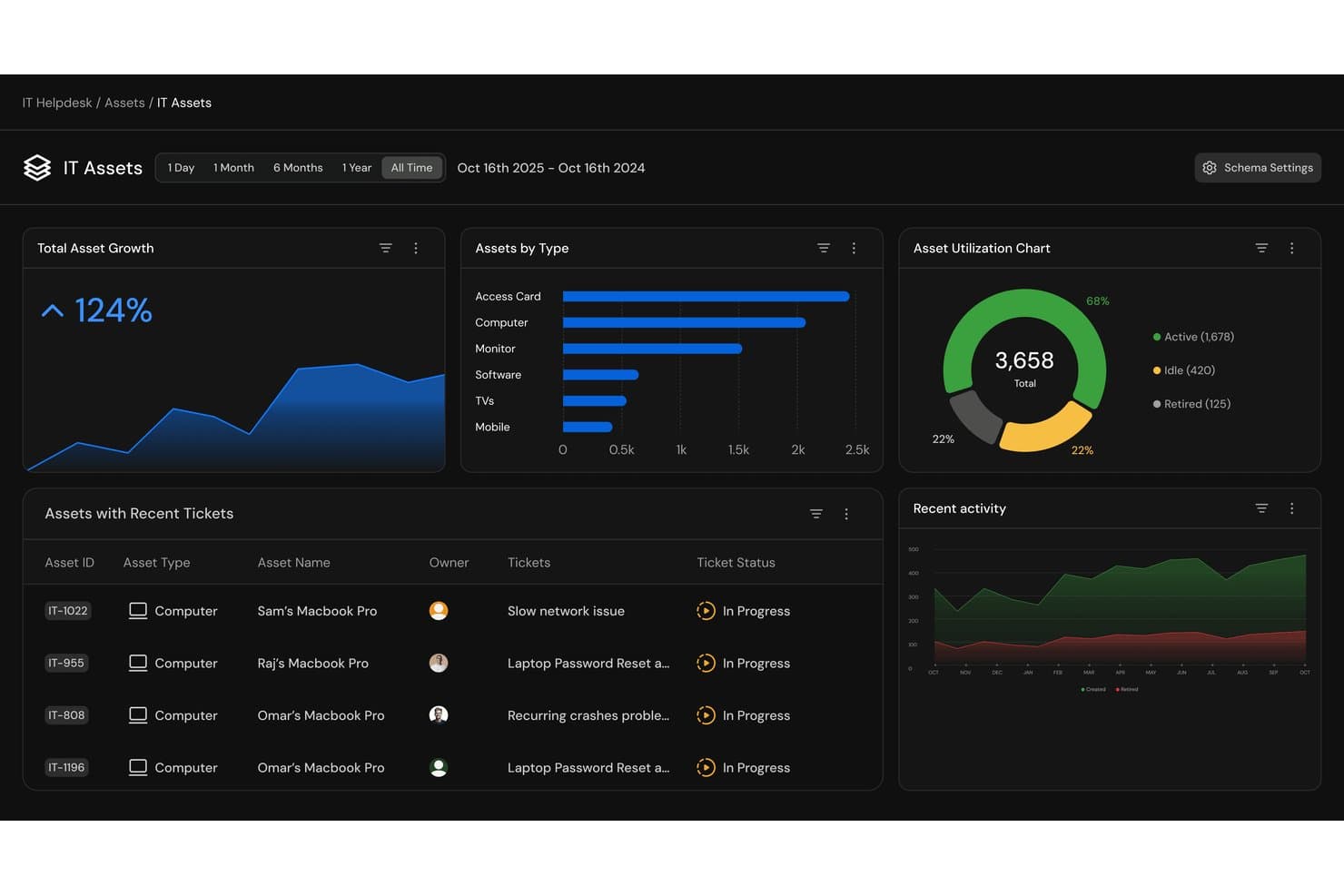
Serval offers an IT Assets dashboard featuring asset growth metrics, asset type breakdowns, utilization charts, and recent ticket tracking for enterprise service management. Serval is an AI-native IT service management platform that uses specialized AI agents to automate help desk requests, access provisioning, and employee onboarding and offboarding workflows.
Who Is Serval Best For?
Serval is a strong fit for IT teams at fast-growing tech companies that handle high volumes of repetitive service requests and want to automate resolution without replacing their existing ITSM tools.
Why I Picked Serval
I’ve included Serval in my top picks because its AI architecture is genuinely native, not a feature added later. The Help Desk and Automation Agents help my team automate ticket resolution and trigger provisioning workflows, while AI Suggestions surfaces opportunities for further automation. I particularly like the Automation Agent, which converts plain-language descriptions into working TypeScript workflows for tasks like access provisioning and employee onboarding.
Serval Key Features
- Multi-channel intake: Handle requests from Slack, Teams, email, and web portal in a unified service desk interface.
- Team segregation: Segment IT, Security, HR, and Finance requests into separate queues with tailored workflows and knowledge sources.
- AI Suggestions: Surfaces automation opportunities from ticket patterns and recommends new skills, workflows, app connections, and knowledge updates.
- Analytics: Tracks resolution rates, time saved, and SLA performance through built-in dashboards.
Serval Integrations
Serval offers native integrations with Okta, Google Workspace, Microsoft Teams, Slack, Notion, Confluence, Jira, GitHub, ServiceNow, and Salesforce. An API is available for custom integrations.
Pros and Cons
Pros:
- Automation Agent generates workflows from plain language
- Automates onboarding and offboarding workflows natively
- Native AI agents resolve tickets autonomously
Cons:
- May be more complex than needed for basic IT support
- Smaller ecosystem than established ITSM platforms
Learn more about Serval: Best for the education sector
- Free demo available
- From $76/agent/month
Visit WebsiteCustomer Rating:4.3/5
TOPdesk supports schools and universities by helping IT, facilities, and campus operations teams deliver services through a shared platform. The tool is designed for organizations that manage a broad mix of requests—from classroom technology issues to building maintenance—and need a central system that serves staff, faculty, and students.
Why I picked TOPdesk: I selected TOPdesk because its structure and feature set align well with the needs of educational institutions. The platform handles both IT and facilities requests, which is valuable in environments where support teams often collaborate to resolve issues that span classrooms, labs, and campus spaces. Its self-service portal and knowledge-sharing tools also make it easier for students and staff to get answers quickly, reducing demand on front-line support teams during busy periods.
Standout features & integrations:
Features include an incident management system to track and respond to student and staff requests, an asset management module to monitor educational equipment and resources, and a facilities management component to support building maintenance and campus operations. The platform also offers a self-service portal and knowledge base that help users resolve common questions independently, along with reporting tools that highlight service trends across campus departments.
Integrations include Microsoft 365, Google Workspace, Azure Active Directory, Slack, Jira, Salesforce, Zapier, and Microsoft Teams.
Pros and Cons
Pros:
- Scales effectively for multi-campus institutions
- Offers self-service tools that reduce demand on support teams
- Supports both IT and facilities workflows common in educational environments
Cons:
- Some interface components may feel dated compared to newer platforms
- Requires coordinated setup across departments for full value
Learn more about TOPdesk: 5Best for asset-centric organizations
IFS
- Free demo available
- Pricing upon request
Visit WebsiteCustomer Rating:4/5
IFS Assyst helps organizations manage IT and non-IT assets throughout their lifecycle while supporting structured service and change workflows. Formerly known as Axios, the platform is designed for teams that need strong configuration management, clear asset relationships, and predictable service delivery across distributed environments.
Why I picked IFS: I selected IFS Assyst because it provides comprehensive asset and configuration management capabilities that address the needs of organizations with complex equipment inventories or tightly controlled technical environments. Its CMDB, lifecycle tracking, and standardized service processes make it well-suited to teams that require precise oversight of assets and their dependencies. The platform also supports enterprise-level change and incident workflows, helping teams maintain consistency across operational systems.
Standout features & integrations:
Features an extensive asset and configuration management system that tracks resources from acquisition through retirement, along with a CMDB that maps dependencies among services, applications, and infrastructure components. The platform also offers a detailed service catalog to standardize request types, incident and problem management tools to handle operational issues, and change management workflows to help teams introduce updates with minimal disruption. Reporting features give visibility into lifecycle costs, service activity, and operational trends.
Integrations include Microsoft 365, Salesforce, SAP, Oracle, Azure, AWS, Google Cloud, ServiceNow, Jira, and IBM tools.
Pros and Cons
Pros:
- Offers strong visibility into asset relationships and service dependencies
- Supports complex change and service workflows across large organizations
- Provides full lifecycle asset tracking with a detailed CMDB
Cons:
- Might be more than smaller enterprises need for basic service management
- Setup and configuration require significant effort and expertise
Learn more about IFS : Best for large enterprises
- Free demo available
- Pricing upon request

ServiceNow helps large enterprises manage and automate service workflows across IT, HR, and operations. ServiceNow is a cloud-based platform designed for organizations with complex, multi-team environments. It centralizes service delivery, supports structured workflows, and provides tools for tracking requests, coordinating tasks, and managing high-volume operations across departments.
Why I picked ServiceNow: I selected ServiceNow because it offers the depth and scalability required by large enterprises with interconnected processes. Its workflow engine supports detailed routing rules, approvals, and cross-department coordination, making it suitable for organizations that manage thousands of requests and depend on consistent service outcomes. The platform’s analytics, automation options, and broad module set also make it a strong fit for teams that need a unified view of service operations.
Standout features & integrations:
Features include a unified self-service portal where employees can submit and track requests, AI-assisted case handling that helps route and prioritize incoming work, and performance analytics that highlight trends in service activity and operational bottlenecks. The platform also supports IT operations management, employee service management, and complex workflow orchestration, helping large organizations maintain consistency across teams and departments.
Integrations include a wide range of enterprise systems, including Salesforce, Workday, Microsoft Teams, Slack, SAP, Oracle, Google Cloud Platform, and Amazon Web Services.
Pros and Cons
Pros:
- Provides strong analytics for monitoring performance and trends
- Centralizes service operations across multiple departments
- Supports complex workflows and large organizational structures
Cons:
- Requires ongoing administrative ownership to manage configurations
- Implementation can be time-intensive
Learn more about ServiceNow Customer Service Management:

Ivanti helps organizations manage IT services while maintaining strong security and compliance practices across devices and applications. Ivanti combines traditional IT service management with endpoint management, patching, and vulnerability insights, making it a fit for organizations that need to keep systems secure while handling day-to-day service requests.
Why I picked Ivanti: I selected Ivanti because it addresses service management and security requirements together, which is valuable for teams operating in regulated or risk-sensitive environments. Its patch automation and risk-based vulnerability tools help IT teams prioritize remediation efforts, while its service desk capabilities cover core ITSM needs. This combination makes Ivanti suitable for companies that want a more security-aware approach to service operations without having to manage separate tools for compliance and support.
Standout features & integrations:
Features include centralized IT asset management to track devices and software across the organization, automated patch management to improve the security posture, and vulnerability insights to help teams identify and prioritize high-risk issues. The platform also supports incident, problem, and change management workflows, as well as compliance reporting that highlights configuration gaps and areas requiring attention.
Integrations include Microsoft Teams, Slack, ServiceNow, Salesforce, AWS, Azure, Google Workspace, Jira, Okta, and Active Directory.
Pros and Cons
Pros:
- Provides asset visibility across devices and applications
- Automates patching and helps prioritize high-risk vulnerabilities
- Combines IT service management with security and compliance capabilities
Cons:
- Not ideal for teams that do not need security-focused functionality
- Setup and administration can require significant technical expertise
Learn more about Ivanti:

BMC Helix uses AI and automation to help enterprises manage incidents, assets, and service workflows across cloud and hybrid environments. BMC Helix is an enterprise service management platform designed for organizations seeking to strengthen IT operations through predictive capabilities and automated processes. It aligns with ITIL practices and supports service delivery across distributed, complex environments.
Why I picked BMC Helix: I chose BMC Helix because it brings together ITSM, AIOps, and automation in a way that appeals to large organizations managing mixed cloud and on-premise environments. Its predictive insights help teams identify issues before they escalate, while its no-code workflow tools allow process owners to create or adjust service logic without relying heavily on developers. This balance of automation and configurability makes it practical for enterprises with layered systems and high service volumes.
Standout features & integrations:
Features cognitive service management that uses AI to classify, route, and prioritize requests; multi-cloud management tools for overseeing resources across cloud and hybrid setups; and dependency mapping that visualizes relationships among services, applications, and infrastructure components. These capabilities help teams maintain visibility over complex technology landscapes and automate routine operational tasks.
Integrations include Microsoft Teams, Slack, Jira, Salesforce, AWS, Microsoft Azure, and Google Cloud.
Pros and Cons
Pros:
- Offers no-code tools for configuring service workflows
- Supports hybrid and multi-cloud environments
- Uses AI to help identify and manage issues proactively
Cons:
- Works best with structured onboarding and ongoing administrative support
- Initial setup can feel complex for new teams
Learn more about BMC Helix: Best for budget-conscious users
- 30-day free trial + free demo available
- From $104/month

ManageEngine ServiceDesk Plus provides IT teams with essential service management features at accessible price points, making it a practical option for organizations with tighter budgets. The platform supports incident, asset, and change management in a centralized environment, providing structure without the cost or complexity of larger enterprise systems.
Why I picked ManageEngine ServiceDesk Plus: I selected ServiceDesk Plus because it delivers core ITSM capabilities in editions that scale by need, allowing teams to choose the functionality that matches their budget and operational complexity. Its incident workflows, asset tracking, and change processes give smaller or cost-sensitive teams the tools they need to manage IT operations more effectively. For companies moving beyond email-based support or basic ticketing, ServiceDesk Plus offers a structured but approachable step up.
Standout features & integrations:
Features an incident management module that helps teams categorize, prioritize, and resolve tickets, along with asset management tools that track hardware and software throughout their lifecycle. The platform also offers a service catalog for handling standard requests, change management workflows for planned updates, and reporting dashboards that give visibility into team performance and resource usage. Contract and vendor management are also available, helping teams monitor renewal dates and agreements.
Integrations include Microsoft 365, Jira, Slack, Microsoft Teams, Zoho CRM, G Suite, AWS, Azure, Google Workspace, and Salesforce.
Pros and Cons
Pros:
- Includes reporting and contract tracking tools for operational visibility
- Provides incident, asset, and change management in one platform
- Offers core ITSM capabilities at accessible price points
Cons:
- Setup and configuration still require some administrative effort
- Advanced ITSM features are limited to higher-tier editions
Learn more about ManageEngine:

Atomicwork boosts IT and HR service delivery for growing companies with AI-driven automation. Atomicwork is an AI-driven service management solution that supports IT, HR, and other internal service teams. It centralizes employee requests, automates routine tasks, and provides a conversational interface that lets people ask for help directly within the tools they already use.
Why I picked Atomicwork: I chose Atomicwork because it offers a modern, lightweight approach to service management that suits organizations without large ITSM footprints. Its AI assistant can handle a significant portion of routine requests, reducing the daily workload for small- and mid-sized teams. The platform’s focus on chat-based intake, automated responses, and simple workflow configuration makes it more accessible than heavier enterprise systems, which is often the right fit for companies looking to scale without adding operational overhead.
Standout features & integrations:
Features an AI assistant that helps employees get answers to common questions, trigger requests, and resolve simple tasks directly within chat tools. The platform also provides a service catalog, asset tracking, workflow automation, and built-in knowledge management that automatically surfaces relevant information based on request context. These capabilities support both IT and HR teams without requiring extensive setup.
Integrations include Microsoft Teams, Slack, Okta, Google Workspace (with Google Drive support for document syncing), Jira, Azure Active Directory, and Salesforce.
Pros and Cons
Pros:
- Works directly inside chat tools for easy adoption
- Offers a simple, modern interface suitable for smaller teams
- Handles routine requests through AI, reducing manual workload
Cons:
- Requires consistent connectivity for best performance
- Less suited for large, highly complex enterprise environments
Learn more about Atomicwork:
Other Enterprise Service Management Software
Here are some additional enterprise service management software options that didn’t make it onto my shortlist, but are still worth checking out:
- 11SysAidBest for easy user interface
- 12TeamDynamixBest for public sector organizations
- 13AtlassianBest for Agile IT teams
- 14ServiceaideBest for AI-assisted support operations
Related Reviews
How I Evaluate Enterprise Service Management Software
When an IT director needs HR, facilities, and IT services unified in one platform, I evaluate tools in two layers: core ESM requirements and the differentiators that distinguish top contenders.
Core Functionality (Table Stakes For This List)
When I'm selecting tools for my list, I rank each one on a scale from 0 (does not offer the functionality) to 5 (excels in this area) for each core functionality listed below. Then, I calculate the tool's total score into a percentage. Each tool needs to achieve a minimum total score of 65% to be considered for inclusion.
- Multi-Department Service Delivery: I look for purpose-built support beyond IT—things like onboarding request templates for HR or workspace move workflows for facilities teams.
- ITIL-Aligned Process Management: Each tool should cover incident, problem, change, and request management with structured workflows that map to established ITIL practices.
- Self-Service Portal & Catalog: A configurable portal where employees browse available services, submit requests through dynamic forms, and search knowledge articles matters here.
- Workflow Automation Engine: I evaluate whether the platform offers a visual, low-code workflow builder for approvals, escalations, and routing across departments.
- CMDB & Asset Management: The tool should maintain configuration items with relationship mapping so teams can trace how a server outage impacts upstream business services.
- SLA Management & Reporting: I check for multi-tier SLA tracking and dashboards that let service desk managers and department leads monitor performance against targets.
Once I have a list of tools that meet this criteria, I consider what sets each platform apart.
Differentiating Factors (What Sets Vendors Apart)
Here's how I compare and contrast different vendors:
Standout Features
AI-powered virtual agents are a major differentiator. I look for platforms where employees can resolve password resets or submit leave requests through a chat interface without ever filing a ticket. Low-code app builders also matter because teams like legal or procurement often have niche workflows that pre-built templates don't cover. I evaluate each platform's integration marketplace too, since ESM tools need to connect with systems like Workday, SAP, Slack, or Microsoft Teams to keep cross-departmental processes moving.
Beyond Features
Licensing models deserve close attention. Some vendors charge per agent while others use per-employee pricing, and that distinction changes the math entirely when you're rolling ESM out to HR, facilities, and finance teams who aren't full-time agents. I also evaluate compliance certifications like SOC 2 Type II and ISO 27001, especially for organizations in regulated industries. Implementation timelines matter too—I check whether platforms offer pre-built ESM templates that shorten rollout versus requiring months of custom configuration.
How to Choose Enterprise Service Management Software
It’s easy to get bogged down by long feature lists and complex pricing structures. To help you stay focused as you evaluate options, here’s a checklist of key factors to consider during your software selection process.
| Factor | What to Consider |
|---|---|
| FactorScalability | What to ConsiderAssess whether the software can grow with your organization. Will it handle increased user traffic or data volume? Look for scalable architecture and flexible pricing plans that support long-term growth without creating cost spikes. |
| FactorIntegrations | What to ConsiderReview how well the platform connects with your existing tools. Check compatibility with systems such as your CRM, ERP, or communication platforms. Avoid tools that require extensive workarounds or custom development to fit your current tech stack. |
| FactorCustomizability | What to ConsiderConsider how easily you can tailor the software to your workflows. Look for the ability to customize fields, forms, processes, and automation rules. Rigid systems can limit adoption and make it harder to match the platform to your team’s needs. |
| FactorEase of use | What to ConsiderEvaluate the overall user experience. Is the interface intuitive? How steep is the learning curve? Choose a solution that minimizes training time and supports productivity from day one. |
| FactorImplementation and onboarding | What to ConsiderReflect on how long it will take to fully implement the system and train your team. Favor platforms that offer strong onboarding support, including documentation, video tutorials, templates, and guided tours. |
| FactorCost | What to ConsiderReview the total cost of ownership, including subscription fees, implementation costs, support levels, and any paid add-ons. Compare the offered features and service levels against your budget constraints to determine overall value. |
| FactorSecurity safeguards | What to ConsiderExamine the security measures in place. Look for compliance with standards such as GDPR or HIPAA, data encryption, access controls, and regular audits. Strong security practices help protect sensitive organizational information. |
| FactorSupport availability | What to ConsiderConsider the quality and availability of customer support. Check whether the vendor offers 24/7 assistance and through which channels. Responsive support helps resolve issues quickly and maintain service continuity. |
What Is Enterprise Service Management Software?
Enterprise service management software helps organizations manage and automate service delivery across departments such as IT, HR, and facilities. These platforms centralize requests, incidents, and asset data, enabling teams to resolve issues more consistently and reduce manual work. They typically include tools for incident handling, service requests, knowledge sharing, and asset tracking, allowing teams to coordinate processes from a single system.
Features of Enterprise Service Management Software
When selecting enterprise service management software, keep an eye out for the following key features:
- Incident management: Provides a structured way to log, prioritize, and resolve service disruptions, enabling teams to address issues efficiently and minimize downtime.
- Service request handling: Allows employees to submit routine requests or questions through a centralized portal, helping service teams organize incoming work and respond consistently.
- Asset tracking: Offers visibility into hardware, software, and other organizational resources, supporting complete lifecycle management and reducing the risk of outdated or misplaced assets.
- Change management: Supports controlled updates by providing approval steps, documentation options, and structured workflows that reduce risk during system or process changes.
- Self-service portal: Provides employees with access to forms, FAQs, and standard solutions that help them resolve simple issues independently, reducing the number of support tickets and ultimately enhancing the overall employee experience.
- Knowledge base: Stores and organizes articles, troubleshooting steps, and internal documentation, enabling teams to share information and improve decision-making.
- Integration capabilities: Connect the service platform to communication tools, identity providers, cloud environments, monitoring systems, and other business applications to support unified workflows.
- Reporting and analytics: Provide visibility into service trends, team performance, asset usage, and operational bottlenecks, enabling data-driven improvement efforts.
- Customizability: Allows administrators to tailor fields, workflows, forms, and automation rules to match organizational processes and department-specific requirements.
- Security safeguards: Include encryption, access controls, compliance certifications (such as GDPR or HIPAA), and other protections to secure sensitive organizational data.
Benefits of Enterprise Service Management Software
Enterprise service management software can help teams improve efficiency, streamline communication, and deliver more consistent service across departments. Here are some of the key benefits organizations typically see when adopting these platforms:
- Improved efficiency: By automating routine tasks such as ticket routing, notifications, and request intake, these platforms help reduce manual work and free up service teams to focus on higher-value responsibilities.
- Enhanced service delivery: Centralized ticketing and request management allow teams to respond to issues faster and maintain a more predictable, organized workflow across departments.
- Better asset oversight: Asset-tracking tools provide visibility into hardware, software, and other resources, supporting lifecycle management and helping reduce unexpected costs or downtime.
- Informed decision-making: Reporting and analytics provide insight into service trends, recurring issues, team performance, and operational bottlenecks, enabling data-driven improvements.
- Increased user satisfaction: Features such as self-service portals and knowledge bases give employees quick access to information and allow them to resolve common issues independently, improving their overall experience.
- Scalability: These platforms can expand as organizations grow, supporting additional users, departments, and service areas without requiring a complete system overhaul.
- Security assurance: Built-in safeguards such as encryption, access controls, and compliance frameworks help protect sensitive data and maintain organizational security standards.
Costs and Pricing of Enterprise Service Management Software
Selecting enterprise service management software requires an understanding of the various pricing models and plans available. Costs vary based on features, team size, add-ons, and more. The table below summarizes common plans, their average prices, and typical features included in enterprise service management software solutions:
Plan Comparison Table for Enterprise Service Management Software
| Plan Type | Average Price | Common Features |
|---|---|---|
| Plan TypeFree Plan | Average Price$0/user/month | Common FeaturesBasic incident management, limited service requests, and community support. |
| Plan TypePersonal Plan | Average Price$5-$25/user/month | Common FeaturesIncident management, service request handling, asset tracking, and email support. |
| Plan TypeBusiness Plan | Average Price$30-$60/user/month | Common FeaturesAdvanced reporting, change management, knowledge base, and phone support. |
| Plan TypeEnterprise Plan | Average Price$70-$120/user/month | Common FeaturesCustomizability, integration capabilities, security safeguards, and dedicated account management. |
Enterprise Service Management Software FAQs
Here are some answers to common questions about enterprise service management software:
How can the software help you enforce service level agreements across business units?
You can set SLAs for each department and track them in one place to prevent missed deadlines. Your Timers, alerts, and escalation rules keep requests moving, and when something falls behind, the system surfaces it quickly so your team can adjust before it becomes a larger issue. This helps maintain clear and consistent service expectations across the organization.
How do you measure ROI and justify investment in enterprise service management software?
Start by tracking how much time your team saves by eliminating manual work and repetitive tasks. Then measure improvements such as faster turnaround times, fewer delays, and reduced errors. Comparing these gains to subscription and implementation costs gives you a clearer view of the software’s financial impact and helps demonstrate value to leadership.
What change management challenges should you expect when adopting enterprise service management software?
Teams may resist new tools or shared processes if they are used to working independently. Clear communication, supportive training, and a phased rollout can make the transition easier. Gradual adoption helps reduce frustration and gives users time to adjust without feeling overwhelmed.
How do you decide whether to build custom workflows or use out-of-the-box functionality in such software?
Begin by evaluating whether your existing process is unique enough to require customization. If not, the built-in workflows may meet your needs and help you launch faster. Custom configurations take more effort to maintain, so it’s best to choose the most straightforward setup that fits your requirements.
How do you manage data quality when using enterprise service management software?
Assign responsibility for keeping fields, naming conventions, and records consistent. Regularly review older tickets, asset entries, and service data to catch errors or outdated information. Clean data improves reporting accuracy and reduces confusion across teams.
How can you compare vendors when their feature lists look similar?
Focus on how each platform performs during real workflows rather than relying on feature checklists. Test demos with scenarios your team encounters weekly, such as ticket routing or asset lookups. This helps highlight differences in usability, performance, and flexibility that aren’t obvious from marketing pages alone.