

Manter todos os dispositivos atualizados não se resume apenas à conveniência: trata-se de proteger a sua empresa contra ameaças cibernéticas em evolução. O software de gestão de patches elimina o trabalho manual necessário para manter a segurança, atualizando automaticamente os sistemas, acompanhando a conformidade e reduzindo as vulnerabilidades. Quer faça a gestão de uma pequena equipa de TI, quer supervisione operações ao nível empresarial, a ferramenta certa pode poupar horas de trabalho repetitivo e evitar períodos de inatividade dispendiosos.
Why Trust Our Software Recommendations
6,700+
Reviews
20
Industry experts
16+
Evaluation factors
14
Years
Our team has been testing and reviewing software since 2012. As tech leaders ourselves, we know how difficult—and important—it is to choose the right software.
For this guide, we evaluated tools using hands-on testing and independent research, scoring tools using our selection criteria.
Our reviews reflect our human editorial judgment, not a sales pitch.
Expert reviewers:
- Paulo Gardini MiguelTech Director
 Tim FisherVP of AI
 Gabriel RosasTech Lead & Software Architect
 Christhian GruhnTech Lead & Platform Architect

Tabela comparativa de software de gestão de patches
Esta tabela comparativa resume os detalhes de preços das minhas principais escolhas de software de gestão de patches:
| Tool | Best For | Trial Info | Price | ||
|---|---|---|---|---|---|
| 1 | Best for simplified patch compliance reporting | Free trial available | Pricing upon request | Website | |
| 2 | Best for AI-powered ITSM with smart patching | 14-day free trial | From $19/user/month (billed annually) | Website | |
| 3 | Best for multi-OS patch management | Free trial available | From $149/user/month (billed annually) | Website | |
| 4 | Best with real-time asset visibility | Free trial + free demo available | Pricing upon request | Website | |
| 5 | Best for HR-driven patch policy enforcement | 14-day free trial | From $8/user/month (billed annually) | Website | |
| 6 | Best with unified risk detection and patching | 30-day free trial + free demo available | Pricing upon request | Website | |
| 7 | Best for IT consultants and service providers | 30-day free trial available | Pricing upon request | Website | |
| 8 | Best for remote workforce patch management | Free plan + free demo available | Pricing upon request | Website | |
| 9 | Best for cloud-native environments | 15-day free trial + free demo available | From $1/endpoint/month (billed annually) | Website | |
| 10 | Best with automated CVE remediation | Free trial + demo available | From $12/device/year | Website |


Avaliações dos melhores softwares de gestão de patches
Seguem-se os meus resumos detalhados dos melhores softwares de gestão de patches que entraram na minha lista. As minhas avaliações apresentam uma análise detalhada das principais funcionalidades, vantagens & desvantagens, integrações e casos de utilização ideais de cada ferramenta, para o ajudar a encontrar a melhor opção para si.
 Best for simplified patch compliance reporting
- Free trial available
- Pricing upon request
Visit WebsiteCustomer Rating:4.7/5
Dashboard overview in NinjaOne patch management software NinjaOne is a unified IT operations solution that includes streamlined patch management. Its patch compliance reporting is simplified and straightforward, catering to organizations that require this specific feature.
Why I Picked NinjaOne: I chose NinjaOne because it offers an intuitive approach to patch compliance reporting. This particular aspect sets it apart, making it best for those who need simplified reporting in compliance settings.
Standout Features & Integrations:
NinjaOne provides automated patching, custom scripting, and real-time monitoring. The platform also includes intuitive dashboards that simplify compliance reporting.
The tool integrates with popular RMM and PSA tools, as well as cloud storage solutions like Dropbox and Google Drive.
Pros and Cons
Pros:
- Low starting price point
- Custom scripting options
- Simplified patch compliance reporting
Cons:
- Dashboards can be cluttered.
- Fewer advanced features
- Limited support for non-Windows platforms
Learn more about NinjaOne: Best for AI-powered ITSM with smart patching
- 14-day free trial
- From $19/user/month (billed annually)
Visit WebsiteCustomer Rating:4.6/5
Testing and deploying patches in Freshservice patch management software Freshservice is an ITSM platform that combines service management with automated patch management capabilities. It helps you manage incidents, assets, and changes while using AI-driven workflows to streamline patch deployment and device oversight.
Why I Picked Freshservice: I picked Freshservice because it combines AI-powered IT service management with automated patch testing and deployment in a single system. Its intelligent automation supports ticket routing and service workflows, while built-in patch management tools help you identify, test, and deploy updates across devices without relying on separate software.
Standout Features & Integrations:
Freshservice offers features like auto-discovery of devices, automated patch testing, and deployment. Furthermore, it has a built-in CMDB for better asset management.
It integrates with popular ITSM tools, IT operations tools, and software like Jira and Slack.
Pros and Cons
Pros:
- Flexible integrations
- Built-in CMDB for asset management
- ITIL compliance
Cons:
- Limited patch-specific features.
- Overkill for non-ITIL organizations
- Pricier starting point
Learn more about Freshservice: Best for multi-OS patch management
- Free trial available
- From $149/user/month (billed annually)
Visit WebsiteCustomer Rating:4.6/5
Atera automation profile showing scheduled OS patch management, software updates, and maintenance tasks managed from a single dashboard. Atera is a complete solution for IT professionals and managed service providers, offering tools for remote monitoring and management. It's designed to simplify your workload by automating various processes, including multi-OS patch management.
Why I Picked Atera: I picked Atera because it automates patch installations across multiple operating systems, which can save you a lot of time. Whether you're dealing with Windows, macOS, or Linux, Atera has you covered with its automated scheduling and installation features. This ensures that your systems are always up to date without you having to manually intervene.
Another reason Atera stands out is its ability to handle reboots and manage patch-related tasks without disrupting your work. This means you can focus on more critical tasks while knowing that your patch management is being handled efficiently. These features make it a reliable choice for keeping your systems secure.
Standout Features & Integrations:
Features include automated patch management that covers Windows, macOS, and Linux, There's an option for offline agent execution, so patches can be applied even when machines aren't connected to the internet. Additionally, Atera offers detailed reporting on patch statuses.
The tool integrates with Microsoft Teams, Slack, ServiceNow, Okta, Jira Software Cloud, Azure Active Directory, Microsoft Outlook, WhatsApp Notifications, Acronis Cyber Protect Cloud, Google Sheets, ChatGPT (OpenAI), and monday.com.
Pros and Cons
Pros:
- Custom scripts and real-time dashboards offer visibility into patch workflows
- Combines patch management, remote access, and help desk features
- Unlimited endpoint coverage under a single technician license makes it cost-effective for MSPs
Cons:
- Interface can feel clunky when managing large device fleets or running bulk actions
- Compliance and audit reporting may fall short for heavily regulated industries
- Patch rollback options are minimal compared to enterprise-grade tools
 Best with real-time asset visibility
- Free trial + free demo available
- Pricing upon request

Heimdal’s unified management dashboard gives you clear visibility into endpoint compliance, patching status, and security controls across all managed devices. Heimdal's patch management software stands out as a versatile solution for businesses aiming to enhance their cybersecurity posture. It is particularly appealing to IT professionals and managed service providers (MSPs) who need to manage software updates seamlessly across various platforms. By automating the patch deployment process, Heimdal addresses the challenge of keeping systems secure and compliant with industry regulations, making it an ideal choice for sectors like healthcare, education, and government.
Why I Picked Heimdal
I picked Heimdal for its ability to automate the patch deployment process, which significantly reduces manual workload and ensures timely updates. With support for over 350 third-party applications, Heimdal provides comprehensive coverage to keep your systems secure and compliant. Its integration with Heimdal's Unified Security Platform further enhances your organization's cybersecurity strategy, making it a practical choice for those in need of effective patch management.
Heimdal Key Features
In addition to automated patch deployment, I also found that Heimdal offers several other valuable features:
- Vulnerability Management: Continuously scans your systems to identify and address potential security threats.
- Asset Management: Provides real-time visibility into your organization's IT assets, helping you track and manage them effectively.
- Customizable Patching Schedules: Allows you to set patch deployment times that minimize disruptions to your operations.
- Priority Server Updates: Optimizes patch distribution for bandwidth-limited environments, ensuring critical updates reach priority endpoints first.
Heimdal Integrations
Native integrations are not currently listed by Heimdal; however, the platform supports API-based custom integrations.
Pros and Cons
Pros:
- Detailed asset and license visibility
- Strong vulnerability and threat detection
- Automates patching across endpoints
Cons:
- Interface requires onboarding time
- No native integrations available
Learn more about Heimdal: Best for HR-driven patch policy enforcement
- 14-day free trial
- From $8/user/month (billed annually)
Visit WebsiteCustomer Rating:4.7/5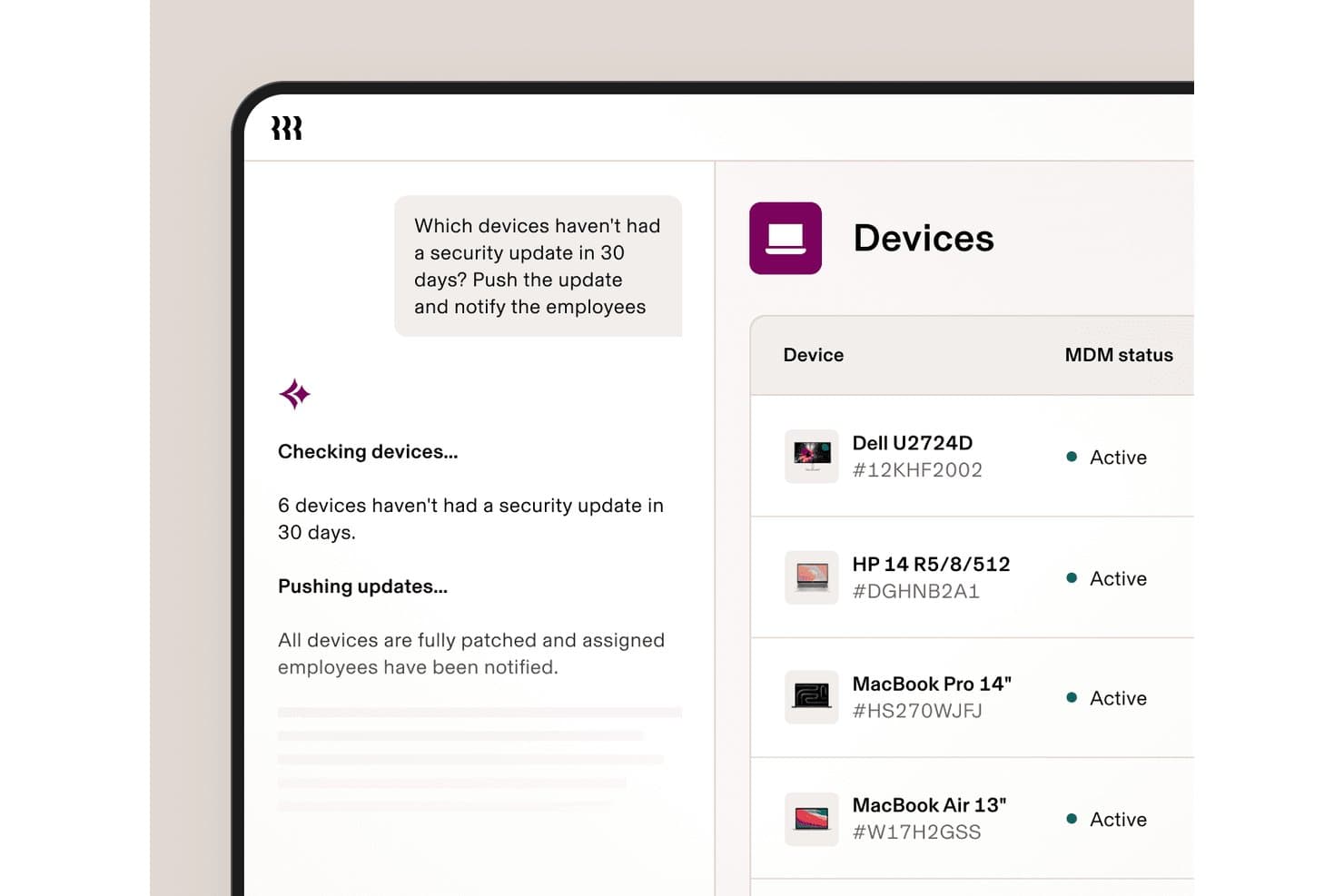
Rippling IT automates security patch deployment and notifies employees instantly. Rippling IT is a unified IT platform that combines MDM, identity and access management, OS patch enforcement for Mac and Windows, device inventory, helpdesk, and automated compliance in a single console.
Who Is Rippling IT Best For?
Rippling IT suits lean IT teams at small-to-mid-sized companies that want device policy enforcement tied directly to HR events like hiring, role changes, and offboarding.
Why I Picked Rippling IT
I've included Rippling IT in my top picks because its OS patch enforcement is wired directly into HR events: when someone changes roles or gets offboarded, device policies update automatically without me touching a thing. I particularly like how Apple OS updates are pushed through Declarative Device Management (DDM), using Apple's GDMF feed as the source of truth for consistent, real-time enforcement across macOS fleets. The compliance reporting also holds up well, with automated SOC 2 and NIST evidence collection built in.
Rippling IT Key Features
- Role-based policy enforcement: Security and OS update policies are assigned by employee attributes like department, role, and location, and update automatically when those attributes change.
- Zero-touch device enrollment: Devices are pre-staged through Apple Business Manager and Windows Autopilot, so remote employees receive ready-to-use hardware without IT manual setup.
- No-code compliance reporting: A report builder generates real-time dashboards combining device and employee data, mapped to SOC 2 and NIST frameworks for audit evidence collection.
- Custom script deployment: Bash and PowerShell scripts are supported for deploying custom or private apps outside of Rippling's standard software catalog.
Rippling IT Integrations
Rippling IT offers integrations with SentinelOne, Drata, Vanta, Apple Business Manager, Windows Autopilot, Okta, and Microsoft Entra ID. It also connects with HR systems including ADP, BambooHR, Gusto, UKG, Paycom, Paylocity, and Workday.
Pros and Cons
Pros:
- Audit dashboards map device posture to frameworks
- Mac and Windows updates enforce remotely
- HR events automate patch policy changes
Cons:
- CVE prioritization and rollback remain undocumented
- No Linux or server patch support
Learn more about Rippling IT: Best with unified risk detection and patching
- 30-day free trial + free demo available
- Pricing upon request
Visit WebsiteCustomer Rating:4.5/5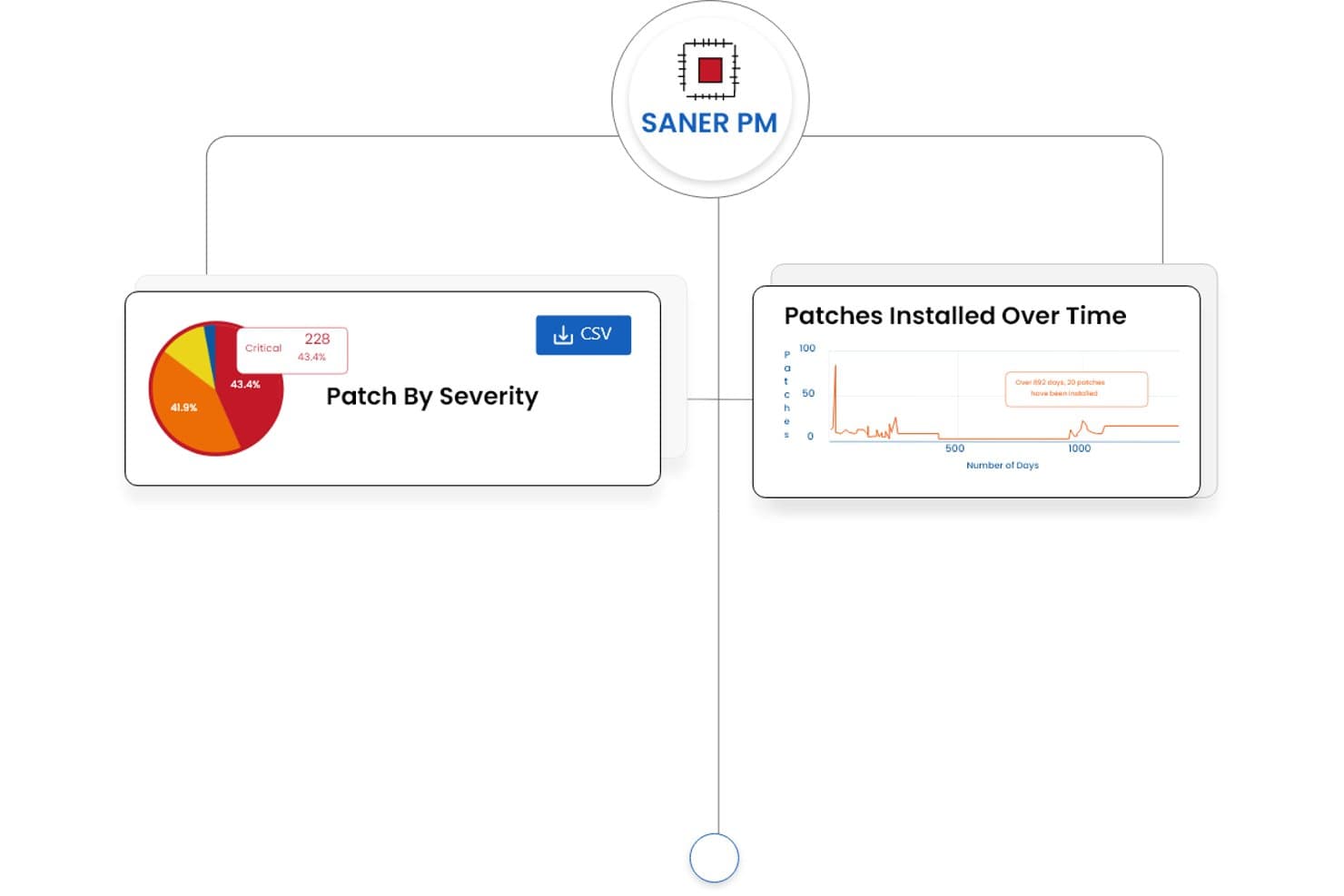
SecPod (Saner Platform) offers patch management dashboards displaying patch severity breakdowns and patches installed over time trends. SecPod's Saner Platform is a cloud-native patch management and vulnerability exposure solution that combines continuous risk detection, automated patch deployment, and compliance reporting across Windows, macOS, Linux, and 550+ third-party applications.
Who Is SecPod (Saner Platform) Best For?
Security and IT operations teams at mid-to-large enterprises that need vulnerability detection and patch remediation managed from a single platform.
Why I Picked SecPod (Saner Platform)
SecPod (Saner Platform) earns its spot as one of the best on my shortlist because it collapses two typically separate workflows, vulnerability detection and patch deployment, into one agent-driven platform. I particularly like how it layers SSVC business-context scoring, EPSS exploit probability, and CISA KEV data together to surface which patches actually need urgent action. The single-click rollback is genuinely useful when a patch causes issues in a production environment and you need to restore a stable state fast.
SecPod (Saner Platform) Key Features
- Automated multi-OS patching: Continuously applies patches across Windows, macOS, Linux, and 550+ third-party apps from a single console.
- Custom patch packaging: Lets admins deploy organization-specific or in-house developed patches alongside vendor updates.
- Compliance reporting: Generates exportable, audit-ready reports mapped to regulatory frameworks like HIPAA, PCI, and SOC 2.
- Cloud-native agent architecture: Enables patching and vulnerability management for distributed and remote endpoints without relying on VPNs.
SecPod (Saner Platform) Integrations
Native integrations are not clearly documented. An API is available for custom integrations.
Pros and Cons
Pros:
- Supports 550+ third-party application patches
- Risk-based patch prioritization using real threat data
- Unified vulnerability detection and patch remediation
Cons:
- Limited third-party integration options available
- Reporting interface can feel overwhelming initially
Learn more about SecPod (Saner Platform): Best for IT consultants and service providers
- 30-day free trial available
- Pricing upon request
Visit WebsiteCustomer Rating:5/5
Admin panel of Atera patch management software Atera is designed as an all-in-one IT management solution aimed at IT consultants and service providers. Its flexible pricing and customization make it especially useful for this target group.
Why I Picked Atera: I chose Atera because of its tailored approach for IT consultants and service providers. In terms of unique offerings, its customizability and flexible pricing models make it distinct. It's best for IT consultants and service providers who require a flexible, customizable tool.
Standout Features & Integrations:
Atera offers remote monitoring, patch management, and an integrated help desk. Its automated scripts are particularly useful for IT service providers.
The tool has native integrations with popular PSAs and RMM solutions, as well as Windows operating systems.
Pros and Cons
Pros:
- A high degree of customizability
- Offers integrated help desk and RMM
- Tailored for IT consultants and service providers
Cons:
- Higher starting price point.
- Might be too specialized for general business use
- Billed annually, not monthly
Learn more about Atera: Best for remote workforce patch management
- Free plan + free demo available
- Pricing upon request
Visit WebsiteCustomer Rating:4.9/5
Overview of the 'Endpoints' dashboard in Action1 patch management software Action1 is a cloud-based patch management solution designed to assist businesses in automating the deployment of software patches to remote workforces. This is particularly beneficial for companies with many remote employees who require consistent patching, making it best for remote workforce patch management.
Why I Picked Action1: I selected Action1 for this compilation because of its cloud-based architecture that effectively allows businesses to manage patches across remote workforces. It stands out for its ability to maintain the security and performance of distributed endpoints.
Thus, it cuts the best tool for companies needing remote workforce patch management.
Standout Features & Integrations:
The most vital features of Action1 include automated patch assessments, real-time reporting, and multi-platform support, offering businesses greater flexibility in managing patches across various operating systems. It also integrates with commonly used systems like Active Directory and SCCM, making it more adaptable for businesses with existing infrastructure.
Pros and Cons
Pros:
- Multi-platform support covers a broad range of operating systems.
- Real-time reporting gives immediate insights into patch compliance.
- Cloud-based architecture is ideal for managing remote workforces.
Cons:
- Limited features compared to some other enterprise-level solutions.
- Could be a learning curve for teams new to patch management.
- Minimum seat requirements may not suit smaller organizations.
Learn more about Action1: Best for cloud-native environments
- 15-day free trial + free demo available
- From $1/endpoint/month (billed annually)
Visit WebsiteCustomer Rating:4.7/5
System management feature on Automox patch management software Automox automates patch management in the cloud, from discovery to deployment. It's flexible and scalable, perfect for securing remote endpoints.
Why I Picked Automox: I chose Automox for this list because of its comprehensive, cloud-native approach to patch management. In a world where remote work is becoming increasingly common, having a tool that is designed from the ground up to handle cloud-based operations is incredibly valuable.
Automox stands out because it manages and secures remote endpoints, making it best for organizations operating in cloud-native environments.
Standout Features & Integrations:
Automox provides features like automatic system discovery, continuous vulnerability assessment, and policy-based automation. These features make it easier to manage patches and reduce the security risks associated with outdated software.
Additionally, Automox integrates with popular third-party tools such as Slack, Jira, and Webhooks, allowing for better communication and coordination across your organization.
Pros and Cons
Pros:
- Integrates with popular third-party tools for better communication and coordination.
- Policy-based automation to streamline patch management tasks.
- Cloud-native platform, designed for modern, distributed organizations.
Cons:
- Requires some technical knowledge for setup and configuration.
- Pricing is on an annual basis, which might not be ideal for some businesses.
- Might be less suitable for organizations not fully operating in the cloud.
 Best with automated CVE remediation
- Free trial + demo available
- From $12/device/year
Visit WebsiteCustomer Rating:4.6/5
PDQ Deploy displays a real-time deployments dashboard showing software package installations with online status, completion state, and elapsed time across multiple endpoints. PDQ Connect is a cloud-based patch management platform for Windows devices that offers automated patch deployment, remote device inventory, custom package creation, and role-based access controls.
Who Is PDQ Connect Best For?
IT teams in small to midsize organizations managing Windows devices across distributed or remote environments.
Why I Picked PDQ Connect
I picked PDQ Connect as one of the best because it automates CVE remediation, letting my team quickly address vulnerabilities as soon as they’re identified. I like that it pulls in CVE data, matches it to our Windows devices, and pushes patches without manual intervention. This approach means we can stay ahead of threats and reduce the window of exposure across our environment.
PDQ Connect Key Features
- Remote device inventory: View and manage all Windows devices in your environment from a single dashboard.
- Custom package deployment: Build and deploy custom software packages to targeted devices.
- Role-based access control: Assign permissions and roles to team members for secure management.
- Real-time reporting: Generate up-to-date reports on patch status and device compliance.
PDQ Connect Integrations
Native integrations are not clearly documented. PDQ Connect provides an API for custom integrations.
Pros and Cons
Pros:
- Detailed compliance and audit reporting
- Automated patch scheduling for Windows devices
- Real-time device inventory and status updates
Cons:
- Reporting customization options are limited
- Lacks built-in vulnerability scanning features
Learn more about PDQ Connect:
Outros softwares de gestão de patches
Eis algumas opções adicionais de software de gestão de patches que não entraram na minha lista, mas que ainda vale a pena conhecer:
- 11ConnectWise AutomateBest for MSPs looking for extensive customization
- 12ITarianBest for small businesses on a budget
- 13AcronisBest for those needing backup and patch management in one
- 14SolarWinds Patch ManagerBest for large enterprise scalability
- 15IvantiBest for integrating with other Ivanti products
- 16ManageEngine Patch Management PlusBest for centralized control of heterogeneous networks
- 17N-central Patch ManagementBest for automating routine patch tasks
- 18ScalefusionBest for automated patch deployment
- 19GFI LanguardGood for businesses needing network security scans
- 20GoTo ResolveGood for remote patching via a simple interface
- 21Kaseya VSAGood for centralized management with compliance reporting
- 22PDQGood for automated deployments of third-party updates
- 23Microsoft Defender for IoTGood for IoT devices requiring high-security standards
- 24SyxsenseGood for cloud-based patch management
- 25Qualys Patch ManagementGood for organizations requiring real-time threat intelligence
How I Evaluate Patch Management Software
Whether you're patching remote endpoints or managing third-party app updates across mixed OSes, I evaluate every tool in two layers: the baseline it must meet and what actually sets it apart.
Core Functionality (Table Stakes For This List)
When I'm selecting tools for my list, I rank each one on a scale from 0 (does not offer the functionality) to 5 (excels in this area) for each core functionality listed below. Then, I calculate the tool's total score into a percentage. Each tool needs to achieve a minimum total score of 75% to be considered for inclusion.
- Patch Discovery & Inventory: I check whether the tool can continuously scan endpoints and build a real-time picture of missing patches, not just run on-demand scans that go stale within hours.
- Automated Patch Deployment: Policy-driven deployment matters here—I look for configurable approval workflows and grouping logic so you can push updates to finance servers differently than developer workstations.
- OS & Third-Party App Support: A tool that only covers Windows updates falls short. I evaluate the breadth of OS coverage (macOS, Linux) and the third-party catalog for apps like Chrome, Zoom, and Java.
- Patch Scheduling & Rollback: I look for maintenance windows, staged rollouts, and reliable rollback options—because a bad patch pushed to production at midday with no undo path is a real risk.
- Compliance Reporting & Auditing: Reports need to map patch status to frameworks like PCI-DSS or CIS benchmarks. I evaluate whether you can generate audit-ready output without manually stitching data together.
- Remote & Distributed Patching: With hybrid workforces, I evaluate how each tool handles endpoints outside the corporate network—whether through cloud-native agents, relay servers, or peer-to-peer distribution.
Once I have a list of tools that meet this criteria, I consider what sets each platform apart.
Differentiating Factors (What Sets Vendors Apart)
Here's how I compare and contrast different vendors:
Standout Features
Vulnerability prioritization is a big one—I look for tools that tie CVE/CVSS data into patch queues so your team fixes actively exploited threats first, not just the latest update. Pre-deployment testing matters just as much, since a sandbox or test ring can catch a broken driver update before it hits your production fleet. I also evaluate custom patch support, which lets you package and deploy in-house application updates alongside vendor-supplied patches through the same workflow.
Beyond Features
Integrations matter a lot here—I check whether each tool connects natively with your ITSM, SIEM, and endpoint security stack so patch data flows into existing incident and vulnerability workflows. Compliance alignment is equally important, especially if your organization maps patch status to frameworks like HIPAA or SOC 2. I also evaluate pricing and licensing transparency, since per-endpoint models can scale very differently than flat-tier subscriptions when your device count grows from 500 to 5,000.
Como escolher um software de gestão de patches
É fácil ficar atolado em longas listas de funcionalidades e estruturas de preços complexas. Para o ajudar a manter o foco enquanto analisa o seu processo único de seleção de software, eis uma lista de fatores a ter em conta:
| Fator | O que considerar |
|---|---|
| FatorEscalabilidade | O que considerarA ferramenta pode crescer com a sua empresa? Tenha em conta o número de dispositivos que irá gerir à medida que expande a atividade. Procure soluções que possam crescer sem problemas. |
| FatorIntegrações | O que considerarFunciona com os seus sistemas atuais? Garanta a compatibilidade com as ferramentas que já utiliza, como software de segurança ou plataformas de gestão de TI. |
| FatorPersonalização | O que considerarPode adaptar o software às suas necessidades? Procure ferramentas que permitam personalizar painéis e relatórios de acordo com os seus fluxos de trabalho. |
| FatorFacilidade de utilização | O que considerarA interface é intuitiva? Um design fácil de utilizar reduz o tempo de formação e ajuda a sua equipa a trabalhar de forma mais eficiente. |
| FatorImplementação e integração inicial | O que considerarQuanto tempo demorará até estar operacional? Tenha em conta os recursos necessários e se o fornecedor disponibiliza apoio, como vídeos de formação ou tutoriais. |
| FatorCusto | O que considerarQual é o custo total de propriedade? Não se limite ao preço anunciado. Tenha em conta taxas ocultas, contratos de longa duração e se os preços estão de acordo com o seu orçamento. |
| FatorMedidas de segurança | O que considerarCumpre as suas necessidades de segurança? Avalie a encriptação, as medidas de proteção de dados e a conformidade com as normas do setor. |
| FatorDisponibilidade do apoio | O que considerarObterá a ajuda de que necessita? Verifique se existem opções de apoio 24/7, os tempos de resposta e se o apoio está incluído no preço. |
O que é um software de gestão de patches?
O software de gestão de atualizações é uma ferramenta que ajuda a automatizar o processo de atualização de aplicações de software e sistemas, garantindo que estão seguros e atualizados. Os profissionais de TI e os administradores de sistemas utilizam geralmente estas ferramentas para manter a segurança e a eficiência dos sistemas. A implementação automatizada de atualizações, o agendamento de atualizações e os relatórios de conformidade ajudam a gerir redes de grandes dimensões e a reduzir o trabalho manual. De um modo geral, estas ferramentas mantêm os sistemas seguros, minimizam as vulnerabilidades e garantem operações sem problemas.
Funcionalidades
Ao selecionar software de gestão de atualizações, procure as seguintes funcionalidades principais:
- Implementação automatizada de atualizações: Aplique automaticamente atualizações aos sistemas, reduzindo a necessidade de intervenção manual e garantindo correções atempadas.
- Relatórios de conformidade: Gere relatórios que demonstrem o cumprimento das normas e regulamentações do setor, ajudando a manter a conformidade em matéria de segurança.
- Monitorização em tempo real: Acompanhe o estado das atualizações em toda a sua rede para identificar e resolver rapidamente quaisquer problemas.
- Painéis personalizáveis: Adapte a interface para apresentar as informações mais relevantes para a sua equipa, melhorando a eficiência do fluxo de trabalho.
- Agendamento de atualizações: Defina horários específicos para as atualizações, minimizando as interrupções durante o horário de trabalho e mantendo a produtividade.
- Análise de vulnerabilidades: Identifique potenciais riscos de segurança nos seus sistemas, permitindo a adoção de medidas proativas.
- Capacidades de acesso remoto: Faça a gestão e atualize sistemas a partir de qualquer local, o que é particularmente útil para equipas distribuídas.
- Integração da proteção de dados: Garanta que as atualizações são aplicadas sem comprometer a integridade dos dados, mantendo a segurança geral.
- Suporte multiplataforma: Faça a gestão de atualizações em diferentes sistemas operativos, garantindo a aplicação de medidas de segurança consistentes.
- Interface intuitiva: Simplifique a navegação e reduza o tempo de formação, permitindo que a sua equipa se concentre em tarefas críticas.
Vantagens
A implementação de software de gestão de atualizações proporciona várias vantagens para a sua equipa e para a sua empresa. Eis algumas das vantagens que pode esperar:
- Segurança reforçada: As atualizações regulares e a análise de vulnerabilidades ajudam a proteger os seus sistemas contra ameaças e a reduzir os riscos de segurança.
- Maior eficiência: A implementação automatizada e o agendamento de atualizações poupam tempo e recursos, permitindo que a sua equipa se concentre em tarefas mais importantes.
- Conformidade melhorada: Os relatórios de conformidade garantem o cumprimento das normas do setor, o que pode evitar sanções dispendiosas.
- Redução do tempo de inatividade: O agendamento de atualizações fora das horas de maior atividade minimiza as interrupções nas operações da sua empresa.
- Melhor desempenho do sistema: Manter o software atualizado com as correções mais recentes garante um desempenho e uma estabilidade ideais.
- Gestão remota: As capacidades de acesso remoto permitem gerir e atualizar sistemas a partir de qualquer local, o que é benéfico para equipas distribuídas.
- Experiência de utilização personalizável: Os painéis personalizáveis e uma interface intuitiva facilitam o trabalho eficiente e eficaz da sua equipa.
Custos e preços
A seleção de software de gestão de atualizações requer uma compreensão dos vários modelos de preços e planos disponíveis. Os custos variam consoante as funcionalidades, o tamanho da equipa, os complementos e outros fatores. A tabela abaixo resume os planos comuns, os respetivos preços médios e as funcionalidades normalmente incluídas nas soluções de software de gestão de atualizações:
Tabela de comparação de planos de software de gestão de atualizações
| Tipo de plano | Preço médio | Funcionalidades comuns |
|---|---|---|
| Tipo de planoPlano gratuito | Preço médio$0 | Funcionalidades comunsImplementação básica de atualizações, relatórios limitados e apoio da comunidade. |
| Tipo de planoPlano pessoal | Preço médio$5-$25/utilizador/mês | Funcionalidades comunsAtualizações automatizadas, agendamento de atualizações e relatórios básicos de conformidade. |
| Tipo de planoPlano empresarial | Preço médio$30-$60/utilizador/mês | Funcionalidades comunsRelatórios avançados, suporte multiplataforma e capacidades de gestão remota. |
| Tipo de planoPlano empresarial de grande dimensão | Preço médio$65-$100/utilizador/mês | Funcionalidades comunsPainéis personalizáveis, monitorização em tempo real e apoio premium ao cliente. |
Perguntas frequentes sobre software de gestão de atualizações
Eis algumas respostas a perguntas comuns sobre software de gestão de atualizações:
Como é que a gestão de atualizações ajuda a prevenir ciberataques?
A gestão de atualizações reduz os riscos de segurança ao corrigir vulnerabilidades conhecidas do software antes que os hackers possam explorá-las. Assim que uma atualização é disponibilizada, os atacantes visam frequentemente sistemas que ainda não foram atualizados. As ferramentas automatizadas de atualização garantem que as atualizações são aplicadas rapidamente, mantendo a sua rede protegida com um esforço manual mínimo.
Quais são os riscos de não utilizar software de gestão de atualizações?
Sem atualizações automatizadas, os seus sistemas ficam mais vulneráveis a malware, ransomware e violações de dados. As atualizações manuais são frequentemente adiadas ou esquecidas, deixando lacunas críticas na proteção. Com o tempo, isto pode provocar instabilidade do sistema, períodos de inatividade ou até violações dos requisitos de conformidade.
O software de gestão de atualizações pode funcionar em ambientes de trabalho híbridos ou remotos?
Sim. A maioria das ferramentas modernas de gestão de atualizações é baseada na nuvem, o que significa que pode atualizar e monitorizar dispositivos onde quer que estejam—em casa, no escritório ou em viagem. Esta flexibilidade mantém as equipas distribuídas seguras sem a necessidade de configurações de rede complexas.
Como é que a gestão de atualizações contribui para a conformidade e a auditoria?
Muitos setores exigem provas de que os sistemas são atualizados regularmente. As ferramentas de gestão de atualizações geram automaticamente relatórios detalhados que mostram o histórico de atualizações, o estado dos dispositivos e a conformidade com as políticas de segurança. Estes relatórios ajudam a cumprir as normas regulamentares e simplificam a preparação para auditorias.
Que funcionalidades essenciais devo priorizar ao escolher software de gestão de atualizações?
Concentre-se na automatização, no suporte multiplataforma e na monitorização em tempo real. A automatização poupa tempo, a compatibilidade multiplataforma garante que todos os dispositivos permanecem abrangidos e os painéis em direto proporcionam visibilidade sobre o estado das atualizações. Relatórios completos e integrações simples também são essenciais para expandir as suas operações de TI de forma eficiente.