

Navegar pelas muitas ferramentas de suporte técnico disponíveis atualmente pode ser avassalador — especialmente se a sua equipa precisar tanto de acompanhar pedidos como de garantir a visibilidade dos ativos. A plataforma certa pode poupar tempo, reduzir o stress e centralizar as suas operações de suporte.
Este guia analisa soluções de confiança concebidas para equipas que valorizam fluxos de trabalho organizados, automatização e responsabilização. Cada análise destaca o que diferencia o software, o seu melhor caso de utilização e os principais prós e contras, para ajudar a encontrar a solução mais adequada.
Why Trust Our Software Recommendations
6,700+
Reviews
20
Industry experts
16+
Evaluation factors
14
Years
Our team has been testing and reviewing software since 2012. As tech leaders ourselves, we know how difficult—and important—it is to choose the right software.
For this guide, we evaluated tools using hands-on testing and independent research, scoring tools using our selection criteria.
Our reviews reflect our human editorial judgment, not a sales pitch.
Expert reviewers:
- Paulo Gardini MiguelTech Director
 Tim FisherVP of AI
 Gabriel RosasTech Lead & Software Architect
 Christhian GruhnTech Lead & Platform Architect

Tabela comparativa de software de suporte técnico com gestão de ativos
A tabela abaixo compara os detalhes de preços das minhas principais seleções de software de suporte técnico com gestão de ativos.
| Tool | Best For | Trial Info | Price | ||
|---|---|---|---|---|---|
| 1 | Best for real-time asset monitoring | Free trial available | Pricing upon request | Website | |
| 2 | Best for incorporating ITIL best practices | 14-day free trial | From $19/user/month (billed annually) | Website | |
| 3 | Best for combining help desk & IT asset management | Free trial available | From $149/user/month (billed annually) | Website | |
| 4 | Best for built-in CMDB maps | Free demo available | From $89/agent/month | Website | |
| 5 | Best for context-aware IT support | 14-day free trial | Pricing upon request | Website | |
| 6 | Best for intuitive ticketing and problem resolution | Free trial available | From $25/agent/month (billed annually) | Website | |
| 7 | Best with AI-driven service automation | Free demo available | Pricing upon request | Website | |
| 8 | Best for IT inventory management | 14-day free trial | From $8/user/month (billed annually) | Website | |
| 9 | Best for scheduled maintenance tasks | Free trial available | From $478/user/annually | Website | |
| 10 | Best for large enterprises needing comprehensive IT solutions | Free demo available | Pricing upon request | Website |


Análises do melhor software de suporte técnico com gestão de ativos
 Best for real-time asset monitoring
- Free trial available
- Pricing upon request
Visit WebsiteCustomer Rating:4.7/5
NinjaOne displays real-time device performance, asset details, and software inventory in one unified view. NinjaOne is an IT management platform that combines helpdesk ticketing and asset management into a unified solution. It enables IT teams to monitor, manage, and support devices and users from a single interface.
Why I picked NinjaOne: NinjaOne's active asset management feature provides a comprehensive inventory of IT assets, displaying live health and performance data. This real-time information allows your team to quickly assess device status and make informed decisions during incident resolution.
Another key aspect is the customizable ticketing experience. NinjaOne allows you to tailor ticket boards to your team's workflow, ensuring that tickets are categorized and prioritized effectively.
Standout features & integrations:
Features include real-time reporting and analytics, a self-service client portal, live device inventory, one-click remote access, stealth remediation tools, integrated documentation, automated patch management, flexible technician boards, and endpoint health alerts.
Integrations include Accelo, Autotask, Bitdefender, BrightGauge, Connectwise Manage, CrowdStrike, IT Glue, Microsoft Entra, Okta, Slack, SentinelOne, and Zendesk.
Pros and Cons
Pros:
- Customizable ticketing aligns with team workflows
- Centralized control over device configurations
- Comprehensive endpoint management capabilities
Cons:
- The mobile app could offer more functionalities
- Initial setup may require time and resources
Learn more about NinjaOne: Best for incorporating ITIL best practices
- 14-day free trial
- From $19/user/month (billed annually)
Visit WebsiteCustomer Rating:4.6/5
Freshservice lets you create a unified view of all assets across multiple systems, offices, and clouds. Freshservice is a cloud-based IT service management tool that flawlessly integrates ITIL best practices into its operations. This software is designed to help businesses manage and track IT assets while providing a top-notch help desk solution, making it excellent for those seeking to adhere to ITIL standards.
Why I Picked Freshservice: One standout feature is its robust incident management system, which allows for intelligent routing of incidents and equips technicians with all necessary tools to resolve issues efficiently. The platform's AI-driven service management capabilities further enhance productivity by providing intelligent suggestions and automating routine tasks. Additionally, Freshservice offers a unified service catalog that simplifies service delivery, from simple password resets to complex onboarding processes.
Standout features & integrations:
Key features of Freshservice include its incident, problem, change, and release management modules, all of which align with ITIL guidelines. In addition, it offers a modern and intuitive self-service portal for end-users. On the integration front, Freshservice works well with popular business apps like Google Workspace, Slack, and Okta, extending its functionality beyond the IT department.
Pros and Cons
Pros:
- Robust workflow automation capabilities
- Supports ITIL processes
- Provides a user-friendly self-service portal
Cons:
- Could be expensive for small businesses
- Customization options could be better
Learn more about Freshservice: Best for combining help desk & IT asset management
- Free trial available
- From $149/user/month (billed annually)
Visit WebsiteCustomer Rating:4.6/5
Atera provides a streamlined ticket automation feature to manage help desk operations. Atera is an IT management platform that combines Remote Monitoring and Management (RMM), Professional Services Automation (PSA), and help desk software into one cloud-based solution for managed service providers (MSPs) and internal IT teams. In addition to its monitoring and automation capabilities, Atera includes IT Asset Management (ITAM) tools that help you track, organize, and manage IT assets throughout their lifecycle.
Why I Picked Atera:
I picked Atera because of how fully it integrates help desk ticketing with asset management tools. When a ticket is created, you can link it directly to hardware or software assets, giving you immediate context without needing to switch systems. You’re able to access device status, performance data, and service history alongside each support request. That means you can make more informed troubleshooting decisions and reduce time spent gathering background details. Atera’s unified interface also helps MSPs and IT departments keep both client support and asset inventory under one roof.
Standout features & integrations:
Features include automated patch management, network discovery, AI-powered ticket summaries and recommendations, remote access, contract management, and proactive issue alerts. Atera integrates with Microsoft Teams, Slack, ServiceNow, Okta, Azure Active Directory, Microsoft Outlook, WhatsApp Notifications, monday.com, Jira Software Cloud, ClickUp, Acronis Cyber Protect Cloud, and Google Sheets.
Pros and Cons
Pros:
- Detailed reporting and client-facing dashboards
- Proactive issue detection and automation options
- Centralizes ticketing, RMM, PSA, and asset management
Cons:
- Some limitations in PSA and billing features
- Learning curve for new users due to breadth of features
 Best for built-in CMDB maps
- Free demo available
- From $89/agent/month
Visit WebsiteCustomer Rating:4.5/5
SysAid displays active service records with AI-assisted ticket summaries, priority levels, and response timelines. SysAid is an IT Service Management (ITSM) platform that combines help desk software and asset management in a single system. It helps IT teams manage incidents, service requests, and assets while maintaining visibility across the IT environment. With AI-driven automation and a centralized CMDB, SysAid supports more efficient workflows and faster issue resolution.
Why I picked SysAid: I picked SysAid because it lets you manage IT services and assets in one connected platform instead of relying on separate tools. It's built-in CMDB maps relationships between hardware, software, and services, while SysAid’s AI capabilities help categorize and route tickets automatically to reduce manual triage. This setup gives you clearer oversight of your IT operations and helps reduce service disruptions caused by missed dependencies or slow response times.
Standout features & integrations:
Features include a Self-Service Portal that allows users to submit requests, resolve common issues, and access knowledge articles, AI-driven ticket categorization and automation to reduce repetitive service desk work, and Asset Management with CMDB for tracking hardware, software, and license usage. SysAid also provides Reporting and Analytics to surface metrics like response times, workload trends, and potential bottlenecks.
Integrations include Microsoft 365, Microsoft Teams, Slack, Jira, Salesforce, Google Workspace, ServiceNow, Zendesk, Zoom, Box, Dropbox, and Trello.
Pros and Cons
Pros:
- Workflow automation reduces operational errors
- CMDB maps IT asset relationships
- AI agent automates ticket handling
Cons:
- Implementation process reported as slow
- Interface considered outdated by users
 Best for context-aware IT support
- 14-day free trial
- Pricing upon request
Visit WebsiteCustomer Rating:4.6/5
SuperOps displays ticket details, updates, and SLA status in one unified help desk view. SuperOps is an AI-powered platform that combines Professional Services Automation (PSA) and Remote Monitoring and Management (RMM) to support managed service providers (MSPs) and IT teams.
Why I Picked SuperOps: I picked SuperOps because of how tightly its help desk and asset management features are connected. When a ticket is raised, technicians can instantly view all asset data related to that ticket—like software versions, hardware details, and recent changes—without switching tabs or tools. The asset timeline shows every event tied to a device, making it easier to trace issues and spot patterns. You can also act on those assets directly from the help desk, like running scripts or pushing patches, which saves time and cuts down on back-and-forth. Overall, these features help you provide more context-aware IT support.
Standout features & integrations:
Features include technician collision detection, which helps prevent multiple technicians from working on the same ticket at the same time. On the asset management side, SuperOps also supports asset relationship mapping, letting you define and visualize how assets are connected—like which printer belongs to which department or which software is installed on which device. Some integrations include Acronis, ESET, Sophos, SentinelOne, Emsisoft, Bitdefender, Splashtop, TeamViewer, Connectwise Control, Xero, Quickbooks, and Azure.
Pros and Cons
Pros:
- Tickets link directly to assets
- The platform offers robust reporting tools that provide valuable insights into IT operations
- Intelligent AI-based alerting system
Cons:
- Limited language support
- Setup can be time-consuming for smaller teams
Learn more about SuperOps: Best for intuitive ticketing and problem resolution
- Free trial available
- From $25/agent/month (billed annually)
Visit WebsiteCustomer Rating:4.3/5
A screenshot of the agent dashboard view of Zendesk. Zendesk is a customer service platform designed to streamline your support team's workflow with its robust and intuitive ticketing system. The software shines brightly in its ability to simplify problem resolution, ensuring that businesses can swiftly and effectively attend to customer inquiries or issues, thereby solidifying its position as a top pick for those seeking intuitive ticketing solutions.
Why I Picked Zendesk: Zendesk was a clear choice for my list given its renowned reputation in the helpdesk software landscape. Its easy-to-use interface and robust capabilities make it an ideal solution for businesses looking for a streamlined ticketing and problem resolution process. I believe Zendesk is best for intuitive ticketing due to its efficient design, helping users navigate requests effortlessly, hence facilitating rapid problem resolution.
Standout features & integrations:
Zendesk impresses with its smart ticketing system that automatically routes and categorizes requests for efficient handling. Its AI-powered Answer Bot offers immediate responses to customer queries, enhancing user experience. In terms of integrations, Zendesk pairs well with a vast number of applications, including Slack, Salesforce, and Microsoft Teams, allowing for smoother communication and data flow between different platforms.
Pros and Cons
Pros:
- Wide range of integrations for enhanced functionality
- Smart ticketing system with auto-routing
- Easy-to-use interface for efficient problem resolution
Cons:
- Lacks asset management in the lower-tier plans
- Advanced features only available at higher pricing tiers
- Can be pricey for small businesses
 Best with AI-driven service automation
- Free demo available
- Pricing upon request
Visit WebsiteCustomer Rating:4.5/5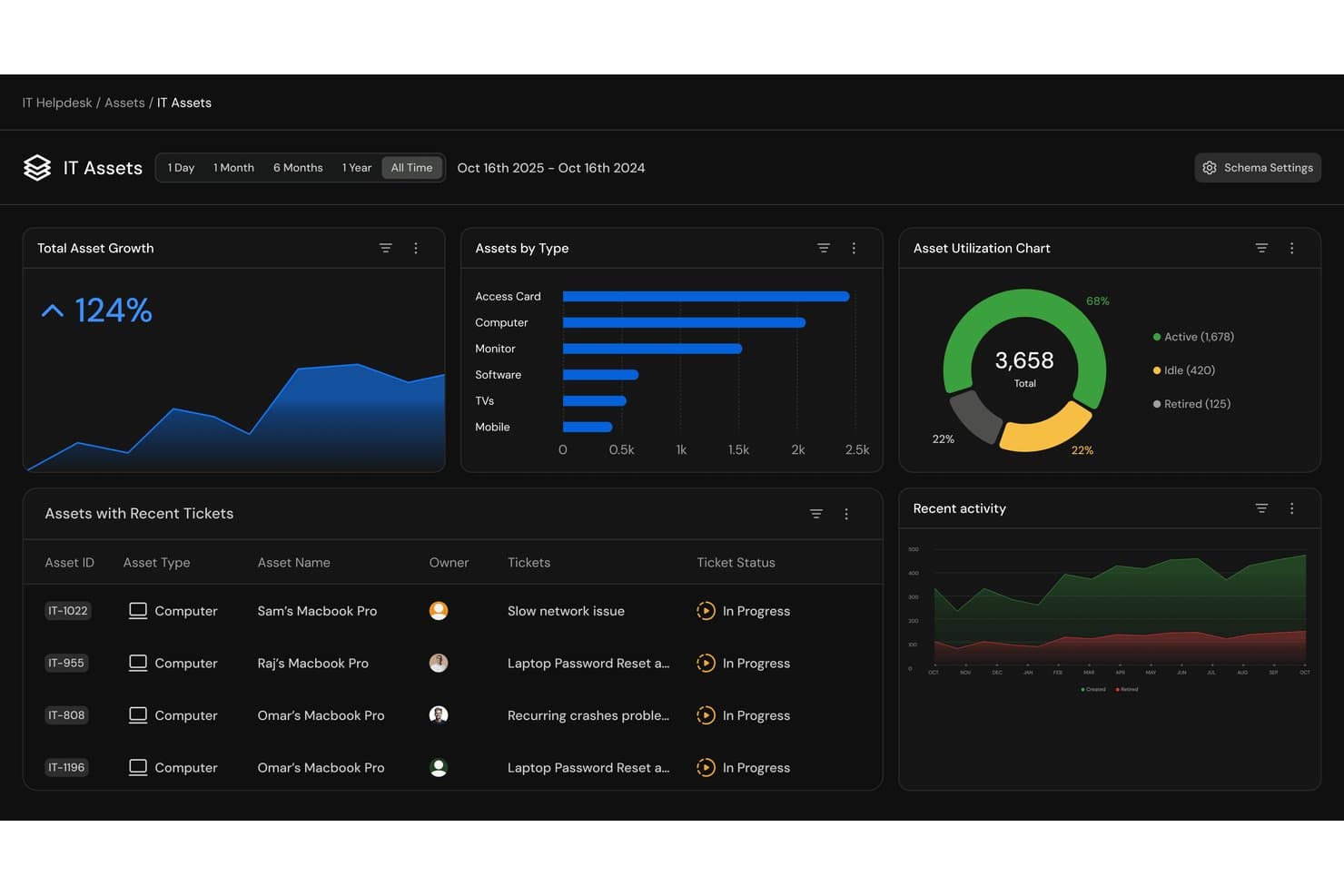
Serval offers an IT Assets dashboard with asset growth metrics, asset type breakdowns, utilization charts, and recent ticket tracking for help desk asset management. Serval is an AI-native ITSM platform that combines help desk ticketing, asset management, workflow automation, and access management through autonomous AI agents that handle and resolve IT requests.
Who Is Serval Best For?
Serval suits mid-to-large IT teams at technically mature organizations that want AI to autonomously handle high volumes of routine support requests.
Why I Picked Serval
Serval earns its spot on my shortlist because of how it handles automation differently from every other tool I've reviewed. Instead of a drag-and-drop workflow builder, I can describe a process in plain English and Serval generates production-ready automation. What I find genuinely useful is Serval Suggestions: as my team closes tickets manually, the system spots resolution patterns and proposes fully built workflows I can publish in one click.
Serval Key Features
- Asset ingestion and reconciliation: Automatically collects and merges asset records from MDM, HRIS, IdP, and procurement systems.
- Custom workflow code management: Stores workflow automations as auditable code with Git version control for transparency and rollbacks.
- Team segmentation: Organizes tickets, workflows, and integrations by department, with fine-grained access controls.
- Multi-channel support: Allows IT teams to receive and manage requests through Slack, Teams, email, and a web portal.
Serval Integrations
Serval offers native integrations with Okta, Google Workspace, Microsoft Teams, Slack, Notion, Confluence, Jira, GitHub, ServiceNow, and Salesforce. An API is available for custom integrations.
Pros and Cons
Pros:
- Multi-department team segmentation with fine-grained access
- Plain-language workflow building without writing code
- AI autonomously resolves tickets without technician input
Cons:
- New product with limited third-party review data
- Asset management depth lags behind dedicated ITAM tools
Learn more about Serval: Best for IT inventory management
- 14-day free trial
- From $8/user/month (billed annually)
Visit WebsiteCustomer Rating:4.6/5
monday service helps IT teams track assets and manage support with no-code customization. monday service is a customizable service platform that helps teams efficiently manage and automate their service operations and processes. Its visual approach simplifies the management of both service requests and IT inventory.
Why I picked monday service: Teams can easily monitor hardware, assign tasks, and keep track of important maintenance dates. You can organize equipment by type, track serial numbers, and monitor the lifecycle of each asset.
The platform’s customizable workflows make it simple to create an asset management process that fits your team’s specific needs. With automations, you’ll receive reminders when maintenance is due, and visual dashboards keep everyone aligned and make it easy to see the status of all equipment in real-time.
Standout features & integrations:
Features include customizable no-code workflows, centralized IT asset tracking, visual dashboards for hardware management, automations for sending maintenance reminders, tools for tracking serial numbers and handover dates, and reporting tools for asset usage insights.
Integrations include Slack, Zoom, Microsoft Teams, Google Drive, Dropbox, Jira, HubSpot, Salesforce, GitHub, and Gmail.
Pros and Cons
Pros:
- Visual dashboards for asset status
- Automations for asset maintenance
- Customizable asset workflows
Cons:
- Automations may require fine-tuning
- Setup can be time-consuming
Learn more about monday service: Best for scheduled maintenance tasks
- Free trial available
- From $478/user/annually
Visit WebsiteCustomer Rating:4.5/5
Issuetrak consolidates support requests and offers a separate module for asset management. Issuetrak is a versatile help desk software designed to simplify issue tracking and resolution for businesses across various industries. It offers a comprehensive suite of tools to manage customer support requests, complaints, and internal incidents efficiently.
Why I picked Issuetrak: Issuetrak's asset management feature allows you to keep track of hardware and software information, ensuring that all assets are accounted for and up to date. Additionally, the system enables the scheduling of maintenance tasks, ensuring that equipment remains in optimal condition.
Another reason to consider Issuetrak is its ability to automate ticket assignments through round-robin distribution. This feature ensures that incoming issues are evenly distributed among your support team, preventing overload on individual members and promoting efficient resolution times. By automating this process, your team can focus more on resolving issues rather than managing task assignments.
Standout features & integrations:
Features include a centralized Issue Hub that provides a one-stop location to view, manage, and update tickets with ease. The platform also offers task flows, allowing your team to collaborate on issues and maintain consistency in processes. Furthermore, Issuetrak's knowledge base helps keep important information accessible for both users and administrators.
Integrations include Microsoft 365, Google Analytics, Gmail, Salesforce, Power BI, and thousands more through Zapier. You can also access the Issuetrak API for even more connections.
Pros and Cons
Pros:
- Highly customizable system
- Cloud and on-premises deployment options
- Effective in organizing and managing tickets
Cons:
- Certain features may be complex to set up
- Asset management is a paid add-on
Learn more about Issuetrak: Best for large enterprises needing comprehensive IT solutions
- Free demo available
- Pricing upon request
Visit WebsiteCustomer Rating:4.4/5
A photo of the details portion for a ticket created in ServiceNow. ServiceNow offers an extensive range of IT services making it an all-encompassing tool for large enterprises. Its breadth of functionality caters to a myriad of needs, securing its position as a leading solution for businesses requiring comprehensive IT services.
Why I Picked ServiceNow: ServiceNow emerged as a prime contender during my evaluation due to its comprehensive suite of IT solutions. I chose this platform because it offers a wide range of services under one roof, making it particularly useful for larger organizations. Its extensive functionality is what sets it apart and makes it the "Best for..." large enterprises that need a comprehensive set of IT solutions.
Standout features & integrations:
ServiceNow shines with its incident management, problem management, change and release management, and asset and cost management features. It also offers impressive AI capabilities that help automate routine tasks. ServiceNow integrates seamlessly with many enterprise solutions like Slack, Jira, and Trello, which further boosts its effectiveness.
Pros and Cons
Pros:
- Robust integrations with other enterprise solutions
- Advanced AI capabilities for automation
- Comprehensive suite of IT solutions
Cons:
- Requires technical knowledge for customization
- Interface can be complicated for new users
- Premium pricing may not suit all budgets
Outro software de suporte técnico com gestão de ativos
Segue-se uma lista de software adicional de suporte técnico com ferramentas de gestão de ativos que selecionei, mas que não chegaram ao top 10. Vale definitivamente a pena analisá-los.
- 11InvGate Service ManagementBest for drag-and-drop IT workflows
- 12Jira Service ManagementBest for Agile development teams seeking ITSM tools
- 13ConnectWise ManageBest for IT services requiring robust business management
- 14SysAidBest for integrating multiple ITSM services into one platform
- 15Cherwell Service ManagementBest for flexible and customizable workflows
- 16Ivanti Service ManagementBest for comprehensive IT asset management
- 17Spiceworks IT DesktopBest for budget-conscious businesses needing IT support
- 18SolarWinds IT Service Desk SoftwareBest for incident management automation
- 19HiverBest for omnichannel communication
- 20ManageEngine ServiceDesk PlusBest for implementing advanced IT analytics
- 21HappyFoxGood for teams needing a user-friendly helpdesk platform
- 22LansweeperGood for IT departments needing network inventory and asset discovery
- 23Device42Good for businesses requiring comprehensive IT infrastructure management
- 24Alloy NavigatorGood for IT operations requiring robust IT asset management
- 25HaloGood for businesses seeking a customizable ITSM solution with ITIL-aligned processes
Análises relacionadas de software de suporte técnico com gestão de ativos
How I Evaluate Help Desk Software With Asset Management
I evaluate these tools across two layers: the baseline—things like a working CMDB, automated asset discovery, and ticket-to-asset linking—and the differentiators that set stronger platforms apart.
Core Functionality (Table Stakes For This List)
When I'm selecting tools for my list, I rank each one on a scale from 0 (does not offer the functionality) to 5 (excels in this area) for each core functionality listed below. Then, I calculate the tool's total score into a percentage. Each tool needs to achieve a minimum total score of 65% to be considered for inclusion.
- Ticketing System: I look for multi-channel intake (email, portal, chat), automated routing, SLA timers, and queue management so technicians aren't manually triaging every request.
- Asset Repository (CMDB): A solid CMDB should track hardware, software, and CIs with lifecycle status, ownership, and dependency mapping between related assets.
- Ticket-to-Asset Linking: I check whether a technician can pull up a device's full incident history directly from a ticket instead of hunting through a separate inventory screen.
- Automated Asset Discovery: Network and agent-based scanning that keeps your inventory current matters here—manual CSV imports alone won't cut it for growing environments.
- License & Contract Tracking: I evaluate whether the tool tracks software license counts, vendor contracts, warranty expirations, and flags compliance gaps before renewal deadlines hit.
- ITIL Workflow Support: Beyond basic incident logging, I look for structured change, problem, and request management workflows with approval chains and escalation paths.
Once I have a list of tools that meet this criteria, I consider what sets each platform apart.
Differentiating Factors (What Sets Vendors Apart)
Here's how I compare and contrast different vendors:
Standout Features
Built-in remote control is a big one—technicians who can jump into an end-user's desktop straight from a ticket resolve issues faster than those toggling between separate tools. I also look at patch management capabilities, since platforms that automate OS and third-party patching directly reduce the ticket volume hitting your queue. AI-powered ticket deflection is worth evaluating too, especially for teams fielding repetitive password resets or access requests that a chatbot can handle before a technician ever gets involved.
Beyond Features
Integration ecosystem matters a lot here. Your help desk and asset management tool needs to sync with directory services like Active Directory or Okta for user provisioning, plus endpoint management platforms like Intune or Jamf for real-time asset data. I also evaluate compliance posture—SOC 2 Type II and ISO 27001 certifications signal that a vendor takes data protection seriously, which matters when your CMDB holds sensitive device and user records. Total cost of ownership deserves attention too, since some vendors charge extra for discovery agents or additional asset records.
Como escolher software de suporte técnico com gestão de ativos
É fácil ficar atolado em listas extensas de funcionalidades e estruturas de preços complexas. Para se manter focado enquanto percorre o seu processo específico de seleção de software, segue-se uma lista de verificação dos fatores a ter em conta:
| Fator | O que considerar |
|---|---|
| FatorEscalabilidade | O que considerarA ferramenta consegue acompanhar o crescimento da sua empresa? Verifique se suporta um aumento do número de utilizadores e de dados sem perda de desempenho. Considere a expansão futura e a forma como a ferramenta lidará com uma carga acrescida. |
| FatorIntegrações | O que considerarÉ compatível com os seus sistemas existentes? Procure integrações nativas com o software que já utiliza. Evite ferramentas que exijam soluções alternativas complexas para se ligarem à sua infraestrutura tecnológica. |
| FatorPersonalização | O que considerarPode adaptar a ferramenta aos seus fluxos de trabalho? Certifique-se de que permite ajustes para se adequar aos seus processos sem exigir programação extensiva. A flexibilidade é essencial para necessidades empresariais específicas. |
| FatorFacilidade de utilização | O que considerarA interface é intuitiva? Teste se apresenta uma estrutura simples que os novos utilizadores consigam compreender rapidamente. Evite ferramentas com uma navegação excessivamente complexa que atrase as tarefas diárias. |
| FatorImplementação e integração | O que considerarCom que rapidez pode a sua equipa começar a trabalhar? Procure ferramentas que disponibilizem guias de integração claros, recursos de formação ou suporte dedicado para ajudar a começar sem dificuldades. Ao comparar ferramentas como o NinjaOne vs. Atera, considere a experiência e os fluxos de trabalho preferidos da sua equipa. |
| FatorCusto | O que considerarEstá dentro do seu orçamento? Compare os planos de preços e esteja atento a custos ocultos. Considere o custo total de propriedade, incluindo possíveis custos futuros à medida que as suas necessidades evoluem. |
| FatorMedidas de segurança | O que considerarOs seus dados e ativos estão protegidos? Verifique os padrões de encriptação, as atualizações de segurança regulares e a conformidade com os regulamentos relevantes. Certifique-se de que cumpre as políticas de segurança da sua organização. |
O que é software de suporte técnico com gestão de ativos?
O software de suporte técnico com gestão de ativos é uma ferramenta que combina a gestão de pedidos com o acompanhamento de ativos para melhorar a prestação de serviços de TI. Os profissionais de TI, as equipas de suporte e os responsáveis pelas operações utilizam geralmente estas ferramentas para gerir de forma eficiente as questões dos clientes e os ativos da empresa. As funcionalidades de gestão de pedidos, acompanhamento de ativos e elaboração de relatórios de incidentes ajudam a organizar os fluxos de trabalho e a manter a qualidade do serviço. De um modo geral, estas ferramentas e outros softwares de gestão de ativos fixos melhoram a eficiência e a gestão de recursos nas organizações.
Funcionalidades
Ao selecionar um software de suporte técnico com gestão de ativos, procure as seguintes funcionalidades principais:
- Gestão de pedidos: Organiza e define prioridades para as questões dos clientes, garantindo respostas atempadas e eficientes.
- Acompanhamento de ativos: Monitoriza e gere os ativos da empresa ao longo do seu ciclo de vida para manter a responsabilização e a eficiência.
- Elaboração de relatórios de incidentes: Regista e acompanha incidentes para ajudar as equipas a analisar padrões e prevenir problemas futuros.
- Fluxos de trabalho personalizáveis: Permite às equipas adaptar os processos às necessidades específicas da empresa sem programação extensa.
- Suporte multicanal: Permite a comunicação com os utilizadores através de várias plataformas, melhorando a acessibilidade e a experiência do utilizador.
- Portal de autosserviço: Permite aos utilizadores encontrar soluções de forma autónoma, reduzindo a carga de trabalho das equipas de suporte.
- Ferramentas de análise: Fornece informações sobre o desempenho e as tendências do serviço, apoiando a tomada de decisões baseada em dados.
- Capacidades de integração: Liga-se aos sistemas existentes para garantir um fluxo contínuo de informação entre plataformas.
- Medidas de segurança: Protege os dados sensíveis através de encriptação e do cumprimento dos regulamentos relevantes.
- Faturação automatizada: Simplifica as operações financeiras ao garantir uma faturação precisa e o acompanhamento das receitas.
Benefícios
A implementação de um software de suporte técnico com gestão de ativos proporciona vários benefícios à sua equipa e à sua empresa. Eis alguns dos benefícios que pode esperar:
- Maior eficiência: Automatiza tarefas rotineiras, como a gestão de pedidos e o acompanhamento de ativos, permitindo à sua equipa concentrar-se nas prioridades estratégicas.
- Melhor tomada de decisões: Fornece ferramentas de análise que oferecem informações sobre as tendências de desempenho, ajudando-o a tomar decisões baseadas em dados.
- Melhor gestão de recursos: Acompanha os ativos ao longo do seu ciclo de vida, garantindo uma utilização ideal e reduzindo o desperdício.
- Maior satisfação dos utilizadores: Disponibiliza um portal de autosserviço para que os utilizadores resolvam problemas de forma autónoma, conduzindo a uma resolução mais rápida dos problemas.
- Poupança de custos: Reduz os custos operacionais ao automatizar os processos de faturação e emissão de faturas, garantindo precisão e eficiência.
- Escalabilidade: Apoia empresas em crescimento ao acomodar um número crescente de utilizadores e dados sem comprometer o desempenho.
- Maior segurança: Protege as informações sensíveis através de medidas de segurança e do cumprimento dos regulamentos, garantindo a integridade dos dados.
Custos & Preços
A seleção de um software de suporte técnico com gestão de ativos exige uma compreensão dos vários modelos e planos de preços disponíveis. Os custos variam consoante as funcionalidades, o tamanho da equipa, os complementos, entre outros fatores. A tabela abaixo resume os planos comuns, os respetivos preços médios e as funcionalidades normalmente incluídas nas soluções de software de suporte técnico com gestão de ativos:
Tabela de comparação de planos para software de suporte técnico com gestão de ativos
| Tipo de plano | Preço médio | Funcionalidades comuns |
|---|---|---|
| Tipo de planoPlano gratuito | Preço médio$0 | Funcionalidades comunsGestão básica de pedidos, acompanhamento limitado de ativos e suporte da comunidade. |
| Tipo de planoPlano pessoal | Preço médio$5-$25/utilizador/mês | Funcionalidades comunsGestão de pedidos, acompanhamento básico de ativos, suporte por e-mail e portal de autosserviço. |
| Tipo de planoPlano empresarial | Preço médio$30-$60/utilizador/mês | Funcionalidades comunsGestão avançada de ativos, suporte multicanal, ferramentas de elaboração de relatórios e capacidades de integração. |
| Tipo de planoPlano empresarial avançado | Preço médio$70-$120/utilizador/mês | Funcionalidades comunsOpções completas de personalização, análise avançada, gestão dedicada de conta e funcionalidades de segurança reforçadas. |
Perguntas frequentes sobre software de help desk com gestão de ativos
O que distingue o software de help desk com gestão de ativos de uma ferramenta de help desk normal?
Um help desk normal centra-se principalmente na gestão de tickets de serviço. Quando combinado com a gestão de ativos, o sistema também acompanha ativos físicos e digitais, associando cada ticket ao equipamento ou software envolvido para proporcionar um melhor contexto e resoluções mais rápidas.
O software de help desk pode acompanhar ativos que não sejam de TI?
Sim. Embora tenha sido originalmente concebido para ativos de TI, como portáteis ou servidores, muitas plataformas permitem agora acompanhar equipamentos de escritório, mobiliário e até licenças de software, proporcionando às equipas uma visibilidade completa entre departamentos.
Como é que o acompanhamento de ativos melhora a resolução de problemas?
Ao associar os tickets a ativos específicos, os técnicos podem consultar o histórico completo de um ativo, incluindo problemas anteriores ou registos de manutenção. Isto torna a identificação de problemas recorrentes mais rápida e precisa.
Que tipos de organizações utilizam software de help desk com gestão de ativos?
É utilizado em vários setores, desde as TI e a educação até aos cuidados de saúde e às finanças. Qualquer organização que faça a gestão de equipamentos ou ferramentas digitais em conjunto com o apoio aos utilizadores pode beneficiar desta solução.
Como se integra a automatização nas ferramentas de help desk e gestão de ativos?
A automatização ajuda a encaminhar tickets, atualizar registos de ativos e acionar lembretes de manutenção. Reduz o trabalho manual repetitivo e garante que os dados permanecem precisos em todos os sistemas.
Os sistemas de help desk baseados na nuvem são melhores do que os sistemas instalados localmente?
Os sistemas baseados na nuvem são mais fáceis de aceder e atualizar, o que os torna ideais para equipas remotas ou híbridas. No entanto, as soluções instaladas localmente continuam a ser úteis para empresas que precisam de um controlo rigoroso sobre o armazenamento de dados e a conformidade.