

Mantenere il corretto funzionamento dell'infrastruttura cloud non significa solo garantire la disponibilità: significa individuare i problemi di prestazioni prima che abbiano un impatto sugli utenti, assicurare la scalabilità senza sprechi e mantenere la visibilità in ambienti complessi. Se ti è mai capitato di dover affrontare rallentamenti inspiegabili, interruzioni impreviste o una carenza di informazioni in tempo reale, sai quanto possa essere difficile prevenire i problemi senza gli strumenti di monitoraggio adeguati.
Gli strumenti di monitoraggio dell'infrastruttura cloud offrono un modo centralizzato per tenere sotto controllo le prestazioni delle applicazioni, l'attività di rete e l'utilizzo delle risorse negli ambienti cloud. Nel corso degli anni ho testato un'ampia gamma di questi strumenti, valutando la loro efficacia nel rilevare i problemi, ridurre i tempi di risposta e integrarsi con i flussi di lavoro esistenti. In questa guida analizzerò le migliori opzioni disponibili, aiutandoti a trovare la soluzione più adatta alle tue esigenze di monitoraggio del cloud.
Perché fidarsi dei nostri consigli sui software
6,700+
Reviews
20
Industry experts
16+
Evaluation factors
14
Years
Il nostro team testa e recensisce software dal 2012. In quanto leader tecnologici noi stessi, sappiamo quanto sia difficile — e importante — scegliere il software giusto.
Per questa guida, abbiamo valutato gli strumenti attraverso test praticie ricerche indipendenti, assegnando un punteggio agli strumenti in base ai nostri criteri di selezione.
Le nostre recensioni riflettono il nostro giudizio editoriale umano, non un discorso di vendita.
Revisori esperti:
- Paulo Gardini MiguelDirettore tecnico
 Tim FisherVP dell'IA
 Gabriel RosasTech Lead e architetto software
 Christhian GruhnTech Lead e architetto della piattaforma

Riepilogo dei migliori strumenti di monitoraggio dell'infrastruttura cloud
| Tool | Best For | Trial Info | Price | ||
|---|---|---|---|---|---|
| 1 | Ideale per dashboard multilivello altamente personalizzabili | Prova gratuita di 30 giorni | Da $200/mese (fatturati annualmente) | Website | |
| 2 | Ideale per test di transazioni sintetiche | No | Prezzo su richiesta | Website | |
| 3 | Ideale per il monitoraggio delle prestazioni delle applicazioni | No | $945 all'anno per un massimo di 25 server o applicazioni | Website | |
| 4 | Ideale per il monitoraggio di infrastrutture IT ibride | No | Prezzi su richiesta | Website | |
| 5 | Ideale per metriche di salute dettagliate | Sì | $99/mese | Website | |
| 6 | Ideale per l'approccio Infrastructure as Code (IaC) | Sì | $20/user/month | Website | |
| 7 | Ideale per l'ambiente IBM Cloud | No | $10 per milione di metriche raccolte/mese | Website | |
| 8 | Ideale per dati unificati di applicazioni e infrastrutture | Prova gratuita di 30 giorni disponibile | Da $7/nodo/mese | Website | |
| 9 | Migliore per il monitoraggio cloud open source | No | Gratuito, supporto a pagamento da $1000/mese | Website | |
| 10 | Ideale per osservabilità in tempo reale | No | $60 per host al mese | Website |


Recensioni dei migliori strumenti di monitoraggio dell'infrastruttura cloud
Di seguito trovi i miei riepiloghi dettagliati dei migliori strumenti di monitoraggio dell’infrastruttura cloud inclusi nel mio elenco. Le mie recensioni offrono un’analisi dettagliata delle funzionalità principali, dei pro e dei contro, delle integrazioni e dei casi d’uso ideali di ogni strumento, per aiutarti a trovare quello più adatto a te.
 Ideale per dashboard multilivello altamente personalizzabili
- Prova gratuita di 30 giorni
- Da $200/mese (fatturati annualmente)
Visit WebsiteCustomer Rating:4.6/5This rating combines scores from multiple user review sites to reflect overall customer sentiment about the product.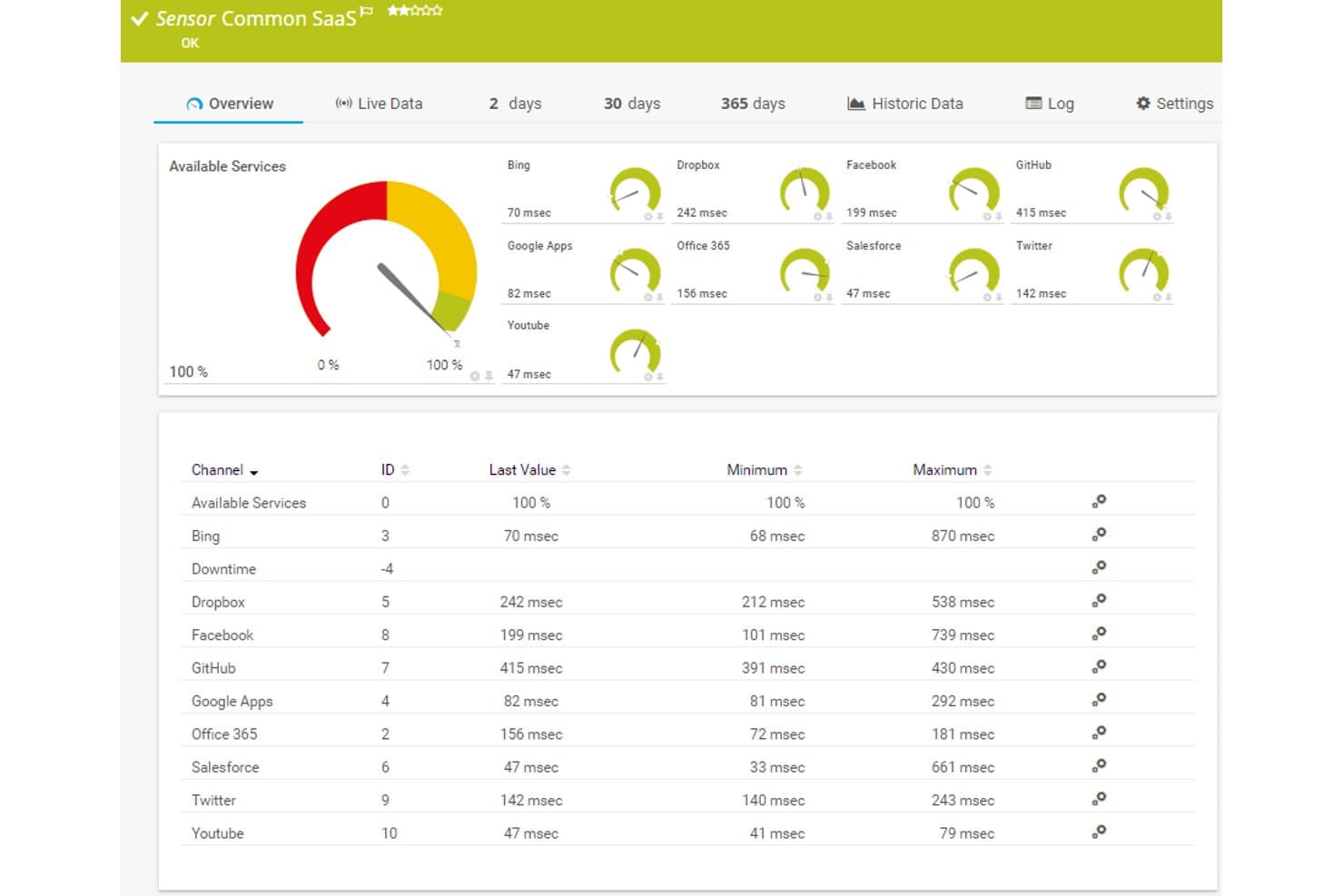
Paessler PRTG offre una dashboard Common SaaS sensor che mostra in tempo reale tempi di risposta e disponibilità per servizi cloud come Dropbox, Office 365, Salesforce e GitHub. Paessler PRTG è una piattaforma di monitoraggio dell'infrastruttura che traccia dispositivi di rete, server, servizi cloud e applicazioni utilizzando un approccio basato su sensori sia in ambienti on-premise che cloud ospitati.
Per chi è ideale Paessler PRTG?
Team IT di organizzazioni di medie dimensioni che gestiscono ambienti ibridi e necessitano di una visibilità centralizzata su infrastruttura di rete, server e cloud.
Perché ho scelto Paessler PRTG
Ho scelto Paessler PRTG come uno dei migliori perché il suo generatore di dashboard si distingue davvero dalla maggior parte degli strumenti di monitoraggio. Il designer di mappe drag-and-drop mette a disposizione oltre 300 widget, dai grafici sul traffico alle icone di stato dei dispositivi, e posso sovrapporre elementi HTML personalizzati per costruire viste multilivello che riflettono esattamente come la mia infrastruttura è organizzata. Utilizzo anche la funzione di rotazione delle mappe per scorrere tra diverse prospettive dell'infrastruttura su un unico display.
Funzionalità principali di Paessler PRTG
- Monitoraggio basato su sensori: consente di tracciare metriche specifiche per dispositivi, applicazioni e servizi cloud.
- Supporto probe ospitato su AWS: permette di monitorare ambienti globali senza mantenere infrastrutture locali.
- Probe multipiattaforma: si installa su Windows, Linux, Raspberry Pi o NAS per un coverage flessibile degli agenti.
- Report programmati: genera ed invia automaticamente report via email su dati prestazionali, trend e metriche SLA.
Integrazioni di Paessler PRTG
Paessler PRTG offre integrazioni native con AWS, Microsoft Azure, Google Cloud Platform, VMware vSphere e Microsoft 365. È disponibile un'API per integrazioni personalizzate e supporta webhook per avvisi verso canali come Slack e Microsoft Teams.
Pros and Cons
Pros:
- Raccolta di metriche basata su sensori altamente granulare
- Supporta ambienti cloud ibridi e on-premise
- Profondo supporto a SNMP e protocolli di flusso
Cons:
- Osservabilità cloud nativa meno potente rispetto ai concorrenti
- I limiti al numero di sensori aumentano i costi
Learn more about Paessler PRTG: Ideale per test di transazioni sintetiche
- No
- Prezzo su richiesta
Visit WebsiteCustomer Rating:4.7/5This rating combines scores from multiple user review sites to reflect overall customer sentiment about the product.
Site24x7 tiene traccia delle transazioni web multi-step per monitorare prestazioni e disponibilità. Per le aziende che gestiscono infrastrutture cloud complesse, Site24x7 offre una soluzione di monitoraggio che include test di transazioni sintetiche per aiutare a tracciare la disponibilità e le prestazioni dei servizi. Si rivolge a team IT e organizzazioni che necessitano di una chiara visibilità nei loro ambienti cloud, contribuendo a risolvere problemi come rallentamenti delle prestazioni, uso delle risorse e gestione degli incidenti. Con una copertura che include le principali piattaforme cloud e una gamma di funzionalità di monitoraggio, Site24x7 aiuta i team a mantenere operazioni stabili e un'esperienza utente coerente.
Perché ho scelto Site24x7
Ho scelto Site24x7 per i suoi test di transazioni sintetiche, che aiutano a monitorare la disponibilità dei servizi simulando i flussi di lavoro di utenti e sistemi. La piattaforma supporta inoltre i principali ambienti cloud e include il monitoraggio delle prestazioni applicative per tracciare il comportamento delle applicazioni e individuare le problematiche. Le sue funzioni di automazione agevolano la gestione degli incidenti, aiutando i team a rispondere più rapidamente e gestire le risorse in modo più efficiente.
Caratteristiche principali di Site24x7
Oltre ai test di transazioni sintetiche, Site24x7 offre:
- Monitoraggio del traffico reale (RUM): Questa funzionalità fornisce informazioni sull'effettiva esperienza utente rilevando e analizzando le interazioni degli utenti con le applicazioni.
- Gestione dei log: Con questa funzione puoi aggregare e analizzare i log provenienti da diverse fonti per ottenere una visione completa dello stato del sistema.
- Monitoraggio della rete: Offre una panoramica sulle prestazioni della rete aiutando a risolvere problemi di connettività e ottimizzare l'infrastruttura di rete.
Integrazioni di Site24x7
Le integrazioni includono Slack, ServiceNow, Moogsoft, Jira, PagerDuty, Freshservice, Microsoft Teams, Amazon EventBridge, Zapier e ManageEngine Analytics Plus.
Pros and Cons
Pros:
- Monitoraggio flessibile che si integra facilmente con molteplici componenti dell'infrastruttura
- Monitoraggio completo per svariati sistemi
- Il monitoraggio full-stack potenziato dall'AI supporta la gestione di infrastrutture multicloud
Cons:
- Configurazione complessa rallenta l'impostazione iniziale e la comprensione della piattaforma
- Bug nelle notifiche causano problemi all'aggiunta di nuove configurazioni di monitoraggio
Learn more about Site24x7: Ideale per il monitoraggio delle prestazioni delle applicazioni
- No
- $945 all'anno per un massimo di 25 server o applicazioni
Visit WebsiteCustomer Rating:4.3/5This rating combines scores from multiple user review sites to reflect overall customer sentiment about the product.
ManageEngine Applications Manager dispone di funzionalità come allarmi per i dati monitorati e snapshot dell'infrastruttura per offrire il massimo delle soluzioni di monitoraggio. Può essere ulteriormente verificato sulla sua dashboard predefinita. ManageEngine Applications Manager è uno strumento robusto che offre un monitoraggio delle prestazioni end-to-end per un ampio spettro di applicazioni, database, server e sistemi. È particolarmente abile nel fornire approfondimenti sulle prestazioni delle applicazioni, rendendolo una soluzione ottimale per il monitoraggio delle prestazioni delle applicazioni.
Perché ho scelto ManageEngine Applications Manager:
Nella selezione di ManageEngine Applications Manager per questa lista, ho tenuto conto della sua capacità completa di monitorare e gestire applicazioni in diversi ambienti. Si distingue per la fornitura di dettagliate informazioni sulle prestazioni delle applicazioni, agevolando il rilevamento e la risoluzione rapida dei problemi.
Di conseguenza, l'ho ritenuto il 'migliore per il monitoraggio delle prestazioni delle applicazioni' grazie alle sue superiori capacità in quest'area specifica.
Funzionalità di spicco e integrazioni:
Alcune delle funzionalità di spicco di ManageEngine Applications Manager includono la capacità di rilevamento delle applicazioni, il monitoraggio approfondito dei componenti e l'automazione intelligente. Queste caratteristiche permettono un monitoraggio robusto e la risoluzione automatica dei problemi, assicurando prestazioni ottimali delle applicazioni.
Per quanto riguarda le integrazioni, ManageEngine Applications Manager può integrarsi con varie applicazioni, server e database, come Oracle, MySQL, Microsoft SQL Server, SAP e molti altri.
Pros and Cons
Pros:
- Monitoraggio dettagliato delle prestazioni delle applicazioni
- Ampia compatibilità con varie applicazioni, server e database
- Automazione intelligente per la risoluzione dei problemi
Cons:
- Può essere complesso da configurare e impostare
- Il costo iniziale elevato potrebbe essere un ostacolo per aziende di piccole dimensioni
- L'interfaccia potrebbe non essere intuitiva quanto alcune alternative
Learn more about ManageEngine Applications Manager: Ideale per il monitoraggio di infrastrutture IT ibride
- No
- Prezzi su richiesta
Visit WebsiteCustomer Rating:4.5/5This rating combines scores from multiple user review sites to reflect overall customer sentiment about the product.
Ecco una panoramica di come l'interfaccia di LogicMonitor è progettata per la facilità d'uso. LogicMonitor è una piattaforma SaaS automatizzata per il monitoraggio delle prestazioni IT che offre una visibilità completa sulle infrastrutture IT complesse. Grazie alla sua capacità di gestire ambienti sia on-premises che cloud, si pone come una delle migliori soluzioni per il monitoraggio di infrastrutture IT ibride.
Perché ho scelto LogicMonitor:
Nella scelta di uno strumento che eccelle nel monitoraggio delle infrastrutture IT ibride, LogicMonitor è stata la mia scelta. La sua versatilità nel supportare una vasta gamma di infrastrutture, comprese quelle cloud, on-premises e ibride, lo distingue dagli altri. Ho determinato LogicMonitor come il migliore per il monitoraggio delle infrastrutture IT ibride grazie alla funzione di rilevamento automatico dei dispositivi e alla capacità di gestire sistemi diversi.
Funzionalità di spicco e integrazioni:
La funzione di rilevamento automatico dei dispositivi di LogicMonitor è notevole perché semplifica il processo di aggiunta di nuovi dispositivi al sistema. Offre inoltre dashboard personalizzabili, garantendo agli utenti la flessibilità di monitorare l'infrastruttura in base alle proprie esigenze specifiche.
In termini di integrazioni, LogicMonitor supporta varie piattaforme cloud come AWS, Google Cloud e Azure. Inoltre, si integra con strumenti chiave per il business come ServiceNow, Slack e Jira, agevolando operazioni più efficienti.
Pros and Cons
Pros:
- Rilevamento automatico dei dispositivi per una configurazione semplice
- Dashboard personalizzabili per un monitoraggio su misura
- Supporta varie piattaforme cloud e strumenti aziendali
Cons:
- I prezzi non sono trasparenti
- Alcuni utenti potrebbero trovare l'interfaccia meno intuitiva
- L'impostazione dei dashboard personalizzati può richiedere competenze tecniche
Learn more about LogicMonitor: Ideale per metriche di salute dettagliate
- Sì
- $99/mese
Visit WebsiteCustomer Rating:4.3/5This rating combines scores from multiple user review sites to reflect overall customer sentiment about the product.
Questa è l'organizzazione della dashboard Application Performance Monitoring (APM) di New Relic. New Relic è una piattaforma di analisi software basata su cloud che offre approfondimenti sui dati in tempo reale per aiutare le aziende a valutare le prestazioni delle proprie applicazioni software. Grazie alle sue metriche di salute approfondite, è particolarmente abile nel fornire informazioni dettagliate sullo stato e l'efficienza di questi sistemi.
Perché ho scelto New Relic:
New Relic mi ha colpito per le sue potenti capacità di analisi, ed è per questo che l'ho selezionato per questa lista. La sua abilità nel fornire metriche di salute granulari e in tempo reale lo distingue dagli altri strumenti. Credo che New Relic sia il migliore per metriche di salute dettagliate grazie alle sue funzionalità complete di analisi e visualizzazione dei dati, che forniscono approfondimenti più approfonditi sulle prestazioni delle applicazioni.
Caratteristiche principali e integrazioni:
Una delle caratteristiche distintive di New Relic è la sua capacità di monitoraggio delle prestazioni delle applicazioni (APM), che offre una panoramica completa sulla salute delle tue applicazioni. Inoltre, offre il monitoraggio reale degli utenti, che fornisce dati su come gli utenti interagiscono con le tue applicazioni.
New Relic si integra perfettamente con una varietà di piattaforme come AWS, Azure, Google Cloud Platform e Kubernetes. Queste integrazioni aiutano a fornire una visione più olistica della tua infrastruttura e delle applicazioni.
Pros and Cons
Pros:
- Metriche di salute dettagliate per approfondimenti approfonditi
- Ampia gamma di integrazioni con piattaforme cloud
- Capacità complete di monitoraggio delle prestazioni delle applicazioni
Cons:
- Prezzo elevato per le piccole imprese
- Un'interfaccia complessa che può risultare difficile per i principianti
- Le funzionalità estese possono causare un sovraccarico di informazioni per alcuni utenti
Learn more about New Relic:

Ecco uno screenshot che mostra in dettaglio un report riepilogativo realizzato in HashiCorp. HashiCorp offre una suite di strumenti open-source per consentire alle aziende di definire, fornire e gestire le infrastrutture dei data center utilizzando un approccio dichiarativo basato sul codice. È particolarmente adatto alle organizzazioni che desiderano adottare la metodologia Infrastructure as Code (IaC) per migliorare l'efficienza e mantenere la coerenza nella gestione dell'infrastruttura.
Perché ho scelto HashiCorp:
Ho incluso HashiCorp nella mia selezione grazie alle sue solide capacità IaC, che lo rendono piuttosto distintivo nel panorama della gestione dell'infrastruttura. Questo approccio IaC favorisce efficienza, ripetibilità e sicurezza nell'approvvigionamento e nella gestione dell'infrastruttura.
Per questi motivi, ritengo HashiCorp il 'Migliore per' le organizzazioni interessate a sfruttare l'approccio IaC.
Funzionalità chiave e integrazioni:
Strumenti di HashiCorp come Terraform, Vault e Consul offrono una vasta gamma di funzionalità che coprono l'approvvigionamento dell'infrastruttura, la sicurezza e il networking dei servizi. La funzionalità di codifica dell'infrastruttura di Terraform lo rende estremamente prezioso per il deployment e la gestione di infrastrutture di qualsiasi scala.
Le integrazioni significative includono quelle con AWS, GCP e Azure, estendendo efficacemente le sue capacità IaC su più ambienti cloud.
Pros and Cons
Pros:
- Eccellenti capacità di Infrastructure as Code
- Si integra con le principali piattaforme cloud
- Offre una varietà di strumenti per diversi aspetti della gestione dell'infrastruttura
Cons:
- Può essere complesso da configurare e utilizzare
- Le versioni enterprise possono essere costose per i team più piccoli
- Il supporto per gli utenti gratuiti potrebbe essere limitato
Learn more about HashiCorp: Ideale per l'ambiente IBM Cloud
- No
- $10 per milione di metriche raccolte/mese

La dashboard principale di IBM Cloud Monitoring fornisce informazioni quali, ma non solo, la topologia della rete e l'utilizzo delle risorse. IBM Cloud Monitoring è un servizio di monitoraggio che fornisce informazioni in tempo reale sulle prestazioni delle tue applicazioni e infrastrutture ospitate sul cloud IBM. Questo strumento è stato appositamente progettato per funzionare in modo fluido con l'ambiente cloud IBM, rendendolo la scelta migliore per chi investe in questo ecosistema.
Perché ho scelto IBM Cloud Monitoring:
La scelta di IBM Cloud Monitoring per questa lista è stata semplice considerando la sua superiore integrazione e compatibilità nativa con l'ambiente cloud IBM. Si distingue per la sua interoperabilità senza soluzione di continuità con i vari servizi del cloud IBM.
Ho giudicato questo servizio 'il migliore per l'ambiente IBM cloud' grazie alla sua capacità di fornire metriche dettagliate, dashboard e avvisi specifici per il cloud IBM.
Funzionalità principali e integrazioni:
Le metriche dettagliate di IBM Cloud Monitoring offrono un'enorme quantità di dati sulle prestazioni della tua infrastruttura. È degna di nota la sua capacità di fornire dati di monitoraggio in tempo reale e facilitare il rilevamento rapido delle anomalie.
Per quanto riguarda le integrazioni, si integra perfettamente con diversi servizi cloud IBM, tra cui IBM Cloud Databases, IBM Kubernetes Service e IBM Cloud Functions, solo per citarne alcuni.
Pros and Cons
Pros:
- Integrazione senza soluzione di continuità con i servizi IBM cloud
- Metriche dettagliate offrono una visione completa
- Monitoraggio in tempo reale e rilevamento anomalie
Cons:
- La struttura dei prezzi può essere complessa e dipendere dall'utilizzo
- Potrebbe non integrarsi bene con servizi non-IBM
- L'interfaccia potrebbe richiedere un periodo di apprendimento per i nuovi utenti
Learn more about IBM Cloud Monitoring: Ideale per dati unificati di applicazioni e infrastrutture
- Prova gratuita di 30 giorni disponibile
- Da $7/nodo/mese

SolarWinds Observability SaaS fornisce un monitoraggio dettagliato delle prestazioni delle applicazioni SolarWinds Observability SaaS è una piattaforma di monitoraggio dell'infrastruttura cloud progettata per team IT e DevOps. Offre visibilità su applicazioni cloud, infrastruttura, log, database, reti e dati sull'esperienza utente. Affronta le complessità della gestione di ambienti IT eterogenei, fornendo strumenti per semplificare i processi di monitoraggio, migliorare la risoluzione dei problemi e offrire insight attuabili, rendendolo ideale per i team che vogliono ottimizzare le operazioni IT e migliorare le prestazioni dei sistemi.
Perché ho scelto SolarWinds Observability SaaS
Ho scelto SolarWinds Observability SaaS per la sua capacità di fornire una visibilità completa attraverso dati unificati di applicazioni e infrastrutture. Questa caratteristica è fondamentale per comprendere pienamente gli ambienti IT, che comprende anche supporto a framework open-source e integrazioni di terze parti. Inoltre, le sue funzionalità AIOps, potenziate dal machine learning, aiutano a ridurre l'affaticamento da alert dando priorità ai problemi reali, rendendolo uno strumento prezioso per i team sopraffatti da notifiche costanti.
Funzionalità principali di SolarWinds Observability SaaS
Ecco alcune funzionalità che potresti trovare utili:
- Strumentazione automatica e mappatura delle dipendenze: Questa funzione consente al tuo team di monitorare e mappare le dipendenze in modo efficiente senza interventi manuali.
- Rilevamento delle anomalie in tempo reale e analisi della causa radice basata su AI: Aiuta a individuare e risolvere rapidamente i problemi prima che impattino sulle prestazioni del sistema.
- Implementazione rapida e interfaccia intuitiva: Il team può ottenere rapidamente valore grazie a un'interfaccia intuitiva che semplifica la configurazione e la gestione continua.
- Supporto ai framework open-source: Garantisce un'integrazione semplice con gli strumenti esistenti e flessibilità nella gestione dell'infrastruttura IT.
Integrazioni SolarWinds Observability SaaS
Le integrazioni includono AWS, Azure, Google Cloud Platform, Kubernetes, ServiceNow, Slack, Microsoft Teams, Jira, Splunk e PagerDuty.
Pros and Cons
Pros:
- Efficace per troubleshooting e insight operativi
- Archiviazione dati completa con supporto AWS S3
- Le funzionalità AIOps riducono l'affaticamento da alert
Cons:
- Opzioni di personalizzazione limitate per dashboard e report
- Curva di apprendimento ripida per configurazioni complesse
Learn more about SolarWinds Observability SaaS: Migliore per il monitoraggio cloud open source
- No
- Gratuito, supporto a pagamento da $1000/mese

Il pannello di controllo di monitoraggio di Zabbix fornisce facilmente lo stato del monitoraggio in tempo reale per soddisfare al meglio le tue esigenze. Zabbix Cloud Monitoring è uno strumento potente che offre il monitoraggio in tempo reale di server, macchine virtuali e servizi cloud. Riconosciuto per la sua natura open source, si distingue come il migliore per le organizzazioni che cercano personalizzazione ed economicità.
Perché ho scelto Zabbix Cloud Monitoring:
Ho scelto Zabbix per la sua natura open source che offre possibilità di personalizzazione e il suo ampio spettro di monitoraggio che include server, VM e servizi cloud. Si distingue per la sua flessibilità, permettendo di modificarlo in base a esigenze specifiche.
Per questo motivo, si aggiudica il riconoscimento di essere il 'Migliore per' il monitoraggio cloud open source, ideale per chi valorizza flessibilità e un approccio pratico.
Funzionalità distintive e integrazioni:
Zabbix eccelle nel rilevamento della rete, offrendo la scoperta automatica di dispositivi e configurazioni di rete. Fornisce strumenti avanzati di visualizzazione dei dati che permettono di comprendere le statistiche di monitoraggio a colpo d'occhio. In quanto strumento open source, Zabbix si integra con una vasta gamma di altri sistemi, tra cui MySQL, PostgreSQL e IBM DB2.
Pros and Cons
Pros:
- Open source, offre possibilità di personalizzazione
- Ampia gamma di integrazioni
- Funzionalità di monitoraggio complete
Cons:
- Curva di apprendimento ripida per utenti non tecnici
- La configurazione può essere complessa
- Il supporto a pagamento è relativamente costoso
Learn more about Zabbix Cloud Monitoring: Ideale per osservabilità in tempo reale
- No
- $60 per host al mese

Splunk Infrastructure Monitoring offre analisi rapide in base alle performance del cloud monitorato, aiutando le aziende a ottenere insight e risultati immediati. Splunk Infrastructure Monitoring è uno strumento che offre osservabilità e analisi in tempo reale per infrastrutture cloud e microservizi. Essendo una piattaforma nota per velocità ed efficienza, è la scelta ideale per le aziende che necessitano di insight immediati sulle performance del proprio cloud.
Perché ho scelto Splunk Infrastructure Monitoring:
Ho selezionato Splunk Infrastructure Monitoring per le sue forti capacità nel fornire insight in tempo reale, che lo rendono un punto di riferimento nello scenario dell’osservabilità.
È la ricchezza di queste analisi che mi ha portato a ritenerlo il 'Migliore per' l’osservabilità in tempo reale, particolarmente utile per le aziende che richiedono una conoscenza immediata delle loro operazioni cloud.
Funzionalità distintive e integrazioni:
Splunk Infrastructure Monitoring dispone di un’architettura di streaming in tempo reale che permette di fornire insight immediati. Include anche funzionalità come il baselining dinamico istantaneo e il rilevamento di anomalie, per individuare problemi in modo proattivo.
Le integrazioni chiave includono quelle con AWS, Google Cloud e Azure, permettendone il monitoraggio senza interruzioni su ambienti multi-cloud.
Pros and Cons
Pros:
- Offre osservabilità in tempo reale
- Include funzionalità di rilevamento proattivo dei problemi
- Si integra bene con le principali piattaforme cloud
Cons:
- Potrebbe risultare costoso per le piccole imprese
- Interfaccia complessa che può richiedere tempo di apprendimento
- Memorizzazione limitata dei dati storici
Learn more about Splunk Infrastructure Monitoring:
Altri strumenti di monitoraggio dell'infrastruttura cloud
Di seguito trovi un elenco di ulteriori strumenti di monitoraggio dell’infrastruttura cloud che ho selezionato, ma che non sono rientrati tra i primi 10.
- 11ThousandEyesIdeale per la visibilità su ogni percorso di rete
- 12meshIQIdeale per il monitoraggio e la gestione del middleware
- 13CheckmkIdeale per il monitoraggio completo dell'infrastruttura IT
- 14DynatraceIdeale per il monitoraggio assistito dall'IA
- 15DatadogMigliore per l'osservabilità full-stack
- 16Dotcom MonitorIdeale per monitoraggio basato su agenti e senza agenti
Recensioni di software correlate
Se non hai ancora trovato quello che cerchi, dai un'occhiata a questi strumenti alternativi che abbiamo testato e valutato.
- Software di monitoraggio della rete
- Software di monitoraggio dei server
- Soluzioni SD-Wan
- Strumenti di monitoraggio dell'infrastruttura
- Analizzatore di pacchetti
- Strumenti di monitoraggio delle applicazioni
Wie ich Qualitäts-Engineering-Tools bewerte
Ich unterteile meine Bewertung in zwei Ebenen: grundlegende Anforderungen wie CI/CD-Integration und automatisierte Tests über verschiedene Umgebungen hinweg sowie die Differenzierungsmerkmale, die für QA-Teams und DevOps-Ingenieure relevant sind.
Kernfunktionalität (Grundvoraussetzung für diese Liste)
Wenn ich Tools für meine Liste auswähle, bewerte ich jedes auf einer Skala von 0 (bietet die Funktionalität nicht) bis 5 (hervorragend in diesem Bereich) anhand der unten aufgeführten Kernfunktionen. Anschließend rechne ich die Gesamtpunktzahl des Tools in einen Prozentsatz um. Jedes Tool muss eine Mindestgesamtpunktzahl von 65 % erreichen, um für die Aufnahme in Betracht gezogen zu werden.
- Testautomatisierung: Ich prüfe, ob ein Tool funktionale, Regressions- und End-to-End-Tests über UI-, API- und mobile Ebenen automatisieren kann, statt sich lediglich auf manuelle Ausführung zu beschränken.
- CI/CD-Pipeline-Integration: Jedes Tool sollte sich mit Systemen wie Jenkins, GitHub Actions oder GitLab CI verbinden lassen, sodass Tests bei jedem Build oder Deployment automatisch ausgelöst werden.
- Testmanagement & Reporting: Ich achte auf strukturierte Organisation der Testfälle, Verfolgung der Ausführung und Dashboards, die Bestehens-/Fehlertendenzen und Abdeckungsdefizite über Releases hinweg darstellen.
- Testabdeckung über verschiedene Umgebungen: Das Tool muss Tests über mehrere Browser, Betriebssysteme und Geräte hinweg ermöglichen – nicht nur Chrome auf einem einzigen Desktop-Betriebssystem.
- Integration mit Defekt- & Issue-Trackern: Hier zählt die bidirektionale Synchronisation mit Tools wie Jira oder Azure Boards, sodass fehlgeschlagene Tests als nachverfolgbare Defekte mit Protokollen und Kontext erscheinen.
- Skripting oder codelose Erstellung: Ich prüfe, ob die Plattform codebasierte Frameworks (Selenium, Playwright, Python) oder codelose Test-Builder unterstützt – oder idealerweise beides – um QA-Teams mit unterschiedlichen Fähigkeiten zu bedienen.
Wenn ich eine Liste von Tools habe, die die Kriterien erfüllen, schaue ich mir an, was jede Plattform einzigartig macht.
Differenzierungsmerkmale (Was Anbieter unterscheidet)
So vergleiche und bewerte ich verschiedene Anbieter:
Herausragende Funktionen
Selbstheilende Testfunktionen ersparen QA-Teams stundenlangen Wartungsaufwand, wenn ein Frontend-Refactoring während eines Sprints die Button-IDs oder Elementpfade ändert. Außerdem achte ich auf visuelles Regressionstesting, das Layoutverschiebungen und Styling-Fehler erkennt, die funktionale Überprüfungen oft völlig übersehen. Auch Shift-Left-Tools sind hier wichtig – IDE-Plugins und Test-Trigger auf Pull-Request-Ebene ermöglichen es Entwicklern, Fehler zu entdecken, bevor Code überhaupt auf den Hauptzweig gelangt.
Mehr als nur Funktionen
Skalierbarkeit ist entscheidend – ich prüfe, ob eine Plattform parallele Ausführung in verteilten oder containerisierten Umgebungen unterstützt, damit Test-Suiten während Releases keine Engpässe verursachen. Sicherheits- und Compliance-Zertifikate wie SOC 2 und ISO 27001 sind einen Blick wert, besonders wenn Ihr Team mit sensiblen Testdaten arbeitet oder in regulierten Branchen tätig ist. Ich betrachte auch das Integrationsökosystem, insbesondere ob das Tool mit Observability-Plattformen wie Datadog oder New Relic verbunden werden kann, um Testfehler mit produktionsnahen Diagnosen zu korrelieren.
Come scegliere gli strumenti di monitoraggio dell'infrastruttura cloud
È facile perdersi in lunghi elenchi di funzionalità e strutture tariffarie complesse. Per aiutarti a rimanere concentrato mentre affronti il tuo specifico processo di selezione del software, ecco una lista di fattori da tenere presenti:
| Fattore | Cosa considerare |
|---|---|
| FattoreScalabilità | Cosa considerareAssicurati che lo strumento sia in grado di gestire esigenze infrastrutturali in crescita. La soluzione di monitoraggio dovrebbe adattarsi all'espansione del tuo ambiente cloud, aggiungendo nuove istanze e servizi senza problemi di prestazioni. |
| FattoreIntegrazioni | Cosa considerareCerca uno strumento che si integri con i provider cloud esistenti (AWS, Azure, GCP) e con i servizi di terze parti (come Slack, Jira). Questo aiuta a centralizzare i dati di monitoraggio e ad automatizzare gli avvisi. |
| FattorePersonalizzazione | Cosa considerareScegli una soluzione che ti consenta di creare dashboard, report e avvisi personalizzati in base alle esigenze e ai flussi di lavoro specifici del tuo team. La flessibilità nella visualizzazione dei dati è fondamentale. |
| FattoreSemplicità d'uso | Cosa considerareUn'interfaccia intuitiva riduce la curva di apprendimento e accelera la risoluzione dei problemi. Assicurati che lo strumento sia facile da usare sia per gli sviluppatori sia per gli utenti non tecnici. |
| FattoreBudget | Cosa considerareControlla la struttura dei prezzi per individuare costi nascosti come la conservazione dei dati, il supporto premium o le integrazioni aggiuntive. Confronta i diversi livelli di prezzo per evitare di pagare più del necessario. |
| FattoreMisure di sicurezza | Cosa considerareAssicurati che lo strumento offra crittografia, controllo degli accessi basato sui ruoli e connessioni API sicure per proteggere i dati sensibili dell'infrastruttura. La conformità agli standard di settore (come SOC 2) rappresenta un vantaggio. |
| FattoreAutomazione | Cosa considerareCerca funzionalità di automazione come il rilevamento delle anomalie, la correzione automatica e l'ottimizzazione delle prestazioni per ridurre il lavoro manuale e migliorare l'efficienza. |
| FattoreAvvisi in tempo reale | Cosa considerareAssicurati che lo strumento fornisca avvisi e notifiche in tempo reale tramite più canali (e-mail, Slack, ecc.) per rispondere rapidamente ai problemi. |
Tendenze negli strumenti di monitoraggio dell'infrastruttura cloud
Durante la mia ricerca, ho raccolto innumerevoli aggiornamenti di prodotto, comunicati stampa e registri delle versioni di diversi fornitori di strumenti di monitoraggio dell'infrastruttura cloud. Ecco alcune delle tendenze emergenti che sto tenendo d'occhio:
- Informazioni basate sull'IA: sempre più strumenti utilizzano l'IA e l'apprendimento automatico per prevedere i guasti, rilevare le anomalie e suggerire correzioni prima che i problemi si aggravino. Questo aiuta i team ad adottare un approccio proattivo invece che reattivo.
- Monitoraggio dettagliato dei costi: gli strumenti di monitoraggio forniscono ora informazioni più approfondite sulla spesa per il cloud, aiutando i team a individuare gli sprechi e a ottimizzare l'allocazione delle risorse. Alcuni strumenti offrono persino consigli automatici per ridurre i costi.
- Osservabilità unificata: i fornitori stanno combinando il monitoraggio dell'infrastruttura, delle applicazioni e della rete in un'unica piattaforma. Questo offre ai team una visione completa del proprio ambiente senza dover passare da uno strumento all'altro.
- Monitoraggio dell'edge: poiché sempre più carichi di lavoro vengono spostati sull'edge, gli strumenti si stanno ampliando per monitorare i dispositivi edge e i microservizi. Questo aiuta i team a mantenere prestazioni e disponibilità negli ambienti distribuiti.
- Monitoraggio della sicurezza avanzato: gli strumenti stanno aggiungendo funzionalità di rilevamento delle minacce in tempo reale e registrazione degli eventi di sicurezza. Alcuni offrono ora integrazioni con SIEM (Gestione delle informazioni e degli eventi di sicurezza) per una risposta più rapida agli incidenti.
Cosa sono gli strumenti di monitoraggio dell'infrastruttura cloud?
Gli strumenti di monitoraggio dell'infrastruttura cloud offrono un modo automatizzato per supervisionare i processi operativi all'interno di un'infrastruttura IT basata sul cloud. Utilizzati principalmente da professionisti IT, ingegneri di rete e amministratori di sistema, questi strumenti sono preziosi per monitorare lo stato, le prestazioni e l'integrità di server, database, reti e servizi applicativi che risiedono nel cloud.
Svolgono una funzione fondamentale nell'identificare rapidamente i problemi, prevenire potenziali interruzioni e garantire il regolare svolgimento delle operazioni aziendali. Questi strumenti di monitoraggio offrono informazioni e analisi che aiutano a ottimizzare le risorse, svolgendo così un ruolo fondamentale nel processo decisionale strategico e nel miglioramento delle prestazioni complessive del sistema.
Funzionalità degli strumenti di monitoraggio dell'infrastruttura cloud
Quando selezioni gli strumenti di monitoraggio dell'infrastruttura cloud, presta attenzione alle seguenti funzionalità chiave:
- Monitoraggio in tempo reale: offre visibilità immediata sulle prestazioni dell’infrastruttura, aiutandoti a individuare e risolvere rapidamente i problemi.
- Dashboard personalizzate: consente di creare visualizzazioni personalizzate delle metriche principali, semplificando il monitoraggio degli aspetti più importanti per il team.
- Rilevamento delle anomalie: utilizza l’apprendimento automatico e i software per il monitoraggio dei log per identificare schemi insoliti e segnalare potenziali problemi prima che influiscano sulle prestazioni.
- Avvisi e notifiche: invia avvisi attraverso più canali (e-mail, Slack, ecc.) per informare il team dei problemi in tempo reale.
- Aggregazione dei log: raccoglie e organizza i log provenienti da sistemi diversi, semplificando la risoluzione dei problemi e l’individuazione delle cause principali.
- Monitoraggio dei costi: suddivide la spesa per il cloud in base al servizio, alla regione o al progetto, aiutandoti a individuare gli sprechi e ottimizzare i costi.
- Controllo degli accessi basato sui ruoli: consente di definire le autorizzazioni degli utenti per garantire che i membri del team abbiano accesso solo ai dati di cui hanno bisogno.
- Analisi dei dati storici: archivia i dati storici sulle prestazioni, consentendo di identificare le tendenze e prendere decisioni informate.
- Soluzioni multi-cloud: monitora l’infrastruttura su diversi provider cloud come AWS, Azure e Google Cloud da un’unica piattaforma.
- API e integrazioni: si connette ad altri strumenti e piattaforme per automatizzare i flussi di lavoro e centralizzare i dati.
Vantaggi degli strumenti di monitoraggio dell’infrastruttura cloud
L’implementazione di strumenti di monitoraggio dell’infrastruttura cloud offre numerosi vantaggi al team e all’azienda. Ecco alcuni dei vantaggi che puoi aspettarti:
- Migliore disponibilità: gli strumenti di monitoraggio aiutano a individuare tempestivamente i problemi di prestazioni, riducendo i tempi di inattività e mantenendo i servizi disponibili per gli utenti.
- Risoluzione più rapida dei problemi: gli avvisi in tempo reale e i log dettagliati semplificano l’identificazione e la risoluzione rapida dei problemi da parte del team.
- Migliore gestione dei costi: le funzionalità di monitoraggio dei costi e ottimizzazione delle risorse aiutano a evitare un sovradimensionamento e a ridurre gli sprechi.
- Maggiore sicurezza: il rilevamento integrato delle minacce e la registrazione degli eventi di sicurezza aiutano a individuare le vulnerabilità e a rispondere più rapidamente agli attacchi.
- Decisioni più consapevoli: i dati storici e l’analisi delle tendenze offrono informazioni sui modelli di prestazione e sulle esigenze relative alle risorse.
- Gestione multi-cloud semplificata: le dashboard unificate e il supporto multi-cloud consentono di monitorare diversi ambienti cloud da un unico punto.
- Migliore collaborazione del team: l’accesso basato sui ruoli e le dashboard condivise garantiscono che tutti i membri del team dispongano dei dati necessari per prendere decisioni.
Costi e prezzi degli strumenti di monitoraggio dell’infrastruttura cloud
La scelta degli strumenti di monitoraggio dell’infrastruttura cloud richiede una conoscenza dei vari modelli di prezzo e dei piani disponibili. I costi variano in base alle funzionalità, alle dimensioni del team, ai componenti aggiuntivi e ad altri fattori. La tabella seguente riassume i piani più comuni, i relativi prezzi medi e le funzionalità tipicamente incluse negli strumenti di monitoraggio dell’infrastruttura cloud:
Tabella comparativa dei piani per gli strumenti di monitoraggio dell’infrastruttura cloud
| Tipo di piano | Prezzo medio | Funzionalità comuni |
|---|---|---|
| Tipo di pianoPiano gratuito | Prezzo medio$0 | Funzionalità comuniStrumenti di monitoraggio delle prestazioni di base, avvisi limitati, supporto della community e integrazione con un singolo cloud. |
| Tipo di pianoPiano personale | Prezzo medio$10–$30/utente/mese | Funzionalità comuniMonitoraggio delle prestazioni, avvisi in tempo reale, analisi di base dei log e accesso per un singolo utente. |
| Tipo di pianoPiano aziendale | Prezzo medio$40–$100/utente/mese | Funzionalità comuniSupporto multi-cloud, rilevamento avanzato delle anomalie, dashboard personalizzate e autorizzazioni basate sul team. |
| Tipo di pianoPiano enterprise | Prezzo medio$150–$500/utente/mese | Funzionalità comuniInformazioni basate sull’intelligenza artificiale, correzione automatizzata, monitoraggio della sicurezza, account manager dedicato e monitoraggio della conformità. |
Domande frequenti sugli strumenti di monitoraggio dell'infrastruttura cloud
Ecco alcune risposte alle domande comuni sugli strumenti di monitoraggio dell’infrastruttura cloud:
In che modo questi strumenti gestiscono il monitoraggio in ambienti multi-cloud?
Molti strumenti di monitoraggio dell’infrastruttura cloud supportano gli ambienti multi-cloud, consentendo di monitorare le risorse tra diversi provider cloud come AWS, Azure e Google Cloud da un’unica piattaforma. Questo approccio unificato aiuta il tuo team a mantenere una supervisione coerente e semplifica la gestione.
Questi strumenti possono integrarsi con i flussi di lavoro DevOps esistenti?
Sì, la maggior parte degli strumenti di monitoraggio offre integrazioni con i più diffusi strumenti di monitoraggio DevOps come Jenkins, GitHub e Slack. Queste integrazioni consentono al tuo team di incorporare i dati di monitoraggio nei flussi di lavoro esistenti, migliorando la collaborazione e ottimizzando i processi.
In che modo questi strumenti aiutano a ottimizzare i costi del cloud?
Molti strumenti di monitoraggio offrono funzionalità che tengono traccia dell’utilizzo delle risorse e identificano quelle sottoutilizzate. Analizzando questi dati, puoi prendere decisioni informate per ottimizzare la spesa per il cloud e allocare le risorse in modo più efficiente.
Quali funzionalità di sicurezza sono generalmente incluse in questi strumenti?
Le funzionalità di sicurezza spesso includono il rilevamento delle minacce in tempo reale, la valutazione delle vulnerabilità e il monitoraggio della conformità. Queste capacità aiutano il tuo team a identificare e affrontare tempestivamente i potenziali problemi di sicurezza, mantenendo l’integrità della tua infrastruttura.
Quanto sono personalizzabili i dashboard e i report di questi strumenti?
La maggior parte degli strumenti offre dashboard e report personalizzabili, consentendoti di adattare la visualizzazione delle metriche e delle analisi alle esigenze specifiche del tuo team. Questa flessibilità garantisce che tu possa concentrarti sui dati più rilevanti per le tue operazioni.
Questi strumenti supportano risposte automatizzate ai problemi rilevati?
Sì, molti strumenti di monitoraggio supportano funzionalità di automazione in grado di attivare azioni predefinite in risposta a specifici avvisi o anomalie. Questa automazione aiuta il tuo team ad affrontare tempestivamente i problemi, riducendo i tempi di inattività e migliorando l’affidabilità del sistema.
Qual è il prossimo passo?
Se stai cercando strumenti di monitoraggio dell'infrastruttura cloud, contatta gratuitamente un consulente SoftwareSelect per ricevere consigli.
Compili un modulo e fai una breve conversazione in cui vengono analizzate nel dettaglio le tue esigenze. Dopodiché riceverai una selezione ristretta di software da valutare. Ti supporteranno anche durante l'intero processo di acquisto, comprese le trattative sul prezzo.