

Esplorando il mondo dell'intelligenza artificiale, ci si imbatte spesso in una vasta gamma di strumenti per l'elaborazione del linguaggio naturale, ognuno dei quali vanta capacità uniche. Dai bot basati su modelli NLP avanzati alle app che facilitano la traduzione automatica e la sintesi, questi strumenti sono la spina dorsale dell'attuale panorama dell'automazione.
Grazie alla mia esperienza nella comprensione del linguaggio naturale, nella risposta alle domande, nell'estrazione delle entità e nelle complessità dei linguaggi di programmazione, ho visto come gli assistenti virtuali e le applicazioni NLP abbiano rivoluzionato le interazioni. Esaminare queste opzioni può eliminare la difficoltà di analizzare manualmente i dati, colmando il divario tra una quantità enorme di informazioni e le informazioni utili.
Perché fidarsi dei nostri consigli sui software
6,700+
Reviews
20
Industry experts
16+
Evaluation factors
14
Years
Il nostro team testa e recensisce software dal 2012. In quanto leader tecnologici noi stessi, sappiamo quanto sia difficile — e importante — scegliere il software giusto.
Per questa guida, abbiamo valutato gli strumenti attraverso test praticie ricerche indipendenti, assegnando un punteggio agli strumenti in base ai nostri criteri di selezione.
Le nostre recensioni riflettono il nostro giudizio editoriale umano, non un discorso di vendita.
Revisori esperti:
- Paulo Gardini MiguelDirettore tecnico
 Tim FisherVP dell'IA
 Gabriel RosasTech Lead e architetto software
 Christhian GruhnTech Lead e architetto della piattaforma

Tabella comparativa: software NLP
Questa tabella comparativa riassume i dettagli dei prezzi dei miei migliori software NLP selezionati.
| Tool | Best For | Trial Info | Price | ||
|---|---|---|---|---|---|
| 1 | Ideale per l'implementazione on-premise dell'NLP conversazionale | Piano gratuito + demo gratuita disponibile | Prezzi su richiesta | Website | |
| 2 | Ideale per accedere tramite API a modelli linguistici all'avanguardia | Piano gratuito disponibile | A partire da $20/utente/mese | Website | |
| 3 | Ideale per l'analisi unificata di dati testuali e strutturati | Prova gratuita di 14 giorni + demo gratuita disponibile | Prezzi su richiesta | Website | |
| 4 | Ideale per l'elaborazione di documenti con contesto esteso tramite LLM aperti | Non disponibile | Prezzi su richiesta | Website | |
| 5 | Ideale per la messa a punto completa degli LLM su larga scala | Piano gratuito disponibile | A partire da $0.04/credit | Website | |
| 6 | Ideale per ottenere informazioni dal testo nativo AWS su larga scala | Piano gratuito disponibile | A partire da $0.0001/unità | Website | |
| 7 | Ideale per la distribuzione di pipeline NLP pronte per la produzione | Piano gratuito disponibile | Piano gratuito disponibile | Website | |
| 8 | Ideale per l'NLP sottoposto a governance nelle distribuzioni cloud ibride | Piano gratuito + prova gratuita + demo gratuita disponibili | A partire da $1,110/mese | Website | |
| 9 | Ideale per pipeline di analisi dei testi native di GCP | Piano gratuito disponibile | A partire da $0.90/1.000 caratteri (con fatturazione annuale) | Website | |
| 10 | Ideale per la messa a punto di modelli open source su larga scala | Piano gratuito disponibile | A partire da $9/mese | Website |





Recensioni dei migliori software NLP
 1Ideale per l'implementazione on-premise dell'NLP conversazionale
Rasa
- Piano gratuito + demo gratuita disponibile
- Prezzi su richiesta
Visit WebsiteCustomer Rating:4.2/5
Rasa consente agli utenti di configurare i flussi conversazionali con un generatore visivo di flussi. Rasa è un framework NLP conversazionale open source che offre una pipeline NLU modulare, classificazione personalizzata delle intenzioni, riconoscimento delle entità nominate, integrazione con gli LLM tramite la sua architettura CALM e opzioni di implementazione di livello produttivo, inclusi ambienti on-premise e isolati.
Per chi è più indicato Rasa?
Rasa è particolarmente adatto agli ingegneri ML/NLP e ai team DevOps di settori regolamentati che necessitano del pieno controllo sull'ambiente di implementazione della propria IA conversazionale.
Perché ho scelto Rasa
Ho incluso Rasa tra le mie migliori scelte perché è l'opzione più solida che abbia trovato per i team che devono implementare l'NLP conversazionale interamente sulla propria infrastruttura. La sua implementazione nativa per Kubernetes tramite grafici Helm, il supporto per gli ambienti isolati e la gestione dei segreti con HashiCorp Vault lo rendono particolarmente adatto a settori regolamentati come quello sanitario e finanziario, in cui i dati non lasciano mai il perimetro aziendale. Apprezzo anche l'architettura CALM, che separa la comprensione del linguaggio basata sugli LLM dalla logica aziendale deterministica, mantenendo prevedibile e verificabile il comportamento dell'agente in produzione.
Funzionalità principali di Rasa
- Classificatore DIET: Un modello basato su trasformatori che gestisce simultaneamente la classificazione delle intenzioni e l'estrazione delle entità all'interno di un'unica architettura addestrabile.
- Instradamento multi-LLM: Consente di assegnare LLM diversi a compiti diversi all'interno dello stesso agente, offrendo il controllo sui compromessi tra costi e latenza.
- Modulo RAG aziendale: Si connette a database vettoriali personalizzati per il recupero di conoscenze in tempo reale, basando le risposte sui propri dati senza dover riaddestrare il modello.
- Riutilizzo dei flussi multilingue: Implementa gli stessi flussi conversazionali in più lingue e supporta il cambio di lingua durante la conversazione senza perdere il contesto.
Integrazioni di Rasa
Rasa documenta le integrazioni con Hugging Face Transformers, spaCy, scikit-learn, Duckling, GPT-4, Llama, Redis, Apache Kafka, HashiCorp Vault e OpenTelemetry. Le API REST e WebSocket supportano integrazioni personalizzate.
Pros and Cons
Pros:
- Implementazione on-premise e in ambienti isolati supportata
- Completamente open source con pipeline personalizzabili
- Riutilizzo dei flussi multilingue con conservazione del contesto
Cons:
- Nessuna analisi del sentiment o riepilogo nativi
- L'edizione open source è in modalità manutenzione
Learn more about Rasa: Ideale per accedere tramite API a modelli linguistici all'avanguardia
- Piano gratuito disponibile
- A partire da $20/utente/mese

Il Playground di OpenAI consente agli utenti di eseguire query dell'interprete di codice tramite gli assistenti. OpenAI è una piattaforma di IA che offre agli sviluppatori l'accesso tramite API a un ampio catalogo di modelli linguistici di grandi dimensioni, modelli di incorporamento e modelli vocali per la creazione di applicazioni di elaborazione del linguaggio naturale (NLP) per attività come la classificazione del testo, l'estrazione di entità, la sintesi, la traduzione e la ricerca semantica.
A chi è più adatto OpenAI?
OpenAI è una soluzione particolarmente adatta agli ingegneri di apprendimento automatico e ai team di sviluppo che necessitano di un accesso affidabile e scalabile tramite API a modelli linguistici all'avanguardia senza dover gestire l'infrastruttura sottostante.
Perché ho scelto OpenAI
OpenAI si è guadagnato un posto nella mia lista ristretta perché nessun'altra piattaforma offre un accesso diretto tramite API a un catalogo più ampio di modelli all'avanguardia con questo livello di qualità. Apprezzo in particolare il modo in cui l'API Responses, l'API Batch e i modelli di incorporamento lavorano insieme: è possibile eseguire attività NER o di classificazione ad alto volume a metà del costo tramite l'API Batch, quindi inserire i risultati in
text-embedding-3-largeper il raggruppamento semantico, il tutto senza gestire alcuna infrastruttura. Il Programma di modelli personalizzati è un altro elemento di spicco, con risultati comprovati in produzione come l'aumento dell'accuratezza dell'83% ottenuto da Harvey nell'elaborazione del linguaggio naturale giuridico.Funzionalità principali di OpenAI
- Tokenizzatore Tiktoken: un tokenizzatore BPE open source che rispecchia la tokenizzazione interna di OpenAI e consente di contare i token e gestire i limiti della finestra di contesto prima di effettuare chiamate API.
- Output strutturati tramite modalità JSON: forza le risposte del modello ad adottare uno schema JSON definito, rendendo affidabile l'estrazione di entità o etichette di classificazione su larga scala.
- API Embeddings: genera rappresentazioni vettoriali dense del testo utilizzando
text-embedding-3-smallotext-embedding-3-largeper attività di ricerca semantica, raggruppamento e classificazione. - API Batch: elabora in modo asincrono grandi volumi di richieste di inferenza applicando uno sconto del 50% sul costo rispetto alle chiamate API sincrone.
Integrazioni di OpenAI
OpenAI si integra con LangChain, LlamaIndex, Azure OpenAI Service, Pinecone, Weaviate, Qdrant, Chroma e Temporal. Le sue API e i suoi SDK ufficiali supportano connessioni personalizzate a database vettoriali, sistemi aziendali e flussi di lavoro CI/CD.
Pros and Cons
Pros:
- Modelli linguistici all'avanguardia aggiornati con benchmark ai vertici della categoria
- L'API Batch riduce i costi di elaborazione su larga scala
- Messa a punto con casi di studio aziendali comprovati
Cons:
- Nessun hosting on-premise o su cloud privato
- Non espone alcuna pipeline classica di preelaborazione NLP
Learn more about OpenAI: Ideale per l'analisi unificata di dati testuali e strutturati
- Prova gratuita di 14 giorni + demo gratuita disponibile
- Prezzi su richiesta

SAS Model Studio consente agli utenti di organizzare i progetti di analisi testuale in un unico spazio. SAS Visual Analytics è una piattaforma aziendale di analisi e NLP che combina esplorazione visiva dei dati, analisi testuale, modellazione degli argomenti, analisi del sentiment e NER con un generatore di pipeline senza codice e un assistente di IA generativa.
Per chi è più adatto SAS Visual Analytics?
SAS Visual Analytics è particolarmente adatto ai team aziendali di data science che devono analizzare dati testuali strutturati e non strutturati all'interno di un'unica piattaforma governata.
Perché ho scelto SAS Visual Analytics
Ho scelto SAS Visual Analytics perché è una delle poche piattaforme NLP che unifica realmente l'analisi dei dati strutturati e l'analisi testuale senza costringerti a integrare strumenti separati. SAS Visual Text Analytics, che funziona insieme ad essa, gestisce NER, l'analisi del sentiment basata su BERT e la modellazione degli argomenti nello stesso ambiente governato in cui risiedono già i tuoi dati strutturati. Apprezzo particolarmente la funzionalità di calibrazione degli LLM, che consente di regolare il comportamento del modello per le pipeline RAG senza modificare il modello di base, un vantaggio concreto quando si lavora con dati aziendali sensibili.
Funzionalità principali di SAS Visual Analytics
- Pre-elaborazione testuale in 33 lingue: La tokenizzazione, la lemmatizzazione e l'analisi morfosintattica sono disponibili nativamente in 33 lingue, tra cui arabo, hindi, thailandese e vietnamita.
- Generatore di pipeline NLP ibride: Un'interfaccia visiva senza codice consente di combinare nodi basati su regole, ML e apprendimento profondo in un'unica pipeline di analisi testuale.
- API SAS Micro Analytic Score: Un'API di scoring senza stato e residente in memoria, progettata per l'inferenza dei modelli in tempo reale e ad alte prestazioni negli ambienti di produzione.
- File di modelli portatili ASTORE: I modelli addestrati vengono esportati come file binari ASTORE, consentendo lo scoring al di fuori dell'ambiente SAS su piattaforme cloud e locali.
Integrazioni di SAS Visual Analytics
SAS Visual Analytics offre integrazioni native nell'ecosistema Microsoft, tra cui Microsoft 365 e Azure, oltre al supporto per la distribuzione su AWS, Google Cloud Platform e Red Hat OpenShift. Le API REST e gli SDK di SAS Viya supportano integrazioni personalizzate.
Pros and Cons
Pros:
- Supporto multilingue nativo per 33 lingue
- Piattaforma unificata per dati testuali e strutturati
- IA generativa con controlli integrati sui bias
Cons:
- Le funzionalità NLP avanzate richiedono un componente aggiuntivo separato
- Meno flessibile dei framework NLP open source
Learn more about SAS Visual Analytics: Ideale per l'elaborazione di documenti con contesto esteso tramite LLM aperti
- Non disponibile
- Prezzi su richiesta

AI21 Studio consente agli utenti di definire requisiti di output espliciti per ogni esecuzione dell'API. AI21 Studio è una piattaforma per LLM basata sulla famiglia Jamba di modelli ibridi Mamba-Transformer, che offre generazione di testo, riepilogo, risposte a domande, classificazione, orchestrazione RAG e messa a punto su più livelli tramite API, SDK e servizi cloud gestiti.
A chi è più adatto AI21 Studio?
AI21 Studio è particolarmente adatto agli ingegneri ML e ai team aziendali che sviluppano pipeline RAG o flussi di lavoro basati sulla conoscenza, costruiti su grandi raccolte di documenti non strutturati.
Perché ho scelto AI21 Studio
AI21 Studio si è guadagnato un posto nella mia selezione perché la famiglia di modelli Jamba gestisce molto bene carichi di lavoro con documenti davvero voluminosi. La finestra di contesto da 256K token è la più ampia disponibile tra i modelli open-weight, il che significa che posso inserire interi contratti, rapporti di sperimentazioni cliniche o documenti relativi a operazioni di fusioni e acquisizioni in una singola chiamata di inferenza senza suddividerli in parti. A ciò si aggiunge il livello di orchestrazione RAG Maestro, che instrada dinamicamente le richieste tra ricerca nei file, ricerca sul web e LLM, offrendo al contempo un grafico visivo dell'esecuzione: il risultato è una pipeline efficace per estrarre informazioni strutturate da raccolte dense e non strutturate.
Caratteristiche principali di AI21 Studio
- Architettura ibrida Jamba: i modelli Jamba combinano livelli Mamba SSM con l'attenzione dei Transformer in una progettazione a miscela di esperti, offrendo un'inferenza fino a 2,5 volte più veloce rispetto a modelli basati esclusivamente su Transformer di dimensioni comparabili.
- API per la messa a punto su più livelli: supporta la messa a punto completa, LoRA e QLoRA tramite le librerie HuggingFace standard, oltre a un servizio di post-addestramento gestito per i team aziendali che desiderano avere la proprietà del modello risultante.
- Gateway intelligente: un livello di instradamento pronto all'uso che analizza il costo per agente, compatta il contesto ridondante e seleziona adattivamente i modelli a ogni turno; attualmente è gratuito durante la fase beta.
- Pesi dei modelli aperti su Hugging Face: i modelli Jamba sono disponibili pubblicamente secondo la Licenza per modelli aperti Jamba, consentendo al tuo team di ospitarli autonomamente, ispezionarli o personalizzarli ulteriormente senza vincoli rispetto al fornitore.
Integrazioni di AI21 Studio
AI21 Studio si integra con AWS, Microsoft Azure, Google Cloud, NVIDIA NIM, Hugging Face, LangChain, LlamaIndex, Pinecone, Snowflake e Databricks. Le sue API REST, SDK Python e SDK TypeScript supportano integrazioni personalizzate e flussi di lavoro di distribuzione.
Pros and Cons
Pros:
- Gestisce input di documenti lunghi fino a 256K token
- Supporta la messa a punto completa, LoRA e QLoRA
- Pesi dei modelli aperti per l'hosting autonomo
Cons:
- Nessuna API dedicata per NER o analisi del sentiment
- Non dispone di un generatore visivo senza codice per pipeline NLP
Learn more about AI21 Studio: Ideale per la messa a punto completa degli LLM su larga scala
- Piano gratuito disponibile
- A partire da $0.04/credit
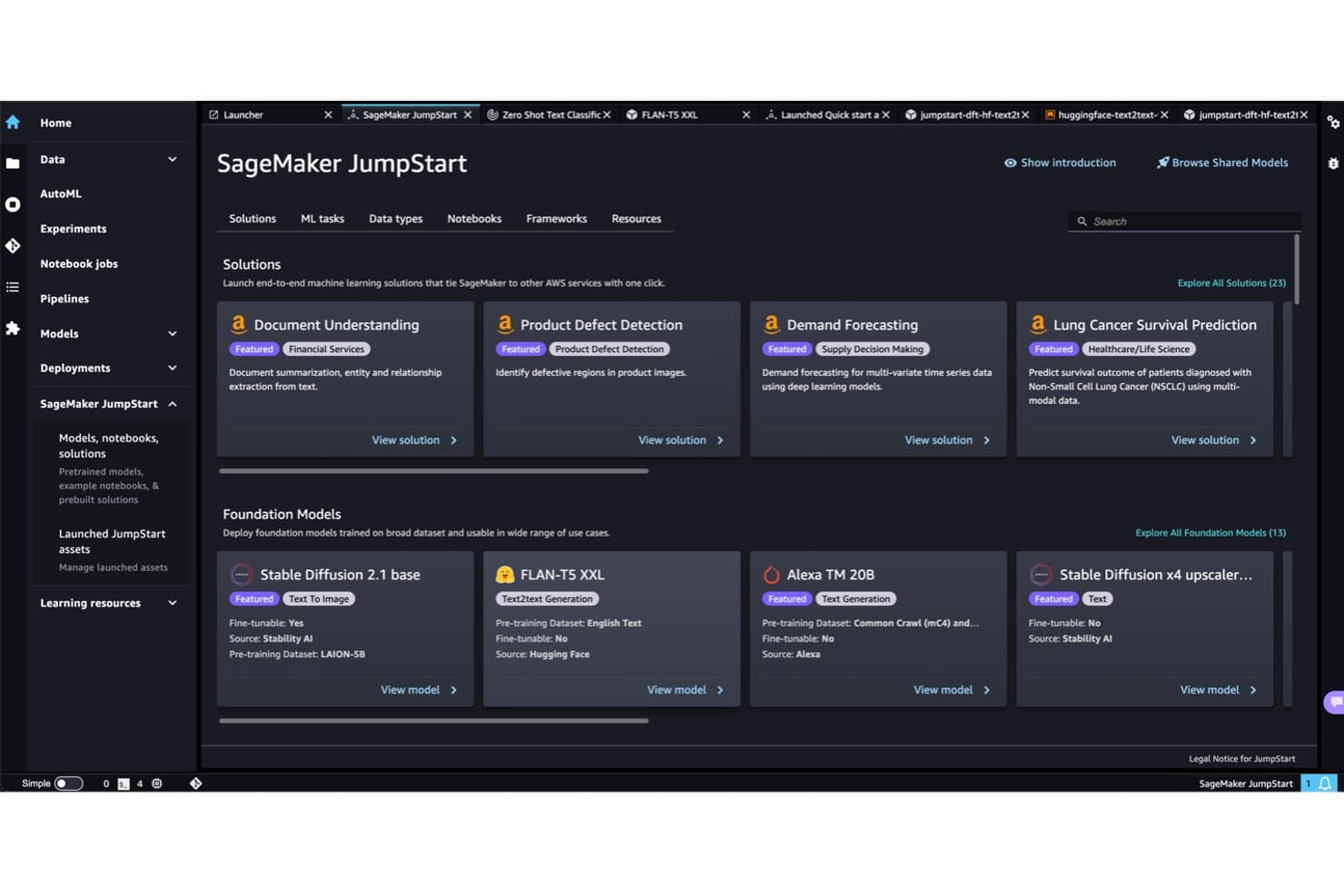
Amazon SageMaker JumpStart offre modelli NLP predefiniti pronti per la distribuzione. Amazon SageMaker è la piattaforma ML gestita di AWS che copre l'intero ciclo di vita dei modelli NLP, dalla pre-elaborazione e tokenizzazione dei dati fino all'addestramento, alla messa a punto e alla distribuzione di modelli linguistici di grandi dimensioni su larga scala tramite strumenti come JumpStart, HyperPod e integrazioni native con Hugging Face.
Per chi è più adatto Amazon SageMaker?
Amazon SageMaker è la scelta giusta per gli ingegneri ML e i team MLOps di aziende medio-grandi che hanno bisogno di un'unica piattaforma per portare gli LLM dai dati grezzi alla produzione su larga scala.
Perché ho scelto Amazon SageMaker
Amazon SageMaker si è guadagnato un posto nella mia lista ristretta perché nessun'altra piattaforma ML gestita eguaglia la sua profondità per la messa a punto completa degli LLM su larga scala. Sono particolarmente colpito da HyperPod, che consente di eseguire la messa a punto distribuita su centinaia di acceleratori con un addestramento elastico senza checkpoint, riducendo i tempi di addestramento fino al 40%. Il catalogo di oltre 1.000 modelli di JumpStart, tra cui Llama 4, DeepSeek R1 e gli LLM medici di John Snow Labs, mi permette di passare dalla selezione di un modello di base specifico per il dominio alla sua messa a punto su dati personalizzati senza uscire dalla piattaforma.
Funzionalità principali di Amazon SageMaker
- SageMaker Clarify: rileva i bias e genera report di spiegabilità per i modelli NLP durante l'addestramento, la valutazione e il monitoraggio post-distribuzione.
- SageMaker Data Wrangler: offre un'interfaccia a basso codice per importare, trasformare e preparare i dati testuali prima dell'addestramento del modello.
- Endpoint di inferenza multimodale: supporta opzioni di inferenza in tempo reale, senza server, asincrona e in batch su oltre 70 tipi di istanze, inclusi i chip Inferentia e Trainium.
- Integrazione con MLflow gestito: tiene traccia degli esperimenti, confronta le esecuzioni dei modelli e gestisce il controllo delle versioni nei flussi di lavoro NLP senza richiedere un'infrastruttura separata.
Integrazioni di Amazon SageMaker
Amazon SageMaker offre integrazioni native con Amazon S3, Amazon Bedrock, Amazon OpenSearch Service, Amazon EKS, AWS Lambda, Amazon CloudWatch, AWS IAM, Hugging Face e MLflow. Offre inoltre API REST, SDK e accesso tramite AWS CLI per integrazioni personalizzate.
Pros and Cons
Pros:
- Il più ampio catalogo disponibile di modelli pre-addestrati
- HyperPod supporta l'addestramento distribuito di LLM su larga scala
- Ciclo di vita completo con strumenti di spiegabilità
Cons:
- Il monitoraggio dei costi è difficile per la maggior parte dei team
- Rischio di dipendenza dal fornitore per le aziende che operano su più cloud
Learn more about Amazon SageMaker: Ideale per ottenere informazioni dal testo nativo AWS su larga scala
- Piano gratuito disponibile
- A partire da $0.0001/unità
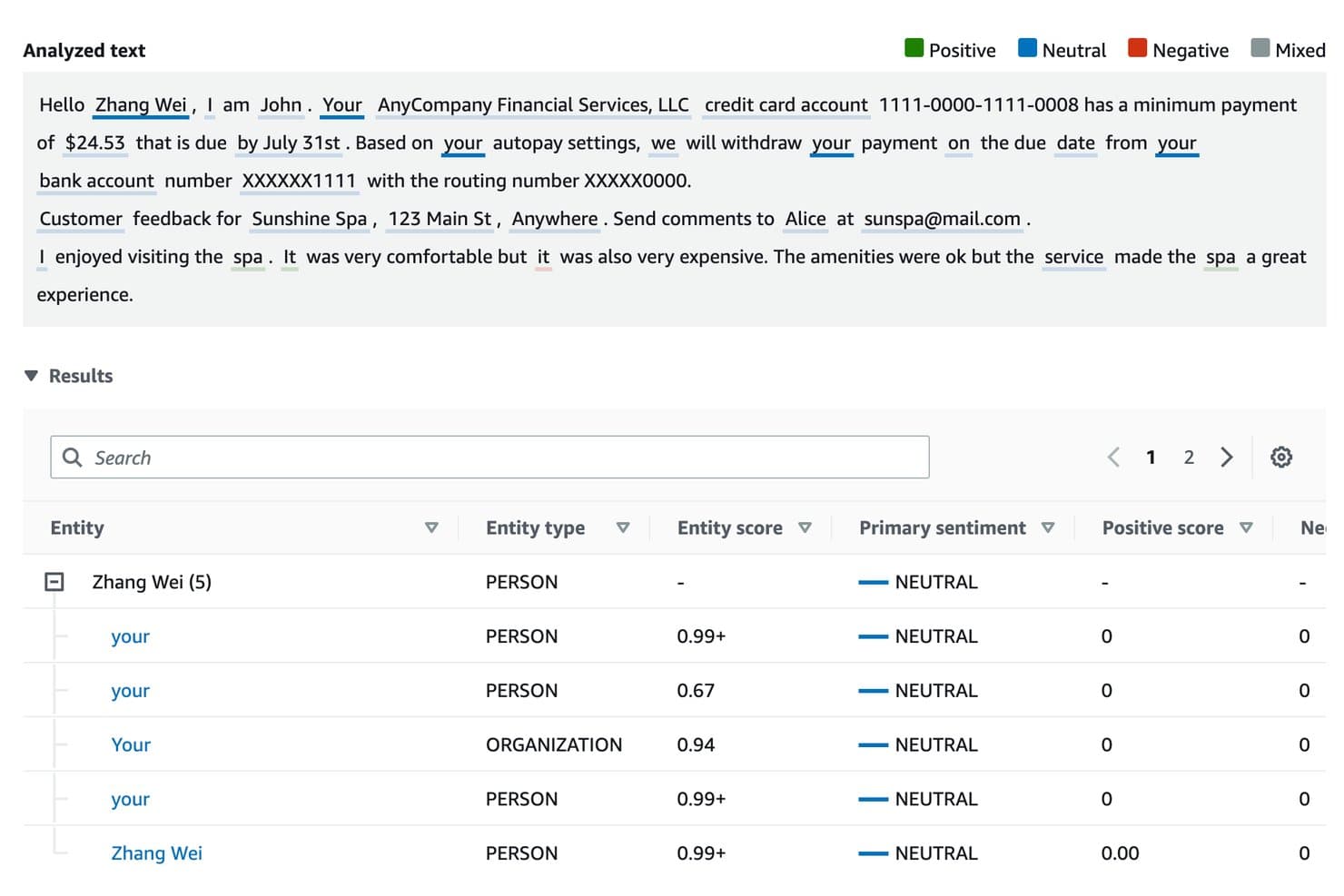
Amazon Comprehend identifica entità e sentimenti nel testo analizzato. Amazon Comprehend è un servizio NLP AWS completamente gestito che offre funzionalità di analisi del testo predefinite e basate su API, tra cui analisi del sentiment, riconoscimento delle entità nominate, rilevamento dei dati personali, estrazione delle frasi chiave e addestramento di modelli personalizzati tramite AutoML, senza richiedere la gestione di alcuna infrastruttura sottostante.
Per chi è più adatto Amazon Comprehend?
Amazon Comprehend è una scelta ideale per i team di ingegneria e DevOps che eseguono già carichi di lavoro in AWS e necessitano di NLP pronto per la produzione senza gestire alcuna infrastruttura ML.
Perché ho scelto Amazon Comprehend
Amazon Comprehend è entrato nella mia lista ristretta perché è la soluzione più naturale per l'analisi del testo nativa AWS su larga scala. Mi piace il fatto che sia possibile eseguire l'analisi del sentiment, il riconoscimento mirato delle entità e la rimozione dei dati personali direttamente tramite endpoint API gestiti, senza dover configurare un solo server. In pratica, questo significa che il mio team può elaborare in modo asincrono milioni di record dei clienti da S3, con prezzi differenziati in base al volume che diventano effettivamente più convenienti quanto più si analizza.
Caratteristiche principali di Amazon Comprehend
- Riconoscimento personalizzato delle entità: addestra un sistema di riconoscimento delle entità specifico per il tuo dominio utilizzando i tuoi esempi etichettati, per estrarre termini come numeri di polizza o codici interni che i modelli predefiniti non sono in grado di rilevare.
- Rilevamento e rimozione dei dati personali: identifica e rimuove automaticamente i dati personali sensibili, come nomi, numeri di previdenza sociale e numeri di carte di credito, direttamente nella pipeline di elaborazione dei documenti.
- Automazione MLOps con Flywheel: gestisci l'intero ciclo di vita dei modelli personalizzati, dall'acquisizione dei dati al riaddestramento e alla promozione delle versioni, senza creare un livello MLOps separato.
- Collegamento all'ontologia di Comprehend Medical: associa le entità cliniche estratte a sistemi di codifica standardizzati come ICD-10-CM, RxNorm e SNOMED CT per flussi di lavoro NLP specifici per il settore sanitario.
Integrazioni di Amazon Comprehend
Amazon Comprehend dispone di integrazioni native con Amazon S3, AWS Lambda, AWS KMS, AWS IAM, Amazon Kendra, Amazon Lex, Amazon Connect, AWS CloudTrail e Amazon CloudWatch. La sua API REST, gli SDK AWS, AWS CLI, Step Functions ed EventBridge supportano pipeline personalizzate e l'automazione dei flussi di lavoro.
Pros and Cons
Pros:
- Integrazione nativa per i flussi di lavoro NLP incentrati su AWS
- NLP sanitario con mappatura delle ontologie cliniche
- Rilevamento e rimozione integrati dei dati personali
Cons:
- Nessun accesso agli elementi interni del modello
- Ottimizzazione limitata oltre l'AutoML di base
Learn more about Amazon Comprehend: Ideale per la distribuzione di pipeline NLP pronte per la produzione
- Piano gratuito disponibile
- Piano gratuito disponibile
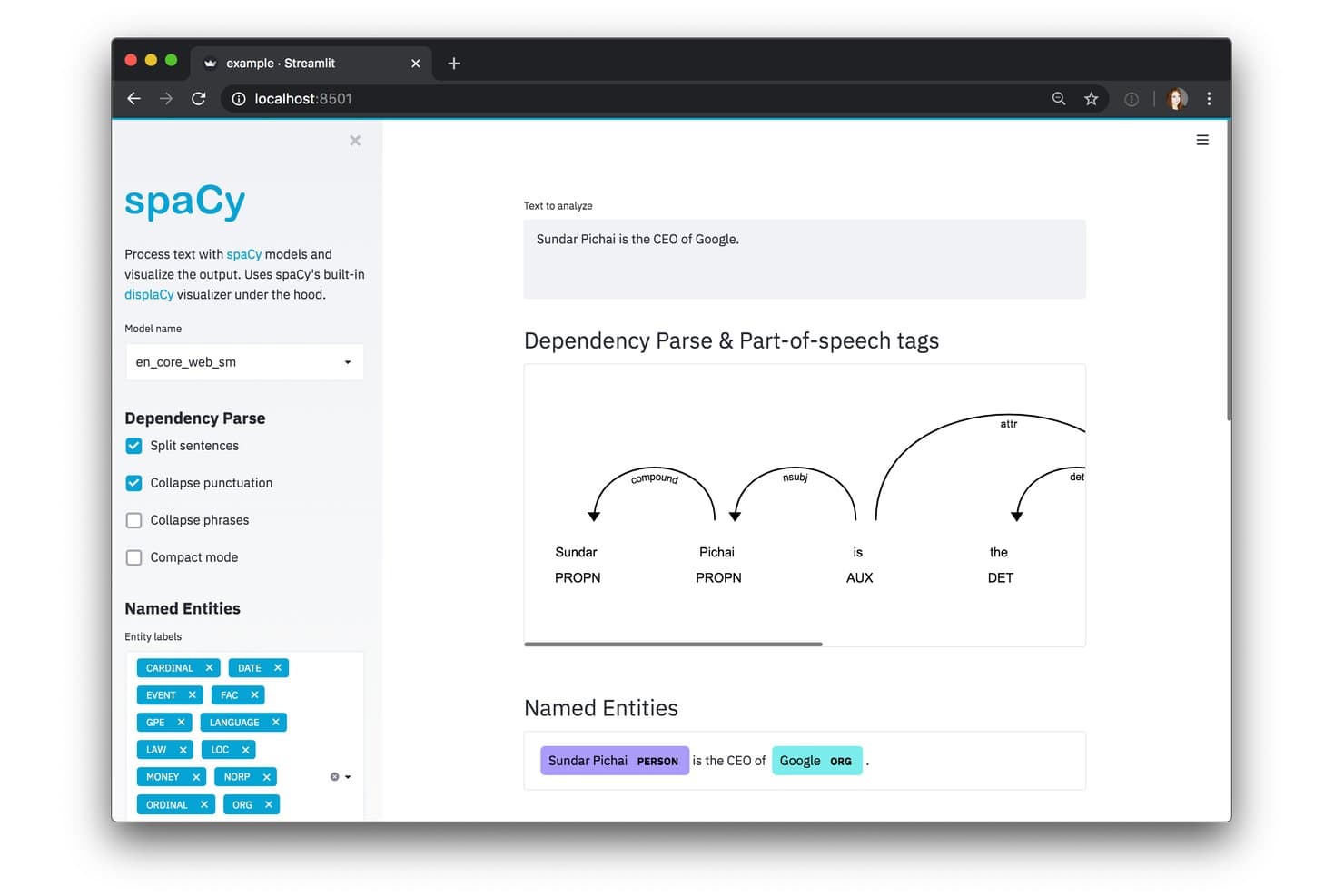
spaCy visualizza interattivamente l'analisi delle dipendenze e le entità nominate. spaCy è una libreria NLP open source per Python che include tokenizzazione, riconoscimento di entità nominate, analisi delle dipendenze, classificazione del testo e addestramento di modelli basati su transformer in oltre 75 lingue.
Per chi è più adatto spaCy?
spaCy è particolarmente adatto agli ingegneri del machine learning e ai data scientist che devono creare, addestrare e distribuire pipeline NLP in Python senza affidarsi a una piattaforma gestita.
Perché ho scelto spaCy
spaCy si è guadagnato un posto nella mia rosa di strumenti perché è stato progettato fin dall'inizio per la produzione, non solo per la sperimentazione. Apprezzo molto il fatto che le pipeline addestrate vengano impacchettate come moduli Python installabili: distribuire un modello NER personalizzato in un container Docker o in un livello AWS Lambda diventa così un processo ripetibile e versionato, anziché un'attività improvvisata ogni volta. Il sistema
spaCy trainbasato sulla configurazione mantiene ogni iperparametro e scelta architetturale in un unico file, rendendo le mie pipeline riproducibili in ambienti diversi. È proprio questa combinazione di disciplina nella distribuzione dei pacchetti e velocità di elaborazione in batch basata su Cython, tramitenlp.pipe(), a rendere spaCy realmente pronto per la produzione.Funzionalità principali di spaCy
- 84 pipeline preaddestrate: scarica ed esegui pipeline preaddestrate in 25 lingue, da modelli compatti ottimizzati per la CPU a varianti complete basate su transformer, realizzate con RoBERTa e BERT.
- Integrazione
spaCy-LLM: collega le pipeline spaCy direttamente alle API LLM ospitate (OpenAI, Anthropic, Cohere) o a modelli open source per eseguire attività NLP senza richiedere dati di addestramento etichettati. - Visualizzatore displaCy: visualizza nel browser le annotazioni delle entità nominate e gli alberi delle dipendenze utilizzando il componente di visualizzazione integrato di spaCy.
- Ecosistema di pipeline specifiche per dominio: accedi a pipeline della community pronte all'uso per il settore sanitario (medspaCy) e per i testi giuridici (Blackstone) tramite la libreria spaCy Universe.
Integrazioni di spaCy
spaCy si integra con Hugging Face Transformers, PyTorch, TensorFlow, OpenAI, Anthropic, Cohere, LangChain, Prodigy, DVC, Prefect e Ray. La sua API Python supporta integrazioni personalizzate, ma non include un'API REST nativa.
Pros and Cons
Pros:
- Funziona interamente sulla propria infrastruttura
- Offre pipeline specifiche per il settore sanitario e giuridico
- L'impacchettamento consente distribuzioni dei modelli riproducibili e versionate
Cons:
- Nessuna API REST integrata per la distribuzione
- Nessuna interfaccia visiva o per flussi di lavoro senza codice
Learn more about spaCy: Ideale per l'NLP sottoposto a governance nelle distribuzioni cloud ibride
- Piano gratuito + prova gratuita + demo gratuita disponibili
- A partire da $1,110/mese

IBM watsonx.ai estrae fatti strutturati dai documenti SEC 10-K utilizzando prompt few-shot. IBM watsonx.ai è una piattaforma IA aziendale che combina un catalogo di modelli fondamentali multi-fornitore, la libreria Watson NLP, il fine-tuning LoRA/QLoRA, AutoML e opzioni flessibili di distribuzione SaaS, on-premise e cloud ibrido per creare e scalare carichi di lavoro NLP.
Per chi è più indicato IBM watsonx.ai?
IBM watsonx.ai è particolarmente adatto ai team IT aziendali e di data science che devono creare, ottimizzare e distribuire carichi di lavoro NLP in ambienti on-premise, ibridi e cloud, con rigorosi requisiti di governance e conformità.
Perché ho scelto IBM watsonx.ai
IBM watsonx.ai è entrato nella mia rosa di candidati soprattutto per la sua capacità di gestire efficacemente l'NLP sottoposto a governance negli ambienti cloud ibridi, un vero elemento distintivo per i team aziendali soggetti a rigorosi requisiti di conformità. Sono particolarmente colpito dalla libreria Watson NLP, che include il riconoscimento di entità nominate, l'analisi del sentiment, la classificazione del tono e l'analisi dei ruoli semantici in oltre 20 lingue, all'interno di un'unica pipeline verificabile. Abbinandola a CP4D su Red Hat OpenShift per le distribuzioni on-premise o ibride e ad AI Factsheets per le tracce di controllo dei modelli, si ottiene una governance completa integrata in ogni livello.
Funzionalità principali di IBM watsonx.ai
- Catalogo di modelli fondamentali multi-fornitore: Accedi a modelli pre-addestrati di IBM Granite, Meta Llama, Mistral, DeepSeek e NVIDIA da un'unica libreria ospitata.
- Fine-tuning LoRA/QLoRA: Adatta i modelli fondamentali a attività NLP specifiche del dominio utilizzando il fine-tuning efficiente in termini di parametri in ambienti con accelerazione GPU.
- Creazione di pipeline AutoAI: Gestisce automaticamente la preparazione dei dati, l'ingegneria delle funzionalità, la selezione dei modelli e l'ottimizzazione degli iperparametri per i flussi di lavoro di machine learning predittivo.
- Endpoint API compatibile con OpenAI: Collega le applicazioni esistenti all'inferenza di watsonx.ai utilizzando un formato API REST compatibile con OpenAI, oltre agli SDK per Python, Node.js e Java.
Integrazioni di IBM watsonx.ai
IBM watsonx.ai si integra con Hugging Face, Red Hat OpenShift, watsonx.data, Watson Assistant, watsonx Orchestrate, Watson Discovery e IBM Cloud Object Storage. La sua API REST, insieme agli SDK per Python, Node.js e Java, supporta le integrazioni personalizzate.
Pros and Cons
Pros:
- Ampia copertura delle attività NLP in oltre 20 lingue
- Indennizzo per violazione della proprietà intellettuale per i modelli IBM aziendali
- Supporto nativo per RAG e ricerca vettoriale
Cons:
- I modelli proprietari IBM non sono disponibili per AWS
- L'interfaccia può risultare confusa per i nuovi utenti
Learn more about IBM watsonx.ai: Ideale per pipeline di analisi dei testi native di GCP
- Piano gratuito disponibile
- A partire da $0.90/1.000 caratteri (con fatturazione annuale)

Google Cloud Natural Language AI annota le entità di un curriculum, come competenze e datori di lavoro. Google Cloud Natural Language AI è un'API NLP gestita di Google che offre analisi preaddestrata del sentiment, riconoscimento delle entità, analisi sintattica, classificazione dei contenuti e moderazione dei testi tramite interfacce REST e gRPC, con librerie client per otto linguaggi di programmazione.
Per chi è più indicato Google Cloud Natural Language AI?
Google Cloud Natural Language AI è particolarmente adatto ai team di ingegneria che eseguono già carichi di lavoro su GCP e hanno bisogno di funzionalità NLP pronte per la produzione senza dover gestire l'infrastruttura.
Perché ho scelto Google Cloud Natural Language AI
Google Cloud Natural Language AI è entrato nella mia selezione perché si integra naturalmente nelle pipeline di analisi dei testi native di GCP. Se il tuo team utilizza già BigQuery per i dati, puoi chiamare
ML.UNDERSTAND_TEXTdirettamente in SQL per eseguire l'analisi del sentiment o delle entità senza mai uscire dal data warehouse. Apprezzo anche il fatto che l'API v2 utilizzi un modello basato su PaLM per le attività relative alle entità e al sentiment e che il metodoannotateTextconsenta di recuperare più funzionalità NLP con una singola chiamata API, riducendo notevolmente il sovraccarico dei tempi di andata e ritorno.Funzionalità principali di Google Cloud Natural Language AI
- Analisi del sentiment delle entità: rileva il sentiment associato a ciascuna entità denominata in un testo, restituendo punteggi per entità in inglese, giapponese e spagnolo.
- AutoML Natural Language: consente di addestrare modelli personalizzati di classificazione dei testi ed estrazione delle entità sui propri set di dati etichettati tramite un'interfaccia visiva senza codice in Vertex AI.
- Endpoint multiregionali: instrada le richieste API attraverso endpoint statunitensi o dell'UE per mantenere i dati elaborati e archiviati all'interno di una regione specifica, in conformità con i requisiti di residenza dei dati.
- API idonea per HIPAA: è coperta dall'Accordo di Google Cloud per i soci in affari, rendendola utilizzabile per flussi di lavoro che gestiscono informazioni sanitarie protette.
Integrazioni di Google Cloud Natural Language AI
Google Cloud Natural Language AI si integra con Vertex AI, BigQuery, Cloud Composer, Speech-to-Text, Translation API, Vision API, Dataflow, Cloud Run e Cloud Functions. REST, gRPC e otto librerie client supportano le integrazioni personalizzate.
Pros and Cons
Pros:
- I modelli preaddestrati non richiedono dati di addestramento
- I dati non vengono mai archiviati dopo l'elaborazione tramite API
- Supporto multilingue per le funzionalità NLP principali
Cons:
- Nessuna spiegabilità del modello o metrica sui bias
- La messa a punto è disponibile solo tramite Vertex AI
Learn more about Google Cloud Natural Language AI: Ideale per la messa a punto di modelli open source su larga scala
- Piano gratuito disponibile
- A partire da $9/mese

HuggingChat consente agli utenti di interrogare i modelli di IA tramite un'interfaccia di chat web. Hugging Face è una piattaforma NLP open source che consente di accedere a oltre 2 milioni di modelli preaddestrati, insieme a una suite completa di strumenti per la tokenizzazione, la messa a punto e la distribuzione dei modelli in ambienti cloud e locali.
Per chi è più adatto Hugging Face?
Hugging Face è la piattaforma di riferimento per gli ingegneri ML e NLP che necessitano di accesso diretto ai modelli open source e all'intera catena di strumenti per metterli a punto, valutarli e distribuirli su larga scala.
Perché ho scelto Hugging Face
Hugging Face si è guadagnato un posto nella mia lista ristretta perché nessun'altra piattaforma è paragonabile per la messa a punto di modelli open source su larga scala. Apprezzo il fatto che PEFT e QLoRA consentano di mettere a punto LLM con miliardi di parametri, come LLaMA o Mistral, su una singola GPU, riducendo drasticamente i costi di calcolo senza compromettere la qualità. La libreria TRL aggiunge inoltre il supporto completo per RLHF e DPO, permettendo di allineare modelli specifici per dominio con un sovraccarico minimo.
Funzionalità principali di Hugging Face
- API Pipeline di Transformers: Un'interfaccia a riga singola per eseguire attività NLP — classificazione, NER, riepilogo, traduzione e controllo qualità — con qualsiasi modello presente sull'Hub.
- AutoTrain: Un'interfaccia di addestramento senza codice in cui si carica un set di dati etichettato, si seleziona un'attività e la piattaforma gestisce automaticamente la selezione e l'addestramento del modello.
- Text Embeddings Inference (TEI): Un motore di inferenza dedicato, ottimizzato per la generazione ad alto volume di rappresentazioni vettoriali, che supporta la ricerca semantica e le pipeline RAG su larga scala.
- API dei provider di inferenza: Un punto di accesso unificato compatibile con OpenAI che instrada le richieste tra provider come Groq, Together AI e Cerebras utilizzando un singolo token Hugging Face.
Integrazioni di Hugging Face
Hugging Face si integra con PyTorch, TensorFlow, JAX, AWS SageMaker, Google Cloud, Azure, Weights & Biases, MLflow e Snowflake. Le sue API Python, JavaScript, REST e CLI supportano integrazioni personalizzate e flussi di lavoro per la distribuzione.
Pros and Cons
Pros:
- Selezione senza eguali di modelli NLP open source
- Permette di mettere a punto modelli enormi su una singola GPU
- AutoTrain consente di addestrare modelli senza codice
Cons:
- La qualità e la sicurezza dei modelli della community variano
- La distribuzione pronta per le aziende richiede competenze DevOps
Learn more about Hugging Face:
Altri software NLP
Di seguito è riportato un elenco di software NLP aggiuntivi che ho selezionato, ma che non sono entrati tra i primi 10. Vale sicuramente la pena prenderli in considerazione.
- 11NLP CloudBäst för användningsområden inom utbildning av medarbetare
- 12SnorkelIdeale per l'etichettatura programmatica su scala aziendale
- 13ClaudeIdeale per l'NLP orientato alla sicurezza su tutti i principali cloud
- 14Cohere NorthIdeale per l'implementazione di modelli NLP in ambienti isolati dalla rete
- 15Microsoft Azure AI LanguageIdeale per NLP isolato dalla rete nei settori regolamentati
- 16NLTKIdeale per l'elaborazione del linguaggio naturale classica senza costi di infrastruttura
- 17Stanford NLPIdeale per la precisione linguistica in oltre 80 lingue
Come Valuto il Software NLP
Dalle pipeline NER all’implementazione di transformer in produzione, valuto gli strumenti NLP su due livelli: i requisiti di base che ogni piattaforma deve soddisfare per entrare nella lista e i fattori differenzianti che distinguono i migliori.
Funzionalità Core (Requisiti Fondamentali per questa Lista)
Quando seleziono gli strumenti per la mia lista, valuto ognuno su una scala da 0 (non offre la funzionalità) a 5 (eccelle in quest’area) per ogni funzionalità core elencata di seguito. Poi calcolo il punteggio totale dello strumento come percentuale. Ogni strumento deve raggiungere un punteggio totale minimo del 75% per essere preso in considerazione per l’inclusione.
- Preprocessing Testuale & Tokenizzazione: Verifico se una piattaforma gestisce l’intera catena di pulizia—tokenizzazione, stemming, lemmatizzazione, rimozione delle stopword—così che il testo grezzo sia pronto per la pipeline in più lingue.
- Modelli Linguistici Pre-addestrati: L’accesso alle attuali architetture transformer è fondamentale. Cerco un catalogo di modelli ampio e aggiornato regolarmente invece di poche opzioni obsolete.
- Copertura delle Attività Core di NLP: Ogni strumento dovrebbe supportare attività fondamentali come NER, analisi del sentiment, classificazione e sintesi—le basi della maggior parte dei flussi di lavoro NLP in produzione.
- Training del Modello & Fine-tuning: Valuto se è possibile caricare propri dataset e ottimizzare i modelli con controllo reale sugli iperparametri, non solo attivando qualche preset dietro a una procedura guidata.
- Accesso API & SDK: Buoni strumenti NLP espongono REST API e SDK in linguaggi come Python e Java. Cerco documentazione chiara, endpoint versionati e compatibilità con diversi framework.
- Deployment & Scalabilità: Considero come ogni piattaforma gestisce i carichi di lavoro in produzione—se supporta auto-scaling per inference, elaborazione batch e opzioni compute flessibili come la disponibilità di GPU o TPU.
Una volta che ho una lista di strumenti che soddisfano i criteri, considero cosa distingue ogni piattaforma.
Fattori di Differenziazione (Cosa Distingue i Fornitori)
Ecco come confronto i diversi fornitori:
Funzionalità Distintive
I framework RAG e il supporto per la ricerca vettoriale sono grandi fattori di differenziazione al momento. I team che sviluppano app basate su LLM hanno bisogno di pipeline native di generazione di embedding e retrieval, non soluzioni tampone. Cerco anche strumenti di explainability e rilevazione dei bias—quando distribuisci modelli di sentiment in produzione, gli stakeholder vogliono capire il motivo dietro una previsione. Anche i model zoo specifici per domini fanno risparmiare davvero tempo, soprattutto per team in ambito sanitario o legale che altrimenti dovrebbero impiegare settimane per ottimizzare modelli generalisti.
Oltre le Funzionalità
La flessibilità di deployment è fondamentale quando il tuo team di sicurezza richiede hosting on-premises o ambienti isolati (air-gapped). Valuto se una piattaforma supporta opzioni cloud, ibride e self-hosted insieme all’orchestrazione Kubernetes. Il controllo della privacy dati è altrettanto importante—verifico la conformità SOC 2, le opzioni di residenza dei dati e le policy zero-retention, soprattutto quando le pipeline gestiscono testi sensibili come cartelle cliniche. L’integrazione nell’ecosistema chiude il cerchio: uno strumento che si collega al tuo stack MLOps e infrastrutture dati fa risparmiare mesi di lavoro di integrazione personalizzata.
Come scegliere il software NLP
È facile perdersi in lunghi elenchi di funzionalità e strutture tariffarie complesse. Per aiutarti a rimanere concentrato mentre affronti il tuo particolare processo di selezione del software, ecco un elenco di fattori da tenere a mente:
| Fattore | Cosa considerare |
|---|---|
| FattoreScalabilità | Cosa considerareIl software può crescere insieme al tuo team? Cerca strumenti in grado di gestire carichi di dati maggiori senza costi aggiuntivi. Considera le esigenze future e le potenziali espansioni. |
| FattoreIntegrazioni | Cosa considerareFunziona con i tuoi sistemi esistenti? Verifica la compatibilità con gli strumenti che utilizzi attualmente per evitare interruzioni del flusso di lavoro. |
| FattorePersonalizzazione | Cosa considerarePuoi adattarlo alle tue esigenze? Assicurati di poter modificare le impostazioni o le funzionalità affinché si adattino ai tuoi processi specifici. |
| FattoreSemplicità d'uso | Cosa considerareL'interfaccia è intuitiva? Gli strumenti complessi possono rallentarne l'adozione. Cerca design intuitivi che richiedano una formazione minima. |
| FattoreImplementazione e avviamento | Cosa considerareQuanto tempo ci vorrà per iniziare? Valuta il tempo necessario per la configurazione e la formazione. Un avviamento rapido può far risparmiare tempo e risorse. |
| FattoreCosto | Cosa considerareRientra nel tuo budget? Confronta i piani tariffari e fai attenzione ai costi nascosti. Considera il costo totale di proprietà, non solo il prezzo iniziale. |
| FattoreMisure di sicurezza | Cosa considerareI tuoi dati sono protetti? Assicurati che siano rispettati gli standard di privacy dei dati e cerca funzionalità di crittografia e altre caratteristiche di sicurezza. |
| FattoreDisponibilità dell'assistenza | Cosa considerareI servizi di assistenza sono accessibili quando servono? Valuta la disponibilità e la qualità dei canali di assistenza clienti, come chat, e-mail o telefono. |
Che cos'è il software NLP?
Il software NLP è uno strumento che elabora e analizza i dati del linguaggio umano. Professionisti come data scientist, esperti di marketing e team del servizio clienti utilizzano questi strumenti per estrarre informazioni utili e migliorare la comunicazione. Le funzionalità di analisi del testo, analisi del sentiment e traduzione linguistica aiutano a comprendere e soddisfare le esigenze degli utenti.
Nel complesso, questi strumenti, compreso il software di intelligenza conversazionale, migliorano il processo decisionale e l'efficienza nelle attività legate al linguaggio.
Funzionalità
Quando selezioni un software NLP, presta attenzione alle seguenti funzionalità principali:
- Analisi del testo: elabora grandi volumi di dati testuali per estrarre informazioni utili, aiutando i team a comprendere tendenze e modelli.
- Analisi del sentiment: identifica e classifica le opinioni espresse nel testo per valutare gli atteggiamenti dei clienti e migliorare le strategie di coinvolgimento.
- Traduzione linguistica: converte il testo da una lingua all'altra, facilitando la comunicazione globale e l'accessibilità.
- Software di riconoscimento vocale: trascrive il linguaggio parlato in testo, consentendo l'input vocale e migliorando l'accessibilità.
- Riconoscimento delle entità: identifica e classifica gli elementi chiave all'interno del testo, come nomi e date, per una migliore organizzazione dei dati.
- Supporto multilingue: offre funzionalità in più lingue, consentendo un'applicazione più ampia in diverse regioni.
- Modelli personalizzabili: consente agli utenti di adattare gli algoritmi a esigenze specifiche, migliorando la pertinenza e l'accuratezza dei risultati.
- Elaborazione in tempo reale: fornisce analisi e feedback immediati, fondamentali per le applicazioni e il processo decisionale sensibili alle tempistiche.
- Impostazioni di privacy dei dati: garantisce la conformità alle normative sulla protezione dei dati, salvaguardando le informazioni sensibili.
- Integrazione cloud: consente una collaborazione e un accesso ai dati senza interruzioni attraverso diverse piattaforme e dispositivi.
Vantaggi
L'implementazione di un software NLP offre diversi vantaggi al tuo team e alla tua azienda. Ecco alcuni dei risultati che puoi aspettarti:
- Comunicazione migliorata: il software di generazione del linguaggio naturale e il riconoscimento vocale rendono più semplice la comunicazione globale e accessibile.
- Processo decisionale potenziato: l'analisi del testo e l'analisi del sentiment forniscono informazioni utili per orientare strategie e azioni.
- Risparmio di tempo: l'elaborazione in tempo reale offre feedback rapidi, consentendo risposte e azioni più veloci.
- Efficienza dei costi: l'automazione di attività come il riconoscimento delle entità riduce la necessità di gestire manualmente i dati, consentendo di risparmiare risorse.
- Maggiore accuratezza: i modelli personalizzabili garantiscono risultati adattati a esigenze specifiche, migliorando la precisione degli output.
- Sicurezza dei dati: le impostazioni di privacy dei dati aiutano a mantenere al sicuro le informazioni sensibili e a garantire la conformità alle normative.
- Scalabilità: il supporto multilingue e l'integrazione cloud consentono la crescita e l'adattamento in diversi mercati.
Costi e prezzi
La scelta di un software NLP richiede la comprensione dei vari modelli e piani tariffari disponibili. I costi variano in base alle funzionalità, alle dimensioni del team, agli strumenti aggiuntivi e ad altri fattori. La tabella seguente riassume i piani più comuni, i relativi prezzi medi e le funzionalità tipicamente incluse nelle soluzioni software NLP:
Tabella comparativa dei piani per il software NLP
| Tipo di piano | Prezzo medio | Funzionalità comuni |
|---|---|---|
| Tipo di pianoPiano gratuito | Prezzo medio$0 | Funzionalità comuniAnalisi di base del testo, supporto linguistico limitato e supporto della community. |
| Tipo di pianoPiano personale | Prezzo medio$10-$30/user/month | Funzionalità comuniAnalisi del sentiment, traduzione linguistica e supporto via e-mail. |
| Tipo di pianoPiano aziendale | Prezzo medio$40-$100/user/month | Funzionalità comuniRiconoscimento vocale, riconoscimento delle entità e supporto telefonico. |
| Tipo di pianoPiano per grandi aziende | Prezzo medio$150+/user/month | Funzionalità comuniModelli personalizzabili, elaborazione in tempo reale e gestione dedicata dell'account. |
Domande frequenti sul software NLP
Ecco alcune risposte alle domande comuni sul software NLP:
Il software NLP può integrarsi con i miei strumenti esistenti?
La maggior parte dei software NLP offre funzionalità di integrazione con piattaforme diffuse come i sistemi CRM e gli strumenti di analisi dei dati. Verifica la compatibilità con il tuo attuale insieme di tecnologie per garantire un flusso di lavoro e una condivisione dei dati senza problemi. Alcune soluzioni potrebbero richiedere lo sviluppo di API personalizzate per l’integrazione.
Quanto è sicuro il software NLP?
Le funzionalità di sicurezza variano a seconda del fornitore, ma cerca la crittografia dei dati, la conformità alle normative sulla protezione dei dati e aggiornamenti di sicurezza regolari. Assicurati che il software soddisfi gli standard del tuo settore in materia di privacy e protezione dei dati, soprattutto se gestisce informazioni sensibili.
È possibile personalizzare il software NLP?
Molti strumenti NLP offrono opzioni di personalizzazione per adattare funzionalità e modelli alle tue esigenze. Ciò può includere la modifica degli algoritmi o la creazione di flussi di lavoro specifici per l’elaborazione dei dati. Tuttavia, il livello di personalizzazione può variare, quindi verifica le funzionalità prima di scegliere una soluzione.
Quale tipo di assistenza è disponibile per gli utenti del software NLP?
I servizi di assistenza spaziano dalle risorse online, come domande frequenti e tutorial, all’assistenza clienti in tempo reale tramite chat, e-mail o telefono. Valuta la disponibilità e la reattività di questi servizi e considera l’importanza di avere un’assistenza dedicata, soprattutto durante l’implementazione.
NLP è la stessa cosa dell'IA?
NLP è un sottocampo dell’intelligenza artificiale. Mentre il software di IA copre un’ampia gamma di funzionalità, NLP si occupa specificamente dell’elaborazione del linguaggio umano.
Il software NLP è in grado di comprendere lo slang o il linguaggio informale?
Alcuni strumenti NLP sono addestrati a riconoscere il linguaggio informale, lo slang o le espressioni regionali, ma la precisione può variare in base ai dati utilizzati per addestrare il modello.