

Orientarsi tra i numerosi strumenti di help desk disponibili oggi può sembrare complicato, soprattutto se il team ha bisogno sia del monitoraggio dei ticket sia della visibilità sugli asset. La piattaforma giusta può far risparmiare tempo, ridurre lo stress e centralizzare le operazioni di assistenza.
Questa guida analizza soluzioni affidabili progettate per i team che danno valore a flussi di lavoro organizzati, automazione e responsabilità. Ogni recensione evidenzia ciò che distingue il software, il caso d'uso più adatto e i principali pro e contro, per aiutarti a trovare la soluzione giusta.
Perché fidarsi dei nostri consigli sui software
6,700+
Reviews
20
Industry experts
16+
Evaluation factors
14
Years
Il nostro team testa e recensisce software dal 2012. In quanto leader tecnologici noi stessi, sappiamo quanto sia difficile — e importante — scegliere il software giusto.
Per questa guida, abbiamo valutato gli strumenti attraverso test praticie ricerche indipendenti, assegnando un punteggio agli strumenti in base ai nostri criteri di selezione.
Le nostre recensioni riflettono il nostro giudizio editoriale umano, non un discorso di vendita.
Revisori esperti:
- Paulo Gardini MiguelDirettore tecnico
 Tim FisherVP dell'IA
 Gabriel RosasTech Lead e architetto software
 Christhian GruhnTech Lead e architetto della piattaforma

Riepilogo dei migliori software di help desk con gestione degli asset
| Tool | Best For | Trial Info | Price | ||
|---|---|---|---|---|---|
| 1 | Ideale per il monitoraggio degli asset in tempo reale | Prova gratuita di 14 giorni disponibile | Prezzi su richiesta | Website | |
| 2 | Ideale per incorporare le migliori pratiche ITIL | Prova gratuita di 14 giorni + demo gratuita disponibile | Da $19/agente/mese (fatturato annualmente) | Website | |
| 3 | Ideale per combinare help desk e gestione delle risorse IT | Prova gratuita di 30 giorni + demo gratuita disponibile | Da $129/tecnico/mese (fatturazione annuale) | Website | |
| 4 | Ideale per la mappatura CMDB integrata | Prova gratuita di 14 giorni | Prezzo su richiesta | Website | |
| 5 | Ideale per un supporto IT contestuale | Prova gratuita di 21 giorni + demo gratuita disponibile | A partire da $149/tecnico/mese (fatturazione annuale) | Website | |
| 6 | Ideale per gestione ticket intuitiva e risoluzione dei problemi | Prova gratuita di 14 giorni + demo gratuita disponibile | $19/utente/mese (fatturato annualmente) | Website | |
| 7 | Ideale per l’automazione dei servizi guidata dall’IA | Demo gratuita disponibile | Prezzo su richiesta | Website | |
| 8 | Ideale per la gestione dell'inventario IT | Prova gratuita di 14 giorni | Da $9/postazione/mese (fatturazione annuale) | Website | |
| 9 | Ideale per attività di manutenzione programmate | Prova gratuita disponibile | Da $478/utente/anno | Website | |
| 10 | Ideale per grandi aziende che necessitano di soluzioni IT complete | Demo gratuita disponibile | $100/utente/mese | Website |


Recensioni dei migliori software di help desk con gestione degli asset
 Ideale per il monitoraggio degli asset in tempo reale
- Prova gratuita di 14 giorni disponibile
- Prezzi su richiesta
Visit WebsiteCustomer Rating:4.7/5
NinjaOne mostra in tempo reale le prestazioni dei dispositivi, i dettagli degli asset e l'inventario software in un'unica vista. NinjaOne è una piattaforma di gestione IT che combina la gestione dei ticket dell'helpdesk e la gestione degli asset in un'unica soluzione. Permette ai team IT di monitorare, gestire e supportare dispositivi e utenti da un'unica interfaccia.
Perché ho scelto NinjaOne: La funzione di gestione attiva degli asset di NinjaOne offre un inventario completo delle risorse IT, mostrando dati aggiornati sulla salute e sulle prestazioni. Queste informazioni in tempo reale consentono al tuo team di valutare rapidamente lo stato dei dispositivi e prendere decisioni informate durante la risoluzione degli incidenti.
Un altro aspetto chiave è l'esperienza di ticketing personalizzabile. NinjaOne permette di adattare le bacheche dei ticket al flusso di lavoro del tuo team, assicurando che i ticket siano categorizzati e prioritizzati in modo efficace.
Funzionalità principali & integrazioni:
Funzionalità includono reportistica e analisi in tempo reale, portale self-service per i clienti, inventario dispositivi in tempo reale, accesso remoto con un clic, strumenti di risoluzione nascosta, documentazione integrata, gestione automatizzata delle patch, bacheche flessibili per i tecnici e avvisi sulla salute degli endpoint.
Integrazioni incluse Accelo, Autotask, Bitdefender, BrightGauge, Connectwise Manage, CrowdStrike, IT Glue, Microsoft Entra, Okta, Slack, SentinelOne e Zendesk.
Pros and Cons
Pros:
- Gestione completa degli endpoint
- Controllo centralizzato della configurazione dei dispositivi
- Ticketing personalizzabile in linea con il flusso di lavoro del team
Cons:
- La configurazione iniziale può richiedere tempo e risorse
- L'app mobile potrebbe offrire più funzionalità
Learn more about NinjaOne: Ideale per incorporare le migliori pratiche ITIL
- Prova gratuita di 14 giorni + demo gratuita disponibile
- Da $19/agente/mese (fatturato annualmente)
Visit WebsiteCustomer Rating:4.6/5
Freshservice consente di creare una visualizzazione unificata di tutte le risorse attraverso più sistemi, uffici e cloud. Freshservice è uno strumento di gestione dei servizi IT basato su cloud che integra perfettamente le migliori pratiche ITIL nelle sue operazioni. Questo software è progettato per aiutare le aziende a gestire e tracciare le risorse IT, offrendo al contempo una soluzione di help desk di alto livello, rendendolo eccellente per chi desidera aderire agli standard ITIL.
Perché ho scelto Freshservice: Una caratteristica distintiva è il suo solido sistema di gestione degli incidenti, che consente un instradamento intelligente degli incidenti e fornisce ai tecnici tutti gli strumenti necessari per risolvere i problemi in modo efficiente. Le funzionalità di gestione dei servizi guidate dall'IA della piattaforma aumentano ulteriormente la produttività offrendo suggerimenti intelligenti e automatizzando le attività di routine. Inoltre, Freshservice offre un catalogo di servizi unificato che semplifica l'erogazione dei servizi, dai semplici reset delle password a processi di onboarding complessi.
Funzionalità e integrazioni principali:
Le principali funzionalità di Freshservice includono i moduli di gestione di incidenti, problemi, cambiamenti e rilasci, tutti conformi alle linee guida ITIL. Inoltre, offre un portale self-service moderno e intuitivo per gli utenti finali. Sul fronte delle integrazioni, Freshservice lavora bene con app aziendali popolari come Google Workspace, Slack e Okta, ampliando la sua funzionalità oltre il dipartimento IT.
Pros and Cons
Pros:
- Fornisce un portale self-service intuitivo per l'utente
- Supporta i processi ITIL
- Solide capacità di automazione dei flussi di lavoro
Cons:
- Le opzioni di personalizzazione potrebbero essere migliori
- Potrebbe essere costoso per le piccole imprese
Learn more about Freshservice: Ideale per combinare help desk e gestione delle risorse IT
- Prova gratuita di 30 giorni + demo gratuita disponibile
- Da $129/tecnico/mese (fatturazione annuale)
Visit WebsiteCustomer Rating:4.6/5
Atera offre una funzione di automazione dei ticket semplificata per gestire le operazioni di help desk. Atera è una piattaforma di gestione IT che combina Monitoraggio e Gestione Remota (RMM), Automazione dei Servizi Professionali (PSA) e help desk in un'unica soluzione cloud pensata per i fornitori di servizi gestiti (MSP) e i team IT interni. Oltre alle sue capacità di monitoraggio e automazione, Atera include strumenti di Gestione delle Risorse IT (ITAM) che ti aiutano a tracciare, organizzare e gestire le risorse IT durante tutto il loro ciclo di vita.
Perché ho scelto Atera:
Ho scelto Atera per come integra completamente la gestione dei ticket di help desk con gli strumenti di gestione delle risorse. Quando viene creato un ticket, puoi collegarlo direttamente alle risorse hardware o software, ottenendo subito il contesto necessario senza dover cambiare sistema. Puoi accedere allo stato del dispositivo, ai dati sulle prestazioni e alla cronologia dei servizi insieme a ogni richiesta di supporto. Questo significa che puoi prendere decisioni di troubleshooting più informate e ridurre il tempo dedicato alla raccolta delle informazioni di background. L’interfaccia unificata di Atera aiuta anche MSP e dipartimenti IT a gestire sia l’assistenza ai clienti sia l’inventario delle risorse sotto lo stesso tetto.
Funzionalità e integrazioni principali:
Le funzionalità includono gestione automatizzata delle patch, rilevamento della rete, riepiloghi e raccomandazioni dei ticket alimentati da AI, accesso remoto, gestione dei contratti e avvisi proattivi sui problemi. Atera si integra con Microsoft Teams, Slack, ServiceNow, Okta, Azure Active Directory, Microsoft Outlook, Notifiche WhatsApp, monday.com, Jira Software Cloud, ClickUp, Acronis Cyber Protect Cloud e Google Sheets.
Pros and Cons
Pros:
- Centralizza ticketing, RMM, PSA e gestione delle risorse
- Rilevamento proattivo dei problemi e opzioni di automazione
- Reportistica dettagliata e dashboard per i clienti
Cons:
- Curva di apprendimento per i nuovi utenti dovuta all’ampiezza delle funzionalità
- Alcune limitazioni nelle funzionalità PSA e di fatturazione
 Ideale per la mappatura CMDB integrata
- Prova gratuita di 14 giorni
- Prezzo su richiesta
Visit WebsiteCustomer Rating:4.5/5
SysAid mostra record di servizio attivi con riepiloghi dei ticket assistiti dall'IA, livelli di priorità e cronologia delle risposte. SysAid è una piattaforma di Gestione dei Servizi IT (ITSM) che combina software per help desk e gestione degli asset in un unico sistema. Aiuta i team IT a gestire incidenti, richieste di servizio e asset mantenendo la visibilità sull'intero ambiente IT. Grazie all'automazione guidata dall'IA e a un CMDB centralizzato, SysAid supporta flussi di lavoro più efficienti e una risoluzione delle problematiche più rapida.
Perché ho scelto SysAid: Ho scelto SysAid perché permette di gestire servizi IT e asset in un'unica piattaforma connessa invece di affidarsi a strumenti separati. Il CMDB integrato mappa le relazioni tra hardware, software e servizi, mentre le capacità di IA di SysAid aiutano a categorizzare e instradare i ticket automaticamente per ridurre la gestione manuale. Questa configurazione offre una supervisione più chiara delle operazioni IT e aiuta a ridurre le interruzioni di servizio causate da dipendenze non rilevate o tempi di risposta lenti.
Funzionalità e integrazioni principali:
Le funzionalità includono un Portale Self-Service che consente agli utenti di inviare richieste, risolvere problemi comuni e accedere ad articoli di conoscenza, la categorizzazione dei ticket e l'automazione basata su IA per ridurre il lavoro ripetitivo all'help desk, e la Gestione degli Asset con CMDB per tracciare hardware, software e utilizzo delle licenze. SysAid offre anche Reportistica e Analisi per visualizzare metriche come i tempi di risposta, le tendenze del carico di lavoro e i potenziali colli di bottiglia.
Le integrazioni includono Microsoft 365, Microsoft Teams, Slack, Jira, Salesforce, Google Workspace, ServiceNow, Zendesk, Zoom, Box, Dropbox e Trello.
Pros and Cons
Pros:
- L'agente IA automatizza la gestione dei ticket
- Il CMDB mappa le relazioni tra asset IT
- L'automazione dei flussi di lavoro riduce gli errori operativi
Cons:
- L'interfaccia è considerata datata dagli utenti
- Il processo di implementazione è segnalato come lento
 Ideale per un supporto IT contestuale
- Prova gratuita di 21 giorni + demo gratuita disponibile
- A partire da $149/tecnico/mese (fatturazione annuale)
Visit WebsiteCustomer Rating:4.6/5
SuperOps mostra dettagli del ticket, aggiornamenti e stato SLA in una vista unificata dell’help desk. SuperOps è una piattaforma potenziata dall’intelligenza artificiale che combina l’Automazione dei Servizi Professionali (PSA) e il Monitoraggio e Gestione Remota (RMM) per supportare i fornitori di servizi gestiti (MSP) e i team IT.
Perché ho scelto SuperOps: Ho scelto SuperOps per la stretta integrazione tra le sue funzionalità di help desk e di gestione degli asset. Quando viene aperto un ticket, i tecnici possono visualizzare istantaneamente tutti i dati relativi all’asset coinvolto—come versioni software, dettagli hardware e modifiche recenti—senza dover cambiare scheda o strumento. La timeline dell’asset mostra ogni evento collegato a un dispositivo, facilitando l’individuazione dei problemi e il riconoscimento di schemi ricorrenti. È anche possibile intervenire sugli asset direttamente dall’help desk, ad esempio eseguendo script o applicando patch, risparmiando tempo e riducendo il numero di passaggi. Nel complesso, queste funzioni consentono di offrire un supporto IT maggiormente contestualizzato.
Funzionalità e integrazioni principali:
Le funzionalità includono il rilevamento delle collisioni tra tecnici, che aiuta a evitare che più tecnici lavorino sullo stesso ticket contemporaneamente. Per quanto riguarda la gestione degli asset, SuperOps supporta anche la mappatura delle relazioni degli asset, consentendo di definire e visualizzare come sono collegati gli asset—ad esempio quale stampante appartiene a quale reparto o quale software è installato su quale dispositivo. Alcune delle integrazioni disponibili sono Acronis, ESET, Sophos, SentinelOne, Emsisoft, Bitdefender, Splashtop, TeamViewer, Connectwise Control, Xero, Quickbooks e Azure.
Pros and Cons
Pros:
- Sistema di notifiche intelligente basato sull’IA
- La piattaforma offre strumenti di reportistica avanzati che forniscono preziose informazioni sulle operazioni IT
- I ticket sono collegati direttamente agli asset
Cons:
- La configurazione può richiedere tempo per i team più piccoli
- Supporto linguistico limitato
Learn more about SuperOps: Ideale per gestione ticket intuitiva e risoluzione dei problemi
- Prova gratuita di 14 giorni + demo gratuita disponibile
- $19/utente/mese (fatturato annualmente)
Visit WebsiteCustomer Rating:4.3/5
Screenshot della vista dashboard agente di Zendesk. Zendesk è una piattaforma di assistenza clienti progettata per ottimizzare il flusso di lavoro del tuo team di supporto grazie al suo sistema di gestione ticket robusto e intuitivo. Il software si distingue per la capacità di semplificare la risoluzione dei problemi, garantendo che le aziende possano rispondere in modo rapido ed efficace alle richieste o ai problemi dei clienti, consolidando così la sua posizione come scelta top per chi cerca soluzioni di gestione ticket intuitive.
Perché ho scelto Zendesk: Zendesk è stata una scelta ovvia per la mia lista data la sua rinomata reputazione nel panorama dei software helpdesk. La sua interfaccia facile da usare e le potenti funzionalità lo rendono una soluzione ideale per le aziende che desiderano rendere più efficiente il processo di gestione dei ticket e risoluzione dei problemi. Credo che Zendesk sia il migliore per una gestione ticket intuitiva grazie al suo design efficiente, che aiuta gli utenti a gestire le richieste senza difficoltà, facilitando così una rapida risoluzione dei problemi.
Caratteristiche e integrazioni di spicco:
Zendesk colpisce per il suo sistema di gestione ticket intelligente che indirizza e categorizza automaticamente le richieste per una gestione efficiente. Il suo Answer Bot basato su intelligenza artificiale fornisce risposte immediate alle domande dei clienti, migliorando l’esperienza utente. Per quanto riguarda le integrazioni, Zendesk si integra perfettamente con un vasto numero di applicazioni, tra cui Slack, Salesforce e Microsoft Teams, consentendo una comunicazione più fluida e maggiore interoperabilità tra diverse piattaforme.
Pros and Cons
Pros:
- Interfaccia facile da usare per una risoluzione efficiente dei problemi
- Sistema di ticketing intelligente con auto-smistamento
- Ampia gamma di integrazioni per funzionalità avanzate
Cons:
- Può risultare costoso per le piccole imprese
- Funzionalità avanzate disponibili solo nei piani di fascia alta
- Gestione delle risorse assente nei piani base
 Ideale per l’automazione dei servizi guidata dall’IA
- Demo gratuita disponibile
- Prezzo su richiesta
Visit WebsiteCustomer Rating:4.5/5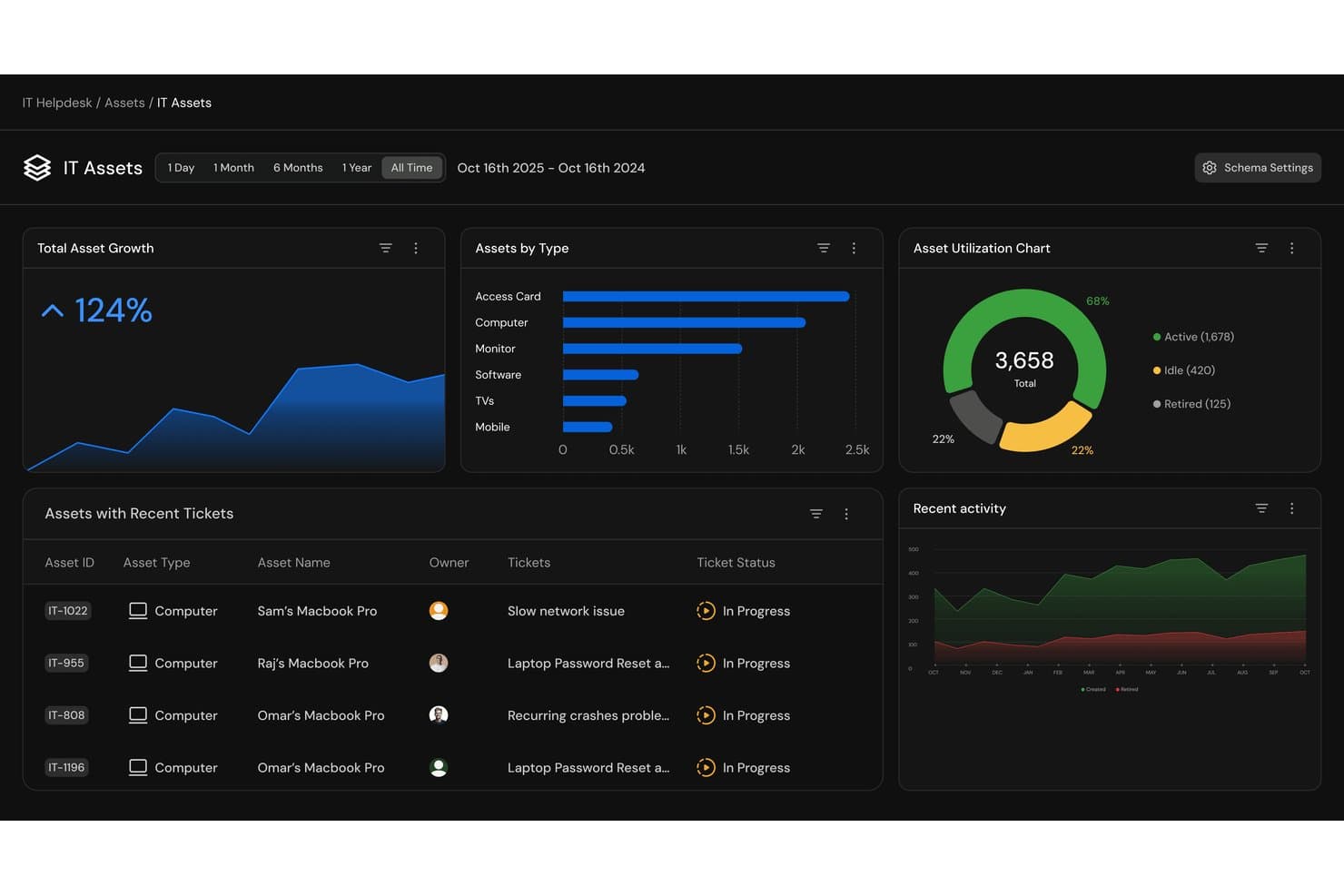
Serval offre una dashboard degli asset IT con metriche di crescita degli asset, suddivisioni per tipo di asset, grafici di utilizzo e tracciamento dei ticket recenti per la gestione degli asset dell’help desk. Serval è una piattaforma ITSM nativa per l’IA che combina ticketing dell’help desk, gestione degli asset, automazione dei flussi di lavoro e gestione degli accessi tramite agenti IA autonomi che gestiscono e risolvono le richieste IT.
Per chi è ideale Serval?
Serval è adatto a team IT di medie e grandi dimensioni presso organizzazioni tecnologicamente mature che desiderano che l’IA gestisca in modo autonomo volumi elevati di richieste di supporto ricorrenti.
Perché ho scelto Serval
Serval si guadagna un posto nella mia shortlist per il modo in cui gestisce l’automazione, diverso da qualsiasi altro strumento che abbia mai recensito. Invece di un generatore di flussi di lavoro drag-and-drop, posso descrivere un processo in linguaggio naturale e Serval genera un’automazione pronta per la produzione. Ciò che trovo particolarmente utile sono i Suggerimenti Serval: mentre il mio team chiude manualmente i ticket, il sistema individua schemi di risoluzione e propone flussi di lavoro già pronti che posso pubblicare con un clic.
Caratteristiche principali di Serval
- Ingestione e riconciliazione degli asset: Raccoglie e unisce automaticamente i dati degli asset da sistemi MDM, HRIS, IdP e dagli acquisti.
- Gestione del codice dei flussi di lavoro personalizzati: Memorizza le automazioni dei flussi di lavoro come codice verificabile, con controllo di versione Git per trasparenza e possibilità di ripristino.
- Segmentazione del team: Organizza ticket, flussi di lavoro e integrazioni per reparto, con controlli di accesso dettagliati.
- Supporto multicanale: Consente ai team IT di ricevere e gestire richieste tramite Slack, Teams, email e un portale web.
Integrazioni Serval
Serval offre integrazioni native con Okta, Google Workspace, Microsoft Teams, Slack, Notion, Confluence, Jira, GitHub, ServiceNow e Salesforce. È disponibile un’API per integrazioni personalizzate.
Pros and Cons
Pros:
- L’IA risolve autonomamente i ticket senza intervento dei tecnici
- Costruzione di flussi di lavoro in linguaggio naturale senza scrivere codice
- Segmentazione dei team multi-reparto con controlli d’accesso dettagliati
Cons:
- La gestione degli asset è meno approfondita rispetto agli strumenti ITAM specializzati
- Prodotto nuovo con pochi dati da fonti indipendenti
Learn more about Serval: Ideale per la gestione dell'inventario IT
- Prova gratuita di 14 giorni
- Da $9/postazione/mese (fatturazione annuale)
Visit WebsiteCustomer Rating:4.6/5
monday service aiuta i team IT a tracciare gli asset e gestire il supporto con personalizzazione no-code. monday service è una piattaforma di servizi personalizzabile che aiuta i team a gestire e automatizzare in modo efficiente le proprie operazioni e processi di servizio. Il suo approccio visivo semplifica la gestione sia delle richieste di servizio che dell'inventario IT.
Perché ho scelto monday service: i team possono monitorare facilmente l'hardware, assegnare compiti e tenere traccia delle date importanti di manutenzione. È possibile organizzare le attrezzature per tipologia, tracciare i numeri di serie e monitorare il ciclo di vita di ogni asset.
I flussi di lavoro personalizzabili della piattaforma rendono semplice creare un processo di gestione degli asset che si adatta alle esigenze specifiche del tuo team. Grazie alle automazioni, riceverai promemoria quando la manutenzione è prevista, e le dashboard visive mantengono tutti allineati e rendono facile vedere in tempo reale lo stato di tutte le attrezzature.
Funzionalità e integrazioni distintive:
Le funzionalità includono flussi di lavoro personalizzabili senza codice, tracciamento centralizzato degli asset IT, dashboard visive per la gestione dell'hardware, automazioni per l'invio di promemoria di manutenzione, strumenti per il monitoraggio dei numeri di serie e delle date di consegna, e strumenti di reportistica per analisi sull'utilizzo degli asset.
Le integrazioni includono Slack, Zoom, Microsoft Teams, Google Drive, Dropbox, Jira, HubSpot, Salesforce, GitHub e Gmail.
Pros and Cons
Pros:
- Flussi di lavoro degli asset personalizzabili
- Automazioni per la manutenzione degli asset
- Dashboard visive per lo stato degli asset
Cons:
- La configurazione può richiedere tempo
- Le automazioni potrebbero richiedere aggiustamenti
Learn more about monday service: Ideale per attività di manutenzione programmate
- Prova gratuita disponibile
- Da $478/utente/anno
Visit WebsiteCustomer Rating:4.5/5
Issuetrak consolida le richieste di supporto e offre un modulo separato per la gestione degli asset. Issuetrak è un software help desk versatile progettato per semplificare il monitoraggio e la risoluzione delle segnalazioni per le aziende di diversi settori. Offre una suite completa di strumenti per gestire le richieste di assistenza clienti, i reclami e gli incidenti interni in modo efficiente.
Perché ho scelto Issuetrak: La funzionalità di gestione degli asset di Issuetrak consente di tenere traccia delle informazioni su hardware e software, assicurando che tutti gli asset siano registrati e aggiornati. Inoltre, il sistema permette di programmare le attività di manutenzione, garantendo che le apparecchiature rimangano in condizioni ottimali.
Un altro motivo per considerare Issuetrak è la sua capacità di automatizzare l'assegnazione dei ticket tramite la distribuzione a rotazione (round-robin). Questa funzione garantisce che le segnalazioni in ingresso siano distribuite equamente tra i membri del team di supporto, prevenendo sovraccarichi su singole persone e promuovendo tempi di risoluzione efficienti. Grazie all'automazione di questo processo, il team può concentrarsi maggiormente sulla risoluzione dei problemi piuttosto che sulla gestione delle assegnazioni.
Funzionalità principali & integrazioni:
Le funzionalità includono un Centro Segnalazioni centralizzato che fornisce un punto unico in cui visualizzare, gestire e aggiornare i ticket con facilità. La piattaforma offre anche flussi di lavoro, permettendo al team di collaborare sulle segnalazioni e mantenere coerenza nei processi. Inoltre, la knowledge base di Issuetrak aiuta a mantenere le informazioni importanti accessibili sia agli utenti che agli amministratori.
Le integrazioni includono Microsoft 365, Google Analytics, Gmail, Salesforce, Power BI e migliaia di altre tramite Zapier. È inoltre possibile accedere all'API di Issuetrak per ulteriori collegamenti.
Pros and Cons
Pros:
- Efficace nell'organizzare e gestire i ticket
- Opzioni di implementazione in cloud e on-premises
- Sistema altamente personalizzabile
Cons:
- La gestione degli asset è un componente aggiuntivo a pagamento
- Alcune funzionalità possono essere complesse da configurare
Learn more about Issuetrak: Ideale per grandi aziende che necessitano di soluzioni IT complete
- Demo gratuita disponibile
- $100/utente/mese
Visit WebsiteCustomer Rating:4.4/5
Una foto della sezione dettagli di un ticket creato in ServiceNow. ServiceNow offre una vasta gamma di servizi IT, rendendolo uno strumento completo per le grandi aziende. L'ampiezza delle sue funzionalità risponde a molteplici esigenze, assicurandogli la posizione di soluzione leader per le imprese che necessitano di servizi IT completi.
Perché ho scelto ServiceNow: ServiceNow si è distinto nella mia valutazione grazie alla sua suite completa di soluzioni IT. Ho scelto questa piattaforma perché offre un'ampia scelta di servizi in un'unica soluzione, rendendola particolarmente utile per le organizzazioni di grandi dimensioni. La sua vasta funzionalità è ciò che la differenzia e la rende la 'Migliore per...' le grandi aziende che hanno bisogno di un set completo di soluzioni IT.
Funzionalità e integrazioni principali:
ServiceNow si distingue per la gestione degli incidenti, la gestione dei problemi, la gestione delle modifiche e delle versioni, oltre alla gestione degli asset e dei costi. Offre inoltre capacità AI di alto livello che aiutano ad automatizzare le attività di routine. ServiceNow si integra senza problemi con molte soluzioni enterprise come Slack, Jira e Trello, aumentando ulteriormente la sua efficacia.
Pros and Cons
Pros:
- Suite completa di soluzioni IT
- Capacità AI avanzate per l'automazione
- Integrazioni robuste con altre soluzioni enterprise
Cons:
- Il prezzo premium può non essere adatto a tutti i budget
- L'interfaccia può risultare complicata per i nuovi utenti
- Richiede conoscenze tecniche per la personalizzazione
Altri software di help desk con gestione degli asset
Di seguito è riportato un elenco di ulteriori software di help desk con strumenti di gestione degli asset che ho selezionato, ma che non sono rientrati nella top 10. Vale sicuramente la pena esaminarli.
- 11InvGate Service ManagementIdeale per flussi di lavoro IT drag-and-drop
- 12Jira Service ManagementIdeale per i team di sviluppo Agile che cercano strumenti ITSM
- 13ConnectWise ManageIdeale per i servizi IT che richiedono una gestione aziendale avanzata
- 14SysAidIdeale per integrare più servizi ITSM in un'unica piattaforma
- 15Cherwell Service ManagementIdeale per flussi di lavoro flessibili e personalizzabili
- 16Ivanti Service ManagementIdeale per la gestione completa degli asset IT
- 17Spiceworks IT DesktopIdeale per le aziende attente al budget che necessitano di supporto IT
- 18SolarWinds IT Service Desk SoftwareIdeale per l'automazione della gestione degli incidenti
- 19HiverIdeale per la comunicazione omnicanale
- 20ManageEngine ServiceDesk PlusIdeale per l'implementazione di analisi IT avanzate
Recensioni correlate sui software di help desk con gestione degli asset
Come valuto i software Help Desk con gestione delle risorse
Valuto questi strumenti su due livelli: la base—elementi come un CMDB funzionante, la rilevazione automatica delle risorse e il collegamento tra ticket e risorse—e i fattori differenzianti che distinguono le piattaforme più solide.
Funzionalità principali (Prerequisiti per questa lista)
Quando seleziono gli strumenti per la mia lista, valuto ciascuno su una scala da 0 (non offre la funzionalità) a 5 (eccelle in quest'area) per ciascuna delle funzionalità fondamentali elencate di seguito. Quindi, converto il punteggio totale dello strumento in percentuale. Ogni strumento deve ottenere un punteggio totale minimo del 65% per essere preso in considerazione per l'inclusione.
- Sistema di ticketing: Cerco raccolta multicanale (email, portale, chat), instradamento automatico, timer SLA e gestione delle code in modo che i tecnici non debbano smistare manualmente ogni richiesta.
- Archivio risorse (CMDB): Un CMDB solido deve tracciare hardware, software e CI con stato del ciclo di vita, assegnazione e mappatura delle dipendenze tra risorse correlate.
- Collegamento ticket-risorsa: Verifico se un tecnico può accedere alla cronologia completa degli incidenti di un dispositivo direttamente da un ticket invece di dover cercare in uno schermo inventario separato.
- Rilevazione automatica delle risorse: Sono importanti qui la scansione di rete e quella tramite agenti per mantenere aggiornata l'inventario—le importazioni manuali di file CSV non bastano per ambienti in crescita.
- Monitoraggio delle licenze e dei contratti: Valuto se lo strumento tiene traccia del numero di licenze software, dei contratti con i fornitori, della scadenza delle garanzie e segnala preventivamente eventuali lacune di conformità prima delle scadenze di rinnovo.
- Supporto ai workflow ITIL: Oltre alla registrazione base degli incidenti, cerco workflow strutturati per la gestione di cambiamenti, problemi e richieste, con catene di approvazione e percorsi di escalation.
Una volta che ho una lista di strumenti che soddisfano questi criteri, considero ciò che distingue ciascuna piattaforma.
Fattori differenzianti (Cosa distingue i vendor)
Ecco come confronto i diversi fornitori:
Funzionalità distintive
Il controllo remoto integrato è molto importante—i tecnici che possono accedere direttamente al desktop di un utente finale dal ticket risolvono i problemi più velocemente rispetto a chi deve passare da uno strumento all'altro. Osservo anche le capacità di gestione delle patch, perché le piattaforme che automatizzano l'applicazione delle patch di sistema operativo e di terze parti riducono direttamente il volume di ticket in coda. Vale anche la pena valutare la deflessione dei ticket alimentata dall'intelligenza artificiale, soprattutto per i team che ricevono molte richieste ripetitive di reset password o di accesso che un chatbot può gestire prima che sia necessario l'intervento di un tecnico.
Oltre alle funzionalità
L'ecosistema di integrazione conta molto. Il tuo strumento help desk e di gestione risorse deve sincronizzarsi con i servizi di directory come Active Directory o Okta per il provisioning degli utenti, oltre a piattaforme di gestione degli endpoint come Intune o Jamf per i dati sulle risorse in tempo reale. Valuto anche la postura di conformità—le certificazioni SOC 2 Type II e ISO 27001 indicano che un vendor prende sul serio la protezione dei dati, il che conta quando il tuo CMDB contiene dati sensibili su dispositivi e utenti. Anche il costo totale di proprietà merita attenzione, visto che alcuni vendor applicano costi aggiuntivi per agenti di rilevazione o per ulteriori record di risorse.
Come scegliere un software di help desk con gestione degli asset
È facile perdersi in lunghi elenchi di funzionalità e strutture di prezzo complesse. Per aiutarti a rimanere concentrato mentre affronti il tuo processo di selezione software specifico, ecco una lista di fattori da tenere a mente:
| Fattore | Cosa considerare |
|---|---|
| FattoreScalabilità | Cosa considerareLo strumento può crescere insieme alla tua attività? Verifica se supporta un aumento degli utenti e dei dati senza cali di prestazioni. Considera l'espansione futura e il modo in cui lo strumento gestirà un carico maggiore. |
| FattoreIntegrazioni | Cosa considerareSi adatta ai sistemi esistenti? Cerca integrazioni native con i software che già utilizzi. Evita gli strumenti che richiedono soluzioni alternative complesse per connettersi al tuo stack tecnologico. |
| FattorePersonalizzazione | Cosa considerarePuoi adattare lo strumento ai tuoi flussi di lavoro? Assicurati che consenta modifiche adatte ai tuoi processi senza richiedere una programmazione estesa. La flessibilità è fondamentale per esigenze aziendali specifiche. |
| FattoreFacilità d'uso | Cosa considerareL'interfaccia è intuitiva? Verifica che il layout sia semplice e che i nuovi utenti possano imparare a usarlo rapidamente. Evita gli strumenti con una navigazione eccessivamente complessa che rallenta le attività quotidiane. |
| FattoreImplementazione e onboarding | Cosa considerareQuanto rapidamente può iniziare a lavorare il tuo team? Cerca strumenti che offrano guide chiare per l'onboarding, risorse formative o assistenza dedicata, così da partire con il piede giusto. Quando confronti strumenti come NinjaOne vs. Atera, considera le competenze e i flussi di lavoro preferiti del tuo team. |
| FattoreCosto | Cosa considerareRientra nel tuo budget? Confronta i piani tariffari e presta attenzione ai costi nascosti. Considera il costo totale di proprietà, inclusi i potenziali costi futuri con l'evolversi delle tue esigenze. |
| FattoreMisure di sicurezza | Cosa considerareI tuoi dati e asset sono protetti? Verifica gli standard di crittografia, gli aggiornamenti regolari della sicurezza e la conformità alle normative pertinenti. Assicurati che rispetti le policy di sicurezza della tua organizzazione. |
Cos'è un software di help desk con gestione degli asset?
Il software per l'assistenza tecnica con gestione delle risorse è uno strumento che combina la gestione dei ticket e il monitoraggio delle risorse per migliorare l'erogazione dei servizi IT. I professionisti IT, i team di supporto e i responsabili delle operazioni utilizzano generalmente questi strumenti per gestire in modo efficiente le richieste dei clienti e le risorse aziendali. Le funzionalità di gestione dei ticket, monitoraggio delle risorse e segnalazione degli incidenti aiutano a organizzare i flussi di lavoro e a mantenere la qualità del servizio. Nel complesso, questi strumenti e altri software per la gestione delle immobilizzazioni migliorano l'efficienza e la gestione delle risorse nelle organizzazioni.
Funzionalità
Quando selezioni un software per l'assistenza tecnica con gestione delle risorse, presta attenzione alle seguenti funzionalità chiave:
- Gestione dei ticket: Organizza e assegna priorità alle richieste dei clienti per garantire risposte tempestive ed efficienti.
- Monitoraggio delle risorse: Monitora e gestisce le risorse aziendali durante tutto il loro ciclo di vita per mantenere responsabilità ed efficienza.
- Segnalazione degli incidenti: Registra e monitora gli incidenti per aiutare i team ad analizzare gli schemi ricorrenti e prevenire problemi futuri.
- Flussi di lavoro personalizzabili: Consente ai team di adattare i processi alle specifiche esigenze aziendali senza ricorrere a una programmazione estesa.
- Supporto multicanale: Consente di comunicare con gli utenti attraverso diverse piattaforme, migliorando l'accessibilità e l'esperienza dell'utente.
- Portale autonomo: Permette agli utenti di trovare autonomamente le soluzioni, riducendo il carico di lavoro dei team di supporto.
- Strumenti di analisi: Forniscono informazioni sulle prestazioni e sulle tendenze del servizio, favorendo decisioni basate sui dati.
- Funzionalità di integrazione: Si collegano ai sistemi esistenti per garantire un flusso regolare di informazioni tra le piattaforme.
- Misure di sicurezza: Proteggono i dati sensibili mediante la crittografia e la conformità alle normative pertinenti.
- Fatturazione automatizzata: Semplifica le operazioni finanziarie garantendo una fatturazione accurata e il monitoraggio dei ricavi.
Vantaggi
L'implementazione di un software per l'assistenza tecnica con gestione delle risorse offre diversi vantaggi al tuo team e alla tua azienda. Ecco alcuni dei vantaggi che puoi aspettarti:
- Maggiore efficienza: Automatizza attività di routine come la gestione dei ticket e il monitoraggio delle risorse, consentendo al tuo team di concentrarsi sulle priorità strategiche.
- Migliore capacità decisionale: Fornisce strumenti di analisi che offrono informazioni sulle tendenze delle prestazioni, aiutandoti a prendere decisioni basate sui dati.
- Migliore gestione delle risorse: Monitora le risorse durante tutto il loro ciclo di vita, garantendone un utilizzo ottimale e riducendo gli sprechi.
- Maggiore soddisfazione degli utenti: Offre un portale autonomo che consente agli utenti di risolvere autonomamente i problemi, portando a una risoluzione più rapida.
- Risparmio sui costi: Riduce i costi operativi automatizzando i processi di fatturazione e di emissione delle fatture, garantendo accuratezza ed efficienza.
- Scalabilità: Supporta le aziende in crescita consentendo di gestire un numero crescente di utenti e dati senza sacrificare le prestazioni.
- Maggiore sicurezza: Protegge le informazioni sensibili attraverso misure di sicurezza e la conformità alle normative, garantendo l'integrità dei dati.
Costi e prezzi
La scelta di un software per l'assistenza tecnica con gestione delle risorse richiede la comprensione dei vari modelli e piani tariffari disponibili. I costi variano in base alle funzionalità, alle dimensioni del team, agli elementi aggiuntivi e ad altro ancora. La tabella seguente riepiloga i piani più comuni, i relativi prezzi medi e le funzionalità generalmente incluse nelle soluzioni software per l'assistenza tecnica con gestione delle risorse:
Tabella comparativa dei piani per software per l'assistenza tecnica con gestione delle risorse
| Tipo di piano | Prezzo medio | Funzionalità comuni |
|---|---|---|
| Tipo di pianoPiano gratuito | Prezzo medio$0 | Funzionalità comuniGestione di base dei ticket, monitoraggio limitato delle risorse e supporto della comunità. |
| Tipo di pianoPiano personale | Prezzo medio$5-$25/utente/mese | Funzionalità comuniGestione dei ticket, monitoraggio di base delle risorse, supporto via e-mail e portale autonomo. |
| Tipo di pianoPiano aziendale | Prezzo medio$30-$60/utente/mese | Funzionalità comuniGestione avanzata delle risorse, supporto multicanale, strumenti di reportistica e funzionalità di integrazione. |
| Tipo di pianoPiano per grandi aziende | Prezzo medio$70-$120/utente/mese | Funzionalità comuniOpzioni di personalizzazione complete, analisi avanzate, gestione dedicata dell'account e funzionalità di sicurezza avanzate. |
Domande frequenti sul software di help desk con gestione delle risorse
Cosa distingue il software di help desk con gestione delle risorse da un normale strumento di help desk?
Un normale help desk si concentra principalmente sulla gestione dei ticket di assistenza. Se combinato con la gestione delle risorse, il sistema tiene traccia anche delle risorse fisiche e digitali, collegando ogni ticket all’apparecchiatura o al software coinvolto per offrire un contesto migliore e risolvere i problemi più rapidamente.
Il software di help desk può tenere traccia delle risorse non informatiche?
Sì. Sebbene sia stato originariamente creato per risorse informatiche come laptop o server, molte piattaforme ora consentono di tenere traccia di apparecchiature per ufficio, mobili e persino licenze software, offrendo ai team una visibilità completa tra i vari reparti.
In che modo il monitoraggio delle risorse migliora la risoluzione dei problemi?
Collegando i ticket a risorse specifiche, i tecnici possono consultare la cronologia completa di una risorsa, inclusi i problemi precedenti o i registri di manutenzione. Questo rende più rapida e accurata l’identificazione dei problemi ricorrenti.
Quali tipi di organizzazioni utilizzano software di help desk con gestione delle risorse?
Viene utilizzato in diversi settori, dall’informatica all’istruzione, fino alla sanità e alla finanza. Qualsiasi organizzazione che gestisca apparecchiature o strumenti digitali insieme all’assistenza agli utenti può trarne vantaggio.
In che modo l'automazione si integra negli strumenti di help desk e gestione delle risorse?
L’automazione aiuta a indirizzare i ticket, aggiornare i record delle risorse e attivare promemoria per la manutenzione. Riduce il lavoro manuale ripetitivo e garantisce che i dati rimangano accurati tra i vari sistemi.
I sistemi di help desk basati sul cloud sono migliori di quelli on-premise?
I sistemi basati sul cloud sono più facili da utilizzare e aggiornare, il che li rende ideali per i team remoti o ibridi. Le configurazioni on-premise, tuttavia, rimangono utili per le aziende che necessitano di uno stretto controllo sull’archiviazione dei dati e sulla conformità normativa.
Qual è il prossimo passo:
Se stai cercando un software di help desk con gestione delle risorse, contatta gratuitamente un consulente SoftwareSelect per ricevere consigli.
Compili un modulo e fai una breve conversazione durante la quale il consulente approfondisce le tue esigenze specifiche. Dopodiché riceverai una selezione ristretta di software da valutare. Ti accompagnerà inoltre durante l'intero processo di acquisto, comprese le negoziazioni sul prezzo.