

Mantenere aggiornati tutti i dispositivi non è solo una questione di praticità, ma anche di protezione dell'azienda dalle minacce informatiche in continua evoluzione. Il software di gestione delle patch elimina il lavoro manuale necessario per mantenere la sicurezza, aggiornando automaticamente i sistemi, monitorando la conformità e riducendo le vulnerabilità. Che tu gestisca un piccolo team IT o supervisioni attività a livello aziendale, lo strumento giusto può farti risparmiare ore di lavoro ripetitivo e prevenire costosi tempi di inattività.
Perché fidarsi dei nostri consigli sui software
6,700+
Reviews
20
Industry experts
16+
Evaluation factors
14
Years
Il nostro team testa e recensisce software dal 2012. In quanto leader tecnologici noi stessi, sappiamo quanto sia difficile — e importante — scegliere il software giusto.
Per questa guida, abbiamo valutato gli strumenti attraverso test praticie ricerche indipendenti, assegnando un punteggio agli strumenti in base ai nostri criteri di selezione.
Le nostre recensioni riflettono il nostro giudizio editoriale umano, non un discorso di vendita.
Revisori esperti:
- Paulo Gardini MiguelDirettore tecnico
 Tim FisherVP dell'IA
 Gabriel RosasTech Lead e architetto software
 Christhian GruhnTech Lead e architetto della piattaforma

Riepilogo dei migliori software di gestione delle patch
Questa tabella comparativa riassume i dettagli sui prezzi delle mie migliori selezioni di software di gestione delle patch, per aiutarti a trovare quello più adatto al tuo budget e alle esigenze della tua azienda.
| Tool | Best For | Trial Info | Price | ||
|---|---|---|---|---|---|
| 1 | Ideale per una reportistica semplificata sulla conformità delle patch | Prova gratuita di 14 giorni disponibile | $3/utente/mese | Website | |
| 2 | Ideale per ITSM potenziata dall'IA con patching intelligente | Prova gratuita di 14 giorni + demo gratuita disponibile | $19/utente/mese | Website | |
| 3 | Ideale per la gestione delle patch su più sistemi operativi | Prova gratuita di 30 giorni + demo gratuita disponibile | A partire da $129/tecnico/mese (fatturazione annuale) | Website | |
| 4 | Ideale per la visibilità delle risorse in tempo reale | Prova gratuita + demo gratuita disponibili | Prezzo su richiesta | Website | |
| 5 | Ottimale con rilevamento e applicazione unificati dei rischi | Prova gratuita di 30 giorni | Prezzi su richiesta | Website | |
| 6 | Ideale per la gestione delle patch nella forza lavoro remota | Piano gratuito disponibile | $10/user/month (min 5 seats) | Website | |
| 7 | Ideale per ambienti cloud-native | Prova gratuita di 15 giorni | $3/utente/mese (fatturato annualmente) | Website | |
| 8 | Il migliore per la risoluzione automatica delle CVE | Prova gratuita + demo disponibile | Da $12/dispositivo/anno | Website | |
| 9 | Ideale per gli MSP che cercano un'ampia personalizzazione | $19/utente/mese (fatturato annualmente) + quota base mensile di $2500 | Website | ||
| 10 | Ideale per piccole imprese con un budget limitato | Prova gratuita + demo gratuita disponibili | $4/user/month | Website |


Recensioni dei migliori software di gestione delle patch
Di seguito trovi i miei riepiloghi dettagliati dei migliori software di gestione delle patch inclusi nel mio elenco. Le mie recensioni offrono uno sguardo approfondito alle funzionalità principali, ai vantaggi e agli svantaggi, alle integrazioni e ai casi d’uso ideali di ogni strumento, per aiutarti a trovare quello più adatto a te.
 Ideale per una reportistica semplificata sulla conformità delle patch
- Prova gratuita di 14 giorni disponibile
- $3/utente/mese
Visit WebsiteCustomer Rating:4.7/5
Panoramica della dashboard nel software di gestione patch NinjaOne NinjaOne è una soluzione unificata per le operazioni IT che include una gestione delle patch semplificata. I suoi report di conformità delle patch sono facili e intuitivi, adatti alle organizzazioni che richiedono questa specifica funzionalità.
Perché ho scelto NinjaOne: Ho scelto NinjaOne perché offre un approccio intuitivo alla reportistica sulla conformità delle patch. Questo aspetto in particolare lo distingue, rendendolo ideale per chi necessita di una reportistica semplificata in contesti di conformità.
Caratteristiche principali e integrazioni:
NinjaOne offre automazione delle patch, scripting personalizzato e monitoraggio in tempo reale. La piattaforma include anche dashboard intuitive che semplificano la reportistica di conformità.
Lo strumento si integra con i più diffusi strumenti RMM e PSA, oltre a soluzioni di archiviazione cloud come Dropbox e Google Drive.
Pros and Cons
Pros:
- Reportistica semplificata sulla conformità delle patch
- Opzioni di scripting personalizzato
- Prezzo di partenza basso
Cons:
- Supporto limitato per piattaforme non-Windows
- Meno funzionalità avanzate
- Le dashboard possono risultare caotiche.
Learn more about NinjaOne: Ideale per ITSM potenziata dall'IA con patching intelligente
- Prova gratuita di 14 giorni + demo gratuita disponibile
- $19/utente/mese
Visit WebsiteCustomer Rating:4.6/5
Testare e distribuire patch nel software di gestione delle patch di Freshservice Freshservice è una piattaforma ITSM che combina la gestione dei servizi con capacità di gestione automatizzata delle patch. Ti aiuta a gestire incidenti, asset e cambiamenti utilizzando flussi di lavoro basati sull'intelligenza artificiale per semplificare la distribuzione delle patch e la supervisione dei dispositivi.
Perché ho scelto Freshservice: Ho scelto Freshservice perché unisce la gestione dei servizi IT potenziata dall'IA con il test e la distribuzione automatizzati delle patch in un unico sistema. La sua automazione intelligente supporta l'assegnazione dei ticket e i flussi di lavoro dei servizi, mentre gli strumenti integrati per la gestione delle patch permettono di identificare, testare e distribuire aggiornamenti su tutti i dispositivi senza dover ricorrere a software separati.
Caratteristiche e integrazioni principali:
Freshservice offre funzionalità come la scoperta automatica dei dispositivi, il test automatizzato delle patch e la loro distribuzione. Inoltre, dispone di una CMDB integrata per una migliore gestione degli asset.
Si integra con i principali strumenti ITSM, strumenti per le operazioni IT e software come Jira e Slack.
Pros and Cons
Pros:
- Conformità ITIL
- CMDB integrata per la gestione degli asset
- Integrazioni flessibili
Cons:
- Prezzo iniziale più elevato
- Eccessivo per organizzazioni non ITIL
- Funzionalità specifiche per le patch limitate.
Learn more about Freshservice: Ideale per la gestione delle patch su più sistemi operativi
- Prova gratuita di 30 giorni + demo gratuita disponibile
- A partire da $129/tecnico/mese (fatturazione annuale)
Visit WebsiteCustomer Rating:4.6/5
Profilo di automazione di Atera che mostra la gestione pianificata delle patch del sistema operativo, aggiornamenti software e attività di manutenzione gestite da un'unica dashboard. Atera è una soluzione completa per i professionisti IT e i fornitori di servizi gestiti, che offre strumenti per il monitoraggio e la gestione remota. È progettata per semplificare il tuo carico di lavoro automatizzando vari processi, inclusa la gestione delle patch su più sistemi operativi.
Perché ho scelto Atera: Ho scelto Atera perché automatizza l'installazione delle patch su diversi sistemi operativi, permettendoti di risparmiare molto tempo. Che tu stia lavorando con Windows, macOS o Linux, Atera ti copre con le sue funzionalità di pianificazione e installazione automatica. Questo assicura che i tuoi sistemi siano sempre aggiornati senza che tu debba intervenire manualmente.
Un altro motivo per cui Atera si distingue è la sua capacità di gestire riavvii e attività correlate alle patch senza interrompere il tuo lavoro. Questo significa che puoi concentrarti su attività più critiche, sapendo che la gestione delle patch è gestita in modo efficiente. Queste caratteristiche lo rendono una scelta affidabile per mantenere i sistemi sicuri.
Funzionalità e integrazioni principali:
Le funzionalità includono la gestione automatizzata delle patch per Windows, macOS e Linux. C'è un'opzione per l'esecuzione offline dell'agente, così le patch possono essere applicate anche quando i dispositivi non sono connessi a internet. Inoltre, Atera offre report dettagliati sullo stato delle patch.
Lo strumento si integra con Microsoft Teams, Slack, ServiceNow, Okta, Jira Software Cloud, Azure Active Directory, Microsoft Outlook, Notifiche WhatsApp, Acronis Cyber Protect Cloud, Google Sheets, ChatGPT (OpenAI) e monday.com.
Pros and Cons
Pros:
- Copertura illimitata degli endpoint con una singola licenza per tecnico, conveniente per MSP
- Combina gestione delle patch, accesso remoto e funzionalità di help desk
- Script personalizzati e dashboard in tempo reale offrono visibilità sui flussi di lavoro delle patch
Cons:
- Le opzioni di rollback delle patch sono minime rispetto agli strumenti di livello enterprise
- La reportistica per la conformità e gli audit può risultare insufficiente per settori altamente regolamentati
- L'interfaccia può risultare poco fluida nella gestione di flotte di dispositivi numerose o nell'esecuzione di azioni in massa
 Ideale per la visibilità delle risorse in tempo reale
- Prova gratuita + demo gratuita disponibili
- Prezzo su richiesta

La dashboard di gestione unificata di Heimdal offre una visibilità chiara sulla conformità degli endpoint, sullo stato delle patch e sui controlli di sicurezza di tutti i dispositivi gestiti. Il software di gestione delle patch di Heimdal si distingue come una soluzione versatile per le aziende che desiderano migliorare il proprio livello di sicurezza informatica. È particolarmente indicato per i professionisti IT e i fornitori di servizi gestiti (MSP) che devono gestire senza difficoltà gli aggiornamenti software su varie piattaforme. Automatizzando il processo di distribuzione delle patch, Heimdal affronta la sfida di mantenere i sistemi sicuri e conformi alle normative del settore, rendendolo una scelta ideale per ambiti come sanità, istruzione e pubblica amministrazione.
Perché ho scelto Heimdal
Ho scelto Heimdal per la sua capacità di automatizzare il processo di distribuzione delle patch, riducendo significativamente il carico di lavoro manuale e garantendo aggiornamenti tempestivi. Grazie al supporto per oltre 350 applicazioni di terze parti, Heimdal offre una copertura completa per mantenere i sistemi sicuri e conformi. La sua integrazione con la Piattaforma di sicurezza unificata di Heimdal rafforza ulteriormente la strategia di sicurezza informatica dell'organizzazione, rendendolo una scelta pratica per chi necessita di una gestione efficace delle patch.
Funzionalità principali di Heimdal
Oltre alla distribuzione automatizzata delle patch, ho riscontrato che Heimdal offre diverse altre funzionalità utili:
- Gestione delle vulnerabilità: esegue scansioni continue dei sistemi per identificare e risolvere potenziali minacce alla sicurezza.
- Gestione delle risorse: offre visibilità in tempo reale sulle risorse IT dell'organizzazione, aiutando a monitorarle e gestirle in modo efficace.
- Pianificazioni personalizzabili delle patch: consente di impostare gli orari di distribuzione delle patch per ridurre al minimo le interruzioni operative.
- Aggiornamenti prioritari dei server: ottimizza la distribuzione delle patch negli ambienti con larghezza di banda limitata, garantendo che gli aggiornamenti critici raggiungano prima gli endpoint prioritari.
Integrazioni di Heimdal
Al momento Heimdal non indica integrazioni native; tuttavia, la piattaforma supporta integrazioni personalizzate basate su API.
Pros and Cons
Pros:
- Automatizza la gestione delle patch sugli endpoint
- Solida rilevazione delle vulnerabilità e delle minacce
- Visibilità dettagliata su risorse e licenze
Cons:
- Nessuna integrazione nativa disponibile
- L'interfaccia richiede un periodo di apprendimento iniziale
Learn more about Heimdal: Ottimale con rilevamento e applicazione unificati dei rischi
- Prova gratuita di 30 giorni
- Prezzi su richiesta
Visit WebsiteCustomer Rating:4.5/5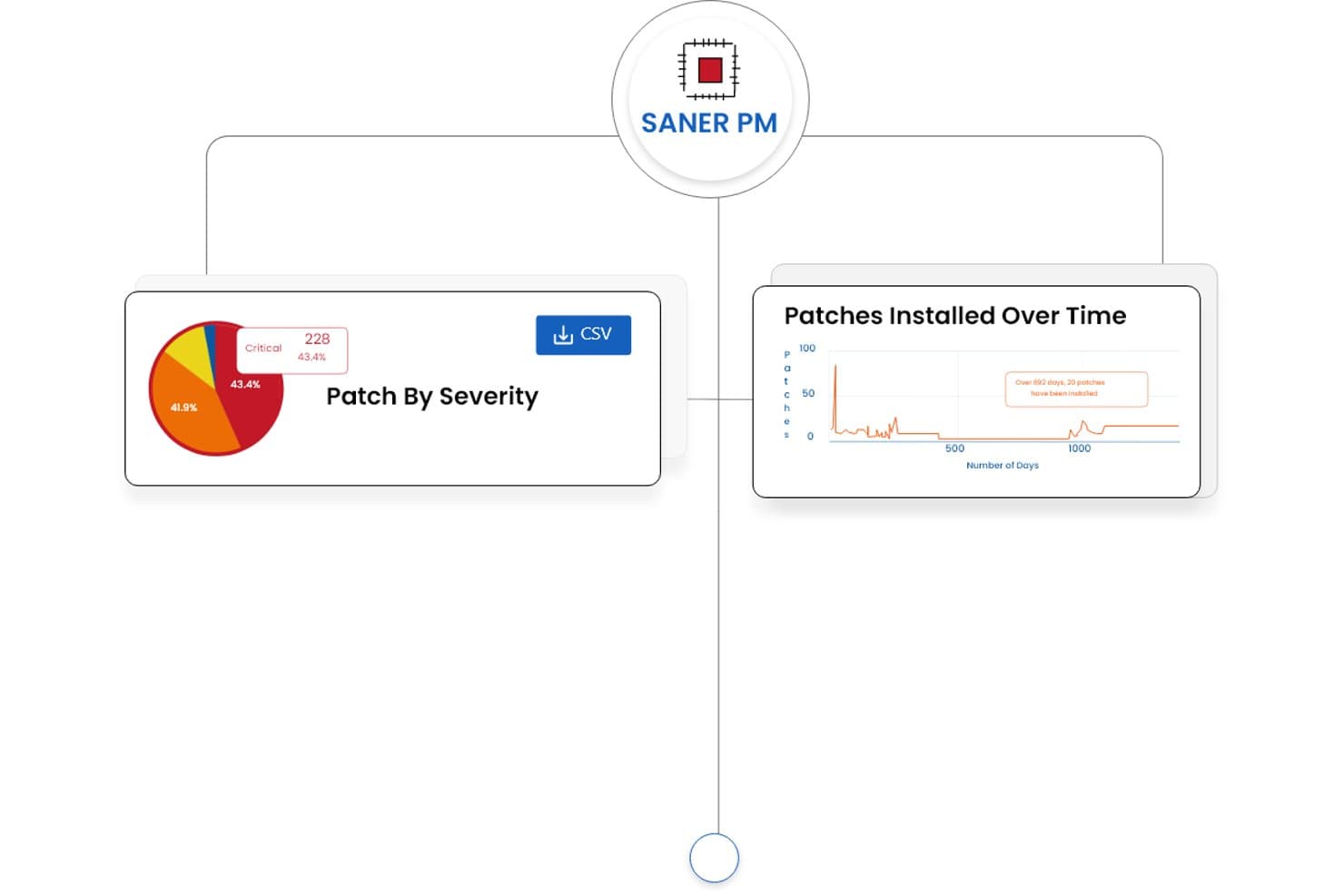
SecPod (Saner Platform) offre dashboard per la gestione degli aggiornamenti correttivi che mostrano la suddivisione per gravità degli aggiornamenti e le tendenze degli aggiornamenti installati nel tempo. Saner Platform di SecPod è una soluzione nativa del cloud per la gestione degli aggiornamenti correttivi e dell'esposizione alle vulnerabilità, che combina il rilevamento continuo dei rischi, la distribuzione automatizzata degli aggiornamenti correttivi e la reportistica sulla conformità per Windows, macOS, Linux e oltre 550 applicazioni di terze parti.
Per chi è più adatto SecPod (Saner Platform)?
I team addetti alla sicurezza e alle operazioni IT delle aziende di medie e grandi dimensioni che necessitano di gestire il rilevamento delle vulnerabilità e la correzione tramite aggiornamenti da un'unica piattaforma.
Perché ho scelto SecPod (Saner Platform)
SecPod (Saner Platform) merita il suo posto tra le migliori soluzioni della mia selezione perché riunisce due flussi di lavoro normalmente separati, il rilevamento delle vulnerabilità e la distribuzione degli aggiornamenti correttivi, in un'unica piattaforma basata su agenti. Apprezzo in particolare il modo in cui combina il punteggio del contesto aziendale SSVC, la probabilità di sfruttamento EPSS e i dati CISA KEV per evidenziare quali aggiornamenti correttivi richiedono effettivamente un'azione urgente. La funzione di ripristino con un clic è davvero utile quando un aggiornamento causa problemi in un ambiente di produzione e occorre ripristinare rapidamente uno stato stabile.
Caratteristiche principali di SecPod (Saner Platform)
- Aggiornamenti correttivi automatizzati per più sistemi operativi: Applica continuamente gli aggiornamenti correttivi a Windows, macOS, Linux e oltre 550 applicazioni di terze parti da un'unica console.
- Creazione personalizzata dei pacchetti di aggiornamento: Consente agli amministratori di distribuire aggiornamenti correttivi specifici dell'organizzazione o sviluppati internamente insieme agli aggiornamenti dei fornitori.
- Reportistica sulla conformità: Genera report esportabili e pronti per gli audit, associati a framework normativi come HIPAA, PCI e SOC 2.
- Architettura degli agenti nativa del cloud: Consente di gestire gli aggiornamenti correttivi e le vulnerabilità per gli endpoint distribuiti e remoti senza dipendere dalle VPN.
Integrazioni di SecPod (Saner Platform)
Le integrazioni native non sono documentate chiaramente. È disponibile un'API per le integrazioni personalizzate.
Pros and Cons
Pros:
- Rilevamento unificato delle vulnerabilità e correzione tramite aggiornamenti
- Definizione delle priorità degli aggiornamenti correttivi basata sul rischio e sull'uso di dati reali sulle minacce
- Supporta gli aggiornamenti correttivi per oltre 550 applicazioni di terze parti
Cons:
- L'interfaccia di reportistica può sembrare inizialmente complessa
- Sono disponibili opzioni limitate per le integrazioni di terze parti
Learn more about SecPod (Saner Platform): Ideale per la gestione delle patch nella forza lavoro remota
- Piano gratuito disponibile
- $10/user/month (min 5 seats)
Visit WebsiteCustomer Rating:4.9/5
Panoramica della dashboard 'Endpoint' nel software di gestione delle patch Action1 Action1 è una soluzione di gestione delle patch basata su cloud progettata per aiutare le aziende ad automatizzare la distribuzione degli aggiornamenti software alle forze lavoro remote. Questo è particolarmente vantaggioso per le aziende con molti dipendenti da remoto che necessitano di aggiornamenti costanti, rendendolo il migliore per la gestione delle patch nelle forze lavoro distribuite.
Perché ho scelto Action1: Ho selezionato Action1 per questa selezione grazie alla sua architettura cloud che permette alle aziende di gestire efficacemente le patch per i team remoti. Si distingue per la capacità di mantenere sicurezza e prestazioni degli endpoint distribuiti.
È quindi lo strumento ideale per le aziende che necessitano di gestire aggiornamenti in una forza lavoro remota.
Caratteristiche principali e integrazioni:
Le funzionalità più rilevanti di Action1 comprendono valutazioni automatiche delle patch, reportistica in tempo reale e supporto multipiattaforma, offrendo alle aziende maggiore flessibilità nella gestione degli aggiornamenti su vari sistemi operativi. Si integra inoltre con sistemi comunemente usati come Active Directory e SCCM, risultando così più adattabile per aziende con un'infrastruttura già esistente.
Pros and Cons
Pros:
- L'architettura cloud è ideale per la gestione di team di lavoro remoti.
- La reportistica in tempo reale offre informazioni immediate sulla conformità degli aggiornamenti.
- Il supporto multipiattaforma copre un'ampia gamma di sistemi operativi.
Cons:
- Il requisito minimo di licenze potrebbe non essere adatto ad organizzazioni più piccole.
- Potrebbe esserci una curva di apprendimento per i team inesperti nella gestione delle patch.
- Funzionalità limitate rispetto ad alcune altre soluzioni di livello enterprise.
Learn more about Action1: Ideale per ambienti cloud-native
- Prova gratuita di 15 giorni
- $3/utente/mese (fatturato annualmente)
Visit WebsiteCustomer Rating:4.7/5
Funzione di gestione dei sistemi del software di gestione patch Automox Automox automatizza la gestione delle patch nel cloud, dalla scoperta alla distribuzione. È flessibile e scalabile, perfetto per mettere in sicurezza gli endpoint remoti.
Perché ho scelto Automox: Ho inserito Automox in questa lista per il suo approccio completo e cloud-native alla gestione delle patch. In un mondo in cui il lavoro da remoto è sempre più diffuso, è estremamente prezioso disporre di uno strumento progettato fin dall'inizio per gestire le operazioni basate sul cloud.
Automox si distingue perché gestisce e protegge gli endpoint remoti, risultando ideale per le organizzazioni che operano in ambienti cloud-native.
Funzionalità e integrazioni principali:
Automox offre funzionalità come la scoperta automatica dei sistemi, la valutazione continua delle vulnerabilità e l'automazione basata su policy. Queste caratteristiche facilitano la gestione delle patch e riducono i rischi di sicurezza associati all'uso di software obsoleti.
Inoltre, Automox si integra con strumenti di terze parti molto diffusi come Slack, Jira e Webhooks, consentendo una comunicazione e coordinazione più efficaci all'interno dell'organizzazione.
Pros and Cons
Pros:
- Piattaforma cloud-native, progettata per organizzazioni moderne e distribuite.
- Automazione basata su policy per semplificare le attività di gestione delle patch.
- Si integra con strumenti di terze parti popolari per una migliore comunicazione e coordinazione.
Cons:
- Potrebbe essere meno adatto per organizzazioni che non operano completamente nel cloud.
- La tariffazione è annuale, il che potrebbe non essere ideale per alcune aziende.
- Richiede una certa competenza tecnica per l'installazione e la configurazione.
 Il migliore per la risoluzione automatica delle CVE
- Prova gratuita + demo disponibile
- Da $12/dispositivo/anno
Visit WebsiteCustomer Rating:4.6/5
PDQ Deploy mostra una dashboard di distribuzioni in tempo reale che visualizza le installazioni dei pacchetti software con stato online, stato di completamento e tempo trascorso su più endpoint. PDQ Connect è una piattaforma cloud per la gestione delle patch su dispositivi Windows che offre distribuzione automatica delle patch, inventario remoto dei dispositivi, creazione di pacchetti personalizzati e controlli di accesso basati sui ruoli.
Per chi è più indicato PDQ Connect?
Team IT in organizzazioni di piccole e medie dimensioni che gestiscono dispositivi Windows in ambienti distribuiti o remoti.
Perché ho scelto PDQ Connect
Ho scelto PDQ Connect tra i migliori perché automatizza la risoluzione delle CVE, consentendo al mio team di affrontare rapidamente le vulnerabilità non appena vengono identificate. Mi piace che acquisisca i dati delle CVE, li associ ai nostri dispositivi Windows e distribuisca le patch senza intervento manuale. Questo approccio ci permette di stare sempre un passo avanti alle minacce e ridurre il periodo di esposizione nel nostro ambiente.
Funzionalità chiave di PDQ Connect
- Inventario remoto dei dispositivi: Visualizza e gestisci tutti i dispositivi Windows del tuo ambiente da una singola dashboard.
- Distribuzione di pacchetti personalizzati: Crea e distribuisci pacchetti software personalizzati ai dispositivi target.
- Controllo accessi basato sui ruoli: Assegna permessi e ruoli ai membri del team per una gestione sicura.
- Reportistica in tempo reale: Genera report aggiornati sullo stato delle patch e sulla conformità dei dispositivi.
Integrazioni con PDQ Connect
Le integrazioni native non sono chiaramente documentate. PDQ Connect fornisce un'API per integrazioni personalizzate.
Pros and Cons
Pros:
- Inventario e stato dei dispositivi in tempo reale
- Pianificazione automatica delle patch per dispositivi Windows
- Report dettagliati di conformità e audit
Cons:
- Mancano funzionalità di scansione delle vulnerabilità integrate
- Le opzioni di personalizzazione dei report sono limitate
Learn more about PDQ Connect: Ideale per gli MSP che cercano un'ampia personalizzazione
- $19/utente/mese (fatturato annualmente) + quota base mensile di $2500
Visit WebsiteCustomer Rating:4/5
Funzionalità di monitoraggio di ConnectWise Automate per la gestione delle patch ConnectWise Automate è progettato per aiutare i Managed Service Provider (MSP) a gestire e automatizzare tutti gli aspetti della gestione delle patch. La sua natura personalizzabile permette di adattare le funzionalità dello strumento alle esigenze operative specifiche, rendendolo ideale per gli MSP che richiedono un'ampia personalizzazione.
Perché ho scelto ConnectWise Automate: Nella selezione degli strumenti per questa lista, la personalizzazione era un criterio chiave. ConnectWise Automate offre grandissime possibilità di personalizzazione, consentendo agli MSP di adattare il software alle necessità di clienti specifici o mercati di nicchia.
Questa capacità unica giustifica la sua posizione come migliore per gli MSP che richiedono opzioni di personalizzazione approfondite nelle soluzioni di gestione delle patch.
Funzionalità e integrazioni principali:
Le funzionalità principali includono sicurezza basata sui ruoli, test automatici delle patch e strumenti di reportistica personalizzabili, offrendo agli MSP la possibilità di perfezionare i processi di gestione delle patch.
ConnectWise Automate si integra inoltre con altre soluzioni della suite ConnectWise, oltre che con strumenti di terze parti come LabTech, ScreenConnect e SQL Server, offrendo così un ecosistema completo per gli MSP.
Pros and Cons
Pros:
- Le ampie capacità di personalizzazione consentono implementazioni di nicchia.
- La sicurezza basata sui ruoli garantisce un controllo granulare sul sistema.
- Un ecosistema completo con diverse integrazioni per un flusso operativo migliore.
Cons:
- La complessità potrebbe rendere il sistema impegnativo per i team più piccoli.
- Le quote base e la fatturazione annuale potrebbero rappresentare un onere finanziario per alcune aziende.
- Potrebbe essere necessaria una formazione aggiuntiva per sfruttare tutte le opzioni di personalizzazione.
Learn more about ConnectWise Automate: 10Ideale per piccole imprese con un budget limitato
ITarian
- Prova gratuita + demo gratuita disponibili
- $4/user/month
Visit WebsiteCustomer Rating:3.9/5
Le procedure di patch di Itarian per la gestione delle patch Itarian è una piattaforma cloud per la gestione IT che offre una gamma di servizi, tra cui la gestione delle patch. La sua convenienza e la dotazione di funzionalità essenziali la rendono ideale per le piccole imprese con un budget limitato.
Perché ho scelto Itarian: Ho selezionato Itarian perché la sua piattaforma rappresenta un'opzione economica per le piccole imprese senza rinunciare alle funzionalità fondamentali. Ciò che la distingue è la convenienza abbinata all'utilità. È la soluzione migliore per le piccole realtà con un budget ridotto, offrendo un equilibrio efficace tra costi e funzionalità.
Funzionalità principali e integrazioni:
Itarian offre gestione automatizzata delle patch, valutazione delle vulnerabilità e monitoraggio remoto. Inoltre, la piattaforma fornisce avvisi in tempo reale per tenere informati gli amministratori.
Lo strumento si integra con i principali sistemi operativi come Windows, Linux e macOS e offre il supporto API per funzionalità estese.
Pros and Cons
Pros:
- Conveniente per le piccole imprese
- Include funzionalità di base come la valutazione delle vulnerabilità
- Supporta diversi sistemi operativi
Cons:
- Funzionalità avanzate limitate
- Interfaccia complessa per i principianti
- Nessuna integrazione nativa con le principali app aziendali.
Learn more about ITarian:
Altri software di gestione delle patch
Ecco alcune altre opzioni di software di gestione delle patch che non sono entrate nel mio elenco, ma che vale comunque la pena valutare:
- 11AcronisIdeale per chi necessita di backup e gestione delle patch in un'unica soluzione
- 12SolarWinds Patch ManagerIdeale per la scalabilità nelle grandi imprese
- 13IvantiIdeale per l'integrazione con altri prodotti Ivanti
- 14ManageEngine Patch Management PlusIdeale per il controllo centralizzato di reti eterogenee
- 15N-central Patch ManagementIdeale per automatizzare le attività di patching di routine
- 16ScalefusionIdeale per la distribuzione automatizzata delle patch
Come valuto il software di gestione delle patch
Che si tratti di aggiornare endpoint remoti o di gestire aggiornamenti di app di terze parti su sistemi operativi misti, valuto ogni strumento su due livelli: lo standard minimo che deve soddisfare e ciò che effettivamente lo distingue dagli altri.
Funzionalità di base (Requisiti essenziali per questa lista)
Quando seleziono gli strumenti per la mia lista, li classifico ciascuno su una scala da 0 (non offre la funzionalità) a 5 (eccelle in quest'area) per ognuna delle funzionalità di base elencate di seguito. Quindi, calcolo il punteggio totale dello strumento in percentuale. Ogni strumento deve ottenere un punteggio totale minimo del 75% per essere preso in considerazione per l'inclusione.
- Scoperta patch & inventario: Verifico se lo strumento è in grado di eseguire una scansione continua degli endpoint e fornire una panoramica in tempo reale delle patch mancanti, non solo scansioni su richiesta che diventano obsolete nel giro di poche ore.
- Distribuzione automatizzata delle patch: Qui è importante il deployment guidato da policy—cerco workflow di approvazione configurabili e logiche di raggruppamento che consentano di distribuire aggiornamenti ai server finanziari in modo diverso rispetto alle workstation degli sviluppatori.
- Supporto per sistemi operativi & app di terze parti: Uno strumento che copre solo gli aggiornamenti Windows non è sufficiente. Valuto l’ampiezza della copertura dei sistemi operativi (macOS, Linux) e il catalogo di terze parti per app come Chrome, Zoom e Java.
- Pianificazione patch & rollback: Cerco finestre di manutenzione, distribuzioni graduali e opzioni affidabili di rollback—perché una patch difettosa inviata in produzione a metà giornata senza possibilità di annullamento rappresenta un rischio reale.
- Report di conformità & auditing: I report devono mappare lo stato delle patch su framework come PCI-DSS o benchmark CIS. Valuto se sia possibile generare output pronti per l’audit senza dover assemblare manualmente i dati.
- Patching remoto & distribuito: Con le forze di lavoro ibride, valuto come ogni strumento gestisce gli endpoint fuori dalla rete aziendale—che sia tramite agent cloud-native, server relay o distribuzione peer-to-peer.
Dopo aver trovato gli strumenti che soddisfano questi criteri, considero cosa distingue ciascuna piattaforma.
Fattori differenzianti (Cosa distingue i fornitori)
Ecco come confronto e metto a confronto diversi fornitori:
Funzionalità distintive
La prioritizzazione delle vulnerabilità è essenziale—cerco strumenti che integrano dati CVE/CVSS nelle code delle patch, cosicché il tuo team intervenga prima sulle minacce attivamente sfruttate e non solo sugli ultimi aggiornamenti. Anche i test pre-deployment sono fondamentali: una sandbox o un anello di test può intercettare un aggiornamento driver difettoso prima che arrivi al parco macchine di produzione. Valuto inoltre il supporto per patch personalizzate, che permette di impacchettare e distribuire gli aggiornamenti delle applicazioni interne accanto alle patch dei fornitori tramite lo stesso workflow.
Oltre le funzionalità
Le integrazioni contano molto—verifico se ciascuno strumento si connette nativamente con ITSM, SIEM e la suite di sicurezza endpoint, così che i dati delle patch possano fluire nei workflow esistenti di incident e vulnerability management. L'allineamento alla compliance è altrettanto rilevante, specialmente se la tua organizzazione mappa lo stato delle patch su framework come HIPAA o SOC 2. Valuto anche la trasparenza di prezzi e licenze, poiché i modelli per-endpoint possono scalare in modo molto diverso rispetto agli abbonamenti a tariffa piatta quando il numero di dispositivi passa da 500 a 5.000.
Come scegliere il software di gestione delle patch
È facile perdersi in lunghi elenchi di funzionalità e strutture di prezzi complesse. Per aiutarti a rimanere concentrato mentre affronti il tuo processo di selezione del software, ecco un elenco dei fattori da tenere a mente:
| Fattore | Elementi da considerare |
|---|---|
| FattoreScalabilità | Elementi da considerareLo strumento può crescere insieme alla tua azienda? Considera il numero di dispositivi che dovrai gestire con l'espansione dell'attività. Cerca soluzioni che possano scalare senza problemi. |
| FattoreIntegrazioni | Elementi da considerareFunziona con i sistemi che già utilizzi? Assicurati che sia compatibile con gli strumenti attuali, come il software di sicurezza o le piattaforme di gestione IT. |
| FattorePersonalizzazione | Elementi da considerarePuoi adattare il software alle tue esigenze? Cerca strumenti che ti consentano di personalizzare dashboard e report in base ai tuoi flussi di lavoro. |
| FattoreFacilità d'uso | Elementi da considerareL'interfaccia è intuitiva? Un design facile da usare riduce i tempi di formazione e aiuta il tuo team a lavorare in modo più efficiente. |
| FattoreImplementazione e avviamento | Elementi da considerareQuanto tempo sarà necessario per rendere operativo lo strumento? Considera le risorse necessarie e se il fornitore offre supporto, ad esempio video di formazione o tutorial. |
| FattoreCosto | Elementi da considerareQual è il costo totale di proprietà? Non considerare solo il prezzo indicato. Valuta i costi nascosti, i contratti a lungo termine e se i prezzi rientrano nel tuo budget. |
| FattoreMisure di sicurezza | Elementi da considerareSoddisfa le tue esigenze di sicurezza? Valuta la crittografia, le misure di protezione dei dati e la conformità agli standard del settore. |
| FattoreDisponibilità dell'assistenza | Elementi da considerareRiceverai l'aiuto di cui hai bisogno? Verifica la disponibilità di opzioni di assistenza 24/7, i tempi di risposta e se l'assistenza è inclusa nel prezzo. |
Che cos'è il software di gestione delle patch?
Il software di gestione delle patch è uno strumento che aiuta ad automatizzare il processo di aggiornamento delle applicazioni software e dei sistemi per garantire che siano sicuri e aggiornati. I professionisti IT e gli amministratori di sistema utilizzano generalmente questi strumenti per mantenere la sicurezza e l'efficienza dei sistemi. La distribuzione automatizzata delle patch, la pianificazione degli aggiornamenti e la reportistica sulla conformità aiutano a gestire reti di grandi dimensioni e a ridurre il lavoro manuale. Nel complesso, questi strumenti mantengono i sistemi sicuri, riducono al minimo le vulnerabilità e garantiscono operazioni fluide.
Funzionalità
Quando selezioni un software di gestione delle patch, presta attenzione alle seguenti funzionalità principali:
- Distribuzione automatizzata delle patch: Applica automaticamente gli aggiornamenti ai sistemi, riducendo la necessità di interventi manuali e garantendo correzioni tempestive.
- Reportistica sulla conformità: Genera report per dimostrare il rispetto degli standard e delle normative del settore, contribuendo a mantenere la conformità in materia di sicurezza.
- Monitoraggio in tempo reale: Monitora lo stato delle patch nell'intera rete per identificare e risolvere rapidamente eventuali problemi.
- Pannelli di controllo personalizzabili: Adatta l'interfaccia per visualizzare le informazioni più rilevanti per il tuo team, migliorando l'efficienza del flusso di lavoro.
- Pianificazione degli aggiornamenti: Imposta orari specifici per gli aggiornamenti, riducendo al minimo le interruzioni durante l'orario lavorativo e mantenendo la produttività.
- Scansione delle vulnerabilità: Identifica i potenziali rischi per la sicurezza nei tuoi sistemi, consentendo di adottare misure proattive.
- Funzionalità di accesso remoto: Gestisci e aggiorna i sistemi da qualsiasi posizione, una funzione particolarmente utile per i team distribuiti.
- Integrazione per la protezione dei dati: Garantisci l'applicazione delle patch senza compromettere l'integrità dei dati, mantenendo la sicurezza complessiva.
- Supporto multipiattaforma: Gestisci le patch su diversi sistemi operativi, garantendo l'adozione di misure di sicurezza coerenti.
- Interfaccia intuitiva: Semplifica la navigazione e riduci i tempi di formazione, consentendo al tuo team di concentrarsi sulle attività critiche.
Vantaggi
L'implementazione di un software di gestione delle patch offre diversi vantaggi al tuo team e alla tua azienda. Eccone alcuni di cui potrai beneficiare:
- Maggiore sicurezza: Gli aggiornamenti regolari e la scansione delle vulnerabilità aiutano a proteggere i sistemi dalle minacce e a ridurre i rischi per la sicurezza.
- Maggiore efficienza: La distribuzione automatizzata delle patch e la pianificazione fanno risparmiare tempo e risorse, consentendo al team di concentrarsi sulle attività più importanti.
- Conformità migliorata: La reportistica sulla conformità garantisce il rispetto degli standard del settore, evitando potenziali sanzioni onerose.
- Riduzione dei tempi di inattività: La pianificazione degli aggiornamenti nelle ore di minor attività riduce al minimo le interruzioni delle operazioni aziendali.
- Migliori prestazioni del sistema: Mantenere il software aggiornato con le patch più recenti garantisce prestazioni e stabilità ottimali.
- Gestione remota: Le funzionalità di accesso remoto consentono di gestire e aggiornare i sistemi da qualsiasi luogo, un vantaggio per i team distribuiti.
- Esperienza utente personalizzabile: I pannelli di controllo personalizzabili e un'interfaccia intuitiva facilitano il lavoro efficiente ed efficace del team.
Costi & Prezzi
La scelta di un software di gestione delle patch richiede la comprensione dei vari modelli e piani tariffari disponibili. I costi variano in base alle funzionalità, alle dimensioni del team, ai componenti aggiuntivi e ad altri fattori. La tabella seguente riassume i piani più comuni, i relativi prezzi medi e le funzionalità tipicamente incluse nelle soluzioni software di gestione delle patch:
Tabella comparativa dei piani per il software di gestione delle patch
| Tipo di piano | Prezzo medio | Funzionalità comuni |
|---|---|---|
| Tipo di pianoPiano gratuito | Prezzo medio$0 | Funzionalità comuniDistribuzione di base delle patch, reportistica limitata e supporto della comunità. |
| Tipo di pianoPiano personale | Prezzo medio$5-$25/utente/mese | Funzionalità comuniApplicazione automatizzata delle patch, pianificazione degli aggiornamenti e reportistica di base sulla conformità. |
| Tipo di pianoPiano aziendale | Prezzo medio$30-$60/utente/mese | Funzionalità comuniReportistica avanzata, supporto multipiattaforma e funzionalità di gestione remota. |
| Tipo di pianoPiano aziendale avanzato | Prezzo medio$65-$100/utente/mese | Funzionalità comuniPannelli di controllo personalizzabili, monitoraggio in tempo reale e assistenza clienti di fascia premium. |
Domande frequenti sul software di gestione delle patch
Ecco alcune risposte alle domande più comuni sul software di gestione delle patch:
In che modo la gestione delle patch aiuta a prevenire gli attacchi informatici?
La gestione delle patch riduce i rischi per la sicurezza chiudendo le vulnerabilità note del software prima che gli hacker possano sfruttarle. Una volta rilasciata una patch, gli aggressori prendono spesso di mira i sistemi non aggiornati. Gli strumenti automatizzati per la gestione delle patch garantiscono l’applicazione rapida degli aggiornamenti, mantenendo protetta la rete con il minimo intervento manuale.
Quali sono i rischi del mancato utilizzo di un software di gestione delle patch?
Senza l’applicazione automatizzata delle patch, i sistemi diventano più vulnerabili a malware, ransomware e violazioni dei dati. Gli aggiornamenti manuali vengono spesso rimandati o dimenticati, lasciando lacune critiche nella protezione. Nel tempo, ciò può causare instabilità del sistema, tempi di inattività o persino violazioni degli obblighi di conformità.
Il software di gestione delle patch può funzionare in contesti di lavoro ibrido o da remoto?
Sì. La maggior parte degli strumenti moderni per la gestione delle patch è basata sul cloud, il che significa che può aggiornare e monitorare i dispositivi ovunque si trovino, a casa, in ufficio o in viaggio. Questa flessibilità mantiene al sicuro i team distribuiti senza dover configurare reti complesse.
In che modo la gestione delle patch supporta la conformità e gli audit?
Molti settori richiedono la prova che i sistemi vengano aggiornati regolarmente. Gli strumenti di gestione delle patch generano automaticamente report dettagliati che mostrano la cronologia degli aggiornamenti, lo stato dei dispositivi e la conformità alle policy di sicurezza. Questi report aiutano a soddisfare gli standard normativi e semplificano la preparazione agli audit.
A quali funzionalità chiave dovrei dare la priorità nella scelta di un software di gestione delle patch?
Concentrati sull’automazione, sul supporto multipiattaforma e sul monitoraggio in tempo reale. L’automazione fa risparmiare tempo, la compatibilità multipiattaforma garantisce la copertura di ogni dispositivo e i pannelli di controllo in tempo reale offrono visibilità sullo stato delle patch. Anche report completi e integrazioni semplici sono essenziali per ampliare le operazioni IT in modo efficiente.
Cosa succede ora:
Se stai valutando un software di gestione delle patch, contatta gratuitamente un consulente di SoftwareSelect per ricevere consigli.
Compili un modulo e fai una breve conversazione durante la quale il consulente approfondisce le tue esigenze specifiche. Poi riceverai una selezione ristretta di software da valutare. Ti supporterà anche durante l'intero processo di acquisto, comprese le trattative sul prezzo.