

I 10 migliori software di documentazione recensiti per il 2026

Elenco dei migliori software per la documentazione


Se ti è mai capitato di dover cercare in un wiki disordinato, in PDF obsoleti o in conversazioni casuali su Slack solo per rispondere a una semplice domanda, sai quanto una documentazione inadeguata possa rallentare un team. Che tu stia gestendo conoscenze interne, specifiche tecniche o guide di prodotto, scegliere il software di documentazione giusto può determinare il modo in cui il tuo team opera in modo efficiente.
Negli ultimi anni ho collaborato con team in crescita e organizzazioni di prodotto dinamiche per creare da zero sistemi di documentazione scalabili. Ho testato personalmente decine di piattaforme, valutandone le prestazioni in condizioni reali di collaborazione intensa, non solo in un ambiente dimostrativo.
In questa guida condividerò gli strumenti di documentazione che si sono distinti per chiarezza, struttura, funzionalità di collaborazione e ricercabilità, così potrai scegliere una soluzione che aiuti il tuo team a lavorare più velocemente, documentare in modo più efficace e mantenere le informazioni nel posto giusto.
Perché fidarsi dei nostri consigli sui software
Il nostro team testa e recensisce software dal 2012. In quanto leader tecnologici noi stessi, sappiamo quanto sia difficile — e importante — scegliere il software giusto.
Per questa guida, abbiamo valutato gli strumenti attraverso test praticie ricerche indipendenti, assegnando un punteggio agli strumenti in base ai nostri criteri di selezione.
Le nostre recensioni riflettono il nostro giudizio editoriale umano, non un discorso di vendita.
Revisori esperti:
Riepilogo dei migliori software per la documentazione
| Tool | Best For | Trial Info | Price | ||
|---|---|---|---|---|---|
| 1 | Ideale per le funzionalità basate sull'IA | Prova gratuita di 14 giorni + demo disponibile | Prezzo su richiesta | Website | |
| 2 | La migliore documentazione AI con base di conoscenza | Prova gratuita di 10 giorni + demo gratuita disponibile | Da $40/mese (fatturato annualmente) | Website | |
| 3 | Ideale per unificare la conoscenza da più app | Demo gratuita disponibile | Prezzo su richiesta | Website | |
| 4 | Ideale per documentazione software generata dall'IA | Piano gratuito disponibile | Da $29/mese/utente (fatturazione annuale) | Website | |
| 5 | Ideale per portali clienti personalizzati con il proprio brand | Demo gratuita disponibile | Prezzo su richiesta | Website | |
| 6 | Ideale per la documentazione visiva dei processi | Prova gratuita + piano gratuito disponibile | A partire da $9/mese | Website | |
| 7 | Ideale per l'assistenza clienti guidata da AI | Prova gratuita di 14 giorni + demo gratuita disponibile | Da $19/agente/mese (fatturazione annuale) | Website | |
| 8 | Il migliore per programmatori e sviluppatori | Piani gratuiti per sempre con funzionalità limitate + prova gratuita di 30 giorni per funzionalità avanzate | A partire da $3,67/utente/mese | Website | |
| 9 | Ideale per team che desiderano contenuti visuali | Piano gratuito per sempre con funzionalità di base + prova gratuita di 14 giorni per testare le funzionalità avanzate | A partire da $5/utente/mese | Website | |
| 10 | Ideale per la documentazione video con intelligenza artificiale | Prova gratuita di 7 giorni + piano gratuito + demo gratuita disponibile | A partire da $18/creatore/mese (fatturato annualmente) | Website |

Recensioni dei migliori software per la documentazione
Di seguito trovi i miei riepiloghi dettagliati dei migliori software per la documentazione inclusi nel mio elenco ristretto. Le mie recensioni offrono uno sguardo approfondito alle funzionalità principali, ai pro e contro, alle integrazioni e ai casi d’uso ideali di ogni strumento, per aiutarti a trovare quello più adatto a te.
Ideale per le funzionalità basate sull'IA
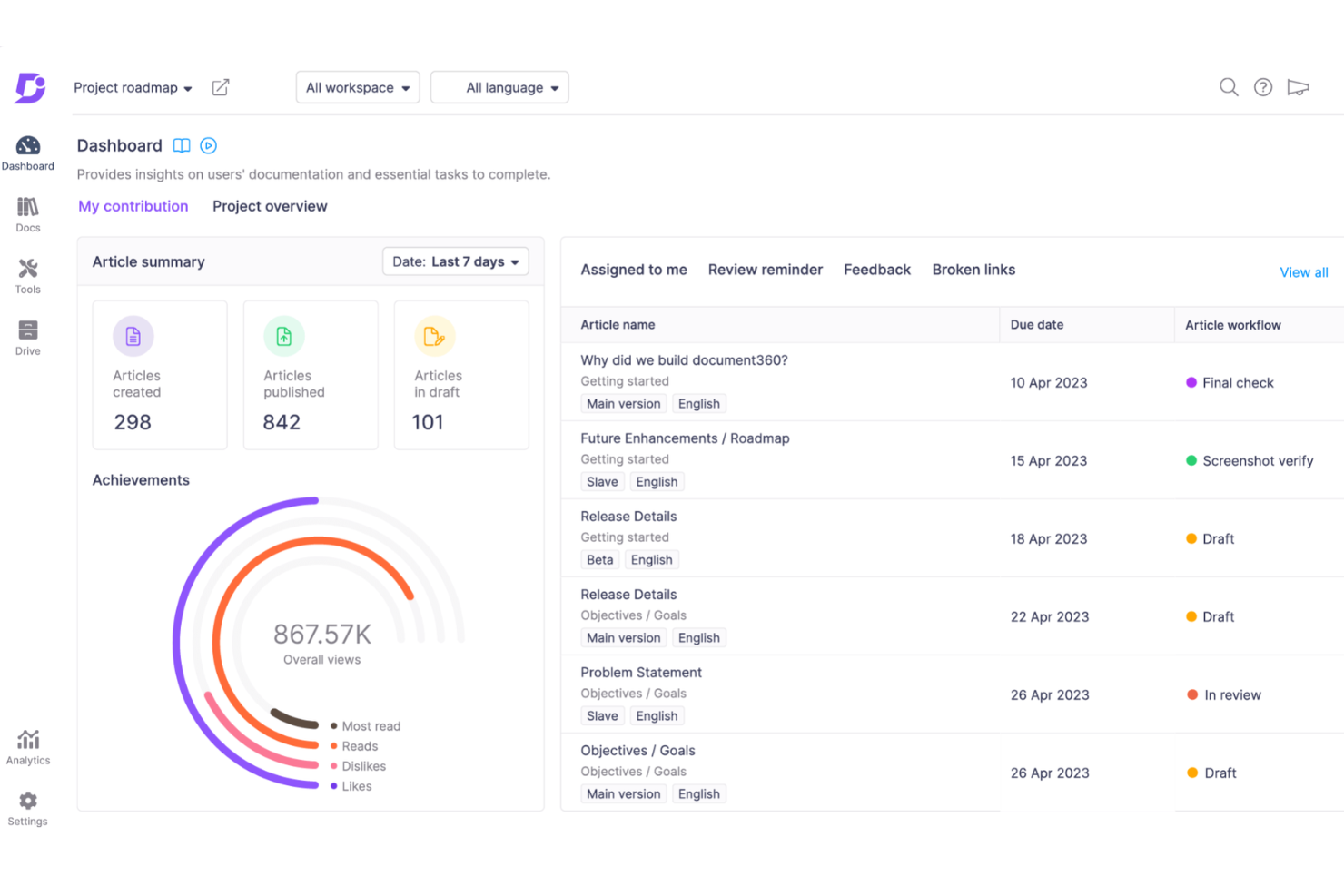
Document360 è un software di knowledge base basato sull'intelligenza artificiale pensato per le aziende che desiderano creare, gestire ed espandere in modo efficiente le proprie attività di documentazione. Offre una piattaforma completa che include un portale intuitivo per i creatori di contenuti e un sito rivolto ai clienti.
Perché ho scelto Document360: supporta vari ruoli utente con un portale dedicato, promuovendo una collaborazione efficace tra editori, autori e revisori. Con funzionalità avanzate come analytics, gestione dei flussi di lavoro e ottimizzazione SEO, gli utenti possono gestire i documenti in modo efficiente e incrementare la produttività. Le funzionalità basate sull'intelligenza artificiale di Document360, come la ricerca interattiva e la generazione automatica dei contenuti, aiutano a gestire i processi di documentazione in modo più efficace. Inoltre, la piattaforma offre un glossario aziendale, un sistema di deviazione ticket e metriche di controllo dello stato di salute per supportare una gestione completa della conoscenza.
Caratteristiche e integrazioni di spicco di Document360
Caratteristiche includono una knowledge base alimentata dall'IA, commenti in linea, un visualizzatore delle differenze per confrontare le versioni, stati del ciclo di vita dei documenti, un gestore delle categorie, azioni in blocco, mappatura di domini personalizzati e personalizzazione del brand.
Integrazioni includono Zendesk, Freshdesk, Intercom, Drift, Slack, GitHub, Make, Salesforce e Microsoft Teams.
Pros and Cons
Pros:
- Fornisce un solido controllo delle versioni con tracciabilità delle revisioni
- Offre reportistica e analytics potenti
- Gestione intelligente dei file
Cons:
- La maggior parte delle integrazioni è disponibile solo con i piani di fascia superiore
- Può risultare costoso per i team con budget limitato
New Product Updates from Document360

Document360 Adds Drive and Eddy AI Workflow Updates
Document360 adds Drive file renaming, Eddy AI email ticket notifications, and Drive image support in AI Capture. These updates simplify file management, support escalation, and visual content editing. For more information, visit Document360’s official site.
 .
.
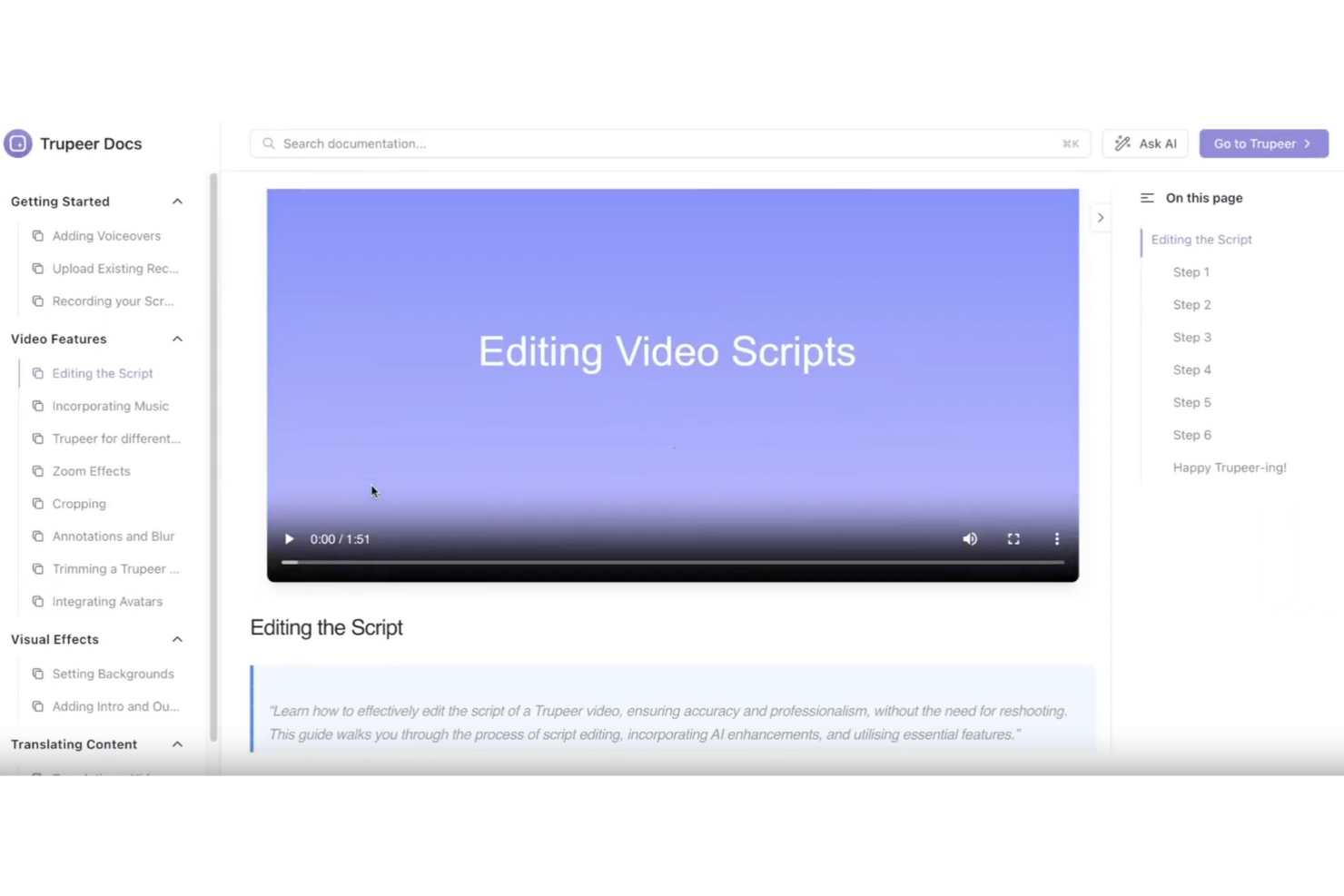
TruPeer offre una soluzione basata sull'intelligenza artificiale per chi necessita di software per la documentazione, particolarmente adatta a team IT, DevOps e ingegneri del supporto. L'eccezionale capacità di trasformare registrazioni schermo grezze in video di prodotto rifiniti e documentazione dettagliata soddisfa il bisogno di creare contenuti in modo rapido ed efficiente. Con funzionalità quali miglioramento automatico degli script e personalizzazione del branding, affronta la sfida di mantenere coerenza e professionalità nella documentazione.
Perché ho scelto TruPeer
Ho scelto TruPeer per la sua caratteristica distintiva: la generazione automatica di documentazione strutturata a partire da flussi di lavoro e appunti, gestita dall'intelligenza artificiale. A ciò si aggiungono strumenti di collaborazione in tempo reale, che permettono al tuo team di modificare e aggiornare insieme i documenti, garantendo accuratezza. In più, la capacità del software di mantenere la coerenza del marchio grazie alle opzioni personalizzabili lo rende una scelta unica per le esigenze di documentazione.
Caratteristiche principali di TruPeer
Oltre alle capacità di generazione di documenti, TruPeer offre:
- Miglioramento automatico degli script: Migliora automaticamente i tuoi script di documentazione, risparmiando tempo rispetto alla modifica manuale.
- Supporto per oltre 65 lingue: Offre capacità di traduzione, rendendo la tua documentazione accessibile a un pubblico globale.
- Analitiche sull'engagement: Permette di monitorare come viene utilizzata la tua documentazione, fornendo informazioni sulla sua efficacia.
- Base di conoscenza centralizzata: Propone un archivio ricercabile per tutta la documentazione, facilitandone la ricerca e l'utilizzo.
Integrazioni TruPeer
Le integrazioni includono Google Workspace, Notion, Slack, Trello e un'API per integrazioni personalizzate.
Pros and Cons
Pros:
- Trasforma rapidamente le registrazioni schermo in video rifiniti
- Gli strumenti collaborativi supportano la modifica e la condivisione multiutente
- La ricerca video AI migliora l’accessibilità alle informazioni in modo rapido
Cons:
- Le funzionalità di modifica avanzate limitate restringono la personalizzazione dettagliata
- Le opzioni di personalizzazione potrebbero non soddisfare tutte le esigenze di branding
Glean
Ideale per unificare la conoscenza da più app
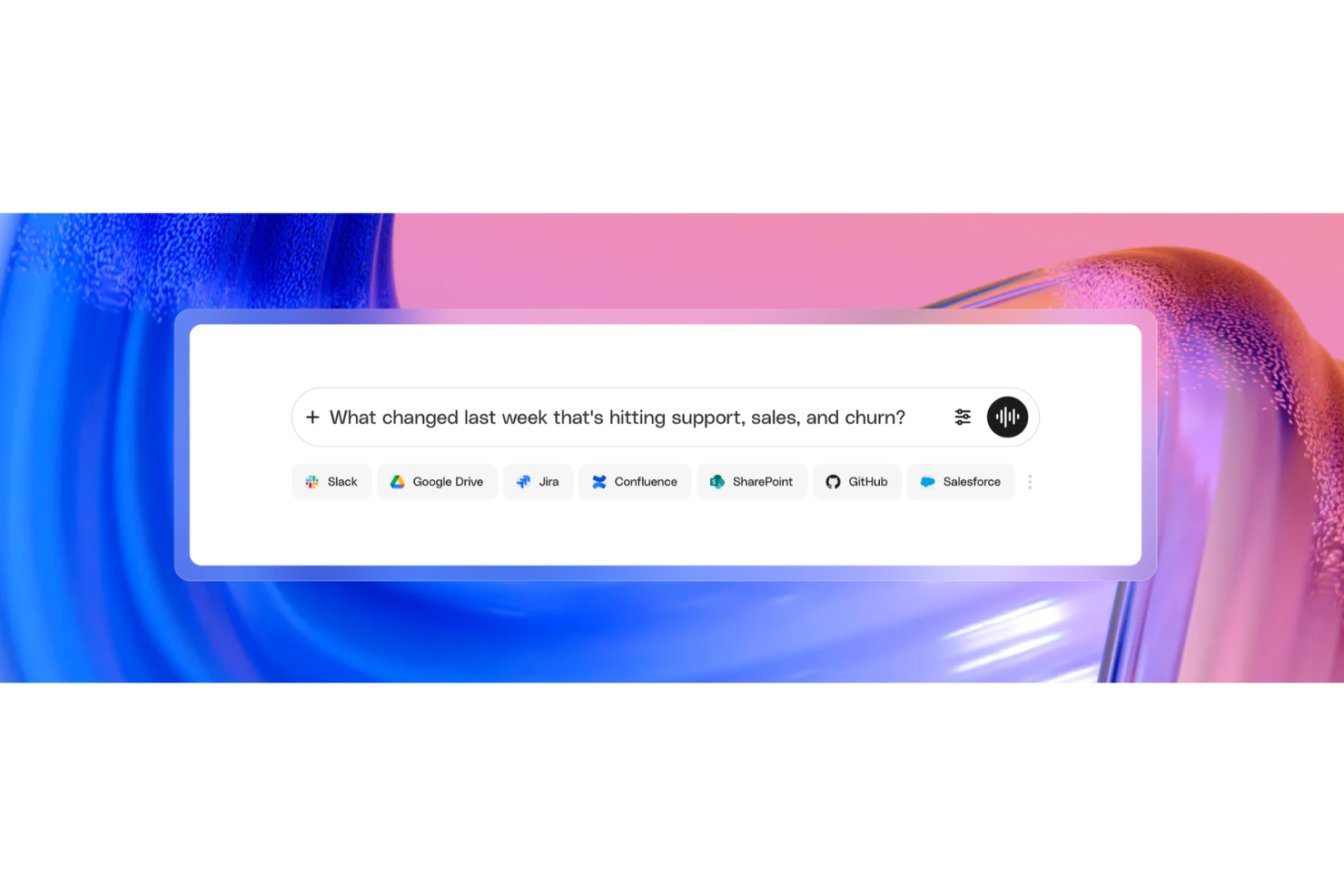
Glean è una piattaforma di ricerca e gestione della conoscenza aziendale basata sull'intelligenza artificiale che si connette ai tuoi strumenti esistenti, indicizza i contenuti di tutti questi e mostra documenti, risposte e competenze rilevanti tramite un'unica interfaccia guidata dall'IA.
Per chi è ideale Glean?
Glean è particolarmente adatto alle grandi aziende con stack tecnologici complessi, dove i dipendenti fanno fatica a trovare informazioni sparse su decine di strumenti e sistemi diversi.
Perché ho scelto Glean
Glean si guadagna un posto nella mia shortlist grazie al modo in cui gestisce la conoscenza distribuita tra strumenti come Confluence, Google Drive, Slack, Jira e SharePoint contemporaneamente. Quello che trovo veramente impressionante è l'Enterprise Graph di Glean, che non si limita a indicizzare i contenuti, ma mappa anche come persone, documenti, processi e sistemi siano collegati tra loro. Così, quando il mio team effettua una ricerca, i risultati sono classificati e contestualizzati in base a relazioni reali, non solo a corrispondenze di parole chiave. Questo livello di intelligenza trasversale alle app è qualcosa che la maggior parte degli strumenti di documentazione non può offrire autonomamente.
Caratteristiche principali di Glean
- Indicizzazione in tempo reale: Glean indicizza in modo continuo i contenuti di tutte le app collegate, così i risultati di ricerca riflettono sempre i documenti, i messaggi e gli aggiornamenti più recenti.
- Sommari di documenti generati dall’IA: Ottieni riepiloghi istantanei di documenti lunghi direttamente nei risultati di ricerca, così puoi vedere rapidamente cosa contiene un file senza doverlo aprire.
- Personal Graph: Glean costruisce un profilo di conoscenze individuale per ogni utente, personalizzando i risultati di ricerca in base a ruolo, team e interazioni precedenti.
- Ricerca in linguaggio naturale: Glean utilizza la ricerca vettoriale e grandi modelli linguistici per interpretare le domande poste in linguaggio naturale, permettendoti di formulare le richieste come le diresti normalmente.
Integrazioni di Glean
Glean offre più di 275 connettori nativi e basati su MCP, inclusi Confluence, Google Drive, Slack, Jira, SharePoint, GitHub, Dropbox, Salesforce, ServiceNow e Box. È disponibile su Zapier ed è presente un'API per integrazioni personalizzate tramite l'Indexing SDK di Glean.
Pros and Cons
Pros:
- I risultati di ricerca includono link alle fonti per la verifica
- I risultati sono personalizzati in base a ruolo e team
- Riduce le domande ripetute da parte di altri utenti
Cons:
- Nessuna possibilità di segnalare i contenuti obsoleti nei risultati
- Configurazione iniziale impegnativa per i dipartimenti IT

Ideale per documentazione software generata dall'IA
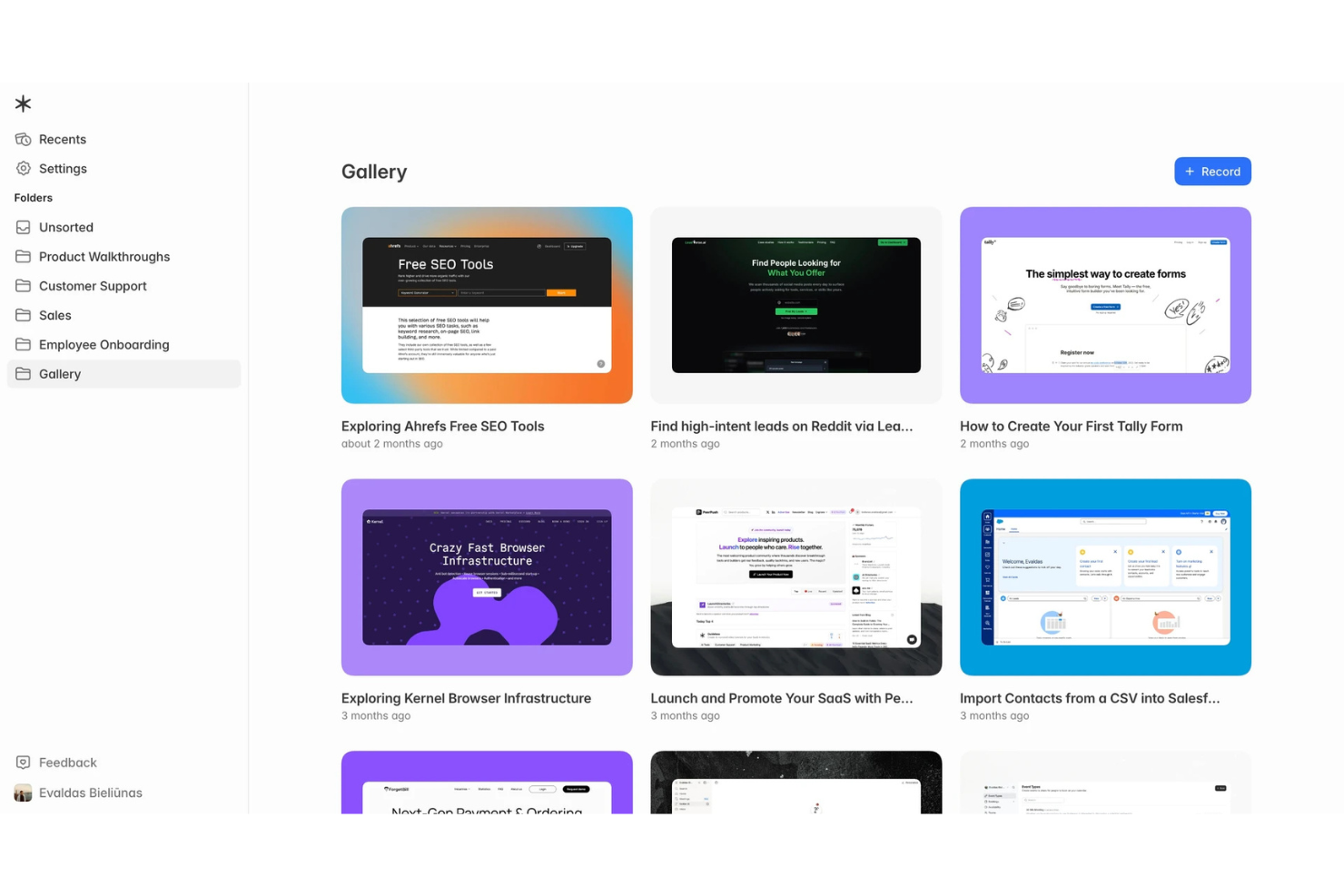
Guideless è una piattaforma di documentazione alimentata dall'IA che trasforma i flussi di lavoro basati su browser in guide narrate, passo dopo passo, con script, didascalie e narrazioni generate automaticamente. I team possono condividere le guide tramite link, incorporarle nelle basi di conoscenza o esportarle come video MP4.
Per chi è ideale Guideless?
Guideless è particolarmente adatto a team IT, di supporto clienti, operazioni e enablement che devono creare documentazione software, materiali di onboarding e guide ai processi senza dover passare ore a registrare e montare video.
Perché ho scelto Guideless
Ho scelto Guideless perché elimina gran parte del lavoro manuale necessario per documentare i flussi di lavoro software. Invece di registrare, narrare e montare i video separatamente, la piattaforma cattura automaticamente le azioni nel browser, genera uno script strutturato, aggiunge una narrazione IA e produce una guida rifinita che può comunque essere modificata dopo la pubblicazione. Apprezzo inoltre che i team possano aggiornare le guide senza dover rifare l'intera registrazione, facilitando la manutenzione della documentazione al cambiare dei processi.
Caratteristiche principali di Guideless
- Voci AI multilingue: Genera guide narrate utilizzando diverse opzioni di voce IA e lingue.
- Didascalie generate automaticamente: Crea didascalie sincronizzate in modo automatico per ogni guida.
- Condivisione ed esportazione flessibili: Condividi le guide tramite link, incorporale in piattaforme di documentazione o esportale come video MP4.
- Spazi di lavoro di team: Collabora alla documentazione all'interno di spazi di lavoro condivisi con accessi basati sui ruoli.
Integrazioni di Guideless
Al momento Guideless non offre integrazioni native documentate con applicazioni business di terze parti. Le guide possono essere incorporate in piattaforme come Notion, Confluence, help center e siti di documentazione interna tramite codici embed o link condivisi. L'API pubblica e il supporto a Zapier non sono attualmente documentati.
Pros and Cons
Pros:
- Le guide vengono create automaticamente dall'IA
- Aggiornamento facile delle guide pubblicate
- Supporta voci IA multiple
Cons:
- Solo flussi di lavoro da browser
- Modifica video limitata

Hub
Ideale per portali clienti personalizzati con il proprio brand
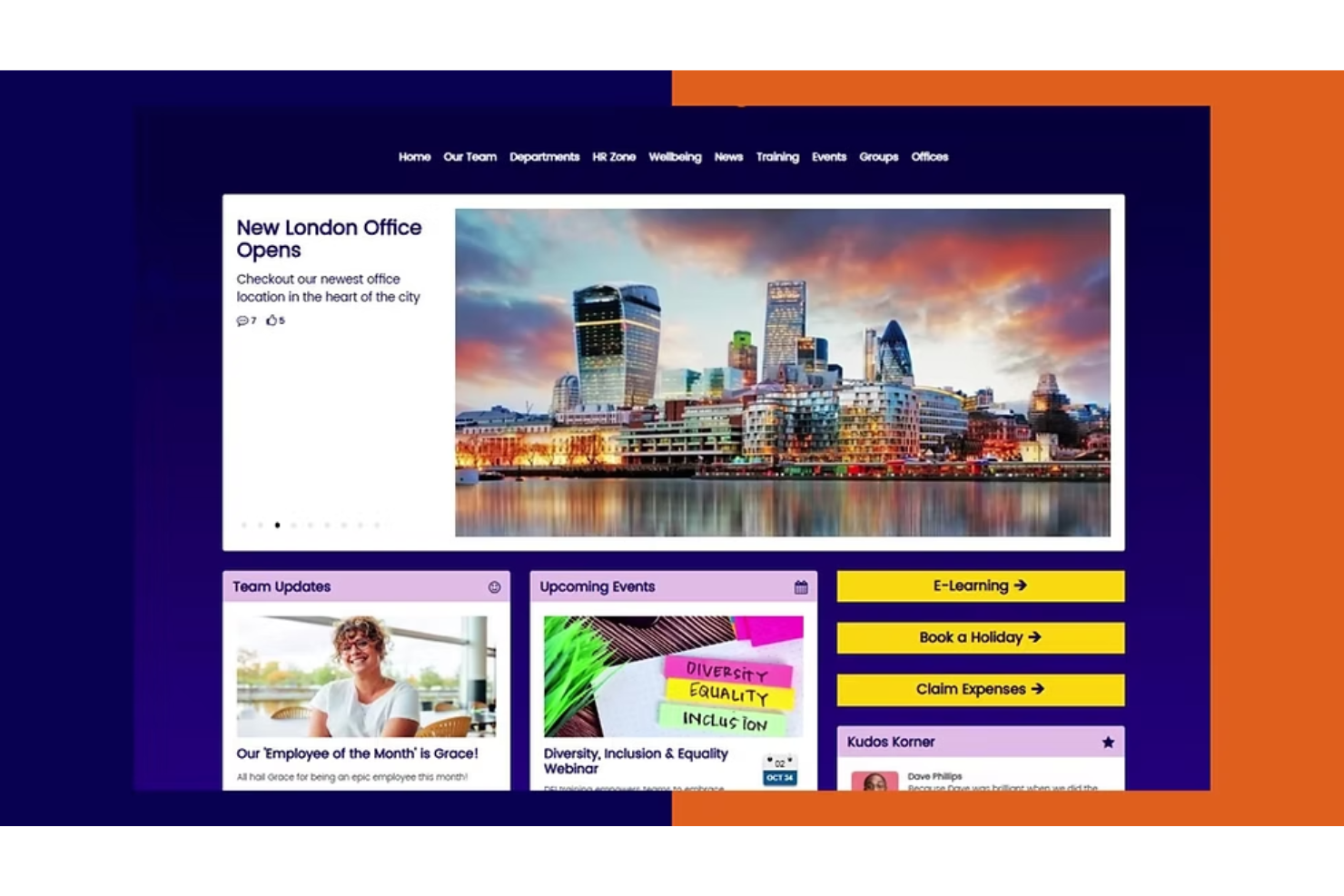
Hub è una piattaforma per intranet e documentazione progettata per centralizzare la conoscenza aziendale e migliorare il coinvolgimento dei clienti. Grazie a portali clienti personalizzabili, consente ai team di creare spazi co-branded o personalizzati dove la documentazione convive con strumenti di collaborazione, rendendola una scelta flessibile sia per l’uso interno che esterno.
Perché ho scelto Hub: Ho scelto Hub perché va oltre il classico software di documentazione, consentendo di creare portali clienti con il proprio marchio. Questo significa che puoi condividere guide, manuali o documenti di onboarding con i clienti in modo che rispecchi la tua identità aziendale. Apprezzo anche la configurazione no-code, che lo rende accessibile ai team non tecnici e garantisce un’implementazione rapida del sistema di documentazione. Se desideri una documentazione che possa anche fungere da risorsa per i clienti, Hub è una scelta valida.
Funzionalità e integrazioni principali di Hub
Le funzionalità includono portali clienti personalizzati con il proprio brand, interfaccia senza codice, conformità GDPR, certificazione ISO 27001, personalizzazione dei contenuti tramite intelligenza artificiale e una progressive web app per l’accesso da mobile. Avrai anche reportistica e analisi in tempo reale per monitorare il coinvolgimento.
Le integrazioni includono SharePoint, Slack, Microsoft Teams, Google Drive, OneDrive, BambooHR, YouTube, Duo, Microsoft Entra ID, Office 365, OneLogin e OKTA.
Pros and Cons
Pros:
- Facile da configurare
- Sicurezza garantita da certificazione ISO
- Portali clienti personalizzabili e con brand aziendale
Cons:
- Prezzi non pubblicati pubblicamente
- Personalizzazione grafica limitata

Ideale per la documentazione visiva dei processi
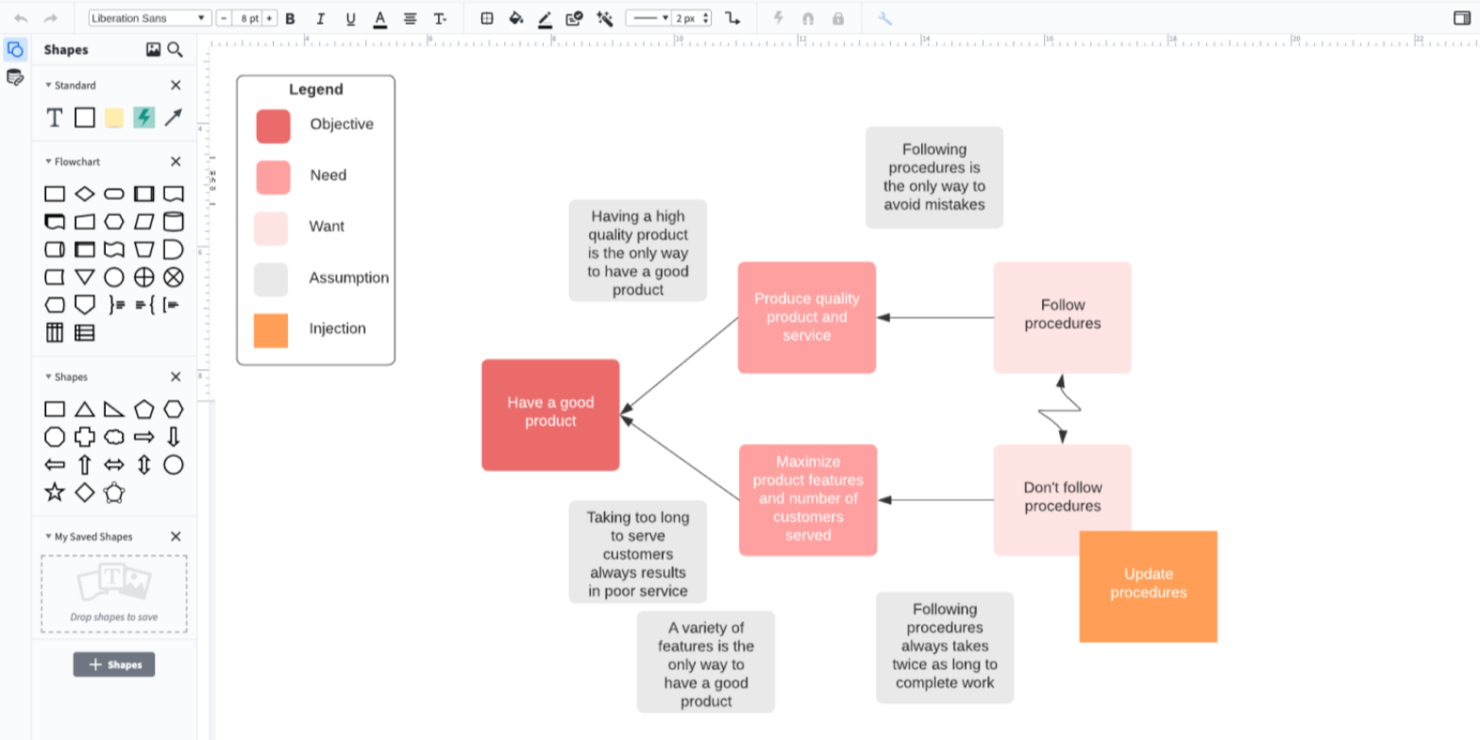
Per chi è alla ricerca di una soluzione software per la documentazione, Lucidchart si presenta come uno strumento di diagrammazione versatile che migliora il modo in cui il tuo team visualizza i processi e collabora sui progetti. Si rivolge in particolare ai professionisti dell’IT, dell’ingegneria, del product management e delle operazioni, fornendo loro gli strumenti per creare diagrammi dettagliati che semplificano flussi di lavoro complessi. Offrendo funzionalità come diagrammi generati dall’intelligenza artificiale e collaborazione in tempo reale, Lucidchart affronta la sfida di mantenere una documentazione chiara e accessibile in diversi settori, dall’istruzione alla sanità.
Perché ho scelto Lucidchart
Ho scelto Lucidchart per la sua capacità unica di trasformare dati complessi in visualizzazioni chiare e utilizzabili, un aspetto cruciale nei software di documentazione. La diagrammazione basata sull’IA semplifica la creazione di diagrammi intricati, permettendoti di concentrarti sui contenuti invece che sul design. Inoltre, la funzione di collaborazione in tempo reale garantisce che il tuo team resti allineato e produttivo, anche lavorando da remoto. Queste caratteristiche rendono Lucidchart una scelta interessante per chi ha bisogno di documentare processi e idee in modo chiaro e collaborativo.
Caratteristiche principali di Lucidchart
Oltre alle sue eccezionali capacità di diagrammazione, ho riscontrato anche diverse funzionalità che ne aumentano l’utilità come software di documentazione:
- Collegamento ai dati: Collega i tuoi diagrammi a fonti di dati in tempo reale, garantendo che la documentazione rimanga sempre aggiornata e accurata.
- Formattazione condizionale: Visualizza tendenze e pattern nei dati grazie a regole personalizzabili che mettono in evidenza le informazioni chiave all’interno dei diagrammi.
- Markup UML: Crea e gestisci diagrammi UML per documentare in modo efficace l’architettura software e i processi di progettazione.
- Libreria di modelli: Accedi a un’ampia raccolta di modelli per avviare rapidamente i tuoi progetti di documentazione e mantenere la coerenza nei documenti.
Integrazioni Lucidchart
Le integrazioni includono Google Workspace, Microsoft Office, Slack, Jira, Salesforce, Atlassian Confluence, Dropbox, AWS, Zapier e Microsoft Teams. È disponibile un’API per integrazioni personalizzate.
Pros and Cons
Pros:
- Potenti strumenti di collaborazione in tempo reale
- Ampia libreria di modelli disponibile
- Supporta il collegamento ai dati in tempo reale
Cons:
- Opzioni di accesso offline limitate
- Le funzionalità avanzate richiedono upgrade

Zendesk
Ideale per l'assistenza clienti guidata da AI
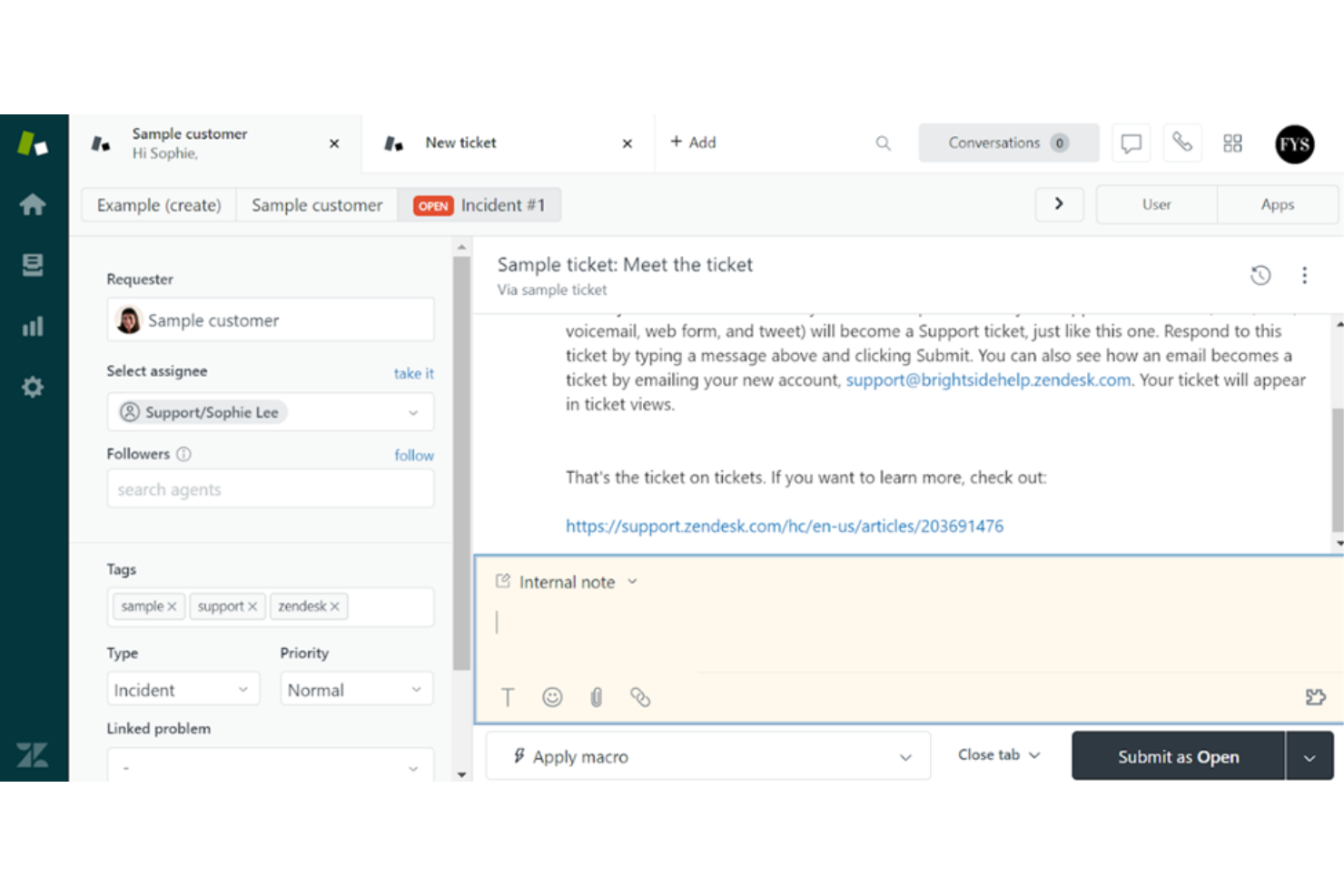
Zendesk è una piattaforma di assistenza clienti e documentazione che aiuta i team a gestire le richieste, le basi di conoscenza e le comunicazioni su più canali. Combina la gestione dei ticket, la messaggistica e strumenti di intelligenza artificiale per migliorare l'esperienza sia dei clienti sia dei dipendenti.
Perché ho scelto Zendesk: Ho scelto Zendesk per le sue capacità di agenti AI e automazione che aiutano a risolvere le richieste più rapidamente e a liberare gli operatori umani per le richieste più complesse. Apprezzo anche il suo supporto omnicanale, che permette di gestire conversazioni da email, chat, social media e telefono in un unico posto. Per le esigenze di documentazione, Zendesk offre risorse dettagliate per sviluppatori, tra cui API, SDK e guide all'integrazione, rendendolo una soluzione ideale per team tecnici che hanno bisogno di mantenere basi di conoscenza robuste e accessibili.
Funzionalità e integrazioni distintive di Zendesk
Le funzionalità includono agenti AI per risposte automatizzate, messaggistica e chat live per supporto in tempo reale, strumenti di gestione delle risorse per l'allocazione dei team, risoluzioni omnicanale con instradamento avanzato delle chiamate, soluzioni per i servizi ai dipendenti per richieste interne e solide misure di protezione dei dati per operazioni sicure.
Le integrazioni includono Salesforce, HubSpot, Slack, Microsoft Teams, Jira, Google Sheets, Typeform, Cognito Forms, Facebook Lead Ads, Google Forms, Unbounce e Zendesk Sell. È possibile collegare ulteriori strumenti tramite Zapier, Workato o Zendesk Apps Framework.
Pros and Cons
Pros:
- Sistema di ticketing efficace per la gestione delle richieste dei clienti
- Solide opzioni di integrazione con telefonia e app
- Aggiornamenti frequenti con nuove funzionalità
Cons:
- La configurazione può risultare complessa senza una guida
- Il sistema self-service potrebbe non coprire tutte le esigenze
New Product Updates from Zendesk
Zendesk Adds Email AI Replies and Predictive Routing
Zendesk’s latest email AI agents update brings configurable knowledge and welcome replies and adds predictive routing for email tickets, so you can tailor your automated emails and get inquiries resolved faster. For more information, visit Zendesk’s official site.

GitHub
Il migliore per programmatori e sviluppatori
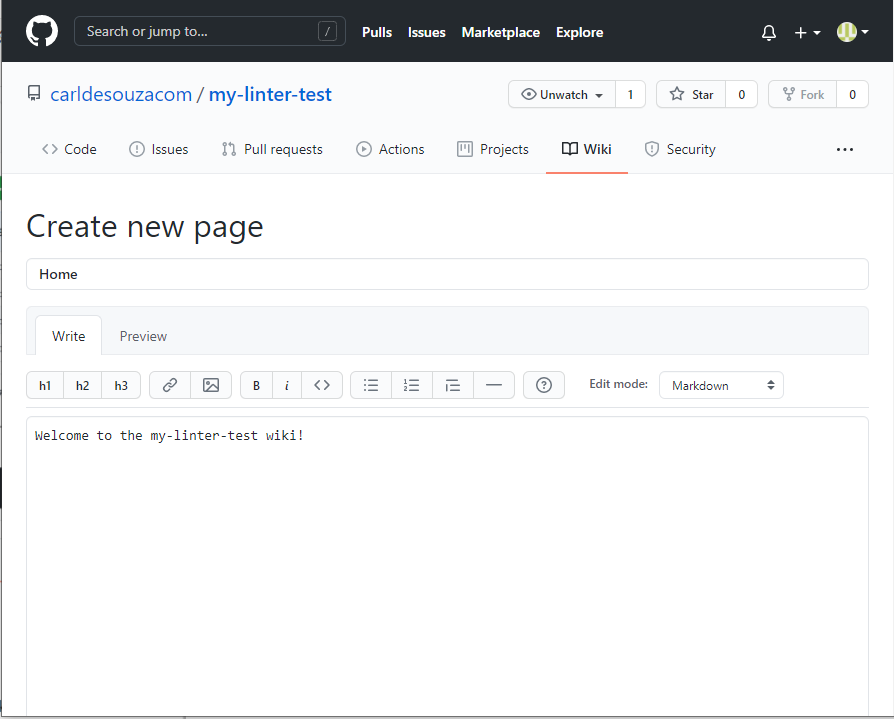
GitHub è una piattaforma che consente agli sviluppatori di ospitare e condividere codice con altri sviluppatori. Dispone inoltre di molti strumenti che aiutano a ospitare e condividere la documentazione per progetti open-source o privati.
Perché ho scelto GitHub: Consiglio GitHub a programmatori e sviluppatori per via delle Wiki di GitHub, una piattaforma di documentazione collaborativa che fa parte del repository GitHub. Le Wiki sono particolarmente utili quando desideri salvare e condividere informazioni sul tuo progetto, come le istruzioni d'uso, il design del progetto e i suoi principi fondamentali. Puoi formattare le wiki aggiungendo immagini, tabelle, sezioni espandibili e citazioni.
Funzionalità e integrazioni evidenti di GitHub:
Le funzionalità che credo possano piacere agli sviluppatori includono la presenza dei file README di GitHub che memorizzano informazioni essenziali sul progetto come ottenere assistenza e chi gestisce e contribuisce al progetto. Inoltre, è possibile pubblicare la propria pagina di documentazione come sito web tramite GitHub Pages. Tutti gli strumenti offrono una potente formattazione del testo con una sintassi semplice.
Le integrazioni sono disponibili come opzioni integrate, tra cui Slack, Microsoft Teams, Terraform e Jira. Include un'API robusta che permette di integrare strumenti di terze parti.
Pros and Cons
Pros:
- Supporto Markdown
- Evidenziazione del codice integrata, che facilita la lettura e la comprensione degli snippet di codice
- Guidato dalla community, quindi è facile ricevere feedback e suggerimenti da altri programmatori
Cons:
- La sicurezza può essere una preoccupazione
- I prezzi diventano elevati per i team numerosi

Nuclino
Ideale per team che desiderano contenuti visuali
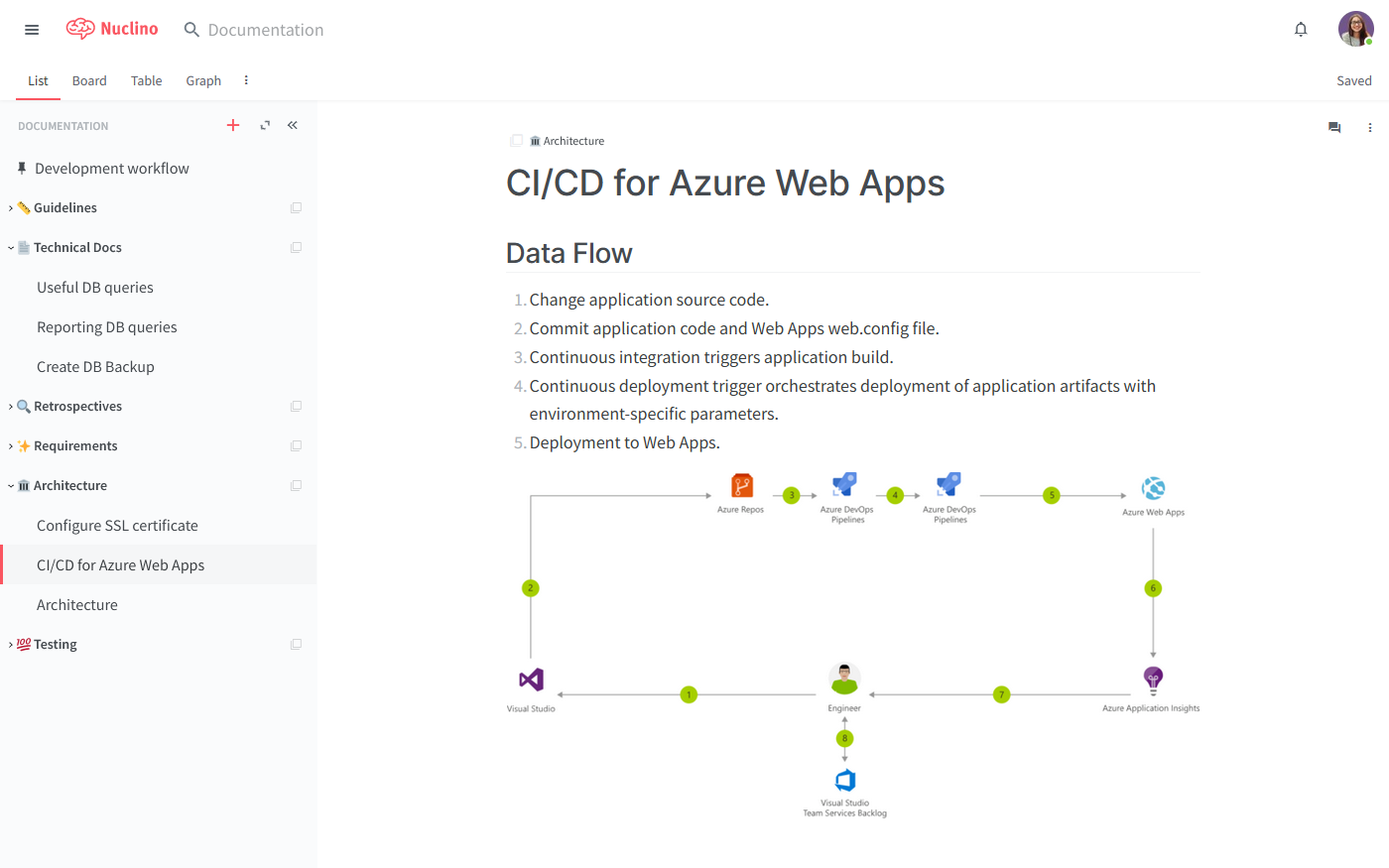
Nuclino è il cervello collettivo e il wiki collaborativo di un team che consente ai gruppi di creare, condividere e collaborare facilmente sui documenti. Offre funzionalità come un editor visuale, la cronologia delle versioni e la possibilità di collegare tra loro i documenti.
Perché ho scelto Nuclino: Ho selezionato Nuclino per la mia lista grazie al suo potente editor visuale. È possibile dare vita a noiosi documenti tecnici aggiungendo immagini, video, screenshot, blocchi di codice, embed, allegati di file, citazioni, comandi markdown e diagrammi Mermaid.
Funzionalità e integrazioni di spicco di Nuclino:
Le funzionalità che ritengo più impressionanti sono la sua capacità di adattare le conoscenze in diverse visualizzazioni come elenco, bacheca, grafico e tabella, così da poter gestire e ricercare facilmente le informazioni. Nuclino consente ai team di personalizzare il proprio spazio di lavoro con logo, combinazione di colori e aspetto, facilitando la creazione di un centro documentale attraente e coerente.
Le integrazioni sono native per Slack, Microsoft Teams, YouTube, Google Calendar, Grammarly, Typeform, Figma, Canva, OneLogin e Miro. Sono disponibili API.
Pros and Cons
Pros:
- Collaborazione in tempo reale
- È possibile cercare e filtrare facilmente le informazioni
- Opzioni di permessi flessibili
Cons:
- Potrebbe non gestire grandi database
- La versione mobile può essere instabile

Guidde
Ideale per la documentazione video con intelligenza artificiale
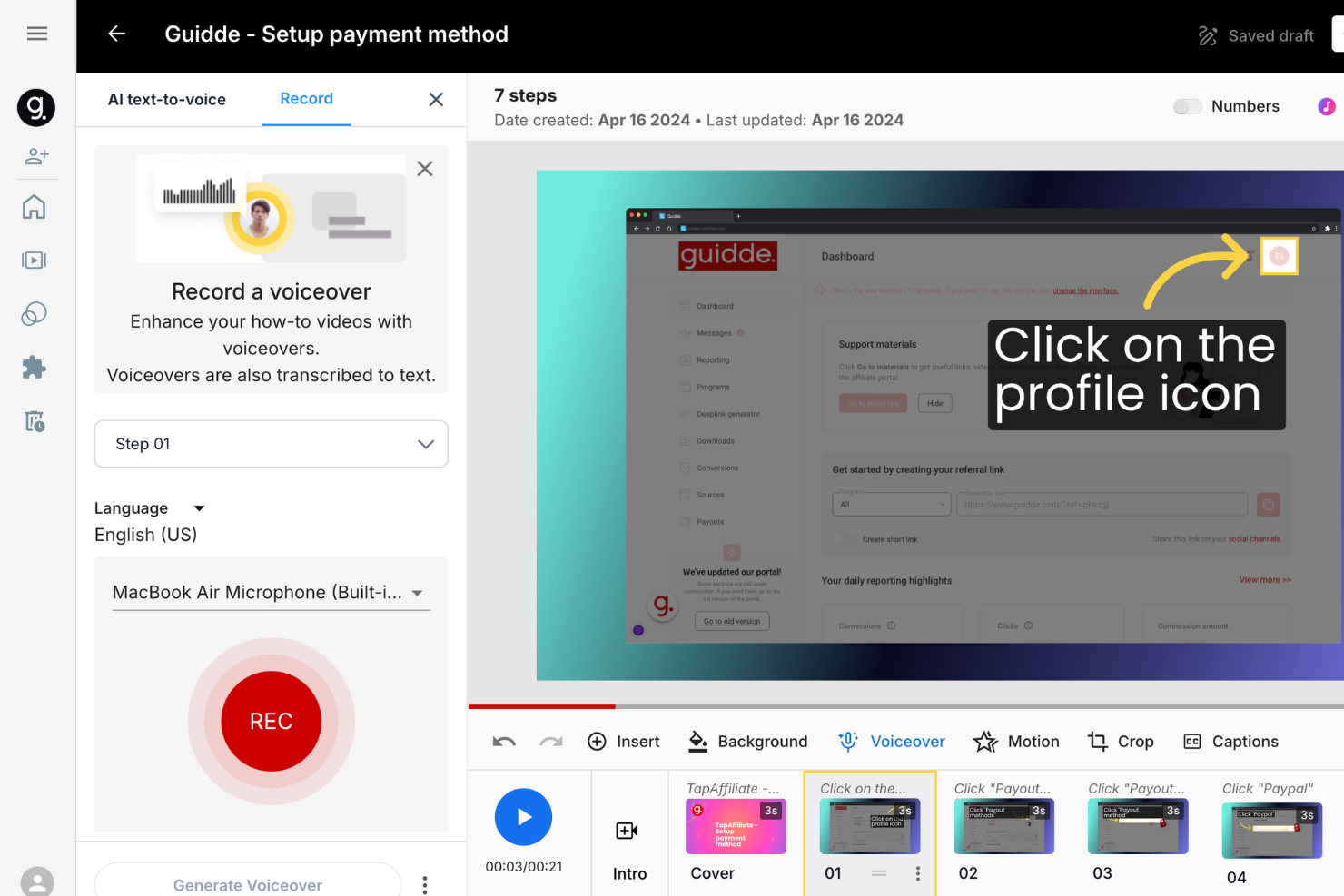
Guidde è una piattaforma di intelligenza artificiale generativa progettata per aiutare il tuo team a creare documentazione video più rapidamente. Ti permette di produrre guide pratiche, procedure operative standard (SOP), materiali di formazione e documenti di onboarding, tutto in un unico posto.
Perché ho scelto Guidde: Ho scelto Guidde per le sue funzionalità AI nella documentazione video che ti consentono di registrare un flusso di lavoro e generare istantaneamente guide passo-passo. Lo strumento aggiunge automaticamente istruzioni visive e consente di scegliere tra oltre 100 voci e lingue per la narrazione, ideale per team con utenti in tutto il mondo. Offre anche strumenti di editing intelligenti che permettono di aggiungere facilmente testo, annotazioni, voiceover e branding ai tuoi video.
Caratteristiche e integrazioni di spicco di Guidde
Caratteristiche includono traduzioni vocali automatiche, compatibilità con applicazioni desktop, descrizioni generate da AI, acquisizione con un clic, branding personalizzabile, acquisizione del flusso di lavoro passo-passo, aggiunta di testo e annotazioni, funzionalità di voiceover, supporto per Windows e macOS, e descrizione automatica dei passaggi.
Integrazioni includono Salesforce, Google Drive, Microsoft OneDrive, Slack, Zoom, Zendesk, ServiceNow, Chrome, Notion e Confluence.
Pros and Cons
Pros:
- Utilizza l'AI per creare automaticamente lo storyboard
- Include elementi interattivi e voiceover professionali
- Supporto multilingue per la documentazione video
Cons:
- Potrebbe offrire un maggior numero di integrazioni
- Non è ideale per i team che non utilizzano la documentazione video
Altri software per la documentazione
Ecco alcune altre opzioni che non sono state incluse nell’elenco dei migliori software per la documentazione, ma che meritano comunque di essere presentate:
- Whatfix
Ideale per walkthrough
- Dropbox
Ideale per team interni
- ClickHelp
Ideale per capacità di ricerca potenti
- Adobe Acrobat
Ideale per la condivisione sicura tra piattaforme diverse
- Zoho Learn
Ideale per creare basi di conoscenza complete
- Confluence
Ideale per modelli di documentazione
- Apiary
Ideale per la documentazione di API
- Guru
Ideale per una base di conoscenza integrata
- Doxygen
Ideale per la documentazione dal codice sorgente
- Archbee
Ideale per team di prodotto e ingegneria
- SimpleMDE
Ideale per la documentazione di base
- MarkdownPad
Ideale per la personalizzazione
- SysAid
Ideale per flussi di lavoro di documentazione integrati con ITSM


Recensioni correlate di software e strumenti
Se non hai ancora trovato qui ciò che stai cercando, dai un'occhiata a questi altri tipi di strumenti che abbiamo testato e valutato.
- Software per il monitoraggio delle reti
- Software per il monitoraggio dei server
- Soluzioni SD-WAN
- Strumenti per il monitoraggio dell'infrastruttura
- Analizzatore di pacchetti
- Strumenti per il monitoraggio delle applicazioni
Come valuto il software di documentazione
Valuto il software di documentazione su due livelli: elementi essenziali come il controllo delle versioni e la ricercabilità, e fattori differenzianti come flussi di lavoro basati su Git e la generazione di riferimenti API.
Funzionalità di base (Prerequisiti per questa lista)
Quando seleziono gli strumenti per la mia lista, valuto ciascuno di essi su una scala da 0 (non offre la funzionalità) a 5 (eccelle in quest'area) per ogni funzionalità di base indicata di seguito. Poi, calcolo il punteggio totale dello strumento in percentuale. Ogni strumento deve raggiungere un punteggio totale minimo del 65% per essere considerato per l'inclusione.
- Authoring di contenuti avanzati: Ricerco l'editing markdown e WYSIWYG con blocchi di codice con evidenziazione della sintassi, poiché la maggior parte delle documentazioni IT include esempi di configurazione, comandi CLI o frammenti di script.
- Controllo delle versioni & Cronologia: Il tracciamento delle revisioni è importante: verifico la presenza di viste in diff e rollback, soprattutto per runbook o SOP che cambiano frequentemente fra le versioni.
- Ricerca & Navigazione: In presenza di centinaia di documenti, sono necessari la ricerca full-text, i tag e le strutture gerarchiche, quindi valuto la rapidità con cui gli utenti possono trovare la pagina giusta.
- Collaborazione & Permessi: Considero la modifica da più utenti, i commenti e i controlli di accesso basati sui ruoli per vedere quanto uno strumento supporti efficacemente sia i team interni che i collaboratori esterni.
- Opzioni di pubblicazione & hosting: Che sia necessario un knowledge base privato o un portale pubblico per sviluppatori, esamino domini personalizzati, branding e capacità di pubblicazione multi-sito.
- Integrazioni & Accesso API: Strumenti come GitBook, Confluence e Document360 si collegano ciascuno diversamente con GitHub, Jira e Slack: valuto le integrazioni native e la profondità delle API.
Una volta che ho una lista di strumenti che soddisfano questi criteri, considero cosa distingue ciascuna piattaforma.
Fattori differenzianti (Cosa distingue i fornitori)
Ecco come confronto e metto a paragone i vari fornitori:
Funzionalità distintive
Il supporto Docs-as-code è un grande elemento di differenziazione: cerco strumenti che consentano ai team di scrivere in markdown, gestire la documentazione in repository Git, e pubblicare tramite pipeline CI/CD. Anche la generazione di riferimenti API è importante, soprattutto perché i team che mantengono microservizi necessitano di documentazione interattiva e auto-generata da specifiche OpenAPI. Verifico anche se una piattaforma offre analisi a livello di pagina e feedback dei lettori, che aiutano i redattori tecnici a individuare runbook obsoleti o lacune nei materiali di onboarding.
Oltre le funzionalità
Sicurezza e conformità pesano molto nella mia valutazione: verifico la certificazione SOC 2, il supporto SSO/SAML e il logging di audit, specialmente per i team che gestiscono documentazione interna delle infrastrutture. Il supporto alla migrazione è un altro fattore chiave, poiché molti team stanno passando da un wiki esistente come Confluence o SharePoint e necessitano di strumenti affidabili di importazione per rendere la transizione fluida. Valuto anche la trasparenza dei prezzi per capire come i costi cresceranno con l’aumento del team e del volume di documentazione nel tempo.
Come scegliere il software per la documentazione
È facile perdersi in lunghi elenchi di funzionalità e strutture tariffarie complesse. Per aiutarti a rimanere concentrato mentre affronti il tuo processo di selezione del software, unico per le tue esigenze, ecco una lista di fattori da tenere a mente:
| Fattore | Cosa considerare |
|---|---|
| Scalabilità | Lo strumento crescerà insieme al tuo team? Cerca piattaforme che supportino librerie di contenuti in espansione e più collaboratori senza rallentare le prestazioni. |
| Integrazioni | Può connettersi agli strumenti che il tuo team utilizza già, come Slack, GitHub, Jira o Google Drive? Le integrazioni semplificano i flussi di lavoro. |
| Personalizzazione | Puoi adattare la struttura, lo stile e i ruoli degli utenti alle esigenze della tua documentazione? I flussi di lavoro e le autorizzazioni personalizzati sono importanti. |
| Semplicità d’uso | L’interfaccia è abbastanza intuitiva sia per gli utenti tecnici sia per quelli non tecnici? Un’adozione rapida dipende da una navigazione chiara e da un editor semplice. |
| Budget | Il prezzo è in linea con le dimensioni e l’utilizzo del tuo team? Fai attenzione ai costi per utente e alle funzionalità bloccate dietro piani a pagamento, che potrebbero limitare la crescita. |
| Misure di sicurezza | Supporta il controllo degli accessi, il SSO, la crittografia e gli standard di conformità? Queste funzionalità sono necessarie se gestisci contenuti sensibili o interni. |
| Funzionalità di ricerca | Gli utenti possono trovare rapidamente ciò di cui hanno bisogno? Funzionalità efficaci di ricerca, tagging e filtraggio riducono gli ostacoli e migliorano l’autonomia degli utenti. |
| Strumenti di collaborazione | Consente la modifica in tempo reale, l’aggiunta di commenti o il monitoraggio delle modifiche? Il tuo team ha bisogno di una collaborazione fluida per i documenti in continuo aggiornamento. |
Tendenze nei software per la documentazione
Durante la mia ricerca, ho raccolto innumerevoli aggiornamenti dei prodotti, comunicati stampa e registri delle versioni di diversi fornitori di software per la documentazione. Ecco alcune delle tendenze emergenti che sto tenendo d’occhio:
- Strumenti di feedback integrati: alcuni strumenti ora includono funzionalità che consentono ai lettori di lasciare commenti o valutare direttamente le pagine. GitBook e Archbee permettono agli utenti di indicare se la documentazione è utile o poco chiara. Questo aiuta gli autori a realizzare miglioramenti mirati senza dover ricorrere a strumenti di sondaggio separati.
- Suggerimenti di contenuti basati sull’intelligenza artificiale: sempre più strumenti offrono funzionalità di intelligenza artificiale per aiutare gli utenti a scrivere, applicare tag o organizzare la documentazione. Ad esempio, Notion e Confluence utilizzano l’intelligenza artificiale per suggerire automaticamente riepiloghi dei contenuti o generare nuove voci da zero. Questo aiuta i team a risparmiare tempo e a ridurre la difficoltà iniziale della pagina vuota.
- Analisi integrate: i fornitori stanno aggiungendo funzionalità di monitoraggio dell’utilizzo per mostrare quali pagine vengono lette, ignorate o consultate nuovamente. Slab e Helpjuice, ad esempio, offrono informazioni sui termini di ricerca e sui modelli di visualizzazione. Questo aiuta i team a individuare rapidamente lacune nei contenuti o articoli obsoleti.
- Controlli granulari degli accessi: i team desiderano un controllo più rigoroso su chi può visualizzare o modificare documenti specifici. Strumenti come Guru e Document360 ora supportano autorizzazioni per singola sezione e accessi con scadenza. Questa funzionalità è utile per gestire le conoscenze interne sensibili.
- Supporto multilingue: sempre più piattaforme aggiungono funzionalità native per tradurre e gestire contenuti in più lingue. ClickHelp e Document360 consentono agli utenti di pubblicare la documentazione in diverse lingue da un’unica dashboard. Questo è fondamentale per i team e le basi clienti globali.
Che cos’è il software per la documentazione?
Il software per la documentazione è una categoria di strumenti progettati per creare, gestire e archiviare documenti in formato elettronico. Questi strumenti sono utilizzati da un’ampia gamma di professionisti, tra cui redattori tecnici, responsabili di progetto e specialisti IT, che necessitano di modalità efficienti per gestire la documentazione.
Le aziende utilizzano questo tipo di software per semplificare la creazione dei documenti, migliorare la collaborazione tra i membri del team, proteggere le informazioni sensibili e garantire un facile accesso ai documenti critici. Il valore complessivo di questi strumenti per la creazione della documentazione di supporto risiede nella loro capacità di ridurre significativamente il tempo e gli sforzi necessari per la gestione dei documenti, consentendo alle organizzazioni di concentrarsi sulle proprie attività principali e migliorare l’efficienza operativa.
Funzionalità del software per la documentazione
Ecco dieci funzionalità fondamentali da considerare quando scegli un software per la documentazione:
- Interfaccia intuitiva: Un'interfaccia semplice e intuitiva è essenziale per consentire agli utenti di trovare e utilizzare le funzionalità senza una formazione approfondita. Questa semplicità favorisce l'adozione rapida e l'uso efficace del software da parte di utenti con diversi livelli di competenza tecnica.
- Controllo delle versioni: La possibilità di monitorare e gestire le modifiche nel tempo è fondamentale. Il controllo delle versioni garantisce agli utenti l'accesso alle versioni precedenti dei documenti, facilitando una gestione migliore dei documenti e il controllo della loro evoluzione.
- Controllo degli accessi: Definire chi può visualizzare, modificare o gestire la documentazione è fondamentale per la sicurezza e la governance. Il controllo degli accessi contribuisce a mantenere la riservatezza e l'integrità della documentazione, consentendo solo al personale autorizzato di apportare modifiche.
- Strumenti di collaborazione: Le funzionalità che consentono a più utenti di lavorare contemporaneamente sui documenti promuovono il lavoro di squadra e migliorano la produttività. Gli strumenti di collaborazione sono importanti per garantire che la documentazione possa essere sviluppata, revisionata e aggiornata in modo coordinato.
- Funzionalità di ricerca: Strumenti di ricerca avanzati consentono agli utenti di trovare rapidamente le informazioni di cui hanno bisogno. Una funzionalità di ricerca efficace migliora l'esperienza utente e la produttività, riducendo al minimo il tempo dedicato alla ricerca di dati o documenti specifici.
- Gestione dei contenuti: Un'organizzazione e una categorizzazione efficienti della documentazione facilitano la navigazione e la manutenzione. Una buona gestione dei contenuti garantisce che i documenti siano ordinati e facilmente reperibili, aspetto fondamentale sia per gli utenti interni sia per quelli esterni.
- Funzionalità di integrazione: La possibilità di integrarsi con altri strumenti e sistemi all'interno dell'ecosistema aziendale garantisce flussi di lavoro fluidi. Le funzionalità di integrazione sono essenziali per automatizzare i processi e aumentare l'utilità del software di documentazione.
- Scalabilità: Un software in grado di crescere insieme all'azienda evita la necessità di migrazioni future verso soluzioni più robuste. La scalabilità garantisce che, con l'espansione dell'azienda e delle sue esigenze di documentazione, il software possa assecondare questa crescita senza un peggioramento delle prestazioni.
- Funzionalità di sicurezza: Misure di sicurezza avanzate proteggono le informazioni sensibili da accessi non autorizzati o violazioni. Le funzionalità di sicurezza sono fondamentali per la conformità alle normative e per la protezione dei dati aziendali e dei clienti.
- Feedback e analisi: Gli strumenti che forniscono informazioni sull'utilizzo della documentazione e raccolgono i feedback degli utenti aiutano a migliorarla continuamente. Il feedback e le analisi sono fondamentali per comprendere le esigenze degli utenti e prendere decisioni informate su come migliorare la strategia di documentazione.
Vantaggi del software di documentazione
Per le organizzazioni che affrontano la complessità della gestione di grandi quantità di informazioni, il software di documentazione offre una soluzione ottimizzata ed efficiente. Che si tratti di una piccola startup o di una grande impresa, lo strumento di documentazione giusto può migliorare significativamente la produttività, la sicurezza e la collaborazione. Ecco cinque vantaggi principali dell'utilizzo del software di documentazione per utenti e organizzazioni:
- Collaborazione migliorata: Il software di documentazione consente ai membri del team di lavorare insieme sui documenti in tempo reale, indipendentemente dalla loro posizione. Ciò facilita un flusso di lavoro più coeso, consentendo feedback e contributi immediati, che possono accelerare i tempi dei progetti e migliorare i risultati.
- Organizzazione dei documenti migliorata: Grazie a funzionalità come l'assegnazione di tag, la categorizzazione e le funzioni di ricerca avanzate, gli utenti possono organizzare e individuare facilmente i documenti. Ciò riduce il tempo dedicato alla ricerca delle informazioni e garantisce che i documenti importanti siano prontamente accessibili quando necessario.
- Maggiore sicurezza: Molti strumenti di documentazione offrono solide funzionalità di sicurezza, come crittografia, controlli degli accessi e registri di controllo. Queste funzionalità proteggono le informazioni sensibili dagli accessi non autorizzati, aiutando le aziende a rispettare le normative sulla privacy e a tutelare la propria proprietà intellettuale.
- Scalabilità: Con la crescita delle organizzazioni, le loro esigenze di documentazione si evolvono. Il software di documentazione può scalare facilmente per gestire quantità crescenti di dati, utenti e complessità, senza compromettere le prestazioni o l'usabilità.
- Migliore condivisione e conservazione delle conoscenze: Centralizzando la documentazione, questi strumenti garantiscono che le conoscenze preziose vengano acquisite e archiviate in un formato accessibile. Ciò promuove la condivisione delle conoscenze all'interno dell'organizzazione e previene la perdita di informazioni quando i dipendenti lasciano l'azienda o cambiano ruolo.
Costi e prezzi del software di documentazione
Orientarsi tra la moltitudine di opzioni di software di documentazione può essere un compito arduo per gli acquirenti di software, soprattutto per chi ha poca o nessuna esperienza in questo ambito. Diversi fornitori di software offrono una gamma di piani e opzioni di prezzo progettati per soddisfare le diverse esigenze delle aziende di ogni dimensione. Questi piani sono generalmente strutturati per adattarsi a diversi livelli di utilizzo, requisiti funzionali e vincoli di budget, garantendo un'opzione adatta a ogni organizzazione.
Tabella comparativa dei piani per il software di documentazione
Ecco una panoramica delle opzioni di piano più comuni e dei relativi prezzi per il software di documentazione:
| Tipo di piano | Prezzo medio | Funzionalità comuni |
|---|---|---|
| Gratuito | $0 | Creazione e archiviazione di documenti di base, strumenti di collaborazione limitati, sicurezza standard |
| Base | $5 - $10/utente/mese | Maggiore capacità di archiviazione, funzionalità di collaborazione aggiuntive, controlli degli accessi, integrazione con altre app |
| Professionale | $10 - $30/utente/mese | Funzionalità di sicurezza avanzate, archiviazione illimitata, suite completa per la collaborazione, supporto premium |
| Aziendale | Prezzo personalizzato | Integrazioni personalizzate, funzionalità avanzate di conformità e sicurezza, supporto dedicato, assistenza all'avvio |
Domande frequenti sui software per la documentazione
Vuoi ancora capire meglio in che modo gli strumenti software per la documentazione possono aiutarti? Ecco alcune domande frequenti e le relative risposte.
Quali sono alcuni esempi di documentazione?
Quali sono i vantaggi dei software per la documentazione?
E adesso?
Se stai cercando un software per la documentazione, contatta gratuitamente un consulente SoftwareSelect per ricevere consigli.
Compili un modulo e svolgi una breve conversazione durante la quale vengono analizzate in dettaglio le tue esigenze. In seguito riceverai una selezione ristretta di software da valutare. Ti supporteranno anche durante l'intero processo di acquisto, comprese le negoziazioni sui prezzi.