

La Liste Ultime : Les 10 Meilleurs Logiciels de Déploiement de 2026

10 Meilleur logiciel de déploiement - Sélection


Dans le monde dynamique du SaaS, trouver le bon logiciel de déploiement peut sembler être une tâche ardue. Vous cherchez un outil qui répond aux besoins de votre équipe, réduit les erreurs et vous fait gagner du temps. Mais avec autant d’options disponibles, comment choisir la meilleure ?
J’ai passé d’innombrables heures à tester et à évaluer des logiciels de déploiement, et je partage ici le fruit de mes recherches. Mon objectif : vous offrir un avis impartial et étayé sur les meilleures solutions du marché.
Dans cet article, vous découvrirez les meilleures solutions de logiciel de déploiement disponibles. Je vous guiderai à travers leurs fonctionnalités, leurs avantages et inconvénients, et ce qui rend chacune d’elles unique. Rendons votre recherche un peu plus facile.
Pourquoi faire confiance à nos recommandations de logiciels
Notre équipe teste et évalue des logiciels depuis 2012. En tant que leaders technologiques nous-mêmes, nous savons à quel point il est difficile — et important — de choisir le bon logiciel.
Pour ce guide, nous avons évalué les outils grâce à des tests pratiques et une recherche indépendante, en notant les outils selon nos critères de sélection.
Nos avis reflètent notre jugement éditorial humain, et non un argumentaire de vente.
Résumé des meilleurs logiciels de déploiement
| Tool | Best For | Trial Info | Price | ||
|---|---|---|---|---|---|
| 1 | Idéal pour les pipelines de livraison continue | Non | À partir de $20/utilisateur/mois (facturé annuellement) + $49 de frais de base par mois | Website | |
| 2 | Idéal pour l'automatisation open-source et la prise en charge des plugins | Téléchargement gratuit disponible | Gratuit (étant un outil open-source) | Website | |
| 3 | Idéal pour l'intégration avec JIRA et Bitbucket | Essai gratuit de 30 jours | À partir de $10/utilisateur/mois (facturation annuelle) | Website | |
| 4 | Idéal pour les workflows d'intégration et de déploiement continus | Formule gratuite + démo disponible | À partir de $15/utilisateur/mois (facturé annuellement) | Website | |
| 5 | Idéal pour une utilisation flexible d'orchestrateur de charges de travail | Not available | Tarification sur demande | Website | |
| 6 | Idéal pour le déploiement centralisé de logiciels Windows | Essai gratuit de 14 jours + démonstration gratuite disponible | Tarifs sur demande | Website | |
| 7 | Idéal pour l'intégration avec des outils et services populaires | Essai gratuit de 14 jours + Démonstration gratuite | À partir de $9/utilisateur/mois (facturé annuellement) | Website | |
| 8 | Idéal pour le déploiement d'applications piloté par les modèles | temporairement gratuit à utiliser | À partir de 7 $/utilisateur/mois (facturation annuelle) | Website | |
| 9 | Idéal pour l'imagerie PC et la migration Windows | Not available | Tarification sur demande | Website | |
| 10 | Idéal pour la gestion des terminaux en entreprise | Essai gratuit de 30 jours disponible | Tarification sur demande | Website |
Avis sur les meilleurs logiciels de déploiement

Chef
Idéal pour les pipelines de livraison continue
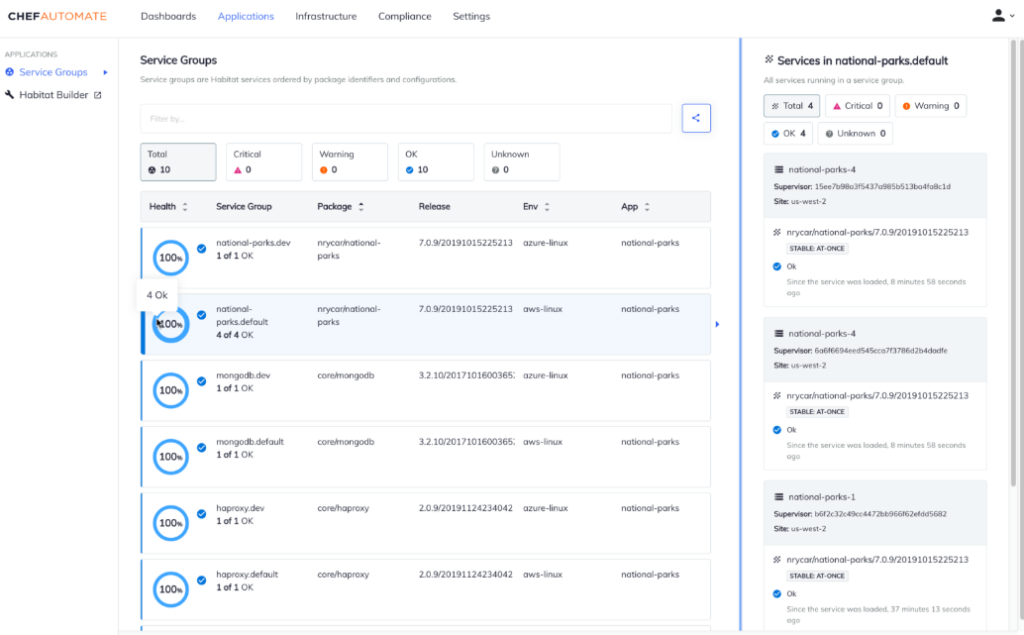
GoCD est un outil open-source complet destiné à aider les équipes DevOps à rationaliser leurs processus d'intégration et de livraison continues. Sa force réside dans l'orchestration de flux de travail complexes, ce qui le distingue comme la meilleure solution pour gérer des pipelines sophistiqués de livraison continue.
Pourquoi j'ai choisi GoCD :
Dans le vaste éventail d'outils DevOps, choisir le bon outil a nécessité une comparaison rigoureuse et des jugements éclairés. J'ai sélectionné GoCD principalement pour ses capacités de visualisation inégalées et son approche du cycle de développement, rendant le déploiement des applications très simple.
Lorsque j'ai pris en compte sa fonctionnalité de bout en bout et l'efficacité qu'il offre pour la gestion des pipelines de livraison continue, j'ai été convaincu qu'il s'agissait de la meilleure option pour les pipelines de livraison continue.
Fonctionnalités phares et intégrations :
GoCD se distingue par sa cartographie robuste des flux de valeur et sa traçabilité détaillée, permettant aux équipes de suivre les changements depuis le premier commit jusqu'à la livraison finale. Ses fonctionnalités bénéficient grandement du support natif de Docker, facilitant l'orchestration des conteneurs. En termes d'intégration, GoCD s'harmonise avec des dépôts majeurs comme GitHub et s'interface aisément avec des plateformes cloud telles qu'AWS et Azure.
Pros and Cons
Pros:
- Représentation visuelle détaillée des pipelines de livraison continue
- Intégration avancée avec Docker et Kubernetes
- Prend en charge de multiples fournisseurs d'infrastructure cloud
Cons:
- La configuration initiale peut être complexe pour les débutants
- Les tarifs peuvent s'avérer élevés pour les jeunes entreprises
- Certains plugins souhaités peuvent être absents ou nécessiter une configuration manuelle.

Jenkins
Idéal pour l'automatisation open-source et la prise en charge des plugins
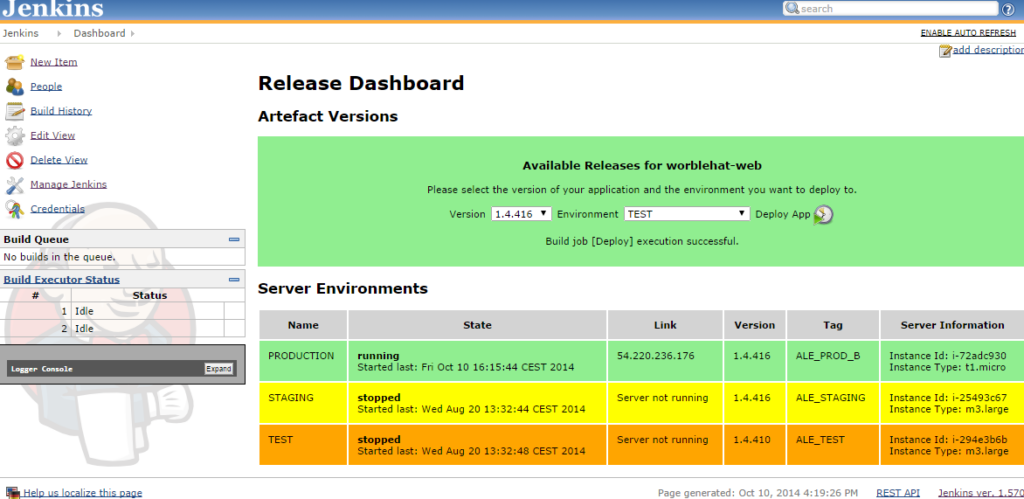
Jenkins est un serveur d'automatisation open-source largement reconnu qui facilite l'intégration continue et la livraison continue (CI/CD). Sa nature extensible, portée par une vaste gamme de modules complémentaires, en fait un outil privilégié pour de nombreuses équipes de développement, notamment en matière d'automatisation et de prise en charge de plugins divers.
Pourquoi j'ai choisi Jenkins : Le processus de sélection d'un outil d'automatisation remarquable m'a amené à considérer Jenkins comme l'un des meilleurs candidats. J'ai reçu des avis de divers experts du secteur ainsi que des expériences personnelles qui allaient en faveur de Jenkins. La raison pour laquelle j'ai choisi Jenkins tient à son caractère open-source associé à un écosystème de plugins exceptionnellement riche. En le comparant à d'autres outils d'automatisation, sa flexibilité et le soutien de sa communauté l'ont vraiment fait ressortir. Ainsi, je pense que Jenkins est « le meilleur pour l'automatisation open-source et la prise en charge des plugins ».
Fonctionnalités phares & intégrations :
Jenkins offre une multitude de fonctionnalités, notamment des pipelines de build, des builds distribués et la surveillance de tâches externes. Sa force réside cependant dans plus de 1 500 plugins disponibles, qui permettent d'adapter la plateforme à presque tous les cas d'utilisation CI/CD. Côté intégrations, Jenkins entretient des liens étroits avec les principales plateformes telles que GitHub, Docker et Kubernetes, offrant aux développeurs une expérience de développement cohérente et intégrée.
Pros and Cons
Pros:
- Un vaste écosystème de plugins pour l’extensibilité
- Prend en charge les builds distribués pour les grands projets
- Large soutien communautaire et mises à jour régulières
Cons:
- La configuration initiale peut être complexe pour les débutants
- L’interface peut sembler vieillissante par rapport à des outils CI/CD plus récents
- La maintenance peut être chronophage en raison des mises à jour régulières et des problèmes de compatibilité des plugins

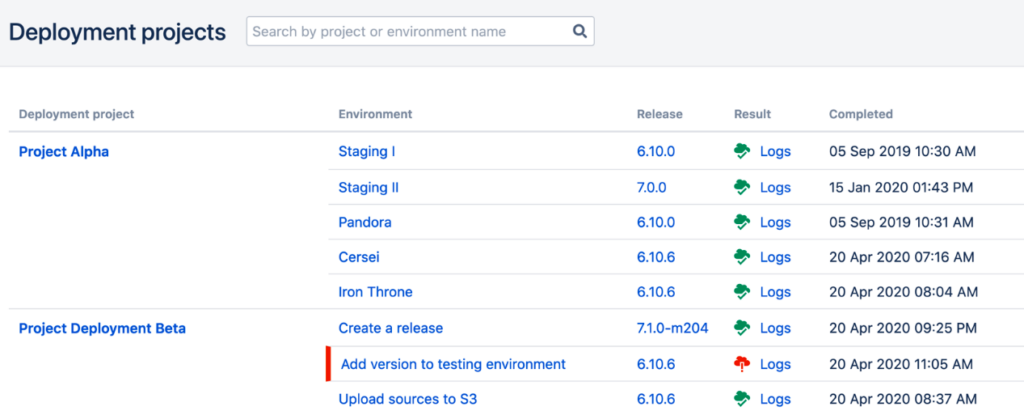
Bamboo par Atlassian sert d'outil d'intégration et de livraison continues, facilitant des flux de travail rationalisés entre le codage et le déploiement. Il atteint tout son potentiel lorsqu'il est combiné avec les autres solutions d'Atlassian, en particulier JIRA et Bitbucket, offrant ainsi un écosystème interconnecté pour le développement logiciel.
Pourquoi j'ai choisi Bamboo par Atlassian : Au moment de sélectionner les bons outils, la synergie intrinsèque de Bamboo avec JIRA et Bitbucket en a fait un choix évident. Ses capacités d'intégration au sein de la suite Atlassian garantissent que les tâches, les codes et les déploiements s'entremêlent aisément. J'ai choisi Bamboo non seulement pour ses fonctionnalités autonomes, mais surtout parce qu'il répond à un besoin spécifique pour les équipes déjà investies dans JIRA et Bitbucket, rendant la chaîne d'outils plus cohérente.
Fonctionnalités et intégrations remarquables :
Bamboo est doté de fonctionnalités comme la fusion automatisée, les projets de déploiement et des workflows de branchement Git intégrés qui améliorent le processus de développement. De plus, ses capacités d'intégration s'étendent au-delà de JIRA et Bitbucket. Il s'adapte aussi à des outils populaires tels qu'AWS CodeDeploy, Docker et Amazon S3, renforçant ainsi son utilité dans des environnements de développement variés.
Pros and Cons
Pros:
- Intégration facile avec les produits Atlassian
- Large compatibilité avec des outils tiers
- Projets de déploiement dédiés pour une gestion des versions plus claire
Cons:
- Peut être trop complexe pour de très petits projets
- Courbe d'apprentissage si vous n'êtes pas familier avec les produits Atlassian
- Le prix peut poser problème pour les grandes équipes

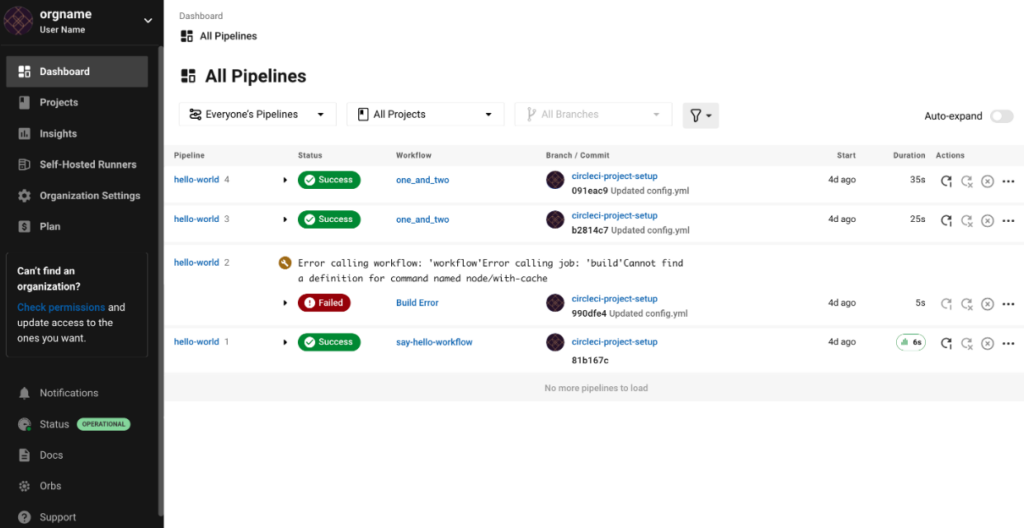
CircleCI se présente comme une plateforme puissante spécialisée dans l'intégration et la livraison continues, garantissant que les modifications logicielles sont automatiquement testées et déployées. En mettant l'accent sur la facilitation de flux de travail ininterrompus, CircleCI répond aux exigences des développeurs à la recherche de processus d'intégration et de déploiement efficaces.
Pourquoi j'ai choisi CircleCI : Dans l'immense paysage des outils de déploiement, CircleCI a attiré mon attention grâce à sa capacité à automatiser l'ensemble du pipeline, de l'intégration du code à la publication du logiciel. Cet outil se distingue par sa combinaison de flexibilité, d'évolutivité et par l'efficacité qu'il apporte aux cycles de développement. J'ai choisi CircleCI notamment pour les équipes ayant besoin d'une solution robuste à la fois pour l'intégration et le déploiement continus, puisque ses fonctionnalités répondent précisément à cette double nécessité.
Fonctionnalités et intégrations remarquables :
CircleCI propose des fonctionnalités telles que la mise en cache des couches Docker, l'orchestration personnalisée des tâches et le parallélisme, qui accélèrent considérablement les temps de compilation. Côté intégrations, il s'associe parfaitement avec GitHub et Bitbucket, et prend également en charge une multitude d'outils tiers, renforçant ainsi son adaptabilité à différents écosystèmes de développement logiciel.
Pros and Cons
Pros:
- Excellent support de Docker et Kubernetes
- Flux de travail personnalisables via configuration YAML
- Évolutif avec des compilations concurrentes
Cons:
- La configuration peut s'avérer complexe pour les débutants
- Certaines fonctionnalités avancées sont uniquement sur des niveaux de prix plus élevés
- La configuration initiale peut nécessiter des ajustements selon les projets

Idéal pour une utilisation flexible d'orchestrateur de charges de travail
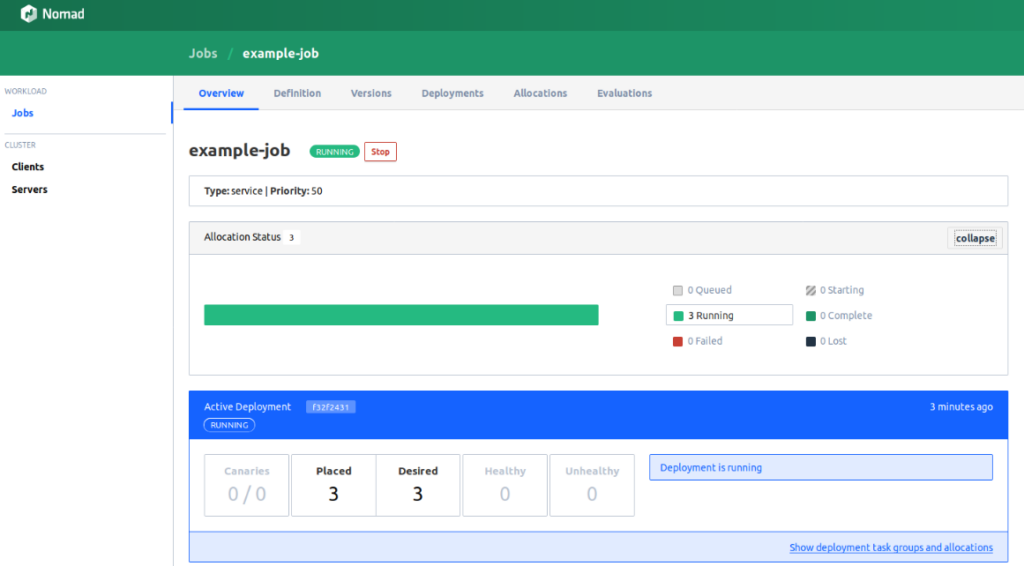
Nomad est un orchestrateur de charges de travail sophistiqué qui facilite le déploiement et la gestion d'applications à travers des environnements d'infrastructure variés. Sa polyvalence dans l'orchestration de différentes charges de travail confirme sa position de choix haut de gamme pour les équipes ayant besoin de flexibilité dans leurs besoins d'orchestration.
Pourquoi j'ai choisi Nomad par HashiCorp : Lors de ma recherche pour identifier les orchestrateurs les plus adaptables, Nomad de HashiCorp s'est imposé. Sa capacité intrinsèque à planifier et coordonner une multitude de charges de travail sur divers environnements d'infrastructure le distingue. J'ai déterminé que Nomad est particulièrement apte à répondre aux équipes qui exigent un orchestrateur flexible et polyvalent.
Fonctionnalités et intégrations remarquables :
Les caractéristiques distinctives de Nomad incluent la prise en charge multi-centres de données et multi-régions, garantissant une haute disponibilité et une grande résilience. Il dispose également d'un système de pilotes de tâches modulaires capable d'exécuter des applications conteneurisées, virtualisées et autonomes. Côté intégration, Nomad collabore harmonieusement avec d'autres outils HashiCorp comme Consul et Vault, et peut également être associé à des plateformes de conteneurs populaires.
Pros and Cons
Pros:
- Très évolutif et capable de gérer efficacement des déploiements à grande échelle
- Intégré à un riche écosystème d'outils HashiCorp
- Prend en charge des charges de travail diverses dont Docker, Java, et plus encore
Cons:
- Présente une courbe d'apprentissage, surtout pour les nouveaux venus dans l'orchestration
- Certaines fonctionnalités peuvent être excessives pour des applications de petite taille
- L'intégration avec des outils autres que HashiCorp peut être moins directe

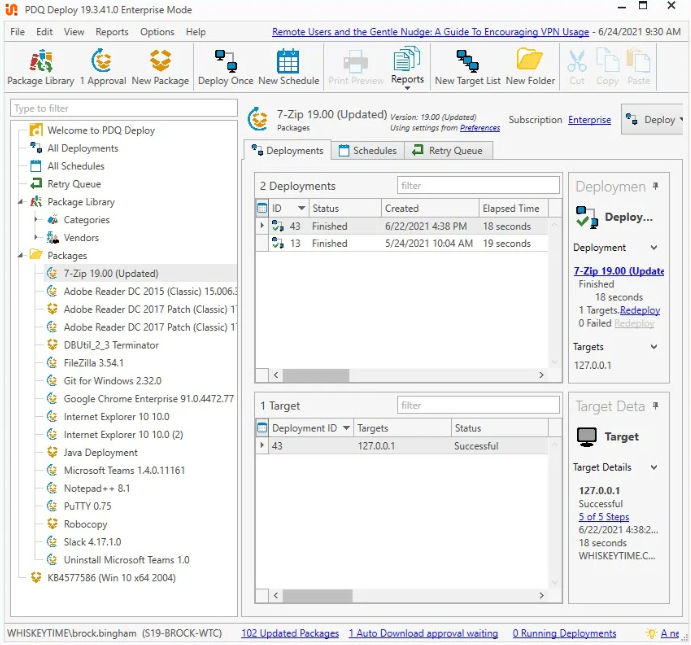
PDQ est un outil de déploiement spécialement conçu pour les environnements Windows. Il offre un déploiement centralisé des logiciels, garantissant des mises à jour et des installations rapides sur plusieurs postes de travail et serveurs Windows. Étant donné les défis liés à la gestion des logiciels dans de grands réseaux Windows, la spécialisation de PDQ sur cette plateforme s'avère précieuse.
Pourquoi j'ai choisi PDQ : Choisir des outils pour une liste implique un processus de jugement, de comparaison et d’évaluation de leur utilité. J'ai sélectionné PDQ pour son accent particulier sur le déploiement de logiciels Windows. À mon avis, cette spécificité le distingue des autres outils de déploiement plus généralistes. De plus, je suis convaincu que PDQ se démarque comme le meilleur outil pour le déploiement centralisé de logiciels Windows grâce à sa simplicité, son efficacité et ses fonctionnalités dédiées.
Fonctionnalités et intégrations remarquables :
L’une des fonctionnalités les plus notables de PDQ est sa capacité à déployer des logiciels sur plusieurs ordinateurs simultanément, réduisant ainsi la charge administrative. L’outil propose également des rapports détaillés, permettant aux administrateurs informatiques de suivre le statut des déploiements en temps réel. Concernant les intégrations, PDQ peut se synchroniser avec Active Directory, garantissant que les logiciels sont déployés sur les bons ordinateurs en fonction de l’appartenance à un groupe ou d’unités organisationnelles.
Pros and Cons
Pros:
- Dédié aux environnements Windows, garantissant un déploiement spécialisé
- Offre un suivi en temps réel du statut de déploiement
- Synchronisation facile avec Active Directory
Cons:
- Non adapté aux environnements non Windows
- Certains utilisateurs peuvent trouver l’interface moins intuitive
- Intégrations tierces limitées comparées à certains concurrents

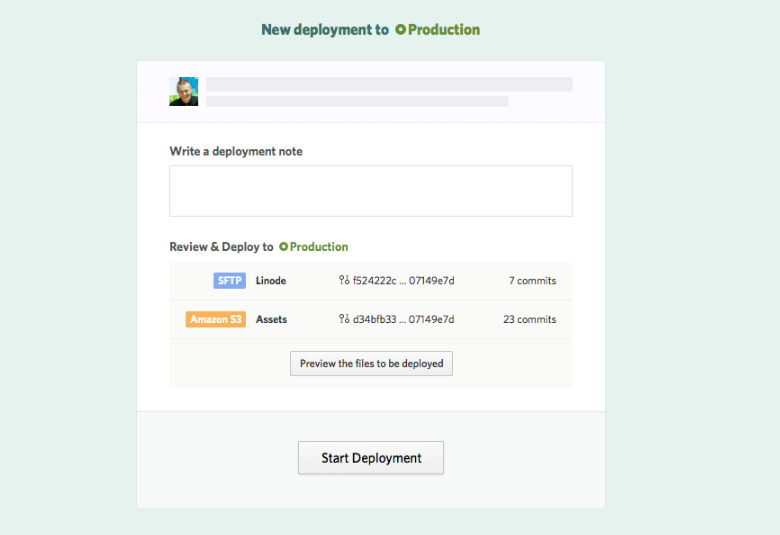
DeployBot est conçu pour simplifier le processus de déploiement en s'interfaçant directement avec une vaste gamme d'outils et de services couramment utilisés. Ce logiciel agit comme un pont entre votre référentiel de code et votre serveur, assurant une transition fluide du code. Sa puissance à se connecter avec des plateformes populaires renforce sa position en tant que référence pour les intégrations.
Pourquoi j'ai choisi DeployBot : Lors du choix des outils, les capacités d'intégration étendues de DeployBot m'ont marqué. En évaluant le paysage des logiciels de déploiement, DeployBot m'a impressionné par son large éventail d'intégrations de services. Je l’ai considéré comme une exception, principalement parce qu’il réduit la friction souvent éprouvée lors de l’intégration avec divers outils et plateformes.
Ainsi, je suis convaincu que c’est un choix de premier ordre lorsque l’on privilégie l’intégration avec des outils et services populaires.
Fonctionnalités et intégrations remarquables :
DeployBot est doté de fonctionnalités qui simplifient le processus de déploiement. Ses déploiements manuels permettent aux développeurs de revoir et contrôler le moment où les modifications sont publiées. Les compilations automatisées signifient que le prétraitement des ressources s’effectue sans intervention manuelle.
Côté intégrations, DeployBot se distingue par sa compatibilité avec des plateformes telles que GitHub, Bitbucket, Slack, ainsi que des services d’hébergement populaires comme Heroku et DigitalOcean, garantissant un écosystème de déploiement complet.
Pros and Cons
Pros:
- Large éventail d'intégrations avec des plateformes populaires
- Le contrôle manuel du déploiement offre de la flexibilité
- Le prétraitement automatisé améliore l'efficacité
Cons:
- Certaines intégrations peuvent nécessiter un temps d'apprentissage
- Peut ne pas répondre à des besoins très spécifiques ou personnalisés
- L'interface, quoique puissante, peut dérouter les nouveaux utilisateurs

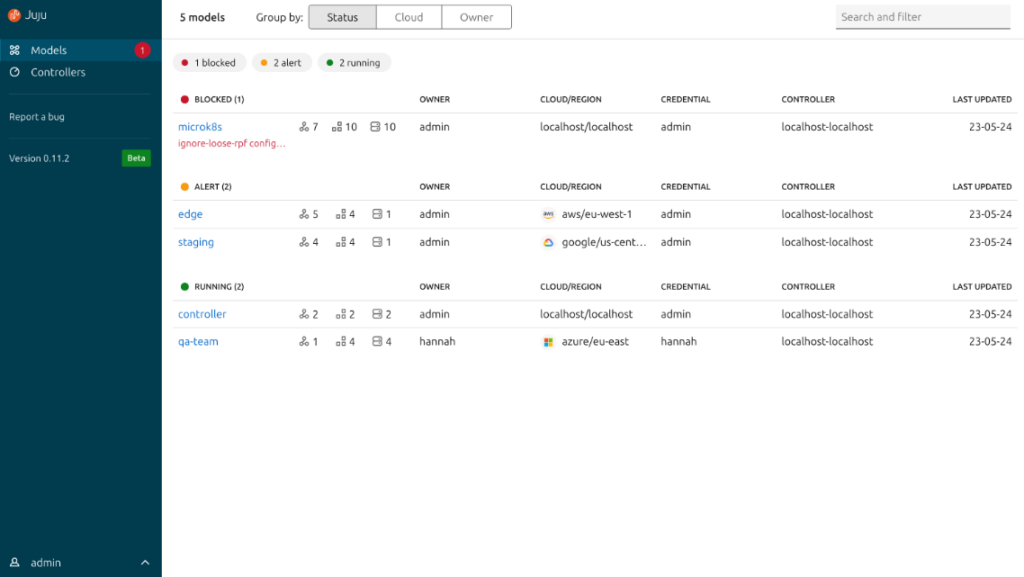
Juju est un outil de déploiement qui adopte une approche unique de la fourniture et de la gestion des logiciels. En s'appuyant sur des techniques pilotées par les modèles, il simplifie et automatise le déploiement de piles logicielles complexes. Son principe fondamental repose sur la modélisation des services, et non des serveurs – une philosophie qui s'accorde avec l'évolution des opérations informatiques.
Pourquoi j'ai choisi Juju : Lors de mon évaluation des outils de déploiement, Juju a retenu mon attention grâce à son architecture unique orientée modèle. J'ai sélectionné ce logiciel car il adopte une vision holistique et orientée service plutôt qu'une perspective centrée sur le serveur, ce qui permet des processus de déploiement plus évolutifs et efficaces.
À mon avis, son accent mis sur la modélisation en fait un exemple parfait pour le déploiement d'applications complexes, c'est pourquoi je pense qu'il est le mieux adapté au déploiement d'applications piloté par les modèles.
Fonctionnalités phares et intégrations :
À la base, Juju offre une panoplie complète d'outils pour orchestrer les services cloud, quel que soit le socle technique sous-jacent. Grâce à la possibilité de définir, configurer et maintenir des piles logicielles, il prend en charge une large gamme d'applications et de bases de données. Côté intégrations, Juju propose un riche écosystème de « charms », des solutions préemballées facilitant l'intégration avec des bases de données, des outils de supervision, et même d'autres solutions d'orchestration.
Pros and Cons
Pros:
- Prend en charge une grande diversité d'environnements cloud
- Écosystème riche en charms pour des intégrations simplifiées
- L'approche orientée modèle facilite les déploiements à l'échelle
Cons:
- Courbe d'apprentissage plus abrupte pour les personnes non familières avec la conception orientée modèle
- Principalement conçu pour le cloud, moins adapté aux environnements sur site
- Les déploiements les plus importants peuvent nécessiter davantage d'ajustements manuels

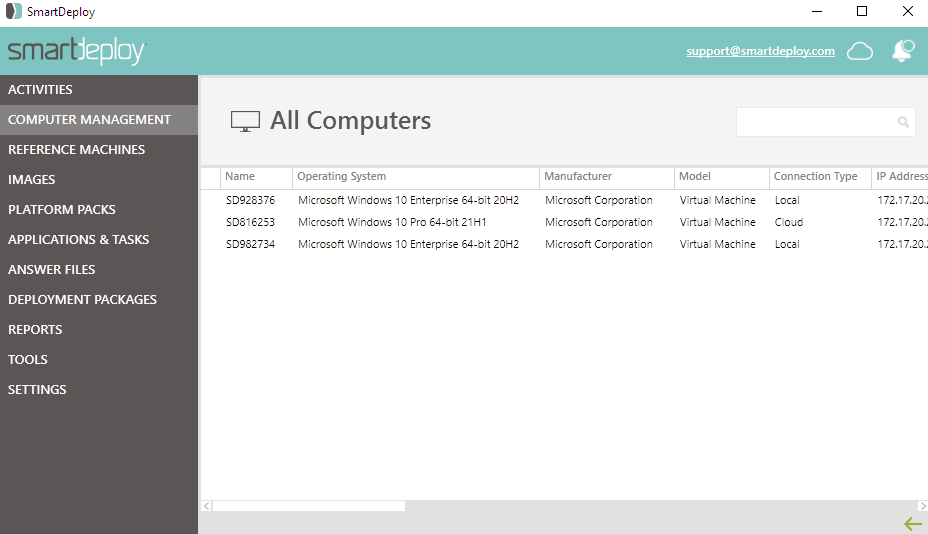
SmartDeploy se spécialise dans les solutions d'imagerie PC et de migration des systèmes Windows. Grâce à sa plateforme, les utilisateurs peuvent garantir une image cohérente et fiable sur du matériel varié, simplifiant ainsi le processus de mise à niveau ou de migration des installations Windows. Son accent mis à la fois sur l'imagerie et la migration en fait un outil indispensable, surtout pour les organisations qui passent d'une version de Windows à une autre.
Pourquoi j'ai choisi SmartDeploy : Lors du choix des outils, il est essentiel d'évaluer leur efficacité, de les comparer à leurs concurrents, et de déterminer ceux qui se démarquent vraiment. J'ai choisi SmartDeploy car il se concentre spécifiquement sur l'imagerie PC et la migration Windows. Selon moi, ce qui différencie SmartDeploy, c'est l'intégration de ces deux fonctions dans une plateforme cohérente et intuitive. Étant donné la complexité de la migration Windows et l'importance d'une imagerie PC précise, SmartDeploy mérite parfaitement le titre de « meilleur pour l'imagerie PC et la migration Windows ».
Caractéristiques et intégrations remarquables :
La capacité de SmartDeploy à créer des images indépendantes du matériel permet aux utilisateurs de déployer une image unique, « golden image », sur n'importe quel appareil. De plus, ses assistants étape par étape guident les utilisateurs à travers des tâches complexes, réduisant ainsi les erreurs. Côté intégrations, SmartDeploy prend en charge un large éventail de versions de Windows, assurant une compatibilité ascendante. Il s'intègre également avec des solutions informatiques populaires telles que WSUS, SCCM et WDS.
Pros and Cons
Pros:
- Une imagerie indépendante du matériel facilite le déploiement sur des appareils variés
- Des assistants détaillés guident les utilisateurs lors de tâches complexes
- Compatibilité avec un large éventail de versions de Windows
Cons:
- Principalement axé sur Windows, utilité limitée pour les plateformes non-Windows
- Courbe d'apprentissage pour les nouveaux utilisateurs
- Nécessite des mises à jour manuelles des pilotes pour certains matériels

Idéal pour la gestion des terminaux en entreprise
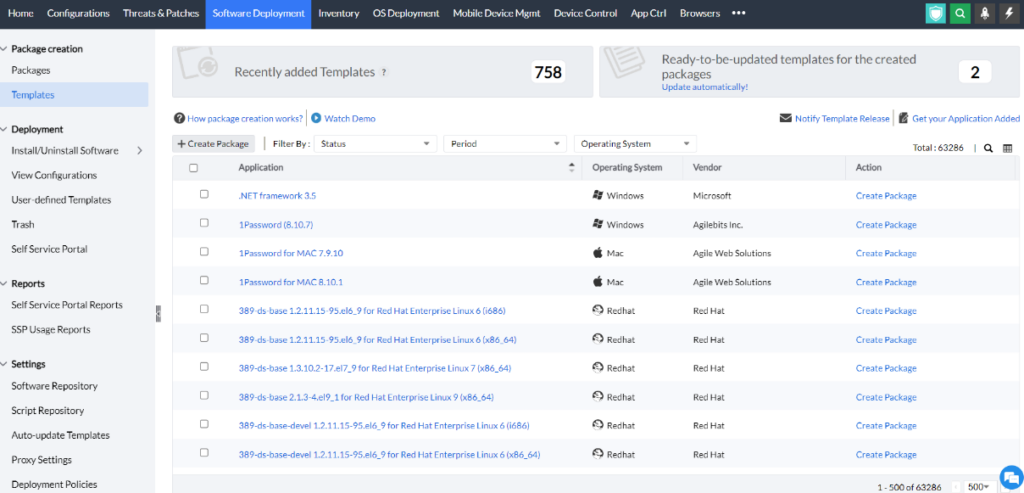
ManageEngine Endpoint Central est conçu pour gérer les tâches de gestion des terminaux sur les réseaux d'entreprise. Il propose des solutions complètes pour surveiller, gérer et sécuriser divers terminaux, garantissant un contrôle cohérent et fiable sur une grande variété d'appareils. Son orientation vers les environnements d’entreprise, compte tenu des défis et de l’ampleur de la gestion des terminaux dans ces contextes, confirme réellement sa prétention à être le meilleur dans ce segment.
Pourquoi j’ai choisi ManageEngine Endpoint Central : Pour sélectionner un outil de gestion des terminaux en entreprise, j’ai comparé diverses options selon leurs fonctionnalités, évalué leurs avantages et analysé leurs points forts. J’ai choisi ManageEngine Endpoint Central en raison de sa robustesse et de la large gamme de fonctionnalités adaptées aux environnements complexes des entreprises.
Après avoir recueilli les avis de différents experts et observé ses performances dans des environnements d’entreprise, je suis convaincu que ManageEngine Endpoint Central est sans conteste « le meilleur pour la gestion des terminaux en entreprise ».
Fonctionnalités et intégrations remarquables :
ManageEngine Endpoint Central se distingue par des fonctionnalités telles que la gestion des correctifs, la distribution de logiciels et le contrôle à distance. Sa fonction de gestion des actifs fournit des informations détaillées sur tous les appareils de l'organisation, assurant une visibilité totale aux services informatiques. Côté intégrations, l’outil fonctionne parfaitement avec Active Directory, ce qui permet une gestion efficace des utilisateurs et des ordinateurs. Il s’intègre également bien avec divers systèmes d’exploitation, offrant ainsi une couverture étendue dans les déploiements d’entreprise.
Pros and Cons
Pros:
- Capacités complètes de gestion des correctifs
- L'intégration avec Active Directory facilite la gestion des utilisateurs et des ordinateurs
- La gestion des actifs offre une vue détaillée des appareils de l'entreprise
Cons:
- Peut être complexe pour des structures de petite taille
- Certaines fonctionnalités nécessitent un apprentissage plus approfondi
- Nécessite une connectivité réseau constante pour de meilleurs résultats
Autres logiciels de déploiement
Ci-dessous, vous trouverez une liste supplémentaire de logiciels de déploiement que j’ai présélectionnés mais qui n’ont pas intégré le top 10. Ils valent vraiment le détour.
- DeployHQ
Idéal pour les déploiements automatiques de dépôts de code
- Octopus Deploy
Idéal pour le déploiement d'applications .NET et l'automatisation DevOps
- AppVeyor
Idéal pour l'intégration et le déploiement continus sur .NET et Windows


Avis associés
- Outils IAC
- Outils de déploiement continu
- Outils de livraison continue
- Outils DevOps
- Outils de surveillance DevOps
Come Valuto i Software di Deployment
Scompongo la mia valutazione in due livelli: i requisiti di base che ogni strumento deve soddisfare e i fattori differenzianti che fanno la differenza quando un canary deployment va storto o i volumi di rilascio superano i limiti di un singolo team.
Funzionalità Principali (Requisiti Minimi per Questa Lista)
Quando seleziono gli strumenti per la mia lista, valuto ciascuno di essi su una scala da 0 (non offre la funzionalità) a 5 (eccelle in quest'area) per ogni funzionalità principale elencata di seguito. Calcolo poi il punteggio totale dello strumento convertendolo in percentuale. Ogni strumento deve raggiungere un punteggio totale minimo del 75% per essere incluso.
- Automazione del Deployment: Cerco strumenti che vadano oltre l'esecuzione di semplici script, offrendo workflow di deployment strutturati e ripetibili con strategie integrate come blue/green o rolling update.
- Integrazione con Pipeline CI/CD: Ogni strumento dovrebbe collegarsi ai sistemi SCM e CI già utilizzati dai team, che si tratti di GitHub Actions, GitLab CI o Jenkins, senza dover ricorrere a pesanti personalizzazioni.
- Supporto Multi-Ambiente: Valuto come uno strumento gestisce la promozione tra ambienti dev, staging e produzione, compreso il supporto per target ibridi come cluster Kubernetes insieme a VM.
- Orchestrazione del Rilascio: La coordinazione di un rilascio di microservizi con dipendenze di servizio e passaggi di approvazione è un ambito in cui gli strumenti si differenziano: quindi verifico la presenza di logica condizionale ed esecuzione parallela.
- Rollback e Versioning: Verifico se la piattaforma può attivare automaticamente un rollback in base a health check falliti, non solo fornire un pulsante di revert manuale dopo che qualcosa si rompe.
- Monitoraggio e Logging del Deployment: Lo streaming in tempo reale dei log e dashboard dedicate allo stato dei deploy sono fondamentali, specialmente quando una pubblicazione in produzione si blocca e più team hanno bisogno di visibilità immediata.
Una volta che ho una lista di strumenti che rispettano questi criteri, considero cosa rende unica ogni piattaforma.
Fattori Differenzianti (Cosa Distingue i Fornitori)
Ecco come confronto e metto a paragone diversi fornitori:
Funzionalità Distintive
Il supporto al progressive delivery è un grande fattore di differenziazione. Cerco funzionalità native di canary e blue/green che automatizzino la gestione del traffico sulla base di segnali di salute in tempo reale, non solo suddivisioni percentuali manuali. Anche il supporto ai workflow GitOps conta molto, in particolare per i team che vogliono gestire l’intero ciclo di deployment tramite commit Git. La governance policy-as-code è un altro aspetto che valuto: è ciò che permette a un’organizzazione da 50 sviluppatori di non aggirare i passaggi di approvazione. I portali self-service per gli sviluppatori risultano distintivi quando permettono ai dev di gestire autonomamente i propri rilasci, entro i limiti imposti dagli ops.
Oltre le Funzionalità
Gli standard di sicurezza e conformità pesano molto nella mia valutazione. Controllo la presenza di certificazioni SOC 2 e ISO 27001, oltre a gestione integrata dei segreti e RBAC, poiché nei settori regolamentati non sono ammesse lacune in questi ambiti. Anche la flessibilità del modello di deployment è importante: alcuni team necessitano di opzioni self-hosted o air-gapped, mentre altri preferiscono il SaaS. Valuto la compatibilità dell’ecosistema osservando come uno strumento si integri con stack di osservabilità esistenti e registri degli artifact, perché una piattaforma di deployment che non si adatta al tuo toolchain crea più problemi di quanti ne risolva.
Comment choisir un logiciel de déploiement
Il est facile de se perdre dans de longues listes de fonctionnalités et des grilles tarifaires complexes. Pour vous aider à rester concentré lors de votre propre processus de sélection de logiciel, voici une liste de critères à garder à l’esprit :
| Critère | À considérer |
|---|---|
| Scalabilité | Le logiciel peut-il évoluer avec votre équipe ? Choisissez des solutions capables de prendre en charge des charges de travail et des utilisateurs croissants sans compromettre les performances. |
| Intégrations | Est-il compatible avec vos outils existants ? Vérifiez la compatibilité avec vos systèmes actuels, comme le contrôle de version ou les services cloud, pour garantir une intégration fluide dans vos flux de travail. |
| Personnalisation | Pouvez-vous l’adapter à vos besoins ? Analysez la facilité à ajuster les paramètres, les workflows ou l’interface pour correspondre à vos processus spécifiques. |
| Simplicité d’utilisation | Votre équipe va-t-elle l’adopter rapidement ? Considérez la courbe d’apprentissage et l’ergonomie de l’interface pour un déploiement et une utilisation au quotidien sans friction. |
| Mise en place et accompagnement | La transition est-elle fluide ? Évaluez le support à la migration des données et à la formation des utilisateurs : tutoriels et assistance client disponibles. |
| Coût | Est-ce dans votre budget ? Comparez les plans tarifaires et vérifiez que le coût total (frais initiaux et récurrents) correspond à vos contraintes budgétaires. |
| Garanties de sécurité | Vos données et systèmes sont-ils protégés ? Renseignez-vous sur les dispositifs en place (chiffrement, conformité aux normes du secteur…) pour limiter les risques. |
| Disponibilité du support | Pourrez-vous obtenir de l’aide en cas de besoin ? Analysez la qualité et la disponibilité du support : réactivité, canaux proposés (chat, téléphone, etc.). |
Qu’est-ce qu’un logiciel de déploiement ?
Un logiciel de déploiement est un outil qui automatise le processus de déploiement d'applications et de mises à jour sur différents environnements. Les professionnels de l’informatique, les équipes DevOps et les développeurs utilisent généralement ces outils afin d’assurer des déploiements efficaces et sans erreur. L’automatisation, la gestion des versions et la prise en charge multi-environnements contribuent à réduire les erreurs manuelles, à maintenir la cohérence et à gérer les déploiements complexes. Globalement, ces outils améliorent l’efficacité et la fiabilité des processus de déploiement logiciel.
Fonctionnalités
Lors du choix d’un logiciel de déploiement, veillez à rechercher les fonctionnalités clés suivantes :
- Automatisation : Automatise le processus de déploiement, réduisant les erreurs humaines et économisant du temps.
- Gestion des versions : Gère différentes versions d’applications, assurant la cohérence lors des déploiements.
- Prise en charge multi-environnements : Permet le déploiement dans divers environnements, offrant une flexibilité pour les tests et la production.
- Capacités de retour arrière : Permet de revenir à des versions antérieures, minimisant les interruptions en cas de problème.
- Exécution de scripts personnalisés : Offre la possibilité d’exécuter des scripts personnalisés, pour des processus de déploiement adaptés.
- Suivi du déploiement en temps réel : Surveille les déploiements en temps réel, aidant à identifier et à résoudre rapidement tout incident.
- Tableau de bord centralisé : Fournit une vue unique pour gérer tous les déploiements, ce qui simplifie le suivi et la gestion.
- Sécurisation renforcée : Protège les données et les systèmes grâce au chiffrement et à la conformité, garantissant des déploiements sûrs.
- Capacités d’intégration : Fonctionne avec les outils et systèmes existants pour assurer la continuité des flux de travail.
- Rapports détaillés : Fournit des informations sur le succès ou l’échec des déploiements, favorisant l’amélioration continue.
Avantages
L’implémentation d’un logiciel de déploiement offre plusieurs avantages à votre équipe et à votre entreprise. En voici quelques-uns auxquels vous pouvez vous attendre :
- Efficacité accrue : Automatise les tâches répétitives pour libérer du temps pour des travaux plus stratégiques.
- Réduction des erreurs : Diminue les erreurs humaines par l’automatisation, assurant des déploiements plus fiables.
- Environnements cohérents : Maintient l’uniformité entre différents environnements grâce à la gestion des versions et au support multi-environnements.
- Retours arrière plus rapides : Permet de revenir rapidement à une version antérieure, réduisant ainsi les temps d’arrêt et les perturbations de service.
- Collaboration améliorée : Mise à disposition d’un tableau de bord centralisé pour favoriser la communication et la coordination entre les membres de l’équipe.
- Sécurité renforcée : Protège les données et les applications grâce à des mesures de sécurité, assurant des déploiements sûrs.
- Meilleure visibilité : Propose des rapports détaillés pour aider l’équipe à analyser les déploiements et améliorer les processus.
Coûts et Tarification
Le choix d’un logiciel de déploiement nécessite de comprendre les différents modèles de tarification et formules proposés. Les coûts varient en fonction des fonctionnalités, de la taille de l’équipe, des options additionnelles, et plus encore. Le tableau ci-dessous résume les formules courantes, leurs prix moyens et les fonctionnalités typiquement incluses dans les solutions logicielles de déploiement :
Tableau comparatif de formules pour les logiciels de déploiement
| Type de formule | Prix moyen | Fonctionnalités courantes |
|---|---|---|
| Formule gratuite | $0 | Automatisation de base, support limité et ressources communautaires. |
| Formule personnelle | $5-$25/user/month | Automatisation, gestion des versions, intégrations de base et support par email. |
| Formule Business | $30-$75/user/month | Automatisation avancée, prise en charge multi-environnements, scripts personnalisés et sécurité renforcée. |
| Formule Entreprise | $100-$200/user/month | Automatisation complète, support premium, intégrations complètes et sécurité renforcée étendue. |
FAQ sur les logiciels de déploiement
Voici des réponses à des questions courantes concernant les logiciels de déploiement :
Quelles sont les exigences de déploiement ?
Les exigences de déploiement définissent l’infrastructure, les procédures d’installation et les configurations nécessaires pour réussir le déploiement du système logiciel. Votre équipe doit prendre en compte les ressources requises, la compatibilité avec les systèmes existants et toute configuration spécifique afin d’assurer un processus de déploiement fluide.
Comment gérez-vous les retours en arrière dans un logiciel de déploiement ?
Gérer les retours en arrière implique de revenir à une version stable antérieure de votre logiciel si des problèmes surviennent lors du déploiement. Vous devez vous assurer que votre logiciel de déploiement prend en charge les capacités de retour en arrière, ce qui permet de restaurer rapidement le système à un état de fonctionnement connu et de minimiser les interruptions de service.
Comment un logiciel de déploiement peut-il améliorer la collaboration au sein de l'équipe ?
Un logiciel de déploiement améliore la collaboration d’équipe en offrant une plateforme centralisée pour gérer les déploiements, suivre les modifications et partager les mises à jour. Il aide votre équipe à coordonner ses efforts, à maintenir la transparence et à s’assurer que tout le monde est aligné tout au long du processus de déploiement.
Comment un logiciel de déploiement prend-il en charge les configurations multi-environnements ?
Un logiciel de déploiement prend en charge les environnements multiples en vous permettant de configurer et de gérer les déploiements sur différents environnements, tels que le développement, les tests et la production. Cette capacité garantit la cohérence et aide votre équipe à conserver des environnements séparés pour chaque étape du cycle de vie du logiciel.
Quel rôle joue l'automatisation dans un logiciel de déploiement ?
L’automatisation dans un logiciel de déploiement réduit l’intervention manuelle, minimise les erreurs et accélère le processus de déploiement. Elle permet à votre équipe d’automatiser les tâches répétitives, telles que le déploiement de code et les tests, libérant ainsi du temps pour des activités plus stratégiques et améliorant l’efficacité globale.
Et ensuite :
Si vous êtes en train de rechercher un logiciel de déploiement, contactez gratuitement un conseiller SoftwareSelect pour des recommandations personnalisées.
Vous remplissez un formulaire et échangez brièvement afin qu'ils comprennent précisément vos besoins. Ensuite, vous recevrez une liste restreinte de solutions à examiner. Ils vous assisteront également tout au long du processus d'achat, y compris la négociation des prix.