

Gestionar un pipeline DevOps no es una tarea sencilla. Entre garantizar la estabilidad en producción, rastrear cuellos de botella de rendimiento y prevenir tiempos de inactividad, la presión para que todo funcione sin problemas puede parecer abrumadora. Quizás has experimentado retrasos frustrantes causados por problemas no detectados o has batallado con herramientas que no se integran perfectamente en tus flujos de trabajo. La realidad es que, sin las herramientas adecuadas de monitorización DevOps, mantener la eficiencia y ofrecer una excelente experiencia de usuario se convierte en una tarea cuesta arriba.
Las herramientas de monitorización DevOps están diseñadas para ofrecerte visibilidad sobre tus sistemas, ayudándote a identificar y resolver posibles problemas antes de que impacten a tus usuarios. Son esenciales para mantener operaciones fluidas, optimizar el rendimiento y asegurar que tu equipo pueda centrarse en innovar en lugar de apagar incendios. A lo largo de los años, he trabajado con numerosas soluciones de monitorización en grandes proyectos y equipos diversos. En esta guía, compartiré mis principales recomendaciones y perspectivas para ayudarte a elegir la herramienta perfecta, agilizando tus procesos y manteniendo tus sistemas en el máximo rendimiento.
Por qué confiar en nuestras recomendaciones de software
6,700+
Reviews
20
Industry experts
16+
Evaluation factors
14
Years
Nuestro equipo lleva probando y evaluando software desde 2012. Como líderes tecnológicos, sabemos lo difícil —y lo importante— que es elegir el software adecuado.
Para esta guía, evaluamos las herramientas mediante pruebas prácticas e investigación independiente, puntuando las herramientas según nuestros criterios de selección.
Nuestras reseñas reflejan nuestro criterio editorial humano, no un discurso de ventas.
Revisores expertos:
- Paulo Gardini MiguelDirector técnico
 Tim FisherVP de IA
 Gabriel RosasTech Lead y arquitecto de software
 Christhian GruhnTech Lead y arquitecto de plataforma

Resumen de las mejores herramientas de monitorización DevOps
| Tool | Best For | Trial Info | Price | ||
|---|---|---|---|---|---|
| 1 | Ideal para monitoreo de infraestructuras híbridas | Prueba gratuita de 30 días | Desde $200/mes (facturado anualmente) | Website | |
| 2 | Ideal para el monitoreo de usuarios reales | Prueba gratuita de 30 días + demo gratis disponible | Desde $10/mes (facturado anualmente) | Website | |
| 3 | Ideal para el monitoreo multi-nube | Prueba gratuita de 30 días + demo gratuita + plan gratuito disponible | Desde $199/año | Website | |
| 4 | Ideal para obtener información de infraestructura en tiempo real | Prueba gratuita de 14 días + plan gratuito + demo gratuita disponible | Desde $4.50/nodo/mes (facturado anualmente) | Website | |
| 5 | Mejor para la monitorización de certificados SSL | Plan gratuito + demo gratis disponible | Desde $8/10 monitores/mes (facturado anualmente) | Website | |
| 6 | Mejor para monitorizar interrupciones y caídas de servidores | Prueba gratuita de 14 días | Desde $21/usuario/mes | Website | |
| 7 | Mejor para la monitorización continua de grandes redes de puertos | Prueba gratuita de 30 días | Desde $1,995/usuario | Website | |
| 8 | Mejor para monitoreo del rendimiento de sitios web y móviles | Prueba gratuita de 15 días | Desde $6/core/mes | Website | |
| 9 | Mejor para la observabilidad completa de pilas SaaS | Plan gratuito disponible | Desde $49/usuario/mes | Website | |
| 10 | Mejor para necesidades empresariales | Prueba gratuita disponible | El precio de IBM Cloud Services parte de $25/usuario/mes. | Website |


Reseñas de las mejores herramientas de monitorización DevOps
Aquí tienes un vistazo a las principales herramientas de monitorización DevOps. Resaltaré las funciones que ofrece cada herramienta y por qué merecen un lugar en esta lista.
 Ideal para monitoreo de infraestructuras híbridas
- Prueba gratuita de 30 días
- Desde $200/mes (facturado anualmente)
Visit WebsiteCustomer Rating:4.6/5This rating combines scores from multiple user review sites to reflect overall customer sentiment about the product.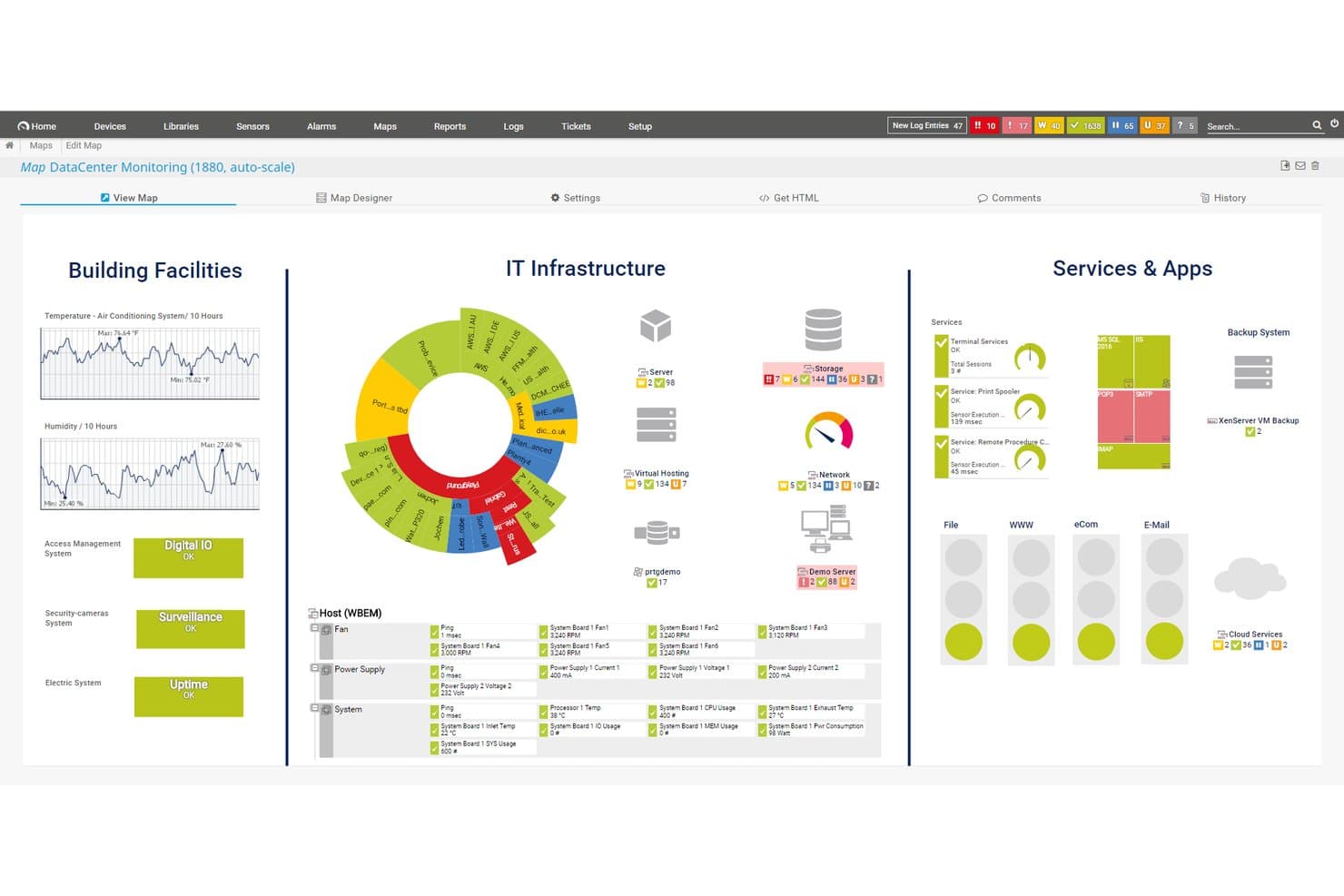
Paessler PRTG ofrece un mapa de monitoreo de centro de datos que muestra las instalaciones del edificio, la infraestructura de TI, los servicios y las aplicaciones en un único panel unificado. Paessler PRTG es una plataforma de monitoreo de infraestructura de TI sin agentes que supervisa dispositivos de red, servidores, aplicaciones, bases de datos y recursos en la nube mediante un sistema basado en sensores con paneles personalizables y alertas en tiempo real.
¿Para quién es mejor Paessler PRTG?
Equipos de operaciones de TI en organizaciones medianas y grandes que necesitan visibilidad centralizada sobre redes locales, servidores e infraestructuras híbridas.
Por qué elegí Paessler PRTG
Elegí Paessler PRTG como uno de los mejores porque su arquitectura basada en sensores me permite recopilar métricas de dispositivos de red, servidores, aplicaciones y recursos en la nube en una sola plataforma. Me gusta cómo el diseñador de mapas de PRTG me permite crear paneles personalizados en tiempo real que reflejan el diseño real de mi infraestructura y no solo una plantilla genérica. La configuración de sondeos remotos amplía esa cobertura a múltiples sitios sin tener que implementar herramientas de monitoreo por separado.
Funciones clave de Paessler PRTG
- Monitoreo basado en sensores: Permite rastrear una variedad de tipos de dispositivos, servicios y protocolos, asignando sensores individuales a métricas específicas.
- Sensores personalizados REST: Permite extraer datos de APIs de terceros o aplicaciones personalizadas mediante solicitudes HTTP.
- Monitoreo distribuido con sondeos remotos: Permite supervisar infraestructuras geográficamente dispersas desde una única consola.
- Registro de auditoría e inicio de sesión único: Permite rastrear la actividad de los usuarios y gestionar el acceso de manera simplificada para cumplir con normativas en organizaciones grandes.
Integraciones de Paessler PRTG
Paessler PRTG ofrece integraciones nativas con Amazon CloudWatch, Microsoft Azure, VMware vSphere y Slack, y proporciona una API para integraciones personalizadas.
Pros and Cons
Pros:
- Sensores personalizables en todas las capas de la infraestructura
- Fuerte soporte para implementaciones locales e híbridas
- El mapeo de auto-descubrimiento cartografía toda tu red automáticamente
Cons:
- Monitoreo de contenedores y Kubernetes nativo limitado
- La interfaz se siente anticuada en comparación con alternativas modernas
Learn more about Paessler PRTG: Ideal para el monitoreo de usuarios reales
- Prueba gratuita de 30 días + demo gratis disponible
- Desde $10/mes (facturado anualmente)
Visit WebsiteCustomer Rating:4.7/5This rating combines scores from multiple user review sites to reflect overall customer sentiment about the product.
Site24x7 ofrece paneles personalizables donde los equipos de DevOps pueden adaptar sus vistas de monitoreo según sus necesidades específicas. Site24x7 es una solución de monitoreo basada en la nube diseñada para equipos de DevOps y operaciones de TI. Ofrece capacidades de monitoreo integral para sitios web, servidores, redes, aplicaciones y servicios en la nube. Con Site24x7, puedes obtener información en tiempo real sobre el rendimiento y la salud de tu infraestructura de TI.
Por qué elegí Site24x7: Me gusta su función de monitoreo del rendimiento de aplicaciones (APM). Esta herramienta te ayuda a identificar y solucionar problemas de rendimiento en tus aplicaciones proporcionando información detallada sobre trazas de transacciones, consultas a bases de datos y componentes de aplicaciones. Otra característica valiosa es el monitoreo de usuarios reales (RUM). RUM te permite rastrear y analizar las experiencias de usuarios reales en tus sitios web y aplicaciones web. Al comprender cómo interactúan los usuarios con tus servicios, puedes tomar decisiones informadas para mejorar la usabilidad y el rendimiento.
Características e integraciones destacadas de Site24x7
Las características incluyen monitoreo sintético de transacciones web, que te permite simular interacciones de usuarios para identificar posibles problemas antes de que afecten a los usuarios reales. Además, el monitoreo de red ofrece visibilidad sobre la salud de los dispositivos de red, ayudándote a mantener la confiabilidad. La gestión de registros es otra función que permite recopilar y analizar logs de diversas fuentes, facilitando la resolución eficiente de problemas e incidencias.
Las integraciones incluyen ServiceNow, PagerDuty, Jira, Microsoft Teams, Slack, Nagios, AWS, Azure, Google Cloud Platform, Docker, Jenkins y Kubernetes.
Pros and Cons
Pros:
- Ofrece alertas en tiempo real a través de diferentes canales
- Paneles y reportes personalizables
- Monitoreo integral para diversos sistemas
Cons:
- El exceso de alertas puede ser abrumador para los usuarios
- La configuración inicial puede ser compleja en entornos grandes
Learn more about Site24x7: Ideal para el monitoreo multi-nube
- Prueba gratuita de 30 días + demo gratuita + plan gratuito disponible
- Desde $199/año
Visit WebsiteCustomer Rating:4.3/5This rating combines scores from multiple user review sites to reflect overall customer sentiment about the product.
Plataforma robusta de gestión del rendimiento de aplicaciones con amplias capacidades de monitoreo e integraciones de terceros para una mejor supervisión de IT. ManageEngine Applications Manager es una herramienta integral que ofrece monitoreo multi-nube, permitiendo a los usuarios supervisar, gestionar, auditar y proteger su infraestructura híbrida y multi-nube. Su principal punto fuerte radica en su capacidad para proporcionar una solución unificada para la supervisión y gestión de entornos multi-nube, lo que lo convierte en la mejor opción para las empresas que buscan optimizar sus esfuerzos de monitoreo en varios entornos nube.
Por qué elegí ManageEngine Applications Manager: ManageEngine Applications Manager destaca por ofrecer funciones robustas que facilitan el monitoreo continuo, el análisis de rendimiento y la resolución de problemas en toda la cadena de DevOps. Permite un enfoque proactivo para la gestión de incidentes, posibilita la automatización de comprobaciones rutinarias y proporciona análisis detallados para mejorar la toma de decisiones. Su capacidad de integrarse fácilmente con diversas herramientas de desarrollo, pruebas y despliegue lo convierte en un activo valioso para equipos DevOps que buscan una alta eficiencia y mínimo tiempo de inactividad.
Características y conexiones destacadas de ManageEngine Applications Manager
Las características incluyen un amplio soporte listo para usar para supervisar más de 100 aplicaciones y servidores, abarcando desde bases de datos, servidores web, servidores de aplicaciones y servidores virtuales, hasta plataformas en la nube, contenedores y arquitecturas de microservicios. Además, ManageEngine Applications Manager incorpora funciones avanzadas de análisis de causa raíz impulsadas por algoritmos de aprendizaje automático.
Las conexiones incluyen Amazon Web Services (AWS), Microsoft Azure, Google Cloud Platform, Oracle Database, MySQL, Microsoft SQL Server, VMware, Docker, Apache Tomcat y Redis.
Pros and Cons
Pros:
- Capacidades de monitoreo integrales a través de aplicaciones, servidores y entornos en la nube
- Paneles e informes personalizables para análisis detallados
- Detección automatizada de anomalías y mecanismos de alerta
Cons:
- Puede ser complejo de configurar y personalizar para necesidades específicas
- El coste puede ser prohibitivo para empresas pequeñas y medianas
Learn more about ManageEngine Applications Manager: Ideal para obtener información de infraestructura en tiempo real
- Prueba gratuita de 14 días + plan gratuito + demo gratuita disponible
- Desde $4.50/nodo/mes (facturado anualmente)
Visit WebsiteCustomer Rating:4.8/5This rating combines scores from multiple user review sites to reflect overall customer sentiment about the product.
Netdata proporciona tableros completamente automatizados que visualizan cada métrica individual. Netdata es una plataforma de monitoreo y solución de problemas de código abierto que ofrece métricas de alta resolución, registros de diario y visualizaciones en tiempo real para la supervisión del sistema. Su objetivo es proporcionar una alternativa rentable y fácil de usar a plataformas más costosas y complejas.
Por qué elegí Netdata: Me gusta que la plataforma enfatiza los datos de alta fidelidad y proporciona visualizaciones en tiempo real, lo que permite a los usuarios monitorear el rendimiento y la salud del sistema con precisión. También simplifica y mejora el proceso de monitoreo para DevOps con funciones para recopilar, almacenar, consultar, visualizar y alertar sobre una amplia gama de métricas. Netdata puede ejecutarse en múltiples nodos, y cada instancia de Netdata es capaz de operar de forma autónoma.
Funciones y Integraciones Destacadas de Netdata
Funciones incluyen alertas para notificar a los usuarios sobre cualquier problema detectado en el sistema, detección automática de anomalías, y tableros automatizados y personalizables. Además, el núcleo del ecosistema Netdata es de código abierto e incluye todas las funciones de monitoreo como la base de datos, el motor de consulta, el motor de puntuación, el motor de salud y el motor de aprendizaje automático.
Integraciones incluyen Contenedores, Contenedores Kubernetes, Máquinas Virtuales, Apache, Consul, Elasticsearch, OpenSearch, MySQL, Redis, archivos de registro Squid, Windows, macOS y cientos más.
Pros and Cons
Pros:
- Alertas automatizadas
- Monitoreo ilimitado de métricas
- Gráficos interactivos para visualización de datos
Cons:
- Puede requerir una curva de aprendizaje para maximizar sus funciones
- Los conocimientos podrían ser más completos
Learn more about Netdata: Mejor para la monitorización de certificados SSL
- Plan gratuito + demo gratis disponible
- Desde $8/10 monitores/mes (facturado anualmente)
Visit WebsiteCustomer Rating:4.7/5This rating combines scores from multiple user review sites to reflect overall customer sentiment about the product.
UptimeRobot rastrea el estado de los certificados SSL y el tiempo de actividad en un panel de control en tiempo real. Para los equipos de DevOps que buscan una solución de monitoreo confiable, UptimeRobot ofrece una opción práctica que admite la monitorización de certificados SSL junto con verificaciones de tiempo de actividad. Es adecuada para equipos de todos los tamaños, desde operadores individuales hasta grandes organizaciones, que necesitan visibilidad sobre la disponibilidad del servicio y el rendimiento de los endpoints. Al ayudar a los equipos a detectar problemas como expiraciones de certificados, caídas y tiempos de respuesta lentos, UptimeRobot respalda operaciones estables y una entrega de servicios constante.
Por qué elegí UptimeRobot
Elegí UptimeRobot por su monitorización de certificados SSL, que ayuda a los equipos de DevOps a evitar problemas causados por certificados vencidos o mal configurados. Supervisa el estado de los certificados y envía alertas antes de que expiren, reduciendo el riesgo de advertencias de acceso o interrupciones del servicio. UptimeRobot también proporciona alertas de caídas a través de integraciones como Slack y PagerDuty, lo que facilita que los equipos respondan rápidamente y mantengan la fiabilidad de los servicios.
Características clave de UptimeRobot
Además de la monitorización de certificados SSL, UptimeRobot ofrece:
- Verificaciones desde múltiples ubicaciones: Supervise sus servicios desde varias ubicaciones a nivel mundial para garantizar la accesibilidad global.
- Monitoreo del tiempo de respuesta: Controle la velocidad de respuesta de su servidor para obtener información sobre cuellos de botella en el rendimiento.
- Páginas de estado personalizables: Comparta actualizaciones de estado en tiempo real con los usuarios a través de páginas de estado con su marca.
- Gestión de incidentes: Gestione y resuelva incidentes de forma eficiente con alertas personalizables y niveles de acceso para el equipo.
Integraciones de UptimeRobot
Las integraciones incluyen Slack, PagerDuty, Microsoft Teams, Telegram, Discord, Splunk On-Call y más, lo que permite una gestión de alertas fluida a través de sus plataformas de comunicación preferidas.
Pros and Cons
Pros:
- Las alertas en tiempo real aseguran una rápida reacción ante problemas de caídas
- El monitoreo SSL ayuda a mantener la seguridad del sitio web de manera eficiente
- Admite múltiples canales de alerta
Cons:
- Limitadas opciones de personalización en configuraciones de notificaciones en comparación con la competencia
- No apto para entornos DevOps complejos
Learn more about UptimeRobot: Mejor para monitorizar interrupciones y caídas de servidores
- Prueba gratuita de 14 días
- Desde $21/usuario/mes
Visit WebsiteCustomer Rating:4.5/5This rating combines scores from multiple user review sites to reflect overall customer sentiment about the product.
Puedes monitorizar y calcular los porcentajes de fallos en solicitudes API en PagerDuty. PagerDuty es una plataforma de respuesta a incidentes que envía alertas cuando hay una interrupción o caída de un servicio. Durante momentos críticos, puede enviar notificaciones por correo electrónico, SMS y llamadas telefónicas a su equipo de desarrollo o base de clientes.
Por qué elegí PagerDuty: Elegí PagerDuty porque es una excelente herramienta si gestiona infraestructura crítica para el negocio que desea supervisar constantemente. La plataforma le permite recibir notificaciones de alerta de guardia de inmediato.
Funciones y compatibilidades destacadas de PagerDuty:
Las funciones que me parecieron más útiles están completamente enfocadas en alertar a los equipos en caso de que sistemas, nodos o servicios de aplicaciones fallen, e incluyen alertas por correo electrónico, alertas móviles, análisis de causa raíz, notificaciones en tiempo real y priorización. También puede programar y escalar automáticamente los problemas.
Las integraciones incluyen complementos preconstruidos como AWS, ServiceNow, Salesforce, Zendesk, Atlassian, Datadog, Slack, Splunk y más.
Pros and Cons
Pros:
- Permite asignar la respuesta a incidentes a la persona o equipo adecuado
- Alertas personalizables que pueden enviarse por correo electrónico, teléfono, SMS o notificaciones push
- Filtra notificaciones para priorizar alertas importantes que indiquen amenazas genuinas mientras reduce falsas alarmas
Cons:
- Buscar alertas históricas puede ser difícil a menos que tenga una ID exacta
- Utiliza un panel convencional que podría ser más personalizable para necesidades y preferencias específicas
Learn more about PagerDuty: Mejor para la monitorización continua de grandes redes de puertos
- Prueba gratuita de 30 días
- Desde $1,995/usuario
Visit WebsiteCustomer Rating:4.6/5This rating combines scores from multiple user review sites to reflect overall customer sentiment about the product.
Aquí puedes monitorizar el ancho de banda y el estado de los puertos en Nagios. Nagios es una aplicación de software de código abierto que monitoriza continuamente redes de tráfico. Puede rastrear el uso del ancho de banda por puerto para el tráfico de entrada y salida, detectar caídas de red, identificar puertos sobreutilizados y descubrir abusos de red.
Por qué elegí Nagios: En lugar de exponer mis sistemas a vulnerabilidades o preocuparme por un rendimiento lento de la red, Nagios ofrece a mi equipo DevOps visibilidad inmediata de nuestra red. También me gustó que registre información como problemas de infraestructura de red y procesos fallidos por puerto.
Características e Integraciones Destacadas de Nagios
Características ofrecidas por Nagios garantizan la seguridad de mis puertos de red. Esto incluye monitorización SNMP, monitorización de switches y routers, monitorización de red y monitorización por ping, lo que me ayuda a mantener la integridad y seguridad de la infraestructura de mi red.
Integraciones preconstruidas incluyen Amazon SNS, Prometheus, PagerDuty, Dynatrace y más. Además, Nagios cuenta con más de 3.000 plugins oficiales y de la comunidad que los desarrolladores pueden añadir a su stack.
Pros and Cons
Pros:
- La versión de código abierto es 100% gratuita
- Ligero para un uso mínimo de recursos
- Aumenta la disponibilidad de toda la infraestructura de red frente a fallos de protocolo y caídas de red
Cons:
- Se requieren licencias separadas para las funciones de seguridad y visibilidad de red
- Utiliza archivos en lugar de bases de datos para almacenar archivos de configuración en el backend
Learn more about Nagios: Mejor para monitoreo del rendimiento de sitios web y móviles
- Prueba gratuita de 15 días
- Desde $6/core/mes
Visit WebsiteCustomer Rating:4.3/5This rating combines scores from multiple user review sites to reflect overall customer sentiment about the product.
AppDynamics puede monitorear detalles históricos de pagos y proporcionar información sobre la proporción de inicio de sesión de usuarios. AppDynamics es una herramienta de gestión del rendimiento de aplicaciones de pila completa. Utiliza algoritmos de aprendizaje automático para detectar problemas de rendimiento, compararlos con métricas de referencia y activar alertas cuando sea necesario.
Por qué elegí AppDynamics: Elegí AppDynamics porque se centra en el rendimiento de las aplicaciones, utilizando el monitoreo para garantizar una experiencia óptima del usuario. Ya sea que gestiones un sitio web o una aplicación móvil, AppDynamics asegura que tus clientes no encuentren problemas como expiraciones de tiempo o tiempos de carga lentos.
Características e integraciones destacadas de AppDynamics:
Características que hacen de AppDynamics una excelente elección para el monitoreo del rendimiento incluyen el monitoreo del rendimiento de aplicaciones (APM) y visibilidad de la infraestructura junto con visibilidad de la base de datos. Además, el monitoreo de usuarios finales también me llamó la atención, ya que garantiza a tus clientes las velocidades más rápidas posibles de la aplicación.
Integraciones con las que AppDynamics colabora incluyen complementos preconstruidos como LoadRunner, Sainapse y NeoLoad para rendimiento y entrega continua. AppDynamics también se asocia con SquaredUp, Medallia y Quantum Metric para monitorear la experiencia del cliente.
Pros and Cons
Pros:
- Proporciona información en tiempo real sobre los procesos que consumen CPU y memoria
- La profundidad del monitoreo de aplicaciones web e infraestructura es inmensa
- La visibilidad de la red te permite ver la cantidad de ancho de banda utilizada por nodo
Cons:
- La funcionalidad puede ser abrumadora para pequeñas empresas
- No realiza escaneo automático de aplicaciones; estas deben definirse en un archivo de configuración
Learn more about AppDynamics: Mejor para la observabilidad completa de pilas SaaS
- Plan gratuito disponible
- Desde $49/usuario/mes
Visit WebsiteCustomer Rating:4.3/5This rating combines scores from multiple user review sites to reflect overall customer sentiment about the product.
Puedes monitorizar cada instancia de tu servicio con New Relic. New Relic es una herramienta de supervisión y análisis web que monitoriza la observabilidad en tiempo real de cada componente de la aplicación distribuido en bases de datos y servidores.
Por qué elegí New Relic: Elegí New Relic porque proporciona una solución 'todo en uno' que monitoriza y analiza todos los aspectos de tu infraestructura tecnológica. Tener una visibilidad completa de extremo a extremo permite a los equipos obtener información procesable cuando surgen problemas y abordarlos y resolverlos de manera oportuna.
Funciones y integraciones destacadas de New Relic:
Funciones que considero que hacen de New Relic una excelente opción para la monitorización de pila completa incluyen la monitorización de aplicaciones y la monitorización de bases de datos. Además, existe la monitorización de disponibilidad para asegurar que tus sistemas funcionen en ubicaciones públicas o privadas en todo momento.
Integraciones disponibles con complementos preconstruidos como AWS, Kubernetes, Azure, Google Cloud Platform y Prometheus. También puedes usar integraciones nativas como SQL Server para enviar consultas a New Relic.
Pros and Cons
Pros:
- Muy completo en funciones y permite la posibilidad de escribir consultas personalizadas sobre los datos recopilados
- Proporciona información sobre métricas y rendimiento incluso bajo cargas y estrés elevados
- Instalación fácil del agente que permite visualizar datos en tu panel en pocos minutos
Cons:
- El costo puede considerarse elevado, especialmente para startups o empresas medianas
- La interfaz puede ser un poco complicada debido a la cantidad de opciones en pantalla
Learn more about New Relic: 10Mejor para necesidades empresariales
Splunk
- Prueba gratuita disponible
- El precio de IBM Cloud Services parte de $25/usuario/mes.
Visit WebsiteCustomer Rating:4.3/5This rating combines scores from multiple user review sites to reflect overall customer sentiment about the product.
Aquí se muestra la función del catálogo de software en IBM Cloud Services. IBM Cloud Services es una plataforma integral de nube para empresas que buscan soluciones de nube escalables y seguras. Atiende a grandes organizaciones ofreciendo una amplia gama de servicios, incluyendo infraestructura, IA y análisis de datos.
Por qué elegí IBM Cloud Services: Su enfoque en las necesidades de la empresa lo hace adecuado para operaciones a gran escala que requieren una infraestructura robusta. Puedes aprovechar sus capacidades de IA y análisis para mejorar los procesos de toma de decisiones. Las características de seguridad de la plataforma aseguran que tus datos permanezcan protegidos. Su red global respalda operaciones comerciales internacionales, brindando fiabilidad y escalabilidad.
Funciones y conexiones destacadas:
Funciones incluyen herramientas avanzadas de IA que apoyan la toma de decisiones basadas en datos. La plataforma ofrece sólidas medidas de seguridad para proteger tus datos y aplicaciones. IBM Cloud Services también proporciona una red global para operaciones internacionales confiables.
Conexiones incluyen Red Hat OpenShift, VMware, SAP, Salesforce, Cisco, Docker, Kubernetes, MongoDB, Watson y Jenkins.
Pros and Cons
Pros:
- Amplia red global
- Sólidas medidas de seguridad
- Adecuado para grandes empresas
Cons:
- Complejo para nuevos usuarios
- Puede requerir capacitación especializada
Learn more about Splunk:
Otras herramientas de monitorización DevOps
Aquí tienes algunas otras herramientas que no llegaron al top 12 pero que definitivamente vale la pena revisar:
- 11PrometheusIdeal para alertas y agregación de métricas
- 12Grafana CloudIdeal para el monitoreo, análisis y visualización de datos
- 13BuddyLa mejor opción para monitorear sitios web y aplicaciones móviles para pequeñas empresas
- 14InfluxDBIdeal para monitorizar datos de series temporales en una base de datos única y multipropósito
- 15SensuIdeal para monitorear entornos en la nube
- 16ChaosSearchLa mejor opción para centralizar datos de registros y eventos en la nube
- 17DynatraceIdeal para la monitorización de extremo a extremo del rendimiento en grandes empresas
- 18Dotcom MonitorLa mejor opción para monitoreo de flujos de trabajo críticos
- 19IcingaIdeal para comprobar la disponibilidad de los recursos de red
Reseñas de otros programas y herramientas relacionadas
Si aún no encuentras lo que buscas aquí, revisa estos otros tipos de herramientas que hemos probado y evaluado.
- Software de monitorización de redes
- Software de monitorización de servidores
- Soluciones SD-WAN
- Herramientas de monitorización de infraestructura
- Analizadores de paquetes
- Herramientas de monitorización de aplicaciones
Cómo Evalúo las Herramientas de Monitoreo DevOps
Evalúo estas herramientas en dos capas: requisitos clave como la ingesta de métricas, el rastreo distribuido y el enrutamiento de alertas, luego diferenciadores que determinan el ajuste para tu stack y equipo.
Funcionalidad Básica (Requisitos Indispensables Para Esta Lista)
Cuando selecciono herramientas para mi lista, califico cada una en una escala de 0 (no ofrece la funcionalidad) a 5 (destaca en esta área) para cada funcionalidad básica enumerada a continuación. Luego, calculo la puntuación total de la herramienta en porcentaje. Cada herramienta necesita lograr una puntuación total mínima del 75% para ser considerada para su inclusión.
- Monitoreo de Infraestructura y Aplicaciones: Evalúo si una herramienta puede rastrear hosts, contenedores, bases de datos y servicios de aplicaciones en un solo lugar, como observar picos de CPU en nodos de Kubernetes junto con la latencia de API.
- Observabilidad de Pila Completa: Los registros, métricas y rastros deberían estar correlacionados a través de servicios para que puedas seguir una solicitud lenta desde un error en el frontend a través de saltos en microservicios hasta la causa raíz.
- Alertas en Tiempo Real y Gestión de Incidentes: Reviso la existencia de condiciones de alerta configurables, políticas de escalamiento y enrutamiento a herramientas como PagerDuty o Slack para que los ingenieros de guardia reciban notificaciones por el canal correcto.
- Monitoreo de Pipeline CI/CD: Aquí importa el seguimiento de despliegues. Busco visibilidad en etapas de construcción, tasas de fallos y la capacidad de correlacionar un despliegue fallido con un incidente en producción.
- Integraciones con la Cadena de Herramientas DevOps: La herramienta debe integrarse con tu stack existente. Busco conectores nativos para Kubernetes, Terraform, Jenkins, GitHub y principales proveedores de la nube.
- Detección de Anomalías y Análisis de la Causa Raíz: Evalúo si la herramienta va más allá de umbrales estáticos. La detección de anomalías basada en aprendizaje automático y la correlación de eventos ayuda a los SREs a filtrar el ruido de alertas durante interrupciones.
Una vez que tengo una lista de herramientas que cumplen estos requisitos, considero qué distingue a cada plataforma.
Factores Diferenciadores (Lo Que Distingue a los Proveedores)
Así es como comparo y contrasto diferentes proveedores:
Características Destacadas
El seguimiento de SLO es un diferenciador importante. Busco herramientas que permitan a los equipos de SRE definir presupuestos de error y monitorear tasas de agotamiento para que las decisiones sobre confiabilidad se basen en datos y no sean reactivas. El monitoreo sintético también es relevante: simular llamadas API o recorridos de usuario desde múltiples regiones ayuda a detectar problemas de latencia antes de que los usuarios reales los experimenten. RUM complementa esto capturando el rendimiento real en navegador y móvil, dándote una visión completa de cómo un despliegue impacta la experiencia del usuario final.
Más Allá de las Funcionalidades
La previsibilidad de precios es algo que evalúo detenidamente. Algunas herramientas cobran por host mientras que otras cobran por volumen de datos, y los costos de retención de logs pueden escalar cuando se ingieren terabytes desde un clúster grande de Kubernetes. El soporte de OpenTelemetry es otro factor relevante, ya que adoptar estándares abiertos protege a tu equipo del bloqueo con el proveedor si cambian las necesidades. También considero el tiempo hasta generar valor: la autoinstrumentación y los tableros preconstruidos pueden marcar la diferencia entre estar en producción en días o gastar semanas en una configuración manual.
Cómo elegir herramientas de monitorización DevOps
Es fácil perderse entre largas listas de funciones y estructuras de precios complejas. Para ayudarte a mantener el foco durante tu proceso de selección de software, aquí tienes una lista de factores clave que debes tener en cuenta:
| Factor | Qué considerar |
|---|---|
| FactorEscalabilidad | Qué considerarAsegúrate de que la herramienta pueda manejar cargas de trabajo crecientes y más usuarios sin perder rendimiento. Las opciones basadas en la nube con autoescalado pueden ayudar a gestionar el crecimiento. |
| FactorIntegraciones | Qué considerarVerifica si la herramienta se integra con tu stack DevOps actual, incluyendo pipelines CI/CD, servicios en la nube y plataformas de respuesta ante incidentes. |
| FactorPersonalización | Qué considerarBusca opciones para ajustar la configuración de monitoreo, los umbrales de alerta y los paneles para adaptar la herramienta a los flujos de trabajo y prioridades de tu equipo. |
| FactorFacilidad de uso | Qué considerarLa herramienta debe tener una interfaz clara y controles intuitivos para que tu equipo pueda detectar y actuar rápidamente ante incidencias. Las configuraciones complicadas pueden ralentizar los tiempos de respuesta. |
| FactorPresupuesto | Qué considerarCompara los costos de suscripción, tarifas de licencia y cargos adicionales por funciones avanzadas o límites de datos incrementados. Presta atención a costos ocultos. |
| FactorSalvaguardas de seguridad | Qué considerarBusca cifrado, controles de acceso y transmisión segura de datos para proteger la información sensible y prevenir brechas. |
| FactorAlertas en tiempo real | Qué considerarLa herramienta debe proporcionar alertas instantáneas ante problemas de rendimiento o caídas, permitiendo que tu equipo actúe con rapidez y minimice el tiempo de inactividad. |
| FactorRetención de datos e informes | Qué considerarAsegúrate de que la herramienta almacene los datos históricos el tiempo suficiente para permitir análisis significativos e identificación de tendencias. Los informes exportables son útiles para revisiones del equipo. |
Tendencias en herramientas de monitoreo DevOps
En mi investigación, consulté innumerables actualizaciones de productos, notas de prensa y registros de lanzamientos de diferentes proveedores de herramientas de monitoreo DevOps. Estas son algunas de las tendencias emergentes que estoy siguiendo:
Detección mejorada de anomalías: Los nuevos modelos de aprendizaje automático están mejorando la detección de anomalías, ayudando a los equipos a identificar patrones irregulares en tiempo real y reducir falsos positivos.
Observabilidad de pila completa: Los proveedores van más allá del monitoreo básico para brindar una visión completa de la infraestructura, las aplicaciones y la experiencia del usuario en un solo lugar. Esto facilita identificar y resolver problemas. Al evaluar plataformas de observabilidad, busca soluciones que ofrezcan capacidades de monitoreo integrales.
Información impulsada por IA: Cada vez más herramientas utilizan IA para analizar datos y predecir problemas de rendimiento antes de que sucedan. Esto ayuda a los equipos a actuar proactivamente en lugar de reaccionar ante fallas.
Trazabilidad distribuida: Las herramientas están agregando capacidades de trazado que permiten a los equipos rastrear solicitudes a través de microservicios y contenedores. Esto ayuda a localizar exactamente dónde ocurren los retrasos o fallos.
Sistemas auto-reparables: Algunas herramientas ahora ofrecen remediación automatizada, donde el sistema puede detectar un problema y solucionarlo sin intervención humana. Esto reduce los tiempos de inactividad y de respuesta.
¿Qué son las herramientas de monitoreo DevOps?
Las herramientas de monitoreo DevOps son soluciones de software especializadas diseñadas para rastrear y analizar en tiempo real el rendimiento y la salud de aplicaciones e infraestructuras. Estas herramientas son utilizadas principalmente por ingenieros DevOps, administradores de sistemas y profesionales de TI para asegurar el funcionamiento fluido y la entrega de productos de software.
Las herramientas de monitoreo DevOps ayudan a automatizar el proceso de monitoreo, ofrecen información sobre el rendimiento del sistema y permiten identificar y resolver problemas rápidamente antes de que afecten el entorno de producción. Funciones como alertas en tiempo real, herramientas de observabilidad de datos y análisis predictivo apoyan una resolución proactiva de problemas y mejoran la eficiencia operativa.
Características
Estas son algunas de las características más importantes que busco en las herramientas de monitoreo DevOps cuando las evalúo para mi lista:
- Alertas y notificaciones en tiempo real: Esta característica garantiza la conciencia inmediata de los problemas a medida que surgen. Es esencial para mitigar los problemas rápidamente, evitando que inconvenientes menores se conviertan en interrupciones graves.
- Paneles de control integrales: Los paneles ofrecen una vista unificada de todas las métricas y registros. Son cruciales para visualizar el estado de la canalización de desarrollo y la salud de las aplicaciones, facilitando la identificación de tendencias y problemas potenciales.
- Métricas personalizables: Opciones de personalización para monitorear métricas específicas. Adaptar las métricas a necesidades concretas permite una supervisión más focalizada, asegurando que los equipos puedan rastrear los indicadores de rendimiento más relevantes para sus proyectos.
- Gestión y análisis de registros: Gestión eficaz de registros y capacidades analíticas. Analizar los registros ayuda a diagnosticar problemas y a entender el comportamiento de las aplicaciones, lo cual es vital para la resolución de problemas y la optimización.
- Escalabilidad: La capacidad de escalar las soluciones de monitoreo a medida que crecen los proyectos. La escalabilidad asegura que la herramienta de monitoreo pueda manejar mayores cargas, evitando la degradación del rendimiento con el tiempo.
- Capacidades de integración: La habilidad de integrar con una amplia gama de herramientas de monitoreo de API y plataformas. Esta funcionalidad permite una colaboración fluida entre las herramientas usadas en el flujo de trabajo de desarrollo, mejorando la eficiencia y la consistencia de los datos.
- Características de seguridad y cumplimiento: Medidas de seguridad incorporadas e informes de cumplimiento. Estas funciones ayudan a proteger los datos sensibles y aseguran que la canalización de desarrollo cumpla con los requisitos regulatorios.
- Gestión automatizada de incidentes: Automatización del proceso de respuesta a incidentes. Al gestionar automáticamente los incidentes, los equipos pueden reducir el tiempo de inactividad y mejorar los tiempos de respuesta, logrando aplicaciones más fiables.
- Compatibilidad nativa con la nube: Optimizados para monitorear entornos basados en la nube. Dado que muchas aplicaciones se alojan ahora en la nube, contar con soporte nativo garantiza que el monitoreo sea eficiente y efectivo en estos entornos.
- Visibilidad de extremo a extremo: La capacidad de monitorear todos los aspectos de la canalización de desarrollo. Esta característica proporciona una visión holística del flujo de trabajo, desde los commits de código hasta el despliegue, lo que es clave para entender el impacto de los cambios e identificar cuellos de botella.
Beneficios
Las herramientas de monitoreo desempeñan un papel fundamental en el ecosistema DevOps. No solo ayudan a identificar y resolver problemas rápidamente, sino que también ofrecen información valiosa que puede llevar a tomar decisiones más acertadas y a mejorar el rendimiento general. Aquí tienes algunos beneficios más específicos de estas herramientas para tu equipo DevOps:
- Mayor eficiencia operativa: Las herramientas de monitoreo DevOps automatizan el seguimiento y el análisis de diversas métricas y registros a lo largo del flujo de desarrollo. Esta automatización libera tiempo valioso para los equipos, permitiéndoles enfocarse en tareas más estratégicas en vez de realizar monitoreo y resolución de problemas manualmente.
- Mayor fiabilidad del sistema: Al ofrecer alertas y notificaciones en tiempo real, estas herramientas permiten a los equipos detectar y abordar problemas rápidamente, antes de que se conviertan en desperfectos graves. Esta capacidad de respuesta inmediata reduce significativamente los tiempos de inactividad y garantiza que los sistemas se mantengan estables y fiables.
- Resolución proactiva de problemas: El uso de análisis predictivo y detección de anomalías ayuda a las organizaciones a anticipar inconvenientes antes de que ocurran. Al identificar problemas potenciales con antelación, los equipos pueden implementar soluciones proactivamente, evitando interrupciones y manteniendo la continuidad operativa.
- Optimización del rendimiento: Las herramientas DevOps para bases de datos ofrecen información sobre el rendimiento de aplicaciones e infraestructuras, identificando cuellos de botella y áreas de mejora. Esta información permite a los equipos optimizar sus sistemas para un mejor rendimiento, mejorando la experiencia de usuario y la eficiencia operativa.
- Mejor postura de seguridad: Con características orientadas al monitoreo de métricas de seguridad y cumplimiento, estas herramientas desempeñan un rol crucial en la identificación de vulnerabilidades y en asegurar que los sistemas sigan las mejores prácticas de seguridad. Esta postura de seguridad reforzada protege contra brechas y mantiene la integridad de los datos y sistemas de la organización.
Costos y precios
Con una variedad de opciones de planes disponibles, comprender los precios y las características de cada uno puede ayudar a los compradores de software a tomar una decisión informada que se ajuste a sus necesidades y presupuesto. Desde versiones gratuitas diseñadas para proyectos pequeños hasta planes empresariales con características avanzadas, existen herramientas de monitoreo para cualquier escala de operación.
Tabla comparativa de planes para herramientas de monitoreo DevOps
A continuación se muestra un desglose detallado de las opciones de planes comunes y precios para las herramientas de monitoreo DevOps, pensado para ayudar a quienes se inician en esta categoría de software a orientarse en sus elecciones.
| Tipo de plan | Precio promedio | Características comunes |
|---|---|---|
| Tipo de planGratis | Precio promedio$0 | Características comunesCapacidades básicas de monitoreo, métricas y registros limitados, soporte de la comunidad, acceso a foros |
| Tipo de planBásico | Precio promedio$20-$50/usuario/mes | Características comunesCapacidades de monitoreo mejoradas, más métricas y registros, soporte por correo electrónico, integración con otras herramientas |
| Tipo de planEstándar | Precio promedio$50-$100/usuario/mes | Características comunesSuite de monitoreo completa, análisis avanzados, soporte 24/7, paneles personalizables, opciones de integración |
| Tipo de planPremium | Precio promedio$100-$200/usuario/mes | Características comunesFunciones premium incluyendo análisis predictivo, capacidades de aprendizaje automático, soporte dedicado, integraciones personalizadas |
| Tipo de planEmpresarial | Precio promedioPrecios personalizados | Características comunesTodas las funciones Premium más opciones de escalabilidad, gerente de cuenta dedicado, seguridad de nivel empresarial |
Preguntas frecuentes sobre herramientas de monitoreo DevOps
Aquí tienes respuestas a preguntas comunes sobre las herramientas de monitoreo DevOps:
Qué sigue:
Si estás investigando herramientas de monitoreo DevOps, conéctate con un asesor de SoftwareSelect para recibir recomendaciones gratuitas.
Rellenas un formulario y tienes una charla rápida donde profundizan en las particularidades de tus necesidades. Posteriormente, recibirás una lista corta de software para revisar. Incluso te apoyarán durante todo el proceso de compra, incluyendo la negociación de precios.