

10 Beste Service-Desk-Software für technischen Support im Jahr 2026

10 Beste Service-Desk-Software Shortlist
Here's my pick of the 10 best software from the 27 tools reviewed.


Service-Desk-Software ist eine innovative Lösung, die als Bindeglied zwischen Support-Mitarbeitern und den von ihnen betreuten Kunden dient. Diese leistungsstarken Tools, wie Freshdesk oder Help Scout, ermöglichen einen nahtlosen Kommunikationsfluss, sorgen für schnellere Reaktionszeiten und helfen dabei, Kundenanfragen zu verwalten und zu optimieren. So zählen sie zu den besten verfügbaren Help-Desk-Software-Lösungen.
Gerade kleine Teams oder Einsteiger profitieren von den kostenlosen Tarifen vieler Anbieter. Der Einsatz einer zuverlässigen Service-Desk-Lösung bringt großen Mehrwert: Arbeitsabläufe werden optimiert, die Fähigkeiten der Support-Teams gestärkt und letztlich für zufriedene Kunden gesorgt.
Why Trust Our Software Reviews
We’ve been testing and reviewing software since 2023. As tech leaders ourselves, we know how critical and difficult it is to make the right decision when selecting software.
We invest in deep research to help our audience make better software purchasing decisions. We’ve tested more than 2,000 tools for different tech use cases and written over 1,000 comprehensive software reviews. Learn how we stay transparent & our software review methodology.
Beste Service-Desk-Software Zusammenfassung
| Tool | Best For | Trial Info | Price | ||
|---|---|---|---|---|---|
| 1 | Best for AI-powered assistance with a conversational bot | 14-day free trial available | From $19/user/month (billed annually) | Website | |
| 2 | Best for AI-driven automation with a human touch | Free trial available | From $25/user/month (billed annually) | Website | |
| 3 | Best for enterprise service management | 30-day free trial available | From $17/user/month | Website | |
| 4 | Best for Gmail-based service desks | Free plan available | From $25/user/month (billed annually) | Website | |
| 5 | Best for ease of use with a clean, user-friendly interface | 21-day free trial | From $12.6/user/month (billed annually) | Website | |
| 6 | Best for Agile teams and software development workflows | 7-day free trial | From $20/user/month (billed annually) | Website | |
| 7 | Best for centralized issue management | Free trial available | From $478/user/annually | Website | |
| 8 | Best for AI-powered knowledge management | Free trial | From $25/user/month (billed annually) | Website | |
| 9 | Best for integrating ITSM and SIAM in one package | Free demo available | Pricing upon request | Website | |
| 10 | Best for its free comprehensive service and simplicity | Not available | Forever free plan available | Website |


-

Site24x7
Visit WebsiteThis is an aggregated rating for this tool including ratings from Crozdesk users and ratings from other sites.4.6 -
GitHub Actions
Visit WebsiteThis is an aggregated rating for this tool including ratings from Crozdesk users and ratings from other sites.4.8 -
Docker
Visit WebsiteThis is an aggregated rating for this tool including ratings from Crozdesk users and ratings from other sites.4.6





Beste Service-Desk-Software Bewertungen


Freshservice is a robust cloud-based IT Service Management (ITSM) solution. It is particularly noted for its advanced artificial intelligence capabilities, which include a conversational bot that enhances customer interactions.
Why I Picked Freshservice: I picked Freshservice for this list because of its superior AI-powered assistance. The tool's conversational bot sets it apart from many of its competitors. This feature is precisely why I believe Freshservice is best for businesses looking to leverage AI technology for better customer engagement and more efficient issue resolution.
Standout Features & Integrations:
Freshservice provides a range of essential features such as incident, problem, change, and release management. Its ITSM functionalities are comprehensive and user-friendly. On the integration front, Freshservice pairs well with popular tools like Slack, Jira, Google Workspace, and more, promoting better team collaboration and project management.
Pros and Cons
Pros:
- Good integration with popular tools like Slack and Jira
- Comprehensive ITSM functionalities
- Strong AI capabilities with a conversational bot
Cons:
- Limited customization options compared to some competitors
- The conversational bot may require a learning curve
- Pricing could be more competitive
New Product Updates from Freshservice

Freshservice Enhances Global Search and Dashboards With Task Support
Freshservice enhances Global Search and Dashboards by adding support for ticket, problem, change, and release tasks, along with custom task views. This update helps teams search, track, and report on tasks from one centralized interface. For more information, visit Freshservice's official site.


Help Scout offers a customer-service-oriented help desk platform built for teams that handle email-centric support and want to extend into chat and self-service without a rigid conventional ticket queue. If your team is a small-to-mid-sized business, SaaS or e-commerce company, or internal support function looking for a tool that doesn’t feel like an overly complex enterprise system, this might be a good fit for you.
Why I Picked Help Scout
I picked Help Scout for its unique ability to combine AI-driven automation with human touch in customer service. The AI chatbot feature stands out, managing the majority of routine inquiries, allowing your team to focus on more complex issues. Additionally, the shared inbox facilitates seamless team collaboration, ensuring no customer query goes unanswered. These features make Help Scout an excellent choice for businesses aiming to enhance their service desk capabilities without losing the personal connection with their customers.
Help Scout Key Features
In addition to its standout AI and collaboration tools, Help Scout offers several other features that enhance its service desk functionality:
- Help Center and Live Chat: Offers 24/7 customer support access, ensuring your customers can reach you anytime.
- Workflows: Automates essential tasks to keep your team's inbox organized and efficient.
- Saved Replies: Provides quick access to pre-written responses for common inquiries, saving your team time.
- Performance Insights: Delivers metrics to help you optimize service quality and team performance.
Help Scout Integrations
Integrations include Slack, HubSpot, Salesforce, Mailchimp, Shopify, Jira, Google Workspace, Trello, Asana, and Intercom.
Pros and Cons
Pros:
- Help Center and Live Chat provide 24/7 customer support access.
- AI-driven automation helps manage routine inquiries effectively.
- Shared inbox feature enhances team collaboration and efficiency.
Cons:
- Less depth around multi-channel support (phone, social media) compared to tools built for full contact-centre operations.
- Mobile app experience lags behind desktop support in usability and features.
New Product Updates from Help Scout

Help Scout Enhances Support Management With AI and Integrations
Help Scout introduces smarter routing, WhatsApp and Aircall integrations, and new AI enhancements to help teams manage conversations, automate workflows, and support customers across more channels. For more information, visit Help Scout’s official site.
 .
.

InvGate Service Management is a flexible, no-code ITSM solution that can support not only IT operations but also enterprise-wide service delivery across departments like HR, Facilities, and Finance.
Why I Picked InvGate Service Desk: One aspect that stands out is its ability to be used across different service teams. Whether it’s managing onboarding requests from HR or maintenance tickets from Facilities, InvGate offers a unified experience that supports enterprise service management out of the box.
I also like that it introduces a unique concept to the service desk space: gamification. This aspect makes it different from many other offerings on the market. By gamifying the service desk experience, it adds an extra level of engagement that can boost productivity and morale among support staff.
Standout Features & Integrations:
Features include a self-service portal that empowers employees across departments to resolve common issues independently by accessing a shared knowledge base and service catalog. The platform also has an intuitive UX that supports non-technical teams without needing additional setup or modules.
For integrations, InvGate offers compatibility with a wide range of systems, including LDAP, SSO, email servers, and various other IT management tools.
Pros and Cons
Pros:
- Incorporates AI and low-code automation
- A broad array of features for comprehensive service management
- Gamified service desk experience enhances user engagement and productivity
Cons:
- No social media ticket creation support
- Could offer more native integrations
New Product Updates from InvGate Service Management
InvGate Service Management Enhances Workflows and Usability
InvGate Service Management introduces VSA access from the AI Hub, Microsoft Teams workflow task completion, expanded Okta workflow actions, and custom labels for workflow steps. These updates improve usability and streamline workflow execution across platforms. For more information, visit InvGate Service Management's official site.
 .
.

For teams seeking a service desk solution that integrates with their existing email infrastructure, Hiver presents a compelling option. Designed to cater to industries such as technology, healthcare, and logistics, Hiver transforms Gmail into a helpdesk tool. It addresses challenges like managing high volumes of customer queries and enhancing team collaboration, making it ideal for customer support, finance, IT service management, and HR teams.
Why I Picked Hiver
I picked Hiver for its unique ability to transform Gmail into a fully functional service desk, which is particularly useful for teams already embedded in the Google Workspace ecosystem. The standout feature is its shared inbox, allowing teams to collaborate on customer queries without leaving their email. Additionally, Hiver's workflow automation streamlines repetitive tasks, freeing up your team to focus on more complex issues. With AI-driven insights, you can also gain valuable metrics on team performance and customer satisfaction, addressing the need for data-driven decision-making.
Hiver Key Features
In addition to its core functionalities, I also found Hiver offers several other features that enhance its utility as a service desk software:
- Live Chat: Engage with your customers in real-time through a built-in chat feature, allowing for instant query resolution.
- Knowledge Base: Create and manage a repository of articles and FAQs to empower customers with self-service options.
- Customer Portal: Provide customers with a platform to track their queries and interact with your support team.
- Sentiment Analysis: Utilize AI to gauge customer emotions and tailor your responses to improve satisfaction.
Hiver Integrations
Integrations include Salesforce, Hubspot, Shopify, Slack, Jira, Asana, Trello, QuickBooks, Dropbox, and Zapier.
Pros and Cons
Pros:
- Workflow automation reduces manual tasks
- AI tools accelerate response drafting
- Omnichannel inbox centralizes customer communication
Cons:
- Heavy reliance on Google Workspace
- Limited integrations restrict platform flexibility
New Product Updates from Hiver

Hiver Enhances Automation With Smarter Conversation Routing
Hiver introduces SLA targeting, auto-assign outbound conversations, and auto-unassign for agent availability. These updates improve response handling by ensuring conversations are assigned, reassigned, and followed up more efficiently. For more information, visit Hiver’s official site.

Best for ease of use with a clean, user-friendly interface

Mojo Helpdesk is a feature-packed service desk software with a focus on usability. Its intuitive design and clean, user-friendly interface set it apart in terms of accessibility and ease of use.
Why I Picked Mojo Helpdesk: I chose Mojo Helpdesk for its unique blend of robust features and a clean, user-friendly interface. It's evident that the developers put careful thought into the user experience, making the software easily navigable even for non-tech folks.
In my judgment, Mojo Helpdesk stands out as the best for businesses seeking a hassle-free and intuitive service desk solution.
Standout Features & Integrations:
Mojo Helpdesk comes with a multitude of useful features including ticket tracking, knowledge base, and customer satisfaction rating. It also offers some innovative capabilities like time tracking and custom forms.
Regarding integrations, Mojo Helpdesk works well with Google Workspace, making it a seamless fit for organizations already leveraging Google's suite of productivity tools.
Pros and Cons
Pros:
- Seamless integration with Google Workspace
- Robust set of features including time tracking and custom forms
- User-friendly interface with intuitive navigation
Cons:
- Reporting features could be more robust
- Lack of a free tier for small businesses
- Limited options for customization compared to some competitors
Best for Agile teams and software development workflows
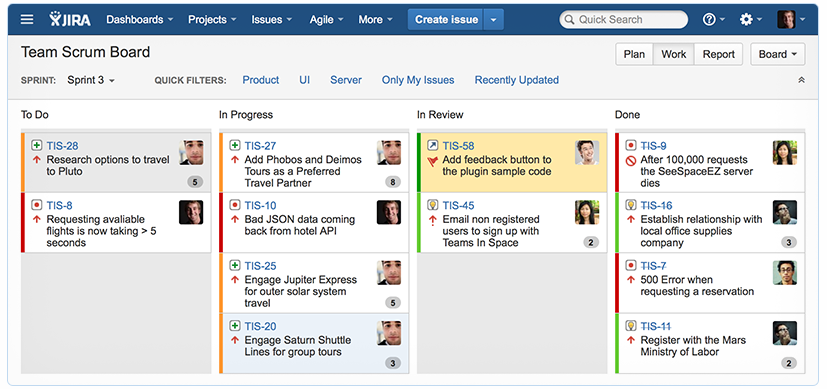
Jira Service Management is a comprehensive IT service management tool that integrates seamlessly with the Jira Software development platform. It supports Agile methodologies and is particularly well-suited to manage software development workflows, making it an ideal choice for such teams.
Why I Picked Jira Service Management: I chose Jira Service Management because it stands out for its strong support for Agile methodologies and software development workflows. When comparing different tools, I judged this one to be a particularly good fit for Agile teams and software development workflows.
It's unique in its ability to bridge the gap between IT support and development teams.
Standout Features & Integrations:
Jira Service Management offers features like a customizable service desk, advanced SLA support, change management, and incident management. Its robust integration capabilities stand out, especially with other Atlassian products like Jira Software and Confluence. Also, it can integrate with tools like Slack, GitHub, and Jenkins.
Pros and Cons
Pros:
- Features like change management and incident management
- Excellent integration with other Atlassian products
- Strong support for Agile methodologies and software development workflows
Cons:
- Optimal usage requires familiarity with other Atlassian products
- Might be complex for teams new to the Agile approach
- Relatively higher starting price


Issuetrak is a versatile service desk software designed to help your team manage and resolve issues efficiently. It offers tools for tracking complaints, handling customer support requests, and managing help desk tickets.
Why I Picked Issuetrak: Issuetrak's omnichannel ticket submission lets your team create tickets directly in the app, via email, or through web forms, ensuring all issues are captured promptly. The Issue Hub provides a centralized location to view, manage, and update tickets, making it easier to monitor progress and maintain organization. Additionally, the round-robin issue assignment feature automatically distributes tickets among your team members, balancing workloads and promoting timely resolutions.
Additionally, task flows in Issuetrak enable your team to collaborate effectively by breaking down complex issues into manageable tasks, ensuring consistency and thoroughness in your processes. The knowledge base also serves as a repository for important information, allowing team members to access solutions and guidelines quickly.
Standout Features & Integrations:
Features include asset management, which helps you keep track of hardware and software details, maintenance schedules, and software licenses, ensuring your assets are well-managed. The platform also offers automated routing that directs incoming tickets to the appropriate team members based on predefined criteria.
Integrations include Microsoft 365, Google Analytics, Gmail, Salesforce, Power BI, and thousands more through Zapier. You can also access the Issuetrak API for even more connections.
Pros and Cons
Pros:
- Effective in organizing and managing tickets
- Cloud and on-premises deployment options
- Highly customizable system
Cons:
- Asset management is a paid add-on
- Certain features may be complex to set up and integrate within the system


Guru is an AI-powered enterprise search, intranet, and wiki platform designed to enhance knowledge sharing and operational efficiency within organizations.
Why I Picked Guru: While Guru isn’t your typical service desk software, it plays a key role in supporting service desk operations. It gives your team quick access to your internal knowledge base, providing them with contextual answers and suggestions using AI for the issues that come up in tickets.
For instance, when a customer submits a problem through a help desk platform, Guru can automatically search your knowledge base and pull up relevant documents or past cases of similar issues, helping your team resolve each case quicker.
Standout Features & Integrations:
Features include the ability to verify knowledge to ensure Guru provides the most accurate information to help desk agents. It also offers a writing assistant called AI Assist to help you draft responses to customer tickets.
Integrations include Slack, Salesforce, Microsoft Teams, Google Drive, GitHub, Jira, HubSpot, Dropbox, Asana, Trello, BambooHR, Freshdesk, Notion, ServiceNow, Airtable, and Adobe Workfront.
Pros and Cons
Pros:
- Analytics to track knowledge usage and identify gaps
- AI suggestions improve information relevancy and retrieval
- Provides a system for verifying information
Cons:
- Can't handle tickets and customer interactions without a help desk integration
- Can become overwhelming if not properly organized


4me is a comprehensive service management tool designed to unify ITSM and SIAM in one cohesive package. Its capabilities stretch beyond traditional IT service management to include service integration and management, making it an all-in-one solution for businesses.
Why I Picked 4me: I chose 4me because its seamless integration of ITSM and SIAM makes it a standout in the crowded service desk market. This unique combination streamlines the management of services, allowing businesses to manage and deliver services more effectively.
Given this, I believe 4me is the best for businesses looking for a comprehensive package that handles both ITSM and SIAM.
Standout Features & Integrations:
4me's defining features include integrated service management, KPI tracking, and self-service portals, making it easier for businesses to deliver, manage, and measure their services.
In terms of integrations, 4me connects with an array of software, including but not limited to Jira, Salesforce, and Slack, thereby allowing users to streamline their service management process.
Pros and Cons
Pros:
- Wide range of software integrations
- Detailed performance tracking with KPIs
- Comprehensive ITSM and SIAM capabilities in one package
Cons:
- More suitable for larger organizations, smaller businesses may find it overwhelming
- Some users may find the interface less intuitive than other tools
- Absence of transparent pricing may deter some potential users


Spiceworks Cloud Help Desk software is a user-friendly tool that offers comprehensive service desk functionality at no cost. It brings together ticket management, self-service portals, and reporting in a simple, easy-to-use interface.
Why I Picked Spiceworks Cloud Help Desk: I picked Spiceworks Cloud Help Desk because it manages to offer a comprehensive, feature-rich service desk solution completely free of charge. Its user-friendly interface and simplicity make it accessible to all users, regardless of their technical prowess.
For companies starting out or operating on a tight budget, this tool is the best for its cost-effectiveness and simplicity.
Standout Features & Integrations:
Spiceworks' notable features include a built-in ticketing system, knowledge base, and IT asset management, all designed to simplify your service desk operations. In terms of integrations, it pairs well with a variety of systems such as Active Directory, Google Workspace, and Microsoft Office 365, extending its functionality and enhancing user convenience.
Pros and Cons
Pros:
- Wide range of software integrations
- User-friendly interface
- Comprehensive service desk features at no cost
Cons:
- May not scale well for larger organizations
- Absence of built-in chat functionality
- Limited advanced features compared to paid alternatives
Weitere Service-Desk-Software
Im Folgenden findest du eine Liste weiterer Service-Desk-Lösungen, die es auf meine Shortlist geschafft haben, aber nicht in die Top 10 aufgenommen wurden. Sie sind auf jeden Fall einen Blick wert.
- Hesk
For businesses seeking affordability without compromising on features
- LiveAgent
For omnichannel support with extensive customization options
- Rescue
For remote support with powerful diagnostic capabilities
- LiveAgent
For omnichannel ticket management
- ManageEngine ServiceDesk Plus
For robust ITIL-ready capabilities with asset management
- Zendesk
For a holistic approach to customer service across multiple channels
- Front
For email-centric customer support with seamless integrations
- Kayako
Good for businesses seeking a unified customer service platform
- Splashtop
Good for remote access and control in IT helpdesk scenarios
- HaloITSM
Good for a comprehensive approach to IT service management
- HubSpot Service Hub
Good for businesses using HubSpot's marketing and sales solutions
- Cayzu
Good for simple and intuitive multi-channel customer support
- SysAid
Good for IT helpdesk support with integrated tools for asset and project management
- BMC Helix ITSM
Good for cloud-based IT service management powered by cognitive automation
- ServiceNow ITSM
Good for IT service management with strong scalability
- C2-ITSM
Good for IT service management with a focus on compliance
- SolarWinds IT Service Desk Software
Good for IT operations management and cost tracking


Weitere Help-Desk-Software-Bewertungen
Auswahlkriterien für Service-Desk-Software
Um die beste Service-Desk-Software für diese Liste auszuwählen, habe ich übliche Käuferbedürfnisse und typische Herausforderungen wie das Management hoher Ticketvolumina und die Verbesserung von Reaktionszeiten berücksichtigt. Zudem habe ich folgendes Framework genutzt, um meine Bewertung strukturiert und fair zu gestalten:
Kernfunktionen (25 % der Gesamtbewertung) Für die Aufnahme in diese Liste musste jede Lösung die folgenden Anwendungsfälle abdecken:
- Ticketverwaltung
- Automatisierte Workflows
- Multi-Kanal-Support
- Berichtswesen & Analysen
- Wissensdatenbank-Management
Zusätzliche Highlights (25 % der Gesamtbewertung) Um die Auswahl weiter einzugrenzen, habe ich auch nach besonderen Funktionen gesucht, zum Beispiel:
- KI-gestützte Ticketzuweisung
- Individuell anpassbare Dashboards
- Integration mit Drittanbieter-Apps
- Mobile App-Funktionalität
- Werkzeuge für die Zusammenarbeit in Echtzeit
Benutzerfreundlichkeit (10 % der Gesamtbewertung) Für die Bewertung der Benutzerfreundlichkeit habe ich Folgendes geprüft:
- Intuitive Benutzeroberfläche
- Einfache Navigation
- Geringe Einarbeitungszeit
- Individualisierungsmöglichkeiten
- Barrierefreiheit
Onboarding (10 % der Gesamtbewertung) Zur Bewertung der Einführungserfahrung bei jedem Anbieter habe ich folgende Aspekte betrachtet:
- Verfügbarkeit von Erklärvideos
- Vorgefertigte Vorlagen
- Interaktive Produkt-Touren
- Zugang zu Chatbots
- Webinare für neue Benutzer
Kundensupport (10 % der Gesamtbewertung) Um die Kundensupport-Dienste jedes Softwareanbieters zu bewerten, habe ich Folgendes berücksichtigt:
- 24/7 Supportverfügbarkeit
- Mehrere Supportkanäle
- Antwortzeit
- Zugang zu einem Community-Forum
- Qualität der Dokumentation
Preis-Leistungs-Verhältnis (10 % der Gesamtbewertung) Um das Preis-Leistungs-Verhältnis jeder Plattform einzuschätzen, habe ich Folgendes berücksichtigt:
- Konkurrenzfähige Preisgestaltung
- Funktionsumfang zum Preis
- Flexible Preismodelle
- Verfügbarkeit einer kostenlosen Testphase
- Rabatte für Jahresabonnements
Kundenrezensionen (10 % der Gesamtbewertung) Um einen Eindruck von der allgemeinen Kundenzufriedenheit zu gewinnen, habe ich beim Lesen der Kundenbewertungen Folgendes berücksichtigt:
- Benutzerzufriedenheitsbewertungen
- Feedback zu den Kernfunktionen
- Kommentare zur Benutzerfreundlichkeit
- Meinungen zum Kundensupport
- Wahrnehmung des Gesamtwerts
Wie wählt man Service-Desk-Software aus?
Es ist leicht, sich in langen Funktionslisten und komplexen Preisstrukturen zu verlieren. Damit Sie den Fokus während Ihres individuellen Auswahlprozesses behalten, finden Sie hier eine Checkliste der wichtigsten Faktoren:
| Faktor | Worauf zu achten ist |
|---|---|
| Skalierbarkeit | Kann die Software mit Ihrem Team mitwachsen? Planen Sie Wachstum bei Nutzern und Ticketvolumen ein. Vermeiden Sie Tools, die Sie bei steigendem Bedarf einschränken könnten. |
| Integrationen | Lässt sie sich mit Ihren bestehenden Systemen wie CRM oder E-Mail verbinden? Achten Sie darauf, dass das Tool nahtlos integrierbar ist, damit manuelle Umgehungslösungen entfallen. |
| Anpassbarkeit | Können Sie das Tool an Ihre Arbeitsabläufe anpassen? Achten Sie auf Möglichkeiten, Felder, Formulare und Prozesse nach den Abläufen Ihres Teams zu gestalten. |
| Benutzerfreundlichkeit | Ist es für Ihr Team intuitiv zu bedienen? Eine komplizierte Oberfläche kann die Einführung bremsen – priorisieren Sie Tools mit klarer Navigation. |
| Implementierung und Einführung | Wie schnell können Sie starten? Prüfen Sie, ob Ressourcen wie Tutorials und Support vorhanden sind, um einen reibungslosen Übergang sicherzustellen. |
| Kosten | Passt das Tool ins Budget? Vergleichen Sie Preismodelle – monatlich oder jährlich – und achten Sie auf versteckte Kosten, z. B. Einrichtungsgebühren oder Premium-Support. |
| Sicherheitsvorkehrungen | Sind Ihre Daten und Nutzerdaten geschützt? Achten Sie auf Verschlüsselung, Zugriffskontrollen und die Einhaltung von Datenschutzstandards wie der DSGVO. |
| Support-Verfügbarkeit | Wann ist der Support erreichbar? Sorgen Sie dafür, dass Sie im Bedarfsfall schnell Hilfe erhalten – per Chat, Telefon oder E-Mail, insbesondere in kritischen Zeiten. |
Was ist Service-Desk-Software?
Service-Desk-Software ist ein Tool, das Unternehmen ermöglicht, ihren Kundendienst und Support effizient zu verwalten. In der Regel wird sie von IT-Teams, Kundendienstmitarbeitern und Helpdesk-Agenten eingesetzt; ihr Hauptzweck ist es, den Prozess des Empfangens, Priorisierens, Nachverfolgens und Lösens von Kundenanfragen und Problemen zu vereinfachen.
Diese Tools adressieren effektiv die Hauptprobleme in der Kundenerfahrung: verzögerte Antworten, verpasste Tickets und unkoordinierte Kommunikation. Mittels Funktionen wie SLA-Management und Helpdesk-Ticketing sorgen sie dafür, dass Ihre Serviceteams die vorgeschriebenen Reaktions- und Lösungszeiten einhalten. Eskalationsregeln und Warteschlangen helfen bei der Priorisierung von Tickets und deren Zuordnung zu den richtigen Teammitgliedern. Außerdem sind bereits Vorlagen für gängige Antworten enthalten, was repetitive Aufgaben beschleunigt.
Diese Plattformen – ob On-Premise oder SaaS – lassen sich häufig über APIs integrieren, liefern so einen umfassenden Blick auf Kundendaten und helfen, Kundenbeziehungen zu verbessern. Viele bieten zudem mobile Apps für Android und iOS an – ein Muss in unserer zunehmend mobilen Welt.
Funktionen
Beim Auswählen einer Service-Desk-Software sollten Sie auf die folgenden Schlüsselfunktionen achten:
- Ticketverwaltung: Organisiert und verfolgt Kundenanfragen, um zeitnahe Antworten und Lösungen sicherzustellen.
- Automatisierte Workflows: Strafft wiederkehrende Aufgaben und Prozesse, um Zeit zu sparen und menschliche Fehler zu reduzieren.
- Unterstützung auf mehreren Kanälen: Ermöglicht es Kunden, den Support über verschiedene Kanäle wie E-Mail, Chat und Telefon zu erreichen.
- Wissensdatenbank-Verwaltung: Bietet ein zentrales Informationsarchiv, damit Nutzer schnell Antworten finden können.
- Anpassbare Dashboards: Bietet Flexibilität, um die Benutzeroberfläche an spezifische Arbeitsabläufe und Präferenzen anzupassen.
- Integrationsmöglichkeiten: Verbindet sich mit bestehenden Tools und Systemen, um die Produktivität und den Datenfluss zu verbessern.
- Berichtswesen und Analytik: Bietet Einblicke in die Teamleistung und Kundenzufriedenheit, um fundierte Entscheidungen zu treffen.
- Echtzeit-Kollaborationstools: Ermöglicht es Teammitgliedern, effizient zusammenzuarbeiten, um Probleme schneller zu lösen.
- Sicherheitsmechanismen: Schützt sensible Daten und gewährleistet die Einhaltung von Datenschutzbestimmungen.
- Mobile App-Funktionalität: Ermöglicht Teammitgliedern den Zugriff und die Verwaltung von Supportaufgaben von unterwegs aus.
Vorteile
Die Implementierung einer Service-Desk-Software bietet zahlreiche Vorteile für Ihr Team und Ihr Unternehmen. Hier sind einige, auf die Sie sich freuen können:
- Verbesserte Effizienz: Automatisierte Workflows und Ticketverwaltung helfen Ihrem Team, Supportaufgaben schneller und mit weniger Fehlern zu erledigen.
- Höhere Kundenzufriedenheit: Mehrkanal-Support und eine gut gepflegte Wissensdatenbank sorgen dafür, dass Kunden schnelle Hilfe erhalten.
- Bessere Entscheidungsfindung: Berichte und Analysen liefern Einblicke in die Leistung und Verbesserungsmöglichkeiten.
- Mehr Teamzusammenarbeit: Echtzeit-Kollaborationstools ermöglichen Ihrem Team eine effektive Zusammenarbeit bei der Problemlösung.
- Skalierbarkeit: Die Möglichkeit zur Integration mit bestehenden Systemen und zur Anpassung von Dashboards stellt sicher, dass die Software mit Ihrem Unternehmen mitwächst.
- Datenschutz: Sicherheitsmechanismen sorgen dafür, dass sensible Informationen geschützt und die Vorschriften eingehalten werden.
- Flexibilität: Die mobile App-Funktionalität ermöglicht es Ihrem Team, Supportaufgaben von überall aus zu verwalten und so die Reaktionsfähigkeit zu erhöhen.
Kosten & Preise
Die Auswahl einer Service-Desk-Software erfordert ein Verständnis der verschiedenen Preismodelle und verfügbaren Pläne. Die Kosten variieren je nach Funktionen, Teamgröße, Zusatzmodulen und mehr. Die folgende Tabelle fasst gängige Pläne, deren Durchschnittspreise und typische Funktionen von Service-Desk-Softwarelösungen zusammen:
Vergleichstabelle der Service-Desk-Softwarepläne
| Plan-Typ | Durchschnittlicher Preis | Übliche Funktionen |
|---|---|---|
| Kostenloser Plan | $0 | Grundlegende Ticketverwaltung, E-Mail-Support und eingeschränktes Reporting. |
| Persönlicher Plan | $5-$25/user/month | Ticketverwaltung, Basisautomatisierung und E-Mail-Integration. |
| Business-Plan | $30-$60/user/month | Erweiterte Automatisierung, Mehrkanal-Support und anpassbare Dashboards. |
| Enterprise-Plan | $70-$150/user/month | Vollständige Integrationsmöglichkeiten, erweiterte Sicherheitsfunktionen und umfassende Analysetools. |
Häufig gestellte Fragen (FAQs)
Wie kann Service-Desk-Software die Teamproduktivität verbessern?
Service-Desk-Software steigert die Produktivität, indem sie Routineaufgaben wie Ticketweiterleitung und Statusaktualisierungen automatisiert. Sie zentralisiert die Kommunikation, sodass der Zugriff auf frühere Interaktionen und Wissensdatenbanken einfach ist. Dadurch kann Ihr Team Probleme schneller lösen und wiederholte Arbeit reduzieren.
Was sollte ich bei der Integration von Service-Desk-Software mit anderen Tools beachten?
Achten Sie auf Kompatibilität mit Ihren bestehenden Systemen wie CRM- und E-Mail-Plattformen. Prüfen Sie, ob die Software APIs für individuelle Integrationen unterstützt. Berücksichtigen Sie die Einfachheit der Einrichtung und mögliche Herausforderungen bei der Datenmigration sowie den laufenden Wartungsaufwand.
Wie geht Service-Desk-Software mit Datensicherheit um?
Die meisten Service-Desk-Softwares beinhalten Sicherheitsfunktionen wie Datenverschlüsselung und Zugriffskontrollen. Überprüfen Sie die Einhaltung von Datenschutzstandards wie der DSGVO, um sicherzustellen, dass die Daten Ihrer Kunden geschützt sind. Auch regelmäßige Sicherheitsupdates und Audits sind wichtig.
Wie geht es weiter?
Wenn Sie gerade auf der Suche nach einer passenden Service-Desk-Software sind, verbinden Sie sich mit einem SoftwareSelect-Berater für kostenlose Empfehlungen.
Sie füllen ein Formular aus und führen ein kurzes Gespräch, in dem Ihre spezifischen Anforderungen besprochen werden. Danach erhalten Sie eine Vorauswahl an Software, die Sie prüfen können. Außerdem begleiten sie Sie durch den gesamten Kaufprozess – inklusive Preisverhandlungen.