


Hiver Review: Pros, Cons, Features, and Pricing


Hiver is a help desk platform that helps your team manage conversations across email, chat, voice, WhatsApp, and self-service tools from a single, inbox-style interface. It’s built for customer service leads who want something easy for their agents to learn but powerful enough to support industries like logistics, travel, e-commerce, IT, and professional services. The main value comes from its simple design, smooth collaboration, and AI tools that help you respond faster and personalize every interaction.
In this review, I’ll walk you through Hiver’s features, benefits, potential drawbacks, best and worst use cases, pricing details, and more, so you can decide if it’s the right platform for your team’s needs.
Hiver Evaluation Summary

- From $25/user/month (billed annually)
- 7-day free trial + free demo + free plan available
Why Trust Our Software Reviews
We’ve been testing and reviewing software since 2023. As tech leaders ourselves, we know how critical and difficult it is to make the right decision when selecting software.
We invest in deep research to help our audience make better software purchasing decisions. We’ve tested more than 2,000 tools for different tech use cases and written over 1,000 comprehensive software reviews. Learn how we stay transparent & our software review methodology.
Hiver Overview
Hiver is a strong fit for teams that want a modern customer service platform but don’t want to deal with overwhelming dashboards or stiff help desk structures. Its AI Copilot, inbox-style workspace, and straightforward workflows make it competitive with more complex tools that require months of training. Overall, Hiver shines when you’re comparing ease of adoption, collaboration, and how quickly your team can deliver personalized support. It’s best suited for teams who prioritize responsiveness and operational simplicity.
pros
-
Your team stays aligned with shared drafts, notes, collision alerts, and clear ownership.
-
Hiver AI reduces manual effort by drafting responses, auto-tagging conversations, and summarizing threads in seconds
-
You deliver human-like, personalized responses without switching tabs or sounding robotic.
cons
-
No advanced help desk forecasting, capacity planning, or predictive SLA breach modeling.
-
Complex enterprise workflows may require more customization than Hiver currently offers.
-
Teams with support channels outside of chat, email, and call (like social channels), may find the platform lacks features.
Is Hiver Right For Your Needs?
Who Would be a Good Fit for Hiver?
Hiver is ideal if you need a help desk platform that’s quick to adopt and easy to maintain. If your team handles high volumes of email, wants cleaner collaboration, or depends on personalization in every response, Hiver fits those needs well. You’ll especially benefit if your team works in Gmail or Outlook and wants AI to help streamline repetitive tasks.
-
AI-Driven Teams
AI Copilot removes manual effort so your team can focus on higher-value tasks.
-
Travel & Hospitality
Natural, friendly replies help maintain strong relationships with customers and travelers.
-
Logistics & Operations
Shared inboxes and clear workloads help you stay organized across high message volumes.
-
IT Help Desks
SLA tracking, automations, and routing help you manage internal requests smoothly.
-
E-Commerce Businesses
You can access customer and order context quickly, making it easier to handle common inquiries.
-
Small Support Teams
The interface is simple enough that your team can start resolving issues within hours.
Who Would be a Bad Fit for Hiver?
Hiver may not be the right choice if your workflows rely heavily on custom data models, complex multi-stage escalations, or advanced enterprise routing. If email isn’t the main communication channel for your team, or if you need deep customization at the object level, Hiver may feel too constrained for your use case. Teams that depend on mobile-first support or field service workflows may also find gaps.
-
Data-Heavy Teams
If your workflows revolve around deeply modeled objects, Hiver’s custom object setup may be too basic.
-
Teams Without Email-Driven Workflows
If email isn’t central to your support, Hiver’s strengths may go unused.
-
Field-Based Teams
Workflows built for mobile, on-site resolution may not align with Hiver's inbox-style interface.
-
Developer or Engineering Support
Highly technical ticket structures may require deeper customization.
-
Strictly Regulated Businesses
Teams needing extensive compliance or specialized audit requirements may need additional layers.
-
Large Enterprises
Sophisticated escalations and routing rules may be too advanced for Hiver’s setup.
Our Review Methodology
How We Test & Score Tools
We’ve spent years building, refining, and improving our software testing and scoring system. The rubric is designed to capture the nuances of software selection and what makes a tool effective, focusing on critical aspects of the decision-making process.
Below, you can see exactly how our testing and scoring works across seven criteria. It allows us to provide an unbiased evaluation of the software based on core functionality, standout features, ease of use, onboarding, customer support, integrations, customer reviews, and value for money.
Core Functionality (25% of final scoring)
The starting point of our evaluation is always the core functionality of the tool. Does it have the basic features and functions that a user would expect to see? Are any of those core features locked to higher-tiered pricing plans? At its core, we expect a tool to stand up against the baseline capabilities of its competitors.
Standout Features (25% of final scoring)
Next, we evaluate uncommon standout features that go above and beyond the core functionality typically found in tools of its kind. A high score reflects specialized or unique features that make the product faster, more efficient, or offer additional value to the user.
We also evaluate how easy it is to integrate with other tools typically found in the tech stack to expand the functionality and utility of the software. Tools offering plentiful native integrations, 3rd party connections, and API access to build custom integrations score best.
Ease of Use (10% of final scoring)
We consider how quick and easy it is to execute the tasks defined in the core functionality using the tool. High scoring software is well designed, intuitive to use, offers mobile apps, provides templates, and makes relatively complex tasks seem simple.
Onboarding (10% of final scoring)
We know how important rapid team adoption is for a new platform, so we evaluate how easy it is to learn and use a tool with minimal training. We evaluate how quickly a team member can get set up and start using the tool with no experience. High scoring solutions indicate little or no support is required.
Customer Support (10% of final scoring)
We review how quick and easy it is to get unstuck and find help by phone, live chat, or knowledge base. Tools and companies that provide real-time support score best, while chatbots score worst.
Customer Reviews (10% of final scoring)
Beyond our own testing and evaluation, we consider the net promoter score from current and past customers. We review their likelihood, given the option, to choose the tool again for the core functionality. A high scoring software reflects a high net promoter score from current or past customers.
Value for Money (10% of final scoring)
Lastly, in consideration of all the other criteria, we review the average price of entry level plans against the core features and consider the value of the other evaluation criteria. Software that delivers more, for less, will score higher.
Core Features
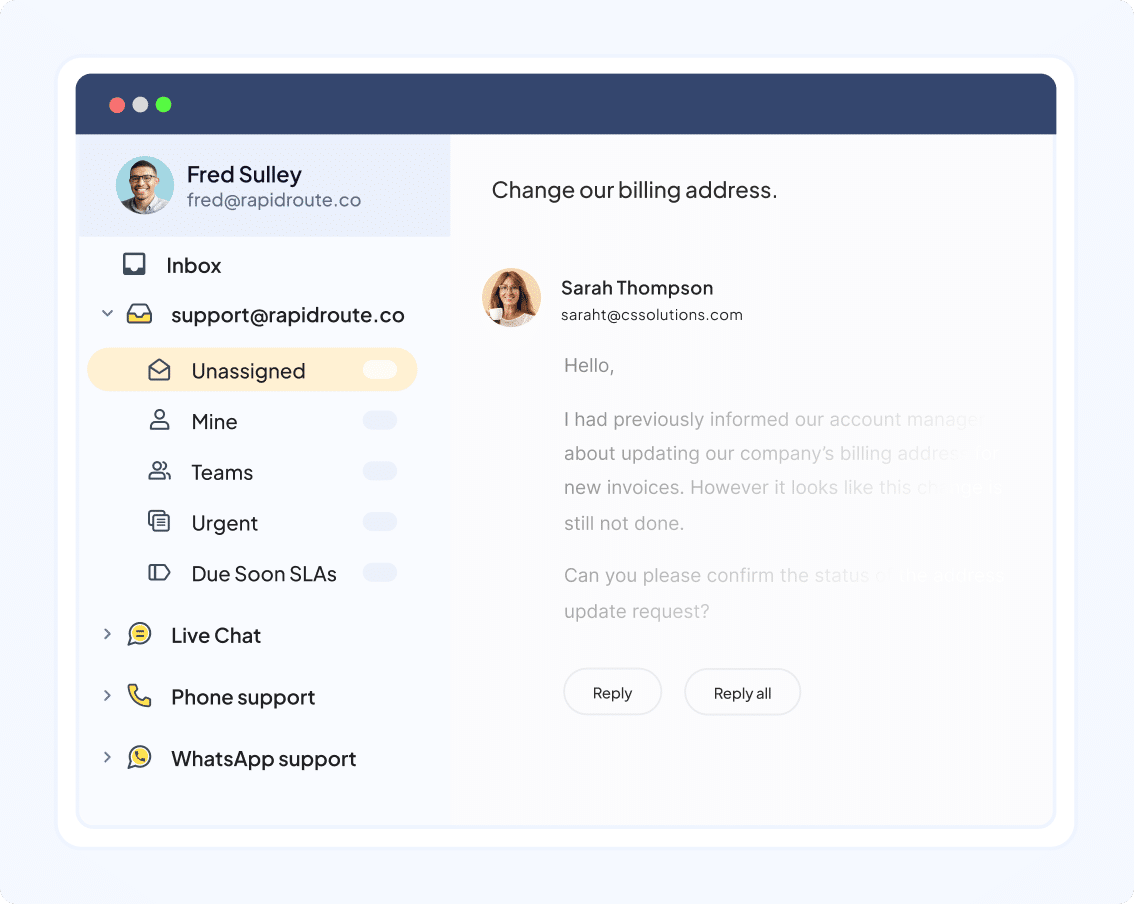
Omnichannel Inbox:
You handle email, live chat, WhatsApp, voice, and portal communications in one space that feels like your inbox. This keeps your team organized and helps prevent confusion.
Ticket Management:
You assign conversations, track progress, and maintain clear ownership. It helps your team stay on top of every message without losing time.
Workflow Automation:
You automate routing, tagging, and assignment based on rules. This reduces manual effort and helps you stay consistent at scale.
Live Chat:
Allows you to answer customer questions in real-time, giving a quicker way to resolve issues and facilitate better customer engagement.
Knowledge Base & Self-Service:
You publish help articles and use an AI-enhanced chat widget to help customers solve problems on their own. This reduces ticket volume while improving customer experience.
Analytics & Reporting:
You track performance metrics like response time, resolution time, and CSAT. Dashboards give you visibility into trends and team performance.
Standout Features
AI Copilot:
AI drafts replies, summarizes long threads, and picks up sentiment. This lets your team respond faster while keeping the tone human and accurate.
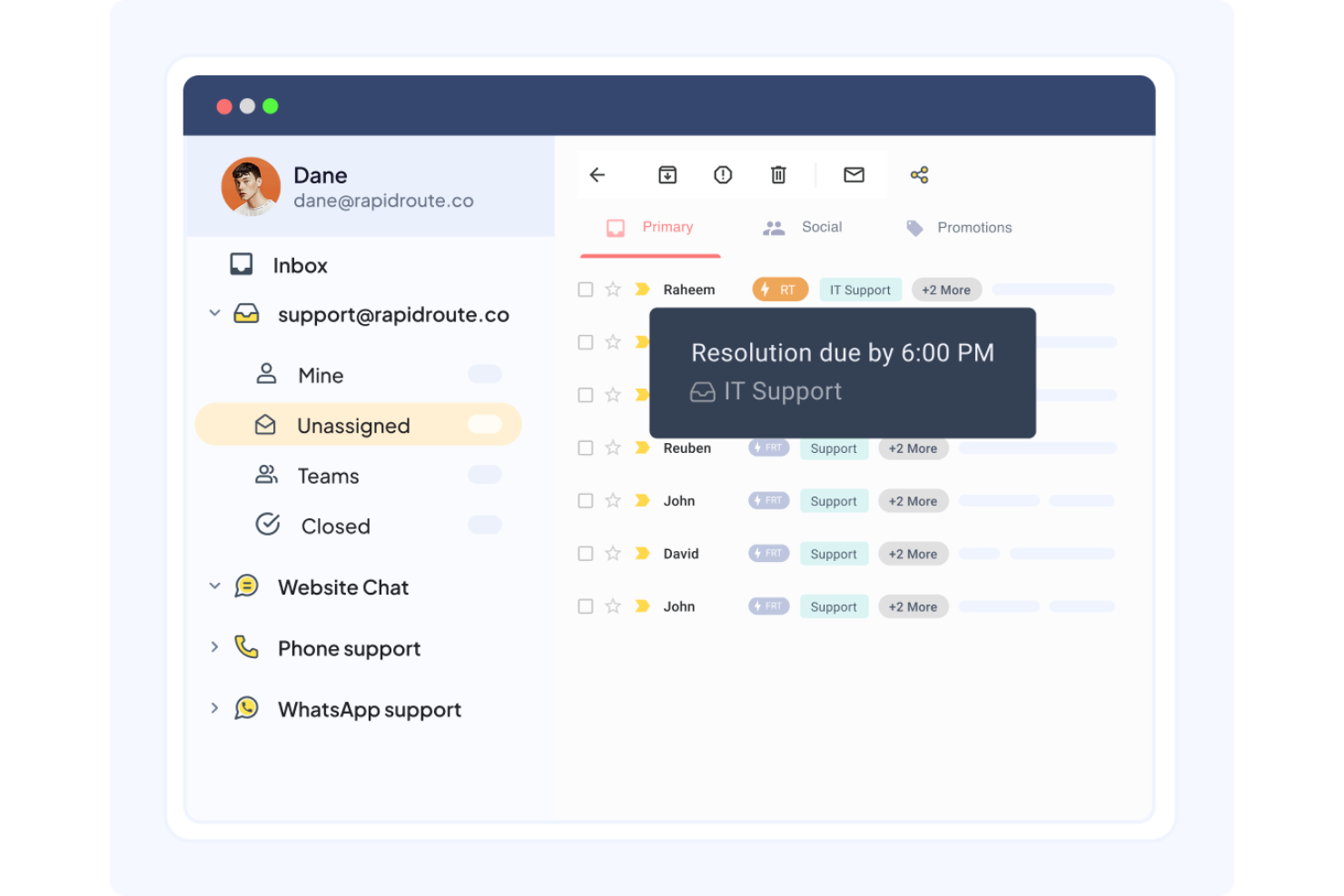
SLA Management:
Set service level agreements (SLAs) to ensure timely responses to customer queries. This feature helps your team meet performance goals and maintain high service standards.
Ease of Use
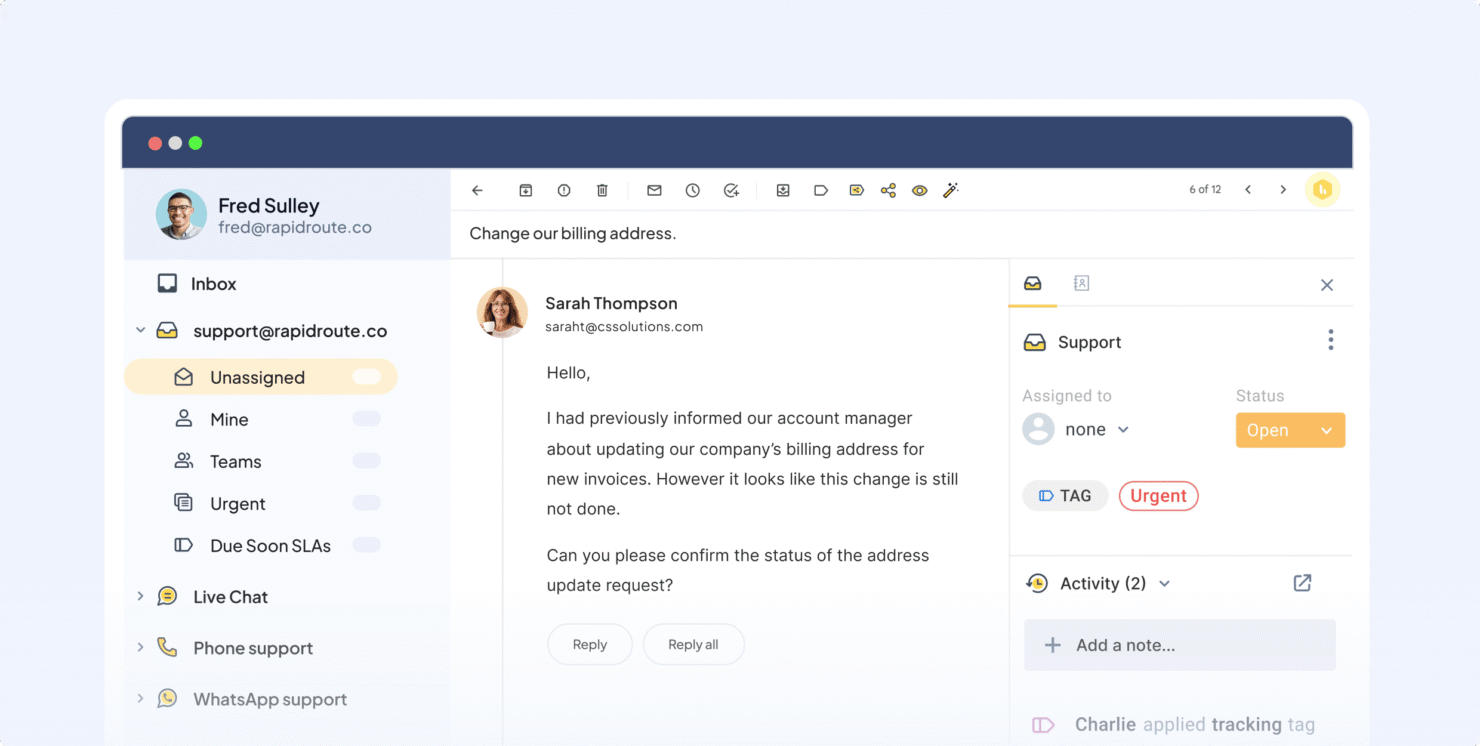
Hiver is simple to use because it mirrors the look and feel of your inbox, which makes it easy for your team to get comfortable quickly. Even with heavy volumes, the layout stays clean and helps you identify what needs attention. AI reduces the number of clicks needed to manage each ticket, so your team can handle more work with less effort. It’s a great fit for teams that need fast adoption and reliable productivity.
Onboarding
Hiver gives you 24/7 access to support through email and live chat, so your team always has help available. Their guidance is straightforward and focused on practical solutions, which makes onboarding and daily problem-solving easier. The help center and product tours also offer plenty of self-service resources. Overall, the support experience is reliable and user-friendly.
Customer Support
Hiver's customer support stands out, ensuring your team receives timely assistance. Users often highlight the availability of multiple support channels, such as live chat and email, which makes resolving issues easy. The support team is knowledgeable, providing clear solutions and guidance. This level of support helps your team maintain productivity, making Hiver a reliable choice for businesses that prioritize excellent customer service.
Integrations
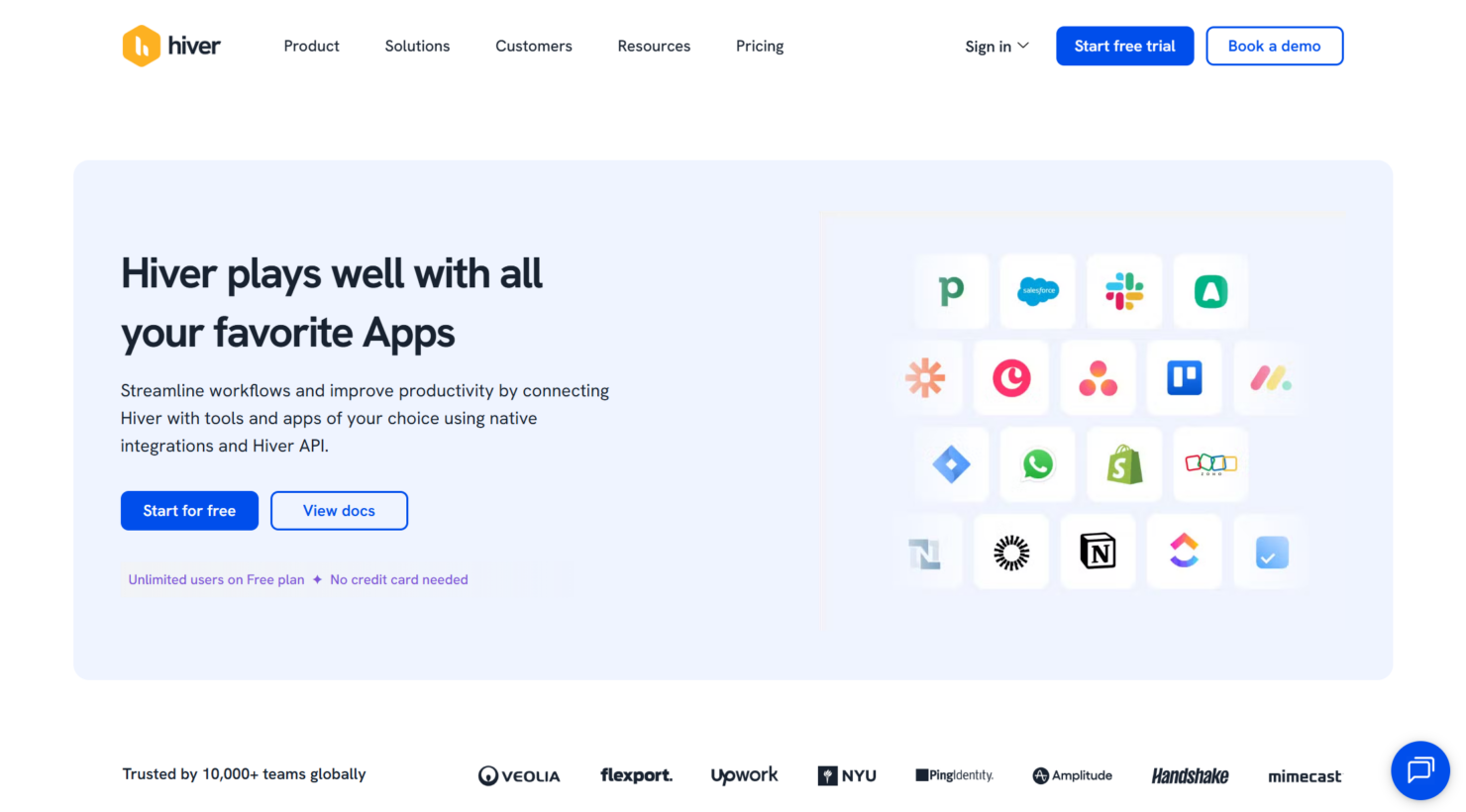
Hiver integrates with Slack, Salesforce, HubSpot, Pipedrive, Zoho CRM, Copper, Shopify, WooCommerce, Jira, Asana, ClickUp, and monday.com. Hiver also offers an API and connects with third-party integration tools like Zapier, providing flexibility for custom integrations.
Value for Money
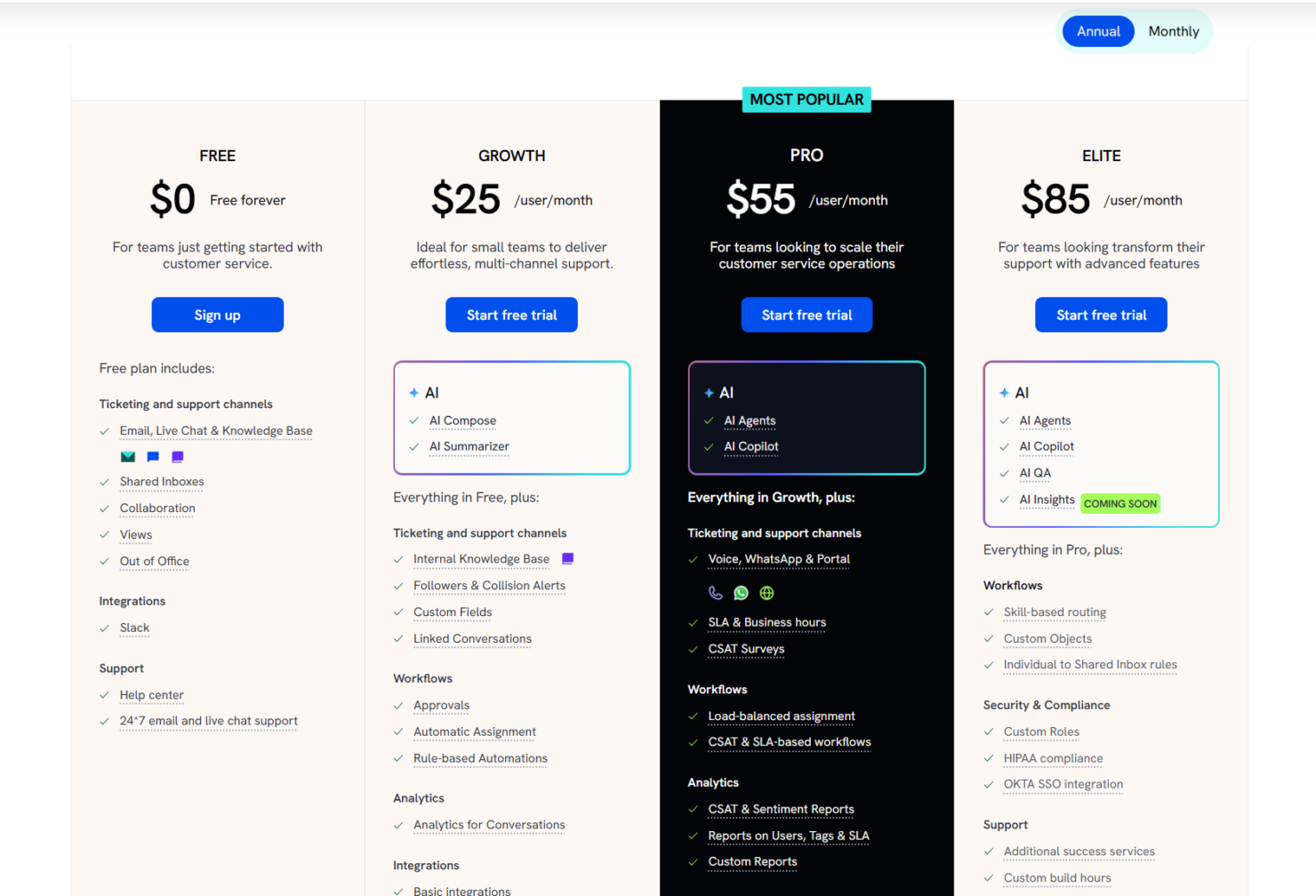
Hiver offers strong value by giving you powerful AI tools, an intuitive interface, and omnichannel support without the overhead of a traditional help desk. The pricing plans scale in a predictable way as your team grows. A 7-day free trial is also available.
- Free: Offers basic features for new customer service teams.
- Growth: Provides enhanced collaboration tools and analytics for up to 10 users, as well as AI capabilities.
- Pro: Includes more advanced features, including CSAT surveys and premium integrations.
- Elite: Grants full feature access for an unlimited number of shared inboxes, with quarterly team training and a dedicated success manager.
New Product Updates from Hiver

Hiver Introduces Custom Objects for Workflow Automation
Hiver introduces Custom Objects, enabling teams to import external data into workflows. These updates improve automation accuracy and allow conversations to be routed based on structured data. Highlights include:
- Custom Objects: Imports CRM or spreadsheet data into Hiver workflows.
- Dynamic Routing: Assigns conversations based on predefined relationships.
- Workflow Personalization: Enhances automation using external data context.
Visit Hiver’s official site for more details.
 for more details.
Hiver Automations Center Adds AI Actions and Email Routing
Hiver introduces an Automations Center with AI-powered actions and automated email routing to Shared Inboxes. These updates centralize workflow creation and ensure emails are tracked and handled efficiently across teams. Highlights include:
- Automations Center: Centralizes automation templates for faster workflow setup.
- AI-Powered Actions: Enables extract, triage, and summarization within workflows.
- Email Auto-Routing: Automatically moves personal emails to Shared Inboxes for team visibility.
Visit Hiver’s official site for more details.

Hiver Enhances Automation With Smarter Conversation Routing
Hiver introduces SLA targeting, auto-assign outbound conversations, and auto-unassign to improve how conversations are routed and managed. These updates enhance workflow efficiency by ensuring timely follow-ups and better distribution of conversations across available agents. Highlights include:
- SLA Targeting: Allows automations to trigger based on specific SLA policies for more precise follow-up actions.
- Auto-Assign Outbound Conversations: Automatically assigns outbound emails and replies to the sender to prevent missed ownership.
- Auto-Unassign Conversations: Reassigns conversations from away agents to available team members for faster response times.
Visit Hiver’s official site for more details.

Hiver Launches Live Chat for SaaS Tools
Hiver introduces Live Chat for SaaS tools with in-app embedding, enabling support teams to assist users without leaving the product. This update improves response efficiency by providing contextual support and flexible chat customization directly within the user experience. Here are the details of the update:
- Embedded Live Chat: Offers seamless in-app support by placing the live chat feature directly in the SaaS product.
- User Context Access: Ensures customer support teams can access user data in real time, promoting faster and more personalized assistance.
- Flexible Trigger Controls: Allows customization of chat triggers, aligning them with user actions to initiate help precisely when needed.
Visit Hiver's official site for more details.

Hiver Introduces Shareable Links for Dashboards
Hiver introduces shareable links for dashboards, enabling users to publish and share custom reports instantly. This update improves visibility by making it easier for teams and stakeholders to access and review important metrics without additional setup.
Visit Hiver's official site for more details.

Hiver Introduces Auto-Join for Team Member Onboarding
Hiver introduces Auto-join, which automatically adds new teammates with your company domain to selected Shared Inboxes. This update improves admin efficiency by reducing manual invites and speeding up team onboarding.
Visit Hiver's official site for more details.

Hiver Introduces AI-Powered Search for Knowledge Base
Hiver introduces AI-powered search for its Knowledge Base, enabling users to retrieve answers through intent-based natural language queries. This update improves self-service support by delivering accurate summaries with linked sources, helping users find answers faster without manual searching. Highlights include:
- Natural Language Processing: Users can interact with the Knowledge Base using natural language questions, making it easier and more intuitive to find information.
- Summarized Responses: The AI provides concise answers, ensuring that users receive relevant information swiftly, enhancing their efficiency.
- Reduced Search Effort: By minimizing the need to browse through numerous articles, this feature saves time and effort, allowing users to focus on more critical tasks.
Visit Hiver's official site for more details.

Hiver Introduces AI-Powered Task Creation
Hiver introduces AI-powered tasks that automatically process incoming emails by extracting information, summarizing requests, and initiating actions through automation rules. This improves efficiency by reducing manual work and streamlining multi-step workflows. Here are the details of the update:
- AI-Powered Tasks: These tasks automate the extraction of key information from emails, enabling faster responses and efficient request handling.
- Visual Builder for Automation Rules: Users can leverage a visual tool to set up complex automation rules tailored to their needs, such as customer refunds or follow-ups.
- Multi-step Action Management: This feature enables users to automate complex processes across multiple steps, reducing the burden of repetitive tasks and boosting productivity.
Visit Hiver's official site for more details.

Hiver Introduces Public APIs for Custom Integrations
Hiver introduces public APIs that allow you to programmatically access and sync data across systems. This enables seamless integrations and helps teams bring customer context and actions into their existing workflows. Here are the details of the update:
- Public APIs Introduction: Developers can now access and sync Hiver data programmatically.
- Custom Integrations: These APIs enable the development of personalized integrations with other tools.
- Data Synchronization: The APIs allow pushing or pulling of conversation information, ensuring seamless data flows between Hiver and your existing application stack.
- Enhanced Customer Context: By integrating APIs, applications can bring enhanced customer context and actionable data directly into user apps.
Visit Hiver's official site for more details.

Hiver Introduces Chat Playground for Chat Testing
Hiver introduces Chat Playground to simulate chat interactions, validate bot responses, and test flow behavior before going live. This allows teams to identify issues early and deliver more reliable chat experiences. Here are the details of the update:
- Simulation of Visitor's Chat Experience: Test the chat widget from a visitor’s perspective to identify potential issues and improve user interaction.
- Validation of Bot Responses: Ensure that automated responses are correct and effective, improving communication and satisfaction.
- Flow Behaviour Checks: Verify and tweak the chat flow to ensure logical and smooth conversation paths.
Visit Hiver's official site for more details.
Hiver Specs
- Analytics
- API
- Batch Permissions & Access
- Call Integration
- Chat
- Contact Management
- Contact Sharing
- CRM Integration
- Customer Management
- Customer Service
- Dashboard
- Data Export
- Data Import
- Data Visualization
- Email Integration
- Escalation Management
- External Integrations
- Instant Chat Integration
- Knowledge Base
- Lead Management
- Lead Scoring
- Multi-User
- Notifications
- Real-time Alerts
- Scheduling
- Self-service Portal
- Social Media Integration
- Support Forum
- Third-Party Plugins/Add-Ons
- Ticket Management
- Workflow Management
Hiver FAQs
How does Hiver help your team deliver personalized service?
Does Hiver improve collaboration for customer service teams?
Can Hiver help you manage high email volumes?
What channels does Hiver support?
Does Hiver include analytics?
Can Hiver grow with your team?
Can Hiver integrate with existing IT systems?
How does Hiver handle data security?
Hiver Company Overview & History
Hiver, headquartered in San Jose, California, was founded by Niraj Ranjan Rout and Nitesh Nandy in 2011. The company focuses on enhancing email management and customer service solutions with AI-powered features. Known for its easy setup and efficient tools, Hiver has grown to serve over 10,000 customer service, finance, and IT teams across the technology, healthcare, and education sectors. Hiver has raised over $40 million in funding, emphasizing its commitment to innovation and growth.
- Hiver Major Milestones
- 2011: Founded by Niraj Ranjan Rout and Nitesh Nandy.
- 2018: Raised significant funding to enhance platform capabilities.
- 2024: Reached $25 million in revenue.
- 2025: Continued growth, becoming trusted by over 10,000 teams worldwide.