

Guru Review: Pros, Cons, Features, and Pricing
Guru excels as a knowledge management platform that offers AI-powered search tools, making it a standout choice for connecting all knowledge and improving trust.

We review tools independently, and commissions help fund our testing. See our transparency policy, our methodology, or suggest a tool.
Guru is a conversational intelligence software for teams that need to capture, analyze, and act on insights from customer and sales conversations. It's worth choosing over a tool like Gong if your team needs conversation analysis paired with a built-in knowledge layer—so reps can surface verified answers in real time, not just review calls after the fact.
Guru Evaluation Summary

3.5/5
- Pricing upon request
- 30-day free trial + free demo available
Why Trust Our Software Recommendations
6,700+
Reviews
20
Industry experts
16+
Evaluation factors
14
Years
Our team has been testing and reviewing software since 2012. As tech leaders ourselves, we know how difficult—and important—it is to choose the right software.
For this guide, we evaluated tools using hands-on testing and independent research, scoring tools using our selection criteria.
Our reviews reflect our human editorial judgment, not a sales pitch.
Expert reviewers:
- Paulo Gardini MiguelTech Director
 Tim FisherVP of AI
 Gabriel RosasTech Lead & Software Architect
 Christhian GruhnTech Lead & Platform Architect

Guru Overview
In my opinion, Guru stands out as a knowledge management platform due to its real-time updates and strong customer support. It excels in ease of use due to its intuitive interface and offers great value for money compared to others. It could include more integration options, but you can use Zapier, Workato, and its API to connect to third-party applications. It's best for tech and finance teams that need efficient communication and information flow. If you're deciding on a knowledge management platform, Guru offers a user-friendly experience with helpful support, making it a solid choice for many organizations.
Pros
- You’ll find Guru's interface easy to use and navigate.
- Your team benefits from strong customer support.
- Guru offers reliable knowledge verification capabilities.
Cons
- You might notice limited customization options.
- Guru can feel less flexible compared to other tools.
- Some users find the reporting features basic.
Is Guru Right For Your Needs?
Who Would be a Good Fit for Guru?
Guru is ideal for tech companies, finance teams, and healthcare providers that need accurate, verified knowledge. Your team will appreciate its intuitive interface, making it easy to learn and use. Guru's strong customer support ensures onboarding and troubleshooting run smoothly. If your work involves dynamic knowledge, your team can retrieve up-to-date information without extensive searching, making Guru an effective choice.
- Tech CompaniesYour tech team benefits from Guru's centralized knowledge hub, which consolidates dispersed documentation and helps simplify cross-functional workflows.
- Finance TeamsFinance teams can keep documentation related to financial regulations, audit requirements, and control frameworks current, helping them stay compliant.
- Healthcare ProvidersHealthcare providers can use Guru to store standard operating procedures, treatment protocols, and compliance policies, maintaining one source and reducing reliance on potentially outdated information.
- Small BusinessesSmall businesses can centralize information that may otherwise be stored in emails, chats, or disconnected spreadsheets, making it easier for employees to find what they need.
- IT DepartmentsIT departments can rely on Guru's efficient tracking to manage regulatory updates and incident response procedures, allowing quick responses to issues.
- Compliance ManagersCompliance managers can use Guru to create a verifiable knowledge base for overseeing compliance processes and ensuring adherence to regulations.
Who Would be a Bad Fit for Guru?
Guru might not suit large enterprises or teams needing extensive customization options. If your work demands highly flexible compliance solutions, Guru's limited customization could be a drawback. Manufacturing industries and creative agencies may find Guru's basic reporting features insufficient for their complex needs. Your team may need a tool offering more advanced reporting and customization capabilities to handle intricate compliance requirements.
- Large EnterprisesLarge enterprises might find Guru's limited customization options restrictive for complex knowledge management needs.
- Manufacturing IndustriesManufacturing industries may need more advanced reporting features than Guru offers for their intricate processes.
- Creative AgenciesCreative agencies could find Guru's basic reporting insufficient for managing diverse requirements.
- Custom Software DevelopersCustom software developers might require more flexibility than Guru provides to tailor solutions to their needs.
- Legal DepartmentsLegal departments might find Guru's lack of advanced customization a limitation for specific legal knowledge tracking.
Our Review Methodology
How We Test & Score Tools
We’ve spent years building, refining, and improving our software testing and scoring system. The rubric is designed to capture the nuances of software selection and what makes a tool effective, focusing on critical aspects of the decision-making process.
Below, you can see exactly how our testing and scoring works across seven criteria. It allows us to provide an unbiased evaluation of the software based on core functionality, standout features, ease of use, onboarding, customer support, integrations, customer reviews, and value for money.
Core Functionality (25% of final scoring)
The starting point of our evaluation is always the core functionality of the tool. Does it have the basic features and functions that a user would expect to see? Are any of those core features locked to higher-tiered pricing plans? At its core, we expect a tool to stand up against the baseline capabilities of its competitors.
Standout Features (25% of final scoring)
Next, we evaluate uncommon standout features that go above and beyond the core functionality typically found in tools of its kind. A high score reflects specialized or unique features that make the product faster, more efficient, or offer additional value to the user.
We also evaluate how easy it is to integrate with other tools typically found in the tech stack to expand the functionality and utility of the software. Tools offering plentiful native integrations, 3rd party connections, and API access to build custom integrations score best.
Ease of Use (10% of final scoring)
We consider how quick and easy it is to execute the tasks defined in the core functionality using the tool. High scoring software is well designed, intuitive to use, offers mobile apps, provides templates, and makes relatively complex tasks seem simple.
Onboarding (10% of final scoring)
We know how important rapid team adoption is for a new platform, so we evaluate how easy it is to learn and use a tool with minimal training. We evaluate how quickly a team member can get set up and start using the tool with no experience. High scoring solutions indicate little or no support is required.
Customer Support (10% of final scoring)
We review how quick and easy it is to get unstuck and find help by phone, live chat, or knowledge base. Tools and companies that provide real-time support score best, while chatbots score worst.
Customer Reviews (10% of final scoring)
Beyond our own testing and evaluation, we consider the net promoter score from current and past customers. We review their likelihood, given the option, to choose the tool again for the core functionality. A high scoring software reflects a high net promoter score from current or past customers.
Value for Money (10% of final scoring)
Lastly, in consideration of all the other criteria, we review the average price of entry level plans against the core features and consider the value of the other evaluation criteria. Software that delivers more, for less, will score higher.
Core Features
Intuitive Interface: Guru's user-friendly interface makes it easy for your team to navigate and use. This reduces the time needed for training and onboarding.
Strong Customer Support: With responsive support, Guru assists your team whenever issues arise. This ensures smooth operation and quick resolution of problems.
User Permissions: Set user permissions to fully control who can access or edit specific documents. This ensures sensitive information is only available to authorized personnel.
Verification Process: Guru requests regular content checks, ensuring your information is up to date. This helps with project management as your team's knowledge is accurate and reliable.
Collaborative Editor: Create and format content in Guru Cards with help from AI. Your content will be easy to write, read, and keep up to date.
Analytics Dashboard: View how your team is using content across the platform. You can track adoption over time, see gaps in your team's usage or understanding of content, and optimize your knowledge base.

Standout Features
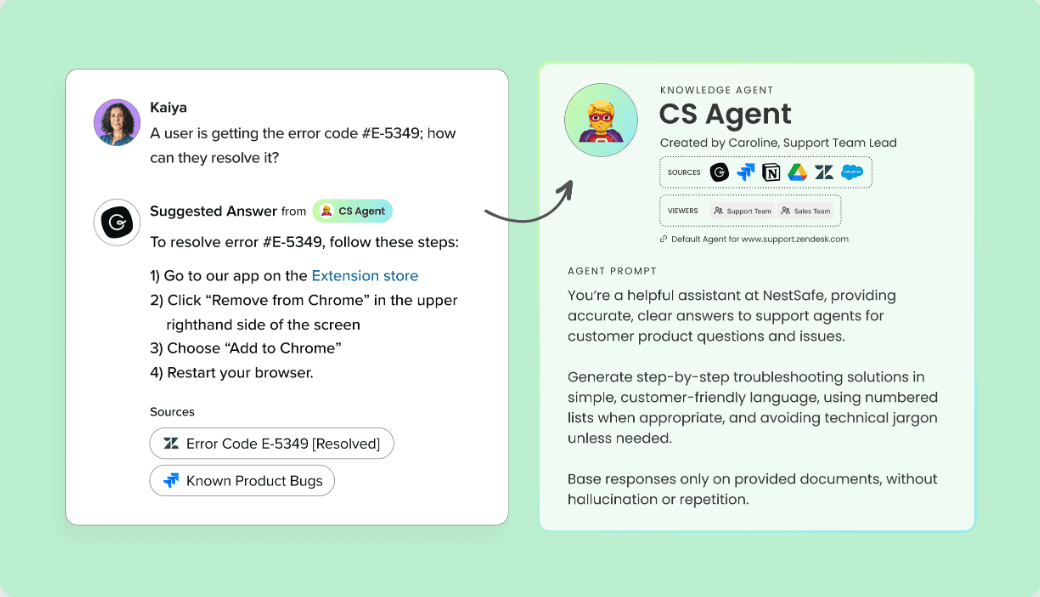
Knowledge Agents: Get instant answers from or refine, research, and create knowledge with AI assistants. You can customize each Agent to streamline responses, making it easier for your team to get to the right answer faster.
Browser Extension: Give your team access to a verified knowledge base in a browser, such as Chrome, without the need for extra tabs or wasted time. You can get instant answers in your workflow, avoiding loss of focus.
Ease of Use
Guru's intuitive interface makes it easy for your team to get started without a steep learning curve. You’ll appreciate how quickly users can find the information they need and note what's missing. The straightforward design and clear layout reduce the time needed for training. Guru offers more seamless functionality than some other knowledge management platforms, which means more productivity and a less frustrating user experience for your team.

Onboarding
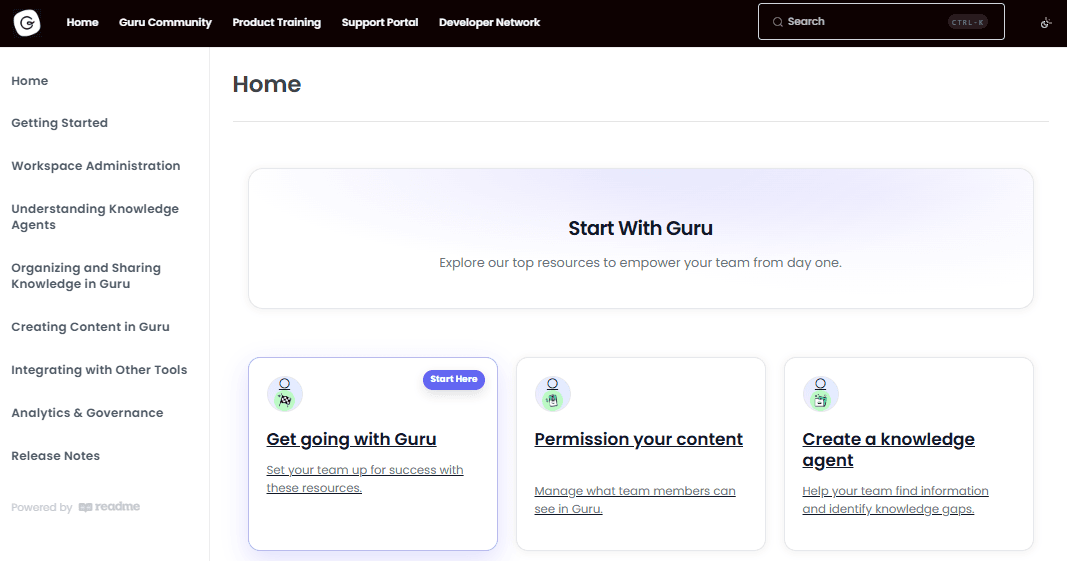
Guru offers a smooth onboarding experience with clear instructions and helpful support. Your team will find the setup process straightforward, allowing you to start managing knowledge quickly. The available resources include tutorials, FAQs, and customer support that assist in resolving any initial problems. Compared to other tools, Guru's onboarding ensures you reach value faster, minimizing downtime and maximizing efficiency for your knowledge management needs.
Customer Support
Guru provides reliable customer support that your team can count on when challenges arise. With responsive support via chat and email channels, you’ll find that issues get resolved quickly, minimizing disruptions. User reviews often praise the support team's helpfulness and knowledge, making it easier for your team to navigate any problems. The availability of various resources ensures you have the assistance you need, setting Guru apart in terms of user satisfaction and support efficiency.
Integrations
Guru integrates with Slack, Salesforce, Microsoft Teams, Google Drive, Asana, Dropbox, Jira, Zendesk, Trello, and GitHub.
Guru also offers an API and connects with third-party integration tools, including Zapier and Workato.

Value for Money
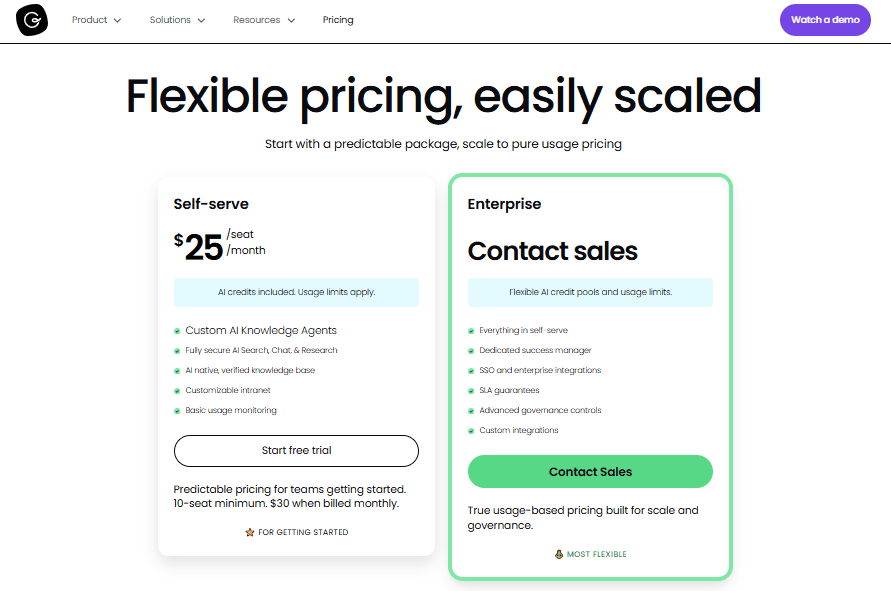
Guru offers competitive pricing with two plans that cater to different team sizes and needs. Users find good value in its features, making it a worthwhile investment for many organizations. A free trial of the self-serve plan is available, so your team can evaluate the software before purchasing.
- Self-Serve Plan: $25/seat/month (billed annually); Custom AI Knowledge Agents, AI Chat, Search, and Research, and more.
- Enterprise Plan: Public pricing not available. Contact Guru for more details; Everything in self-serve plus a dedicated success manager, custom integrations, and more.
Guru Specs
- API: Yes
- Chat: Yes
- Contact Management: Yes
- Contact Sharing: Yes
- Data Export: Yes
- Data Import: Yes
- Document Comparison: Yes
- Email Integration: Yes
- External Integrations: Yes
- File Sharing: Yes
- File Transfer: Yes
- History/Version Control: Yes
- Multi-User: Yes
- Notifications: Yes
- Project Management: Yes
Guru FAQs
Guru Company Overview & History
Guru, founded in 2013, is headquartered in Philadelphia, Pennsylvania, and has around 160 employees. It focuses on providing a knowledge management platform that helps teams access and share information efficiently. Major companies across various industries use Guru. The company is private and has raised over $70 million in funding, showcasing its growth and commitment to enhancing workplace productivity.
Guru Major Milestones
- 2013: Founded in Philadelphia, Pennsylvania.
- 2020: Raised $30 million in Series C funding.
- 2021: Reached over 1000 customers including Shopify, GitHub, and Spotify.
- 2023: Named by Forbes as one of America's Best Startup Employers.