
10 beste AIOps-Plattformen im Jahr 2026

Beste AIOps-Auswahl
Hier ist meine Auswahl der besten AIOps-Plattformen:


Das Management von IT-Operationen ist komplexer geworden, da Systeme wachsen und die Datenmenge zunimmt. AIOps-Plattformen erleichtern dies, indem sie künstliche Intelligenz nutzen, um Probleme automatisch zu überwachen, zu analysieren und zu beheben.
Mit Echtzeiteinblicken und vorausschauenden Warnmeldungen hilft AIOps Teams, Probleme frühzeitig zu erkennen, Reaktionen zu automatisieren und den Systemzustand mit weniger manueller Arbeit aufrechtzuerhalten. Das Ergebnis ist eine schnellere, zuverlässigere und effizientere IT-Umgebung.
Dieser Leitfaden listet die besten heute verfügbaren AIOps-Plattformen auf, sorgfältig ausgewählt nach Zuverlässigkeit, Benutzerfreundlichkeit und fortschrittlichen Automatisierungsfunktionen. Jede davon wurde entwickelt, um Ihrem Team Zeit zu sparen, Kosten zu senken und Ihre Systeme auf höchstem Niveau laufen zu lassen.
Why Trust Our Software Reviews
Zusammenfassung der besten AIOps-Plattformen
| Tool | Best For | Trial Info | Price | ||
|---|---|---|---|---|---|
| 1 | Best for automated script generation | 30-day free trial + free demo available | From $149/technician/month (billed annually) | Website | |
| 2 | Best for predictive analysis | Free demo + 30-day free trial available | From $9/month (billed annually) | Website | |
| 3 | Best for ensuring data security compliance | 14-day free trial + free demo available | From $0.05/GB | Website | |
| 4 | Best for enterprises to scale their operations with AI and ML | Free demo + 15-day free trial available | From $7/host/month (billed annually) | Website | |
| 5 | Best for building AI-enabled workflows with integrations | 14-day free trial + free plan + free demo available | From $21/user/month | Website | |
| 6 | Best for root cause analysis and anomaly detection | Free 15-day trial | From $16/hybrid unit/month | Website | |
| 7 | Best for a range of AI-powered capabilities | Free demo available | Pricing upon request | Website | |
| 8 | Best for system alerts and notifications using machine logic | Free trial + free demo available | Pricing upon request | Website | |
| 9 | Best for multi-cloud environments | 14-day free trial + free demo available | Pricing upon request | Website | |
| 10 | Best for gaining operational insights across your infrastructure | Free demo available | From $9/user/month (billed annually) | Website |

-

Site24x7
Visit WebsiteThis is an aggregated rating for this tool including ratings from Crozdesk users and ratings from other sites.4.6 -
GitHub Actions
Visit WebsiteThis is an aggregated rating for this tool including ratings from Crozdesk users and ratings from other sites.4.8 -
Docker
Visit WebsiteThis is an aggregated rating for this tool including ratings from Crozdesk users and ratings from other sites.4.6




Bewertungen der besten AIOps-Plattformen
Hier finden Sie eine kurze Beschreibung der besten AIOps-Plattformen auf dem Markt. Ich habe bemerkenswerte Funktionen hervorgehoben und Screenshots bereitgestellt, um Ihnen einen Eindruck davon zu vermitteln, wie jede aussieht.


Atera brings together remote-monitoring, helpdesk, automation and AI into one cloud-based platform — a practical pick if you manage a fleet of devices or support many end users. It’s especially appealing for small to mid-size IT teams or managed service providers (MSPs) who want better visibility into their infrastructure and a simpler way to handle tickets, patching and endpoint health.
Why I Picked Atera
I picked Atera because it evolves the classic RMM + PSA model by embedding AI that actively assists your team — for example via AI Copilot and Autopilot — to reduce manual toil. Its automated script generation and ticket-summary features let your staff handle issues faster, and the ability for Autopilot to autonomously address common end-user problems reduces repetitive load. This helps your team focus on more strategic tasks, while routine IT operations become more predictable and less hands-on.
Atera Key Features
In addition to its AI-driven functionalities, Atera offers:
- Patch Management: Atera automates the deployment of software updates, ensuring your systems remain secure and up-to-date.
- Ticketing System: This feature allows you to manage and track IT support requests efficiently, improving response times and customer satisfaction.
- Reporting and Analytics: Gain insights into your IT infrastructure with comprehensive reports and analytics, helping you make informed decisions.
- Remote Access: Securely connect to your clients' devices from anywhere, providing timely support and reducing downtime.
Atera Integrations
Native integrations include Acronis, Splashtop, Bitdefender, Keeper, and IT Glue. Atera also offers an API for custom integrations, enhancing its flexibility to fit into your existing IT ecosystem.
Pros and Cons
Pros:
- Remote access tools are fast and reliable for daily IT tasks
- Device monitoring covers servers, workstations, and network hardware
- AI Copilot and Autopilot accelerate ticket resolution and reduce manual workload
Cons:
- Alert settings can feel rigid when managing complex environments
- Patch deployments sometimes lack granular control options
New Product Updates from Atera

Atera Enhances IT Autopilot With Automation and File Support
Atera’s IT Autopilot gets three major boosts: you can now attach common files for deeper analysis, automate IT tasks with clear workflows, and choose how the system follows up when users go silent. These updates help streamline IT operations and improve resolution efficiency. For more information, visit Atera’s official site.


Site24x7 is a cloud-based monitoring solution that leverages artificial intelligence to oversee your entire IT infrastructure. It provides real-time insights into the performance of websites, servers, networks, and applications.
Why I picked Site24x7: One thing I like is its advanced anomaly detection capabilities. The system continuously monitors critical performance metrics and identifies deviations from normal behavior, alerting you to potential issues before they escalate. This proactive approach ensures that your IT operations remain smooth and uninterrupted. It also offers predictive analysis. By analyzing historical data, the platform forecasts future trends in resource utilization, such as disk and memory space.
Site24x7 Standout Features and Integrations:
Features include automated incident remediation, which uses simple scripts to resolve issues without manual intervention, reducing downtime and operational costs. The platform also offers data visualization and business intelligence tools, organizing critical data into charts, dashboards, and reports for quick analysis and troubleshooting.
Integrations include ServiceNow, PagerDuty, Opsgenie, Jira, ManageEngine AlarmsOne, ManageEngine ServiceDesk Plus, Slack, Microsoft Teams, Zoho Cliq, Amazon EventBridge, Zapier, and Webhooks.
Pros and Cons
Pros:
- Comprehensive monitoring capabilities across various IT infrastructure components
- Reliable real-time alerts that enable prompt issue resolution
- Flexible customization options for dashboards and reports
Cons:
- Configuration complexity can be challenging for new users
- Limited integration options with certain third-party tools
New Product Updates from Site24x7

Site24x7 Enhances Monitoring with AI-Powered Features
Site24x7 introduces new AI-powered capabilities to improve monitoring and troubleshooting. These updates help teams identify issues faster and gain insights more efficiently across their systems. For more information, visit Site24x7’s official site.
 .
.

Coralogix is a log management platform that helps organizations analyze their data at scale and ensure end-to-end security with automated incident response.
Why I picked Coralogix: I put Coralogix on this list because it automates posture assessments to ensure compliance with data security standards like SOC, ISO, and HIPAA. The TCO Optimizer feature lets you designate certain types of logs as compliance data.
Coralogix Standout Features and Integrations:
Features that differentiate Coralogix from other AIOps tools, in my opinion, are its automated vulnerability assessments. This feature uses AI to continuously monitor your log data and detect known security vulnerabilities; if it detects a vulnerability, it’ll display a description of the issue and estimate its severity so you can prioritize and remediate appropriately. I also like that it has 24/7 support built right into the app.
Integrations include over 100 native options to platforms and services like AWS, CircleCI, Jenkins, Microsoft Azure, PagerDuty, Perimeter 81, Cloudflare, and NXLog. You can use its REST APIs to connect to more applications.
Pros and Cons
Pros:
- Offers 24/7 in-app technical support
- Full range of features available with every plan
- Easy to set up pipelines to ingest data from multiple sources
Cons:
- Can be difficult to set up alerts and notifications
- Some users report slow speeds for log searches

Best for enterprises to scale their operations with AI and ML

Dynatrace is an application monitoring tool that provides full infrastructure observability. Is AI engine monitors your infrastructure in real-time and instantly surfaces anomalies.
Why I picked Dynatrace: I chose Dynatrace because it offers a highly scalable platform that continuously maps your digital environment as your organization grows. Its cloud-native architecture automatically adds new nodes to scale horizontally as needed.
Dynatrace Standout Features and Integrations:
Features that I think can help organizations automate their IT operations include its OneAgent software, which automatically maps your entire environment with a single agent; you won’t have to install multiple agents or manually configure plugins. Another feature worth mentioning is Smartscape, a topological model that creates an interactive map of your infrastructure. This allows you to see all the dependencies between your applications.
Integrations include over 600 native and pre-built options, such as Amazon S3, Ansible, CloudFlare, Databricks, Google Big Query, jQuery, NeoLoad, and Redis.
Pros and Cons
Pros:
- Offers customizable dashboards and reporting options
- Supports on-premise and cloud deployments
- Automates incident response at scale
Cons:
- Interface can be difficult to navigate
- Not cost-effective for small businesses to implement


PagerDuty is an infrastructure monitoring platform that leverages AI and ML to help companies stay ahead of critical issues and reduce manual processes.
Why I picked PagerDuty: Aggregating data across all the platforms and services you use isn’t easy, which is why I put PagerDuty on this list. It includes native integrations with over 700 tools and step-by-step instructions for popular platforms like AWS. You can also use its Events API v2 to ingest and process different types of event data.
PagerDuty Standout Features and Integrations:
Features that I feel make PagerDuty stand out from other AIOps tools include its intelligent alert grouping, which uses ML to group related alerts into a single incident. This helps reduce alert noise and speed up resolution times. Automation Actions is another feature I found helpful as it allows you to create automated incident response workflows to common issues; however, I should point out that this feature is only available as a paid-on.
Integrations are available natively for over 700 platforms, including AWS, ServiceNow, Salesforce, Zendesk, Atlassian, and Datadog.
Pros and Cons
Pros:
- Offers an extensive resource library of guides and documentation
- Pre-built ML models help reduce incident noise
- Allows for on-call scheduling to ensure incidents reach the right people
Cons:
- Automation Actions is charged separately as an add-on
- Free plan has limited functionality

LogicMonitor is a cloud-based infrastructure monitoring platform with AIOps capabilities that help organizations prevent outages and streamline their operations.
Why I picked LogicMonitor: I put LogicMonitor on this list for its anomaly detection. The system applies machine learning to historical data to detect anomalies outside normal patterns. Dynamic thresholds ensure that you only receive alerts for critical issues.
LogicMonitor Standout Features and Integrations:
Features that I think make LogicMonitor stand out from other AIOps platforms include its data forecasting tool, which uses historical data to make predictions about your infrastructure. For example, you can use it to anticipate when the disk space on a server will run out. These insights can help you take a more proactive approach to preventing outages.
Integrations are available natively for over 2,000 platforms. Notable integrations include Microsoft Azure, Google Cloud Platform, VMware, AWS, ServiceNow, Citrix, Fortinet, Java, MySQL, and ConnectWise.
Pros and Cons
Pros:
- Native integrations for 2,000 platforms and services
- Enables real-time monitoring of network devices, servers, and applications
- Offers an intuitive and simple user interface
Cons:
- Some users report additional development work for certain integrations
- Lack of customization for the monitoring templates

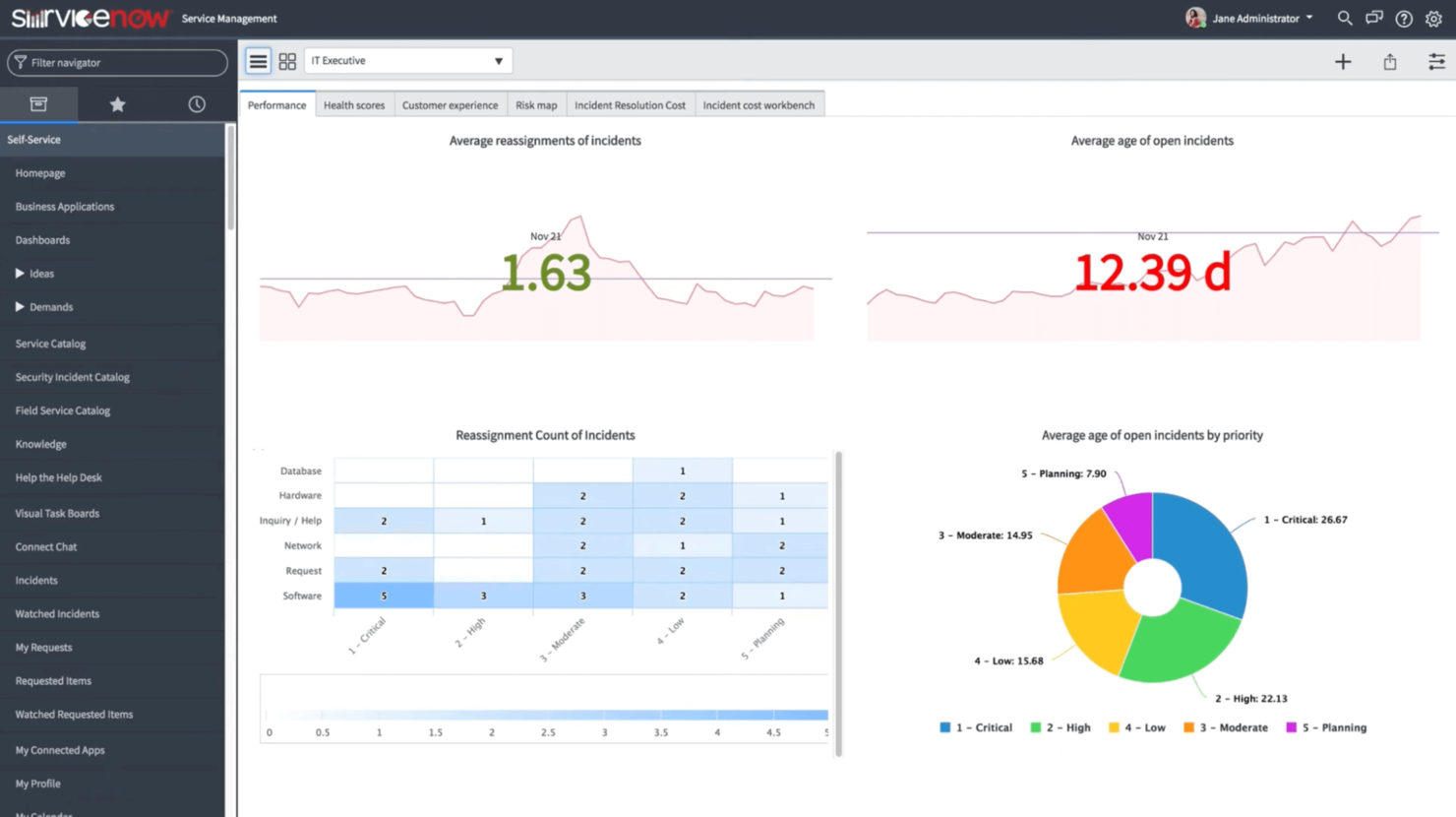
ServiceNow is a cloud-based IT operations management platform. It leverages AI to simplify data ingestion and automate incident resolution.
Why I picked ServiceNow: I put ServiceNow here because it offers an array of features that can help organizations manage and optimize their IT infrastructure. It can automatically discover applications and map their dependencies, detect and remediate anomalies, and even optimize resources to reduce cloud spend.
ServiceNow Standout Features and Integrations:
Features that I think make ServiceNow worth considering include its predictive AIOps capabilities, which can instantly identify anomalies as they occur. The platform also offers pre-built actions that you can apply to alerts and speed up remediation. I also found its service health dashboards helpful for understanding which applications were at risk.
Integrations are available natively for platforms like AWS, Google Cloud Platform, Microsoft Azure, Citrix, Okta, Jira, and SAP. You can also use ServiceNow’s REST APIs to integrate with more applications.
Pros and Cons
Pros:
- Offers apps for iOS and Android
- Facilitates collaboration and information sharing
- Platform can be customized to fit different use cases
Cons:
- Setting up integrations may require some technical expertise
- Some users report performance issues with the platform

Best for system alerts and notifications using machine logic

New Relic is a network observability platform that allows you to monitor the health of your infrastructure. It automatically detects anomalies and correlates incidents to streamline troubleshooting.
Why I picked New Relic: I picked New Relic because it does an excellent job at cutting through the “noise” and minimizing false positives. The platform uses an AI-powered correlation engine that reviews incidents and groups related issues to create a single alert. You can easily configure workflows to notify and provide relevant context to the right people so they can get straight to work.
New Relic Standout Features and Integrations:
Features that make New Relic stand apart include its issues feed, which provides a clear overview of the issues the system detected. I could drill down into each issue and get specifics like issue duration, entity type, and user actions. I also found its “postmortem” feature useful as it provided insights into what worked and what didn’t when responding to an incident.
Integrations include native options for various platforms and systems, including Amazon ECS, Elasticsearch, Synk, Kubernetes, Azure Batch, Google BigQuery, Kamon, and Comet.
Pros and Cons
Pros:
- Easy to set up and configure
- Offers simple and transparent pricing plans
- Provides full-stack observability across your infrastructure
Cons:
- Can be costly for small businesses
- Some users report inadequate documentation for advanced features


Splunk is an observability platform that uses AI and ML to detect anomalies and automate incident response across hybrid environments.
Why I picked Splunk: I chose Splunk because it offers a robust ecosystem of apps and integrations that enable multi-cloud enterprises to gain full visibility of their infrastructure. Its service-level dashboards allow you to drill down to the code level to make troubleshooting issues more effective.
Splunk Standout Features and Integrations:
Features that impressed me about Splunk include its predictive analytics tool, which uses ML algorithms to predict what the health score of a service may look like in 30 minutes. With these models, I could determine which services required immediate attention before an outage occurs. I also like that Splunk lets you create and add templates to standardize incident responses.
Integrations include pre-built and native applications that are available via Splunkbase — a marketplace of apps and add-ons for Splunk.
Pros and Cons
Pros:
- Offers flexible deployment options
- Has a range of pre-built and native integrations
- Powerful search and analytics capabilities
Cons:
- Requires training for users to utilize all features
- Uses a resource-intensive architecture

BigPanda
Best for gaining operational insights across your infrastructure

BigPanda’s AIOps tool uses intelligent automation to help organizations detect and resolve IT incidents to ensure continuous service availability.
Why I picked BigPanda: BigPanda has all the features you’d expect from an AIOps platform, like data aggregation, incident analysis, and alert correlation. But the reason I listed BigPanda here is because of its robust analytics and reporting. Its dashboard makes it easy to visualize key trends and understand the operational health of your infrastructure.
BigPanda Standout Features and Integrations:
Features that stood out to me about BigPanda during my testing are its generative AI that automatically creates titles and descriptions for incidents. You can give these descriptions a thumbs or down, which improves the AI-generated summary. I also like that the system conducts an incident analysis and surfaces probable root causes in real time.
Integrations are available natively with various platforms and services, such as Splunk, Nagios, Jenkins, Jira, ServiceNow, Slack, and Asana.
Pros and Cons
Pros:
- Offers a user-friendly and intuitive interface
- Performs automated incident analysis in real time
- Correlates and organizes IT alerts from various monitoring tools
Cons:
- Documentation isn’t as detailed for certain features
- Some users report slow response times from customer support
Weitere AIOps-Software-Optionen
Während meiner Recherche habe ich eine Vielzahl von Tools bewertet. Auch wenn diese es nicht in meine Topliste der AIOps geschafft haben, finde ich sie dennoch einen Blick wert:
- Elastic Observability
For accelerating root cause analysis
- IBM Instana Observability
For automated full-stack observability
- Moogsoft
For leveraging AI and ML to automate incident response
- ignio AIOps
Closed-loop automation system
- Secoda
For maintaining data quality and governance
- Datadog
For growing startups to leverage AI
- Netreo
For ease of deploying an AIOps solution
- CloudFabrix
Generative AI for troubleshooting issues
- Zenoss
For full-stacking monitoring
- Micro Focus
For network health and performance monitoring


Weitere Bewertungen von AIOps-Plattformen
Falls Sie hier noch nicht das Passende gefunden haben, sehen Sie sich diese anderen von uns getesteten und bewerteten Tools an:
- IT-Infrastruktur-Software
- IT-Management-Software
- DevOps-Tools
- Cybersecurity-Software
- Cloud-Service-Provider
- ETL-Tools
- Datenintegrations-Tools
Auswahlkriterien für AIOps-Plattformen
Bei der Auswahl der besten AIOps-Plattformen für diese Liste habe ich auf übliche Anforderungen und Probleme von Käufern wie Reaktionszeiten bei Vorfällen und Herausforderungen bei der Datenintegration geachtet. Außerdem habe ich den folgenden Rahmen verwendet, um meine Bewertung strukturiert und fair zu halten:
Kernfunktionen (25 % der Gesamtnote)
Um in diese Liste aufgenommen zu werden, musste jede Lösung die folgenden Anwendungsfälle abdecken:
- Erkennung und Behandlung von Vorfällen
- Anomalieerkennung
- Ursachenanalyse
- Leistungsüberwachung
- Datenintegration
Besondere Zusatzfunktionen (25 % der Gesamtnote)
Um die Auswahl weiter einzugrenzen, habe ich auch nach einzigartigen Merkmalen gesucht, wie z. B.:
- Funktionen für prädiktive Analysen
- Anpassbare Dashboards
- KI-gesteuerte Automatisierung
- Multi-Cloud-Unterstützung
- Echtzeit-Datenverarbeitung
Benutzerfreundlichkeit (10 % der Gesamtnote)
Um ein Gefühl für die Benutzerfreundlichkeit jedes Systems zu bekommen, habe ich Folgendes berücksichtigt:
- Intuitive Benutzeroberfläche
- Einfache Navigation
- Minimale Lernkurve
- Anpassungsmöglichkeiten
- Effizienz der Arbeitsabläufe
Onboarding (10% der Gesamtbewertung)
Zur Bewertung der Onboarding-Erfahrung jeder Plattform habe ich Folgendes berücksichtigt:
- Verfügbarkeit von Trainingsvideos
- Interaktive Produkttouren
- Zugriff auf Vorlagen
- Live-Webinare und Workshops
- Reaktionsschnelle Chatbots für Support
Kundensupport (10% der Gesamtbewertung)
Um den Kundensupport jedes Softwareanbieters zu bewerten, habe ich Folgendes berücksichtigt:
- 24/7 Verfügbarkeit
- Mehrere Support-Kanäle
- Reaktionszeit auf Anfragen
- Verfügbarkeit einer Wissensdatenbank
- Personalisierte Support-Optionen
Preis-Leistungs-Verhältnis (10% der Gesamtbewertung)
Um das Preis-Leistungs-Verhältnis jeder Plattform zu bewerten, habe ich Folgendes berücksichtigt:
- Wettbewerbsfähige Preisgestaltung
- Verhältnis Funktionen zu Preis
- Verfügbarkeit von kostenlosen Testphasen
- Flexible Preispläne
- Rabatte bei langfristigen Laufzeiten
Kundenbewertungen (10% der Gesamtbewertung)
Um einen Eindruck von der allgemeinen Kundenzufriedenheit zu gewinnen, habe ich bei der Auswertung von Kundenbewertungen Folgendes beachtet:
- Konsistenz positiver Rückmeldungen
- Häufig gemeldete Probleme
- Zufriedenheit der Nutzer mit den Funktionen
- Feedback zum Kundensupport
- Allgemeine Zuverlässigkeit und Leistung
Wie wähle ich eine AIOps-Plattform aus?
Es ist leicht, sich in langen Funktionslisten und komplexen Preisstrukturen zu verlieren. Um Ihnen dabei zu helfen, während Ihres individuellen Softwareauswahlprozesses fokussiert zu bleiben, finden Sie hier eine Checkliste mit wichtigen Faktoren:
| Faktor | Worauf zu achten ist |
|---|---|
| Skalierbarkeit | Kann die Plattform mit Ihrem Unternehmen wachsen? Berücksichtigen Sie künftige Anforderungen und stellen Sie sicher, dass das Tool Ihr Wachstum nicht limitiert. Suchen Sie nach Plattformen, die mit zunehmenden Daten- und Benutzerlasten umgehen können. |
| Integrationen | Funktioniert sie mit Ihren bestehenden Systemen? Prüfen Sie, ob sie mit den wichtigsten Werkzeugen kompatibel ist, die Sie bereits nutzen. Fehlende Integrationen können zu manuellen Umgehungslösungen führen. |
| Anpassbarkeit | Können Sie die Plattform an Ihre Arbeitsabläufe anpassen? Stellen Sie sicher, dass sie Ihre Prozesse unterstützt, ohne dass hohe Kosten oder eine zu große Komplexität durch individuelle Anpassungen entstehen. |
| Benutzerfreundlichkeit | Ist die Plattform für Ihr Team intuitiv bedienbar? Bewerten Sie die Lernkurve und ob die Benutzeroberfläche dem Kenntnisstand Ihres Teams entspricht. |
| Implementierung und Onboarding | Wie schnell können Sie loslegen? Berücksichtigen Sie Zeit und Ressourcenaufwand für Einrichtung, Schulung und Einführung. Suchen Sie nach Support-Optionen, die den Übergang erleichtern. |
| Kosten | Passt die Preisstruktur zu Ihrem Budget? Vergleichen Sie die Kosten mit den angebotenen Funktionen. Achten Sie auf versteckte Gebühren oder Preismodelle, die wichtige Funktionen einschränken. |
| Sicherheitsvorkehrungen | Entsprechen die Maßnahmen zum Datenschutz dem Standard? Stellen Sie sicher, dass die Plattform Branchenstandards erfüllt und Funktionen wie Verschlüsselung und Zugangskontrolle bietet. |
| Support-Verfügbarkeit | Bekommen Sie Unterstützung, wenn Sie sie brauchen? Achten Sie auf 24/7-Support und mehrere Kontaktmöglichkeiten. Schnelle, zuverlässige Hilfe kann in kritischen Situationen Zeit sparen. |
Was sind AIOps-Plattformen?
AIOps-Plattformen sind Softwarelösungen, die künstliche Intelligenz (KI) und maschinelles Lernen (ML) nutzen, um IT-Prozesse zu automatisieren. Fortschrittliche Algorithmen ermöglichen es diesen Plattformen, Probleme zu erkennen, Ursachenanalysen durchzuführen und Lösungen schneller vorzuschlagen, als es Menschen möglich wäre. Dadurch können IT-Teams schnell auf Vorfälle reagieren und die durchschnittliche Lösungszeit (MTTR) reduzieren.
Funktionen
Beachten Sie bei der Auswahl von AIOps-Plattformen folgende zentrale Funktionen:
- Anomalieerkennung: Erkennt ungewöhnliche Muster in den Daten, um Teams frühzeitig auf potenzielle Probleme aufmerksam zu machen.
- Ursachenanalyse: Identifiziert die zugrunde liegende Ursache von Vorfällen und hilft Teams, Probleme schneller und präziser zu lösen.
- Automatisierte Incident Response: Nutzt KI, um gängige Probleme automatisch zu beheben und so den Bedarf an manuellen Eingriffen zu reduzieren und die Lösungszeiten zu verkürzen.
- Prädiktive Analysen: Sagt durch die Analyse historischer Daten künftige Probleme voraus, sodass Teams IT-Operationen proaktiv steuern können.
- Echtzeitüberwachung: Liefert aktuelle Einblicke in die Systemleistung und ermöglicht schnelles Reagieren auf Änderungen oder Vorfälle.
- Anpassbare Dashboards: Bietet personalisierte Ansichten von Daten und Kennzahlen, damit sich Teams besser auf das für sie Wesentliche konzentrieren können.
- Integrationsmöglichkeiten: Verbindet sich mit bestehenden Tools und Systemen, um eine einheitliche IT-Umgebung zu schaffen, Silos abzubauen und die Effizienz zu steigern.
- Self-Healing-Funktionen: Behebt erkannte Probleme automatisch, um Systemstabilität zu gewährleisten und Ausfallzeiten zu minimieren.
- Compliance-Prüfungen: Stellt sicher, dass die IT-Operationen den Branchenvorgaben entsprechen, wodurch das Risiko von Regelverstößen sinkt.
- Skalierbarkeit: Unterstützt wachsende Daten- und Nutzeranforderungen und gewährleistet so die Wirksamkeit der Plattform beim Unternehmenswachstum.
Vorteile
Die Implementierung von AIOps-Plattformen bringt für Ihr Team und Ihr Unternehmen mehrere Vorteile mit sich. Hier sind einige, auf die Sie sich freuen können:
- Weniger Ausfallzeiten: Automatisierte Incident Response und Echtzeitüberwachung führen zu einer schnelleren Problembehebung und minimieren Systemausfälle.
- Gesteigerte Effizienz: Funktionen wie Anomalieerkennung und Ursachenanalyse ermöglichen es Teams, sich auf die Lösung von Problemen statt auf deren Suche zu konzentrieren, was die Produktivität steigert.
- Proaktives Management: Prädiktive Analysen erlauben es Teams, potenzielle Probleme zu antizipieren und zu beheben, bevor diese den Betrieb beeinträchtigen.
- Verbesserte Entscheidungsfindung: Anpassbare Dashboards verschaffen klare Einblicke und ermöglichen fundierte Entscheidungen auf Basis von Echtzeitdaten und Analysen.
- Kosteneinsparungen: Durch die Automatisierung von Routinetätigkeiten und die Optimierung der Ressourcennutzung helfen AIOps-Plattformen, Betriebskosten zu senken.
- Compliance-Garantie: Integrierte Compliance-Prüfungen stellen sicher, dass die IT-Betriebe Branchenstandards erfüllen und das Risiko von Verstößen sinkt.
- Skalierbarkeit: Die Fähigkeit, mit wachsenden Daten- und Nutzeranforderungen umzugehen, stellt sicher, dass die Plattform beim Wachstum Ihres Unternehmens wirksam bleibt.
Kosten & Preise
Die Auswahl von AIOps-Plattformen erfordert ein Verständnis der verschiedenen verfügbaren Preismodelle und Tarife. Die Kosten variieren je nach Funktionsumfang, Teamgröße, Erweiterungen und mehr. Die folgende Tabelle fasst gängige Tarife, ihre Durchschnittspreise sowie typische Funktionen, die in AIOps-Plattform-Lösungen enthalten sind, zusammen:
Tarifvergleichstabelle für AIOps-Plattformen
| Tarifart | Durchschnittspreis | Übliche Funktionen |
|---|---|---|
| Gratis-Tarif | $0 | Basisüberwachung, eingeschränkte Benachrichtigungen und Community-Support. |
| Persönlicher Tarif | $5-$25/user/month | Anomalieerkennung, anpassbare Dashboards und E-Mail-Support. |
| Business-Tarif | $30-$60/user/month | Ursachenanalyse, Echtzeitüberwachung und Integration mit Drittanbieter-Tools. |
| Enterprise-Tarif | $70-$150/user/month | Prädiktive Analysen, erweiterte Automatisierung, Compliance-Prüfungen und dediziertes Account-Management. |
AIOps-Tool FAQ
Hier finden Sie Antworten auf häufig gestellte Fragen zu AIOps:
Wie lange dauert die Implementierung einer AIOps-Plattform?
Die Implementierungsdauer hängt von der Größe Ihrer IT-Infrastruktur und der Komplexität Ihrer Systeme ab. Kleine Teams benötigen möglicherweise ein paar Wochen, während große Unternehmen mehrere Monate brauchen können, um Arbeitsabläufe vollständig zu integrieren und zu optimieren.
Benötigen AIOps-Plattformen Programmier- oder technische Fachkenntnisse?
Die meisten modernen AIOps-Plattformen sind mit benutzerfreundlichen Dashboards und Automatisierungsvorlagen ausgestattet. Für individuelle Anpassungen oder die Einbindung bestehender Überwachungstools bzw. APIs kann jedoch technisches Know-how erforderlich sein.
Können AIOps-Plattformen die Business Continuity unterstützen?
Ja. AIOps-Plattformen spielen eine Schlüsselrolle bei der Aufrechterhaltung der Geschäftskontinuität, indem sie Risiken frühzeitig erkennen, Wiederherstellungsmaßnahmen automatisieren und gewährleisten, dass Systeme auch bei Ausfällen oder unerwarteten Störungen funktionsfähig bleiben.
Wie helfen AIOps-Tools, Alarmmüdigkeit zu reduzieren?
AIOps nutzt Korrelationen und Rauschunterdrückung, um zusammenhängende Alarme zu gruppieren und Duplikate zu eliminieren. Teams können sich dadurch auf wichtige Vorfälle konzentrieren und werden nicht von zu vielen Benachrichtigungen überflutet.
Sind AIOps-Plattformen auch für kleine oder mittelständische Unternehmen geeignet?
Ja. Obwohl AIOps ursprünglich in großen Unternehmen eingesetzt wurde, gibt es mittlerweile viele Anbieter mit skalierbaren Lösungen für kleinere Organisationen. Dadurch können kleine Teams Unternehmenslevel-Überwachung und Automatisierung nutzen – ohne hohe Anfangsinvestitionen.
Wie beeinflussen AIOps-Lösungen Compliance und Auditing?
AIOps-Plattformen vereinfachen das Compliance-Management, indem sie detaillierte Systemprotokolle führen, die Berichterstellung automatisieren und eine konsistente Einhaltung von Richtlinien sicherstellen. Dadurch werden Audits schneller und präziser.
Können AIOps-Tools mit bestehenden ITSM- oder DevOps-Systemen integriert werden?
Die meisten AIOps-Plattformen sind für eine nahtlose Integration mit IT-Service-Management (ITSM) und DevOps-Tools wie ServiceNow, Jira und PagerDuty ausgelegt. So laufen Prozesse reibungslos weiter, ohne bestehende Abläufe zu unterbrechen.
Welche Datenarten analysieren AIOps-Plattformen?
AIOps-Plattformen verarbeiten eine Vielzahl an Daten einschließlich Protokollen, Metriken, Ereignissen, Alarmen und Traces. Durch die Kombination dieser Quellen entsteht ein einheitlicher Überblick über Systemzustand und Performance-Trends.
Wie geht es weiter?
Wenn Sie gerade dabei sind, AIOps-Plattformen zu recherchieren, verbinden Sie sich kostenlos mit einem SoftwareSelect-Berater für individuelle Empfehlungen.
Sie füllen ein Formular aus und führen ein kurzes Gespräch, in dem Ihre spezifischen Anforderungen besprochen werden. Anschließend erhalten Sie eine Liste mit passenden Softwarelösungen. Sie werden während des gesamten Kaufprozesses unterstützt – einschließlich der Preisverhandlungen.