

10 Best Service Desk Software for Tech Support In 2026

10 Best Service Desk Software Shortlist
Here's my pick of the 10 best software from the 27 tools reviewed.


Service desk software is an innovative solution that serves as the linchpin between support agents and the customers they serve. These powerful tools, like Freshdesk or Help Scout, facilitate a seamless flow of communication, ensure faster response times, and help manage and streamline customer issues, making them the best help desk software solutions available.
And if you're a small team or just starting out, you can benefit from their free plans. Using a reliable service desk tool is a game-changer, optimizing workflows, enhancing the capabilities of support agents, and ultimately leading to satisfied customers.
Why Trust Our Software Reviews
We’ve been testing and reviewing software since 2023. As tech leaders ourselves, we know how critical and difficult it is to make the right decision when selecting software.
We invest in deep research to help our audience make better software purchasing decisions. We’ve tested more than 2,000 tools for different tech use cases and written over 1,000 comprehensive software reviews. Learn how we stay transparent & our software review methodology.
Best Service Desk Software Summary
| Tool | Best For | Trial Info | Price | ||
|---|---|---|---|---|---|
| 1 | Best for AI-powered assistance with a conversational bot | 14-day free trial + free demo available | From $19/agent/month (billed annually) | Website | |
| 2 | Best for AI-driven automation with a human touch | Free plan + free trial available | From $25/user/month (billed annually) | Website | |
| 3 | Best for enterprise service management | 30-day free trial available | From $17/user/month | Website | |
| 4 | Best for centralized issue management | Free trial available | From $478/user/annually | Website | |
| 5 | Best for ease of use with a clean, user-friendly interface | 21-day free trial | From $12.6/user/month (billed annually) | Website | |
| 6 | Best for Agile teams and software development workflows | 7-day free trial + free plan available | From $20/agent/year (billed annually) | Website | |
| 7 | Best for AI-powered knowledge management | Not available | Pricing upon request | Website | |
| 8 | Best for integrating ITSM and SIAM in one package | Free demo available | Pricing upon request | Website | |
| 9 | Best for its free comprehensive service and simplicity | Not available | Forever free plan available | Website | |
| 10 | Best for businesses seeking affordability without compromising on features | Free plan + free demo available | From $29.99/10 users/month (billed annually) | Website |

-

Freshservice
Visit WebsiteThis is an aggregated rating for this tool including ratings from Crozdesk users and ratings from other sites.4.6 -
Deel IT
Visit Website -
Rippling IT
Visit WebsiteThis is an aggregated rating for this tool including ratings from Crozdesk users and ratings from other sites.4.8



Best Service Desk Software Reviews


Freshservice is a robust cloud-based IT Service Management (ITSM) solution. It is particularly noted for its advanced artificial intelligence capabilities, which include a conversational bot that enhances customer interactions.
Why I Picked Freshservice: I picked Freshservice for this list because of its superior AI-powered assistance. The tool's conversational bot sets it apart from many of its competitors. This feature is precisely why I believe Freshservice is best for businesses looking to leverage AI technology for better customer engagement and more efficient issue resolution.
Standout Features & Integrations:
Freshservice provides a range of essential features such as incident, problem, change, and release management. Its ITSM functionalities are comprehensive and user-friendly. On the integration front, Freshservice pairs well with popular tools like Slack, Jira, Google Workspace, and more, promoting better team collaboration and project management.
Pros and Cons
Pros:
- Good integration with popular tools like Slack and Jira
- Comprehensive ITSM functionalities
- Strong AI capabilities with a conversational bot
Cons:
- Limited customization options compared to some competitors
- The conversational bot may require a learning curve
- Pricing could be more competitive
New Product Updates from Freshservice

Freshservice Enhances Global Search and Dashboards With Task Support
Freshservice enhances Global Search and Dashboards by adding support for ticket, problem, change, and release tasks, along with custom task views. This update helps teams search, track, and report on tasks from one centralized interface. For more information, visit Freshservice's official site.


Help Scout offers a customer-service-oriented help desk platform built for teams that handle email-centric support and want to extend into chat and self-service without a rigid conventional ticket queue. If your team is a small-to-mid-sized business, SaaS or e-commerce company, or internal support function looking for a tool that doesn’t feel like an overly complex enterprise system, this might be a good fit for you.
Why I Picked Help Scout
I picked Help Scout for its unique ability to combine AI-driven automation with human touch in customer service. The AI chatbot feature stands out, managing the majority of routine inquiries, allowing your team to focus on more complex issues. Additionally, the shared inbox facilitates seamless team collaboration, ensuring no customer query goes unanswered. These features make Help Scout an excellent choice for businesses aiming to enhance their service desk capabilities without losing the personal connection with their customers.
Help Scout Key Features
In addition to its standout AI and collaboration tools, Help Scout offers several other features that enhance its service desk functionality:
- Help Center and Live Chat: Offers 24/7 customer support access, ensuring your customers can reach you anytime.
- Workflows: Automates essential tasks to keep your team's inbox organized and efficient.
- Saved Replies: Provides quick access to pre-written responses for common inquiries, saving your team time.
- Performance Insights: Delivers metrics to help you optimize service quality and team performance.
Help Scout Integrations
Integrations include Slack, HubSpot, Salesforce, Mailchimp, Shopify, Jira, Google Workspace, Trello, Asana, and Intercom.
Pros and Cons
Pros:
- Help Center and Live Chat provide 24/7 customer support access.
- AI-driven automation helps manage routine inquiries effectively.
- Shared inbox feature enhances team collaboration and efficiency.
Cons:
- Less depth around multi-channel support (phone, social media) compared to tools built for full contact-centre operations.
- Mobile app experience lags behind desktop support in usability and features.
New Product Updates from Help Scout

Help Scout Enhances Support Management With AI and Integrations
Help Scout introduces smarter routing, WhatsApp and Aircall integrations, and new AI enhancements to help teams manage conversations, automate workflows, and support customers across more channels. For more information, visit Help Scout’s official site.
 .
.

InvGate Service Management is a flexible, no-code ITSM solution that can support not only IT operations but also enterprise-wide service delivery across departments like HR, Facilities, and Finance.
Why I Picked InvGate Service Desk: One aspect that stands out is its ability to be used across different service teams. Whether it’s managing onboarding requests from HR or maintenance tickets from Facilities, InvGate offers a unified experience that supports enterprise service management out of the box.
I also like that it introduces a unique concept to the service desk space: gamification. This aspect makes it different from many other offerings on the market. By gamifying the service desk experience, it adds an extra level of engagement that can boost productivity and morale among support staff.
Standout Features & Integrations:
Features include a self-service portal that empowers employees across departments to resolve common issues independently by accessing a shared knowledge base and service catalog. The platform also has an intuitive UX that supports non-technical teams without needing additional setup or modules.
For integrations, InvGate offers compatibility with a wide range of systems, including LDAP, SSO, email servers, and various other IT management tools.
Pros and Cons
Pros:
- Incorporates AI and low-code automation
- A broad array of features for comprehensive service management
- Gamified service desk experience enhances user engagement and productivity
Cons:
- No social media ticket creation support
- Could offer more native integrations
New Product Updates from InvGate Service Management
InvGate Enhances Workflows and Self-Service Experience
InvGate Service Management introduces Google Meet Space creation, VSA chat from search, and Knowledge Base enhancements. These updates improve workflow automation, user interaction, and self-service efficiency. For more information, visit InvGate Service Management's official site.
 .
.

Issuetrak is a versatile service desk software designed to help your team manage and resolve issues efficiently. It offers tools for tracking complaints, handling customer support requests, and managing help desk tickets.
Why I Picked Issuetrak: Issuetrak's omnichannel ticket submission lets your team create tickets directly in the app, via email, or through web forms, ensuring all issues are captured promptly. The Issue Hub provides a centralized location to view, manage, and update tickets, making it easier to monitor progress and maintain organization. Additionally, the round-robin issue assignment feature automatically distributes tickets among your team members, balancing workloads and promoting timely resolutions.
Additionally, task flows in Issuetrak enable your team to collaborate effectively by breaking down complex issues into manageable tasks, ensuring consistency and thoroughness in your processes. The knowledge base also serves as a repository for important information, allowing team members to access solutions and guidelines quickly.
Standout Features & Integrations:
Features include asset management, which helps you keep track of hardware and software details, maintenance schedules, and software licenses, ensuring your assets are well-managed. The platform also offers automated routing that directs incoming tickets to the appropriate team members based on predefined criteria.
Integrations include Microsoft 365, Google Analytics, Gmail, Salesforce, Power BI, and thousands more through Zapier. You can also access the Issuetrak API for even more connections.
Pros and Cons
Pros:
- Effective in organizing and managing tickets
- Cloud and on-premises deployment options
- Highly customizable system
Cons:
- Asset management is a paid add-on
- Certain features may be complex to set up and integrate within the system

Best for ease of use with a clean, user-friendly interface

Mojo Helpdesk is a feature-packed service desk software with a focus on usability. Its intuitive design and clean, user-friendly interface set it apart in terms of accessibility and ease of use.
Why I Picked Mojo Helpdesk: I chose Mojo Helpdesk for its unique blend of robust features and a clean, user-friendly interface. It's evident that the developers put careful thought into the user experience, making the software easily navigable even for non-tech folks.
In my judgment, Mojo Helpdesk stands out as the best for businesses seeking a hassle-free and intuitive service desk solution.
Standout Features & Integrations:
Mojo Helpdesk comes with a multitude of useful features including ticket tracking, knowledge base, and customer satisfaction rating. It also offers some innovative capabilities like time tracking and custom forms.
Regarding integrations, Mojo Helpdesk works well with Google Workspace, making it a seamless fit for organizations already leveraging Google's suite of productivity tools.
Pros and Cons
Pros:
- Seamless integration with Google Workspace
- Robust set of features including time tracking and custom forms
- User-friendly interface with intuitive navigation
Cons:
- Reporting features could be more robust
- Lack of a free tier for small businesses
- Limited options for customization compared to some competitors
Best for Agile teams and software development workflows
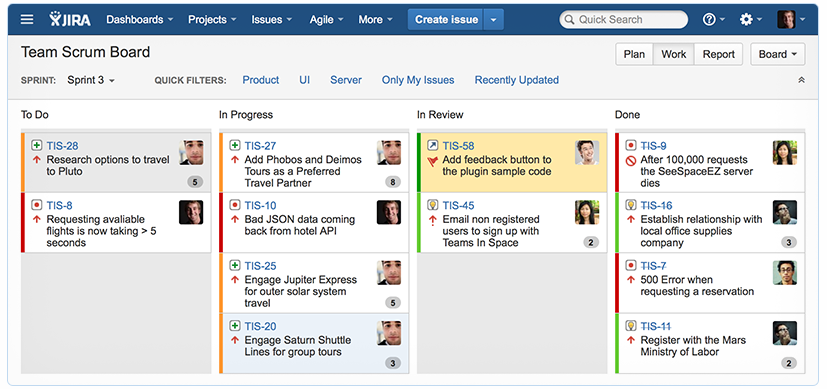
Jira Service Management is a comprehensive IT service management tool that integrates seamlessly with the Jira Software development platform. It supports Agile methodologies and is particularly well-suited to manage software development workflows, making it an ideal choice for such teams.
Why I Picked Jira Service Management: I chose Jira Service Management because it stands out for its strong support for Agile methodologies and software development workflows. When comparing different tools, I judged this one to be a particularly good fit for Agile teams and software development workflows.
It's unique in its ability to bridge the gap between IT support and development teams.
Standout Features & Integrations:
Jira Service Management offers features like a customizable service desk, advanced SLA support, change management, and incident management. Its robust integration capabilities stand out, especially with other Atlassian products like Jira Software and Confluence. Also, it can integrate with tools like Slack, GitHub, and Jenkins.
Pros and Cons
Pros:
- Features like change management and incident management
- Excellent integration with other Atlassian products
- Strong support for Agile methodologies and software development workflows
Cons:
- Optimal usage requires familiarity with other Atlassian products
- Might be complex for teams new to the Agile approach
- Relatively higher starting price


Guru is an AI-powered enterprise search, intranet, and wiki platform designed to enhance knowledge sharing and operational efficiency within organizations.
Why I Picked Guru: While Guru isn’t your typical service desk software, it plays a key role in supporting service desk operations. It gives your team quick access to your internal knowledge base, providing them with contextual answers and suggestions using AI for the issues that come up in tickets.
For instance, when a customer submits a problem through a help desk platform, Guru can automatically search your knowledge base and pull up relevant documents or past cases of similar issues, helping your team resolve each case quicker.
Standout Features & Integrations:
Features include the ability to verify knowledge to ensure Guru provides the most accurate information to help desk agents. It also offers a writing assistant called AI Assist to help you draft responses to customer tickets.
Integrations include Slack, Salesforce, Microsoft Teams, Google Drive, GitHub, Jira, HubSpot, Dropbox, Asana, Trello, BambooHR, Freshdesk, Notion, ServiceNow, Airtable, and Adobe Workfront.
Pros and Cons
Pros:
- Analytics to track knowledge usage and identify gaps
- AI suggestions improve information relevancy and retrieval
- Provides a system for verifying information
Cons:
- Can't handle tickets and customer interactions without a help desk integration
- Can become overwhelming if not properly organized


4me is a comprehensive service management tool designed to unify ITSM and SIAM in one cohesive package. Its capabilities stretch beyond traditional IT service management to include service integration and management, making it an all-in-one solution for businesses.
Why I Picked 4me: I chose 4me because its seamless integration of ITSM and SIAM makes it a standout in the crowded service desk market. This unique combination streamlines the management of services, allowing businesses to manage and deliver services more effectively.
Given this, I believe 4me is the best for businesses looking for a comprehensive package that handles both ITSM and SIAM.
Standout Features & Integrations:
4me's defining features include integrated service management, KPI tracking, and self-service portals, making it easier for businesses to deliver, manage, and measure their services.
In terms of integrations, 4me connects with an array of software, including but not limited to Jira, Salesforce, and Slack, thereby allowing users to streamline their service management process.
Pros and Cons
Pros:
- Wide range of software integrations
- Detailed performance tracking with KPIs
- Comprehensive ITSM and SIAM capabilities in one package
Cons:
- More suitable for larger organizations, smaller businesses may find it overwhelming
- Some users may find the interface less intuitive than other tools
- Absence of transparent pricing may deter some potential users


Spiceworks Cloud Help Desk software is a user-friendly tool that offers comprehensive service desk functionality at no cost. It brings together ticket management, self-service portals, and reporting in a simple, easy-to-use interface.
Why I Picked Spiceworks Cloud Help Desk: I picked Spiceworks Cloud Help Desk because it manages to offer a comprehensive, feature-rich service desk solution completely free of charge. Its user-friendly interface and simplicity make it accessible to all users, regardless of their technical prowess.
For companies starting out or operating on a tight budget, this tool is the best for its cost-effectiveness and simplicity.
Standout Features & Integrations:
Spiceworks' notable features include a built-in ticketing system, knowledge base, and IT asset management, all designed to simplify your service desk operations. In terms of integrations, it pairs well with a variety of systems such as Active Directory, Google Workspace, and Microsoft Office 365, extending its functionality and enhancing user convenience.
Pros and Cons
Pros:
- Wide range of software integrations
- User-friendly interface
- Comprehensive service desk features at no cost
Cons:
- May not scale well for larger organizations
- Absence of built-in chat functionality
- Limited advanced features compared to paid alternatives

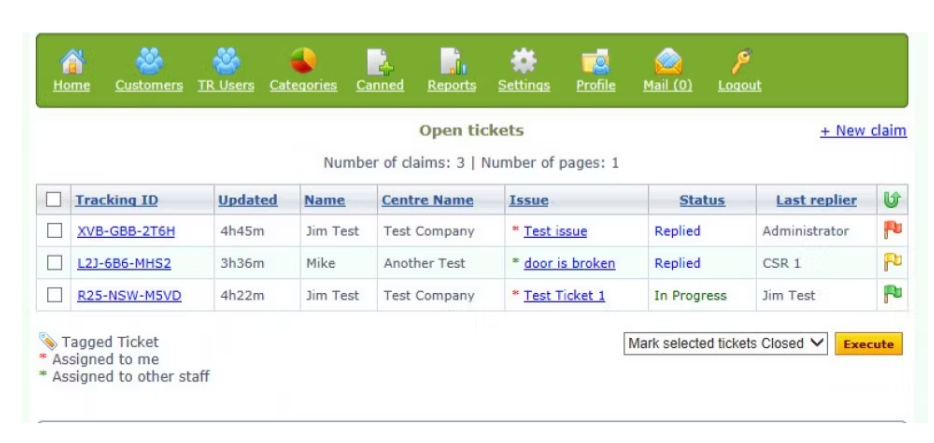
Hesk is an efficient customer support tool that provides a comprehensive set of features while maintaining an affordable price point. It's an ideal choice for businesses that want to stay within a budget but do not want to sacrifice the richness of features in their support desk tool.
Why I Picked Hesk: I selected Hesk because of its unique ability to combine affordability with a rich feature set. During my comparisons, it emerged as a distinctive option that provides a balance of cost and functionality.
I consider it best for businesses seeking affordability without compromising on features, as it offers a range of functionalities that surpass many of its similarly priced competitors.
Standout Features & Integrations:
Hesk comes with a range of useful features, including ticket management, a knowledge base, and self-service portals. It also supports custom fields and provides performance metrics. Importantly, Hesk can integrate with a variety of popular tools such as Outlook, Gmail, and Mailchimp, which can greatly improve workflow efficiency.
Pros and Cons
Pros:
- Useful integrations with popular tools like Outlook and Mailchimp
- The presence of a knowledge base and self-service portals
- Affordable pricing with comprehensive features
Cons:
- Advanced features require higher-priced plans
- Lack of native mobile app support
- The user interface could be more modern
Other Service Desk Software
Below is a list of additional service desk software that I shortlisted, but did not make it to the top 10. Definitely worth checking them out.
- LiveAgent
For omnichannel support with extensive customization options
- Rescue
For remote support with powerful diagnostic capabilities
- Hiver
For Gmail-based service desks
- LiveAgent
For omnichannel ticket management
- ManageEngine ServiceDesk Plus
For robust ITIL-ready capabilities with asset management
- Zendesk
For a holistic approach to customer service across multiple channels
- Front
For email-centric customer support with seamless integrations
- Kayako
Good for businesses seeking a unified customer service platform
- Splashtop
Good for remote access and control in IT helpdesk scenarios
- HaloITSM
Good for a comprehensive approach to IT service management
- Cayzu
Good for simple and intuitive multi-channel customer support
- HubSpot Service Hub
Good for businesses using HubSpot's marketing and sales solutions
- SysAid
Good for IT helpdesk support with integrated tools for asset and project management
- BMC Helix ITSM
Good for cloud-based IT service management powered by cognitive automation
- ServiceNow ITSM
Good for IT service management with strong scalability
- C2-ITSM
Good for IT service management with a focus on compliance
- SolarWinds IT Service Desk Software
Good for IT operations management and cost tracking


Other Help Desk Software Reviews
Service Desk Software Selection Criteria
When selecting the best service desk software to include in this list, I considered common buyer needs and pain points like managing high ticket volumes and improving response times. I also used the following framework to keep my evaluation structured and fair:
Core Functionality (25% of total score) To be considered for inclusion in this list, each solution had to fulfill these common use cases:
- Ticket management
- Automated workflows
- Multi-channel support
- Reporting and analytics
- Knowledge base management
Additional Standout Features (25% of total score) To help further narrow down the competition, I also looked for unique features, such as:
- AI-driven ticket routing
- Customizable dashboards
- Integration with third-party apps
- Mobile app functionality
- Real-time collaboration tools
Usability (10% of total score) To get a sense of the usability of each system, I considered the following:
- Intuitive interface
- Easy navigation
- Minimal learning curve
- Customization options
- Accessibility features
Onboarding (10% of total score) To evaluate the onboarding experience for each platform, I considered the following:
- Availability of training videos
- Pre-built templates
- Interactive product tours
- Access to chatbots
- Webinars for new users
Customer Support (10% of total score) To assess each software provider’s customer support services, I considered the following:
- 24/7 support availability
- Multiple support channels
- Response time
- Access to a community forum
- Quality of documentation
Value For Money (10% of total score) To evaluate the value for money of each platform, I considered the following:
- Competitive pricing
- Feature set for the price
- Flexible pricing tiers
- Free trial availability
- Discounts for annual subscriptions
Customer Reviews (10% of total score) To get a sense of overall customer satisfaction, I considered the following when reading customer reviews:
- User satisfaction ratings
- Feedback on core features
- Comments on ease of use
- Opinions on customer support
- Overall value perception
How to Choose Service Desk Software
It’s easy to get bogged down in long feature lists and complex pricing structures. To help you stay focused as you work through your unique software selection process, here’s a checklist of factors to keep in mind:
| Factor | What to Consider |
|---|---|
| Scalability | Can the software grow with your team? Consider future growth in users and ticket volume. Avoid tools that might limit you as your needs expand. |
| Integrations | Does it connect with your existing systems like CRM or email? Ensure the tool can integrate seamlessly to avoid manual workarounds. |
| Customizability | Can you tailor it to fit your workflows? Look for options to modify fields, forms, and processes to align with your team's operations. |
| Ease of use | Is it intuitive for your team to adopt? A complicated interface can slow down adoption, so prioritize tools with straightforward navigation. |
| Implementation and onboarding | How quickly can you get started? Check for resources like tutorials and support to facilitate a smooth transition. |
| Cost | Does it fit your budget? Compare pricing models—monthly vs. annual—and look for hidden fees like setup charges or premium support costs. |
| Security safeguards | Are your data and user information protected? Look for encryption, access controls, and compliance with data protection standards like GDPR. |
| Support availability | When can you reach support if needed? Ensure you have access to timely help, whether through chat, phone, or email, especially during critical times. |
What Is Service Desk Software?
Service desk software is a tool that enables organizations to manage their customer service and support operations efficiently. Typically used by IT teams, customer support representatives, and help desk agents, its primary function is to streamline the process of receiving, prioritizing, tracking, and resolving customer inquiries and issues.
What these tools effectively address are the main pain points in customer experience: delayed responses, missed tickets, and disjointed communication. By leveraging features such as SLA management and help desk ticketing, they ensure that your service teams are adhering to set response and resolution times. Escalation rules and queues also help in prioritizing tickets and assigning them to the right team members. Plus, they come packed with templates for common responses, reducing the time spent on repetitive tasks.
These platforms, whether on-premise or SaaS, often integrate with APIs, providing a holistic view of customer data, and helping improve customer relationships. Many also offer mobile applications for Android and iOS, a must in our increasingly mobile world.
Features
When selecting service desk software, keep an eye out for the following key features:
- Ticket management: Organizes and tracks customer requests to ensure timely responses and resolution.
- Automated workflows: Streamlines repetitive tasks and processes to save time and reduce human error.
- Multi-channel support: Allows customers to reach support through various channels like email, chat, and phone.
- Knowledge base management: Provides a centralized repository of information to help users find answers quickly.
- Customizable dashboards: Offers flexibility to tailor the interface to match specific workflow needs and preferences.
- Integration capabilities: Connects with existing tools and systems to enhance productivity and data flow.
- Reporting and analytics: Provides insights into team performance and customer satisfaction to inform decision-making.
- Real-time collaboration tools: Enables team members to work together efficiently to resolve issues faster.
- Security safeguards: Protects sensitive data and ensures compliance with data protection regulations.
- Mobile app functionality: Allows team members to access and manage support tasks on the go.
Benefits
Implementing service desk software provides several benefits for your team and your business. Here are a few you can look forward to:
- Improved efficiency: Automated workflows and ticket management help your team handle support tasks faster and with fewer errors.
- Enhanced customer satisfaction: Multi-channel support and a well-managed knowledge base ensure customers get the help they need quickly.
- Better decision-making: Reporting and analytics provide insights into performance and areas for improvement.
- Increased team collaboration: Real-time collaboration tools enable your team to work together effectively to resolve issues.
- Scalability: The ability to integrate with existing systems and customize dashboards ensures the software grows with your business.
- Data protection: Security safeguards keep sensitive information secure and compliant with regulations.
- Flexibility: Mobile app functionality allows your team to manage support tasks from anywhere, increasing responsiveness.
Costs & Pricing
Selecting service desk software requires an understanding of the various pricing models and plans available. Costs vary based on features, team size, add-ons, and more. The table below summarizes common plans, their average prices, and typical features included in service desk software solutions:
Plan Comparison Table for Service Desk Software
| Plan Type | Average Price | Common Features |
|---|---|---|
| Free Plan | $0 | Basic ticketing, email support, and limited reporting. |
| Personal Plan | $5-$25/user/month | Ticket management, basic automation, and email integration. |
| Business Plan | $30-$60/user/month | Advanced automation, multi-channel support, and customizable dashboards. |
| Enterprise Plan | $70-$150/user/month | Full integration capabilities, advanced security features, and comprehensive analytics tools. |
People Also Ask (FAQs)
How can service desk software improve team productivity?
Service desk software boosts productivity by automating routine tasks like ticket routing and status updates. It centralizes communication, allowing easy access to past interactions and knowledge bases, which helps your team resolve issues faster and reduce repetitive work.
What should I consider when integrating service desk software with other tools?
Look for compatibility with your existing systems like CRM and email platforms. Check if the software supports APIs for custom integrations. Consider the ease of setup and potential data migration challenges, as well as ongoing maintenance needs.
How does service desk software handle data security?
Most service desk software includes security features like data encryption and access controls. Verify compliance with data protection standards, such as GDPR, to ensure your customers’ information is safe. Regular security updates and audits are also important.
What’s Next:
If you're in the process of researching service desk software, connect with a SoftwareSelect advisor for free recommendations.
You fill out a form and have a quick chat where they get into the specifics of your needs. Then you'll get a shortlist of software to review. They'll even support you through the entire buying process, including price negotiations.