

Navigating the 10 Best IoT Platforms of 2026

10 Best IoT Platforms Shortlist
Here's my pick of the 10 best software from the 24 tools reviewed.


Navigating the world of IoT platforms can be overwhelming, especially when you're trying to find the right fit for your team. With so many options, it's hard to know which one will truly meet your needs. As someone who independently tests and reviews software, I understand these challenges and aim to guide you through them.
I've put together a well-researched list of the best IoT platforms available, focusing on their unique features and benefits. In my experience, a reliable platform can transform how your team operates, offering solutions for data management, connectivity, and more.
Throughout this article, you'll find unbiased reviews to help you make informed decisions. Let's dive into what these platforms can do for you.
Why Trust Our Software Reviews
We’ve been testing and reviewing software since 2023. As tech leaders ourselves, we know how critical and difficult it is to make the right decision when selecting software.
We invest in deep research to help our audience make better software purchasing decisions. We’ve tested more than 2,000 tools for different tech use cases and written over 1,000 comprehensive software reviews. Learn how we stay transparent & our software review methodology.
Best IoT Platforms Summary
| Tool | Best For | Trial Info | Price | ||
|---|---|---|---|---|---|
| 1 | Best for CRM integrated IoT solutions | Not available | Pricing upon request | Website | |
| 2 | Best for scalable cloud integration | Not available | From $7/user/month (billed annually) + $49 base fee per month | Website | |
| 3 | Best for large-scale enterprise solutions | Free demo + 30-day free trial available | Pricing upon request | Website | |
| 4 | Best for industrial automation and digitalization | Free demo available | Pricing upon request | Website | |
| 5 | Best for rapid IoT application development | Not available | Pricing upon request | Website | |
| 6 | Best for IoT fleet management | Not available | Pricing upon request | Website | |
| 7 | Best for smart home device platforms | Not available | Pricing upon request | Website | |
| 8 | Best for end-to-end device connectivity | Free plan available | From $299/block/month | Website | |
| 9 | Best for IoT module hardware integration | Not available | Pricing upon request | Website | |
| 10 | Best for real-time IoT data visualization | Free demo available | Pricing upon request | Website |



Best IoT Platforms Reviews


Salesforce IoT Cloud is a platform that bridges the gap between customer relationship management (CRM) and IoT. By connecting devices to Salesforce's vast CRM ecosystem, the tool provides real-time data insights and fosters improved customer experiences. The tool's strength lies in its CRM-integrated IoT solutions, allowing businesses to capitalize on their IoT data within the context of customer management.
Why I Picked Salesforce IoT Cloud:
While choosing the right platforms for IoT, the Salesforce IoT Cloud struck me as a distinctive tool, given its deep integration with a world-class CRM system. I determined that its tight-knit combination of IoT and CRM functions made it stand apart from other contenders. I chose this tool because it uniquely addresses the need for businesses to directly relate IoT data with customer behaviors and trends. It is undoubtedly best suited for organizations looking for CRM-integrated IoT solutions.
Standout features and integrations:
The Salesforce IoT Cloud boasts features like proactive device monitoring, which can trigger CRM workflows based on device data. Additionally, with the Event Processing Engine, businesses can process billions of events daily, analyzing data and taking necessary actions. Integrations are at the heart of Salesforce, and the IoT Cloud integrates effortlessly with other Salesforce products, ensuring a unified experience and leveraging existing CRM data.
Pros and Cons
Pros:
- Proactive device monitoring that can drive CRM actions
- Ability to process billions of events daily
- Deep integration with Salesforce CRM for cohesive data handling
Cons:
- Some users may desire more out-of-the-box integrations with non-Salesforce products
- Can be on the pricier side compared to other IoT platforms
- Might have a learning curve for those unfamiliar with Salesforce


Amazon Web Services (AWS) IoT is a comprehensive platform that delivers a robust set of services for connecting devices, managing applications, and integrating with the cloud. Its focus on scalable cloud integration allows businesses to grow and adapt their IoT infrastructure easily, a feature that directly ties into why it is best for scalable cloud integration.
Why I Picked Amazon Web Services (AWS) IoT:
I chose AWS IoT because of its wide-reaching functionality and a strong emphasis on scalability. Among the many platforms I've compared, its cloud integration services stood out, offering versatile options for businesses of all sizes. AWS IoT is best for scalable cloud integration, enabling organizations to expand their connected devices and applications while ensuring robust security and efficiency.
Standout Features and Integrations:
AWS IoT offers features like Device Defender, which monitors and ensures device security, and IoT Core, which allows connectivity between devices and the cloud. It also includes analytics tools that enable real-time processing of data. Important integrations include those with AWS Lambda for code execution, Amazon S3 for storage, and Amazon SageMaker for machine learning capabilities.
Pros and Cons
Pros:
- Scalable to accommodate business growth
- Strong focus on security and compliance
- Wide range of features and tools
Cons:
- Limited support for non-AWS environments
- Can become costly as usage increases
- Complex for new users to understand

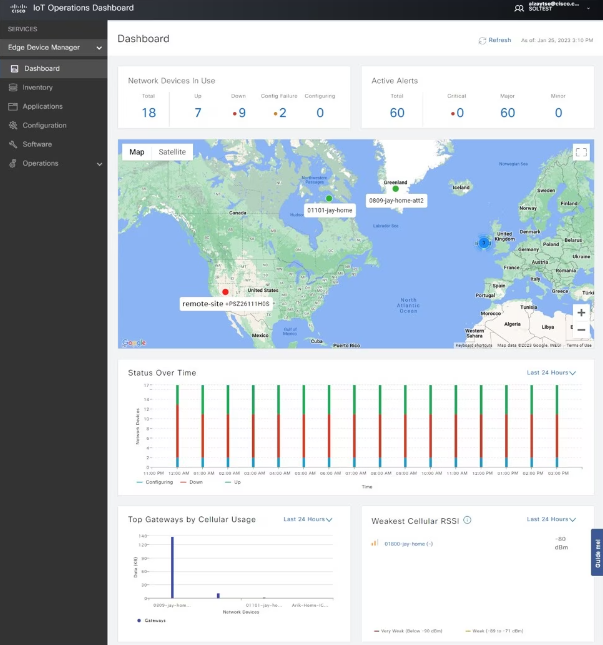
Cisco IoT is synonymous with robust, enterprise-level IoT solutions designed for scalability and reliability. By catering to large-scale enterprises, it lives up to its reputation, making it undeniably the best choice for expansive corporate networks seeking IoT integration.
Why I Picked Cisco IoT:
When it came to selecting IoT platforms that cater specifically to large enterprises, Cisco was impossible to overlook. From all the options, it stood apart, not just because of the brand's reputation but due to its commitment to handling the complexities of vast enterprise networks. In my comparisons and evaluations, I determined that for corporations seeking a resilient, scalable IoT solution, Cisco IoT is unequivocally best for large-scale enterprise solutions.
Standout Features and Integrations:
Cisco IoT boasts a suite of security features ensuring safe device connectivity across sprawling enterprise networks. Its data analytics tools provide real-time insights, pivotal for making critical business decisions. Integration-wise, Cisco IoT works harmoniously with ERP systems like SAP, Oracle, and Salesforce, connecting the dots between operations and data.
Pros and Cons
Pros:
- Integrates with major ERP systems
- Comprehensive security features for large-scale deployments
- Tailored for vast enterprise networks
Cons:
- Complexity necessitates IT professionals for setup and maintenance
- Proprietary hardware is often required
- Might be overkill for smaller businesses


Siemens is a global powerhouse focusing on the areas of electrification, automation, and digitalization. As one of the world's largest producers of energy-efficient, resource-saving technologies, Siemens is a leading supplier of systems for power generation and transmission. Its commitment to industrial automation and digitalization makes it an ideal choice for businesses aiming to streamline their industrial processes.
Why I Picked Siemens:
I determined Siemens to be a prominent contender when selecting tools for this list, mainly due to its significant contributions in the domain of industrial automation. Having opinions and comparisons from industry experts further reinforced my judgment. Siemens stands apart, particularly because of its unparalleled expertise and vast experience in the industry. For organizations emphasizing industrial automation and digital transformation, Siemens naturally presents itself as the optimal choice.
Standout features and integrations:
Siemens boasts a comprehensive range of software for automation, including SIMATIC SCADA, TIA Portal, and SINAMICS Drive Technology. These tools offer advanced functionalities that can integrate easily with various industrial hardware and software. Furthermore, Siemens integrates effortlessly with many IoT platforms, ensuring real-time data exchange and rapid insights.
Pros and Cons
Pros:
- Strong integrations with various industrial IoT platforms
- Renowned for its reliability and efficiency in the industry
- Comprehensive range of automation software solutions
Cons:
- Licensing structure may be complex for some businesses
- While robust, some tools have a steep learning curve
- The vast array of solutions can be overwhelming for newcomers


ThingWorx, a product by PTC, is designed to empower businesses with swift IoT application development capabilities. Recognized for its intuitive interface and tools, it is ideally positioned for organizations that want to quickly prototype, develop, and deploy IoT solutions.
Why I Picked ThingWorx (PTC):
When searching for platforms that allow accelerated IoT application development, ThingWorx constantly emerged as a top choice. I chose it due to its unique blend of user-friendly design tools and powerful backend capabilities. My judgment, after comparing various platforms, was that ThingWorx provides the right balance of simplicity and functionality, making it best for rapid IoT application development.
Standout features and integrations:
ThingWorx shines with its drag-and-drop interface, enabling non-developers to visualize and create IoT applications. Its robust analytics tools provide actionable insights derived from data streams. As for integrations, ThingWorx collaborates effectively with popular cloud platforms like AWS and Azure, allowing for data synchronization and management across systems.
Pros and Cons
Pros:
- Efficient integration with major cloud platforms
- Comprehensive analytics tools for real-time insights
- Drag-and-drop interface simplifies application creation
Cons:
- Some users might prefer code-heavy environments for deeper customization
- Licensing costs can be high for larger enterprises
- Might have a steeper learning curve for complete novices


Balena provides a platform tailored for developers to deploy, manage, and scale IoT fleets. Its tools cater to the entire device lifecycle, from development to deployment and monitoring. The platform's primary strength lies in efficient fleet management, making it an apt choice for the "best for" claim.
Why I Picked Balena:
In my journey of examining various IoT tools, I determined that Balena had distinct advantages in managing multiple devices. Its focus on fleet management set it apart from many other solutions I reviewed. I believe that for organizations looking to oversee extensive IoT deployments and simplify device maintenance, Balena is the front-runner, earning its title as best for IoT fleet management.
Standout features and integrations:
One of Balena's key features is its BalenaCloud, which allows for easy deployment and updates to IoT devices. The platform also supports a container-based approach, ensuring consistent environments across all devices. In terms of integrations, Balena can work with popular cloud providers, such as AWS, Google Cloud, and Azure, facilitating better data management and analytics.
Pros and Cons
Pros:
- Comprehensive integrations with major cloud providers
- Container-based system ensures consistency across devices
- BalenaCloud simplifies device deployment and updates
Cons:
- Limited to its own operating system, balenaOS, for some functionalities
- Certain advanced features may require a deeper technical understanding
- Might be complex for users unfamiliar with containerization


Tuya provides an all-inclusive IoT platform that aids manufacturers, brands, OEMs, and retail chains in developing smart home devices. By offering a unified suite of tools and solutions, Tuya empowers businesses to bring smart devices to consumers globally. Its emphasis on the smart home ecosystem naturally positions it as a preferred choice for those prioritizing this niche.
Why I Picked Tuya:
I chose Tuya after determining its leadership in the realm of smart home platforms. In my judgment, and after comparing several platforms, Tuya stood out for its expansive ecosystem and ability to cater to multiple stakeholders in the smart device manufacturing process. This has led me to believe that Tuya is best suited for smart home device platforms.
Standout features and integrations:
Tuya offers a robust AI+IoT platform, which facilitates rapid development and launch of smart devices. Its capabilities span from voice and video services to data analytics, helping businesses glean actionable insights. Integration-wise, Tuya’s platform meshes well with major voice assistants like Amazon Alexa and Google Assistant, thus enhancing user experience.
Pros and Cons
Pros:
- Ready compatibility with leading voice assistants
- Extensive support for voice and video services
- Comprehensive AI+IoT platform suitable for diverse smart device creation
Cons:
- Some advanced features might have steeper learning curves
- Customizing for very specific niches might present challenges
- Might be overwhelming for newcomers due to its vast array of features


Particle is a leading force when it comes to connecting devices from the edge to the cloud. Its prowess in maintaining consistent and reliable connections across the entire spectrum of IoT infrastructure gives credence to its standing as the best for end-to-end device connectivity.
Why I Picked Particle:
In my journey of selecting the optimal IoT platforms, Particle emerged as a unique entity. My determination was based on its unmatched capability to ensure consistent device connectivity, from the smallest sensor to the vast realms of the cloud. Comparing it with peers, Particle's concentration on delivering uninterrupted connections made it a standout. It's this commitment to connectivity that solidified my opinion that Particle is genuinely best for end-to-end device connectivity.
Standout Features and Integrations:
Particle showcases a Device Cloud feature, which manages the health of devices, ensuring they remain connected. Its Edge Operations feature facilitates smooth firmware updates. As for integrations, Particle aligns well with popular platforms such as Google Cloud, Microsoft Azure, and IFTTT, ensuring devices can interact with a multitude of services easily.
Pros and Cons
Pros:
- Streamlined firmware update process
- Integrates with major cloud platforms
- Strong emphasis on continuous device connectivity
Cons:
- Costs can accumulate with the addition of more devices
- Initial learning curve for new users
- Limited to its ecosystem for some features


Telit specializes in offering advanced IoT modules, platforms, and services. Designed for easy integration into various applications, Telit's solutions make it easier for businesses to tap into the power of the Internet of Things. Their expertise in IoT module hardware integration stood out, making them an appropriate choice for the designated "best for" title.
Why I Picked Telit:
In my exploration of numerous IoT solutions, I selected Telit for its comprehensive approach to hardware module integration. Compared to other tools, Telit's offerings uniquely focus on ensuring that IoT modules integrate effectively with various applications and systems. I'm of the opinion that Telit holds a distinctive edge in this domain, aptly positioning it as the best for IoT module hardware integration.
Standout features and integrations:
Telit's modules boast high-speed connectivity options, including 5G, catering to diverse IoT application needs. Their OneEdge software suite simplifies device management and offers tools for quicker IoT deployments. As for integrations, Telit's modules are compatible with numerous platforms, ensuring that businesses can tie them into their existing infrastructure without significant hurdles.
Pros and Cons
Pros:
- Wide compatibility ensures smooth integration with various platforms
- OneEdge software eases device management and accelerates deployments
- High-speed connectivity options, including 5G, cater to varied needs
Cons:
- Custom integrations could present challenges for certain legacy systems
- Initial setup might require a significant technical understanding
- Some modules might be overkill for simpler IoT projects


Losant is a comprehensive IoT platform geared towards visualizing and analyzing IoT data in real time. It empowers enterprises to connect their devices, collect data, and generate instant visual insights to make informed decisions. Its proficiency in presenting real-time IoT data visually is what aligns it with the "best for" claim.
Why I Picked Losant:
In my process of selecting platforms, I judged Losant based on its robust visualization capabilities and versatility. It caught my attention due to its distinct emphasis on real-time data representation, making it unique compared to other platforms. My opinion is that for businesses prioritizing immediate insights from their IoT data, Losant stands out as the ideal choice, making it best for real-time data visualization.
Standout features and integrations:
Losant offers powerful features like its Visual Workflow Engine, allowing users to build and customize their IoT solutions without intensive coding. Additionally, its End-User Experiences tool enables businesses to create custom branded interfaces for their users. Integrations-wise, Losant supports a variety of third-party systems, including MQTT, RESTful APIs, and Webhooks, making it compatible with a broad spectrum of devices and applications.
Pros and Cons
Pros:
- Broad integration capabilities with third-party systems
- End-User Experiences tool for custom-branded user interfaces
- Advanced Visual Workflow Engine for tailored IoT solutions
Cons:
- Potential costs associated with scaling large deployments
- Limited built-in tools for non-visualization aspects of IoT
- Might require a steep learning curve for non-technical users
Other IoT Platforms
Below is a list of additional IoT platforms that I shortlisted but did not make it to the top 10. Definitely worth checking them out.
- Bosch IoT Suite
For diverse IoT ecosystem support
- Ayla Networks
For agile IoT device management
- Blynk
-iot-platforms
- Microsoft Azure IoT
-iot-platforms
- Ubidots
-iot-platforms
- NimbeLink
-iot-platforms
- myDevices
-iot-platforms
- Kaa IoT Platform
-iot-platforms
- DeviceHive
-iot-platforms
- SiteWhere
-iot-platforms
- ClearBlade
-iot-platforms
- IBM Watson IoT
-iot-platforms
- Cisco IoT Cloud Connect
-iot-platforms
- Oracle IoT Cloud
-iot-platforms


Related Reviews
IoT Platform Selection Criteria
When selecting the best IoT platforms to include in this list, I considered common buyer needs and pain points like device compatibility and data security. I also used the following framework to keep my evaluation structured and fair:
Core Functionality (25% of total score)
To be considered for inclusion in this list, each solution had to fulfill these common use cases:
- Device connectivity
- Data analysis
- Remote monitoring
- Security management
- Scalability
Additional Standout Features (25% of total score)
To help further narrow down the competition, I also looked for unique features, such as:
- Edge computing capabilities
- Integration with AI tools
- Customizable dashboards
- Real-time alerts
- Predictive maintenance
Usability (10% of total score)
To get a sense of the usability of each system, I considered the following:
- Intuitive interface design
- Ease of navigation
- Clear documentation
- Minimal setup complexity
- User-friendly controls
Onboarding (10% of total score)
To evaluate the onboarding experience for each platform, I considered the following:
- Availability of training videos
- Interactive product tours
- Access to webinars
- Comprehensive templates
- Responsive chatbots
Customer Support (10% of total score)
To assess each software provider’s customer support services, I considered the following:
- 24/7 availability
- Multichannel support options
- Responsiveness to inquiries
- Access to a dedicated support team
- Quality of troubleshooting resources
Value For Money (10% of total score)
To evaluate the value for money of each platform, I considered the following:
- Competitive pricing
- Features offered at each price tier
- Flexibility in pricing plans
- No hidden fees
- Cost-benefit analysis
Customer Reviews (10% of total score)
To get a sense of overall customer satisfaction, I considered the following when reading customer reviews:
- Overall satisfaction ratings
- Feedback on reliability
- Comments on ease of use
- Specific feature mentions
- Long-term user experiences
How to Choose IoT Platform
It’s easy to get bogged down in long feature lists and complex pricing structures. To help you stay focused as you work through your unique software selection process, here’s a checklist of factors to keep in mind:
| Factor | What to Consider |
|---|---|
| Scalability | Can the platform handle your growth? Consider future needs and whether the platform can scale up without excessive costs or complexity. |
| Integrations | Does it work with your current systems? Look for native integrations with existing software to avoid costly custom development. |
| Customizability | Can you tailor the platform to your workflows? Check if the platform allows customization to fit your specific process needs. |
| Ease of use | Is the platform user-friendly for your team? Test the interface for intuitiveness and simplicity to ensure quick adoption. |
| Implementation and onboarding | How long will it take to get started? Evaluate the resources and support provided for setup and training, like tutorials or dedicated onboarding teams. |
| Cost | Does the price fit your budget? Compare pricing tiers and ensure there are no hidden fees, and weigh the cost against the value provided. |
| Security safeguards | Are your data and devices secure? Check for encryption, compliance with data protection standards, and regular security updates. |
| Support availability | Is help available when you need it? Look for 24/7 support options and assess the quality of customer service through reviews or direct inquiries. |
What Are IoT Platforms?
IoT platforms are tools that connect, manage, and analyze data from internet-connected devices. These platforms are typically used by IT professionals, developers, and business analysts to improve operational efficiency and make data-driven decisions. Device connectivity, data analytics, and remote monitoring features help with integrating systems, optimizing processes, and enhancing user experiences. Overall, these tools provide a foundation for businesses to harness IoT technology effectively.
Features
When selecting IoT platforms, keep an eye out for the following key features:
- Device connectivity: Enables seamless communication between devices, ensuring data is collected and transmitted efficiently.
- IoT analytics platform: Provides insights by processing and analyzing data from connected devices to drive informed decision-making.
- Remote monitoring: Allows users to oversee devices and systems from anywhere, enhancing management and troubleshooting capabilities.
- Edge computing: Processes data closer to the source, reducing latency and improving response times for real-time applications.
- Customizable dashboards: Offers users the ability to tailor interfaces to display critical data and metrics specific to their needs.
- Security management: Protects data and devices through encryption and compliance with industry standards, ensuring safety and trust.
- Over-the-air updates: Facilitates remote software updates, keeping devices current without manual intervention.
- Scalability: Supports growth by accommodating an increasing number of devices and data volume without degrading performance.
Benefits
Implementing IoT platforms provides several benefits for your team and your business. Here are a few you can look forward to:
- Improved efficiency: Automates data collection and analysis, allowing your team to focus on strategic tasks rather than manual processes.
- Enhanced decision-making: Provides real-time insights through data analytics, helping your team make informed business decisions quickly.
- Cost savings: Reduces operational costs by optimizing resource use and minimizing downtime through predictive maintenance.
- Increased scalability: Allows your business to grow by accommodating more devices and data without additional infrastructure.
- Better security: Protects sensitive data and devices with robust security management features, such as VPN software, ensuring compliance and reducing risks.
- Remote accessibility: Enables monitoring and management of devices from any location, improving flexibility and response times.
Costs & Pricing
Selecting IoT platforms requires an understanding of the various pricing models and plans available. Costs vary based on features, team size, add-ons, and more. The table below summarizes common plans, their average prices, and typical features included in IoT platforms solutions:
Plan Comparison Table for IoT Platforms
| Plan Type | Average Price | Common Features |
|---|---|---|
| Free Plan | $0 | Basic connectivity, limited data storage, and community support. |
| Personal Plan | $5-$25/user/month | Enhanced connectivity, basic analytics, and email support. |
| Business Plan | $30-$75/user/month | Full analytics, advanced security features, and priority support. |
| Enterprise Plan | $100+/user/month | Custom integrations, dedicated account management, and comprehensive analytics. |
IoT Platforms FAQs
How do IoT platforms prevent system downtime?
They track data from connected devices to spot problems early, so teams can fix issues before they cause delays or failures.
What challenges come with using IoT platforms?
Businesses often face setup difficulties, device compatibility issues, and data security concerns. Careful planning and testing can make the process smoother.
Can IoT platforms work without the internet?
Yes. Many can store and process data locally, then sync to the cloud once the internet connection is restored.
How do IoT platforms protect user data?
They use encryption, secure access controls, and follow data privacy rules like GDPR to keep sensitive information safe.
How does IoT data help improve decisions?
By turning real-time data into insights, IoT platforms help businesses find trends, cut waste, and improve daily operations.
What’s Next:
If you're in the process of researching IoT platforms, connect with a SoftwareSelect advisor for free recommendations.
You fill out a form and have a quick chat where they get into the specifics of your needs. Then you'll get a shortlist of software to review. They'll even support you through the entire buying process, including price negotiations.