

iOS device management software lets you control, monitor, and secure iPhones, iPads, Macs, and other iOS hardware across your organization from a central dashboard. If you’re responsible for managing growing fleets of iOS devices, keeping systems secure, and ensuring compliance, finding the right software is essential. Here, you'll get my take on the best iOS device management platforms, with up-to-date recommendations to help you compare features, see what meets enterprise standards, and prioritize tools that make your job easier.
Why Trust Our Software Recommendations
6,700+
Reviews
20
Industry experts
16+
Evaluation factors
14
Years
Our team has been testing and reviewing software since 2012. As tech leaders ourselves, we know how difficult—and important—it is to choose the right software.
For this guide, we evaluated tools using hands-on testing and independent research, scoring tools using our selection criteria.
Our reviews reflect our human editorial judgment, not a sales pitch.
Expert reviewers:
- Paulo Gardini MiguelTech Director
 Tim FisherVP of AI
 Gabriel RosasTech Lead & Software Architect
 Christhian GruhnTech Lead & Platform Architect

iOS Device Management Software Comparison Table
This comparison table summarizes pricing details for my top iOS device management software selections.
| Tool | Best For | Trial Info | Price | ||
|---|---|---|---|---|---|
| 1 | Best for HR-triggered device lifecycle management | 14-day free trial | From $8/user/month (billed annually) | Website | |
| 2 | Best for kiosk and single app mode on Apple | 14-day free trial | From $2.00/device/month (billed annually) | Website | |
| 3 | Best for Munki integration | 30-day free trial + free demo available | From $2.50/device/month (billed annually) | Website | |
| 4 | Best for SMB multi-OS management | 14-day free trial + free plan available | From $2.75/device/month (billed annually) | Website | |
| 5 | Best for real-time device monitoring | 14-day free trial + free demo available | From $8.25/Mac/month | Website | |
| 6 | Best built-in AI security analytics | 30-day free trial available | From $4/client device/month | Website | |
| 7 | Best for cross-platform endpoint control | 30-day free trial | Pricing upon request | Website | |
| 8 | Best for multi-OS profile provisioning | 30-day free trial + free demo available | From $1.28/device/month (billed annually) | Website | |
| 9 | Best integrated Apple security features | Free plan + 30-day free trial available | From $0.46/device/month | Website | |
| 10 | Best for automated issue fixing | Free demo available | From $3/device/month | Website |


Best iOS Device Management Software Reviews
Below are my detailed summaries of the best iOS device management software that made it onto my shortlist. My reviews offer a detailed look at the features, integrations, and best use cases of each platform to help you find the best one for you.
 Best for HR-triggered device lifecycle management
- 14-day free trial
- From $8/user/month (billed annually)
Visit WebsiteCustomer Rating:4.8/5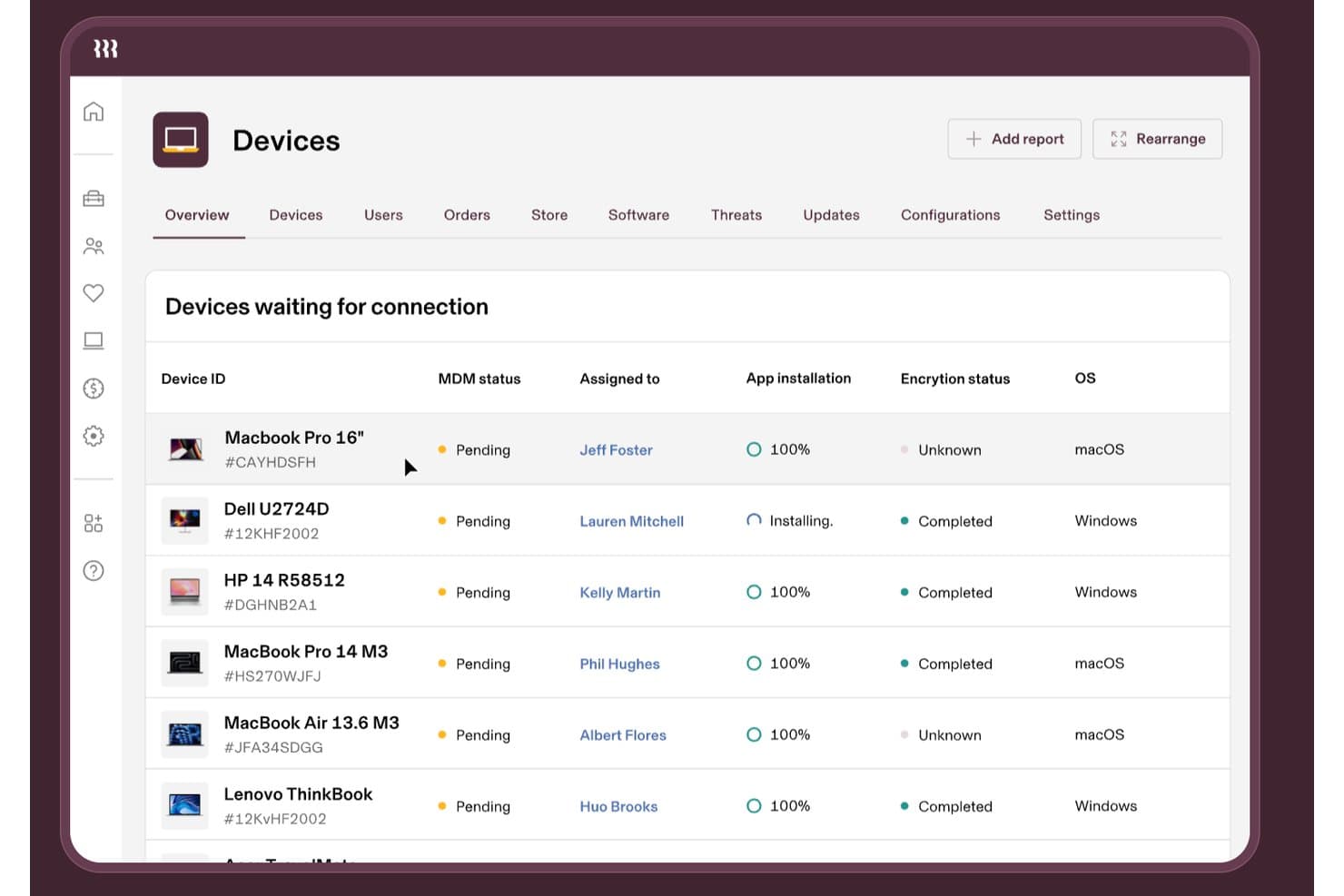
Rippling IT tracks iOS and Windows device MDM status in one dashboard. Rippling IT is an MDM and IT management platform that combines Apple device enrollment, configuration profile deployment, app distribution, remote lock and wipe, and compliance enforcement with built-in HR-driven workflow automation.
Who Is Rippling IT Best For?
Rippling IT is a strong fit for companies already using Rippling for HR who want device lifecycle management tied directly to employee onboarding, role changes, and offboarding.
Why I Picked Rippling IT
I've included Rippling IT in my top picks because no other MDM ties device lifecycle management so tightly to HR events. When you hire someone, a single trigger in Rippling can order the Mac, enroll it via ADE through ABM, push the right apps using Supergroups, and ship it to the employee, all without manual IT steps. I also like that offboarding works the same way in reverse, with remote wipe or scheduled lock synced directly to the termination event.
Rippling IT Key Features
- Declarative Device Management (DDM): Enforces passcode policies, OS update windows, and security controls directly on macOS, iOS, and iPadOS devices using Apple's native DDM protocol.
- Supergroups: Dynamically assigns configuration profiles, apps, and policies to users based on HR and device attributes, updating automatically when roles change.
- FileVault encryption enforcement: Pushes FileVault encryption to macOS devices and escrows recovery keys within the Rippling console.
- SentinelOne threat protection integration: Automatically deploys the SentinelOne agent to managed devices and surfaces threat remediation directly inside the Rippling IT console.
Rippling IT Integrations
Rippling IT offers 600+ pre-built integrations, including Slack, Jira, GitHub, AWS, Microsoft 365, Zoom, Salesforce, Microsoft Entra ID, and Google Workspace. Its REST API supports custom integrations.
Pros and Cons
Pros:
- Hardware retrieval and buyback support
- Automated ABM enrollment with dynamic assignments
- HR-triggered onboarding and offboarding automation
Cons:
- Mac admins report post-upgrade breakage
- No documented third-party app patching
Learn more about Rippling IT: Best for kiosk and single app mode on Apple
- 14-day free trial
- From $2.00/device/month (billed annually)
Visit WebsiteCustomer Rating:4.7/5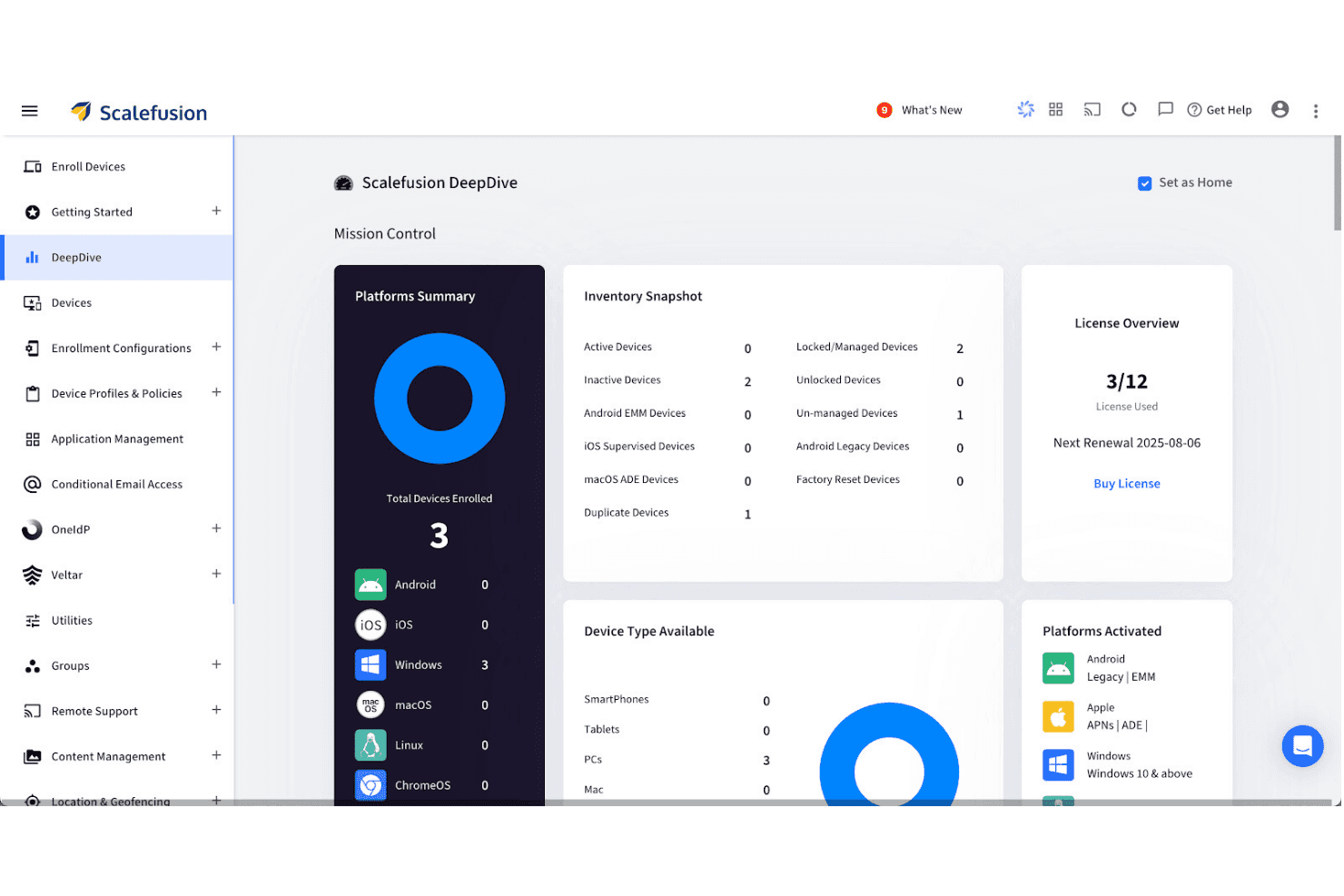
Scalefusion's DeepDive dashboard gives a full device inventory overview. Scalefusion is a unified endpoint management platform that covers iOS, iPadOS, macOS, and tvOS devices alongside Android, Windows, Linux, and ChromeOS—all managed from a single dashboard with kiosk controls, app deployment, zero-touch enrollment, and identity integration.
Who Is Scalefusion Best For?
Scalefusion is a strong fit for IT teams managing mixed-OS fleets who need tight kiosk and single app mode controls alongside standard Apple MDM capabilities.
Why I Picked Scalefusion
Scalefusion earns its spot on my shortlist because of how far its kiosk and Single App Mode controls go beyond what most Apple MDMs offer. I've set up Single App Kiosk Mode on iOS deployments where devices need to run one app permanently, and Scalefusion handles that without workarounds. It also supports Apple TV management, including Single App Mode for tvOS, which lets you lock down lobby displays or digital signage from the same console as your iPhones and Macs.
Scalefusion Key Features
- macOS App Catalog: A library of 400+ third-party macOS apps powered by Installomator that supports silent installation, automated background updates, and pre/post-install scripting.
- AirThink AI script generation: An AI-powered tool that generates ready-to-deploy Shell, Bash, Python, and PowerShell scripts for macOS and other platforms without manual coding.
- Apple TV (tvOS) management: Remote app deployment, home screen layout control, and AirPlay settings management for Apple TV devices from the same dashboard as iOS and macOS.
- FileVault encryption management: Enforces full-disk encryption on managed Macs with support for key escrow and key rotation directly from the Scalefusion dashboard.
Scalefusion Integrations
Scalefusion offers native integrations with Apple Business Manager, Apple School Manager, Okta, Microsoft Entra ID, Google Workspace, Samsung Knox, Zebra, Lenovo, Bluebird, and Kyocera, plus Platform SSO for macOS. An open API and webhooks are available for custom integrations and automation workflows.
Pros and Cons
Pros:
- Built-in AI-powered scripting for automation
- macOS App Catalog with silent deployments
- Single App Kiosk Mode on iOS and tvOS
Cons:
- Lacks on-premise or FedRAMP compliance options
- No native Mac endpoint detection or EDR
Learn more about Scalefusion: Best for Munki integration
- 30-day free trial + free demo available
- From $2.50/device/month (billed annually)
Visit WebsiteCustomer Rating:4.8/5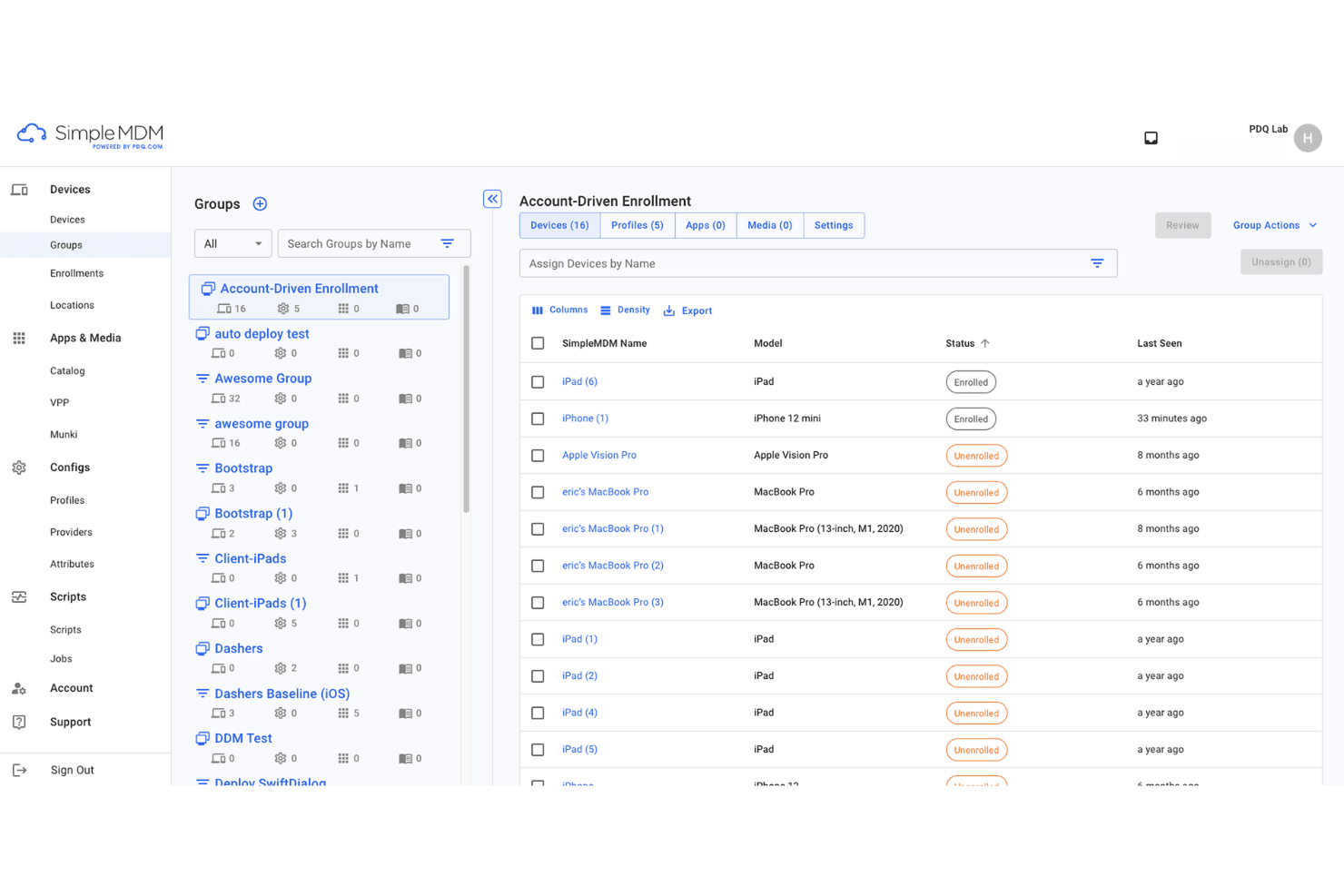
SimpleMDM organizes iOS devices into groups for streamlined enrollment management. SimpleMDM is a macOS and iOS device management platform for automating configuration, app management, device inventory, and policy enforcement, offering features tailored for administrators managing Apple device environments.
Who Is SimpleMDM Best For?
SimpleMDM is a strong fit for IT teams at midsize businesses and educational institutions managing large Apple device inventories.
Why I Picked SimpleMDM
I picked SimpleMDM as one of the best because I get a purpose-built Munki integration that simplifies creating custom app catalogues and managing heavy software deployments. I also like that I can automate patching and app distribution workflows easily.
SimpleMDM Key Features
- Zero-touch device enrollment: Set up and provision Apple devices remotely from first boot.
- Granular configuration profiles: Apply detailed device restrictions and preferences across fleets.
- Remote lock and wipe: Secure lost or stolen devices with centralized lock and data removal.
- Certificate and Wi-Fi management: Push network credentials and certificates directly to managed devices.
SimpleMDM Integrations
Integrations include Apple Business Manager, Apple School Manager, Microsoft Azure, OneLogin, Okta, ADFS, and JumpCloud.
Pros and Cons
Pros:
- Simple app catalogue creation Fast platform setup
- Automated Munki-based software deployment workflows
- Automated Munki-based software deployment workflows
Cons:
- No local agent for offline device control
- Limited Windows or cross-platform management
Learn more about SimpleMDM: Best for SMB multi-OS management
- 14-day free trial + free plan available
- From $2.75/device/month (billed annually)
Visit WebsiteCustomer Rating:4.5/5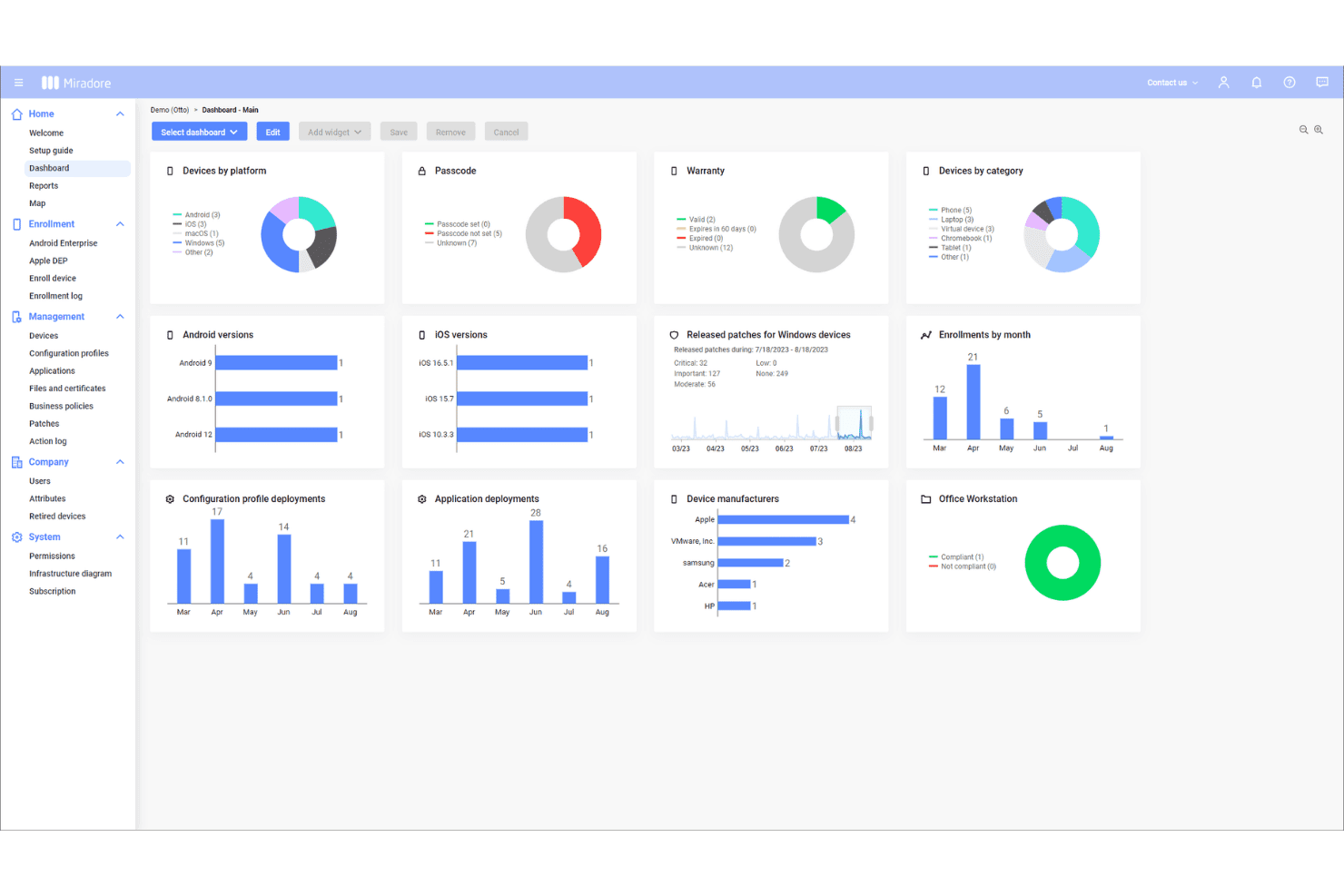
Miradore's dashboard gives a full overview of enrolled devices. Miradore is a cloud-based mobile device management solution for SMBs that lets you enroll, monitor, secure, and control Apple, Android, and Windows devices from a single web console.
Who Is Miradore Best For?
SMB IT administrators who need an easy way to manage Apple and other device platforms across multiple locations will find Miradore a strong fit.
Why I Picked Miradore
I picked Miradore because I can manage iOS, Android, and Windows devices from one dashboard—ideal for SMBs with diverse device fleets. My team uses its over-the-air configuration and remote lock/wipe features to keep Apple devices secure.
Miradore Key Features
- Device inventory management: Track detailed hardware and software information for all managed Apple devices.
- Application whitelisting and blacklisting: Specify which apps can or cannot be installed or run on devices.
- Automated OS update management: Schedule and enforce operating system updates across enrolled Apple devices.
- Compliance monitoring: Monitor device status and security posture through real-time compliance dashboards.
Miradore Integrations
Integrations include TeamViewer, API, Microsoft Active Directory, Microsoft Entra ID, and Google Workspace.
Pros and Cons
Pros:
- Supports bulk device provisioning workflows
- Easy policy deployment to Apple devices
- Centralized web console for device oversight
Cons:
- Some restrictions on remote device actions
- Limited security compliance reporting tools
Learn more about Miradore: Best for real-time device monitoring
- 14-day free trial + free demo available
- From $8.25/Mac/month
Visit WebsiteCustomer Rating:4.5/5
Addigy dashboard shows live device monitoring and security status insights. Addigy is an Apple device management platform that gives IT teams tools for centralized configuration, inventory management, remote monitoring, software deployment, and security policy enforcement across Macs, iPhones, and iPads.
Who Is Addigy Best For?
IT teams in midsize to large organizations that need to monitor, manage, and secure Apple devices across multiple locations.
Why I Picked Addigy
I picked Addigy as one of the best because I rely on its real-time device monitoring to quickly flag compliance issues and system failures. Its live dashboard and automated remediation let me react to critical changes as they happen, not hours later.
Addigy Key Features
- Automated onboarding workflows: Provision new Apple devices with custom scripts, configurations, and apps as soon as they join your network.
- Patch management: Schedule and deploy OS updates and application patches across your entire Apple device fleet.
- Self-service portal: Provide users with access to a catalogue of approved apps and resources for easy, secure installation.
- Policy management: Centrally enforce and adjust compliance, security, and usage policies for macOS, iOS, and iPadOS devices.
Addigy Integrations
Integrations include Apple Business Manager, Okta, Google, ThreatDown, Autotask, Backblaze, BrightGauge, CloudRadial, Hudu, and Zapier.
Pros and Cons
Pros:
- Supports zero-touch provisioning
- Policy enforcement across device types
- Real-time monitoring for instant status updates
Cons:
- Fewer reporting templates
- Limited visibility into web content
Learn more about Addigy: Best built-in AI security analytics
- 30-day free trial available
- From $4/client device/month
Visit WebsiteCustomer Rating:4.2/5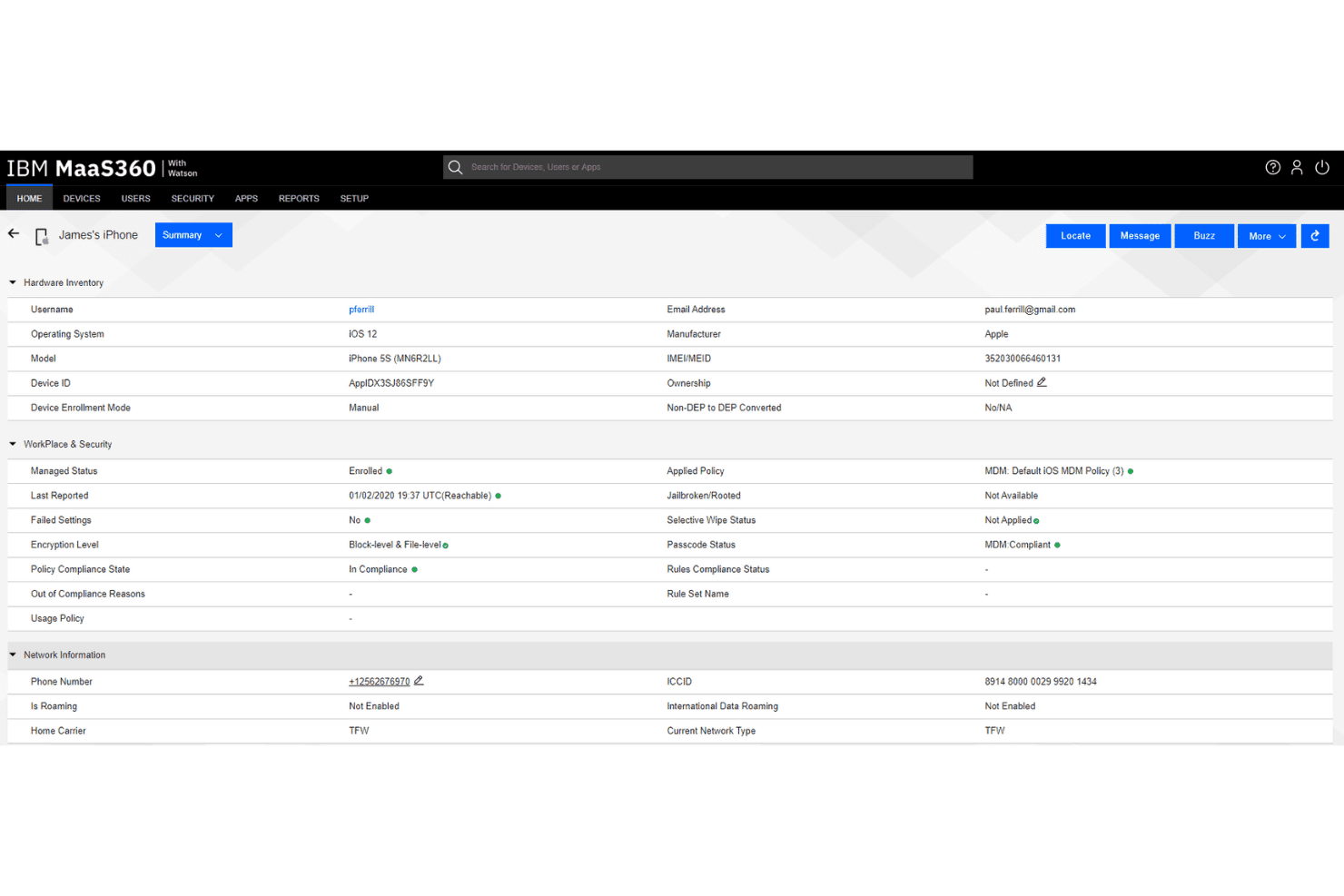
IBM MaaS360 gives admins full device visibility and compliance status. IBM MaaS360 is a unified endpoint management platform designed for Apple device management, offering cloud-based control, real-time monitoring, remote configuration, and policy automation across iOS, macOS, and other devices.
Who Is IBM MaaS360 Best For?
IT security and compliance teams in regulated industries who need real-time monitoring and control over Apple devices at scale.
Why I Picked IBM MaaS360
I picked IBM MaaS360 because I rely on its built-in AI security analytics for advanced threat detection on Apple devices. I use its Watson AI-powered dashboards to quickly surface suspicious behaviours and automate compliance alerts across enterprise endpoints.
IBM MaaS360 Key Features
- Remote device wipe: Remotely erase data on lost or stolen Apple devices.
- Automated device enrollment: Configure and enroll new Apple devices at scale.
- Application catalogue: Deploy, update, and manage apps across managed Apple devices.
- Geofencing policies: Apply security and access rules based on device location.
IBM MaaS360 Integrations
Integrations include Zimperium Mobile Threat Defense (MTD), IBM Verify, IBM Cloud Pak for Security, TeamViewer, Zscaler, Microsoft Azure, and Microsoft 365.
Pros and Cons
Pros:
- Built-in mobile expense monitoring tracks data usage
- Supports granular device and app policy controls
- Proactively flags device security issues
Cons:
- Manual renewal needed for Entra ID synchronization
- Remote control requires separate TeamViewer license
Learn more about IBM MaaS360: Best for cross-platform endpoint control
- 30-day free trial
- Pricing upon request
Visit WebsiteCustomer Rating:4.7/5
Microsoft Intune dashboard with device compliance and enrollment status. Microsoft Intune is a unified endpoint management platform from Microsoft designed for IT teams to manage Apple, Windows, and Android devices, with tools for device configuration, security policy enforcement, and application deployment.
Who Is Microsoft Intune Best For?
Microsoft Intune is a strong choice for IT administrators at midsize and large organizations with diverse fleets of Apple and other devices.
Why I Picked Microsoft Intune
I picked Microsoft Intune as one of the best because I can create and enforce cross-platform security policies for Apple endpoints alongside Windows and Android devices. My team uses it to automate device enrollment, push custom compliance configurations, and manage app deployments from a unified dashboard.
Microsoft Intune Key Features
- Device lifecycle management: Manage provisioning, updates, and retirement for Apple hardware.
- Remote device actions: Remotely lock, wipe, or reset Apple devices from the console.
- Apple Business Manager integration: Sync and manage devices purchased through Apple Business Manager.
- Bulk application deployment: Install, update, or remove apps across large sets of managed devices.
Microsoft Intune Integrations
Integrations include Configuration Manager, Windows Autopilot, Endpoint analytics, Microsoft 365, Microsoft Defender for Endpoint, Windows Autopatch, Managed Google Play, Apple tokens and certificates, and TeamViewer.
Pros and Cons
Pros:
- Manage enterprise deployment at scale
- Automated Apple device compliance enforcement
- Centralized device management for Mac and iOS
Cons:
- Advanced macOS settings require manual configuration
- Apple OS version controls can be restrictive
Learn more about Microsoft Intune: Best for multi-OS profile provisioning
- 30-day free trial + free demo available
- From $1.28/device/month (billed annually)
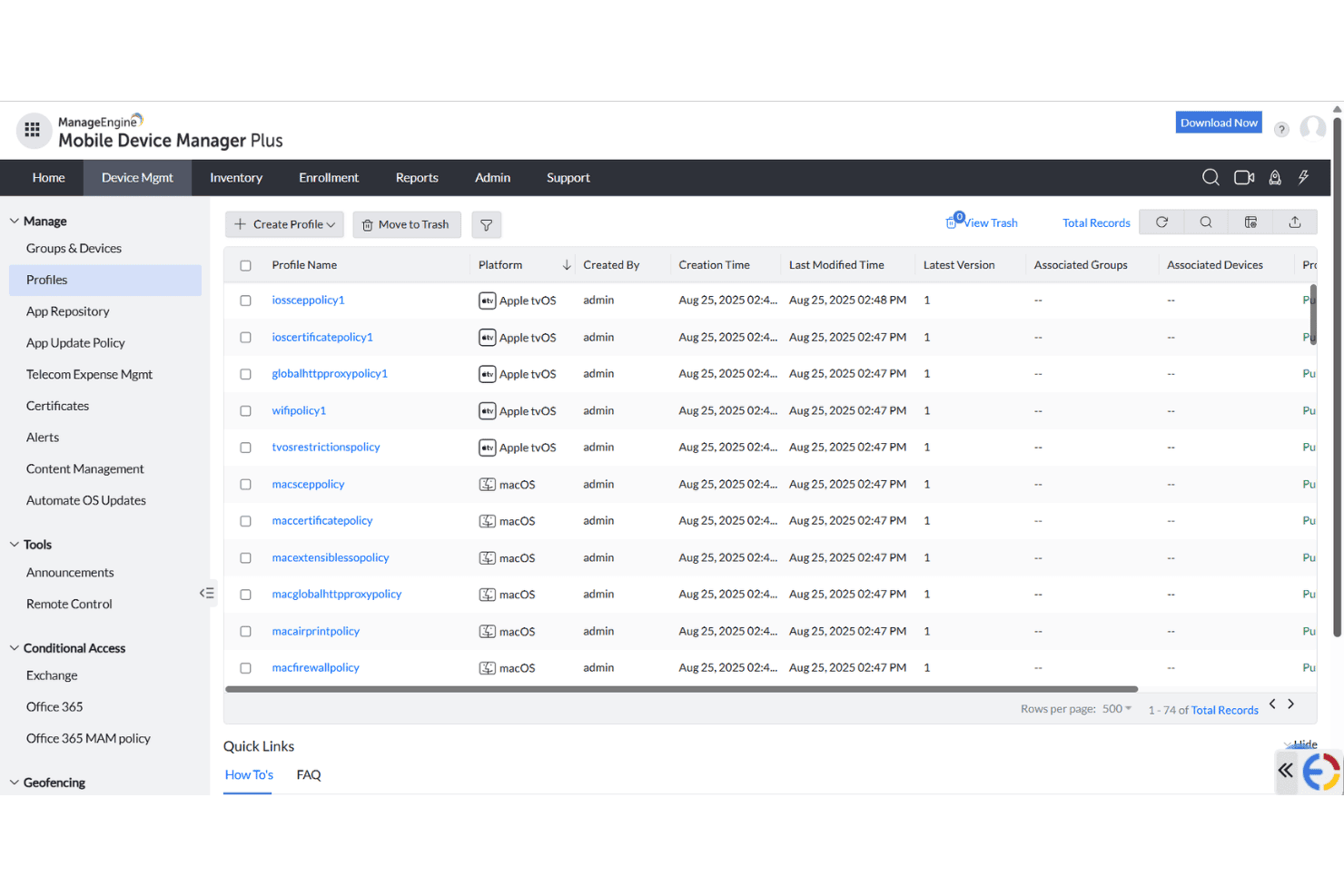
ManageEngine MDM Plus centralizes device profile management across platforms. ManageEngine Mobile Device Manager Plus is an endpoint management solution for IT teams who need centralized control over Apple, Android, Windows, Chrome OS, and Linux devices, with features for device enrollment, configuration, and security policy enforcement.
Who Is ManageEngine Mobile Device Manager Plus Best For?
IT teams at educational institutions and mid-sized enterprises managing large multi-OS device fleets will find ManageEngine Mobile Device Manager Plus especially useful.
Why I Picked ManageEngine Mobile Device Manager Plus
I picked ManageEngine Mobile Device Manager Plus because I can provision and assign custom profiles across iOS, macOS, Android, and Windows from a single console. My team uses it to automate user- and device-based policy deployment, so we don’t have to manage multiple platforms separately.
ManageEngine Mobile Device Manager Plus Key Features
- Remote device troubleshooting: Remotely view and control Apple devices for support and diagnostics.
- App distribution management: Push, update, or remove apps on iOS and macOS devices over the air.
- Compliance reporting: Generate reports on device compliance status and security posture.
- Content management: Distribute, update, and secure documents on managed Apple devices.
ManageEngine Mobile Device Manager Plus Integrations
Integrations include ServiceDesk Plus, ServiceNow, Zendesk, Analytics Plus, AssetExplorer, Zoho Creator, and Zoho CRM.
Pros and Cons
Pros:
- Remote troubleshooting for iOS and macOS devices
- Automated policy deployment for multiple operating systems
Cons:
- Limited customization for configuration templates
- Granular access controls are complex
- Allows remote device viewing
Learn more about ManageEngine Mobile Device Manager Plus: Best integrated Apple security features
- Free plan + 30-day free trial available
- From $0.46/device/month

Mosyle device security panel with remote controls and protection tools. Mosyle is an Apple device management software platform that offers configuration, deployment, compliance controls, and security management for macOS, iOS, iPadOS, and tvOS devices in business and education environments.
Who Is Mosyle Best For?
IT teams in education and business settings who need specialized security and management for mixed fleets of Apple devices.
Why I Picked Mosyle
I picked Mosyle as one of the best because I get tight integration of Apple-specific security features like device encryption, endpoint protection, and automated compliance checks directly in the management platform. This lets me address both security and configuration from one place.
Mosyle Key Features
- Remote device deployment: Provision and configure Apple devices without on-site setup.
- Application management: Install, update, and remove apps across managed endpoints.
- Profile-based configurations: Apply tailored settings based on user groups or device types.
- Live device monitoring: Track hardware status and compliance in real time.
Mosyle Integrations
Integrations include Google Workspace, Microsoft 365 for Business, Okta, Ping Identity, AD Federation Services (AD FS), and LDAP Active Directory.
Pros and Cons
Pros:
- Includes encryption management
- Detailed Apple-centric compliance tools
- Native security for Apple devices
Cons:
- Lacks advanced scripting features
- Limited customization for compliance reporting
Learn more about Mosyle: Best for automated issue fixing
- Free demo available
- From $3/device/month
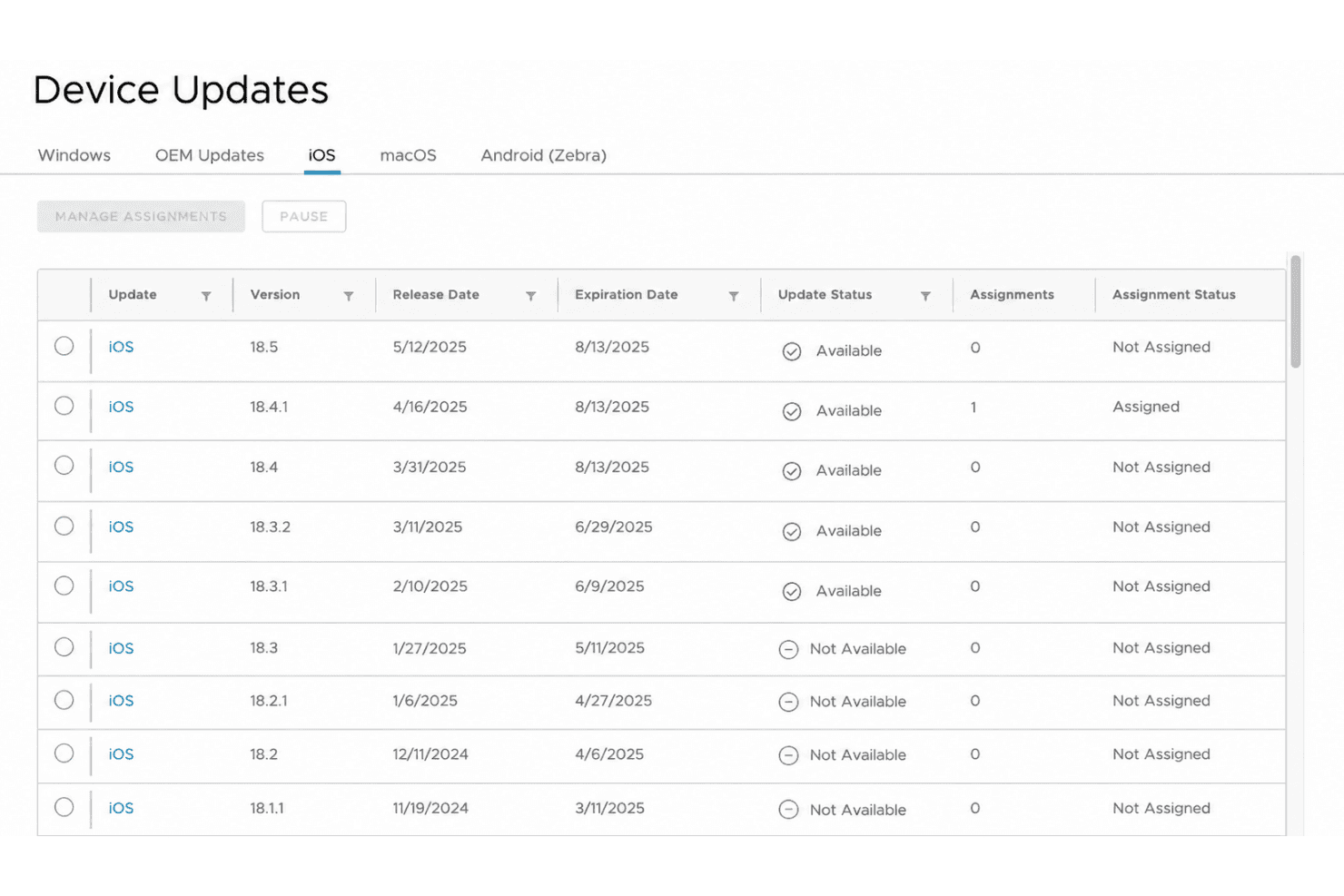
Omnissa Workspace ONE manages iOS device update assignments by version. Omnissa Workspace ONE is a unified endpoint management platform for Apple devices that offers app management, device compliance, zero-touch enrollment, and real-time monitoring in a cloud-based environment.
Who Is Omnissa Workspace ONE Best For?
IT teams in large enterprises need to automate Apple device management, monitoring, and issue remediation across complex device environments.
Why I Picked Omnissa Workspace ONE
I picked Omnissa Workspace ONE because I’ve used its automation engine to fix routine Apple device issues before they hit end users. My team relies on intelligent remediation workflows and granular policy enforcement that go beyond what typical MDM platforms offer.
Omnissa Workspace ONE Key Features
- Zero-touch provisioning: Set up and enroll Apple devices remotely without manual configuration.
- App catalogue management: Distribute and manage approved applications across your fleet of Apple devices.
- Device encryption controls: Enforce encryption policies to secure sensitive data on all managed Apple devices.
- Remote lock and wipe: Remotely lock or wipe devices if they are lost or compromised.
Omnissa Workspace ONE Integrations
Integrations include Omnissa Access, Okta, Microsoft Entra ID, ServiceNow, Horizon 8, Horizon Cloud, and Omnissa Intelligence.
Pros and Cons
Pros:
- Detailed role-based access for IT teams
- Experience score tracking improves support
- Automated remediation for common
Cons:
- High server memory load during certificate shifts
- Extra license required for custom reports
Learn more about Omnissa Workspace ONE:
Other iOS Device Management Software
Here are some additional iOS device management software options that didn’t make it onto my shortlist, but are still worth checking out:
- 11Ivanti Neurons for MDMBest for automated device enrollment
- 12FleetBest open source management tools
- 13Deel ITBest compliance for international teams
- 14JumpCloudBest for automated user-to-device setup
- 15NinjaOneBest remote troubleshooting for Macs
- 16HexnodeBest role-based access control
- 17JamfBest for education environments
- 18IruBest API extensibility for automation
- 19RipplingBest unified HR and IT device management
- 20Cisco Meraki Systems ManagerBest network-driven device controls
- 21iMazingBest local device backup management
How I Evaluate iOS Device Management Software
I evaluate these tools in two layers: the baseline requirements like native ABM support and ADE enrollment, and the differentiators that separate tools worth recommending from those that don't.
Core Functionality (Table Stakes For This List)
When I'm selecting tools for my list, I rank each one on a scale from 0 (does not offer the functionality) to 5 (excels in this area) for each core functionality listed below. Then, I calculate the tool's total score as a percentage. Each tool needs to achieve a minimum total score of 65% to be considered for inclusion.
- iOS MDM Protocol Support: I check for native integration with Apple's MDM framework and Apple Business Manager, since tools without proper ABM connectivity create enrollment headaches at scale.
- Zero-Touch Deployment: Every tool should support Automated Device Enrollment so new hires can unbox a Mac, connect to Wi-Fi, and land on a fully configured desktop with no IT hands-on the device.
- Configuration Profile Management: I evaluate how each tool handles building and scoping profiles for things like Wi-Fi, VPN, and restriction payloads across macOS and iOS devices.
- App & Patch Management: Deploying VPP-purchased apps is table stakes, but I also look at how each tool handles third-party patching for apps like Chrome, Zoom, and Slack on macOS.
- Security & Compliance Enforcement: The tool should handle FileVault key escrow, passcode policies, Gatekeeper settings, and remote lock/wipe to keep iOS endpoints aligned with security baselines.
- Inventory & Reporting: Real-time visibility into device hardware, installed software, and OS versions matters. I look for reporting that helps you spot non-compliant or outdated devices quickly.
Once I have a list of tools that meet the criteria, I consider what sets each platform apart.
Differentiating Factors (What Sets Vendors Apart)
Here's how I compare and contrast different vendors:
Standout Features
Identity provider integration with Okta, Entra ID, or Google Workspace is a big differentiator—it ties device trust directly to user authentication through Platform SSO. I also look at whether a tool supports custom scripting for tasks like enforcing naming conventions or remediating configuration drift with shell scripts. A self-service portal where employees install approved apps without filing a ticket cuts down support volume. Built-in endpoint detection matters too, since Mac-specific threats are better caught by tools tuned to macOS behaviours.
Beyond Features
Compliance certifications matter a lot here. I check whether a vendor holds SOC 2 Type II or ISO 27001 and offers prebuilt templates for frameworks like CIS Benchmarks or NIST 800-53. Pricing structure is another factor I weigh—per-device vs. per-user licensing changes total cost significantly when employees carry both a Mac and an iPhone. I also evaluate ecosystem integrations, especially connectors to SIEM platforms and ITSM tools like ServiceNow, since iOS MDMs rarely operate in isolation from a broader security and operations stack.
How to Choose iOS Device Management Software
It’s easy to get bogged down in long feature lists and complex pricing structures. To help you stay focused as you work through your unique software selection process, here’s a checklist of factors to keep in mind:
| Factor | What to Consider |
|---|---|
| FactorScalability | What to ConsiderCan the solution handle your current and projected iOS device count? Watch for per-device pricing and limits on organizational units. |
| FactorIntegrations | What to ConsiderDoes it natively connect to your identity provider, device inventory, ticketing, or network security tools? Check for support with iOS Business Manager. |
| FactorCustomizability | What to ConsiderWill you be able to create granular policies, automate workflows, or adapt the dashboard to your workflows? Test admin controls in a trial if possible. |
| FactorEase of use | What to ConsiderIs the admin dashboard intuitive? Can staff quickly enroll and manage devices without extensive training or manual processes? |
| FactorImplementation and onboarding | What to ConsiderHow long will device rollout and policy configuration take? Ask about vendor support, import tools, and migration help for large fleets. |
| FactorCost | What to ConsiderAre licensing, support, and upgrade fees predictable? Calculate expected monthly and annual spend, not just the listed price. |
| FactorSecurity safeguards | What to ConsiderDoes the platform align with your compliance requirements and internal standards for data privacy, encryption, and access controls? |
| FactorSupport availability | What to ConsiderCan you access timely support in your region and time zone? Find out about live chat, phone support hours, and escalation processes. |
What is iOS Device Management Software?
iOS device management software is a platform for centrally enrolling, configuring, securing, and monitoring fleets of iOS, iPadOS, and macOS devices. IT teams use it to automate device provisioning, push policies, enforce compliance, and support users remotely. These tools help manage updates, restrict functions, and protect sensitive data across all managed iOS devices in an organization.
Features
When selecting iOS device management software, keep an eye out for the following key features:
- Automated device enrollment: Enroll new iPhones, iPads, or Macs in bulk via ABM or Apple School Manager, so they’re ready for use right out of the box, reducing manual setup time for IT teams.
- App distribution and updates: Push, update, or remove applications on managed devices remotely to ensure users have the right tools and always run supported software from the app store.
- Remote lock and wipe: Remotely lock or erase lost, stolen, or retired devices to protect sensitive data and reduce the risk of unauthorized access.
- Policy and configuration management: Define and enforce security settings, Wi-fi details, VPN settings, content filtering, and passcode restrictions across devices to maintain compliance and consistency.
- Compliance and reporting dashboards: Monitor device and user compliance status, generate reports on security posture, and quickly identify devices falling out of policy.
- Device inventory tracking: Maintain a real-time inventory of all managed iOS devices, including hardware details, active payloads, and software versions, to support asset management and planning.
- Location tracking and geofencing: Track device locations and enforce location-based restrictions, such as disabling features or blocking access outside approved boundaries.
- Identity and access integration: Connect with identity providers to enforce user-based policies, manage Single Sign-On (SSO) and authentication, and require secure logins or multi-factor authentication on all devices.
- Self-service portals: Allow users to install apps, perform password resets, or handle device registration without IT intervention, whether utilizing a shared iPad, corporate deployment, or BYOD models via user enrollment.
- Role-based admin controls: Assign different permission levels to administrators, such as external MSPs or internal teams, so you can delegate device management without compromising security or compliance.
Benefits
Implementing iOS device management software provides several benefits for your team and your business. Here are a few you can look forward to:
- Centralized device visibility: Monitor and manage all company iOS devices through a single dashboard for better oversight and control across iOS, macOS, iPadOS, tvOS, and even Visionos.
- Automated security enforcement: Set and enforce security policies across devices automatically, minimizing manual errors and protecting sensitive data.
- Faster device onboarding: Get new employees up and running quickly with automated device enrollment and pre-configured configuration profiles.
- Regulatory compliance support: Track compliance status and generate detailed reports to help meet industry or organizational security standards across every endpoint.
- Reduced support workload: Empower users with self-service tools, troubleshoot remotely, and automate common IT tasks to lighten the day-to-day support burden.
- Consistent user experience: Deliver standardized apps, access, and settings so all users have the same secure and productive working environment.
- Remote response capabilities: Lock, wipe, or push upgrades to devices remotely to address incidents or changes in business needs without requiring physical access.
Costs and Pricing
Selecting iOS device management software requires an understanding of the various pricing models and plans available. Costs vary based on features, team size, add-ons, and more. The table below summarizes common plans, their average prices, and typical features included in iOS device management software solutions:
Plan Comparison Table
| Plan Type | Average Price | Common Features |
|---|---|---|
| Plan TypeFree Plan | Average Price$0 | Common FeaturesSupports a limited number of devices, includes basic enrollment, basic app management, and limited support. |
| Plan TypePersonal Plan | Average Price$5-$10/user/month | Common FeaturesAdds advanced app distribution, remote lock and wipe, device inventory tracking, and email support. |
| Plan TypeBusiness Plan | Average Price$10-$25/user/month | Common FeaturesIncludes policy enforcement, compliance dashboards, integration with identity providers, reports, and admin controls. |
| Plan TypeEnterprise Plan | Average Price$25-$50/user/month | Common FeaturesOffers advanced security analytics, automated compliance, geofencing, custom onboarding, premium support, and SLAs. |
iOS Device Management Software FAQs
Here are some answers to common questions about iOS device management software:
Can I manage both Macs and iPhones with the same tool?
Yes, most Apple device management software lets you manage Macs, iPhone models, iPad models, and sometimes even Apple TV units from a single admin console. This unified approach across the Apple ecosystem simplifies policy enforcement and inventory tracking across all your hardware.
Do I need Apple Business Manager to use device management software?
No, but integrating with Apple Business Manager unlocks zero-touch device enrollment and deeper control. Without it, you may have to manually enroll devices using tools like Apple Configurator, which can be slower and limit automation for larger fleets.
What happens if an employee loses their managed device?
You can remotely lock, locate, or wipe lost or stolen Apple devices through your management platform to secure devices instantly. This protects company data and helps prevent unauthorized access even if the device is outside the office.
How do updates and new iOS/macOS versions get managed?
Most platforms support pushing updates and controlling when a new operating system rolls out to managed devices. This lets IT teams test compatibility before OS updates are installed and helps avoid disruptions.
Can IT control personal accounts on company-owned or employee-owned hardware?
No. While MDM software allows organizations to manage corporate configurations, applications, and security parameters, it cannot access or manage personal data, private iCloud accounts, or personal photos.
What is the typical onboarding time for a new device?
With automated device enrollment, a new device can be set up for users in minutes. Manual onboarding takes more time, but most tools provide step-by-step guides and templates to help speed up the process.