

IBM MaaS360 Review: Pros, Cons, Features, and Pricing
IBM MaaS360 excels in providing intuitive cloud-based MDM solutions with AI-driven insights, making it ideal for teams seeking intelligent device management across laptops, iPhones, and iPads.

We review tools independently, and commissions help fund our testing. See our transparency policy, our methodology, or suggest a tool.
IBM MaaS360 is MDM software for managing and securing mobile devices across a mixed-device fleet. I’d consider it if your IT team needs one console to manage devices across multiple operating systems and apply security policies. Compared with Jamf, MaaS360 is a better fit when your fleet includes Android and Windows devices alongside Apple devices, rather than focusing primarily on Apple management.
IBM MaaS360 Evaluation Summary
4.2/5
- From $4/client device/month
- 30-day free trial available
Why Trust Our Software Recommendations
6,700+
Reviews
20
Industry experts
16+
Evaluation factors
14
Years
Our team has been testing and reviewing software since 2012. As tech leaders ourselves, we know how difficult—and important—it is to choose the right software.
For this guide, we evaluated tools using hands-on testing and independent research, scoring tools using our selection criteria.
Our reviews reflect our human editorial judgment, not a sales pitch.
Expert reviewers:
- Paulo Gardini MiguelTech Director
 Tim FisherVP of AI
 Gabriel RosasTech Lead & Software Architect
 Christhian GruhnTech Lead & Platform Architect

IBM MaaS360 Overview
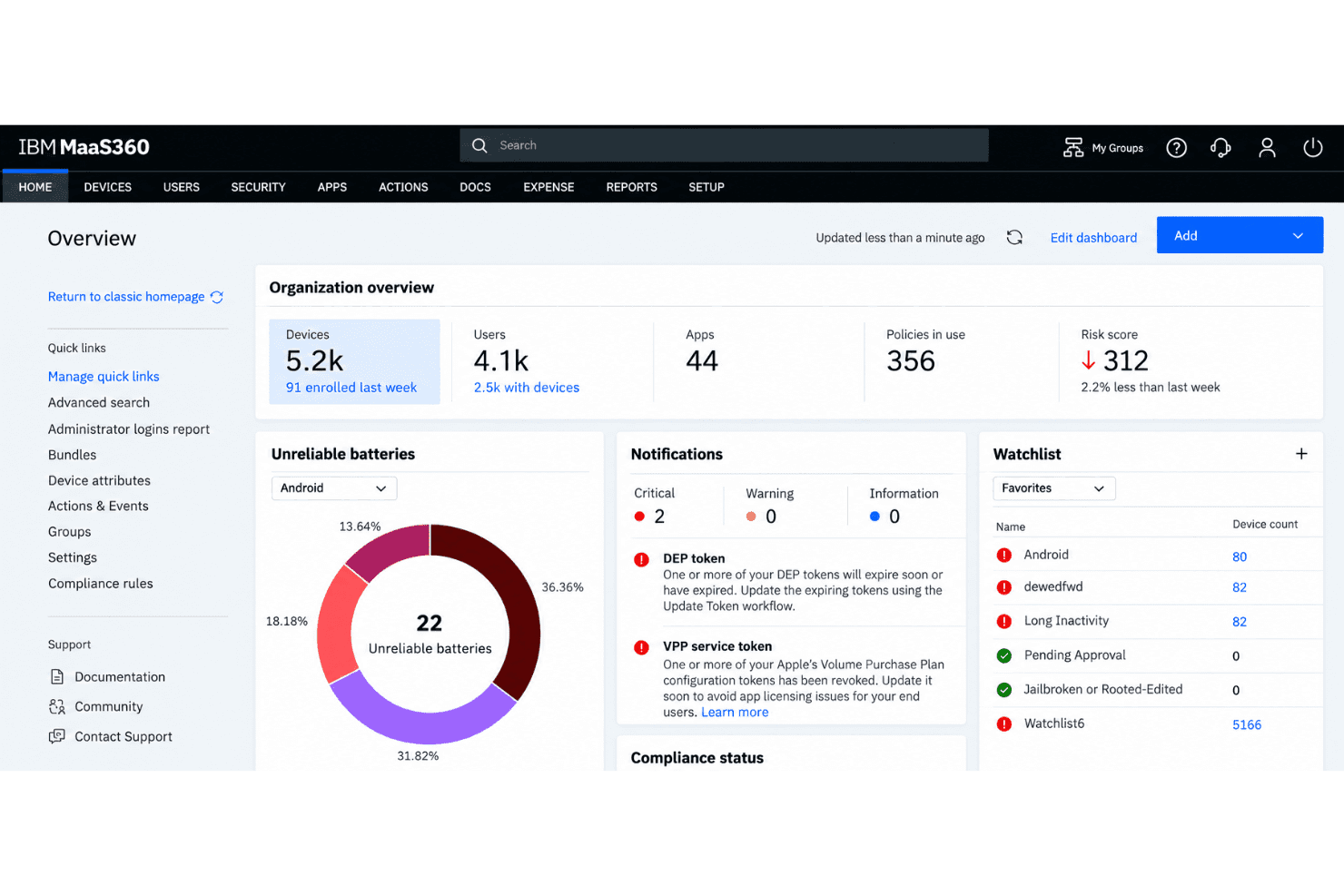
I’d choose IBM MaaS360 when your fleet spans iOS, Android, Windows, ChromeOS, and rugged or IoT devices. Its single console combines policy management, app distribution, threat defense, and compliance controls, while Apple Business Manager and Android zero-touch enrollment simplify setup. Third-party app integrations and IBM’s Mobility Success Services support broader deployments, though the interface can feel weighty beside simpler tools. Pricing requires a quote, so compare the full cost against your device count and required security features. I think it suits mixed-device enterprises better than teams needing only basic, single-platform management.
Pros
- Manages mixed iOS, Android, Windows, and ChromeOS fleets centrally.
- Work profiles separate BYOD data while policies enforce compliance.
- Built-in mobile threat defense detects phishing, malware, and network threats.
Cons
- Reviewers describe the admin portal as dated and setup as complex.
- Reviewers report less-smooth Android management than iOS management.
- Advanced security features require higher-priced tiers.
Is IBM MaaS360 Right For Your Needs?
Who Would be a Good Fit for IBM MaaS360?
IBM MaaS360 fits teams that need to manage diverse device fleets and connect device controls with security tools. Its centralized console covers enrollment, policies, app distribution, and security controls, while integrations and APIs can connect it with other systems. Consider it when those capabilities match your environment, rather than choosing it for basic device administration alone.
- Mixed FleetsOrganizations managing different device types can use MaaS360’s cross-platform controls, enrollment, policies, and app distribution from one console.
- Security TeamsSecurity teams can connect MaaS360 with IBM QRadar or Cloud Pak for Security, and the Enterprise plan adds mobile threat management.
- Mobile WorkforcesIT teams supporting employees’ mobile devices can apply device policies and distribute apps through MaaS360’s centralized management console.
- IBM EnvironmentsOrganizations using IBM Verify or QRadar can integrate MaaS360 with those services, while REST web services APIs support other connections.
- App ManagementDepartments that need to distribute apps across managed devices can use MaaS360’s app distribution and app management features.
- Enterprise ITLarger IT departments with layered device and security needs can draw on MaaS360’s enrollment, policy, identity, patch, and security features across its plans.
Who Would be a Bad Fit for IBM MaaS360?
MaaS360 is less suited to teams that need only basic device controls, have little time for setup, or depend heavily on reporting or hands-on support. Its broad feature set brings a learning curve, and reviewers describe initial configuration and support experiences that vary. Plan pricing, which starts at $4.24 per device monthly, can also be hard to justify when you won’t use its wider capabilities.
- Basic MDMTeams that need only simple device management may find MaaS360’s broader feature set and learning curve heavier than their requirements warrant.
- Tight BudgetsCost-conscious organizations with basic needs may not get enough value to justify plans starting at $4.24 per device monthly.
- Fast RolloutsTeams with little time for setup may struggle because the use-case wizard requires at least one successful enrollment, and reviewers report complex initial configuration.
- Reporting NeedsReporting-focused departments should weigh reviewer feedback that MaaS360’s reporting needs work before choosing it as their main management tool.
- Support RelianceTeams that require consistently responsive hands-on support may find the mixed feedback concerning, including Capterra’s 3.8/5 customer service rating.
- No Device FleetOrganizations without devices to enroll, manage, or secure have little use for MaaS360’s device policies, app distribution, and security controls.
Our Review Methodology
How We Test & Score Tools
We’ve spent years building, refining, and improving our software testing and scoring system. The rubric is designed to capture the nuances of software selection and what makes a tool effective, focusing on critical aspects of the decision-making process.
Below, you can see exactly how our testing and scoring works across seven criteria. It allows us to provide an unbiased evaluation of the software based on core functionality, standout features, ease of use, onboarding, customer support, integrations, customer reviews, and value for money.
Core Functionality (25% of final scoring)
The starting point of our evaluation is always the core functionality of the tool. Does it have the basic features and functions that a user would expect to see? Are any of those core features locked to higher-tiered pricing plans? At its core, we expect a tool to stand up against the baseline capabilities of its competitors.
Standout Features (25% of final scoring)
Next, we evaluate uncommon standout features that go above and beyond the core functionality typically found in tools of its kind. A high score reflects specialized or unique features that make the product faster, more efficient, or offer additional value to the user.
We also evaluate how easy it is to integrate with other tools typically found in the tech stack to expand the functionality and utility of the software. Tools offering plentiful native integrations, 3rd party connections, and API access to build custom integrations score best.
Ease of Use (10% of final scoring)
We consider how quick and easy it is to execute the tasks defined in the core functionality using the tool. High scoring software is well designed, intuitive to use, offers mobile apps, provides templates, and makes relatively complex tasks seem simple.
Onboarding (10% of final scoring)
We know how important rapid team adoption is for a new platform, so we evaluate how easy it is to learn and use a tool with minimal training. We evaluate how quickly a team member can get set up and start using the tool with no experience. High scoring solutions indicate little or no support is required.
Customer Support (10% of final scoring)
We review how quick and easy it is to get unstuck and find help by phone, live chat, or knowledge base. Tools and companies that provide real-time support score best, while chatbots score worst.
Customer Reviews (10% of final scoring)
Beyond our own testing and evaluation, we consider the net promoter score from current and past customers. We review their likelihood, given the option, to choose the tool again for the core functionality. A high scoring software reflects a high net promoter score from current or past customers.
Value for Money (10% of final scoring)
Lastly, in consideration of all the other criteria, we review the average price of entry level plans against the core features and consider the value of the other evaluation criteria. Software that delivers more, for less, will score higher.
Core Features
Cross-Platform Device Management
MaaS360 manages iOS, Android, Windows, ChromeOS, and rugged or IoT devices from one console. Your team can apply and monitor device controls across a mixed fleet without switching management tools.
Device Enrollment
MaaS360 supports Apple Business Manager and Android zero-touch enrollment for device setup. These options let IT prepare devices for policy management before handing them to employees.
Policy Management
MaaS360 lets administrators set device policies and apply them across managed endpoints. You can use consistent rules for a mixed fleet instead of configuring each device individually.
App Distribution
MaaS360 supports distributing apps to managed devices. IT can provide required apps through its management console rather than asking employees to install them manually.
BYOD Work Profiles
MaaS360 work profiles separate organizational data from personal data on supported employee devices. That separation helps IT manage work information without applying the same controls to personal content.
Mobile Threat Defense
MaaS360’s built-in mobile threat defense detects phishing, malware, and network threats. Your team can use these threat signals alongside device policies when protecting mobile endpoints.
Ease of Use
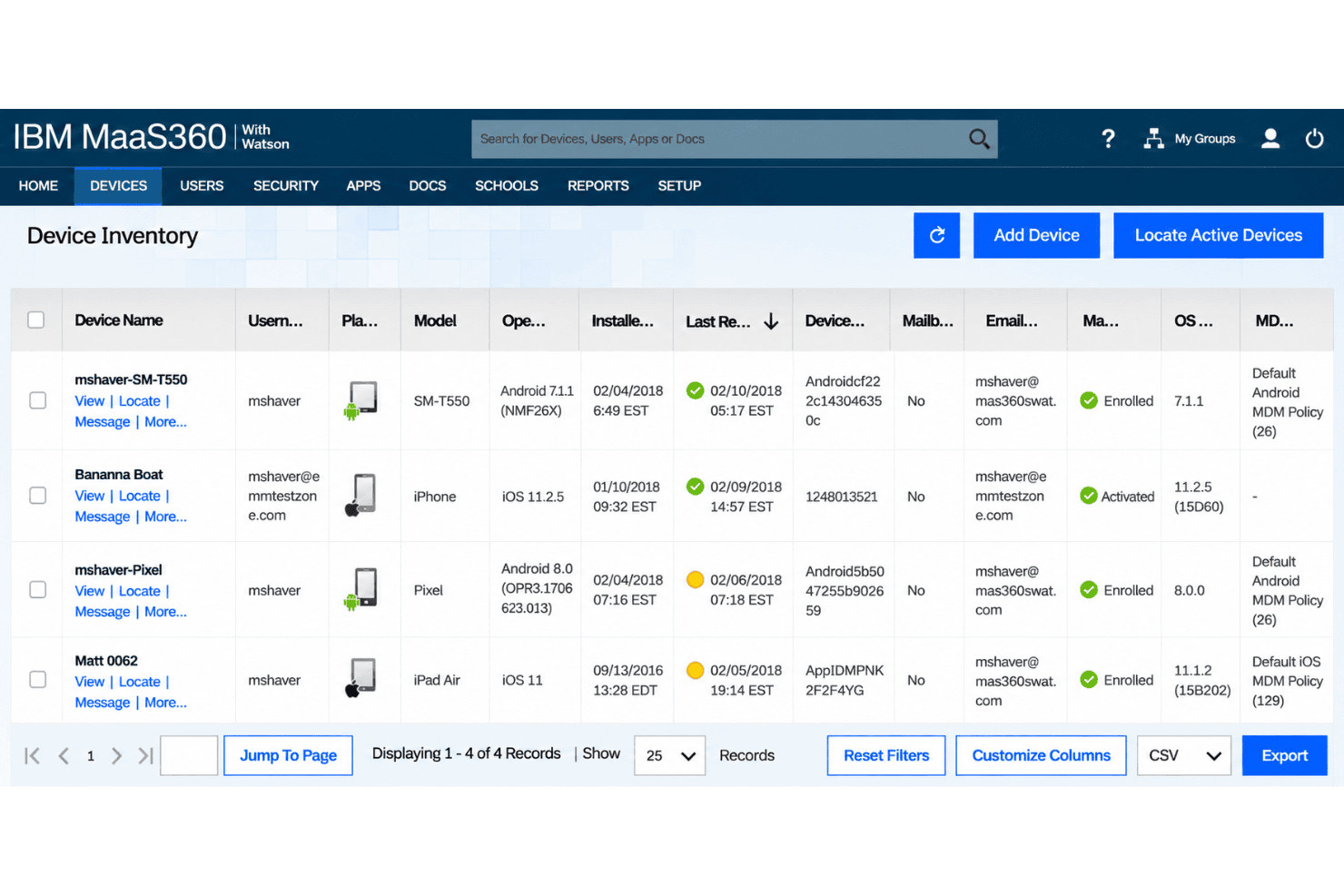
MaaS360 is capable, but its broad feature set comes with a learning curve. One console handles mixed-device fleets, enrollment, policy configuration, app distribution, and security controls, though that breadth can make routine administration feel less intuitive. Reviewers praise centralized management, but several describe the interface as dated or complex and say reporting needs work. I’d choose it when you need cross-platform controls; for basic device management, its usability may feel heavier than necessary.
Integrations
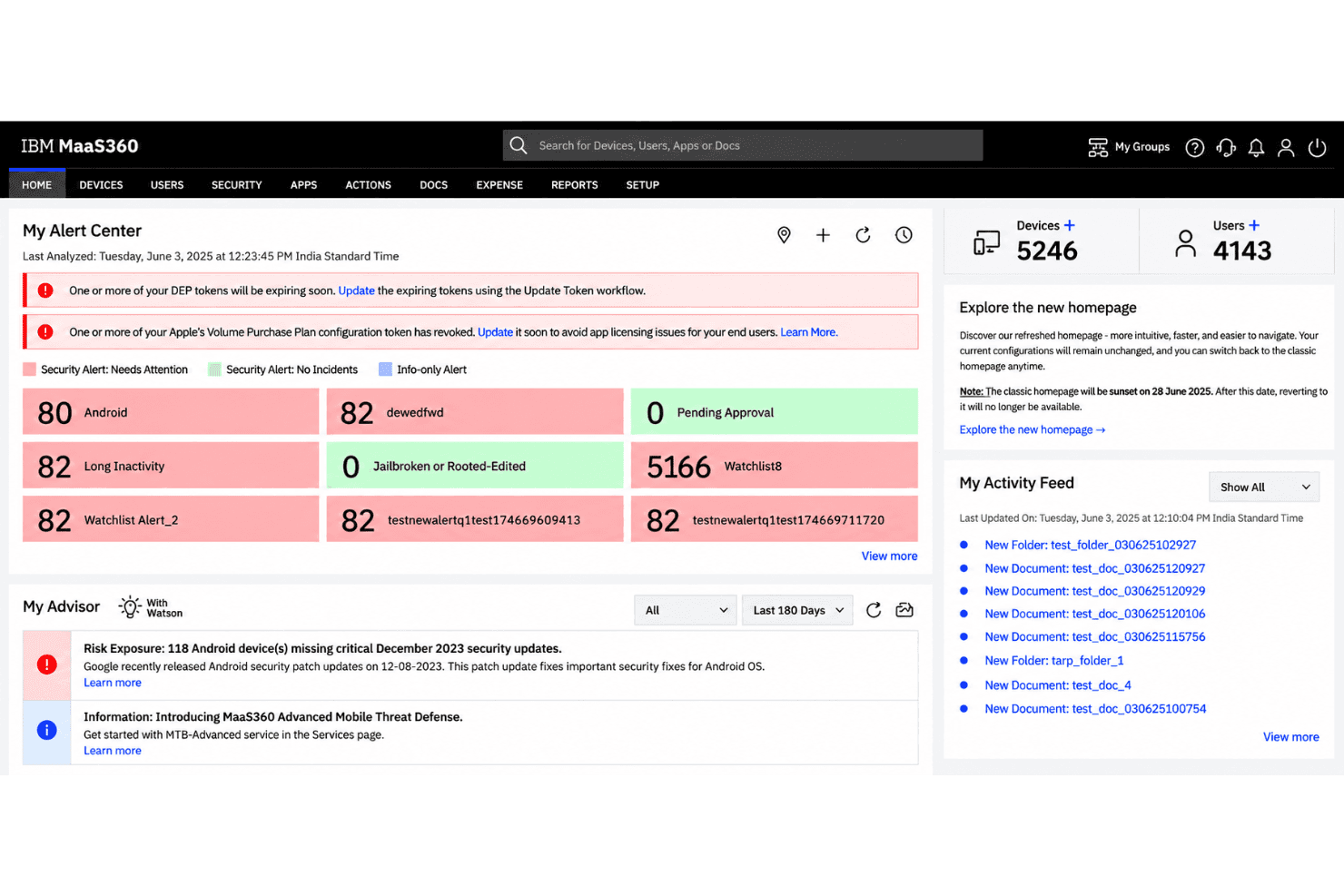
IBM MaaS360 integrates with IBM Verify, IBM QRadar, IBM Cloud Pak for Security, TeamViewer, Zscaler, Zimperium Mobile Threat Defense, Microsoft Entra ID, Microsoft 365, Aruba ClearPass, and Box for EMM, among others.
IBM MaaS360 also offers REST APIs for custom integrations and supports connections with third-party security and productivity tools.
IBM MaaS360 Specs
- 2-Factor Authentication: Yes
- Analytics: Yes
- API: Yes
- Batch Permissions & Access: Yes
- Collaboration Support: No
- CRM Integration: No
- Customer Service: No
- Dashboard: Yes
- Data Export: Yes
- Data Import: No
- Data Visualization: Yes
- Developer Tools: Yes
- Email Integration: Yes
- External Integrations: Yes
- File Sharing: Yes
- Forecasting: No
- Marketing Automation: No
- Multi-User: Yes
- Notifications: Yes
- Project Management: No
- Resource Management: No
- Sales Automation: No
- Task Scheduling/Tracking: Yes
- Third-Party Plugins/Add-Ons: Yes
- Time Management: No
- Visualization: No

