

10 Best API Security Tools: Complete Guide 2026

10 Best API Security Tools Shortlist


In today's digital landscape, safeguarding your API is crucial. You’re probably grappling with the complexities of securing sensitive data while keeping your systems running smoothly. It's a tough balancing act, and that's where API security tools come into play.
I’ve spent time digging into the best options out there, so you don’t have to. You’ll find a list of top picks that can help protect your data and maintain trust with your users.
In this article, I’ll share my independent reviews and insights to help you choose the right tool for your team. Whether you're a small startup or a large enterprise, there's something here for everyone. Let's dive in and find the right fit for you.
Why Trust Our Software Reviews
We’ve been testing and reviewing software since 2023. As tech leaders ourselves, we know how critical and difficult it is to make the right decision when selecting software.
We invest in deep research to help our audience make better software purchasing decisions. We’ve tested more than 2,000 tools for different tech use cases and written over 1,000 comprehensive software reviews. Learn how we stay transparent & our software review methodology.
Best API Security Tools Summary
This comparison chart summarizes pricing details for my top API security tools selections to help you find the best one for your budget and business needs.
| Tool | Best For | Trial Info | Price | ||
|---|---|---|---|---|---|
| 1 | Best for AI-driven threat detection | 30-day free trial + free demo available | Pricing upon request | Website | |
| 2 | Best for securing APIs during local development | Free plan available | From $8/month (billed annually) | Website | |
| 3 | Best for discovering hidden and undocumented APIs | Free demo available | Pricing upon request | Website | |
| 4 | Best for comprehensive API penetration testing | Free demo available | From $69/month | Website | |
| 5 | Best for in-depth scanning of various API formats | Free demo available | Pricing upon request | Website | |
| 6 | Best for source code analysis | Free demo available | Pricing upon request | Website | |
| 7 | Best for API access management solutions | Free demo available | From $2,500/month | Website | |
| 8 | Best for automated API testing | 14-day free trial | Pricing upon request | Website | |
| 9 | Best for swift API endpoint inspection | Not available | From $10/user/month (min 3 seats) | Website | |
| 10 | Best for intelligent API traffic monitoring | Not available | Pricing upon request | Website |
Best API Security Tools Reviews
Below are my detailed summaries of the best API security tools that made it onto my shortlist. My reviews offer a detailed look at the key features, pros & cons, integrations, and ideal use cases of each tool to help you find the best one for you.

Radware
Best for AI-driven threat detection

Radware offers a sophisticated API Security Service tailored for enterprises looking to safeguard their APIs, making it a strong option for teams that need AI-driven threat detection. This service will appeal to IT security professionals and organizations focused on maintaining reliable API defenses, providing real-time insights and automated protection against complex attacks.
Why I Picked Radware
I picked Radware for its AI-driven threat detection, which combines API discovery, business logic defense, and runtime protection in one platform. Its automated API discovery gives you visibility into first-party, third-party, and shadow APIs, while runtime posture management reviews live traffic to highlight real risks. The business logic protection layer tracks API workflows to spot and block complex attacks, helping teams address common OWASP API security risks.
Radware Key Features
In addition to AI-driven threat detection, Radware offers:
- Adaptive Protection: Maintains legitimate API traffic even during large-scale DDoS attacks, ensuring business continuity.
- Unified Platform: Facilitates collaboration among Dev, Sec, and DevSecOps teams, simplifying compliance and reducing complexity.
- Comprehensive Coverage: Provides protection against the OWASP Top 10 API Security Risks and various DDoS attacks.
Radware Integrations
Native integrations are not currently listed by Radware. However, custom integrations may be possible through available APIs.
Pros and Cons
Pros:
- Protects against multiple OWASP attack categories
- Provides real-time traffic monitoring and threat alerts
- Detects and blocks advanced web application attacks
Cons:
- Reporting tools are difficult to use and customize effectively
- Customization options are limited for tailoring security configurations


ngrok is a developer networking and API gateway platform that uses encrypted tunnels, edge traffic policies, and built-in authentication to expose and secure local APIs and services without modifying application code or opening inbound ports.
Who Is ngrok Best For?
ngrok is a strong fit for software development teams and platform engineers who need to expose, test, and secure APIs during active development or across distributed environments.
Why I Picked ngrok
I've included ngrok in my top picks because it's one of the few tools that applies real security controls to APIs while they're still running locally. When I spin up a local dev environment and expose it through an ngrok tunnel, I can layer on JWT validation, IP allowlisting, and rate limiting via its Traffic Policy engine before a single request hits my app. I also like that ngrok blocks OWASP Top 10 attacks using built-in OWASP CRS rules at the edge, so I'm not shipping vulnerable endpoints even during early testing.
ngrok Key Features
- mTLS enforcement: Requires mutual TLS authentication on incoming API connections, verifying both client and server certificates before traffic is accepted.
- Webhook verification: Validates webhook signatures from providers like GitHub, Stripe, and Twilio at the edge, rejecting requests with invalid or missing signatures.
- DDoS protection: Automatically absorbs volumetric attack traffic at ngrok's global network layer before it reaches your origin server.
- RBAC and audit logs: Assign role-based access controls to team members and generate structured audit logs for visibility into who accessed what and when.
ngrok Integrations
ngrok supports integrations with identity providers for endpoint SSO, including Okta, Microsoft Entra ID, Auth0, and Google. For observability, it offers built-in event destinations for Datadog, Amazon CloudWatch, AWS Firehose, AWS Kinesis, and Azure Logs Ingestion. An API and Agent SDKs (Python, Go, Node, Rust) are available for custom integrations.
Pros and Cons
Pros:
- Real-time request inspection aids API debugging
- Edge-level traffic policy rules filter requests
- HTTPS enforced on every tunnel by default
Cons:
- Requires a running agent on-premises
- Free tier lacks meaningful authentication controls

Invicti
Best for discovering hidden and undocumented APIs

Invicti is a comprehensive web application and API security tool that offers automated discovery and security testing for web applications and APIs, allowing users to find and fix vulnerabilities. The platform provides visibility into web assets, vulnerabilities, and remediation efforts, and integrates into existing developer workflows to produce more secure code.
Why I Picked Invicti:
One of the most compelling aspects of Invicti is its ability to discover hidden and undocumented APIs. This is crucial because many security breaches occur through overlooked or forgotten APIs that are not adequately secured. Invicti's API discovery capability, embedded within the software development lifecycle, ensures that all APIs, including those that are hidden or unlinked, are identified and tested.
Standout features and integrations:
Invicti's dynamic application security testing combined with proof-based scanning technology provides accurate and actionable data. The platform also supports multiple API types, including REST, SOAP, and GraphQL. Integrations include MuleSoft Anypoint Exchange, Amazon API Gateway, Apigee API hub, Kubernetes, Azure Boards, Bitbucket, Bugzilla, FogBugz, DefectDojo, Freshservice, GitHub, GitLab, Jazz Team Server, and Jira.
Pros and Cons
Pros:
- Easy to use and set up
- Proof-based scanning technology
- Generates detailed vulnerability reports
Cons:
- Enterprise version may be expensive for some users
- Limited customization options
Best for comprehensive API penetration testing
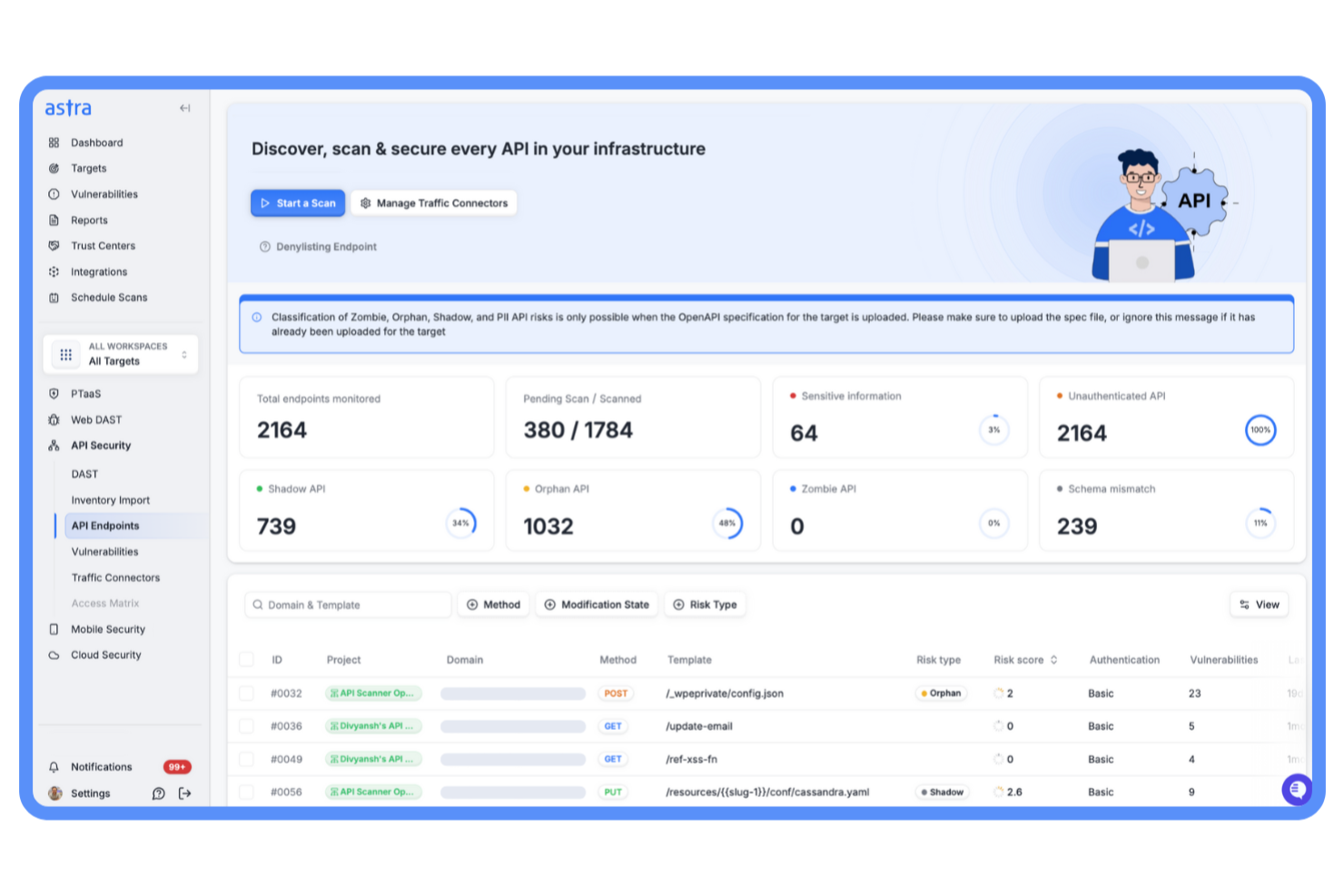
Astra Pentest is a specialized security platform that identifies vulnerabilities in APIs through a combination of automated scans and expert-led penetration testing. By pairing real-time monitoring with extensive vulnerability checks, it helps teams detect potential risks, protect critical endpoints, and maintain consistent visibility across their API landscape.
Why I Picked Astra Pentest:
I picked Astra Pentest for its targeted approach to penetration testing designed specifically for APIs. While many tools rely solely on automation, Astra combines automated testing with manual reviews conducted by certified experts. The platform uses more than 15,000 dynamic test cases, including checks aligned with the OWASP API Top 10, providing a balanced mix of breadth and depth to uncover issues that automated scanners might overlook.
Standout features and integrations:
Astra Pentest offers a vulnerability management dashboard that displays findings in real time and helps teams prioritize remediation. It supports continuous API discovery to locate shadow and undocumented APIs, along with traffic-based detection that maps active endpoints even without static specifications. Integrations with GitHub, GitLab, JIRA, and Slack enable teams to manage vulnerabilities within their existing workflows.
Pros and Cons
Pros:
- Supports compliance with major security standards
- High detection accuracy with fewer false positives
- Blends automated and manual testing
Cons:
- Some users find pricing less transparent
- Manual pentests may take weeks

Acunetix
Best for in-depth scanning of various API formats

Acunetix is a web application and API security scanner that automates security testing for companies, offering a comprehensive solution for discovering, testing, and patching vulnerabilities in web applications and APIs.
Why I Picked Acunetix:
I like its ability to perform in-depth vulnerability scanning across various API formats, including REST, SOAP, and GraphQL. This versatility ensures that no matter the type of API architecture in use, Acunetix can effectively identify and address potential security flaws. The tool supports built-in security checks and allows for the import of API definitions, which streamlines the process of discovering and testing API endpoints.
Standout features and integrations:
Features include the ability to detect over 12,000 vulnerabilities, including OWASP Top 10, SQL injections, and XSS. The tool's capability to provide actionable scan results in minutes and automatically prioritize high-risk vulnerabilities also significantly enhances the efficiency of security teams. Integrations include MuleSoft Anypoint Exchange, Apigee API hub, Kubernetes, Azure Boards, BitBucket, Bugzilla, DefectDojo, FogBugz, Freshservice, GitHub, and GitLab.
Pros and Cons
Pros:
- Ability to identify a wide range of vulnerabilities
- Noted for its fast scanning capabilities
- Advanced reporting features
Cons:
- Learning curve for beginners
- Limited customization options
Best for source code analysis

Checkmarx is a comprehensive software security solution that specializes in identifying vulnerabilities within the source code of applications. By deeply analyzing code, Checkmarx offers developers insights into potential security flaws.
Why I Picked Checkmarx:
In determining which tools to spotlight, Checkmarx grabbed my attention due to its in-depth code analysis capabilities. Its distinction lies in its adeptness at trawling through vast lines of code to unearth even subtle vulnerabilities. I think that Checkmarx is "Best for source code analysis" primarily because of its emphasis on ensuring the foundational layers of software remain robust and secure.
Standout features and integrations:
One of Checkmarx's pivotal features is its Static Application Security Testing (SAST), which probes code for vulnerabilities without executing the program. Its Open Source Analysis (OSA) also offers visibility into open-source components' security and compliance. As for integrations, Checkmarx easily works with popular development tools and platforms like GitHub, GitLab, and Jenkins, enabling a smooth workflow for developers.
Pros and Cons
Pros:
- Smooth integrations with popular development platforms
- Offers visibility into open-source components
- Deep and comprehensive code-scanning capabilities
Cons:
- Potential delays due to in-depth analysis on larger codebases
- Extensive features might be overkill for smaller projects
- Might have a steep learning curve for newcomers

Gravitee
Best for API access management solutions

Gravitee provides a versatile platform for managing and monitoring API gateways. Their focus on delivering robust API access management solutions gives organizations the flexibility and control they need over their API ecosystem, positioning them as the prime choice for API access management solutions.
Why I Picked Gravitee:
When selecting tools for this list, Gravitee stood out prominently. In my process of comparing and judging different platforms, I chose Gravitee because of its comprehensive feature set explicitly tailored to API access management. From my perspective, its commitment to enhancing API access control and its extensible capabilities make it ideally "Best for API access management solutions".
Standout features and integrations:
Gravitee boasts a decentralized architecture allowing for distributed API management. Its open-source nature provides customization options that many closed platforms don't offer. Integration-wise, Gravitee has a rich set of connectors for popular identity providers, ensuring identity and access management within the API ecosystem.
Pros and Cons
Pros:
- Supports a wide range of identity providers for easy integration
- Open-source nature offers extensive customization possibilities
- Decentralized architecture ensures scalability and resilience
Cons:
- Requires regular updates and maintenance to stay secure and efficient
- Organizations used to closed systems may find the open-source nature daunting
- Might require technical expertise for setup and customization

Best for automated API testing

Parasoft SOAtest champions the cause of streamlining the API testing process. By automating intricate tests, this tool ensures APIs function flawlessly, validating its status as the top pick for automated testing.
Why I Picked Parasoft SOAtest:
Among the array of API testing tools I examined, Parasoft SOAtest's commitment to automation caught my attention. The platform stood out due to its efficient handling of complex testing scenarios, and I determined it offered something unique. Based on its capabilities, it's clear why this tool earns the title "Best for automated API testing.”
Standout features and integrations:
Parasoft SOAtest offers a comprehensive suite of tests, including security, load, and performance testing. Its smart test generation utilizes AI to pinpoint potential defects. Regarding integrations, Parasoft SOAtest collaborates effectively with widely-used CI/CD tools, ensuring a smooth testing workflow.
Pros and Cons
Pros:
- Strong compatibility with CI/CD pipelines
- AI-driven test generation
- Diverse range of test types
Cons:
- UI may appear dense to new users
- Initial setup can be intricate
- Might be overkill for small-scale projects


Swagger Inspector provides users with a clear, streamlined approach to testing and validating API endpoints. Its efficiency in promptly analyzing and delivering results on API endpoints is why it's deemed best for swiftly inspecting those endpoints.
Why I Picked Swagger Inspector:
While going through various API inspection tools, Swagger Inspector caught my attention due to its simplicity and rapid output. Its capability to provide immediate feedback on API performance and reliability is distinct. This unmatched speed in the analysis is why it's the best tool for swift API endpoint inspection.
Standout features and integrations:
Swagger Inspector shines with its intuitive interface, enabling users to test and generate OpenAPI documentation quickly. Additionally, the tool's cloud-based nature ensures users can inspect endpoints from anywhere without any setup. Regarding integrations, Swagger Inspector syncs with SwaggerHub, enabling effective collaboration and sharing of API documentation.
Pros and Cons
Pros:
- Easy integration with SwaggerHub for collaboration
- Intuitive interface for swift endpoint inspection
- Cloud-based for easy access and testing
Cons:
- Requires consistent online access for optimal performance
- Might be oversimplified for highly complex APIs
- Limited customization options

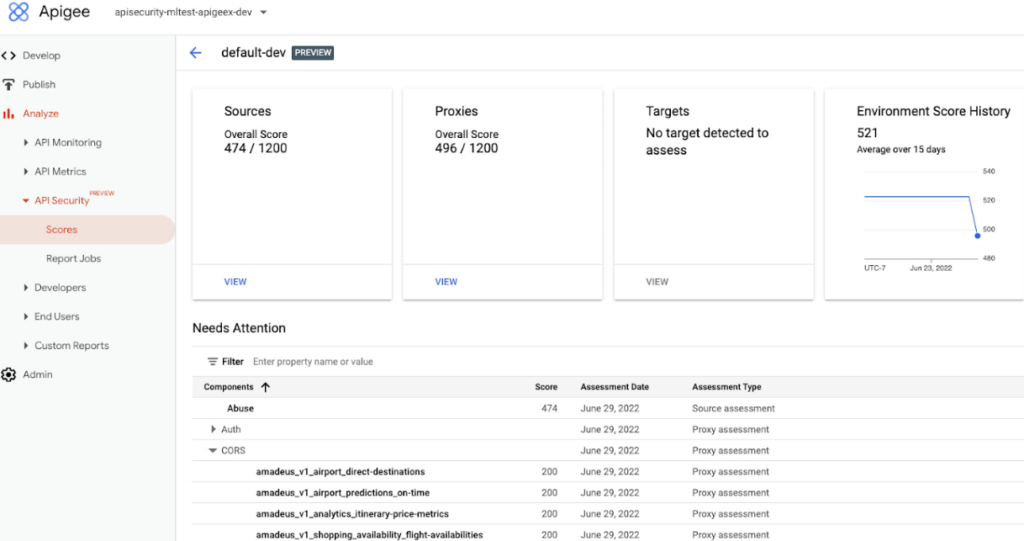
Apigee Sense by Google analyzes API traffic to detect anomalies and threats, providing insights for efficient and secure API management.
Why I Picked Google Apigee Sense:
After careful consideration of various tools, I have concluded that Google Apigee Sense is the best option for intelligent API traffic monitoring. Its advanced analytics and machine learning capabilities, combined with detailed API traffic analytics, provide unique insights that other platforms lack. Google's expertise in machine learning is evident in this platform's ability to not only monitor but understand API traffic, giving it a distinct advantage over similar tools.
Standout features and integrations:
Google Apigee Sense thrives on its machine learning-powered anomaly detection, which can discern unusual patterns and potential threats in API traffic. Moreover, its behavioral API analytics provide a granular view of how APIs are being accessed and by whom. Integration-wise, given it's a Google product, Apigee Sense can smoothly integrate with a suite of other Google Cloud Platform tools, enhancing its functionality and reach.
Pros and Cons
Pros:
- Strong integration capabilities with Google Cloud Platform tools
- Detailed behavioral API analytics
- Machine learning-driven anomaly detection
Cons:
- Dependency on the Google Cloud ecosystem might not appeal to all
- Pricing structure can be ambiguous for some
- Might be complex for beginners
Other API Security Tools
Below is a list of additional API security tools that I shortlisted but did not make it to the top 10. Definitely worth checking them out.
- Qualys Web Application Scanning
For web application vulnerabilities
- Edgio
For edge network security
- Orca Security
Good for deep cloud security posture management
- Wallarm API Security Platform
For real-time API threat analysis
- StackHawk
For developer-focused API safety
- ImmuniWeb
For AI-driven API security
- 42Crunch
For comprehensive API protection
- Intruder
Good for proactive API vulnerability scanning
- Burp Suite
Good for thorough penetration testing of APIs
- Postman
Good for comprehensive API development and security
- Wallarm
Good for AI-powered API security automation
- Traceable AI
Good for machine learning-driven API protection
- Tinfoil Security
Good for developer-friendly API scanning
- RapidAPI Security Testing
Good for enterprises requiring detailed API insights
- Nevatech Sentinet
Good for managing and monitoring API integrations
- Imperva API Security
Good for real-time API protection and analytics
- Stoplight API Security
Good for design-first API security practices


How I Evaluate API Security Tools
I split my evaluation into baseline requirements—like shadow API discovery and OWASP runtime detection—and the differentiators that separate tools worth recommending from the rest.
Core Functionality (Table Stakes For This List)
When I'm selecting tools for my list, I rank each one on a scale from 0 (does not offer the functionality) to 5 (excels in this area) for each core functionality listed below. Then, I calculate the tool's total score into a percentage. Each tool needs to achieve a minimum total score of 65% to be considered for inclusion.
- API Discovery & Inventory: I look for tools that automatically surface shadow and zombie endpoints across environments, not just catalog APIs you manually import from a spec file.
- Vulnerability & Posture Testing: Coverage of the OWASP API Security Top 10 matters here, including how well the tool catches misconfigurations like broken object-level authorization.
- Runtime Threat Detection: I evaluate whether detection goes beyond static rules to flag anomalous patterns like credential stuffing bursts or unusual parameter enumeration in live traffic.
- Attack Prevention & Blocking: The tool should offer inline or orchestrated blocking through gateways and WAFs, not just surface alerts that require your team to act manually.
- Sensitive Data Detection: I check whether the tool can identify regulated data types like PII or payment card numbers flowing through API responses and flag unintended exposure.
- CI/CD & DevOps Integration: Plugins for tools like Jenkins, GitHub Actions, or GitLab CI show whether security testing fits into your pipeline or lives outside the development workflow.
Once I have a list of tools that meet this criteria, I consider what sets each platform apart.
Differentiating Factors (What Sets Vendors Apart)
Here's how I compare and contrast different vendors:
Standout Features
Business logic abuse detection separates the stronger tools from the rest. I look for platforms that catch BOLA and account takeover attempts that signature-based engines miss entirely. Attack surface risk scoring is another differentiator—tools that rank endpoints by sensitivity, exposure, and auth posture help your team prioritize what to fix first. I also evaluate whether a tool can generate or reconcile OpenAPI specs from live traffic, closing the documentation gaps that leave shadow APIs unprotected.
Beyond Features
Deployment architecture matters a lot here. I check whether a tool supports agentless options like traffic mirroring or eBPF to avoid adding latency to production APIs. Ecosystem integrations are just as important—a tool that connects to your API gateways, SIEM, and CI/CD pipeline fits into your existing stack rather than sitting beside it. I also evaluate compliance mapping, especially whether a platform can generate audit-ready reports tied to frameworks like PCI DSS 4.0 or SOC 2.
How to Choose API Security Tools
It’s easy to get bogged down in long feature lists and complex pricing structures. To help you stay focused as you work through your unique software selection process, here’s a checklist of factors to keep in mind:
| Factor | What to Consider |
|---|---|
| Scalability | Will the tool grow with your API usage? Look for scalable solutions that can handle increased traffic and data without performance issues. |
| Integrations | Does it work with your existing systems? Ensure the tool integrates seamlessly with your current tech stack to avoid disruptions. |
| Customizability | Can you tailor the tool to your needs? Check if you can adjust settings and policies to fit your security requirements. |
| Ease of use | Is the interface intuitive for your team? A user-friendly design can reduce training time and improve adoption rates. |
| Implementation and onboarding | How quickly can you get started? Evaluate the setup process and available support to ensure a smooth transition. |
| Cost | Does it fit your budget? Compare pricing plans and consider long-term expenses, including potential hidden fees. |
| Security safeguards | Are there robust protections in place? Verify the tool's security measures, like encryption and access controls, to protect your data. |
| Compliance requirements | Does the tool meet your industry's standards? Ensure it supports necessary compliance frameworks, like GDPR or HIPAA, to avoid legal issues. |
What Are API Security Tools?
API security tools are solutions designed to protect APIs from unauthorized access and potential threats. These tools are typically used by IT professionals, developers, and security teams to safeguard data and ensure compliance with industry standards.
Monitoring, encryption, and access control features help with protecting sensitive information, integrating with existing systems, and maintaining regulatory compliance. Overall, these tools provide essential security measures to keep your APIs and data safe.
Features
When selecting API security tools, keep an eye out for the following key features:
- Access control: Manages who can access your APIs, ensuring only authorized users have entry.
- Encryption: Protects data in transit and at rest, keeping sensitive information secure.
- Monitoring: Tracks API traffic for unusual activity, identifying potential threats quickly.
- Compliance support: Helps meet industry standards like GDPR or HIPAA, avoiding legal issues.
- Integration capabilities: Works seamlessly with your existing systems, reducing disruptions.
- Customizable policies: Allows tailoring of security settings to fit specific needs and requirements.
- Real-time alerts: Provides instant notifications of security breaches or anomalies.
- Analytics and reporting: Offers insights into API usage and security status, aiding in decision-making.
- Automated threat detection: Identifies and mitigates threats using AI-driven analysis.
- User-friendly interface: Ensures ease of use for teams, minimizing training time and increasing adoption.
Benefits
Implementing API security tools provides several benefits for your team and your business. Here are a few you can look forward to:
- Enhanced data protection: Encryption and access control features keep sensitive information secure from unauthorized access.
- Regulatory compliance: Compliance support helps you meet industry standards like GDPR, avoiding potential legal issues.
- Improved threat detection: Automated threat detection and real-time alerts quickly identify and mitigate security risks.
- Seamless integration: Integration capabilities ensure the tool works smoothly with your existing systems, reducing disruptions.
- Informed decision-making: Analytics and reporting provide valuable insights into API usage and security status.
- Custom security settings: Customizable policies allow you to tailor security measures to fit your specific needs.
- Ease of use: A user-friendly interface ensures your team can quickly adopt and efficiently use the tool.
Costs & Pricing
Selecting API security tools requires an understanding of the various pricing models and plans available. Costs vary based on features, team size, add-ons, and more. The table below summarizes common plans, their average prices, and typical features included in API security tools solutions:
Plan Comparison Table for API Security Tools
| Plan Type | Average Price | Common Features |
|---|---|---|
| Free Plan | $0 | Basic monitoring, limited access control, and community support. |
| Personal Plan | $10-$30/user/month | Advanced monitoring, basic encryption, and email support. |
| Business Plan | $50-$100/user/month | Full monitoring suite, enhanced encryption, integration capabilities, and priority support. |
| Enterprise Plan | $150-$300/user/month | Comprehensive security features, custom policies, compliance support, dedicated account manager, and 24/7 support. |
API Security Tools FAQs
Here are some answers to common questions about API security tools:
What are the security risks of API?
APIs face risks like data breaches, weak authentication, and insecure endpoints. Unauthorized access can expose sensitive data or disrupt systems through attacks like injection or DoS. You should focus on strong authentication and encryption to mitigate these risks.
How do you test API security vulnerabilities?
Testing API security involves methods like static and dynamic testing, penetration testing, and fuzz testing. These help identify vulnerabilities by simulating attacks. Regular testing ensures your APIs remain secure against new threats.
What are the types of API security?
API security can be categorized by protocols like SOAP, REST, and GraphQL. Each uses different methods for securing data, such as digital signatures in SOAP or token-based authentication in REST. Choose based on your system’s needs.
How can WAFs and API gateways protect APIs?
Web Application Firewalls (WAFs) and API gateways protect APIs by filtering and monitoring traffic. They block malicious requests and enforce security policies, acting as a barrier against unauthorized access and attacks.
Can zero trust architecture ensure API protection?
Zero trust architecture enhances API security by verifying every request, regardless of origin. It requires authentication and authorization for all interactions, reducing the risk of breaches through continuous verification.
What's needed to protect APIs?
Protecting APIs requires a mix of authentication, encryption, and monitoring. Implement strong access controls and regular security assessments. Staying updated with security patches and educating your team about best practices is also crucial.
Why is there such a significant disparity in pricing between different tools?
The cost often reflects the tool’s capabilities, scalability, support, and brand reputation. Devices designed for larger enterprises or those offering advanced threat detection and mitigation features will typically cost more than essential solutions for startups or small businesses.
What’s Next:
If you're in the process of researching API security tools, connect with a SoftwareSelect advisor for free recommendations.
You fill out a form and have a quick chat where they get into the specifics of your needs. Then you'll get a shortlist of software to review. They'll even support you through the entire buying process, including price negotiations.