

Explorând domeniul testării statice a securității aplicațiilor, am ajuns să înțeleg natura sa indispensabilă în automatizarea identificării vulnerabilităților de securitate din liniile de cod. Astfel de instrumente nu acoperă doar aspectele de bază, ci pătrund și în zone complexe ale securității cibernetice, contribuind la combaterea configurărilor necorespunzătoare și oferind o gestionare cuprinzătoare a vulnerabilităților.
În calitate de expert în securitate, am văzut atât soluții locale, cât și module care funcționează împreună cu testarea dinamică a securității aplicațiilor pentru a consolida protecția. Nu vă neglijați apărarea; alegeți instrumentul potrivit pentru a întări securitatea software-ului dumneavoastră.
Ce este un instrument de testare statică a securității aplicațiilor?
Instrumentele de testare statică a securității aplicațiilor, prescurtate adesea SAST, sunt instrumente software specializate concepute pentru a analiza codul sursă, codul intermediar sau codul binar al aplicațiilor fără a le executa. Dezvoltatorii, profesioniștii în securitate și organizațiile integrează SAST în ciclul de viață al dezvoltării software pentru a aborda și a remedia preventiv vulnerabilitățile de securitate, asigurându-se că aplicațiile lor mențin o poziție defensivă solidă împotriva amenințărilor cibernetice.
Este mai mult decât un simplu instrument – este un aliat esențial care ajută echipele de dezvoltare să asigure un cod securizat și să abordeze problemele de securitate în etapa de revizuire a codului, cu mult înainte ca acestea să se agraveze. Integrând aceste instrumente în ciclul de dezvoltare, puteți muta securitatea într-o etapă mai timpurie, folosind testarea de tip cutie albă pentru a identifica și remedia vulnerabilități, de la depășiri de buffer până la atacuri de tip scriptare între site-uri, inclusiv în aplicațiile mobile.
Why Trust Our Software Recommendations
6,700+
Reviews
20
Industry experts
16+
Evaluation factors
14
Years
Our team has been testing and reviewing software since 2012. As tech leaders ourselves, we know how difficult—and important—it is to choose the right software.
For this guide, we evaluated tools using hands-on testing and independent research, scoring tools using our selection criteria.
Our reviews reflect our human editorial judgment, not a sales pitch.
Expert reviewers:
- Paulo Gardini MiguelTech Director
 Tim FisherVP of AI
 Gabriel RosasTech Lead & Software Architect
 Christhian GruhnTech Lead & Platform Architect

Rezumatul celor mai bune instrumente de testare statică a securității aplicațiilor
Sorted by: Default
| Tool | Starting Price | Website | |
|---|---|---|---|
Best for AI-powered vulnerability triage | 4.3 out of 5 | $300/month Free plan + free demo available | Book Demo |
Best for zero-noise risk prioritization | Not rated | €3,300/year Free plan + free demo available | Website |
Best for reducing false positives | 4.5 out of 5 | $200/month Free plan available | Book Demo |
Best for advanced taint analysis | 4.4 out of 5 | Pricing upon request Free trial available | Website |
Best for real-time threat detection | 4.5 out of 5 | $7/month 15-day free trial + demo available | Website |
Best for open-source code insights | 4.6 out of 5 | $25/contributing developer/month Free plan + free demo available | Website |
Best for integrated DevOps security | Not rated | $29/user/month Free plan available | Website |
Best for holistic application security | Not rated | $40/user/month | Website |
Best for scalable enterprise solutions | Not rated | $29/user/month Free demo available | Website |
Best for detecting sensitive data leaks | Not rated | Pricing upon request. | Website |


Recenzii ale celor mai bune instrumente de testare statică a securității aplicațiilor
 Best for AI-powered vulnerability triage
- Free plan + free demo available
- From $300/month
Visit WebsiteCustomer Rating:4.3/5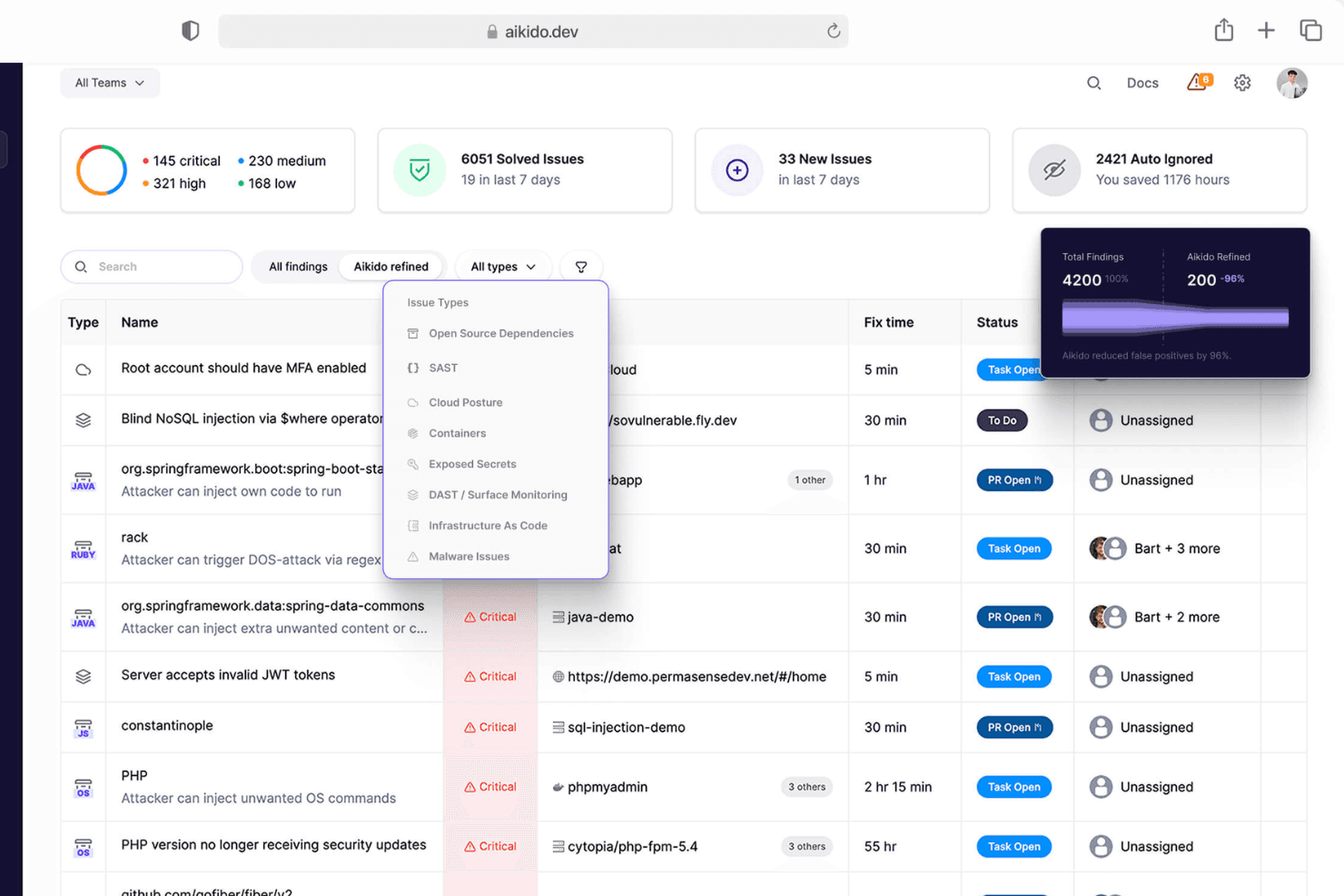
Aikido Security provides a unified dashboard to triage and filter issues by type, severity, and scan source. Aikido Security is a platform that scans your source code to identify security vulnerabilities before they become issues. By analyzing your codebase, it detects weaknesses like SQL injection, cross-site scripting (XSS), and buffer overflows, providing clear guidance on how to address them.
Why I Picked Aikido Security: Aikido's SAST engine focuses exclusively on security, filtering out non-security issues such as code readability and style. This means you'll only receive alerts that matter, reducing distractions and allowing your team to concentrate on genuine vulnerabilities. Additionally, Aikido supports all major programming languages, ensuring comprehensive coverage across diverse codebases.
Standout Features & Integrations:
Other features include an AI-powered auto-triage system that prioritizes vulnerabilities, dismisses false positives, and provides actionable advice. It also offers dependency scanning, integrated IDE support, runtime protection, cloud posture management, open source dependency scanning, secrets detection, and infrastructure as code scanning.
Integrations include Amazon Web Services (AWS), Google Cloud, Microsoft Azure Cloud, Drata, Vanta, AWS Elastic Container Registry, Docker Hub, Jira, Asana, and GitHub.
Pros and Cons
Pros:
- Has a comprehensive dashboard and customizable reports
- Offers actionable insights
- Scalable for growing teams
Cons:
- Custom SAST rules must be enabled by Aikido
- Excludes unfixed CVEs by default in ephemeral container scans
Learn more about Aikido Security: Best for zero-noise risk prioritization
- Free plan + free demo available
- From €3,300/year (billed annually)

Xygeni SAST dashboard displaying prioritized vulnerabilities by severity, with a detailed SQL injection issue view showing CWE classification, propagation path, and AI-assisted remediation options. For developers and security teams seeking a reliable solution for static application security testing, Xygeni provides AI-powered SAST, contextual risk analysis, and AI-assisted remediation across application code and the software supply chain. It's designed to help you detect vulnerabilities early, prioritize them based on real-world exposure, and address them directly within your development workflows. The platform focuses on reducing alert noise while improving the accuracy of security triage.
Why I Picked Xygeni
I picked Xygeni because of its zero-noise risk prioritization powered by AI-driven triage and contextual analysis. The platform evaluates vulnerabilities based on reachability, exploitability, dependency context, and exposure analysis, helping your team focus on issues that pose real risk rather than surface-level findings. Its AI-assisted remediation capabilities also help resolve certain issues automatically, reducing manual effort and supporting faster secure development cycles.
Xygeni Key Features
In addition to its standout features, Xygeni offers other capabilities that cater to your security needs:
- AI Triage & Customizable Risk Funnel: Automatically triages findings and allows you to tailor prioritization criteria based on your environment and risk tolerance.
- Context-Based Prioritization: Uses reachability, exploitability, dependency analysis, and exposure context to rank vulnerabilities according to actual risk.
- AI-powered SAST: Scans source code for vulnerabilities and provides remediation guidance within IDEs and pull requests.
- Real-Time Malware Detection in Application Code: Scans proprietary and open-source code to identify malicious behaviors, suspicious patterns, and software supply chain threats.
- Automated Asset Inventory: Maintains an up-to-date inventory of software components and dependencies across projects.
Xygeni Integrations
Integrations include GitHub, GitLab, Jenkins, Azure DevOps, Bitbucket, Slack, Jira, and GitHub Ticketing.
Pros and Cons
Pros:
- Real-time detection minimizes security risk
- Function-level analysis prioritizes vulnerabilities
- Privacy-first scanning ensures data safety
Cons:
- Limited integrations compared to competitors
- Pricing may be steep for some teams
Learn more about Xygeni: Best for reducing false positives
- Free plan available
- From $200/month
Visit WebsiteCustomer Rating:4.5/5
Zeropath offers a comprehensive dashboard for monitoring application security. For organizations striving to fortify their application security, Zeropath offers a sophisticated AI-driven Static Application Security Testing (SAST) solution. Ideal for innovative companies, this platform excels in identifying and auto-fixing code vulnerabilities, compliance violations, and security issues, offering a seamless integration into your existing development workflow.
Why I Picked Zeropath
I picked Zeropath for its AI-powered approach to static application security testing, which stands out in its ability to drastically reduce false positives. This feature is crucial for development teams seeking accuracy and efficiency in vulnerability detection. Additionally, its seamless integration with developer tools such as GitHub and GitLab provides instant feedback and AI-generated fixes, streamlining the security review process. Zeropath's ability to offer contextual triage further ensures that your team can prioritize and address the most critical vulnerabilities swiftly.
Zeropath Key Features
Aside from its standout AI capabilities, Zeropath offers several other valuable features:
- Deep Vulnerability Detection: The platform thoroughly scans code to identify complex security vulnerabilities that might be missed by other tools.
- Risk Management Capabilities: It provides a comprehensive view of potential security risks, allowing your team to manage and mitigate them effectively.
- Compliance Reporting: Zeropath includes robust compliance reporting tools to help your organization stay aligned with industry standards and regulations.
- Executive Dashboards: These dashboards offer high-level insights into your security posture, facilitating informed decision-making for stakeholders.
Zeropath Integrations
Integrations include GitHub, GitLab, Bitbucket, Jira, Slack, Linear, and Azure DevOps.
Pros and Cons
Pros:
- It catches logic flaws and hidden risks you might miss in normal scans.
- Cuts down noisy findings so your team can focus on real issues.
- Gives you clear fixes that speed up your security reviews.
Cons:
- Potential for missed vulnerabilities if AI is not configured correctly.
- You may need time to adjust your workflow around its automation.
Learn more about Zeropath: Best for advanced taint analysis
- Free trial available
- Pricing upon request
Visit WebsiteCustomer Rating:4.4/5
SonarQube is a SAST platform that automates code analysis and detects vulnerabilities across languages. SonarQube is a static application security testing (SAST) platform that delivers automated code analysis, vulnerability detection, and customizable rule enforcement across a wide range of programming languages. It integrates into development workflows to help teams identify and remediate security issues before deployment.
Who Is SonarQube Best For?
Development and DevOps teams in midsize to large organizations that require automated code security and quality checks integrated into CI/CD pipelines.
Why I Picked SonarQube
I picked SonarQube for its advanced taint analysis capabilities, which help detect data flow vulnerabilities across applications. It identifies how untrusted inputs move through code and highlights potential injection risks or unsafe patterns. Combined with customizable quality gates, this allows teams to enforce security standards before merging code.
SonarQube Key Features
- Multi-language support: Analyze code in over 30 programming languages from a single platform.
- Quality gates: Enforce pass/fail standards for security and maintainability before merging.
- Pull request analysis: Scan pull requests and surface issues directly in version control workflows.
- Custom rule creation: Build and apply organization-specific static analysis rules.
SonarQube Integrations
SonarQube integrates with GitHub, GitLab, Bitbucket, Azure DevOps, Jenkins, and Bamboo. It supports CI/CD workflows and provides an API for custom integrations.
Pros and Cons
Pros:
- Integrates with major CI/CD platforms
- Offers customizable quality gates and rules
- Detects security vulnerabilities in multiple languages
Cons:
- Configuration can be complex for large projects
- Advanced features require paid editions
Learn more about SonarQube: Best for real-time threat detection
- 15-day free trial + demo available
- From $7/month (billed annually)
Visit WebsiteCustomer Rating:4.5/5
Dynatrace static application security testing tool Dynatrace offers a sophisticated application performance and monitoring solution, designed not only to gauge performance but also to identify and address security threats in real time. The platform's commitment to instantaneous threat detection makes it a crucial asset for businesses aiming to maintain a secure digital environment without compromising on agility.
Why I Picked Dynatrace: When determining which tools to include on this list, the immediacy with which Dynatrace operates caught my attention. In comparing various platforms, I found that the real-time aspect of Dynatrace's threat detection was both unique and invaluable.
Considering the evolving nature of cyber threats and the need for businesses to respond promptly, I came to the conclusion that Dynatrace stands out as "best for real-time threat detection."
Standout Features & Integrations:
Dynatrace shines with features like full-stack monitoring, root cause analysis, and AI-assisted problem resolution, which not only detect but also aid in mitigating threats swiftly.
When it comes to integrations, Dynatrace offers compatibility with a host of cloud platforms, CI/CD tools, and container orchestration systems, ensuring security oversight across diverse environments.
Pros and Cons
Pros:
- Robust integration capabilities with popular cloud and DevOps tools
- Comprehensive full-stack monitoring provides deep insights
- AI-assistance aids in quick threat mitigation
Cons:
- Pricing might not align with smaller budgets
- The vast array of features could pose an initial learning challenge
- Might be overkill for smaller-scale operations
 6Best for open-source code insights
Snyk
- Free plan + free demo available
- From $25/contributing developer/month
Visit WebsiteCustomer Rating:4.6/5
Snyk's insights dashboard Snyk is a prominent security platform tailored to detect and resolve vulnerabilities in open-source libraries and containers. By focusing on the nuances of open-source codebases, Snyk provides teams with invaluable insights, ensuring safer application development and deployment.
Why I Picked Snyk: I chose Snyk after closely comparing several tools that cater to open-source security. Snyk distinctly stood out because of its in-depth vulnerability database and the clarity of its code insights. These unique features positioned Snyk as a tool that is undeniably "best for open-source code insights."
Standout Features & Integrations:
At the core of Snyk's offering is its expansive vulnerability database that is regularly updated, allowing for precise and timely threat detection. Additionally, Snyk offers license compliance checks and remediation advice, which are invaluable for open-source projects.
Integration-wise, Snyk supports a broad spectrum of platforms, from GitHub and Bitbucket to popular CI/CD pipelines, ensuring that security checks are easily incorporated into development workflows.
Pros and Cons
Pros:
- Extensive integration capabilities streamline the development process
- License compliance features ensure legal protection
- Comprehensive vulnerability database tailored for open-source projects
Cons:
- Without clear pricing details, budgeting can be challenging
- The depth of insights might overwhelm newcomers
- Targeted primarily at open-source projects, which might not be suitable for all types of applications
Learn more about Snyk: Best for integrated DevOps security
- Free plan available
- From $29/user/month (billed annually)

GitLab security dashboard GitLab is a comprehensive DevOps platform that consolidates source code management, continuous integration, and continuous delivery (CI/CD) into one interface. Its inclusion of built-in security functionalities ensures that the software development process remains safeguarded at every stage, making it ideal for teams desiring an integrated security solution.
Why I Picked GitLab: In my quest to find an all-encompassing DevOps tool with a keen emphasis on security, GitLab emerged as a frontrunner. Its unified approach to the software development lifecycle and inbuilt security components differentiate it from many standalone tools. The way GitLab merges development and security easily is the key reason I believe it's "best for integrated DevOps security."
Standout Features & Integrations:
GitLab offers automated security scans in its CI/CD pipelines, ensuring code is assessed for vulnerabilities before deployment. Additionally, its container security capabilities protect Docker containers and Kubernetes clusters.
As for integrations, GitLab supports a vast array of tools such as Jenkins, JIRA, and Kubernetes, allowing teams to preserve their existing tech stacks while leveraging GitLab's capabilities.
Pros and Cons
Pros:
- Vast integration possibilities with popular development tools
- Robust container security features for modern application deployment
- Consolidated DevOps and security in a singular platform
Cons:
- Some advanced security features are restricted to higher pricing tiers
- Performance might vary depending on the scale of the projects
- Steeper learning curve due to its comprehensive feature set
Learn more about GitLab:

Synopsys application security testing tool reports and dashboards Synopsys delivers a comprehensive application security platform that caters to various aspects of software assurance, from code analysis to threat intelligence. The holistic nature of its offerings ensures that companies have a thorough overview and can address vulnerabilities at every stage of the software lifecycle.
Why I Picked Synopsys: In the process of selecting tools for this compilation, Synopsys distinguished itself with its all-encompassing approach to application security. Through my research and comparison, I identified its capability to provide an end-to-end solution as a primary differentiator.
With the growing need for businesses to ensure robust security across the entirety of their application's life, I believe Synopsys genuinely fits the bill as "best for holistic application security."
Standout Features & Integrations:
At its core, Synopsys boasts features like static code analysis, software composition analysis, and penetration testing. These facilitate early and continuous detection of vulnerabilities. Integration-wise, Synopsys collaborates smoothly with a range of development and operation tools, ensuring that security becomes an inherent part of the software delivery process.
Pros and Cons
Pros:
- Integrates well with popular DevOps tools
- Supports early detection of vulnerabilities with its static code analysis
- Provides a comprehensive suite of application security tools
Cons:
- The breadth of tools might lead to redundancy for certain use cases
- Comprehensive features could be overwhelming for smaller teams
- May have a steeper learning curve for beginners
Learn more about Synopsys: Best for scalable enterprise solutions
- Free demo available
- From $29/user/month (billed annually)

HCL AppScan dashboard HCL AppScan is a comprehensive software security solution that aids enterprises in identifying, fixing, and preventing vulnerabilities in their applications. As organizations grow, their need for scalable security solutions increases, positioning AppScan as a vital tool for large-scale businesses.
Why I Picked HCL AppScan: In comparing various security tools, I found that HCL AppScan offers robust features suitable for large enterprises. Its unique selling proposition lies in its ability to scale as the organization grows, ensuring security without impeding growth. I'm confident that it's "best for scalable enterprise solutions" given its track record and capacity to handle expansive security demands.
Standout Features & Integrations:
HCL AppScan offers dynamic and static application security testing, ensuring that apps are safe at both the code and runtime levels. Additionally, its Interactive Application Security Testing (IAST) bridges the gap between static and dynamic testing.
For integrations, AppScan provides connections with CI/CD pipelines, thus promoting secure DevOps practices.
Pros and Cons
Pros:
- Designed for scalability, making it suitable for large organizations
- Efficient integration with CI/CD tools
- Supports both dynamic and static application security testing
Cons:
- The expansive feature set can be intimidating for new users
- Requires skilled personnel for optimal utilization
- Might be an overkill for small businesses or startups
Learn more about HCL AppScan:

GitGuardian activity overview GitGuardian specializes in monitoring codebases and detecting inadvertent leaks of sensitive information, such as API keys or credentials. With an increasing number of breaches originating from exposed secrets in public repositories, GitGuardian serves as a critical line of defense for organizations.
Why I Picked GitGuardian: I selected GitGuardian after a meticulous examination of several tools aimed at safeguarding code repositories. GitGuardian's focused approach to identifying exposed secrets and its robust detection algorithms made it a clear front-runner. Its precision in pinpointing potential data leaks is why I believe it is "best for detecting sensitive data leaks."
Standout Features & Integrations:
One of GitGuardian's most crucial features is its ability to continuously scan public and private repositories for over 200 types of secrets. Furthermore, its incident response platform allows teams to act promptly on detected vulnerabilities.
In terms of integrations, GitGuardian smoothly connects with platforms like GitHub, GitLab, and Bitbucket, ensuring comprehensive coverage across various development environments.
Pros and Cons
Pros:
- Swift incident response platform ensures timely action on vulnerabilities
- Supports both public and private repository scans
- Dedicated focus on detecting sensitive data leaks
Cons:
- Dependency on third-party integrations might affect detection efficacy in non-supported platforms
- Without transparent pricing, it may be challenging for teams to budget accurately
- The specificity of the tool may not cater to broader security needs
Learn more about GitGuardian:
Alte instrumente remarcabile de testare statică a securității aplicațiilor
Mai jos este o listă cu instrumente suplimentare de testare statică a securității aplicațiilor pe care le-am selectat, dar care nu au ajuns în primele 12. Merită cu siguranță să le analizați.
- 11Parasoft JTestBest for Java application testing
- 12CodePeerBest for in-depth Ada language analysis
- 13Legit SecurityBest for unified security control
- 14GuardRailsBest for continuous security feedback
- 15EmboldBest for identifying anti-patterns
- 16Mend.ioBest for modern web app security
- 17GitHubGood for native integration with repository management
- 18AppknoxGood for mobile app security checks
- 19CheckmarxGood for comprehensive vulnerability detection
- 20DeepSourceGood for continuous analysis in CI/CD
- 21KlocworkGood for architectural risk analysis
- 22Qualys Web Application ScanningGood for cloud-based web app scans
- 23SemgrepGood for custom rule creation
- 24Contrast SecurityGood for real-time code analysis
Criterii de selecție pentru alegerea celor mai bune instrumente de testare statică a securității aplicațiilor
În căutarea celor mai bune instrumente de testare statică a securității aplicațiilor, nu m-am mulțumit cu evaluări superficiale. Am analizat în profunzime, testând și cercetând numeroase instrumente pentru a identifica cele mai valoroase soluții din acest domeniu. În urma acestei evaluări extinse, am identificat câteva criterii esențiale, funcționalitatea specifică aflându-se în centrul procesului meu de selecție.
Iată o analiză detaliată a aspectelor pe care le-am considerat cele mai importante:
Funcționalități de bază
- Detectarea vulnerabilităților: Scopul principal al oricărui instrument SAST. Acesta ar trebui să identifice eficient și cu precizie potențialele breșe de securitate din codul sursă.
- Compatibilitatea cu baza de cod: Capacitatea de a scana mai multe limbaje de programare și cadre de dezvoltare, pentru a vă asigura că nicio parte a aplicației nu rămâne neverificată. Aceasta înseamnă că, indiferent dacă securizați instrumente de analiză statică a codului pentru Java sau Python, software-ul rămâne compatibil.
- Integrarea continuă: Integrare facilă în fluxul CI/CD, permițând verificări regulate și automatizate ale codului ca parte a procesului de dezvoltare.
- Prioritizarea riscurilor: Nu este suficientă doar identificarea vulnerabilităților; acestea trebuie și clasificate în funcție de gravitate, pentru a aborda mai întâi problemele critice.
Funcționalități principale
- Crearea de reguli personalizate: Le permite utilizatorilor să își definească propriul set de reguli, adaptat nevoilor specifice ale aplicației.
- Scanarea codului binar: Unele instrumente oferă posibilitatea de a evalua aplicațiile compilate, analizându-le fără codul sursă original.
- Răspuns în timp real: Răspunsul imediat, oferit pe măsură ce dezvoltatorii scriu sau trimit codul, încurajează o abordare proactivă a securității.
- Scanări bazate pe cloud: Oferă flexibilitate și scalabilitate, aspecte deosebit de importante pentru întreprinderile mari sau pentru organizațiile cu echipe distribuite.
Utilizabilitate
- Panou intuitiv: Pentru un instrument SAST, reprezentarea vizuală a vulnerabilităților, completată cu căi către fișiere și diagrame ale nivelurilor de severitate, este esențială. Aceasta ajută la înțelegerea rapidă a nivelului de securitate al aplicației.
- Puncte de integrare simple: Instrumentele SAST ar trebui să ofere integrări directe cu mediile de dezvoltare integrate și sistemele populare de control al versiunilor, reducând conflictele din procesul de dezvoltare.
- Acces bazat pe roluri: Se asigură că accesul la rezultatele scanărilor și la configurații este limitat la personalul autorizat, consolidând securitatea în cadrul instrumentului de securitate.
- Documentație cuprinzătoare: Având în vedere natura tehnică a acestor instrumente, o bază de cunoștințe cuprinzătoare, care să includă cazuri de utilizare comune și sfaturi pentru depanare, este esențială pentru familiarizarea utilizatorilor și pentru asistența continuă.
Cele mai frecvente întrebări referitoare la instrumentele de testare statică a securității aplicațiilor (FAQ)
Care sunt avantajele utilizării unui instrument SAST?
Utilizarea unui instrument SAST oferă mai multe avantaje:
- Detectare timpurie: Identificarea vulnerabilităților într-o etapă timpurie a ciclului de viață al dezvoltării, chiar înainte de rularea codului.
- Eficiență din punct de vedere al costurilor: Remedierea problemelor într-o etapă timpurie este, de obicei, mai puțin costisitoare decât rezolvarea lor după implementare.
- Îmbunătățirea nivelului de securitate: Obținerea unei imagini cuprinzătoare asupra securității aplicației, ceea ce permite o gestionare mai bună a riscurilor.
- Educația dezvoltatorilor: Feedbackul în timp real îi informează pe dezvoltatori cu privire la cele mai bune practici de securitate, îmbunătățind standardele de programare.
- Conformitate cu reglementările: Multe instrumente ajută la îndeplinirea cerințelor de conformitate în materie de securitate specifice industriei.
Cât costă de obicei aceste instrumente?
Costul instrumentelor SAST poate varia semnificativ în funcție de funcționalitatea, scalabilitatea și piața țintă a acestora (companii versus dezvoltatori individuali). Prețurile pot varia de la câțiva dolari pe lună pentru instrumentele de bază până la câteva mii de dolari pe an pentru soluțiile destinate companiilor.
Care sunt modelele obișnuite de tarifare pentru instrumentele SAST?
Furnizorii de soluții SAST folosesc mai multe modele de tarifare:
- Per utilizator/dezvoltator: Tarifarea se bazează pe numărul de utilizatori sau dezvoltatori care accesează instrumentul.
- Per scanare: Se percepe un tarif în funcție de numărul de scanări efectuate.
- Pe bază de abonament: Abonamente lunare sau anuale care oferă scanări nelimitate pe durata perioadei respective.
- Tarifare pe niveluri: Niveluri de tarifare diferite în funcție de funcții, de numărul de scanări sau de dimensiunea bazei de cod.
Care este intervalul de prețuri obișnuit pentru aceste instrumente?
Intervalul de prețuri poate fi foarte larg. Pentru dezvoltatorii individuali sau proiectele mici, prețurile pot începe de la doar 10-50 $ pe lună. Pentru companiile mai mari sau instrumentele mai cuprinzătoare, acestea pot varia între 1.000 și 5.000 $ pe an sau chiar mai mult.
Care sunt unele dintre cele mai ieftine și cele mai scumpe opțiuni software?
Printre cele mai accesibile opțiuni se numără instrumente precum Semgrep sau DeepSource, care oferă prețuri competitive pentru dezvoltatorii individuali sau echipele mici. Pe de altă parte, soluțiile destinate companiilor, precum Checkmarx sau Veracode Static Analysis, tind să se situeze la limita superioară a spectrului datorită gamei extinse de funcții și scalabilității lor.
Există opțiuni gratuite de instrumente SAST?
Da, există instrumente SAST gratuite, adesea sub forma unor proiecte cu sursă deschisă. De exemplu, Semgrep oferă un nivel gratuit și există și alte opțiuni cu sursă deschisă, precum FlawFinder sau Brakeman pentru aplicațiile Ruby on Rails. Cu toate acestea, versiunile gratuite pot avea limitări în ceea ce privește funcțiile sau numărul de scanări.
Tarifarea acestor instrumente este o taxă unică sau recurentă?
Majoritatea instrumentelor SAST adoptă un model de tarifare recurent, fie lunar, trimestrial sau anual. Unele pot oferi opțiuni de achiziție unică, însă acestea sunt mai puțin frecvente în industrie.
Aceste instrumente oferă de obicei perioade de probă sau demonstrații?
Da, multe instrumente SAST oferă perioade de probă, permițând utilizatorilor să le testeze funcțiile și eficiența înainte de a lua o decizie de achiziție. Această etapă de probă poate dura de la o săptămână până la o lună, în funcție de instrument.
Alte recenzii ale software-ului pentru testarea securității
Rezumat
Selectarea celui mai bun instrument de testare statică a securității aplicațiilor (SAST) este un pas esențial pentru asigurarea securității codului sursă al unei aplicații. În acest ghid, am analizat în profunzime funcționalitățile de bază, caracteristicile esențiale, aspectele legate de utilizare și criteriile importante care contează cel mai mult atunci când alegeți soluția SAST potrivită.
Dincolo de simpla identificare a vulnerabilităților, instrumentul potrivit poate oferi informații neprețuite, poate încuraja obiceiuri mai bune de programare în rândul dezvoltatorilor și poate asigura conformitatea cu reglementările.
Concluzii principale
- Detectarea timpurie este importantă: Principalul avantaj al instrumentelor SAST este capacitatea lor de a detecta vulnerabilitățile într-o etapă timpurie a ciclului de dezvoltare, ceea ce reduce costurile și îmbunătățește nivelul general de securitate.
- Utilizabilitate și experiența utilizatorului: Dincolo de funcționalitate, luați în considerare designul instrumentului, ușurința integrării, interfața și asistența pentru clienți. Un instrument SAST eficient ar trebui să se integreze în fluxul de lucru al dezvoltatorului.
- Preț versus valoare: Deși prețul este un aspect esențial, este important să evaluați costul în raport cu valoarea oferită. Unele instrumente pot fi costisitoare, însă funcțiile lor cuprinzătoare, scalabilitatea și precizia pot oferi un randament mai mare al investiției.
Ce părere aveți?
Deși am efectuat cercetări și teste ample pentru a alcătui această listă, domeniul testării statice a securității aplicațiilor este vast și în continuă evoluție. Dacă ați găsit utile alte instrumente de testare statică a aplicațiilor sau de analiză a compoziției software pe care nu le-am inclus, mi-ar plăcea să aflu părerea dumneavoastră. Vă rugăm să împărtășiți sugestiile sau experiențele în comentarii și să facem împreună această resursă și mai cuprinzătoare pentru toată lumea. Perspectivele dumneavoastră ar putea fi esențiale pentru a-i ajuta pe alții să găsească instrumentul SAST ideal.