

Å holde skyinfrastrukturen i jevn drift handler ikke bare om oppetid – det handler om å oppdage ytelsesproblemer før de påvirker brukerne, sikre skalerbarhet uten sløsing og opprettholde oversikt på tvers av komplekse miljøer. Hvis du noen gang har slitt med uforklarlige tregheter, uventede driftsavbrudd eller manglende innsikt i sanntid, vet du hvor vanskelig det kan være å ligge i forkant av problemene uten de riktige overvåkingsverktøyene.
Verktøy for overvåking av skyinfrastruktur gir en sentralisert måte å følge med på applikasjonsytelse, nettverksaktivitet og ressursutnyttelse på tvers av skymiljøer. I løpet av årene har jeg testet et bredt utvalg av slike verktøy og vurdert hvor godt de oppdager problemer, reduserer responstid og integreres med eksisterende arbeidsflyter. I denne veiledningen går jeg gjennom de beste tilgjengelige alternativene, slik at du kan finne en løsning som passer behovene dine for skyovervåking.
Why Trust Our Software Recommendations
6,700+
Reviews
20
Industry experts
16+
Evaluation factors
14
Years
Our team has been testing and reviewing software since 2012. As tech leaders ourselves, we know how difficult—and important—it is to choose the right software.
For this guide, we evaluated tools using hands-on testing and independent research, scoring tools using our selection criteria.
Our reviews reflect our human editorial judgment, not a sales pitch.
Expert reviewers:
- Paulo Gardini MiguelTech Director
 Tim FisherVP of AI
 Gabriel RosasTech Lead & Software Architect
 Christhian GruhnTech Lead & Platform Architect

Sammenligningstabell: Verktøy for overvåking av skyinfrastruktur
| Tool | Best For | Trial Info | Price | ||
|---|---|---|---|---|---|
| 1 | Best for customizable multi-layer dashboards | 30-day free trial + free plan available | From $200/month (billed annually) | Website | |
| 2 | Best for synthetic transaction tests | 30-day free trial | From $3/device/month | Website | |
| 3 | Best for application performance monitoring | 30-day free trial + free demo + free plan availabl | From $199/year | Website | |
| 4 | Best for AI-assisted monitoring | 15-day free trial | From $7/month | Website | |
| 5 | Best for full-stack observability | Free plan available | From $15/month (billed annually) | Website | |
| 6 | Best for hybrid IT infrastructure monitoring | 14-day free trial | Pricing upon request | Website | |
| 7 | Best for detailed health metrics | Free plan available | From $10/user/month | Website | |
| 8 | Best for Infrastructure as Code (IaC) approach | Yes | From $20/user/month | Website | |
| 9 | Best for IBM Cloud environment | No | From $10 per million metrics ingested/month | Website | |
| 10 | Good for unified application and infrastructure data | 30-day free trial available | From $7/node/month | Website |


Anmeldelser av de beste verktøyene for overvåking av skyinfrastruktur
Nedenfor finner du mine detaljerte sammendrag av de beste verktøyene for overvåking av skyinfrastruktur som kom med på kortlisten min. Anmeldelsene mine gir en detaljert gjennomgang av de viktigste funksjonene, fordelene & ulempene, integrasjonene og de ideelle bruksområdene for hvert verktøy, slik at du kan finne det som passer best for deg.
 Best for customizable multi-layer dashboards
- 30-day free trial + free plan available
- From $200/month (billed annually)
Visit WebsiteCustomer Rating:4.6/5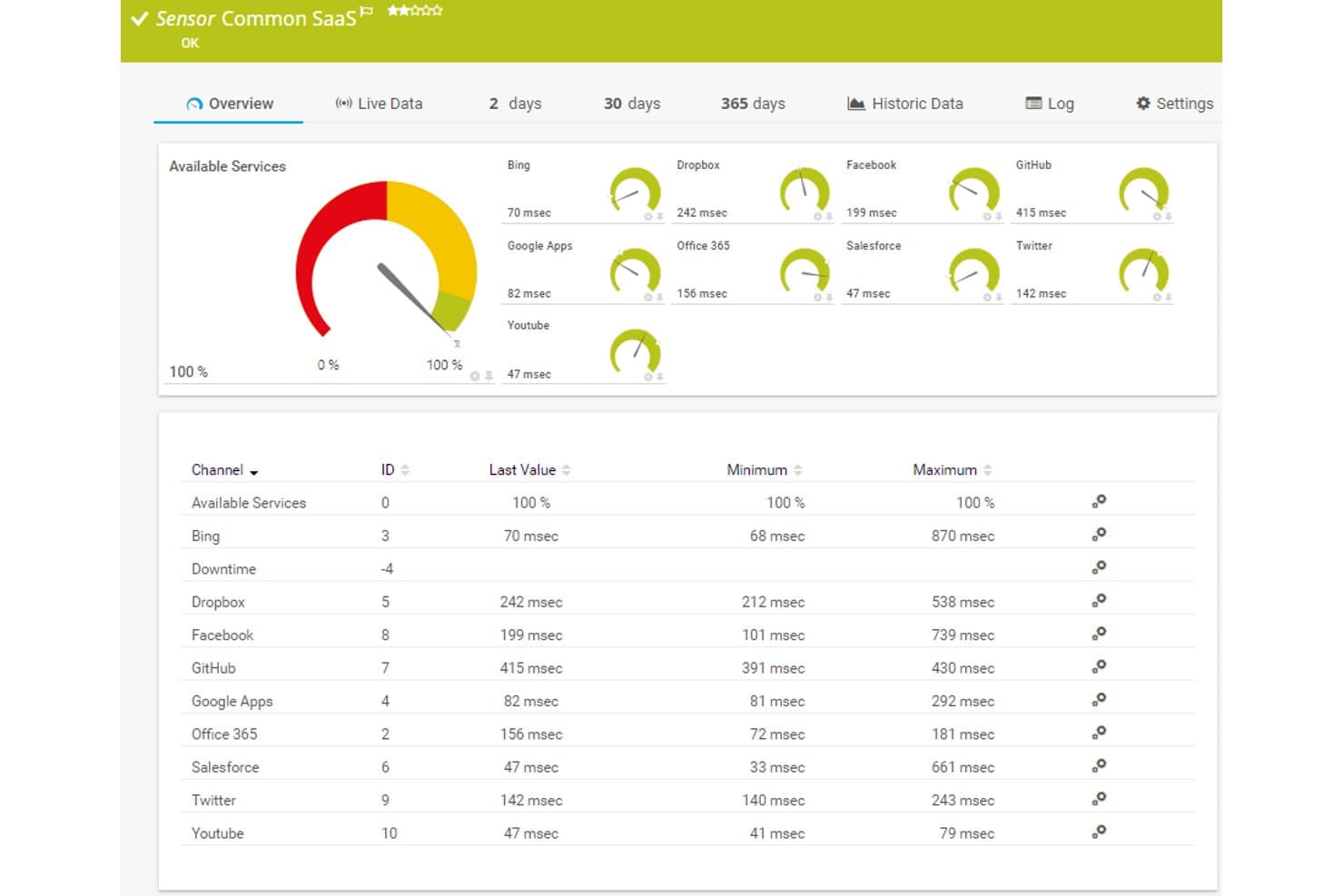
Paessler PRTG offers a Common SaaS sensor dashboard displaying real-time response times and availability for cloud services like Dropbox, Office 365, Salesforce, and GitHub. Paessler PRTG is an infrastructure monitoring platform that tracks network devices, servers, cloud services, and applications using a sensor-based approach across both on-premises and hosted cloud environments.
Who Is Paessler PRTG Best For?
IT operations teams at mid-sized organizations managing hybrid environments who need centralized visibility across network, server, and cloud infrastructure.
Why I Picked Paessler PRTG
I picked Paessler PRTG as one of the best because its dashboard builder genuinely stands apart from most monitoring tools. The drag-and-drop map designer gives me access to 300+ widgets, from traffic charts to device status icons, and I can layer custom HTML elements to build multi-layer views that reflect exactly how my infrastructure is organized. I also use the map rotation feature to cycle through different infrastructure perspectives on a single display.
Paessler PRTG Key Features
- Sensor-based monitoring: Allows you to track specific metrics for devices, applications, and cloud services.
- AWS-hosted probe support: Lets you monitor global environments without maintaining on-premises infrastructure.
- Multi-platform probe: Deploys on Windows, Linux, Raspberry Pi, or NAS for flexible agent coverage.
- Scheduled reporting: Generates and emails automated reports for performance data, trends, and SLA metrics.
Paessler PRTG Integrations
Paessler PRTG offers native integrations with AWS, Microsoft Azure, Google Cloud Platform, VMware vSphere, and Microsoft 365. An API is available for custom integrations, and it supports webhooks for alerting to channels like Slack and Microsoft Teams.
Pros and Cons
Pros:
- Deep SNMP and flow protocol support
- Supports hybrid cloud and on-premises environments
- Highly granular sensor-based metric collection
Cons:
- Sensor count limits drive up costs
- Weaker native cloud observability than competitors
Learn more about Paessler PRTG: Best for synthetic transaction tests
- 30-day free trial
- From $3/device/month
Visit WebsiteCustomer Rating:4.7/5
Site24x7 tracks multi-step web transactions to monitor performance and availability. For businesses managing complex cloud infrastructure, Site24x7 offers a monitoring solution that includes synthetic transaction testing to help track service availability and performance. It serves IT teams and organizations that need clear visibility into their cloud environments, helping address issues such as performance slowdowns, resource use, and incident response. With coverage across major cloud platforms and a range of monitoring features, Site24x7 helps teams maintain stable operations and consistent user experience.
Why I Picked Site24x7
I picked Site24x7 for its synthetic transaction tests, which help monitor service availability by simulating user and system workflows. The platform also supports major cloud environments and includes application performance monitoring to track application behavior and identify issues. Its automation features assist with incident handling, helping teams respond faster and manage resources more effectively.
Site24x7 Key Features
In addition to synthetic transaction tests, Site24x7 offers:
- Real User Monitoring (RUM): This feature provides insights into the actual user experience by tracking and analyzing user interactions with your applications.
- Log Management: With this feature, you can aggregate and analyze logs from various sources to gain a comprehensive view of your system's health.
- Network Monitoring: It provides visibility into network performance, helping you troubleshoot connectivity issues and optimize your network infrastructure.
Site24x7 Integrations
Integrations include Slack, ServiceNow, Moogsoft, Jira, PagerDuty, Freshservice, Microsoft Teams, Amazon EventBridge, Zapier, and ManageEngine Analytics Plus.
Pros and Cons
Pros:
- AI-powered full-stack monitoring supports multicloud infrastructure management
- Comprehensive monitoring for various systems
- Flexible monitoring integrates easily with multiple infrastructure components
Cons:
- Alert bugs cause issues when adding new monitoring configurations
- Complex configuration slows initial setup and platform understanding
Learn more about Site24x7: Best for application performance monitoring
- 30-day free trial + free demo + free plan availabl
- From $199/year
Visit WebsiteCustomer Rating:4.3/5
ManageEngine Applications Manager has features such as alarms for monitored data and infrastructure snapshots to give out maximum monitoring solutions. It can be further checked on its default dashboard. ManageEngine Applications Manager is a robust tool providing end-to-end performance monitoring for a broad spectrum of applications, databases, servers, and systems. It is particularly adept at providing insights into application performance, which makes it an optimal solution for application performance monitoring.
Why I Picked ManageEngine Applications Manager:
In selecting ManageEngine Applications Manager for this list, I took into account its comprehensive ability to monitor and manage applications across a variety of environments. It differentiates itself by providing detailed insights about application performance, aiding in rapid problem detection and resolution.
Accordingly, I deemed it the "best for application performance monitoring" due to its superior capabilities in this specific area.
Standout Features and Integrations:
Some of the standout features of ManageEngine Applications Manager include its application discovery capability, deep-dive component monitoring, and smart automation. These features allow for robust monitoring and automated problem resolution, ensuring application performance remains optimal.
As for integrations, ManageEngine Applications Manager can integrate with various applications, servers, and databases, such as Oracle, MySQL, Microsoft SQL Server, SAP, and many more.
Pros and Cons
Pros:
- Intelligent automation for problem resolution
- Broad compatibility with various applications, servers, and databases
- Detailed application performance monitoring
Cons:
- Interface may not be as user-friendly as some alternatives
- High starting cost could be a barrier for smaller companies
- Can be complex to set up and configure
Learn more about ManageEngine Applications Manager:

Dynatrace provides full-stack observability making it one of the best tools for infrastructure monitoring. Take a look at its main dashboard. Dynatrace is a software intelligence platform that provides application performance management (APM), artificial intelligence for operations (AIOps), digital experience management (DEM), and cloud infrastructure monitoring. The tool's AI-assisted capabilities offer accurate and real-time insights, making it particularly well-suited for AI-assisted monitoring.
Why I Picked Dynatrace:
In compiling this list, I was drawn to Dynatrace's strong artificial intelligence components. This tool differentiates itself by providing robust, AI-powered operational insights. Its ability to continuously monitor and analyze performance data across all layers and technologies of an application makes it the best for AI-assisted monitoring.
Standout Features and Integrations:
Dynatrace's most significant feature is Davis, its AI assistant, which automatically identifies and provides solutions for potential issues in real time. Its automatic and dynamic baselining feature also stands out, enabling the tool to understand normal behavior patterns and quickly spot anomalies.
For integrations, Dynatrace works with a wide range of technologies, including AWS, Azure, Google Cloud, Oracle, and more. It also has API integration capabilities, allowing users to extend their monitoring and analytics beyond the tool.
Pros and Cons
Pros:
- Dynamic and automatic baselining
- Extensive cloud and technology integrations
- Comprehensive AI-assisted capabilities
Cons:
- Some customization options require advanced technical skills
- Steeper learning curve for new users
- Pricing can be complex due to different modules
 Best for full-stack observability
- Free plan available
- From $15/month (billed annually)
Visit WebsiteCustomer Rating:4.5/5
One great feature of Datadog is its customizable dashboard which enables personalization to better fit your infrastructure monitoring solutions. Datadog is a monitoring service that provides full-stack observability across an organization's entire technology stack, from servers and databases to applications. It aligns perfectly with businesses seeking comprehensive visibility into their technology stack, thereby justifying its position as "Best for full-stack observability".
Why I Picked Datadog:
I chose Datadog because it offers an all-in-one approach to monitoring and observability. This tool is unique because it not only monitors systems but also allows for comprehensive troubleshooting, providing insights into servers, databases, and applications.
For this reason, I judged Datadog as "Best for..." full-stack observability, as it provides a holistic view of an organization's IT infrastructure.
Standout Features and Integrations:
Datadog's standout features include real-time monitoring, anomaly, and outlier detection, and full API availability. Furthermore, it provides visualizations to analyze and explore data interactively. Critical integrations include cloud services like AWS, GCP, and Azure, along with many other technologies such as Docker, Elasticsearch, and more, making it even more efficient for businesses running a diverse technology stack.
Pros and Cons
Pros:
- Robust alerting and reporting capabilities
- Rich integration ecosystem
- Provides full-stack observability
Cons:
- UI could be more intuitive for new users
- Advanced features may be costly
- Can be complicated to set up initially
 Best for hybrid IT infrastructure monitoring
- 14-day free trial
- Pricing upon request
Visit WebsiteCustomer Rating:4.5/5
Here's an overview of how the interface of LogicMonitor is designed for ease of use. LogicMonitor is a SaaS-based, automated IT performance monitoring platform that provides comprehensive visibility into complex IT infrastructure. Given its capacity to handle both on-premises and cloud environments, it stands as a top choice for monitoring hybrid IT infrastructures.
Why I Picked LogicMonitor:
When selecting a tool that excels in monitoring hybrid IT infrastructure, LogicMonitor was my pick. Its versatility in supporting a wide range of infrastructures, including cloud, on-premises, and hybrid systems, sets it apart. I determined LogicMonitor as the best for hybrid IT infrastructure monitoring due to its automated device discovery feature and ability to handle diverse systems.
Standout Features and Integrations:
LogicMonitor's automated device discovery feature is quite remarkable as it simplifies the process of adding new devices to the system. It also offers customizable dashboards, providing users with the flexibility to monitor their infrastructure based on their unique needs.
In terms of integrations, LogicMonitor supports various cloud platforms like AWS, Google Cloud, and Azure. Additionally, it integrates with key business tools such as ServiceNow, Slack, and Jira, aiding in streamlined operations.
Pros and Cons
Pros:
- Supports various cloud platforms and business tools
- Customizable dashboards for personalized monitoring
- Automated device discovery for easy setup
Cons:
- Custom dashboard setup may require technical knowledge
- Some users may find the interface less intuitive
- Pricing is not transparent
Learn more about LogicMonitor: Best for detailed health metrics
- Free plan available
- From $10/user/month
Visit WebsiteCustomer Rating:4.3/5
This is how the Application Performance Monitoring (APM) dashboard of New Relic is organized. New Relic is a cloud-based software analytics platform that offers real-time data insights to help businesses gauge the performance of their software applications. With its in-depth health metrics, it is particularly adept at providing detailed insights into the health and efficiency of these systems.
Why I Picked New Relic:
New Relic stood out to me due to its powerful analytics capabilities, and thus, I selected it for this list. Its capacity to provide granular, real-time health metrics sets it apart from other tools. I believe New Relic is the best for detailed health metrics given its comprehensive data analytics and visualization capabilities, which offer deeper insights into application performance.
Standout Features and Integrations:
One of New Relic's standout features is its application performance monitoring (APM) capabilities, which provide comprehensive insights into the health of your applications. Additionally, it features real user monitoring, which provides data on how users interact with your applications.
New Relic integrates seamlessly with a variety of platforms such as AWS, Azure, Google Cloud Platform, and Kubernetes. These integrations help provide a more holistic view of your infrastructure and applications.
Pros and Cons
Pros:
- Comprehensive application performance monitoring capabilities
- Wide range of integrations with cloud platforms
- Detailed health metrics for in-depth insights
Cons:
- Extensive features may lead to an information overload for some users
- A complex interface that may be difficult for beginners
- Steep pricing for small businesses
Learn more about New Relic:

Here's a screenshot providing a detailed display of a summary report done in HashiCorp. HashiCorp offers a suite of open-source tools to empower businesses to define, provision, and manage data center infrastructures using a declarative code approach. It's best suited for organizations wanting to adopt the Infrastructure as Code (IaC) methodology to improve efficiency and maintain consistency in infrastructure management.
Why I Picked HashiCorp:
HashiCorp made it to my selection due to its robust IaC capabilities, making it quite distinct in the infrastructure management landscape. This IaC approach fosters efficiency, repeatability, and safety in infrastructure provisioning and management.
For these reasons, I believe HashiCorp is "Best for" organizations keen on utilizing the IaC approach.
Standout Features and Integrations:
HashiCorp's tools like Terraform, Vault, and Consul provide a wide range of features that cater to infrastructure provisioning, security, and service networking. Terraform's feature of infrastructure codification makes it highly valuable for deploying and managing any scale of infrastructure.
Significant integrations include those with AWS, GCP, and Azure, effectively extending its IaC capabilities across multiple cloud environments.
Pros and Cons
Pros:
- Offers a variety of tools for different aspects of infrastructure management
- Integrates with major cloud platforms
- Excellent Infrastructure as Code capabilities
Cons:
- Support for free users may be limited
- Enterprise versions may be costly for smaller teams
- Can be complex to set up and use
Learn more about HashiCorp: Best for IBM Cloud environment
- No
- From $10 per million metrics ingested/month

The main dashboard of IBM Cloud Monitoring provides information such as but not limited to network topology and resource usage. IBM Cloud Monitoring is a monitoring service that provides real-time insights into your application and infrastructure performance hosted on the IBM cloud. This tool is specifically designed to work seamlessly with the IBM cloud environment, making it the best choice for those invested in this ecosystem.
Why I Picked IBM Cloud Monitoring:
Choosing IBM Cloud Monitoring for the list was a straightforward decision considering its superior integration and native compatibility with the IBM cloud environment. It stands out due to its seamless interoperability with the IBM cloud's various services.
I judged it as the "best for IBM cloud environment" because of its capacity to deliver detailed metrics, dashboards, and alerts specifically for the IBM cloud.
Standout Features and Integrations:
IBM Cloud Monitoring's detailed metrics provide a wealth of data about your infrastructure's performance. Its ability to provide real-time monitoring data and facilitate rapid anomaly detection is noteworthy.
In terms of integrations, it seamlessly integrates with various IBM cloud services, including IBM Cloud Databases, IBM Kubernetes Service, and IBM Cloud Functions, to name a few.
Pros and Cons
Pros:
- Real-time monitoring and anomaly detection
- Detailed metrics provide comprehensive insights
- Seamless integration with IBM cloud services
Cons:
- Interface might require a learning curve for new users
- May not integrate well with non-IBM services
- Pricing can be complex and depends on usage
Learn more about IBM Cloud Monitoring: Good for unified application and infrastructure data
- 30-day free trial available
- From $7/node/month

SolarWinds Observability SaaS provides detailed application performance monitoring SolarWinds Observability SaaS is a cloud infrastructure monitoring platform for IT and DevOps teams. It provides visibility across cloud applications, infrastructure, logs, databases, networks, and user experience data. It addresses the complexities of managing diverse IT environments, providing tools to streamline monitoring processes, enhance issue resolution, and offer actionable insights, making it ideal for teams looking to optimize their IT operations and improve system performance.
Why I Picked SolarWinds Observability SaaS
I picked SolarWinds Observability SaaS for its ability to provide comprehensive visibility through unified application and infrastructure data. This feature is crucial for understanding the full scope of IT environments, which includes support for open-source frameworks and third-party integrations. Additionally, its AIOps capabilities, enhanced with machine learning, can help reduce alert fatigue by prioritizing real issues, making it a valuable tool for teams overwhelmed by constant alerts.
SolarWinds Observability SaaS Key Features
Here are some features you might find beneficial:
- Automated Instrumentation and Dependency Mapping: This feature allows your team to efficiently monitor and map dependencies without manual intervention.
- Real-Time Anomaly Detection and AI-Powered Root Cause Analysis: It helps you quickly identify and address issues before they impact your system's performance.
- Quick Deployment and User-Friendly Interface: Your team can rapidly realize value with an intuitive interface that simplifies setup and ongoing management.
- Support for Open-Source Frameworks: This ensures easy integration with existing tools, providing flexibility in how you manage your IT infrastructure.
SolarWinds Observability SaaS Integrations
Integrations include AWS, Azure, Google Cloud Platform, Kubernetes, ServiceNow, Slack, Microsoft Teams, Jira, Splunk, and PagerDuty.
Pros and Cons
Pros:
- AIOps capabilities reduce alert fatigue
- Comprehensive data archiving with AWS S3 support
- Effective for troubleshooting and operational insights
Cons:
- Steep learning curve for complex configurations
- Limited customization options for dashboards and reports
Learn more about SolarWinds Observability SaaS:
Andre verktøy for overvåking av skyinfrastruktur
Nedenfor finner du en liste over flere verktøy for overvåking av skyinfrastruktur som jeg hadde på kortlisten, men som ikke kom med blant de 10 beste.
- 11Zabbix Cloud MonitoringBest for open-source cloud monitoring
- 12Splunk Infrastructure MonitoringBest for real-time observability
- 13ThousandEyesBest for visibility into every network path
- 14meshIQBest for middleware monitoring and management
- 15CheckmkBest for comprehensive IT infrastructure monitoring
- 16Dotcom MonitorBest for agent-based & agentless monitoring
- 17CoralogixGood for enhancing security and visibility in cloud-native environments
- 18Sumo LogicGood for continuous intelligence to deliver optimized customer experiences
- 19PrometheusGood for powerful metrics collection and alerting in Kubernetes environments
- 20IBM TurbonomicGood for AI-powered application resource management
- 21Elastic ObservabilityGood for unifying logs, metrics, and application performance data
- 22IBM InstanaGood for real-time visibility into the health of your applications and infrastructure
- 23Amazon CloudWatchGood for detailed observability of your AWS resources and applications
- 24PRTG Network MonitorGood for complete visibility over your entire IT infrastructure
- 25Microsoft Azure MonitorGood for collecting, analyzing, and acting on telemetry from Azure and on-premises environments
- 26Google Cloud OperationsGood for comprehensive monitoring, logging, and diagnostics in the Google Cloud Platform
- 27Blumira Automated Detection & ResponseGood for automated threat detection and response
Relaterte programvareanmeldelser
Hvis du fortsatt ikke har funnet det du leter etter her, kan du se nærmere på disse alternative verktøyene som vi har testet og vurdert.
- Programvare for nettverksovervåking
- Programvare for serverovervåking
- SD-WAN-løsninger
- Verktøy for infrastrukturovervåking
- Pakkesniffer
- Verktøy for applikasjonsovervåking
How I Evaluate Cloud Infrastructure Monitoring Tools
I split my evaluation into baseline requirements a tool must meet—like multi-cloud metric ingestion and real-time alerting—and the differentiators that separate good tools from great ones.
Core Functionality (Table Stakes For This List)
When I'm selecting tools for my list, I rank each one on a scale from 0 (does not offer the functionality) to 5 (excels in this area) for each core functionality listed below. Then, I calculate the tool's total score into a percentage. Each tool needs to achieve a minimum total score of 75% to be considered for inclusion.
- Multi-Cloud Resource Monitoring: I check whether a tool can ingest metrics from AWS, Azure, and GCP across compute, storage, network, and database services in a single pane of glass.
- Real-Time Alerting & Anomaly Detection: Configurable alert thresholds and routing matter here—I look for multi-channel delivery to tools like Slack, PagerDuty, or Opsgenie with escalation support.
- Metrics, Logs & Traces Aggregation: I evaluate how well a tool correlates telemetry types so teams can pivot from a CPU spike to the related log entries and traces without switching contexts.
- Customizable Dashboards & Visualization: Prebuilt templates get teams started fast, but I also look for drag-and-drop customization so SREs and ops managers can build role-specific views.
- Auto-Discovery & Integration Methods: A tool should detect new cloud resources as they spin up—whether through native API polling or lightweight agents—without requiring manual configuration each time.
- Historical Data & Reporting: I look at how long a tool retains performance data and whether it supports trend analysis, capacity planning reports, and SLA compliance documentation.
Once I have a list of tools that meet the criteria, I consider what sets each platform apart.
Differentiating Factors (What Sets Vendors Apart)
Here's how I compare and contrast different vendors:
Standout Features
AI-powered root cause analysis is a major differentiator—when a latency spike hits a microservices cluster, I want the tool to trace it back to the failing service automatically instead of requiring manual log diving. Kubernetes and container observability matters just as much, particularly pod- and node-level metrics with dependency mapping across clusters. I also evaluate cost optimization capabilities like idle resource detection and right-sizing recommendations, since monitoring tools that surface spend insights alongside performance data give infrastructure teams real leverage during budget conversations.
Beyond Features
Pricing transparency matters a lot in this space. Telemetry data grows fast, and I check whether a tool charges per host, per GB ingested, or per metric—and how predictable costs stay as environments scale. Integration depth is another key factor; I look for native OpenTelemetry and Prometheus support alongside connectors to incident management and CI/CD pipelines that fit existing workflows. For teams in regulated industries, I also evaluate vendor certifications like SOC 2 Type II and ISO 27001, along with RBAC, SSO, and regional data residency options.
Slik velger du verktøy for overvåking av skyinfrastruktur
Det er lett å gå seg vill i lange funksjonslister og komplekse prismodeller. For å hjelpe deg med å holde fokus mens du går gjennom den unike prosessen med å velge programvare, får du her en sjekkliste over faktorer du bør ha i tankene:
| Faktor | Hva bør vurderes |
|---|---|
| FaktorSkalerbarhet | Hva bør vurderesSørg for at verktøyet kan håndtere økende behov i infrastrukturen. Overvåkingsløsningen bør kunne skaleres etter hvert som skymiljøet utvides, og legge til nye instanser og tjenester uten ytelsesproblemer. |
| FaktorIntegrasjoner | Hva bør vurderesSe etter et verktøy som integreres med de eksisterende skyleverandørene dine (AWS, Azure, GCP) og tredjepartstjenester (som Slack, Jira). Dette bidrar til å sentralisere overvåkingsdata og automatisere varsler. |
| FaktorTilpasningsmuligheter | Hva bør vurderesVelg en løsning som lar deg opprette tilpassede dashbord, rapporter og varsler som samsvarer med teamets spesifikke behov og arbeidsflyter. Fleksibilitet i datavisualisering er avgjørende. |
| FaktorBrukervennlighet | Hva bør vurderesEt brukervennlig grensesnitt reduserer læringskurven og gjør det raskere å løse problemer. Sørg for at verktøyet er intuitivt både for utviklere og ikke-tekniske brukere. |
| FaktorBudsjett | Hva bør vurderesKontroller prismodellen for skjulte kostnader som datalagring, premiumstøtte eller ekstra integrasjoner. Sammenlign ulike prisnivåer for å unngå å betale for mye. |
| FaktorSikkerhetstiltak | Hva bør vurderesSørg for at verktøyet tilbyr kryptering, rollebasert tilgangskontroll og sikre API-tilkoblinger for å beskytte sensitive infrastrukturdata. Samsvar med bransjestandarder (som SOC 2) er en fordel. |
| FaktorAutomatisering | Hva bør vurderesSe etter automatiseringsfunksjoner som avviksdeteksjon, automatisk utbedring og ytelsesjustering for å redusere manuelt arbeid og forbedre effektiviteten. |
| FaktorSanntidsvarsler | Hva bør vurderesSørg for at verktøyet tilbyr sanntidsvarsler og -notifikasjoner via flere kanaler (e-post, Slack osv.) slik at problemer kan håndteres raskt. |
Trender innen verktøy for overvåking av skyinfrastruktur
I undersøkelsen min hentet jeg inn utallige produktoppdateringer, pressemeldinger og lanseringslogger fra ulike leverandører av verktøy for overvåking av skyinfrastruktur. Her er noen av de fremvoksende trendene jeg følger med på:
- AI-drevet innsikt: Flere verktøy bruker AI og maskinlæring til å forutsi feil, oppdage avvik og foreslå løsninger før problemene eskalerer. Dette hjelper team med å være proaktive i stedet for reaktive.
- Detaljert kostnadssporing: Overvåkingsverktøy gir nå dypere innsikt i skyforbruket, slik at team kan identifisere sløsing og optimalisere ressursfordelingen. Noen verktøy tilbyr til og med automatiserte anbefalinger for kostnadsbesparelser.
- Samlet observerbarhet: Leverandører kombinerer infrastruktur-, applikasjons- og nettverksovervåking i én plattform. Dette gir team en fullstendig oversikt over miljøet uten at de må bytte mellom verktøy.
- Overvåking av edge-miljøer: Etter hvert som flere arbeidsbelastninger flyttes til edge-miljøer, utvides verktøyene for å overvåke edge-enheter og mikrotjenester. Dette hjelper team med å opprettholde ytelse og tilgjengelighet i distribuerte miljøer.
- Forbedret sikkerhetsovervåking: Verktøy legger til funksjoner for sanntidsdeteksjon av trusler og sikkerhetslogging. Noen tilbyr nå integrasjoner med SIEM-plattformer (sikkerhetsinformasjon og hendelseshåndtering) for raskere hendelsesrespons.
Hva er verktøy for overvåking av skyinfrastruktur?
Verktøy for overvåking av skyinfrastruktur gir en automatisert måte å følge med på driftsprosessene i en skybasert IT-infrastruktur. Disse verktøyene brukes hovedsakelig av IT-fagfolk, nettverksingeniører og systemadministratorer, og er uvurderlige for å spore statusen, ytelsen og tilstanden til servere, databaser, nettverk og applikasjonstjenester i skyen.
De spiller en kritisk rolle i rask identifisering av problemer, forebygging av potensielle driftsavbrudd og sikring av at forretningsdriften fungerer problemfritt. Disse overvåkingsverktøyene gir innsikt og analyser som bidrar til optimalisering av ressurser, og spiller dermed en avgjørende rolle i strategiske beslutninger og forbedring av den samlede systemytelsen.
Funksjoner i verktøy for overvåking av skyinfrastruktur
Når du velger verktøy for overvåking av skyinfrastruktur, bør du se etter følgende viktige funksjoner:
- Overvåking i sanntid: Gir umiddelbar oversikt over infrastrukturens ytelse, slik at du raskt kan oppdage og løse problemer.
- Tilpassede oversikter: Lar deg opprette personlige visninger av viktige måleverdier, noe som gjør det enklere å følge med på det som betyr mest for teamet ditt.
- Avviksdeteksjon: Bruker maskinlæring og programvare for loggovervåking til å identifisere uvanlige mønstre og flagge potensielle problemer før de påvirker ytelsen.
- Varsler og meldinger: Sender varsler gjennom flere kanaler (e-post, Slack osv.) for å informere teamet ditt om problemer i sanntid.
- Loggaggregasjon: Samler inn og organiserer logger fra ulike systemer, noe som gjør det enklere å feilsøke problemer og finne rotårsaker.
- Kostnadssporing: Bryter ned skyutgifter etter tjeneste, region eller prosjekt, slik at du kan identifisere sløsing og optimalisere kostnadene.
- Rollebasert tilgangskontroll: Lar deg definere brukertillatelser for å sikre at teammedlemmer bare har tilgang til dataene de trenger.
- Analyse av historiske data: Lagrer historiske ytelsesdata, slik at du kan identifisere trender og ta informerte beslutninger.
- Flerkylleløsninger: Overvåker infrastruktur på tvers av ulike skyleverandører som AWS, Azure og Google Cloud fra én enkelt plattform.
- API-er og integrasjoner: Kobler seg til andre verktøy og plattformer for å automatisere arbeidsflyter og sentralisere data.
Fordeler med verktøy for overvåking av skyinfrastruktur
Implementering av verktøy for overvåking av skyinfrastruktur gir flere fordeler for teamet og virksomheten din. Her er noen av fordelene du kan se frem til:
- Bedre oppetid: Overvåkingsverktøy bidrar til å oppdage ytelsesproblemer tidlig, redusere nedetid og holde tjenestene tilgjengelige for brukerne.
- Raskere problemløsning: Sanntidsvarsler og detaljerte logger gjør det enklere for teamet ditt å identifisere og løse problemer raskt.
- Bedre kostnadsstyring: Funksjoner for kostnadssporing og ressursoptimalisering hjelper deg med å unngå overdimensjonering og redusere sløsing.
- Økt sikkerhet: Innebygd trusseldeteksjon og sikkerhetslogging hjelper deg med å oppdage sårbarheter og reagere raskere på angrep.
- Mer informerte beslutninger: Historiske data og trendanalyse gir deg innsikt i ytelsesmønstre og ressursbehov.
- Forenklet flerskyadministrasjon: Samlede oversikter og støtte for flere skyer lar deg overvåke ulike skymiljøer fra ett sted.
- Bedre teamsamarbeid: Rollebasert tilgang og delte oversikter sikrer at alle i teamet har dataene de trenger for å ta beslutninger.
Kostnader og priser for verktøy for overvåking av skyinfrastruktur
Når du velger verktøy for overvåking av skyinfrastruktur, må du forstå de ulike prismodellene og abonnementene som er tilgjengelige. Kostnadene varierer basert på funksjoner, teamstørrelse, tillegg og mer. Tabellen nedenfor oppsummerer vanlige abonnementer, gjennomsnittsprisene deres og typiske funksjoner som er inkludert i verktøy for overvåking av skyinfrastruktur:
Sammenligningstabell for abonnementer for verktøy for overvåking av skyinfrastruktur
| Abonnementstype | Gjennomsnittspris | Vanlige funksjoner |
|---|---|---|
| AbonnementstypeGratisabonnement | Gjennomsnittspris$0 | Vanlige funksjonerGrunnleggende verktøy for ytelsesovervåking, begrensede varsler, brukerstøtte fra fellesskapet og integrasjon med én sky. |
| AbonnementstypePersonlig abonnement | Gjennomsnittspris$10–$30/bruker/måned | Vanlige funksjonerYtelsessporing, sanntidsvarsler, grunnleggende logganalyse og tilgang for én bruker. |
| AbonnementstypeForretningsabonnement | Gjennomsnittspris$40–$100/bruker/måned | Vanlige funksjonerStøtte for flere skyer, avansert avviksdeteksjon, tilpassede oversikter og teambaserte tillatelser. |
| AbonnementstypeVirksomhetsabonnement | Gjennomsnittspris$150–$500/bruker/måned | Vanlige funksjonerKI-drevet innsikt, automatisert utbedring, sikkerhetsovervåking, dedikert kundeansvarlig og samsvarssporing. |
Vanlige spørsmål om verktøy for overvåking av skyinfrastruktur
Her er noen svar på vanlige spørsmål om verktøy for overvåking av skyinfrastruktur:
Hvordan håndterer disse verktøyene overvåking i miljøer med flere skyer?
Mange verktøy for overvåking av skyinfrastruktur støtter miljøer med flere skyer, slik at du kan overvåke ressurser på tvers av ulike skyleverandører som AWS, Azure og Google Cloud fra én enkelt plattform. Denne enhetlige tilnærmingen hjelper teamet ditt med å opprettholde konsekvent oversikt og forenkler administrasjonen.
Kan disse verktøyene integreres med eksisterende DevOps-arbeidsflyter?
Ja, de fleste overvåkingsverktøy tilbyr integrasjoner med populære \u003ca href=\u0022https://thectoclub.com/tools/best-devops-monitoring-tools/\u0022\u003everktøy for DevOps-overvåking\u003c/a\u003e som Jenkins, GitHub og Slack. Disse integrasjonene gjør det mulig for teamet ditt å innlemme overvåkingsdata i de eksisterende arbeidsflytene, noe som styrker samarbeidet og effektiviserer prosessene.
Hvordan bidrar disse verktøyene til å optimalisere skykostnader?
Mange overvåkingsverktøy har funksjoner som sporer ressursbruk og identifiserer underutnyttede ressurser. Ved å analysere disse dataene kan du ta informerte beslutninger for å optimalisere skyutgiftene og fordele ressursene mer effektivt.
Hvilke sikkerhetsfunksjoner er vanligvis inkludert i disse verktøyene?
Sikkerhetsfunksjoner omfatter ofte trusseloppdagelse i sanntid, sårbarhetsvurderinger og overvåking av samsvar. Disse funksjonene hjelper teamet ditt med å identifisere og håndtere potensielle sikkerhetsproblemer raskt, slik at infrastrukturen opprettholder sin integritet.
Hvor tilpassbare er oversiktene og rapportene i disse verktøyene?
De fleste verktøy tilbyr tilpassbare oversikter og rapporter, slik at du kan tilpasse visningen av måleverdier og analyser til teamets spesifikke behov. Denne fleksibiliteten sikrer at du kan fokusere på de mest relevante dataene for driften.
Støtter disse verktøyene automatiserte svar på oppdagede problemer?
Ja, mange overvåkingsverktøy støtter automatiseringsfunksjoner som kan utløse forhåndsdefinerte handlinger som svar på bestemte varsler eller avvik. Denne automatiseringen hjelper teamet ditt med å håndtere problemer raskt, redusere nedetid og forbedre systemets pålitelighet.