

I migliori strumenti per i test tra browser aiutano i team di sviluppo a identificare problemi di layout, script non funzionanti ed esperienze utente incoerenti tra browser e dispositivi prima che arrivino in produzione. Questi strumenti simulano condizioni reali, consentendo ai team di verificare prestazioni, accessibilità e reattività in diversi ambienti senza affidarsi ai test manuali.
Molti team iniziano a cercare soluzioni migliori quando i test diventano inaffidabili, la copertura dei browser è incompleta o il debug delle incoerenze visive tra Chrome, Safari ed Edge rallenta i cicli di rilascio. Flussi di lavoro frammentati e risultati dei test poco chiari portano spesso a difetti non rilevati e team QA frustrati.
Ho lavorato direttamente con sviluppatori web e ingegneri QA per valutare gli strumenti per i test tra browser all'interno di pipeline CI/CD attive, misurando la loro capacità di gestire scalabilità, accuratezza dei report e collaborazione.
In questa guida scoprirai quali piattaforme per i test tra browser offrono davvero risultati coerenti, riducono le rielaborazioni manuali e danno al tuo team la sicurezza necessaria per ogni rilascio.
Perché fidarsi dei nostri consigli sui software
6,700+
Reviews
20
Industry experts
16+
Evaluation factors
14
Years
Il nostro team testa e recensisce software dal 2012. In quanto leader tecnologici noi stessi, sappiamo quanto sia difficile — e importante — scegliere il software giusto.
Per questa guida, abbiamo valutato gli strumenti attraverso test praticie ricerche indipendenti, assegnando un punteggio agli strumenti in base ai nostri criteri di selezione.
Le nostre recensioni riflettono il nostro giudizio editoriale umano, non un discorso di vendita.
Revisori esperti:
- Paulo Gardini MiguelDirettore tecnico
 Tim FisherVP dell'IA
 Gabriel RosasTech Lead e architetto software
 Christhian GruhnTech Lead e architetto della piattaforma

Riepilogo dei migliori strumenti per i test tra browser
Questa tabella comparativa riassume i dettagli dei prezzi delle mie migliori selezioni di strumenti per i test tra browser, per aiutarti a trovare quello più adatto al tuo budget e alle esigenze della tua azienda.
| Tool | Best For | Trial Info | Price | ||
|---|---|---|---|---|---|
| 1 | Ideale per l'automazione con modularità avanzata | Prova gratuita di 14 giorni | Prezzo su richiesta | Website | |
| 2 | Ideale per il testing di app mobili | Prova gratuita disponibile | Da $199/mese/anno (minimo 4 utenti) | Website | |
| 3 | Ideale per test browser live | Piano gratuito disponibile + demo gratuita | Da $15/utente/mese (fatturato annualmente) | Website | |
| 4 | Ideale per la collaborazione tra team | Demo gratuita disponibile | Prezzi su richiesta | Website | |
| 5 | Ideale per infrastruttura cloud | Prova gratuita disponibile | Da $39/utente/mese (fatturato annualmente) | Website | |
| 6 | Ideale per il testing guidato dall’IA | Prova gratuita disponibile + demo gratuita | Prezzo su richiesta | Website | |
| 7 | Ideale per la registrazione di test su più browser | Prova gratuita di 14 giorni | Da $212/mese | Website | |
| 8 | Ideale per test su dispositivi reali | Demo gratuita disponibile | Da $39/mese (fatturato annualmente) | Website | |
| 9 | Ideale per test auto-riparanti | Prova gratuita di 14 giorni + demo gratuita | Da $175/mese | Website | |
| 10 | Ideale per il monitoraggio delle prestazioni | Piano gratuito disponibile | Da $49/utente/mese | Website |


Recensioni dei migliori strumenti per i test tra browser
Di seguito trovi i miei riepiloghi dettagliati dei migliori strumenti per i test tra browser inclusi nella mia selezione. Le mie recensioni offrono uno sguardo approfondito alle funzionalità principali, ai pro & contro, alle integrazioni e ai casi d’uso ideali di ogni strumento, per aiutarti a trovare quello più adatto a te.
 Ideale per l'automazione con modularità avanzata
- Prova gratuita di 14 giorni
- Prezzo su richiesta
Visit WebsiteCustomer Rating:4.8/5This rating combines scores from multiple user review sites to reflect overall customer sentiment about the product.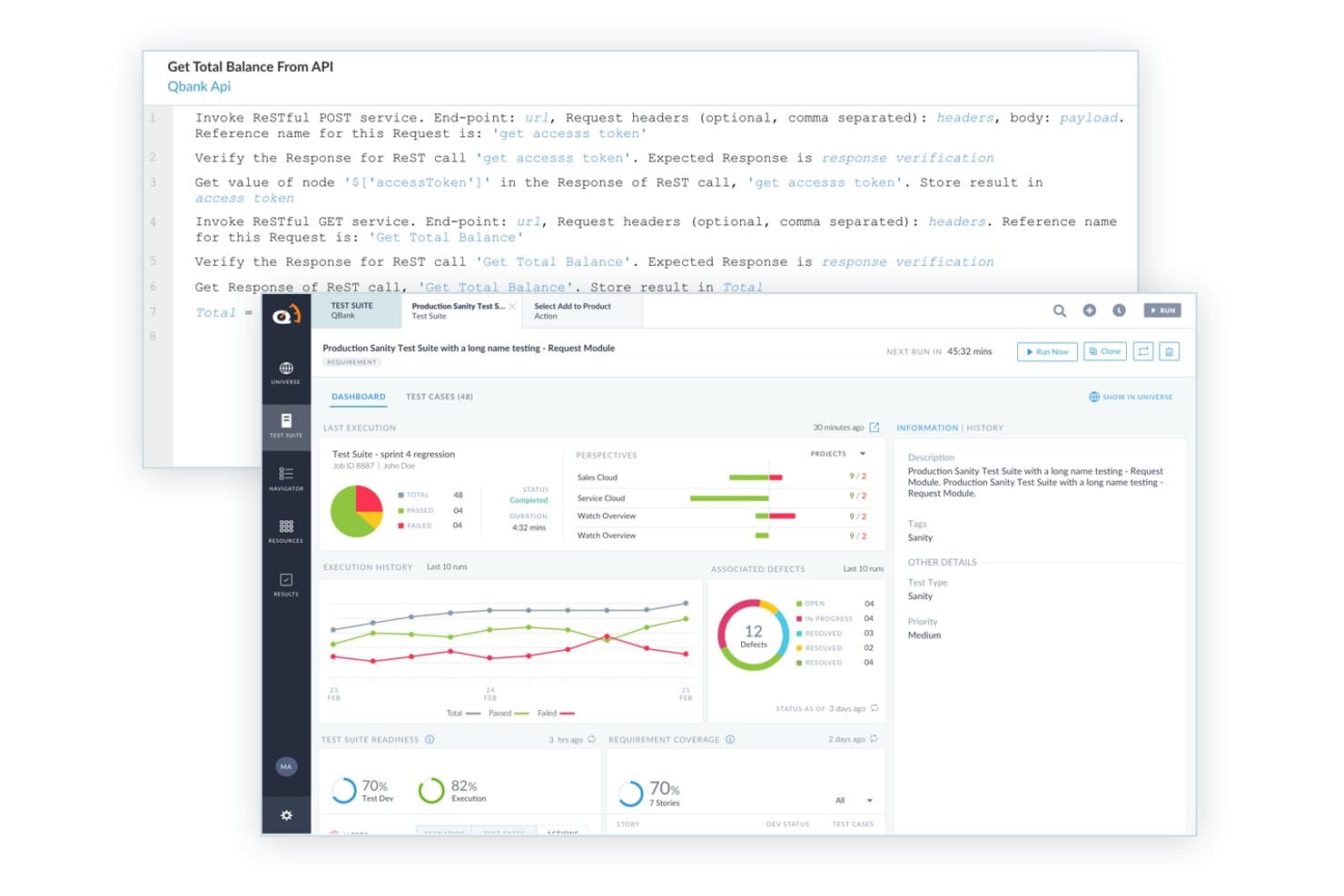
ACCELQ offre un'interfaccia di test API senza codice con invocazione servizi RESTful, dashboard delle suite di test, cronologia delle esecuzioni e tracciamento dei difetti integrati. ACCELQ è una piattaforma di automazione dei test senza codice, basata su intelligenza artificiale, che supporta test cross-browser, mobile, API e desktop attraverso progettazione di test in linguaggio naturale e flussi di automazione modulari.
Per chi è ACCELQ?
ACCELQ è adatto ai team QA aziendali e agli SDET che necessitano di scalare l'automazione cross-browser senza dover scrivere o mantenere grandi quantità di codice di test.
Perché ho scelto ACCELQ
ACCELQ si guadagna il proprio posto tra i migliori della mia lista perché il suo design modulare dei test cambia veramente il modo in cui si scala la copertura cross-browser. Mi piace il fatto che un singolo flusso di test si esegua su Chrome, Firefox, Safari ed Edge senza dover intervenire sulla logica dei test sottostante, incarnando così l'approccio ACCELQ 'disegna una volta, esegui ovunque'. Unito all'identificazione degli elementi senza locator e a un meccanismo di auto-riparazione, non devo riscrivere continuamente i test quando una UI cambia tra diverse versioni del browser o release.
Caratteristiche principali di ACCELQ
- Automazione in sprint: Crea ed esegui test all'interno degli sprint agili mentre requisiti e interfaccia utente sono ancora in evoluzione.
- Esecuzione in cloud lab: Esegui test automatizzati su laboratori di browser e dispositivi on-demand senza dover mantenere una tua griglia.
- Analisi d'impatto e avvisi: Ricevi analisi di impatto automatizzate per i cambiamenti delle app, che ti notificano gli script interessati e i rischi di regressione.
- Automazione di test API e database: Automatizza la validazione di API, backend e database, tutto nella stessa piattaforma dei test browser.
Integrazioni ACCELQ
ACCELQ offre integrazioni native con Jenkins, Azure DevOps, GitHub, CircleCI, Bamboo, TeamCity, Jira e Slack. È disponibile un'API per integrazioni personalizzate.
Pros and Cons
Pros:
- Creazione dei test senza codice e senza necessità di conoscenze di programmazione
- I locator auto-riparanti riducono lo sforzo di manutenzione tra browser
- Il design modulare dei test consente il riutilizzo su diversi browser
Cons:
- Numero limitato di dispositivi reali in cloud confronto alle piattaforme dedicate
- I dashboard di reporting mancano di profondità per suite di grandi dimensioni
Learn more about ACCELQ: Ideale per il testing di app mobili
- Prova gratuita disponibile
- Da $199/mese/anno (minimo 4 utenti)
Visit WebsiteCustomer Rating:4.9/5This rating combines scores from multiple user review sites to reflect overall customer sentiment about the product.
La dashboard di TestGrid offre una panoramica immediata dei test falliti, riusciti e interrotti. TestGrid è una piattaforma di testing basata su cloud progettata per applicazioni mobile e web, pensata per i team di sviluppo che desiderano potenziare le proprie capacità di testing. Offre soluzioni di testing end-to-end, con un focus specifico sul testing di app mobili per garantire qualità e funzionalità dell'app.
Perché ho scelto TestGrid: La piattaforma offre il testing su dispositivi reali, fondamentale per gli sviluppatori di app mobili per garantire la compatibilità. L'infrastruttura cloud permette ambienti di testing scalabili, rendendola adatta a team di ogni dimensione. L'architettura flessibile supporta diversi framework di testing, offrendo versatilità nell'approccio ai test. Le funzionalità specifiche per mobile di TestGrid la rendono una scelta principale per i team che danno priorità alle prestazioni delle app mobili.
Funzionalità e integrazioni principali:
Funzionalità includono il testing su dispositivi reali, che garantisce risultati accurati testando su dispositivi mobili effettivi. L'infrastruttura cloud supporta test scalabili, permettendo al tuo team di espandere gli ambienti di prova secondo necessità. L'architettura flessibile accoglie vari framework di testing, offrendo al team la versatilità di scegliere l'approccio migliore.
Integrazioni includono Jenkins, Jira, Slack, GitHub, Bitbucket, Azure DevOps, CircleCI, TestRail, Selenium e Appium.
Pros and Cons
Pros:
- Testing su dispositivi reali
- Infrastruttura cloud scalabile
- Supporta diversi framework
Cons:
- Richiede competenze tecniche
- Potrebbe non essere adatto a progetti non mobile
Learn more about TestGrid: Ideale per test browser live
- Piano gratuito disponibile + demo gratuita
- Da $15/utente/mese (fatturato annualmente)
Visit WebsiteCustomer Rating:4.9/5This rating combines scores from multiple user review sites to reflect overall customer sentiment about the product.
LambdaTest consente agli utenti di testare manualmente le loro applicazioni web in tempo reale su diversi browser e sistemi operativi, permettendo loro di interagire con l'applicazione come farebbe un utente finale. TestMu AI è una piattaforma online di test cross-browser che offre test dal vivo e automatizzati su un'ampia gamma di browser, dispositivi e sistemi operativi.
Per chi è ideale TestMu AI?
TestMu AI è adatto a ingegneri QA e team di sviluppo che devono testare applicazioni web e mobile su diversi browser e sistemi operativi.
Perché ho scelto TestMu AI
Ho scelto TestMu AI perché i suoi test browser interattivi dal vivo sono davvero eccezionali. Posso avviare una sessione in tempo reale su una qualsiasi delle oltre 3.000 combinazioni di browser e sistemi operativi—Chrome, Safari, Firefox, Edge, e molti altri—senza dover configurare macchine virtuali locali o mantenere infrastrutture. Ogni sessione dal vivo include strumenti di sviluppo nativi, così posso ispezionare elementi, eseguire il debug dei problemi di layout e verificare gli errori della console direttamente nell'ambiente di test. Ho sfruttato anche la funzionalità di limitazione della rete durante le sessioni dal vivo per simulare connessioni 3G o instabili, configurazione che altrimenti dovrei effettuare separatamente.
Funzionalità chiave di TestMu AI
- Test di geolocalizzazione: Esegui sessioni dal vivo da diversi IP geografici per verificare che i contenuti, i reindirizzamenti e le esperienze specifiche per località funzionino correttamente per gli utenti in differenti regioni.
- Test multi-dispositivo: Esegui test su un massimo di sei dispositivi reali simultaneamente, confrontando più varianti del sito affiancate in una singola sessione.
- Test di regressione visiva: Rileva regressioni CSS e cambiamenti di layout lungo tutta la matrice di browser grazie a confronti visuali automatizzati.
- Test della risoluzione dello schermo: Modifica le impostazioni di risoluzione dello schermo all'interno di una sessione dal vivo per verificare come il sito viene visualizzato su diversi formati di viewport.
Integrazioni TestMu AI
TestMu AI offre integrazioni native con Jenkins, Jira, GitHub, GitLab, Slack, Azure DevOps, Bitbucket, CircleCI e TeamCity e fornisce un'API per integrazioni personalizzate.
Pros and Cons
Pros:
- Copertura ampia dei browser
- Ambiente di test in tempo reale
- Test automatici degli screenshot
Cons:
- Richiede una connessione internet stabile
- Potrebbe non essere adatto a team piccoli
Learn more about TestMu AI: Ideale per la collaborazione tra team
- Demo gratuita disponibile
- Prezzi su richiesta
Visit WebsiteCustomer Rating:4.9/5This rating combines scores from multiple user review sites to reflect overall customer sentiment about the product.
QA Wolf offre una copertura end-to-end completamente gestita dei test. QA Wolf è una piattaforma online per il testing cross-browser che permette ai team di creare, eseguire e gestire test automatizzati sui browser nel cloud, con strumenti integrati per la creazione, l'esecuzione e la condivisione dei risultati dei test.
Per chi è ideale QA Wolf?
QA Wolf è particolarmente indicato per i team di ingegneria e QA in aziende di medie e grandi dimensioni che necessitano di un approccio gestito e automatizzato al testing cross-browser.
Perché ho scelto QA Wolf
Ho incluso QA Wolf nella mia shortlist perché aiuta i team di ingegneria e QA distribuiti a rimanere allineati durante tutto il processo di test. Mi piace il fatto che i rapporti sui bug includano video, tracce e log allegati, consentendo al mio team di condividere un quadro completo di ogni errore senza dover cercare ulteriori informazioni. Le integrazioni con Slack e Microsoft Teams inviano i risultati dei test in tempo reale direttamente nei canali già utilizzati dal mio team, quindi non è necessario accedere a una dashboard separata per rimanere aggiornati. Inoltre, ingegneri QA in carne e ossa sono inseriti nel tuo team, rendendo la collaborazione più naturale e parte integrante del flusso di lavoro.
Funzionalità principali di QA Wolf
- Orchestrazione di esecuzione parallela dei test: esegui l'intera suite di test contemporaneamente su più browser, con ri-esecuzione automatica dei test falliti per eliminare instabilità dovute alla rete o all'ambiente.
- Integrazione con pipeline CI/CD: avvia esecuzioni dei test direttamente da GitHub, GitLab o Bitbucket quando il codice viene unito, e ricevi i risultati direttamente all'interno del tuo flusso di lavoro CI.
- Manutenzione test potenziata dall'IA: agenti di manutenzione analizzano automaticamente i fallimenti dei test, diagnosticano la causa principale e propongono correzioni che i tuoi ingegneri QA possono revisionare e approvare.
- Gating della pipeline di deployment: configura QA Wolf come l'ultimo controllo di qualità prima del rilascio in produzione, grazie alle integrazioni con Netlify e Vercel.
Integrazioni di QA Wolf
QA Wolf offre integrazioni native con Jira, Asana, Linear, GitHub, Slack, Microsoft Teams, GitLab e Bitbucket. È disponibile un'API per integrazioni personalizzate.
Pros and Cons
Pros:
- Creazione di test veloce
- Report dei bug verificati da persone
- Esecuzione parallela illimitata dei test
Cons:
- Richiede tempo per la configurazione iniziale
- Opzioni di personalizzazione limitate
Learn more about QA Wolf: Ideale per infrastruttura cloud
- Prova gratuita disponibile
- Da $39/utente/mese (fatturato annualmente)
Visit WebsiteCustomer Rating:4.5/5This rating combines scores from multiple user review sites to reflect overall customer sentiment about the product.
BrowserStack permette di eseguire test manuali e automatici tra browser su oltre 3000 browser e dispositivi reali. BrowserStack è una piattaforma online per il test cross-browser che offre accesso a browser e dispositivi reali per test manuali e automatici, esecuzione parallela dei test e integrazioni con i principali strumenti CI/CD.
Per chi è ideale BrowserStack?
BrowserStack è adatto per ingegneri QA e team di sviluppo di aziende di medie e grandi dimensioni che hanno bisogno di test su browser e dispositivi scalabili e basati sul cloud per suite di test ampie.
Perché ho scelto BrowserStack
BrowserStack merita un posto nella mia shortlist perché la sua infrastruttura cloud è realmente progettata per la scalabilità in un modo che le grid interne semplicemente non possono eguagliare. Mi piace che si possano eseguire test in parallelo su oltre 3.500 combinazioni reali di browser e sistemi operativi senza dover gestire neanche una macchina fisica o VM. Il cloud completamente gestito significa che il mio team non perde tempo con la manutenzione delle grid: stiamo solo eseguendo test. Il Self-Healing Agent è un'altra funzionalità che trovo particolarmente utile: corregge automaticamente i localizzatori non funzionanti durante l'esecuzione, riducendo così i fallimenti di test instabili che tipicamente rallentano le pipeline CI/CD.
Funzionalità principali di BrowserStack
- Test interattivo live: Testa manualmente siti web e applicazioni web su browser e dispositivi reali direttamente dal tuo browser, senza alcuna configurazione.
- Test automatici degli screenshot: Cattura screenshot contemporaneamente su più combinazioni di browser e sistemi operativi per individuare regressioni visive.
- Test di accessibilità: Esegui controlli automatici di accessibilità secondo gli standard WCAG per identificare e segnalare problemi di compliance su diversi browser.
- Simulazione di rete: Verifica come si comporta la tua app in diverse condizioni di rete, incluse 2G, 3G e latenze personalizzate.
Integrazioni di BrowserStack
BrowserStack offre integrazioni native con Jenkins, GitHub, GitLab, Bitbucket, Jira, Slack, Microsoft Teams, Azure DevOps, CircleCI e Travis CI, e si collega con Zapier. È disponibile una API per integrazioni personalizzate.
Pros and Cons
Pros:
- Ampia copertura dei dispositivi
- Nessuna configurazione locale necessaria
- Simulazione di condizioni reali d'uso
Cons:
- Funzionalità offline limitate
- Curva di apprendimento per alcune funzionalità
Learn more about BrowserStack: Ideale per il testing guidato dall’IA
- Prova gratuita disponibile + demo gratuita
- Prezzo su richiesta
Visit WebsiteCustomer Rating:4.5/5This rating combines scores from multiple user review sites to reflect overall customer sentiment about the product.
Codifica il tuo test con il dev kit di Testim: registra un flusso utente e poi esporta quel test in codice Tricentis Testim è una piattaforma cloud di automazione dei test per applicazioni web che combina la creazione di test guidata dall’IA, l’esecuzione cross-browser e integrazioni con le pipeline CI/CD.
Per chi è Tricentis Testim?
Tricentis Testim è adatto a ingegneri QA e team di sviluppo in aziende di media e grande dimensione che necessitano automatizzare e scalare i test delle applicazioni web su più browser.
Perché ho scelto Tricentis Testim
Tricentis Testim si guadagna il suo posto tra le mie scelte grazie alle sue capacità di IA che vanno ben oltre la semplice registrazione dei test. In particolare, apprezzo i localizzatori intelligenti basati su IA, che sfruttano una combinazione di intelligenza artificiale, apprendimento automatico e metadati per adattarsi automaticamente ai cambiamenti dell’interfaccia—così i test non si interrompono ogni volta che uno sviluppatore pubblica un aggiornamento. Utilizzo regolarmente anche Testim Copilot, dove posso descrivere un passaggio di test complesso in linguaggio naturale e ottenere subito indietro uno step personalizzato in JavaScript senza doverlo scrivere da zero. Per la copertura multi-browser, il mio team può eseguire i test sulla griglia di Testim o su qualsiasi griglia compatibile con Selenium, su richiesta o tramite trigger CI.
Funzionalità chiave di Tricentis Testim
- Registrazione test con editor visuale: Registra i flussi utente e configurali in un editor visuale low-code, con l’IA che aiuta a costruire strutture di test pulite e riutilizzabili.
- Analisi della causa principale: Diagnostica i test falliti utilizzando schermate evidenziate, log della console, log di rete e suggerimenti per individuare rapidamente i bug.
- TestOps: Gestisci le modifiche ai test, organizza team e suite di test e dai priorità alle attività di testing man mano che i cicli di rilascio crescono.
- Validazione visiva: Verifica la precisione visiva della tua applicazione web a livello di elemento o di pagina su diversi browser.
Integrazioni di Tricentis Testim
Tricentis Testim offre integrazioni native con Jira, Trello, GitHub, Slack e supporta i workflow CI/CD attraverso integrazioni con sistemi di controllo versione e griglie compatibili con Selenium. È disponibile un’API per integrazioni personalizzate.
Pros and Cons
Pros:
- Localizzatori intelligenti guidati dall’IA
- Creazione di test rapida
- Approccio low-code
Cons:
- Curva di apprendimento ripida
- Supporto offline limitato
Learn more about Tricentis Testim: Ideale per la registrazione di test su più browser
- Prova gratuita di 14 giorni
- Da $212/mese
Visit WebsiteCustomer Rating:4.8/5This rating combines scores from multiple user review sites to reflect overall customer sentiment about the product.
Reflect offre un'interfaccia di automazione dei test senza codice per la creazione dei test. Reflect è una piattaforma cloud per il testing cross-browser che ti permette di registrare, automatizzare ed eseguire test di applicazioni web su più browser senza scrivere codice.
Per chi è più adatto Reflect?
Reflect è pensato per team di QA e sviluppatori che devono costruire e mantenere suite di test cross-browser senza dipendere da ingegneri di automazione dedicati.
Perché ho scelto Reflect
Ho scelto Reflect tra i migliori grazie a come il suo registratore di test no-code gestisce la copertura cross-browser. Registri un test una sola volta nel browser cloud di Reflect e lo stesso test viene eseguito su Chrome, Firefox, Edge e Safari senza bisogno di modifiche. Questo è utile quando occorre coprire oltre il 95% degli utenti senza mantenere script separati per ogni browser. Mi piace anche che Reflect mantenga aggiornate le versioni dei browser nella propria infrastruttura cloud, così il mio team non deve inseguire i cicli di rilascio dei browser. Ogni esecuzione di test produce anche un video a schermo intero insieme ai log di console e di rete, facilitando la determinazione se un errore è specifico di un browser oppure indica un problema più profondo.
Caratteristiche principali di Reflect
- Manutenzione dei test con IA: Il motore SmartBear HaloAI di Reflect adatta automaticamente i test quando l'interfaccia della tua app cambia, riducendo la necessità di aggiornamenti manuali.
- Test di regressione visiva: Reflect confronta pixel per pixel gli screenshot tra vari browser e segnala le differenze, offrendo un flusso di approvazione con un clic per i cambiamenti attesi.
- Supporto ai test API: Esegui chiamate API dirette insieme ai test UI per creare dati di test o convalidare i risultati senza scrivere ulteriori passaggi UI.
- Integrazione CI/CD: Reflect include integrazioni pronte all'uso con GitHub, CircleCI e Jenkins in modo che i test si attivino automaticamente ad ogni pull request o deployment.
Integrazioni di Reflect
Reflect offre integrazioni native con GitHub, GitLab, Slack, Jira e CircleCI e fornisce un'API per integrazioni personalizzate.
Pros and Cons
Pros:
- Integrazione CI/CD completa
- Manutenzione dei test con intelligenza artificiale
- Creazione di test senza codice
Cons:
- Potrebbe offrire più opzioni di personalizzazione per le configurazioni dei test
- Limitazioni nel testing delle app mobili
Learn more about Reflect: Ideale per test su dispositivi reali
- Demo gratuita disponibile
- Da $39/mese (fatturato annualmente)
Visit WebsiteCustomer Rating:4.6/5This rating combines scores from multiple user review sites to reflect overall customer sentiment about the product.
Un esempio della dashboard di cross browser testing di HeadSpin. HeadSpin è una piattaforma online per il cross-browser testing che ti dà accesso a un cloud globale di dispositivi reali per testare browser e app, eseguire debug da remoto e monitorare le prestazioni su diversi sistemi operativi e browser.
Per chi è ideale HeadSpin?
HeadSpin si adatta perfettamente a ingegneri QA e team di sviluppo mobile che hanno la necessità di testare su dispositivi reali invece che su emulatori o simulatori.
Perché ho scelto HeadSpin
HeadSpin si è guadagnato un posto nella mia shortlist perché è una delle poche piattaforme di cross-browser testing costruite completamente attorno a dispositivi reali, invece che su emulatori. Mi piace che quando il mio team esegue un test su Chrome per Android o Safari su iOS, utilizziamo un vero dispositivo abilitato SIM in una delle oltre 50 località globali, e non un ambiente simulato che maschera il comportamento reale della rete. La piattaforma traccia oltre 130 KPI tra cui caricamento pagina, prestazioni della CPU e uso della batteria in una vista temporale affiancata alle registrazioni degli schermi, rendendo molto più semplice individuare esattamente dove si verifica un problema specifico del browser. L'interfaccia Waterfall unisce tutti quei dati di sessione in un unico flusso, così correlare un calo delle prestazioni con una particolare condizione di rete o stato del dispositivo non richiede di passare da uno strumento all'altro.
Funzionalità principali di HeadSpin
- Analisi potenziate dall’IA: Analizza i dati acquisiti durante le sessioni di test e genera insight guidati dall'intelligenza artificiale con raccomandazioni operative legate a problemi specifici.
- Schede problemi con analisi della causa principale: Segnala automaticamente i problemi di UX e prestazioni durante le sessioni e identifica se la causa principale è a livello di backend, dispositivo, sistema operativo o rete.
- Supporto per Appium e Selenium: Esegue test automatizzati su browser e dispositivi mobili in modo nativo tramite Appium e Selenium senza richiedere l'installazione di SDK o modifiche al codice dell'app.
- Monitoraggio sintetico: Monitora continuamente le app automatizzando i percorsi utente per rilevare bug e cali di prestazioni tra i rilasci.
Integrazioni di HeadSpin
HeadSpin offre integrazioni native con Appium, Selenium, Jenkins, Jira e Slack, e mette a disposizione un'API per integrazioni personalizzate.
Pros and Cons
Pros:
- Test su dispositivi reali
- Analisi dettagliata delle prestazioni
- Supporta test di condizioni di rete
Cons:
- Potrebbe non essere adatto a tutti i budget
- Capacità offline limitate
Learn more about HeadSpin: Ideale per test auto-riparanti
- Prova gratuita di 14 giorni + demo gratuita
- Da $175/mese
Visit WebsiteCustomer Rating:4.7/5This rating combines scores from multiple user review sites to reflect overall customer sentiment about the product.
L'estensione Chrome di Endtest ti aiuta a registrare sequenze di azioni sul browser facilmente leggibili dagli utenti. Endtest è una piattaforma online di testing cross-browser che consente di creare, eseguire e gestire test automatizzati su browser e dispositivi utilizzando un approccio no-code o low-code.
Per chi è più indicato Endtest?
Endtest è adatto a team QA e sviluppatori che devono impostare e mantenere test cross-browser automatizzati senza dipendere molto dalle competenze di programmazione.
Perché ho scelto Endtest
Endtest si guadagna un posto nella mia lista grazie al modo in cui gestisce la manutenzione dei test tramite l’auto-riparazione. Quando uno sviluppatore aggiorna il codice sottostante di un’applicazione, i localizzatori nei test possono rompersi immediatamente. Il motore di machine learning di Endtest memorizza fino a 100 localizzatori diversi per elemento, quindi quando una modifica ne rompe uno, il motore passa automaticamente a uno di riserva. Apprezzo anche che la funzionalità di computer vision esegua un confronto pixel-per-pixel dell’interfaccia utente in parallelo, individuando regressioni visive che i controlli basati sui localizzatori potrebbero non rilevare affatto.
Funzionalità principali di Endtest
- Registratore di test no-code: Crea test automatizzati registrando le interazioni nel browser senza scrivere una sola riga di codice.
- Esecuzione parallela dei test: Esegui più test contemporaneamente su diversi browser e sistemi operativi per ridurre il tempo totale di test.
- Grid cloud cross-browser: Esegui i test su un'infrastruttura cloud di browser reali, inclusi Chrome, Firefox, Safari ed Edge.
- Registrazioni video e log: Rivedi la riproduzione video completa e log dettagliati per ogni esecuzione di test per individuare esattamente dove si è verificato un errore.
Integrazioni di Endtest
Endtest offre integrazioni native con Jenkins, GitLab, Sauce Labs, BrowserStack, Bamboo Server, Heroku, Bitbucket, TravisCI, CircleCI, TeamCity, Azure DevOps, Mattermost, Microsoft Teams, GitHub, PagerDuty, Slack e Jira. È disponibile un’API per integrazioni personalizzate.
Pros and Cons
Pros:
- Creazione di test senza script
- Interfaccia intuitiva
- Supporta test data-driven
Cons:
- Opzioni di personalizzazione limitate
- Potrebbe non essere adatto a scenari di test complessi
Learn more about Endtest: Ideale per il monitoraggio delle prestazioni
- Piano gratuito disponibile
- Da $49/utente/mese
Visit WebsiteCustomer Rating:4.3/5This rating combines scores from multiple user review sites to reflect overall customer sentiment about the product.
New Relic ti consente di monitorare e dare priorità ai problemi, assegnarli ai membri del team e collaborare alla loro risoluzione. New Relic è una piattaforma di monitoraggio delle prestazioni delle applicazioni che offre analisi in tempo reale, tracciamento distribuito e monitoraggio dell'infrastruttura per applicazioni web e mobile.
Per chi è ideale New Relic?
New Relic è particolarmente indicato per i team DevOps e di ingegneria di aziende di medie e grandi dimensioni che necessitano di una visibilità approfondita sulle prestazioni delle applicazioni e delle infrastrutture.
Perché ho scelto New Relic
Ho scelto New Relic tra i migliori perché le sue funzionalità di monitoraggio del browser e monitoraggio sintetico offrono ai team di ingegneria una visione in tempo reale di come le applicazioni web si comportano in diversi ambienti. Apprezzo particolarmente la funzione di monitoraggio browser, che tiene traccia delle prestazioni delle pagine in base al sistema dell'utente e alla regione, consentendo di individuare esattamente quali configurazioni causano tempi di caricamento lenti o tassi di errore elevati. Il monitoraggio sintetico di New Relic permette al mio team di simulare percorsi utente completi su URL e API prima che i problemi raggiungano la produzione, cosa davvero utile per individuare regressioni in anticipo. La funzione di tracciamento delle modifiche collega direttamente gli eventi di deployment alle variazioni delle prestazioni, così quando qualcosa si rompe dopo un rilascio posso correlare immediatamente l'evento invece di dover cercare nei log.
Caratteristiche principali di New Relic
- Replay delle sessioni: Registra e riproduce le sessioni reali degli utenti nel browser per aiutarti a identificare esattamente dove incontrano errori o problemi di prestazioni.
- Errors inbox: Raccoglie gli errori da tutto il tuo stack in una vista unica, così puoi gestire e dare priorità alle correzioni senza dover cambiare strumento.
- Avvisi intelligenti: Utilizza soglie dinamiche per ridurre il rumore degli avvisi e mostrare solo le anomalie che richiedono veramente la tua attenzione.
- Dashboard personalizzabili: Ti consente di creare e configurare dashboard per visualizzare in un unico posto i dati di telemetria specifici di cui il tuo team ha bisogno.
Integrazioni di New Relic
New Relic offre integrazioni native con AWS, Azure, Google Cloud Platform, Kubernetes, Jenkins, PagerDuty, Slack, Jira, GitHub e ServiceNow. È disponibile una API per integrazioni personalizzate.
Pros and Cons
Pros:
- Monitoraggio delle prestazioni in tempo reale
- Capacità di allerta proattiva
- Dashboard personalizzabili
Cons:
- Richiede competenze tecniche
- Funzionalità offline limitate
Learn more about New Relic:
Altri strumenti per i test tra browser
Ecco alcune opzioni aggiuntive di strumenti per i test tra browser che non sono entrate nella mia selezione, ma che vale comunque la pena prendere in considerazione:
- 11Sauce LabsIl migliore per la scalabilità aziendale
- 12FunctionizeIdeale per la creazione dei test tramite IA
- 13AutifyIdeale per i test su Salesforce
- 14MablIdeale per l'integrazione DevOps
- 15ExperitestIdeale per il testing di app mobile
- 16TestingBotIdeale per test live e automatizzati
- 17BrowserlingIdeale per un accesso immediato al browser
- 18Telerik Test StudioIdeale per l'automazione dei test senza codice
- 19OwlityIdeale per l’esecuzione autonoma dei test
Come Valuto gli Strumenti di Test Cross-Browser
Divido la mia valutazione in due livelli: i requisiti minimi che uno strumento deve soddisfare—copertura dispositivi reali, supporto a Selenium/Playwright, integrazioni CI/CD—e i fattori differenzianti che davvero distinguono i fornitori.
Funzionalità di Base (Requisiti Fondamentali per Questa Lista)
Quando seleziono gli strumenti per la mia lista, valuto ciascuno su una scala da 0 (non offre la funzionalità) a 5 (eccelle in quest'area) per ogni funzionalità di base elencata sotto. Poi, calcolo il punteggio totale dello strumento in percentuale. Ogni strumento deve raggiungere un punteggio totale minimo del 65% per essere considerato per l'inclusione.
- Copertura Multi-Browser: Verifico quali browser e versioni sono supportati da ciascuno strumento—ad esempio, testare un processo di acquisto su Safari 15 vs. Safari 17 o verificare il layout su Edge legacy.
- Accesso a Dispositivi Reali & Emulatori: È importante avere sia dispositivi reali che emulatori. Cerco piattaforme che permettano il test su veri iPhone o hardware Android insieme ad ambienti simulati.
- Compatibilità con Framework di Automazione: Valuto se lo strumento funziona con i framework che i team già usano, come Selenium, Cypress, Playwright o Appium, senza costose configurazioni aggiuntive.
- Esecuzione di Test in Parallelo: Eseguire una suite completa di regression test su 20 combinazioni browser/OS in modo sequenziale può richiedere ore. Osservo quante sessioni contemporanee lo strumento supporta e come scala.
- Testing Interattivo Live: A volte è necessario cliccare manualmente su una pagina per riprodurre un bug di rendering. Verifico se gli strumenti offrono sessioni browser in tempo reale con strumenti di sviluppo funzionanti.
- Integrazione CI/CD & Strumenti di Debugging: Valuto come ogni piattaforma si connette a pipeline come Jenkins o GitHub Actions, e se raccoglie artefatti utili—replay video, log della console, tracciamenti di rete.
Una volta ottenuta una lista di strumenti che soddisfano i criteri, considero ciò che distingue ogni piattaforma.
Fattori Differenzianti (Cosa Distingue i Fornitori)
Ecco come confronto i diversi fornitori:
Funzionalità Distintive
Il testing di regressione visiva è un notevole fattore differenziante: cerco strumenti che segnalino automaticamente differenze UI a livello di pixel tra i browser dopo una distribuzione, risparmiando ore di confronto manuale degli screenshot. Sono importanti anche i tunnel per test locali, quando l'app è dietro un firewall o su un server di staging non accessibile pubblicamente. Valuto anche le dashboard di analisi dei test, in particolare la rilevazione automatica di test instabili, perché identificare test inaffidabili aiuta i team QA a concentrarsi su veri guasti e non su falsi positivi.
Oltre le Funzionalità
I modelli di prezzo variano molto in questo settore: alcuni fornitori addebitano per sessione parallela, altri per utente, quindi valuto quale struttura si adatti al volume di test del team senza costi inattesi in fase di scaling. Anche la profondità d'integrazione è importante, in particolare i plugin nativi per strumenti CI/CD come Jenkins o GitHub Actions e i collegamenti con Jira per il tracciamento dei bug. Controllo inoltre le caratteristiche di sicurezza, tra cui conformità SOC 2, supporto SSO e politiche di conservazione dei dati delle sessioni, dato che gli ambienti di test spesso gestiscono codice pre-release sensibile e dati dei clienti.
Come scegliere uno strumento per i test tra browser
È facile perdersi in lunghi elenchi di funzionalità e strutture tariffarie complesse. Per aiutarti a rimanere concentrato mentre affronti il tuo particolare processo di selezione del software, ecco una lista di fattori da tenere a mente:
| Fattore | Cosa considerare |
| Scalabilità | Assicurati che lo strumento possa crescere insieme al tuo team. Verifica se supporta l'aumento dei volumi di test e l'espansione della copertura dei dispositivi man mano che i tuoi progetti crescono. |
| Integrazioni | Cerca la compatibilità con gli strumenti che già utilizzi, come pipeline CI/CD, software di gestione dei progetti e strumenti per il test dell'accessibilità web, per semplificare il tuo flusso di lavoro. |
| Personalizzazione | Valuta se lo strumento consente di adattare i processi e i report di test alle esigenze e alle preferenze specifiche del tuo team. |
| Facilità d'uso | Valuta l'interfaccia dello strumento e la curva di apprendimento. Assicurati che il tuo team possa adottarlo rapidamente senza una formazione approfondita o competenze tecniche specifiche. |
| Budget | Allinea il prezzo dello strumento al tuo budget. Considera il costo totale di proprietà, comprese eventuali commissioni nascoste o spese per funzionalità aggiuntive. |
| Misure di sicurezza | Verifica le misure di sicurezza dello strumento per proteggere i tuoi dati. Cerca funzionalità come la crittografia, i controlli degli accessi e la conformità agli standard del settore. |
| Copertura dei test | Assicurati che lo strumento offra una copertura completa di browser e dispositivi per soddisfare i tuoi requisiti di test. Verifica il supporto sia per le piattaforme più diffuse sia per quelle di nicchia. |
| Servizi di supporto | Considera la disponibilità e la qualità dell'assistenza clienti, inclusi i tempi di risposta e l'accesso a risorse come la documentazione e i forum della comunità. |
Tendenze negli strumenti di test tra browser
Nella mia ricerca, ho raccolto innumerevoli aggiornamenti di prodotto, comunicati stampa e registri delle versioni di diversi fornitori di strumenti per il test tra browser e per il test delle email. Ecco alcune delle tendenze emergenti che sto monitorando:
- Test basati sull'IA: L'IA viene utilizzata per migliorare l'accuratezza e l'efficienza dei test. Strumenti come Functionize sfruttano l'IA per creare e mantenere i test, riducendo il lavoro manuale e minimizzando gli errori nei processi di test.
- Test visivi: Questa tendenza si concentra sul confronto degli aspetti visivi delle applicazioni web nei diversi browser. Applitools utilizza l'IA visiva per rilevare gli errori visivi, garantendo interfacce ed esperienze utente coerenti.
- Test delle prestazioni: L'attenzione si sta concentrando sempre più non solo sulla compatibilità, ma anche sulle prestazioni in condizioni diverse. Strumenti come Sauce Labs offrono funzionalità di test delle prestazioni per aiutare i team a ottimizzare velocità e affidabilità.
- Test tra dispositivi: Testare su una varietà di dispositivi, non solo di browser, sta diventando sempre più importante. Fornitori come BrowserStack offrono un'ampia copertura dei dispositivi per garantire che le applicazioni funzionino bene su tutte le piattaforme.
- Soluzioni basate sul cloud: Molti fornitori stanno passando a piattaforme basate sul cloud, offrendo ambienti di test scalabili e flessibili. Questa tendenza consente un accesso e una collaborazione semplici, con strumenti come LambdaTest all'avanguardia nella transizione verso l'infrastruttura cloud.
Cosa sono gli strumenti di test tra browser?
Gli strumenti di test tra browser sono applicazioni che consentono agli sviluppatori e ai team QA di verificare il funzionamento di siti web e applicazioni web su browser, dispositivi e sistemi operativi diversi. Questi strumenti vengono utilizzati da sviluppatori web, tester e designer per assicurarsi che i siti abbiano l'aspetto corretto e funzionino correttamente per tutti gli utenti.
Funzionalità come i test in tempo reale, i controlli automatizzati dei browser e il confronto visivo aiutano a individuare i problemi di impaginazione, correggere gli errori di compatibilità e migliorare la coerenza. Nel complesso, semplificano la realizzazione di un sito web che funziona in modo affidabile su ogni piattaforma.
Funzionalità degli strumenti di test tra browser
Quando selezioni gli strumenti di test tra browser, presta attenzione alle seguenti funzionalità chiave:
- Test automatizzati: Automatizzano i test ripetitivi, facendo risparmiare tempo e riducendo gli errori umani.
- Test in tempo reale: Consentono agli utenti di testare istantaneamente le applicazioni su più browser e dispositivi.
- Test visivi: Confrontano gli elementi visivi per garantire interfacce utente coerenti su tutte le piattaforme.
- Test in parallelo: Consentono l'esecuzione simultanea dei test, velocizzando il processo di test.
- Funzionalità basate sull'IA: Utilizzano l'IA per migliorare l'accuratezza dei test e mantenere aggiornati i test man mano che le applicazioni evolvono.
- Test delle prestazioni: Valutano la velocità e l'affidabilità delle applicazioni in condizioni diverse.
- Copertura dei dispositivi: Offrono accesso a un'ampia gamma di dispositivi per garantire la compatibilità.
- Piattaforma basata sul cloud: Offre ambienti di test scalabili e flessibili, accessibili da qualsiasi luogo.
- Pannelli di controllo personalizzabili: Consentono agli utenti di personalizzare il modo in cui visualizzano e gestiscono i dati dei test.
- Test di geolocalizzazione: Simulano diverse posizioni geografiche per garantire le prestazioni globali delle applicazioni.
Vantaggi degli strumenti per il test tra browser
L'implementazione di strumenti per il test tra browser offre numerosi vantaggi al tuo team e alla tua azienda. Eccone alcuni:
- Compatibilità migliorata: garantisce che le tue applicazioni web funzionino su tutti i browser e dispositivi, riducendo la frustrazione degli utenti.
- Risparmio di tempo: automatizza le attività ripetitive e i test paralleli, velocizzando il processo di test e liberando il tempo del tuo team.
- Esperienza utente migliorata: i test visivi e delle prestazioni aiutano a mantenere interfacce utente coerenti e affidabili.
- Rilevamento precoce dei bug: identifica i problemi nelle prime fasi dello sviluppo, consentendo correzioni rapide e riducendo i costosi problemi successivi al rilascio.
- Scalabilità: le piattaforme basate sul cloud offrono ambienti di test flessibili che crescono in base alle esigenze del tuo progetto.
- Approfondimenti basati sui dati: fornisce analisi e report dettagliati che aiutano il tuo team a prendere decisioni informate sui miglioramenti dell'applicazione.
- Portata globale: i test di geolocalizzazione garantiscono che le tue applicazioni funzionino bene per gli utenti di tutto il mondo, ampliando la tua presenza sul mercato.
Costi e prezzi degli strumenti per il test tra browser
La scelta degli strumenti per il test tra browser richiede la comprensione dei diversi modelli di prezzo e dei piani disponibili. I costi variano in base alle funzionalità, alle dimensioni del team, ai componenti aggiuntivi e ad altri fattori. La tabella seguente riassume i piani comuni, i relativi prezzi medi e le funzionalità tipicamente incluse nelle soluzioni per il test tra browser:
Tabella comparativa dei piani per gli strumenti di test tra browser
| Tipo di piano | Prezzo medio | Funzionalità comuni |
| Piano gratuito | $0 | Copertura limitata dei browser, funzionalità di test di base e supporto della comunità. |
| Piano personale | $10-$25/user/month | Accesso a più browser e dispositivi, strumenti di test automatizzati e test paralleli limitati. |
| Piano aziendale | $50-$100/user/month | Copertura completa di browser e dispositivi, report avanzati, test paralleli e supporto prioritario. |
| Piano aziendale | $150-$300/user/month | Soluzioni personalizzabili, gestione dedicata dell'account, numerose integrazioni e sicurezza avanzata. |
Domande frequenti sugli strumenti per i test cross-browser
Ecco alcune risposte alle domande comuni sugli strumenti per i test cross-browser:
Come automatizzare i test cross-browser?
Per automatizzare i test cross-browser, puoi utilizzare script per caricare automaticamente il tuo sito web in più browser. Questo metodo consente di simulare le interazioni degli utenti e verificare diversi percorsi utente su browser differenti. Aiuta il tuo team a identificare e risolvere rapidamente i problemi di compatibilità.
Qual è il miglior strumento per i test cross-browser?
La scelta dello strumento migliore dipende dalle esigenze del tuo team, ma Selenium è una scelta popolare grazie all’ampio supporto dei browser. Altri strumenti come BrowserStack e LambdaTest offrono soluzioni basate sul cloud che garantiscono un’ampia copertura dei dispositivi, rendendoli ottime opzioni per test completi.
I test cross-browser sono funzionali o non funzionali?
I test cross-browser sono considerati test non funzionali. Verificano che il tuo sito web funzioni come previsto su browser e sistemi operativi diversi. Questi test garantiscono agli utenti un’esperienza coerente, indipendentemente dal browser utilizzato.
Perché è importante testare le pagine web su browser diversi?
I diversi browser interpretano il codice dei siti web in modi differenti, il che può causare problemi di compatibilità. Testando su più browser, puoi identificare e risolvere questi problemi, assicurandoti che il tuo sito web funzioni correttamente per tutti gli utenti. Questo processo contribuisce a mantenere un’esperienza utente fluida.
Come si selezionano i browser per i test?
Seleziona i browser in base alle preferenze del tuo pubblico di riferimento e alle statistiche di utilizzo. Concentrati sui browser più popolari, come Chrome, Firefox e Safari, e valuta la possibilità di includere versioni precedenti, se necessario. Questo approccio garantisce che il tuo sito web raggiunga il pubblico più ampio possibile.
Quali difficoltà potresti incontrare nei test cross-browser?
Le difficoltà includono la gestione della vasta gamma di browser e dispositivi, il tenersi al passo con gli aggiornamenti frequenti e la necessità di garantire una copertura dei test completa. Gli strumenti automatizzati possono contribuire a ridurre queste difficoltà offrendo un ampio supporto dei browser e processi di test efficienti.
Cosa succede ora?
Se stai cercando strumenti per i test cross-browser, contatta gratuitamente un consulente SoftwareSelect per ricevere consigli.
Compili un modulo e fai una breve conversazione durante la quale il consulente approfondirà le tue esigenze specifiche. In seguito riceverai una selezione ristretta di software da valutare. Ti accompagnerà anche durante l'intero processo di acquisto, comprese le trattative sul prezzo.