

I migliori strumenti per i test di penetrazione delle applicazioni web aiutano i team a individuare tempestivamente le vulnerabilità, convalidare i controlli di sicurezza e proteggere i dati sensibili all'interno di applicazioni complesse. Quando gli errori di configurazione sfuggono alle revisioni, gli scanner automatizzati non rilevano i problemi ad alto rischio o emergono lacune tra i test manuali e le pipeline CI/CD, le debolezze di sicurezza possono passare inosservate e diventare costose da risolvere in seguito.
La piattaforma di test di penetrazione giusta offre ai team di sicurezza risultati accurati, report chiari e flussi di lavoro che si integrano naturalmente nei processi di sviluppo esistenti. In qualità di direttore tecnologico con oltre 20 anni di esperienza nel test e nell'implementazione di strumenti di sicurezza in ambienti web attivi, ho valutato le migliori soluzioni in base ad accuratezza, qualità delle integrazioni e facilità d'uso. Ogni recensione esamina funzionalità, vantaggi e svantaggi e casi d'uso ideali, per aiutare il tuo team a scegliere il miglior strumento per i test di penetrazione delle applicazioni web e ottenere una sicurezza delle applicazioni più solida e affidabile.
Perché fidarsi dei nostri consigli sui software
6,700+
Reviews
20
Industry experts
16+
Evaluation factors
14
Years
Il nostro team testa e recensisce software dal 2012. In quanto leader tecnologici noi stessi, sappiamo quanto sia difficile — e importante — scegliere il software giusto.
Per questa guida, abbiamo valutato gli strumenti attraverso test praticie ricerche indipendenti, assegnando un punteggio agli strumenti in base ai nostri criteri di selezione.
Le nostre recensioni riflettono il nostro giudizio editoriale umano, non un discorso di vendita.
Revisori esperti:
- Paulo Gardini MiguelDirettore tecnico
 Tim FisherVP dell'IA
 Gabriel RosasTech Lead e architetto software
 Christhian GruhnTech Lead e architetto della piattaforma

Tabella comparativa degli strumenti per i test di penetrazione delle applicazioni web
Questa tabella comparativa riassume i dettagli sui prezzi dei miei migliori strumenti WAPT selezionati.
| Tool | Best For | Trial Info | Price | ||
|---|---|---|---|---|---|
| 1 | Ideale per report di valutazione delle vulnerabilità personalizzabili | Demo gratuita disponibile | Prezzo su richiesta | Website | |
| 2 | Ideale per il rilevamento delle vulnerabilità nella logica di business | Demo gratuita disponibile | Prezzo su richiesta | Website | |
| 3 | Ideale per il pentesting ibrido IA + umano | Piano gratuito disponibile | A partire da $200/mese | Website | |
| 4 | Ideale per pentest basati su IA | Piano gratuito disponibile + demo gratuita | Da $350/mese | Website | |
| 5 | Ideale per controlli quotidiani delle configurazioni cloud | Prova gratuita di 14 giorni + demo gratuita disponibile | A partire da $149/mese | Website | |
| 6 | Ideale per configurare i profili di scansione | Demo gratuita disponibile | Prezzi su richiesta | Website | |
| 7 | Ideale per la scansione di vulnerabilità nelle SPA | Piano gratuito disponibile | Da $475/utente/anno | Website | |
| 8 | Ideale con add-on da marketplace per test estesi | Piano gratuito disponibile | Prezzo su richiesta | Website | |
| 9 | Ideale per la scansione continua delle vulnerabilità | Demo gratuita disponibile | Da $69/mese | Website | |
| 10 | Ideale per DeepScan in applicazioni web complesse | Demo gratuita disponibile | Prezzo su richiesta | Website |


Recensioni dei migliori strumenti per i test di penetrazione delle applicazioni web
Di seguito sono riportati i miei riepiloghi dettagliati dei migliori strumenti per i test di penetrazione delle applicazioni web inclusi nel mio elenco ristretto. Le mie recensioni offrono un’analisi dettagliata delle funzionalità principali, dei vantaggi e degli svantaggi, delle integrazioni e dei casi d’uso ideali di ciascuno strumento, per aiutarti a trovare quello più adatto a te.
 Ideale per report di valutazione delle vulnerabilità personalizzabili
- Demo gratuita disponibile
- Prezzo su richiesta

Terra Security offre un pannello dettagliato dei risultati che mostra le vulnerabilità XSS memorizzate rilevate tramite caricamento SVG, compresi endpoint delle risorse, generazione del segnale e traccia di esecuzione per il testing della sicurezza applicativa. Terra Security è una piattaforma di penetration testing as a service (PTaaS) alimentata da intelligenza artificiale che combina agenti di sicurezza autonomi con pentester certificati per fornire test continui di vulnerabilità su applicazioni web, API, reti e cloud.
Per chi è pensato Terra Security?
Terra Security è particolarmente adatto ai team di sicurezza di organizzazioni di medie e grandi dimensioni che necessitano di penetration test continui e validati, invece di affidarsi a valutazioni annuali effettuate in momenti specifici.
Perché ho scelto Terra Security
Ho scelto Terra Security tra i migliori per la ricchezza di dettagli e il contesto aziendale che i suoi report realmente contengono. Piuttosto che presentare una semplice lista generica di CVE, i report di Terra sono firmati da pentester certificati, costruiti attorno al profilo di rischio specifico della tua organizzazione e strutturati per comunicare con ogni stakeholder, dagli sviluppatori ai dirigenti. La valutazione della gravità va oltre il CVSS incorporando prove di sfruttabilità, casi reali comparabili di violazione e l'impatto finanziario potenziale, così che le tue decisioni di remediation siano basate sul rischio aziendale reale piuttosto che su valutazioni tecniche astratte.
Caratteristiche principali di Terra Security
- Scansione continua basata sui cambiamenti: Terra monitora il tuo ambiente di produzione e ripete i test quando rileva cambiamenti significativi alla tua applicazione o infrastruttura.
- Catene di attacco generate dall'AI: Gli agenti AI concatenano i singoli risultati in percorsi di attacco a più passi, riflettendo come un vero attaccante si muoverebbe nel tuo ambiente.
- Solo risultati validati: Ogni vulnerabilità segnalata viene confermata come sfruttabile prima di raggiungere la tua coda, eliminando i falsi positivi.
- Red teaming AI: Terra testa sistemi AI, integrazioni LLM e Copilot contro vulnerabilità come injection di prompt, perdita di dati e manipolazione del modello.
Integrazioni di Terra Security
Le integrazioni native non sono chiaramente documentate sul sito di Terra Security. La piattaforma si integra con i flussi di lavoro CI/CD e raccoglie il contesto applicativo, compresi accessi, architettura e integrazioni CI/CD, durante l'onboarding. Terra Security è inoltre disponibile su AWS Marketplace per i team che utilizzano i processi di acquisto AWS.
Pros and Cons
Pros:
- Testa la logica di business oltre la scansione standard
- Fornisce i primi risultati in poche ore
- Copre superfici web, di rete e AI
Cons:
- Nessuna opzione self-service o prova gratuita
- Dati limitati di recensioni di terze parti online
Learn more about Terra Security: Ideale per il rilevamento delle vulnerabilità nella logica di business
- Demo gratuita disponibile
- Prezzo su richiesta

Escape rileva vulnerabilità nella logica di business nei penetration test delle applicazioni web. Escape è uno strumento di penetration testing per applicazioni web progettato per organizzazioni che devono affrontare le sfide della sicurezza digitale moderna. È specializzato nell'individuazione di vulnerabilità nella logica di business che spesso sfuggono agli scanner tradizionali, rendendolo particolarmente adatto a settori come finanza, sanità e tecnologia. Integrandosi negli stack tecnologici esistenti, Escape aiuta a garantire una validazione continua della sicurezza, in linea con i rapidi cicli di rilascio delle applicazioni contemporanee.
Perché ho scelto Escape
Ho scelto Escape perché eccelle nell'identificare complesse vulnerabilità nella logica di business grazie a un test dinamico della sicurezza delle applicazioni (DAST) guidato dall'IA, distinguendosi dagli strumenti tradizionali. Questa attenzione alla sicurezza della logica di business è fondamentale per le organizzazioni che affrontano minacce informatiche sofisticate. Inoltre, l'integrazione di Escape con le pipeline CI/CD assicura che i test di sicurezza tengano il passo con i rapidi cicli di sviluppo, fornendo informazioni in tempo reale e consigli pratici di rimedio. Queste caratteristiche rendono Escape una scelta interessante per i team che mirano a migliorare la loro postura di sicurezza senza rallentare l'innovazione.
Funzionalità principali di Escape
Oltre alle capacità di testing della logica di business, Escape offre:
- Rilevamento API: Identifica e documenta automaticamente le API all'interno della tua applicazione, garantendo una copertura di sicurezza completa.
- Test di sicurezza GraphQL: Fornisce test specializzati per le API GraphQL, affrontando le vulnerabilità specifiche associate a questa tecnologia.
- Report di conformità: Genera report dettagliati per aiutare a soddisfare gli standard di conformità del settore, semplificando il processo di audit.
- Rilevamento di perdita di dati sensibili: Individua potenziali fuoriuscite di dati nelle tue applicazioni, aiutando a proteggere le informazioni sensibili.
Integrazioni di Escape
Escape si integra con stack tecnologici moderni, incluse piattaforme CI/CD, per offrire una validazione della sicurezza senza interruzioni. Le integrazioni native includono GitHub, GitLab, Jenkins, JIRA, Slack, Bitbucket, Azure DevOps, AWS, Docker e Kubernetes.
Pros and Cons
Pros:
- Scansione continua e verifica che supportano il monitoraggio costante della sicurezza
- Tecnologia di scansione avanzata che identifica un'ampia gamma di problemi di sicurezza
- Solida individuazione delle vulnerabilità API, inclusa la copertura di endpoint REST e GraphQL
Cons:
- Gli aggiornamenti della piattaforma possono richiedere tempo per essere applicati e adattati
- Per utilizzare efficacemente le funzioni avanzate è necessaria una certa familiarità tecnica
Learn more about Escape: Ideale per il pentesting ibrido IA + umano
- Piano gratuito disponibile
- A partire da $200/mese
Visit WebsiteCustomer Rating:4.5/5This rating combines scores from multiple user review sites to reflect overall customer sentiment about the product.
ZeroPath offre una dashboard di sicurezza unificata che mette in evidenza i pentest, l’attività di scansione, i tipi di vulnerabilità, la gravità degli incidenti e i principali problemi critici a colpo d’occhio. Zeropath è una piattaforma di sicurezza applicativa AI-native progettata per soddisfare le esigenze delle aziende attente alla sicurezza che desiderano potenziare i propri processi di sicurezza delle applicazioni web. Offrendo strumenti avanzati come lo Static Application Security Testing (SAST) e la correzione automatizzata delle vulnerabilità, Zeropath consente al tuo team di individuare e risolvere le vulnerabilità in modo efficiente.
Perché ho scelto Zeropath
Ho scelto Zeropath perché unisce test continui guidati dall’IA ad analisi degli attacchi condotte da esperti, soluzione ideale se cerchi uno strumento per il penetration testing delle applicazioni web che vada oltre i controlli superficiali. Ottieni ricognizione e scoperta delle vulnerabilità automatizzate attive 24/7, offrendo al tuo team visibilità sulle lacune di sicurezza non appena si presentano. Pentester esperti validano poi i risultati e approfondiscono catene d’attacco complesse, così non resti con il dubbio su quali problemi siano reali o sfruttabili. Questa combinazione permette al tuo team di dare priorità alle vulnerabilità rilevanti e agire con sicurezza.
Caratteristiche principali di Zeropath
Oltre all’approccio combinato di test continui IA + umani, il tuo team può anche beneficiare di:
- Correzione automatica delle vulnerabilità: Questa funzionalità offre soluzioni automatiche per le vulnerabilità individuate, semplificando la risoluzione per il team di sviluppo.
- Feedback in tempo reale: Zeropath fornisce immediatamente informazioni su eventuali problemi di sicurezza, consentendo al tuo team di affrontarli prontamente.
- Ritest automatico delle soluzioni: Una volta applicata una patch, Zeropath verifica la correzione per confermare che il problema sia risolto.
- Confronto SARIF: Questa funzione consente un’analisi dettagliata e il confronto dei report di sicurezza, migliorando la capacità del team di tracciare e gestire le vulnerabilità.
- Rilevamento delle vulnerabilità in tempo reale: La piattaforma invia avvisi non appena emergono nuove debolezze in ambienti applicativi in evoluzione.
Integrazioni di Zeropath
Le integrazioni includono GitHub, GitLab, Azure DevOps e Bitbucket.
Pros and Cons
Pros:
- Il monitoraggio continuo rileva nuove vulnerabilità in qualsiasi momento
- La ricognizione IA amplia la copertura delle superfici d’attacco nascoste
- Gli exploit proof-of-concept chiariscono i rischi reali per i team
Cons:
- Non ideale per i team che vogliono solo test puntuali tradizionali
- Potresti dover adeguare il flusso di lavoro alla sua automazione
Learn more about Zeropath: Ideale per pentest basati su IA
- Piano gratuito disponibile + demo gratuita
- Da $350/mese
Visit WebsiteCustomer Rating:4.7/5This rating combines scores from multiple user review sites to reflect overall customer sentiment about the product.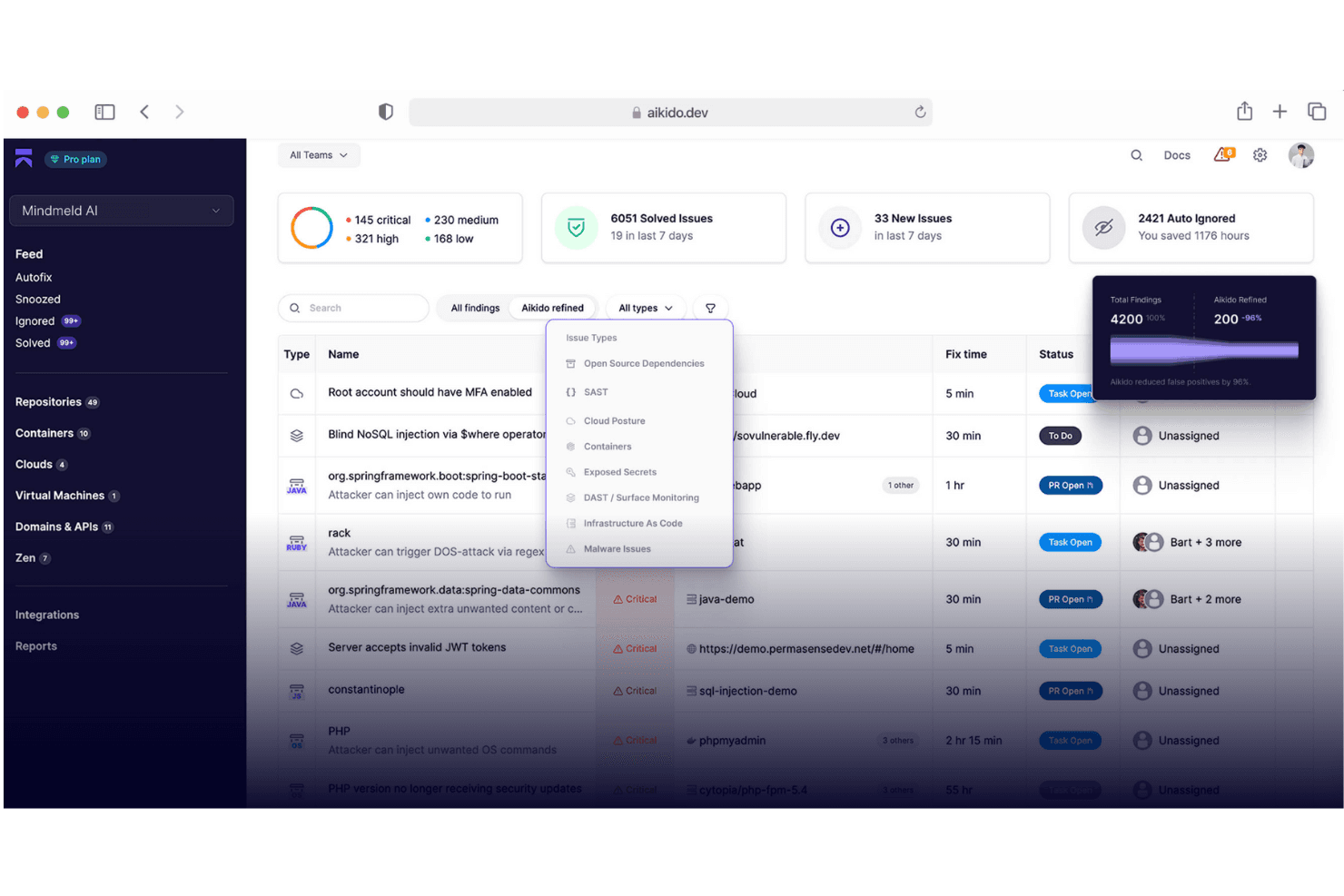
Aikido Security fornisce una dashboard unificata per gestire e filtrare i problemi per tipo, gravità e fonte della scansione. Aikido Security è una piattaforma di sicurezza applicativa nativa per l'IA che combina pentesting automatizzato, DAST, SAST, SCA, rilevamento segreti e scansione API durante l'intero ciclo di vita dello sviluppo software.
Per chi è più indicato Aikido Security?
Aikido Security è particolarmente adatto a team guidati da ingegneri in aziende in crescita che desiderano una copertura di sicurezza automatizzata senza un team AppSec dedicato.
Perché ho scelto Aikido Security
Aikido Security merita il suo posto nella mia shortlist per il suo approccio innovativo al pentesting. Mi piace il fatto che impieghi oltre 200 agenti autonomi che confermano la possibilità di sfruttamento prima di segnalare una vulnerabilità, il che significa che ogni vulnerabilità riportata è reale. Rileva anche problemi di logica aziendale come IDOR e accesso cross-tenant, che la maggior parte degli scanner non rileva affatto, e produce report pronti per audit e strutturati per la conformità SOC 2 e ISO 27001.
Funzionalità principali di Aikido Security
- Scansione API: Supporta test completi su endpoint REST, GraphQL, gRPC e SOAP.
- Monitoraggio della superficie (DAST): Analizza dinamicamente frontend di app web e API per rilevare vulnerabilità reali.
- Rilevamento segreti: Identifica automaticamente chiavi API trapelate, credenziali ed altre informazioni sensibili nel codice.
- Integrazione plugin IDE: Porta il rilevamento delle problematiche di sicurezza direttamente negli ambienti di sviluppo supportati.
Integrazioni di Aikido Security
Aikido Security offre integrazioni native con GitHub, GitLab, Bitbucket, Jira, Jenkins, CircleCI, Docker, Google Cloud, Asana, Monday, DigitalOcean e Slack. È disponibile un'API per integrazioni personalizzate.
Pros and Cons
Pros:
- Agenti autonomi validano ogni vulnerabilità segnalata
- Rileva difetti nella logica di business che la maggior parte degli scanner non trova
- Genera report di pentest per la conformità pronti per audit
Cons:
- La reportistica può risultare eccessiva per team di piccole dimensioni
- Capacità limitate di pentesting manuale rispetto agli strumenti tradizionali
Learn more about Aikido Security: Ideale per controlli quotidiani delle configurazioni cloud
- Prova gratuita di 14 giorni + demo gratuita disponibile
- A partire da $149/mese
Visit WebsiteCustomer Rating:4.8/5This rating combines scores from multiple user review sites to reflect overall customer sentiment about the product.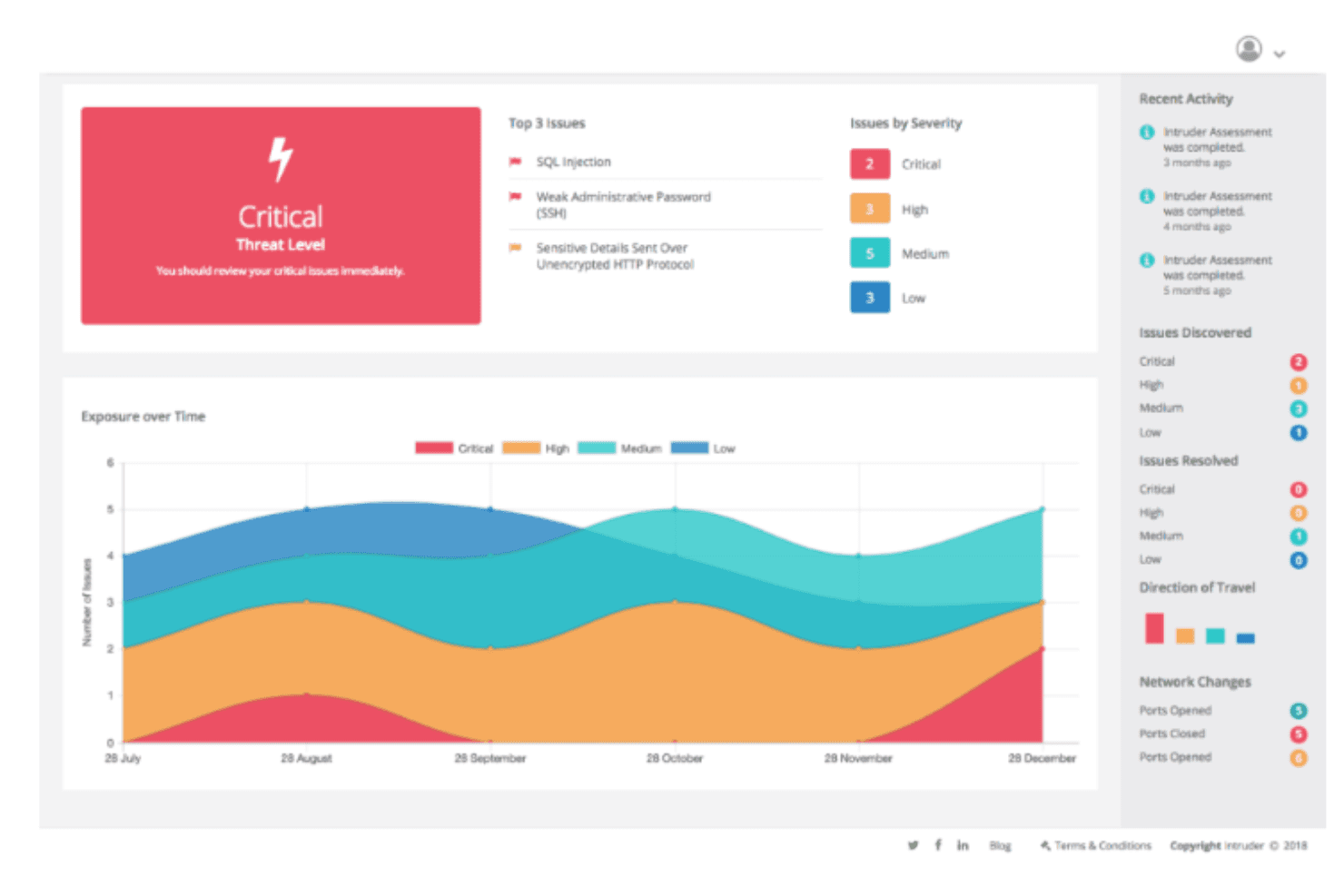
Intruder monitora automaticamente i tuoi sistemi per rilevare e notificare potenziali minacce appena emergono. Intruder è una piattaforma di gestione continua dell’esposizione che combina scansione automatizzata delle vulnerabilità, penetration testing guidato dall’IA, monitoraggio della superficie di attacco e controlli della configurazione di sicurezza cloud su app web, API e infrastrutture.
Per chi è ideale Intruder?
Intruder è particolarmente adatto per i team di sicurezza e IT di aziende piccole e medie che necessitano di una copertura continua delle vulnerabilità senza disporre di un ampio team di sicurezza dedicato.
Perché ho scelto Intruder
Ho scelto Intruder tra i migliori perché i suoi controlli quotidiani della configurazione cloud offrono al mio team una visione quasi in tempo reale delle variazioni di sicurezza negli ambienti AWS, Azure e GCP. A differenza degli strumenti che effettuano scansioni settimanali o su richiesta, il CSPM di Intruder è eseguito ogni giorno e segnala le configurazioni errate prima che possano essere sfruttate. Apprezzo anche le Emerging Threat Scans: il team di sicurezza di Intruder esegue manualmente controlli per nuove vulnerabilità critiche appena divulgate e scansiona i tuoi target senza dover configurare nulla.
Funzionalità principali di Intruder
- Pentesting guidato dall’IA: Esegue test di penetrazione on-demand utilizzando l’IA per simulare il comportamento di un aggressore sulle tue applicazioni.
- Analista di sicurezza GregAI: Riassume, verifica e dà priorità alle vulnerabilità rilevate nell’ambiente utilizzando l’IA.
- Scansione di applicazioni web autenticata: Supporta la scansione su applicazioni web protette da password o con sessione ristretta.
- Rilevamento di minacce emergenti: Ricerca proattivamente e testa vulnerabilità zero-day e di alto profilo sulle tue esposizioni.
Integrazioni di Intruder
Intruder offre integrazioni native con AWS, Microsoft Azure, Google Cloud, Jira, GitHub, GitLab, ServiceNow, Slack, Microsoft Teams e Okta. È disponibile un’API per integrazioni personalizzate.
Pros and Cons
Pros:
- Controlli automatici quotidiani delle configurazioni cloud
- Pentesting e riepiloghi delle vulnerabilità guidati dall’IA
- Onboarding veloce per piccoli team IT
Cons:
- I controlli sulle notifiche possono essere limitati
- Nessun pentesting manuale da parte di esperti umani
Learn more about Intruder: Ideale per configurare i profili di scansione
- Demo gratuita disponibile
- Prezzi su richiesta
Visit WebsiteCustomer Rating:4.6/5This rating combines scores from multiple user review sites to reflect overall customer sentiment about the product.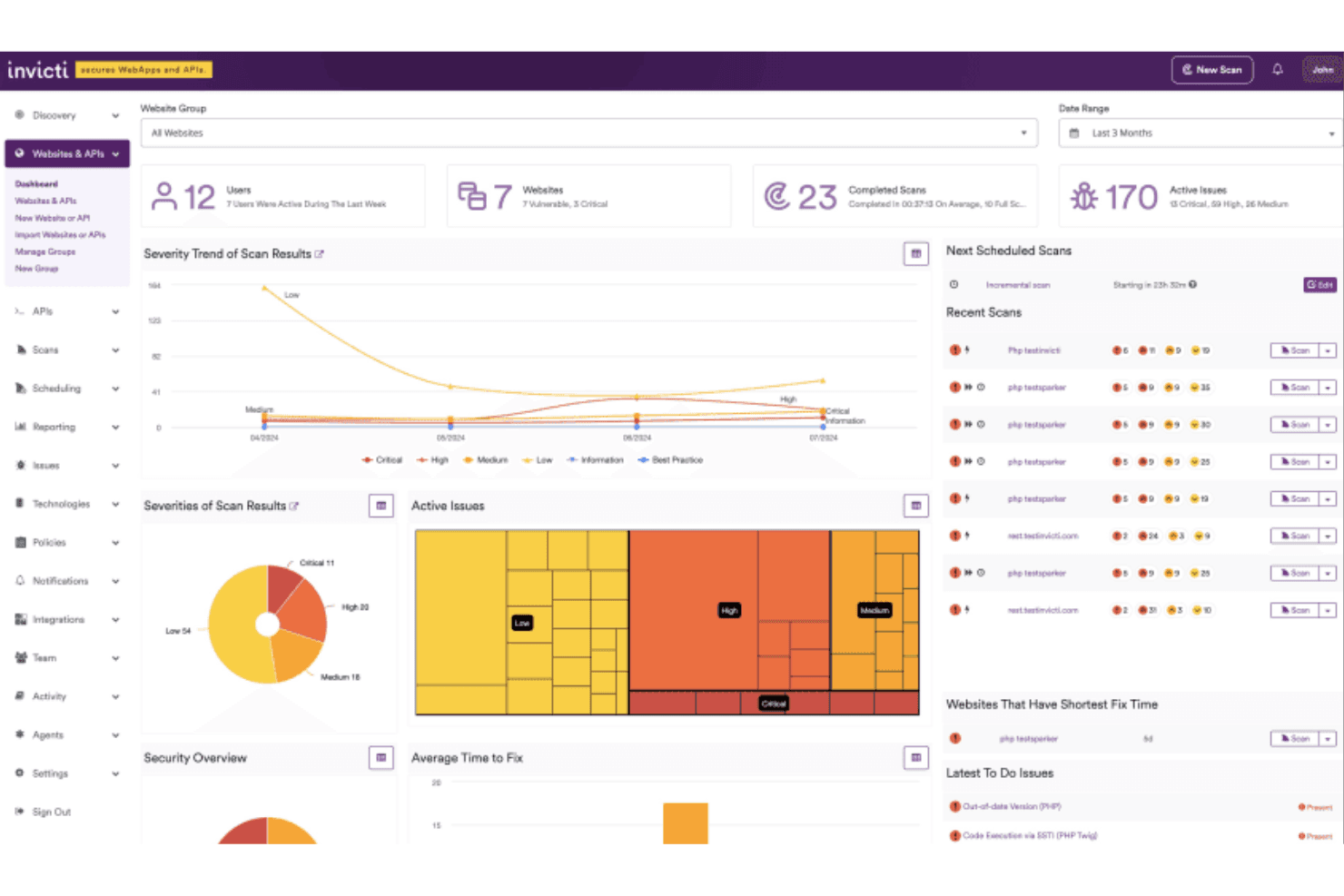
La dashboard principale di Invicti fornisce una panoramica delle scansioni e dei test recenti, insieme ai relativi stati. Invicti è una piattaforma di sicurezza delle applicazioni che combina DAST, test di sicurezza API, SAST, SCA e gestione delle vulnerabilità in un unico luogo, utilizzando la scansione basata su prove per confermare le vulnerabilità sfruttabili in applicazioni web e API attive.
Per Chi È Meglio Invicti?
Invicti è particolarmente indicato per team di sicurezza aziendali e AppSec che gestiscono ampi portafogli di applicazioni web e API in ambienti complessi e multi-team.
Perché Ho Scelto Invicti
Ho inserito Invicti nella mia shortlist per il livello di controllo che offre sulla configurazione delle scansioni. Mi piace poter costruire e salvare profili personalizzati per ciascun obiettivo, escludendo tecnologie non rilevanti per una specifica applicazione, riducendo così notevolmente i tempi di scansione. Quando aggiungo una nuova applicazione simile a una esistente, applico un profilo salvato invece di configurare tutto da capo. La scansione basata su prove quindi convalida la reale sfruttabilità all'interno di quel perimetro definito.
Funzionalità Chiave di Invicti
- Scansione basata su prove: Conferma le vulnerabilità verificando automaticamente la possibilità di sfruttamento con attacchi reali e sicuri.
- Test di sicurezza delle API: Scansiona API REST, SOAP e GraphQL per i problemi della OWASP Top Ten.
- Reportistica per compliance e dirigenti: Mappa le vulnerabilità secondo i framework normativi e fornisce dashboard per il monitoraggio.
- Controllo accessi basato sui ruoli: Permette di assegnare permessi agli utenti per accesso e gestione collaborativi e sicuri.
Integrazioni di Invicti
Invicti offre oltre 110 integrazioni native, tra cui Jira, GitHub, GitLab, Azure DevOps, Jenkins, ServiceNow, Slack, Microsoft Teams, Okta, HashiCorp Vault e AWS WAF. È disponibile un'API per integrazioni personalizzate.
Pros and Cons
Pros:
- Profili di scansione personalizzati per diverse app
- Motore di conferma delle vulnerabilità basato su prove
- Gestisce bene scenari di autenticazione complessi
Cons:
- Nessun test integrato per app mobile
- La flessibilità della reportistica potrebbe essere migliorata
Learn more about Invicti: Ideale per la scansione di vulnerabilità nelle SPA
- Piano gratuito disponibile
- Da $475/utente/anno
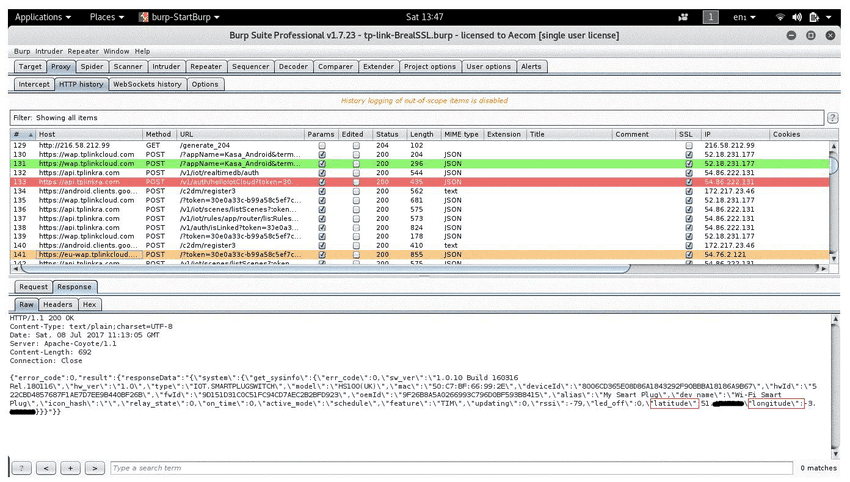
L'interfaccia dettagliata di Burp Suite mostra chiaramente la posizione esatta dell'utente Burp Suite è una piattaforma per il penetration testing delle applicazioni web di PortSwigger che combina un proxy di intercettazione, la scansione automatica delle vulnerabilità, strumenti di test manuali e un framework estendibile per la ricerca sulla sicurezza su app web e API moderne.
Per chi è ideale Burp Suite?
Burp Suite è perfetto per penetration tester professionisti e ingegneri della sicurezza delle applicazioni che necessitano di un controllo preciso e pratico sui propri flussi di lavoro di test.
Perché ho scelto Burp Suite
Burp Suite si guadagna un posto tra i migliori della mia lista grazie alla capacità del suo scanner, basato su browser, di gestire in modo efficace le SPA pesanti in JavaScript. Utilizzando un browser Chromium integrato, rende e interagisce con i contenuti dinamici come farebbe un vero utente, identificando vulnerabilità che gli scanner tradizionali trascurano completamente. Apprezzo anche il supporto nativo ai test delle API, che copre definizioni OpenAPI, JSON e GraphQL con individuazione automatica degli endpoint integrata direttamente nel flusso di scansione.
Funzionalità principali di Burp Suite
- Proxy di intercettazione: Cattura, ispeziona e modifica il traffico HTTP e HTTPS tra il browser e l'applicazione target.
- Burp Intruder: Automatizza attacchi personalizzati e fuzzing per individuare vulnerabilità nella gestione degli input.
- Strumento Repeater: Consente la manipolazione manuale e l'invio ripetuto di richieste HTTP individuali per analisi approfondite.
- Estensioni BApp Store: Espande le funzionalità di Burp Suite con centinaia di plugin ufficiali e della community installabili.
Integrazioni Burp Suite
Burp Suite offre integrazioni native con Jira, GitLab e Trello, oltre a supportare flussi di lavoro CI/CD tramite la sua API. Un ricco BApp Store mette a disposizione centinaia di estensioni della community e ufficiali per aumentare le capacità di test.
Pros and Cons
Pros:
- Gestisce i test di sicurezza delle applicazioni a pagina singola
- Include strumenti avanzati per test manuali
- Supporta la scansione automatica di vulnerabilità complesse
Cons:
- Elevato utilizzo di risorse durante scansioni di grandi dimensioni
- L'interfaccia può essere complicata per i nuovi tester
Learn more about Burp Suite: Ideale con add-on da marketplace per test estesi
- Piano gratuito disponibile
- Prezzo su richiesta
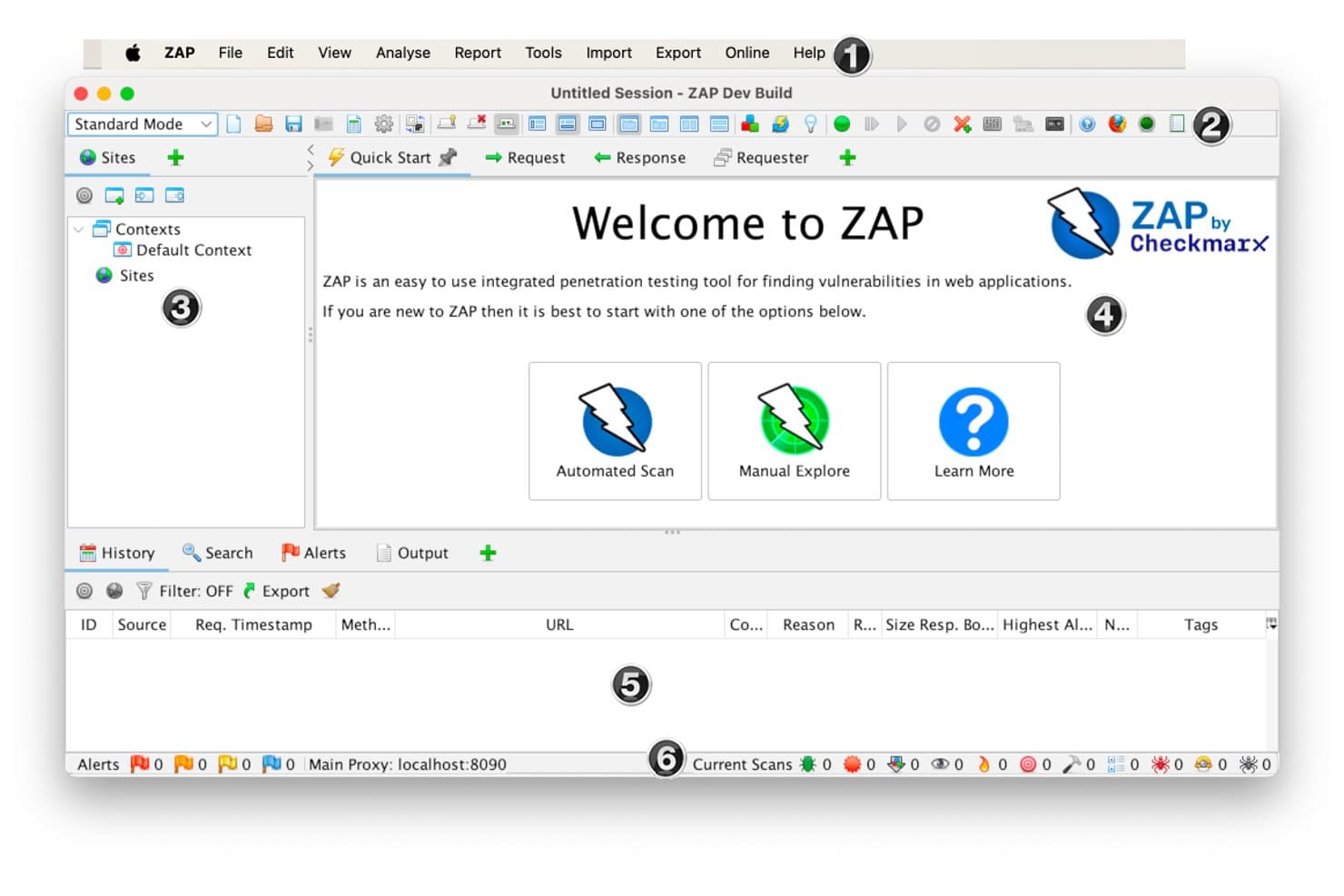
OWASP ZAP (Zed Attack Proxy) offre una schermata di benvenuto intuitiva con opzioni di Scansione automatica, Esplorazione manuale e Maggiori informazioni per il penetration testing delle applicazioni web. ZAP di Checkmarx è uno strumento gratuito e open-source per il penetration testing di applicazioni web che funziona come un proxy manipolatore-in-mezzo, combinando scansione attiva e passiva, spidering e automazione CI/CD in un'unica piattaforma.
Per Chi è Ideale OWASP ZAP (Zed Attack Proxy)?
ZAP è particolarmente adatto a ingegneri della sicurezza e sviluppatori che necessitano di uno strumento DAST open-source a costo zero, estendibile e automatizzabile all'interno delle pipeline esistenti.
Perché Ho Scelto OWASP ZAP (Zed Attack Proxy)
ZAP si guadagna il suo posto nella mia shortlist tra i migliori perché il suo marketplace di add-on estende concretamente ciò che uno strumento DAST di base può offrire. Ho aggiunto le estensioni GraphQL e OpenAPI per coprire gli endpoint API moderni che altrimenti non sarebbero testati con un normale spider. L'add-on Retire.js è un altro che uso regolarmente, evidenziando pacchetti JavaScript obsoleti che la sola scansione attiva non potrebbe rilevare.
Funzionalità Principali di OWASP ZAP (Zed Attack Proxy)
- Scansione automatica e avvio rapido: Avvia una scansione completa dell'applicazione web con spidering e controlli attivi delle vulnerabilità.
- Scansione passiva e attiva: Ispeziona e attacca il traffico HTTP senza richiedere intervento manuale.
- Heads Up Display (HUD): Sovrappone i controlli di test e i feedback in tempo reale direttamente nella finestra del browser.
- Framework di automazione: Supporta flussi di lavoro di test scriptati e si integra con CI/CD tramite Docker e opzioni API.
Integrazioni di OWASP ZAP (Zed Attack Proxy)
ZAP offre integrazioni con GitHub Actions, Jenkins, Docker e supporta l'importazione dei risultati in strumenti come DefectDojo, Dradis e Faraday. Un'API e un framework di automazione permettono di collegare ZAP a pipeline personalizzate e ambienti CI/CD.
Pros and Cons
Pros:
- Estendibile con add-on dal marketplace ufficiale
- Open-source con supporto attivo della comunità
- Potenti capacità di scansione automatica e passiva
Cons:
- Manca di template avanzati per i report
- L'interfaccia utente appare datata rispetto alle alternative
Learn more about OWASP ZAP (Zed Attack Proxy): Ideale per la scansione continua delle vulnerabilità
- Demo gratuita disponibile
- Da $69/mese
Visit WebsiteCustomer Rating:4.5/5This rating combines scores from multiple user review sites to reflect overall customer sentiment about the product.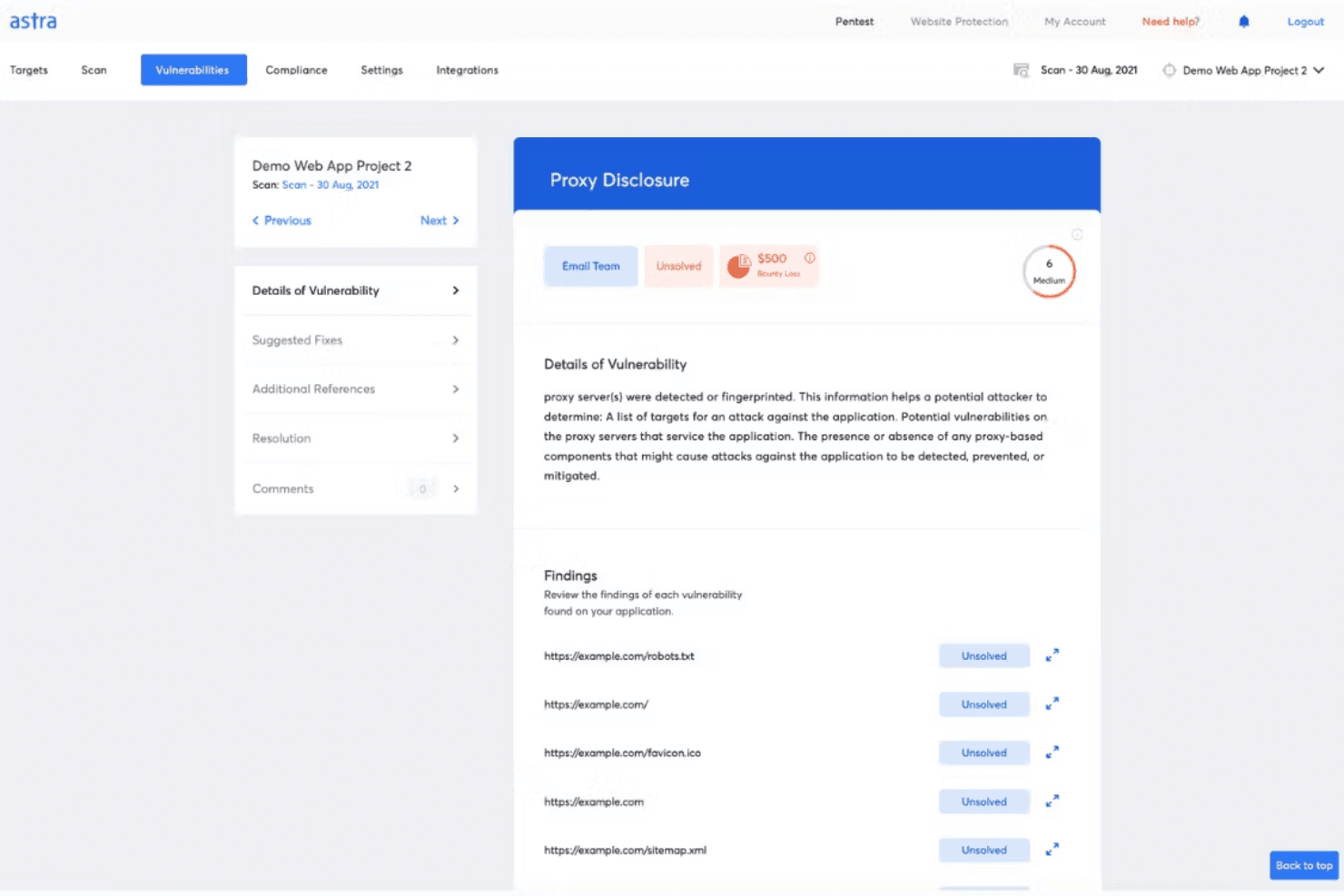
I penetration test di Astra possono rilevare vulnerabilità e forniscono risultati dettagliati e raccomandazioni. Astra Pentest è una piattaforma PTaaS che combina scansioni DAST automatizzate, penetration test manuali condotti da esperti, test di sicurezza delle API e scansioni delle vulnerabilità nel cloud in un unico cruscotto.
####Per chi è più indicato Astra Pentest?
È particolarmente adatto a team attenti alla sicurezza in startup e aziende di medie dimensioni che hanno bisogno di report di penetration test conformi alle normative insieme a scansioni automatizzate continue.
####Perché ho scelto Astra Pentest
Astra Pentest si guadagna un posto tra i migliori nella mia lista perché le sue scansioni DAST continue eseguono oltre 10.000 test, inclusi quelli autenticati dietro pareti di login, che la maggior parte degli scanner ignora del tutto. Apprezzo anche il fatto che includa revisioni delle scansioni verificate da esperti, così il mio team non viene sommerso dai dati grezzi ma lavora su risultati validati. Il triage assistito dall’IA dei falsi positivi mantiene il rapporto segnale/rumore gestibile, anche quando le scansioni vengono eseguite con regolarità continua.
####Caratteristiche principali di Astra Pentest
- Pen test manuale da esperti di sicurezza: Professionisti certificati eseguono test offensivi utilizzando linee guida OWASP, SANS, CREST e PTES.
- Piattaforma per la sicurezza delle API: Analizza le API per i principali 10 problemi OWASP API e individua endpoint nascosti o orfani tramite cattura del traffico live.
- Reportistica orientata alla conformità: Genera report dedicati per i requisiti SOC2, ISO 27001, PCI-DSS, HIPAA e GDPR.
- Certificato di penetration test verificabile pubblicamente: Ricevi un certificato condivisibile dopo ogni pen test superato, a conferma di avvenuta correzione delle vulnerabilità e completamento dei retest.
####Integrazioni di Astra Pentest
Astra Pentest offre integrazioni native con Bitbucket, CircleCI, GitHub, GitLab, Jenkins, Jira, Microsoft Azure e Slack. Fornisce inoltre accesso API per integrazioni personalizzate e supporta la cattura del traffico API live con Postman, Kong, AWS, GCP e Nginx.
Pros and Cons
Pros:
- DAST automatizzato e penetration test manuali combinati
- Report conformi a diversi standard
- Workflow di remediation integrato nel cruscotto dei penetration test
Cons:
- Non include test di vulnerabilità per app mobile
- Le scansioni possono generare occasionali falsi positivi
Learn more about Astra Pentest: 10Ideale per DeepScan in applicazioni web complesse
Acunetix
- Demo gratuita disponibile
- Prezzo su richiesta
Visit WebsiteCustomer Rating:4.2/5This rating combines scores from multiple user review sites to reflect overall customer sentiment about the product.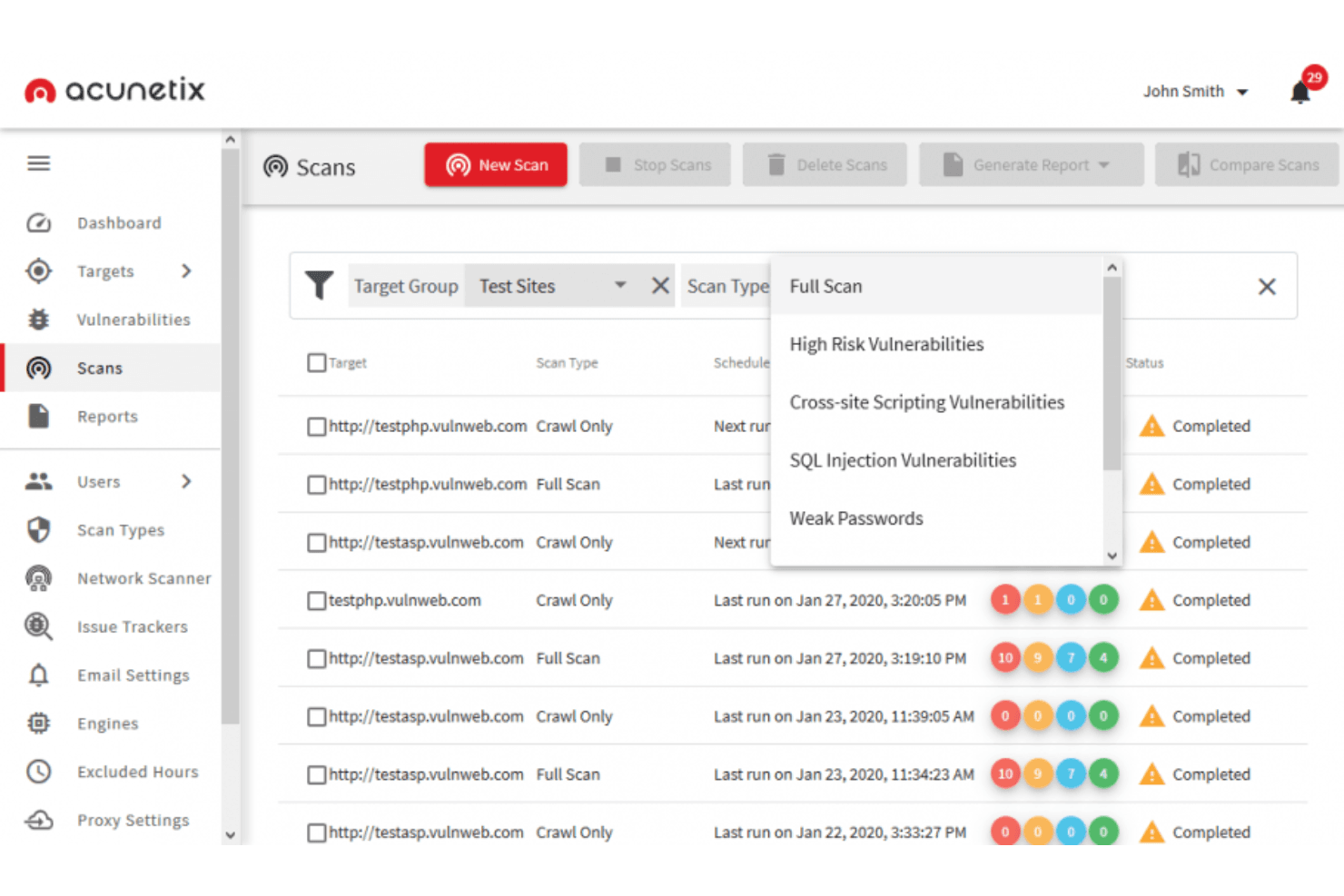
Acuntix può identificare una vasta gamma di vulnerabilità, tra cui OWASP Top 10, SQL injection, XSS, configurazioni errate, database esposti e vulnerabilità out-of-band. Acunetix è uno scanner di sicurezza per applicazioni web incentrato su DAST che rileva vulnerabilità su applicazioni web, API e LLM utilizzando DeepScan, AcuSensor e analisi potenziate dall'IA per individuare problemi sfruttabili anche in ambienti complessi e ricchi di JavaScript.
Per chi è pensato Acunetix?
Acunetix è adatto a team aziendali di sicurezza e AppSec che necessitano di una scansione automatizzata delle vulnerabilità su grandi portafogli di applicazioni web e API.
Perché ho scelto Acunetix
Acunetix merita il suo posto nella mia shortlist per l’efficacia con cui DeepScan gestisce applicazioni a pagina singola ricche di JavaScript. Molti scanner non riescono a trovare le vulnerabilità nascoste dietro chiamate AJAX o rendering lato client, ma DeepScan esegue effettivamente il JavaScript per esplorare ciò che vede il browser. Mi affido anche ad AcuSensor, che installa un sensore nel codice sorgente per combinare la scansione black-box con feedback interni, scoprendo vulnerabilità che la sola scansione esterna perde regolarmente.
Funzionalità principali di Acunetix
- Punteggio di rischio predittivo: Utilizza modelli di machine learning per stimare il rischio di vulnerabilità prima ancora che inizi la scansione.
- Controlli di accesso basati sui ruoli: Permette di assegnare ruoli e permessi agli utenti per gestire flussi di lavoro di scansione e remediation.
- Ritest e validazione automatizzati: Riesegue il test sui problemi individuati dopo la risoluzione per confermare che le vulnerabilità siano state effettivamente rimosse.
- Scansione della sicurezza delle API: Analizza REST, GraphQL e SOAP API per problemi di sicurezza, insieme al testing delle applicazioni web.
Integrazioni di Acunetix
Acunetix offre integrazioni native con Jira, GitHub, GitLab, Azure DevOps, Bitbucket, Bamboo, Bugzilla, F5 BIG-IP e Cloudflare. È disponibile un'API per integrazioni personalizzate.
Pros and Cons
Pros:
- Analizza single page application e applicazioni ricche di JavaScript
- Combina il DAST con una scansione interattiva opzionale
- Include la scansione delle vulnerabilità del perimetro di rete
Cons:
- Flessibilità limitata nella programmazione delle scansioni
- Personalizzazione dei report minima
Learn more about Acunetix:
Altri strumenti per i test di penetrazione delle applicazioni web
Ecco alcune opzioni aggiuntive di strumenti per i test di penetrazione delle applicazioni web che non sono state incluse nel mio elenco ristretto, ma che vale comunque la pena valutare:
- 11VeracodeIdeale per combinare test automatizzati e manuali
- 12MedusaIdeale per il testing parallelo basato su thread
- 13AmassIdeale per la scoperta di asset esterni
- 14GobusterIdeale per sviluppatori
- 15Rapid7Ideale per l'automazione nell'identificazione delle vulnerabilità
- 16NessusScansioni con e senza credenziali facili da usare
- 17NMapSoluzione leggera per i test di penetrazione delle applicazioni web
- 18John the RipperIdeale per il supporto esteso di hash e cifrari
- 19MetasploitAutomatizza i test manuali e semplifica il tuo processo
- 20Core ImpactIdeale per la replica di attacchi a più stadi
- 21SQLMapIdeale per le tecniche di iniezione SQL
- 22ZeroThreatIdeale per simulazioni d’attacco automatiche senza configurazione
- 23PcloudyIdeale per il testing dell'esperienza funzionale
Wie ich Call-Queue-Software bewerte
Ich unterteile meine Bewertung in grundlegende Kriterien – wie ACD-Routing und IVR-Konfiguration – und Unterscheidungsmerkmale, die Lösungen für große Contact Center von einfacheren Einsätzen abheben.
Kernfunktionalität (Mindestanforderungen für diese Liste)
Bei der Auswahl der Tools für meine Liste bewerte ich jedes einzelne auf einer Skala von 0 (bietet die Funktion nicht an) bis 5 (hervorragende Umsetzung in diesem Bereich) hinsichtlich jeder unten aufgeführten Kernfunktion. Anschließend berechne ich die Gesamtpunktzahl des Tools als Prozentwert. Jedes Tool muss eine Mindestgesamtpunktzahl von 65 % erreichen, um berücksichtigt zu werden.
- Automatische Gesprächsverteilung: Ich prüfe die Bandbreite der verfügbaren Routing-Strategien – skillbasiert, Rundlauf, längste Leerlaufzeit – und ob Ausweichregeln greifen, wenn primäre Agenten nicht verfügbar sind.
- Warteschlangenverwaltung & Priorisierung: Jedes Tool sollte es Administratoren ermöglichen, mehrere Warteschlangen mit Prioritätsstufen und Überlaufregeln einzurichten, etwa VIP-Konten vor allgemeinen Anfragen zu routen.
- IVR- & Self-Service-Menüs: Ich bewerte, ob das IVR mehrstufiges Verzweigen und bedingte Logik unterstützt und nicht bloß ein flaches Menü, das jeden Anrufer in dieselbe Warteschlange schickt.
- Warteerlebnis & Rückruf: Ansagen zur Position in der Warteschlange, geschätzte Wartezeiten und virtuelle Rückrufoptionen spielen alle eine Rolle – Anrufer, die einen Rückruf statt Warteschleife wählen können, reduzieren im Allgemeinen die Abbruchquote.
- Echtzeit-Monitoring & Analytics: Live-Dashboards mit Warteschlangentiefe, Wartezeiten und Agentenstatus sind ebenso wichtig wie historische Berichte zu Servicelevels und Abbruchraten.
- CRM- & Telefonie-Integrationen: Ich prüfe native Konnektoren zu CRMs wie Salesforce, HubSpot und Zendesk sowie SIP/VoIP-Unterstützung, damit Teams ihre bestehende Telefonie-Infrastruktur nutzen können.
Habe ich eine Liste mit Tools, die die Kriterien erfüllen, betrachte ich, was jede Plattform besonders macht.
Unterscheidungsmerkmale (Was Anbieter voneinander abhebt)
So vergleiche und differenziere ich die Anbieter:
Herausragende Funktionen
Omnichannel-Warteschlangen sind ein entscheidendes Differenzierungsmerkmal – Teams, die Anfragen über Chat, E-Mail und Telefon bearbeiten, profitieren von einer einheitlichen Warteschlange, ohne dass Agenten zwischen Plattformen wechseln müssen. Außerdem achte ich auf KI-basierte Assistenzfunktionen, die während des Gesprächs Wissensdatenbank-Artikel anzeigen oder Antwortvorschläge machen. Ein weiterer Punkt ist das Workforce Management; Tools mit integrierter Prognosefunktion unterstützen Supervisoren dabei, Warteschlangen entsprechend vorhergesagtem Volumen und nicht nach Bauchgefühl zu besetzen.
Mehr als nur Funktionen
Compliance und Sicherheit sind besonders wichtig, wenn in Warteschlangen sensible Daten verarbeitet werden – ich prüfe die Einhaltung von PCI-DSS und HIPAA sowie Verschlüsselung und Einwilligungsmanagement bei Gesprächsaufzeichnungen. Ein weiterer Aspekt ist Preistransparenz, da manche Anbieter Kernfunktionen für Warteschlangen in Basispaketen bündeln, während andere Rückruf- oder Analysefunktionen als Zusatzleistungen anbieten. Ich bewerte zudem, wie schnell ein Team starten kann: Plattformen mit geführter Einrichtung und Unterstützung beim Portieren von Rufnummern verkürzen meist die Zeit zwischen Kauf und erstem Anruf in der Warteschlange.
Come scegliere uno strumento per i test di penetrazione delle applicazioni web
È facile perdersi in lunghi elenchi di funzionalità e strutture tariffarie complesse. Per aiutarti a rimanere concentrato mentre affronti il tuo particolare processo di selezione del software, ecco un elenco dei fattori da tenere presenti:
| Fattore | Cosa considerare |
|---|---|
| FattoreScalabilità | Cosa considerareLo strumento crescerà insieme alle tue esigenze? Considera il numero di utenti e applicazioni che può gestire senza problemi di prestazioni. |
| FattoreIntegrazioni | Cosa considerareSi integra con i sistemi esistenti? Cerca la compatibilità con altri strumenti di sicurezza e piattaforme di sviluppo che già utilizzi. |
| FattorePersonalizzazione | Cosa considerarePuoi adattare lo strumento ai tuoi flussi di lavoro specifici? Verifica se consente di personalizzare dashboard e report. |
| FattoreSemplicità d'uso | Cosa considerareLo strumento è intuitivo per il tuo team? Valuta la curva di apprendimento e se richiede una formazione approfondita o competenze tecniche. |
| FattoreImplementazione e onboarding | Cosa considerareQuanto tempo ci vorrà per renderlo operativo? Considera la complessità della configurazione e la disponibilità di risorse come tutorial e supporto durante l'implementazione. |
| FattoreCosto | Cosa considerareIl prezzo rientra nel tuo budget? Confronta il costo con le funzionalità offerte e cerca eventuali costi nascosti o contratti a lungo termine. |
| FattoreMisure di sicurezza | Cosa considerareSono presenti solide misure di sicurezza? Assicurati che lo strumento sia conforme ai tuoi standard di sicurezza e offra funzionalità di protezione dei dati. |
| FattoreRequisiti di conformità | Cosa considerareRispetta gli standard di conformità del settore? Verifica se lo strumento supporta normative necessarie come il GDPR o PCI-DSS per il tuo specifico settore. |
Cosa sono gli strumenti per i test di penetrazione delle applicazioni web?
Gli strumenti per i test di penetrazione delle applicazioni web identificano le vulnerabilità di sicurezza nelle applicazioni web. I professionisti della sicurezza e gli sviluppatori utilizzano generalmente questi strumenti per proteggere i dati sensibili e garantire la sicurezza delle applicazioni.
La scansione automatizzata, gli avvisi in tempo reale e le funzionalità di report dettagliati aiutano a identificare le minacce e a mantenere gli standard di sicurezza. Nel complesso, questi strumenti sono essenziali per proteggere le applicazioni web da potenziali attacchi.
Caratteristiche
Quando selezioni gli strumenti per i test di penetrazione delle applicazioni web, presta attenzione alle seguenti caratteristiche principali:
- Scansione completa delle vulnerabilità: questa funzionalità esegue automaticamente la scansione delle tue applicazioni web alla ricerca di un'ampia gamma di vulnerabilità di sicurezza, come l'iniezione SQL, il cross-site scripting e le impostazioni di sicurezza configurate in modo errato. Ti aiuta a individuare tempestivamente le minacce nascoste, così non devi inseguire continuamente nuovi problemi di sicurezza.
- Test dell'autenticazione: verifica se i meccanismi di accesso e di gestione delle sessioni della tua applicazione sono sicuri. Simulando diversi tipi di attacchi, puoi scoprire se credenziali, sessioni e autorizzazioni sono adeguatamente protette o richiedono interventi.
- Report e analisi: report chiari e dettagliati riepilogano i risultati delle scansioni in modo concreto e utile. Questi strumenti ordinano le vulnerabilità per gravità, offrono indicazioni per la risoluzione e spesso consentono di esportare i risultati per condividerli con il tuo team (o per vantartene un po').
- Casi di test personalizzabili: puoi modificare o creare scenari di test personalizzati per affrontare i rischi specifici del tuo ambiente. In questo modo hai il controllo e i test non sono vincolati a un approccio uguale per tutti.
- Funzionalità di integrazione: questi strumenti si connettono alle altre piattaforme di sicurezza o sviluppo, come pipeline CI/CD, sistemi di ticketing o dashboard di sicurezza. Ciò contribuisce a mantenere fluido il flusso di lavoro, senza dover passare continuamente da una scheda all'altra.
- Scansione e individuazione: esamina l'intera applicazione web, mappando i contenuti pubblici e nascosti. Non perderai sezioni della tua applicazione che necessitano di protezione, perché lo strumento le porta tutte alla luce.
- Riduzione dei falsi positivi: nessuno vuole perdere tempo con minacce inesistenti. Gli strumenti con una buona riduzione dei falsi positivi ti aiutano a concentrarti sui problemi di sicurezza reali invece di inseguire fantasmi.
- Verifiche di conformità: molti strumenti verificano la conformità delle tue applicazioni web a standard come OWASP Top 10 o PCI DSS. Questo ti aiuta ad assicurarti di rispettare i requisiti del settore, mantenendo soddisfatti sia i revisori sia i clienti.
Funzionalità basate sull'IA degli strumenti comuni per i test di penetrazione delle applicazioni web
Oltre alle funzionalità standard degli strumenti per i test di penetrazione delle applicazioni web elencate sopra, molte di queste soluzioni stanno integrando l'IA con funzionalità come:
- Rilevamento automatizzato delle minacce: in questo caso, l'IA apprende dalle scansioni precedenti e dai nuovi dati sulle minacce per individuare problemi di sicurezza che potrebbero sfuggire alle scansioni regolari. Il sistema diventa più intelligente, quindi non devi individuare personalmente ogni vulnerabilità complessa.
- Definizione intelligente delle priorità: l'IA analizza i dati delle scansioni, prevede l'impatto reale delle vulnerabilità e le classifica in base al rischio. Ottieni informazioni utili su cosa affrontare per primo, non solo un lungo elenco di problemi.
- Scansione adattiva: gli strumenti di scansione basati sull'IA apprendono la struttura anche dei siti web complessi o dinamici, individuando percorsi o contenuti nascosti in modo più efficace rispetto agli strumenti tradizionali. Ciò significa che durante la verifica della sicurezza vengono tralasciati meno elementi.
- Simulazione contestuale degli attacchi: con l'IA, questi strumenti adattano gli attacchi simulati alle caratteristiche uniche della tua app e al comportamento degli utenti, fornendoti una valutazione più accurata della tua reale esposizione.
- Rilevamento delle anomalie: l'IA osserva la tua app web per individuare comportamenti anomali, come schemi di accesso insoliti o richieste di dati impreviste, e li segnala per la revisione. Ricevi un avviso anticipato sulle minacce insolite prima che diventino gravi.
Vantaggi
L'implementazione di strumenti per i test di penetrazione delle applicazioni web offre numerosi vantaggi al tuo team e alla tua azienda. Eccone alcuni:
- Sicurezza migliorata: identificando le vulnerabilità tramite la scansione automatizzata, il tuo team può affrontare le minacce prima che diventino problemi gravi.
- Risparmio di tempo: gli avvisi in tempo reale e i processi automatizzati fanno risparmiare tempo al tuo team, permettendogli di concentrarsi su altre attività importanti.
- Conformità rafforzata: il supporto alla conformità garantisce che la tua azienda rispetti le normative del settore, riducendo i rischi legali.
- Processo decisionale consapevole: report dettagliati forniscono informazioni utili per stabilire le priorità delle misure di sicurezza e allocare le risorse in modo efficace.
- Esperienza personalizzabile: i pannelli di controllo personalizzabili consentono agli utenti di concentrarsi sui dati rilevanti, migliorando l'efficienza del flusso di lavoro e la soddisfazione degli utenti.
- Semplicità d'uso: un'interfaccia intuitiva riduce la curva di apprendimento, facilitando l'adozione e l'utilizzo efficace degli strumenti da parte del tuo team.
Costi e prezzi
La scelta degli strumenti per i test di penetrazione delle applicazioni web richiede la comprensione dei vari modelli di prezzo e dei piani disponibili. I costi variano in base alle funzionalità, alle dimensioni del team, agli extra e ad altri fattori. La tabella seguente riassume i piani più comuni, i relativi prezzi medi e le funzionalità generalmente incluse nelle soluzioni di strumenti per i test di penetrazione delle applicazioni web:
Tabella comparativa dei piani per gli strumenti di test di penetrazione delle applicazioni web
| Tipo di piano | Prezzo medio | Funzionalità comuni |
|---|---|---|
| Tipo di pianoPiano gratuito | Prezzo medio$0 | Funzionalità comuniFunzionalità di scansione di base, report limitati e supporto della comunità. |
| Tipo di pianoPiano personale | Prezzo medio$10-$30/utente/mese | Funzionalità comuniScansione automatizzata, avvisi in tempo reale, pannelli di controllo personalizzabili e supporto via e-mail. |
| Tipo di pianoPiano aziendale | Prezzo medio$50-$100/utente/mese | Funzionalità comuniReport dettagliati, funzionalità di integrazione, supporto alla conformità e supporto telefonico. |
| Tipo di pianoPiano per grandi aziende | Prezzo medio$150-$300/utente/mese | Funzionalità comuniInformazioni avanzate sulle minacce, responsabile dell'account dedicato, personalizzazione completa e supporto 24/7. |
Domande frequenti sugli strumenti di test di penetrazione delle applicazioni web
Ecco alcune risposte alle domande frequenti sugli strumenti WAPT:
Con quale frequenza è necessario eseguire i test di penetrazione delle applicazioni web?
Si consiglia di eseguire i test di penetrazione almeno una volta all’anno o ogni volta che vengono apportate modifiche significative all’applicazione. I test regolari aiutano a identificare nuove vulnerabilità che potrebbero derivare da aggiornamenti o modifiche all’ambiente dell’applicazione.
Gli strumenti per i test di penetrazione possono sostituire i test manuali?
No, gli strumenti per i test di penetrazione integrano i test manuali, ma non li sostituiscono. Gli strumenti automatizzati possono identificare rapidamente le vulnerabilità note, ma i test manuali sono essenziali per individuare difetti logici complessi e problemi di sicurezza contestuali che richiedono intuito e competenze umane.
Come si garantisce che i risultati dei test di penetrazione vengano risolti?
Dopo i test, assegna la priorità alla risoluzione delle vulnerabilità in base ai livelli di rischio. Sviluppa un piano di correzione con tempistiche e responsabilità chiare. Aggiorna regolarmente le pratiche di sicurezza ed esegui test di controllo per verificare che i problemi siano stati risolti.