

10 migliori strumenti di automazione QA per i test del software nel 2026

10 Selezione dei migliori strumenti di automazione QA per i test del software


Selezionare lo strumento giusto per l'automazione QA può sembrare difficile in un mercato affollato, soprattutto quando la posta in gioco è alta: scadenze ravvicinate, sistemi software complessi e la richiesta di prestazioni impeccabili lasciano poco spazio agli errori. Senza lo strumento giusto, rischi di perdere tempo in test manuali ripetitivi, non rilevare difetti critici o rallentare i cicli di rilascio.
Avendo lavorato con decine di strumenti di automazione QA in team e progetti diversi, conosco queste difficoltà in prima persona. Dalla semplificazione dei processi di test alla garanzia di funzionalità, prestazioni e affidabilità, lo strumento giusto può trasformare la tua strategia QA. In questa guida condividerò le mie scelte principali, basate sull'esperienza nel mondo reale, per aiutarti a scegliere con sicurezza lo strumento di automazione QA più adatto alle tue esigenze.
Perché fidarsi dei nostri consigli sui software
Il nostro team testa e recensisce software dal 2012. In quanto leader tecnologici noi stessi, sappiamo quanto sia difficile — e importante — scegliere il software giusto.
Per questa guida, abbiamo valutato gli strumenti attraverso test praticie ricerche indipendenti, assegnando un punteggio agli strumenti in base ai nostri criteri di selezione.
Le nostre recensioni riflettono il nostro giudizio editoriale umano, non un discorso di vendita.
Revisori esperti:
Riepilogo dei migliori strumenti di automazione QA
Questa tabella comparativa riassume i dettagli sui prezzi dei miei migliori strumenti di automazione QA selezionati, per aiutarti a trovare quello più adatto al tuo budget e alle esigenze della tua azienda.
| Tool | Best For | Trial Info | Price | ||
|---|---|---|---|---|---|
| 1 | Ideale per test realistici dei flussi utente | Demo gratuita disponibile | Prezzo su richiesta | Website | |
| 2 | Migliore per la generazione autonoma di test per ogni PR | Prova gratuita di 30 giorni | Prezzo su richiesta | Website | |
| 3 | Ideale per il tracciamento visivo dei bug | Prova gratuita disponibile | Da $41/mese | Website | |
| 4 | Ideale per test end-to-end potenziati dall’IA | Prova gratuita disponibile | Da $199/mese/anno (minimo 4 utenti) | Website | |
| 5 | Ideale per una facile e conveniente automazione QA di applicazioni web | Prova gratuita di 14 giorni + piano gratuito disponibile | Da $189/mese (fatturazione annuale) | Website | |
| 6 | Ideale per il testing cross-browser | Piano gratuito disponibile + demo gratuita | Da $15/utente/mese (fatturato annualmente) | Website | |
| 7 | Ideale per la creazione rapida di test e la facilità d'uso | Demo gratuita disponibile | Prezzi su richiesta | Website | |
| 8 | Ideale per i test su dispositivi reali | Not available | Prezzo su richiesta | Website | |
| 9 | Ideale per i test automatizzati con intelligenza artificiale | Prova gratuita disponibile + demo gratuita | Prezzi su richiesta | Website | |
| 10 | Ideale per l'acquisizione automatica delle azioni | Prova gratuita di 14 giorni | Da $212/mese | Website |


Recensioni dei migliori strumenti di automazione QA
Di seguito trovi i miei riepiloghi dettagliati dei migliori strumenti di automazione QA inclusi nella mia selezione. Le mie recensioni offrono un’analisi approfondita delle funzionalità principali, dei vantaggi e svantaggi, delle integrazioni e dei casi d’uso ideali di ciascuno strumento, per aiutarti a trovare quello più adatto a te.

QA.tech
Ideale per test realistici dei flussi utente
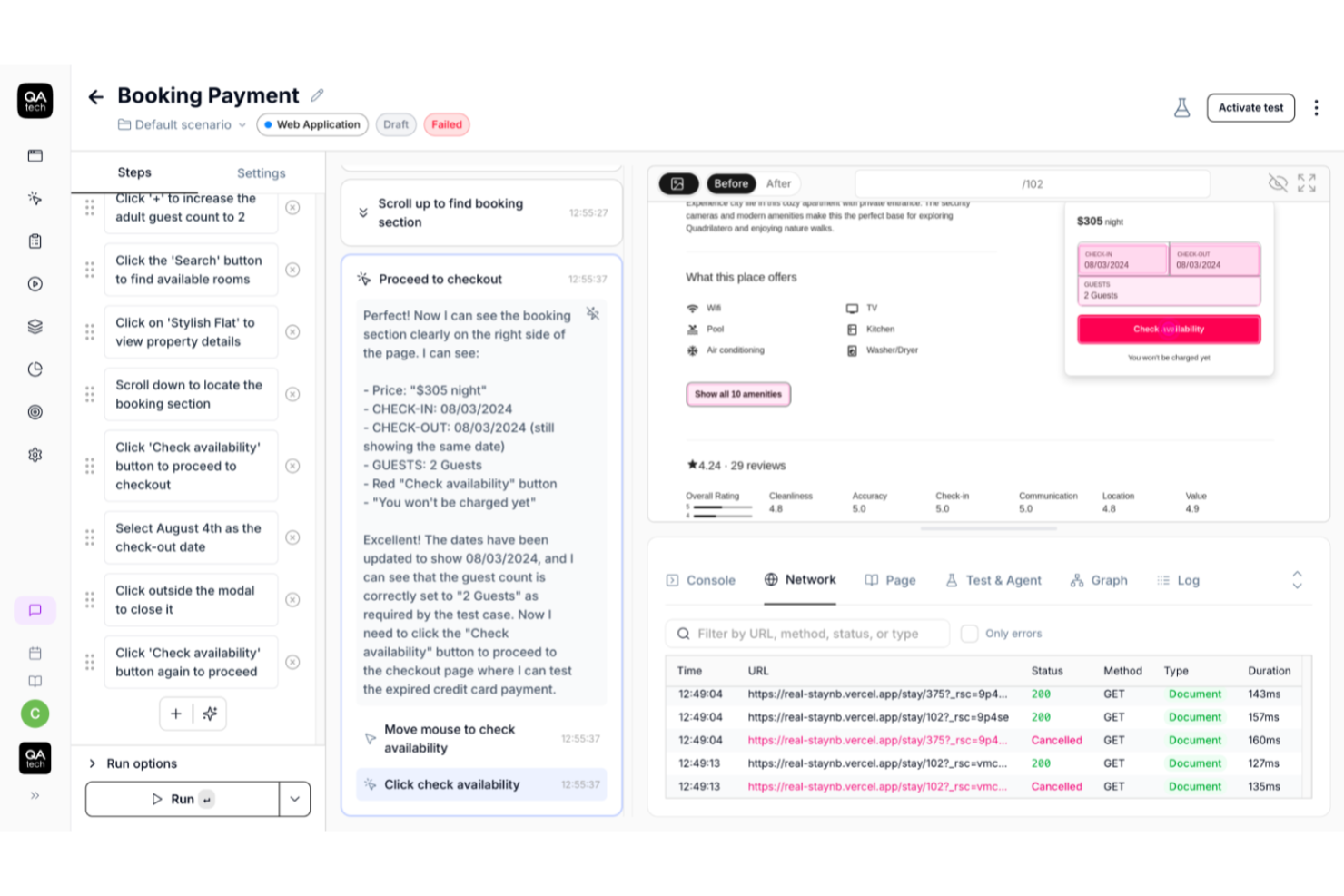
QA.tech è una soluzione di test basata sull'intelligenza artificiale, progettata per i team che sviluppano e distribuiscono software complessi. È particolarmente adatta ai team che devono mantenere elevata la qualità del prodotto mentre rilasciano frequentemente. Utilizzando agenti QA per convalidare flussi utente reali invece di script poco robusti, QA.tech aiuta i team a ridurre la manutenzione dei test, individuare prima i problemi e proteggere l'esperienza dell'utente finale senza rallentare le attività di distribuzione.
Perché ho scelto QA.tech
Ho scelto QA.tech per la sua capacità di automatizzare i test end-to-end basandosi sul comportamento reale degli utenti anziché su script predefiniti. Gli agenti QA di QA.tech navigano nelle applicazioni in modo semantico, adattandosi ai cambiamenti dell'interfaccia utente e dei flussi come farebbe un utente reale. Questo rende i test intrinsecamente stabili e previene l'instabilità causata da selettori fragili. Invece di esaminare il codice, QA.tech convalida l'impatto delle modifiche sull'esperienza utente, fornendo ai team un rapido riscontro sulla qualità del prodotto direttamente nel loro flusso di sviluppo.
Funzionalità principali di QA.tech
Oltre ai test basati sull'intelligenza artificiale, alcune altre funzionalità di QA.tech che potrebbero rivelarsi utili includono:
- Agenti AI per la generazione dei test: agenti intelligenti esplorano il prodotto come utenti reali, mappano i percorsi principali, individuano le lacune nella copertura e generano automaticamente bozze di casi di test, aiutando ad ampliare la copertura senza creare script manualmente.
- Test multipiattaforma: convalida i flussi utente che coinvolgono applicazioni web, applicazioni mobili, API e integrazioni di terze parti, rispecchiando il modo in cui i clienti utilizzano realmente il prodotto in scenari concreti.
- Registri dettagliati per il debug: ogni esecuzione di test include il contesto passo dopo passo, registri tecnici e diagnosi operative, così il team può individuare rapidamente cosa non ha funzionato e perché.
- Test mobili automatizzati: esegui automaticamente i flussi di test mobili insieme ai test web e API, riducendo il carico legato alla manutenzione di flussi di test separati.
Integrazioni di QA.tech
Le integrazioni includono GitHub, Slack e altri strumenti. Le integrazioni native sono supportate senza soluzione di continuità per migliorare il processo di sviluppo, ed è disponibile un'API per le integrazioni personalizzate.
Pros and Cons
Pros:
- Riscontri e report sui difetti in tempo reale
- Integrazioni CI/CD e per la collaborazione supportate
- Generazione autonoma di casi di test tramite AI
Cons:
- L'AI potrebbe non rilevare casi limite
- Prezzo disponibile solo su richiesta

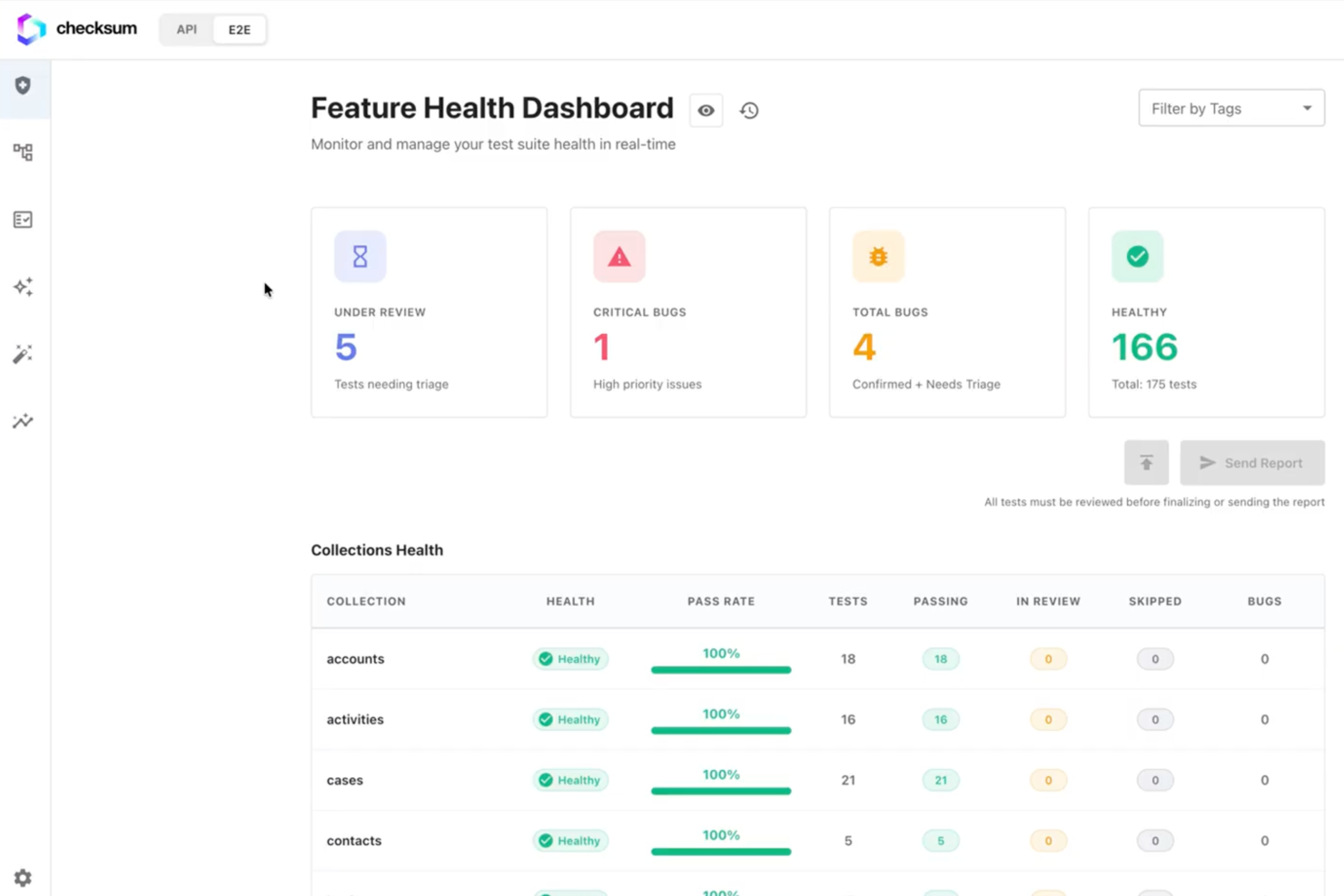
Checksum è uno strumento di automazione QA che si concentra sulla generazione automatica dei test, sulla copertura continua delle API e sull'esportazione di codice reale per la proprietà dei test all'interno dei moderni flussi di lavoro di sviluppo.
Per chi è più adatto Checksum?
Ingegneri QA e team di sviluppo presso aziende tecnologiche che desiderano automatizzare la creazione dei test e mantenere la copertura delle API durante tutto il ciclo di vita dello sviluppo.
Perché ho scelto Checksum
Ho scelto Checksum come uno dei migliori perché genera automaticamente test per ogni pull request, il che significa che il mio team non perde mai copertura sul nuovo codice. Mi piace che si integri direttamente nella nostra pipeline CI/CD e crei test pertinenti non appena il codice viene inviato. In pratica, questo significa che individuiamo le regressioni in anticipo e manteniamo la nostra suite di test aggiornata senza sforzo manuale.
Funzionalità principali di Checksum
- Analisi dello schema API: Analizza e mappa automaticamente gli endpoint API per la copertura dei test.
- Dashboard dei risultati dei test: Visualizza in tempo reale gli esiti dei test e le metriche di copertura.
- Opzioni di esportazione del codice: Permette di esportare i test generati come codice reale per ulteriori personalizzazioni.
- Integrazione CI/CD: Si collega direttamente ai tuoi strumenti CI/CD esistenti per l'esecuzione automatica dei test.
Integrazioni di Checksum
Le integrazioni native non sono chiaramente documentate. Checksum offre un'API per integrazioni personalizzate e supporta flussi di lavoro CI/CD tramite la sua API.
Pros and Cons
Pros:
- Supporta utenti illimitati senza costi per utente
- Fornisce dashboard dettagliate per la copertura dei test
- Si integra con le pipeline CI/CD per l'automazione
Cons:
- La versione di prova gratuita limita il numero di flussi di lavoro
- Incentrato sulle API, non adatto a test non-API

BugHerd
Ideale per il tracciamento visivo dei bug
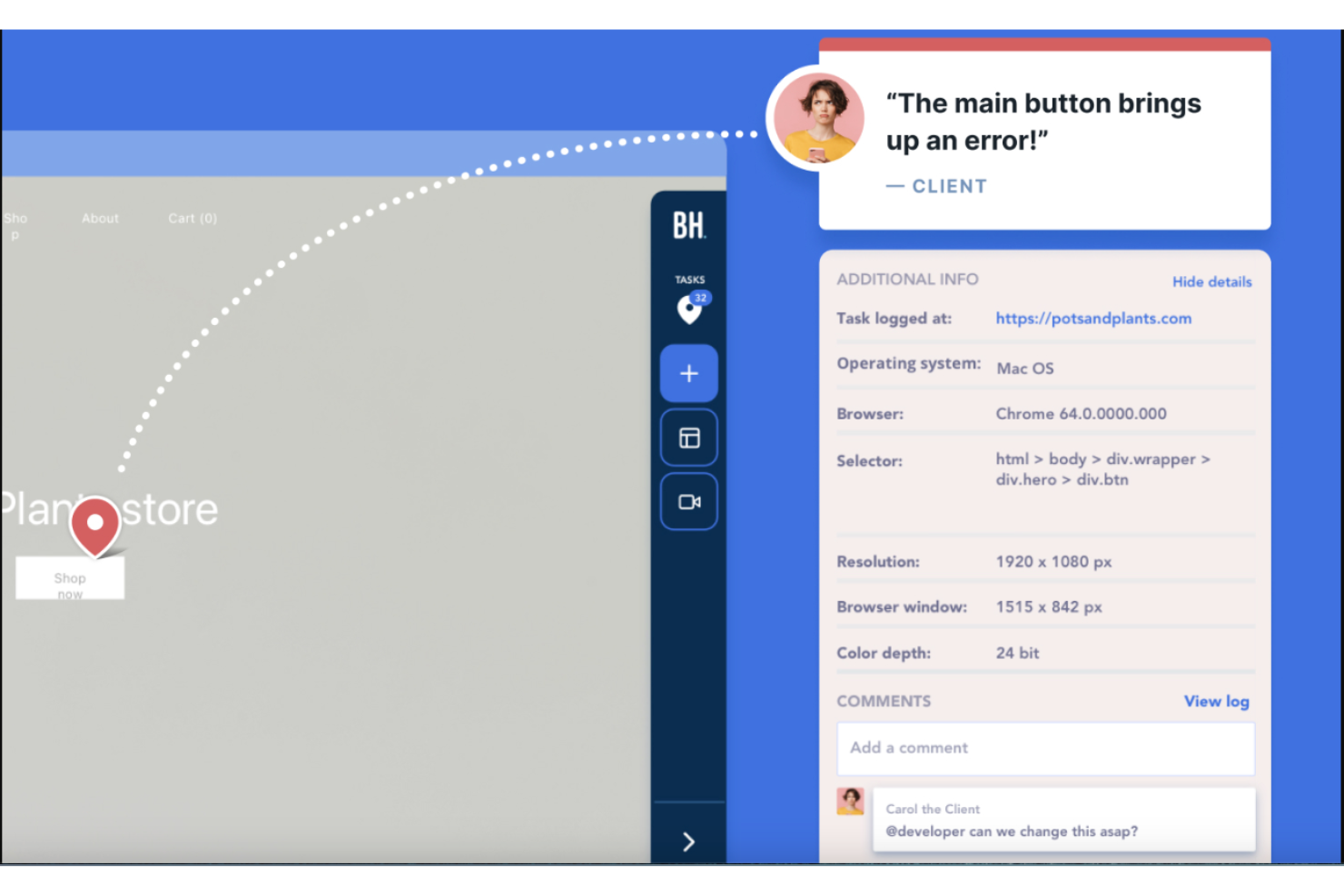
BugHerd è uno strumento di automazione QA per il testing software che permette ai team di raccogliere, organizzare e gestire bug e feedback direttamente sulle pagine web utilizzando un'interfaccia visiva.
Per chi è ideale BugHerd?
BugHerd è adatto a team di sviluppo web e QA che necessitano di un modo semplice per acquisire e gestire feedback di clienti o stakeholder direttamente su siti web attivi.
Perché ho scelto BugHerd
BugHerd guadagna il suo posto nella mia lista grazie al modo in cui gestisce il tracciamento visivo dei bug in un modo che nessun altro strumento replica veramente. Quando un tester o un cliente clicca su un elemento danneggiato, BugHerd assegna il feedback direttamente a quello specifico elemento sulla pagina, non solo a uno screenshot dell'area generale. Cattura inoltre automaticamente l'URL, il browser, il sistema operativo e la risoluzione dello schermo con ogni segnalazione, quindi il mio team ottiene una panoramica completa senza dover rincorrere nessuno per i dettagli. Solo questi metadati riducono in modo significativo il via vai di messaggi nel ciclo QA.
Funzionalità chiave di BugHerd
- Bacheca Kanban: Ogni feedback raccolto viene automaticamente inviato a una bacheca Kanban integrata dove puoi assegnare, dare priorità e monitorare i problemi fino alla risoluzione.
- Cattura feedback video: Registra brevi clip video e audio direttamente all'interno di BugHerd per documentare i passaggi che portano a un bug, con un timer di un minuto che mantiene i report concisi.
- Widget di feedback pubblico: Incorpora un widget di feedback su siti web attivi così che i visitatori possano segnalare problemi mentre li incontrano, con possibilità opzionale di raccogliere l'e-mail per eventuali follow-up.
- Gestione feedback assistita dall'AI: L'auto-tagging e la generazione automatica dei titoli riducono il lavoro amministrativo manuale nell'organizzazione e gestione dei feedback QA e dei clienti.
Integrazioni BugHerd
BugHerd offre oltre 20 integrazioni native, tra cui Jira, Asana, ClickUp, monday.com, Trello, GitHub, Slack, Microsoft Teams, WordPress e Zapier. Sono disponibili API e webhook per integrazioni personalizzate.
New Product Updates from BugHerd

BugHerd Enhances Jira Integration
BugHerd's Jira integration receives a major update enhancing workflow synchronization and user mapping for Premium plan users. These updates improve workflow synchronization, task management, and collaboration across both platforms. For more information, visit BugHerd's official site.
 .
.
TestGrid
Ideale per test end-to-end potenziati dall’IA
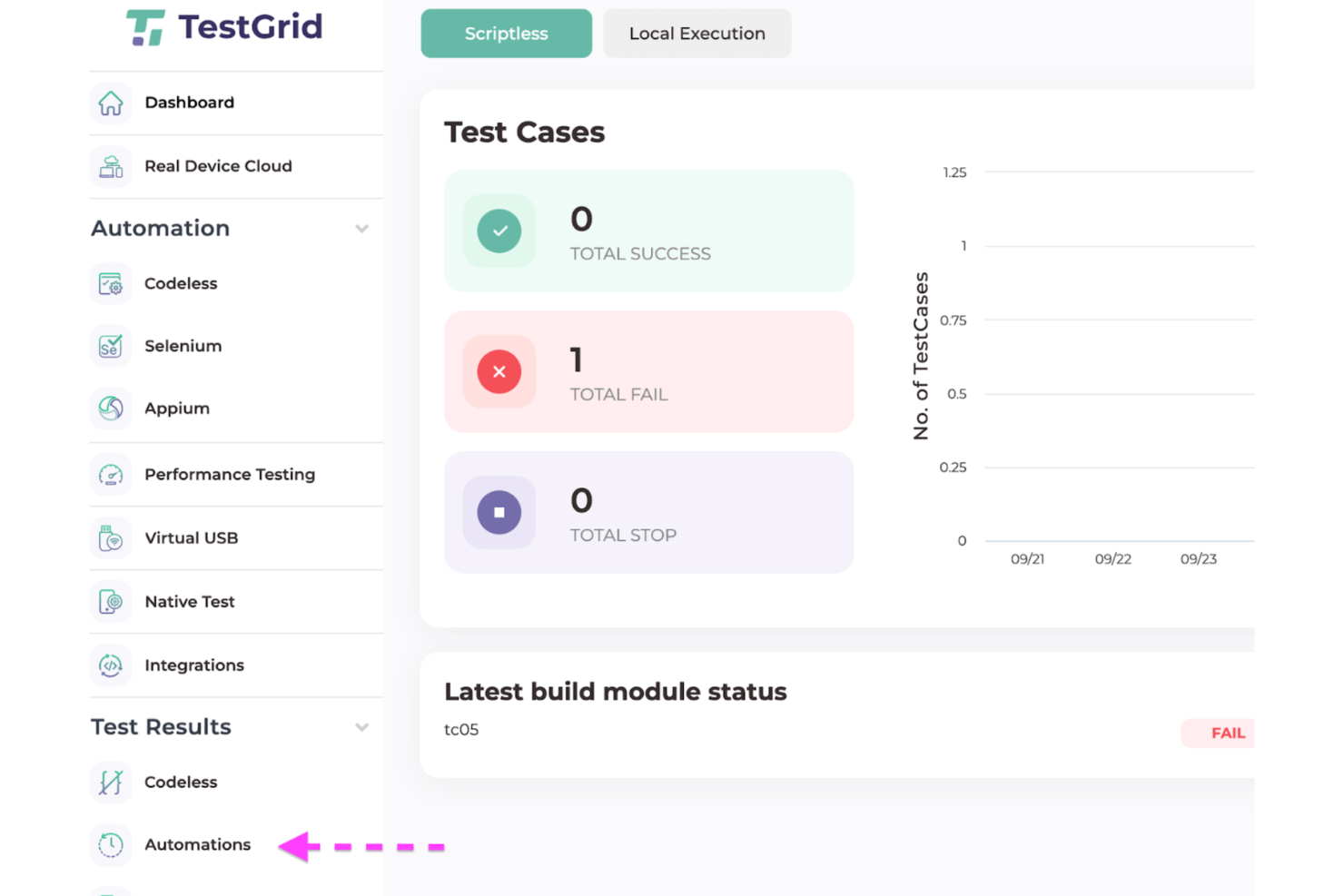
TestGrid è una piattaforma di automazione QA per il testing software che unisce la creazione di test guidata dall’IA, l’automazione web e mobile, l’accesso a cloud di dispositivi reali e integrazioni con le pipeline CI/CD.
Per chi è ideale TestGrid?
TestGrid è adatto a ingegneri QA e team di sviluppo in aziende di medie e grandi dimensioni che necessitano di un’automazione dei test end-to-end su applicazioni web e mobile.
Perché ho scelto TestGrid
Ho scelto TestGrid tra i migliori grazie a CoTester, il suo agente AI che gestisce l’intero ciclo di vita del testing dalla creazione all’esecuzione dei test. Trovo davvero utile che il motore di auto-riparazione AgentRx di CoTester rileva automaticamente le modifiche dell’interfaccia utente—including i redesign completi—e aggiorna la logica dei test in tempo reale durante l’esecuzione, riducendo la manutenzione che rende frustranti le suite di test fragili. Apprezzo anche che CoTester estragga le specifiche direttamente da Jira e generi la logica completa dei test in pochi minuti, così il mio team non passa più ore a scrivere casi di test prima di un rilascio. Il Vision Language Model (VLM) al suo interno legge lo schermo dell’app come farebbe un tester umano, combinando layout visivo e testo per prendere decisioni più intelligenti in tempo reale.
Funzionalità principali di TestGrid
- Registra e riproduci: Registra le azioni su browser o app e lascia che TestOS generi automaticamente gli script di automazione da tali interazioni.
- Testing cross-browser: Esegui test su Chrome, Firefox, Safari, Edge e Opera su browser reali e macchine remote.
- Sessioni parallele: Esegui più sessioni di test simultaneamente per ridurre il tempo totale di esecuzione.
- Performance testing: Simula carichi virtuali sul tuo server per misurare tempi di risposta, CPU, memoria e attività di rete sotto stress.
Integrazioni TestGrid
TestGrid offre integrazioni native con Jenkins, Jira, GitHub, GitLab, Slack e Azure DevOps, e fornisce un’API per integrazioni personalizzate.

BugBug
Ideale per una facile e conveniente automazione QA di applicazioni web
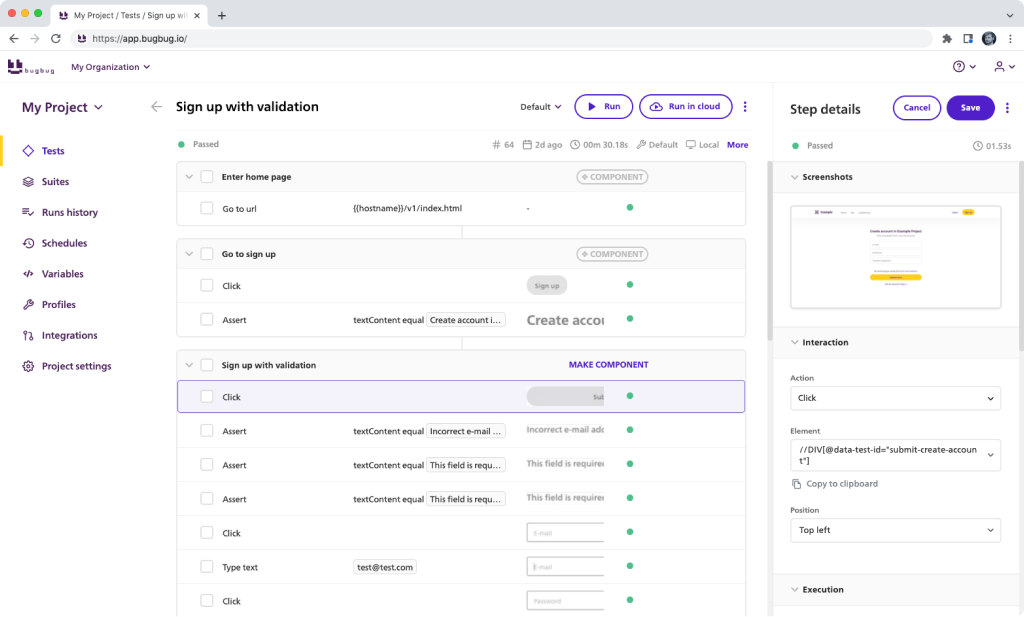
BugBug è una piattaforma di automazione QA per il testing software che permette di creare, pianificare ed eseguire test automatizzati per applicazioni web tramite un'interfaccia no-code ed esecuzione su cloud.
Per chi è più adatto BugBug?
BugBug è ideale per team di sviluppo di piccole e medie dimensioni che hanno bisogno di automatizzare il testing di app web senza ingegneri QA dedicati o competenze di programmazione.
Perché ho scelto BugBug
BugBug merita un posto nella mia lista perché permette di passare da zero all'esecuzione di veri test di regressione con un setup minimo. Mi piace che il registratore di test, integrato come estensione Chrome, catturi selettori stabili automaticamente—senza XPath, senza CSS, senza lavoro manuale sui locator. Quando un test fallisce, la funzione Modifica & Rewind consente di saltare direttamente allo step interrotto e risolvere il problema senza dover rilanciare l'intera suite da capo. L'inbox integrata per testare email di BugBug è anch'essa molto utile, permettendo di testare i flussi di registrazione e login end-to-end senza strumenti esterni.
Funzionalità principali di BugBug
- Esecuzione di test in parallelo: Esegui migliaia di test simultaneamente sull'infrastruttura cloud di BugBug invece di attendere esecuzioni sequenziali.
- Variabili & profili: Gestisci dinamicamente i dati di test e le configurazioni degli ambienti su diversi ambienti di test.
- Testing della regressione visiva: Rileva cambiamenti indesiderati dell'interfaccia confrontando automaticamente screenshot tra varie esecuzioni di test.
- Report pronti per la compliance: Genera report PDF con screenshot di ogni passaggio per audit, stakeholder o documentazione QA.
Integrazioni di BugBug
BugBug offre integrazioni native con Slack, GitHub, GitLab, Bitbucket, Jira e Trello, e si collega anche con Zapier. Sono disponibili un'API e un'interfaccia a riga di comando per integrazioni personalizzate e l'automazione di pipeline CI/CD.
New Product Updates from BugBug
BugBug Adds MCP Beta, Daily Backups, and Suite Setup Controls
BugBug adds MCP support in beta, automatic daily YAML backups, and suite-level setup and cleanup steps. These updates expand AI-assisted testing and reduce repetitive test maintenance. For more information, visit BugBug’s official site.
 .
.
Ideale per il testing cross-browser
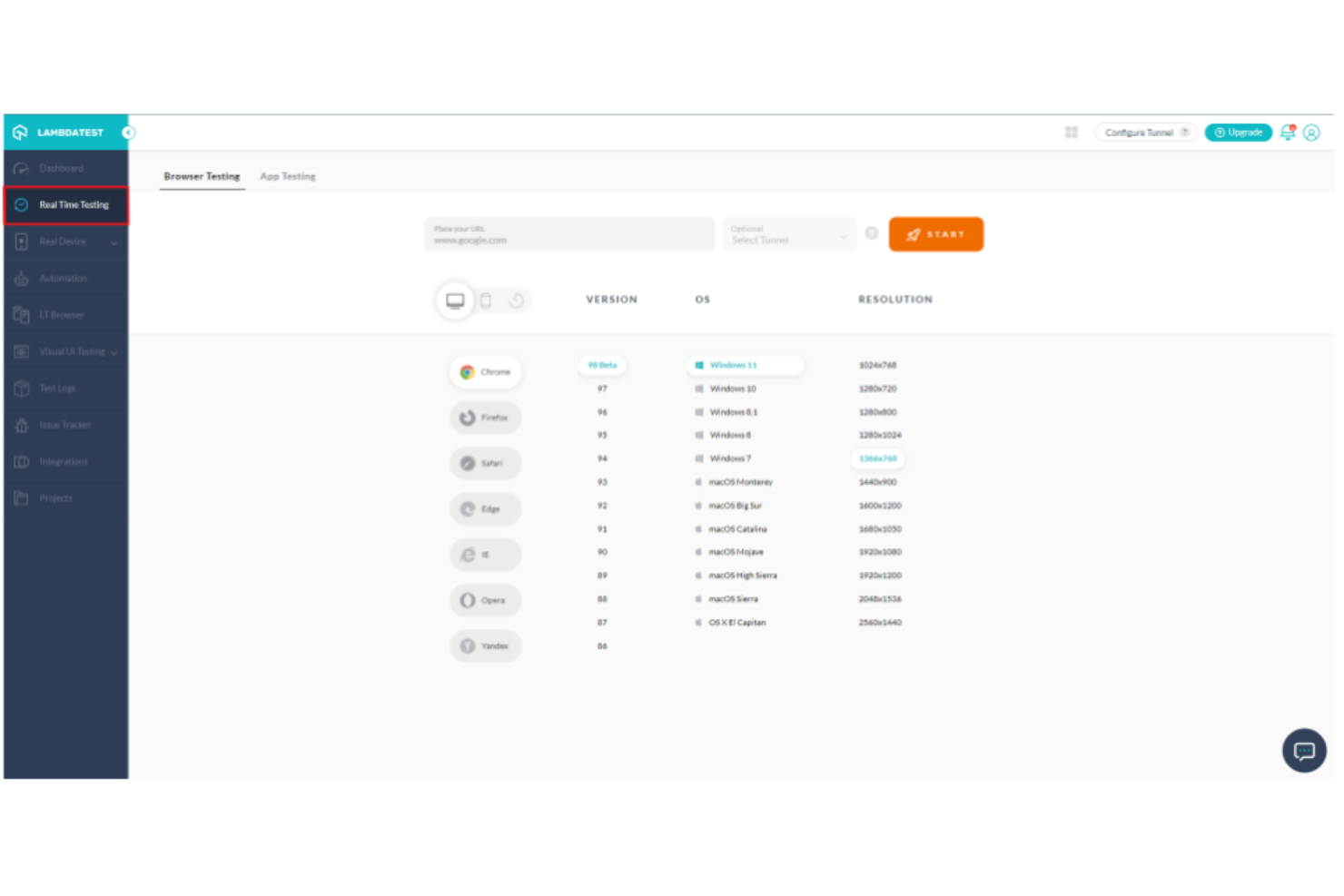
TestMu AI è una piattaforma di automazione QA alimentata dall'intelligenza artificiale che consente di creare, eseguire e gestire test automatizzati su browser, dispositivi e sistemi operativi.
Per chi è consigliato TestMu AI?
TestMu AI è adatto a ingegneri QA e team di sviluppo che devono testare applicazioni web su una vasta gamma di browser e ambienti.
Perché ho scelto TestMu AI
I test cross-browser sono l'ambito in cui TestMu AI si guadagna davvero un posto nella mia selezione. La piattaforma ti dà accesso a oltre 3.000 browser reali — non emulatori — che girano su hardware reale, quindi i risultati dei test su Chrome, Safari, Firefox ed Edge riflettono ciò che vivranno i tuoi utenti. Mi piace anche l'agente di test visivi SmartUI, che esegue confronti visivi attraverso l'intera matrice di browser e segnala automaticamente regressioni CSS e spostamenti di layout. La funzione di limitazione della rete consente di simulare connessioni 3G, 4G o instabili durante le sessioni di test cross-browser, così posso individuare problemi di rendering che emergono solo in condizioni specifiche.
Funzionalità principali di TestMu AI
- Agente di authoring test KaneAI: Scrivi e gestisci casi di test utilizzando comandi in linguaggio naturale, senza dover programmare manualmente il codice di automazione.
- Orchestrazione dei test HyperExecute: Esegui test in parallelo con distribuzione intelligente, tentativi automatici e streaming dei log in tempo reale su più ambienti.
- Agente Auto Healing: Rileva e corregge i locator dei test non validi per ridurre i fallimenti dei test intermittenti.
- Cloud di dispositivi reali: Esegui test manuali e automatici su dispositivi reali iOS e Android, con opzioni di dispositivi pubblici, dedicati e on-premise disponibili.
Integrazioni di TestMu AI
TestMu AI offre integrazioni native con Jenkins, Jira, GitHub, GitLab, Slack, Azure DevOps, CircleCI, Bitbucket, Bamboo e TeamCity. È disponibile un'API per integrazioni personalizzate.

QA Wolf
Ideale per la creazione rapida di test e la facilità d'uso
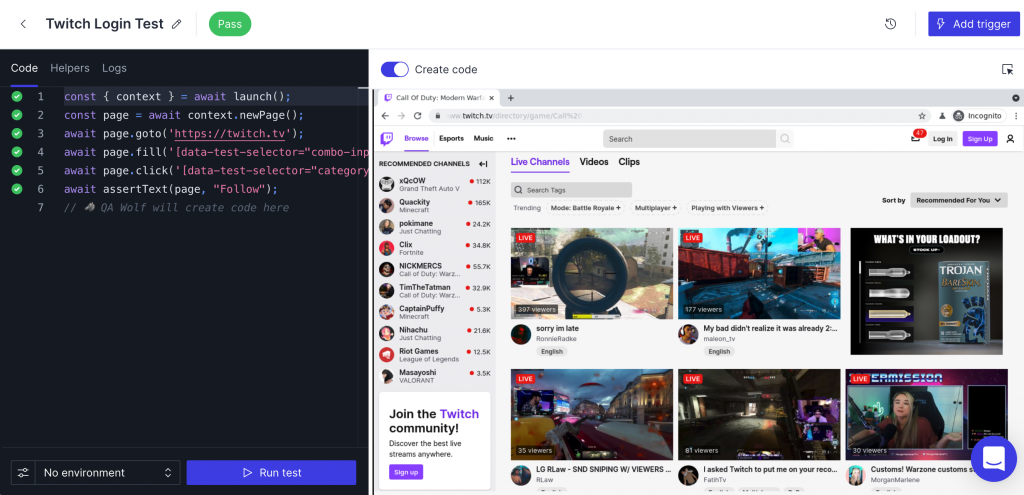
QA Wolf è una piattaforma di automazione QA per il testing software che consente di creare, eseguire e gestire test end-to-end basati su browser utilizzando un'interfaccia no-code e un'infrastruttura cloud.
Per chi è QA Wolf?
QA Wolf è adatto a team di ingegneria e QA in aziende software che necessitano di costruire e scalare la copertura dei test automatizzati senza una profonda esperienza nella scrittura di test script.
Perché ho scelto QA Wolf
QA Wolf si guadagna un posto tra i migliori nella mia shortlist per la rapidità con cui consente di ottenere una reale copertura dei test. La piattaforma nativa dell'IA utilizza un Mapping Agent che esplora la tua app e apprende ogni funzionalità, poi un Automation Agent che scrive codice Playwright o Appium eseguendo manualmente il test e commentando ogni passaggio prima della pubblicazione. In pratica, questo significa che il mio team può passare da zero a centinaia di test end-to-end automatizzati in settimane invece che mesi. Apprezzo anche la Maintenance AI, che analizza i test falliti, diagnostica il problema e suggerisce automaticamente le correzioni—così il mio team non trascorre ore a indagare su risultati instabili dopo ogni deploy.
Caratteristiche principali di QA Wolf
- Orchestrazione dell'esecuzione parallela: Esegui la tua suite di test completa in contemporanea, con i test falliti riavviati automaticamente per eliminare problemi dovuti a instabilità di rete o ambiente.
- Report dei bug verificati da umani: Gli ingegneri QA revisionano i fallimenti segnalati dall'IA e forniscono report di bug verificati, con video, tracce e log allegati.
- Integrazione nelle pipeline CI/CD: Avvia l'esecuzione dei test direttamente dalla tua CI, ricevi risultati su GitHub e configura QA Wolf come gate di rilascio prima della produzione.
- Garanzia Zero Flake: QA Wolf separa automaticamente i bug dai flaky test, così il tuo team ottiene risultati pass/fail affidabili ad ogni esecuzione.
Integrazioni QA Wolf
QA Wolf offre integrazioni native con Jira, Asana e Linear per il tracciamento delle issue, supporta i workflow CI/CD e mette a disposizione una API per integrazioni personalizzate.
New Product Updates from QA Wolf

QA Wolf Adds Real Media Testing for iOS Apps
QA Wolf introduces real media testing for iOS apps using camera and microphone inputs. This update improves test reliability for real-world use cases. For more information, visit QA Wolf’s official site.
 .
.
Testlio
Ideale per i test su dispositivi reali
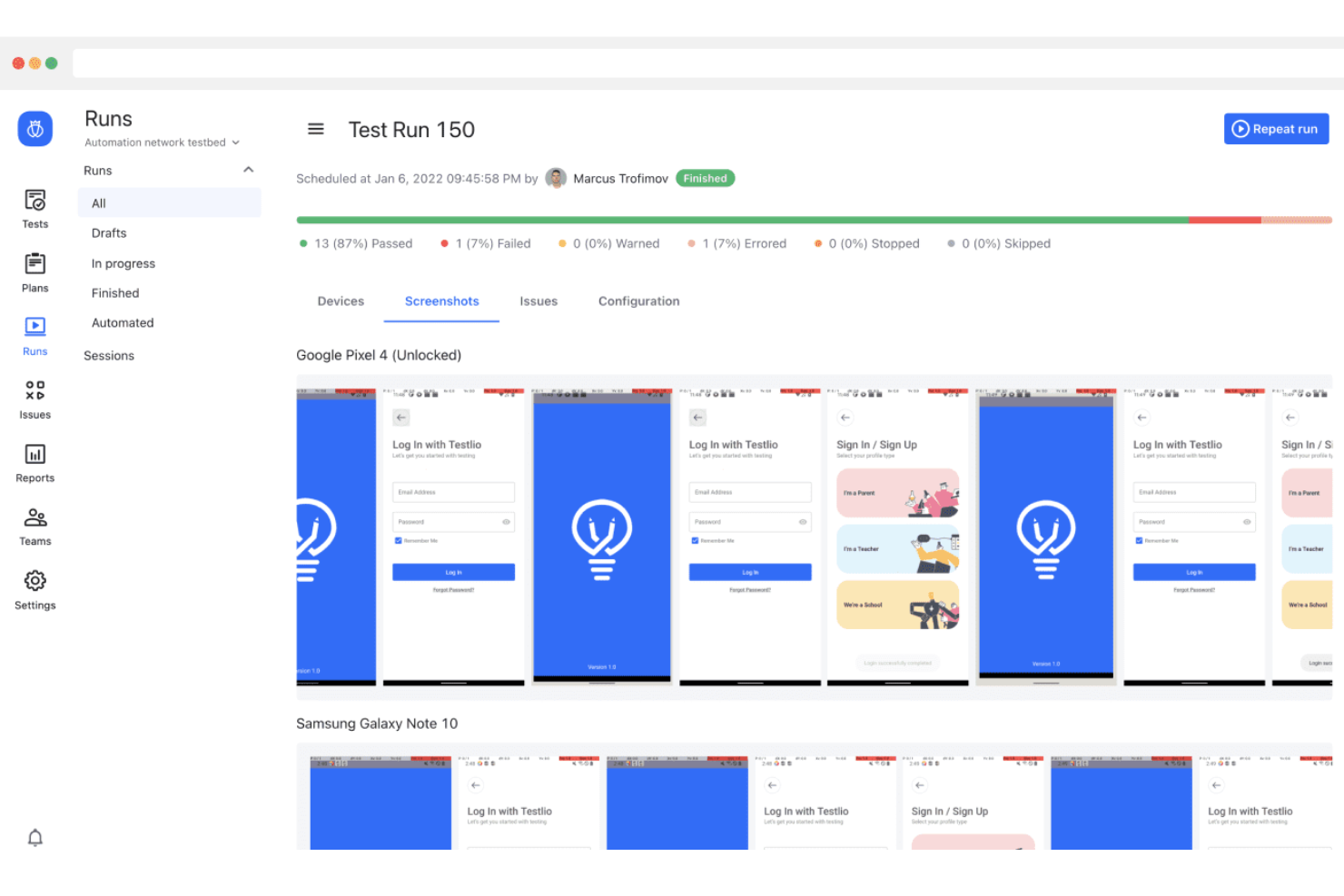
Testlio è una piattaforma di automazione QA che collega il tuo team a una rete globale di tester e supporta sia i test manuali che quelli automatizzati del software su dispositivi reali e ambienti autentici.
Per Chi è Ideale Testlio?
Testlio si adatta perfettamente ai team software di medie e grandi dimensioni che necessitano di validare le prestazioni di app su una vasta gamma di dispositivi reali e ambienti operativi.
Perché Ho Scelto Testlio
Testlio merita un posto nella mia shortlist per il modo in cui gestisce la copertura di dispositivi reali su una scala difficilmente replicabile internamente. Il dominio Device all'interno della piattaforma Testlio offre accesso a più di 600.000 dispositivi reali e sparsi sul territorio—non emulatori—così, quando devo validare il comportamento di un'applicazione su uno smartphone Android di fascia media di tre anni fa con uno specifico operatore, posso farlo. Apprezzo anche che i test vengano effettuati da tester selezionati e presenti sul mercato in oltre 150 paesi, il che significa che eventuali problemi di localizzazione e comportamentali regionali emergono come succederebbe a un vero utente, non a uno simulato. Il motore LeoAI Engine™ riunisce tutto ciò gestendo l'esecuzione dei test e la classificazione dei problemi, così il mio team non viene sommerso da rumore quando arrivano i risultati da un ampio sweep di dispositivi.
Caratteristiche Principali di Testlio
- Test software integrato: Testlio combina l'esecuzione automatizzata e manuale dei test in un singolo flusso di lavoro, utilizzando l'automazione per i percorsi stabili e affidando ai tester manuali quelli instabili o falliti che richiedono revisione umana.
- Test dei pagamenti: Valida i flussi di transazione su oltre 800 metodi di pagamento reali, coprendo flussi funzionali, integrazioni e conformità grazie ai tester presenti sul mercato.
- Test di localizzazione: Esegui la validazione linguistica e dell'esperienza utente regionale in oltre 100 lingue usando tester in-market che rilevano errori di traduzione e problemi culturali di layout.
- Integrazione pipeline CI/CD: Collega Testlio alla tua pipeline DevOps esistente in modo che ogni nuova build attivi l'esecuzione di test e visualizzi i risultati senza avvio manuale.
Integrazioni Testlio
Testlio offre integrazioni native con Jira, Jenkins, GitHub, GitLab, Slack e Azure DevOps, e fornisce un'API per integrazioni personalizzate.

Ideale per i test automatizzati con intelligenza artificiale
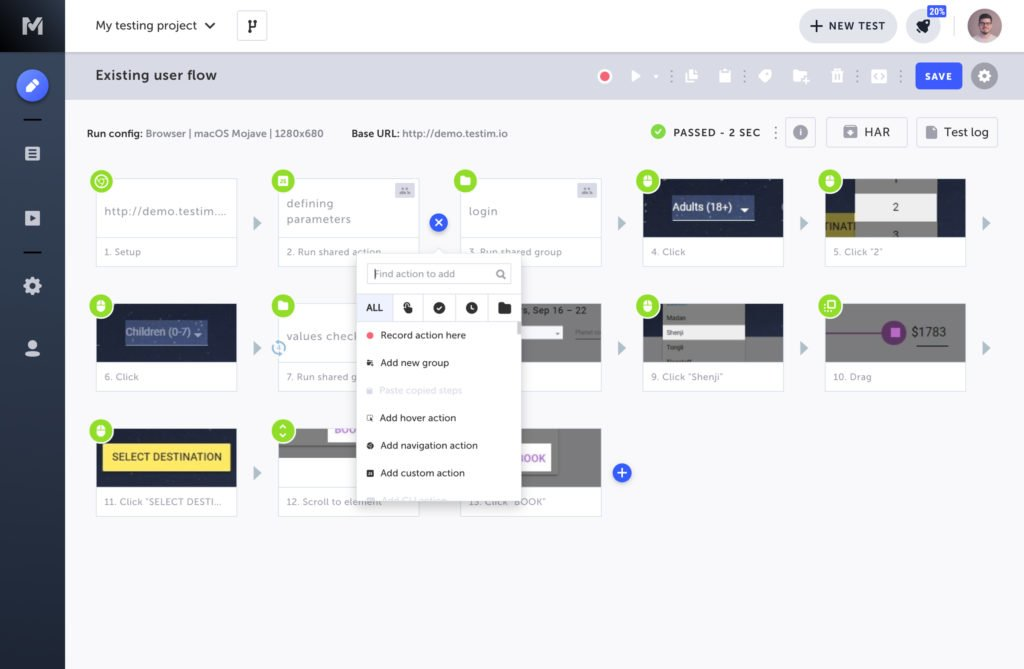
Testim consente agli utenti di creare test stabili e personalizzati—sia senza codice che con codice, utilizza l'intelligenza artificiale per rendere i test resilienti, esegue test paralleli su diversi tipi di browser nel proprio cloud di test e crea e pubblica report di bug informativi.
Testim si rivolge sia agli utenti principianti che avanzati, permettendo anche ai membri del team non tecnici di creare test senza codice. L'eccellente servizio clienti migliora ulteriormente il punteggio di Usabilità secondo i nostri criteri di valutazione sopra menzionati.
Il principale svantaggio è che la verifica delle immagini (validazione a livello di pixel) non è una funzionalità locale, il che significa che è necessario utilizzare una soluzione di terze parti per accedere a questa funzione.
Testim è gratuito fino a 1000 esecuzioni/mese. I piani di livello superiore offrono prezzi personalizzati su richiesta.

Reflect
Ideale per l'acquisizione automatica delle azioni

Reflect è una piattaforma di automazione QA no-code per il testing software che consente di creare, modificare ed eseguire test basati su browser con acquisizione automatica delle azioni, regressione visiva e supporto cross-browser.
Per chi è ideale Reflect?
Reflect è adatto a team di sviluppo di piccole e medie dimensioni che hanno bisogno di creare e mantenere test automatizzati per applicazioni web senza disporre di ingegneri QA dedicati o competenze di codifica.
Perché ho scelto Reflect
Reflect è una delle mie scelte preferite perché adoro come la sua funzione di acquisizione delle azioni record-and-play lavori direttamente in un browser cloud: interagisci con la tua app e Reflect registra automaticamente ogni clic, input e passaggio di navigazione. Quel test acquisito può poi essere modificato usando comandi in inglese semplice alimentati dall’IA, così il mio team non è bloccato a gestire selettori o locator quando l’interfaccia cambia. Mi piace anche che il motore IA di Reflect gestisca automaticamente la manutenzione dei test quando l’app si modifica, il che significa che non sprechiamo tempo negli sprint a sistemare test rotti invece di crearne di nuovi.
Funzionalità chiave di Reflect
- Test mobile: Esegui test automatizzati su app iOS, Android e ibride da un singolo test senza duplicare gli script in ogni ambiente.
- Test email e 2FA: Testa i flussi che prevedono verifica tramite email o autenticazione a due fattori direttamente nel browser cloud di Reflect.
- Integrazione pipeline CI/CD: Avvia i test automaticamente ad ogni pull request tramite l’app GitHub, oppure collegali a CircleCI e Jenkins con integrazioni predefinite.
- Segnalazione bug con video HD: Quando un test fallisce, Reflect cattura una riproduzione video completa insieme a log di console e rete per un debug immediato.
Integrazioni di Reflect
Reflect offre integrazioni native con Slack, GitHub, Zephyr ed email per le notifiche, oltre a supportare i flussi di lavoro CI/CD tramite la sua API.
Altri strumenti di automazione QA
Ecco alcune opzioni aggiuntive di strumenti di automazione QA che non sono entrate nella mia selezione, ma che vale comunque la pena esaminare:
- Endtest
Ideale per i test auto-riparanti
- testRigor
Miglior strumento di automazione per QA manuale e manutenzione minima dei test
- New Relic
Ideale per approfondimenti sulle prestazioni in tempo reale per un'automazione efficace dei test software
- Tricentis NeoLoad
Ideale per test delle prestazioni scalabili
- Tricentis Test Automation
Ideale per team agili
- Avo Assure
Ideale per un'automazione dei test 100% no-code
- Squish
Ideale per l'automazione agile dei test GUI
- Autify
Migliore automazione dei test con IA per desktop e mobile
- Tricentis qTest
Ideale per la gestione scalabile dei test
- Kobiton
Migliore piattaforma di test per app mobile con automazione QA
- Watir
Ideale per una facile manutenzione dei casi di test
- Sahi Pro
Ideale per reporting automatico e registrazione dei bug


Come Valuto gli Strumenti di Automazione QA
Divido la mia valutazione in criteri di base—come l'integrazione CI/CD e l'esecuzione cross-browser—e fattori che differenziano realmente gli strumenti degni di raccomandazione dagli altri.
Funzionalità Principali (Requisiti Minimi Per Questa Lista)
Quando seleziono gli strumenti per la mia lista, valuto ciascuno su una scala da 0 (non offre la funzionalità) a 5 (eccelle in quest'area) per ogni funzionalità principale elencata sotto. Poi calcolo il punteggio totale dello strumento in percentuale. Ogni strumento deve raggiungere un punteggio totale minimo del 75% per essere considerato per l'inclusione.
- Creazione e Manutenzione degli Script di Test: Valuto se uno strumento supporta la creazione tramite codice, low-code o registrazione e riproduzione—e come gestisce i repository degli oggetti e i componenti riutilizzabili.
- Copertura di Test Multipiattaforma: Ogni strumento dovrebbe coprire almeno due livelli come web e API, oppure web e mobile. Gli strumenti limitati a una sola piattaforma raramente soddisfano le reali esigenze QA.
- Integrazione con le Pipeline CI/CD: Verifico la presenza di collegamenti nativi con strumenti come Jenkins, GitLab CI e GitHub Actions, così che i team possano avviare i test automaticamente a ogni commit o merge.
- Esecuzione Parallela e Cross-Browser: È importante eseguire suite contemporaneamente su Chrome, Firefox, Safari e browser mobile. Valuto il supporto integrato per grid o la compatibilità con cloud farm.
- Reportistica dei Test e Diagnosi dei Fallimenti: Un buon reporting va oltre il semplice superato/fallito. Cerco log dettagliati, screenshot in caso di errore e dashboard di trend che aiutino i responsabili QA a individuare rapidamente i test instabili.
- Compatibilità con Framework & Linguaggi: Gli strumenti che supportano framework come Selenium, Playwright o Cypress—e linguaggi come Java, Python o JavaScript—offrono flessibilità ai team man mano che gli stack si evolvono.
Una volta che dispongo di una lista di strumenti che soddisfano i criteri, considero cosa distingue ciascuna piattaforma.
Fattori Differenzianti (Cosa Distingue i Fornitori)
Ecco come confronto i diversi fornitori:
Funzionalità Distintive
L'auto-riparazione guidata dall'AI è un grande vantaggio—cerco strumenti che aggiornano automaticamente i locator quando il DOM cambia, perché è questo che evita che le suite si rompano dopo ogni sprint. Anche il testing di regressione visiva è importante quando il tuo team pubblica aggiornamenti frequenti dell'interfaccia utente. Individuare un pulsante disallineato o un layout spostato su vari viewport è qualcosa che gli assert funzionali non riescono a rilevare. Valuto inoltre le opzioni di creazione senza codice, poiché spesso i responsabili QA hanno bisogno che analisti business o tester manuali contribuiscano all'automazione senza scrivere codice.
Oltre le Funzionalità
La scalabilità è una considerazione importante—valuto se uno strumento può gestire suite in crescita tramite grid cloud o runner containerizzati senza degradare le prestazioni all'aumentare dei test. Anche le integrazioni nell'ecosistema sono altrettanto importanti. Uno strumento QA deve connettersi con il sistema di gestione dei test, repository Git e tracker dei difetti come Jira o TestRail per integrarsi nei flussi di lavoro già esistenti. Esamino anche i modelli di licenza, dato che la tariffazione per test paralleli può cogliere di sorpresa i team rispetto a strutture per utente o tariffa fissa.
Come scegliere uno strumento di automazione QA
È facile perdersi in lunghi elenchi di funzionalità e strutture tariffarie complesse. Per aiutarti a rimanere concentrato mentre affronti il tuo specifico processo di selezione del software, ecco una lista di fattori da tenere a mente:
| Fattore | Cosa considerare |
|---|---|
| Scalabilità | Lo strumento supporta la crescita del tuo team? Verifica se è in grado di gestire volumi di test e numeri di utenti crescenti senza problemi di prestazioni. |
| Integrazioni | Verifica se lo strumento si integra con i software che già utilizzi, come pipeline CI/CD, sistemi di controllo versione e strumenti di gestione dei progetti. |
| Personalizzazione | Puoi adattare lo strumento ai tuoi flussi di lavoro specifici? Cerca opzioni per personalizzare dashboard e report. |
| Facilità d'uso | Lo strumento è intuitivo per il tuo team? Una curva di apprendimento ripida può ritardare l'implementazione. Verifica che l'interfaccia sia semplice e chiara. |
| Implementazione e avvio | Quanto tempo occorrerà per iniziare? Valuta la disponibilità di risorse formative e assistenza per agevolare la transizione. |
| Costo | Valuta il costo totale di proprietà, inclusi licenze, formazione e assistenza. Confrontalo con il tuo budget e il ROI previsto. |
| Misure di sicurezza | Lo strumento soddisfa i tuoi standard di sicurezza? Cerca funzionalità di crittografia dei dati, controlli degli accessi degli utenti e conformità alle normative del settore. |
| Disponibilità dell'assistenza | Quali opzioni di assistenza sono disponibili? Valuta la disponibilità di assistenza in tempo reale, documentazione di supporto e forum della community per aiutare il tuo team. |
Tendenze negli strumenti di automazione QA
Gli strumenti di automazione della QA sono diventati più sofisticati, adattandosi alla crescente complessità delle applicazioni e alla necessità di velocità ed efficienza nel processo di test. Di seguito, esamino le principali tendenze che plasmano gli strumenti di automazione della QA, le loro caratteristiche e funzionalità, offrendo informazioni su ciò che è nuovo, ciò che è essenziale e ciò che sta perdendo terreno.
- Integrazione con l'IA e l'apprendimento automatico: L'integrazione dell'IA e dell'apprendimento automatico è diventata una tendenza significativa, migliorando la creazione, l'esecuzione e l'analisi dei test. Oggi gli strumenti sfruttano queste tecnologie per prevedere potenziali guasti, ottimizzare i casi di test e modificare automaticamente i parametri di test in tempo reale. Questa evoluzione risponde alla necessità di processi di test più intelligenti ed efficienti, in grado di adattarsi ai cambiamenti e prevedere i problemi prima che si aggravino.
- Supporto avanzato per i test continui in DevOps: L'integrazione dei test continui nelle pipeline DevOps ha registrato una rapida evoluzione, riflettendo la necessità di flussi di lavoro fluidi e automatizzati. Il software di automazione delle compilazioni garantisce che i test procedano di pari passo con l'integrazione e la distribuzione continue, facilitando cicli di rilascio più rapidi e un feedback immediato.
- Crescita dell'automazione dei test senza codice: L'emergere di funzionalità di automazione senza codice risponde alla domanda di soluzioni di test più accessibili. Consentendo ai tester di creare ed eseguire test senza conoscenze approfondite di programmazione, questi strumenti democratizzano i test, ne ampliano la portata e accelerano il ciclo di test.
- Analisi e reportistica avanzate: Si registra una crescente attenzione alle funzionalità di analisi e reportistica avanzate. Informazioni in tempo reale, analisi predittive e report completi sui test aiutano i team a prendere decisioni consapevoli, identificare le tendenze e concentrarsi sulle aree critiche, rispondendo alla necessità di strategie di test basate sui dati.
- Focus sui test per dispositivi mobili e multipiattaforma: Poiché le applicazioni mobili continuano a dominare il mercato, il supporto avanzato per i test su dispositivi mobili e multipiattaforma è diventato una funzionalità fondamentale. Questa tendenza risponde alla sfida di garantire prestazioni uniformi delle app su un'ampia gamma di dispositivi e piattaforme.
Queste tendenze evidenziano la risposta del settore degli strumenti di automazione della QA alle esigenze e alle sfide in continua evoluzione dei professionisti della QA. Comprendendo queste dinamiche, i tester possono selezionare strumenti che non solo soddisfano i requisiti attuali, ma sono anche pronti ad adattarsi agli sviluppi futuri nei test del software, in particolare con la diffusione degli strumenti di automazione dei test basati sull'IA.
Cosa sono gli strumenti di automazione della QA?
Gli strumenti di automazione della QA sono applicazioni software utilizzate nel processo di sviluppo del software per eseguire automaticamente test sul software in fase di sviluppo. Questi strumenti eseguono casi di test predefiniti senza intervento manuale, verificando la presenza di errori, problemi di prestazioni e altri difetti nel software.
Consentono di eseguire test completi attraverso gli strumenti di test di regressione visiva e altre attività che spesso richiedono molto tempo o sono impraticabili da svolgere manualmente, e sono fondamentali per garantire che il software soddisfi i requisiti di progettazione e funzionalità.
Funzionalità
Quando selezioni gli strumenti di automazione della QA, presta attenzione alle seguenti funzionalità chiave:
- Esecuzione automatizzata dei test: consente di eseguire automaticamente i test, riducendo l'impegno manuale e aumentando la velocità dei test.
- Funzionalità di integrazione: si collega senza problemi alle pipeline CI/CD e ad altri strumenti di sviluppo per semplificare i flussi di lavoro.
- Test multipiattaforma: consente di eseguire test su dispositivi e sistemi operativi diversi per garantire la compatibilità.
- Pannelli di controllo personalizzabili: offre la possibilità di adattare i pannelli di controllo per una gestione e una reportistica personalizzate dei test.
- Strumento di reportistica dell'automazione: genera report completi sui test per aiutare a identificare e risolvere rapidamente i problemi.
- Test basati sull'IA: utilizza l'intelligenza artificiale per migliorare l'accuratezza e l'efficienza dei test.
- Creazione visiva dei test: consente agli utenti di progettare test utilizzando un'interfaccia visiva, rendendola accessibile agli utenti non tecnici.
- Collaborazione in tempo reale: supporta la collaborazione del team consentendo a più utenti di lavorare insieme sui casi di test.
- Misure di sicurezza: garantisce la protezione dei dati con funzionalità come la crittografia e i controlli degli accessi degli utenti.
- Risorse di formazione: offre video di formazione, tour interattivi e webinar per facilitare l'inserimento degli utenti e lo sviluppo delle competenze.
Vantaggi
L'implementazione degli strumenti di automazione della QA offre diversi vantaggi al tuo team e alla tua azienda. Eccone alcuni di cui potrai beneficiare:
- Risparmio di tempo: L'esecuzione automatizzata dei test riduce il tempo dedicato ai test manuali, consentendo al team di concentrarsi su altre priorità.
- Maggiore accuratezza: I test basati sull'intelligenza artificiale riducono al minimo gli errori umani, portando a risultati dei test più affidabili.
- Collaborazione migliorata: Le funzionalità di collaborazione in tempo reale consentono ai membri del team di lavorare insieme in modo efficiente sui casi di test.
- Copertura dei test più ampia: I test multipiattaforma garantiscono che il software funzioni su diversi dispositivi e sistemi operativi.
- Rilasci più rapidi: Le funzionalità di integrazione con le pipeline CI/CD accelerano il processo di rilascio del software.
- Processo decisionale informato: La reportistica dettagliata fornisce informazioni sui risultati dei test, aiutandoti a prendere decisioni basate sui dati.
- Garanzia della sicurezza: Le misure di sicurezza proteggono i dati sensibili, offrendoti tranquillità durante il processo di test.
Costi e prezzi
La scelta degli strumenti di automazione della qualità (QA) richiede la comprensione dei vari modelli e piani tariffari disponibili. I costi variano in base alle funzionalità, alle dimensioni del team, ai componenti aggiuntivi e ad altri fattori. La tabella seguente riassume i piani più comuni, i relativi prezzi medi e le funzionalità normalmente incluse nelle soluzioni di strumenti di automazione della QA:
Tabella di confronto dei piani per gli strumenti di automazione della QA
| Tipo di piano | Prezzo medio | Funzionalità comuni |
|---|---|---|
| Piano gratuito | $0 | Esecuzione di base dei test, integrazioni limitate e supporto della comunità. |
| Piano personale | $5-$25/utente/mese | Esecuzione avanzata dei test, reportistica di base e supporto limitato. |
| Piano aziendale | $30-$75/utente/mese | Test multipiattaforma, reportistica dettagliata e supporto via e-mail. |
| Piano aziendale avanzato | $100-$200/utente/mese | Integrazioni personalizzate, test basati sull'intelligenza artificiale, responsabile dell'account dedicato e supporto 24/7. |
Domande frequenti sugli strumenti di automazione della QA
Affronta con facilità la complessità della scelta dello strumento di automazione della QA ideale: la nostra sezione delle domande frequenti risponde alle domande più importanti, offrendo indicazioni di esperti per guidarti nel processo di selezione.
Gli strumenti di automazione della QA possono essere personalizzati per soddisfare requisiti specifici del settore?
Questa domanda esamina l’adattabilità degli strumenti di automazione della QA a diversi settori. Ad esempio, un’applicazione sanitaria potrebbe dover rispettare le normative HIPAA e lo strumento di QA dovrebbe essere personalizzabile per verificare tali requisiti specifici di conformità.
La personalizzazione può estendersi anche alle funzionalità di reportistica, consentendo di generare report specifici del settore che possono essere preziosi durante gli audit.
In che modo gli strumenti di automazione della QA supportano l'esecuzione parallela dei test?
L’esecuzione parallela dei test è essenziale per cicli di test rapidi. Ad esempio, uno strumento di automazione della QA potrebbe eseguire contemporaneamente test su diverse combinazioni di browser e sistemi operativi, riducendo il tempo necessario per ottenere una copertura completa dei test. Questa funzionalità è particolarmente utile negli ambienti Agile, dove le iterazioni rapide sono comuni e un feedback tempestivo è essenziale.
Quali sono alcune delle difficoltà più comuni che i team affrontano nel passaggio dai test manuali a quelli automatizzati?
Il passaggio ai test automatizzati può essere complesso. Ad esempio, un team abituato ai test manuali potrebbe incontrare difficoltà dovute a lacune nelle competenze, rendendo necessaria la formazione sui linguaggi di scripting comunemente utilizzati nell’automazione, come Python o Java.
Inoltre, all’interno del team potrebbe esserci resistenza all’adozione di nuovi metodi, rendendo necessario un cambiamento culturale volto ad accogliere l’automazione. Leggi ulteriori informazioni su come passare dai test manuali all’automazione dei test.
Quali sono i requisiti hardware per eseguire strumenti avanzati di automazione della QA?
Comprendere i requisiti hardware è fondamentale per un funzionamento efficace dello strumento. Ad esempio, alcuni strumenti avanzati di QA potrebbero richiedere un server dedicato con elevate capacità di RAM e CPU per eseguire scenari di test complessi senza rallentamenti o arresti anomali.
Trascurare i requisiti hardware potrebbe causare colli di bottiglia nelle prestazioni, compromettendo l’efficienza del processo di test.
Quali fattori devono essere considerati nella valutazione dei vantaggi a lungo termine del ROI degli strumenti di automazione della QA?
La valutazione del ROI a lungo termine implica diversi fattori. Ad esempio, considera non solo il costo iniziale di configurazione, ma anche il tempo risparmiato nell’esecuzione dei test nell’arco di diversi mesi, che può tradursi in un risparmio sui costi.
È inoltre essenziale tenere conto dei costi della formazione del team e di eventuali miglioramenti nella qualità del software e nella soddisfazione dei clienti.
Qual è il prossimo passo:
Se stai cercando strumenti per l'automazione del controllo qualità, mettiti in contatto gratuitamente con un consulente di SoftwareSelect per ricevere consigli.
Compili un modulo e fai una breve conversazione durante la quale il consulente approfondisce le tue esigenze specifiche. Poi riceverai una selezione ristretta di software da esaminare. Ti supporteranno persino durante l'intero processo di acquisto, comprese le trattative sul prezzo.