


TestMu AI vs. BrowserStack: Comparison & Expert Reviews for 2026

We review tools independently, and commissions help fund our testing. See our transparency policy, our methodology, or suggest a tool.
Choosing between modern testing platforms isn’t always straightforward, especially when your team needs faster releases without sacrificing quality. You’re likely evaluating tools that can handle test automation, real-device testing, and growing quality assurance complexity without adding more overhead. TestMu AI (Formerly LambdaTest) and BrowserStack are both leading options in the end-to-end testing tool space, but they differ in how they approach AI, infrastructure, and workflow consolidation.
In this article, I’ll compare both platforms across their features, strengths and weaknesses, pricing, security, usability, and ideal use cases to help you make a confident decision.
TestMu AI
4.9/5
- Free plan + free demo available
- From $15/month (billed annually)
BrowserStack

4.5/5
- Free trial available
- From $29/user/month (billed annually)
Why Trust Our Software Recommendations
6,700+
Reviews
20
Industry experts
16+
Evaluation factors
14
Years
Our team has been testing and reviewing software since 2012. As tech leaders ourselves, we know how difficult—and important—it is to choose the right software.
For this guide, we evaluated tools using hands-on testing and independent research, scoring tools using our selection criteria.
Our reviews reflect our human editorial judgment, not a sales pitch.
Expert reviewers:
- Paulo Gardini MiguelTech Director
 Tim FisherVP of AI
 Gabriel RosasTech Lead & Software Architect
 Christhian GruhnTech Lead & Platform Architect

| TestMu AI | BrowserStack | |
|---|---|---|
| Free Trial | Free plan + free demo available | Free trial available |
| Pricing | From $15/month (billed annually) | From $29/user/month (billed annually) |
TestMu AI (Formerly LambdaTest) vs. BrowserStack Pricing & Hidden Costs
TestMu AI (Formerly LambdaTest) uses a modular pricing model, where you pay for individual components like live testing, automation, HyperExecute, and AI features such as KaneAI, rather than a single bundled plan. BrowserStack follows a similar modular structure, with separate pricing for products like Live, Automate, App Automate, and Percy (AI-powered visual testing), often based on parallel test capacity or user licenses, depending on the product. In both cases, costs can rise as you scale, whether that’s adding more modules in TestMu AI or increasing concurrency and unlocking higher-tier features in BrowserStack.
When assessing the two, it’s worth thinking about how your usage will grow. TestMu AI can add up as you layer in multiple modules, while BrowserStack can get pricey through added modules, parallel testing limits, feature gating, and potential overages (especially in areas like visual testing). Scoping your expected test volume, team size, and required capabilities upfront (and testing each platform through a trial) will give you a much clearer picture of long-term cost.
Both TestMu AI and BrowserStack offer comprehensive testing capabilities, including cloud-based execution, cross-browser and cross-device testing, and support for both manual and automated testing workflows. You’ll get access to real device clouds for mobile app testing, broad browser and OS coverage, CI/CD integrations, visual and accessibility testing, and reporting features in both platforms—making either a strong option if you want to centralize testing without managing your own infrastructure.
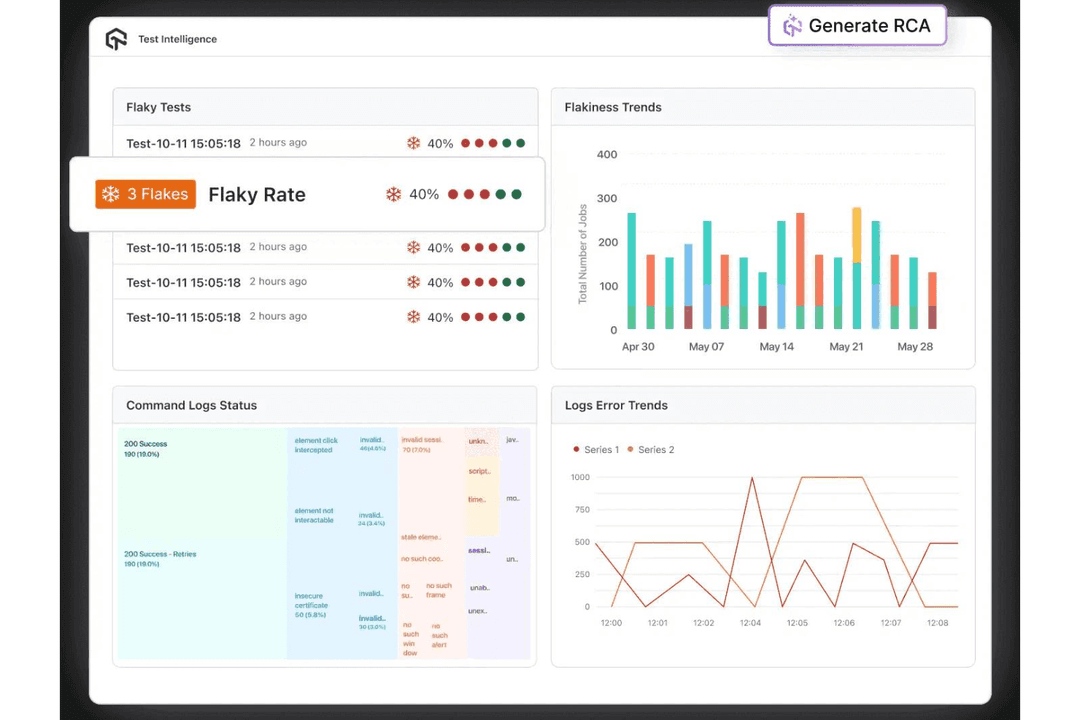
The key difference lies in how each platform is built and where it emphasizes innovation. TestMu AI focuses on an AI-native approach, with features like KaneAI for natural language test creation, Test Intelligence for root cause analysis, agent-to-agent testing for evaluating AI systems, and a scalable browser and real device cloud for unified testing workflows. BrowserStack, on the other hand, differentiates through the depth and maturity of its testing infrastructure, including advanced real-device capabilities (such as biometrics, payment flows, and device-level interactions).
In short, TestMu AI emphasizes AI-driven automation and unified workflows, while BrowserStack leans into infrastructure depth and advanced device-level testing scenarios.
| TestMu AI | BrowserStack | |
|---|---|---|
| A/B Testing | No | No |
| API | Yes | Yes |
| Automated Testing | Yes | Yes |
| Browser Compatibility Testing | Yes | Yes |
| Bug Tracking | Yes | Yes |
| Calendar Management | No | No |
| CI/CD Integration | Yes | Yes |
| Dashboard | Yes | Yes |
| Data Export | Yes | Yes |
| Data Import | Yes | Yes |
| Data Visualization | Yes | Yes |
| Developer Tools | Yes | Yes |
| External Integrations | Yes | Yes |
| History/Version Control | Yes | No |
| Manual Testing | Yes | Yes |
| Multi-User | Yes | Yes |
| Notifications | Yes | Yes |
| Performance Testing | Yes | Yes |
| Regression Testing | Yes | Yes |
| Scheduling | Yes | No |
| Status Notifications | Yes | Yes |
| Third-Party Plugins/Add-Ons | Yes | Yes |
| Integration | TestMu AI | BrowserStack |
| Jira | ✅ | ✅ |
| Slack | ✅ | ✅ |
| Jenkins | ✅ | ✅ |
| GitHub | ✅ | ✅ |
| GitLab | ✅ | ✅ |
| Azure DevOps | ✅ | ✅ |
| CircleCI | ✅ | ✅ |
| Selenium | ✅ | ✅ |
| Appium | ✅ | ✅ |
| Rails | ❌ | ✅ |
| Gatsby | ❌ | ✅ |
| Asana | ✅ | ❌ |
| API | ✅ | ✅ |
| Zapier | ✅ | ✅ |
Both TestMu AI and BrowserStack cover the core integrations most teams rely on, including CI/CD, issue tracking, and communication tools, so you’re unlikely to run into major gaps with either platform. BrowserStack does have a broader integration library overall, but in practice, that advantage is less impactful since both platforms offer API access and workflow automation options that let you connect to almost anything you need.
| Factor | TestMu AI | BrowserStack |
|---|---|---|
| FactorData Privacy | TestMu AISupports GDPR, CCPA, HIPAA, and strong data governance practices. | BrowserStackSupports GDPR, CCPA, and SOC 2 Type II compliance, with strong data segregation and privacy controls. |
| FactorAI Regulatory Compliance | TestMu AIAligns with the EU AI Act and Responsible AI principles, emphasizing transparency, human oversight, and secure AI deployment. | BrowserStackSupports responsible AI and enterprise governance practices, though public documentation around formal EU AI Act alignment and Responsible AI frameworks is limited. |
| FactorEncryption | TestMu AIUses encryption in transit (TLS 1.2+) and at rest (AES-256). | BrowserStackEncrypts data in transit (TLS 1.2+) and at rest (AES-256). |
| FactorUptime & Reliability | TestMu AIProvides high availability with enterprise-grade infrastructure and reliability practices. | BrowserStackOffers a 99% uptime SLA with a public status page and uptime transparency. |
| FactorAccess Management | TestMu AISupports SSO, RBAC, 2FA, and Zero Trust access controls. | BrowserStackSupports SSO, SCIM, RBAC, and enterprise identity integrations. |
| FactorAudit Logging | TestMu AIIncludes audit trails and activity tracking for compliance and debugging. | BrowserStackProvides detailed audit logs and session-level tracking. |
Overall, each provider offers strong security, compliance, and reliability, with support for modern privacy standards, encryption, and access controls. BrowserStack has a mature and well-documented enterprise security posture, including SOC 2 certification and transparent uptime reporting, while TestMu AI stands out with its Zero Trust approach and broad compliance coverage, including certifications like ISO 27001, ISO 27701, and ISO 27017, along with support for frameworks such as GDPR and HIPAA. TestMu AI also differentiates itself more clearly in the area of AI governance and emerging regulatory readiness through its alignment with Responsible AI principles and the EU AI Act.
In practice, both are enterprise-ready. It may just come down to specific compliance requirements for your unique organization’s needs.
| Factor | TestMu AI | BrowserStack |
| User Interface | Features a modern interface with AI-native workflows and centralized dashboards. | Offers a clean, familiar interface with easy navigation and quick access to devices. |
| Onboarding | Combines self-serve setup with guided onboarding for more complex use cases. | Provides step-by-step onboarding, sample projects, and extensive documentation. |
| Test Setup | Simplifies test creation with natural language inputs and AI-assisted configuration. | Enables fast setup with pre-configured environments, SDKs, and device selection. AI testing agents are available for an additional layer of support. |
| Customer Support | Provides 24/7 support and offers multiple support channels, documentation, and community resources. Tiered enterprise support is available. | Provides responsive support, documentation, and a large community, with advanced support tiers for enterprise users. |
Each testing solution is relatively easy to get started with for core use cases, but they diverge as workflows become more complex. TestMu AI emphasizes AI-assisted test creation (via KaneAI) and streamlined, unified workflows that can reduce manual effort, while BrowserStack offers a familiar, developer-friendly experience with strong documentation, SDKs, and debugging tools.
In practice, while both platforms now incorporate AI to support testing workflows, they apply it differently. TestMu AI embeds AI more deeply across its platform to unify test creation, execution, and analysis, whereas BrowserStack layers AI agents on top of its existing testing infrastructure to enhance specific tasks like test generation, debugging, and self-healing. This means TestMu AI may feel more guided overall.
TestMu AI
- AI-native platform with autonomous test creation, execution, and analysis (KaneAI + Test Intelligence).
- Extensive test coverage across 3000+ browser and OS combinations and 10,000+ real devices, with the ability to test complex scenarios.
- A unified platform that combines visual, accessibility, test management, API, and performance testing tools in one place.
- Advanced features and enterprise capabilities may require onboarding support or technical guidance.
- Pricing can increase significantly as teams scale usage across multiple modules.
- Despite deep AI capabilities, it’s not ideal for hands-off teams as it still requires some engineering involvement.
BrowserStack
- You get access to a wide range of real browsers and real devices without maintaining your own device lab.
- You can test complex real-device scenarios like biometrics, OTP/SMS flows, and payment systems.
- Supports manual and automated testing, along with visual, accessibility, and test management tools in one platform.
- Advanced setups (e.g., local testing, proxies, parallel tunnels) can be complex and require extra configuration.
- High-demand devices can sometimes have queue times before they become available.
- Pricing can be high, especially for smaller teams or when you need advanced features.
TestMu AI
- Product ManagersKaneAI enables product managers and non-technical stakeholders to create tests with natural language, contribute to coverage, validate user journeys, and collaborate more effectively with QA and engineering teams.
- Mobile App Testing TeamsThe real device cloud enables thorough validation across a wide range of devices, OS versions, and real-world usage conditions that emulators can’t fully replicate.
- Global Teams Requiring Localization TestingBroad browser, device, and geolocation coverage makes it easier to validate user experiences across multiple devices, regions, languages, and environments.
- AI Product Teams (LLMs, Chatbots, Voice Agents)Agent testing enables teams to evaluate hallucination, bias, and response quality, making it a strong fit for organizations building and deploying AI-driven applications.
- Enterprises Standardizing QA ToolingHelps enterprises consolidate testing tools into a single platform while scaling automation across teams. Its AI-native test creation, execution, and analysis improve reliability, enhance visibility, governance, and collaboration, and reduce maintenance for QA engineers.
- DevOps & Platform Engineering TeamsTestMu AI integrates directly into CI/CD pipelines and supports large-scale orchestration, making it ideal for teams embedding testing into infrastructure and release workflows.
BrowserStack
- Product & Release TeamsBrowserStack helps your team manage testing workflows, track results, and validate releases across environments, especially when shipping frequently.
- E-commerce Development TeamsYou can reduce lost revenue by ensuring checkout flows, payments, and site functionality work reliably across devices and regions.
- Web DevelopersYou can confirm your web apps work across multiple browsers, OS versions, and screen sizes without maintaining your own infrastructure.
- Mobile App DevelopersBrowserStack is especially valuable if you need real-device testing for Android and iOS, including advanced workflows like biometrics, payments, and device-specific behaviors.
- Enterprise Engineering TeamsIf your organization needs centralized testing across multiple teams, BrowserStack’s enterprise controls (SSO, SCIM, RBAC, network policies) and shared platform approach make it a strong choice.
- QA Teams/DepartmentsYour QA team can centralize manual testing, automation, visual regression, and accessibility testing in one platform while scaling with parallel execution.
Who Should Use TestMu AI, and Who Should Use BrowserStack?
TestMu AI is a strong fit for startups, mid-sized teams, and enterprises that want an AI-native platform to create, run, and analyze tests in one place with less manual effort. It’s especially valuable for fast-growing teams scaling automation, working in CI/CD environments, or building modern applications—including AI systems—where features like KaneAI and AI-driven insights can streamline workflows. If you’re looking to consolidate tools and adopt more autonomous, AI-assisted testing as you grow, TestMu AI is a strong match.
BrowserStack is best suited for mid-sized and enterprise teams that need reliable, large-scale software testing across a wide range of real devices, browsers, and environments. While smaller teams can use it, pricing and feature gating can make it less ideal for tight budgets or lightweight needs. If your priority is infrastructure depth, extensive device coverage, and hands-on configuration over a more guided AI-first approach, BrowserStack is a dependable option.
| TestMu AI | BrowserStack | |
|---|---|---|
| AI Automation | TestMu AI AI-native, agentic platform with built-in capabilities like KaneAI, Test Intelligence, autonomous agents, and agent-to-agent testing across the entire lifecycle. | BrowserStack Offers AI agents for tasks like test generation, debugging, and self-healing, layered onto its existing platform. |
| AI System Testing | TestMu AI Includes agent-to-agent testing for validating AI systems (e.g., chatbots, voice agents). | BrowserStack Does not offer dedicated AI system testing capabilities. |
| Core Platform Approach | TestMu AI Designed as an AI-native quality engineering platform built on scalable infrastructure, unifying test creation, execution, and analysis. | BrowserStack Built as a broad testing cloud and “test stack” centered on infrastructure and device access. |
| Device Coverage | TestMu AI Provides extensive real mobile devices and browser coverage (10,000+ iOS and Android devices, 3000+ environments) with fast, on-demand access. | BrowserStack BrowserStack offers a larger device cloud (30,000+ real devices) with broad global coverage and deep device-level testing capabilities. |
| Test Creation | TestMu AI TestMu AI supports natural language test creation and AI-assisted generation via KaneAI QA Agent. | BrowserStack Primarily code-based or low-code, with optional AI-assisted test generation functionality. |
| CI/CD Integrations | Both integrate with popular CI/CD tools like Jenkins, GitHub, and Azure DevOps to automate test pipelines. |
|---|---|
| Cloud Availability | Both platforms perform test runs in the cloud, eliminating local setup and enabling remote access for distributed teams. |
| Cross-Browser Support | Both support testing across a wide range of browsers and OS combinations to identify compatibility issues early. |
| Manual Testing | Both allow manual, interactive testing sessions on browsers and real devices. |
| Reporting & Analytics | Both offer detailed reporting, logs, and dashboards to help teams track performance and debug failures. AI analysis options are available for both. |