

Gestire la sicurezza dei container può sembrare opprimente. Devi occuparti della conformità, della protezione dei dati e della minaccia sempre presente delle violazioni. Non è facile, e lo capisco. Ecco perché ho testato e recensito per te le migliori soluzioni di sicurezza dei container.
In base alla mia esperienza, lo strumento giusto può fare una differenza significativa. Queste soluzioni aiutano a proteggere la tua infrastruttura e ti danno maggiore tranquillità. Ti presenterò le mie scelte migliori, concentrandomi sui loro vantaggi esclusivi e su come possono adattarsi alle esigenze del tuo team.
Aspettati una recensione dettagliata e imparziale, che fa chiarezza eliminando il rumore. Troviamo lo strumento che affronta al meglio le tue sfide e sostiene i tuoi obiettivi di sviluppo.
Perché fidarsi dei nostri consigli sui software
6,700+
Reviews
20
Industry experts
16+
Evaluation factors
14
Years
Il nostro team testa e recensisce software dal 2012. In quanto leader tecnologici noi stessi, sappiamo quanto sia difficile — e importante — scegliere il software giusto.
Per questa guida, abbiamo valutato gli strumenti attraverso test praticie ricerche indipendenti, assegnando un punteggio agli strumenti in base ai nostri criteri di selezione.
Le nostre recensioni riflettono il nostro giudizio editoriale umano, non un discorso di vendita.
Revisori esperti:
- Paulo Gardini MiguelDirettore tecnico
 Tim FisherVP dell'IA
 Gabriel RosasTech Lead e architetto software
 Christhian GruhnTech Lead e architetto della piattaforma

Tabella comparativa delle soluzioni di sicurezza dei container
Questa tabella comparativa riassume i dettagli dei prezzi delle migliori soluzioni di sicurezza dei container che ho selezionato:
| Tool | Best For | Trial Info | Price | ||
|---|---|---|---|---|---|
| 1 | Ideale per la gestione del livello di sicurezza e gli audit di conformità Kubernetes | Prova gratuita di 30 giorni + demo gratuita disponibile | Prezzi su richiesta | Website | |
| 2 | Ideale per correggere automaticamente le vulnerabilità dei container | Piano gratuito disponibile | A partire da $350/mese | Website | |
| 3 | Ideale per l'analisi dei percorsi di attacco dei container nativi di Azure | Prova gratuita di 30 giorni | A partire da $15/utente/mese (con fatturazione annuale) | Website | |
| 4 | Ideale per la valutazione dei rischi dei container nell'intero stack | Prova gratuita di 14 giorni | Prezzi su richiesta | Website | |
| 5 | Ideale per la scansione delle vulnerabilità e della conformità | Prova gratuita di 7 giorni | Prezzo su richiesta | Website | |
| 6 | Ideale per una sicurezza completa delle applicazioni native per il cloud | Prova gratuita di 30 giorni | Prezzi su richiesta | Website | |
| 7 | Ideale per la prevenzione della deriva in fase di esecuzione nei container | Prova gratuita disponibile | Prezzo su richiesta | Website | |
| 8 | Ideale per la visibilità sui container e l'analisi forense | Demo gratuita disponibile | Prezzi su richiesta | Website | |
| 9 | Ideale per la definizione delle priorità delle vulnerabilità basata sul contesto di esecuzione | Demo gratuita disponibile | Prezzi su richiesta | Website | |
| 10 | Ideale per la sicurezza nativa della catena di approvvigionamento Kubernetes | Prova gratuita di 60 giorni | Prezzi su richiesta | Website |


Recensioni delle migliori soluzioni di sicurezza dei container
Di seguito sono riportati i miei riepiloghi dettagliati delle migliori soluzioni di sicurezza dei container entrate nella mia selezione. Le mie recensioni offrono uno sguardo approfondito alle funzionalità principali, ai pro e contro, alle integrazioni e ai casi d’uso ideali di ogni strumento, per aiutarti a trovare quello più adatto a te.
 Ideale per la gestione del livello di sicurezza e gli audit di conformità Kubernetes
- Prova gratuita di 30 giorni + demo gratuita disponibile
- Prezzi su richiesta
Visit WebsiteCustomer Rating:4.5/5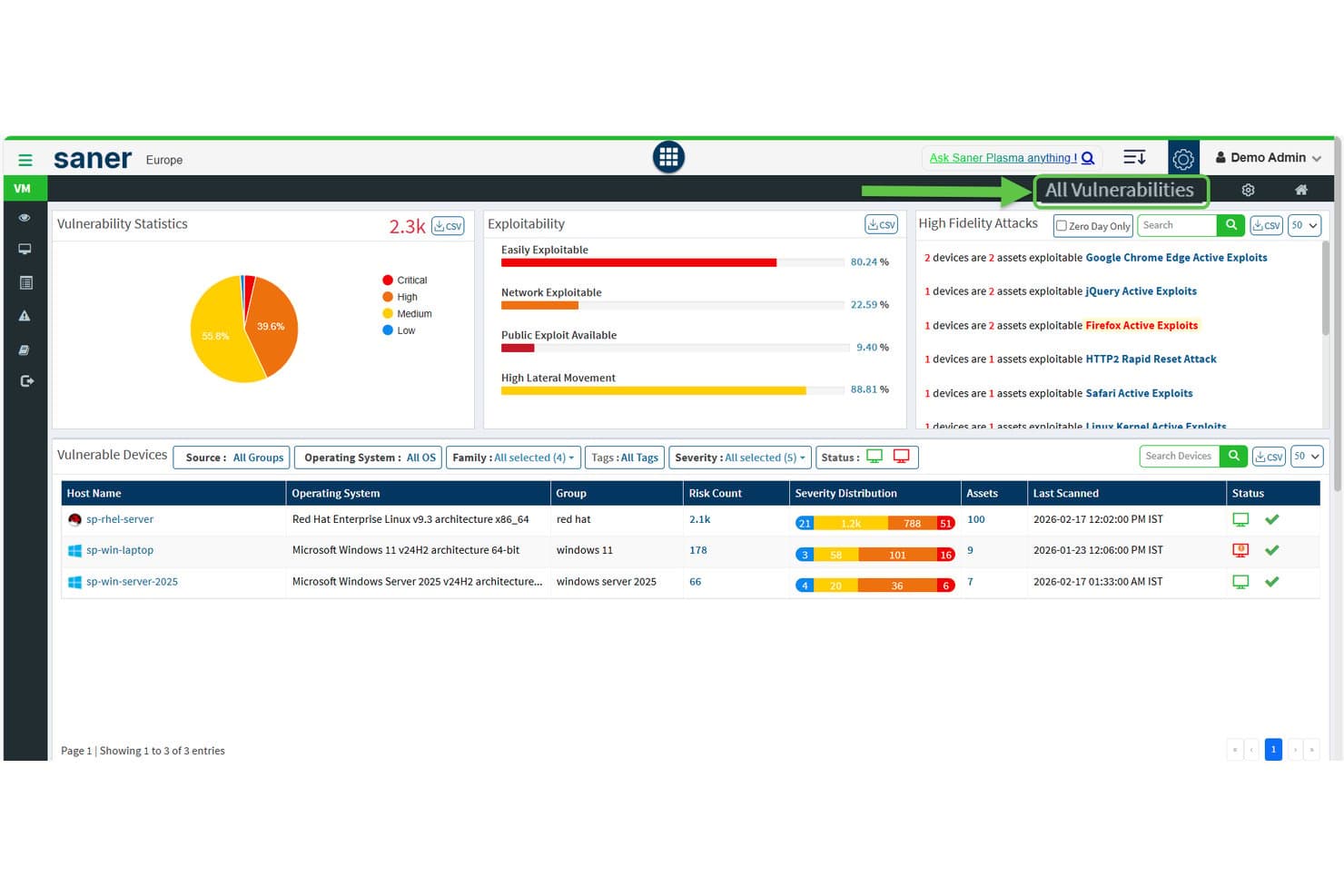
SecPod (piattaforma Saner) mostra le statistiche sulle vulnerabilità e la sfruttabilità tra i dispositivi. Saner COSP (Piattaforma di sicurezza per l'orchestrazione dei container) è il modulo di sicurezza Kubernetes di SecPod all'interno del suo più ampio CNAPP, che copre la gestione del livello di sicurezza dei cluster, l'esposizione degli asset, l'analisi delle autorizzazioni RBAC, gli audit di conformità e il rilevamento delle anomalie su EKS, AKS, GKE e cluster locali.
Per chi è più adatto SecPod?
Saner COSP di SecPod è particolarmente adatto agli architetti della sicurezza cloud e ai responsabili della sicurezza che gestiscono ambienti Kubernetes con più cluster e che danno priorità alla configurazione del livello di sicurezza, agli audit RBAC e ai report di conformità rispetto al rilevamento delle minacce in fase di esecuzione o alla scansione delle immagini prima della distribuzione.
Perché ho scelto SecPod (piattaforma Saner)
Ho scelto SecPod come una delle soluzioni migliori perché il suo modulo Saner COSP offre un'analisi più approfondita del livello di sicurezza e degli audit di conformità Kubernetes rispetto alla maggior parte degli strumenti che ho valutato. Apprezzo particolarmente il modo in cui COSP mappa le autorizzazioni RBAC tra utenti, account di servizio e ruoli del cluster, segnalando le autorizzazioni con caratteri jolly e i ruoli inutilizzati da 30 giorni. La sua gestione del livello di sicurezza verifica i cluster in base a CIS, NIST 800-53, PCI DSS e HIPAA contemporaneamente, con benchmark personalizzati per ogni namespace.
Funzionalità principali di SecPod (piattaforma Saner)
- Mappatura dell'esposizione degli asset: individua e monitora namespace, pod, servizi, ingress, mappe di configurazione e segreti, segnalando le risorse esposte a Internet e le porte aperte tra i cluster.
- Punteggio di igiene dell'orchestrazione dei container: aggrega i risultati relativi a esposizione, configurazione, controllo degli accessi e sicurezza dei carichi di lavoro in un unico punteggio che è possibile confrontare nel tempo tra cluster e namespace.
- Definizione delle priorità del rischio basata su SSVC: utilizza un albero decisionale CISA SSVC per classificare i risultati in base a sfruttabilità, impatto sulla missione e potenziale di automazione, con risultati mappati su MITRE ATT&CK.
- Regole di correzione automatizzata: consente di configurare correzioni pianificate o attivate da eventi per i problemi rilevati, con supporto al rollback nel caso sia necessario annullare una correzione applicata.
Integrazioni di SecPod (piattaforma Saner)
Le integrazioni includono Amazon EKS, Microsoft AKS, Google GKE, Kubernetes autogestito, Freshservice, AWS, Azure e Google Cloud. Le API REST e per i report supportano connessioni personalizzate, mentre Okta, Azure AD, Auth0, PingID e PingFederate offrono integrazioni per la gestione delle identità.
Pros and Cons
Pros:
- Analisi approfondita dell'esposizione Kubernetes e di RBAC
- Report di conformità basati su più framework con benchmark personalizzati
- La correzione automatizzata include il supporto al rollback
Cons:
- Nessuna scansione delle immagini dei container prima della distribuzione
- Nessun rilevamento delle minacce in tempo reale all'interno dei container
Learn more about SecPod (Saner Platform): Ideale per correggere automaticamente le vulnerabilità dei container
- Piano gratuito disponibile
- A partire da $350/mese
Visit WebsiteCustomer Rating:4.7/5
Aikido Security offre un pannello di controllo unificato per classificare e filtrare i problemi per tipo, gravità e origine della scansione. Aikido Security è una piattaforma di sicurezza delle applicazioni nativa per sviluppatori che combina la scansione delle immagini dei container, SAST, SCA, il rilevamento dei segreti, CSPM e la protezione integrata nell'applicazione in fase di esecuzione negli ambienti cloud e CI/CD.
Per chi è più adatto Aikido Security?
Aikido Security è una soluzione ideale per i team DevSecOps che vogliono individuare e correggere le vulnerabilità dei container prima della distribuzione, senza aggiungere il sovraccarico degli agenti o strumenti complessi.
Perché ho scelto Aikido Security
Ho scelto Aikido Security come una delle soluzioni migliori perché nessun altro strumento di questo elenco gestisce le correzioni delle vulnerabilità delle immagini di base allo stesso modo. Invece di segnalare semplicemente un'immagine di base vulnerabile, genera da tre a cinque varianti di Dockerfile pronte per l'unione, ciascuna annotata con i CVE esatti che vengono corretti o introdotti. Abbinando questa funzionalità alla sua libreria di oltre 2.000 immagini di base rafforzate e prive di CVE, il tuo team può sostituire un'immagine di base rischiosa senza dover valutare le possibili alternative.
Funzionalità principali di Aikido Security
- Analisi della raggiungibilità: conferma se le funzioni vulnerabili nelle dipendenze vengono effettivamente chiamate nel tuo codice, riducendo i falsi positivi fino al 95%.
- Generazione di SBOM: esporta gli elenchi dei componenti software nei formati CycloneDX, SPDX e CSV, con analisi VEX della sfruttabilità, accessibili tramite API per i flussi di lavoro automatizzati.
- Controllo delle pipeline CI/CD: blocca le distribuzioni in base a soglie di gravità configurabili su GitHub Actions, GitLab CI/CD, Jenkins, Azure Pipelines, CircleCI e Bitbucket Pipelines.
- Flusso di minacce Aikido Intel: un flusso proprietario in tempo reale che rileva vulnerabilità non divulgate e malware negli ecosistemi open source entro 8 minuti dalla pubblicazione.
Integrazioni di Aikido Security
Aikido Security offre integrazioni native con GitHub, GitLab, Bitbucket, Azure Repos, sei piattaforme CI/CD e oltre 12 registri di container, tra cui Amazon ECR, Harbor, JFrog e Docker Hub. Si connette inoltre ad AWS, Azure, GCP, Jira e Vanta, con accesso API per flussi di lavoro personalizzati.
Pros and Cons
Pros:
- Genera automaticamente correzioni sicure nei Dockerfile delle immagini
- Riduce i falsi positivi con l'analisi della raggiungibilità
- Offre oltre 2.000 immagini di base prive di CVE
Cons:
- Non offre il rilevamento dei container in fase di esecuzione basato su eBPF
- Non dispone dell'integrazione con il controllo degli accessi nativo di Kubernetes
Learn more about Aikido Security: Ideale per l'analisi dei percorsi di attacco dei container nativi di Azure
- Prova gratuita di 30 giorni
- A partire da $15/utente/mese (con fatturazione annuale)

Microsoft Defender for Cloud filtra le raccomandazioni sulle vulnerabilità in base al tipo di risorsa Container. Microsoft Defender for Cloud è una piattaforma di protezione delle applicazioni nativa del cloud (CNAPP) che comprende la scansione delle immagini dei container, il rilevamento delle minacce in fase di esecuzione, la gestione del livello di sicurezza di Kubernetes, la sicurezza delle pipeline CI/CD e l'applicazione dei criteri negli ambienti Azure, AWS e GCP.
Per chi è più adatto Microsoft Defender for Cloud?
È particolarmente adatto ai team di sicurezza nativi di Azure che devono tracciare i percorsi di attacco dei container attraverso le risorse cloud senza aggiungere una piattaforma CNAPP separata.
Perché ho scelto Microsoft Defender for Cloud
Ho scelto Microsoft Defender for Cloud perché il suo Cloud Security Graph fa qualcosa che non ho visto realizzato allo stesso livello negli ambienti nativi di Azure: traccia i percorsi di attacco sfruttabili da un container esposto pubblicamente fino alle configurazioni RBAC errate, ai percorsi di rete laterali e alle identità con autorizzazioni eccessive, arrivando alle risorse cloud critiche. Questa definizione delle priorità basata sul contesto fa sì che io non insegua il semplice numero di CVE, ma risolva i percorsi che sono effettivamente sfruttabili. Apprezzo anche il fatto che l'implementazione controllata di Kubernetes blocchi le immagini non conformi al momento della distribuzione in AKS, EKS e GKE, trasformando i risultati della valutazione del livello di sicurezza in criteri applicati anziché in semplici raccomandazioni.
Funzionalità principali di Microsoft Defender for Cloud
- Scansione delle immagini in più registri: la valutazione delle vulnerabilità senza agenti analizza le immagini dei container in ACR, ECR, GAR, GCR, Docker Hub e JFrog Artifactory, con nuove scansioni giornaliere che coprono i pacchetti del sistema operativo e dei linguaggi.
- Rilevamento delle minacce mappato su MITRE ATT&CK: oltre 60 analisi integrate, collegate al framework MITRE ATT&CK for Containers, rilevano attività sospette a livello di cluster, nodo e carico di lavoro.
- Integrazione CI/CD di Defender CLI: uno strumento da riga di comando integra la scansione delle immagini in oltre 11 piattaforme CI/CD, tra cui GitHub Actions, Jenkins e GitLab, con controlli di superamento/fallimento basati su SARIF.
- SCA basata sulla raggiungibilità tramite Endor Labs: un'integrazione con Endor Labs identifica quali vulnerabilità nelle dipendenze dei container sono effettivamente raggiungibili in fase di esecuzione, riducendo il rumore nelle code di risoluzione.
Integrazioni di Microsoft Defender for Cloud
Microsoft Defender for Cloud offre integrazioni native con AKS, Amazon EKS, Google GKE, Azure Container Registry, Amazon ECR, GitHub Actions, Jenkins, GitLab, Microsoft Defender XDR e Microsoft Sentinel. Supporta 12 integrazioni CI/CD documentate, oltre a GitHub Advanced Security, Endor Labs e Azure Arc.
Pros and Cons
Pros:
- Analisi dei percorsi di attacco dal container al cloud
- Scansione delle immagini senza agenti nei principali registri
- Implementazione controllata di Kubernetes per l'applicazione dei criteri
Cons:
- Le funzionalità multicloud sono meno avanzate rispetto alla parità con Azure
- Complessità dell'interfaccia segnalata dagli utenti aziendali
Learn more about Microsoft Defender for Cloud: 4Ideale per la valutazione dei rischi dei container nell'intero stack
Wiz
- Prova gratuita di 14 giorni
- Prezzi su richiesta

Wiz organizza le immagini dei container per ciclo di vita, gravità e numero di vulnerabilità. Wiz è una piattaforma di protezione delle applicazioni cloud-native (CNAPP) che combina la scansione senza agenti delle immagini, la gestione del livello di sicurezza di Kubernetes, il rilevamento delle minacce in fase di runtime, l'integrazione con le pipeline CI/CD e l'analisi dei percorsi di attacco in un'unica piattaforma unificata.
Per chi è più adatto Wiz?
Wiz è particolarmente adatto ai team di sicurezza aziendali che gestiscono ambienti multi-cloud e necessitano di un'unica piattaforma per valutare e stabilire le priorità dei rischi dei container nell'intero stack, dal codice al runtime.
Perché ho scelto Wiz
Wiz è entrato nella mia rosa di finalisti perché nessun'altra piattaforma mette in correlazione i rischi dei container nell'intero stack come fa il suo Security Graph. Invece di mostrare migliaia di CVE grezzi, mappa le relazioni tra vulnerabilità, configurazioni errate, segreti esposti ed esposizione della rete per identificare i percorsi di attacco realmente sfruttabili. Apprezzo anche il fatto che il suo KSPM copra EKS, AKS e GKE con valutazioni senza agenti certificate CIS, tracciando i movimenti laterali dai cluster Kubernetes ai livelli cloud sottostanti.
Funzionalità principali di Wiz
- Sensore runtime Wiz Defend: Un sensore basato su eBPF che monitora le chiamate di sistema, l'attività dei processi e i flussi di rete nei carichi di lavoro containerizzati con un sovraccarico della CPU inferiore al 2%.
- Wiz Admission Controller: Un webhook nativo di Kubernetes che impedisce la distribuzione di immagini di container non conformi o non firmate, in base a policy di sicurezza definite centralmente.
- Generazione di SBOM: Creazione continua e senza agenti di distinte dei materiali software nei registri, nelle pipeline CI/CD e negli ambienti di runtime, con visibilità completa a livello di pacchetto.
- Wiz Workflows: Playbook personalizzati basati su Python che automatizzano azioni di correzione come la revoca dei ruoli cloud, la rotazione delle credenziali e il blocco dell'accesso ai bucket di archiviazione.
Integrazioni di Wiz
Wiz offre integrazioni native con GitHub Actions, Jenkins, GitLab CI/CD, Azure DevOps, Amazon ECR, Google Artifact Registry, Azure Container Registry, Docker Hub, Jira e ServiceNow. Si connette inoltre a Splunk, Microsoft Sentinel, Cosign e Notary.
Pros and Cons
Pros:
- La configurazione senza agenti rileva i rischi in poche ore
- Il grafo di sicurezza individua i veri percorsi di attacco
- Livello di sicurezza certificato CIS per tutti i principali Kubernetes
Cons:
- Il rilevamento delle minacce in fase di runtime è relativamente recente
- Alcuni flussi di ricerca degli eventi risultano poco intuitivi
Learn more about Wiz: Ideale per la scansione delle vulnerabilità e della conformità
- Prova gratuita di 7 giorni
- Prezzo su richiesta

Qualys Container Security monitora immagini, container e vulnerabilità degli host in base alla gravità. Qualys Container Security (CS) è una piattaforma di sicurezza dei container che comprende la scansione delle vulnerabilità delle immagini, il rilevamento delle minacce in fase di esecuzione, la gestione del livello di sicurezza di Kubernetes e gli audit di conformità durante l'intero ciclo di vita dei container, dalle pipeline CI/CD alla produzione.
Per chi è più indicato Qualys Container Security (CS)?
Qualys Container Security è particolarmente adatto ai team di sicurezza di settori regolamentati che devono consolidare la scansione delle vulnerabilità, gli audit di conformità e il rilevamento delle minacce in fase di esecuzione in un'unica piattaforma.
Perché ho scelto Qualys Container Security (CS)
Ho incluso Qualys Container Security tra le mie scelte principali perché il suo punteggio TruRisk va oltre il CVSS grezzo e considera segnali di sfruttabilità nel mondo reale, come i dati CISA KEV e l'attività dei ransomware, consentendo al team di concentrarsi sulle vulnerabilità che contano davvero. Il benchmark CIS Docker v1.7.0 e i controlli di conformità Kubernetes vengono applicati continuamente, non solo verificati su richiesta. Apprezzo inoltre che le esportazioni SBOM nei formati SPDX e CycloneDX siano incluse nativamente, un aspetto importante quando è necessario ottenere rapidamente trasparenza sulla catena di approvvigionamento.
Funzionalità principali di Qualys Container Security (CS)
- Controller di ammissione Kubernetes: intercetta le richieste API di Kubernetes e valuta i criteri di sicurezza dell'organizzazione prima che i carichi di lavoro vengano distribuiti nel cluster.
- QScanner CLI: uno strumento da riga di comando che non richiede installazione, in grado di analizzare immagini di container locali e remote e di produrre risultati nei formati JSON, SARIF o SBOM per l'integrazione nelle pipeline.
- Sensore del runtime dei container basato su eBPF: monitora i processi dei container, l'attività sui file, le chiamate di sistema e i flussi di rete a livello di kernel senza richiedere un contenitore sidecar o privilegiato.
- Analisi dei percorsi di attacco: mette in relazione le vulnerabilità dei container, le configurazioni errate del cloud e i permessi eccessivi per visualizzare i percorsi sfruttabili tra container, nodi e risorse cloud.
Integrazioni di Qualys Container Security (CS)
Qualys Container Security offre integrazioni native con GitLab CI/CD e Azure DevOps, oltre al supporto per Jenkins e alle integrazioni con i registri Amazon ECR, Azure Container Registry, GitHub Container Registry, JFrog Artifactory e Harbor. QScanner e le API supportano flussi di lavoro CI/CD personalizzati.
Pros and Cons
Pros:
- Il punteggio TruRisk evidenzia le vulnerabilità realmente sfruttabili
- La protezione del runtime basata su eBPF copre gli attacchi a livello di kernel
- La generazione di SBOM favorisce la trasparenza della catena di approvvigionamento software
Cons:
- Il modello di licenza è complesso da interpretare
- Le azioni di correzione richiedono l'intervento manuale del team
Learn more about Qualys Container Security (CS): Ideale per una sicurezza completa delle applicazioni native per il cloud
- Prova gratuita di 30 giorni
- Prezzi su richiesta

Prisma Cloud monitora le vulnerabilità delle immagini dei container lungo l'intera pipeline. Prisma Cloud è una piattaforma di protezione delle applicazioni native per il cloud (CNAPP) di Palo Alto Networks che combina la scansione delle immagini dei container, il rilevamento delle minacce in fase di esecuzione, la gestione del livello di sicurezza di Kubernetes, l'integrazione con le pipeline CI/CD e il controllo della conformità negli ambienti multi-cloud.
Per chi è più adatto Prisma Cloud?
Prisma Cloud è particolarmente adatto ai team di sicurezza aziendali che gestiscono ambienti multi-cloud e hanno bisogno di un'unica piattaforma per coprire l'intero ciclo di vita dei container, dal codice alla fase di esecuzione.
Perché ho scelto Prisma Cloud
Prisma Cloud rientra nella mia rosa dei preferiti perché copre una parte maggiore del ciclo di vita della sicurezza dei container in un'unica piattaforma rispetto a qualsiasi altra soluzione che abbia valutato. Apprezzo in particolare l'architettura con agenti e senza agenti: consente di ottenere visibilità immediata in un ambiente multi-cloud senza toccare un singolo nodo, per poi aggiungere gli agenti Defender e applicare controlli approfonditi durante la fase di esecuzione dove sono più importanti. L'analisi dei percorsi di attacco è ciò che lo distingue davvero, poiché mette in correlazione CVE, configurazioni errate IAM ed esposizione della rete in un grafico visivo, permettendo di risolvere i rischi che sono effettivamente sfruttabili.
Funzionalità principali di Prisma Cloud
- Ambiente isolato per l'analisi delle immagini: Esegue dinamicamente le immagini dei container in un ambiente isolato per rilevare malware o attività di estrazione illecita di criptovalute prima che le immagini raggiungano la produzione.
- Copertura dei framework di conformità: Esegue oltre 400 controlli pronti all'uso rispetto a framework tra cui CIS, NIST SP 800-190, PCI DSS, HIPAA, FedRAMP High e DISA STIG.
- Generazione dell'elenco dei materiali del software: Produce automaticamente gli SBOM come parte del modulo di sicurezza della catena di fornitura, offrendo ai team una visibilità completa sulle dipendenze a codice aperto.
- Definizione del comportamento di base: Analizza i normali processi dei container e la normale attività dei file system e della rete durante un periodo iniziale di apprendimento, quindi segnala o blocca le deviazioni in tempo reale.
Integrazioni di Prisma Cloud
Prisma Cloud offre integrazioni native con Jenkins, GitHub Actions, CircleCI, AWS CodeBuild, Azure DevOps, Google Cloud Build, Docker Hub, Amazon ECR, Google Container Registry e Azure Container Registry.
Pros and Cons
Pros:
- L'analisi dei percorsi di attacco visualizza scenari di sfruttamento reale
- Opzioni di distribuzione con e senza agenti
- Oltre 400 controlli di conformità normativa
Cons:
- L'elevato volume di avvisi può sovraccaricare i team più piccoli
- Configurazione complessa per gli ambienti multi-cloud
Learn more about Prisma Cloud: Ideale per la prevenzione della deriva in fase di esecuzione nei container
- Prova gratuita disponibile
- Prezzo su richiesta

L'esploratore dei carichi di lavoro di Aqua offre una vista topologica per la sicurezza dei cluster Kubernetes. Aqua Security è una piattaforma di sicurezza dei container basata sulla protezione in fase di esecuzione basata su eBPF, sulla scansione delle vulnerabilità delle immagini, sulla gestione della postura di sicurezza di Kubernetes e sulla sicurezza della catena di approvvigionamento software in ambienti multi-cloud e ibridi.
Per chi è più adatta Aqua Security?
Aqua Security è particolarmente adatta ai team di sicurezza e di ingegneria delle piattaforme che eseguono carichi di lavoro containerizzati su larga scala e necessitano di rilevamento delle minacce in fase di esecuzione insieme alla sicurezza della catena di approvvigionamento.
Perché ho scelto Aqua Security
Aqua Security è entrata nella mia lista ristretta perché la sua prevenzione della deriva basata su eBPF è davvero tra le migliori della categoria: quando un container si discosta dal suo stato noto come sicuro durante l'esecuzione, Aqua blocca il processo o la modifica dei file non autorizzati senza terminare il carico di lavoro. Apprezzo anche la sandbox per l'analisi dinamica delle minacce, che rileva malware senza file e minacce del giorno zero che la scansione statica non riesce proprio a individuare. Il suo sistema brevettato di protezione dalle vulnerabilità blocca lo sfruttamento dei componenti senza patch durante l'esecuzione, dando al team il tempo necessario senza richiedere modifiche al codice.
Caratteristiche principali di Aqua Security
- Sandbox per l'analisi dinamica delle minacce: Esegue le immagini dei container in una sandbox virtuale sicura per rilevare malware senza file, attacchi del giorno zero e minacce alla catena di approvvigionamento che la scansione statica non individua.
- Esploratore dei rischi di Kubernetes: Fornisce una mappa interattiva e in tempo reale dei cluster in esecuzione, evidenziando e classificando i rischi per la sicurezza tra spazi dei nomi, nodi, container e connessioni di rete.
- Modulo di sicurezza della catena di approvvigionamento software: Esegue la scansione di tutti i repository del codice sorgente alla ricerca di vulnerabilità, configurazioni errate IaC, segreti e problemi di licenza, generando al contempo SBOM con firma digitale a ogni fase della pipeline di compilazione.
- Criteri di garanzia CI/CD: Impone controlli di sicurezza con esito positivo/negativo su Jenkins, GitHub Actions, GitLab CI e altre piattaforme, bloccando la distribuzione delle immagini non conformi.
Integrazioni di Aqua Security
Aqua Security offre integrazioni native con oltre 8 piattaforme CI/CD e oltre 10 registri di container, tra cui Jenkins, GitLab CI, GitHub Actions, Azure DevOps, Amazon ECR, JFrog Artifactory, Harbor, Red Hat Quay, Docker Hub e Sonatype Nexus Repository. Supporta inoltre Terraform e AWS CloudFormation.
Pros and Cons
Pros:
- La prevenzione della deriva blocca le modifiche non autorizzate ai container
- L'approvazione FedRAMP High supporta gli ambienti regolamentati
- La sandbox dinamica rileva il malware senza file nei container
Cons:
- I prezzi non sono trasparenti senza contattare il fornitore
- La navigazione dell'interfaccia utente crea difficoltà ai nuovi amministratori
Learn more about Aqua Security: Ideale per la visibilità sui container e l'analisi forense
- Demo gratuita disponibile
- Prezzi su richiesta

Sysdig rivela le vulnerabilità dei pacchetti nei diversi livelli dell'immagine del container. Sysdig è una piattaforma di protezione delle applicazioni cloud-native (CNAPP) che combina il rilevamento delle minacce in fase di esecuzione, la scansione delle vulnerabilità delle immagini, la gestione della postura di sicurezza di Kubernetes e funzionalità di analisi forense basate sul motore open source Falco.
Per chi è più adatto Sysdig?
Sysdig è particolarmente adatto ai team di sicurezza e di ingegneria delle piattaforme che eseguono carichi di lavoro containerizzati su larga scala e necessitano di una visibilità approfondita in fase di esecuzione, oltre alla possibilità di analizzare gli incidenti dopo che si sono verificati.
Perché ho scelto Sysdig
Sysdig è entrato nella mia selezione perché è l'unico fornitore qui presente ad aver creato Falco, il motore di rilevamento in fase di esecuzione, un progetto graduato dalla CNCF, oggi operativo nel 60% degli ambienti delle aziende Fortune 500. Questa base gli offre una visibilità sui container senza pari: la cattura delle chiamate di sistema basata su eBPF consente di vedere esattamente quali processi sono stati eseguiti, quali file sono stati utilizzati e quali connessioni sono state stabilite all'interno di un container, in tempo reale. Quando si verifica un incidente, la ricostruzione forense di Sysdig permette di ripercorrere l'intera sequenza temporale dell'attacco invece di ricomporla a partire da registri incompleti.
Funzionalità principali di Sysdig
- Sysdig Sage: Un assistente IA che risponde alle domande sulla sicurezza in linguaggio naturale e genera automaticamente ticket di correzione con tutti i dettagli contestuali.
- Grafo degli attacchi cloud: Visualizza i percorsi di attacco sfruttabili correlando vulnerabilità, configurazioni errate, segreti esposti e autorizzazioni eccessive all'interno dell'ambiente.
- Sicurezza della catena di approvvigionamento software: Convalida la provenienza delle immagini e supporta la verifica delle firme delle immagini tramite Sigstore/Cosign per rilevare manomissioni lungo l'intera catena, dalla compilazione alla distribuzione.
- Monitoraggio continuo della conformità: Verifica automaticamente l'ambiente rispetto a framework come FedRAMP, PCI-DSS, HIPAA e CIS Benchmarks, con report PDF pronti per l'audit generabili su richiesta.
Integrazioni di Sysdig
Sysdig offre integrazioni documentate con GitHub Actions, GitLab CI, Jenkins, CircleCI, Argo CD, AWS ECR, Google GCR, Azure ACR, Harbor e JFrog Artifactory. Si connette inoltre a Splunk, Jira, ServiceNow, Slack, PagerDuty e Open Policy Agent.
Pros and Cons
Pros:
- Visibilità più approfondita in fase di esecuzione grazie alla cattura delle chiamate di sistema di Falco
- Correla i percorsi di rischio con il Grafo degli attacchi cloud
- Analisi forense in tempo reale con sequenze temporali degli attacchi ricostruibili
Cons:
- La configurazione iniziale e la messa a punto sono complesse
- Nessuna prova gratuita per Sysdig Secure
Learn more about Sysdig: Ideale per la definizione delle priorità delle vulnerabilità basata sul contesto di esecuzione
- Demo gratuita disponibile
- Prezzi su richiesta

Sysdig Secure mostra le vulnerabilità dei pacchetti nei diversi livelli dell'immagine del container. Sysdig Secure è una piattaforma CNAPP e di sicurezza dei container basata sul rilevamento in fase di esecuzione con eBPF, che comprende la scansione delle vulnerabilità delle immagini, la gestione della postura Kubernetes, il rilevamento e la risposta alle minacce nel cloud, gli audit di conformità e la sicurezza delle pipeline CI/CD.
Per chi è più adatto Sysdig Secure?
Sysdig Secure è particolarmente adatto ai team di sicurezza aziendale e di ingegneria delle piattaforme che gestiscono ambienti Kubernetes su larga scala e hanno bisogno del contesto di esecuzione per eliminare il rumore delle vulnerabilità.
Perché ho scelto Sysdig Secure
Sysdig Secure si è guadagnato un posto nella mia lista ristretta perché è basato su Falco, il motore di esecuzione promosso dalla CNCF che rileva le minacce a livello del kernel utilizzando eBPF, offrendo una visibilità che nessuno scanner statico può replicare. Ciò che trovo più interessante è la definizione delle priorità dei pacchetti in uso: il contesto di esecuzione filtra le vulnerabilità associate ai pacchetti non effettivamente caricati in memoria, riducendo il rumore fino al 99,8%, così il team lavora su un elenco reale e non teorico. Il grafico CVE360 aggiunge poi i dati sulla sfruttabilità e sulla criticità delle risorse, rendendo la definizione delle priorità realmente operativa.
Funzionalità principali di Sysdig Secure
- Motore di esecuzione basato su Falco: rileva le minacce a livello del kernel utilizzando la strumentazione eBPF, acquisendo in tempo reale le chiamate di sistema Linux nei container e negli host.
- Grafo degli attacchi nel cloud: mette in correlazione vulnerabilità, configurazioni errate, segreti esposti e autorizzazioni eccessive per mappare i percorsi di attacco sfruttabili nell'ambiente cloud.
- Assistente GenAI Sysdig Sage: risponde alle domande sulla sicurezza in linguaggio naturale e guida il team attraverso una procedura di correzione passo dopo passo, inclusi i comandi esatti e i percorsi di aggiornamento dell'immagine di base.
- Modulo di conformità: verifica continuamente le configurazioni Kubernetes e cloud rispetto a framework come FedRAMP, PCI DSS 4.0, HIPAA, DISA STIG e CIS Benchmarks, con generazione pianificata di report in formato PDF e CSV.
Integrazioni di Sysdig Secure
Sysdig Secure offre integrazioni native con GitHub Actions, GitLab, Jenkins, Azure Pipelines, Amazon ECR, Azure Container Registry, Docker Hub, Quay, Splunk e ServiceNow. Supporta inoltre Backstage e un'API per flussi di lavoro di sicurezza personalizzati.
Pros and Cons
Pros:
- Filtra le vulnerabilità non presenti in memoria
- Rilevamento a livello del kernel con il motore eBPF Falco
- Copre la conformità per i settori regolamentati
Cons:
- La configurazione iniziale richiede competenze tecniche
- Le funzionalità di reportistica del pannello di controllo sono limitate
Learn more about Sysdig Secure: Ideale per la sicurezza nativa della catena di approvvigionamento Kubernetes
- Prova gratuita di 60 giorni
- Prezzi su richiesta
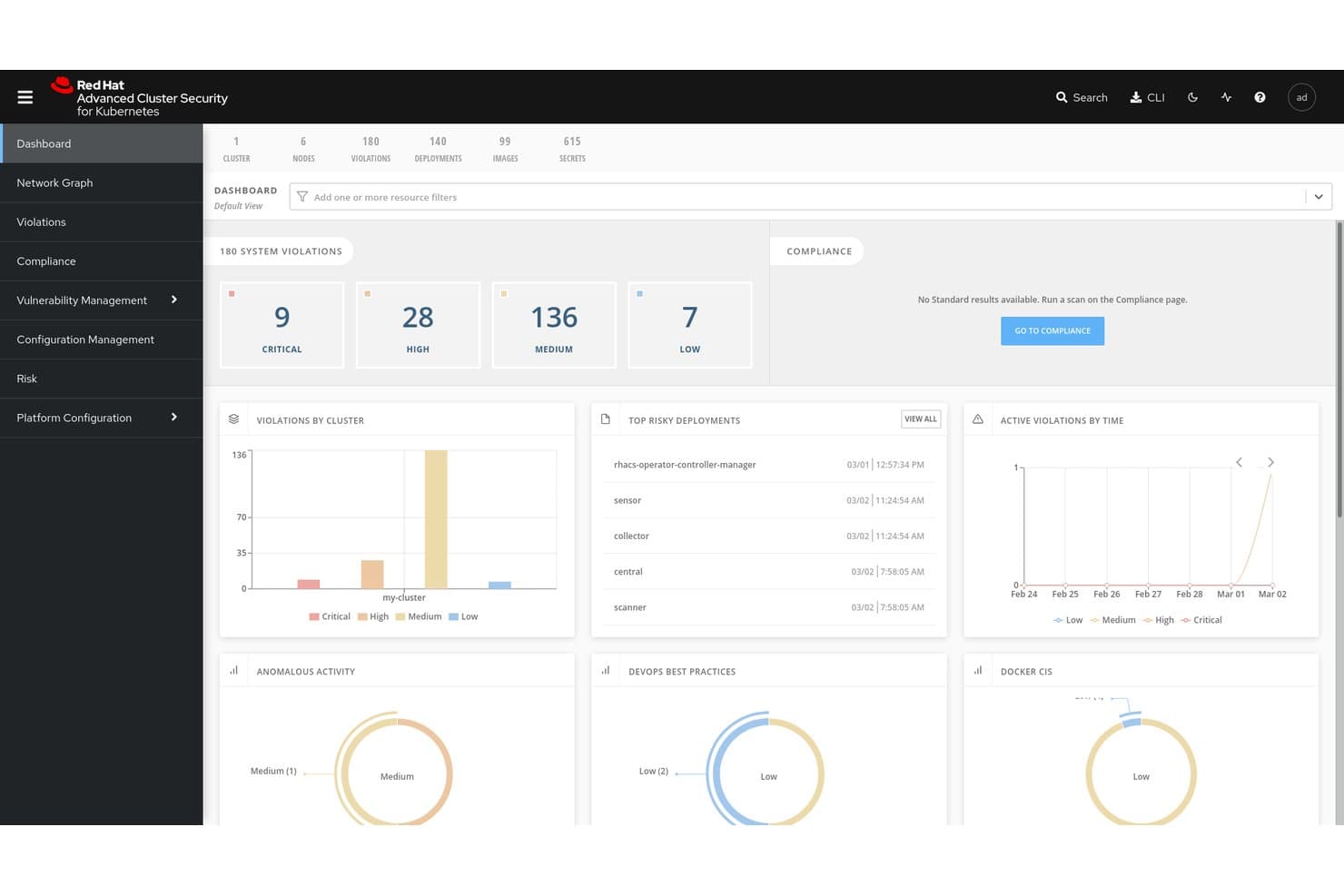
Red Hat Advanced Cluster Security for Kubernetes centralizza la visibilità sulle violazioni e sui rischi. Red Hat Advanced Cluster Security for Kubernetes (RHACS) è una piattaforma di sicurezza dei container nativa per Kubernetes che copre la scansione delle vulnerabilità delle immagini, il rilevamento delle minacce in fase di esecuzione, l'applicazione delle policy e il controllo della conformità in ambienti multi-cluster e multicloud.
A chi è più adatto Red Hat Advanced Cluster Security for Kubernetes?
RHACS è particolarmente adatto ai team di piattaforma e DevSecOps che eseguono carichi di lavoro su Red Hat OpenShift o in ambienti Kubernetes multicloud e necessitano di una copertura di sicurezza nativa e approfondita per l'intero ciclo di vita dei container.
Perché ho scelto Red Hat Advanced Cluster Security for Kubernetes
Ho scelto RHACS come una delle soluzioni migliori perché è progettato specificamente per Kubernetes fin dalle fondamenta, il che lo rende particolarmente adatto alla sicurezza della catena di approvvigionamento a livello di orchestratore. Apprezzo in particolare il modo in cui combina la verifica delle firme delle immagini Cosign/Sigstore con la generazione di SBOM nel formato SPDX 2.3, consentendo ai team di applicare policy che bloccano le immagini non firmate prima ancora che raggiungano il cluster. La sua interfaccia della riga di comando
roxctlsi integra direttamente con le pipeline Jenkins, GitHub Actions e Tekton per bloccare le build in caso di violazioni delle policy, in base a soglie di gravità configurabili.Caratteristiche principali di Red Hat Advanced Cluster Security for Kubernetes
- Raccolta del runtime eBPF CO-RE: acquisisce dati telemetrici a livello di kernel relativi a chiamate di sistema, processi, file e rete dai container in esecuzione, senza moduli del kernel o container sidecar.
- Controller di ammissione con modalità di errore configurabili: applica le policy al momento della distribuzione tramite un webhook di ammissione Kubernetes, con comportamento Fail Open o Fail Close in base ai requisiti di disponibilità e sicurezza.
- Scansione automatizzata della conformità: esegue controlli pianificati rispetto ai framework CIS, NIST, PCI DSS 4.0, HIPAA e ISO 27001, con esportazione con un clic delle evidenze pronte per gli auditor da un'unica dashboard.
- Rilevamento multi-cluster: individua i cluster non protetti su Amazon EKS, Google GKE e Microsoft AKS tramite Paladin Cloud e l'integrazione con Red Hat OpenShift Cluster Manager.
Integrazioni di Red Hat Advanced Cluster Security for Kubernetes
Le integrazioni native includono Red Hat OpenShift, Amazon EKS, Google GKE, Microsoft AKS, Jenkins, GitHub Actions, Tekton e Argo CD. RHACS si connette inoltre a Quay, Amazon ECR e Prometheus tramite il proprio endpoint delle metriche.
Pros and Cons
Pros:
- Progettato specificamente per i controlli di sicurezza Kubernetes
- Visibilità del runtime eBPF con rilevamento a livello di kernel
- Ampia copertura della conformità su più framework
Cons:
- Le funzionalità più avanzate sono legate alla piattaforma OpenShift
- Alcune attività di amministrazione richiedono l'interfaccia della riga di comando
Learn more about Red Hat Advanced Cluster Security for Kubernetes:
Altre soluzioni di sicurezza dei container
Ecco alcune ulteriori opzioni di soluzioni di sicurezza dei container che non sono entrate nella mia selezione, ma che vale comunque la pena prendere in considerazione:
- 11Orca SecurityIdeale per la tecnologia di scansione laterale dei container
- 12ARMOIdeale per RBAC Kubernetes e il rafforzamento della sicurezza in fase di esecuzione
- 13CrowdStrike Falcon Cloud SecurityIdeale per classificare i rischi dei container in base agli avversari
- 14SnykMigliore per la gestione delle vulnerabilità nei container
- 15Check Point CloudGuardIdeale per la difesa runtime arricchita dall'IA di ThreatCloud
- 16NeuVectorIdeale per la sicurezza dei container open source basata sul modello zero trust
- 17PingSafeIdeale per la difesa adattiva dalle minacce
- 18Trend Micro Cloud SecurityIdeale per CNAPP aziendali con correlazione XDR
- 19Tenable Container Security ScannerIdeale per la gestione dei rischi dei container incentrata sull'esposizione
Come valuto le soluzioni di sicurezza per container
Valuto gli strumenti di sicurezza per container su due livelli: prima le funzionalità di base come la scansione delle immagini e il rilevamento delle minacce in tempo reale, poi i fattori differenzianti come la profondità nell’hardening di Kubernetes e l’integrazione nelle pipeline CI/CD.
Funzionalità di base (Requisiti minimi per questa lista)
Quando seleziono gli strumenti per la mia lista, valuto ciascuno su una scala da 0 (non offre la funzionalità) a 5 (eccelle in quest’area) per ogni funzionalità di base elencata di seguito. Poi calcolo il punteggio totale dello strumento in percentuale. Ogni strumento deve raggiungere un punteggio minimo totale del 65% per essere considerato.
- Scansione delle vulnerabilità delle immagini: Controllo se lo strumento esegue scansioni delle immagini dei container nei vari registri per CVE, segreti incorporati e pacchetti obsoleti—oltre a generare SBOM.
- Rilevamento delle minacce in tempo reale: Il monitoraggio in tempo reale dei container in esecuzione è importante, quindi valuto come ogni strumento rileva processi anomali, chiamate di rete inaspettate e deviazioni nei container.
- Rinforzo della configurazione Kubernetes: Ogni strumento dovrebbe valutare i cluster K8s rispetto ai benchmark CIS, segnalare permessi RBAC rischiosi e mettere in evidenza admission controller configurati male.
- Integrazione nelle pipeline CI/CD: Analizzo come ogni strumento si connette alle pipeline di build per controllare i deployment—se supporta controlli delle policy in GitHub Actions, GitLab CI o Jenkins.
- Conformità & applicazione delle policy: Template di policy predefiniti per framework come PCI-DSS, HIPAA e SOC 2 sono la base; valuto anche la personalizzazione delle policy e la profondità dei report.
- Controlli di segmentazione di rete: La microsegmentazione consapevole dei container aiuta a prevenire movimenti laterali, quindi cerco enforcement delle policy L3–L7 e visibilità nitida sul traffico est-ovest.
Una volta che ho una lista di strumenti che soddisfano questi criteri, considero cosa distingue ciascuna piattaforma.
Fattori differenzianti (Cosa distingue i fornitori)
Ecco come confronto e metto in risalto i diversi fornitori:
Caratteristiche distintive
La prioritizzazione dei rischi basata su AI è un grande fattore differenziante: strumenti che correlano CVE con l’esposizione e la sfruttabilità nel runtime aiutano i team a tagliare il rumore degli allarmi e concentrarsi sulle minacce reali. Valuto anche l’enforcement tramite admission controller, che blocca l’implementazione nei cluster dei workload non conformi prima che causino problemi. Le capacità CNAPP unificate sono preziose quando i team vogliono la sicurezza dei container combinata con CSPM, CWPP e CIEM in un’unica console, riducendo la proliferazione degli strumenti nello stack cloud-native.
Oltre le funzionalità
Il modello di deployment ha qui grande importanza. Controllo se uno strumento supporta scansione basata su agente, senza agente o ibrida, e se funziona in ambienti isolati per team soggetti a normative. Le integrazioni nell’ecosistema sono parimenti cruciali; uno strumento che si collega al tuo SIEM, sistema di ticketing e registri come Harbor o Artifactory mantiene il flusso dei dati di sicurezza dove già lavora il tuo team. Valuto anche la scalabilità, in particolare quanto siano leggeri i sensori runtime su cluster con migliaia di nodi e se la visibilità multi-cloud si trova in un’unica console.
Come scegliere una soluzione di sicurezza dei container
È facile perdersi in lunghi elenchi di funzionalità e strutture tariffarie complesse. Per aiutarti a rimanere concentrato mentre affronti il tuo processo unico di selezione del software, ecco un elenco dei fattori da tenere presenti:
| Fattore | Cosa considerare |
|---|---|
| FattoreScalabilità | Cosa considerareLo strumento può crescere insieme alla tua azienda? Verifica se gestisce carichi di lavoro e utenti in aumento senza richiedere aggiornamenti costanti. |
| FattoreIntegrazioni | Cosa considerareFunziona con gli strumenti che già utilizzi? Controlla la compatibilità con le pipeline CI/CD, i provider cloud e altri software essenziali. |
| FattorePersonalizzazione | Cosa considerarePuoi adattarlo alle tue esigenze? Cerca opzioni per modificare impostazioni, dashboard e avvisi in base al tuo flusso di lavoro. |
| FattoreFacilità d'uso | Cosa considerareÈ intuitivo? Assicurati che l'interfaccia sia facile da usare e richieda una formazione minima affinché il tuo team possa iniziare. |
| FattoreImplementazione e avviamento | Cosa considerareQuanto rapidamente puoi iniziare? Valuta i tempi di configurazione, la disponibilità di risorse come la formazione e il supporto durante le fasi iniziali. |
| FattoreCosto | Cosa considerareRientra nel tuo budget? Confronta i piani tariffari, fai attenzione ai costi nascosti e considera il valore offerto rispetto al prezzo. |
| FattoreMisure di sicurezza | Cosa considerareOffre protezioni solide? Cerca crittografia, controlli degli accessi e conformità agli standard del settore per garantire la sicurezza dei dati. |
| FattoreRequisiti di conformità | Cosa considerareSoddisfa le normative? Verifica che la soluzione sia conforme agli standard giuridici pertinenti al tuo settore, come il GDPR o l'HIPAA. |
Cosa sono le soluzioni di sicurezza dei container?
Le soluzioni di sicurezza dei container sono strumenti progettati per proteggere le applicazioni containerizzate da vulnerabilità e minacce. I professionisti IT, gli sviluppatori e i team di sicurezza utilizzano generalmente questi strumenti per garantire che le applicazioni funzionino in modo sicuro in vari ambienti, indipendentemente dal fatto che utilizzino alternative a Docker o altre piattaforme per container. La scansione delle vulnerabilità, i controlli di conformità e la protezione in fase di esecuzione aiutano a identificare i rischi, rispettare le normative e salvaguardare le operazioni. Questi strumenti forniscono una sicurezza essenziale per mantenere le applicazioni containerizzate sicure e conformi.
Funzionalità
Quando selezioni le soluzioni di sicurezza dei container, presta attenzione alle seguenti funzionalità chiave:
- Scansione delle vulnerabilità: identifica e segnala i potenziali rischi per la sicurezza presenti nelle immagini dei container e nelle applicazioni in esecuzione.
- Controlli di conformità: garantisce che i container soddisfino gli standard e le normative di settore come GDPR e HIPAA.
- Protezione in fase di esecuzione: monitora e difende dalle minacce durante l'esecuzione delle applicazioni containerizzate.
- Funzionalità di integrazione: funziona perfettamente con le pipeline CI/CD e i provider cloud esistenti per mantenere la sicurezza durante le fasi di sviluppo.
- Controllo degli accessi basato sui ruoli: consente di impostare le autorizzazioni e gestire l'accesso degli utenti a informazioni e azioni sensibili.
- Risoluzione automatica: fornisce correzioni automatiche per le vulnerabilità identificate, riducendo la necessità di interventi manuali.
- Avvisi in tempo reale: informa immediatamente il team sugli incidenti di sicurezza, consentendo una risposta rapida.
- Dashboard personalizzabili: offre una visualizzazione adattata delle metriche e degli avvisi di sicurezza, facilitando il monitoraggio degli aspetti più importanti.
- Crittografia: garantisce che i dati all'interno dei container siano protetti dagli accessi non autorizzati.
- Rilevamento delle minacce basato sull'apprendimento automatico: utilizza algoritmi avanzati per identificare e prevedere le potenziali minacce, migliorando le misure di sicurezza complessive.
Vantaggi
L'implementazione di soluzioni di sicurezza dei container offre numerosi vantaggi al team e all'azienda. Eccone alcuni:
- Maggiore sicurezza: utilizzando la scansione delle vulnerabilità e la protezione in fase di esecuzione, riduci il rischio di violazioni e proteggi i dati sensibili.
- Conformità normativa: i controlli di conformità garantiscono che le operazioni rispettino gli standard legali necessari, evitando sanzioni e problemi giuridici.
- Risparmio di tempo: la risoluzione automatica e gli avvisi in tempo reale consentono al team di reagire rapidamente alle minacce senza interventi manuali.
- Maggiore efficienza: le funzionalità di integrazione con gli strumenti esistenti semplificano i processi e mantengono la sicurezza durante tutto lo sviluppo.
- Controllo degli accessi: il controllo degli accessi basato sui ruoli aiuta a gestire chi può accedere a cosa, riducendo la possibilità di azioni non autorizzate.
- Processo decisionale informato: le dashboard personalizzabili forniscono informazioni sulle metriche di sicurezza, aiutandoti a prendere decisioni di sicurezza più consapevoli.
- Protezione dei dati: la crittografia garantisce che i dati siano al sicuro dagli accessi non autorizzati, preservandone la riservatezza e l'integrità.
Costi e prezzi
La scelta delle soluzioni di sicurezza dei container richiede la comprensione dei vari modelli e piani tariffari disponibili. I costi variano in base alle funzionalità, alle dimensioni del team, agli elementi aggiuntivi e ad altro ancora. La tabella seguente riepiloga i piani più comuni, i relativi prezzi medi e le funzionalità generalmente incluse nelle soluzioni di sicurezza dei container:
Tabella comparativa dei piani per le soluzioni di sicurezza dei container
| Tipo di piano | Prezzo medio | Funzionalità comuni |
|---|---|---|
| Tipo di pianoPiano gratuito | Prezzo medio$0 | Funzionalità comuniScansione di base delle vulnerabilità, controlli di conformità limitati e assistenza della comunità. |
| Tipo di pianoPiano personale | Prezzo medio$5-$25/utente/mese | Funzionalità comuniScansione avanzata, protezione di base in fase di esecuzione e assistenza via e-mail. |
| Tipo di pianoPiano aziendale | Prezzo medio$30-$75/utente/mese | Funzionalità comuniControlli di conformità completi, funzionalità di integrazione e controllo degli accessi basato sui ruoli. |
| Tipo di pianoPiano per grandi aziende | Prezzo medio$100+/utente/mese | Funzionalità comuniDashboard personalizzabili, rilevamento delle minacce tramite apprendimento automatico e assistenza dedicata. |
Domande frequenti sulle soluzioni di sicurezza dei container
Quali compromessi ci si deve aspettare tra gli strumenti di sicurezza dei container a codice aperto e quelli commerciali?
Con gli strumenti a codice aperto, si ottengono spesso flessibilità, personalizzazione e nessun costo di licenza, ma in genere ci si deve assumere una maggiore attività di integrazione, messa a punto e supporto. Le soluzioni commerciali tendono a includere più funzionalità pronte all’uso (pannelli di controllo, avvisi, motori di criteri), ma si potrebbe essere vincolati ai limiti del fornitore o dover sostenere costi più elevati con la crescita. Occorre valutare la maturità del team, la complessità degli ambienti e la disponibilità a creare collegamenti tra gli strumenti.
Quali difficoltà si presentano quando si proteggono i container in infrastrutture multicloud o ibride?
Negli ambienti multicloud, si devono affrontare API incoerenti, modelli di identità differenti e criteri di rete divergenti. Una soluzione che funziona in AWS potrebbe non adattarsi perfettamente ad Azure o agli ambienti locali. Servono strumenti che astraggano queste differenze (o che utilizzino un piano di controllo centralizzato) e consentano di uniformare il livello di sicurezza tra i cloud.
Come posso risolvere i problemi relativi alla chiusura imprevista dei container in AWS Fargate?
La chiusura imprevista dei container in AWS Fargate può essere dovuta a limitazioni delle risorse o a configurazioni errate. Verificare nella definizione dell’attività che le risorse siano allocate correttamente e consultare i log alla ricerca di messaggi di errore. La regolazione delle impostazioni relative alla memoria o alla CPU potrebbe risolvere il problema.
Come si gestiscono i falsi positivi nelle scansioni delle vulnerabilità delle immagini dei container?
I falsi positivi sono comuni quando gli strumenti di scansione segnalano problemi di basso impatto o dipendenze che l’applicazione non utilizza effettivamente. Per ridurre il rumore, regolare le soglie dello strumento di scansione, eliminare gli avvisi relativi ai risultati a basso rischio e correlare nel tempo i risultati delle scansioni per individuare i problemi persistenti. È inoltre possibile convalidare i risultati mediante più strumenti o utilizzare un meta-framework (ad es. LUCID) per ridurre le incoerenze tra gli strumenti di scansione.