

I 10 migliori software firewall recensiti nel 2026

10 Elenco dei migliori software firewall


Nell'era digitale odierna, proteggere la rete non è solo una scelta intelligente: è essenziale. Devi affrontare minacce costanti provenienti dagli attacchi informatici, ed è qui che entra in gioco il software firewall. Funziona come una barriera, proteggendo i tuoi dati e preservando la tua tranquillità.
Ho dedicato del tempo a testare e recensire diverse soluzioni firewall e comprendo le difficoltà che tu e il tuo team dovete affrontare per proteggere i vostri sistemi. In questo articolo condividerò le mie scelte migliori, offrendoti una panoramica imparziale delle migliori opzioni disponibili.
Troverai informazioni sulle funzionalità, sulla facilità d'uso e sugli elementi che distinguono ogni software, aiutandoti a prendere una decisione consapevole. Immergiamoci nel mondo dei software firewall e troviamo la soluzione più adatta alle tue esigenze.
Perché fidarsi dei nostri consigli sui software
Il nostro team testa e recensisce software dal 2012. In quanto leader tecnologici noi stessi, sappiamo quanto sia difficile — e importante — scegliere il software giusto.
Per questa guida, abbiamo valutato gli strumenti attraverso test praticie ricerche indipendenti, assegnando un punteggio agli strumenti in base ai nostri criteri di selezione.
Le nostre recensioni riflettono il nostro giudizio editoriale umano, non un discorso di vendita.
Revisori esperti:
Riepilogo dei migliori software firewall
| Tool | Best For | Trial Info | Price | ||
|---|---|---|---|---|---|
| 1 | La soluzione migliore per il TCO più basso per Mbps protetto | Prova gratuita di 30 giorni e dimostrazione gratuita disponibili | A partire da $700 | Website | |
| 2 | Ideale per l'intelligence sulle minacce Talos su larga scala | Demo gratuita disponibile | Prezzi su richiesta | Website | |
| 3 | Ideale per la copertura firewall SD-WAN delle filiali | Prova gratuita di 14 giorni + dimostrazione gratuita | A partire da $25/utente/mese (con fatturazione annuale) | Website | |
| 4 | Ideale per il rilevamento degli attacchi zero-day nella memoria basato sull'apprendimento automatico | Prova gratuita di 90 giorni OPPURE demo gratuita disponibile | A partire da $550 (solo hardware) | Website | |
| 5 | Ideale per l'isolamento della rete attivato dagli endpoint | Prova gratuita disponibile | A partire da $25/utente/mese (fatturato annualmente) | Website | |
| 6 | Ideale per un accesso sicuro al cloud tramite zero trust | Demo gratuita disponibile | Prezzo su richiesta | Website | |
| 7 | Ideale per una prevenzione delle minacce multilivello approfondita | Prova gratuita di 30 giorni OPPURE demo gratuita disponibile | Prezzi su richiesta | Website | |
| 8 | Ideale per consolidare NGFW, SD-WAN e ZTNA | Prova gratuita di 30 giorni | A partire da $450 (apparato hardware) | Website | |
| 9 | Ideale per bloccare le minacce del giorno zero prima della divulgazione | Prova gratuita di 15–30 giorni OPPURE dimostrazione gratuita disponibile | Prezzo su richiesta | Website | |
| 10 | La soluzione migliore per gli standard europei di cybersicurezza | Demo gratuita disponibile | Prezzi su richiesta | Website |
Recensioni dei migliori software firewall

La soluzione migliore per il TCO più basso per Mbps protetto
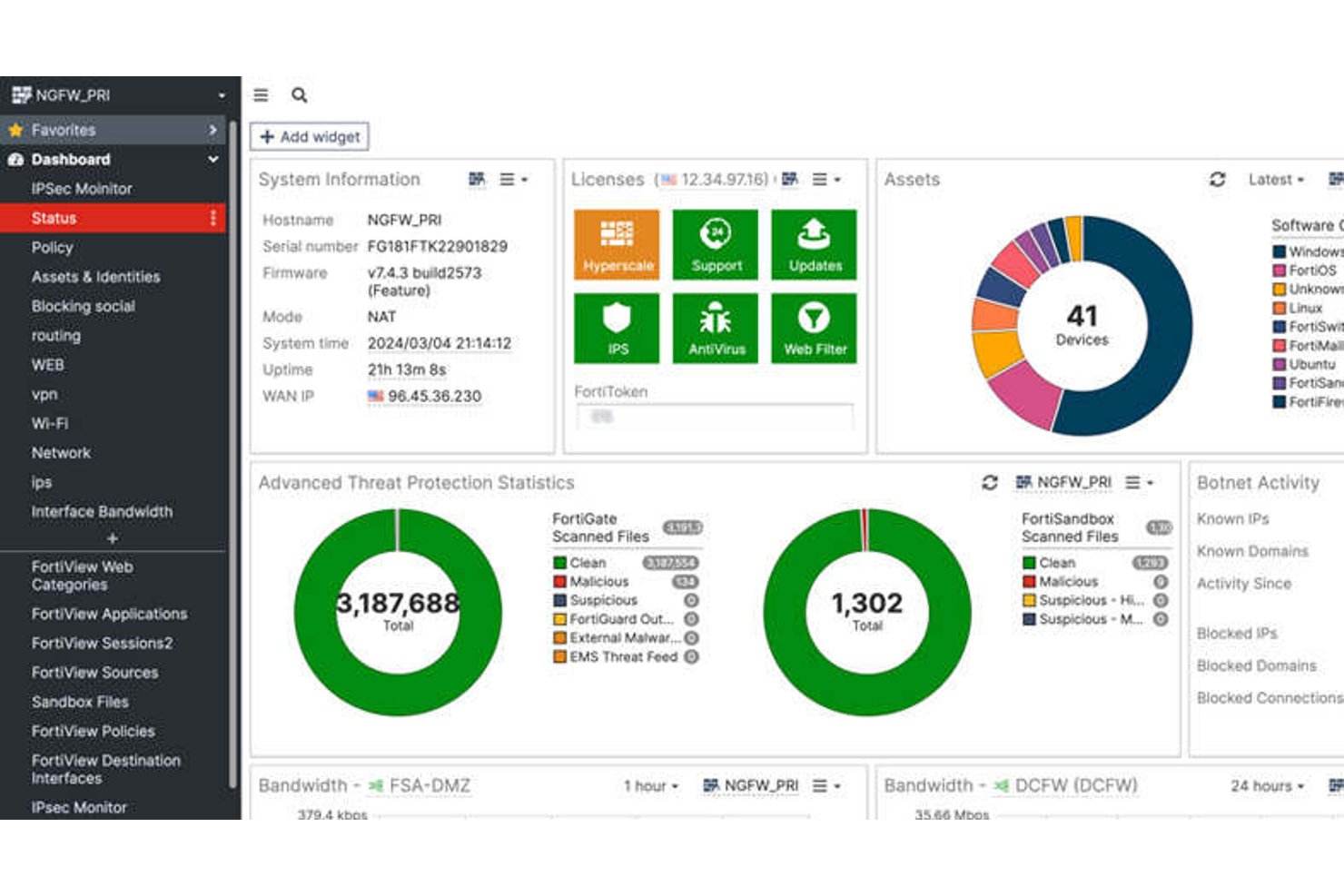
FortiGate NGFW è una piattaforma firewall di rete di Fortinet che combina l'ispezione approfondita dei pacchetti, la prevenzione delle intrusioni, il controllo a livello applicativo, la decrittografia SSL/TLS e la SD-WAN integrata tra appliance hardware, macchine virtuali e distribuzioni ospitate nel cloud.
Per chi è più adatto FortiGate NGFW?
FortiGate NGFW è particolarmente adatto ai gruppi di sicurezza di rete aziendali che devono proteggere ambienti ad alta capacità di elaborazione distribuiti tra infrastrutture locali, cloud e ibride.
Perché ho scelto FortiGate NGFW
FortiGate NGFW si è guadagnato un posto nella mia lista dei migliori perché nessun altro firewall si avvicina alla sua velocità di elaborazione pura nella protezione dalle minacce su larga scala. Mi riferisco ai processori personalizzati FortiASIC, che portano l'ispezione SSL/TLS e l'IPS alla velocità di linea, raggiungendo 520 Gbps sul modello 3800G senza compromettere le prestazioni. Apprezzo anche il fatto che la SD-WAN sia inclusa nella licenza, così il mio gruppo non deve gestire prodotti separati per proteggere il traffico delle filiali mantenendo al contempo quella capacità di elaborazione tra siti distribuiti.
Funzionalità principali di FortiGate NGFW
- Segmentazione dei domini virtuali (VDOM): Divide una singola appliance FortiGate in più istanze firewall virtuali isolate, ciascuna con le proprie policy, tabelle di routing e amministratori.
- Orchestrazione centralizzata con FortiManager: Gestisce policy, configurazioni e firmware tra distribuzioni FortiGate distribuite da un'unica console, con supporto per il controllo delle versioni e il ripristino.
- CASB integrato per la visibilità sul SaaS: Monitora e controlla in tempo reale il traffico verso le applicazioni cloud, portando alla luce l'IT ombra e bloccando l'esfiltrazione dei dati dalle piattaforme non autorizzate.
- Crittografia post-quantistica per le VPN IPsec: Implementa algoritmi post-quantistici approvati dal NIST in FortiOS 7.6.1 per proteggere i tunnel VPN dalle minacce dell'informatica quantistica.
Integrazioni di FortiGate NGFW
FortiGate NGFW supporta oltre 3.000 integrazioni Security Fabric tra più di 400 partner, tra cui CrowdStrike, ServiceNow, Armis, Splunk, AWS, Microsoft Azure e Google Cloud Platform. Il supporto per Terraform, Ansible e REST API consente integrazioni personalizzate e flussi di lavoro basati sull'infrastruttura come codice.
Pros and Cons
Pros:
- Offre la più elevata capacità di elaborazione per la protezione dalle minacce disponibile
- SD-WAN nativa inclusa senza costi aggiuntivi
- La segmentazione VDOM consente il multi-tenant
Cons:
- Gli aggiornamenti del firmware possono introdurre errori critici
- La reportistica avanzata richiede una licenza FortiAnalyzer separata

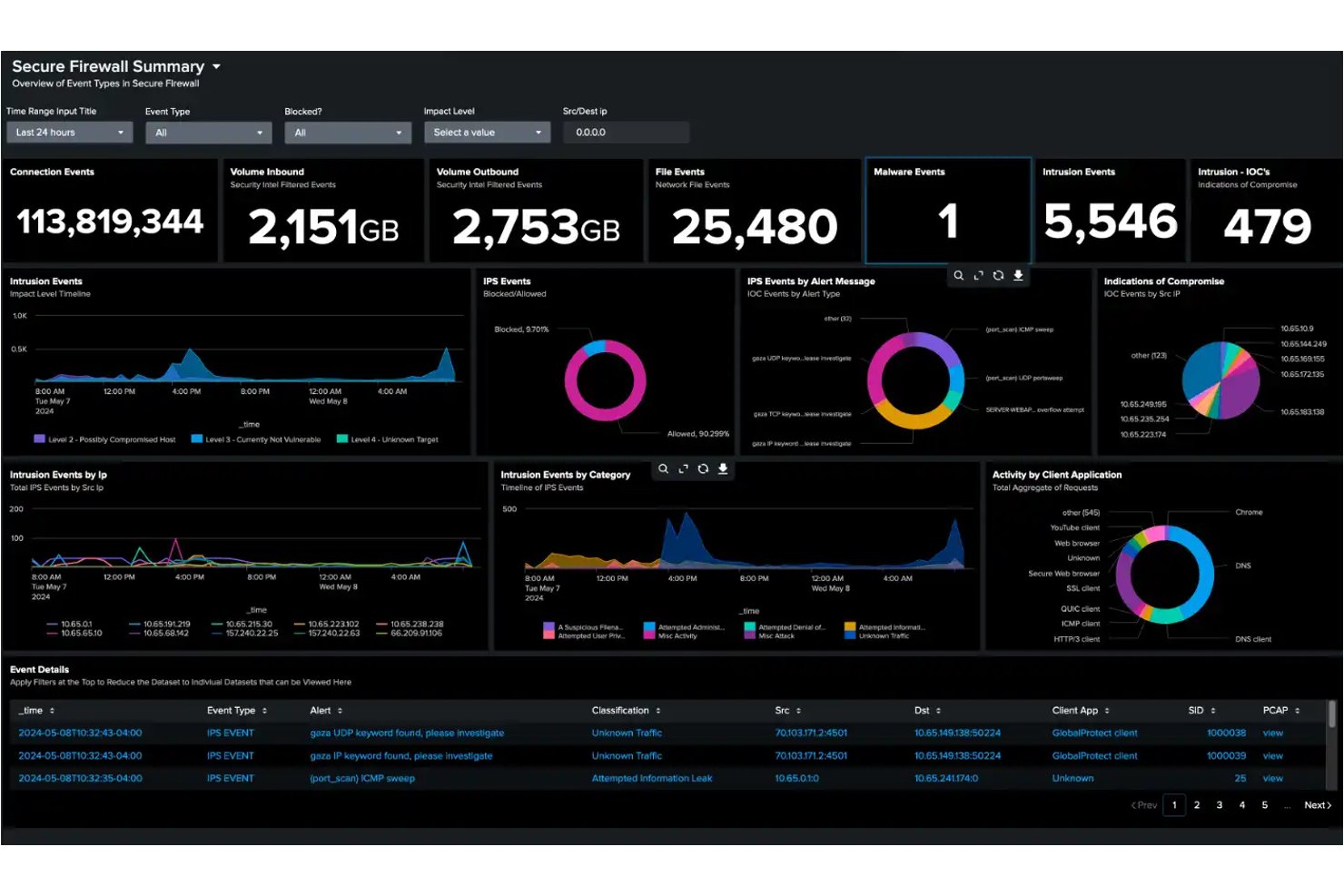
Cisco Secure Firewall è una piattaforma firewall di nuova generazione che offre l'ispezione con stato del traffico, la prevenzione delle intrusioni tramite il motore Snort 3, l'ispezione approfondita dei pacchetti su oltre 6.500 applicazioni e l'analisi del traffico cifrato attraverso il suo Motore di visibilità sul traffico cifrato.
Per chi è più indicato Cisco Secure Firewall?
Cisco Secure Firewall è particolarmente adatto ai team di sicurezza aziendale che necessitano di una protezione dalle minacce verificata e basata sull'intelligence in ambienti di rete estesi, distribuiti e ibridi.
Perché ho scelto Cisco Secure Firewall
Cisco Secure Firewall si è guadagnato un posto nella mia lista perché l'intelligence sulle minacce che lo supporta è davvero di un altro livello. Cisco Talos analizza ogni giorno 900 miliardi di eventi di sicurezza in 193 Paesi, alimentando rilevamenti in tempo reale direttamente nel motore IPS Snort 3 del firewall. Il modello comportamentale SnortML si aggiunge a questa tecnologia, rilevando gli exploit zero-day senza dover attendere un aggiornamento delle firme. Nei test aziendali di SE Labs del 2026, Cisco ha bloccato il 100% delle minacce, incluse le simulazioni di APT29 e Scattered Spider.
Caratteristiche principali di Cisco Secure Firewall
- Motore di visibilità sul traffico cifrato (EVE): rileva e blocca le minacce nascoste nel traffico cifrato TLS 1.3 senza richiederne la decifratura.
- Centro di gestione del firewall (FMC): console di gestione centralizzata on-premise per configurare e applicare i criteri su istanze firewall hardware, virtuali e cloud.
- Accesso universale alla rete a fiducia zero (UZTNA): fornisce l'accesso alle applicazioni basato sull'identità e sullo stato del dispositivo, sostituendo la VPN tradizionale con connessioni verificate continuamente.
- Controllo cloud della sicurezza Cisco: piattaforma di orchestrazione nativa del cloud per gestire distribuzioni firewall multi-sito e multi-tenant da un'unica interfaccia.
Integrazioni di Cisco Secure Firewall
Cisco Secure Firewall dispone di integrazioni native con Splunk, Cisco XDR, Cisco ISE, Cisco Secure Workload, Cisco Umbrella, Cisco Secure Access e Cisco Multicloud Defense. Supporta QRadar e Microsoft Sentinel tramite syslog, oltre a API REST, Terraform e Ansible per flussi di lavoro personalizzati e DevSecOps.
Pros and Cons
Pros:
- Blocca le minacce zero-day utilizzando l'analisi comportamentale SnortML
- Ispeziona il traffico TLS 1.3 senza decifratura
- Supporta distribuzioni multi-cloud e containerizzate
Cons:
- La distribuzione dei criteri può essere lenta e problematica
- La complessità dell'interfaccia di gestione frustra gli amministratori


Barracuda CloudGen Firewall è un firewall di nuova generazione che combina l'ispezione approfondita dei pacchetti con stato, la SD-WAN integrata, IDS/IPS, il controllo a livello applicativo e il supporto alla distribuzione in ambienti multicloud su AWS, Azure e GCP.
Per chi è più adatto Barracuda CloudGen Firewall?
I team IT che gestiscono reti di filiali distribuite o ambienti multicloud trarranno il massimo da Barracuda CloudGen Firewall, soprattutto quando sono importanti la SD-WAN integrata e la distribuzione senza intervento.
Perché ho scelto Barracuda CloudGen Firewall
Ho scelto Barracuda CloudGen Firewall come una delle soluzioni migliori perché gestisce la sicurezza multicloud senza costringerti a integrare strumenti separati. La distribuzione nativa su AWS, Azure e GCP consente di applicare criteri firewall coerenti, indipendentemente dal fatto che il traffico raggiunga una filiale o un carico di lavoro cloud. Apprezzo anche il fatto che sia inclusa la SD-WAN integrata con duplicazione del traffico e correzione degli errori in avanti, così i team distribuiti rimangono connessi anche su collegamenti 4G/5G soggetti a perdita di pacchetti, con commutazione automatica senza perdita di pacchetti.
Funzionalità principali di Barracuda CloudGen Firewall
- Ispezione approfondita dei pacchetti con stato: Esamina le intestazioni e i contenuti dei pacchetti in un unico passaggio, applicando contemporaneamente firewall, IPS/IDS e scansione antivirus senza aggiungere latenza.
- Centro di controllo del firewall: Una console di gestione centralizzata che supporta distribuzioni multisito con controllo delle revisioni, ripristino della configurazione e predisposizione senza intervento dei siti remoti.
- Analisi in ambiente isolato per la protezione avanzata dalle minacce: Utilizza l'emulazione completa del sistema per analizzare in sicurezza i file sconosciuti e rilevare le minacce comportamentali, distribuendo automaticamente le nuove firme ai livelli di prefiltraggio.
- Criteri di controllo degli accessi basati sull'identità: Applica regole granulari per utente, gruppo, applicazione, ora e posizione utilizzando integrazioni con Active Directory, LDAP, RADIUS, TACACS+ e certificati x.509.
Integrazioni di Barracuda CloudGen Firewall
Barracuda CloudGen Firewall si integra con Microsoft Azure, Azure Virtual WAN, AWS, Google Cloud Platform, Datadog e Tufin SecureTrack. Supporta l'esportazione syslog verso Splunk e altre piattaforme SIEM, oltre alle API REST per l'automazione personalizzata.
Pros and Cons
Pros:
- SD-WAN integrata senza apparecchiature aggiuntive
- Gestione centralizzata per ambienti multisito
- Protezione avanzata dalle minacce con analisi in ambiente isolato
Cons:
- Manca il supporto per il protocollo WireGuard
- Le funzionalità principali richiedono abbonamenti aggiuntivi

Ideale per il rilevamento degli attacchi zero-day nella memoria basato sull'apprendimento automatico
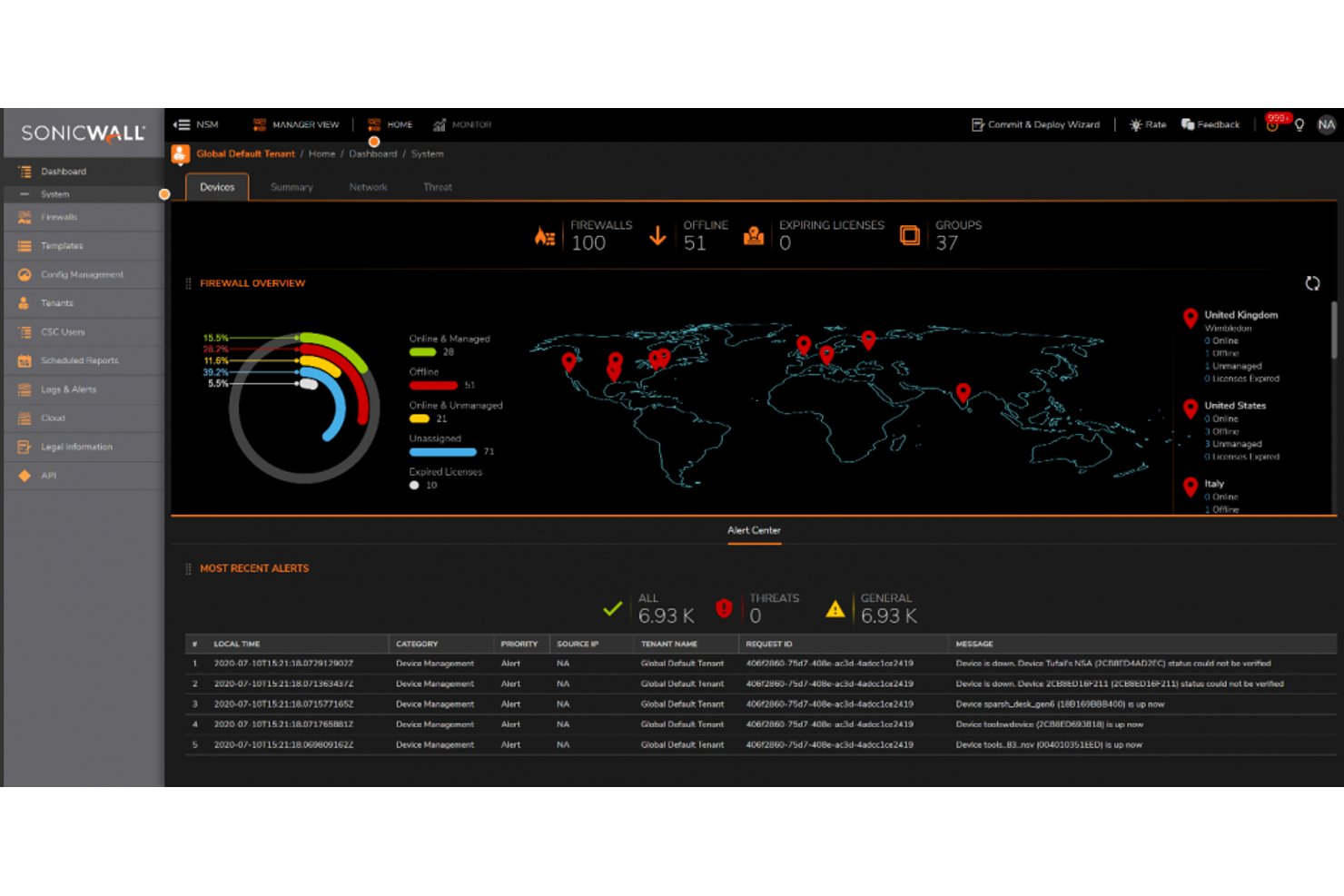
SonicWall è una piattaforma firewall di nuova generazione che combina l'ispezione approfondita dei pacchetti, la prevenzione delle intrusioni, il controllo a livello applicativo e il sandboxing basato sul cloud in ambienti hardware, virtuali e distribuiti nel cloud.
Per chi è più adatto SonicWall?
SonicWall è una soluzione ideale per i team IT delle PMI e delle aziende del mercato intermedio che necessitano di una prevenzione delle minacce di livello aziendale senza il relativo prezzo.
Perché ho scelto SonicWall
Ho scelto SonicWall come una delle migliori soluzioni perché il suo rilevamento delle violazioni in tempo reale è davvero difficile da replicare. Il motore brevettato RTDMI analizza la memoria in tempo reale, rilevando il malware che si nasconde dietro la crittografia prima che venga eseguito. Con il supporto di cinque punteggi perfetti consecutivi assegnati da ICSA Labs, il rilevamento del 100% delle minacce con zero falsi positivi non è solo una dichiarazione di marketing: è verificato. Apprezzo molto anche il sandbox Capture ATP, poiché esegue un'emulazione completa del sistema sui file sospetti anziché effettuare controlli superficiali.
Caratteristiche principali di SonicWall
- Architettura delle policy basata sulle zone: consente di definire regole firewall granulari tra zone attendibili, non attendibili, wireless e crittografate, con applicazione per utente e per gruppo.
- SD-WAN sicura integrata: offre la commutazione automatica intelligente, il bilanciamento del carico e l'instradamento consapevole delle applicazioni tra siti distribuiti senza richiedere un'appliance separata.
- Network Security Manager (NSM): una console centralizzata e nativa del cloud per gestire policy, configurazioni e report su più firewall e siti da un'unica interfaccia.
- Licenze ZTNA integrate: i firewall Gen 8 vengono forniti con l'integrazione Cloud Secure Edge, abilitando il controllo degli accessi basato sull'identità e sul dispositivo come alternativa integrata alla SSL-VPN.
Integrazioni di SonicWall
SonicWall offre integrazioni syslog native con Splunk, IBM QRadar e Microsoft Sentinel, oltre alla connettività con Active Directory e LDAP. NSM fornisce un'API REST per integrazioni e automazioni personalizzate.
Pros and Cons
Pros:
- Precisione nel rilevamento delle minacce ai vertici del settore
- SD-WAN e ZTNA integrati inclusi
- L'ispezione della memoria in tempo reale blocca il malware nascosto
Cons:
- Le vulnerabilità ricorrenti della SSL-VPN destano preoccupazioni
- Le funzionalità avanzate richiedono più abbonamenti a pagamento


Sophos Firewall è una piattaforma firewall di nuova generazione che combina l'ispezione approfondita dei pacchetti, la decrittografia TLS 1.3, la prevenzione delle intrusioni, il controllo a livello applicativo e la condivisione della telemetria sulle minacce tra endpoint, server e dispositivi di rete.
Per chi è più indicato Sophos Firewall?
Sophos Firewall è particolarmente adatto ai team IT e di sicurezza che utilizzano già, o intendono utilizzare, endpoint Sophos, dove l'isolamento automatico delle minacce tramite Security Heartbeat offre il massimo valore.
Perché ho scelto Sophos Firewall
Ho scelto Sophos Firewall perché la sua architettura Synchronized Security fa qualcosa che la maggior parte dei firewall non è in grado di fare: condivide la telemetria sullo stato in tempo reale tra il firewall e gli endpoint Sophos tramite Security Heartbeat, isolando automaticamente a livello di rete i dispositivi compromessi senza alcun intervento manuale. Apprezzo anche Active Threat Response, che integra i feed degli analisti MDR e il rilevamento ML di NDR Essentials per contenere gli attacchi attivi quasi in tempo reale.
Funzionalità principali di Sophos Firewall
- Ispezione TLS 1.3: l'architettura Xstream utilizza l'accelerazione hardware per decrittografare e ispezionare il traffico TLS 1.3 senza una significativa riduzione delle prestazioni.
- Sandbox cloud Sandstorm: i file sospetti vengono inviati a una sandbox basata sul cloud che utilizza l'apprendimento automatico e l'analisi comportamentale per rilevare malware sconosciuti prima che raggiungano la rete.
- Gateway ZTNA integrato: ogni appliance Sophos Firewall include un gateway integrato per l'accesso alla rete zero trust, eliminando la necessità di un'appliance separata.
- Reportistica centralizzata del firewall: Sophos Central offre modelli di report di conformità basati sul cloud per HIPAA, PCI-DSS e GLBA, con una conservazione dei log fino a 30 giorni nel pacchetto Xstream.
Integrazioni di Sophos Firewall
Sophos Firewall si integra con Sophos Central, Sophos Intercept X Endpoint, Sophos MDR/XDR, Active Directory, LDAP, AWS, Azure e GCP. La sua API di integrazione SIEM supporta connessioni personalizzate, mentre i feed di intelligence sulle minacce di terze parti e le implementazioni VMware, Hyper-V e KVM estendono la connettività.
Pros and Cons
Pros:
- Isolamento automatico degli endpoint tramite Security Heartbeat
- Ispezione TLS 1.3 con accelerazione hardware
- Gateway ZTNA integrato in ogni dispositivo
Cons:
- Per sfruttare appieno le funzionalità sono necessari endpoint Sophos
- Conservazione dei log limitata senza un SIEM esterno

Ideale per un accesso sicuro al cloud tramite zero trust
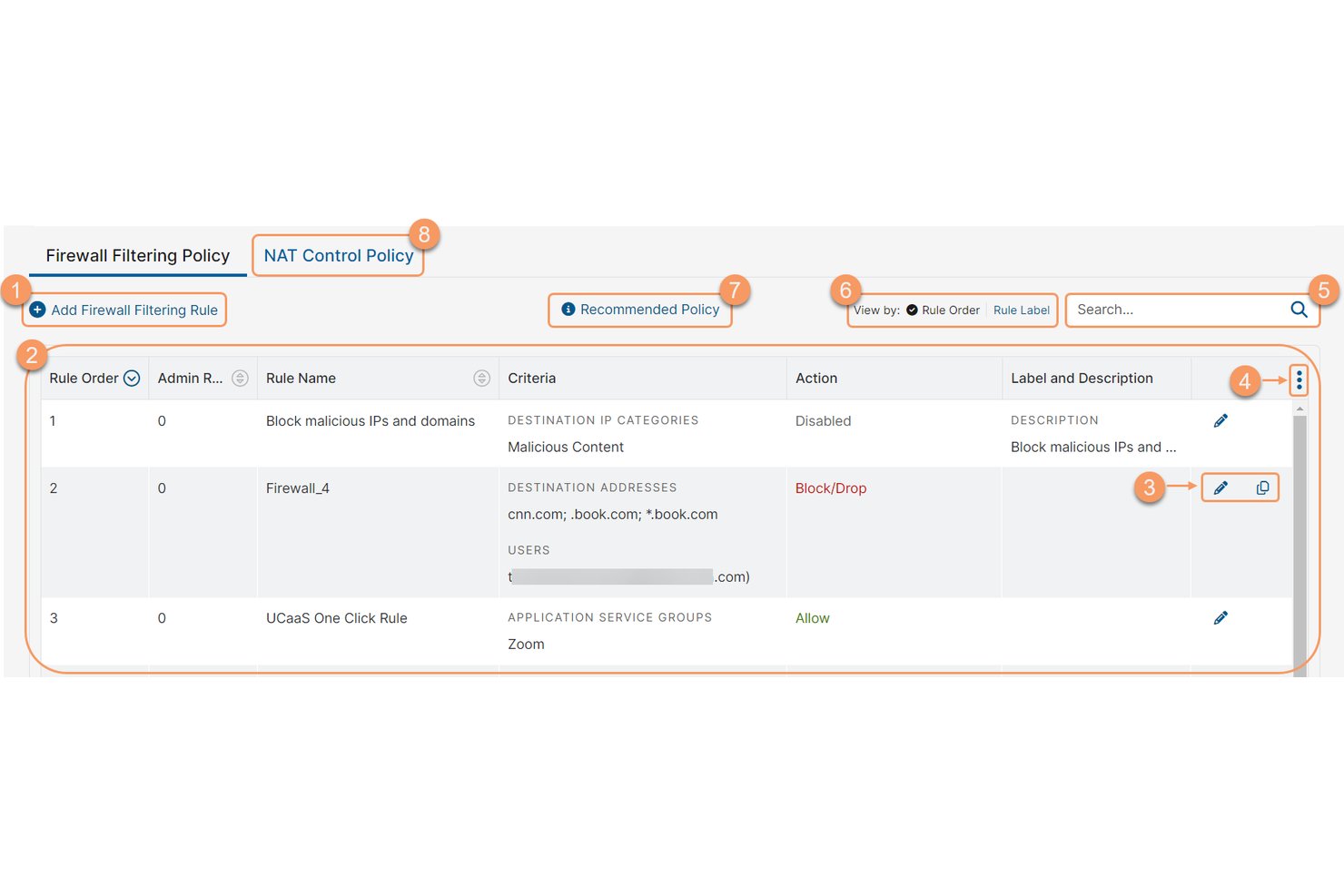
Zscaler Internet Access è una piattaforma edge di sicurezza e firewall cloud-native che offre un gateway web zero trust, un firewall cloud, la prevenzione delle intrusioni, il sandboxing e il controllo a livello applicativo, il tutto senza appliance hardware.
Per chi è più indicato Zscaler Internet Access?
Zscaler Internet Access è particolarmente adatto ai team aziendali responsabili della sicurezza e della rete che stanno sostituendo i firewall basati su hardware con un'architettura zero trust distribuita tramite cloud.
Perché ho scelto Zscaler Internet Access
Zscaler Internet Access si è guadagnato un posto nella mia lista ristretta perché è l'esempio più chiaro di un firewall cloud-native che elimina effettivamente la necessità di appliance fisiche. Apprezzo il modo in cui il suo Zero Trust Firewall ispeziona tutte le porte e i protocolli inline, terminando ogni connessione in uno degli oltre 150 punti di presenza globali prima che il traffico pulito raggiunga la destinazione. Il suo motore Single Scan, Multi-Action esegue l'ispezione TLS, l'IPS e il sandboxing in un unico passaggio, qualcosa che i NGFW tradizionali non riescono a replicare su larga scala.
Funzionalità principali di Zscaler Internet Access
- Gestione delle policy basata sull'identità: consente di creare e applicare regole firewall basate sull'identità dell'utente, sullo stato del dispositivo, sull'applicazione, sulla posizione e sull'orario da un'unica console cloud.
- IPS cloud con tre metodi di rilevamento: combina il rilevamento basato su firme, basato su policy e basato su anomalie/comportamenti inline su tutto il traffico crittografato, con aggiornamenti continui senza finestre di manutenzione.
- Sandbox cloud basato sull'IA: isola e analizza i file sconosciuti per rilevare malware zero-day, con quarantena del paziente zero e supporto per l'invio tramite API nel livello Advanced.
- Streaming dei log SIEM e SOAR: trasmette log ed eventi in tempo reale tramite API a piattaforme come Splunk, Microsoft Sentinel e IBM QRadar per la reportistica di conformità e i flussi di lavoro di risposta agli incidenti.
Integrazioni di Zscaler Internet Access
Zscaler Internet Access offre integrazioni documentate con Splunk, Microsoft Sentinel, IBM QRadar, ServiceNow, Okta, Microsoft Entra ID, CrowdStrike, Terraform, Ansible e Pulumi. La sua architettura API-first supporta lo streaming dei log SIEM e SOAR, oltre all'automazione personalizzata delle policy.
Pros and Cons
Pros:
- Ispeziona il 100% del traffico crittografato
- Cloud-native, senza necessità di appliance hardware
- Accesso zero trust a ogni connessione
Cons:
- La configurazione iniziale delle policy può essere complessa
- La velocità di Internet può risentirne nelle ore di punta

Ideale per una prevenzione delle minacce multilivello approfondita

I firewall di nuova generazione Check Point (NGFW) sono una piattaforma firewall che combina l'ispezione approfondita dei pacchetti, la prevenzione delle minacce basata sull'intelligenza artificiale, il controllo degli accessi basato sull'identità e la gestione centralizzata delle policy negli ambienti on-premise, cloud e ibridi.
Per chi sono più indicati i firewall di nuova generazione Check Point (NGFW)?
I firewall NGFW di Check Point sono particolarmente adatti ai team di sicurezza aziendali che gestiscono infrastrutture complesse e con più ambienti, dove l'accuratezza della prevenzione delle minacce è imprescindibile.
Perché ho scelto i firewall di nuova generazione Check Point (NGFW)
I firewall NGFW di Check Point si sono guadagnati un posto nella mia rosa ristretta perché ThreatCloud AI è davvero in una categoria a sé, elaborando oltre 2 miliardi di decisioni di sicurezza ogni giorno per rilevare minacce che gli strumenti basati sulle firme non riescono a individuare. Apprezzo particolarmente il modo in cui il sandboxing SandBlast e Threat Extraction lavorano insieme: i file sospetti vengono eseguiti in un ambiente isolato, mentre versioni bonificate raggiungono gli utenti in pochi secondi. I benchmark indipendenti del 2025 di Miercom hanno convalidato un tasso di blocco del malware del 99,9% e un tasso di blocco del phishing del 99,7%, numeri difficili da contestare quando si valuta una prevenzione delle minacce multilivello.
Funzionalità principali dei firewall di nuova generazione Check Point (NGFW)
- Gestione centralizzata delle policy con SmartConsole: Un'unica interfaccia di gestione per coordinare le policy firewall negli ambienti on-premise, virtuali, cloud e SASE da un'unica dashboard.
- Architettura Software Blade: Un modello di licenza modulare che consente di attivare funzionalità di sicurezza specifiche—IPS, anti-bot, sandboxing, DLP—sul gateway senza appliance separate.
- Identity Awareness: Applica policy di controllo degli accessi basate su utenti e gruppi integrandosi con Active Directory, Azure AD e Okta per associare le regole di rete a identità specifiche.
- Cluster firewall iperscalabile Maestro: Un'architettura iperscalabile che amplia elasticamente l'hardware del gateway esistente per fornire oltre 1 Tbps di throughput di prevenzione delle minacce per gli ambienti dei grandi data center.
Integrazioni dei firewall di nuova generazione Check Point (NGFW)
I firewall NGFW di Check Point si integrano con Splunk, Microsoft Sentinel, IBM QRadar, Okta, Microsoft Azure, AWS, VMware NSX, ServiceNow, Terraform e Ansible. La relativa API REST supporta integrazioni personalizzate e flussi di lavoro CI/CD.
Pros and Cons
Pros:
- Gestione centralizzata delle policy per tutti gli ambienti
- Tassi di blocco di malware e phishing ai vertici della categoria
- Visibilità approfondita a livello di applicazione e utente
Cons:
- Il complesso modello di licenza confonde molti team
- L'esperienza utente varia tra i diversi moduli del prodotto


Fortinet Next Generation Firewall (NGFW) è una piattaforma firewall basata su FortiOS che offre ispezione stateful del traffico, ispezione approfondita dei pacchetti, prevenzione delle intrusioni, controllo delle applicazioni, SD-WAN e accesso alla rete Zero Trust per distribuzioni hardware, virtuali e cloud.
Per chi è più indicato Fortinet Next Generation Firewall (NGFW)?
Fortinet NGFW è una soluzione particolarmente adatta ai team di sicurezza di rete che gestiscono ambienti distribuiti e di grandi dimensioni, in cui l'infrastruttura di sicurezza deve crescere senza aggiungere complessità.
Perché ho scelto Fortinet Next Generation Firewall (NGFW)
Fortinet NGFW si è guadagnato un posto nella mia lista ristretta perché l'hardware accelerato da FortiASIC consente di aumentare il throughput della protezione dalle minacce fino a 520 Gbps senza sacrificare la profondità dell'ispezione. Apprezzo il fatto che Universal ZTNA sia integrato direttamente in FortiOS senza costi aggiuntivi: così, con la crescita dell'ambiente, anche l'applicazione dell'accesso per sessione può scalare di conseguenza. FortiManager riunisce poi tutto in un'unica soluzione, consentendo di distribuire policy coerenti tra implementazioni FortiGate fisiche, virtuali e cloud da un'unica console.
Funzionalità principali di Fortinet Next Generation Firewall (NGFW)
- Informazioni sulle minacce basate sull'intelligenza artificiale di FortiGuard: I flussi sulle minacce aggiornati continuamente da FortiGuard Labs forniscono aggiornamenti delle firme in tempo reale, sicurezza DNS, filtraggio degli URL e protezione anti-botnet in tutte le implementazioni.
- Ispezione SSL/TLS: La decrittografia accelerata dall'hardware tramite i processori FortiASIC consente un'ispezione approfondita dei pacchetti del traffico crittografato senza compromettere le prestazioni della rete.
- CASB in linea: Identifica e controlla l'utilizzo non autorizzato delle applicazioni SaaS sia nel traffico in chiaro sia in quello crittografato, offrendo visibilità sull'IT ombra.
- Registrazione centralizzata con FortiAnalyzer: Aggrega i rilevamenti delle policy firewall, gli eventi IPS, l'attività VPN e il comportamento degli utenti in un'unica piattaforma di gestione dei log, con report pronti per la conformità a PCI-DSS, HIPAA e GDPR.
Integrazioni di Fortinet Next Generation Firewall (NGFW)
Fortinet NGFW si integra con Splunk, Microsoft Sentinel, IBM QRadar, FortiSOAR, AWS, Azure, Google Cloud Platform e Oracle Cloud Infrastructure. Il supporto per REST API, Terraform e Ansible consente integrazioni personalizzate e flussi di lavoro per l'infrastruttura come codice.
Pros and Cons
Pros:
- Prestazioni di ispezione approfondita dei pacchetti accelerate dall'hardware
- Universal ZTNA incluso senza costi aggiuntivi
- Gestione centralizzata delle policy per più siti
Cons:
- Vulnerabilità ricorrenti di gravità elevata nel firmware
- Alcune funzionalità avanzate richiedono competenze nell'uso della CLI

Ideale per bloccare le minacce del giorno zero prima della divulgazione

Il firewall di nuova generazione di Palo Alto Networks è una piattaforma di sicurezza di rete che offre l'ispezione stateful del traffico, il controllo a livello applicativo tramite App-ID, la prevenzione delle intrusioni e informazioni sulle minacce in ambienti hardware, virtuali, container e nativi del cloud.
Per chi è più adatto il firewall di nuova generazione di Palo Alto Networks?
Le aziende orientate alla sicurezza e le grandi organizzazioni che necessitano di una prevenzione delle minacce basata sull'intelligenza artificiale in ambienti ibridi, multi-cloud e locali trarranno il massimo vantaggio da questa piattaforma.
Perché ho scelto il firewall di nuova generazione di Palo Alto Networks
Ho scelto il firewall di nuova generazione di Palo Alto Networks perché il suo motore di apprendimento profondo in linea Precision AI blocca le minacce prima che raggiungano la rete, senza attendere le firme o i ritardi dell'ambiente isolato. Ciò che trovo più impressionante è Frontier Virtual Patching, che analizza migliaia di archivi a codice aperto e fornisce patch nello stesso giorno, prima ancora che i fornitori divulghino le vulnerabilità. Inoltre, App-ID identifica le applicazioni in base al comportamento effettivo, non alla porta o al protocollo, quindi un criterio che blocca i caricamenti di file in Dropbox viene realmente applicato.
Funzionalità principali del firewall di nuova generazione di Palo Alto Networks
- Gestione centralizzata con Panorama: Un'unica console di gestione che controlla fino a 5.000 firewall hardware, virtuali e per container, con controllo degli accessi basato sui ruoli e simulazione dell'impatto dei criteri.
- Applicazione dei criteri con User-ID: Associa il traffico di rete a singoli utenti e gruppi in Active Directory, LDAP e provider di identità cloud per applicare criteri di sicurezza basati sull'identità.
- Ambiente isolato avanzato WildFire: Analizza i file sospetti utilizzando l'analisi statica, l'analisi dinamica del comportamento e l'apprendimento automatico per rilevare e bloccare malware noti e sconosciuti.
- Firewall per container CN-Series: Un firewall nativo per Kubernetes che ispeziona il traffico tra container senza interrompere i flussi di lavoro degli sviluppatori o la velocità delle pipeline.
Integrazioni del firewall di nuova generazione di Palo Alto Networks
Le integrazioni native includono Splunk, IBM QRadar e Microsoft Sentinel. Cortex XSOAR aggiunge più di 900 integrazioni, mentre Terraform, Ansible e le API REST/XML di PAN-OS supportano l'automazione personalizzata.
Pros and Cons
Pros:
- Blocca le minacce del giorno zero prima della divulgazione da parte del fornitore
- Identifica le applicazioni in base al comportamento, non alla porta
- Gestisce centralmente fino a 5.000 firewall
Cons:
- Le funzionalità di sicurezza avanzate richiedono licenze separate
- I tempi di risposta dell'assistenza possono essere imprevedibili

La soluzione migliore per gli standard europei di cybersicurezza

Stormshield Network Security (SNS) è una piattaforma firewall di nuova generazione che combina l'ispezione approfondita dei pacchetti con stato, IPS/IDS, controllo a livello applicativo, SD-WAN, ZTNA e gestione centralizzata delle policy multi-sito in un'unica suite integrata.
Per chi è più indicato Stormshield Network Security (SNS)?
SNS è particolarmente indicato per le organizzazioni europee operanti nel settore governativo, della difesa o delle infrastrutture critiche che necessitano di un firewall conforme a rigorosi requisiti di sovranità e conformità, come ANSSI, NIS2 e NATO Restricted.
Perché ho scelto Stormshield Network Security (SNS)
Ho scelto SNS come una delle soluzioni migliori perché nessun altro firewall di questo elenco è all'altezza delle sue credenziali in materia di sovranità europea: qualificazione secondo lo standard ANSSI, CC EAL4+, EU Restricted e certificazioni NATO Restricted. In pratica, ciò significa che le organizzazioni governative, della difesa o delle infrastrutture critiche possono implementare SNS in ambienti classificati nei quali i fornitori con sede negli Stati Uniti semplicemente non sono approvati. Valuto inoltre molto positivamente il supporto nativo per i protocolli OT/ICS, che include Modbus, OPC UA, S7 e DNP3, per i team che proteggono ambienti industriali insieme alle reti IT tradizionali.
Funzionalità principali di Stormshield Network Security (SNS)
- Stormshield Management Center (SMC): Una console centralizzata per gestire regole di filtraggio, topologie VPN e policy SD-WAN su più firewall SNS da un'unica interfaccia.
- Sandbox Breach Fighter: Un modulo di sandboxing basato sul cloud che analizza i file sospetti attraverso un'analisi a tre livelli che combina IPS, scansione antivirus e rilevamento comportamentale potenziato dall'IA.
- Crittografia VPN post-quantistica: SMC supporta la crittografia post-quantistica basata su KEM e PPK per le implementazioni VPN IPSec, proteggendo le comunicazioni dalle minacce crittografiche future.
- Ispezione dei protocolli industriali: Il motore IPS analizza nativamente i protocolli OT/ICS, inclusi Modbus, OPC UA, S7 e DNP3, per i team che proteggono gli ambienti di tecnologia operativa.
Integrazioni di Stormshield Network Security (SNS)
Stormshield Network Security (SNS) dispone di integrazioni documentate con Splunk, Elastic, Microsoft Entra ID e Nozomi Networks Guardian. Offre inoltre una raccolta Ansible ufficiale, API REST per l'automazione personalizzata e opzioni di implementazione tramite OVHcloud, 3DS OUTSCALE e Microsoft Azure Marketplace.
Pros and Cons
Pros:
- Certificata per la conformità a EU, NATO e ANSSI
- Ispezione nativa dei protocolli OT/ICS inclusa
- SD-WAN integrata con sicurezza integrata fin dalla progettazione
Cons:
- Scalabilità VPN remota limitata su alcuni modelli
- Meno integrazioni dirette con le piattaforme SIEM globali
Altri software firewall
Di seguito è riportato un elenco di ulteriori software firewall che ho selezionato, ma che non sono rientrati nella top 10. Vale sicuramente la pena provarli.
- Google Cloud
Ideale per le policy firewall gerarchiche native di GCP
- Imperva WAF
Ideale per WAF per oltre 111.000 CVE
- Cloudflare WAF
Ideale per la difesa dalle minacce alle applicazioni web leader secondo Forrester
- WatchGuard Firebox
Ideale per la gestione unificata della sicurezza per PMI e MSP


Come valuto i software firewall
Divido la mia valutazione in requisiti di base, come l'ispezione con stato e l'IPS, e fattori distintivi come il supporto ZTNA, la distribuzione nativa del cloud e il modo in cui le licenze si configurano nei diversi ambienti.
Funzionalità principali (Requisiti fondamentali per questo elenco)
Quando seleziono gli strumenti per il mio elenco, assegno a ciascuno un punteggio su una scala da 0 (non offre la funzionalità) a 5 (eccelle in quest'area) per ogni funzionalità principale elencata di seguito. Quindi, converto il punteggio totale dello strumento in una percentuale. Ogni strumento deve raggiungere un punteggio totale minimo del 75% per essere preso in considerazione.
- Filtraggio e ispezione del traffico: verifico che lo strumento esegua un'ispezione completa con stato su tutti i protocolli pertinenti e possa decrittografare il traffico SSL/TLS senza ridurre le prestazioni.
- Gestione delle politiche e delle regole: cerco la possibilità di creare politiche granulari e basate sull'identità, circoscritte a utenti, gruppi, zone e applicazioni, con opzioni flessibili di gestione delle regole.
- Prevenzione delle intrusioni (IDS/IPS): valuto l'efficacia con cui lo strumento rileva e previene le minacce, dal tradizionale confronto con le firme fino al rilevamento avanzato delle minacce comportamentali e del giorno zero.
- Controllo a livello applicativo (DPI): mi aspetto un'ispezione approfondita dei pacchetti che identifichi accuratamente le applicazioni in base al comportamento, consentendo controlli precisi che vadano oltre il semplice filtraggio per porta o protocollo.
- Informazioni sulle minacce e protezione antimalware: mi concentro sull'integrazione in tempo reale delle informazioni sulle minacce, sull'isolamento in ambiente sandbox per le minacce sconosciute e sulle funzionalità di filtraggio DNS/URL per proteggere dal phishing e dalle connessioni di richiamo verso i server di comando e controllo.
- Registrazione, monitoraggio e reportistica: valuto quanto sia possibile cercare e personalizzare i log, la flessibilità degli avvisi e se i pannelli di controllo supportino nativamente requisiti di conformità come PCI-DSS e HIPAA.
Una volta ottenuto un elenco di strumenti che soddisfano questo criterio, considero ciò che distingue ogni piattaforma.
Fattori distintivi (Ciò che distingue i fornitori)
Ecco come confronto i diversi fornitori:
Funzionalità di spicco
Il supporto ZTNA è un fattore importante: cerco firewall che applichino un accesso basato sull'identità e sul contesto per ogni sessione, un aspetto rilevante quando la forza lavoro è distribuita tra uffici e sedi remote. La distribuzione nativa del cloud è un altro fattore che considero, soprattutto per i gruppi che eseguono carichi di lavoro su AWS, Azure o GCP e necessitano di un'applicazione coerente delle politiche tra i diversi fornitori. Valuto inoltre se una piattaforma offra una console di gestione unificata per amministrare le istanze locali e cloud da un unico punto, poiché gestire pannelli separati per ogni ambiente comporta un notevole sovraccarico operativo.
Oltre le funzionalità
La struttura delle licenze è un aspetto che valuto sempre con attenzione. Alcuni fornitori includono IPS, l'isolamento in ambiente sandbox e i flussi di informazioni sulle minacce nella licenza di base, mentre altri applicano costi per ogni componente aggiuntivo: questo modifica notevolmente il TCO su un periodo pluriennale. Anche la compatibilità con l'ecosistema è importante: verifico la presenza di integrazioni native con piattaforme SIEM come Splunk o Sentinel e con fornitori di identità come Okta. Infine, considero se il fornitore disponga di un gruppo interno di ricerca sulle minacce, poiché la qualità e la rapidità degli aggiornamenti delle firme e delle informazioni sulle minacce influiscono direttamente sulla capacità del firewall di contrastare le minacce emergenti.
Come scegliere il software firewall
È facile perdersi in lunghi elenchi di funzionalità e strutture tariffarie complesse. Per aiutarti a rimanere concentrato mentre affronti il tuo specifico processo di selezione del software, ecco un elenco di fattori da tenere a mente:
| Fattore | Cosa considerare |
|---|---|
| Scalabilità | Il software può crescere insieme alla tua azienda? Verifica se supporta l'espansione in termini di utenti e dati senza compromettere le prestazioni. |
| Integrazioni | Funziona con i sistemi esistenti? Assicurati che sia compatibile con gli altri strumenti utilizzati dal tuo team per evitare interruzioni del flusso di lavoro. |
| Personalizzazione | Puoi adattarlo alle tue esigenze? Cerca un software che ti permetta di modificare impostazioni e criteri per adattarli ai processi aziendali. |
| Facilità d'uso | È intuitivo? Valuta quanto è intuitiva l'interfaccia e se il tuo team può utilizzarla senza una formazione approfondita. |
| Implementazione e onboarding | Quanto tempo occorre per iniziare? Valuta il tempo e le risorse necessari per la configurazione e la formazione. Cerca guide per iniziare rapidamente o opzioni di assistenza. |
| Costo | Rientra nel tuo budget? Confronta i modelli di prezzo e fai attenzione ai costi nascosti. Considera il costo a lungo termine rispetto al valore che offre al tuo team. |
| Misure di sicurezza | Soddisfa le tue esigenze di sicurezza? Verifica la presenza di protocolli di sicurezza e certificazioni aggiornati per garantire la protezione dei tuoi dati. |
| Requisiti di conformità | È conforme agli standard legali? Assicurati che il software rispetti le normative di settore pertinenti per la tua azienda, come GDPR o HIPAA, per evitare complicazioni legali. |
Che cos'è un software firewall?
Il software firewall è una sentinella digitale progettata per monitorare e controllare il traffico di rete in entrata e in uscita sulla base di criteri di sicurezza predefiniti. Agendo come barriera tra una rete interna affidabile e reti esterne potenzialmente non attendibili, come Internet, è uno strumento fondamentale sia per le aziende sia per i privati.
Mentre le aziende utilizzano i firewall per proteggere i dati sensibili, impedire accessi non autorizzati e garantire la conformità normativa, i privati li usano per difendersi dalle minacce informatiche, proteggere le informazioni personali e tutelare la privacy nelle loro attività online. L'importanza di uno strumento simile? È come avere una guardia instancabile e sempre vigile, che tiene a bada le minacce mentre ottimizza la larghezza di banda e garantisce che il software antivirus possa funzionare senza interruzioni eccessive. Un monitoraggio regolare con il software di controllo dei firewall garantisce prestazioni ottimali.
Funzionalità
Quando si seleziona un software firewall, è importante prestare attenzione alle seguenti funzionalità chiave:
- Monitoraggio del traffico: Analizza continuamente il traffico di rete per rilevare e segnalare eventuali attività sospette.
- Rilevamento delle intrusioni: Identifica potenziali minacce e tentativi di accesso non autorizzato, offrendo un ulteriore livello di sicurezza.
- Connessioni VPN sicure: Consente connessioni crittografate per l'accesso remoto, garantendo la privacy e la protezione dei dati.
- Intelligence avanzata sulle minacce: Utilizza dati in tempo reale per identificare e contrastare rapidamente le minacce emergenti.
- Gestione automatizzata delle policy: Semplifica il processo di configurazione e aggiornamento delle policy di sicurezza all'interno della rete.
- Dashboard personalizzabili: Consente di adattare l'interfaccia per visualizzare le informazioni e le metriche rilevanti in base alle proprie esigenze.
- Integrazione con i servizi cloud: Garantisce la compatibilità con applicazioni e servizi basati sul cloud, mantenendo la sicurezza tra gli ambienti.
- Analisi in tempo reale: Fornisce informazioni immediate sull'attività di rete, aiutando a prendere decisioni di sicurezza consapevoli.
- Supporto alla conformità: Aiuta a rispettare le normative e gli standard del settore, evitando problemi legali.
- Interfaccia intuitiva: Offre un design intuitivo che facilita la navigazione e l'utilizzo efficace da parte dei membri del team.
Vantaggi
L'implementazione di un software firewall o di servizi firewall gestiti offre diversi vantaggi al team e all'azienda. Ecco alcuni dei benefici che si possono ottenere:
- Maggiore sicurezza: Protegge la rete dagli accessi non autorizzati e dalle minacce informatiche grazie a funzionalità come il rilevamento delle intrusioni e le connessioni VPN sicure.
- Privacy dei dati: Garantisce la riservatezza delle informazioni sensibili crittografando i dati e monitorando il traffico alla ricerca di attività sospette.
- Conformità normativa: Aiuta a rispettare gli standard del settore e i requisiti legali, riducendo il rischio di sanzioni grazie alle funzionalità di supporto alla conformità.
- Migliori prestazioni di rete: Gestisce e assegna priorità al traffico di rete in modo efficiente, prevenendo la congestione e mantenendo fluide le operazioni.
- Risposta alle minacce in tempo reale: Offre una rapida identificazione e mitigazione delle potenziali minacce utilizzando l'intelligence avanzata sulle minacce e l'analisi in tempo reale.
- Controlli personalizzabili: Consente di adattare le policy di sicurezza e le impostazioni dell'interfaccia alle specifiche esigenze aziendali, migliorando l'usabilità.
- Risparmio sui costi: Riduce i potenziali costi associati alle violazioni dei dati e ai tempi di inattività della rete gestendo proattivamente i rischi per la sicurezza.
Costi e prezzi
La selezione di un software firewall richiede la comprensione dei vari modelli di prezzo e dei piani disponibili. I costi variano in base alle funzionalità, alle dimensioni del team, ai componenti aggiuntivi e ad altri fattori. La tabella seguente riepiloga i piani più comuni, i relativi prezzi medi e le funzionalità tipicamente incluse nelle soluzioni software firewall:
Tabella comparativa dei piani per software firewall
| Tipo di piano | Prezzo medio | Funzionalità comuni |
|---|---|---|
| Piano gratuito | $0 | Monitoraggio di base del traffico, rilevamento limitato delle intrusioni e supporto della community. |
| Piano personale | $5-$25/utente/mese | Monitoraggio avanzato del traffico, connessioni VPN sicure e supporto via e-mail. |
| Piano aziendale | $30-$100/utente/mese | Analisi in tempo reale, gestione automatizzata delle policy e supporto telefonico. |
| Piano per grandi imprese | $100+/utente/mese | Dashboard personalizzabili, supporto alla conformità e gestione dedicata dell'account. |
Domande frequenti sul software firewall
Ecco alcune risposte alle domande comuni sul software firewall:
Quali sono le 4 regole del firewall?
I quattro tipi di base delle regole del firewall sono consentire tutto, negare tutto, consentire elementi specifici e negare elementi specifici. È necessario comprendere queste regole per configurare il firewall in modo efficace. Ogni tipo di regola ha finalità diverse e utilizzarle correttamente può aiutare a gestire il traffico di rete e la sicurezza.
Qual è il problema più grande di un firewall?
Un problema importante dei firewall è la loro incapacità di gestire le minacce interne. I firewall sono ottimi per bloccare i rischi esterni, ma possono avere difficoltà a contrastare le minacce provenienti dall’interno dell’organizzazione. Valuta l’adozione di ulteriori misure di sicurezza per ridurre rischi come le minacce interne e il traffico crittografato.
Come funziona un firewall software?
Un firewall software è un programma che analizza i dati in entrata e in uscita da un dispositivo. Filtra i dati verificando se corrispondono al profilo di un codice dannoso. Puoi personalizzarlo in base alle tue esigenze specifiche, ottenendo una soluzione di sicurezza flessibile per i tuoi sistemi.
Come si configura un firewall?
Per configurare un firewall, inizia definendo le politiche e le regole di sicurezza. Stabilisce quali tipi di traffico consentire o negare in base alle esigenze della tua rete. Aggiorna e verifica regolarmente le configurazioni per adattarle alle nuove minacce alla sicurezza e mantenere la protezione.
Che cos'è l'ispezione con stato?
L’ispezione con stato è una funzionalità del firewall che monitora lo stato delle connessioni attive. Analizza i pacchetti in base al contesto del flusso di traffico, assicurando che passino solo i dati legittimi. Offre un approccio più dinamico e sicuro rispetto al filtraggio statico.
Quando dovrei utilizzare un firewall software?
Utilizza un firewall software quando hai bisogno di soluzioni di sicurezza flessibili per singoli dispositivi o piccole reti. È particolarmente utile per i lavoratori da remoto o le piccole aziende che necessitano di una protezione personalizzabile senza investire in hardware. Valuta le tue esigenze specifiche per decidere se è la soluzione giusta per te.
Qual è il prossimo passo?
Se stai cercando un software firewall, contatta gratuitamente un consulente SoftwareSelect per ricevere consigli.
Compili un modulo e partecipi a una breve conversazione durante la quale il consulente approfondirà le tue esigenze specifiche. Poi riceverai una selezione ristretta di software da valutare. Ti assisterà inoltre durante l'intero processo di acquisto, comprese le trattative sul prezzo.