

Le 10 Migliori Strumenti di Valutazione dei Rischi per la Sicurezza del 2026

10 Migliori strumenti per la valutazione dei rischi per la sicurezza – Shortlist


Nel mondo connesso di oggi, mantenere le tue informazioni al sicuro è più importante che mai. Le aziende affrontano molti tipi di rischi online, dai dati sottratti a sistemi non sicuri, e può essere difficile individuarli tutti. Ecco perché esistono strumenti per la valutazione dei rischi per la sicurezza: ti aiutano a trovare i punti deboli in anticipo e a mantenere protetta la tua azienda.
Questi strumenti semplificano la verifica delle possibili criticità, aiutano a restare organizzati e a rispettare le norme di sicurezza. Offrono al tuo team una visione chiara di ciò che richiede attenzione, così puoi intervenire prima che i problemi si aggravino.
In questa guida scoprirai i migliori strumenti per la valutazione dei rischi per la sicurezza che aiutano a mantenere sicure le tue informazioni e il buon funzionamento della tua azienda. Che tu gestisca un piccolo team o una grande impresa, questi strumenti facilitano la sicurezza online.
Perché fidarsi dei nostri consigli sui software
Il nostro team testa e recensisce software dal 2012. In quanto leader tecnologici noi stessi, sappiamo quanto sia difficile — e importante — scegliere il software giusto.
Per questa guida, abbiamo valutato gli strumenti attraverso test praticie ricerche indipendenti, assegnando un punteggio agli strumenti in base ai nostri criteri di selezione.
Le nostre recensioni riflettono il nostro giudizio editoriale umano, non un discorso di vendita.
Revisori esperti:
Riepilogo dei migliori strumenti per la valutazione dei rischi per la sicurezza
| Tool | Best For | Trial Info | Price | ||
|---|---|---|---|---|---|
| 1 | Ideale per le valutazioni del rischio dei fornitori di terze parti | Demo gratuita disponibile | Prezzo su richiesta | Website | |
| 2 | Ideale per approfondimenti sui rischi in tempo reale | Demo gratuita disponibile | Prezzo su richiesta | Website | |
| 3 | Ideale per avvisi sulle minacce in tempo reale | Not available | Prezzo su richiesta | Website | |
| 4 | Ideale per scansioni complete di sicurezza dal codice al cloud | Piano gratuito disponibile + demo gratuita | A partire da $350/mese | Website | |
| 5 | Ideale per la gestione di rischi specifici IT | Demo gratuita disponibile | Prezzo su richiesta | Website | |
| 6 | Ideale per correzioni generate dall’IA | Demo gratuita disponibile | Da $69/mese | Website | |
| 7 | Ideale per sviluppatori web che necessitano di progetti simultanei | Download gratuito disponibile | Gratuito | Website | |
| 8 | Ideale per la governance e l'analisi CyberGRC | Demo gratuita disponibile | Prezzo su richiesta | Website | |
| 9 | Ideale per la sicurezza IT e la gestione integrata del rischio | Demo gratuita disponibile. | Prezzi su richiesta | Website | |
| 10 | Ideale per l'analisi dei rischi informatici guidata dai processi | Not available | Prezzo su richiesta | Website |

Recensioni dei migliori strumenti per la valutazione dei rischi per la sicurezza

Ideale per le valutazioni del rischio dei fornitori di terze parti

Prevalent è una piattaforma di gestione del rischio di terze parti progettata per aiutare le organizzazioni a gestire i rischi dei fornitori e dei partner lungo tutto il loro ciclo di vita. È pensata per vari team come gestione del rischio, approvvigionamento, sicurezza e conformità nei settori tra cui finanza, sanità e commercio al dettaglio.
Perché ho scelto Prevalent: Prevalent si concentra sul monitoraggio di un'ampia gamma di minacce informatiche e vulnerabilità che possono influenzare i rapporti con i fornitori. Con la funzione di intelligence informatica sui fornitori, Prevalent fornisce informazioni sugli incidenti informatici di terze parti analizzando dati da oltre 1.500 forum criminali, siti web oscuri, repository di codice e database di vulnerabilità. Questo permette al tuo team di verificare se uno qualsiasi dei tuoi fornitori sia stato interessato da credenziali esposte o potenziali violazioni di sicurezza. Prevalent monitora anche i rischi operativi e finanziari, tenendo sotto controllo la salute della rete dei fornitori e identificando vulnerabilità che potrebbero compromettere la sicurezza dei dati.
Funzionalità e integrazioni principali:
Oltre al monitoraggio informatico, Prevalent offre strumenti aggiuntivi per aiutarti a tenere sotto controllo il rischio dei fornitori. La funzione di notifica degli eventi di violazione ti avvisa quando un fornitore terzo subisce un incidente relativo ai dati, così che il tuo team possa rispondere in modo proattivo. La piattaforma fornisce anche informazioni reputazionali in tempo reale e un registro dei rischi che centralizza tutti i dati di valutazione e monitoraggio. Le integrazioni includono Active Directory, BitSight, ServiceNow, SecZetta e Source Defense.
Pros and Cons
Pros:
- Solidi protocolli di sicurezza per proteggere i dati
- Gli utenti possono personalizzare i report in base alle esigenze specifiche
- Ampie funzionalità per la gestione del rischio fornitori
Cons:
- Le sfide nella migrazione dei dati possono complicare la configurazione iniziale
- La piattaforma è complessa e richiede un periodo di apprendimento
Ideale per approfondimenti sui rischi in tempo reale
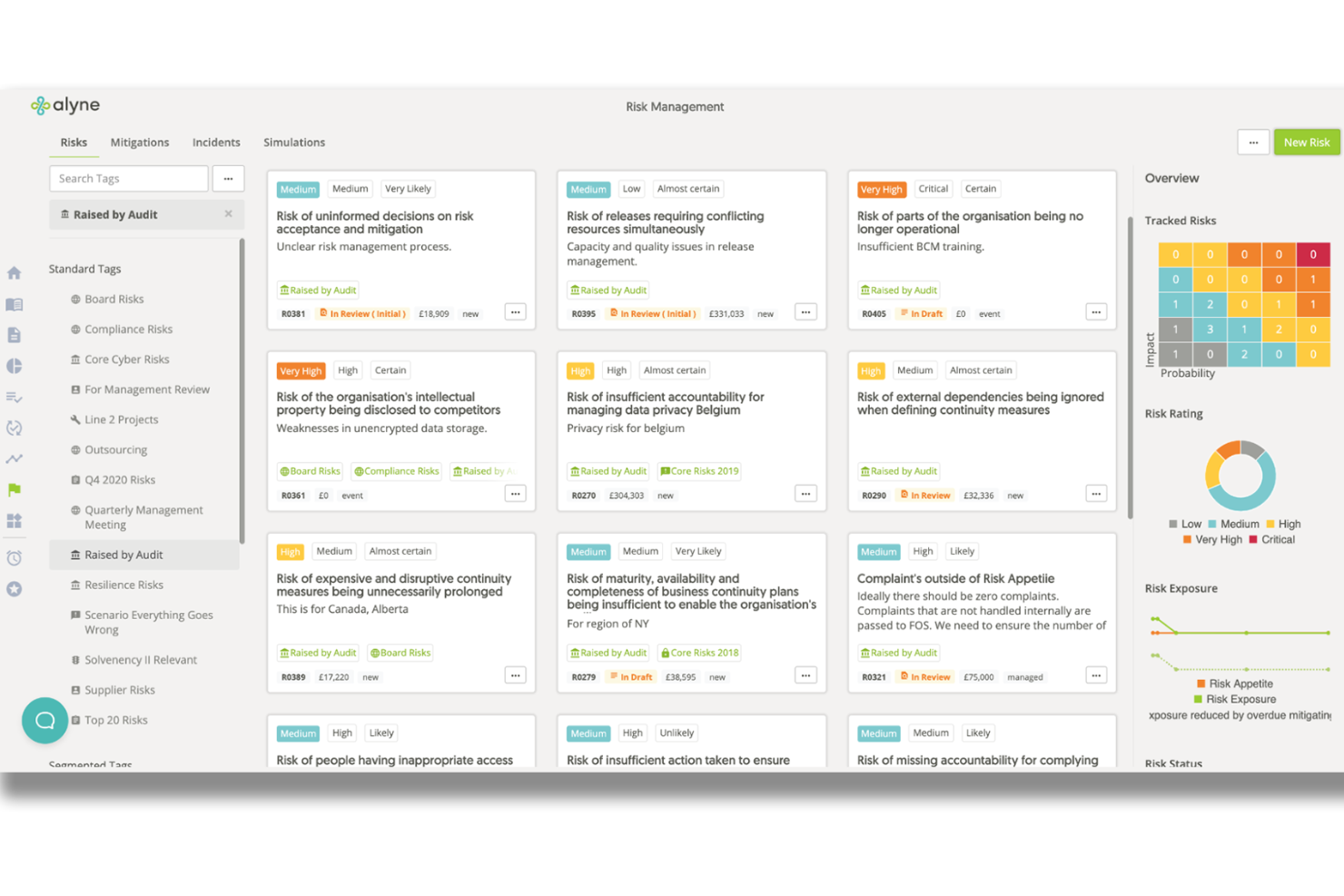
Alyne di Mitratech è una piattaforma completa di governance, rischio e conformità (GRC) progettata per aiutare le organizzazioni a identificare, valutare e monitorare i rischi in diversi ambiti, tra cui la cybersicurezza, la privacy e la conformità normativa.
Perché ho scelto Mitratech: I suoi approfondimenti in tempo reale sui rischi e le valutazioni automatizzate migliorano il processo di individuazione di potenziali vulnerabilità di sicurezza. Grazie a librerie incorporate di controlli e framework allineati agli standard globali, come ISO 27001 e NIST, Alyne garantisce che le aziende adottino un approccio strutturato per gestire efficacemente i rischi di sicurezza.
Caratteristiche principali & integrazioni:
La piattaforma offre integrazioni in tempo reale con fornitori di dati terzi come Black Kite e SecurityScorecard, migliorando la sua capacità di fornire valutazioni complete dei rischi. Inoltre, il design cloud-based guidato dall’IA di Alyne consente un monitoraggio e una gestione continua dei rischi. Le integrazioni includono Black Kite, SecurityScorecard, LeanIX, Snowflake, Tableau, Microsoft Azure, AWS e altri fornitori di dati.
Pros and Cons
Pros:
- Piattaforma abilitata all’IA
- Valutazioni personalizzabili
- Approfondimenti azionabili
Cons:
- Nessuna prova gratuita disponibile
- Potenziali difficoltà nell’integrare alcuni strumenti di terze parti


NordStellar è uno strumento di cybersicurezza progettato per aiutare le aziende a gestire i propri rischi di sicurezza. Centralizza le informazioni sulle minacce provenienti da più fonti, offrendo avvisi in tempo reale e una visione completa delle vulnerabilità.
Perché ho scelto NordStellar: Ho scelto NordStellar perché offre il monitoraggio delle violazioni dei dati, che ti aiuta a identificare i dati compromessi e a rispondere rapidamente per minimizzare i danni. Questa funzionalità è fondamentale per mantenere le tue informazioni sensibili al sicuro e conservare la fiducia dei clienti. Inoltre, il monitoraggio del dark web ti avvisa delle potenziali minacce emergenti dal dark web, permettendoti di adottare misure proattive. Un altro motivo per cui ho scelto NordStellar è la gestione della superficie di attacco. Questa funzione identifica e aiuta a mettere in sicurezza i punti di ingresso vulnerabili, riducendo il rischio di attacchi informatici. Prioritizzando i rischi, il tuo team può concentrarsi sulle minacce più urgenti, assicurando così che gli sforzi di cybersicurezza siano mirati ed efficaci.
Funzionalità e integrazioni distintive:
Le funzionalità includono la protezione del brand, che ti aiuta a monitorare e tutelare la reputazione della tua azienda online. La piattaforma fornisce anche informazioni centralizzate sulle violazioni, semplificando la gestione e la priorità dei rischi. Con avvisi in tempo reale, sei sempre informato sulle minacce potenziali, permettendoti di rispondere rapidamente e minimizzare i danni. Tra le integrazioni figurano Splunk, QRadar e Datadog.
Pros and Cons
Pros:
- Avvisi in tempo reale consentono una risposta rapida
- Il monitoraggio del dark web rileva violazioni
- La gestione della superficie di attacco identifica le vulnerabilità
Cons:
- I dettagli sui prezzi richiedono la richiesta di una demo
- La complessità dell'interfaccia aumenta la curva di apprendimento
Ideale per scansioni complete di sicurezza dal codice al cloud
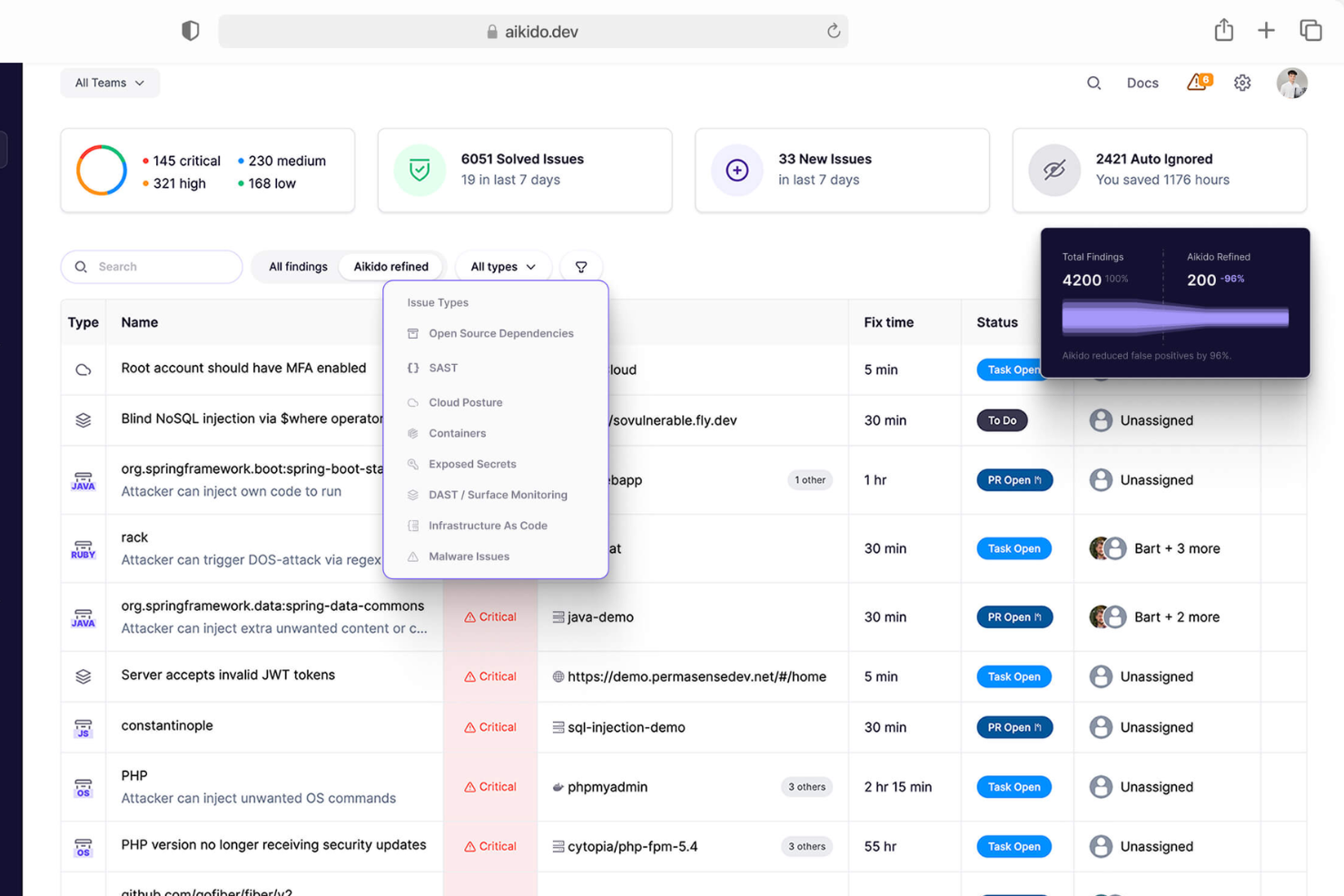
Aikido Security è una piattaforma DevSecOps completa progettata per proteggere il codice e gli ambienti cloud. Offre funzionalità come la gestione delle vulnerabilità, la generazione di SBOM e la protezione delle applicazioni durante l'esecuzione.
Perché ho scelto Aikido Security: Mi piace che Aikido Security offra una piattaforma tutto-in-uno che integra diverse funzionalità essenziali di scansione della sicurezza, tra cui il testing statico della sicurezza delle applicazioni (SAST), il testing dinamico della sicurezza delle applicazioni (DAST), la scansione dell'infrastruttura come codice (IaC), l'analisi della composizione del software (SCA) e la gestione della postura di sicurezza cloud (CSPM). Questa integrazione consente alle organizzazioni di coprire l'intero panorama della sicurezza, dal codice al cloud, assicurando che tutte le potenziali vulnerabilità vengano individuate e risolte.
Funzionalità principali & integrazioni:
Le funzionalità includono il rilevamento dei segreti che analizza il codice per scoprire chiavi API, password, certificati, chiavi di crittografia e altre informazioni sensibili esposte, al fine di prevenire accessi non autorizzati. Offre anche rilevamento malware, monitoraggio delle superfici di attacco e scansione delle immagini dei container. Le integrazioni includono Amazon Web Services (AWS), Google Cloud, Microsoft Azure Cloud, Drata, Vanta, AWS Elastic Container Registry, Docker Hub, Jira, Asana e GitHub.
Pros and Cons
Pros:
- Offre una dashboard completa e report personalizzabili
- Fornisce indicazioni operative
- Interfaccia intuitiva
Cons:
- Non dispone di sicurezza dell'endpoint o capacità di rilevamento delle intrusioni
- Ignora le vulnerabilità se non è disponibile una correzione
New Product Updates from Aikido Security
Aikido Security Adds Pentest for AI Capabilities
Aikido Security adds Pentest for AI to test agents and LLM features against OWASP Agentic Top 10 risks. This helps teams identify AI-specific security weaknesses before they reach production. For more information, visit Aikido Security’s official site.

Ideale per la gestione di rischi specifici IT
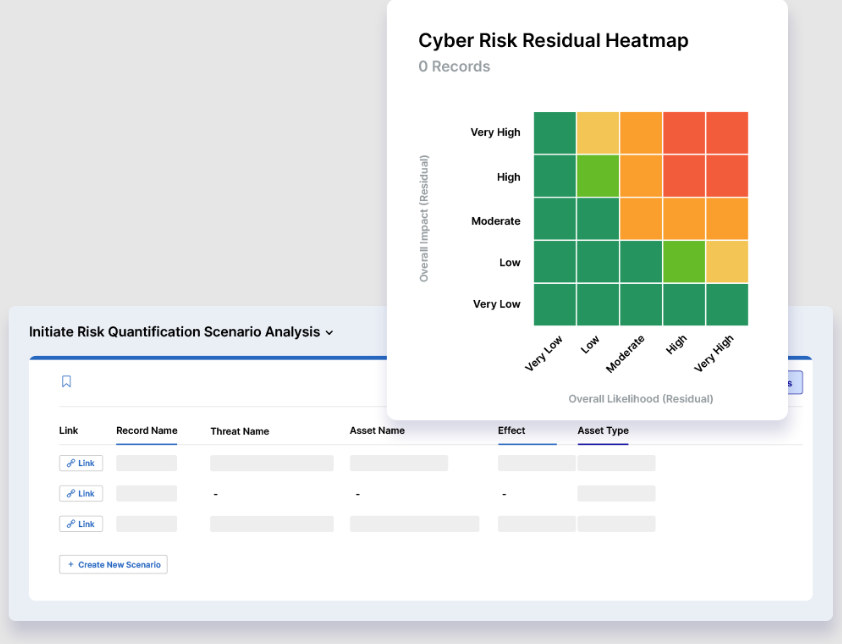
LogicGate offre una piattaforma progettata per semplificare le attività di gestione del rischio IT. Il suo focus specializzato fornisce alle organizzazioni gli strumenti necessari per identificare, valutare e prioritizzare i rischi informatici in modo efficiente.
Perché ho scelto LogicGate: Ho scelto LogicGate dopo un attento confronto con altri strumenti grazie al suo approccio su misura alla gestione dei rischi IT. In un panorama di soluzioni più generiche, LogicGate si distingue per funzionalità pensate per le sfide specifiche che i dipartimenti IT devono affrontare. La sua capacità di gestire vulnerabilità, minacce e controlli di conformità specifici per l’IT mi ha convinto della sua reputazione come scelta principale per la gestione del rischio focalizzata sull’IT.
Funzionalità e integrazioni principali:
LogicGate vanta l’automazione dei flussi di lavoro per la mitigazione dei rischi e framework di conformità IT integrati, offrendo una visione d’insieme sul panorama dei rischi informatici. Si integra con le più diffuse soluzioni ITSM, potenziando le sue capacità tramite l’acquisizione di dati per valutazioni del rischio più approfondite.
Pros and Cons
Pros:
- Progettato su misura per la gestione del rischio IT
- Automazione dei flussi di lavoro per la mitigazione dei rischi
- Incorpora framework di conformità IT
Cons:
- Potrebbe non essere adatto per la valutazione di rischi non IT
- È necessaria una curva di apprendimento per i nuovi utenti
- Le informazioni sui prezzi non sono immediatamente disponibili

Ideale per correzioni generate dall’IA
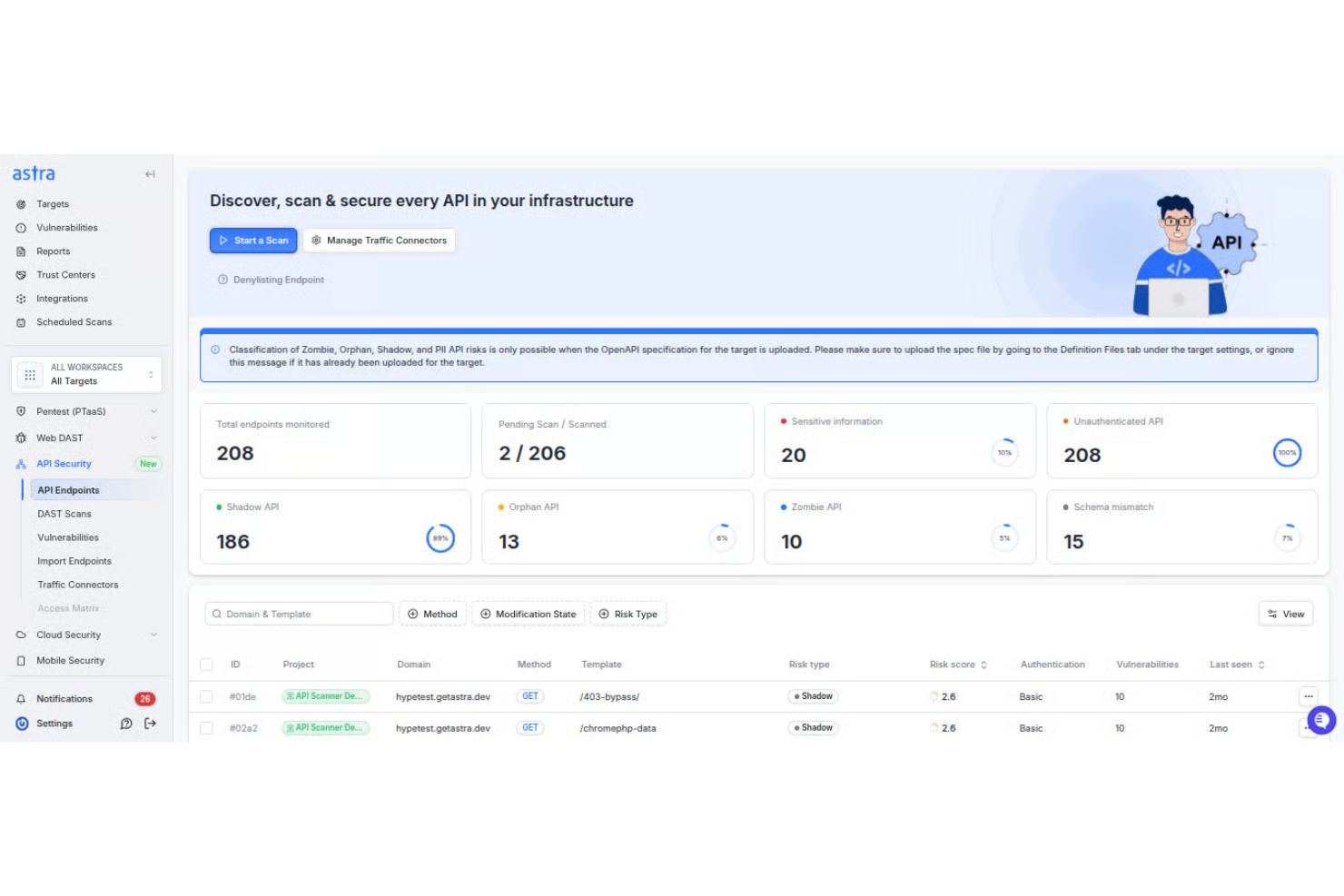
Astra Pentest è uno strumento di valutazione del rischio di sicurezza che ti aiuta a identificare e correggere le vulnerabilità nei tuoi sistemi. Combina test automatici e manuali per fornire una valutazione approfondita della tua postura di sicurezza.
Perché ho scelto Astra Pentest: Ho scelto Astra Pentest perché esegue oltre 8.000 test automatici, coprendo le principali vulnerabilità della classifica OWASP Top 10 e gli standard di conformità come GDPR e ISO 27001. La sua dashboard di gestione delle vulnerabilità integrata ti permette di classificare, dare priorità e risolvere rapidamente i problemi, con azioni correttive generate dall’intelligenza artificiale che guidano il tuo team durante ogni intervento.
Caratteristiche principali e integrazioni:
Le funzionalità includono l’integrazione con pipeline CI/CD, che consente il testing della sicurezza continuo durante l’intero processo di sviluppo. Hai anche la possibilità di collaborare in tempo reale con esperti di sicurezza: quindi, quando incontri vulnerabilità complesse, puoi consultarti direttamente con i professionisti. Sono disponibili report dettagliati che evidenziano le vulnerabilità e forniscono approfondimenti pratici per la correzione.
Le integrazioni includono Slack, Salesforce, Jira, Atlassian, GitHub, GitLab e Astra API Security Platform.
Pros and Cons
Pros:
- Test ibrido automatico e manuale
- Oltre 8.000 controlli delle vulnerabilità
- Supporto per la conformità ai principali standard
Cons:
- Richiede configurazione da parte di esperti di sicurezza
- I tempi per i test manuali possono variare
Ideale per sviluppatori web che necessitano di progetti simultanei
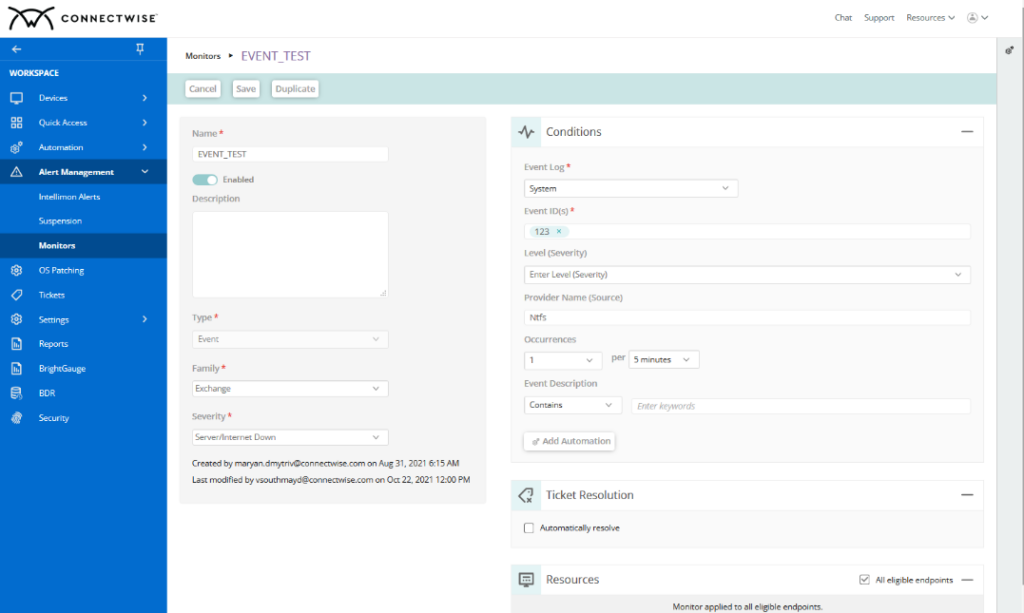
Bluefish è un potente editor di testo pensato per programmatori e sviluppatori web. Grazie alla capacità di gestire più progetti contemporaneamente, semplifica il processo di modifica dei file in vari linguaggi, risultando ideale per gli sviluppatori web che necessitano di gestire progetti contemporanei.
Perché ho scelto Bluefish:
Ho scelto Bluefish dopo aver attentamente confrontato e valutato la sua capacità di supportare più progetti allo stesso tempo. La caratteristica che distingue Bluefish dagli altri è proprio la sua attitudine a facilitare il lavoro degli sviluppatori web che gestiscono più progetti simultaneamente. Questa determinazione mi ha portato a selezionare Bluefish come il migliore per chi ha bisogno di gestire diversi progetti di sviluppo web nello stesso momento.
Funzionalità principali e integrazioni:
Le caratteristiche distintive di Bluefish includono la possibilità di aprire oltre 500 documenti contemporaneamente e un supporto integrato per i progetti che permette di organizzare facilmente più lavori. L’evidenziazione della sintassi supporta numerosi linguaggi di programmazione, migliorando l’esperienza di codifica. L’integrazione con i browser web per le anteprime e con altri strumenti di sviluppo crea un ambiente su misura per le esigenze degli sviluppatori web.
Pros and Cons
Pros:
- Supporta la gestione simultanea di numerosi documenti e progetti.
- Ampia evidenziazione della sintassi per diversi linguaggi di programmazione.
- Si integra bene con i browser web per anteprime in tempo reale
Cons:
- L’interfaccia potrebbe risultare meno moderna rispetto ad altri editor
- Mancano alcune funzionalità avanzate presenti negli editor di testo commerciali
- La curva di apprendimento può essere ripida per i neofiti dello sviluppo web

Ideale per la governance e l'analisi CyberGRC
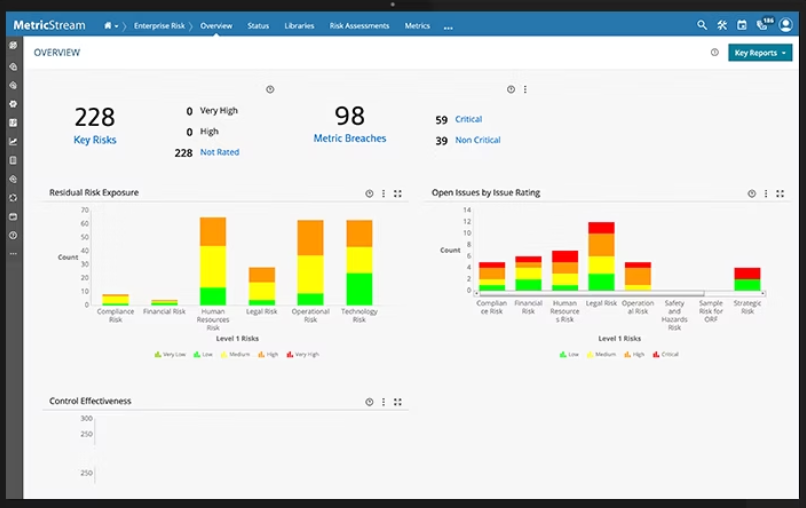
MetricStream semplifica le iniziative CyberGRC con un focus sulla governance e sull'analisi, rendendo più semplice la gestione della cybersicurezza e della conformità.
Perché ho scelto MetricStream: Ho scelto MetricStream per la sua enfasi sulla governance CyberGRC, un aspetto spesso trascurato da altri strumenti. Le sue capacità analitiche e l'approccio incentrato sulla governance lo distinguono dalle altre opzioni sul mercato. Considerato il crescente numero di minacce informatiche che affrontano le organizzazioni, credo che l'esperienza di MetricStream nella governance e nell'analisi CyberGRC sia fondamentale per le aziende che desiderano rafforzare i propri meccanismi di difesa.
Caratteristiche distintive e integrazioni:
MetricStream è molto apprezzato per le sue solide capacità di reportistica che forniscono approfondimenti sulla postura di cybersicurezza di un'organizzazione. L'automazione dei workflow aiuta a semplificare i processi di conformità, assicurando che nulla sia trascurato. Sul fronte delle integrazioni, MetricStream è compatibile con diversi strumenti di sicurezza IT, fonti di threat intelligence e database normativi, garantendo così che l'organizzazione rimanga aggiornata e conforme.
Pros and Cons
Pros:
- Solide capacità di reportistica per analisi approfondite
- Automazione dei processi per una conformità semplificata
- Ampia integrazione con strumenti di sicurezza IT e database normativi
Cons:
- La configurazione iniziale può essere complessa per alcune organizzazioni
- Richiede una formazione specializzata per sfruttarne al massimo le potenzialità
- Le informazioni sui prezzi non sono immediatamente disponibili, il che potrebbe scoraggiare potenziali clienti

Archer
Ideale per la sicurezza IT e la gestione integrata del rischio
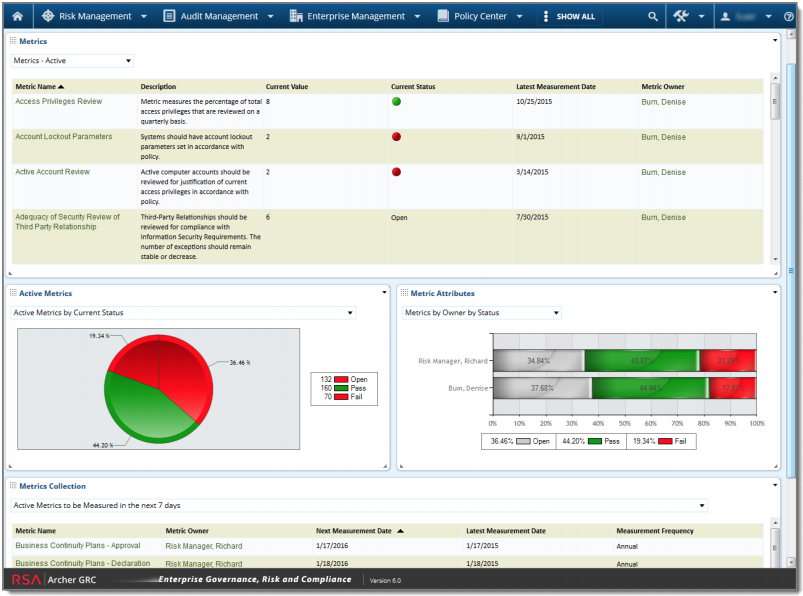
Archer è uno strumento completo pensato per la gestione dei rischi legati alla sicurezza IT, offrendo allo stesso tempo capacità di gestione integrata del rischio. Con un forte accento sulla risoluzione delle sfide inerenti alla sicurezza informatica e sulla centralizzazione dei dati di rischio in tutta l'azienda, è progettato per fornire una visione olistica dello scenario di rischio organizzativo.
Perché ho scelto Archer: Archer ha attirato la mia attenzione dopo un'attenta analisi di vari strumenti di gestione del rischio. Il suo doppio focus sulla sicurezza IT e sulla gestione integrata e olistica del rischio lo distingue dai concorrenti. Grazie alla sua capacità di collocare i rischi IT all'interno di un quadro più ampio di gestione integrata del rischio, Archer è particolarmente adatto alle organizzazioni che desiderano unire queste due funzioni fondamentali.
Funzionalità principali e integrazioni:
Archer offre una dashboard dinamica che semplifica la visualizzazione di dati di rischio complessi, facilitando il processo decisionale. Le sue analisi avanzate consentono di approfondire i dati sui rischi, permettendo alle organizzazioni di svelare insight nascosti. In termini di integrazione, Archer è compatibile con una vasta gamma di strumenti di sicurezza IT e piattaforme aziendali, favorendo il flusso dei dati e migliorando la risposta ai rischi.
Pros and Cons
Pros:
- Dashboard dinamica per una facile visualizzazione dei rischi
- Analisi avanzate per valutazioni dettagliate dei rischi
- Ampia gamma di integrazioni con strumenti di sicurezza informatica
Cons:
- L'interfaccia può risultare complessa per i principianti
- L'implementazione può richiedere tempo per le grandi aziende
- Mancanza di una struttura di prezzi trasparente

ProcessUnity
Ideale per l'analisi dei rischi informatici guidata dai processi
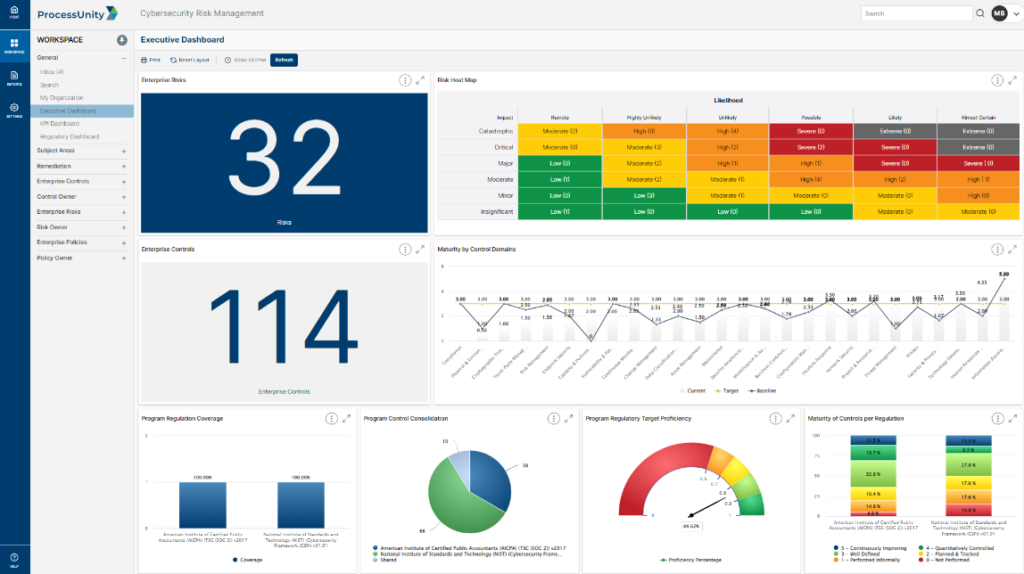
ProcessUnity offre alle organizzazioni un modo strutturato per gestire i rischi informatici concentrandosi su processi consolidati. L'enfasi sull'analisi dei rischi guidata dai processi garantisce che le vulnerabilità siano identificate e affrontate in modo sistematico, rispecchiando la sua designazione come la migliore per questo tipo di approccio.
Perché ho scelto ProcessUnity: Tra i numerosi strumenti che ho valutato, ProcessUnity si è distinto per il suo approccio sistematico e orientato ai processi nella gestione dei rischi informatici. L'ho scelto per la sua costante attenzione ai flussi di lavoro, che semplificano il compito complesso della gestione del rischio. Vista la sua attenzione all'analisi dei rischi sistematica, ho determinato che ProcessUnity è il migliore per le organizzazioni che cercano una metodologia incentrata sui processi per affrontare le minacce alla sicurezza informatica.
Funzionalità principali & integrazioni:
ProcessUnity dispone di registri di rischio dinamici e valutazioni automatizzate, garantendo un ciclo continuo di valutazione dei rischi. Il suo dashboard offre un'interfaccia intuitiva, che consente agli utenti di navigare tra i parametri di rischio e ottenere facilmente informazioni operative. Per quanto riguarda le integrazioni, ProcessUnity si sincronizza con una vasta gamma di fornitori di intelligence sui rischi di terze parti, arricchendo i suoi dati nativi con scenari di minaccia esterni.
Pros and Cons
Pros:
- Registri di rischio dinamici per valutazioni continue
- Dashboard intuitivo per una visualizzazione chiara dei rischi
- Si integra in modo efficiente con fonti di intelligence sui rischi di terze parti
Cons:
- Informazioni sui prezzi non immediatamente disponibili
- Potrebbe richiedere una formazione per un utilizzo ottimale
- Volume limitato di dati di threat intelligence integrati rispetto ad alcuni concorrenti
Altri strumenti degni di nota per la valutazione dei rischi per la sicurezza
Di seguito trovi un elenco di ulteriori strumenti per la valutazione dei rischi per la sicurezza che ho selezionato ma che non sono entrati nella top 10. Vale sicuramente la pena dargli un’occhiata.
- IBM Security Guardium Data Risk Manager
Ideale per la gestione dei rischi orientata ai dati
- IBM OpenPages
Ideale per la gestione del rischio operativo e della conformità
- Tenable Vulnerability Management
Ideale per il rilevamento e la risposta alle vulnerabilità
- Qualys VMDR
Migliore per la gestione dinamica delle vulnerabilità
- Cybereason
Ideale per valutazioni mirate della postura di sicurezza informatica
- FAIR Risk Management
Ideale per metodi di analisi del rischio quantitativa
- Riskonnect
Ideale per l'integrazione completa della gestione dei rischi
- NowSecure
Ideale per la gestione dei rischi delle app mobili


Recensioni correlate sugli strumenti di valutazione dei rischi per la sicurezza
- Software per la gestione dei rischi
- Strumenti per la gestione delle vulnerabilità
- Strumenti DAST
- Sistemi di rilevamento e prevenzione delle intrusioni
Come valuto gli strumenti di valutazione del rischio di sicurezza
Quando un CISO deve difendere la propria posizione di rischio di fronte agli auditor, cerco due elementi: la funzionalità di base che ogni strumento deve offrire e i fattori differenzianti che separano il buono dall'eccellente.
Funzionalità principali (Requisiti indispensabili per questa lista)
Quando seleziono gli strumenti per la mia lista, valuto ciascuno su una scala da 0 (non offre la funzionalità) a 5 (eccelle in quell'area) per ogni funzionalità principale elencata di seguito. Calcolo quindi il punteggio totale dello strumento in percentuale. Ogni strumento deve raggiungere un punteggio totale minimo del 65% per essere considerato per l'inclusione.
- Scoperta di asset e vulnerabilità: Verifico se uno strumento è in grado di inventariare automaticamente gli asset e individuare vulnerabilità tra ambienti on-premise, cloud e ibridi senza un consistente inserimento manuale.
- Punteggio e prioritizzazione del rischio: Ogni strumento dovrebbe classificare i rischi utilizzando metodi consolidati come CVSS o FAIR, in modo che i team possano concentrare la remediation su ciò che minaccia effettivamente le operazioni aziendali.
- Mappatura dei framework di conformità: Valuto quanti framework pre-caricati sono supportati dallo strumento—NIST CSF, ISO 27001, SOC 2, PCI DSS—e se i controlli vengono mappati automaticamente.
- Workflow di valutazione del rischio: In questo ambito sono importanti template strutturati di valutazione, automazione dei questionari e pianificazione delle rivalutazioni, soprattutto per i team che gestiscono revisioni di fornitori terzi.
- Monitoraggio remediation e trattamento del rischio: Cerco la possibilità di assegnare task di remediation, monitorare SLA e documentare decisioni di accettazione del rischio in modo che nulla venga trascurato.
- Reportistica e dashboard del rischio: Un executive summary di livello board richiede dati diversi rispetto alla vista di un SOC analyst, quindi valuto dashboard basate sui ruoli e la generazione di report audit-ready.
Una volta che ho una lista di strumenti che soddisfano questi criteri, considero ciò che distingue ciascuna piattaforma.
Fattori differenzianti (Cosa distingue i fornitori)
Ecco come confronto e metto a paragone diversi fornitori:
Funzionalità distintive
La modellazione quantitativa del rischio rappresenta un importante fattore differenziante. Gli strumenti che traducono le vulnerabilità in un impatto finanziario proiettato danno ai CISO un reale potere nelle discussioni di budget. Valuto anche l'integrazione di threat intelligence, in particolare se una piattaforma integra feed come MITRE ATT&CK o CISA KEV per contestualizzare i rischi con dati su exploit attivi. La gestione della superficie di attacco è fondamentale per i team con estesi ambienti cloud, dove IT ombra può introdurre silenziosamente esposizioni che le scansioni tradizionali non rilevano.
Oltre le funzionalità
La profondità dell'integrazione conta molto qui. Uno strumento di valutazione del rischio che si collega in modo bidirezionale con SIEM, ITSM e fornitori cloud mantiene il flusso dei dati di rischio senza necessità di reinserimento manuale tra Splunk, ServiceNow o AWS. Valuto anche la postura di sicurezza del fornitore stesso—le certificazioni SOC 2 Type II e ISO 27001 sono segnali che predicano ciò che praticano. Scalabilità e struttura di licensing meritano attenzione anch'essi, poiché una tariffazione per asset può crescere rapidamente man mano che l'ambiente si espande tra le business unit.
Come scegliere gli strumenti per la valutazione dei rischi per la sicurezza
È facile perdersi tra lunghe liste di funzionalità e strutture di prezzo complesse. Per aiutarti a restare concentrato durante tutto il tuo processo di selezione del software, ecco un elenco di fattori da tenere presenti:
| Fattore | Cosa considerare |
|---|---|
| Scalabilità | Lo strumento può crescere insieme alla tua organizzazione? Valuta come gestisce l’aumento dei dati e degli utenti man mano che la tua azienda si espande. Cerca piani flessibili che supportino la crescita. |
| Integrazioni | Funziona con i tuoi sistemi attuali? Verifica la compatibilità con il tuo attuale stack software per evitare interruzioni operative. |
| Personalizzazione | Puoi adattare lo strumento alle tue esigenze? Assicurati che offra opzioni di personalizzazione adatte ai tuoi flussi di lavoro e ai processi aziendali. |
| Facilità d’uso | L’interfaccia è intuitiva? Prova la facilità d’uso dello strumento per garantire che il tuo team possa adottarlo rapidamente senza una formazione approfondita. |
| Implementazione e onboarding | Quanto tempo richiede la configurazione? Valuta il processo di onboarding, incluse le risorse formative e il supporto, per ridurre al minimo i tempi di fermo durante l’implementazione. |
| Costo | Il prezzo è in linea con il tuo budget? Confronta i modelli di prezzo e considera costi aggiuntivi come quote di attivazione o supporto premium. |
| Tutela della sicurezza | Le misure di protezione dei dati sono robuste? Verifica le funzionalità di sicurezza dello strumento, come la crittografia e i controlli d’accesso, per proteggere le informazioni sensibili. |
| Requisiti di conformità | Rispettano gli standard normativi? Assicurati che siano allineati ai regolamenti specifici del settore per evitare problemi di conformità. |
Cosa sono gli strumenti per la valutazione dei rischi per la sicurezza?
Gli strumenti di valutazione del rischio di sicurezza sono soluzioni software progettate per identificare, valutare e gestire i rischi di sicurezza all'interno di un'organizzazione. Questi strumenti vengono solitamente utilizzati da professionisti della sicurezza IT, responsabili della gestione dei rischi e addetti alla conformità per proteggere i dati sensibili e garantire il rispetto delle normative.
Funzionalità come il monitoraggio in tempo reale, la reportistica automatizzata e le valutazioni delle vulnerabilità aiutano a identificare le minacce, gestire i rischi e mantenere la conformità. Nel complesso, questi strumenti offrono informazioni essenziali e supporto per salvaguardare i beni digitali di un'organizzazione.
Funzionalità
Quando selezioni strumenti di valutazione del rischio di sicurezza, presta attenzione alle seguenti caratteristiche fondamentali:
- Monitoraggio in tempo reale: Controlla continuamente i tuoi sistemi per rilevare e avvisarti riguardo potenziali minacce alla sicurezza non appena si presentano.
- Reportistica automatizzata: Genera report dettagliati sullo stato di sicurezza e sulla conformità, risparmiando tempo e garantendo una documentazione accurata.
- Valutazioni delle vulnerabilità: Identifica le debolezze nei tuoi sistemi e aiuta a prioritizzare gli interventi correttivi per ridurre l'esposizione al rischio.
- Quantificazione del rischio: Misura il potenziale impatto dei rischi individuati, consentendo decisioni informate sulla gestione del rischio.
- Cruscotti personalizzabili: Offre visualizzazioni su misura dei dati di sicurezza, così puoi concentrarti sulle informazioni più rilevanti per le tue esigenze.
- Monitoraggio della conformità: Garantisce che la tua organizzazione rispetti gli standard di settore e i requisiti normativi, riducendo il rischio di sanzioni.
- Automazione dei flussi di lavoro: Ottimizza i processi e le risposte in ambito sicurezza, aumentando l'efficienza e riducendo l'intervento manuale.
- Individuazione e classificazione dei dati: Trova e categorizza i dati sensibili, favorendone la protezione e il rispetto delle normative sui dati.
- Intelligence sulle minacce: Fornisce informazioni sulle minacce emergenti per aiutarti a difenderti in modo proattivo da potenziali attacchi.
- Capacità di integrazione: Si connette con sistemi e strumenti esistenti per uno scambio dati senza soluzione di continuità e operazioni di sicurezza migliorate.
Vantaggi
L'implementazione di strumenti di valutazione del rischio di sicurezza offre numerosi vantaggi per il tuo team e la tua azienda. Eccone alcuni a cui puoi guardare con interesse:
- Miglior rilevamento delle minacce: Il monitoraggio in tempo reale aiuta a identificare rapidamente possibili minacce, consentendo una risposta e mitigazione più rapide.
- Conformità migliorata: La reportistica automatizzata e il monitoraggio della conformità assicurano che la tua organizzazione rispetti gli standard normativi, riducendo il rischio di sanzioni.
- Gestione del rischio efficiente: Valutazioni delle vulnerabilità e quantificazione del rischio aiutano a prioritizzare i rischi, consentendo decisioni informate e una migliore allocazione delle risorse.
- Risparmio di tempo: L'automazione dei flussi di lavoro semplifica i processi, riducendo le attività manuali e liberando il tuo team per concentrarsi su iniziative strategiche.
- Protezione dei dati: L'individuazione e la classificazione dei dati proteggono le informazioni sensibili, aiutando a mantenere la privacy e la conformità alle normative.
- Difesa proattiva: L'intelligence sulle minacce offre informazioni su minacce emergenti, consentendo di prepararsi e difendersi meglio dagli attacchi potenziali.
- Analisi personalizzate: I cruscotti personalizzabili offrono visualizzazioni su misura dei dati di sicurezza, aiutandoti a focalizzarti sulle informazioni più rilevanti per te.
Costi e prezzi
La scelta di strumenti di valutazione del rischio di sicurezza richiede la comprensione dei vari modelli e piani di prezzo disponibili. I costi variano in base alle funzionalità, alla dimensione del team, agli add-on e altro ancora. La tabella seguente riassume i piani comuni, i loro prezzi medi e le caratteristiche tipiche incluse nelle soluzioni di strumenti di valutazione del rischio di sicurezza:
Tabella di confronto dei piani per strumenti di valutazione del rischio di sicurezza
| Tipo di piano | Prezzo medio | Caratteristiche comuni |
|---|---|---|
| Piano gratuito | $0/user/month | Scansione delle vulnerabilità di base, reportistica limitata e supporto dalla community. |
| Piano personale | $10-$30/user/month | Monitoraggio in tempo reale, rapporti automatizzati e monitoraggio base della conformità. |
| Piano business | $40-$80/user/month | Valutazioni avanzate dei rischi, automazione dei flussi di lavoro e cruscotti personalizzabili. |
| Piano enterprise | $100-$200/user/month | Piene capacità di integrazione, protezione dati completa e supporto clienti dedicato. |
Domande frequenti sugli strumenti di valutazione del rischio di sicurezza
Chi utilizza gli strumenti di valutazione del rischio di sicurezza?
u003cp data-start=u0022528u0022 data-end=u0022673u0022u003eSono utilizzati principalmente da team IT, imprenditori e responsabili della conformità che vogliono comprendere e gestire i possibili rischi nelle loro attività.u003c/pu003e
Con quale frequenza dovrebbe essere effettuata una valutazione del rischio di sicurezza?
u003cp data-start=u0022734u0022 data-end=u0022864u0022u003eÈ meglio eseguirne una regolarmente, almeno alcune volte all’anno, oppure ogni volta che apporti modifiche importanti ai tuoi sistemi o software.u003c/pu003e
Le piccole imprese possono usare questi strumenti?
u003cp data-start=u0022910u0022 data-end=u00221043u0022u003eSì. Molte opzioni sono abbastanza semplici da utilizzare anche per team più piccoli. Aiutano aziende di ogni dimensione a individuare i rischi in anticipo e a rimanere organizzate.u003c/pu003e
Questi strumenti funzionano con altri software?
u003cp data-start=u00221092u0022 data-end=u00221229u0022u003eLa maggior parte sì. Possono collegarsi ai comuni sistemi di lavoro, rendendo più facile tenere tutto in un unico posto ed evitare di ripetere i compiti.u003c/pu003e
Quanto tempo richiede solitamente la configurazione?
u003cp data-start=u00221271u0022 data-end=u00221417u0022u003eIl tempo di configurazione dipende dalla complessità del tuo sistema. Alcuni strumenti possono essere pronti in poche ore, mentre altri potrebbero richiedere alcuni giorni per essere configurati completamente.u003c/pu003e
Quali sfide affrontano i team nell'utilizzo di questi strumenti?
u003cp data-start=u00221479u0022 data-end=u00221636u0022u003eLe principali sfide includono imparare a utilizzare il software, gestire grandi quantità di informazioni e assicurarsi che i risultati vengano compresi e messi in pratica.u003c/pu003e
Qual è la differenza tra una scansione di sicurezza e una valutazione completa del rischio?
u003cp data-start=u00221718u0022 data-end=u00221925u0022u003eUna scansione di sicurezza verifica problemi tecnici, come file non sicuri o password deboli. Una valutazione del rischio completa considera uno scenario più ampio, inclusi persone, processi e la gestione complessiva dei sistemi.u003c/pu003e
Come aiutano questi strumenti nella pianificazione della sicurezza a lungo termine?
u003cp data-start=u00221989u0022 data-end=u00222110u0022u003eRegistrano e monitorano i rischi nel tempo, aiutando i team a individuare schemi ricorrenti e a pianificare meglio la prevenzione di problemi futuri.u003c/pu003e
E ora:
Se stai cercando strumenti di valutazione del rischio di sicurezza, connettiti con un consulente SoftwareSelect per ricevere consigli gratuiti.
Compila un modulo e fai una breve chiacchierata in cui entrano nei dettagli delle tue esigenze. Riceverai quindi una lista ristretta di software da valutare. Ti supporteranno anche durante tutto il processo di acquisto, comprese le trattative sul prezzo.