

I migliori strumenti di monitoraggio dell'infrastruttura aiutano i team a rilevare tempestivamente i problemi di sistema, mantenere la disponibilità e garantire il funzionamento affidabile di applicazioni e servizi in ambienti complessi. Questi strumenti offrono alle organizzazioni visibilità in tempo reale su server, reti e risorse cloud, consentendo di individuare cali di prestazioni e risolvere i problemi prima che gli utenti ne risentano.
Quando configurazioni errate causano interruzioni, i controlli manuali rallentano i tempi di risposta o le lacune nel monitoraggio lasciano inosservati i sistemi critici, le prestazioni e l'efficienza possono diminuire rapidamente. Questi problemi provocano ritardi nella risoluzione dei malfunzionamenti, aumentano i rischi durante i picchi di carico e rendono più difficile per i team di ingegneria e operativi capire cosa accade nella loro infrastruttura.
Con oltre 20 anni di esperienza nel settore come Chief Technology Officer, ho testato e analizzato decine di strumenti di monitoraggio dell'infrastruttura in ambienti reali per valutarne accuratezza, integrazioni e facilità d'uso. Questa guida presenta i migliori strumenti di monitoraggio dell'infrastruttura, che migliorano la visibilità, ottimizzano la gestione delle prestazioni e aiutano i team a mantenere sistemi affidabili. Ogni recensione illustra caratteristiche, vantaggi e svantaggi, nonché i casi d'uso più adatti, per aiutarti a scegliere lo strumento giusto.
Perché fidarsi dei nostri consigli sui software
6,700+
Reviews
20
Industry experts
16+
Evaluation factors
14
Years
Il nostro team testa e recensisce software dal 2012. In quanto leader tecnologici noi stessi, sappiamo quanto sia difficile — e importante — scegliere il software giusto.
Per questa guida, abbiamo valutato gli strumenti attraverso test praticie ricerche indipendenti, assegnando un punteggio agli strumenti in base ai nostri criteri di selezione.
Le nostre recensioni riflettono il nostro giudizio editoriale umano, non un discorso di vendita.
Revisori esperti:
- Paulo Gardini MiguelDirettore tecnico
 Tim FisherVP dell'IA
 Gabriel RosasTech Lead e architetto software
 Christhian GruhnTech Lead e architetto della piattaforma

Riepilogo dei migliori strumenti di monitoraggio dell'infrastruttura
Questo grafico comparativo riassume i dettagli sui prezzi delle mie migliori scelte di strumenti di monitoraggio dell’infrastruttura, per aiutarti a trovare quello più adatto al tuo budget e alle esigenze della tua azienda.
| Tool | Best For | Trial Info | Price | ||
|---|---|---|---|---|---|
| 1 | Ideale per visualizzazioni dashboard personalizzabili | Prova gratuita di 30 giorni | Da $200/mese (fatturato annualmente) | Website | |
| 2 | Ideale per il monitoraggio open source dell'infrastruttura | Piano gratuito disponibile | Prezzi su richiesta | Website | |
| 3 | Ideale per una gestione IT completa | Demo gratuita disponibile | Prezzo su richiesta | Website | |
| 4 | Ideale per verifiche sulle prestazioni dei siti web | Prova gratuita di 30 giorni + demo gratuita disponibile | Da $10/mese (fatturato annualmente) | Website | |
| 5 | Ideale per applicazioni cloud-native | No | $12/user/month | Website | |
| 6 | Ideale per la visibilità end-to-end | No | Prezzo su richiesta | Website | |
| 7 | Ideale per la gestione delle macchine virtuali | No | $70/user/month | Website | |
| 8 | Ideale per il monitoraggio di ambienti cloud ibridi | Prova gratuita di 30 giorni disponibile | A partire da $7/nodo/mese | Website | |
| 9 | Ideale per la protezione da malware | No | $69.99/user/year | Website | |
| 10 | Ideale per il monitoraggio dell'infrastruttura cloud | No | Prezzo su richiesta | Website |


Recensioni dei migliori strumenti di monitoraggio dell'infrastruttura
Di seguito sono riportati i miei riepiloghi dettagliati dei migliori strumenti di monitoraggio dell’infrastruttura inclusi nella mia selezione. Le mie recensioni offrono un’analisi approfondita delle caratteristiche principali, dei vantaggi e degli svantaggi, delle integrazioni e dei casi d’uso ideali di ciascuno strumento, per aiutarti a trovare quello più adatto a te.
 Ideale per visualizzazioni dashboard personalizzabili
- Prova gratuita di 30 giorni
- Da $200/mese (fatturato annualmente)
Visit WebsiteCustomer Rating:4.6/5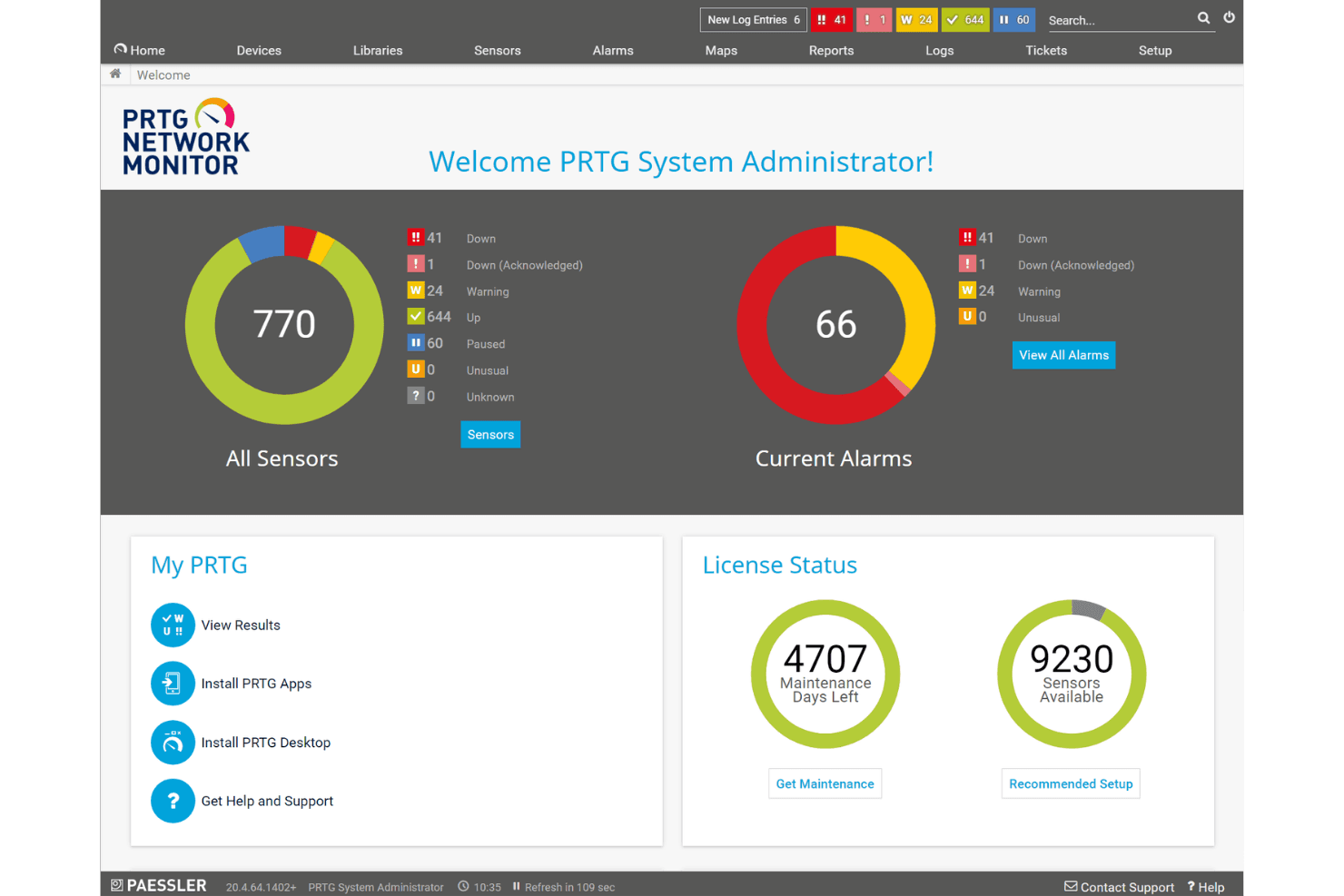
Paessler PRTG visualizza una dashboard centralizzata per il monitoraggio della rete con stato dei sensori, allarmi attuali e informazioni sulla licenza a colpo d'occhio. Paessler PRTG è una piattaforma di monitoraggio dell'infrastruttura che traccia dispositivi di rete, server, applicazioni e servizi cloud utilizzando un'architettura basata su sensori con supporto per SNMP, NetFlow, WMI, REST e altri protocolli in ambienti on-premises e ibridi.
Per chi è più indicato Paessler PRTG?
PRTG si adatta perfettamente ai team IT e NOC di organizzazioni di medie dimensioni che gestiscono ambienti complessi e con dispositivi eterogenei, sia on-premise che in infrastrutture ibride.
Perché ho scelto Paessler PRTG
Ho scelto Paessler PRTG come uno dei migliori perché il suo Map Designer mi permette di costruire mappe di rete in tempo reale da zero, raccogliendo dati di stato live da qualsiasi dispositivo monitorato in una vista unica e completamente personalizzabile. Inoltre, apprezzo come PRTG MultiBoard consolida le dashboard di più server PRTG in un unico schermo. In pratica, significa che il mio team NOC ottiene una vera vista unificata di tutti i siti senza dover passare da un'istanza all'altra.
Funzionalità chiave di Paessler PRTG
- Raccolta dati basata su sensori: Scegli tra oltre 250 tipi di sensori per monitorare dispositivi, banda, applicazioni, servizi cloud e altro ancora.
- Wizard di auto-scoperta: Trova e mappa automaticamente i dispositivi di rete per una configurazione rapida.
- API e framework per sensori personalizzati: Estendi il monitoraggio creando sensori personalizzati o integrando sistemi esterni.
- Monitoraggio distribuito con probe remoti: Monitora sedi remote o filiali utilizzando agenti leggeri senza bisogno di server PRTG aggiuntivi.
Integrazioni di Paessler PRTG
Paessler PRTG offre integrazioni native con AWS, Microsoft Azure, Google Cloud Platform, Cisco, VMware vSphere, ServiceNow e Splunk. È disponibile un'API per integrazioni personalizzate.
Pros and Cons
Pros:
- Oltre 250 sensori per coprire ambienti infrastrutturali eterogenei
- Mappatura topologica di rete in tempo reale integrata
- Solido supporto per SNMP, NetFlow e WMI
Cons:
- Il prezzo per sensore diventa costoso su larga scala
- Monitoraggio di Kubernetes e container poco approfondito
Learn more about Paessler PRTG: Ideale per il monitoraggio open source dell'infrastruttura
- Piano gratuito disponibile
- Prezzi su richiesta
Visit WebsiteCustomer Rating:4.7/5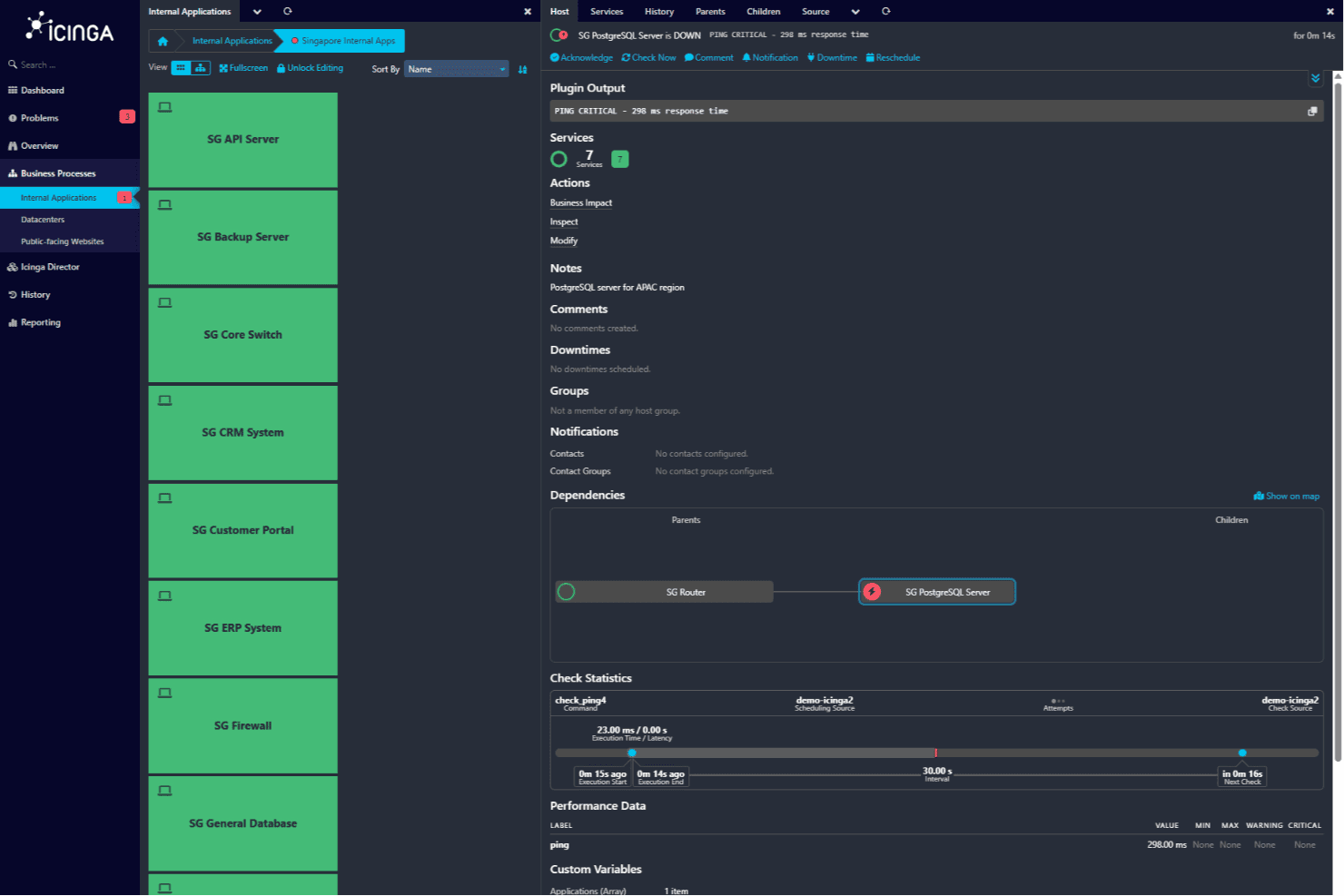
Vista delle applicazioni interne di Icinga che mostra SG PostgreSQL Server in uno stato critico con i dettagli del servizio. Per i team alla ricerca di uno strumento affidabile per il monitoraggio dell'infrastruttura, Icinga offre una soluzione completa pensata per ambienti IT complessi. La sua architettura open source supporta il monitoraggio flessibile di server, reti e applicazioni, rendendola adatta ai team che gestiscono configurazioni IT complesse. Che operiate nei settori delle telecomunicazioni, della finanza o della tecnologia, Icinga vi aiuta a monitorare i sistemi integrandosi con i flussi di lavoro dei servizi IT esistenti, così da poter identificare e risolvere rapidamente i problemi e ridurre al minimo le interruzioni delle vostre operazioni.
Perché ho scelto Icinga
Ho scelto Icinga per il suo monitoraggio open source dell'infrastruttura, che offre ai team la flessibilità necessaria per monitorare server, reti e applicazioni in ambienti IT complessi. La sua automazione del monitoraggio aiuta il vostro team a gestire grandi volumi di dati senza un lavoro manuale costante, mentre il sistema di notifica degli avvisi vi tiene informati sui problemi non appena si verificano, consentendovi di reagire rapidamente. Apprezzo anche le sue funzionalità di analisi, che forniscono informazioni sulle prestazioni del sistema e favoriscono una gestione IT più proattiva.
Perché ho scelto Icinga
Oltre al monitoraggio open source dell'infrastruttura, Icinga offre:
- Monitoraggio del cloud: questa funzionalità consente di monitorare diversi ambienti cloud, assicurando il corretto funzionamento delle operazioni basate sul cloud.
- Monitoraggio di Kubernetes: Icinga supporta il monitoraggio dei cluster Kubernetes, fornendo informazioni sulle prestazioni e sullo stato delle applicazioni containerizzate.
- Monitoraggio dei database: tenete sotto controllo le prestazioni e la disponibilità dei database per garantire che le applicazioni basate sui dati siano sempre operative e disponibili.
- Monitoraggio della sicurezza: questa funzionalità segnala attività insolite e supporta la scansione delle vulnerabilità, contribuendo a proteggere la vostra infrastruttura IT.
Integrazioni di Icinga
Le integrazioni includono Grafana, Puppet, Ansible, Chef, AWS, Azure, ServiceNow, SIGNL4, ilert e AlertOps.
Pros and Cons
Pros:
- Fornisce visibilità in tempo reale su infrastrutture IT complesse
- Supporta un'ampia gamma di integrazioni con i servizi IT
- Altamente personalizzabile e scalabile per le esigenze aziendali
Cons:
- Mancanza di un'interfaccia intuitiva per gli utenti non tecnici
- Forte dipendenza dai file di configurazione rispetto agli strumenti SaaS
Learn more about Icinga: Ideale per una gestione IT completa
- Demo gratuita disponibile
- Prezzo su richiesta
Visit WebsiteCustomer Rating:4.2/5
ManageEngine OpManager Plus fornisce visibilità in tempo reale sulla disponibilità dei server, perdita di pacchetti e storico del tempo di attività. ManageEngine OPM Plus è uno strumento di monitoraggio dell'infrastruttura IT progettato per amministratori e responsabili IT. Aiuta a monitorare e gestire gli asset IT, concentrandosi sulla gestione di Active Directory e sulla gestione delle informazioni di sicurezza.
Perché ho scelto ManageEngine OPM Plus: Questo strumento offre capacità di monitoraggio approfondite sia per infrastrutture fisiche che virtuali. La sua caratteristica distintiva è la completa gestione delle operazioni IT, che include il monitoraggio in tempo reale delle modifiche e la gestione della larghezza di banda. Puoi anche beneficiare delle sue robuste funzioni di sicurezza che aiutano a proteggere dalle minacce informatiche. La sua interfaccia intuitiva lo rende accessibile, anche se potrebbe richiedere una certa formazione per i nuovi utenti.
Funzionalità principali & integrazioni:
Funzionalità includono il monitoraggio in tempo reale delle modifiche, che ti tiene aggiornato su qualsiasi alterazione apportata alla tua infrastruttura, e il monitoraggio approfondito dei log e degli indirizzi IP, aiutandoti a individuare problemi di prestazioni. Le notifiche multicanale assicurano di non perdere mai un avviso critico, offrendo tranquillità al tuo team.
Integrazioni includono ServiceNow, Jira, Slack, Microsoft Teams, PagerDuty, Splunk, Zapier, Zoho Analytics, ManageEngine Analytics Plus e ManageEngine ServiceDesk Plus.
Pros and Cons
Pros:
- Capacità di monitoraggio complete
- Interfaccia intuitiva
- Notifiche multicanale
Cons:
- Complessità per i nuovi utenti
- Richiede una formazione adeguata
Learn more about ManageEngine OPM Plus: Ideale per verifiche sulle prestazioni dei siti web
- Prova gratuita di 30 giorni + demo gratuita disponibile
- Da $10/mese (fatturato annualmente)
Visit WebsiteCustomer Rating:4.7/5
Site24x7 offre dashboard personalizzabili in cui gli utenti possono adattare le loro viste di monitoraggio in base alle specifiche esigenze. Site24x7 è uno strumento di monitoraggio dell'infrastruttura basato su cloud, progettato per i team IT e DevOps. Si concentra sul monitoraggio delle prestazioni dei siti web e dell'esperienza utente, fornendo approfondimenti che aiutano a migliorare la disponibilità del sistema.
Perché ho scelto Site24x7: Offre un monitoraggio dettagliato delle prestazioni dei siti web, fondamentale per mantenere un'elevata disponibilità e la soddisfazione degli utenti. Il monitoraggio reale degli utenti ti consente di vedere esattamente come i visitatori interagiscono con il tuo sito. Il monitoraggio delle prestazioni delle applicazioni offre una visione più approfondita sulla salute e le prestazioni della tua app. Questo strumento è ideale per i team che devono garantire che i loro servizi web siano sempre ottimizzati.
Caratteristiche e integrazioni principali:
Le funzionalità includono il monitoraggio dei server per tenere traccia della salute e dello stato dei server. Il monitoraggio della rete ti aiuta a tenere sotto controllo le prestazioni della rete e a risolvere rapidamente eventuali problemi. Il monitoraggio sintetico consente al tuo team di simulare interazioni degli utenti e testare le prestazioni del sito da diverse posizioni.
Le integrazioni includono Slack, Microsoft Teams, PagerDuty, Zapier, Jira, ServiceNow, Trello, HipChat, Opsgenie e Zoho Desk.
Pros and Cons
Pros:
- Metriche dettagliate delle prestazioni dei siti web
- Monitoraggio reale degli utenti disponibile
- Approfondimenti sulle prestazioni delle applicazioni
Cons:
- Potrebbe essere complesso da configurare
- Può richiedere formazione aggiuntiva
Learn more about Site24x7:

Una panoramica della dashboard riepilogativa in New Relic. New Relic è uno strumento di monitoraggio dell'infrastruttura basato su cloud pensato per sviluppatori e team IT. Si concentra sul monitoraggio e l'analisi delle prestazioni delle applicazioni per migliorare l'esperienza digitale dei clienti.
Perché ho scelto New Relic: Il suo focus sulle applicazioni cloud-native lo rende una scelta ideale per i team che lavorano in ambienti moderni. Il monitoraggio delle prestazioni applicative dello strumento offre approfondimenti dettagliati sulla salute della tua app. Le analisi in tempo reale ti aiutano a prendere decisioni basate sui dati in modo rapido. La sua scalabilità supporta la crescita del tuo team senza compromettere le prestazioni.
Funzionalità e integrazioni principali:
Le funzionalità includono il monitoraggio degli utenti in tempo reale, che offre informazioni sulle interazioni degli utenti con le tue applicazioni. Le dashboard personalizzate ti permettono di visualizzare i dati in modo adatto alle esigenze del tuo team. Il tracciamento degli errori ti aiuta a identificare e risolvere rapidamente i problemi.
Le integrazioni includono AWS, Microsoft Azure, Google Cloud Platform, Kubernetes, Docker, Slack, PagerDuty, Jira, ServiceNow e Splunk.
Pros and Cons
Pros:
- Monitoraggio degli utenti in tempo reale
- Adatto agli ambienti cloud-native
- Dashboard personalizzabili
Cons:
- Alcune funzionalità possono risultare complesse
- Potrebbe richiedere formazione aggiuntiva
Learn more about New Relic:

Ecco come i dati possono essere visualizzati all'interno della dashboard di sistema in eG Enterprise. eG Enterprise è uno strumento di monitoraggio dell'infrastruttura IT progettato per team IT e amministratori di sistema. Si concentra sulla fornitura di visibilità end-to-end attraverso ambienti fisici, virtuali e cloud, migliorando le prestazioni e l'affidabilità dei sistemi.
Perché ho scelto eG Enterprise: La sua visibilità end-to-end ti permette di avere una panoramica completa della tua infrastruttura IT. La diagnosi automatica delle cause principali ti aiuta a identificare e risolvere rapidamente i problemi. Grazie ai suoi dettagliati parametri di prestazione, puoi monitorare tutto, dalle applicazioni ai dispositivi di rete. Questo approccio completo assicura che nulla venga trascurato, rendendo lo strumento ideale per ambienti IT complessi.
Funzionalità principali & integrazioni:
Le funzionalità includono metriche dettagliate sulle prestazioni che coprono una vasta gamma di risorse IT, aiutandoti a mantenere prestazioni di sistema ottimali. Lo strumento offre una diagnosi automatica delle cause principali per identificare e risolvere rapidamente i problemi. I suoi dashboard personalizzabili permettono di visualizzare i dati nel modo più adatto alle esigenze del tuo team.
Le integrazioni includono ServiceNow, Microsoft SCOM, VMware vSphere, Citrix, Oracle, SAP, Microsoft Exchange, Microsoft Active Directory, Amazon Web Services e Microsoft Azure.
Pros and Cons
Pros:
- Analisi automatica delle cause principali
- Visibilità end-to-end completa
- Dashboard personalizzabili
Cons:
- Richiede manutenzione e aggiornamenti continui
- Personalizzazione limitata in alcune aree
Learn more about eG Enterprise:

Questo screenshot mostra una demo del profilo di configurazione in vSphere. vSphere è una piattaforma di virtualizzazione progettata per amministratori IT e architetti di sistema. Si concentra sulla gestione delle macchine virtuali, fornendo l'infrastruttura necessaria per eseguire applicazioni in modo efficiente in ambienti virtuali.
Perché ho scelto vSphere: Le sue capacità di gestione delle macchine virtuali sono fondamentali per ottimizzare le risorse e migliorare le prestazioni del sistema. La funzionalità di migrazione live consente di spostare le VM senza tempi di inattività. Grazie al bilanciamento automatizzato del carico, il tuo team può garantire un'allocazione ottimale delle risorse. Inoltre, le funzionalità di protezione dei dati aiutano a salvaguardare l'ambiente virtuale da potenziali minacce.
Funzionalità e integrazioni principali:
Le funzionalità includono la migrazione live, che permette lo spostamento senza interruzioni delle VM. Il bilanciamento automatico del carico aiuta a distribuire efficacemente i carichi di lavoro tra le risorse. Le funzioni di protezione dei dati garantiscono la sicurezza e l'integrità degli ambienti virtuali.
Le integrazioni comprendono VMware vSAN, VMware NSX, VMware Cloud Foundation, VMware Site Recovery Manager, Dell EMC VxRail, HPE SimpliVity, IBM Cloud, AWS, Microsoft Azure e Google Cloud Platform.
Pros and Cons
Pros:
- Migrazione live senza tempi di inattività
- Gestione efficiente delle macchine virtuali
- Bilanciamento automatico del carico
Cons:
- Aggiornamenti frequenti necessari per prestazioni ottimali
- Opzioni di personalizzazione limitate
Learn more about vSphere: Ideale per il monitoraggio di ambienti cloud ibridi
- Prova gratuita di 30 giorni disponibile
- A partire da $7/nodo/mese

SolarWinds monitora le prestazioni dell'infrastruttura su server, reti e risorse cloud SolarWinds Observability SaaS è una piattaforma di monitoraggio dell'infrastruttura per team IT che gestiscono ambienti complessi. Offre una visibilità unificata su sistemi cloud-native, on-premise e ibridi per supportare il monitoraggio e la risoluzione dei problemi. Eliminando la proliferazione degli strumenti e riducendo l'affaticamento da allerta, garantisce livelli di servizio ottimali e soddisfazione degli utenti, rendendolo una risorsa inestimabile per le aziende che vogliono mantenere standard di prestazioni elevati nelle loro operazioni IT.
Perché ho scelto SolarWinds Observability SaaS
Ho scelto SolarWinds Observability SaaS per la sua capacità di offrire una visione unificata su ambienti multi-cloud, ibridi e on-premise. Le capacità di monitoraggio di reti ibride e infrastrutture cloud di questo strumento sono particolarmente vantaggiose, poiché includono sia dispositivi di rete tradizionali sia servizi cloud moderni. La sua integrazione di AIOps con apprendimento automatico per dare priorità e mettere in evidenza i problemi reali aiuta il vostro team a concentrarsi sulla risoluzione rapida delle criticità. Queste funzionalità forniscono complessivamente un quadro affidabile per i team che puntano a migliorare le proprie strategie di monitoraggio dell'infrastruttura.
Caratteristiche principali di SolarWinds Observability SaaS
Oltre alle funzionalità principali, ho trovato anche altre caratteristiche che ne aumentano l'utilità:
- Monitoraggio delle prestazioni delle applicazioni ibride: Questa funzione offre risoluzione dei problemi unificata a livello di codice con tracciamento delle transazioni e profilazione del codice, combinata con approfondimenti sull'esperienza utente.
- Monitoraggio delle prestazioni di database open-source: Offre piena visibilità su database open-source come MySQL, PostgreSQL e MongoDB, aiutando a ottimizzare le prestazioni del sistema.
- Flessibilità di localizzazione del data center: Consente la scelta delle regioni dei data center, supportando la conformità locale e ottimizzando la distribuzione del carico per migliori prestazioni.
- Real User Monitoring (RUM): Fornisce informazioni sulle vere esperienze utente, permettendo alle aziende di rilevare e risolvere efficacemente i problemi che impattano direttamente sugli utenti.
Integrazioni di SolarWinds Observability SaaS
Le integrazioni includono AWS, Azure, Google Cloud, Kubernetes, Docker, MySQL, PostgreSQL, MongoDB, Redis e dispositivi abilitati SNMP.
Pros and Cons
Pros:
- Funzionalità avanzate di rilevamento anomalie e avvisi intelligenti
- Risparmio grazie alla riduzione dei tempi di inattività
- Efficace nella gestione di infrastrutture legacy e cloud
Cons:
- I costi aumentano con l'aggiunta di altra infrastruttura
- La configurazione può essere complessa
Learn more about SolarWinds Observability SaaS:

Ecco l'interfaccia di Malwarebytes for Business. Malwarebytes for Business è una soluzione di cybersecurity progettata per aziende di tutte le dimensioni. Si concentra sulla protezione da malware, offrendo rilevamento e rimozione delle minacce in tempo reale per mettere al sicuro i tuoi sistemi.
Perché ho scelto Malwarebytes for Business: Il suo principale focus sulla protezione da malware garantisce che i tuoi sistemi rimangano al sicuro da diverse minacce. Lo strumento offre rilevamento delle minacce in tempo reale per individuare e rimuovere rapidamente i malware. Grazie alla sua protezione multilivello, puoi difendere la tua rete da ransomware, spyware e altri attacchi dannosi. Tutto ciò lo rende una risorsa preziosa per le aziende che desiderano rafforzare la propria postura di cybersecurity.
Funzionalità principali & integrazioni:
Le funzionalità includono rilevamento delle minacce in tempo reale, che ti aiuta a identificare e neutralizzare rapidamente i malware. La protezione multilivello fornisce una barriera aggiuntiva contro ransomware e altre minacce informatiche. La console di gestione centralizzata dello strumento ti permette di supervisionare e controllare le misure di sicurezza attraverso la tua rete.
Le integrazioni includono Splunk, ConnectWise Automate, SolarWinds N-central, Atera, AWS, Microsoft Azure, VMware, Cisco Umbrella, Ivanti e ServiceNow.
Pros and Cons
Pros:
- Rilevamento delle minacce in tempo reale
- Protezione mirata contro i malware
- Protezione multilivello contro le minacce
Cons:
- La configurazione iniziale può essere complessa
- Può richiedere conoscenze tecniche
Learn more about Malwarebytes for Business: Ideale per il monitoraggio dell'infrastruttura cloud
- No
- Prezzo su richiesta

Guarda questa scheda dei collector che mostra l'integrazione dei flussi di lavoro e del monitoraggio in Logic Monitor. Logic Monitor è uno strumento di monitoraggio dell'infrastruttura basato su cloud, rivolto a team IT e DevOps. Aiuta a monitorare l'infrastruttura cloud, fornendo approfondimenti su prestazioni, disponibilità e utilizzo delle risorse.
Perché ho scelto Logic Monitor: La sua attenzione al monitoraggio dell'infrastruttura cloud lo rende ideale per i team che lavorano in ambienti dinamici. Lo strumento offre metriche dettagliate sulle prestazioni, aiutandoti a tenere traccia dello stato di salute della tua infrastruttura. Grazie agli avvisi automatici, puoi rispondere rapidamente ai problemi. La sua scalabilità supporta la crescita del tuo team, rendendolo una scelta affidabile per operazioni in espansione.
Caratteristiche principali e integrazioni:
Le funzionalità includono avvisi automatici che ti notificano potenziali problemi, consentendo una risoluzione rapida. Le dashboard personalizzabili dello strumento permettono di visualizzare i dati in base alle esigenze del tuo team. Metriche dettagliate sulle prestazioni offrono una visione sulla salute ed efficienza della tua infrastruttura.
Le integrazioni includono AWS, Microsoft Azure, Google Cloud Platform, VMware, Docker, Kubernetes, ServiceNow, Slack, PagerDuty e Jira.
Pros and Cons
Pros:
- Metriche dettagliate sulle prestazioni
- Monitoraggio efficace dell'infrastruttura cloud
- Avvisi automatici per una risposta rapida
Cons:
- Può avere una curva di apprendimento ripida
- Richiede competenze tecniche
Learn more about Logic Monitor:
Altri strumenti di monitoraggio dell'infrastruttura
Ecco alcune opzioni aggiuntive di strumenti di monitoraggio dell’infrastruttura che non sono entrate nella mia selezione, ma che vale comunque la pena valutare:
- 11NMISIdeale per la flessibilità dell'open-source
- 12DynatraceIdeale per l'automazione guidata dall'intelligenza artificiale
- 13DatadogIdeale per analisi dei dati in tempo reale
- 14Dotcom MonitorIdeale per simulazioni di percorsi utente reali
Come valuto gli strumenti di monitoraggio dell'infrastruttura
Quando un site reliability engineer reperibile deve diagnosticare il crash di un pod Kubernetes alle 2 di notte, gli strumenti che valuto devono innanzitutto superare una soglia minima di funzionalità di monitoraggio di base prima che io prenda in considerazione ciò che li distingue.
Funzionalità core (requisiti minimi per questa lista)
Quando seleziono gli strumenti per la mia lista, valuto ciascuno su una scala da 0 (non offre la funzionalità) a 5 (eccelle in quest'area) per ogni funzionalità core elencata di seguito. Quindi, calcolo il punteggio totale dello strumento in percentuale. Ogni strumento deve raggiungere un punteggio totale minimo del 75% per essere considerato per l'inclusione.
- Raccolta e visualizzazione delle metriche: Valuto se uno strumento può acquisire metriche di CPU, memoria, disco e rete e presentarle in dashboard che puoi effettivamente personalizzare in base ai flussi di lavoro del tuo team.
- Copertura multi-ambiente: Che il tuo stack sia composto da server bare-metal, AWS, Azure, GCP o cluster Kubernetes, verifico che uno strumento offra supporto nativo su configurazioni ibride e multi-cloud.
- Alerting e rilevamento delle anomalie: Cerco regole di allerta configurabili con instradamento verso canali come Slack, PagerDuty o Teams, affinché sia la persona reperibile giusta a ricevere la notifica, invece dell'intero dipartimento.
- Gestione dei log e degli eventi: Correlare un picco nei tassi di errore con uno specifico deploy è importante, quindi valuto quanto bene ogni strumento collega i dati di log alle metriche infrastrutturali per l'analisi della causa radice.
- Monitoraggio della rete e della disponibilità: Verifico il monitoraggio della disponibilità e della latenza tramite metodi come ping, SNMP o controlli sintetici che confermano che i servizi siano raggiungibili dalla prospettiva dell'utente finale.
- Dati storici e reporting: La pianificazione della capacità richiede mesi di dati sulle tendenze, quindi valuto le finestre di conservazione e se uno strumento può generare report utili per revisioni SLA o previsioni delle risorse.
Una volta che ho una lista di strumenti che soddisfano questi criteri, considero ciò che distingue ciascuna piattaforma.
Fattori differenzianti (cosa distingue i fornitori)
Ecco come confronto e metto a confronto i diversi fornitori:
Funzionalità emergenti
L'auto-scoperta è importante quando l'ambiente cambia costantemente. Cerco strumenti che rilevano nuovi container o VM non appena entrano in funzione e mappano le dipendenze senza necessità di configurazione manuale. Le funzionalità AIOps distinguono gli strumenti reattivi da quelli proattivi, soprattutto quando il rilevamento di anomalie tramite ML individua un memory leak prima che venga raggiunta la soglia di allerta. Valuto anche il supporto per l'infrastructure-as-code, perché i team che gestiscono i monitor tramite Terraform o YAML possono versionare le configurazioni di alert insieme alle pipeline di deploy.
Oltre le funzionalità
La prevedibilità dei costi è fondamentale. Controllo se un fornitore addebita per host, per metrica o in base al volume di ingestione, perché una fattura a sorpresa dopo un picco di traffico può compromettere il budget. Anche l'ampiezza dell'ecosistema di integrazione è importante. Il supporto a OpenTelemetry e Prometheus permette di evitare il lock-in con il fornitore e di integrare i dati con strumenti ITSM già esistenti come ServiceNow o Jira. Valuto inoltre la flessibilità nel deployment, perché i team in settori regolamentati hanno spesso bisogno di opzioni hosted o SaaS regionali per soddisfare i requisiti di residenza dei dati.
Come scegliere uno strumento di monitoraggio dell'infrastruttura
È facile perdersi in lunghi elenchi di funzionalità e strutture tariffarie complesse. Per aiutarti a rimanere concentrato mentre affronti il tuo specifico processo di selezione del software, ecco un elenco di fattori da tenere presenti:
| Fattore | Considerazioni |
| Scalabilità | Assicurati che lo strumento possa crescere insieme alla tua azienda. Cerca soluzioni in grado di gestire quantità maggiori di dati e utenti senza compromettere le prestazioni. |
| Integrazioni | Verifica se lo strumento si integra con il tuo stack software esistente. La compatibilità con piattaforme come AWS, Azure e Google Cloud è fondamentale per garantire operazioni fluide. |
| Personalizzazione | Cerca strumenti che offrano dashboard e report personalizzabili. Questa flessibilità ti consente di adattare l'interfaccia alle specifiche esigenze di monitoraggio del tuo team. |
| Facilità d'uso | Scegli uno strumento che offra un'interfaccia intuitiva e una navigazione semplice. In questo modo riduci i tempi di formazione del team e aumenti la produttività. |
| Budget | Valuta la struttura dei prezzi e assicurati che rientri nel tuo piano finanziario. Considera i costi nascosti, come quelli per funzionalità aggiuntive, supporto o archiviazione dei dati. |
| Misure di sicurezza | Dai priorità agli strumenti dotati di solide misure di sicurezza. Funzionalità come la crittografia, i controlli degli accessi e la conformità alle normative sulla protezione dei dati sono essenziali. |
| Avvisi in tempo reale | Scegli strumenti che offrano notifiche in tempo reale. In questo modo il tuo team può rispondere rapidamente ai problemi, riducendo al minimo i tempi di inattività e le potenziali perdite. |
| Supporto | Valuta la qualità e la disponibilità dell'assistenza clienti. Un team di supporto reattivo può essere prezioso per risolvere i problemi e offrire indicazioni. |
Tendenze negli strumenti di monitoraggio dell'infrastruttura
Nella mia ricerca ho raccolto innumerevoli aggiornamenti di prodotto, comunicati stampa e registri delle versioni di diversi fornitori di strumenti di monitoraggio dell'infrastruttura. Ecco alcune delle tendenze emergenti che sto tenendo d'occhio:
- Analisi basate sull'intelligenza artificiale: Un numero sempre maggiore di strumenti utilizza l'intelligenza artificiale per fornire analisi predittive e informazioni utili. Questo aiuta i team ad anticipare i problemi prima che si verifichino, risparmiando tempo e riducendo i tempi di inattività. Fornitori come Dynatrace hanno integrato l'intelligenza artificiale per migliorare le proprie funzionalità di monitoraggio.
- Visibilità sull'intero stack: È in crescita la domanda di strumenti che offrano visibilità sull'intero stack tecnologico. Le aziende devono monitorare tutto, dall'hardware alle applicazioni, da un unico punto. New Relic offre il monitoraggio dell'intero stack per rispondere a questa esigenza.
- Monitoraggio dell'esperienza utente: Gli strumenti di monitoraggio delle applicazioni e dei siti web si concentrano sempre più sull'esperienza dell'utente finale. Monitorando le interazioni degli utenti, le aziende possono migliorare le prestazioni e la soddisfazione. Germain UX, ad esempio, pone l'accento sull'analisi dell'esperienza utente.
- Supporto per il cloud ibrido: Poiché un numero sempre maggiore di aziende adotta strategie di cloud ibrido, gli strumenti di monitoraggio si stanno evolvendo per supportare questi ambienti. Ciò garantisce un funzionamento fluido tra infrastrutture locali e cloud. Logic Monitor è noto per le sue funzionalità per il cloud ibrido.
- Miglioramenti della sicurezza dei dati: Con l'aumento delle minacce informatiche, si pone una forte attenzione al miglioramento della sicurezza dei dati negli strumenti di monitoraggio. Funzionalità come la crittografia e la conformità alle normative sui dati stanno diventando standard. Strumenti come Malwarebytes for Business danno priorità a queste misure di sicurezza.
Cosa sono gli strumenti di monitoraggio dell'infrastruttura?
Gli strumenti di monitoraggio dell'infrastruttura tengono traccia delle prestazioni e dello stato dei componenti dell'infrastruttura IT. Gli amministratori IT, i team DevOps e gli ingegneri di rete utilizzano generalmente questi strumenti per garantire che i sistemi funzionino in modo efficiente e prevenire i tempi di inattività.
Gli avvisi in tempo reale, le metriche delle prestazioni e il monitoraggio dell'esperienza utente aiutano a identificare i problemi, ottimizzare l'utilizzo delle risorse e mantenere l'affidabilità del sistema. Questi strumenti forniscono alle aziende le informazioni necessarie per mantenere l'efficienza operativa e migliorare le prestazioni complessive del sistema.
Funzionalità degli strumenti di monitoraggio dell'infrastruttura
Quando selezioni gli strumenti di monitoraggio dell'infrastruttura, presta attenzione alle seguenti funzionalità chiave:
- Avvisi in tempo reale: informano gli utenti dei problemi non appena si verificano, consentendo una risposta rapida e riducendo al minimo i potenziali tempi di inattività.
- Metriche delle prestazioni: forniscono informazioni dettagliate sullo stato e sull'efficienza del sistema, aiutando i team a ottimizzare le risorse.
- Monitoraggio dell'esperienza utente: tiene traccia delle interazioni degli utenti finali per migliorare le prestazioni e la soddisfazione relative alle applicazioni.
- Analisi predittiva: utilizza l'IA per prevedere potenziali problemi, consentendo una manutenzione proattiva e riducendo le interruzioni.
- Visibilità dell'intero stack tecnologico: offre una visione completa dell'intero stack tecnologico, garantendo il monitoraggio di tutti i componenti in un unico luogo.
- Supporto per il cloud ibrido: garantisce la compatibilità con gli ambienti locali e cloud, supportando diverse strategie IT.
- Risoluzione automatizzata dei problemi: identifica e risolve automaticamente i problemi comuni, facendo risparmiare tempo e fatica ai team IT.
- Dashboard personalizzabili: consentono agli utenti di adattare la visualizzazione dei dati alle specifiche esigenze e preferenze di monitoraggio.
- Miglioramenti della sicurezza dei dati: forniscono funzionalità come la crittografia e la conformità alle normative per proteggere le informazioni sensibili.
- Scalabilità: si adatta alle crescenti esigenze aziendali, gestendo quantità maggiori di dati e utenti senza compromettere le prestazioni.
Vantaggi degli strumenti di monitoraggio dell'infrastruttura
L'implementazione di strumenti di monitoraggio dell'infrastruttura offre diversi vantaggi al team e all'azienda. Ecco alcuni dei vantaggi che puoi aspettarti:
- Migliore disponibilità: gli avvisi in tempo reale e l'analisi predittiva aiutano a prevenire i tempi di inattività affrontando i problemi prima che si aggravino.
- Prestazioni migliorate: le metriche delle prestazioni consentono ai team di ottimizzare le risorse del sistema, garantendo un funzionamento efficiente.
- Migliore esperienza utente: il monitoraggio dell'esperienza utente aiuta a identificare e risolvere i problemi che influiscono sulle prestazioni delle applicazioni e sulla soddisfazione degli utenti.
- Risparmio sui costi: la risoluzione automatizzata dei problemi riduce la necessità di interventi manuali, facendo risparmiare tempo e costi di manodopera.
- Conformità in materia di sicurezza: i miglioramenti della sicurezza dei dati proteggono le informazioni sensibili e garantiscono la conformità alle normative di settore.
- Scalabilità: la capacità di crescere insieme all'azienda consente agli strumenti di gestire esigenze maggiori senza compromettere la qualità del servizio.
- Processo decisionale informato: la visibilità dell'intero stack tecnologico fornisce informazioni complete, consentendo ai team di prendere decisioni basate sui dati.
Costi e prezzi degli strumenti di monitoraggio dell'infrastruttura
La scelta degli strumenti di monitoraggio dell'infrastruttura richiede la comprensione dei vari modelli e piani tariffari disponibili. I costi variano in base alle funzionalità, alle dimensioni del team, ai componenti aggiuntivi e ad altri fattori. La tabella seguente riassume i piani più comuni, i relativi prezzi medi e le funzionalità tipicamente incluse nelle soluzioni di strumenti di monitoraggio dell'infrastruttura:
Tabella comparativa dei piani per gli strumenti di monitoraggio dell'infrastruttura
| Tipo di piano | Prezzo medio | Funzionalità comuni |
| Piano gratuito | $0 | Monitoraggio di base, avvisi limitati e supporto della community. |
| Piano personale | $5-$25/utente/mese | Avvisi in tempo reale, metriche delle prestazioni e dashboard personalizzabili. |
| Piano aziendale | $30-$75/utente/mese | Visibilità dell'intero stack tecnologico, monitoraggio dell'esperienza utente e risoluzione automatizzata dei problemi. |
| Piano per grandi aziende | $80-$150/utente/mese | Analisi predittiva, supporto per il cloud ibrido e avanzate misure di sicurezza. |
Domande frequenti sugli strumenti di monitoraggio dell'infrastruttura
Ecco alcune risposte alle domande comuni sugli strumenti di monitoraggio dell’infrastruttura:
Quali sono i parametri del monitoraggio dell'infrastruttura?
Gli strumenti di monitoraggio dell’infrastruttura coprono parametri come l’utilizzo della CPU e della memoria, il traffico di rete, lo spazio su disco, i tempi di risposta e i tassi di errore. Questi parametri aiutano il tuo team a garantire che i sistemi funzionino in modo fluido ed efficiente. Monitorando queste metriche, puoi identificare i colli di bottiglia e ottimizzare le prestazioni.
Cosa è necessario installare nella propria infrastruttura per monitorare un'infrastruttura in sede?
Per monitorare un’infrastruttura in sede, dovrai installare agenti software su ogni sistema. Questi agenti raccolgono i dati e li inviano al server di monitoraggio. Questa configurazione ti aiuta a mantenere la visibilità sull’intera rete, assicurandoti di poter affrontare rapidamente qualsiasi problema si verifichi.
Qual è la differenza tra il monitoraggio delle applicazioni e il monitoraggio dell'infrastruttura?
Il monitoraggio delle applicazioni si concentra sulla disponibilità dell’app e sull’esperienza degli utenti, mentre il monitoraggio dell’infrastruttura offre visibilità sull’ambiente di rete. Entrambi sono importanti, ma il monitoraggio dell’infrastruttura aiuta a proteggere da inefficienze dei costi e minacce alla sicurezza tenendo sotto controllo i sistemi sottostanti.
In che modo gli strumenti di monitoraggio dell'infrastruttura gestiscono gli avvisi?
Gli strumenti di monitoraggio dell’infrastruttura gestiscono gli avvisi configurando notifiche in base a soglie e condizioni predefinite. Possono inviare avvisi tramite e-mail, SMS o integrazioni con strumenti di collaborazione e gestione degli incidenti, aiutando il tuo team a rispondere rapidamente ai problemi.
Gli strumenti di monitoraggio dell'infrastruttura possono integrarsi con altri sistemi?
Sì, la maggior parte degli strumenti di monitoraggio dell’infrastruttura offre integrazioni con altri sistemi, come piattaforme cloud, strumenti di gestione dei servizi IT e software per la collaborazione. Queste integrazioni aiutano a semplificare i flussi di lavoro e forniscono una visione unificata dell’ambiente IT, migliorando l’efficienza complessiva.
In che modo gli strumenti di monitoraggio dell'infrastruttura supportano la scalabilità?
Gli strumenti di monitoraggio dell’infrastruttura supportano la scalabilità gestendo quantità maggiori di dati e carichi di utenti senza compromettere le prestazioni. Offrono funzionalità come la scalabilità automatica e il bilanciamento del carico, assicurando che i sistemi possano crescere insieme alla tua attività. Questa adattabilità è fondamentale per mantenere le prestazioni durante la crescita.
Cosa succede ora?
Se stai cercando strumenti di monitoraggio dell'infrastruttura, contatta gratuitamente un consulente di SoftwareSelect per ricevere consigli.
Compili un modulo e fai una breve conversazione durante la quale il consulente approfondirà le tue esigenze specifiche. Poi riceverai una selezione ristretta di software da valutare. Ti supporterà anche durante l'intero processo di acquisto, comprese le negoziazioni sul prezzo.