

10 Migliori Strumenti per Query SQL Recensiti nel 2026

Selezione dei migliori strumenti per query SQL


I migliori strumenti per query SQL aiutano i team a scrivere, testare e ottimizzare le query più rapidamente, migliorando al contempo precisione e collaborazione nei progetti sui dati. Semplificano la connessione a più database, la visualizzazione dei risultati e la risoluzione dei problemi relativi ai colli di bottiglia nelle prestazioni, senza dover ricorrere a configurazioni manuali complesse.
La maggior parte dei team inizia a cercare questi strumenti quando le query lente ritardano la reportistica, gli errori di sintassi continuano a sfuggire ai controlli oppure la gestione delle connessioni tra gli ambienti diventa complicata. Queste difficoltà spesso comportano una perdita di tempo, un accesso ai dati incoerente e analisi non allineate tra i team.
Ho collaborato con data engineer e analisti nella valutazione di strumenti per query SQL in ambienti SaaS, aziendali e ibridi, testandone le prestazioni, l'usabilità e l'integrazione con i flussi di lavoro di BI e DevOps.
In questa guida scoprirai quali strumenti per query SQL migliorano effettivamente l'efficienza delle query, riducono gli errori e aiutano il tuo team a ottenere più rapidamente informazioni affidabili dai dati.
Perché fidarsi dei nostri consigli sui software
Il nostro team testa e recensisce software dal 2012. In quanto leader tecnologici noi stessi, sappiamo quanto sia difficile — e importante — scegliere il software giusto.
Per questa guida, abbiamo valutato gli strumenti attraverso test praticie ricerche indipendenti, assegnando un punteggio agli strumenti in base ai nostri criteri di selezione.
Le nostre recensioni riflettono il nostro giudizio editoriale umano, non un discorso di vendita.
Revisori esperti:
Riepilogo dei migliori strumenti per query SQL
Questa tabella comparativa riassume i dettagli sui prezzi degli strumenti per query SQL che ho selezionato, per aiutarti a trovare quello più adatto al tuo budget e alle esigenze della tua azienda.
| Tool | Best For | Trial Info | Price | ||
|---|---|---|---|---|---|
| 1 | Ideale per analisi in tempo reale ad alta velocità su larga scala | Prova gratuita di 30 giorni | A partire da $0.03/ora | Website | |
| 2 | Ideale per il monitoraggio SQL multi-motore | Prova gratuita di 30 giorni + demo gratuita disponibile | A partire da $10/mese (fatturazione annuale) | Website | |
| 3 | Ideale per il monitoraggio delle prestazioni applicative | Prova gratuita di 30 giorni + demo gratuita + piano gratuito disponibile | Da $199/anno | Website | |
| 4 | Ideale per il supporto database cross-platform | Prova gratuita di 21 giorni | Da $5/utente/mese (fatturazione annuale) | Website | |
| 5 | Ideale per lo sviluppo in MySQL e MariaDB | Prova gratuita di 30 giorni + demo gratuita disponibile | Prezzo su richiesta | Website | |
| 6 | Ideale per soluzioni di connettività ai database | Versione di prova gratuita disponibile | Da $15/utente/mese (fatturato annualmente) | Website | |
| 7 | Ideale per l'analisi visiva | Prova gratuita + demo disponibile | A partire da $19/utente/mese (fatturazione annuale) | Website | |
| 8 | Ideale per la gestione di database Oracle | Not available | Gratis | Website | |
| 9 | Ideale per la gestione integrata dei dati | Not available | Prezzi su richiesta | Website | |
| 10 | Ideale per una console di query intelligente | Prova gratuita di 30 giorni + demo disponibile | Da $8.90/utente/mese (fatturato annualmente) | Website |
Recensioni dei migliori strumenti per query SQL
Di seguito trovi i miei riepiloghi dettagliati dei migliori strumenti per query SQL inclusi nella mia selezione. Le mie recensioni offrono un’analisi approfondita delle caratteristiche principali, dei vantaggi e degli svantaggi, delle integrazioni e dei casi d’uso ideali di ogni strumento, per aiutarti a trovare quello più adatto a te.

Ideale per analisi in tempo reale ad alta velocità su larga scala
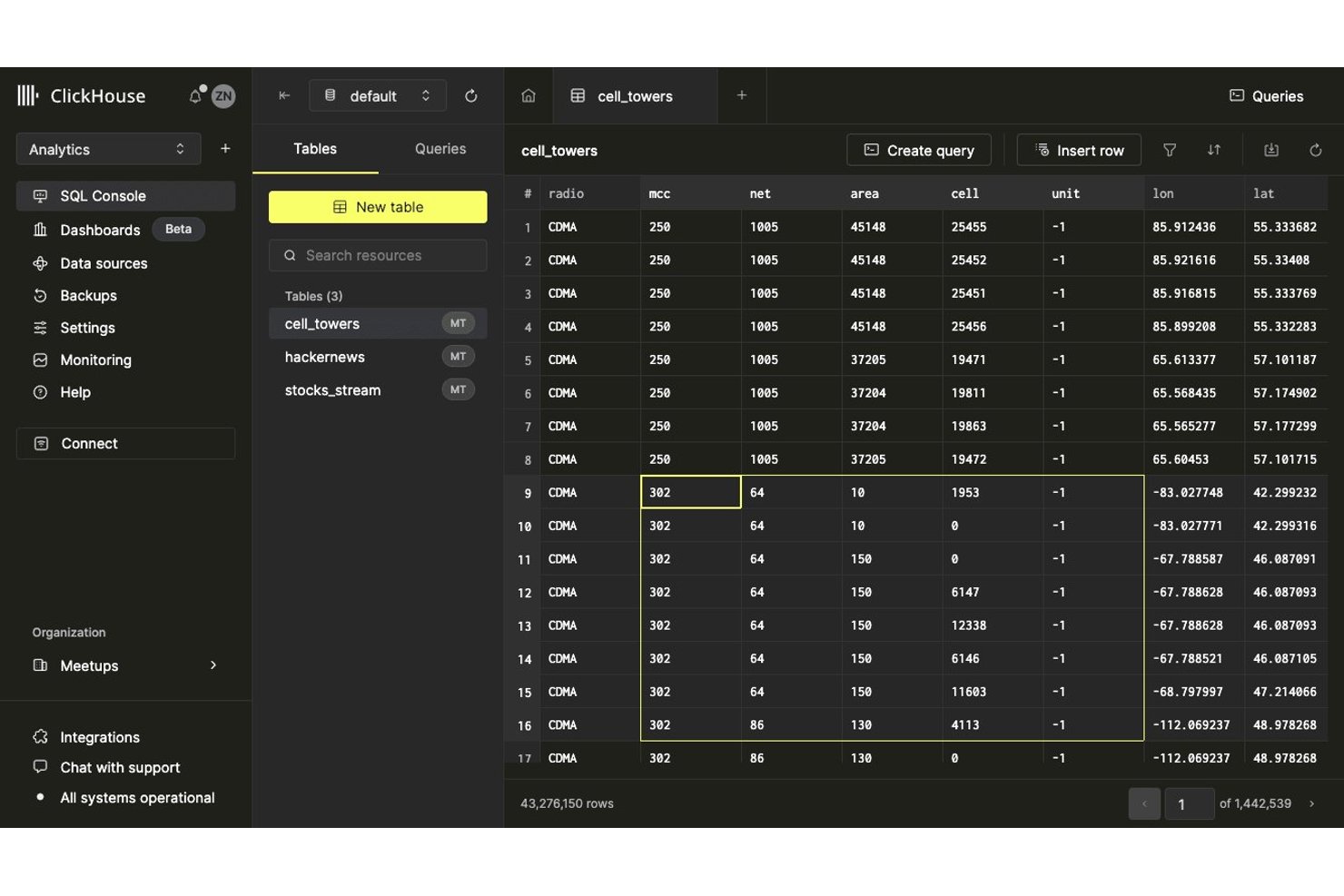
ClickHouse è un database analitico orientato alle colonne con un'interfaccia integrata per le query SQL, acquisizione dati in tempo reale, esplorazione dello schema, profilazione delle query ed esportazione dei risultati su dataset su scala petabyte.
Per chi è più adatto ClickHouse?
ClickHouse è particolarmente adatto agli ingegneri dei dati e ai team di ingegneria di settori ad alta intensità di dati come fintech, adtech, osservabilità e IA, che eseguono query su scala enorme.
Perché ho scelto ClickHouse
ClickHouse si è guadagnato un posto nella mia selezione perché nessun altro ambiente SQL che ho testato gestisce le query su miliardi di righe con la stessa velocità costante. L'archiviazione orientata alle colonne mi permette di eseguire aggregazioni su 10 miliardi di righe e ottenere risultati in millisecondi, non in minuti. Mi affido inoltre al profiler integrato delle query e alla vista della pipeline EXPLAIN per individuare esattamente dove una query lenta presenta problemi, una funzione davvero utile quando si diagnosticano analisi di produzione su larga scala.
Funzionalità principali di ClickHouse
- Console SQL: Offre un editor SQL completo di evidenziazione della sintassi, completamento automatico ed esecuzione delle query direttamente nel browser.
- Esploratore di schemi e tabelle: Consente di esplorare visivamente database, schemi, tabelle, colonne e indici tramite un'interfaccia intuitiva.
- Query salvate e condivisione: Permette agli utenti di organizzare, salvare e condividere frammenti SQL e cronologie delle query con il proprio team.
- Acquisizione dati gestita con ClickPipes: Supporta connettori nativi per l'acquisizione in tempo reale da PostgreSQL, MySQL, Kafka, S3 e altro.
Integrazioni di ClickHouse
ClickHouse offre integrazioni native con Tableau, Power BI, Looker, Grafana, Apache Superset, dbt, Airbyte, Fivetran e Apache Kafka. È disponibile un'API per le integrazioni personalizzate.
Pros and Cons
Pros:
- Aggregazioni rapidissime su miliardi di righe
- Pipeline EXPLAIN integrata per la diagnostica delle query
- Acquisizione in tempo reale direttamente nelle tabelle analitiche
Cons:
- Non adatto ai carichi di lavoro SQL transazionali
- Funzionalità integrate minime per la collaborazione del team sulle query

Site24x7
Ideale per il monitoraggio SQL multi-motore
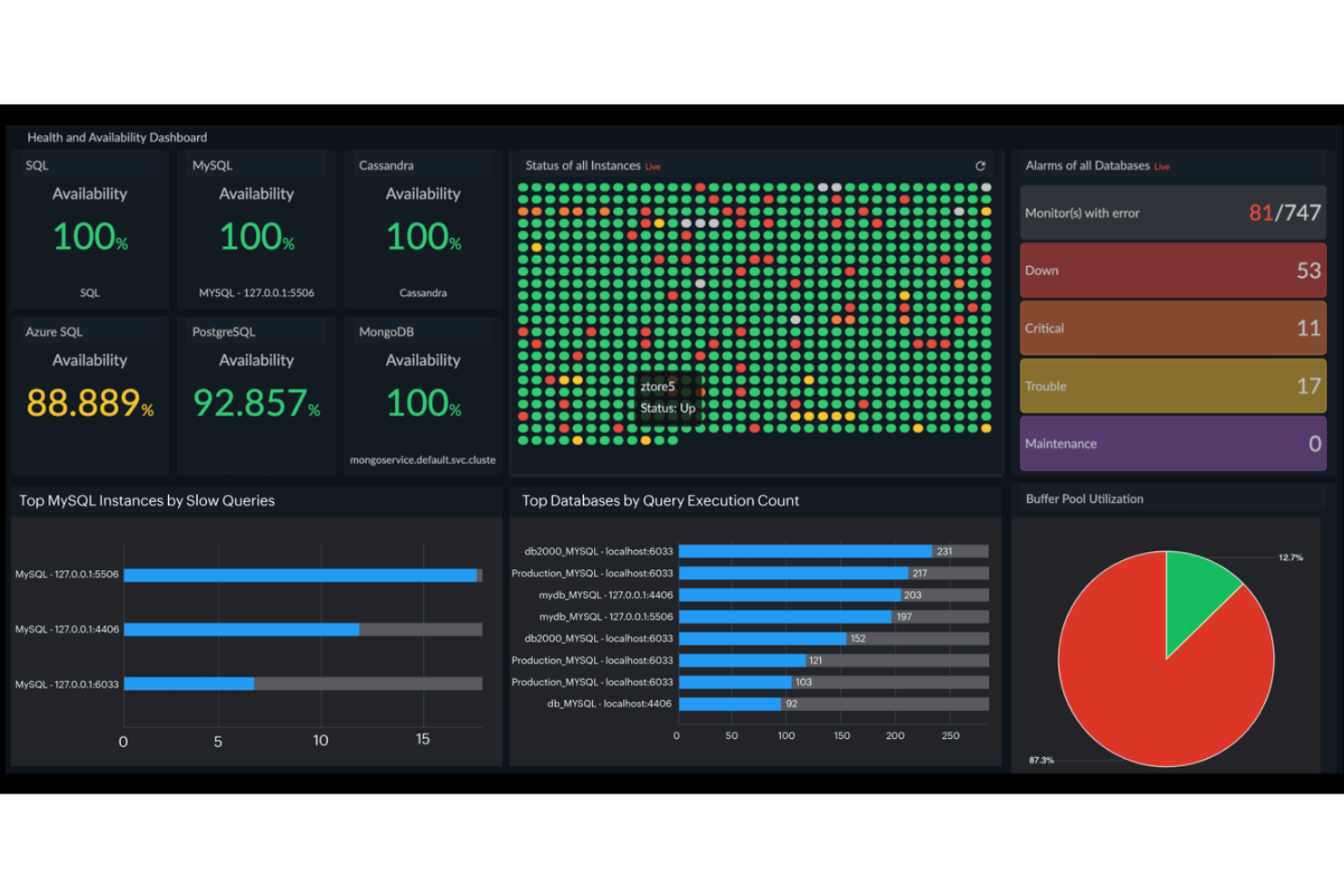
Site24x7 è presente in questo elenco perché è uno dei pochi strumenti che può monitorare le prestazioni delle query SQL su più motori come MySQL, SQL Server e PostgreSQL da un'unica dashboard. Ho visto che i team ne traggono maggior beneficio quando gestiscono diversi sistemi di database e desiderano una visibilità unificata. Ciò che mi colpisce è l'analisi granulare delle query e la capacità di individuare query lente in ambienti misti. Apprezzo anche come il rilevamento delle anomalie segnali i valori anomali prima che causino problemi maggiori.
Site24x7 è ideale per
- Team che gestiscono diversi motori SQL
- Amministratori IT che necessitano di un monitoraggio centralizzato delle query tra più database
Site24x7 non è adatto per
- Chi lavora solo con una singola tecnologia di database
- Sviluppatori che cercano strumenti pratici per l'ottimizzazione delle query
Cosa distingue Site24x7
Site24x7 adotta un approccio orientato al monitoraggio invece di concentrarsi sulla modifica diretta delle query SQL come DBeaver o DataGrip. Lo configuri per osservare le prestazioni delle query su diverse piattaforme database, mettendo in evidenza tendenze e anomalie man mano che si sviluppano. Ritengo che questo funzioni al meglio in ambienti con molta infrastruttura, dove hai bisogno di una panoramica continua e ad alto livello della salute del sistema, piuttosto che di analisi approfondite e ad hoc.
Compromessi con Site24x7
Site24x7 è pensato per il monitoraggio centralizzato, quindi si rinuncia a funzionalità avanzate di interrogazione o ottimizzazione a livello di codice. Se hai la necessità di scrivere o ottimizzare query direttamente, troverai limitati i suoi strumenti diagnostici.
Pros and Cons
Pros:
- Offre avvisi in tempo reale tramite diversi canali
- Dashboard e report personalizzabili
- Monitoraggio completo per diversi sistemi
Cons:
- Mancano funzioni per scrivere e testare le query; lo strumento è limitato al solo monitoraggio
- Troppe notifiche possono risultare eccessive per gli utenti
New Product Updates from Site24x7
Site24x7 Adds Compliance Reports and Domain Squatting Detection
Site24x7’s Digital Risk Analyzer now offers domain compliance assessment and squatting detection to help you validate security posture, compare domains, and spot impersonation risks faster. For more information, visit Site24x7’s official site.
 .
.
Ideale per il monitoraggio delle prestazioni applicative
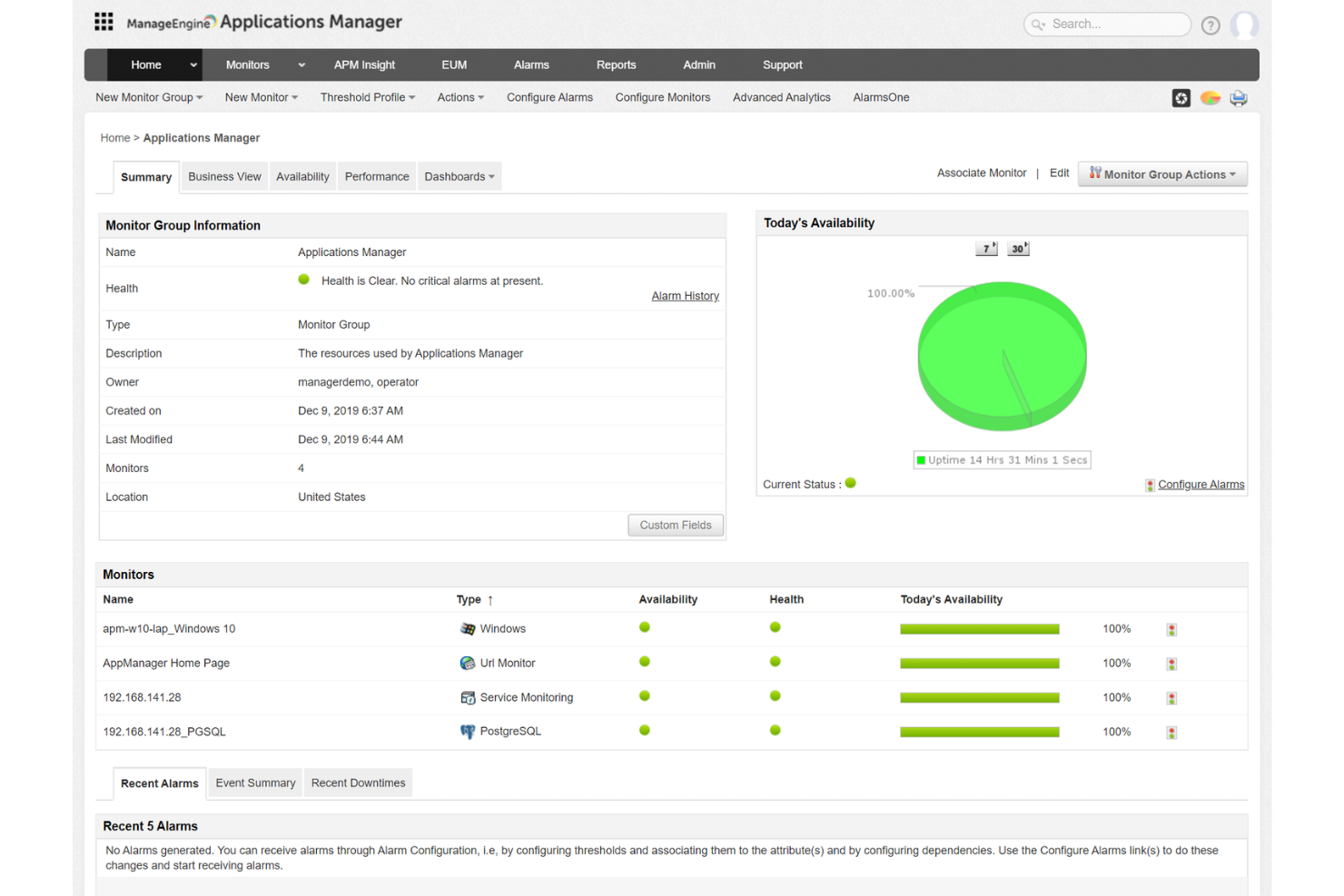
ManageEngine Applications Manager entra nella mia lista per la profondità che offre nelle analisi delle prestazioni delle applicazioni, soprattutto quando si tratta di tracciare i colli di bottiglia delle query SQL. Quando ho testato il suo cruscotto delle prestazioni del database, ho potuto approfondire i tempi di risposta delle query, le sessioni bloccate e le transazioni problematiche, tutto da un'unica visuale.
Ottieni un'analisi della causa principale isolata a livello di query, cosa che non vedo affrontata in modo così approfondito nella maggior parte degli strumenti di monitoraggio. Apprezzo il fatto che si possano individuare le transazioni lente e collegare direttamente i picchi di prestazioni alle query che causano problemi, così da poter agire rapidamente prima che gli utenti si accorgano dei rallentamenti.
Migliore utilizzo di Applications Manager
- Team IT che monitorano le prestazioni end-to-end delle query SQL
- Organizzazioni che necessitano di analisi dettagliate delle cause alla radice per query lente
Quando Applications Manager non è indicato
- Team che desiderano strumenti dedicati per la modifica e la progettazione di query SQL
- Piccole realtà che necessitano solo di monitoraggio di base del database
Cosa distingue Applications Manager
Applications Manager è progettato per i team che hanno bisogno di una visibilità approfondita su tutti gli aspetti della salute applicativa, con particolare attenzione alle query di database sottostanti che generano problemi di prestazioni. Presuppone che si voglia monitorare tutto, dalle transazioni alle query SQL, in un'unica visuale. A differenza degli editor di query dedicati come SQL Server Management Studio, è pensato per il monitoraggio continuo piuttosto che per lo sviluppo o lo scripting di query una tantum.
Funziona al meglio quando si desidera individuare i rallentamenti delle applicazioni a livello di query e collegarli direttamente a ciò che sperimentano gli utenti—non solo un'analisi postuma, ma come parte delle operazioni correnti.
Compromessi con Applications Manager
È ottimizzato per il monitoraggio continuo delle prestazioni, ma si perdono le funzionalità granulari di modifica, progettazione dello schema e creazione interattiva delle query che si trovano negli strumenti SQL dedicati allo sviluppo. Ciò significa che, se l'obiettivo principale è creare o perfezionare query complesse, sarà necessario un secondo strumento.
Pros and Cons
Pros:
- Reportistica intuitiva
- Impostazioni di allerta personalizzabili
- Analisi delle prestazioni in tempo reale
Cons:
- Potrebbero essere necessarie risorse dedicate
- Analisi avanzate limitate
New Product Updates from ManageEngine Applications Manager
ManageEngine Applications Manager Adds AppLogs Alerting and Query Tools
ManageEngine Applications Manager adds AppLogs Alerting, advanced query operators, and new AppLogs Explorer visualizations. These updates help teams monitor log activity, refine searches, and analyze trends more efficiently. For more information, visit ManageEngine Applications Manager’s official site.
 .
.
Ideale per il supporto database cross-platform
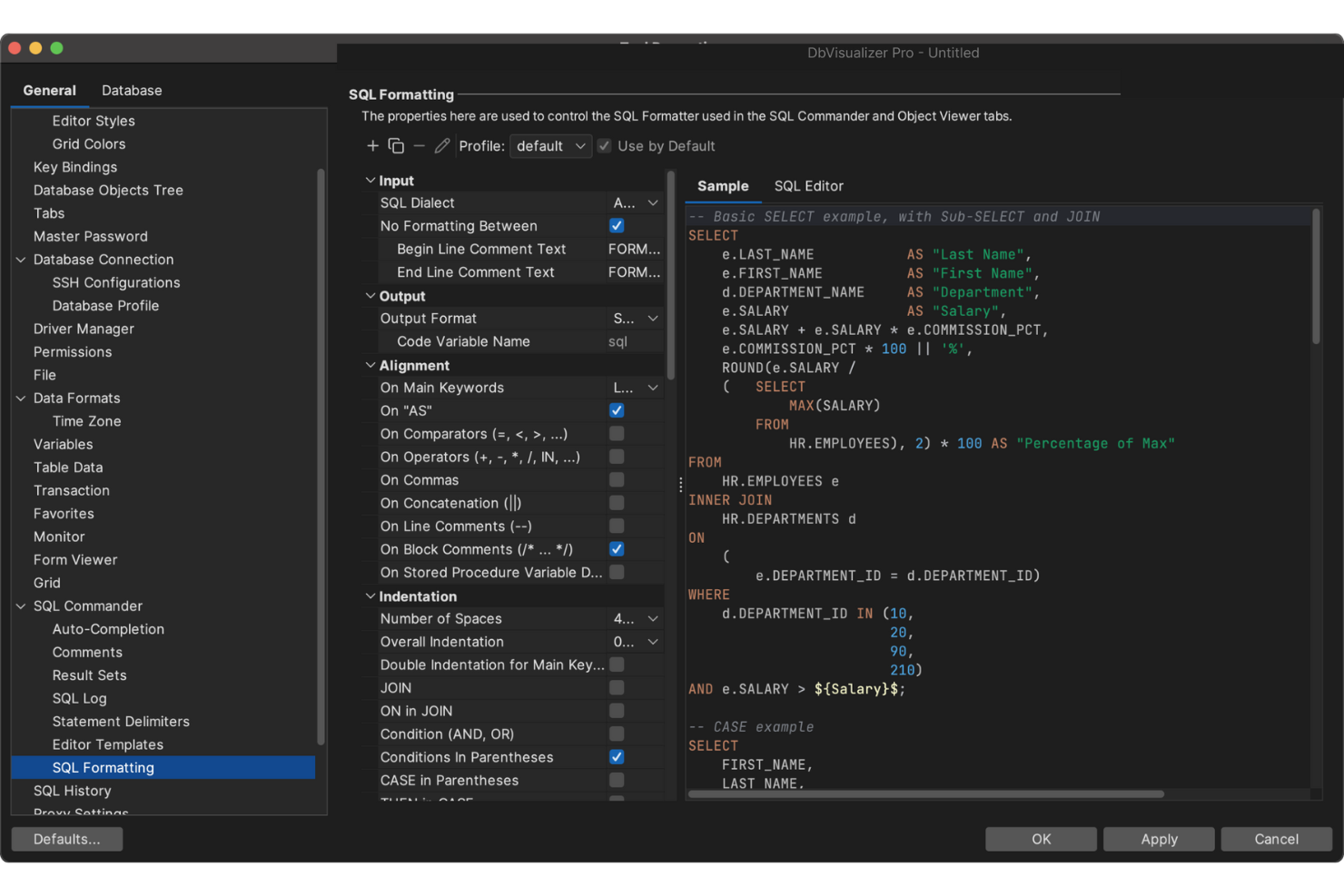
DbVisualizer è nella mia lista perché offre la stessa esperienza affidabile di interrogazione SQL indipendentemente dal database o sistema operativo che utilizzi. Ho visto team che gestiscono MySQL, PostgreSQL, SQL Server e Oracle usare DbVisualizer per centralizzare il loro flusso di lavoro.
Quello che apprezzo qui è che l'interfaccia non ostacola il lavoro: i dati delle tabelle, i diagrammi ER e i piani di esecuzione sono sempre leggibili, anche su macOS o Linux. Se sei stanco di passare da un client nativo all'altro, questa è la soluzione più vicina che ho trovato a un ambiente tutto-in-uno.
DbVisualizer è ideale per
- Team che gestiscono più RDBMS su varie piattaforme
- Utenti che desiderano un'esperienza SQL coerente su qualsiasi sistema operativo
DbVisualizer non è ideale per
- Chi ha bisogno di funzionalità di collaborazione o strumenti di team integrati
- Analisti che danno priorità alla visualizzazione dei dati rispetto agli strumenti di interrogazione
Cosa distingue DbVisualizer
DbVisualizer si distingue perché offre un unico ambiente per interrogare, gestire e visualizzare dati su molti tipi di database, a prescindere dal sistema operativo. Diversamente da SQL Server Management Studio o PgAdmin, non ti obbliga a utilizzare una sola piattaforma o un solo fornitore. In pratica, funziona al meglio quando hai bisogno di mantenere identico il tuo flusso di lavoro passando da Windows a macOS o Linux.
Compromessi con DbVisualizer
DbVisualizer punta all'indipendenza dal database e a un'esperienza uniforme, ma si perdono strumenti più approfonditi e specifici per il fornitore o la collaborazione integrata che invece si trovano in client più specializzati.
Pros and Cons
Pros:
- Compatibilità multipiattaforma
- Costruzione visuale delle query
- Supporto database esteso
Cons:
- È necessaria una licenza separata per ogni utente
- Nessun controllo di versione integrato
New Product Updates from DbVisualizer

DbVisualizer Adds AI Enhancements, Map Visualization, and SQL Tab Groups
DbVisualizer expands AI capabilities, introduces geospatial map visualization, and adds SQL Commander tab groups. The release also improves audit logging, database connection management, and database support to streamline development workflows. For more information, visit DbVisualizer's official site.
 .
.
Ideale per lo sviluppo in MySQL e MariaDB
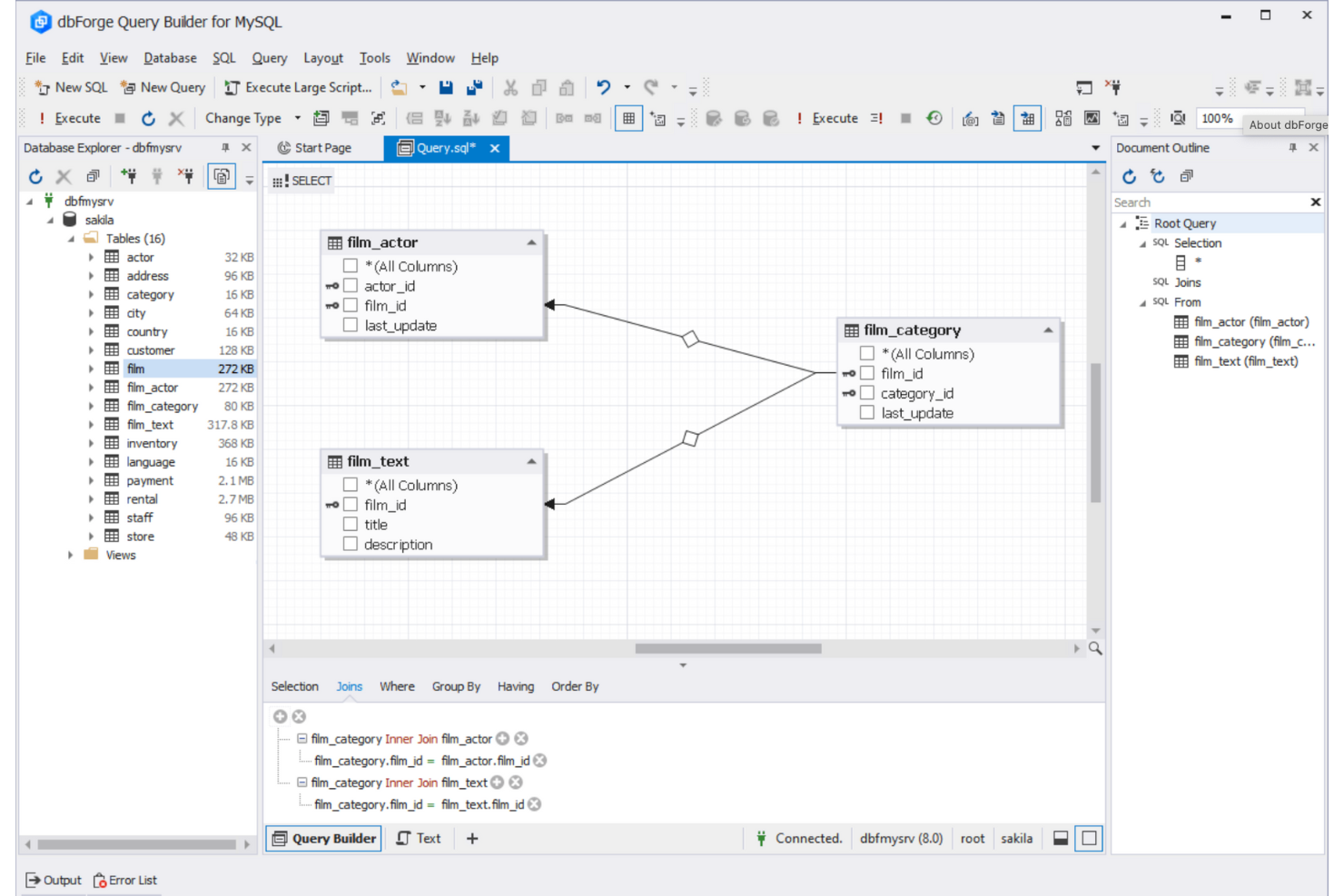
dbForge Studio for MySQL entra nella mia lista perché offre un grande controllo sullo sviluppo in MySQL e MariaDB senza appesantire l’esperienza con elementi superflui. Quando ho testato il completamento del codice SQL, il confronto degli schemi e la creazione visiva delle query, mi ha permesso di approfondire senza mai perdere il filo.
Durante i test, ciò che mi è piaciuto di più è stata la possibilità di passare rapidamente tra il profiling delle query, il debug e la progettazione degli schemi tutto nello stesso ambiente (ottimo, soprattutto se il vostro team lavora sia con MySQL che con MariaDB). Questo approccio unificato fa risparmiare molto tempo evitando continui cambi di attività.
dbForge Studio for MySQL è ideale per
- Sviluppatori di database che lavorano con MySQL e MariaDB
- Team che necessitano di progettazione visuale delle query e confronto degli schemi
dbForge Studio for MySQL non è l’ideale per
- Chi gestisce diversi motori di database non-MySQL
- Utenti che necessitano solo di strumenti SQL basilari e leggeri
Cosa distingue dbForge Studio for MySQL
dbForge Studio for MySQL si distingue per la sua attenzione su MySQL e MariaDB, modellando tutte le funzionalità su uno sviluppo e gestione avanzati del database. Parte dall’idea che tu voglia progettare, fare debug e ottimizzare tutto in un’unica suite. Rispetto a SQL Server Management Studio, dà massimo risalto alla creazione visuale delle query e al confronto degli schemi.
Hai uno spazio di lavoro che connette queste azioni in modo mirato. Invece di disperdere le attività su più strumenti, processi come confronto degli schemi, refactoring del codice e profiling avvengono fianco a fianco e con un senso di coerenza.
Compromessi di dbForge Studio for MySQL
dbForge Studio è ottimizzato per un lavoro approfondito su MySQL e MariaDB. Di conseguenza, si perde il supporto diretto e le funzionalità per altri motori di database: in ambienti misti con vari database è meglio cercare altrove.
Pros and Cons
Pros:
- Supporta la creazione di query complesse
- Strumenti completi per il confronto dei dati
- Importazione ed esportazione dati efficiente
Cons:
- La configurazione iniziale può risultare complessa
- Richiede alcune conoscenze di SQL

Devart
Ideale per soluzioni di connettività ai database
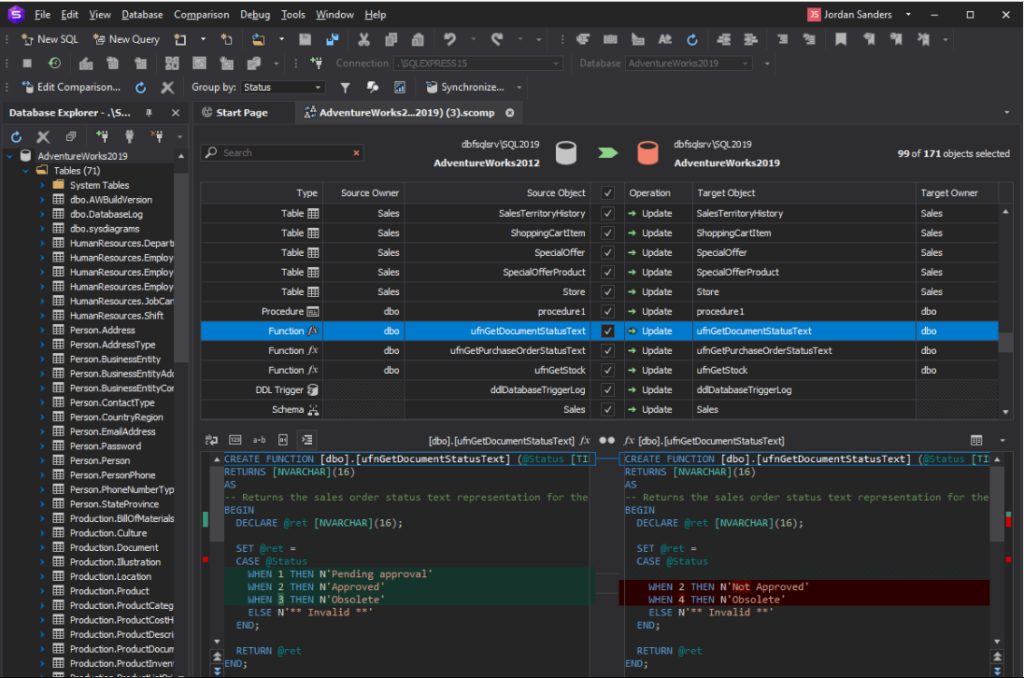
Devart si distingue per la sua eccezionale gamma di soluzioni per la connettività ai database. Quando l'ho messo alla prova, l'ampia varietà di driver supportati—su MySQL, PostgreSQL, Oracle e altri—ha reso le query SQL multipiattaforma semplici, eliminando i continui problemi di connessione. Se lavori in ambienti ibridi o multi-database e hai bisogno di una connettività stabile e ad alte prestazioni, è qui che Devart fa davvero la differenza.
Ciò che mi ha colpito durante i test è stato il modo in cui la piattaforma gestisce scenari reali aziendali, come l'integrazione dei dati o le attività ETL, mantenendo tutto prevedibile dove altri driver falliscono.
Devart è ideale per
- Team IT e data che necessitano di connettività affidabile a più database
- Organizzazioni che gestiscono ambienti ibridi con esigenze complesse di query SQL
Devart non è ideale per
- Utenti che hanno bisogno di avanzati strumenti integrati di visualizzazione SQL
- Team che cercano un'esperienza completa di IDE SQL all-in-one
Cosa distingue Devart
Devart punta su una connettività diretta e affidabile verso un'ampia varietà di database, indipendentemente dal fornitore o dalla configurazione. A differenza di strumenti come DBeaver che includono molte funzionalità per la costruzione di query e interfaccia utente, Devart si aspetta che tu porti il tuo ambiente o flusso di lavoro preferito e che tu abbia solo bisogno di driver affidabili, integrazioni stabili o strumenti leggeri dedicati al traffico SQL.
Spesso vedo che dà il meglio in organizzazioni con requisiti rigorosi sulla connettività e l'interoperabilità, piuttosto che in contesti dove si desiderano editor SQL completi di tutte le funzionalità.
Compromessi con Devart
Devart è ottimizzato per connessioni stabili e indipendenti dal fornitore, ma si rinuncia a funzioni avanzate di progettazione visuale delle query o a strumenti collaborativi per il team. In pratica, è ancora necessario affiancare un IDE SQL o uno strumento di gestione dedicato per la maggior parte delle attività di sviluppo.
Pros and Cons
Pros:
- Ampie opzioni di connettività ai database
- Accesso ai dati affidabile
- Strumenti di integrazione dati efficienti
Cons:
- Configurazione iniziale complessa
- Funzionalità di analisi limitate

Ideale per l'analisi visiva
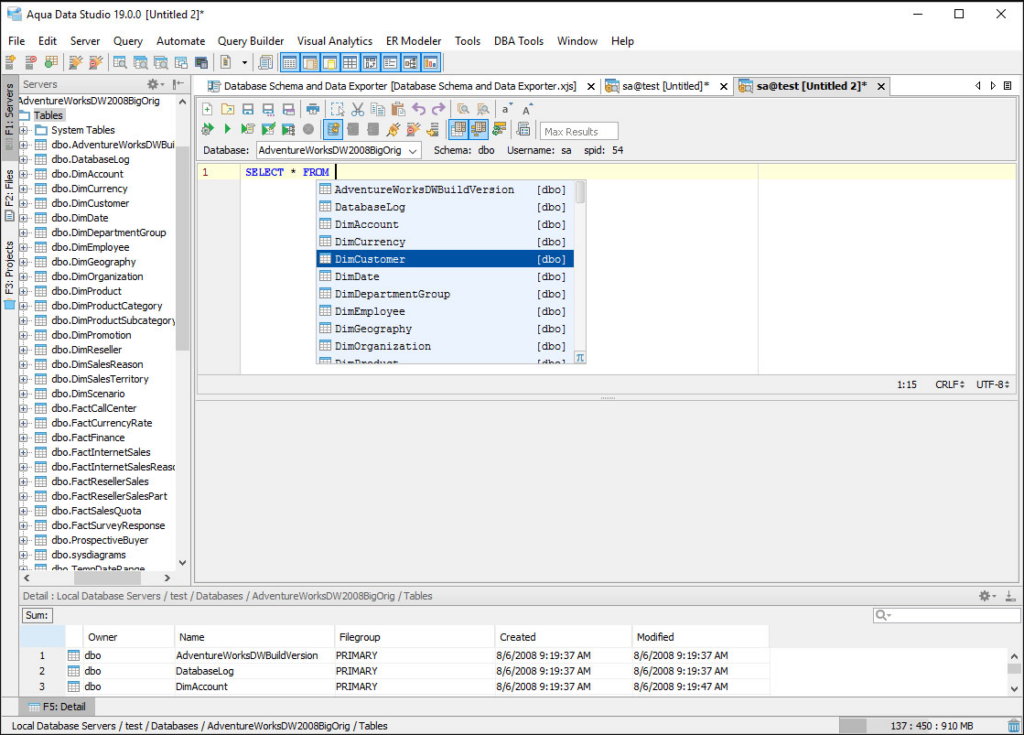
Aqua Data Studio merita un posto qui perché le sue funzionalità di analisi visiva vanno ben oltre i semplici risultati delle query. Quando ho bisogno di ottenere rapidamente informazioni da dati complessi, il generatore di grafici e le dashboard mi permettono di tracciare, filtrare ed esplorare in modo interattivo direttamente dalle mie query.
Ciò che colpisce è l'enorme flessibilità per i team che vogliono trasformare gli output SQL grezzi in report interattivi e condivisibili. Apprezzo soprattutto quanto il costruttore di query visivo acceleri l'esplorazione di nuovi dataset, anche per chi è meno esperto nella scrittura delle query da zero.
Aqua Data Studio è ideale per
- Analisti di dati che creano dashboard visive da query SQL complesse
- Team che desiderano creare grafici interattivi all'interno del proprio strumento di query
Aqua Data Studio non è ideale per
- Organizzazioni che necessitano di ETL automatizzati o report programmati
- Utenti che desiderano solo un editor SQL veloce e basato su testo
Cosa distingue Aqua Data Studio
Aqua Data Studio è progettato per chi vuole visualizzazioni di grande impatto accanto al proprio lavoro SQL. Considera le dashboard interattive come un output fondamentale delle query giornaliere, non come un'opzione secondaria. Questo è diverso da strumenti come DBeaver o SQL Workbench, dove si resta principalmente nella visualizzazione tabellare ed eventualmente si esporta per analizzare in un secondo momento.
Quando uso Aqua Data Studio, noto che ci si aspetta di passare dalla scrittura delle query alla trasformazione dei risultati in grafici dal vivo. Diversamente da Tableau o Power BI, che separano l’analisi dalla programmazione, questo flusso di lavoro unisce entrambi i passaggi in un unico ambiente.
Compromessi con Aqua Data Studio
Aqua Data Studio è ottimizzato per l’esplorazione visiva, ma questa attenzione significa rinunciare ad alcune opzioni per l’automazione della preparazione dei dati o la programmazione della consegna dei report, il che può rallentare i team che hanno esigenze di automazione più rigide.
Pros and Cons
Pros:
- Strumenti di visualizzazione dati potenti
- Supporto per database multipli
- Funzionalità avanzate di creazione grafici
Cons:
- Richiede conoscenze tecniche
- Supporto mobile limitato
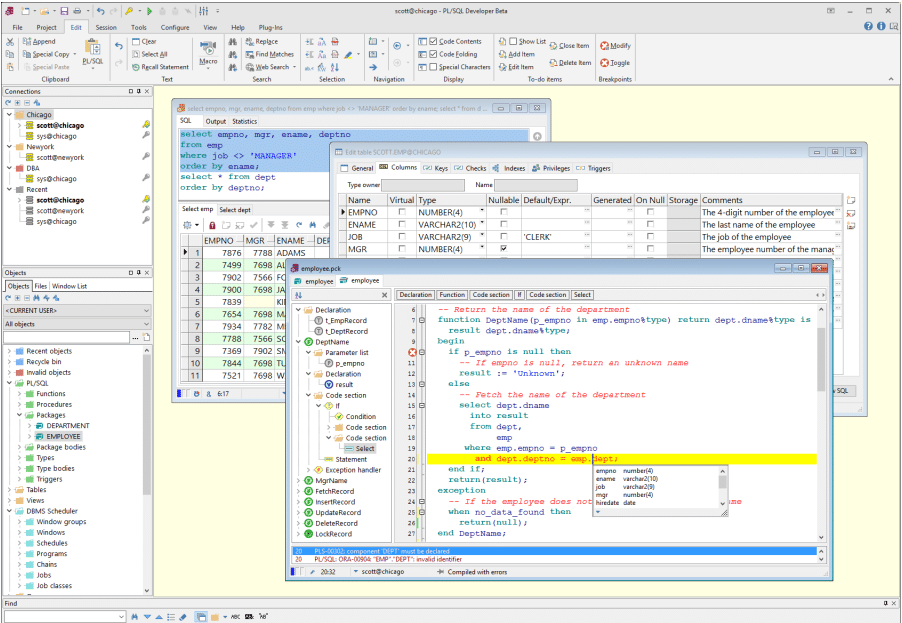
Includo Oracle SQL Developer qui perché è lo strumento che vedo più spesso nei contesti che lavorano con ambienti Oracle grandi e complessi. Ciò che lo distingue è l'integrazione di amministrazione database, editor avanzato di query e modellazione dei dati in un'unica interfaccia.
Apprezzo il fatto che si possano gestire oggetti, ottimizzare le prestazioni e visualizzare le dipendenze senza dover saltare tra diversi strumenti. Questa è l'opzione che consiglio se vuoi una gestione Oracle completa da cima a fondo, insieme a un flusso di lavoro SQL professionale.
Per chi è ideale Oracle SQL Developer
- DBA Oracle dedicati che gestiscono ambienti grandi e complessi
- Team che necessitano di strumenti di ottimizzazione e modellazione integrati e specifici per Oracle
Quando Oracle SQL Developer non è la soluzione ideale
- Contesti che utilizzano principalmente database diversi da Oracle
- Utenti che desiderano uno strumento leggero per semplici query estemporanee
Cosa distingue Oracle SQL Developer
Oracle SQL Developer è pensato per l'amministrazione pratica e lo sviluppo di query all'interno degli ambienti Oracle. Mentre strumenti come DBeaver cercano di supportare diversi sistemi database, SQL Developer si concentra esclusivamente sui flussi di lavoro, la terminologia e i tipi di oggetti tipici di Oracle. Nella pratica, vedo DBA e data engineer restare fedeli a questo strumento perché integra attività di amministrazione, sviluppo PL/SQL e confronti di schema direttamente nel flusso di lavoro quotidiano.
Compromessi di Oracle SQL Developer
SQL Developer è ottimizzato per un flusso di lavoro centrato su Oracle, quindi sacrifica la semplicità per chi non usa Oracle. Se hai la necessità di gestire insieme diversi tipi di database, probabilmente dovrai affiancare un altro strumento.
Pros and Cons
Pros:
- Supporto PL/SQL completo
- Strumenti efficaci di migrazione
- Potenti capacità di modellazione dati
Cons:
- Curva di apprendimento più ripida
- Funzionalità limitate per database non Oracle

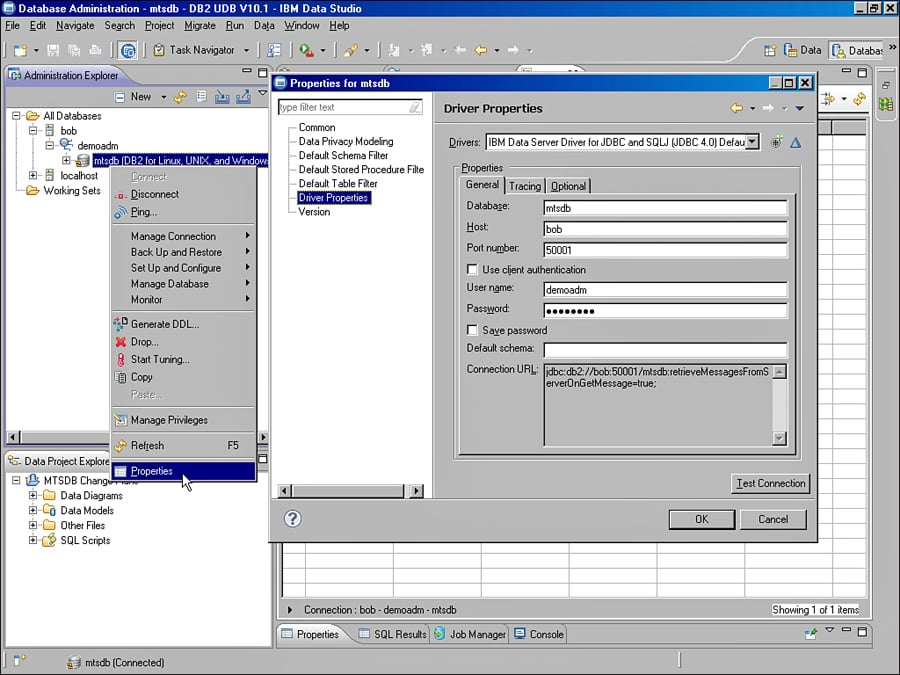
IBM Data Studio merita il suo posto quando si desidera che lo strumento di query SQL funzioni anche come ambiente completo per la gestione dei dati. Mi piace il fatto che si possano progettare, eseguire e ottimizzare le query SQL gestendo al contempo la modellazione del database, la gestione degli utenti e il monitoraggio delle prestazioni, tutto in un’unica console.
Ho visto team che gestiscono più database IBM ottenere il massimo da questa piattaforma, soprattutto quando hanno bisogno di una gestione integrata insieme alla costruzione delle query.
IBM Data Studio è l’ideale per
- DBA e analisti che gestiscono più database IBM
- Team che centralizzano query SQL, modellazione e attività di amministrazione
IBM Data Studio non è adatto a
- Organizzazioni che utilizzano principalmente database non IBM
- Sviluppatori che desiderano strumenti SQL leggeri e incentrati sul codice
Cosa distingue IBM Data Studio
IBM Data Studio si distingue per il modo in cui combina lo sviluppo SQL con le attività quotidiane di amministrazione e monitoraggio delle prestazioni dei database all’interno di un’unica interfaccia. A differenza di editor più leggeri come DBeaver o SQL Workbench, questa piattaforma presuppone un approccio completo: gestione della progettazione delle query, ottimizzazione e sicurezza da un solo luogo.
In pratica, questa soluzione funziona bene per i team che si affidano ai sistemi database IBM e necessitano di uno strumento unico per gestire lo sviluppo delle query insieme alla gestione di schemi e risorse.
Compromessi di IBM Data Studio
IBM Data Studio punta su un’esperienza completa e integrata, ma questa ampiezza aggiunge complessità e overhead. Se si desidera qualcosa di rapido e focalizzato solo sulle query, la configurazione e la navigazione risultano pesanti.
Pros and Cons
Pros:
- Potenti capacità di debug
- Supporta la collaborazione tra team
- Monitoraggio completo delle prestazioni
Cons:
- Funzionalità limitate per database non IBM
- Può essere ad alta richiesta di risorse


JetBrains DataGrip si guadagna il suo posto grazie al modo in cui la console di query intelligente mette in evidenza errori, suggerimenti e il completamento del codice direttamente dove stai lavorando. Quando hai bisogno di uno strumento database che ti aiuti a scrivere SQL migliore e più preciso al volo, questo è quello che ho visto scegliere da molti team.
Apprezzo come DataGrip metta in risalto i problemi prima di eseguire una query e mostri i riferimenti delle tabelle mentre digiti, riducendo così gli errori quando lavori con database complessi.
Ideale per
- Sviluppatori che scrivono query SQL complesse con analisi del codice in tempo reale
- Professionisti del database che hanno bisogno del supporto multi-database in un unico client
Non indicato per
- Utenti non tecnici che cercano costruttori visuali di query
- Team che necessitano di collaborazione e condivisione di query via web
Cosa distingue DataGrip
DataGrip si distingue perché tratta la scrittura SQL come sviluppo software, puntando su completamento intelligente del codice, rilevamento degli errori in linea e navigazione dal vivo delle relazioni. In pratica, lavori con l'editor di query come ambiente principale, ricevendo un feedback istantaneo che si avvicina molto di più alla scrittura di codice in IntelliJ IDEA di JetBrains piuttosto che ai client SQL come DBeaver o SQL Server Management Studio.
Quando uso DataGrip, noto che si aspetta che l’utente conosca sia il codice che la struttura del database, premiando chi vuole scrivere e ottimizzare query rapidamente senza dover ricorrere a molte operazioni punta e clicca.
Compromessi con DataGrip
DataGrip è ottimizzato per la scrittura diretta delle query e l’editing approfondito, quindi si rinuncia ai costruttori visuali di query e a interfacce più semplici. Questo significa che i membri del team non tecnici probabilmente si sentiranno esclusi o sopraffatti.
Pros and Cons
Pros:
- Completamento intelligente del codice
- Efficace rilevamento degli errori
- Ottime capacità di refactoring
Cons:
- Potrebbe richiedere la configurazione di plugin
- Può essere impegnativo per le risorse
Altri strumenti per query SQL
Ecco alcune opzioni aggiuntive di strumenti per query SQL che non sono state incluse nella mia selezione, ma che vale comunque la pena valutare:
- MySQL Workbench
Ideale per la progettazione di database MySQL
- Navicat for SQL Server
Ideale per l’amministrazione di SQL Server
- DBHawk
Può richiedere molte risorse
- NinjaOne
Ideale per monitoraggio remoto
- dbForge Studio for SQL Server
Ideale per l’ottimizzazione intelligente delle query con AI
- dbForge Edge
Ideale per la costruzione visuale di query


Come valuto gli strumenti per query SQL
Divido la mia valutazione in due livelli: la base indispensabile per ogni DBA che si connette a Postgres o SQL Server, e i fattori differenzianti come la generazione di query con l'IA o le librerie di query condivise dal team che distinguono uno strumento dall'altro.
Funzionalità principali (Requisiti minimi per questa lista)
Quando seleziono gli strumenti per la mia lista, valuto ognuno su una scala da 0 (non offre la funzionalità) a 5 (eccelle in quest'area) per ogni funzionalità principale elencata di seguito. Poi calcolo il punteggio totale dello strumento in percentuale. Ogni strumento deve raggiungere un punteggio minimo totale del 65% per essere preso in considerazione.
- Connessione Multi-Database: Verifico quanti motori di database uno strumento supporta nativamente, da PostgreSQL e MySQL fino a soluzioni cloud come Snowflake e Redshift.
- Editor di Query SQL: Un buon editor deve offrire evidenziazione della sintassi e auto-completamento contestuale, suggerendo i nomi delle colonne dallo schema attivo, non solo parole chiave SQL generiche.
- Navigazione di Schema & Metadati: Cerco un albero visivo degli oggetti in cui si possa esplorare tabelle, viste, indici e stored procedure senza scrivere manualmente query information_schema.
- Gestione dei Risultati: Ordinamento, filtraggio ed esportazione dei risultati delle query sono aspetti fondamentali. Valuto la gamma di formati di esportazione disponibili e se è possibile gestire grandi set di risultati senza bloccare l'interfaccia.
- Strumenti per le Performance delle Query: Cerco output visivi dei piani di esecuzione e statistiche di profiling, strumenti utili per individuare un indice mancante o una scansione sequenziale costosa prima che arrivi in produzione.
- Query Salvate & Cronologia: La possibilità di rivedere e organizzare le query passate fa risparmiare tempo reale. Valuto se uno strumento offre cartelle, etichette, ricerca o opzioni di condivisione per gli snippet memorizzati.
Dopo aver stilato un elenco di strumenti che soddisfano questi criteri, considero cosa distingue ogni piattaforma.
Fattori differenzianti (ciò che distingue i fornitori)
Ecco come confronto e metto a confronto i diversi fornitori:
Caratteristiche distintive
L'assistenza nelle query tramite IA è un importante fattore di distinzione. Cerco soluzioni che traducano istruzioni in linguaggio naturale in SQL valido o spieghino join complessi in termini semplici. Anche le funzionalità di collaborazione sono rilevanti quando più ingegneri condividono un database. Librerie di query condivise e commenti riducono il lavoro duplicato. Valuto anche la pianificazione delle query, poiché i team che hanno bisogno di eseguire estrazioni dati notturne o inviare avvisi su Slack al superamento di certe soglie traggono vantaggio dall'automazione integrata direttamente nello strumento di query.
Oltre le funzionalità
Sicurezza e controllo degli accessi assumono particolare importanza quando uno strumento si connette direttamente a database di produzione. Verifico la presenza di SSO, permessi basati sui ruoli e log di audit delle query, soprattutto per i team in settori regolamentati che necessitano la conformità SOC 2 o HIPAA. Anche il modello di distribuzione è rilevante. Alcuni team richiedono un'opzione self-hosted per mantenere le query e le credenziali dietro il proprio firewall. Valuto anche la struttura dei prezzi, poiché la differenza tra un client desktop gratuito per un singolo utente e una soluzione enterprise a licenza per utente può influire sulla scelta dello strumento ideale da parte di una startup di cinque persone o di un team di ingegneria da 200 persone.
Come scegliere gli strumenti per query SQL
È facile perdersi in lunghi elenchi di funzionalità e strutture di prezzo complesse. Per aiutarti a rimanere concentrato mentre affronti il tuo specifico processo di selezione del software, ecco una lista di fattori da tenere presenti:
| Fattore | Elementi da considerare |
| Scalabilità | Assicurati che lo strumento possa crescere insieme al tuo team. Cerca opzioni in grado di gestire volumi di dati e carichi di utenti crescenti senza compromettere le prestazioni. |
| Integrazioni | Verifica la compatibilità con i sistemi esistenti. Ti serve uno strumento che si colleghi facilmente ai tuoi database, agli strumenti DevOps e ad altri software come gli strumenti CRM o BI. |
| Personalizzazione | Trova uno strumento che ti permetta di adattare le funzionalità alle tue esigenze. Dashboard e modelli di query personalizzabili possono migliorare la produttività e adattarsi a flussi di lavoro specifici. |
| Facilità d'uso | Cerca un'interfaccia intuitiva e una navigazione semplice. Uno strumento facile da imparare riduce i tempi di formazione e aumenta l'efficienza del team. |
| Budget | Valuta il costo rispetto ai tuoi vincoli finanziari. Considera il costo totale di proprietà, comprese eventuali commissioni nascoste o spese aggiuntive per le funzionalità extra. |
| Misure di sicurezza | Assicurati che lo strumento offra solide funzionalità di sicurezza. La crittografia dei dati, l'autenticazione degli utenti e i controlli degli accessi sono fondamentali per proteggere le informazioni sensibili. |
| Prestazioni | Valuta in che modo lo strumento ottimizza i tempi di esecuzione delle query. Velocità di elaborazione elevate sono essenziali per grandi insiemi di dati e query complesse. |
| Supporto | Considera il livello di assistenza clienti disponibile. L'accesso al supporto 24 ore su 24, 7 giorni su 7 e a una knowledge base completa può rivelarsi prezioso durante l'implementazione e in seguito. |
Tendenze negli strumenti per query SQL
Nella mia ricerca, ho raccolto innumerevoli aggiornamenti di prodotto, comunicati stampa e registri delle versioni di diversi fornitori di strumenti per query SQL. Ecco alcune delle tendenze emergenti che sto monitorando:
- Analisi basate sull'intelligenza artificiale: un numero sempre maggiore di strumenti integra l'intelligenza artificiale per fornire analisi predittive e ottimizzare automaticamente le query. Questo ti aiuta a individuare potenziali problemi prima che si trasformino in criticità e migliora le prestazioni delle query senza interventi manuali.
- Soluzioni basate sul cloud: molti fornitori stanno passando a piattaforme basate sul cloud, che offrono maggiore flessibilità e scalabilità. Ciò consente al tuo team di accedere agli strumenti da qualsiasi luogo e di gestire in modo efficiente volumi di dati più elevati, come dimostrano le soluzioni di Azure Data Studio.
- Miglioramenti alla visualizzazione dei dati: gli strumenti di analisi SQL stanno migliorando le funzionalità di visualizzazione dei dati, rendendo più semplice creare dashboard e report intuitivi. Strumenti come Aqua Data Studio offrono funzionalità avanzate per la creazione di grafici, che aiutano a comprendere e presentare meglio i dati.
- Funzionalità di collaborazione: negli strumenti per query SQL si pone sempre più l'accento sulla collaborazione tra i membri del team. Le funzionalità che consentono a più utenti di lavorare contemporaneamente sulle query e condividere informazioni stanno diventando uno standard, favorendo una migliore comunicazione nel team e una maggiore capacità di risolvere i problemi.
- Attenzione alla sicurezza: con la crescente frequenza delle violazioni dei dati, gli strumenti per query SQL stanno dando priorità alle funzionalità di sicurezza. Per proteggere le informazioni aziendali sensibili vengono integrate misure avanzate di crittografia dei dati, autenticazione degli utenti e controllo degli accessi.
Cosa sono gli strumenti per query SQL?
Gli strumenti per query SQL sono applicazioni software progettate per aiutare gli utenti a scrivere, eseguire e ottimizzare query SQL sui database. Gli amministratori di database, gli sviluppatori e gli analisti dei dati utilizzano generalmente questi strumenti per gestire i dati in modo efficiente ed estrarre informazioni utili.
Funzionalità come l'ottimizzazione delle query, la visualizzazione dei dati e gli strumenti di collaborazione contribuiscono a migliorare le prestazioni, comprendere le tendenze dei dati e promuovere il lavoro di squadra. Nel complesso, questi strumenti offrono funzionalità essenziali per gestire ambienti di dati complessi e prendere decisioni aziendali informate.
Funzionalità degli strumenti per query SQL
Quando scegli uno strumento per query SQL, presta attenzione alle seguenti funzionalità:
- Ottimizzazione delle query: migliora le prestazioni delle query identificando le inefficienze e suggerendo miglioramenti.
- Visualizzazione dei dati: fornisce rappresentazioni visive dei dati per aiutare gli utenti a comprendere tendenze e schemi.
- Strumenti di collaborazione: consentono a più utenti di lavorare contemporaneamente sulle query, promuovendo il lavoro di squadra e la comunicazione.
- Accesso basato sul cloud: consente agli utenti di accedere allo strumento da qualsiasi luogo, offrendo flessibilità e scalabilità.
- Funzionalità di sicurezza: includono la crittografia dei dati e i controlli degli accessi per proteggere le informazioni sensibili.
- Analisi basate sull’intelligenza artificiale: utilizza l’intelligenza artificiale per fornire informazioni predittive e automatizzare l’ottimizzazione delle query.
- Creazione visiva delle query: semplifica la creazione delle query con un’interfaccia di trascinamento, riducendo la necessità di conoscenze approfondite di SQL.
- Gestione dello schema: aiuta gli utenti a progettare e gestire le strutture dei database, garantendo coerenza e organizzazione.
- Monitoraggio delle prestazioni: tiene traccia delle prestazioni del database per identificare i colli di bottiglia e migliorare l’efficienza.
- Dashboard personalizzabili: consentono agli utenti di adattare l’interfaccia alle proprie esigenze specifiche, migliorando usabilità e produttività.
Vantaggi degli strumenti per query SQL
L’implementazione di uno strumento per query SQL offre diversi vantaggi al tuo team e alla tua azienda. Eccone alcuni di cui potrai beneficiare:
- Maggiore efficienza: l’ottimizzazione delle query e il monitoraggio delle prestazioni aiutano il tuo team a gestire i database più rapidamente e con maggiore efficacia.
- Collaborazione migliorata: gli strumenti di collaborazione consentono ai membri del team di lavorare insieme sulle query, migliorando la comunicazione e la risoluzione dei problemi.
- Maggiore flessibilità: l’accesso basato sul cloud garantisce la possibilità di gestire i database da qualsiasi luogo, adattandosi agli ambienti di lavoro da remoto o ibridi.
- Maggiore sicurezza: funzionalità di sicurezza come la crittografia dei dati e i controlli degli accessi proteggono le informazioni sensibili della tua azienda.
- Informazioni migliori sui dati: la visualizzazione dei dati e le analisi basate sull’intelligenza artificiale consentono di comprendere le tendenze dei dati e prendere decisioni informate.
- Creazione semplificata delle query: gli strumenti visivi per la creazione delle query facilitano la creazione di query complesse senza richiedere una conoscenza approfondita di SQL.
- Gestione coerente dei database: la gestione dello schema garantisce che le strutture dei database rimangano organizzate e coerenti nei diversi ambienti.
Costi e prezzi degli strumenti per query SQL
La scelta di uno strumento per query SQL richiede la comprensione dei vari modelli e piani tariffari disponibili. I costi variano in base alle funzionalità, alle dimensioni del team, agli extra e ad altri fattori. La tabella seguente riassume i piani più comuni, i relativi prezzi medi e le funzionalità tipicamente incluse nelle soluzioni per query SQL:
Tabella di confronto dei piani per gli strumenti per query SQL
| Tipo di piano | Prezzo medio | Funzionalità comuni |
| Piano gratuito | $0 | Esecuzione di query di base, connessioni limitate ai database e supporto della comunità. |
| Piano personale | $5-$25 /utente /mese | Editor SQL avanzato, visualizzazione di base dei dati e supporto limitato. |
| Piano aziendale | $30-$60 /utente /mese | Supporto per più database, strumenti di visualizzazione dei dati e supporto clienti standard. |
| Piano aziendale avanzato | $70-$150 /utente /mese | Funzionalità di sicurezza complete, monitoraggio delle prestazioni, analisi avanzate e supporto prioritario. |
Domande frequenti sullo strumento per query SQL
Ecco alcune risposte alle domande più comuni sullo strumento per query SQL:
Come velocizzare l'esecuzione di una query SQL?
Per velocizzare una query SQL, puoi utilizzare gli indici in modo efficace, favorendo così un rapido recupero dei dati. Evita di usare SELECT * e recupera solo le colonne necessarie per ridurre il carico di dati. Ottimizzare le operazioni JOIN e ridurre al minimo le sottoquery può inoltre migliorare le prestazioni. Valuta l’utilizzo di procedure memorizzate per le attività ripetitive.
Quali sono i 4 principali tipi di query SQL?
Le query SQL sono suddivise in categorie: il linguaggio di definizione dei dati (DDL) per definire le strutture dei database, il linguaggio di manipolazione dei dati (DML) per manipolare i dati, il linguaggio di controllo dei dati (DCL) per le autorizzazioni e il linguaggio di interrogazione dei dati (DQL) per recuperare i dati. Il linguaggio di controllo delle transazioni (TCL) gestisce le transazioni in SQL.
Quali sono le basi di una query SQL?
Le basi di una query SQL includono comandi come SELECT per estrarre i dati, UPDATE per modificarli, DELETE per rimuoverli e INSERT INTO per aggiungere nuovi dati. Questi comandi aiutano a gestire e manipolare efficacemente i dati all’interno di un database.
Qual è lo scopo dell'ottimizzazione delle query?
L’ottimizzazione delle query mira a migliorare le prestazioni delle query SQL riducendo i tempi di esecuzione e il consumo di risorse. Consiste nell’analizzare i piani di esecuzione delle query e nell’apportare modifiche all’indicizzazione e alla struttura delle query, garantendo un recupero e un’elaborazione efficienti dei dati.
Perché la visualizzazione dei dati è importante negli strumenti per query SQL?
La visualizzazione dei dati trasforma insiemi di dati complessi in formati visivi come grafici e diagrammi, facilitando la comprensione di tendenze e schemi. Questa funzionalità è fondamentale per prendere decisioni basate sui dati, aiutando te e il tuo team a interpretare rapidamente gli approfondimenti e ad agire di conseguenza.
Qual è il prossimo passo?
Se stai cercando uno strumento per query SQL, contatta gratuitamente un consulente di SoftwareSelect per ricevere consigli.
Compili un modulo e partecipi a una breve conversazione durante la quale il consulente approfondirà le tue esigenze specifiche. In seguito riceverai una selezione ristretta di software da valutare. Ti accompagnerà inoltre durante l'intero processo di acquisto, comprese le negoziazioni sul prezzo.