

I 10 Migliori Software di Progettazione di Reti del 2026

10 Migliori Software per la Progettazione di Reti – Shortlist


Nell'odierno mondo frenetico della progettazione di reti, restare al passo è fondamentale. Devi affrontare sfide come la gestione di architetture complesse e la garanzia della sicurezza. È qui che entra in gioco il software per la progettazione di reti per aiutarti a mappare reti efficienti e scalabili, senza stress per te e il tuo team.
Ho dedicato tempo a recensire e testare questi strumenti, concentrandomi su ciò che davvero conta per te: facilità d'uso, scalabilità e valore. Voglio fornirti una panoramica imparziale e ben documentata sulle migliori soluzioni disponibili.
In questo articolo troverai un'analisi dei principali software per la progettazione di reti, ognuno con i suoi punti di forza. Che tu faccia parte di un piccolo team o di una grande azienda, troverai sicuramente la soluzione adatta alle tue esigenze.
Perché fidarsi dei nostri consigli sui software
Il nostro team testa e recensisce software dal 2012. In quanto leader tecnologici noi stessi, sappiamo quanto sia difficile — e importante — scegliere il software giusto.
Per questa guida, abbiamo valutato gli strumenti attraverso test praticie ricerche indipendenti, assegnando un punteggio agli strumenti in base ai nostri criteri di selezione.
Le nostre recensioni riflettono il nostro giudizio editoriale umano, non un discorso di vendita.
Revisori esperti:
Riepilogo Migliori Software per la Progettazione di Reti
Questa tabella comparativa riassume i dettagli sui prezzi delle mie migliori selezioni di software per la progettazione di reti, per aiutarti a trovare quello più adatto alle tue esigenze e al tuo budget.
| Tool | Best For | Trial Info | Price | ||
|---|---|---|---|---|---|
| 1 | Ideale per la mappatura di topologie personalizzate | Prova gratuita di 30 giorni + demo gratuita disponibile | Da $10/mese (fatturazione annuale) | Website | |
| 2 | Ideale per la mappatura automatica della rete | Demo gratuita disponibile | Da $245/25 dispositivi | Website | |
| 3 | Ideale per progetti visivi intuitivi | Prova gratuita di 14 giorni + piano gratuito disponibile | Da $25/utente/mese (fatturazione annuale) | Website | |
| 4 | Ideale per la scalabilità a livello aziendale | Prova gratuita di 30 giorni | Da $5/utente/mese (fatturato annualmente) | Website | |
| 5 | Ideale per la collaborazione di squadra | Not available | Da $9/utente/mese (fatturazione annuale) | Website | |
| 6 | Ideale per reti basate su grafi | Not available | Prezzo su richiesta | Website | |
| 7 | Ideale per visualizzazioni dettagliate | Not available | Prezzo su richiesta | Website | |
| 8 | Ideale per progetti di reti basati su cloud | Prova gratuita di 14 giorni + piano gratuito disponibile | Da $5/utente/mese | Website | |
| 9 | Ideale per funzionalità multipiattaforma | Versione di prova gratuita disponibile | Da $7,95/utente/mese (fatturato annualmente) | Website | |
| 10 | Ideale per la progettazione di reti wireless | Not available | Prezzo su richiesta | Website |
Recensioni Migliori Software per la Progettazione di Reti
Di seguito trovi i miei riepiloghi dettagliati dei migliori software per la progettazione di reti che sono entrati nella mia shortlist. Le mie recensioni offrono uno sguardo approfondito sulle funzioni chiave, pro e contro, integrazioni e casi d’uso ideali di ciascun tool, per aiutarti a trovare quello che fa per te.

Site24x7
Ideale per la mappatura di topologie personalizzate
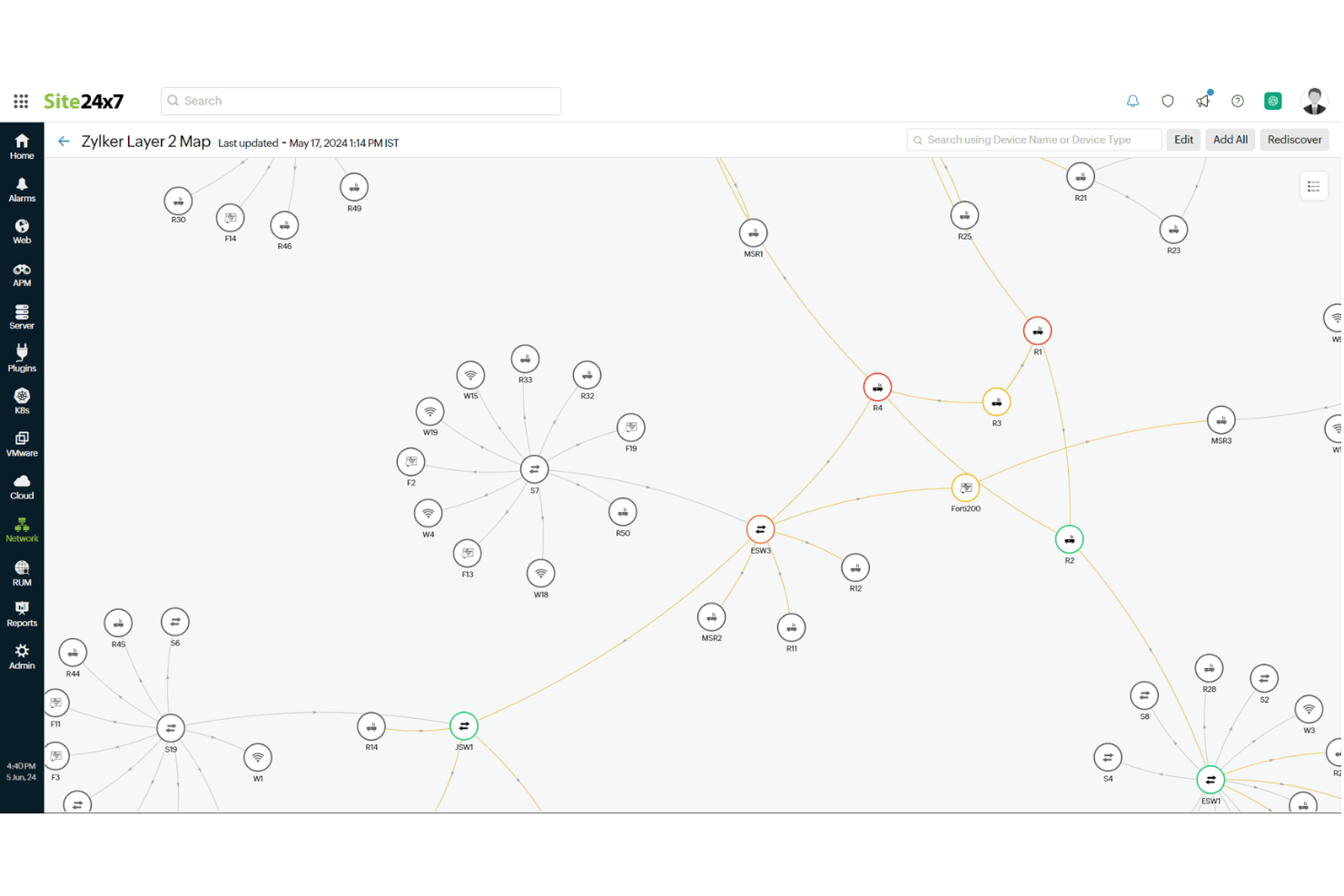
Site24x7 è una soluzione di monitoraggio basata su cloud che ti aiuta a supervisionare l'intera infrastruttura IT, inclusi reti, server, applicazioni e siti web. La sua funzione di mappatura della rete ti consente di visualizzare la disposizione della tua rete, facilitando la gestione dei dispositivi e delle connessioni.
Perché ho scelto Site24x7: Apprezzo il fatto che offra la scoperta automatica della rete. Scansionando la tua rete, identifica tutti i dispositivi collegati e mappa le loro interconnessioni, risparmiandoti il tempo e lo sforzo della mappatura manuale. Questa funzione garantisce che la mappa della rete rimanga aggiornata, riflettendo qualsiasi cambiamento in tempo reale.
Un'altra funzione utile è la possibilità di creare mappe di topologia di rete personalizzate. Puoi disporre dispositivi e interfacce su sfondi predefiniti o personalizzati, offrendo una rappresentazione visiva chiara della struttura della tua rete. Questa configurazione ti aiuta a comprendere come interagiscono i dispositivi e ti permette di individuare rapidamente eventuali problemi.
Funzionalità distintive & integrazioni:
Altre funzionalità includono il supporto per i principali protocolli come ARP, CDP e LLDP, che aiutano a scoprire le interconnessioni fisiche della rete. Inoltre, Site24x7 offre mappe di Livello 3 che forniscono una visualizzazione dettagliata della disposizione logica della rete, compresi router e subnet, migliorando la comprensione delle comunicazioni tra segmenti di rete. Lo strumento permette anche di aggiungere gruppi di monitoraggio, consentendoti di visualizzare lo stato di un cluster di dispositivi di rete in modo logico e comodo sulla mappa.
Le integrazioni includono ServiceNow, PagerDuty, Jira, Microsoft Teams, Slack, Nagios, AWS, Azure, Google Cloud Platform, Docker, Jenkins e Kubernetes.
Pros and Cons
Pros:
- Monitoraggio completo per diversi sistemi
- Dashboard e report personalizzabili
- Offre avvisi in tempo reale su diversi canali
Cons:
- Complessità nella configurazione iniziale per ambienti di grandi dimensioni
- Un sovraccarico di avvisi può essere travolgente per gli utenti
New Product Updates from Site24x7
Site24x7 Adds Compliance Reports and Domain Squatting Detection
Site24x7’s Digital Risk Analyzer now offers domain compliance assessment and squatting detection to help you validate security posture, compare domains, and spot impersonation risks faster. For more information, visit Site24x7’s official site.
 .
.
Ideale per la mappatura automatica della rete
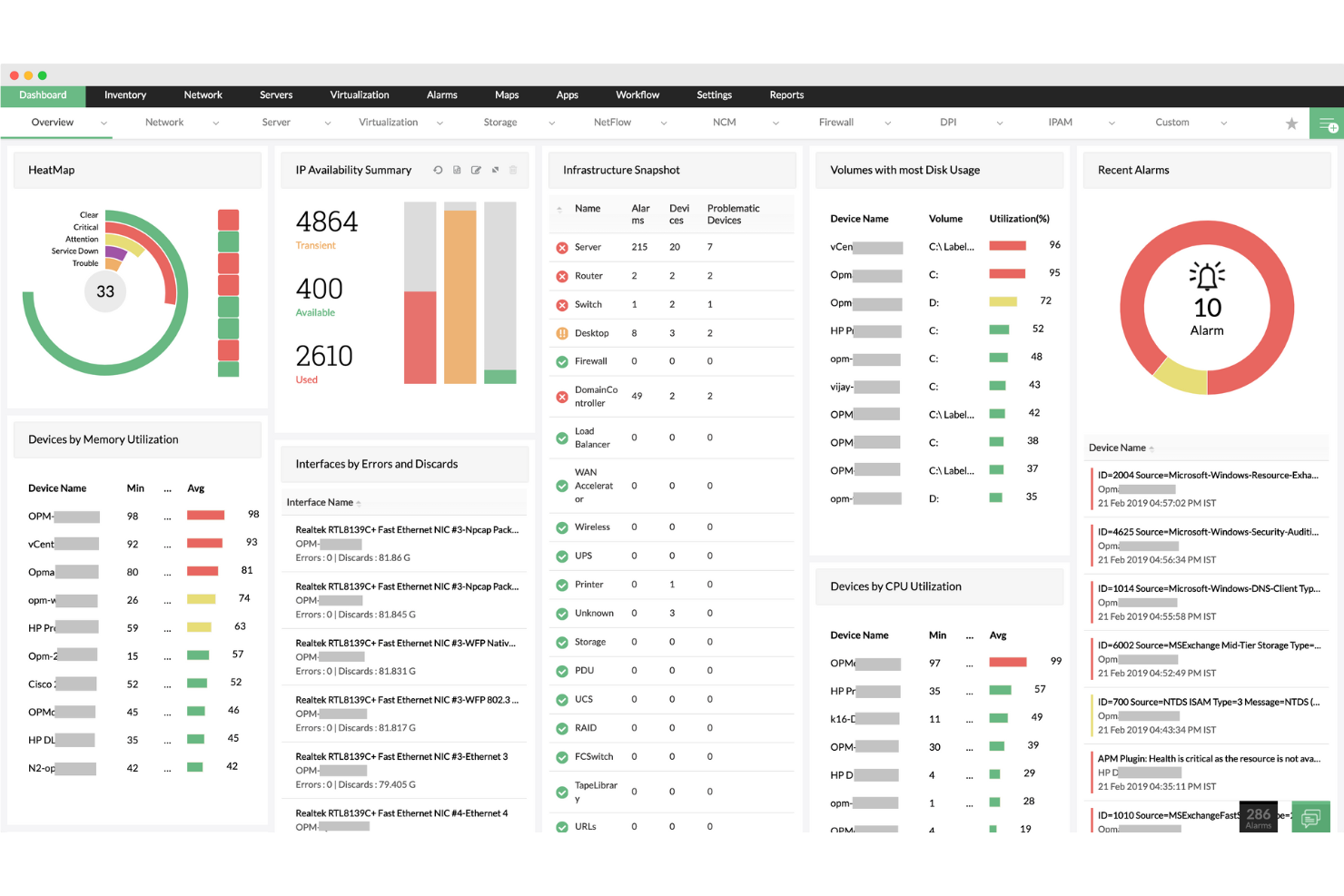
ManageEngine OpManager è una soluzione per il monitoraggio di rete che ti aiuta a supervisionare le prestazioni e la salute della tua rete. Fornisce un monitoraggio in tempo reale di vari dispositivi di rete, inclusi router, switch, server e macchine virtuali.
Perché ho scelto ManageEngine OpManager: OpManager si distingue come un potente software per la creazione di diagrammi di rete grazie alle sue capacità di mappatura automatica della rete. La funzione Layer2 Maps crea rappresentazioni visive della struttura logica della rete, permettendoti di vedere come sono collegati i dispositivi e di identificare rapidamente i guasti. Questa automazione fa risparmiare tempo eliminando la necessità di disegnare manualmente i diagrammi di rete, risultando particolarmente vantaggiosa per reti grandi e complesse.
Inoltre, la funzione di scoperta Layer2 garantisce che i dispositivi di nuova aggiunta siano automaticamente integrati nelle mappe di rete esistenti, mantenendo i diagrammi sempre aggiornati con il minimo sforzo.
Funzionalità e integrazioni principali:
Altre funzionalità includono la possibilità di creare visualizzazioni 3D dei piani, che forniscono una rappresentazione dall’alto delle sale server e dei data center, facilitando la gestione dell’infrastruttura fisica. La visualizzazione 3D dei rack offre una rappresentazione virtuale degli armadi server, consentendo agli amministratori IT di organizzare e monitorare i dispositivi di rete come se fossero fisicamente presenti in un data center.
Le integrazioni includono ADManager Plus, Identity360, ServiceDesk Plus, Log360, Endpoint Central, OpManager, NetFlow Analyzer, CloudSpend, Analytics Plus, AWS Marketplace, Azure Marketplace e AppCreator.
Pros and Cons
Pros:
- Notifiche in tempo reale
- Scalabilità per reti in crescita
- Funzionalità di monitoraggio complete
Cons:
- Potrebbe offrire più opzioni di integrazione
- Configurazione iniziale complessa
New Product Updates from ManageEngine OpManager

ManageEngine OpManager Adds NVIDIA GPU Monitoring
ManageEngine OpManager adds NVIDIA GPU monitoring for Linux servers, dedicated GPU dashboards, adaptive thresholds, and automated incident response to help teams track AI infrastructure performance, health, and resource usage. For more information, visit ManageEngine OpManager’s official site.
 .
.
Visme
Ideale per progetti visivi intuitivi

Visme è uno strumento di design che semplifica il processo di creazione di diagrammi di rete grazie alla sua interfaccia intuitiva drag-and-drop. È una scelta preferita da chi desidera realizzare progetti di rete che siano non solo funzionali ma anche visivamente accattivanti.
Perché ho scelto Visme: Ho selezionato Visme per la sua eccezionale capacità di creare progetti di rete esteticamente piacevoli senza una curva di apprendimento ripida. La sua interfaccia facile da usare, insieme a un'ampia gamma di elementi di design, lo rende unico nel suo genere.
A mio avviso, questo software offre un'esperienza impareggiabile per chi dà priorità alla creatività visiva nei diagrammi di rete, motivo per cui è il migliore per progetti visivi intuitivi.
Caratteristiche principali e integrazioni:
Il set di funzionalità di Visme include un editor drag-and-drop facile da utilizzare, modelli personalizzabili e una vasta libreria di elementi di design. Facilita la creazione di diagrammi di rete visivamente attraenti, permettendo agli utenti di importare le proprie immagini per una personalizzazione aggiuntiva.
In termini di integrazioni, Visme si collega senza sforzo alle più conosciute piattaforme di archiviazione cloud come Google Drive e Dropbox, consentendo un facile accesso e condivisione dei file tra i team.
Pros and Cons
Pros:
- Editor drag-and-drop facile da usare
- Vasta libreria di elementi di design e modelli
- Integrazione comoda con piattaforme di archiviazione cloud
Cons:
- Funzionalità avanzate di progettazione di rete limitate
- Alcuni elementi di design disponibili solo nei piani premium
- Ciclo di fatturazione annuale per fasce di prezzo inferiori

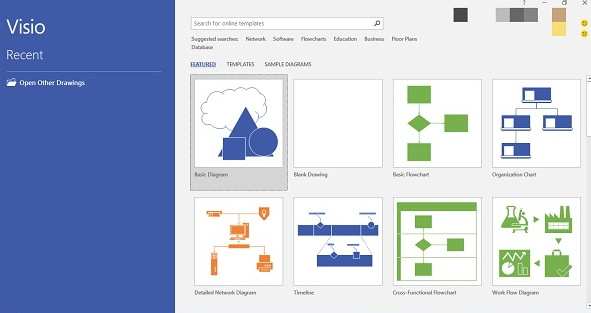
Microsoft Visio è un'applicazione leader per la creazione di diagrammi e grafica vettoriale, pensata per semplificare e comunicare informazioni complesse attraverso i diagrammi. Grazie alle sue potenti funzionalità e al supporto di Microsoft, è evidente come Visio sia fondamentale per le organizzazioni che danno priorità alla scalabilità a livello aziendale.
Perché ho scelto Microsoft Visio: Nella selezione di uno strumento per la creazione di diagrammi adatto alla mia lista, Microsoft Visio è emerso come una scelta evidente per la sua reputazione e le sue funzionalità robuste. Il mio giudizio ha privilegiato la sua comprovata affidabilità, soprattutto considerando la sua scalabilità di livello enterprise.
Credo che Visio si distingua per la capacità di gestire progetti su larga scala e requisiti di diagrammazione complessi, rendendolo la soluzione migliore per le aziende che cercano scalabilità nei loro sforzi di visualizzazione.
Funzionalità principali e integrazioni:
Microsoft Visio offre funzionalità come diagrammi collegati ai dati che permettono di incorporare dati in tempo reale nelle visualizzazioni e la possibilità di creare qualsiasi cosa, da semplici diagrammi di flusso a piani ingegneristici complessi. È progettato per la collaborazione, consentendo a più utenti di lavorare contemporaneamente sullo stesso diagramma.
In termini di integrazioni, Visio si integra perfettamente con gli altri prodotti Microsoft Office e la sua compatibilità con una vasta gamma di formati di file garantisce versatilità nell'importazione ed esportazione dei diagrammi.
Pros and Cons
Pros:
- Ampia gamma di strumenti di diagrammazione adatti a varie complessità
- L'integrazione semplice con la suite Microsoft Office migliora la produttività
- Supporta più utenti che lavorano su un unico diagramma, favorendo la collaborazione
Cons:
- La curva di apprendimento può essere ripida per chi è nuovo ai software di diagrammazione
- La struttura dei prezzi potrebbe essere meno competitiva rispetto alle alternative più recenti e cloud-based
- Forte dipendenza dall'ecosistema Microsoft, che può risultare restrittiva per alcuni utenti

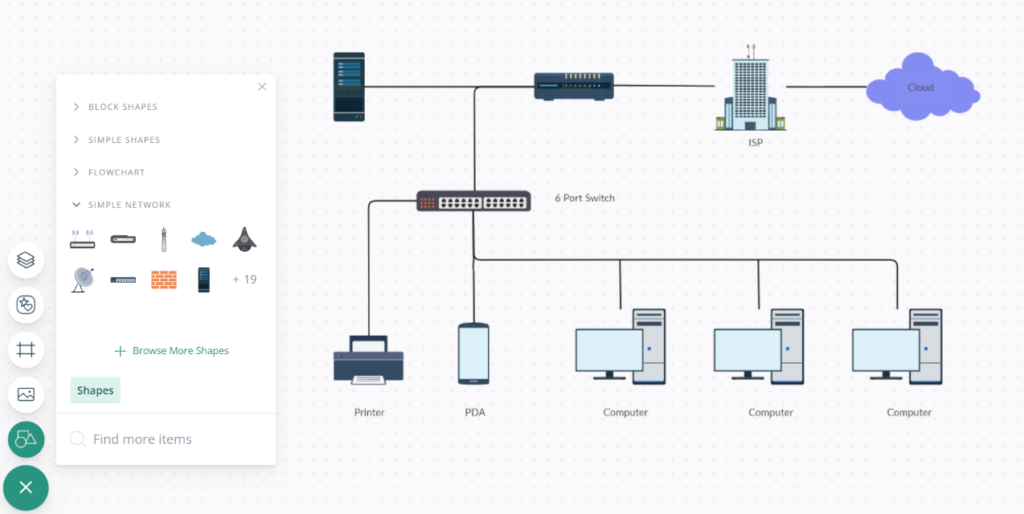
Creately è uno strumento di diagrammazione robusto che rende semplice per i team visualizzare e progettare insieme le proprie infrastrutture di rete. Le sue funzionalità collaborative sono progettate per garantire che più utenti possano lavorare su un unico progetto, ottimizzando gli sforzi del gruppo e rendendolo il migliore per la collaborazione di squadra.
Perché ho scelto il Software di Diagrammi di Rete di Creately: Nel determinare lo strumento giusto per la progettazione di reti, l'enfasi di Creately sulla collaborazione del team è stata un fattore decisivo. Ho scelto Creately per le sue caratteristiche incentrate sul team, difficilmente eguagliate da altri strumenti.
Secondo la mia opinione, per un team che collabora frequentemente su progetti di rete, Creately offre l'ambiente più favorevole, consolidando la sua posizione come il migliore per questa particolare esigenza.
Funzionalità principali e integrazioni:
Le funzionalità di Creately vanno oltre la semplice creazione di diagrammi. Offre collaborazione in tempo reale, permettendo ai membri del team di modificare e commentare simultaneamente sui diagrammi, rendendo il processo di progettazione più interattivo. Il software dispone inoltre di una vasta libreria di modelli e forme, semplificando la fase di progettazione.
Per quanto riguarda le integrazioni, Creately si sincronizza con piattaforme come Google Drive, Slack e Confluence, assicurando così che i team possano incorporare facilmente i loro diagrammi nei flussi di lavoro più ampi senza difficoltà.
Pros and Cons
Pros:
- Funzionalità di collaborazione in tempo reale
- Vasta libreria di modelli
- Integrazione fluida con strumenti di team popolari come Slack
Cons:
- Prezzo leggermente superiore rispetto ad alcuni concorrenti
- Richiede connettività internet per le funzionalità collaborative
- Può risultare complesso per progetti individuali semplici

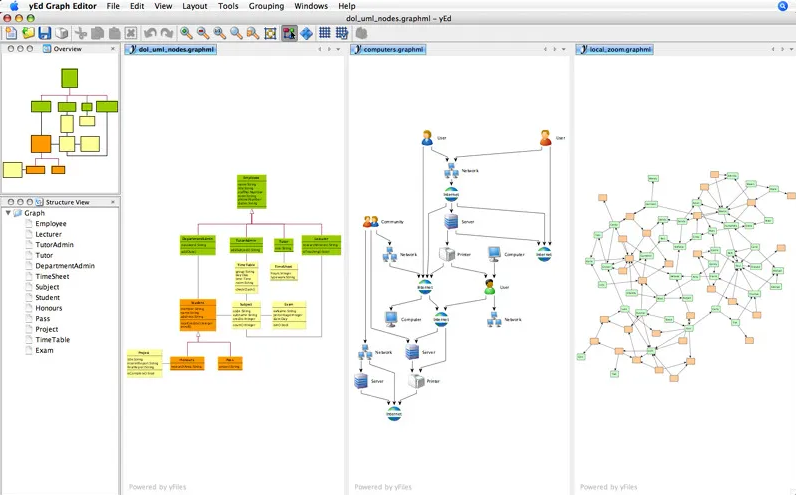
yEd Graph Editor è un potente software pensato per la creazione di diagrammi di alta qualità. Che si tratti di complessi flowchart o di ampi diagrammi di rete, questo strumento può gestire progetti di rete basati su grafi con precisione.
Perché ho scelto yEd Graph Editor: Nella mia ricerca di uno strumento per la creazione di diagrammi, yEd si è distinto come un solido concorrente, soprattutto nella valutazione della capacità di lavorare con reti fondate su grafi. Dopo un confronto tra diverse soluzioni software, la forza specifica di yEd nella gestione di grafi di rete complessi ha attirato la mia attenzione.
In base alla mia valutazione e alle opinioni raccolte, ho determinato che yEd è la scelta migliore per chi ha come esigenza principale la progettazione di reti basate su grafi.
Caratteristiche principali e integrazioni:
yEd offre un algoritmo di layout automatico, che organizza intuitivamente i nodi di qualsiasi diagramma di rete. La sua palette è ricca di elementi diversi per rappresentare i vari componenti di una rete. Pur distinguendosi per le sue funzionalità, vale la pena notare che yEd si integra facilmente con GraphML, un formato file basato su XML per i grafi.
Pros and Cons
Pros:
- Layout automatico per diagrammi complessi
- Ampia palette di elementi per diagrammi
- Supporta GraphML, favorendo un'interoperabilità fluida
Cons:
- Potrebbe risultare complesso per i principianti
- Manca di alcune avanzate funzionalità di collaborazione presenti in altri strumenti
- L'interfaccia può sembrare datata rispetto ad altri strumenti di diagrammazione più recenti

Ideale per visualizzazioni dettagliate
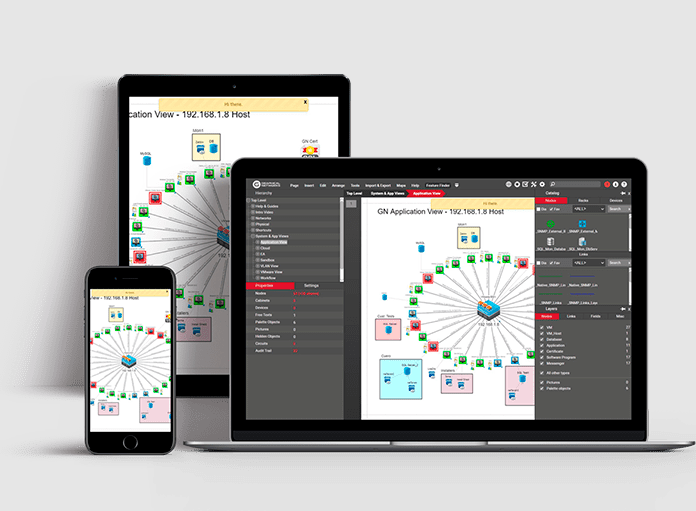
netTerrain è un software completo per la documentazione delle reti, focalizzato sull'offerta di visualizzazioni dettagliate di infrastrutture di rete complesse. La sua precisione nel mostrare le sfumature più intricate garantisce ai responsabili di rete e ai professionisti IT una visione granulare delle loro implementazioni, rispecchiando il suo punto di forza nella visualizzazione dettagliata.
Perché ho scelto netTerrain: Nel processo di selezione di uno strumento per la creazione di diagrammi di rete, netTerrain si è distinto come un'opzione eccezionale, in particolare quando si trattava di individuare strumenti capaci di offrire visualizzazioni dettagliate. Dopo averlo confrontato con diversi concorrenti, sono rimasto colpito dall'attenzione minuziosa ai dettagli e dalla capacità di rappresentare vividamente ogni componente della rete.
È questa profondità nella visualizzazione che mi ha portato a giudicare netTerrain come ineguagliabile per chi dà priorità alla granularità nei diagrammi di rete.
Funzionalità e integrazioni principali:
La funzione di rilevamento automatico della rete di netTerrain è un vero vantaggio, in quanto garantisce rappresentazioni accurate e aggiornate della rete. Il suo approccio gerarchico alla documentazione permette agli utenti di passare da una visione globale della rete al componente più minuscolo.
Per quanto riguarda le integrazioni, netTerrain è progettato per funzionare armoniosamente con una moltitudine di sistemi come dispositivi SNMP, VMware, Amazon Web Services (AWS) e altri ancora, rendendo l'importazione dei dati un'attività relativamente semplice.
Pros and Cons
Pros:
- Il rilevamento automatico della rete garantisce una rappresentazione aggiornata dei dati
- L'approccio di documentazione gerarchica consente un'esplorazione granulare
- Si integra con un'ampia varietà di sistemi, migliorando la raccolta dei dati
Cons:
- Potrebbe presentare una curva di apprendimento per chi è nuovo agli strumenti di documentazione di rete
- Nonostante sia dettagliata, l'interfaccia potrebbe risultare densa per alcuni utenti
- Le opzioni di personalizzazione potrebbero essere limitate rispetto ad alcuni concorrenti


Cacoo è uno strumento di diagrammazione basato su web che consente agli utenti di creare, collaborare e condividere i propri diagrammi in tempo reale. Grazie alla sua natura cloud-centrica, eccelle nel facilitare la progettazione di reti senza la necessità di installare alcun software, rendendolo ideale per chi preferisce flussi di lavoro basati sul cloud.
Perché ho scelto Cacoo: Tra la varietà di strumenti di diagrammazione che ho esaminato, Cacoo ha attirato la mia attenzione per il suo costante impegno nelle funzionalità basate su cloud. La possibilità di progettare, collaborare e condividere senza essere vincolati a un dispositivo o a una posizione specifica è stata particolarmente rilevante.
Questa natura nativa sul cloud di Cacoo mi ha portato a stabilire che sia la scelta ottimale per professionisti o team che danno priorità ad accessibilità e flessibilità nei processi di progettazione di reti.
Funzionalità e integrazioni di rilievo:
Cacoo offre la modifica collaborativa in tempo reale, permettendo ai team di co-progettare da diverse sedi in modo sincrono. Il software offre inoltre una vasta gamma di modelli, assicurando che gli utenti possano avviare i propri progetti senza grandi difficoltà.
In termini di integrazione, Cacoo si allinea facilmente con piattaforme come Google Drive, Dropbox e Confluence, garantendo che i diagrammi possano essere facilmente archiviati e condivisi attraverso gli strumenti più diffusi.
Pros and Cons
Pros:
- Collaborazione in tempo reale che facilita il contributo simultaneo del team
- Libreria di modelli ricca che risponde a esigenze di progettazione diversificate
- Si integra con popolari piattaforme di archiviazione e documentazione
Cons:
- Manca di alcune funzionalità avanzate presenti in strumenti specializzati per la progettazione di reti
- L'interfaccia può risultare complessa per i principianti
- Dipendenza dalla connessione internet, data la sua natura cloud

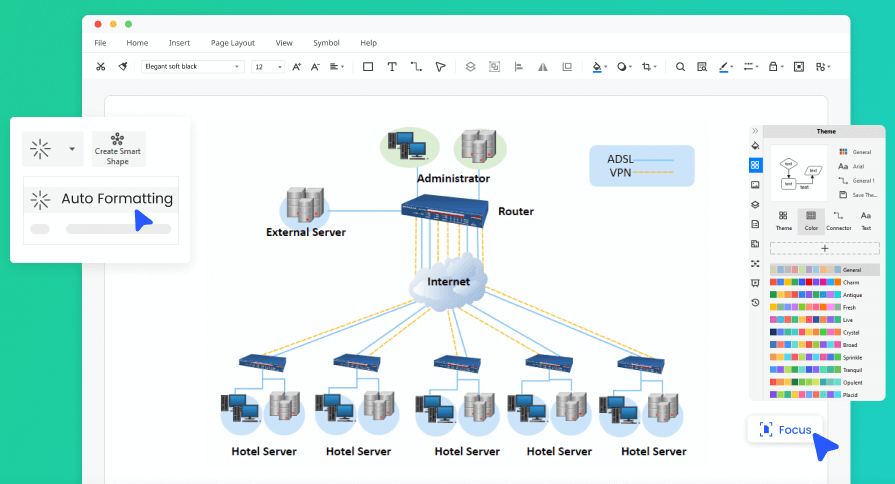
EdrawMax è uno strumento di diagrammazione versatile, progettato per essere compatibile con diversi sistemi operativi, da Windows a macOS fino a Linux. La sua funzionalità multipiattaforma garantisce che gli utenti possano mantenere flussi di lavoro coerenti indipendentemente dal dispositivo o dal sistema operativo utilizzato, rendendolo una scelta interessante per team o singoli che usano sistemi diversificati.
Perché ho scelto EdrawMax: Nella mia ricerca del software di diagrammazione più adattabile, la dedizione di EdrawMax al supporto multipiattaforma è emersa chiaramente. L'ho giudicato superiore a molti altri per il suo impegno nel garantire agli utenti un'esperienza senza intoppi durante la transizione tra sistemi operativi diversi.
Questa enfasi su compatibilità e flessibilità è il motivo per cui credo che EdrawMax sia impareggiabile per chi cerca funzionalità multipiattaforma in uno strumento di diagrammazione.
Funzionalità principali e integrazioni:
EdrawMax offre una suite completa di opzioni di diagrammazione, dai flowchart ai diagrammi di rete, per soddisfare diverse esigenze. La sua interfaccia intuitiva garantisce una navigazione semplice e processi di progettazione rapidi. Per quanto riguarda le integrazioni, EdrawMax è compatibile con numerosi formati di file, consentendo agli utenti di importare ed esportare diagrammi secondo necessità, allineandosi con strumenti come MS Office, PDF e altri.
Pros and Cons
Pros:
- I numerosi tipi di diagrammi soddisfano le esigenze di utenti diversi
- Il supporto multipiattaforma promuove la coerenza tra i dispositivi
- Le integrazioni di formati di file facilitano importazioni ed esportazioni facili
Cons:
- Potrebbe essere troppo ricco di funzionalità per chi cerca solo la diagrammazione di base
- Curva di apprendimento per alcune delle funzionalità avanzate
- La fatturazione annuale potrebbe non piacere a chi cerca piani mensili

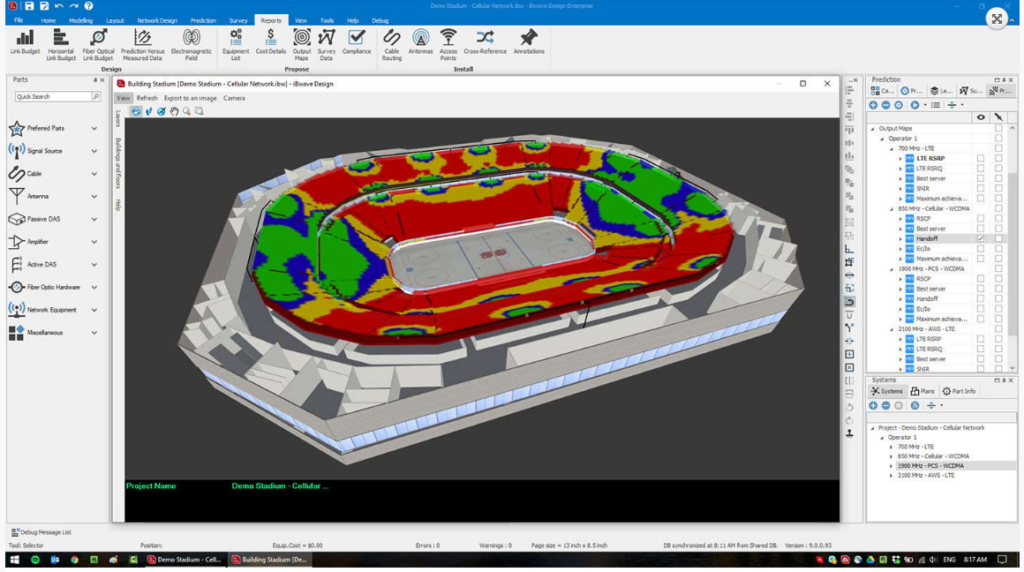
iBwave è uno strumento specializzato progettato per pianificare e migliorare le infrastrutture di rete wireless. Si rivolge specificamente alle particolarità e complessità delle reti wireless, rendendolo una scelta naturale per i professionisti che si concentrano su questo settore.
Perché ho scelto iBwave: Confrontando diversi strumenti, la focalizzazione specifica di iBwave sulla progettazione di reti wireless è stata evidente. Ho selezionato questo software perché le sue funzionalità e capacità affrontano in modo mirato le sfide e le esigenze delle infrastrutture wireless.
Secondo la mia valutazione, iBwave si distingue come leader di settore in questo ambito e risulta chiaramente il migliore per chi si occupa di progettazione di reti wireless.
Funzionalità e integrazioni di spicco:
Il set di funzionalità di iBwave è arricchito da strumenti come la modellazione 3D, funzioni di progettazione automatizzata e algoritmi di previsione completi che forniscono analisi accurate sulla copertura wireless. Inoltre offre capacità come il supporto e l'integrazione multi-tecnologia, assicurando che gli utenti rimangano aggiornati nel settore wireless in rapida evoluzione.
Per quanto riguarda le integrazioni, iBwave si collega senza difficoltà con strumenti di pianificazione RF e altre soluzioni software di terze parti, garantendo una progettazione e una pianificazione wireless coerente.
Pros and Cons
Pros:
- Focalizzazione specifica sulla progettazione di reti wireless
- Algoritmi di previsione completi per analisi accurate della copertura
- Integrazione fluida con strumenti di pianificazione RF
Cons:
- Potrebbe essere troppo specializzato per la pianificazione di reti generiche
- Curva di apprendimento per chi è nuovo nella progettazione wireless
- Mancanza di trasparenza nella struttura dei prezzi
Altri Software per la Progettazione di Reti
Ecco alcune ulteriori opzioni di software per la progettazione di reti che non sono entrate nella mia shortlist, ma che meritano comunque una valutazione:
- NetBrain Network Mapping Software
Ideale per la mappatura dinamica della rete
- Lucidchart
Ideale per opzioni di template diversificate
- Siemens Network design software
Ideale per una pianificazione avanzata dei sistemi elettrici


Come valuto i software per la progettazione di reti
Scompongo la mia valutazione in due livelli: le funzionalità di base di cui ogni ingegnere di rete ha bisogno—come la creazione di diagrammi di topologia e le librerie di dispositivi—e gli elementi che differenziano davvero gli strumenti.
Funzionalità principali (Requisiti fondamentali per questa lista)
Quando seleziono gli strumenti per la mia lista, valuto ciascuno su una scala da 0 (non offre la funzionalità) a 5 (eccelle in quest'area) per ogni funzionalità principale elencata di seguito. Poi calcolo il punteggio totale dello strumento in percentuale. Ogni strumento deve raggiungere un punteggio minimo totale del 65% per essere preso in considerazione.
- Creazione di diagrammi di topologia di rete: Valuto la qualità del design drag-and-drop—puoi mappare rapidamente una rete multi-sottorete con viste logiche e fisiche senza scontrarti con l'interfaccia?
- Librerie di dispositivi e fornitori: È importante disporre di icone accurate e predefinite per dispositivi di Cisco, Juniper, Fortinet e altri, quindi verifico la profondità della libreria e la frequenza di aggiornamento delle forme disponibili.
- Simulazione e modellazione della rete: Cerco la capacità di eseguire scenari "what-if", come la simulazione di un failover di uno switch di core o la verifica di un nuovo piano di segmentazione VLAN prima di intervenire in produzione.
- Auto-scoperta e mappatura: Gli strumenti che possono scansionare il tuo ambiente tramite SNMP o CDP e generare automaticamente una mappa topologica live fanno risparmiare ore di documentazione manuale.
- Documentazione ed esportazione: Verifico se è possibile esportare i progetti finalizzati in formati come PDF, Visio o PNG per la consegna agli auditor, ai fornitori o alla leadership durante le approvazioni delle modifiche.
- Collaborazione multiutente: Gli spazi di lavoro condivisi per la progettazione con cronologia delle versioni e permessi basati sui ruoli sono importanti, soprattutto per i team distribuiti che co-sviluppano un piano di migrazione di un data center.
Una volta ottenuto un elenco di strumenti che soddisfano questi criteri, considero ciò che distingue ogni piattaforma dalle altre.
Fattori differenzianti (Cosa distingue i fornitori)
Ecco come confronto e metto a confronto i diversi fornitori:
Funzionalità distintive
Il supporto per l'architettura cloud è un importante elemento di differenziazione. Cerco strumenti con icone native per AWS, Azure e GCP e architetture di riferimento, così puoi progettare ambienti ibridi senza dover importare forme personalizzate. Anche la generazione di configurazioni è una funzionalità che apprezzo. Uno strumento che converte il tuo diagramma in configurazioni CLI o YAML pronte per il deploy colma il divario tra la pianificazione e l'implementazione. Nei progetti di data center, il diagramma del rack con mappatura dei cavi a livello di porta aiuta i team a pianificare layout fisici insieme ai progetti logici.
Oltre le funzionalità
Le integrazioni qui contano molto. Controllo se uno strumento si collega a piattaforme di monitoraggio come SolarWinds o Datadog e a sistemi ITSM come ServiceNow, poiché l'inserimento di dati live nei diagrammi aiuta a mantenerli precisi dopo la messa in produzione. Anche il modello di distribuzione è un aspetto da considerare—alcuni team in settori regolamentati necessitano di installazioni on-premise invece che SaaS. Valuto inoltre la scalabilità, in particolare come uno strumento gestisce reti aziendali con migliaia di nodi su più siti senza rallentamenti durante le sessioni di modifica simultanee.
Come Scegliere un Software per la Progettazione di Reti
È facile perdersi tra lunghi elenchi di funzionalità e strutture di prezzo complesse. Ecco quindi una checklist di fattori da considerare durante il tuo processo di selezione del software, per aiutarti a mantenere la concentrazione su ciò che conta davvero per le tue esigenze specifiche:
| Fattore | Cosa valutare |
| Scalabilità | Il software può crescere con il tuo team? Cerca soluzioni che supportino reti più ampie man mano che crescono le tue esigenze. Considera soluzioni pensate per il futuro che non ti pongano limiti. |
| Integrazioni | Si collega agli strumenti che già utilizzi? Verifica la compatibilità con altro software che usi per evitare interruzioni nel tuo workflow. |
| Personalizzazione | Puoi adattarlo ai tuoi flussi di lavoro? Preferisci software che permettano aggiustamenti per soddisfare esigenze progettuali specifiche. |
| Facilità d’uso | L’interfaccia è intuitiva? Assicurati che il tuo team possa adattarsi rapidamente senza lunghe sessioni formative, risparmiando tempo e riducendo le frustrazioni. |
| Implementazione e onboarding | Quanto è semplice la fase di attivazione? Valuta tempo e risorse necessari per rendere operativo il software e i supporti disponibili per l’onboarding. |
| Costo | Rientra nel tuo budget? Confronta le strutture di prezzo, considerando sia i costi iniziali che quelli ricorrenti, per trovare una soluzione valida senza sprechi. |
| Sicurezza dei dati | Protegge adeguatamente i tuoi dati? Assicurati che il software sia conforme agli standard di sicurezza per mantenere al sicuro le informazioni di rete da eventuali violazioni. |
| Disponibilità del supporto | Ricevi assistenza quando serve? Verifica orari, tempi di risposta e canali di supporto del fornitore per assicurarti di avere aiuto rapidamente quando serve. |
Che cos'è il software di progettazione di reti?
Il software di progettazione di reti è uno strumento che aiuta a progettare e visualizzare le strutture di rete. I professionisti IT e gli ingegneri di rete utilizzano spesso questi strumenti per pianificare e gestire in modo efficiente i sistemi di rete. Funzionalità come la mappatura della rete, la progettazione della topologia e la simulazione supportano una pianificazione e una risoluzione dei problemi efficaci. Questi strumenti offrono un valore significativo migliorando l'efficienza della rete e riducendo i rischi operativi.
Caratteristiche
Quando scegli un software di progettazione di reti, presta attenzione alle seguenti caratteristiche chiave:
- Strumenti di mappatura della rete: Visualizza le configurazioni di rete per aiutare a identificare le connessioni e le relazioni tra i dispositivi.
- Progettazione della topologia: Fornisce strumenti per progettare e modificare la topologia della rete per una pianificazione e una gestione efficienti.
- Simulazione e testing: Permette di testare virtualmente i progetti di rete, riducendo il rischio di errori prima dell'implementazione.
- Analisi delle prestazioni: Monitora e analizza le prestazioni della rete per identificare colli di bottiglia e ottimizzare l'efficienza.
- Valutazione della sicurezza: Valuta la sicurezza della rete per proteggere da possibili minacce e vulnerabilità.
- Ottimizzazione guidata dall'IA: Utilizza l'intelligenza artificiale per suggerire miglioramenti e ottimizzare le configurazioni di rete.
- Collaborazione in tempo reale: Permette ai membri del team di lavorare simultaneamente sui progetti di rete, migliorando la produttività.
- Integrazione cloud: Si integra con i servizi cloud per estendere le capacità di rete e offrire accesso flessibile.
- Modelli personalizzabili: Fornisce modelli pre-impostati che possono essere adattati a specifici bisogni di progettazione di rete.
- Documentazione automatica: Genera in automatico la documentazione per mantenere i registri aggiornati e ridurre il lavoro manuale.
Vantaggi
L'implementazione di un software di progettazione di reti porta diversi vantaggi al tuo team e alla tua azienda. Ecco alcuni benefici di cui potrai usufruire:
- Efficienza migliorata: La documentazione automatica e l'ottimizzazione guidata dall'IA aiutano a risparmiare tempo e ridurre il lavoro manuale.
- Pianificazione avanzata: La mappatura della rete e la progettazione della topologia offrono visualizzazioni chiare per supportare una pianificazione strategica.
- Riduzione dei rischi: Simulazione e testing consentono di individuare potenziali problemi prima del rilascio, minimizzando gli errori.
- Migliore collaborazione: Le funzioni di collaborazione in tempo reale permettono ai team di lavorare insieme in modo fluido, aumentando la produttività.
- Sicurezza incrementata: Gli strumenti di valutazione della sicurezza aiutano a identificare le vulnerabilità, garantendo la protezione della rete.
- Scalabilità: L'integrazione cloud garantisce che la tua rete possa crescere insieme all'espansione dell'azienda senza interruzioni rilevanti.
- Risparmio sui costi: Gli strumenti di analisi delle prestazioni aiutano a individuare inefficienze, consentendo miglioramenti della rete a costi ridotti.
Costi e prezzi
Scegliere un software di progettazione di reti richiede la comprensione dei vari modelli di prezzo e delle tipologie di piani disponibili. I costi variano in base alle funzionalità, alla dimensione del team, agli add-on e altro ancora. La tabella seguente riassume i piani più comuni, i prezzi medi e le caratteristiche tipiche incluse nelle soluzioni di progettazione di reti:
Tabella comparativa dei piani per i software di progettazione di reti
| Tipo di piano | Prezzo medio | Caratteristiche comuni |
|---|---|---|
| Piano gratuito | $0 | Mappatura di rete di base, progettazione di topologie limitata e supporto dalla community. |
| Piano personale | $10-$30/user/month | Mappatura di rete, simulazione e testing, e analisi delle prestazioni di base. |
| Piano business | $50-$100/user/month | Progettazione avanzata della topologia, collaborazione in tempo reale e valutazione della sicurezza. |
| Piano enterprise | $150-$300/user/month | Modelli personalizzabili, ottimizzazione guidata dall'IA e supporto clienti dedicato. |
Domande frequenti sul software di progettazione di rete
Ecco alcune risposte alle domande più comuni sul software di progettazione di rete:
Quali sono le sfide della progettazione di rete?
La progettazione di rete presenta sfide come garantire la sicurezza, gestire l’espansione delle reti e configurare correttamente i dispositivi. Occorre anche considerare regolamenti e vincoli di budget. Affrontare questi aspetti richiede una pianificazione accurata e gli strumenti giusti per mantenere la rete sicura ed efficiente.
Quali opzioni di supporto sono disponibili per il software di progettazione di rete?
Le opzioni di supporto variano ma spesso includono risorse online, chat dal vivo e assistenza via email. Alcuni fornitori offrono account manager dedicati o piani di supporto premium. Verifica la disponibilità di materiali formativi, come tutorial e webinar, per aiutare il tuo team a iniziare.
Il software di progettazione di rete può integrarsi con i sistemi esistenti?
Sì, molti strumenti di progettazione di rete offrono integrazioni con sistemi e software esistenti. Controlla la compatibilità con i tuoi strumenti attuali per garantire un flusso di dati senza problemi. Le integrazioni possono migliorare la funzionalità e offrire una visione completa della rete.
Cosa succede dopo:
Se sei alla ricerca di un software di progettazione di rete, contatta un consulente SoftwareSelect per ricevere raccomandazioni gratuite.
Compila un modulo e fai una breve chiacchierata in cui analizzeranno nel dettaglio le tue esigenze. Riceverai poi una lista ristretta di software da valutare. Ti supporteranno anche durante tutto il processo di acquisto, comprese le negoziazioni sul prezzo.