

I 10 migliori software DCIM del 2026

10 Elenco dei migliori software DCIM


Orientarsi nel mondo dei software per la gestione dell'infrastruttura dei centri dati, o DCIM, può essere complesso. Questo software gestionale, disponibile sia in modalità cloud sia on-premise, supervisiona in modo efficiente il ciclo di vita delle risorse IT, ottimizza il consumo energetico e semplifica la gestione della rete.
I fornitori offrono moduli dedicati all'efficienza energetica, alla gestione dei cavi, al monitoraggio dell'alimentazione e alle caratteristiche delle PDU, ovvero le unità di distribuzione dell'alimentazione. Con il DCIM puoi ridurre le interruzioni, gestire efficacemente le unità di distribuzione dell'alimentazione e migliorare la disponibilità. Se il tracciamento dei cavi o la valutazione dell'efficienza energetica ti hanno mai creato difficoltà, il DCIM è la soluzione che fa per te.
Perché fidarsi dei nostri consigli sui software
Il nostro team testa e recensisce software dal 2012. In quanto leader tecnologici noi stessi, sappiamo quanto sia difficile — e importante — scegliere il software giusto.
Per questa guida, abbiamo valutato gli strumenti attraverso test praticie ricerche indipendenti, assegnando un punteggio agli strumenti in base ai nostri criteri di selezione.
Le nostre recensioni riflettono il nostro giudizio editoriale umano, non un discorso di vendita.
Revisori esperti:
Riepilogo dei migliori software DCIM
Questa tabella comparativa riassume i dettagli dei prezzi delle mie migliori selezioni di software DCIM per aiutarti a trovare quello più adatto al tuo budget e alle esigenze della tua azienda.
| Tool | Best For | Trial Info | Price | ||
|---|---|---|---|---|---|
| 1 | Ideale per una pianificazione dettagliata della capacità | Prova gratuita disponibile | Da $131.50/utente/mese (fatturato annualmente) | Website | |
| 2 | Ideale per auto-scoperta e monitoraggio dei dispositivi | No | A partire da $15/utente/mese (fatturazione annuale) + quota base di $49 al mese. | Website | |
| 3 | Ideale per la gestione completa degli asset | No | Prezzo su richiesta | Website | |
| 4 | Ideale per il monitoraggio energetico in tempo reale | No | Prezzo su richiesta | Website | |
| 5 | Ideale per l'ottimizzazione di raffreddamento e alimentazione | No | Prezzo su richiesta | Website | |
| 6 | Ideale per il monitoraggio ambientale granulare | No | Prezzi su richiesta | Website | |
| 7 | Ideale per l'adattabilità open-source | Not available | Gratuito con possibilità di servizi di supporto professionale a costi aggiuntivi. | Website | |
| 8 | Ideale per rappresentazioni visive personalizzabili | Not available | Prezzo su richiesta | Website | |
| 9 | Ideale per la modellazione e la visualizzazione degli asset | Not available | Prezzo su richiesta | Website | |
| 10 | Ideale per l'analisi e gli insight sull'infrastruttura | No | Da $20/utente/mese (fatturato annualmente) + $70 di tariffa base mensile. | Website |
Recensioni dei migliori software DCIM
Di seguito trovi i miei riepiloghi dettagliati dei migliori software DCIM entrati nella mia selezione. Le mie recensioni offrono un’analisi approfondita delle funzionalità principali, dei vantaggi e degli svantaggi, delle integrazioni e dei casi d’uso ideali di ogni strumento, per aiutarti a trovare quello più adatto alle tue esigenze.

Ideale per una pianificazione dettagliata della capacità
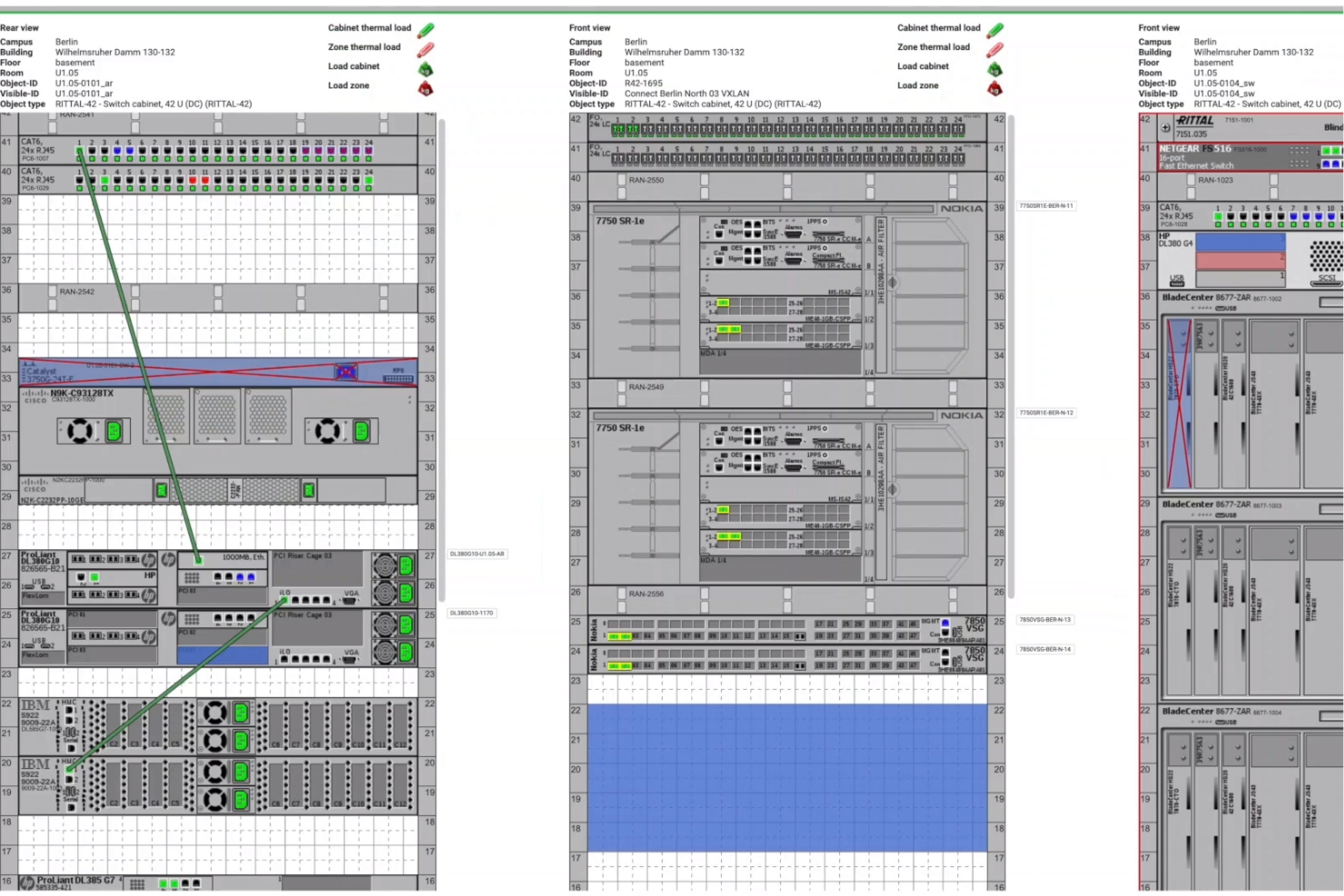
FNT Command è uno strumento di gestione dell'infrastruttura dei data center (DCIM) progettato per offrirti una visione chiara e in tempo reale di tutto l'ambiente del tuo data center. Ti aiuta a gestire asset fisici e virtuali, monitorare energia e raffreddamento e pianificare la capacità, tutto da un'unica piattaforma unificata.
Perché ho scelto FNT Command: Ho scelto FNT Command perché offre un controllo approfondito sulla capacità, sul cablaggio e sulla pianificazione ambientale. Puoi monitorare l'uso di energia, raffreddamento e spazio a pavimento e confrontarlo con i valori pianificati per evitare il sovradimensionamento. Inoltre, gli strumenti di gestione dei cavi e delle patch ti permettono di visualizzare catene di segnale complete e l'interno dei rack, riducendo i tempi di inattività e migliorando la pianificazione. Inoltre, il suo database di tracciamento delle modifiche mantiene una cronologia completa di tutte le modifiche all'infrastruttura.
Funzionalità e integrazioni di spicco:
Altre funzionalità includono la gestione del ciclo di vita e degli oggetti, che registra ogni modifica ai componenti nel tempo, permettendoti di tracciare le modifiche e valutare i dati per uno o più elementi di configurazione. La funzione di gestione dell'energia ti aiuta a pianificare e gestire i sistemi di distribuzione dell'energia, inclusi gli interruttori e il loro stato di connessione, garantendo trasparenza nella rete di alimentazione elettrica. FNT Command si integra con sistemi come Microsoft SCCM, Infosim StableNet e VMware vCenter tramite il suo IntegrationCenter, che utilizza API, strumenti ETL e gestione degli eventi per sincronizzare i dati.
Pros and Cons
Pros:
- Strumenti di visualizzazione completi, inclusi viste 2D e 3D
- Gestione dettagliata della capacità che consente l'ottimizzazione delle risorse
- Robuste funzionalità di gestione di cavi e patch
Cons:
- Le numerose funzionalità possono comportare una curva di apprendimento
- L'integrazione con sistemi esistenti può essere complessa
Device42
Ideale per auto-scoperta e monitoraggio dei dispositivi
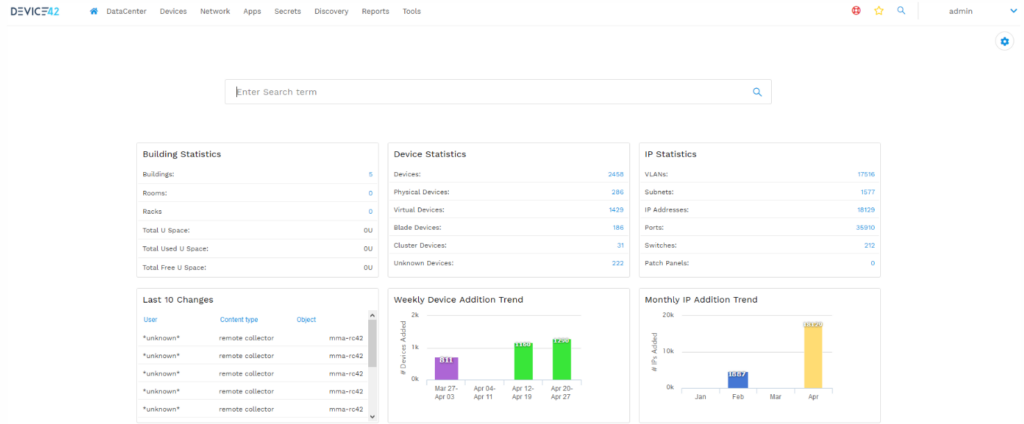
Nell'attuale contesto IT complesso, tenere traccia manualmente delle risorse può risultare scoraggiante. Device42 offre una soluzione unica progettata per automatizzare la scoperta dei dispositivi e monitorare ogni componente hardware nella tua infrastruttura.
Perché ho scelto Device42: Ho selezionato Device42 dopo un'attenta valutazione delle sue funzionalità rispetto ad altri strumenti. Tra la miriade di soluzioni DCIM, le capacità di auto-scoperta di Device42 lo distinguono dagli altri. Lo strumento semplifica il compito complesso di tracciare ogni dispositivo, diventando indispensabile per le organizzazioni con infrastrutture estese. Proprio per questo credo che Device42 sia la scelta migliore per chi dà priorità all'auto-scoperta e al monitoraggio dei dispositivi.
Caratteristiche e integrazioni distintive:
Device42 vanta un potente motore di auto-scoperta che esegue scansioni approfondite dell'infrastruttura, fornendo dettagli su ogni dispositivo rilevato. Inoltre, il suo CMDB centralizzato (Database di Gestione delle Configurazioni) offre una visione olistica dell'ambiente IT. Per quanto riguarda le integrazioni, Device42 si interfaccia perfettamente con strumenti come JIRA, ServiceNow e Confluence, garantendo un flusso di dati tra i tuoi strumenti ITSM.
Pros and Cons
Pros:
- Robuste capacità di auto-scoperta
- Gestione dettagliata delle risorse
- Integrazione con i più diffusi strumenti ITSM
Cons:
- Curva di apprendimento più ripida per i nuovi utenti
- Costo elevato per realtà di piccole dimensioni
- Richiede risorse dedicate per ottenere il massimo beneficio

Ideale per la gestione completa degli asset
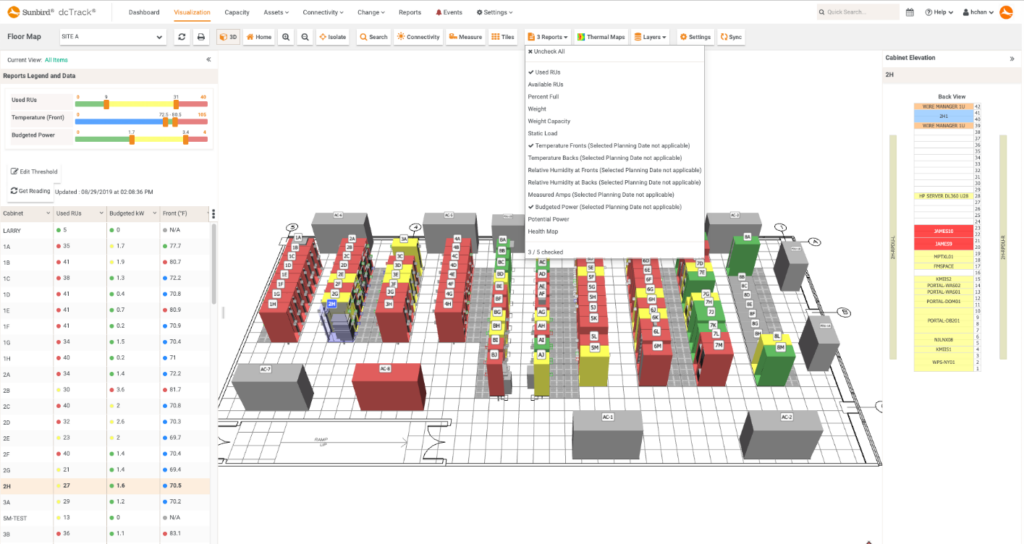
Nell'intricato mondo della gestione dei data center, strumenti come Sunbird DCIM emergono come un punto di riferimento per chi cerca una supervisione completa degli asset. È una soluzione realizzata con precisione, in linea con la missione di offrire una visione olistica e una gestione di ogni asset all'interno di un data center.
Perché ho scelto Sunbird DCIM: Durante l'esplorazione di numerose opzioni DCIM, Sunbird DCIM è emerso costantemente tra i primi posti. L'ho selezionato dopo aver valutato le sue funzionalità complete di gestione degli asset rispetto ad altre. Le mie valutazioni e comparazioni approfondite hanno rafforzato la convinzione che Sunbird DCIM sia davvero la scelta migliore per chi punta a una gestione esaustiva degli asset.
Caratteristiche distintive & integrazioni:
Sunbird DCIM va oltre il semplice tracciamento degli asset. Offre mappe dinamiche dei piani per una chiara visualizzazione della disposizione degli asset e fornisce analisi approfondite sull'utilizzo degli spazi. Dal lato delle integrazioni, si interfaccia con i principali sistemi IT, aumentando la sua utilità nella gestione e manutenzione degli asset su diverse piattaforme.
Pros and Cons
Pros:
- Mappe dinamiche dei piani per una visualizzazione chiara degli asset
- Analisi approfondite sull'utilizzo degli spazi
- Solide integrazioni con i principali sistemi IT
Cons:
- Potrebbe risultare difficoltoso per i nuovi utenti
- Potrebbe trarre beneficio da opzioni di prezzo più scalabili
- Alcuni utenti potrebbero trovare complessa la procedura di configurazione

Ideale per il monitoraggio energetico in tempo reale
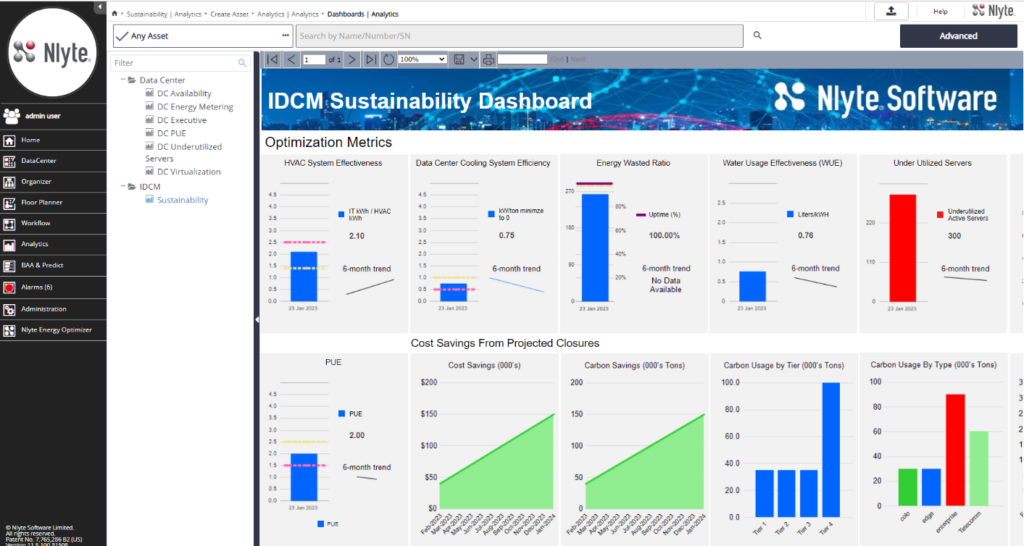
I data center sono molto energivori e gestire in modo efficiente questo consumo è fondamentale. Nlyte DCIM si afferma come leader quando si parla di monitoraggio approfondito dell’energia in tempo reale, garantendo che i data center funzionino non solo in modo ottimale, ma anche rispettoso dell’ambiente.
Perché ho scelto Nlyte DCIM: Nella mia ricerca degli strumenti più efficienti, Nlyte DCIM si è distinto notevolmente. Attraverso un confronto approfondito, ho determinato che le sue capacità di monitoraggio energetico sono senza pari. Il mio giudizio mi ha portato a credere che, per chi dà priorità agli insight energetici in tempo reale, Nlyte sia la soluzione migliore.
Funzionalità distintive e integrazioni:
Nlyte DCIM è progettato con un ottimizzatore termico avanzato, che offre una visione chiara delle aree calde e dell’efficienza del raffreddamento. Vanta inoltre una funzione di analisi predittiva della potenza, anticipando bisogni energetici e possibili risparmi. Sul fronte delle integrazioni, Nlyte si integra ottimamente con i sistemi ITSM, permettendo un flusso di lavoro più fluido tra IT e gestione delle strutture.
Pros and Cons
Pros:
- Strumenti avanzati di ottimizzazione termica
- Analisi predittiva della potenza per garantire il futuro
- Integrazione fluida con i sistemi ITSM
Cons:
- Potrebbe essere eccessivo per operazioni di dimensioni ridotte
- L’interfaccia può apparire complessa ad alcuni utenti
- Mancano alcune funzioni di personalizzazione che si trovano nei concorrenti

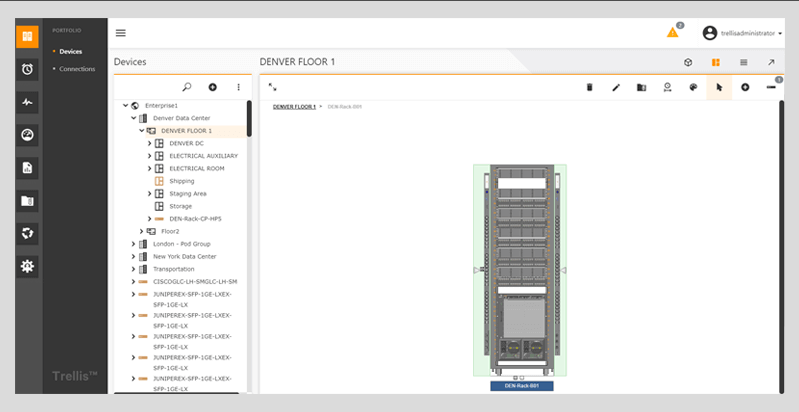
Vertiv Trellis è una soluzione di gestione dell'infrastruttura del data center pensata per monitorare e gestire i sistemi di raffreddamento e alimentazione all'interno degli ambienti IT. Il suo principale punto di forza è l'ottimizzazione di questi due aspetti critici, che garantisce il funzionamento efficiente dei data center e la riduzione dei costi operativi, giustificando così la sua posizione come migliore soluzione per l'ottimizzazione di raffreddamento e alimentazione.
Perché ho scelto Vertiv Trellis: Nel mio percorso di selezione degli strumenti per questa lista, Vertiv Trellis si è distinto grazie alla sua attenzione meticolosa verso i componenti di raffreddamento e alimentazione. Secondo la mia opinione, e dopo averlo confrontato con altri strumenti, è diventato evidente che Vertiv Trellis offre soluzioni uniche che rispondono alle sfide specifiche della gestione e dell'ottimizzazione dei sistemi di potenza e raffreddamento. Questa convinzione è in linea con la reputazione di essere la scelta migliore quando l'ottimizzazione di alimentazione e raffreddamento è fondamentale.
Funzionalità distintive & integrazioni:
Vertiv Trellis è dotato di monitoraggio in tempo reale dell'infrastruttura, assicurando che i sistemi di raffreddamento e alimentazione funzionino sempre ai massimi livelli. Inoltre, le sue analisi predittive possono anticipare potenziali problematiche, permettendo l'adozione di misure preventive. La piattaforma si integra anche con la maggior parte dei principali Building Management Systems (BMS) e strumenti di IT Service Management (ITSM), consolidando la sua presenza all'interno di un più ampio ecosistema IT.
Pros and Cons
Pros:
- Monitoraggio in tempo reale di sistemi di raffreddamento e alimentazione
- Analisi predittive per prevenire le criticità
- Integrazione fluida con strumenti BMS e ITSM
Cons:
- La curva di apprendimento può essere più ripida per i nuovi utenti
- La trasparenza dei prezzi potrebbe essere migliorata
- La personalizzazione può richiedere servizi professionali

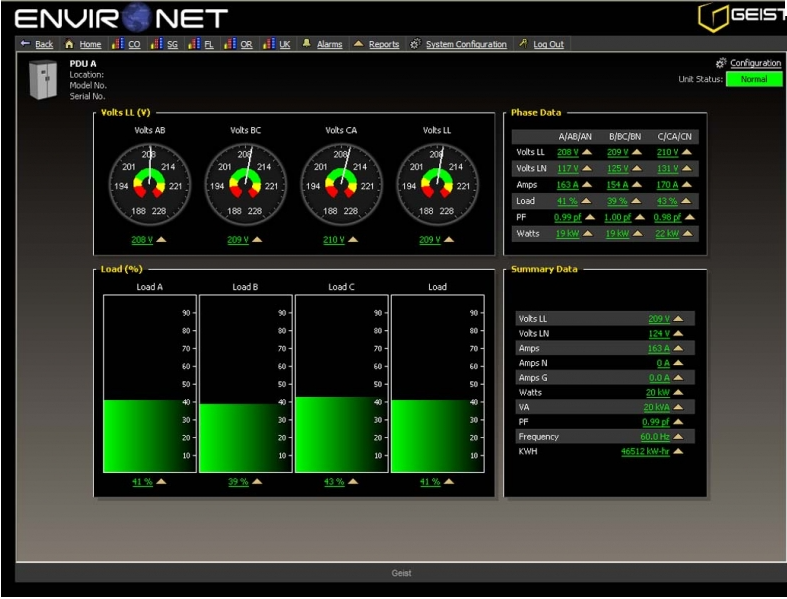
Geist DCIM è una piattaforma specializzata per la gestione dell'infrastruttura dei data center che pone grande enfasi sul monitoraggio ambientale all'interno delle strutture IT. La sua capacità di fornire dettagli approfonditi sui parametri ambientali garantisce la stabilità dell'infrastruttura IT, confermando il suo titolo di migliore soluzione per il monitoraggio ambientale granulare.
Perché ho scelto Geist DCIM: Quando ho selezionato uno strumento incentrato sul monitoraggio ambientale, Geist DCIM ha attirato la mia attenzione per il suo impegno nel fornire dettagli granulari. Ritengo che la sua dedizione nell'offrire analisi così approfondite lo distingua da molti altri strumenti della stessa categoria. Dopo averlo confrontato con diverse alternative, è apparso evidente che Geist DCIM è davvero specializzato in questa nicchia, rendendolo la mia scelta principale per chi dà priorità al monitoraggio ambientale dettagliato.
Caratteristiche e integrazioni principali:
Geist DCIM offre funzionalità come metriche in tempo reale relative a temperatura, umidità e flusso d'aria, consentendo regolazioni e monitoraggio precisi. Anche il sistema di avvisi dello strumento è particolarmente efficiente e informa gli utenti di qualsiasi anomalia ambientale che potrebbe mettere a rischio le apparecchiature IT. Per quanto riguarda le integrazioni, Geist DCIM si integra bene con un ampio spettro di strumenti per la gestione IT, garantendo decisioni basate sui dati ambientali accurati.
Pros and Cons
Pros:
- Fornisce metriche ambientali dettagliate in tempo reale
- Sistema di avvisi efficiente per notifiche immediate
- Si integra efficacemente con altre piattaforme di gestione IT
Cons:
- Potrebbe risultare eccessivamente dettagliato per le attività di dimensioni ridotte
- Possibilità di integrazioni di terze parti più estese
- L'interfaccia potrebbe beneficiare di un ammodernamento.

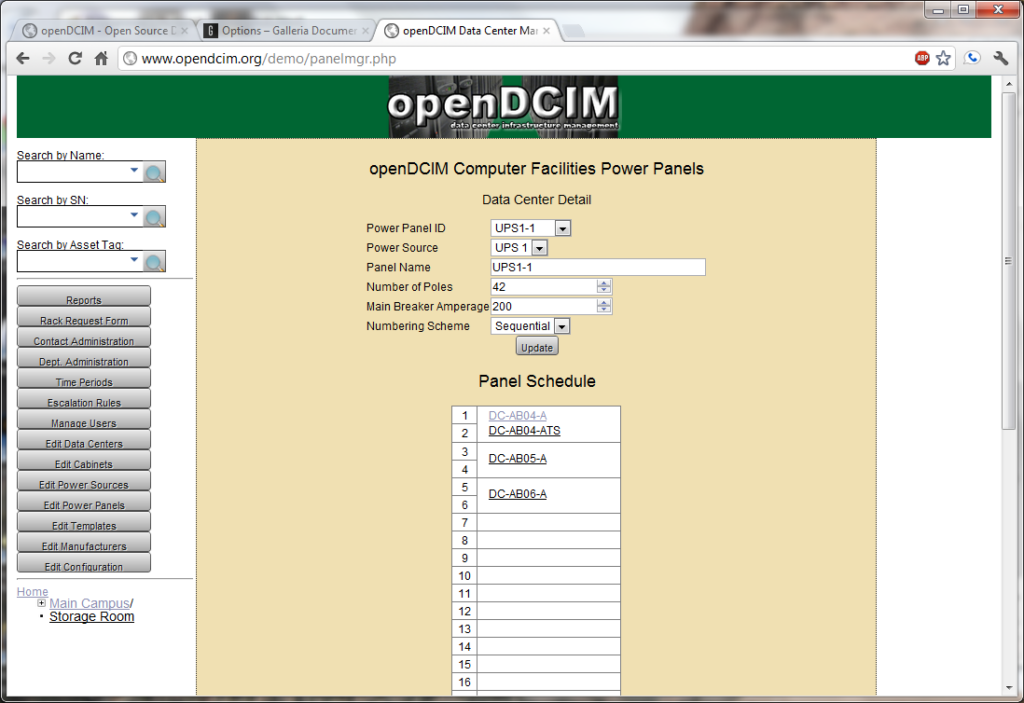
OpenDCIM serve la comunità IT come strumento open-source per la gestione dell'infrastruttura dei data center. Grazie alle sue funzionalità personalizzabili, le organizzazioni possono adattare il software alle proprie esigenze e sfide specifiche, evidenziando la sua adattabilità insita nella natura open-source.
Perché ho scelto OpenDCIM: Nella selezione di questa lista, ho scelto principalmente OpenDCIM per la sua base open-source, che offre un'adattabilità senza pari. A mio avviso, il suo codice trasparente consente ai team IT di modellare il software in base alle necessità in evoluzione, una possibilità non sempre presente negli strumenti proprietari. Questa caratteristica distintiva pone OpenDCIM in prima linea per chi apprezza l'adattabilità dell'open-source.
Funzionalità e integrazioni principali:
OpenDCIM è rinomato per la sua solida gestione dell'inventario, che aiuta i team a tracciare le risorse in modo efficiente. Lo strumento supporta anche una visualizzazione completa delle disposizioni dei data center, facilitando la pianificazione e le decisioni operative. Pur essendo una piattaforma open-source, OpenDCIM si integra bene con diversi strumenti di gestione IT popolari, come Nagios e dispositivi SNMP, favorendo un ambiente IT più interconnesso.
Pros and Cons
Pros:
- Offerta completamente open-source
- Elevate capacità di gestione dell'inventario
- Supporto per diverse integrazioni di terze parti
Cons:
- Potrebbe essere necessario personale dedicato per la personalizzazione
- La configurazione iniziale può essere impegnativa per chi non ha competenze tecniche
- Gli aggiornamenti potrebbero non essere frequenti come negli strumenti proprietari

Ideale per rappresentazioni visive personalizzabili
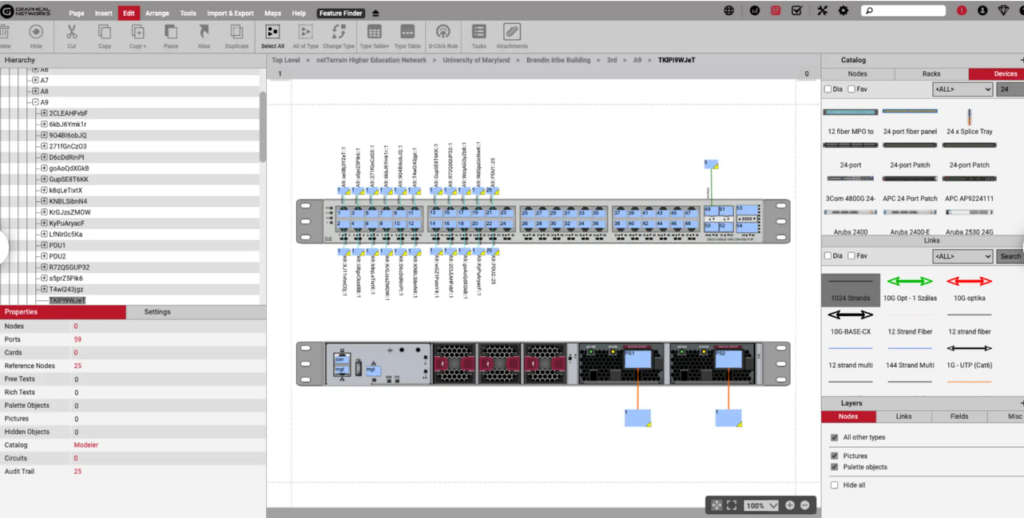
Graphical Networks netTerrain DCIM è una soluzione che semplifica la gestione dell'infrastruttura dei data center concentrandosi su interfacce visive personalizzabili. Fornisce una piattaforma per gli utenti che consente di generare, adattare e gestire rappresentazioni grafiche dei propri ambienti data center. Questa attenzione alla personalizzazione, in particolare nell'ambito delle visualizzazioni, è il motivo per cui si distingue come la migliore per rappresentazioni visive personalizzabili.
Perché ho scelto Graphical Networks netTerrain DCIM: Nel processo di selezione degli strumenti per questa lista, netTerrain DCIM ha attirato la mia attenzione principalmente per la sua flessibilità nella creazione di rappresentazioni visive. Dopo averne valutato le capacità e averlo confrontato con altre soluzioni, ho concluso che il suo focus sulle visualizzazioni personalizzabili lo distingue davvero. Credo che per individui o aziende che danno priorità a un'esperienza di visualizzazione su misura, netTerrain DCIM rappresenti la scelta ottimale.
Caratteristiche e integrazioni principali:
NetTerrain DCIM offre una serie di funzionalità, come la diagrammazione drag-and-drop, la rilevazione automatica della rete e visualizzazioni gerarchiche. Inoltre, la capacità di creare e modificare modelli visivi è una caratteristica distintiva. Si integra con le principali piattaforme IT e di rete, consentendo lo scambio di dati e capacità di visualizzazione avanzate.
Pros and Cons
Pros:
- Ampie opzioni di personalizzazione per le visualizzazioni
- Funzionalità di rilevazione automatica della rete
- Solide capacità di integrazione con le principali piattaforme IT
Cons:
- Potrebbe essere complesso per chi cerca una soluzione semplice
- Possibile lavoro extra nel configurare modelli personalizzati
- L'interfaccia potrebbe essere complessa per i nuovi utenti

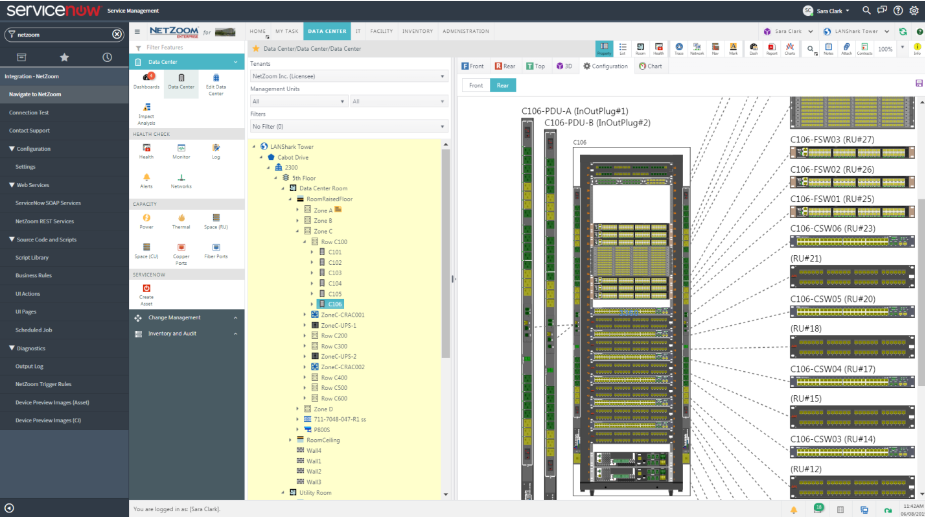
NetZoom è uno strumento che si concentra sulla gestione dell'infrastruttura del data center, in particolare nelle aree di modellazione e visualizzazione degli asset. Fornisce rappresentazioni dettagliate dell'infrastruttura fisica, supportando le attività di pianificazione e implementazione. La capacità unica di modellare e visualizzare asset complessi giustifica la sua posizione come migliore per la modellazione e la visualizzazione degli asset nel contesto dei data center.
Perché ho scelto NetZoom: Ho scelto NetZoom dopo aver esaminato la sua forte enfasi sulla modellazione e visualizzazione degli asset. Confrontando e valutando vari strumenti, è emerso che la dedizione di NetZoom a questo aspetto specifico lo rendeva superiore agli altri. Secondo me, per chi dà priorità a una rappresentazione visiva dettagliata degli asset del data center, NetZoom è la scelta migliore.
Funzionalità e integrazioni principali:
NetZoom offre funzionalità robuste come la modellazione completa dei dispositivi, la pianificazione della capacità e l'auto-scoperta dei dispositivi. I suoi strumenti di visualizzazione sono particolarmente impressionanti, consentendo una rappresentazione precisa dell'infrastruttura fisica. Si integra bene con diverse principali piattaforme di gestione IT, migliorando ulteriormente la sua utilità nella gestione e pianificazione degli asset dei data center.
Pros and Cons
Pros:
- Specializzato nella modellazione e visualizzazione degli asset
- Si integra con varie piattaforme di gestione IT
- Offre funzionalità come auto-scoperta e pianificazione della capacità
Cons:
- Potrebbe essere troppo complesso per operazioni su piccola scala
- Curva di apprendimento più ripida per i principianti
- Potenziali limitazioni nelle opzioni di personalizzazione

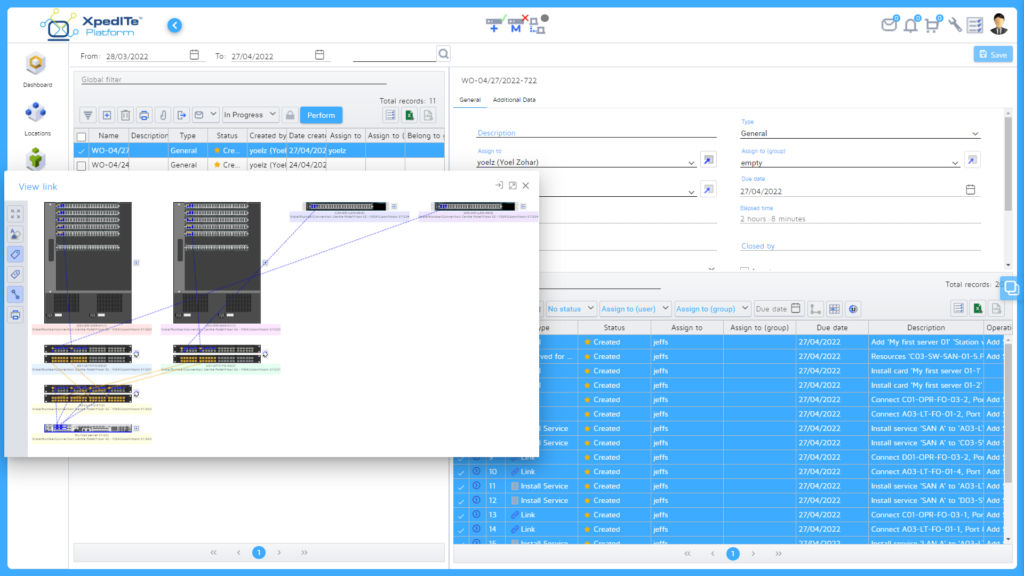
Comprendere e ottimizzare l'infrastruttura può essere una sfida per molti. RiT Tech si distingue offrendo una soluzione che non solo fornisce approfondimenti sulla tua infrastruttura, ma offre anche analytics in grado di ottimizzare le operazioni e ridurre i costi.
Perché ho scelto RiT Tech: Nel labirinto delle soluzioni DCIM, ho selezionato RiT Tech per il suo approccio distintivo all'analisi dell'infrastruttura. La profondità e la chiarezza degli insight che offre mi hanno spinto a ritenerlo superiore agli altri. La sua capacità di fornire analytics azionabili è il motivo per cui sono convinto che RiT Tech sia la scelta ottimale per le organizzazioni che cercano approfondimenti infrastrutturali completi.
Funzionalità principali & integrazioni:
RiT Tech eccelle nell'offrire analytics in tempo reale che permettono ai team di prendere decisioni informate. I suoi dashboard dettagliati e le capacità di analisi predittiva sono un vero vantaggio per ogni responsabile IT. In termini di integrazioni, RiT Tech si collega in modo efficiente con piattaforme come VMWare, Cisco e Microsoft Azure, colmando il divario tra l'infrastruttura e i servizi cloud.
Pros and Cons
Pros:
- Analytics infrastrutturali approfonditi
- Analisi predittiva per decisioni proattive
- Ampio spettro di integrazioni con piattaforme popolari
Cons:
- Richiede tempo per l'interpretazione dei dati
- Potrebbe risultare complesso per le organizzazioni più piccole
- Le funzionalità premium hanno un costo superiore
Altri software DCIM
Di seguito trovi un elenco di altri software DCIM che ho selezionato, ma che non sono rientrati nella top 10. Vale sicuramente la pena consultarli.
- Cormant
Ideale per la gestione mobile dei data center
- Rackwise DCiM X
Ideale per la visualizzazione delle disposizioni dei rack
- FieldView DCIM
Ideale per la scalabilità nei grandi data center


Come Valuto il Software DCIM
Divido la mia valutazione in due livelli: i requisiti imprescindibili—come il monitoraggio dell'alimentazione, la tracciabilità delle risorse e la visualizzazione dei rack—e i fattori differenzianti che distinguono gli strumenti per specifici ambienti.
Funzionalità di Base (Requisiti Minimi per Questo Elenco)
Quando seleziono gli strumenti per la mia lista, valuto ciascuno su una scala da 0 (non offre la funzionalità) a 5 (eccelle in quest'area) per ogni funzionalità di base elencata di seguito. Poi calcolo il punteggio totale dello strumento come percentuale. Ogni strumento deve raggiungere un punteggio totale minimo del 65% per essere considerato per l'inclusione.
- Tracciabilità delle Risorse e dell'Inventario: Verifico se lo strumento cataloga server, PDU, switch e altri hardware con metadati dettagliati—come numeri di serie, stato del ciclo di vita e posizioni nei rack.
- Monitoraggio dell'Alimentazione e Ambientale: La visibilità in tempo reale sul consumo di energia, temperatura e umidità è fondamentale. Cerco soglie di allerta configurabili e integrazione di sensori a livello di rack o dispositivo.
- Pianificazione e Gestione della Capacità: I buoni strumenti permettono di prevedere la potenza, lo spazio e il raffreddamento residui prima di impegnarsi in una nuova implementazione. Valuto come ogni piattaforma gestisce le proiezioni delle risorse.
- Visualizzazione del Data Center: Cerco planimetrie interattive e viste in elevazione dei rack che riflettano il layout reale, non solo schemi statici caricati come file immagine.
- Gestione della Connettività e dei Cavi: Qui valuto la mappatura delle connessioni a livello di porta tra i dispositivi, inclusa la possibilità di tracciare i circuiti attraverso patch panel, switch e PDU.
- Reportistica e Metriche di Efficienza Energetica: Dashboard che evidenziano PUE, tendenze di utilizzo e previsioni di capacità aiutano a giustificare la spesa e identificare sprechi. Verifico la presenza di opzioni di report sia predefinite sia personalizzabili.
Dopo aver stilato un elenco di strumenti che rispondono a questi criteri, considero cosa distingue ciascuna piattaforma.
Fattori di Differenziazione (Cosa Distingue i Fornitori)
Ecco come confronto e metto a paragone i vari fornitori:
Funzionalità di Spicco
Le capacità di digital twin permettono di simulare una migrazione di rack o di testare uno scenario di guasto del raffreddamento prima di intervenire sull'ambiente di produzione. Questo tipo di simulazione rappresenta un fattore di differenziazione significativo. Cerco anche la funzionalità di auto-scoperta, che mantiene aggiornati i registri delle risorse senza affidarsi a verifiche manuali periodiche. Per i team che gestiscono infrastrutture distribuite, il supporto multi-sito con una singola dashboard è importante—soprattutto se si deve bilanciare la capacità tra colocation e strutture on-premise.
Oltre le Funzionalità
L'integrazione con l'infrastruttura IT esistente è una delle prime cose che valuto. Gli strumenti DCIM devono dialogare con piattaforme ITSM come ServiceNow o Jira e supportare protocolli come SNMP, Modbus e IPMI per acquisire dati in tempo reale dall'hardware. Anche la flessibilità di implementazione è rilevante—alcuni ambienti richiedono installazioni on-premise o isolate dalla rete, mentre altri traggono vantaggio da soluzioni in cloud. Valuto anche la struttura delle licenze, poiché un prezzo per rack rispetto a uno per dispositivo può incidere drasticamente sul costo totale a seconda della densità della struttura.
Come scegliere un software DCIM
È facile perdersi in lunghi elenchi di funzionalità e strutture di prezzo complesse. Per aiutarti a rimanere concentrato mentre affronti il tuo particolare processo di selezione del software, ecco un elenco dei fattori da tenere a mente:
| Fattore | Cosa considerare |
|---|---|
| Scalabilità | Il software crescerà insieme alle esigenze del tuo centro dati? Valuta se è in grado di gestire carichi maggiori o operazioni più estese senza richiedere una revisione completa. |
| Integrazioni | Si collega agli strumenti che già utilizzi, come ServiceNow o VMware? Verifica che supporti le integrazioni necessarie per ottimizzare i tuoi flussi di lavoro. |
| Personalizzazione | Puoi adattare il software ai tuoi processi? Cerca opzioni per modificare report, dashboard e flussi di lavoro in base ai tuoi requisiti specifici. |
| Facilità d'uso | L'interfaccia è intuitiva per il tuo team? Assicurati che sia abbastanza semplice da usare quotidianamente senza formazione o assistenza costanti. |
| Implementazione e avvio | In quanto tempo puoi iniziare? Valuta le risorse necessarie per la configurazione e la formazione, inclusa la disponibilità di guide e assistenza. |
| Costo | Il prezzo rientra nel tuo budget? Confronta il costo totale, comprese eventuali commissioni nascoste o spese aggiuntive per le funzionalità premium. |
| Misure di sicurezza | Sono presenti solide misure di sicurezza? Considera le funzionalità di protezione dei dati, come la crittografia e i controlli degli accessi, per mantenere al sicuro le tue informazioni. |
| Disponibilità dell'assistenza | Avrai accesso all'aiuto quando ne avrai bisogno? Verifica se il fornitore offre assistenza 24 ore su 24, 7 giorni su 7, e diversi canali di supporto, come chat o telefono. |
Che cos'è un software DCIM?
Il software DCIM (gestione dell'infrastruttura del centro dati) è un insieme di strumenti strategici che fornisce una visione integrata delle apparecchiature e dei processi legati all'IT all'interno di un centro dati. Utilizzato principalmente dai professionisti IT, dai responsabili delle strutture e dagli amministratori dei centri dati, il suo obiettivo principale è monitorare, gestire e ottimizzare le risorse del centro dati, garantendo un uso efficiente delle apparecchiature, dei consumi energetici e dei processi operativi semplificati.
Funzionalità
Quando selezioni un software DCIM, presta attenzione alle seguenti funzionalità principali:
- Gestione delle risorse: Tiene traccia di tutte le risorse del centro dati e le gestisce, fornendo visibilità e controllo sulle apparecchiature e sulle risorse.
- Monitoraggio dell'alimentazione: Monitora il consumo energetico per contribuire a ridurre i costi e migliorare l'efficienza, identificando le aree in cui è possibile risparmiare.
- Pianificazione della capacità: Aiuta a prevedere le future esigenze del centro dati, garantendo un'allocazione efficace delle risorse.
- Monitoraggio ambientale: Tiene sotto controllo i livelli di temperatura e umidità per mantenere condizioni ottimali e prevenire guasti alle apparecchiature.
- Resoconti e analisi: Fornisce informazioni dettagliate sulle operazioni del centro dati, supportando il processo decisionale e l'ottimizzazione delle prestazioni.
- Strumenti di visualizzazione: Offre rappresentazioni visive della disposizione del centro dati per facilitare la gestione e la pianificazione.
- Pannelli di controllo personalizzabili: Consente agli utenti di adattare la propria interfaccia per visualizzare le informazioni più rilevanti in base alle proprie esigenze specifiche.
- Funzionalità di integrazione: Si collega agli strumenti e ai sistemi esistenti per migliorare il flusso di lavoro e la condivisione dei dati.
- Funzionalità di sicurezza: Garantisce la protezione dei dati attraverso la crittografia e i controlli degli accessi, salvaguardando le informazioni sensibili.
- Sistemi di avviso: Notifica agli utenti eventuali anomalie o problemi, consentendo di rispondere rapidamente alle potenziali criticità.
Vantaggi
L'implementazione di un software DCIM offre diversi vantaggi al tuo gruppo e alla tua azienda. Eccone alcuni:
- Maggiore efficienza: Semplifica le operazioni del centro dati automatizzando le attività di gestione e monitoraggio delle risorse.
- Riduzione dei costi: Riduce il consumo energetico e i costi operativi attraverso il monitoraggio dell'alimentazione e la pianificazione della capacità.
- Migliore processo decisionale: Fornisce resoconti e analisi dettagliati che offrono informazioni sulle prestazioni del centro dati e sull'allocazione delle risorse.
- Maggiore sicurezza: Protegge i dati sensibili con funzionalità di sicurezza come la crittografia e i controlli degli accessi.
- Maggiore disponibilità: Riduce al minimo i guasti alle apparecchiature grazie al monitoraggio ambientale e ai sistemi di avviso proattivi.
- Scalabilità: Supporta la crescita consentendo un facile adattamento alle mutevoli esigenze del centro dati e l'espansione delle operazioni.
- Informazioni personalizzabili: Offre pannelli di controllo personalizzabili che consentono agli utenti di concentrarsi sulle informazioni più rilevanti per i propri ruoli.
Costi e prezzi
La scelta di un software DCIM richiede la comprensione dei vari modelli e piani tariffari disponibili. I costi variano in base alle funzionalità, alle dimensioni del gruppo, ai componenti aggiuntivi e ad altri fattori. La tabella seguente riassume i piani più comuni, i relativi prezzi medi e le funzionalità tipicamente incluse nelle soluzioni software DCIM:
Tabella comparativa dei piani per il software DCIM
| Tipo di piano | Prezzo medio | Funzionalità comuni |
|---|---|---|
| Piano gratuito | $0 | Gestione di base delle risorse, resoconti limitati e monitoraggio di base dell'alimentazione. |
| Piano personale | $10-$30/utente/mese | Gestione delle risorse, monitoraggio dell'alimentazione e pianificazione di base della capacità. |
| Piano aziendale | $40-$70/utente/mese | Resoconti avanzati, pianificazione della capacità e funzionalità di integrazione. |
| Piano per grandi aziende | $80-$150/utente/mese | Personalizzazione completa, funzionalità di sicurezza avanzate e analisi complete. |
Domande frequenti sul software DCIM
Ecco alcune risposte alle domande più comuni sul software DCIM:
In che modo il software DCIM migliora l'efficienza del data center?
Il software DCIM migliora l’efficienza del data center fornendo strumenti per monitorare e gestire il consumo energetico, le condizioni ambientali e l’utilizzo delle risorse. Offre dati e analisi in tempo reale, consentendo al team di prendere decisioni informate che ottimizzano le prestazioni e riducono i costi. Ciò aiuta a mantenere condizioni ottimali e a prevenire i tempi di inattività.
Il software DCIM può integrarsi con i sistemi IT esistenti?
Sì, la maggior parte dei software DCIM può integrarsi con i sistemi IT esistenti, come le piattaforme di gestione dei servizi e gli ambienti virtuali. Le funzionalità di integrazione consentono di semplificare i flussi di lavoro e garantire che i dati fluiscano senza problemi tra i diversi sistemi. Ciò riduce il lavoro manuale e migliora l’efficienza operativa complessiva.
Quali sono i tempi di implementazione tipici del software DCIM?
I tempi di implementazione del software DCIM possono variare in base alla complessità del data center e del software stesso. In genere, possono andare da alcune settimane a diversi mesi. Fattori come le dimensioni del data center, l’infrastruttura esistente e il livello di personalizzazione richiesto possono influire sui tempi.
In che modo il software DCIM gestisce la sicurezza dei dati?
Il software DCIM gestisce la sicurezza dei dati implementando funzionalità come la crittografia, i controlli degli accessi e gli aggiornamenti regolari della sicurezza. Queste misure proteggono le informazioni sensibili da accessi non autorizzati e violazioni. È essenziale assicurarsi che il software sia conforme agli standard di settore e alle migliori pratiche per la protezione dei dati.
Che tipo di assistenza posso aspettarmi da un fornitore DCIM?
I fornitori DCIM offrono in genere diverse opzioni di assistenza, tra cui risorse online, servizi di supporto e responsabili dedicati degli account. Puoi aspettarti assistenza per l’implementazione, la risoluzione dei problemi e la manutenzione continua. È importante valutare il livello di assistenza fornito per assicurarsi che soddisfi le esigenze della tua organizzazione.
Il software DCIM offre opzioni personalizzabili?
Sì, molte soluzioni software DCIM offrono opzioni personalizzabili per adattarsi alle tue esigenze specifiche. Spesso puoi configurare dashboard, report e flussi di lavoro in linea con i tuoi requisiti operativi. La personalizzazione ti aiuta a concentrarti sui dati più rilevanti e migliora l’efficacia del software nella gestione del data center.
Qual è il prossimo passo:
Se stai cercando informazioni sul software DCIM, contatta gratuitamente un consulente SoftwareSelect per ricevere consigli.
Compili un modulo e fai una breve conversazione durante la quale entreranno nel dettaglio delle tue esigenze. Poi riceverai una rosa ristretta di software da esaminare. Ti assisteranno anche durante l'intero processo di acquisto, comprese le negoziazioni sui prezzi.