

Le 10 migliori applicazioni di database desktop recensite nel 2026

I migliori software di database desktop in sintesi


Scegliere il software di database desktop giusto non significa semplicemente selezionare un nome da un elenco: significa assicurarsi che i propri dati rimangano sicuri, accessibili e organizzati, anche quando le proprie esigenze crescono. Forse sei stanco di interfacce macchinose, problemi di compatibilità o difficoltà nell'applicare le policy di sicurezza su dispositivi diversi. Oppure gestisci un volume crescente di informazioni e hai bisogno di una soluzione capace di stare al passo senza compromettere le prestazioni.
Negli ultimi dieci anni ho lavorato con team che gestivano qualsiasi cosa, dagli inventari di piccole imprese ai database aziendali multiutente, mettendo alla prova decine di soluzioni desktop. Ho visto in prima persona quali piattaforme crescono in modo fluido e quali invece ti costringono a ricorrere continuamente a soluzioni alternative.
In questa guida ti aiuterò a trovare il software di database desktop che si adatta davvero al tuo flusso di lavoro: che tu stia cercando uno strumento leggero ed economico o una soluzione potente ricca di funzionalità avanzate.
Perché fidarsi dei nostri consigli sui software
Il nostro team testa e recensisce software dal 2012. In quanto leader tecnologici noi stessi, sappiamo quanto sia difficile — e importante — scegliere il software giusto.
Per questa guida, abbiamo valutato gli strumenti attraverso test praticie ricerche indipendenti, assegnando un punteggio agli strumenti in base ai nostri criteri di selezione.
Le nostre recensioni riflettono il nostro giudizio editoriale umano, non un discorso di vendita.
Riepilogo dei migliori software di database desktop
Questa tabella comparativa riassume i dettagli dei prezzi delle mie migliori selezioni di software di database desktop, per aiutarti a trovare quello più adatto al tuo budget e alle esigenze della tua attività.
| Tool | Best For | Trial Info | Price | ||
|---|---|---|---|---|---|
| 1 | Ideale per ambienti database eterogenei | Prova gratuita di 21 giorni | Da $199/utente/anno (fatturato annualmente) | Website | |
| 2 | Ideale per la creazione di app personalizzate | Versione di prova gratuita disponibile | Da $22/utente/mese (fatturazione annuale) | Website | |
| 3 | Ideale per la gestione avanzata dei dati | Download gratuito disponibile | Gratuito (open source) | Website | |
| 4 | Ideale per l'archiviazione leggera | Not available | Gratuito | Website | |
| 5 | Ideale per la visualizzazione dei database | Not available | Gratuito da usare | Website | |
| 6 | Ideale per utenti open-source | Not available | Gratuito | Website | |
| 7 | Ideale per i team di piccole imprese | Prova gratuita di 30 giorni disponibile | Da $9.99/utente/mese | Website | |
| 8 | Ideale per la scalabilità enterprise | Prova gratuita + demo disponibile | A partire da $99/mese (fatturazione oraria) | Website | |
| 9 | Ideale per database basati su documenti | Piano gratuito disponibile | Da $0.08/ora | Website | |
| 10 | Ideale per principianti | Not available | Gratis da usare | Website |
Recensione dei migliori software di database desktop
Di seguito trovi i miei riepiloghi dettagliati dei migliori software di database desktop inclusi nella mia selezione. Le mie recensioni offrono un’analisi approfondita delle caratteristiche principali, dei vantaggi & degli svantaggi, delle integrazioni e dei casi d’uso ideali di ogni strumento, per aiutarti a trovare quello più adatto a te.

Ideale per ambienti database eterogenei
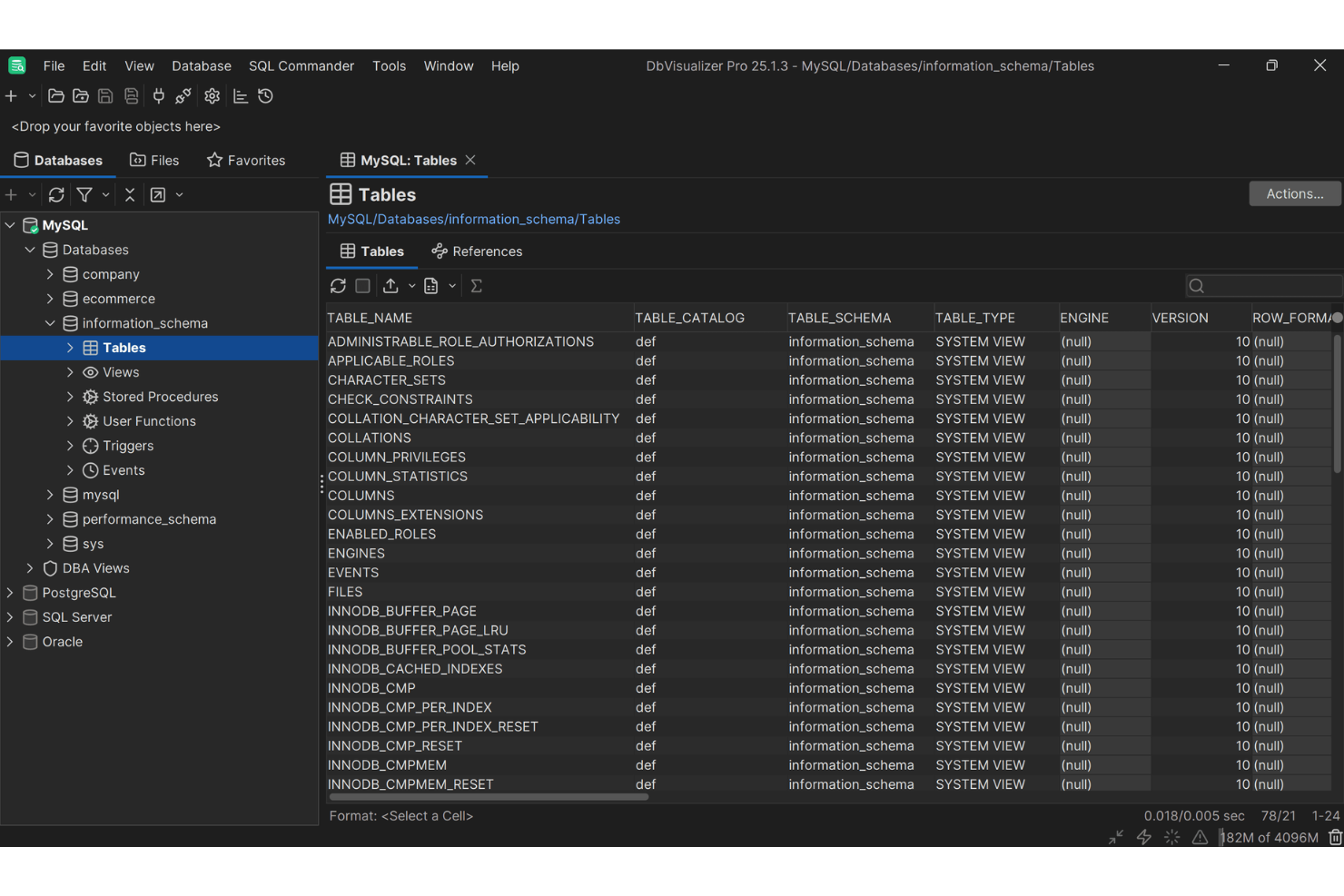
DbVisualizer è pensato per amministratori di database, sviluppatori e analisti di dati che desiderano migliorare le attività di gestione dei database con maggiore facilità ed efficienza. Offrendo una piattaforma unificata che supporta un'ampia gamma di database, si rivolge a professionisti che necessitano di connettività senza soluzione di continuità e robuste capacità di gestione dei dati. Grazie al suo editor SQL intuitivo e ai costruttori visivi di query, DbVisualizer risponde all'esigenza di operazioni sui database più snelle, risultando ideale per chi vuole flussi di lavoro sui dati produttivi e organizzati.
Perché ho scelto DbVisualizer
Ho scelto DbVisualizer per il suo supporto a diversi ambienti di database e per la sua interfaccia intuitiva, che migliora la produttività. Il supporto per più connessioni a database consente di gestire contemporaneamente varie fonti di dati, aiutando gli utenti a semplificare i compiti e a migliorare l'efficienza complessiva. Inoltre, i costruttori visivi di query e l'editor SQL intelligente offrono un'esperienza fluida per creare query complesse senza la necessità di un'estesa codifica manuale.
Caratteristiche principali di DbVisualizer
Oltre a supportare diversi ambienti di database, DbVisualizer offre:
- Modifica inline dei dati: puoi modificare direttamente i dati delle tabelle nello strumento, semplificando le modifiche rapide senza dover navigare tra più schermate.
- Connessioni SSH sicure: DbVisualizer fornisce accesso sicuro ai dati tramite tunneling SSH, garantendo che i tuoi dati rimangano protetti durante le connessioni remote.
- Controllo versione per script SQL: questa funzione permette di gestire e tracciare le modifiche agli script SQL, facilitando la collaborazione e mantenendo l'integrità del codice.
Integrazioni di DbVisualizer
Le integrazioni includono Oracle, MySQL, Microsoft SQL Server, PostgreSQL, MongoDB, Snowflake, Redis, Elasticsearch, IBM Db2 e SQLite.
Pros and Cons
Pros:
- Offre costruttori visivi di query per facilitare la creazione di interrogazioni
- Supporta molti database senza configurazioni aggiuntive
- Fornisce potenti strumenti per la formattazione e la modifica SQL
Cons:
- Capacità di gestione delle schede limitate
- Set di risultati di grandi dimensioni possono rallentare l'interfaccia
New Product Updates from DbVisualizer

DbVisualizer Adds AI Enhancements, Map Visualization, and SQL Tab Groups
DbVisualizer expands AI capabilities, introduces geospatial map visualization, and adds SQL Commander tab groups. The release also improves audit logging, database connection management, and database support to streamline development workflows. For more information, visit DbVisualizer's official site.
 .
.
Ideale per la creazione di app personalizzate
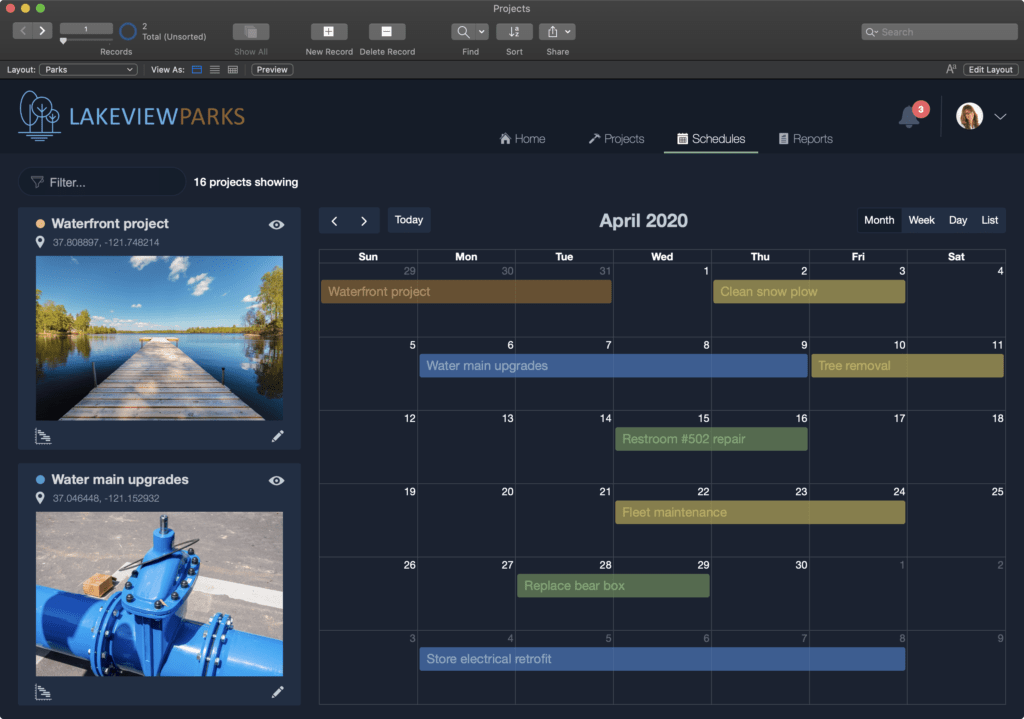
Claris FileMaker è un software di database desktop progettato per gli utenti che desiderano creare applicazioni personalizzate. È molto apprezzato dalle aziende che cercano soluzioni su misura per il proprio flusso di lavoro e per le esigenze operative specifiche.
Perché ho scelto Claris FileMaker: Questo strumento è perfetto per la creazione di app personalizzate grazie al suo ambiente di sviluppo flessibile. Puoi progettare app con facilità grazie al drag-and-drop, rendendolo accessibile anche a chi non è sviluppatore. Supporta il deployment multipiattaforma, permettendo al tuo team di utilizzare le app su dispositivi diversi. Grazie ai modelli integrati, puoi avviare rapidamente i tuoi progetti senza partire da zero.
Funzionalità e integrazioni principali:
Funzionalità includono la possibilità di creare app con la semplicità del drag-and-drop, il supporto alla distribuzione multipiattaforma e modelli integrati per un avvio rapido dei progetti. Puoi anche sfruttare funzionalità di sicurezza avanzate per proteggere i tuoi dati. Inoltre, le capacità di scripting permettono di automatizzare le attività ripetitive.
Integrazioni includono Microsoft Office, AppleScript, REST APIs, ODBC/JDBC, XML, JSON, PHP, JavaScript, Tableau e Zapier.
Pros and Cons
Pros:
- Funzionalità di sicurezza avanzate
- Compatibilità delle app multipiattaforma
- Interfaccia facile con drag-and-drop
Cons:
- Richiede alcune conoscenze tecniche
- Analisi avanzate limitate

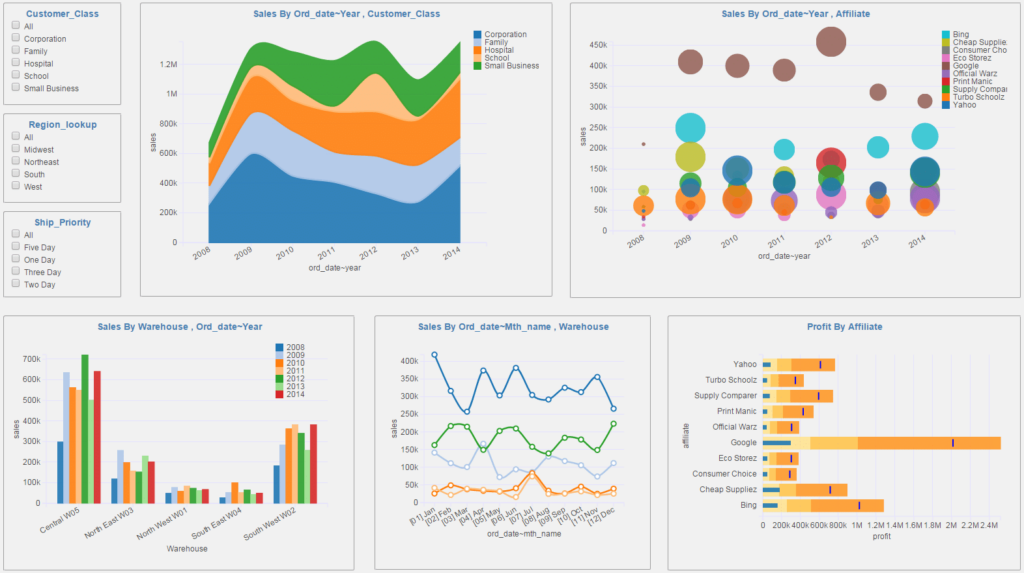
PostgreSQL è un sistema di database relazionale open-source ampiamente utilizzato da sviluppatori e aziende che richiedono avanzate capacità di gestione dei dati. Supporta query complesse e operazioni su larga scala, rendendolo una scelta preferita per le imprese e le applicazioni ad alta intensità di dati.
Perché ho scelto PostgreSQL: Questo strumento eccelle nella gestione avanzata dei dati grazie al supporto per query complesse e funzionalità di integrità dei dati. Puoi eseguire operazioni intricate grazie al supporto per tipi di dati avanzati come JSON e XML. La sua estensibilità consente di aggiungere funzioni personalizzate, che possono essere cruciali per applicazioni specialistiche. Il forte supporto della community assicura continui miglioramenti, mantenendo le tue operazioni sui dati sempre aggiornate.
Caratteristiche distintive e integrazioni:
Caratteristiche includono il supporto per tipi di dati avanzati come JSON e XML, che migliorano la gestione dei dati. È possibile utilizzare anche la funzionalità di ricerca full-text, che semplifica le attività di recupero delle informazioni. Inoltre, i suoi potenti meccanismi di indicizzazione migliorano significativamente le prestazioni delle query.
Integrazioni includono Python, Ruby, Java, C/C++, Node.js, Go, .NET, PHP, Perl e Tcl.
Pros and Cons
Pros:
- Estendibile con funzioni personalizzate
- Supporta tipi di dati avanzati
- Eccellente per query complesse
Cons:
- Opzioni di interfaccia grafica limitate
- Curva di apprendimento più ripida per i principianti

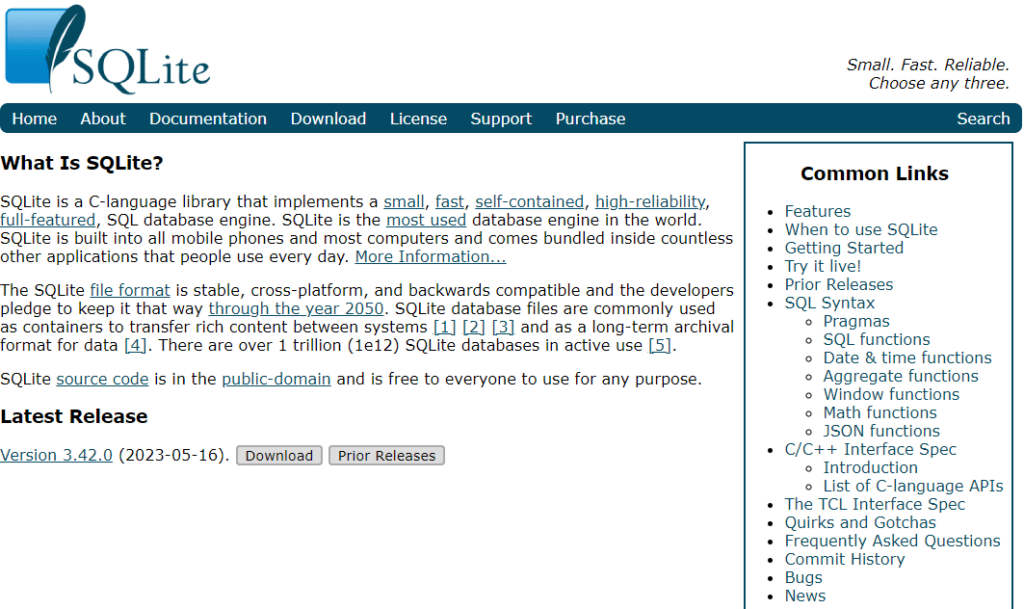
SQLite è un motore di database autosufficiente e senza server, spesso utilizzato da sviluppatori e piccoli team per attività di archiviazione leggere. Eccelle nell'offrire un modo semplice ed efficiente per gestire database senza la necessità di configurazioni complesse o amministrazione.
Perché ho scelto SQLite: Questo strumento è perfetto per l'archiviazione leggera grazie al suo design minimalista. Non richiede installazione o configurazione, rendendolo facile da implementare per il tuo team. La sua architettura senza configurazione permette di integrarlo direttamente nelle applicazioni, risparmiando risorse e tempo. Il database è memorizzato in un unico file su disco, il che semplifica la gestione e il trasferimento dei dati.
Funzionalità e integrazioni principali:
Funzionalità includono la configurazione zero, che riduce le difficoltà per il tuo team. Puoi anche beneficiare del sistema di archiviazione in singolo file, che facilita la gestione e il trasferimento dei database. Il suo ingombro ridotto assicura un consumo minimo di risorse, ideale per applicazioni leggere.
Integrazioni includono Python, PHP, Java, C/C++, .NET, Ruby, Perl, Tcl e Objective-C.
Pros and Cons
Pros:
- Consumo minimo di risorse
- Archiviazione database in file singolo
- Non richiede installazione
Cons:
- Mancanza di funzionalità di sicurezza avanzate
- Scalabilità limitata per progetti di grandi dimensioni

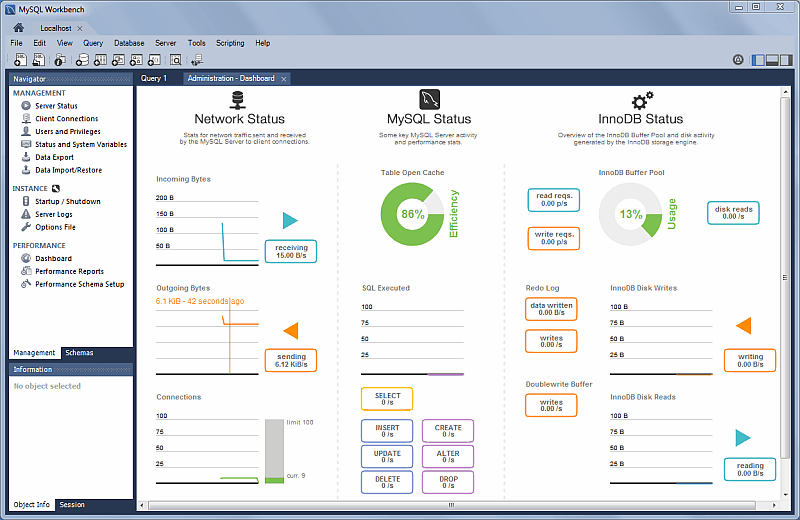
MySQL Workbench è uno strumento visivo unificato per architetti di database, sviluppatori e DBA. Offre modellazione dei dati, sviluppo SQL e strumenti completi di amministrazione per la configurazione del server, la gestione degli utenti e altro ancora.
Perché ho scelto MySQL Workbench: Questo strumento è perfetto per la visualizzazione dei database perché offre un'interfaccia visiva intuitiva che semplifica la progettazione e la gestione dei database. Puoi progettare e gestire visivamente i database grazie a un'interfaccia drag-and-drop, risparmiando tempo nello sviluppo di schemi complessi. Il suo cruscotto visivo delle prestazioni aiuta a monitorare lo stato di salute del database e le metriche delle prestazioni. La possibilità di fare reverse engineering dei database permette di visualizzare facilmente quelli esistenti.
Funzionalità e integrazioni principali:
Funzionalità includono un cruscotto visivo delle prestazioni che ti aiuta a tenere traccia dello stato di salute del database. Puoi inoltre effettuare il reverse engineering dei database per visualizzare le strutture già esistenti. Inoltre, la sua interfaccia drag-and-drop semplifica il processo di progettazione di schemi di database complessi.
Integrazioni includono Python, Java, C/C++, .NET, PHP, Perl, Ruby, Node.js, Visual Studio e Eclipse.
Pros and Cons
Pros:
- Strumenti per il monitoraggio delle prestazioni
- Progettazione di schemi con drag-and-drop
- Interfaccia visiva intuitiva
Cons:
- Può avere difficoltà con grandi quantità di dati
- Limitato ai database MySQL

Base, parte della suite LibreOffice, è un software open-source per database desktop pensato per privati e organizzazioni alla ricerca di una soluzione economica. Consente di creare, gestire e utilizzare database, offrendo una gamma di funzionalità per la manipolazione dei dati e la generazione di report.
Perché ho scelto Base: Questo strumento è ideale per gli utenti open-source perché offre una piattaforma gratuita e flessibile per la gestione dei database. Puoi creare tabelle, query, maschere e report, essenziali per organizzare e analizzare i dati. Base supporta una varietà di motori di database e formati di file, aumentando la sua versatilità. Lo sviluppo guidato dalla comunità garantisce miglioramenti continui e adattabilità alle tue esigenze.
Funzionalità principali e integrazioni:
Funzionalità includono il supporto per diversi motori di database, che ti offre flessibilità nella gestione dei dati. Puoi facilmente creare e modificare tabelle, query, maschere e report. Lo strumento mette inoltre a disposizione una serie di procedure guidate per assisterti nelle operazioni più comuni, semplificando il flusso di lavoro.
Integrazioni includono MySQL, PostgreSQL, Microsoft Access, dBASE, Oracle JDBC, HSQLDB, Firebird, Microsoft Excel, CSV e XML.
Pros and Cons
Pros:
- Supporta diversi motori di database
- Sviluppo guidato dalla comunità
- Opzioni flessibili per la gestione dei dati
Cons:
- Non ideale per database di grandi dimensioni
- Funzionalità avanzate limitate

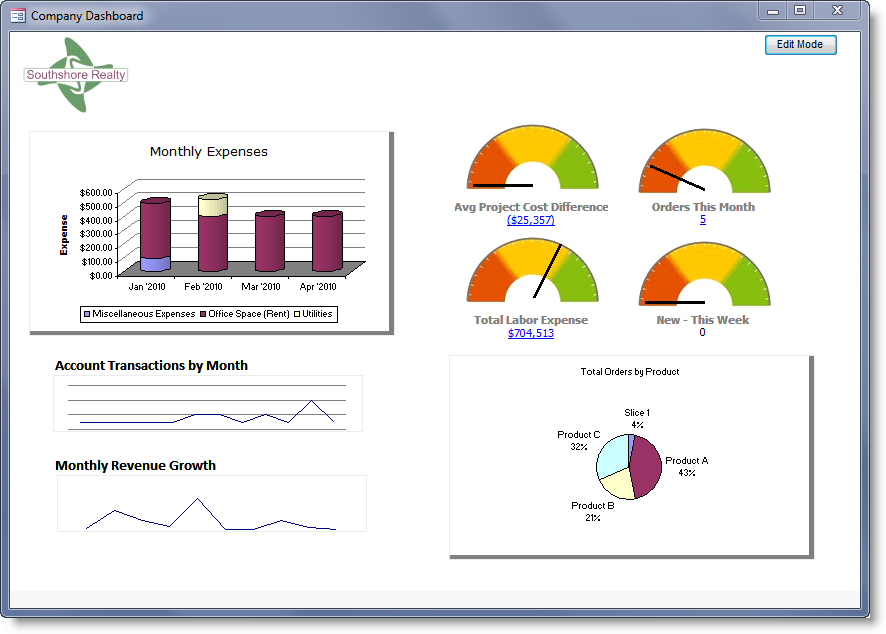
Microsoft Access è un software di database desktop progettato per i team di piccole imprese. Aiuta nella creazione e gestione di applicazioni aziendali, permettendo agli utenti di costruire da modelli predefiniti o da zero.
Perché ho scelto Microsoft Access: Questo strumento è ideale per i team di piccole imprese perché offre un'interfaccia semplice per creare e gestire database. Si possono utilizzare modelli per iniziare rapidamente o creare applicazioni personalizzate adatte alle proprie esigenze. Visual Basic for Applications consente l'automazione, facendo risparmiare tempo al team sulle attività ripetitive. L'integrazione con SQL Server e Azure SQL garantisce che i dati siano sicuri e affidabili.
Caratteristiche distintive e integrazioni:
Caratteristiche includono opzioni di personalizzazione, automazione tramite Visual Basic for Applications e la possibilità di creare applicazioni da modelli predefiniti o da zero. È anche possibile archiviare dati su SQL Server e Microsoft Azure SQL, garantendo maggiore affidabilità e sicurezza per il team.
Integrazioni includono SQL Server, Microsoft Azure SQL, SharePoint, Microsoft Excel, Outlook, Dynamics 365, Power BI, OneDrive, Microsoft Teams e Access Services.
Pros and Cons
Pros:
- Creazione di app facile tramite modelli
- Automazione con Visual Basic
- Creazione di app facile tramite modelli
Cons:
- Funzionalità avanzate limitate
- Disponibile solo per PC

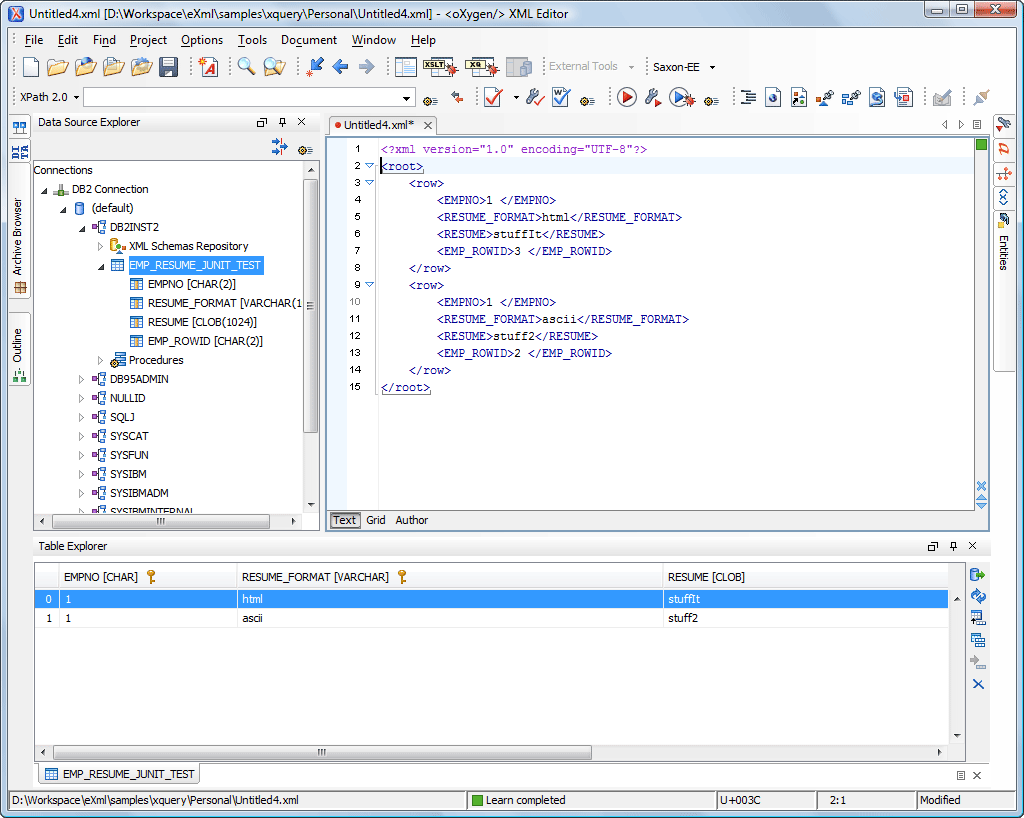
IBM Db2 Express-C è una soluzione software di database progettata per le aziende che necessitano di scalabilità e prestazioni a livello enterprise. Supporta carichi di lavoro dati critici e offre funzionalità pensate per la gestione di dati su larga scala.
Perché ho scelto IBM Db2 Express-C: Questo strumento è ideale per la scalabilità enterprise perché gestisce in modo efficiente grandi volumi di dati. Puoi sfruttare la sua tecnologia avanzata di compressione per risparmiare spazio di archiviazione e migliorare le prestazioni. Offre anche funzionalità per l’alta disponibilità, assicurando che i tuoi dati siano accessibili quando necessario. Le funzionalità di sicurezza integrate aiutano a proteggere le informazioni aziendali sensibili, un aspetto cruciale per le imprese.
Funzionalità principali e integrazioni:
Funzionalità comprendono la compressione avanzata dei dati, che contribuisce a ridurre i costi di archiviazione. Puoi inoltre beneficiare delle funzionalità di alta disponibilità che garantiscono l’accessibilità ai dati. Inoltre, le misure di sicurezza integrate proteggono i tuoi dati da accessi non autorizzati.
Integrazioni includono IBM Cognos, IBM InfoSphere, IBM WebSphere, Microsoft Excel, SAP, Oracle, Java, Python, PHP e .NET.
Pros and Cons
Pros:
- Funzionalità di alta disponibilità
- Tecnologia avanzata di compressione
- Gestisce grandi volumi di dati
Cons:
- Richiede competenze tecniche
- Curva di apprendimento ripida

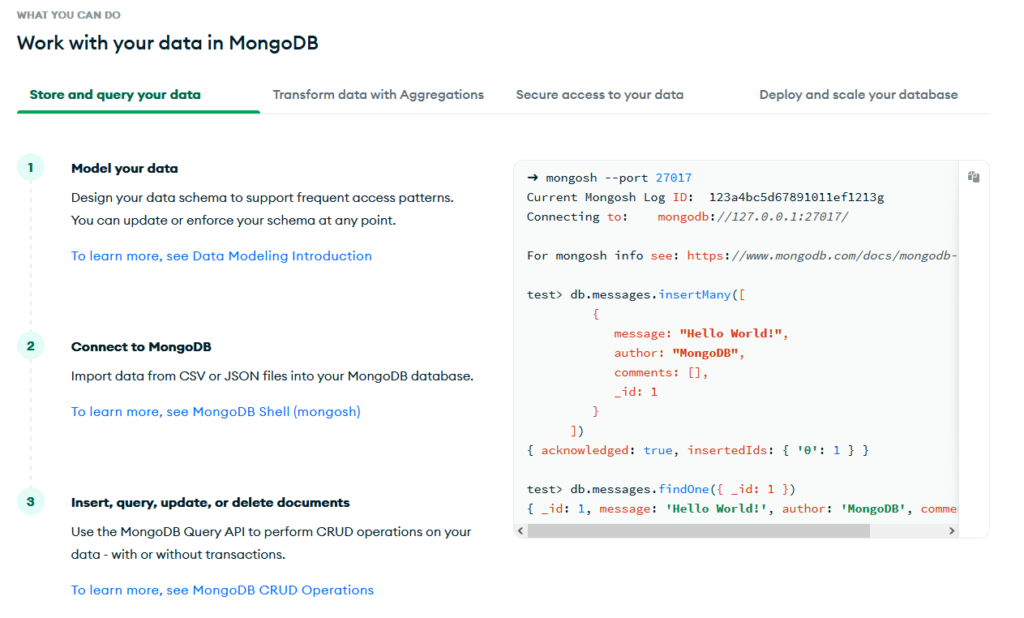
MongoDB Compass è uno strumento GUI (Interfaccia Grafica Utente) progettato specificamente per gli utenti MongoDB. Aiuta a visualizzare ed esplorare i dati, rendendo più semplice per i team lavorare con database basati su documenti.
Perché ho scelto MongoDB Compass: Questo strumento è perfetto per i database basati su documenti, offrendo un'interfaccia facile da usare per l'esplorazione dei dati. Puoi interagire visivamente con i tuoi dati senza dover scrivere query complesse, risparmiando tempo. La funzione di visualizzazione dello schema ti aiuta a comprendere rapidamente la struttura dei dati. Inoltre, la possibilità di eseguire operazioni CRUD direttamente dall'interfaccia aumenta la produttività del tuo team.
Funzionalità principali & integrazioni:
Funzionalità includono la visualizzazione dello schema che ti consente di comprendere facilmente la struttura dei dati. Puoi effettuare operazioni CRUD direttamente dall'interfaccia, velocizzando le attività di gestione dei dati. Lo strumento fornisce anche metriche di performance in tempo reale, aiutandoti a monitorare efficacemente la salute del database.
Integrazioni includono MongoDB Atlas, AWS, Azure, Google Cloud, Red Hat, Kubernetes, Docker, Node.js, Python e Java.
Pros and Cons
Pros:
- Operazioni CRUD dirette
- Metriche di performance in tempo reale
- Funzione di visualizzazione dello schema
Cons:
- Potrebbe non supportare grandi volumi di dati
- Non adatto ad analisi complesse


Microsoft SQL Server Express è un sistema di gestione di database gratuito e di livello base, progettato per applicazioni di piccole dimensioni e per sviluppatori. Offre funzionalità essenziali per la gestione dei database, rendendolo adatto all'apprendimento e allo sviluppo di applicazioni di piccola scala.
Perché ho scelto Microsoft SQL Server Express: Questo strumento è ideale per i principianti perché fornisce un motore di database completo senza la complessità dei sistemi più grandi. Puoi iniziare a sviluppare e distribuire le tue applicazioni facilmente, grazie alla configurazione semplice. Supporta una vasta gamma di tipi di dati e opzioni di indicizzazione, che aiutano a gestire i dati in modo efficiente. Le funzioni di sicurezza integrate proteggono i tuoi dati, rendendolo una scelta affidabile per chi è agli inizi.
Funzionalità e integrazioni di spicco:
Funzionalità includono il supporto per vari tipi di dati e opzioni di indicizzazione, che consentono una gestione dati efficiente. Si possono utilizzare le funzioni di sicurezza integrate per proteggere i dati da accessi non autorizzati. Inoltre, gli strumenti grafici di gestione semplificano le attività di amministrazione dei database.
Integrazioni includono Microsoft Visual Studio, Azure Data Studio, Power BI, Excel, SharePoint, Dynamics 365, .NET, Entity Framework, ODBC e JDBC.
Pros and Cons
Pros:
- Supporta vari tipi di dati
- Configurazione semplice per i nuovi utenti
- Motore di database completo
Cons:
- Mancano funzionalità avanzate
- Opzioni di scalabilità limitate
Altri software di database desktop
Ecco alcune opzioni aggiuntive di software di database desktop che non sono state incluse nella mia selezione, ma che vale comunque la pena prendere in considerazione:
- DB Browser for SQLite
Ideale per un'interfaccia utente intuitiva
- 4D
Ideale per soluzioni multipiattaforma
- Omnis
Ideale per lo sviluppo rapido di applicazioni
- dbForge Edge
Ideale per confronto di dati e schemi


Come Valuto il Software di Database Desktop
Valuto ogni strumento su due livelli: i requisiti fondamentali — esecuzione SQL in locale, progettazione dello schema — e i fattori distintivi che contano di più per DBA e sviluppatori che gestiscono dati in locale.
Funzionalità di Base (Requisiti Minimi per Questo Elenco)
Quando seleziono gli strumenti per il mio elenco, classifico ciascuno su una scala da 0 (non offre la funzionalità) a 5 (eccelle in quest'area) per ogni funzionalità di base elencata di seguito. Poi, calcolo il punteggio totale dello strumento in percentuale. Ogni strumento deve raggiungere un punteggio minimo totale del 65% per essere considerato per l'inclusione.
- Motore di Database Locale: Controllo se lo strumento esegue un motore di database direttamente sul desktop senza bisogno di configurare un server separato, dato che l'obiettivo principale è lavorare localmente su una macchina di sviluppo o una postazione analitica.
- Supporto per Query SQL: Qui è importante un buon editor di query, con evidenziazione della sintassi e salvataggio delle query. Strumenti come DBeaver e DB Browser for SQLite gestiscono questa funzione in modo diverso, quindi confronto la profondità.
- Strumenti di Progettazione Schema: Valuto come ogni strumento gestisce la creazione di tabelle, relazioni, indici e vincoli — soprattutto per la prototipazione degli schemi prima di trasferirli su un server di produzione.
- Importazione/Esportazione Dati: Spostare dati tra file CSV, dump SQL, JSON e altri formati è un compito quotidiano. Guardo a quanti formati sono supportati e quanto è fluido il flusso di lavoro.
- Interfaccia di Manipolazione Dati: Esamino attentamente la GUI per navigare, modificare e filtrare i record. Essere in grado di ordinare, modificare in blocco e ispezionare le righe in una visualizzazione a griglia fa risparmiare davvero tempo rispetto a scrivere query ad hoc.
- Supporto per File in Più Formati: Valuto quali formati di file locali uno strumento può aprire nativamente — che si tratti di .sqlite, .accdb, .mdb o .db — perché spesso i team ereditano database in formati legacy.
Una volta che ho una lista di strumenti che soddisfano i criteri, considero cosa distingue ogni piattaforma.
Fattori Differenzianti (Cosa Distingue i Fornitori)
Ecco come confronto i diversi fornitori:
Funzionalità Distintive
La connettività cross-database è molto importante — cerco strumenti che permettano di interrogare un server PostgreSQL o MySQL remoto insieme a un file SQLite locale nella stessa interfaccia. Il supporto per scripting e automazione distingue ulteriormente i candidati; la possibilità di scrivere macro Python o VBA per pulire e caricare dati secondo una pianificazione specifica permette di risparmiare ore di lavoro manuale. Vale la pena citare anche la presenza di un generatore visuale di query, in particolare per gli analisti che devono estrarre report senza ogni volta scrivere SQL puro.
Oltre le Funzionalità
La compatibilità con il sistema operativo qui è davvero importante. Alcuni strumenti funzionano solo su Windows, il che li esclude per i team che usano postazioni MacOS o Linux. Valuto anche i modelli di licenza — le opzioni open-source come DB Browser for SQLite e DBeaver si rivolgono a un pubblico diverso rispetto a strumenti commerciali come Microsoft Access, e la scelta incide su costo e flessibilità a lungo termine. Controllo inoltre le prestazioni su set di dati locali di grandi dimensioni, perché uno strumento che diventa lento oltre qualche centinaia di migliaia di righe non va bene per data engineer che gestiscono file di grande dimensione.
Come scegliere un software di database desktop
È facile perdersi in lunghi elenchi di funzionalità e strutture tariffarie complesse. Per aiutarti a rimanere concentrato mentre affronti il tuo processo di selezione del software, ecco una lista di fattori da tenere presenti:
| Fattore | Cosa considerare |
| Scalabilità | Assicurati che il software possa crescere insieme alle tue esigenze di dati. Cerca soluzioni che supportino volumi di dati e numeri di utenti crescenti senza perdita di prestazioni. |
| Integrazioni | Considera quanto bene il software si integri con gli strumenti esistenti. Verifica la compatibilità con sistemi come CRM, ERP e database NoSQL. |
| Personalizzazione | Scegli un software che ti permetta di adattare funzionalità e flussi di lavoro ai processi aziendali. I moduli e i report personalizzati sono fondamentali. |
| Facilità d'uso | Valuta l'interfaccia utente e la navigazione. Il tuo team dovrebbe poterlo utilizzare senza una formazione approfondita. |
| Budget | Valuta il costo totale, comprese le commissioni nascoste. Assicurati che rientri nel tuo budget senza sacrificare le funzionalità essenziali. |
| Misure di sicurezza | Cerca funzionalità come la crittografia e i controlli degli accessi per proteggere i dati sensibili. Il tuo database dovrebbe essere conforme agli standard del settore. |
| Assistenza | Verifica la disponibilità e la qualità dell'assistenza clienti. L'assistenza 24 ore su 24, 7 giorni su 7 può essere fondamentale per risolvere rapidamente i problemi. |
| Prestazioni | Testa la velocità e l'affidabilità del software. Dovrebbe gestire le query in modo efficiente, anche nei periodi di picco di utilizzo. |
Tendenze nei software di database desktop
Durante la mia ricerca, ho raccolto innumerevoli aggiornamenti dei prodotti, comunicati stampa e registri delle versioni di diversi fornitori di software di database desktop. Ecco alcune delle tendenze emergenti che sto tenendo d'occhio:
- Integrazione con il cloud: Un numero sempre maggiore di database desktop si integra con i servizi cloud per offrire una migliore accessibilità e collaborazione. Ciò consente agli utenti di accedere ai dati da qualsiasi luogo, semplificando il lavoro da remoto. Fornitori come Microsoft e IBM stanno potenziando i loro prodotti con funzionalità cloud.
- Approfondimenti basati sull'intelligenza artificiale: Le funzionalità di intelligenza artificiale vengono integrate per fornire analisi predittive e approfondimenti sui dati. Questo aiuta le aziende a prendere rapidamente decisioni informate. Strumenti come MongoDB Compass stanno iniziando a includere analisi basate sull'intelligenza artificiale per migliorare l'interpretazione dei dati.
- Funzionalità di sicurezza avanzate: Con l'aumento delle violazioni dei dati, i fornitori si stanno concentrando su protocolli di crittografia e sicurezza avanzati. Questi aggiornamenti aiutano a proteggere le informazioni sensibili e a garantire la conformità alle normative. Prodotti come PostgreSQL offrono misure di sicurezza più solide.
- Interfacce incentrate sull'utente: Si sta passando a interfacce più intuitive e facili da usare. Questa tendenza mira a ridurre la curva di apprendimento e a rendere i software di gestione dei database accessibili agli utenti non tecnici. Aziende come Claris FileMaker sono all'avanguardia in questo settore.
- Elaborazione dei dati in tempo reale: L'elaborazione dei dati in tempo reale sta diventando una priorità, consentendo alle aziende di reagire rapidamente ai cambiamenti. Questo è particolarmente utile nei settori che richiedono aggiornamenti immediati dei dati. VoltDB è noto per le sue funzionalità in tempo reale e sta definendo uno standard nel settore.
Che cos'è il software di database desktop?
Il software di database desktop è un tipo di applicazione utilizzata per creare, gestire e manipolare database su un computer personale. Professionisti come amministratori di database, sviluppatori e analisti aziendali utilizzano generalmente questi strumenti per organizzare e analizzare i dati in modo efficiente.
Funzionalità come l'archiviazione dei dati, l'esecuzione di query SQL e le misure di sicurezza aiutano nella gestione, nell'accessibilità e nella protezione dei dati. Nel complesso, questi strumenti offrono agli utenti la possibilità di gestire i dati in modo efficace, favorendo decisioni informate ed efficienza operativa.
Funzionalità del software di database desktop
Quando selezioni un software di database desktop, presta attenzione alle seguenti funzionalità chiave:
- Archiviazione dei dati: Archivia in modo efficiente grandi volumi di dati, garantendo un facile accesso e recupero quando necessario.
- Esecuzione di query SQL: Consente agli utenti di eseguire manipolazioni e analisi complesse dei dati utilizzando il linguaggio di interrogazione strutturato.
- Misure di sicurezza: Fornisce crittografia e controlli degli accessi per proteggere i dati sensibili dagli accessi non autorizzati.
- Integrazione con il cloud: Consente di accedere ai dati da qualsiasi luogo, facilitando il lavoro da remoto e la collaborazione.
- Informazioni basate sull'AI: Offre analisi predittive e informazioni utili, aiutando le aziende a prendere rapidamente decisioni consapevoli.
- Interfacce incentrate sull'utente: Presenta un design intuitivo che rende la gestione dei database accessibile anche agli utenti non tecnici.
- Elaborazione dei dati in tempo reale: Elabora i dati istantaneamente, consentendo alle aziende di reagire rapidamente ai cambiamenti.
- Personalizzazione: Consente agli utenti di adattare funzionalità e flussi di lavoro alle esigenze e ai processi aziendali specifici.
- Scalabilità: Supporta la crescita del volume dei dati e del numero di utenti, mantenendo le prestazioni senza degradazione.
- Compatibilità multipiattaforma: Garantisce il corretto funzionamento delle applicazioni su diversi sistemi operativi e dispositivi.
Vantaggi dei software per database desktop
L'implementazione di un software per database desktop offre diversi vantaggi al tuo team e alla tua azienda. Ecco alcuni dei vantaggi che puoi aspettarti:
- Gestione dei dati migliorata: Centralizza l'archiviazione e l'organizzazione dei dati, rendendo le informazioni facili da consultare e gestire.
- Processo decisionale più efficace: Le informazioni e le analisi basate sull'AI aiutano il tuo team a prendere rapidamente decisioni aziendali consapevoli.
- Maggiore produttività: Le interfacce incentrate sull'utente e l'elaborazione dei dati in tempo reale accelerano le operazioni quotidiane e riducono le attività manuali.
- Sicurezza dei dati: Le funzionalità di sicurezza integrate, come la crittografia e i controlli degli accessi, proteggono le informazioni sensibili.
- Flessibilità: Le funzionalità personalizzabili consentono di adattare il software ai processi e alle esigenze aziendali.
- Scalabilità: Supporta la crescita gestendo volumi di dati e numeri di utenti maggiori senza perdita di prestazioni.
- Accesso da remoto: L'integrazione con il cloud consente al team di accedere ai dati da qualsiasi luogo, facilitando la collaborazione e il lavoro da remoto.
Costi e prezzi dei software per database desktop
La scelta di un software per database desktop richiede la comprensione dei diversi modelli di prezzo e dei piani disponibili. I costi variano in base alle funzionalità, alle dimensioni del team, ai componenti aggiuntivi e ad altri fattori. La tabella seguente riassume i piani più comuni, i relativi prezzi medi e le funzionalità tipicamente incluse nelle soluzioni software per database desktop:
Tabella comparativa dei piani per i software per database desktop
| Tipo di piano | Prezzo medio | Funzionalità comuni |
| Piano gratuito | $0 | Archiviazione di base dei dati, query limitate e assistenza della comunità. |
| Piano personale | $5-$25 /utente /mese | Archiviazione dei dati, query SQL e funzionalità di sicurezza di base. |
| Piano aziendale | $30-$75 /utente /mese | Sicurezza avanzata, integrazione con il cloud e interfacce intuitive. |
| Piano per grandi aziende | $100-$200/utente /mese | Analisi avanzate, ampia personalizzazione e assistenza dedicata. |
Domande frequenti sul software di database desktop
Ecco alcune risposte alle domande comuni sul software di database desktop:
Perché potremmo preferire utilizzare un database desktop invece di un database server?
I database desktop sono spesso intuitivi e non richiedono la conoscenza di SQL. Di solito dispongono di un’interfaccia grafica, che li rende accessibili agli utenti non tecnici. Offrono inoltre opzioni per pubblicare facilmente i dati sul Web.
Qual è il database migliore per le applicazioni desktop?
La scelta del database migliore dipende dalle esigenze specifiche. Microsoft Access è ideale per i principianti grazie alla sua GUI intuitiva, mentre SQLite è perfetto per i sistemi integrati per via della sua natura leggera. Se Access non soddisfa le tue esigenze, confrontare le alternative a Microsoft Access può aiutarti a trovare una soluzione più adatta.
Qual è la differenza tra un database desktop e un database server?
I database desktop sono adatti ai piccoli uffici o agli uffici domestici e sono progettati per l’accesso da parte di un singolo utente o di piccoli team. I database server, invece, sono pensati per organizzazioni più grandi e supportano ambienti multiutente con esigenze di dati più complesse.
I database desktop sono in grado di gestire grandi volumi di dati?
La maggior parte dei database desktop non è progettata per gestire volumi di dati molto elevati. Se la tua organizzazione gestisce dataset estesi, potresti aver bisogno di una soluzione di database server. Tuttavia, alcune soluzioni desktop offrono opzioni di scalabilità per soddisfare esigenze di dati in crescita.
Quanto sono sicure le soluzioni di database desktop?
Le funzionalità di sicurezza variano a seconda del prodotto, ma molti database desktop includono la crittografia e i controlli di accesso. È importante valutare le misure di sicurezza offerte da ciascun software e assicurarsi che siano in linea con i requisiti di protezione dei dati.
I database desktop supportano l'integrazione con il cloud?
Molti database desktop moderni offrono l’integrazione con il cloud, consentendo di accedere ai dati da remoto e collaborare con i membri del team. Verifica che il software che stai valutando supporti i servizi cloud per migliorare l’accessibilità e il lavoro di squadra.
Cosa succede dopo?
Fai crescere la tua attività SaaS e sviluppa le tue competenze di leadership. Iscriviti alla nostra newsletter per ricevere gli ultimi approfondimenti da CTO e aspiranti leader tecnologici. Ti aiuteremo a crescere in modo più intelligente e a guidare con maggiore efficacia, grazie a guide, risorse e strategie dei migliori esperti!