

Nel mondo digitale di oggi, proteggere i propri dati è una priorità assoluta. La perdita di dati può trasformarsi in un incubo per te e il tuo team, causando una perdita di tempo, denaro e fiducia. È qui che entra in gioco il software per la prevenzione della perdita di dati: ti aiuta a proteggere le informazioni sensibili e a garantire la conformità alle normative.
Provo e recensisco il software in modo indipendente, concentrandomi su ciò che conta davvero per esperti di tecnologia come te. Nella mia esperienza, trovare gli strumenti giusti per la prevenzione della perdita di dati può fare la differenza nella protezione della tua azienda.
In questo articolo condividerò le mie migliori scelte di software per la prevenzione della perdita di dati. Avrai una panoramica imparziale delle funzionalità, dei vantaggi e degli svantaggi, nonché di come questi strumenti possano alleviare le tue difficoltà. Iniziamo e troviamo la soluzione più adatta alle tue esigenze.
Perché fidarsi dei nostri consigli sui software
6,700+
Reviews
20
Industry experts
16+
Evaluation factors
14
Years
Il nostro team testa e recensisce software dal 2012. In quanto leader tecnologici noi stessi, sappiamo quanto sia difficile — e importante — scegliere il software giusto.
Per questa guida, abbiamo valutato gli strumenti attraverso test praticie ricerche indipendenti, assegnando un punteggio agli strumenti in base ai nostri criteri di selezione.
Le nostre recensioni riflettono il nostro giudizio editoriale umano, non un discorso di vendita.
Revisori esperti:
- Paulo Gardini MiguelDirettore tecnico
 Tim FisherVP dell'IA
 Gabriel RosasTech Lead e architetto software
 Christhian GruhnTech Lead e architetto della piattaforma

Riepilogo dei migliori software per la prevenzione della perdita di dati
| Tool | Best For | Trial Info | Price | ||
|---|---|---|---|---|---|
| 1 | Ideale per il controllo dell'esfiltrazione dei dati SaaS e GenAI | Demo gratuita disponibile | Prezzi su richiesta | Website | |
| 2 | Ideale per il rilevamento di minacce interne | Prova gratuita + demo gratuita disponibili | Da $14/postazione/mese (fatturazione annuale) | Website | |
| 3 | Ideale per rilevamento e risposta alle minacce | $15/utente/mese (fatturato annualmente) | Website | ||
| 4 | Ideale per la protezione dei dati aziendali su larga scala | Prezzo personalizzato su richiesta | Website | ||
| 5 | Ideale per la protezione olistica dei dati in ambienti cloud ibridi | Prezzo su richiesta | Website | ||
| 6 | Ideale per sicurezza e conformità dei database | Prova gratuita di 30 giorni disponibile | $30/user/month | Website | |
| 7 | Ideale per la protezione avanzata basata sull'apprendimento automatico | Prezzo su richiesta | Website | ||
| 8 | Ideale per la sicurezza dei dati sensibile al contesto | $10/user/month (fatturato annualmente) | Website | ||
| 9 | Ideale per sicurezza integrata di endpoint e rete | $15/user/month | Website | ||
| 10 | Ideale per ambienti cloud-native | $10/user/month (fatturato annualmente) | Website |


Recensioni dei migliori software per la prevenzione della perdita di dati
 Ideale per il controllo dell'esfiltrazione dei dati SaaS e GenAI
- Demo gratuita disponibile
- Prezzi su richiesta
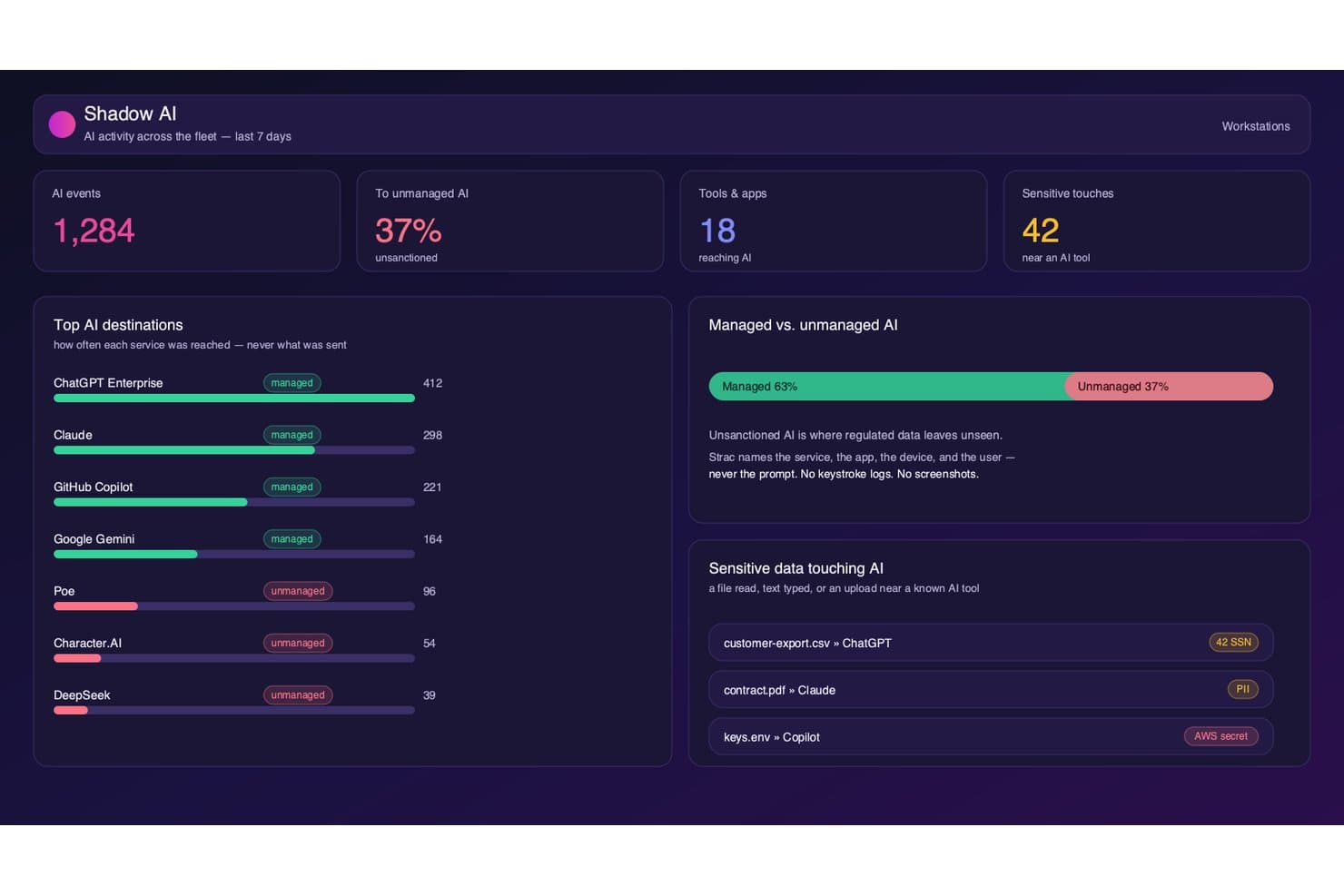
Strac monitora l'utilizzo dell'intelligenza artificiale ombra e segnala i dati sensibili vicino agli strumenti di intelligenza artificiale. Strac è una piattaforma DLP che monitora e applica le policy di protezione dei dati nelle app SaaS, nello storage cloud, negli endpoint, nei browser e negli strumenti di intelligenza artificiale generativa utilizzando la classificazione basata su ML e l'OCR.
Per chi è più adatto Strac?
Strac è particolarmente adatto ai team di sicurezza che gestiscono dati sensibili in ambienti SaaS articolati e alle organizzazioni che stanno adottando attivamente strumenti di intelligenza artificiale generativa e devono controllare quali dati i dipendenti inviano ai modelli di intelligenza artificiale.
Perché ho scelto Strac
Ho scelto Strac come una delle soluzioni migliori perché è una delle poche piattaforme DLP che considera l'intelligenza artificiale generativa un canale di esfiltrazione a tutti gli effetti. Monitora e blocca i dati sensibili inviati a ChatGPT, Claude, Gemini e Copilot a livello di prompt ed estende questa copertura ai flussi di lavoro degli agenti MCP. Apprezzo anche il fatto che il suo motore di classificazione basato su ML e OCR rilevi i dati sensibili incorporati in immagini e PDF scansionati prima che lascino l'ambiente.
Funzionalità principali di Strac
- Modelli di policy per la conformità: Modelli predefiniti associati a HIPAA, PCI DSS, SOC 2, GDPR, CCPA, CPRA, ISO 27001 e ISO 27701 per una copertura normativa pronta all'uso.
- Controllo dei supporti rimovibili e della stampa: Gli agenti endpoint per Windows, macOS e Linux applicano in tempo reale le restrizioni relative a USB, appunti e stampa.
- Distribuzione autogestita on-premise: Strac può essere eseguito interamente all'interno della propria VPC AWS senza alcuna uscita dei dati, supportando rigorosi requisiti di localizzazione dei dati e FedRAMP.
- Suggerimenti di orientamento per gli utenti: Nel momento in cui si verifica una potenziale violazione della policy, Strac fornisce suggerimenti contestuali che informano i dipendenti invece di bloccarli silenziosamente.
Integrazioni di Strac
Strac offre oltre 50 integrazioni native, tra cui Slack, Google Workspace, Microsoft 365, Salesforce, Jira, AWS, Snowflake, PostgreSQL, ChatGPT, Claude e Gemini. Fornisce inoltre la documentazione API per le integrazioni personalizzate e supporta connessioni SIEM con Splunk, Sumo Logic e Microsoft Sentinel.
Pros and Cons
Pros:
- Applica la DLP agli strumenti di intelligenza artificiale generativa
- Fornisce la correzione in tempo reale alla fonte dei dati
- Esegue il rilevamento basato su OCR per immagini e PDF
Cons:
- Manca una soluzione UEBA autonoma per le minacce interne
- Nessun proxy DLP in linea a livello di rete
Learn more about Strac: Ideale per il rilevamento di minacce interne
- Prova gratuita + demo gratuita disponibili
- Da $14/postazione/mese (fatturazione annuale)
Visit WebsiteCustomer Rating:4.5/5This rating combines scores from multiple user review sites to reflect overall customer sentiment about the product.
Teramind mostra analisi su dipendenti principali, dipartimenti e utilizzo delle applicazioni, aiutando a rilevare schemi di attività che potrebbero segnalare rischi potenziali di perdita dati. Teramind entra nella mia shortlist per la sua efficacia nel rilevare minacce interne in tempo reale. Lo consiglio quando è necessario monitorare i comportamenti rischiosi degli utenti che sfuggono ai controlli DLP tradizionali.
Quello che apprezzo è il monitoraggio approfondito delle attività utente e la valutazione automatica del rischio. In pratica, i team possono individuare azioni insolite—come il trasferimento di molti file o accessi non autorizzati—prima che i dati lascino effettivamente l’ambiente.
Teramind è Ideale Per
- Team di sicurezza che monitorano minacce interne e utenti a rischio
- Organizzazioni che necessitano di un tracciamento dettagliato delle attività utente
Teramind Non È Indicato Per
- Aziende che desiderano soluzioni DLP leggere e autonome
- Team concentrati solo sulla classificazione automatica dei dati
Cosa Distingue Teramind
Teramind si focalizza su un monitoraggio ravvicinato del comportamento degli utenti, trattando ogni azione—come trasferimenti di file e utilizzo di applicazioni—come un potenziale indicatore di rischio da tenere sotto controllo. A differenza della maggior parte delle soluzioni DLP che puntano su scansione del contenuto o etichettatura dei dati, Teramind parte dal presupposto che le minacce principali si muovano tramite persone all’interno della rete. In pratica, è ideale quando ti interessa analizzare i modelli di attività più che bloccare solo i tipi di dati già noti.
Compromessi di Teramind
Teramind privilegia il monitoraggio approfondito e i dati comportamentali, ma questo comporta una configurazione più complessa, analisi continuativa e maggiore rumore. Se desideri un DLP automatizzato che richieda poche regolazioni, questo approccio richiede più impegno.
Pros and Cons
Pros:
- Identifica minacce interne trascurate dai sistemi basati solo su regole
- La valutazione dettagliata del rischio aiuta a ridurre i falsi positivi
- Previene le fughe di dati in modo proattivo, non solo una volta rilevate
Cons:
- Nessuna impronta del database per dati strutturati
- Richiede l’installazione dell’agente endpoint su ogni dispositivo
Learn more about Teramind: Ideale per rilevamento e risposta alle minacce
- $15/utente/mese (fatturato annualmente)

Ecco la funzione di analisi di Proofpoint. Proofpoint Enterprise Data Loss Prevention si guadagna un posto perché individua costantemente minacce che altri strumenti non rilevano, soprattutto su email, cloud e endpoint. L'ho visto identificare tentativi di esfiltrazione e rischi interni combinando analisi comportamentale e ispezione dei contenuti in un unico flusso di lavoro.
Ciò che lo distingue, a mio parere, è il motore di correlazione delle minacce. Ricevi avvisi azionabili e un flusso di lavoro di risposta che copre tutto, dal blocco in tempo reale alla revisione degli incidenti, in una sola dashboard.
Proofpoint DLP: ideale per
- Grandi aziende che necessitano di protezione dalle minacce su email, cloud e endpoint
- Team di sicurezza focalizzati su rischi interni e di esfiltrazione
Proofpoint DLP: meno indicato per
- Piccole imprese con risorse IT limitate
- Organizzazioni che desiderano soluzioni DLP leggere o basilari
Cosa rende unico Proofpoint DLP
Proofpoint DLP mette il rilevamento delle minacce al centro, concentrandosi sui segnali comportamentali prima ancora di analizzare contenuti e policy. A differenza dei tradizionali strumenti DLP che si basano principalmente su parole chiave o pattern, Proofpoint punta su contesto e attività in tempo reale, segnalando per primi i comportamenti rischiosi tra email e cloud. Ho visto che funziona al meglio in organizzazioni con una combinazione di minacce interne ed esterne, dove si desidera collegare segni premonitori con i movimenti di dati.
Compromessi con Proofpoint DLP
Ottimizzando per il rilevamento avanzato, Proofpoint introduce maggiore complessità e una curva di apprendimento più ripida. Per i team che desiderano qualcosa di più semplice o dal tocco più leggero, questa profondità extra può tradursi in più lavoro all'inizio e in un onboarding più lento.
Pros and Cons
Pros:
- Capacità eccezionali di rilevamento e risposta alle minacce.
- Si integra con altre soluzioni Proofpoint.
- Offre una visibilità completa sulla sicurezza dei dati.
Cons:
- Prezzo di partenza più alto rispetto ad altre soluzioni DLP.
- Potrebbero esserci costi extra per funzionalità avanzate.
- Può risultare complesso da implementare e gestire per le piccole aziende.
Learn more about Proofpoint Enterprise Data Loss Prevention: Ideale per la protezione dei dati aziendali su larga scala
- Prezzo personalizzato su richiesta

Ecco la funzionalità di gestione delle policy in Symantec Data Loss Prevention. Symantec Data Loss Prevention è nella mia lista perché gestisce alcune delle esigenze di protezione dei dati più grandi e complesse che abbia mai incontrato. Quando lavoro con aziende in cui dati riservati vengono trasferiti tra cloud, endpoint e sistemi on-premise, la gestione unificata delle policy e la scoperta automatica dei dati di Symantec fanno davvero la differenza.
Quello che apprezzo di più è la possibilità di personalizzare le policy per rispondere alle normative regionali, alle minacce interne e ai rischi dei terzi su larga scala.
Symantec DLP è l’ideale per
- Grandi imprese con ambienti dati diversi e complessi
- Organizzazioni che necessitano di un controllo granulare sul trasferimento dei dati sensibili
Symantec DLP non è ideale per
- Piccole aziende con esigenze di protezione dati semplici
- Team che cercano implementazioni rapide e leggere
Cosa distingue Symantec DLP
Symantec DLP è progettato per le organizzazioni che devono governare i dati sensibili spostati tra endpoint, cloud e sistemi on-premise, tutto sotto un unico tetto. A differenza di strumenti più semplici come Microsoft Purview, pensati per ambienti più piccoli o prevalentemente basati su tecnologie Microsoft, Symantec prevede la centralizzazione delle policy e dei report per infrastrutture altamente eterogenee.
Nella pratica, funziona bene per i team di sicurezza che devono coordinare i controlli di rischio tra operazioni globali, obblighi normativi e piattaforme miste.
Compromessi con Symantec DLP
Symantec DLP ottimizza il controllo su scala e complessità, ma la fase di onboarding e la configurazione richiedono tempo e competenze specializzate. I team più piccoli si ritrovano spesso con una manutenzione superiore al desiderato.
Pros and Cons
Pros:
- Può gestire esigenze aziendali su larga scala.
- Offre una gestione unificata delle policy.
- Si integra profondamente con altri prodotti Symantec.
Cons:
- Le informazioni sui prezzi non sono facilmente disponibili.
- Potrebbe essere troppo complesso per organizzazioni più piccole.
- L'implementazione e la gestione possono richiedere molto tempo.
Learn more about Symantec Data Loss Prevention: Ideale per la protezione olistica dei dati in ambienti cloud ibridi
- Prezzo su richiesta

Ecco le analisi delle minacce attive di IBM Data Security. IBM Data Security è nella mia lista perché unisce prevenzione della perdita dei dati e crittografia in ambienti ibridi e multi-cloud. Trovo che il modo in cui automatizza l'applicazione delle policy su Kubernetes, database e filesystem faccia risparmiare molto lavoro manuale man mano che gli ambienti crescono.Durante i test, quello che colpisce è la precisione delle policy e del monitoraggio, senza creare attrito percepibile per gli utenti finali. Questo è particolarmente prezioso per le grandi organizzazioni, dove gli stessi dati hanno bisogno di una protezione coerente e di un'applicazione delle policy su sistemi on-premise, piattaforme cloud e carichi di lavoro containerizzati.IBM Data Security: Migliore per
- Imprese con ambienti di dati complessi, ibridi o multi-cloud
- Team di sicurezza che necessitano di automazione centralizzata per policy e conformità
IBM Data Security: Meno indicato per
- Piccole organizzazioni con archiviazione dati semplice e solo locale
- Team che necessitano di strumenti DLP leggeri e plug-and-play
Cosa distingue IBM Data Security
IBM Data Security si distingue perché dà priorità all'applicazione unificata delle policy e al monitoraggio attraverso fonti di dati cloud e locali. Invece di sovrapporre strumenti DLP per ogni ambiente, imposti le policy una sola volta e le applichi ovunque.
Questo approccio è l'ideale per organizzazioni che gestiscono dati sensibili sia su cloud pubblici sia su data center locali. Rispetto a soluzioni come Symantec DLP, che spesso danno per scontata un'infrastruttura più standardizzata, IBM punta sulla coerenza tra gli ambienti.
Compromessi con IBM Data Security
Ottimizza il controllo centralizzato e ampio, ma questo può comportare implementazioni più lente e configurazione aggiuntiva se hai solo bisogno di una protezione DLP di base e mirata per un singolo sistema.
Pros and Cons
Pros:
- Soluzione completa per la protezione dei dati in ambienti cloud ibridi.
- Offre una piattaforma unificata per tutte le esigenze di sicurezza dei dati.
- Ampia gamma di integrazioni compatibili.
Cons:
- Le informazioni sui prezzi non sono facilmente reperibili.
- Potrebbe risultare troppo complesso per le piccole imprese.
- Potenziale curva di apprendimento dovuta all'ampiezza delle funzionalità.
Learn more about IBM Data Security: Ideale per sicurezza e conformità dei database
- Prova gratuita di 30 giorni disponibile
- $30/user/month

Ecco una panoramica della dashboard di sicurezza dei dati cloud di Imperva. Imperva è qui perché il suo approccio alla sicurezza dei database e alla conformità risolve un problema che vedo spesso: visibilità frammentaria su dove risiedano i dati sensibili e su come vengano acceduti. Quando valuto le opzioni di prevenzione della perdita di dati, Imperva si distingue per il monitoraggio senza agente delle attività e la capacità di applicare politiche granulari direttamente allo store dei dati.Durante i test, ciò che mi ha colpito di più è stata la semplicità con cui è possibile impostare avvisi in tempo reale per accessi rischiosi ai dati, continuando comunque a soddisfare i requisiti degli audit di conformità. Se vi è mai capitato di dover tracciare chi ha avuto accesso a dati sensibili o estrarre i log sotto pressione, questo tipo di visibilità fa davvero la differenza—senza dover mettere insieme più strumenti.Imperva è ideale per
- Settori regolamentati con complesse esigenze di conformità sui database
- Team di sicurezza che necessitano di monitoraggio in tempo reale dei dati sensibili
Imperva non è adatto per
- Organizzazioni focalizzate sulla prevenzione della perdita di dati a livello endpoint
- Team che operano solo su piccola scala o solo su storage di file
Cosa distingue Imperva
Imperva è progettato sull'idea che la sicurezza dei database debba essere granulare, continua e indipendente da dove risiedano i dati. A differenza delle soluzioni DLP tradizionali che si concentrano sugli endpoint o sul traffico di rete, Imperva parte dal presupposto che i dati più preziosi risiedano all'interno di database e cloud store—ed è proprio lì che monitora e applica i controlli.
Riesco a vedere quanto questo funzioni bene quando servono politiche rigorose per carichi regolamentati o ambienti database. Adotta la visione che i controlli centrati sui dati dovrebbero guidare l'approccio alla sicurezza, non solo i perimetri di rete o gli endpoint.
Compromessi con Imperva
Imperva ottimizza la protezione dei dati su database e cloud, ma questa attenzione significa perdere una visibilità completa sui rischi legati a file ed endpoint. I team con dati distribuiti su molti sistemi potrebbero aver bisogno di un altro strumento DLP per una copertura più ampia.
Pros and Cons
Pros:
- Forte attenzione alla sicurezza dei database.
- Aiuta a ottenere la conformità agli standard normativi.
- Si integra con altri strumenti di sicurezza per una protezione completa.
Cons:
- Il prezzo potrebbe essere elevato per le piccole imprese.
- Le opzioni di personalizzazione possono risultare complesse per i principianti.
- A seconda delle dimensioni del database, le prestazioni del sistema potrebbero risentirne.
Learn more about Imperva: Ideale per la protezione avanzata basata sull'apprendimento automatico
- Prezzo su richiesta

Ecco il pannello di controllo di analisi in Forcepoint Data Loss Prevention. Forcepoint Data Loss Prevention si guadagna un posto nella mia lista grazie al suo approccio avanzato basato sull'apprendimento automatico ai rischi di perdita dei dati. Ho visto come lo strumento identifica schemi articolati nel comportamento degli utenti che molti sistemi tradizionali basati su regole non riescono a individuare. Apprezzo la precisione dell'applicazione automatizzata delle policy, soprattutto negli ambienti complessi e fortemente regolamentati.
È una soluzione di riferimento quando il tuo team gestisce grandi volumi di dati sensibili e hai bisogno di informazioni più approfondite e contestuali per bloccare le fughe di dati prima che si verifichino.
Ideale per Forcepoint DLP
- Aziende con flussi di dati complessi e rigorosi requisiti di conformità
- Team di sicurezza che richiedono una protezione dei dati contestuale e basata sull'apprendimento automatico
Non ideale per Forcepoint DLP
- Piccole organizzazioni che necessitano di una soluzione DLP semplice e pronta all'uso
- Team privi delle risorse necessarie per la messa a punto e la gestione continuative
Cosa distingue Forcepoint DLP
Forcepoint DLP è progettato per le organizzazioni che necessitano di qualcosa di più delle semplici regole sui contenuti. In pratica, richiede di configurare policy che prendano in considerazione il contesto e il comportamento degli utenti, non solo i tipi di file o le parole chiave. A differenza di strumenti come Symantec DLP, che fanno forte affidamento su schemi statici, Forcepoint ti orienta verso flussi di lavoro adattivi al rischio che cambiano in base a ciò che gli utenti fanno realmente nel tempo.
Finisci per lavorare con avvisi e controlli che si adattano al tuo ambiente, invece di bloccare ripetutamente le stesse violazioni.
Compromessi con Forcepoint DLP
Concentrandosi sulla protezione adattiva al rischio, Forcepoint richiede un maggiore lavoro iniziale di configurazione e calibrazione, quindi rinunci alla facilità di avvio che avresti con uno strumento DLP di base.
Pros and Cons
Pros:
- Utilizza l'apprendimento automatico avanzato per la protezione.
- Offre una suite completa di funzionalità.
- Offre integrazioni con altre soluzioni Forcepoint.
Cons:
- I prezzi non sono trasparenti e richiedono un contatto diretto.
- Potrebbe essere eccessivamente complesso per le aziende più piccole.
- I modelli di apprendimento automatico possono richiedere tempo per una calibrazione ottimale.
Learn more about Forcepoint Data Loss Prevention: Ideale per la sicurezza dei dati sensibile al contesto
- $10/user/month (fatturato annualmente)

Ecco la funzione di sicurezza automatizzata e facile da implementare in Egress Data Loss Prevention. Egress Data Loss Prevention entra nella mia shortlist per il modo in cui applica la consapevolezza contestuale alla sicurezza dei dati nelle email. Ciò che colpisce è come analizza in tempo reale il contenuto dei messaggi e il contesto dei destinatari, segnalando o bloccando eventi a rischio di perdita dati prima che si verifichino.
Mi piace il fatto che i team possano impostare politiche affinché le informazioni sensibili vengano gestite in modo diverso in base al contenuto, al destinatario o all’azione dell’utente—soprattutto in ambiti finanziari o legali, dove il contesto è fondamentale.
Egress è ideale per
- Organizzazioni che inviano dati riservati tramite email
- Team che necessitano di controlli sui dati basati su politiche e consapevolezza contestuale
Egress non è adatto per
- Aziende che cercano una copertura DLP al di fuori dell’email
- Piccole imprese con esigenze email semplici e di basso volume
Cosa distingue Egress
Egress si distingue perché costruisce la sicurezza delle email attorno al contesto, non solo al rilevamento di semplici contenuti. Invece di etichettare parole chiave o bloccare allegati come fanno alcuni strumenti DLP, analizza sia il messaggio che i destinatari prima di intervenire. Per le organizzazioni dove i dettagli sensibili possono cambiare di significato a seconda di chi li invia, o dove sono comuni errori con dati in uscita, questo strumento è una scelta valida.
Compromessi con Egress
Egress si ottimizza per controlli sfumati e guidati da politiche sulle email, ma ciò comporta una copertura limitata per i canali diversi dall’email. Se hai bisogno di monitorare dati su drive cloud o chat, sarà necessario un secondo strumento.
Pros and Cons
Pros:
- Offre sicurezza dei dati sensibile al contesto.
- Si integra perfettamente con Microsoft 365 e Google Workspace.
- Utilizza machine learning avanzato per il rilevamento delle minacce.
Cons:
- Le funzionalità avanzate potrebbero comportare costi aggiuntivi.
- Può risultare impegnativo per le piccole imprese.
- La configurazione può richiedere un periodo di apprendimento.
Learn more about Egress Data Loss Prevention: Ideale per sicurezza integrata di endpoint e rete
- $15/user/month

Questa è la funzionalità di sicurezza degli endpoint in Trellix Data Loss Prevention. Trellix Data Loss Prevention si guadagna un posto nella mia lista per come unifica la sicurezza degli endpoint e della rete in un sistema coordinato. Ho lavorato con team che vogliono rilevare sia perdite accidentali di dati sia gravi minacce interne senza dover saltare tra strumenti separati, e questa soluzione si adatta bene a queste esigenze.
Ciò che mi piace è il modo in cui Trellix combina l'ispezione dei contenuti in tempo reale con l'applicazione automatica delle policy su dispositivi e livelli di rete. Puoi definire e applicare controlli coerenti da un'unica posizione, riducendo la probabilità di lacune tra endpoint e rete.
Trellix è ideale per
- Organizzazioni che necessitano di una protezione unificata dei dati su endpoint e rete
- Team con esigenze di monitoraggio rigoroso per normative o minacce interne
Trellix non è adatto per
- Piccole imprese senza personale addetto alla sicurezza dedicato
- Team che cercano soluzioni DLP leggere o plug-and-play
Cosa distingue Trellix
Trellix adotta un approccio coordinato gestendo la prevenzione della perdita dei dati sia sugli endpoint che sulla rete. Questo è diverso da strumenti come Symantec DLP, che spesso mantengono quei livelli separati. In pratica, vedo che Trellix si aspetta che tu progetti policy che monitorino i dati sensibili che si muovono in tutto l'ambiente, inclusi endpoint, traffico di rete e canali cloud.
Funziona bene se desideri controlli coerenti e una risposta unificata agli incidenti, ma è necessario pianificare un allineamento delle policy su più superfici.
Compromessi con Trellix
Trellix è ottimizzato per un controllo approfondito delle policy su endpoint e reti, ma questa complessità rallenta la distribuzione e richiede uno sforzo amministrativo continuo. Se cerchi qualcosa di veloce da configurare con un minimo di regolazioni, questa soluzione non fa per te.
Pros and Cons
Pros:
- Fornisce sicurezza sia su endpoint che su rete.
- Visibilità in tempo reale sul movimento dei dati.
- Integrazione semplice con altre piattaforme di sicurezza e IT.
Cons:
- Potrebbe essere costoso per le aziende più piccole.
- Richiede tempo per la configurazione e la definizione delle policy.
- L'interfaccia può richiedere assistenza per la navigazione ai principianti.
Learn more about Trellix Data Loss Prevention:

Ecco la funzione di gestione dei permessi di file e cartelle in Nightfall DLP. Nightfall DLP si distingue per la sua capacità di proteggere a fondo i dati nelle infrastrutture cloud-native. Durante i miei test, il rilevamento automatico e l’ispezione dei contenuti funzionano direttamente all’interno di strumenti come Google Drive, Slack e Jira, segnalando i dati sensibili con una configurazione minima.
Apprezzo in particolare il pacchetto di rilevamento predefinito per i tipi di dati più comuni. È un approccio intelligente per gestire il rischio di perdita dati senza dover intervenire manualmente, soprattutto man mano che il team amplia l’adozione del cloud.
Nightfall DLP è ideale per
- Team di sicurezza che devono proteggere i dati sensibili nelle app cloud
- Organizzazioni che richiedono conformità automatizzata e classificazione dei dati
Nightfall DLP non è adatto per
- Aziende con principalmente infrastrutture on-premise o legacy
- Piccoli team che necessitano solo di soluzioni DLP di base per endpoint
Cosa distingue Nightfall DLP
Nightfall DLP si distingue perché è progettato pensando alle piattaforme cloud come Google Workspace, Slack e Jira, non come aggiunta secondaria. Mentre gli strumenti DLP tradizionali si affidano a controlli per endpoint o rete, Nightfall prevede di lavorare direttamente tra le app SaaS e le API. In pratica, è ideale quando occorre una scansione continua all’interno degli strumenti già utilizzati dal tuo team.
Compromessi con Nightfall DLP
Nightfall è ottimizzato per ambienti cloud-first, ma perdi il supporto diretto per il controllo dei canali dati on-premise, il che lo rende meno utile se la maggior parte dei tuoi dati risiede ancora su endpoint locali o file server.
Pros and Cons
Pros:
- Ottima protezione degli ambienti cloud-native.
- Rilevamento potenziato tramite machine learning.
- Ampie integrazioni con piattaforme cloud.
Cons:
- Potrebbe essere troppo specializzato per aziende non cloud-native.
- Alcune funzionalità avanzate potrebbero avere costi aggiuntivi.
- L’interfaccia utente può richiedere tempo per essere padroneggiata.
Learn more about Nightfall DLP:
Altri software per la prevenzione della perdita di dati
Di seguito è riportato un elenco di software aggiuntivi per la prevenzione della perdita di dati che ho selezionato, ma che non sono rientrati nella top 10. Vale sicuramente la pena dar loro un’occhiata.
- 11Endpoint Protector Data Loss Prevention (DLP) SoftwareIdeale per il controllo di dispositivi USB e periferiche
- 12Safetica ONEIdeale per la prevenzione della perdita di dati tramite analisi comportamentale
- 132B Advice PrIMEIdeale per la gestione della privacy e della conformità
- 14GTT DLPIdeale per la visibilità completa dei dati
Recensioni correlate
- Software per la sicurezza delle reti
- Strumenti per la sicurezza del cloud
- Software per la replica dei dati
Come Valuto i Software per la Prevenzione della Perdita di Dati
Divido la mia valutazione su due livelli: funzionalità di base che ogni strumento DLP deve avere—come classificazione dei dati e applicazione delle policy su più canali—e fattori di differenziazione che distinguono le soluzioni più valide.
Funzionalità di Base (Requisiti Fondamentali per Questa Lista)
Quando seleziono gli strumenti per la mia lista, valuto ciascuno su una scala da 0 (non offre la funzionalità) a 5 (eccelle in quest'area) per ogni funzionalità di base elencata qui sotto. Poi, calcolo il punteggio totale dello strumento in percentuale. Ogni software deve raggiungere un punteggio minimo totale del 75% per essere preso in considerazione.
- Scoperta e Classificazione dei Dati: Verifico se un tool può scansionare e categorizzare automaticamente dati sensibili—come PII in cloud storage o dati finanziari nei database—senza dover contare su etichettatura manuale.
- Applicazione delle Policy su Più Canali: Ogni soluzione dovrebbe applicare le regole su endpoint, email, web, app cloud e supporti rimovibili, così da usare un unico set di policy per coprire tutte le modalità di uscita dei dati dall'organizzazione.
- Ispezione dei Contenuti e Analisi Contestuale: Oltre al semplice matching di parole chiave, valuto se la soluzione offre fingerprinting, corrispondenza esatta dei dati e analisi contestuale per ridurre i falsi positivi su documenti effettivi.
- Rilevamento degli Incidenti e Risposta: Gli avvisi in tempo reale sono fondamentali, ma cerco anche azioni di risposta automatica come il blocco di un trasferimento file o la cifratura di un allegato prima che venga inviato all'esterno.
- Report di Conformità e Log di Audit: Template di report predefiniti già mappati alle normative come GDPR, HIPAA e PCI-DSS permettono di risparmiare tempo prezioso in fase di audit o nella dimostrazione della conformità ai portatori di interesse.
- Monitoraggio dell'Attività Utente e delle Minacce Interne: Analitiche comportamentali e punteggi di rischio aiutano a far emergere schemi anomali—come un utente che scarica volumi insoliti di file—prima che si verifichi una violazione.
Dopo aver individuato gli strumenti che soddisfano questi criteri, considero cosa li distingue sul mercato.
Fattori di Differenziazione (Cosa Distingue i Fornitori)
Ecco come confronto i diversi fornitori:
Caratteristiche Distintive
La valutazione del rischio tramite AI/ML è un grande elemento di differenziazione: aiuta gli analisti a concentrarsi sugli incidenti davvero gravi invece di perdere tempo tra centinaia di avvisi a bassa priorità. Anche la funzione OCR è importante, perché i dati sensibili spesso si nascondono in documenti scansionati, screenshot o PDF basati su immagini che una semplice ispezione non sarebbe in grado di rilevare. Valuto inoltre se una soluzione offre integrazione nativa con CASB per estendere le policy DLP alle app SaaS come Microsoft 365 e Google Workspace, dove oggi avviene la maggior parte della movimentazione dei dati.
Oltre alle Caratteristiche
Valuto con attenzione l'ecosistema di integrazioni: i software DLP devono poter inviare gli avvisi ai SIEM o SOAR già in uso e collegarsi al sistema di gestione delle identità per applicare policy contestuali. Anche la flessibilità di deployment conta. Alcuni team necessitano di una soluzione cloud-native, altri in settori regolamentati richiedono soluzioni on-premise o ibride. Esamino inoltre la struttura dei prezzi: in particolare, se la licenza sia abbastanza modulare da permettere di iniziare con DLP endpoint e aggiungere moduli di rete o cloud con la maturazione del programma, senza pagare da subito per funzioni non necessarie.
Come scegliere il software per la prevenzione della perdita di dati
È facile perdersi in lunghi elenchi di funzionalità e strutture di prezzo complesse. Per aiutarti a rimanere concentrato mentre affronti il tuo processo di selezione del software, unico per le tue esigenze, ecco una lista di fattori da tenere a mente:
| Fattore | Cosa considerare |
|---|---|
| FattoreScalabilità | Cosa considerareIl software crescerà insieme alla tua azienda? Considera i limiti di utenti, la capacità dei dati e la facilità con cui è possibile effettuare l'upgrade o ampliare le funzionalità con l'evolversi delle tue esigenze. |
| FattoreIntegrazioni | Cosa considerareFunziona con gli strumenti che già utilizzi? Verifica la compatibilità con i sistemi attuali e con qualsiasi tecnologia futura che intendi implementare. |
| FattorePossibilità di personalizzazione | Cosa considerarePuoi adattarlo ai tuoi processi? Cerca opzioni che consentano di modificare impostazioni, flussi di lavoro e report in base alle esigenze specifiche del tuo team. |
| FattoreFacilità d'uso | Cosa considerareL'interfaccia è intuitiva? Assicurati che il tuo team possa utilizzare il software senza una formazione approfondita. Verifica l'intuitività del design e delle funzionalità. |
| FattoreImplementazione e avviamento | Cosa considerareQuanto è rapida la configurazione? Valuta il tempo e le risorse necessari per iniziare, compresi i materiali di formazione e il supporto durante la fase iniziale. |
| FattoreCosto | Cosa considerareRientra nel tuo budget? Confronta i modelli di prezzo, come gli abbonamenti rispetto ai costi una tantum, e considera eventuali costi nascosti come componenti aggiuntivi o aggiornamenti. |
| FattoreMisure di sicurezza | Cosa considerareCome protegge i tuoi dati? Valuta gli standard di crittografia, le opzioni di backup dei dati e i controlli degli accessi per garantire solide misure di sicurezza. |
| FattoreRequisiti di conformità | Cosa considerareSoddisfa gli standard del settore? Verifica che il software sia conforme alle normative pertinenti per il tuo settore, come il GDPR o l'HIPAA. |
Cos'è il software per la prevenzione della perdita di dati?
Il software per la prevenzione della perdita di dati è uno strumento progettato per proteggere i dati sensibili da perdita, furto o accesso da parte di utenti non autorizzati. I professionisti IT, i responsabili della conformità e i team addetti alla sicurezza dei dati utilizzano generalmente questi strumenti per tutelare le informazioni e garantire la conformità normativa.
Le funzionalità di monitoraggio, crittografia dei dati e controllo degli accessi aiutano a prevenire le violazioni dei dati e a mantenere l'integrità delle informazioni. Quando si verificano incidenti, il software per l'analisi forense digitale può aiutare a indagare e analizzare la violazione. Nel complesso, questi strumenti garantiscono tranquillità proteggendo le informazioni preziose e sostenendo gli sforzi di conformità.
Funzionalità
Quando selezioni un software per la prevenzione della perdita di dati, presta attenzione alle seguenti funzionalità chiave:
- Monitoraggio dei dati: Tiene traccia dello spostamento e dell'accesso ai dati per identificare attività insolite e impedire accessi non autorizzati.
- Crittografia: Protegge le informazioni sensibili convertendole in un codice illeggibile, garantendo la sicurezza dei dati anche in caso di accesso.
- Controllo degli accessi: Limita le persone che possono visualizzare o modificare i dati, riducendo il rischio di violazioni interne ed esterne.
- Gestione della conformità: Aiuta a garantire il rispetto delle normative di settore come GDPR o HIPAA, evitando multe e sanzioni onerose.
- Avvisi in tempo reale: Notifica immediatamente agli utenti potenziali violazioni dei dati o violazioni delle politiche, consentendo una risposta rapida.
- Funzionalità di integrazione: Funziona perfettamente con i sistemi e i software esistenti, migliorando l'infrastruttura di sicurezza complessiva.
- Classificazione dei dati: Classifica i dati in base alla loro sensibilità, aiutando a dare priorità in modo efficace alle attività di protezione.
- Politiche personalizzabili: Consente di adattare le misure di sicurezza alle esigenze e ai flussi di lavoro specifici dell'organizzazione.
- Registri di controllo: Fornisce registri dettagliati degli accessi e delle modifiche ai dati, agevolando l'analisi forense e la responsabilità.
- Supporto alla formazione degli utenti: Offre risorse e strumenti per formare i dipendenti sulle pratiche di protezione dei dati, riducendo gli errori umani.
Vantaggi
L'implementazione di un software per la prevenzione della perdita di dati offre diversi vantaggi al tuo team e alla tua azienda. Ecco alcuni dei vantaggi che puoi aspettarti:
- Maggiore sicurezza: Protegge le informazioni sensibili con la crittografia e i controlli degli accessi, riducendo il rischio di violazioni dei dati.
- Conformità normativa: Aiuta la tua organizzazione a rispettare gli standard di settore come GDPR o HIPAA, evitando multe e sanzioni onerose.
- Risposta in tempo reale: Invia avvisi istantanei per attività sospette, consentendo al tuo team di agire rapidamente e ridurre le potenziali minacce.
- Visibilità sui dati: Fornisce informazioni sullo spostamento e sull'accesso ai dati, aiutandoti a monitorare e gestire le informazioni in modo efficace.
- Risparmio sui costi: Previene le violazioni dei dati e i costi associati mantenendo l'integrità dei dati e proteggendo dagli accessi non autorizzati.
- Protezione personalizzata: Offre politiche personalizzabili per adattarsi alle esigenze specifiche della tua azienda, garantendo misure di sicurezza dei dati mirate ed efficienti.
- Responsabilità degli utenti: Monitora gli accessi e le modifiche ai dati tramite registri di controllo, promuovendo una cultura della responsabilità e della trasparenza all'interno del tuo team.
Costi & prezzi
La scelta di un software per la prevenzione della perdita di dati richiede la comprensione dei vari modelli e piani tariffari disponibili. I costi variano in base alle funzionalità, alle dimensioni del team, ai componenti aggiuntivi e ad altri fattori. La tabella seguente riassume i piani comuni, i relativi prezzi medi e le funzionalità generalmente incluse nelle soluzioni software per la prevenzione della perdita di dati:
Tabella comparativa dei piani per il software di prevenzione della perdita di dati
| Tipo di piano | Prezzo medio | Funzionalità comuni |
|---|---|---|
| Tipo di pianoPiano gratuito | Prezzo medio$0 | Funzionalità comuniMonitoraggio di base, protezione dei dati limitata e reportistica di base. |
| Tipo di pianoPiano personale | Prezzo medio$5-$25/user/month | Funzionalità comuniCrittografia avanzata, controlli degli accessi e strumenti standard per la conformità. |
| Tipo di pianoPiano aziendale | Prezzo medio$30-$75/user/month | Funzionalità comuniAnalisi avanzate, politiche personalizzabili e funzionalità di integrazione. |
| Tipo di pianoPiano per grandi aziende | Prezzo medio$100-$200/user/month | Funzionalità comuniAvvisi in tempo reale, registri di controllo completi e supporto dedicato. |
Domande più frequenti sul software per la prevenzione della perdita di dati (FAQ)
Come funzionano le policy DLP?
Le policy DLP definiscono regole e azioni per proteggere i dati da accessi non autorizzati o fughe di dati. Monitorano le attività sui dati, rilevano le violazioni e applicano misure correttive come il blocco o l’invio di avvisi. Queste policy sono essenziali per mantenere la sicurezza dei dati e prevenire le violazioni.
Quali sono i quattro tipi di DLP?
I quattro tipi principali di DLP sono rete, endpoint, cloud e applicazioni. Il DLP di rete monitora i dati in transito, il DLP per endpoint protegge i dati sui dispositivi, il DLP cloud protegge i dati archiviati nel cloud e il DLP per applicazioni si concentra sulla protezione dei dati all’interno di applicazioni specifiche.
Come si implementa un software DLP?
L’implementazione di un software DLP prevede la valutazione delle esigenze di protezione dei dati, la selezione di una soluzione adeguata e la configurazione di policy per affrontare le vulnerabilità. Forma il tuo team sull’utilizzo e monitora regolarmente il sistema per assicurarti che protegga efficacemente le informazioni sensibili.
Quali sono le linee guida DLP?
Le linee guida DLP aiutano a identificare, monitorare e proteggere i dati sensibili inattivi, in movimento e in uso. Stabiliscono come devono essere gestiti i dati nelle varie posizioni e attraverso i diversi metodi di trasmissione. L’implementazione di queste linee guida garantisce che le informazioni sensibili rimangano sicure e conformi alle normative.
Cosa succede ora:
Se stai cercando un software per la prevenzione della perdita di dati, contatta gratuitamente un consulente SoftwareSelect per ricevere consigli.
Compili un modulo e fai una breve conversazione durante la quale il consulente approfondirà le tue esigenze specifiche. Riceverai quindi una selezione ristretta di software da esaminare. Ti supporterà anche durante l'intero processo di acquisto, comprese le negoziazioni sul prezzo.