

Le migliori piattaforme di sviluppo senza codice aiutano i team a distribuire le applicazioni più rapidamente, consentendo agli utenti non tecnici di creare, personalizzare e distribuire applicazioni senza scrivere codice. Permettono alle organizzazioni di accelerare i progetti digitali, integrarsi con i sistemi esistenti e ridurre la dipendenza da risorse limitate per lo sviluppo.
Molti team iniziano a cercare soluzioni senza codice dopo aver avuto difficoltà a creare strumenti interni senza il supporto degli sviluppatori, aver sprecato ore nell'aggiornamento manuale di fogli di calcolo che non sono scalabili o aver dovuto gestire molteplici applicazioni disconnesse che non possono condividere dati. Questi problemi rallentano le operazioni e rendono difficile per le unità aziendali procedere al ritmo di cui hanno bisogno.
Ho lavorato con team di prodotto che hanno adottato piattaforme senza codice per sostituire flussi di lavoro obsoleti, ho testato le prestazioni di questi strumenti in ambienti di produzione reali e ho valutato la loro flessibilità nel supportare integrazioni tra infrastrutture SaaS e aziendali. Queste esperienze mi hanno fornito una visione chiara di quali piattaforme consentano agli utenti non tecnici di lavorare in modo efficace senza sacrificare scalabilità o controllo.
In questa guida scoprirai quali piattaforme di sviluppo senza codice offrono le opzioni di personalizzazione più pratiche, si integrano efficacemente con i moderni sistemi aziendali e aiutano la tua organizzazione a procedere più rapidamente senza dipendere esclusivamente dalle risorse di ingegneria.
Perché fidarsi dei nostri consigli sui software
6,700+
Reviews
20
Industry experts
16+
Evaluation factors
14
Years
Il nostro team testa e recensisce software dal 2012. In quanto leader tecnologici noi stessi, sappiamo quanto sia difficile — e importante — scegliere il software giusto.
Per questa guida, abbiamo valutato gli strumenti attraverso test praticie ricerche indipendenti, assegnando un punteggio agli strumenti in base ai nostri criteri di selezione.
Le nostre recensioni riflettono il nostro giudizio editoriale umano, non un discorso di vendita.
Revisori esperti:
- Paulo Gardini MiguelDirettore tecnico
 Tim FisherVP dell'IA
 Gabriel RosasTech Lead e architetto software
 Christhian GruhnTech Lead e architetto della piattaforma

Tabella comparativa delle piattaforme di sviluppo senza codice
Questa tabella comparativa riassume i dettagli dei prezzi delle migliori piattaforme di sviluppo senza codice che ho selezionato:
| Tool | Best For | Trial Info | Price | ||
|---|---|---|---|---|---|
| 1 | Ideale per digitalizzare i flussi di lavoro di raccolta dei dati sul campo | Prova gratuita di 15 giorni | A partire da $20/utente/mese (con fatturazione annuale) | Website | |
| 2 | Ideale per lo sviluppo di app aziendali assistito dall'IA | Demo gratuita disponibile | $40/utente/mese | Website | |
| 3 | Ideale per trasformare fogli di calcolo in app mobili | Prova gratuita di 14 giorni + piano gratuito disponibile | Da $19/mese (fatturazione annuale) | Website | |
| 4 | Ideale per backend scalabili | Piano gratuito disponibile | Da $85/mese (fatturazione annuale) | Website | |
| 5 | Ideale per la progettazione di applicazioni basate su database | Prova gratuita di 15 giorni + demo gratuita disponibile | Da $8/utente/mese (fatturato annualmente) | Website | |
| 6 | Ideale per lo sviluppo visuale di applicazioni web | Piano gratuito disponibile | Da $32/mese | Website | |
| 7 | Ideale per creare app mobili e web interattive | Piano gratuito disponibile | Da $36/mese (fatturato annualmente) | Website | |
| 8 | Ideale per applicazioni dinamiche basate su moduli | Piano gratuito disponibile | Da $34/utente/mese (fatturazione annuale) | Website | |
| 9 | Ideale per soluzioni aziendali nell'ecosistema Microsoft | Prova gratuita di 30 giorni + piano gratuito disponibile | Da $20/utente/mese | Website | |
| 10 | Ideale per automatizzare i processi aziendali | Website |


Recensioni delle 10 migliori piattaforme di sviluppo senza codice
Di seguito trovi i miei riepiloghi dettagliati delle migliori piattaforme di sviluppo senza codice incluse nella mia selezione. Le mie recensioni offrono un’analisi approfondita delle funzionalità principali, dei pro & contro, delle integrazioni e dei casi d’uso ideali di ogni strumento, per aiutarti a trovare quello più adatto a te.
 Ideale per digitalizzare i flussi di lavoro di raccolta dei dati sul campo
- Prova gratuita di 15 giorni
- A partire da $20/utente/mese (con fatturazione annuale)
Visit WebsiteCustomer Rating:4.7/5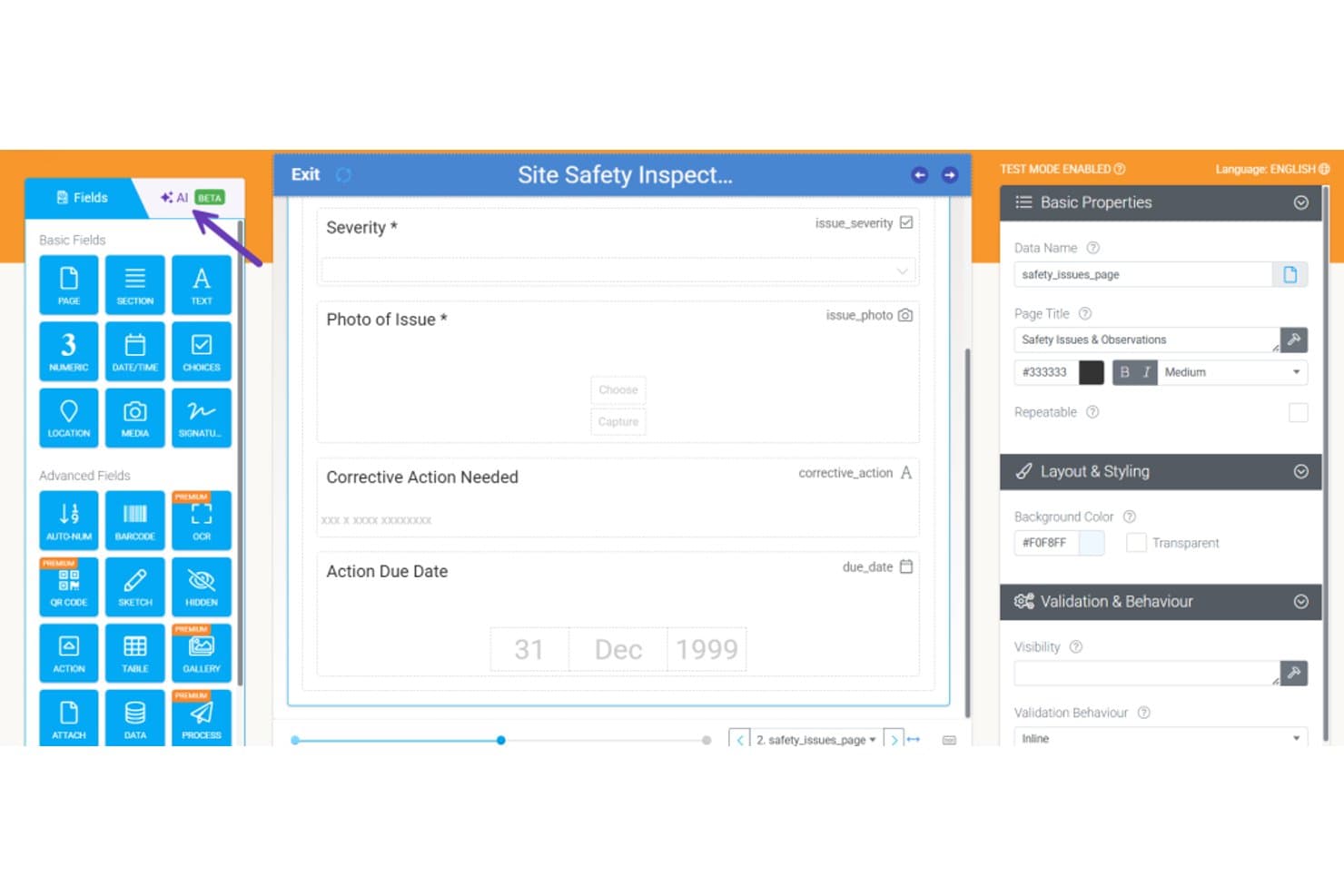
Appenate consente agli utenti di creare moduli per le ispezioni di sicurezza con campi trascinabili. Appenate è un generatore di app mobili senza codice progettato appositamente per i team sul campo, che offre la creazione di moduli tramite trascinamento, la raccolta di dati offline, la generazione di moduli assistita dall'IA e flussi di lavoro automatizzati per ispezioni, audit e assegnazione degli interventi.
Per chi è più indicato Appenate?
Appenate è particolarmente adatto ai team dei servizi sul campo e industriali—come quelli dei settori edile, minerario e manifatturiero—che devono sostituire ispezioni, audit e liste di controllo cartacei con app mobili utilizzabili anche offline.
Perché ho scelto Appenate
Ho scelto Appenate come una delle soluzioni migliori perché fa qualcosa che la maggior parte delle piattaforme senza codice non fa: è stato progettato specificamente per digitalizzare i flussi di lavoro di raccolta dei dati sul campo, invece di essere adattato a questo scopo. Apprezzo molto la funzionalità di compilazione fotografica tramite IA, che consente agli operatori sul campo di fotografare un modulo cartaceo e di compilare automaticamente i campi digitali. In combinazione con la raccolta offline nativa su iOS, Android e Windows, Appenate gestisce le condizioni reali del lavoro sul campo, anche quando la connettività viene meno durante un'ispezione.
Funzionalità principali di Appenate
- Generatore di moduli tramite trascinamento: un editor visivo che consente agli utenti non tecnici di creare app per la raccolta dati utilizzando tipi di campo come GPS, scansione di codici a barre, NFC, firme e tabelle ripetibili.
- Motore di automazione della sincronizzazione: uno strumento per flussi di lavoro senza codice che attiva azioni concatenate—come la generazione di documenti, l'invio di dati e l'invio di e-mail—in base all'invio di moduli, a pianificazioni o a webhook in entrata.
- Cruscotto Distill BI: un livello di analisi integrato che trasforma i dati raccolti sul campo in cruscotti interattivi e consente di interrogare i risultati in relazione alle proprie procedure operative standard interne.
- Supporto per più ambienti: ambienti separati per ogni reparto, con il kit aziendale che consente di gestire più ambienti aziendali e sincronizzare app, documenti e dati tra loro.
Integrazioni di Appenate
Appenate offre integrazioni native con Salesforce, NetSuite, Xero, QuickBooks, Google Sheets, Snowflake, Google BigQuery e gli strumenti dell'ecosistema Microsoft, tra cui SharePoint e Azure. Si connette inoltre a SQL Server, MySQL e PostgreSQL, con un'API REST, webhook e supporto per Zapier.
Pros and Cons
Pros:
- La raccolta mobile offline funziona senza connettività
- La cattura fotografica dei moduli cartacei riduce i tempi di configurazione
- Il supporto dedicato durante l'avvio facilita le implementazioni sul campo
Cons:
- L'ambito ristretto limita la creazione di app generiche
- Nessun controllo delle versioni o codice personalizzato
Learn more about Appenate: Ideale per lo sviluppo di app aziendali assistito dall'IA
- Demo gratuita disponibile
- $40/utente/mese
Visit WebsiteCustomer Rating:4.7/5
L'hub applicativo di Studio Creatio offre una visuale consolidata di tutti i modelli, connettori e app. Creatio Studio è incluso in questo elenco perché combina la progettazione no-code con il supporto dell'IA, risultando perfetto per sviluppare rapidamente applicazioni di livello enterprise. Quando collaboro con team operativi o IT che devono automatizzare flussi di lavoro complessi o prototipare sistemi specifici di reparto, questa è una delle poche piattaforme in cui i suggerimenti generati dall'IA e la mappatura dei processi accelerano davvero il lavoro.
Apprezzo in particolare la facilità con cui i team possono trascinare e rilasciare la logica, integrare i sistemi esistenti e adattare i processi in tempo reale. Si distingue per la modellazione guidata dei processi e per il modo in cui permette di progettare visivamente sia applicazioni aziendali semplici che complesse, con un impegno tecnico minimo.
Il punto di forza di Creatio Studio
- Team IT aziendali o operativi che costruiscono applicazioni personalizzate per i flussi di lavoro
- Organizzazioni che utilizzano l'IA per automatizzare e ottimizzare i processi aziendali
Quando Creatio Studio non è l'ideale
- Piccoli team con esigenze di gestione attività o progetti semplici
- Chi desidera modelli di app predefiniti con una personalizzazione minima
Cosa distingue Creatio Studio
Creatio Studio si concentra sul permettere agli utenti business di creare applicazioni basate su flussi di lavoro in modo visivo, senza ricorrere a codice o script. Si aspetta che le organizzazioni definiscano prima i processi aziendali e poi mappino tali processi in automazioni e interfacce applicative. A differenza di ClickUp o Airtable, che privilegiano la gestione flessibile delle attività, Creatio Studio struttura tutto attorno alla progettazione e automazione dei processi fin dall'inizio.
Compromessi di Creatio Studio
Creatio Studio è ottimizzato per la progettazione strutturata dei processi, ma si rinuncia alla semplicità e ai modelli pronti per l'uso offerti da strumenti no-code più leggeri. Questo significa che piccoli team o utenti meno tecnici possono trovare la configurazione e la fase iniziale più lenta.
Pros and Cons
Pros:
- Minima personalizzazione necessaria
- Funzionalità di automazione di processi e flussi di lavoro
- Interfaccia drag-and-drop
Cons:
- Curva di apprendimento per chi non conosce lo sviluppo no-code
- Alcuni utenti possono trovare complicata la creazione di flussi di automazione
Learn more about Creatio AI Studio: Ideale per trasformare fogli di calcolo in app mobili
- Prova gratuita di 14 giorni + piano gratuito disponibile
- Da $19/mese (fatturazione annuale)
Visit WebsiteCustomer Rating:4.7/5
Esempio di progettazione di un'app utilizzando la funzione di modelli preimpostati di Glide. Glide si guadagna il suo posto perché è la prima piattaforma a cui penso quando un team deve creare rapidamente app mobili da fogli di calcolo, senza toccare una riga di codice. Colleghi i tuoi dati di Google Sheets o Excel, e Glide li trasforma in un'app funzionante che si aggiorna mentre il foglio di calcolo cambia. Mi piace quanto sia semplice creare interfacce utente, aggiungere logica e pubblicare direttamente su mobile—tutto senza bisogno di risorse di sviluppo. È quello che consiglio quando qualcuno supera i limiti di scalabilità dei fogli di calcolo statici ma non è ancora pronto a coinvolgere uno sviluppatore.
Glide è ideale per
- Trasformare Google Sheets o Excel in app mobili
- Team non tecnici che necessitano rapidamente di strumenti interni personalizzati
Glide non è adatto per
- App complesse che richiedono codice personalizzato o API
- App enterprise di larga scala con esigenze avanzate di sicurezza
Cosa distingue Glide
Glide tratta il foglio di calcolo come unica fonte della verità, permettendoti di creare app mobile-first che riflettono i cambiamenti in tempo reale. Invece di richiedere codice o un intero ciclo di sviluppo, colleghi semplicemente il foglio e inizi a configurare l’interfaccia. Diversamente da AppSheet o Mendix, che puntano di più su logica complessa e integrazioni, Glide rimane concentrato su app semplici e guidate dai dati.
Compromessi con Glide
Glide è ottimizzato per una configurazione rapida di app no-code con fogli di calcolo, ma la logica di business complessa o personalizzazioni avanzate del backend sono fuori portata. I team che hanno bisogno di integrazioni molto specializzate o controlli molto dettagliati di solito incontrano rapidamente dei limiti.
Pros and Cons
Pros:
- Integrazione diretta con Google Sheets per aggiornamenti in tempo reale
- Facilità d'uso con un'interfaccia intuitiva
- Varietà di modelli adatti a diverse esigenze
Cons:
- Limitato a Google Sheets come backend dei dati
- Personalizzazioni avanzate possono richiedere un percorso di apprendimento
- Dipendenza da Google Workspace per integrazioni estese
Learn more about Glide: 4Ideale per backend scalabili
Xano
- Piano gratuito disponibile
- Da $85/mese (fatturazione annuale)
Visit WebsiteCustomer Rating:4.8/5
Xano offre un builder di API no-code che consente agli utenti di creare logica aziendale senza scrivere codice. Xano merita il suo posto perché elimina la complessità dal lancio di backend scalabili senza codice. Ho visto team incontrare ostacoli di crescita su altre piattaforme: Xano sblocca la personalizzazione delle API e la scalabilità dei carichi di lavoro quando serve. Apprezzo il fatto che utilizzi un vero database e una logica serverless, così non sei limitato dagli strumenti CRUD solo web.
Ciò che colpisce è la velocità con cui puoi costruire e iterare flussi di lavoro complessi, anche al variare delle esigenze.
Ideale per
- Team di prodotto che sviluppano API e flussi di lavoro no-code scalabili
- App che superano i limiti dei backend di database solo web
Non adatto per
- Utenti non tecnici che hanno bisogno solo di semplici builder di form
- Team che non intendono mai personalizzare la logica del backend
Cosa rende Xano diverso
Xano si occupa del lavoro backend che normalmente faresti con Firebase o API personalizzate, ma ti permette di lavorare in modo visivo e senza codice. Ti chiede di definire la logica aziendale, lo schema del database e gli endpoint API tutto in un unico posto, soluzione che vedo funzionare al meglio per team che sviluppano app web o mobile e che vogliono reale controllo sulle decisioni backend. A differenza di Airtable o Bubble, che danno priorità al frontend, Xano si rivolge a chi costruisce sistemi strutturati e scalabili dietro le quinte.
Compromessi con Xano
Xano punta su potenza e flessibilità del backend, ma l’interfaccia e i concetti richiedono una certa comprensione del design delle API e dei dati relazionali, quindi founder alle prime armi o builder non tecnici possono trovarsi in difficoltà.
Pros and Cons
Pros:
- Xano è altamente scalabile
- Ottime funzionalità di gestione API
- Disponibilità di template preimpostati
Cons:
- Capacità frontend limitate
- Capacità limitate di personalizzare l'infrastruttura base
Learn more about Xano: Ideale per la progettazione di applicazioni basate su database
- Prova gratuita di 15 giorni + demo gratuita disponibile
- Da $8/utente/mese (fatturato annualmente)
Visit WebsiteCustomer Rating:4.3/5
Ecco la funzionalità intuitiva di builder drag-and-drop in Zoho Creator. Zoho Creator entra nella mia lista perché è una delle poche piattaforme che rende davvero accessibile la progettazione di applicazioni basate su database senza codice. Quando i team devono creare app su misura che dipendono da una solida strutturazione dei dati, accesso basato sui ruoli e automazione, ho visto Zoho Creator dare il meglio di sé.
Ciò che apprezzo di più è come puoi modellare visivamente tabelle, relazioni e logica aziendale—è pratico per sistemi di inventario, portali clienti o strumenti di workflow che nascono da dati complessi.
Zoho Creator è ideale per
- Creare applicazioni personalizzate basate su database senza codice
- Organizzazioni che hanno bisogno di modellare dati e automatizzare flussi di lavoro
Zoho Creator non è ideale per
- Team che si aspettano uno sviluppo di app enterprise completo di tutte le funzionalità
- Esigenze come il semplice monitoraggio di progetti o una lista di cose da fare di base
Cosa distingue Zoho Creator
Zoho Creator si concentra sul permetterti di creare app basate su database senza dover toccare codice. A differenza di monday.com, che punta sulle bacheche visuali, trovo che Zoho Creator ti chieda di partire proprio dalla modellazione dei dati e delle relazioni e poi aggiungere i flussi di lavoro. Questo si adatta a organizzazioni che vogliono digitalizzare moduli, approvazioni o sistemi interni e hanno esigenze di dati uniche piuttosto che adottare un modello generico pronto all’uso.
Compromessi con Zoho Creator
Zoho Creator ottimizza per la modellazione dei dati e la logica dei flussi di lavoro, ma si rinuncia alla flessibilità visiva e ai modelli offerti da strumenti come Glide o Airtable. Questo rende l’avvio più lento per i team che vogliono creare velocemente app dalla forte componente visiva invece di partire dalla struttura dei dati.
Pros and Cons
Pros:
- Forte attenzione alla creazione di applicazioni basate su database.
- Interfaccia intuitiva adatta sia a esperti che a principianti.
- Integrazioni versatili, soprattutto all’interno dell’ecosistema Zoho.
Cons:
- Anche se la piattaforma è intuitiva, alcune funzionalità avanzate possono avere una curva di apprendimento più ripida.
- Le integrazioni esterne possono essere più limitate rispetto ad altre piattaforme no-code.
- Come altri strumenti SaaS, i costi possono aumentare quando si scala su team più grandi.
Learn more about Zoho Creator: Ideale per lo sviluppo visuale di applicazioni web
- Piano gratuito disponibile
- Da $32/mese
Visit WebsiteCustomer Rating:4.4/5
Questa è la funzione di interfaccia drag-and-drop di Bubble. Bubble è nella mia lista ristretta perché è la piattaforma più capace che conosco per creare applicazioni web completamente personalizzate in modo visuale, senza bisogno di codice. Quando i team superano i limiti dei costruttori di siti di base e hanno bisogno di progettare flussi di lavoro reali, database dinamici o esperienze utente da web-app, Bubble si distingue per i suoi controlli di layout al livello del pixel e la logica guidata dal database.
Apprezzo il fatto che si possa trascinare e rilasciare quasi qualsiasi modello di interfaccia, impostare flussi di lavoro dettagliati e pubblicare strumenti SaaS pronti per la produzione o portali per i clienti senza toccare il codice sorgente.
Bubble è Ideale Per
- Costruire visualmente SaaS personalizzati, portali o marketplace
- Team che necessitano di controllo avanzato sull’UI e logica di workflow
Quando Bubble Non è l’Ideale
- Pagine di destinazione semplici o siti vetrina
- Chiunque abbia bisogno di app mobili tradizionali impacchettate per gli store
Cosa Distingue Bubble
Bubble si avvicina allo sviluppo di web app mettendo layout a livello di pixel, logica e progettazione del database nelle tue mani senza scrivere una linea di codice. A differenza di strumenti come Webflow, che si concentrano principalmente sul design dei siti web, Bubble ti invita a progettare la logica reale dell’applicazione e flussi di lavoro dinamici. In pratica, funziona bene se vuoi creare strumenti interni complessi o app per clienti senza dover imparare un framework.
Compromessi con Bubble
Bubble privilegia la flessibilità e la logica personalizzata, ma questa complessità comporta una curva di apprendimento più alta rispetto alla maggior parte dei builder visuali. Se vuoi lanciare rapidamente un sito semplice, questo strumento potrebbe risultare eccessivo per l’obiettivo.
Pros and Cons
Pros:
- L'interfaccia drag-and-drop semplifica lo sviluppo dell'applicazione.
- Le modifiche in tempo reale consentono feedback e regolazioni immediati.
- Vasta libreria di plugin per ampliare le capacità dell'app.
Cons:
- Potrebbe esserci una curva di apprendimento per chi parte da zero.
- Sebbene versatile, potrebbero esserci alcune limitazioni rispetto alla programmazione tradizionale.
- La piattaforma potrebbe risultare opprimente per alcuni a causa delle sue numerose funzionalità.
 Ideale per creare app mobili e web interattive
- Piano gratuito disponibile
- Da $36/mese (fatturato annualmente)
Visit WebsiteCustomer Rating:3.5/5
Ecco i componenti predefiniti in Adalo. Adalo è nella mia lista perché offre un modo visivo per creare app mobili e web interattive senza codice. Lo consiglio quando desideri logiche personalizzate e schermate guidate dai dati che mantengano comunque un aspetto nativo su entrambe le piattaforme.
Mi piace il suo marketplace di componenti, che ti permette di aggiungere facilmente funzioni come pagamenti e autenticazione degli utenti dove serve. Ho trovato semplice importare dati in tempo reale o avviare workflow personalizzati durante i test, un'esigenza frequente per strumenti interni o prototipi di startup.
Ideale per
- Creare in modo visivo app mobili o web completamente personalizzate
- Team che devono realizzare rapidamente MVP, prototipi o strumenti interni
Non adatto a
- App complesse con logiche backend avanzate o API
- Sviluppatori che necessitano di esportare tutto il codice o di architetture aperte
Cosa distingue Adalo
Adalo è progettato per creare app interattive in modo visivo, puntando molto sulla creazione e personalizzazione rapida. A differenza di strumenti come Glide, che puntano sulla creazione di app a partire da fogli di calcolo, Adalo offre il pieno controllo su layout, esperienza utente e progettazione del database. È la scelta giusta se hai bisogno di gestire dettagliatamente interazioni e interfacce invece che restare legato a modelli rigidi.
Compromessi con Adalo
Adalo ottimizza la progettazione pratica e la flessibilità, ma rinunci all'estendibilità profonda e al controllo a livello di codice presenti su piattaforme no-code più tecniche. Ciò può limitare la scalabilità della logica dell'app e l'integrazione con sistemi backend personalizzati.
Pros and Cons
Pros:
- Interfaccia drag-and-drop intuitiva per uno sviluppo semplice delle applicazioni.
- Piattaforma versatile che supporta la creazione di app sia web che mobili.
- Ampia libreria di template predefiniti che facilita la rapida realizzazione dei progetti.
Cons:
- Le funzionalità premium hanno un costo più elevato.
- Alcune funzionalità avanzate potrebbero richiedere una lieve curva di apprendimento.
- A seconda del progetto, potrebbero essere necessarie integrazioni esterne per funzionalità complete.
Learn more about Adalo: Ideale per applicazioni dinamiche basate su moduli
- Piano gratuito disponibile
- Da $34/utente/mese (fatturazione annuale)

Ecco uno screenshot della pagina del builder nell'app di Jotform. Jotform Apps è la mia scelta per progetti in cui i moduli non sono solo un inserimento dati, ma rappresentano l'applicazione stessa. Quando i team utilizzano logica condizionale, firme e calcoli integrati, questa diventa una vera alternativa ai tradizionali builder di app. Apprezzo il fatto che sia possibile avviare flussi di lavoro, raccogliere approvazioni e distribuire app senza scrivere una riga di codice, tutto incentrato su moduli personalizzati.
Jotform Apps è ideale per
- Utenti non tecnici che necessitano di app personalizzate basate su moduli
- Team HR, educativi e di servizi che raccolgono ed elaborano dati
Jotform Apps non è l'ideale per
- Creare applicazioni aziendali complesse con logiche multi-utenti
- Team che necessitano di automazioni interne avanzate o chiamate API esterne
Cosa distingue Jotform Apps
Jotform Apps affronta la creazione di app come si fa con i moduli: si assemblano logica, flussi di lavoro e raccolta dati usando lo stesso approccio incentrato sul modulo che hanno perfezionato negli anni. Invece di cercare di imitare strumenti come Glide o Bubble, questo kit presuppone che la necessità principale sia creare moduli interattivi e basati sui processi che fungano anche da app indipendenti.
In pratica, vedo che funziona bene quando il tuo flusso di lavoro ruota attorno ad approvazioni, firme e campi ricchi, ma non richiede una logica backend approfondita.
Compromessi con Jotform Apps
Jotform Apps è ottimizzato per costruire rapidamente soluzioni basate su moduli, ma di conseguenza la profondità della logica applicativa e delle automazioni è limitata rispetto ai builder di app completi. Se si raggiungono questi limiti, non è possibile estendere molto le funzionalità oltre quanto già incluso.
Pros and Cons
Pros:
- Interfaccia intuitiva drag-and-drop
- Feedback in tempo reale durante la progettazione dei moduli
- Integrazioni solide, in particolare con Salesforce e Slack
Cons:
- Le funzionalità avanzate possono richiedere conoscenze di CSS
- Funzionalità di personalizzazione limitate nel piano base
- Curva di apprendimento per alcune funzionalità
Learn more about Jotform Apps: Ideale per soluzioni aziendali nell'ecosistema Microsoft
- Prova gratuita di 30 giorni + piano gratuito disponibile
- Da $20/utente/mese

Ecco lo screenshot dello studio Microsoft Power Apps. Microsoft PowerApps entra nella mia lista perché è una scelta ideale per le organizzazioni già impegnate su Microsoft 365 e Azure. Mi piace il fatto che tu possa rapidamente creare app che sfruttano SharePoint, Dataverse o Dynamics 365 senza bisogno di programmare. Quando i team vogliono automatizzare la raccolta di dati, i moduli o le approvazioni all'interno dei flussi di lavoro Microsoft esistenti, PowerApps è solitamente la soluzione giusta.
Ciò che mi colpisce è come puoi personalizzare l'accesso degli utenti e le connessioni ai dati con controlli di sicurezza dettagliati, tutto gestito nello stesso ecosistema.
PowerApps: Migliore per
- Organizzazioni che utilizzano Microsoft 365 e Azure
- Sviluppare applicazioni aziendali che usano dati interni a Microsoft
PowerApps: Non adatto per
- Team che hanno bisogno di app complesse fuori dallo stack Microsoft
- Utenti che desiderano molti modelli predefiniti specifici per settore
Cosa distingue PowerApps
PowerApps concepisce la creazione di app aziendali come qualcosa da integrare direttamente nei sistemi Microsoft esistenti, invece che come un processo autonomo. Ho notato che la maggior parte delle persone lo utilizza per collegare workflow a SharePoint, Teams o Dataverse senza uscire dall'ambiente Microsoft. Diversamente da strumenti come AppSheet o Bubble, presuppone che i tuoi dati e utenti siano già su Microsoft 365. Questo approccio risulta efficace quando vuoi che le app risiedano all'interno di questi strumenti di produttività.
Compromessi con PowerApps
Ottimizzando per flussi di lavoro allineati a Microsoft, limita la portata e la flessibilità al di fuori di quell'ecosistema: sviluppare per piattaforme non Microsoft o integrare con API esterne generalmente richiede più lavoro.
Pros and Cons
Pros:
- Integrazione solida con i servizi Microsoft come Excel e Dynamics 365.
- Piattaforma di sviluppo applicazioni no-code, accessibile anche a chi ha poca esperienza di programmazione.
- Offre una gamma di modelli predefiniti che velocizzano il processo di sviluppo.
Cons:
- La curva di apprendimento può essere leggermente ripida per chi è nuovo dell'ecosistema Microsoft.
- Nonostante le molte funzionalità, può essere eccessivo per le esigenze delle piccole imprese.
- Le personalizzazioni al di fuori della suite Microsoft possono richiedere connettori aggiuntivi o competenze specifiche.
Learn more about Microsoft PowerApps:

Ecco la schermata principale di Google App AppSheet. Ho scelto Google AppSheet per i team che vogliono automatizzare i processi aziendali senza codice o configurazioni complesse. Ciò che distingue davvero AppSheet è la possibilità di creare app che attivano azioni (come approvazioni, avvisi o generazione di documenti) in base agli aggiornamenti dei dati su Google Workspace e non solo.
Ho visto organizzazioni creare flussi di lavoro che monitorano fogli condivisi o moduli inventariali, avviano automaticamente le fasi successive e mantengono i processi in movimento senza coinvolgimento IT. Apprezzo particolarmente come la sua automazione basata su eventi offra un vero controllo sui processi tra sistemi diversi—senza bisogno di scripting.
AppSheet è ideale per
- Automatizzare processi aziendali associati ai dati di Google Workspace
- Team non tecnici che vogliono creare app di workflow senza codice
Quando AppSheet non è la scelta migliore
- Sviluppatori che necessitano di personalizzazione avanzata o logiche complesse
- Organizzazioni che richiedono un controllo degli accessi rigoroso e granulare tra più app
Cosa distingue AppSheet
AppSheet è pensato per chi vuole automatizzare i processi collegandosi ai dati già in uso, come Google Sheets o Drive, senza scrivere codice. Invece di guidarti nella creazione astratta di un'app, parte dalle informazioni di business esistenti e consente di aggiungere azioni e flussi di lavoro secondo necessità.
Rispetto a soluzioni come Zapier, AppSheet prevede la creazione di vere e proprie app che combinano dati, moduli e trigger in un unico spazio di lavoro, non solo la connessione di singole automazioni.
Compromessi con AppSheet
AppSheet punta tutto sulla semplicità senza codice, il che significa rinunciare al tipo di personalizzazione approfondita e controllo sul sistema che offrono framework aperti o le classiche piattaforme low-code.
Pros and Cons
Pros:
- Integrazione profonda con i servizi Google, per un accesso facilitato ai dati.
- Sincronizzazione dei dati in tempo reale, che garantisce informazioni sempre aggiornate per tutti gli utenti.
- Interfaccia intuitiva, adatta sia a sviluppatori esperti che a principianti.
Cons:
- Pur essendo potente, può essere necessario un periodo di apprendimento per chi è alle primissime armi.
- Le funzionalità più avanzate possono necessitare di competenze maggiori.
- Alcune integrazioni o funzionalità avanzate potrebbero richiedere costi aggiuntivi.
Learn more about Google App AppSheet:
Altre piattaforme di sviluppo senza codice da prendere in considerazione
Di seguito trovi un elenco di ulteriori piattaforme di sviluppo senza codice che ho selezionato, ma che non sono entrate tra le prime 10. Vale sicuramente la pena prenderle in considerazione.
- 11WebflowIdeale per il web design senza scrivere codice
- 12ServiceNow App EngineIdeale per applicazioni scalabili
- 13Base44Ideale per la creazione di app in linguaggio naturale
- 14ThunkableIdeale per la creazione di app mobili drag-and-drop
- 15ZeroqodeIdeale per costruire con template preconfezionati
- 16Codeless ONEIdeale per lo sviluppo di applicazioni aziendali
- 17QuickbaseIdeale per lo sviluppo di applicazioni aziendali
Recensioni correlate di software IT
Se non hai ancora trovato quello che cerchi, dai un'occhiata a questi strumenti alternativi che abbiamo testato e valutato.
- Software per il monitoraggio della rete
- Software per il monitoraggio dei server
- Soluzioni SD-Wan
- Strumenti per il monitoraggio dell'infrastruttura
- Analizzatore di pacchetti
- Strumenti per il monitoraggio delle applicazioni
Come valuto le piattaforme di sviluppo no-code
Dai team IT che realizzano dashboard interne ai responsabili DevOps che automatizzano i processi di approvazione, cerco due cose: le capacità di base che uno strumento deve avere e ciò che davvero distingue i migliori.
Funzionalità di base (Requisiti indispensabili per questa lista)
Quando seleziono gli strumenti per la mia lista, ne valuto ciascuno su una scala da 0 (non offre la funzionalità) a 5 (eccelle in quest'area) per ogni funzionalità di base elencata qui sotto. Poi, calcolo il punteggio totale dello strumento in percentuale. Ogni strumento deve raggiungere un punteggio minimo totale del 75% per essere considerato idoneo all'inclusione.
- Interfaccia di sviluppo visuale: Valuto se il costruttore drag-and-drop copre la disposizione dell'interfaccia utente, il collegamento dei dati e la logica, e non solo il design delle schermate che richiederebbe comunque del codice backend.
- Template e componenti predefiniti: Una solida libreria di elementi riutilizzabili come campi modulo, grafici e visualizzazioni tabellari fa risparmiare davvero tempo nella costruzione di app comuni come i gestori di inventario o i portali di richieste.
- Automazione di workflow e logiche: Cerco costruttori di workflow visuali in grado di gestire processi in più fasi—ad esempio catene di approvazione, instradamenti condizionati e trigger programmati.
- Gestione dei dati e integrazione: Connettersi a database esterni, REST API e strumenti come Salesforce o Google Sheets deve essere semplice e ben documentato.
- Distribuzione multi-piattaforma: Verifico se un singolo progetto può essere rilasciato sia come web app responsive che come app mobile nativa senza dover ricreare le schermate da zero.
- Gestione utenti e ruoli: L'autenticazione integrata e i permessi granulari per i ruoli sono importanti, soprattutto per app interne dove team diversi necessitano visibilità su dati differenti.
Una volta che ho un elenco di strumenti che soddisfano questi criteri, considero ciò che distingue ogni piattaforma.
Fattori differenzianti (Cosa distingue i fornitori)
Ecco come confronto e metto a confronto fornitori diversi:
Caratteristiche eccezionali
Lo sviluppo assistito dall'IA è attualmente un importante elemento distintivo. Cerco piattaforme dove i prompt in linguaggio naturale possono generare layout di app funzionanti o flussi logici, riducendo drasticamente i tempi di realizzazione per strumenti interni comuni. Anche il controllo delle versioni e gli ambienti di staging sono importanti—soprattutto quando più team pubblicano aggiornamenti su app in produzione. La possibilità di estendere con codice personalizzato completa il quadro. Piattaforme come Retool e Appsmith permettono di inserire codice JavaScript quando i limiti del costruttore visuale vengono raggiunti, offrendo ai team IT una rete di sicurezza per i casi limite.
Oltre le funzionalità
Governance e supervisione IT sono fondamentali quando gli sviluppatori "citizen" iniziano a creare applicazioni in diversi reparti. Valuto se una piattaforma offre controlli amministrativi centralizzati e registri di audit affinché i team IT possano mantenere la visibilità senza ostacolare il lavoro dei builder. Anche le certificazioni di conformità come SOC 2 Type II e la preparazione al GDPR sono particolarmente rilevanti, soprattutto per app che gestiscono dati di clienti o dipendenti. Anche la trasparenza dei prezzi conta—verifico se le licenze crescono in modo prevedibile con l'aumento di utenti o unità aziendali, visto che i costi a sorpresa possono frenare rapidamente l'adozione.
Come scegliere le piattaforme di sviluppo senza codice
È facile perdersi in lunghi elenchi di funzionalità e strutture tariffarie complesse. Per aiutarti a rimanere concentrato mentre affronti il tuo processo unico di selezione del software, ecco una lista di fattori da tenere a mente:
| Fattore | Cosa considerare |
|---|---|
| FattoreScalabilità | Cosa considerareAssicurati che la piattaforma possa gestire un aumento del numero di utenti e una crescita delle esigenze relative ai dati senza problemi di prestazioni. |
| FattoreIntegrazioni | Cosa considerareCerca la compatibilità con il tuo CRM, ERP e altri sistemi aziendali fondamentali esistenti. |
| FattorePersonalizzazione | Cosa considerareValuta con quale facilità puoi modificare modelli e flussi di lavoro per adattarli ai tuoi processi aziendali specifici. |
| FattoreSemplicità d'uso | Cosa considerareLa piattaforma dovrebbe avere un'interfaccia intuitiva con funzionalità di trascinamento e un apprendimento minimo. |
| FattoreBudget | Cosa considerareConfronta i piani tariffari per assicurarti di ottenere il giusto equilibrio tra funzionalità e licenze utente rimanendo nel budget. |
| FattoreMisure di sicurezza | Cosa considerareVerifica che la piattaforma offra la crittografia dei dati, l'accesso basato sui ruoli e la conformità agli standard del settore. |
| FattoreSupporto per dispositivi mobili | Cosa considerareAssicurati che la piattaforma supporti un design reattivo e la compatibilità multipiattaforma. |
| FattoreAutorizzazioni degli utenti | Cosa considerareCerca ruoli utente dettagliati e impostazioni di accesso per controllare la visibilità dei dati e i diritti di modifica. |
Tendenze nelle piattaforme di sviluppo senza codice
Nella mia ricerca, ho raccolto innumerevoli aggiornamenti di prodotto, comunicati stampa e registri delle versioni di diversi fornitori di piattaforme di sviluppo a basso codice e senza codice. Ecco alcune delle tendenze emergenti che sto monitorando:
- Sviluppo basato sull'IA: le piattaforme stanno integrando l'IA per automatizzare la logica, suggerire miglioramenti e migliorare l'esperienza utente attraverso la progettazione predittiva e l'automazione intelligente.
- Flessibilità del trascinamento: sempre più piattaforme stanno potenziando le funzionalità di trascinamento, consentendo una maggiore personalizzazione senza richiedere conoscenze di programmazione.
- Ruoli utente avanzati: gli strumenti offrono impostazioni delle autorizzazioni più dettagliate e accesso basato sui ruoli per adattarsi a strutture aziendali complesse.
- Distribuzione multipiattaforma: la crescente domanda di compatibilità con il web, i dispositivi mobili e i computer desktop spinge le piattaforme ad ampliare le opzioni di distribuzione.
- Analisi integrate: i fornitori stanno incorporando direttamente nelle piattaforme strumenti di visualizzazione dei dati e reportistica per aiutare gli utenti a monitorare le prestazioni e ottimizzare i flussi di lavoro.
Cosa sono le piattaforme di sviluppo senza codice?
Le piattaforme di sviluppo senza codice sono strumenti software che consentono agli utenti di creare applicazioni senza scrivere codice. I professionisti aziendali, i responsabili di prodotto e gli sviluppatori civici le utilizzano generalmente per sviluppare applicazioni rapidamente e ridurre la dipendenza dai team tecnici.
Le interfacce di trascinamento, i modelli predefiniti e le funzionalità di automazione dei flussi di lavoro contribuiscono a semplificare il processo di sviluppo. Queste piattaforme offrono una distribuzione rapida, risparmi sui costi e una maggiore innovazione, rendendole preziose per le aziende che desiderano crescere e adattarsi rapidamente. Le moderne piattaforme di IA senza codice fanno un ulteriore passo avanti automatizzando attività complesse che in precedenza richiedevano competenze tecniche.
Funzionalità delle piattaforme di sviluppo senza codice
Quando selezioni piattaforme di sviluppo senza codice, presta attenzione alle seguenti funzionalità chiave:
- Interfaccia di trascinamento: consente agli utenti di creare applicazioni visivamente senza conoscenze di programmazione, accelerando lo sviluppo.
- Modelli predefiniti: fornisce strutture applicative pronte all'uso per accelerare la distribuzione.
- Integrazione dei dati: consente la connessione a database esistenti, API e applicazioni di terze parti.
- Flussi di lavoro personalizzati: supporta l'automazione dei processi aziendali con regole basate sulla logica.
- Design reattivo: garantisce il funzionamento delle applicazioni su dispositivi desktop e mobili.
- Autorizzazioni degli utenti: controlla i livelli di accesso e i ruoli per mantenere la sicurezza dei dati.
- Controllo delle versioni: tiene traccia delle modifiche e le gestisce per evitare conflitti e mantenere la coerenza.
- Analisi e reportistica: fornisce informazioni sulle prestazioni dell'applicazione e sul comportamento degli utenti.
- Scalabilità: garantisce che la piattaforma possa gestire volumi crescenti di utenti e dati.
- Funzionalità offline: consente alle applicazioni di funzionare senza connessione Internet e di sincronizzarsi in un secondo momento.
Vantaggi delle piattaforme di sviluppo senza codice
L'implementazione di piattaforme di sviluppo senza codice offre diversi vantaggi al tuo team e alla tua azienda. Eccone alcuni di cui potrai usufruire:
- Sviluppo più rapido: accelera la creazione di app con strumenti di trascinamento e rilascio e modelli predefiniti.
- Costi inferiori: riduce la necessità di risorse di sviluppo costose e di lunghi cicli di sviluppo.
- Consente ai non sviluppatori di creare app: permette agli utenti aziendali di creare app senza competenze di programmazione.
- Collaborazione migliorata: consente ai team tecnici e non tecnici di lavorare insieme in modo più efficace.
- Scalabilità: si adatta alle esigenze aziendali in crescita senza dover ricostruire tutto da zero.
- Maggiore flessibilità: i flussi di lavoro personalizzati e le opzioni di automazione consentono di realizzare soluzioni su misura.
- Sicurezza avanzata: le autorizzazioni integrate e la crittografia dei dati proteggono le informazioni sensibili.
Costi e prezzi delle piattaforme di sviluppo senza codice
La scelta delle piattaforme di sviluppo senza codice richiede una conoscenza dei vari modelli e piani tariffari disponibili. I costi variano in base alle funzionalità, alle dimensioni del team, ai componenti aggiuntivi e ad altri fattori. La tabella seguente riassume i piani più comuni, i relativi prezzi medi e le funzionalità generalmente incluse nelle piattaforme di sviluppo senza codice:
Tabella di confronto dei piani per le piattaforme di sviluppo senza codice
| Tipo di piano | Prezzo medio | Funzionalità comuni |
|---|---|---|
| Tipo di pianoPiano gratuito | Prezzo medio$0 | Funzionalità comuniModelli di base, numero limitato di utenti e integrazioni limitate. |
| Tipo di pianoPiano personale | Prezzo medio$10–$30/utente/mese | Funzionalità comuniModelli personalizzabili, automazione di base e integrazioni standard. |
| Tipo di pianoPiano aziendale | Prezzo medio$30–$100/utente/mese | Funzionalità comuniAutomazione avanzata, supporto per più utenti, sicurezza avanzata e strumenti di reportistica. |
| Tipo di pianoPiano aziendale avanzato | Prezzo medio$100+/utente/mese | Funzionalità comuniNumero illimitato di utenti, sicurezza avanzata, supporto dedicato e funzionalità di conformità. |
Domande frequenti sulle piattaforme di sviluppo senza codice
Ecco alcune risposte alle domande comuni sulle piattaforme di sviluppo senza codice:
Le piattaforme senza codice possono gestire applicazioni aziendali complesse?
Sì, molte piattaforme senza codice si sono evolute fino a supportare applicazioni aziendali complesse. Offrono funzionalità avanzate come integrazioni con diverse origini dati, autenticazione degli utenti e automazione dei flussi di lavoro. Tuttavia, la complessità che possono gestire varia in base alla piattaforma, quindi è essenziale valutare i propri requisiti specifici e scegliere una piattaforma in linea con le esigenze aziendali.
In che modo le piattaforme senza codice garantiscono la sicurezza e la conformità dei dati?
Le piattaforme senza codice affidabili adottano solide misure di sicurezza, tra cui la crittografia dei dati, l’autenticazione degli utenti e audit di sicurezza periodici. Alcune piattaforme sono inoltre conformi a standard e normative di settore come il GDPR o l’HIPAA. È fondamentale esaminare le funzionalità di sicurezza e le certificazioni di conformità della piattaforma per assicurarsi che soddisfino gli standard della propria organizzazione.
Le piattaforme senza codice possono integrarsi con i sistemi e i database esistenti?
Sì, la maggior parte delle piattaforme senza codice offre funzionalità di integrazione con sistemi e database esistenti tramite API o connettori integrati. Ciò consente di collegare le applicazioni ad altri strumenti e servizi, facilitando il flusso continuo dei dati e migliorando le funzionalità. Verificate sempre le opzioni di integrazione di una piattaforma per assicurarvi che sia compatibile con i sistemi attualmente in uso.
Quali sono i limiti delle piattaforme di sviluppo senza codice?
Sebbene le piattaforme senza codice offrano uno sviluppo rapido e facilità d’uso, possono presentare limiti in termini di personalizzazione e scalabilità rispetto alla programmazione tradizionale. Le funzionalità complesse potrebbero essere difficili da implementare e le prestazioni potrebbero rappresentare un problema per le applicazioni su larga scala. È importante valutare questi fattori in base ai requisiti del progetto.
In che modo le piattaforme senza codice gestiscono la scalabilità durante la crescita dell'azienda?
La scalabilità varia a seconda delle piattaforme senza codice. Alcune sono progettate per supportare la crescita, offrendo funzionalità in grado di gestire un volume maggiore di dati e un numero crescente di utenti. Tuttavia, altre potrebbero essere più adatte ad applicazioni di piccole o medie dimensioni. Valutate le opzioni di scalabilità di una piattaforma, come l’ottimizzazione delle prestazioni e il supporto dell’infrastruttura, per assicurarvi che possa crescere insieme alla vostra azienda. Un’altra opzione, a seconda delle vostre esigenze, consiste nel collaborare con una società di sviluppo, ad esempio un fornitore di servizi di sviluppo di app multipiattaforma.
Sono disponibili opzioni gratuite di piattaforme senza codice?
Sì, molte piattaforme senza codice offrono piani gratuiti per attirare gli utenti. Questi piani gratuiti presentano spesso limitazioni come filigrane del marchio, un numero ridotto di funzionalità o limiti sul numero di utenti o visitatori dell’app. Piattaforme come Bubble e Glide offrono piani gratuiti molto diffusi per iniziare.
È necessaria una conoscenza tecnica per utilizzare efficacemente una piattaforma di sviluppo senza codice?
Le piattaforme senza codice sono progettate per utenti con poca o nessuna esperienza tecnica e offrono interfacce intuitive e funzionalità di trascinamento della selezione. Tuttavia, una conoscenza di base della logica delle applicazioni e delle strutture dati può essere utile per creare applicazioni più sofisticate. Alcune piattaforme offrono inoltre risorse e tutorial per aiutare gli utenti a iniziare.