

The best no-code AI platforms help teams build, test, and deploy AI driven applications without writing custom code. These tools allow users to turn data into models and workflows faster, reducing reliance on specialized engineering resources.
Teams often turn to no-code AI platforms when manual model development slows projects, limited data science capacity creates bottlenecks, or misconfigurations lead to unreliable results. Issues like inconsistent data handling, unclear model behavior, and slow iteration make it harder for business, data, and IT teams to collaborate.
With over 20 years in the industry as a Chief Technology Officer, I’ve tested and reviewed dozens of no-code AI platforms across real-world environments to evaluate their accuracy, integrations, and usability. This guide highlights the top no-code AI platforms that speed up development, improve collaboration, and help teams deploy AI solutions more reliably. Each review covers features, pros and cons, and best-fit use cases to help you choose the right tool.
Why Trust Our Software Recommendations
6,700+
Reviews
20
Industry experts
16+
Evaluation factors
14
Years
Our team has been testing and reviewing software since 2012. As tech leaders ourselves, we know how difficult—and important—it is to choose the right software.
For this guide, we evaluated tools using hands-on testing and independent research, scoring tools using our selection criteria.
Our reviews reflect our human editorial judgment, not a sales pitch.
Expert reviewers:
- Paulo Gardini MiguelTech Director
 Tim FisherVP of AI
 Gabriel RosasTech Lead & Software Architect
 Christhian GruhnTech Lead & Platform Architect

No-Code AI Platform Comparison Table
This comparison table summarizes pricing details for my top no-code AI platform selections:
| Tool | Best For | Trial Info | Price | ||
|---|---|---|---|---|---|
| 1 | Best for no-code chatbot deployment | 7-day free trial + free plan + free demo available | From $32/month (billed annually) | Website | |
| 2 | Best with 1,000+ prebuilt connectors | 30-day free trial | Pricing upon request | Website | |
| 3 | Best for enterprise agentic AI app delivery | Free plan available | Pricing upon request | Website | |
| 4 | Best for no-code apps in the Zoho ecosystem | 15-day free trial | From $8/user/month (billed annually) | Website | |
| 5 | Best for AI-governed citizen app dev at scale | Free demo available | Pricing upon request | Website | |
| 6 | Best for AI agents in regulated enterprise workflows | Free plan available | Pricing upon request | Website | |
| 7 | Best for embedding ML models in the app runtime | Free plan available | From $1,090/month | Website |


Best No-Code AI Platform Reviews
Below are my detailed summaries of the best no-code AI platforms that made it onto my shortlist. My reviews offer a detailed look at the key features, pros & cons, integrations, and ideal use cases of each tool to help you find the best one for you.
 Best for no-code chatbot deployment
- 7-day free trial + free plan + free demo available
- From $32/month (billed annually)
Visit WebsiteCustomer Rating:4.4/5
Chatbase allows you to test your bot's responses and refine custom system instructions in real-time. Chatbase is a no-code AI platform that lets businesses and support teams create custom AI chatbots for websites, apps, and internal tools, helping automate customer interactions and streamline information delivery without needing to write code.
Who Is Chatbase Best For?
Chatbase suits IT teams and business operations leaders at midsize to large organizations who want to deploy AI chatbots without coding.
Why I Picked Chatbase
I picked Chatbase because it offers one of the fastest paths from raw data to a functional AI agent. It doesn't require complex logic mapping and is able to crawl a website or ingest a document to immediately generate a bot that understands the nuances of your specific business. Additionally, its focus on accessibility allows teams to establish a specialized support assistant by leveraging existing knowledge bases rather than building workflows from scratch.
Chatbase Key Features
- AI actions: Connect your chatbot to external APIs to perform tasks like checking order statuses or booking appointments directly within the chat.
- Multilingual support: Deploy chatbots that can understand and respond in multiple languages.
- Custom data source ingestion: Upload documents or connect data sources to train chatbots on your own content.
- Conversation analytics: Track user interactions and chatbot performance with built-in analytics dashboards.
Chatbase Integrations
Chatbase offers native integrations with Slack, WhatsApp, Zendesk, Stripe, and Zapier. An API is available for custom integrations.
Pros and Cons
Pros:
- SOC 2 Type II certified
- Offers user feedback collection after chats
- Visual flow builder for conversation design
Cons:
- Free plan has low monthly message limits
- No built-in live chat handoff feature
Learn more about Chatbase:

Celigo’s no-code workflow builder enables teams to automate processes and connect AI-powered tools without writing code. Celigo is an integration and automation platform designed for IT teams and business operations leaders who need to connect cloud apps, automate workflows, and manage complex data processes without heavy coding.
Who Is Celigo Best For?
IT teams and operations leaders at mid-sized to large businesses who need to automate and orchestrate workflows across multiple cloud applications.
Why I Picked Celigo
I picked Celigo as one of the best because I can tap into over 1,000 prebuilt connectors to automate data flows between cloud apps without writing code. My team uses these connectors to quickly link systems like Salesforce, NetSuite, and Shopify for real-time process automation. In practice, that means we can launch new integrations in hours instead of weeks, even when connecting niche or industry-specific tools.
Celigo Key Features
- Visual flow builder: Drag and drop interface lets you design and deploy integrations without coding.
- Error management dashboard: Centralized dashboard for monitoring, troubleshooting, and resolving integration errors.
- Reusable integration templates: Prebuilt templates for common business processes to speed up deployment.
- Role-based access controls: Set granular permissions for users and teams managing integrations.
Celigo Integrations
Integrations include Salesforce, Microsoft Dynamics 365 Business Central, Oracle NetSuite, Walmart, SAP, Snowflake, Acumatica, ADP, Adobe, and 3M.
Pros and Cons
Pros:
- Supports complex multi-app orchestration without coding
- Real-time monitoring and error handling dashboards
- Built-in AI-driven data mapping tools
Cons:
- Custom scripting needs JavaScript knowledge
- Some connectors require additional licensing fees
Learn more about Celigo: Best for enterprise agentic AI app delivery
- Free plan available
- Pricing upon request
Visit WebsiteCustomer Rating:4.6/5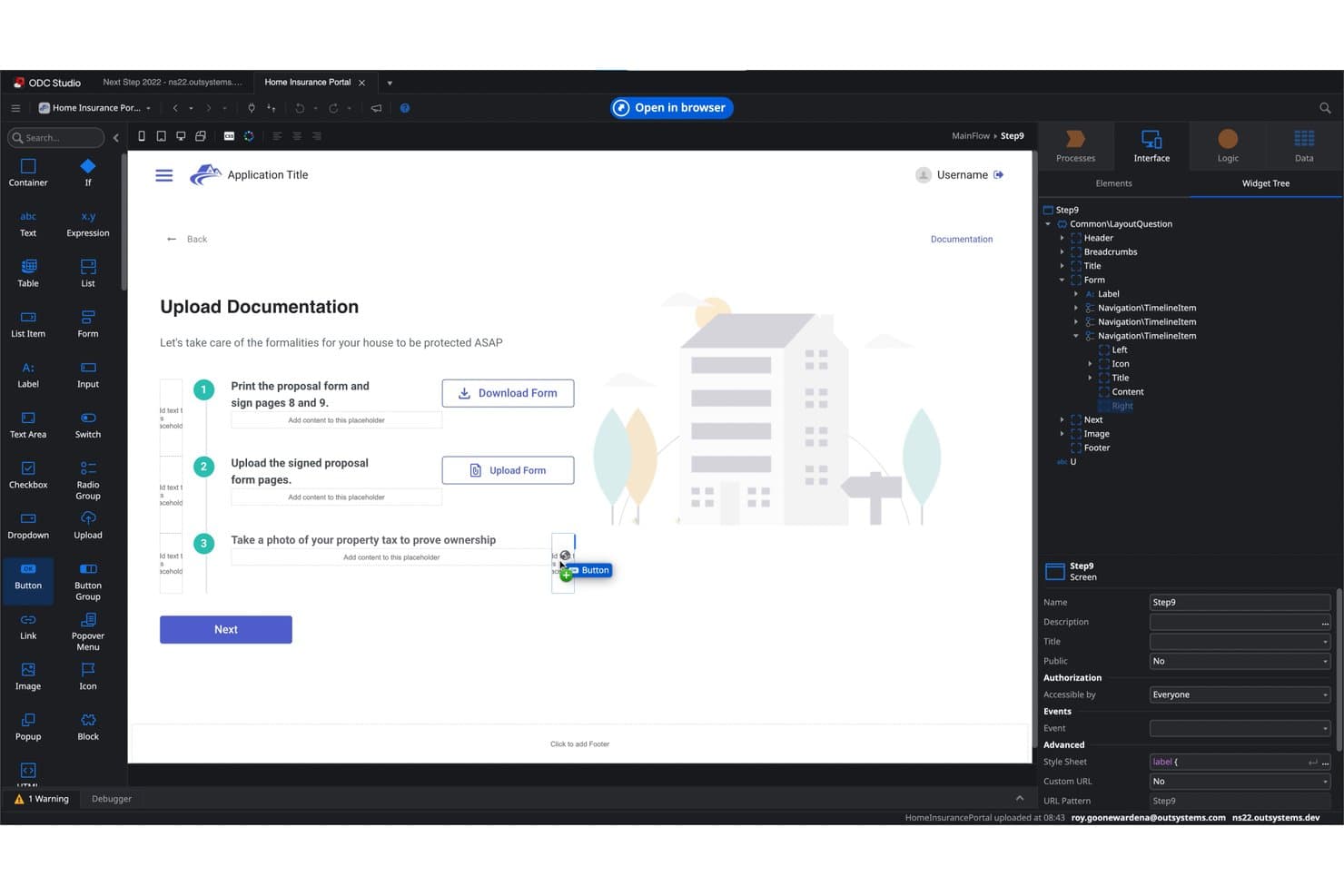
OutSystems lets users build document upload flows visually. OutSystems is a low-code AI platform that lets enterprise teams build, deploy, and govern full-stack web and mobile applications using a visual builder, generative AI app generation, and multi-agent workflow orchestration.
Who Is OutSystems Best For?
OutSystems is a strong fit for enterprise IT and development teams that need to ship AI-powered applications at scale, with the governance and compliance controls regulated industries demand.
Why I Picked OutSystems
OutSystems earns its spot on my shortlist because of how far its agentic AI story goes beyond typical low-code builders. Mentor generates roughly 80% of an MVP from a natural language prompt, and Agent Workbench lets you orchestrate multi-agent workflows with human-in-the-loop controls across dev, QA, and production environments. I find that combination especially compelling for enterprise IT teams shipping AI-powered apps under strict governance requirements.
OutSystems Key Features
- Enterprise Context Graph: A live architectural map that tracks all apps, data, dependencies, and governance policies across your organization to prevent structural drift as teams scale.
- 400+ pre-built connectors: Native integrations with SAP, Salesforce, ServiceNow, Oracle, and more, plus REST/SOAP API support for connecting to custom or legacy systems.
- Multi-environment deployment pipeline: Separate Dev, QA, and production runtimes with one-click promotion between environments, version control, and automated rollback.
- AI agent observability dashboard: Real-time monitoring of agent execution, token usage, workflow outcomes, and performance metrics across deployed AI agents.
OutSystems Integrations
OutSystems offers 400+ pre-built connectors, including SAP, Salesforce, ServiceNow, Oracle, Microsoft Dynamics, and NetSuite. It also supports REST and SOAP APIs, Integration Builder, database connections, and Marketplace integrations for custom connectivity.
Pros and Cons
Pros:
- Full-stack web and mobile app visual builder
- Mentor generates ~80% of MVP apps automatically
- Agent Workbench orchestrates multi-agent AI workflows
Cons:
- Not designed for non-technical business users
- No native AutoML or model training tools
Learn more about OutSystems: Best for no-code apps in the Zoho ecosystem
- 15-day free trial
- From $8/user/month (billed annually)
Visit WebsiteCustomer Rating:4.3/5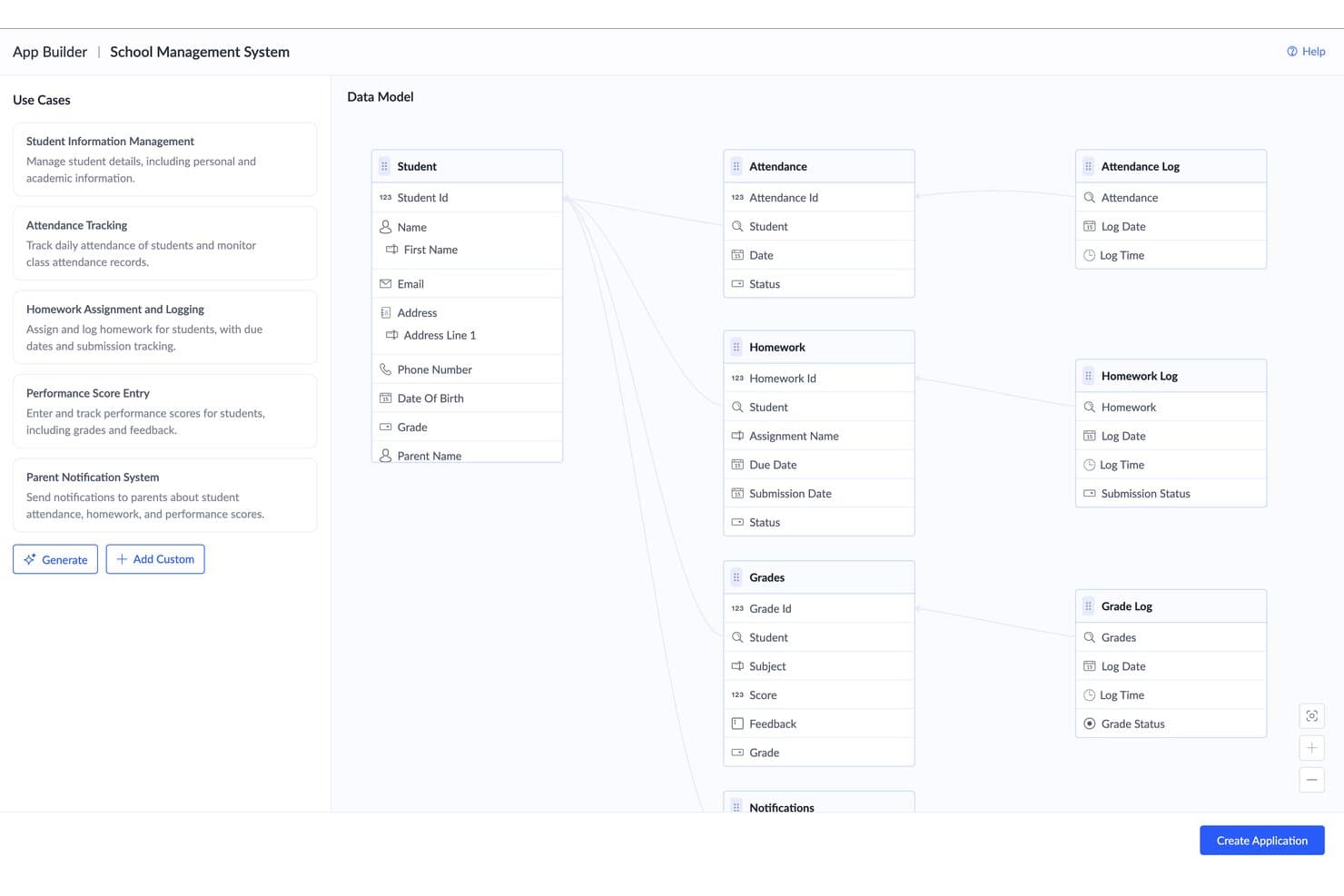
Zoho Creator auto-generates a relational data model from use cases. Zoho Creator is a no-code application development platform that lets you build web and mobile apps using a visual drag-and-drop builder, AI-powered app generation via natural language prompts, no-code ML model training, AI agents, and automated workflow design.
Who Is Zoho Creator Best For?
Zoho Creator is a strong fit for IT teams and business analysts already working within the Zoho ecosystem who need to build and deploy custom apps without relying on dedicated engineering resources.
Why I Picked Zoho Creator
Zoho Creator earns its spot on my shortlist because it's the strongest no-code AI platform for teams already running on Zoho's ecosystem. I particularly like its AI Modeler, which lets you train and deploy custom ML models (think OCR for document processing or sentiment analysis on support tickets) directly as app logic fields, no data science background required. CoCreator's ability to generate full apps from a natural language prompt or a process diagram image means you can go from a workflow sketch to a deployed web and mobile app in one session.
Zoho Creator Key Features
- Blueprints process designer: A visual BPM-style tool for mapping out process stages, transitions, and approval flows directly within your apps.
- Multi-channel auto-deployment: Apps built in Creator automatically generate native iOS and Android versions alongside the web app from a single build.
- Hybrid and on-premise deployment: Creator supports cloud, on-premise, and hybrid hosting options for teams with strict data residency or compliance requirements.
- Role-based portals: Custom-branded portals for external users, such as customers or vendors, with configurable permission sets and access controls.
Zoho Creator Integrations
Zoho Creator offers native integrations across the Zoho ecosystem, including Zoho CRM, Books, Desk, Analytics, WorkDrive, Flow, and RPA. It also connects with Google Drive, Dropbox, Box, OneDrive, Salesforce, and Slack, with REST APIs and custom connectors for additional systems.
Pros and Cons
Pros:
- Supports hybrid and on-premise deployment options
- Offers no-code AI model builder and deployment
- Generates full-featured apps from text prompts
Cons:
- Limited explainability and AI model governance
- Advanced features require Deluge scripting language
Learn more about Zoho Creator: Best for AI-governed citizen app dev at scale
- Free demo available
- Pricing upon request
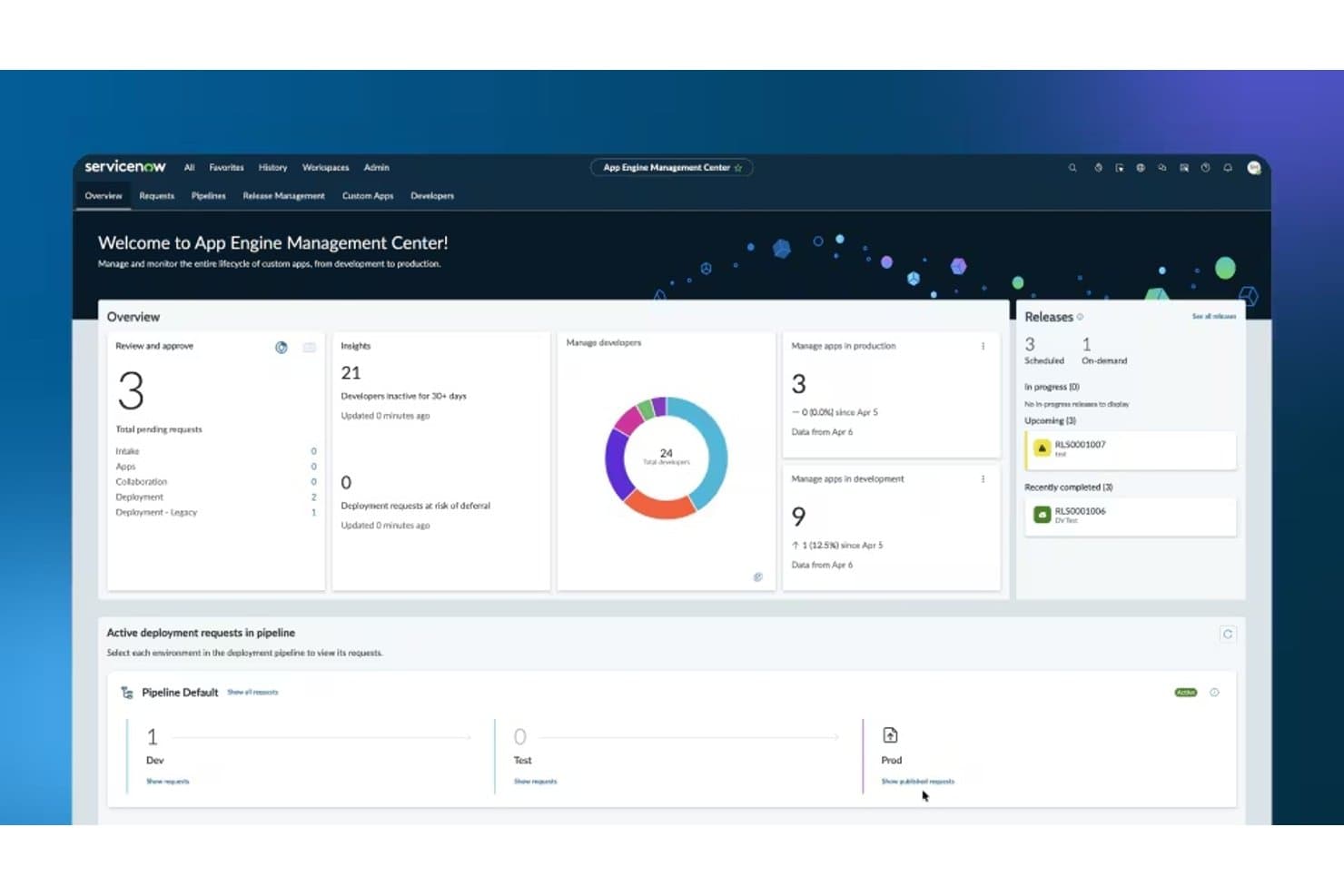
ServiceNow App Engine's dashboard for managing app development, deployments, releases, and developer activity. ServiceNow App Engine is a no-code and low-code application development platform built on the Now Platform that lets citizen developers and professional developers alike build, automate, and deploy AI-powered business apps—governed by enterprise-grade IT controls.
Who Is ServiceNow App Engine Best For?
ServiceNow App Engine is built for enterprises with existing ServiceNow investments that want to scale citizen development across business units without losing IT control.
Why I Picked ServiceNow App Engine
ServiceNow App Engine earns its spot on my shortlist because no other platform I've tested pairs AI-governed citizen development with this level of enterprise-grade IT control. The App Engine Management Center (AEMC) lets business users build apps in App Engine Studio while IT keeps a firm grip on deployment pipelines, approval workflows, and access controls. On top of that, the Build Agent generates complete, production-ready apps from plain-language prompts—with AI agents already embedded.
ServiceNow App Engine Key Features
- Flow Designer: A no-code process automation tool with drag-and-drop logic, branching, triggers, and multi-step approvals—no scripting required for most business workflows.
- Virtual Agent: An AI-powered chatbot builder with a built-in NLU Workbench for defining natural language intents and entities across web, mobile, and portal channels.
- Predictive Intelligence: Template-based ML for classification, similarity, and clustering tasks like ticket routing, major incident detection, and smart recommendations.
- Integration Hub: A library of pre-built connectors (spokes) for 100+ enterprise apps, plus REST, SOAP, and JDBC support for custom integrations.
ServiceNow App Engine Integrations
Integration Hub provides 100+ pre-built spokes, including Jira, GitHub, Slack, Microsoft 365, Salesforce, SAP, Workday, AWS, Azure, and Google Cloud Platform. It also supports REST, SOAP, and JDBC connections for custom integrations.
Pros and Cons
Pros:
- Deep workflow automation for enterprise processes
- Full-stack AI agents embedded by default
- AI-governed app development with IT oversight
Cons:
- Pricing transparency is consistently lacking
- Advanced AI features require extra licensing
Learn more about ServiceNow App Engine: Best for AI agents in regulated enterprise workflows
- Free plan available
- Pricing upon request
Visit WebsiteCustomer Rating:4.4/5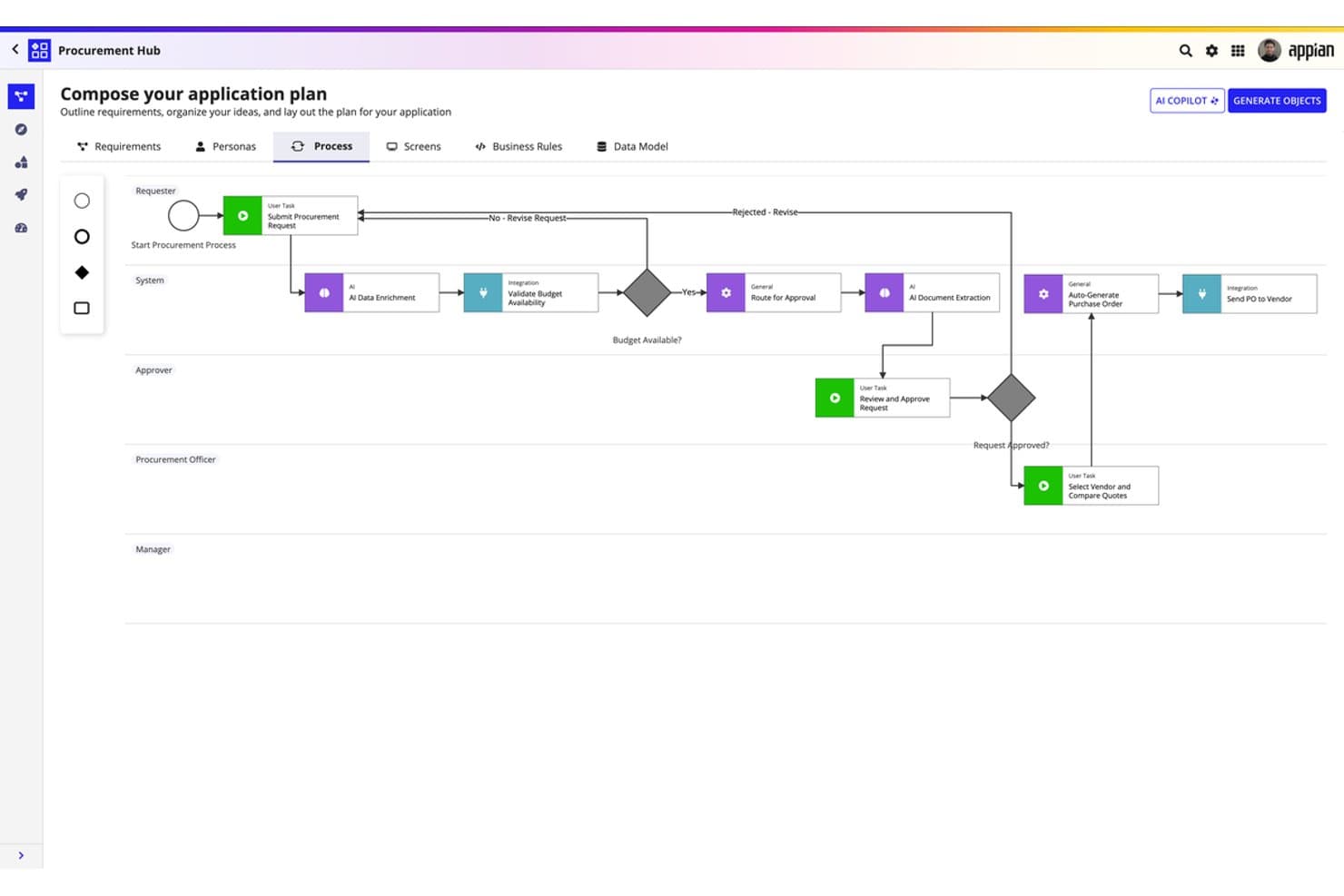
Appian lets users visually compose AI-powered procurement workflows without code. Appian is an enterprise low-code/no-code platform that combines visual app building, AI agents, intelligent document processing, and BPM-grade workflow automation across cloud and self-managed deployments.
Who Is Appian Best For?
Appian is a strong fit for enterprise IT and ops teams in regulated industries—financial services, government, healthcare, and defense—that need governed AI agents embedded in mission-critical workflows.
Why I Picked Appian
Appian earns its spot on my shortlist because of how seriously it handles AI governance inside high-stakes workflows. I'm particularly impressed by Agent Studio, which lets you define autonomous AI agent goals in plain language and embed those agents directly into BPM-grade processes with full audit trails and human escalation built in. Pair that with its Private AI architecture, where no customer data ever trains an external model, and you've got a platform purpose-built for regulated environments like federal agencies or healthcare systems.
Appian Key Features
- Data Fabric federation: Connects and queries data across cloud, on-premises, and legacy systems without requiring data migration, supporting up to 50 million rows.
- Case Management Studio: Provides prebuilt modules—dashboards, routing, and reports—that cover roughly 80% of typical case workflow needs with no coding required.
- Intelligent Document Processing: Extracts and classifies data from complex documents using generative AI, with no-code configuration and human-in-the-loop validation built in.
- Multi-environment deployment: Supports dev, test, and production environment promotion with CI/CD governance across cloud, self-managed Kubernetes, and hybrid configurations.
Appian Integrations
Appian offers 100+ prebuilt connectors, including Salesforce, SAP, Workday, Microsoft SharePoint, DocuSign, AWS, Oracle, and NetSuite. Marketplace integrations include OpenAI and Azure OpenAI, while REST, SOAP, JDBC, and the Integration SDK support custom connections.
Pros and Cons
Pros:
- Real-time process mining and intelligence tools
- Private AI with full audit trails
- Visual agent builder for regulated workflows
Cons:
- Key AI features gated behind higher tiers
- No custom ML model training interface
Learn more about Appian: Best for embedding ML models in the app runtime
- Free plan available
- From $1,090/month
Visit WebsiteCustomer Rating:4.4/5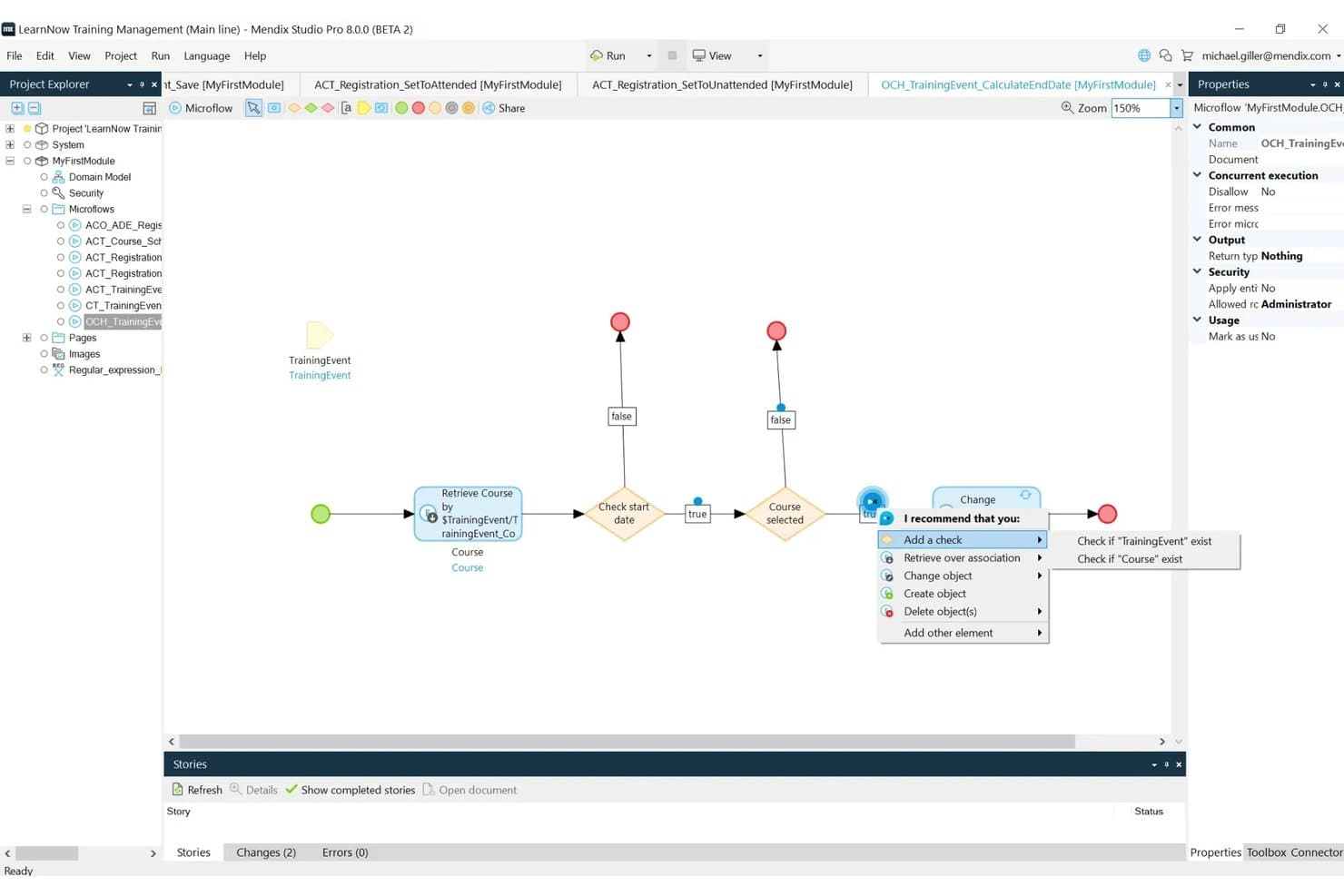
Mendix has a visual workflow editor to configure application logic with low-code components. Mendix is a low-code AI platform built on a model-driven IDE that lets you visually assemble web and mobile applications, embed custom ML models directly into the app runtime, orchestrate AI agents, and automate multi-step workflows.
Who Is Mendix Best For?
Mendix is a strong fit for enterprise IT and application development teams that need to deploy AI-infused apps in regulated, complex environments.
Why I Picked Mendix
Mendix earns its spot on my shortlist because of its ML Kit, which lets you embed custom ML models built in TensorFlow or PyTorch directly into the app runtime via ONNX, with no separate model server required. I love that this isn't just a connector to an external AI service: the model actually runs inside the application, which cuts latency and keeps sensitive data from leaving your environment. The ONNX Model Zoo also gives you pre-trained models for image classification, NLP, and speech without any training work upfront.
Mendix Key Features
- Maia workflow generator: Builds complete workflow diagrams directly from natural language prompts or uploaded images inside Studio Pro.
- AI Agent Builder: A visual starter kit for assembling autonomous, multi-step AI agents that can query knowledge bases, call external APIs, and route to human reviewers.
- Mendix Connect Catalog: A centralized metadata registry that automatically discovers, registers, and governs all APIs, data sources, and services across your organization.
- Multi-environment deployment: Deploy apps to public cloud, private cloud, on-premises, SAP BTP, or FedRAMP-authorized US government cloud from a single platform.
Mendix Integrations
Mendix provides documented connectivity for REST, SOAP, OData, GraphQL, SQL/JDBC, AsyncAPI, and WSDL, plus connectors for SAP, Salesforce, AWS services, Amazon Bedrock, and Kafka. Connect Catalog governs APIs and data sources, while Connector Kit supports custom integrations.
Pros and Cons
Pros:
- Advanced security and compliance certifications included
- Visual agent builder for complex AI workflows
- ML models run in-app for lower latency
Cons:
- Horizontal scalability requires a premium plan
- ML model training must happen externally
Learn more about Mendix:
Other No-Code AI Platforms
Here are some additional no-code AI platform options that didn’t make it onto my shortlist, but are still worth checking out:
- 8Microsoft Power AppsBest for Microsoft 365-native AI app building
- 9DataikuBest for end-to-end ML governance at scale
- 10DataRobotBest for predictive analytics
- 11Gemini Enterprise Agent PlatformBest for multi-agent orchestration at enterprise scale
How I Evaluate No-Code AI Platforms
If a platform can't take a non-coder from a business problem to a working, deployed AI model, it hasn't earned a spot on this list. I break my evaluation into two layers: core functionality every tool must deliver to qualify, and differentiating factors that separate one platform from the next.
Core Functionality (Table Stakes For This List)
When I'm selecting tools for my list, I rank each one on a scale from 0 (does not offer the functionality) to 5 (excels in this area) for each core functionality listed below. Then, I calculate the tool's total score into a percentage. Each tool needs to achieve a minimum total score of 75% to be considered for inclusion.
- Visual App Builder: I look for tools that provide drag-and-drop or visual interfaces for designing applications, workflows, and data models without requiring users to write code.
- Built-In AI/ML Capabilities: I only prioritized tools that offer native, pre-built AI functionality such as machine learning model training, generative AI, NLP, computer vision, or predictive analytics accessible without coding.
- Model Training & Deployment: I gave preference to platforms that enable users to train, test, and deploy AI/ML models directly within the platform using guided or automated workflows (e.g., AutoML).
- Data Ingestion & Integration: I evaluated how well the platforms connect to data from multiple sources (databases, APIs, files, SaaS apps) through pre-built connectors or visual configuration.
- Workflow & Process Automation: I looked for platforms with great tooling for designing automated, AI-driven workflows, decision logic, and triggers via a visual editor.
- Deployment & API Publishing: I gave preference to platforms that let you deploy finished apps, models, or automations as usable endpoints, web apps, or embedded components without custom code.
Once I have a list of tools that meet this criteria, I consider what sets each platform apart.
Differentiating Factors (What Sets Vendors Apart)
Here's how I compare and contrast different vendors:
Standout Features
Model monitoring with drift detection is a big one—I want to see automated alerts when a deployed fraud detection or demand forecasting model starts degrading, plus built-in retraining triggers. Explainability tools also matter because IT teams often need to show stakeholders why an AI model made a specific decision. I look for platforms that pair this with bias checks and audit trails. Generative AI support, like prompt engineering and RAG workflows, is increasingly valuable for teams building internal GenAI apps.
Beyond Features
Deployment flexibility is something I evaluate closely—whether a platform supports cloud, hybrid, or on-prem hosting matters when teams handle sensitive data that can't leave their infrastructure. Security and compliance go hand in hand here. I check for SOC 2, ISO 27001, and AI-specific governance frameworks, especially as regulations around AI accountability tighten globally. Scalability also plays a role; a platform that handles a proof of concept well but buckles under enterprise-grade inference loads won't serve teams long-term.
How to Choose No-Code AI Platforms
It’s easy to get bogged down in long feature lists and complex pricing structures. To help you stay focused as you work through your unique software selection process, here’s a checklist of factors to keep in mind:
| Factor | What to Consider |
| Scalability | Can the platform grow with your needs? Check if it supports increasing data volume and user load without performance issues. |
| Integrations | Does it connect with your existing tools? Ensure it supports the software you already use to avoid workflow disruptions. |
| Customizability | Can you tailor it to your processes? Look for options to modify workflows and interfaces to fit your team’s specific needs. |
| Ease of use | Is it user-friendly for your team? Evaluate the learning curve and whether your team can quickly adapt to using it without extensive training. |
| Implementation and onboarding | How quickly can you get started? Consider the time and resources needed for setup and training, and whether support is available during this phase. |
| Cost | Does it fit your budget? Compare pricing plans and watch for hidden fees. Consider long-term costs and potential savings from automation. |
| Security safeguards | Are your data protected? Look for encryption, access controls, and compliance with data protection regulations to ensure your information is secure. |
| Support availability | Is help available when you need it? Check if support is 24/7 and accessible through multiple channels like chat, email, or phone. |
What Are No-Code AI Platforms?
No-code AI platforms allow users to create and deploy AI models without writing code. These tools are generally used by business analysts, marketers, and other non-technical professionals who need to leverage AI for data analysis and decision-making.
Drag-and-drop interfaces, pre-built models, and integration capabilities help with accessibility, ease of use, and quick implementation. Overall, these tools enable users to harness AI technology efficiently, saving time and resources.
Features of No-Code AI Platforms
When selecting no-code AI platforms, keep an eye out for the following key features:
- Drag-and-drop interface: Simplifies the process of building AI models by allowing users to visually arrange components without coding.
- Pre-built models: Provide ready-to-use templates that help users quickly implement AI solutions without starting from scratch.
- Data integration: Ensures seamless connection with databases and existing tools, such as image recognition software, making data transfer and analysis effortless.
- Customizable workflows: Allow users to tailor processes to meet specific business needs, enhancing flexibility and efficiency.
- Real-time analytics: Offers immediate insights into data, enabling prompt decision-making and adjustments.
- Automated data processing: Reduces manual entry by automatically extracting and organizing information, saving time and reducing errors.
- Scalability: Supports growing data volumes and user loads, ensuring consistent performance as business needs expand.
- Security safeguards: Protects sensitive information with encryption and access controls, maintaining data integrity and compliance.
- Collaboration tools: Facilitate teamwork by allowing multiple users to work on projects simultaneously, improving productivity.
- User-friendly onboarding: Provides training resources and support to ease the transition and help users maximize tool benefits quickly.
Benefits of No-Code AI Platforms
Implementing no-code AI platforms provides several benefits for your team and your business. Here are a few you can look forward to:
- Faster deployment: Quickly implement AI solutions using pre-built models and drag-and-drop interfaces, reducing time to market.
- Reduced costs: Save on development expenses by eliminating the need for specialized coding skills and lengthy development cycles.
- Enhanced productivity: Automate repetitive tasks with automated data processing, freeing up your team to focus on more strategic activities.
- Increased accessibility: Empower non-technical users to create and manage AI models, broadening participation and innovation across your organization.
- Improved decision-making: Leverage real-time analytics to gain insights and make informed decisions promptly, enhancing business outcomes.
- Scalability: Easily adapt to growing data volumes and user demands, ensuring your AI solutions remain effective as your business evolves.
- Better collaboration: Use collaboration tools to enable team members to work together on projects, improving communication and efficiency.
Costs and Pricing of No-Code AI Platforms
Selecting no-code AI software requires an understanding of the various pricing models and plans available. Costs vary based on features, team size, add-ons, and more. The table below summarizes common plans, their average prices, and typical features included in no code AI platform solutions:
Plan Comparison Table for No-Code AI Platforms
| Plan Type | Average Price | Common Features |
| Free Plan | $0 | Limited access to features, basic data processing, and community support. |
| Personal Plan | $10-$30 /user /month | Access to standard features, basic integrations, and limited customization options. |
| Business Plan | $50-$100 /user /month | Advanced features, premium integrations, enhanced security, and priority support. |
| Enterprise Plan | $100+ /user /month | Full feature access, custom integrations, dedicated account management, and enterprise-level support. |
No-Code AI Platform FAQs
Here are some answers to common questions about no-code AI platforms:
Is no-code AI worth it?
No-code AI platforms can be a valuable investment for your business. They reduce development costs by eliminating the need for specialist data scientists or developers. These tools allow non-technical team members to create AI solutions, making AI projects more affordable and scalable for businesses of all sizes. They can also provide integrations with the latest technologies in the space such as natural language generation software or visual recognition tools.
Which no-code platform is best?
The best no-code platform for you depends on your specific needs. For complete beginners, Softr is a great choice. If you need a balance between power and ease of use, Bubble is ideal. For simple mobile apps, Glide excels. Each platform offers unique strengths, so consider your project requirements.
Can no-code AI platforms handle complex tasks?
While no-code AI platforms are designed for ease of use, some are capable of handling complex tasks. They offer advanced features like custom workflows and integrations that can manage sophisticated projects. However, for highly complex tasks, you might still need some technical expertise.
How do I choose the right no-code AI platform?
To choose the right no-code AI platform, assess your team’s technical skills, project requirements, and budget. Consider factors like scalability, integration capabilities, and ease of use. Evaluate trial versions to see how well the platform meets your needs before making a decision.