

Le 10 migliori soluzioni per il deployment continuo nel 2026

10 Migliori Strumenti di Continuous Deployment Lista Breve


Nello sviluppo software, gli strumenti di continuous deployment sono tuoi fedeli alleati. Alla base, intrecciano con destrezza nuove funzionalità sia nelle applicazioni on-premises per Windows, sia in sistemi cloud di grandi dimensioni. Rappresentano un punto di riferimento nella gestione delle dipendenze, assicurando distribuzioni applicative semplificate e minimizzando i tempi di inattività durante i rilasci e aggiornamenti del software.
Ho affrontato le complessità del codice sorgente, utilizzato strumenti di automazione e sviluppato una piattaforma CD dinamica. Ho provato il peso delle sfide dei microservizi, l'urgenza dei cambiamenti on demand e l'imprevedibilità dei rollback. Quindi, se ti senti sopraffatto da distribuzioni inaffidabili o dipendenze intricate, scopri e affidati a questi strumenti. Sperimenta in prima persona i loro vantaggi e rivoluziona il tuo percorso di sviluppo software.
Perché fidarsi dei nostri consigli sui software
Il nostro team testa e recensisce software dal 2012. In quanto leader tecnologici noi stessi, sappiamo quanto sia difficile — e importante — scegliere il software giusto.
Per questa guida, abbiamo valutato gli strumenti attraverso test praticie ricerche indipendenti, assegnando un punteggio agli strumenti in base ai nostri criteri di selezione.
Le nostre recensioni riflettono il nostro giudizio editoriale umano, non un discorso di vendita.
Revisori esperti:
Migliori Strumenti di Continuous Deployment Riepilogo
Questa tabella di confronto riassume i dettagli sui prezzi per le mie principali scelte di strumenti di continuous deployment per aiutarti a trovare quello più adatto alle tue esigenze e al tuo budget aziendale.
| Tool | Best For | Trial Info | Price | ||
|---|---|---|---|---|---|
| 1 | Ideale per automatizzare distribuzioni complesse | Prova gratuita di 30 giorni | Da $30/utente/mese (fatturato annualmente) | Website | |
| 2 | Ideale per cicli di deployment rapidi | Piano gratuito disponibile | Da $20/utente/mese (fatturato annualmente) | Website | |
| 3 | Ideale per pipeline di build personalizzabili | Download gratuito disponibile | Gratuito | Website | |
| 4 | Ideale per la consegna continua scalabile | Demo gratuito disponibile | Da $20/utente/mese (fatturati annualmente) | Website | |
| 5 | Migliore per l'integrazione nell'ambiente Atlassian | Prova gratuita di 30 giorni | Da $10/utente/mese (fatturato annualmente) | Website | |
| 6 | Migliore per compatibilità con la piattaforma Azure | Not available | Da $6/utente/mese (fatturazione annuale) | Website | |
| 7 | Ideale per integrazioni di distribuzione flessibili | Piano gratuito + demo disponibile | A partire da $15/utente/mese | Website | |
| 8 | Ideale per l'automazione dei test continui | Prova gratuita di 14 giorni | Prezzi su richiesta | Website | |
| 9 | Migliore per il modello deployment-as-a-service | Not available | A partire da $20/utente/mese | Website | |
| 10 | Ideale per le distribuzioni Kubernetes-native | Utilizzo gratuito | Open-source, gratuito | Website |
Migliori Strumenti di Continuous Deployment Recensioni
Di seguito trovi i miei approfondimenti sui migliori strumenti di continuous deployment che hanno superato la selezione. Le mie recensioni offrono uno sguardo dettagliato sulle caratteristiche principali, vantaggi e svantaggi, integrazioni e casi d’uso ideali di ciascuno strumento per aiutarti a trovare quello più adatto a te.
Ideale per automatizzare distribuzioni complesse
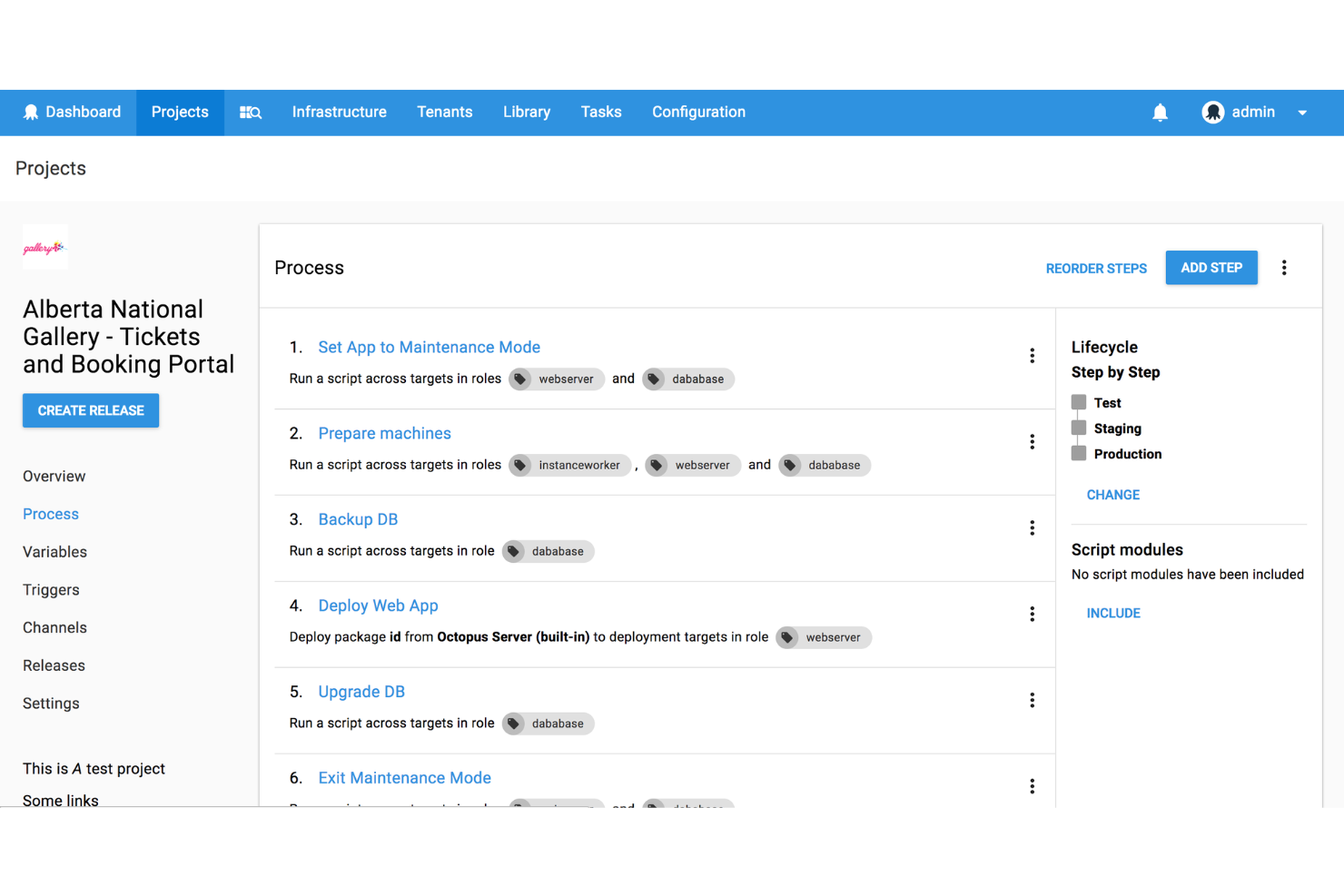
Octopus Deploy è una piattaforma di distribuzione e consegna continua progettata per semplificare i flussi di lavoro di gestione delle release complessi su ambienti on-premises, cloud e container. Aiuta i team DevOps ad automatizzare le distribuzioni, gestire più ambienti e migliorare l'affidabilità della consegna del software.
Perché ho scelto Octopus Deploy: Ho scelto Octopus Deploy per la sua capacità di automatizzare compiti di distribuzione complessi su diversi ambienti. Rispetto ad altri strumenti, eccelle nella gestione dei tenant, consentendo ai team di gestire le distribuzioni per più clienti contemporaneamente. La sua automazione dei runbook integrata, unita alle funzionalità di progressione tra ambienti, lo rende particolarmente efficace nel ridurre errori manuali e garantire distribuzioni coerenti. Questo supporto solido per casi d'uso complessi lo rende il migliore per automatizzare distribuzioni complesse.
Caratteristiche principali & Integrazioni:
Octopus Deploy include funzionalità come l'automazione delle distribuzioni, l'automazione dei runbook per attività operative e distribuzioni multi-tenant per supportare più clienti su vasta scala. La funzione di progressione degli ambienti aiuta i team a portare le applicazioni attraverso le fasi di sviluppo, test e produzione con piena supervisione. Octopus supporta anche la configurazione come codice e si integra con i principali strumenti CI/CD e provider cloud, tra cui GitHub Actions, Jenkins, Azure DevOps, AWS, Google Cloud, Terraform e Kubernetes.
Pros and Cons
Pros:
- Si adatta a distribuzioni multi-tenant
- L'automazione dei runbook riduce gli errori manuali
- Ottime integrazioni con Kubernetes e strumenti CI
Cons:
- L'installazione e l'onboarding possono richiedere tempo
- La profondità dell'integrazione varia tra gli strumenti di terze parti

Ideale per cicli di deployment rapidi
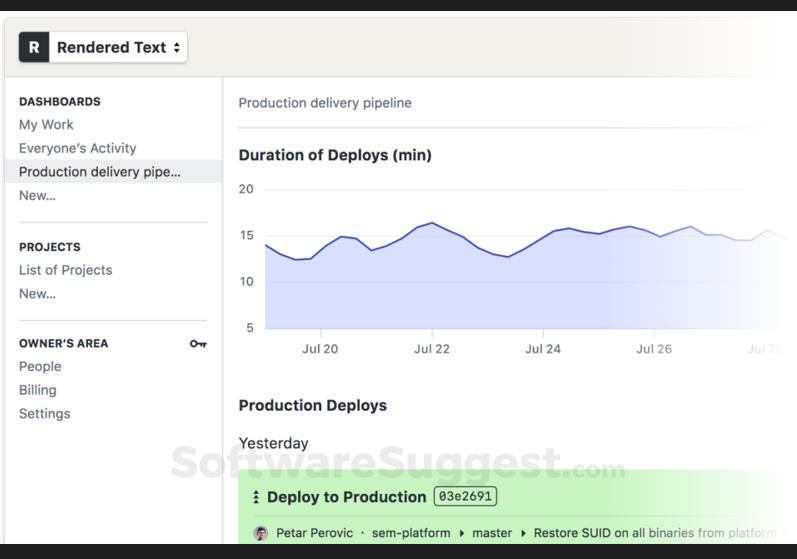
Semaphore è uno strumento d'eccellenza per l'automazione dello sviluppo software. Si distingue nella CI/CD, accelerando i cicli di deployment grazie al rapido passaggio del codice dal repository all'ambiente di produzione. Gli sviluppatori apprezzano Semaphore per la sua efficienza ed efficacia.
Perché ho scelto Semaphore: Ho scelto Semaphore dopo aver confrontato attentamente le sue prestazioni con altri strumenti sul mercato. Ho stabilito che Semaphore è ideale per cicli di deployment rapidi, poiché fornisce costantemente aggiornamenti e patch in tempi brevi, rendendolo una soluzione perfetta per i team che devono rispondere rapidamente ai cambiamenti.
Funzionalità e integrazioni di spicco:
La visualizzazione dei workflow e l'esecuzione parallela di Semaphore permettono agli sviluppatori di distribuire il codice in modo più efficiente, riducendo così il tempo tra un aggiornamento e l'altro. Il Docker Layer Caching, il ridimensionamento automatico e l'agente leggero migliorano ulteriormente le sue capacità di deployment rapido. Le integrazioni più importanti comprendono GitHub, Bitbucket, Docker, Slack e diversi provider cloud, creando un ecosistema coeso per la distribuzione continua.
Pros and Cons
Pros:
- Deployment rapido senza perdita di qualità
- Si integra con piattaforme popolari come GitHub e Docker
- Esecuzione parallela altamente personalizzabile
Cons:
- Prezzi più elevati per i team piccoli
- Curva di apprendimento più ripida per i principianti
- Supporto clienti limitato

Jenkins
Ideale per pipeline di build personalizzabili
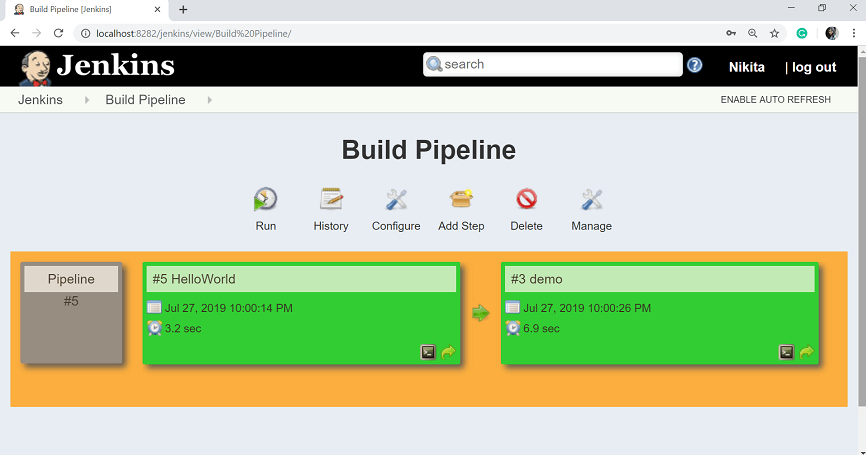
Jenkins è un server di automazione open-source ampiamente utilizzato per semplificare la compilazione, il testing e il deployment delle applicazioni. Le sue potenti capacità di personalizzazione tramite plugin e scripting permettono agli sviluppatori di creare pipeline che si adattano alle esigenze specifiche dei loro progetti.
Perché ho scelto Jenkins: Ho scelto Jenkins dopo aver confrontato le sue vaste opzioni di personalizzazione e aver considerato le opinioni di diversi professionisti dello sviluppo. Questo livello di personalizzazione è il motivo per cui ho determinato che Jenkins è 'Ideale per...' pipeline di build personalizzabili; consente agli sviluppatori di modellare i propri canali secondo i requisiti unici di ogni progetto.
Caratteristiche distintive e integrazioni:
Jenkins offre numerose funzionalità come una ricca architettura di plugin, pipeline-as-code e integrazione con praticamente tutti i sistemi di controllo versione. Dispone di una vasta community che contribuisce con plugin per diverse integrazioni, tra cui Git, Docker, Slack, JIRA e vari servizi cloud. Queste integrazioni consentono agli sviluppatori di creare workflow coesi e automatizzati che possono essere adattati finemente alle loro necessità.
Pros and Cons
Pros:
- Personalizzazione estesa tramite plugin e scripting
- Community attiva e abbondanza di risorse
- Si integra bene con una grande varietà di strumenti e piattaforme
Cons:
- Può essere complesso da configurare, in particolare per i principianti
- Alcuni plugin potrebbero non essere ben mantenuti
- Richiede una gestione attenta e può essere intensivo nell'utilizzo di risorse su progetti più grandi
Ideale per la consegna continua scalabile
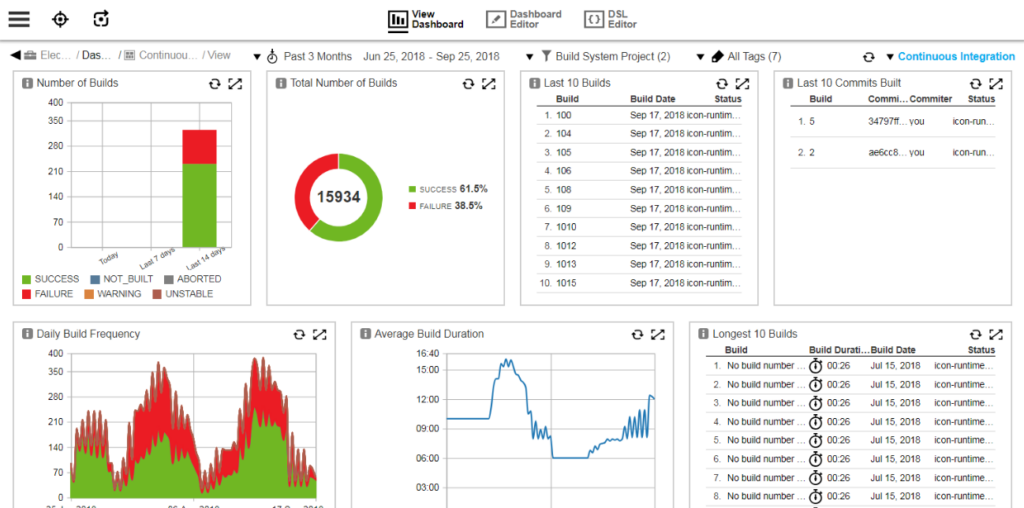
CloudBees è una piattaforma software per la consegna continua progettata per offrire soluzioni scalabili ad aziende di varie dimensioni. Con un'enfasi sull'agilità, CloudBees supporta la capacità di crescere e adattarsi per una consegna continua scalabile.
Perché ho scelto CloudBees: Ho scelto CloudBees per questa lista dopo averla confrontata con varie piattaforme di consegna continua. La sua capacità di scalare senza sforzo, unita a una vasta gamma di funzionalità, ha attirato la mia attenzione. L'ho giudicata la migliore per la consegna continua scalabile grazie alla facilità con cui si adatta alla crescita organizzativa, al suo ampio set di funzionalità e alle opzioni di scalabilità solide che si allineano alle diverse esigenze aziendali.
Funzionalità principali e integrazioni:
CloudBees offre funzionalità come l'automazione delle pipeline, l'analisi in tempo reale e la conformità alla sicurezza. Queste capacità facilitano cicli di sviluppo efficienti e migliorano l'intero processo di consegna. Lo strumento si integra anche con piattaforme popolari come GitHub, Jira e Jenkins, creando un ambiente di sviluppo coeso che può evolvere insieme all'azienda.
Pros and Cons
Pros:
- Scalabilità eccezionale che si adatta a diverse dimensioni aziendali
- Set di funzionalità robuste per la consegna continua
- Integrazioni con strumenti di sviluppo popolari
Cons:
- Può risultare complesso per i team più piccoli
- Il prezzo può essere elevato per le startup
- Curva di apprendimento per i nuovi utenti

Bamboo
Migliore per l'integrazione nell'ambiente Atlassian
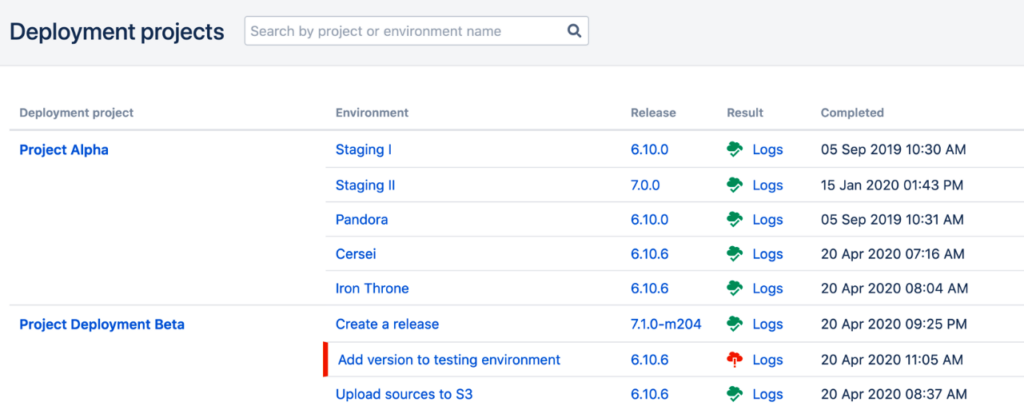
Bamboo è uno strumento di integrazione e distribuzione continua progettato per adattarsi all'ecosistema Atlassian. Grazie a un flusso di lavoro coeso con strumenti come Jira e Bitbucket, Bamboo si impone come la migliore opzione per l'integrazione nell'ambiente Atlassian.
Perché ho scelto Bamboo: Ho scelto Bamboo dopo aver valutato attentamente il suo profondo legame con l'ambiente Atlassian. Non è solo un altro strumento di distribuzione; è stato creato per funzionare in armonia con i prodotti Atlassian. Ho determinato che Bamboo sia il migliore per l'integrazione nell'ambiente Atlassian poiché offre potenti funzionalità di build e distribuzione e unifica la suite Atlassian in un'esperienza più produttiva e collaborativa.
Funzionalità e integrazioni distintive:
Le funzionalità di Bamboo includono processi automatizzati di build e test, progetti di distribuzione e trigger personalizzati. Supporta numerosi linguaggi come Java e Python e framework di test. Il vero gioiello della corona di Bamboo è la sua integrazione con altri strumenti Atlassian come Jira Software, Bitbucket e Fisheye. Queste integrazioni lo rendono parte integrante dell'ecosistema Atlassian, offrendo tracciamento e collaborazione semplificati.
Pros and Cons
Pros:
- Integrazione profonda con gli strumenti Atlassian
- Robuste capacità di automazione di build e test
- Opzioni di distribuzione flessibili
Cons:
- Curva di apprendimento più ripida per chi non utilizza Atlassian
- Integrazioni limitate con terze parti fuori dall'ecosistema Atlassian
- Costo superiore rispetto ad altri strumenti di distribuzione continua


Microsoft Azure DevOps Server è uno strumento collaborativo per lo sviluppo software con sistema di controllo versione centralizzato e funzionalità di gestione progetti integrate. La sua stretta integrazione con la piattaforma cloud Azure lo rende una soluzione ideale per le organizzazioni che fanno affidamento sui servizi Azure, giustificando così l'affermazione che sia il migliore per la compatibilità con la piattaforma Azure.
Perché ho scelto Microsoft Azure DevOps Server: Dopo aver valutato e confrontato diversi strumenti di sviluppo focalizzandomi sulla compatibilità con Azure, ho scelto Microsoft Azure DevOps Server. A mio parere, è il 'Migliore per...' la compatibilità con la piattaforma Azure, poiché sfrutta i punti di forza e i servizi intrinseci di Azure, offrendo un'esperienza di sviluppo coesa.
Caratteristiche distintive e integrazioni:
Microsoft Azure DevOps Server offre funzionalità come controllo versione, reportistica, gestione dei requisiti, gestione dei progetti, build automatiche e gestione dei rilasci. L'integrazione con altri prodotti Microsoft come Visual Studio, Microsoft Teams e Power BI migliora la collaborazione e l'analisi dei dati.
Pros and Cons
Pros:
- Integrazione con Azure e altri servizi Microsoft
- Ampie funzionalità di gestione progetto e sviluppo
- Disponibilità di estensioni per integrazioni di terze parti
Cons:
- Rischia di essere troppo complesso per piccoli team o sviluppatori individuali
- Curva di apprendimento più ripida se non si conosce l’ecosistema Microsoft
- Potenziali limitazioni per chi non è fortemente orientato verso la piattaforma Azure

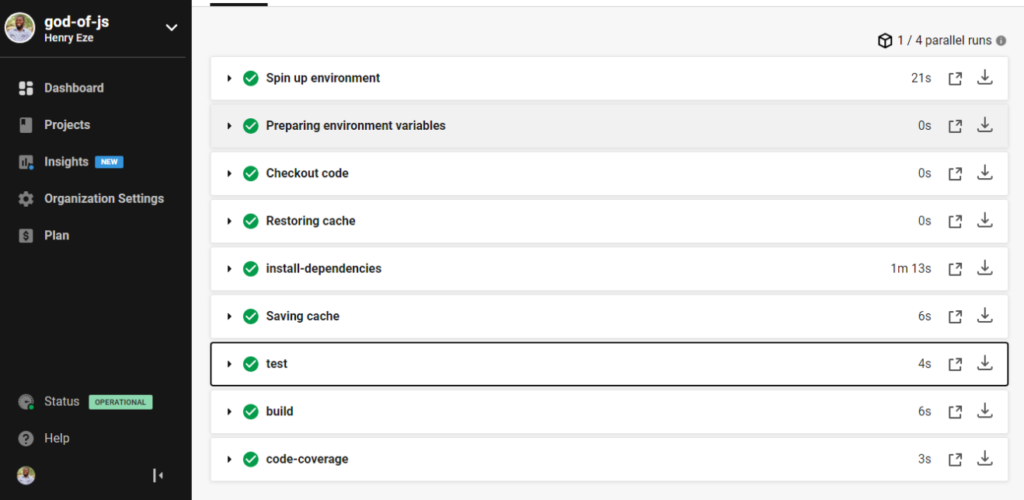
CircleCI è uno strumento progettato per offrire funzionalità di Integrazione Continua e Distribuzione Continua (CI/CD). È particolarmente orientato all'automazione del processo di integrazione delle modifiche al codice e della distribuzione delle applicazioni. Grazie al suo approccio mirato sia all'integrazione che alla distribuzione, CircleCI si è ritagliato una posizione di rilievo come miglior strumento per l'automazione di integrazione e distribuzione.
Perché ho scelto CircleCI: Ho scelto CircleCI dopo un'analisi dettagliata e un confronto con altri strumenti per la distribuzione continua. La sua enfasi su entrambe le fasi di integrazione e distribuzione, unita a potenti funzionalità di automazione, lo rende unico. L'ho giudicato il miglior strumento di automazione per integrazione e distribuzione per la sua efficienza nella gestione di flussi di lavoro complessi e nel collegare varie parti del processo di sviluppo.
Caratteristiche principali e integrazioni:
CircleCI offre flussi di lavoro personalizzabili, comandi e attività riutilizzabili, che contribuiscono tutti a un processo di distribuzione snello. Il suo supporto di prim'ordine per Docker facilita ulteriormente l'automazione del processo di build. Le integrazioni principali includono GitHub, Bitbucket, AWS, Slack e Google Cloud, favorendo un ecosistema di sviluppo ben connesso.
Pros and Cons
Pros:
- Automazione robusta di integrazione e distribuzione
- Solido supporto per Docker e flussi di lavoro personalizzabili
- Ampia varietà di integrazioni con le principali piattaforme
- Ampia gamma di integrazioni con strumenti e piattaforme popolari
- Feedback in tempo reale sul processo di sviluppo
- Supporto per Docker ed esecuzione parallela
Cons:
- Può diventare complesso per progetti più piccoli
- Il prezzo potrebbe essere un ostacolo per i piccoli team
- La documentazione può risultare eccessiva per i nuovi utenti
- Potrebbe richiedere un po' di apprendimento per i nuovi arrivati
- La configurazione può risultare complessa per alcuni utenti
- Potrebbe offrire troppe funzioni per progetti molto piccoli o semplici

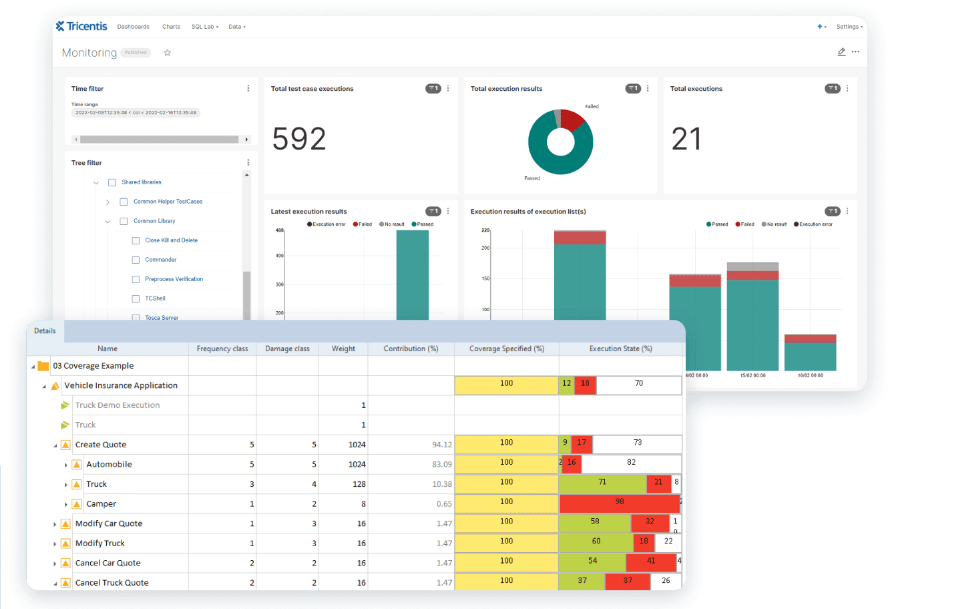
Tricentis è una piattaforma di test continui progettata per automatizzare e gestire l'intero processo di testing all'interno del ciclo di vita dello sviluppo software.
Perché ho scelto Tricentis: Ho scelto Tricentis dopo aver valutato attentamente le sue qualità distintive rispetto ad altre piattaforme di automazione dei test. Tricentis è ideale per l'automazione dei test continui grazie alle sue capacità avanzate, alla riduzione dell'impegno richiesto per i test manuali e alla natura adattiva a diversi scenari e ambienti di testing.
Caratteristiche principali e integrazioni:
Tricentis offre una varietà di funzionalità come l'automazione dei test senza codice, una visione in tempo reale dell'avanzamento dei test e il supporto multipiattaforma. Queste caratteristiche permettono un processo di test più snello ed efficiente senza richiedere conoscenze di programmazione approfondite. La piattaforma si integra con i principali strumenti di sviluppo e gestione progetti come Jira, Jenkins e Selenium, aumentando ulteriormente flessibilità e utilità nell'ecosistema di sviluppo esistente.
Pros and Cons
Pros:
- Capacità di automazione complete
- Integrazione con strumenti di sviluppo popolari
- Supporto multipiattaforma per diverse esigenze di testing
Cons:
- Le informazioni sui prezzi potrebbero essere meno trasparenti
- Potrebbe presentare una curva di apprendimento più ripida per i principianti
- Alcune funzionalità avanzate potrebbero essere eccessive per progetti più piccoli

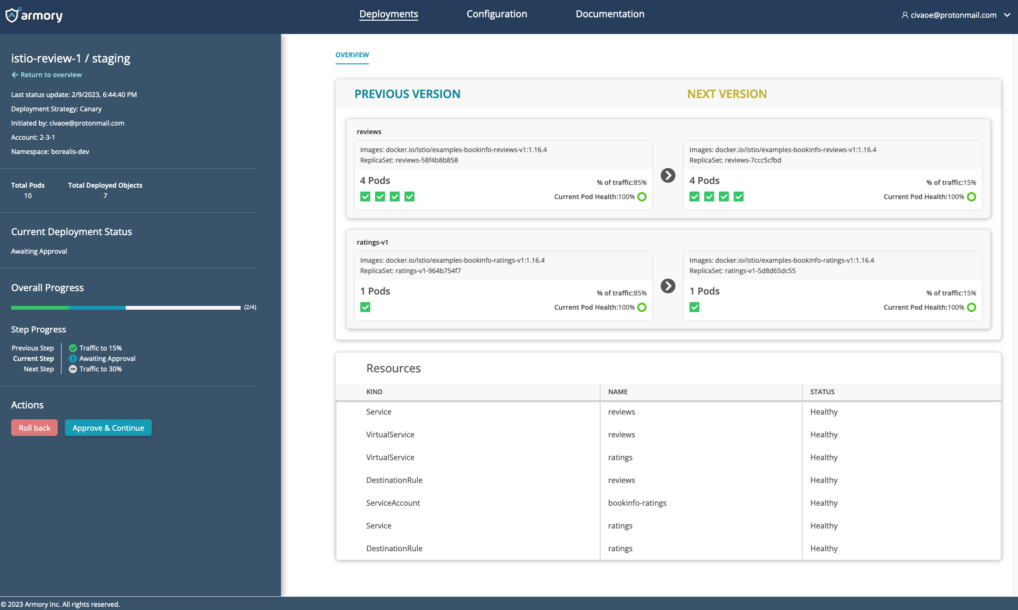
Armory è una piattaforma di continuous delivery che consente alle aziende di distribuire software in modo rapido ed efficiente su ambienti cloud. L'obiettivo della piattaforma, il deployment-as-a-service, automatizza e semplifica i processi di distribuzione.
Perché ho scelto Armory: Ho scelto Armory per la sua dedizione al modello deployment-as-a-service, dopo averlo confrontato con altre piattaforme sul mercato. La sua attenzione all'integrazione e alla delivery continua e il supporto per diversi provider cloud la rendono unica nel settore. Questo particolare focus sul deployment-as-a-service e il supporto offerto alla collaborazione tra diversi team la rendono la “Migliore per...” il modello deployment-as-a-service.
Funzionalità e integrazioni principali:
Armory offre funzionalità avanzate per la distribuzione come l’analisi automatizzata canary, visibilità unificata da un’unica dashboard e supporto per ambienti multi-cloud. Si integra con i principali strumenti CI/CD, provider cloud e piattaforme di orchestrazione di container, tra cui Jenkins, AWS, Google Cloud e Kubernetes, fornendo un’esperienza di distribuzione completa.
Pros and Cons
Pros:
- Opzioni di deployment flessibili su diversi provider cloud
- Integrazione con popolari strumenti CI/CD e piattaforme di orchestrazione di container
- Grande supporto al modello deployment-as-a-service
Cons:
- Il prezzo può essere elevato per organizzazioni di piccole dimensioni
- Alcune funzionalità potrebbero richiedere una curva di apprendimento ripida
- Documentazione e supporto della community limitati rispetto a piattaforme più affermate

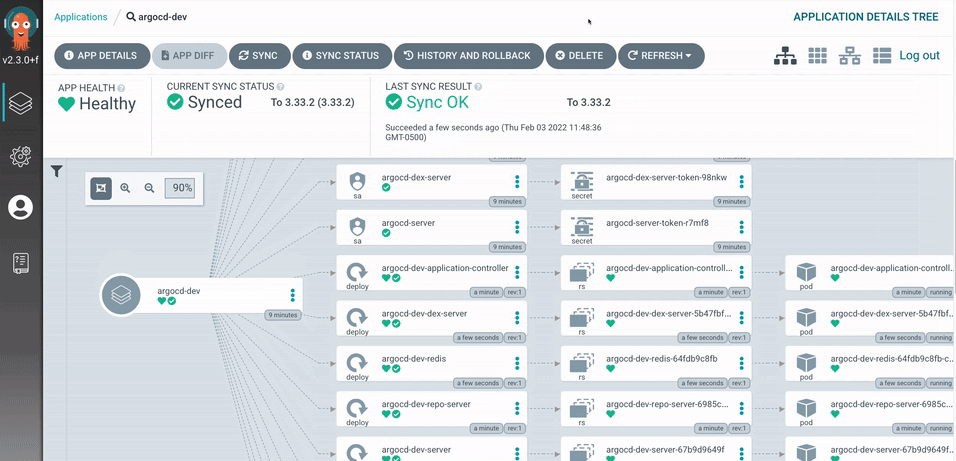
Argo CD è uno strumento di consegna continua GitOps dichiarativo, progettato esplicitamente per ambienti Kubernetes. Aiuta a gestire e mantenere le risorse Kubernetes utilizzando repository Git. Argo CD si distingue come il miglior strumento per le distribuzioni nativamente Kubernetes, grazie alla sua attenzione specializzata su Kubernetes, risultando quindi la scelta ideale per le implementazioni Kubernetes-native.
Perché ho scelto Argo CD: Ho scelto Argo CD per il suo approccio mirato a Kubernetes, che lo distingue da molti altri strumenti di distribuzione. Concentrandosi sulle implementazioni native per Kubernetes, colma una nicchia che si allinea perfettamente alle pratiche DevOps più moderne. Ho individuato Argo CD come il migliore per le distribuzioni Kubernetes-native grazie alla sua profonda integrazione con Kubernetes e alla capacità di sfruttare pienamente tutte le funzionalità offerte da Kubernetes.
Caratteristiche principali e integrazioni:
Le funzionalità distintive di Argo CD includono la definizione dichiarativa e versionata delle applicazioni, la sincronizzazione automatizzata e la visualizzazione degli oggetti Kubernetes. Permette anche la gestione self-service delle applicazioni. Come strumento nativo per Kubernetes, si integra con Helm, Kustomize e Jsonnet, favorendo un ambiente di distribuzione potente ed efficiente.
Pros and Cons
Pros:
- Progettato specificamente per le distribuzioni Kubernetes-native
- Open-source con una comunità attiva di supporto
- Forte integrazione con strumenti dell'ecosistema Kubernetes
Cons:
- Può essere difficile per chi non conosce Kubernetes
- Funzionalità limitate per ambienti non Kubernetes
- Richiede più manutenzione rispetto ad altre soluzioni tutto-in-uno
Altri Strumenti di Continuous Deployment
Di seguito trovi un elenco aggiuntivo di strumenti di continuous deployment che ho selezionato ma che non sono entrati nella top 10. Meritano sicuramente una tua attenzione.
- NinjaOne
Ideale per la distribuzione software semplificata
- ManageEngine Endpoint Central
Ideale per la gestione unificata degli endpoint
- DeployHQ
Ideale per distribuzioni senza tempi di inattività


Come valuto gli strumenti di Deployment Continuo
Divido la mia valutazione in due livelli: la base che ogni strumento deve raggiungere per entrare in questa lista e i fattori differenzianti che distinguono uno strumento CD basilare da uno progettato per rilasci complessi su più cluster.
Funzionalità di base (requisiti minimi per questa lista)
Quando seleziono gli strumenti per la mia lista, valuto ognuno di essi su una scala da 0 (non offre la funzionalità) a 5 (eccelle in quest'area) per ogni funzionalità di base elencata di seguito. Poi calcolo il punteggio totale dello strumento trasformandolo in una percentuale. Ogni strumento deve raggiungere un punteggio totale minimo del 65% per essere considerato per l'inclusione.
- Pipeline di deployment automatizzate: Valuto se ciascuno strumento può portare il codice dall’artifact alla produzione tramite pipeline multi-fase guidate da eventi, invece che tramite script manuali o comandi singoli.
- Integrazione CI/CD: Ogni strumento dovrebbe collegarsi ai provider Git e ai sistemi CI già utilizzati dal tuo team, che si tratti di GitHub Actions, GitLab CI, Jenkins o CircleCI.
- Strategie di delivery progressiva: Cerco il supporto a strategie oltre agli aggiornamenti rolling di base—canary release con suddivisione del traffico, switch blue/green o rollout basati su feature flag per cambiamenti in produzione più sicuri.
- Supporto multi-ambiente e multi-target: Il deployment su un singolo cluster Kubernetes è il requisito minimo. Controllo se uno strumento può anche indirizzare VM, funzioni serverless e cluster su AWS, Azure e GCP.
- Rollback automatizzati e health check: Quando un rilascio interrompe un endpoint di salute o supera una soglia di metriche, lo strumento dovrebbe rilevare il problema e effettuare il rollback automaticamente, senza attendere l'intervento di un ingegnere reperibile.
- Approvazioni, RBAC e audit logging: Esamino quanto in modo granulare uno strumento gestisce i permessi, i gate di approvazione tra le fasi e se mantiene tracce di audit che reggano durante le revisioni di conformità.
Una volta che dispongo di un elenco di strumenti che soddisfano questi criteri, considero ciò che distingue ogni piattaforma.
Fattori differenzianti (cosa distingue i fornitori)
Ecco come confronto e metto a paragone i vari fornitori:
Funzionalità eccezionali
L’analisi automatizzata canary è un importante elemento distintivo. Strumenti come Argo Rollouts e Spinnaker possono acquisire metriche da Prometheus o Datadog per validare statisticamente un rilascio prima della promozione, sostituendo decisioni basate sull’intuizione con dati oggettivi. Valuto anche se uno strumento supporta workflow GitOps nativi, in cui lo stato desiderato è memorizzato in Git e il controller riconcilia automaticamente le divergenze. Per i team in ambienti regolamentati, sono importanti i guardrail di policy-as-code; verifico se lo strumento si integra con OPA o motori simili per bloccare i deployment non conformi prima che raggiungano la produzione.
Oltre le funzionalità
L’architettura di deployment è importante. Alcuni team necessitano di un piano di controllo SaaS completo, mentre altri in settori regolamentati richiedono installazioni self-hosted oppure isolate (air-gapped). Valuto quanto bene ciascuno strumento si integra con gli stack di osservabilità esistenti come Prometheus, Grafana e Datadog, poiché la verifica del rilascio dipende dall’ingestione di metriche in tempo reale. La postura di sicurezza è un altro fattore chiave—verifico la conformità SOC 2, il supporto SSO/SAML e la capacità di fornire SBOM. Infine, tengo in considerazione la trasparenza dei prezzi, specialmente se esiste un livello gratuito o open source per consentire ai team di valutare lo strumento prima dell’adozione.
Come Scegliere gli Strumenti di Continuous Deployment
È facile perdersi in lunghe liste di funzionalità e strutture di prezzo complesse. Per aiutarti a restare concentrato mentre affronti il tuo processo di selezione software, ecco una checklist di fattori da considerare:
| Fattore | Cosa Considerare |
|---|---|
| Scalabilità | Il tool cresce insieme al tuo team? Valuta se può gestire carichi di lavoro e utenti crescenti senza cali di prestazioni. Cerca soluzioni che offrano risorse e prezzi scalabili per accompagnare la tua crescita. |
| Integrazioni | Verifica se il tool si collega con i tuoi sistemi esistenti. Assicurati che supporti il tuo sistema di controllo versione, CI/CD e gli strumenti di collaborazione. Integrazioni mancanti potrebbero causare interruzioni nei flussi di lavoro. |
| Personalizzazione | Valuta se puoi adattare il tool ai tuoi processi. Flussi di lavoro e dashboard personalizzabili ti aiutano ad allineare lo strumento alle tue esigenze specifiche, evitando soluzioni rigide che ti costringono a cambiare i tuoi processi. |
| Facilità d’uso | Determina quanto sia intuitivo il tool per il tuo team. Un’interfaccia complessa può rallentare l’adozione e ridurre la produttività. Cerca strumenti con documentazione chiara e un design facile da usare. |
| Implementazione e onboarding | Quanto velocemente il tuo team può iniziare a utilizzare il tool? Valuta la presenza di tutorial, formazione e supporto durante la fase di configurazione per ridurre al minimo le interruzioni e garantire una transizione fluida. |
| Costo | Analizza il costo totale, non solo il prezzo iniziale. Considera costi nascosti come componenti aggiuntivi, spese di supporto o upgrade obbligatori. Assicurati che il tool rientri nel budget senza sacrificare funzionalità essenziali. |
| Tutele di sicurezza | Assicurati che il tool soddisfi i tuoi standard di sicurezza. Cerca funzionalità come il controllo degli accessi basato sui ruoli, la crittografia dei dati e la conformità alle normative di settore per proteggere i dati e prevenire violazioni. |
| Disponibilità del supporto | Valuta il livello di supporto fornito. Verifica la presenza di supporto 24/7, tempi di risposta e canali disponibili come chat, email o telefono. Un supporto affidabile può far risparmiare tempo e risolvere i problemi più rapidamente. |
Cosa sono gli Strumenti per la Continuous Deployment?
Gli strumenti per la continuous deployment sono soluzioni software che automatizzano il processo di distribuzione delle modifiche al codice negli ambienti di produzione. Sviluppatori, ingegneri DevOps e team IT utilizzano generalmente strumenti di automazione del deploy per aumentare l’efficienza delle distribuzioni e ridurre gli errori manuali. Test automatici, integrazione con il controllo versione e pipeline di deploy facilitano la gestione delle modifiche al codice e garantiscono rilasci affidabili. Nel complesso, questi strumenti permettono un notevole risparmio di tempo e aumentano l’affidabilità delle distribuzioni software.
Caratteristiche
Quando scegli strumenti per la continuous deployment, fai attenzione alle seguenti caratteristiche chiave:
- Test automatici: Garantiscono la qualità del codice eseguendo test automaticamente prima della distribuzione, riducendo il rischio di bug in produzione.
- Integrazione con controllo versione: Si collega al tuo sistema di controllo versione per gestire senza soluzione di continuità le modifiche e la cronologia del codice.
- Pipeline di distribuzione: Automatizza il processo di spostamento del codice dallo sviluppo alla produzione, assicurando coerenza e velocità.
- Canary deployment: Permette di rilasciare nuove modifiche inizialmente solo a una piccola parte degli utenti, minimizzando i rischi attraverso il monitoraggio delle prestazioni prima del rilascio completo.
- Funzionalità di rollback: Consente di tornare rapidamente alle versioni precedenti in caso di problemi, garantendo la stabilità del sistema e riducendo i tempi di inattività.
- Flussi di lavoro personalizzabili: Ti permette di adattare il processo di distribuzione alle esigenze uniche del tuo team, aumentando flessibilità e controllo.
- Monitoraggio in tempo reale: Fornisce informazioni sulle prestazioni della distribuzione e sulla salute del sistema, aiutando i team a rispondere rapidamente ai problemi.
- Tutele di sicurezza: Protegge le tue distribuzioni con funzionalità come controllo degli accessi e crittografia dei dati, garantendo conformità e sicurezza delle informazioni.
- Scalabilità: Supporta l’aumento di carichi di lavoro e utenti senza perdite di prestazioni, assicurando la validità a lungo termine.
- Supporto alle integrazioni: Offre connessioni con strumenti e piattaforme popolari, aumentando la funzionalità dello strumento e integrandosi nei flussi di lavoro esistenti.
Vantaggi
L’implementazione di strumenti per la continuous deployment offre numerosi vantaggi al tuo team e al tuo business. Ecco alcuni di quelli a cui puoi ambire:
- Aumento dell'efficienza: L'automazione delle pipeline di distribuzione riduce il lavoro manuale, consentendo al tuo team di concentrarsi su attività più strategiche.
- Migliore qualità del codice: I test automatizzati garantiscono che solo il codice ben testato raggiunga la produzione, riducendo al minimo bug ed errori.
- Cicli di rilascio più rapidi: Processi snelli permettono rilasci più frequenti, mantenendo il software aggiornato e competitivo.
- Collaborazione migliorata: L'integrazione con i sistemi di controllo versione e il monitoraggio in tempo reale favorisce una migliore comunicazione e lavoro di squadra.
- Rischio ridotto: Funzionalità come deployment canary e possibilità di rollback aiutano a mitigare i rischi durante i rilasci, garantendo stabilità.
- Scalabilità: La capacità di gestire carichi di lavoro crescenti assicura che i processi di distribuzione possano crescere insieme alle esigenze aziendali.
- Migliore sicurezza: Le misure di sicurezza proteggono le distribuzioni, garantendo la conformità e la protezione dei dati sensibili.
Costi e prezzi
La scelta degli strumenti di distribuzione continua richiede la comprensione dei vari modelli di prezzo e dei piani disponibili. I costi variano in base alle funzionalità, alle dimensioni del team, agli add-on e altro ancora. La tabella sottostante riassume i piani più comuni, i prezzi medi e le tipiche funzionalità incluse nelle soluzioni di strumenti per la distribuzione continua:
Tabella di confronto dei piani per strumenti di distribuzione continua
| Tipo di piano | Prezzo medio | Funzionalità comuni |
|---|---|---|
| Piano gratuito | $0/user/month | Capacità base di distribuzione, integrazioni limitate e supporto comunitario. |
| Piano personale | $5-$25/user/month | Test avanzati, integrazione con il controllo versione e flussi di lavoro personalizzabili. |
| Piano business | $30-$75/user/month | Monitoraggio in tempo reale, funzionalità di sicurezza avanzate e supporto prioritario. |
| Piano enterprise | $100-$200/user/month | Piena scalabilità, gestione account dedicata e analisi approfondite. |
Domande frequenti sugli strumenti di Continuous Deployment
Ecco alcune risposte alle domande più comuni sugli strumenti di continuous deployment:
Cosa succede se un deployment fallisce con questi strumenti?
Quando utilizzi strumenti di continuous deployment, è fondamentale assicurarsi che la pipeline sia in grado di rilevare l’errore e ripristinare o bloccare automaticamente. Questo significa che lo strumento deve supportare artefatti versionati, rollback automatico o ripubblicazione di una versione precedente, oltre a sistemi di allerta e monitoraggio per intervenire rapidamente. Se tralasci questo aspetto, un rilascio fallito può restare attivo e impattare i tuoi utenti.
Come gestiscono questi strumenti i diversi ambienti (dev/staging/produzione)?
I tuoi strumenti di deployment dovrebbero permetterti di definire ambienti separati, ciascuno con le proprie configurazioni, variabili e policy di approvazione (se necessarie). I migliori permettono anche di promuovere il rilascio da un ambiente al successivo (dev → staging → produzione) mantenendoli sincronizzati. Se il tuo strumento non supporta esplicitamente la separazione degli ambienti, rischi di incorrere in problemi di configurazione o bug nascosti al passaggio in produzione.
Come posso integrare sicurezza e compliance negli strumenti di continuous deployment?
È importante che la toolchain includa controlli di sicurezza (es. analisi statica del codice, scansione delle vulnerabilità) e barriere di compliance (audit logging, approvazioni basate sui ruoli) anche in pipeline per lo più automatizzate. Lo strumento di deployment deve permettere l’aggiunta di hook o plugin per queste verifiche e offrire visibilità su cosa è stato distribuito, quando e da chi. Se ignori questo aspetto, la velocità potrebbe andare a scapito della sicurezza.
Quali cambiamenti culturali o di processo sono necessari quando si utilizzano questi strumenti?
Passare a rilasci frequenti e automatizzati richiede al team di abbandonare la mentalità delle “big release”. Occorrono cambiamenti più piccoli, feedback più rapidi e una maggiore responsabilità sul codice in produzione. Sviluppatori, tester e operations devono collaborare strettamente e riconoscere che la produzione è parte integrante del processo, non una fase finale accessoria. Se non adegui i processi, lo strumento di deployment rischia di mettere in luce le debolezze invece di risolverle.
Quali costi o rischi nascosti comportano gli strumenti di continuous deployment che dovrei considerare?
Oltre ai costi di licenza degli strumenti o delle infrastrutture, i rischi includono: mantenere molti ambienti simili alla produzione (che ha un costo), aggiornare suite di test e pipeline man mano che il sistema cresce, aumentare le esigenze di monitoraggio operativo e, se le release non sono ben controllate, una maggiore frequenza di incidenti. In alcuni casi, anche la gestione degli strumenti e dell’automazione può diventare un vero progetto invece che un semplice supporto. Se non pianifichi tutto ciò, l’adozione dello strumento potrebbe rallentare il tuo team.
Cosa fare dopo:
Se stai valutando strumenti di continuous deployment, parla con un consulente SoftwareSelect per ottenere consigli gratuiti.
Compili un modulo e fai una breve chiacchierata in cui raccolgono le specifiche delle tue esigenze. Poi riceverai una lista ristretta di software da valutare. Ti supporteranno anche per tutto il processo di acquisto, incluse le negoziazioni sul prezzo.