

Con così tanti strumenti diversi per il testing continuo disponibili, è difficile capire quale sia quello giusto per te. Sai di voler automatizzare l'esecuzione dei test in ogni fase dello sviluppo, ma devi capire quale strumento sia il migliore. Sono qui per aiutarti! In questo articolo ti aiuterò a semplificare la scelta, condividendo le mie esperienze personali nell'utilizzo di decine di diversi software per il testing continuo con team e progetti differenti, insieme alle mie scelte dei migliori strumenti per il testing continuo.
Perché fidarsi dei nostri consigli sui software
6,700+
Reviews
20
Industry experts
16+
Evaluation factors
14
Years
Il nostro team testa e recensisce software dal 2012. In quanto leader tecnologici noi stessi, sappiamo quanto sia difficile — e importante — scegliere il software giusto.
Per questa guida, abbiamo valutato gli strumenti attraverso test praticie ricerche indipendenti, assegnando un punteggio agli strumenti in base ai nostri criteri di selezione.
Le nostre recensioni riflettono il nostro giudizio editoriale umano, non un discorso di vendita.
Revisori esperti:
- Paulo Gardini MiguelDirettore tecnico
 Tim FisherVP dell'IA
 Gabriel RosasTech Lead e architetto software
 Christhian GruhnTech Lead e architetto della piattaforma

Tabella comparativa degli strumenti per il testing continuo
Questa tabella comparativa riassume i dettagli sui prezzi degli strumenti per il testing continuo che ho selezionato tra i migliori:
| Tool | Best For | Trial Info | Price | ||
|---|---|---|---|---|---|
| 1 | Ideale per il test SDLC agentico con passaggio agli agenti di programmazione | Piano gratuito + prova gratuita disponibili | A partire da $20/mese | Website | |
| 2 | Miglior strumento di test continui per eseguire test senza manutenzione | Demo gratuita disponibile | Prezzi su richiesta | Website | |
| 3 | Ideale per i test automatizzati dell'interfaccia utente su desktop e web | Prova gratuita di 14 giorni | Da $3,598/anno (con fatturazione annuale) | Website | |
| 4 | Ideale per testare applicazioni mobili protette e pronte per la produzione | Demo gratuita disponibile | Prezzi su richiesta | Website | |
| 5 | Ideale per la regressione tra browser basata sull'IA visiva | Prova gratuita di 14 giorni + demo gratuita disponibile | Prezzi su richiesta | Website | |
| 6 | Ideale per test tra browser e su dispositivi reali su larga scala | Prova gratuita disponibile | A partire da $29/utente/mese (fatturato annualmente) | Website | |
| 7 | Ideale per test autoriparanti con informazioni dettagliate sulla produzione | Versione di prova gratuita di 30 giorni + demo gratuita disponibile | A partire da 84 $/utente/mese (con fatturazione annuale) | Website | |
| 8 | Ideale per l'esecuzione parallela su diverse versioni dei sistemi operativi | Prova gratuita di 28 giorni + demo gratuita disponibile | A partire da $39/mese (con fatturazione annuale) | Website | |
| 9 | Miglior strumento di test automatizzato del software per Salesforce | Prova gratuita di 14 giorni + demo gratuita disponibile | Prezzi su richiesta | Website | |
| 10 | Ideale per cloud aziendali con dispositivi altamente sicuri | Demo gratuita disponibile | Prezzi disponibili su richiesta | Website |


Recensioni dei migliori strumenti per il testing continuo
Ecco una breve descrizione di ciascun software per il testing continuo, che illustra il caso d’uso migliore di ogni strumento, le sue funzionalità più interessanti e alcuni pro e contro. Ho incluso anche schermate per fornire una panoramica della loro interfaccia utente.
 Ideale per il test SDLC agentico con passaggio agli agenti di programmazione
- Piano gratuito + prova gratuita disponibili
- A partire da $20/mese
Visit WebsiteCustomer Rating:4.7/5
Functionize consente agli utenti di eseguire e rivedere i test nei browser e sui dispositivi. Functionize è una piattaforma di test continui nativa dell'IA che crea, esegue, mantiene e diagnostica autonomamente test per interfacce utente web, API, database, elementi visivi e flussi di lavoro di applicazioni aziendali.
Per chi è più adatto Functionize?
Functionize è particolarmente adatto ai team QA e DevOps che lavorano in ambienti di sviluppo nativi dell'IA, dove agenti di programmazione come Cursor o Claude Code fanno già parte del flusso di lavoro.
Perché ho scelto Functionize
Functionize è entrato nella mia rosa di candidati soprattutto per il modo in cui si integra nei flussi di lavoro SDLC agentici, in particolare grazie al server MCP che consente agli agenti di programmazione come Cursor o Claude Code di passare direttamente a Functionize Studio non appena terminano di generare il codice. Mi affido anche all'agente di diagnosi, che esegue un'analisi automatizzata della causa principale e distingue i difetti reali dalla variabilità dei test senza richiedere un triage manuale. L'agente di creazione completa il quadro convertendo automaticamente le storie utente in linguaggio naturale in casi di test eseguibili.
Funzionalità principali di Functionize
- Test delle API multiprotocollo: Esegui test su REST, SOAP, GraphQL, gRPC, WebSockets, Kafka e MQ da un'unica piattaforma.
- Autoriparazione SmartFix: Rileva e corregge automaticamente i passaggi di test non funzionanti quando si verificano modifiche all'interfaccia utente, riducendo l'impegno di manutenzione fino al 90%.
- Test basati sui dati: Carica un file CSV e Studio scorre ogni riga, associando direttamente le colonne di dati ai passaggi del test.
- Tunneling sicuro QuickConnect: Apre tunnel per sessione verso applicazioni interne o private senza richiedere una VPN o porte in ingresso aperte.
Integrazioni di Functionize
Functionize offre integrazioni documentate con GitHub, Jenkins, Azure DevOps, CircleCI, AWS CodePipeline, Spinnaker, Jira, TestRail, Xray e Zephyr Squad. Supporta inoltre attivazioni tramite webhook e API, oltre a passaggi MCP con Cursor, Windsurf e Claude Code.
Pros and Cons
Pros:
- Gli agenti IA generano e autoriparano automaticamente i test
- Supporto approfondito per i flussi di lavoro SDLC agentici
- La copertura include web, API, voce e database
Cons:
- Supporto limitato per il test nativo di applicazioni mobili
- La documentazione delle integrazioni è indicata come in arrivo
Learn more about Functionize: Miglior strumento di test continui per eseguire test senza manutenzione
- Demo gratuita disponibile
- Prezzi su richiesta
Visit WebsiteCustomer Rating:4.4/5
Testsigma utilizza l'IA per generare ed eseguire automaticamente i casi di test in modo continuo. Testsigma è una piattaforma di test continui nativa dell'IA che copre i test web, mobile, API, Salesforce e desktop tramite un'interfaccia NLP senza codice basata su Selenium e Appium.
Per chi è più adatto Testsigma?
Testsigma è particolarmente adatto ai team di rilascio e QA che necessitano di generazione dei test basata sull'IA, esecuzione con autoriparazione e un punteggio di affidabilità del rilascio in un'unica piattaforma senza codice.
Perché ho scelto Testsigma
Testsigma è entrato nella mia rosa ristretta per il modo in cui gestisce il punteggio di affidabilità del rilascio, una funzionalità che trasforma i risultati dei test in un segnale quantificato di approvazione o rifiuto prima che qualsiasi distribuzione proceda. Apprezzo il fatto che Atto Analyzer Agent non si limiti a evidenziare gli errori, ma li classifichi come difetti reali, variazioni dell'interfaccia utente o test instabili, così il team non perde tempo a inseguire falsi segnali prima di un rilascio. In combinazione con la riparazione in tempo reale dei selettori offerta da Healer Agent, Testsigma mantiene stabili le suite di test senza interventi manuali tra uno sprint e l'altro.
Funzionalità principali di Testsigma
- Creazione di test NLP senza codice: Scrivi casi di test in inglese semplice senza alcuna conoscenza di programmazione, utilizzando un'interfaccia in linguaggio naturale basata su Selenium e Appium.
- Servizio cloud con dispositivi reali: Esegui i test su oltre 3.000 combinazioni di browser e sistemi operativi reali e dispositivi mobili, inclusi oltre 800 dispositivi iOS e Android.
- Integrazione con le pipeline CI/CD: Collegati nativamente a Jenkins, GitHub Actions, Azure DevOps, CircleCI e altre cinque piattaforme CI/CD, con attivazione dei test basata sugli eventi.
- Gestione dei test nativa dell'IA: Gestisci casi di test manuali e automatizzati in un unico modulo, con sincronizzazione bidirezionale con Jira, tracciabilità dei requisiti e gestione delle versioni dei test.
Integrazioni di Testsigma
Testsigma offre oltre 30 integrazioni native nel piano Pro e oltre 40 nel piano Enterprise, tra cui Jenkins, GitHub Actions, Azure DevOps, CircleCI, Jira, Linear, Slack, Microsoft Teams, BrowserStack e Sauce Labs. Fornisce inoltre API per integrazioni CI/CD personalizzate.
Pros and Cons
Pros:
- Punteggio di affidabilità del rilascio per le decisioni di approvazione o rifiuto
- Agenti basati sull'IA per la creazione e la manutenzione dei test
- Piattaforma senza codice unificata per tutti i tipi di test
Cons:
- Nessun supporto nativo per Cypress o Playwright
- I selettori generati automaticamente possono essere inaffidabili
Learn more about Testsigma: Ideale per i test automatizzati dell'interfaccia utente su desktop e web
- Prova gratuita di 14 giorni
- Da $3,598/anno (con fatturazione annuale)

TestComplete consente agli utenti di inserire e gestire le operazioni di test tramite menu contestuali. TestComplete è una piattaforma di automazione dei test dell'interfaccia utente di SmartBear che supporta test con script, basati su parole chiave e senza codice su applicazioni desktop, web e mobili, con autoriparazione integrata basata sull'intelligenza artificiale ed esecuzione parallela tra ambienti.
Per chi è più adatto TestComplete?
TestComplete è particolarmente adatto agli ingegneri dell'automazione QA di grandi aziende che devono testare interfacce utente desktop e web complesse su applicazioni legacy e moderne.
Perché ho scelto TestComplete
TestComplete è entrato nella mia lista ristretta perché gestisce i test automatizzati dell'interfaccia utente su desktop, web e dispositivi mobili con un livello di profondità difficile da eguagliare quando si lavora contemporaneamente con stack applicativi legacy e moderni. Sono particolarmente colpito dai suoi test con autoriparazione basata sull'intelligenza artificiale, che rilevano e correggono automaticamente i riferimenti agli oggetti non più validi quando gli elementi dell'interfaccia utente cambiano, registrando un tasso di successo del 95%. Mi piace anche il fatto che il riconoscimento degli oggetti supporti una gamma insolitamente ampia di framework dell'interfaccia utente, da Oracle Forms e SAP a React ed Electron, così non è necessario mantenere strumenti separati per diversi tipi di applicazioni.
Caratteristiche principali di TestComplete
- Supporto BDD/Cucumber: Scrivi scenari di test nativamente nella sintassi Gherkin, senza plugin aggiuntivi, per allineare i casi di test ai requisiti aziendali.
- Test basati sui dati: Esegui automaticamente la stessa logica di test su più set di dati, coprendo una gamma più ampia di scenari di input senza duplicare gli script di test.
- Network Suite per l'esecuzione distribuita: Coordina ed esegui simultaneamente i test su più macchine remote, riducendo il tempo complessivo di esecuzione dei test nelle suite di grandi dimensioni.
- Integrazione con LoadNinja: Converti i test funzionali esistenti dell'interfaccia utente in test di carico all'interno di un unico flusso di lavoro, senza creare da zero script separati per i test di carico.
Integrazioni di TestComplete
TestComplete offre integrazioni native con Jenkins, Azure DevOps, GitHub Actions, GitLab, TeamCity, Bamboo, Jira, Bitbucket, Zephyr Enterprise e BitBar. La sua CLI, l'API REST e l'architettura aperta dei plugin supportano flussi di lavoro CI/CD personalizzati.
Pros and Cons
Pros:
- Gestisce i test di applicazioni legacy e moderne
- L'autoriparazione basata sull'intelligenza artificiale identifica i cambiamenti nell'interfaccia utente
- Supporta la creazione di test senza codice e con script
Cons:
- Richiede Windows per tutta l'esecuzione dei test
- Non dispone di una gestione integrata dei test end-to-end
Learn more about TestComplete: Ideale per testare applicazioni mobili protette e pronte per la produzione
- Demo gratuita disponibile
- Prezzi su richiesta

Digital.ai Continuous Testing offre dashboard di analisi integrate per ottenere informazioni sui test. Digital.ai Continuous Testing è una piattaforma di test per dispositivi mobili e applicazioni web che supporta i test funzionali, delle prestazioni e dell'accessibilità su dispositivi reali, dispositivi virtuali e browser cloud, con creazione dei test basata sull'intelligenza artificiale, test autoriparanti e ampio supporto ai framework, tra cui Appium, Espresso, XCUITest, Playwright e Cypress.
Per chi è più adatto Digital.ai Continuous Testing?
Digital.ai Continuous Testing è particolarmente adatto ai team aziendali di QA mobile e DevOps che devono testare applicazioni protette e pronte per la produzione su larga scala e su dispositivi reali.
Perché ho scelto Digital.ai Continuous Testing
Digital.ai Continuous Testing si è guadagnato un posto nella mia rosa di candidati perché è l'unica piattaforma di test che consente di eseguire test automatizzati direttamente su applicazioni protette e pronte per la produzione, ovvero quelle protette da offuscamento, RASP e protezione dei file binari tramite la sua integrazione con Arxan, senza dover mantenere una build separata non protetta. Apprezzo inoltre il fatto che i test funzionali, delle prestazioni e dell'accessibilità vengano eseguiti tutti in un unico passaggio con report unificati. Questo modello di esecuzione tre-in-uno riduce i cicli di regressione da giorni a ore su dispositivi reali e virtuali simultaneamente.
Funzionalità principali di Digital.ai Continuous Testing
- Test autoriparanti: i test si aggiornano automaticamente quando cambiano gli elementi dell'interfaccia utente, riducendo il tempo che il team dedica alla manutenzione dei test dopo ogni rilascio dell'applicazione.
- Gate di qualità Smart Agent: un agente automatizzato si integra direttamente nella pipeline CI/CD per attivare l'esecuzione dei test al momento dei commit del codice e bloccare le distribuzioni quando i test non vengono superati.
- Cloud di dispositivi reali con simulazione della rete: esegui i test su dispositivi iOS e Android reali distribuiti in 7 centri dati globali, con supporto per condizioni di limitazione della rete 3G, 4G, 5G e offline.
- Generazione di script con Mobile Studio: uno strumento basato sull'interfaccia utente che genera automaticamente codice di automazione dalle interazioni registrate, consentendo ai non ingegneri di creare script di test senza scrivere manualmente il codice.
Integrazioni di Digital.ai Continuous Testing
Digital.ai Continuous Testing si integra con Jenkins, GitHub Actions, GitLab CI, Azure DevOps, Bitbucket, TeamCity, CircleCI, Jira, Microsoft Teams, Slack, Dynatrace e Datadog. Smart Agent supporta i gate di qualità CI/CD, mentre le integrazioni MCP collegano gli agenti di programmazione basati sull'intelligenza artificiale.
Pros and Cons
Pros:
- Testa direttamente applicazioni mobili protette e pronte per la produzione
- I test paralleli riducono drasticamente la durata dei cicli di regressione
- Test funzionali, delle prestazioni e dell'accessibilità eseguiti insieme
Cons:
- Durante i periodi di punta sono stati segnalati ritardi nelle code dei dispositivi
- L'interfaccia può risultare affollata dopo gli aggiornamenti
Learn more about Digital.ai Continuous Testing: Ideale per la regressione tra browser basata sull'IA visiva
- Prova gratuita di 14 giorni + demo gratuita disponibile
- Prezzi su richiesta

Applitools monitora le esecuzioni dei test, i risultati delle schermate e i problemi irrisolti in un unico cruscotto. Applitools è una piattaforma di test visivi e funzionali dell'interfaccia utente che utilizza l'analisi delle immagini basata sull'IA e un motore di rendering tra browser per automatizzare i test di regressione visiva, accessibilità, tra dispositivi, API e componenti attraverso oltre 30 SDK per framework.
Per chi è più adatto Applitools?
Applitools è particolarmente adatto agli ingegneri dell'automazione QA e ai team responsabili dei rilasci che gestiscono la copertura dei test su più browser e dispositivi in basi di codice ampie e in rapida evoluzione.
Perché ho scelto Applitools
Applitools si è guadagnato un posto nella mia lista ristretta perché il suo motore di IA visiva fa qualcosa che gli strumenti di confronto dei pixel non possono semplicemente fare: distingue le vere regressioni dell'interfaccia utente dai problemi di rendering, il che significa molti meno falsi positivi che intasano la coda delle revisioni. Sono particolarmente colpito da Ultrafast Grid, che acquisisce una singola istantanea del DOM e la riproduce in parallelo su decine di combinazioni di browser e sistemi operativi, comprimendo drasticamente i cicli di riscontro tra browser. Mi distingue anche la gestione delle baseline consapevole dei rami, poiché allinea le baseline visive direttamente ai rami Git, così le regressioni su un ramo di funzionalità non contaminano mai la baseline principale.
Funzionalità principali di Applitools
- Localizzatori di test autoriparanti: l'IA visiva identifica gli elementi dell'interfaccia utente in base al loro aspetto anziché agli attributi del DOM, così i test continuano a essere eseguiti anche quando cambiano i nomi delle classi, gli ID o la struttura della pagina.
- Creazione dei test basata su NLP: scrivi i passaggi del test in inglese naturale e il Modello linguistico deterministico di Applitools li converte in azioni di test eseguibili e riproducibili.
- Test dei componenti Storybook: testa i singoli componenti dell'interfaccia utente in isolamento direttamente all'interno di Storybook, individuando le regressioni prima che raggiungano gli ambienti integrati.
- Analisi della causa principale: l'analizzatore dei difetti visivi collega automaticamente i problemi dell'interfaccia utente a modifiche specifiche del codice, individuando cosa si è rotto e dove senza un'indagine manuale.
Integrazioni di Applitools
Applitools offre oltre 60 integrazioni, tra cui Jenkins, GitHub Actions, GitLab CI/CD, Azure DevOps, CircleCI, Jira, Slack, GitHub, GitLab e Bitbucket. Gli attivatori API e le notifiche webhook supportano flussi di lavoro CI/CD personalizzati.
Pros and Cons
Pros:
- L'IA visiva riduce notevolmente i falsi positivi
- Il motore di test deterministico elimina gli errori intermittenti
- I localizzatori autoriparanti resistono alle modifiche del codice dell'interfaccia utente
Cons:
- È necessaria una revisione manuale per le modifiche visive segnalate
- La configurazione iniziale può essere complessa per i team
Learn more about Applitools: Ideale per test tra browser e su dispositivi reali su larga scala
- Prova gratuita disponibile
- A partire da $29/utente/mese (fatturato annualmente)
Visit WebsiteCustomer Rating:4.5/5
BrowserStack evidenzia l'ottimizzazione delle compilazioni per risparmiare circa 1 ora per esecuzione del test. BrowserStack è una piattaforma di test continuo basata sul cloud che include test automatizzati tra browser, test su dispositivi mobili reali, test di regressione visiva, test di accessibilità e test di carico su migliaia di combinazioni di browser, sistemi operativi e dispositivi.
Per chi è più adatto BrowserStack?
BrowserStack è particolarmente adatto ai team aziendali di QA e DevOps che eseguono suite di test ad alto volume su un'ampia gamma di browser, sistemi operativi e dispositivi mobili reali.
Perché ho scelto BrowserStack
BrowserStack è entrato nella mia lista dei preferiti perché nessun'altra piattaforma eguaglia la sua portata per i test tra browser e sui dispositivi reali. Parlo di oltre 3.500 combinazioni di browser e sistemi operativi e di oltre 35.000 dispositivi fisici reali, non emulatori. Il suo agente per la selezione dei test esegue solo i test interessati da una determinata modifica al codice, mantenendo brevi i tempi della pipeline anche quando la suite cresce. L'agente di autoriparazione corregge automaticamente i selettori danneggiati durante l'esecuzione, così le esecuzioni parallele di grandi dimensioni non si bloccano a causa di piccoli cambiamenti nel DOM.
Funzionalità principali di BrowserStack
- Analisi dei malfunzionamenti basata sull'IA: Test Observability classifica automaticamente i malfunzionamenti in difetti del prodotto, problemi di automazione e problemi dell'ambiente, riducendo i tempi di classificazione iniziale fino al 95%.
- Plugin IDE Test Companion: Uno strumento di IA integrato in VS Code che consente di creare, eseguire, correggere e gestire i test direttamente nell'IDE utilizzando il linguaggio naturale.
- Automazione senza codice: Un registratore basato sull'IA che consente ai tester non tecnici di creare ed eseguire test automatizzati su browser e dispositivi reali in pochi minuti.
- Controlli di qualità: Soglie configurabili di superamento/fallimento che bloccano o approvano automaticamente l'unione delle PR in base alla stabilità dei test, ai tassi di errore e ai punteggi di instabilità.
Integrazioni di BrowserStack
BrowserStack offre oltre 18 integrazioni CI/CD native, tra cui Jenkins, GitHub Actions, GitLab CI/CD, Azure Pipelines, CircleCI, Bitbucket Pipelines e Buildkite. Si integra inoltre con GitHub, GitLab, Bitbucket, Jira, Slack e Microsoft Teams, con API REST e webhook per la connettività personalizzata.
Pros and Cons
Pros:
- Esegue test su oltre 35.000 dispositivi reali
- Gli agenti di IA accelerano la classificazione iniziale e la creazione dei test
- Ampio supporto per tutti i principali framework di test
Cons:
- Le sessioni sui dispositivi reali a volte riscontrano rallentamenti
- I costi dei test automatizzati aumentano rapidamente con l'utilizzo
Learn more about BrowserStack: Ideale per test autoriparanti con informazioni dettagliate sulla produzione
- Versione di prova gratuita di 30 giorni + demo gratuita disponibile
- A partire da 84 $/utente/mese (con fatturazione annuale)
Visit WebsiteCustomer Rating:4.4/5
Katalon Studio consente agli utenti di inserire parole chiave dell'interfaccia web tramite il menu contestuale del clic destro. Katalon Studio è una piattaforma di test continuo che comprende l'automazione dei test web, mobili, API e desktop, combinando in un unico insieme di strumenti la creazione di test basata sull'IA, i localizzatori autoriparanti, l'esecuzione nel cloud e l'analisi del traffico in produzione.
Per chi è più adatto Katalon Studio?
Katalon Studio è una soluzione ideale per i team QA che hanno bisogno di un'unica piattaforma per la creazione, l'esecuzione e la gestione dei test, nonché per l'analisi del traffico in produzione, senza dover integrare strumenti diversi.
Perché ho scelto Katalon Studio
Katalon Studio è entrato nella mia rosa dei candidati perché è l'unico strumento che ho visto in grado di chiudere il ciclo tra il traffico in produzione e la copertura della regressione. TrueTest acquisisce i percorsi degli utenti reali dalla produzione, li associa alla suite di test esistente e genera automaticamente test eseguibili per tutti i percorsi non coperti. Se a questo si aggiungono i localizzatori autoriparanti basati sull'IA per il web e i dispositivi mobili, i test smettono di interrompersi ogni volta che cambia un localizzatore.
Funzionalità principali di Katalon Studio
- Assistente di codifica IA StudioAssist: Un assistente IA integrato nell'editor di script che genera script di test, spiega il codice e suggerisce correzioni utilizzando il fornitore LLM scelto (OpenAI, Gemini, Claude e altri).
- Cloud di dispositivi reali TestCloud: Esegue i test su dispositivi iOS e Android reali con supporto per la limitazione della larghezza di banda della rete, la simulazione GPS, la simulazione biometrica e l'iniezione della fotocamera, senza dover gestire un laboratorio fisico di dispositivi.
- Motore di esecuzione Katalon Runtime Engine (KRE): Un motore di esecuzione CLI senza interfaccia grafica che consente di avviare le esecuzioni dei test direttamente dalle pipeline CI/CD tramite Jenkins, GitHub Actions, Azure DevOps, CircleCI e oltre 7 altre piattaforme.
- Rilevamento dei test instabili: TestOps identifica automaticamente i test con risultati di superamento/fallimento incoerenti tra le varie esecuzioni e li visualizza nei pannelli di controllo, così il team può dare priorità alle correzioni.
Integrazioni di Katalon Studio
Katalon Studio offre integrazioni native con Jenkins, GitHub Actions, GitLab CI, Azure DevOps, Jira, TestRail, Xray, Zephyr, BrowserStack e Sauce Labs. Supporta inoltre integrazioni con ulteriori piattaforme CI/CD, ALM, cloud di dispositivi e test.
Pros and Cons
Pros:
- Localizzatori autoriparanti basati sull'IA per il web e i dispositivi mobili
- Analisi della copertura in produzione con informazioni dettagliate di TrueTest
- Cloud di dispositivi reali e parallelizzazione dei browser
Cons:
- L'esecuzione CI/CD è disponibile solo tramite un componente aggiuntivo a pagamento
- Le suite di test di grandi dimensioni possono causare problemi di prestazioni
Learn more about Katalon Studio: Ideale per l'esecuzione parallela su diverse versioni dei sistemi operativi
- Prova gratuita di 28 giorni + demo gratuita disponibile
- A partire da $39/mese (con fatturazione annuale)
Visit WebsiteCustomer Rating:4.3/5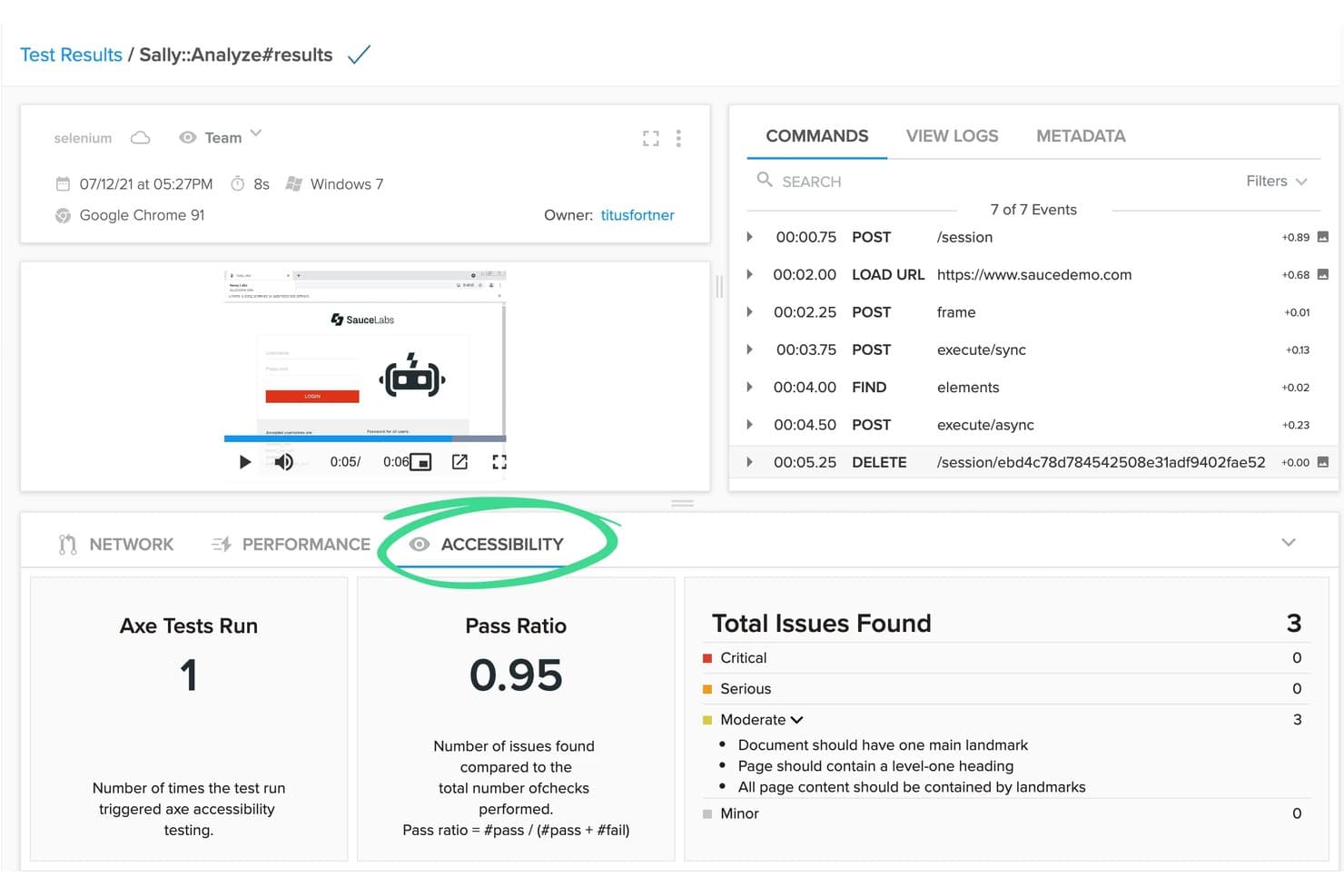
Sauce Labs mostra i risultati dei test di accessibilità insieme alle esecuzioni dei test automatizzati. Sauce Labs è una piattaforma di test continuo basata sul framework AURA, che supporta l'esecuzione di test automatizzati, visivi, API e per dispositivi mobili su dispositivi reali, emulatori e ambienti browser/sistema operativo.
Per chi è più adatto Sauce Labs?
Sauce Labs è una soluzione ideale per i team QA e DevOps delle aziende medio-grandi che devono eseguire simultaneamente test automatizzati su un'ampia gamma di dispositivi reali, browser e sistemi operativi.
Perché ho scelto Sauce Labs
Sauce Labs si è guadagnato un posto nella mia lista ristretta grazie all'enorme capacità di esecuzione parallela su dispositivi reali e ambienti con diversi sistemi operativi. Sto parlando di oltre 10.000 dispositivi reali e più di 8.000 combinazioni browser/sistema operativo eseguite contemporaneamente: ciò significa che una suite di test che richiederebbe ore in sequenza può essere completata in pochi minuti. Mi piace anche la capacità di autoriparazione dei test basata sull'intelligenza artificiale della piattaforma AURA, che si adatta automaticamente alle modifiche dell'interfaccia utente, evitando che le esecuzioni parallele si interrompano non appena cambia un selettore.
Funzionalità principali di Sauce Labs
- Sauce Error Reporting: Strumento di rilevamento e deduplicazione degli arresti anomali in tempo reale, che monitora gli errori durante l'intero ciclo di vita dello sviluppo del software e mette in evidenza diagnosi operative per una risoluzione più rapida.
- Sauce VisualCatch: Test di regressione visiva che rileva tempestivamente le modifiche indesiderate all'interfaccia utente confrontando le schermate tra diverse versioni prima che raggiungano la produzione.
- Sauce Connect Proxy: Soluzione di tunneling sicuro che consente di eseguire test automatizzati su applicazioni ospitate dietro firewall senza esporre l'infrastruttura interna.
- saucectl CLI: Esecutore di test da riga di comando che si integra direttamente con le pipeline CI/CD per attivare e orchestrare le esecuzioni dei test negli ambienti Sauce Labs a ogni commit o evento di compilazione.
Integrazioni di Sauce Labs
Sauce Labs offre integrazioni native con oltre 11 piattaforme CI/CD, tra cui GitHub Actions, GitLab, Jenkins, Azure DevOps, CircleCI, Bitbucket, Codefresh, TeamCity e Harness. Le API REST, i webhook e il supporto per Sauce Connect Proxy consentono integrazioni personalizzate e una connettività sicura alle pipeline.
Pros and Cons
Pros:
- Esegue test paralleli su migliaia di dispositivi
- Creazione e autoriparazione dei test basate sull'intelligenza artificiale
- Supporto comprovato per esigenze aziendali complesse
Cons:
- Funzionalità avanzate di intelligenza artificiale disponibili solo nel piano Enterprise
- Ritardi nelle sessioni al di fuori degli Stati Uniti e dell'Unione Europea
Learn more about Sauce Labs: Miglior strumento di test automatizzato del software per Salesforce
- Prova gratuita di 14 giorni + demo gratuita disponibile
- Prezzi su richiesta

Tricentis Tosca automatizza la creazione dei test e monitora i risultati delle esecuzioni dei test continui. Tricentis Tosca è una piattaforma di test continuo basata su modelli che automatizza i test funzionali, di regressione, delle API, dell'interfaccia utente e dei dispositivi mobili su oltre 160 tecnologie, con creazione di test senza codice e un motore di generazione dei test basato sull'intelligenza artificiale.
Per chi è più adatto Tricentis Tosca?
Tosca è particolarmente adatto ai team QA aziendali che eseguono test su ambienti Salesforce, SAP o Oracle e necessitano di un'automazione senza codice senza sacrificare la profondità della copertura.
Perché ho scelto Tricentis Tosca
Tricentis Tosca si è guadagnato un posto nella mia selezione perché nessun altro strumento di test continuo offre una profondità paragonabile per gli ambienti Salesforce. La funzionalità proprietaria Salesforce Scan crea un modello completo di automazione di un'organizzazione Salesforce in meno di 60 secondi, un risultato davvero difficile da replicare con framework generici. Mi affido inoltre alla sua AI agentica per generare casi di test completi dall'inizio alla fine a partire da descrizioni in linguaggio naturale, consentendo ai non programmatori di contribuire alla copertura dei test senza scrivere una sola riga di script.
Funzionalità principali di Tricentis Tosca
- Griglia di esecuzione elastica: Fornisce agenti cloud e locali su richiesta per eseguire migliaia di test simultanei su tutti i principali browser, iOS e Android contemporaneamente.
- Simulazione delle API tramite servizi virtuali: Sostituisce i microservizi non disponibili sui protocolli HTTP, Kafka, RabbitMQ e MQ, permettendo ai team di eseguire test senza dipendenze attive.
- Intelligence basata sul rischio: Assegna la priorità all'esecuzione dei test in base alle funzioni aziendali critiche e presenta i dati sull'impatto delle modifiche per supportare le decisioni di rilascio.
- Gestione dei dati di test: Crea e fornisce automaticamente dati di test con stato su richiesta utilizzando set di dati sintetici, mascherati o importati direttamente all'interno della piattaforma cloud.
Integrazioni di Tricentis Tosca
Tricentis Tosca offre integrazioni con Jenkins, Azure DevOps, GitHub Actions, GitLab, Jira, qTest, NeoLoad e LiveCompare. Le sue API, la CLI e il client di esecuzione Tosca supportano flussi di lavoro CI/CD personalizzati.
Pros and Cons
Pros:
- Genera test completi dall'inizio alla fine a partire dal linguaggio naturale
- Copertura approfondita dell'automazione per Salesforce e SAP
- Simula API e microservizi non disponibili
Cons:
- Non è adatto ai team di sviluppo che lavorano basandosi sul codice
- L'integrazione con gli strumenti open source è limitata
Learn more about Tricentis Tosca: Ideale per cloud aziendali con dispositivi altamente sicuri
- Demo gratuita disponibile
- Prezzi disponibili su richiesta

Perforce Perfecto monitora nel tempo i tassi di test superati, non superati e bloccati. Perfecto è una piattaforma di test continuo di Perforce che combina test su cloud con dispositivi reali, creazione e autoriparazione dei test basate sull'intelligenza artificiale, esecuzione parallela su più browser e dispositivi e una profonda integrazione con le pipeline CI/CD per applicazioni web, mobili e desktop.
Per chi è più adatto Perfecto?
Perfecto è una soluzione particolarmente adatta ai team aziendali di QA e DevOps di settori regolamentati che necessitano di un cloud sicuro e scalabile con dispositivi reali e una profonda integrazione CI/CD.
Perché ho scelto Perfecto
Perfecto si è guadagnato un posto nella mia selezione soprattutto per la portata e la sicurezza del suo cloud con dispositivi reali, caratteristiche davvero difficili da eguagliare in ambito aziendale. Parliamo di oltre 10.000 dispositivi fisici reali distribuiti in 11 centri dati globali, tutti supportati da uno SLA di disponibilità del 99.999% e certificati secondo gli standard SOC 2, ISO 27001 e PCI. Nei settori regolamentati, dove non è possibile scendere a compromessi sulla gestione dei dati, l'opzione di distribuzione in cloud privato mantiene i dati di test sensibili completamente isolati. L'autoriparazione basata sull'intelligenza artificiale e l'analisi della causa principale, applicate a questa infrastruttura, consentono di dedicare meno tempo alla ricerca dei test instabili e più tempo alla distribuzione del prodotto.
Funzionalità principali di Perfecto
- Analisi della causa principale basata sull'intelligenza artificiale: classifica automaticamente gli errori dei test nei livelli dell'interfaccia utente, delle API, dei dati e dei dispositivi, confrontando le esecuzioni non riuscite con quelle riuscite più recenti per raggruppare i problemi correlati.
- Creazione di test senza script: consente di creare test utilizzando il linguaggio naturale in inglese tramite il framework Quantum, senza richiedere codice, identificatori degli elementi o conoscenze del framework.
- Capacità di picco: aumenta temporaneamente la capacità di esecuzione parallela oltre quella prevista dalla licenza di base durante i periodi di punta dei rilasci, senza richiedere un aggiornamento permanente del piano.
- Test di accessibilità: include controlli integrati per la conformità a WCAG, Sezione 508 e ADA nelle applicazioni web e mobili, inclusa la convalida di VoiceOver su iOS e TalkBack su Android.
Integrazioni di Perforce Perfecto
Perfecto offre oltre 50 integrazioni, tra cui Jenkins, GitHub Actions, GitLab CI/CD, Azure DevOps, CircleCI, TeamCity, Jira, Xray, Helix ALM e Slack. Le API REST supportano avvii di test personalizzati, reportistica e flussi di lavoro CI/CD.
Pros and Cons
Pros:
- Cloud con dispositivi reali e centri dati globali
- Creazione di test basata sull'intelligenza artificiale e autoriparazione automatica
- Test paralleli su browser, dispositivi e piattaforme
Cons:
- Nessuna funzionalità nativa per i test di sicurezza
- Tempi di attesa per i dispositivi cloud condivisi più richiesti
Learn more about Perforce Perfecto:
Altri strumenti per il testing continuo
Ecco alcune altre opzioni valide che non sono rientrate nell’elenco dei migliori strumenti per il testing continuo:
- 11OpenText Functional TestingIdeale per l'automazione dei test SAP, Oracle e mainframe
- 12DatadogMiglior software per test continui senza codice
- 13testRigorIdeale per la creazione di test in inglese semplice in CI/CD
- 14MablIdeale per l'analisi dei test falliti basata nativamente sull'IA
- 15QA WolfIdeale per il monitoraggio dei bug verificati da persone 24 ore su 24
- 16ACCELQIdeale per l'automazione dei test full-stack senza codice
- 17BlazeMeterIdeale per test del carico indipendenti dal framework open source
- 18LeapworkIdeale per l'automazione dei test dello stack applicativo aziendale
- 19SeleniumIdeale per automatizzare i browser web in qualsiasi linguaggio
Come Valuto gli Strumenti di Continuous Testing
Divido la mia valutazione in due livelli: i requisiti fondamentali che uno strumento deve soddisfare per essere idoneo, e i fattori distintivi che separano i migliori dai buoni quando i test bloccano un rilascio a mezzanotte.
Funzionalità di Base (Requisiti Fondamentali per Questa Lista)
Quando seleziono gli strumenti per la mia lista, classifico ciascuno su una scala da 0 (non offre la funzionalità) a 5 (eccelle in quest'area) per ognuna delle funzionalità base elencate di seguito. Poi calcolo il punteggio totale dello strumento in percentuale. Ogni strumento deve raggiungere un punteggio totale minimo del 75% per essere considerato per l'inclusione.
- Integrazione con la pipeline CI/CD: Controllo la presenza di plugin o connettori nativi per strumenti come Jenkins, GitLab CI, GitHub Actions e Azure DevOps così che i test vengano eseguiti automaticamente ad ogni commit.
- Esecuzione automatica dei test: Ogni strumento dovrebbe eseguire test funzionali, di regressione, API e UI sugli eventi di build senza passaggi manuali—coprendo l'intero ambito di una classica pipeline di rilascio.
- Test in parallelo e su ambienti multipli: Valuto se è possibile eseguire suite contemporaneamente su diversi browser, versioni di sistemi operativi e dispositivi per ridurre i cicli di feedback durante gli sprint.
- Reportistica e analisi dei test: Dashboard in tempo reale, log dei fallimenti e analisi delle tendenze sono fondamentali—cerco il livello di dettaglio che aiuta un responsabile QA a individuare un test instabile alle 2 di notte.
- Supporto multi-framework e multi-lingua: Gli strumenti dovrebbero funzionare con framework ampiamente adottati come Selenium, Cypress, Playwright e Appium, supportando i linguaggi già utilizzati dal team di sviluppo.
- Versionamento e gestione dei test: Analizzo quanto strettamente i test siano allineati con i workflow Git—esecuzione sensibile ai branch, versionamento dei casi di test e tracciabilità delle modifiche al codice.
Una volta ottenuta una lista di strumenti che soddisfano questi criteri, considero cosa distingue ogni piattaforma dalle altre.
Fattori Differenzianti (Cosa Distingue i Fornitori)
Ecco come confronto i diversi fornitori:
Caratteristiche Distintive
L’automazione dei test guidata dall’IA è un fattore di differenziazione importante. Gli strumenti che auto-riparano i locator quando cambia l’interfaccia risparmiano ore di manutenzione degli script dopo ogni sprint. Valuto anche l’accesso al cloud di dispositivi reali, fondamentale quando l’app mobile deve funzionare in centinaia di combinazioni di dispositivi e sistemi operativi senza un laboratorio fisico. Un’altra caratteristica che cerco è l’analisi predittiva dell’impatto dei test: sfrutta i dati sulle modifiche al codice per eseguire solo i test rilevanti, riducendo notevolmente i tempi di pipeline in un grande monorepo.
Oltre le Caratteristiche
La scalabilità è una delle prime cose che valuto. Uno strumento che oggi gestisce 50 test in parallelo deve poter scalare automaticamente quando il team raddoppia e il ritmo dei rilasci accelera. Anche la sicurezza e la conformità sono rilevanti: verifico la presenza di SOC 2, SSO/SAML e controlli di accesso basati sui ruoli, specialmente per i team in settori regolamentati come fintech o sanitario. Infine considero la profondità dell’ecosistema: uno strumento che si collega al sistema di tracciamento dei ticket, piattaforma APM e strumenti di chat mantiene i risultati dei test visibili in tutto il flusso di lavoro dei rilasci.
Come scegliere uno strumento per il testing continuo
È facile perdersi in lunghi elenchi di funzionalità e strutture tariffarie complesse. Per aiutarti a rimanere concentrato mentre affronti il tuo particolare processo di selezione del software, ecco un elenco di fattori da tenere a mente:
| Fattore | Cosa considerare |
|---|---|
| FattoreScalabilità | Cosa considerareLo strumento può crescere insieme al tuo team? Considera il numero di utenti e casi di test che è in grado di gestire. Cerca opzioni che offrano una scalabilità semplice senza aumenti significativi dei costi. |
| FattoreIntegrazioni | Cosa considerareFunziona con gli strumenti che già utilizzi? Verifica la compatibilità con le pipeline CI/CD, i sistemi di controllo versione e gli altri software essenziali per evitare interruzioni del flusso di lavoro. |
| FattorePersonalizzazione | Cosa considerarePuoi adattarlo ai tuoi processi? Cerca opzioni che consentano di modificare impostazioni, flussi di lavoro e report in base alle esigenze del tuo team. |
| FattoreSemplicità d'uso | Cosa considerareL'interfaccia è intuitiva? Assicurati che i membri del team possano utilizzarlo senza una formazione approfondita. Uno strumento complicato potrebbe ostacolarne l'adozione e la produttività. |
| FattoreImplementazione e onboarding | Cosa considerareQuanto velocemente puoi iniziare? Valuta le risorse necessarie per la configurazione, inclusi tempo, formazione e assistenza. Un onboarding rapido significa un ritorno sull'investimento più veloce. |
| FattoreCosto | Cosa considerareRientra nel tuo budget? Confronta i modelli di abbonamento e i costi nascosti. Bilancia il costo con le funzionalità e la scalabilità di cui hai bisogno. |
| FattoreMisure di sicurezza | Cosa considerareIn che modo protegge i tuoi dati? Valuta gli standard di crittografia, i controlli degli accessi e la conformità alle normative sulla protezione dei dati. |
| FattoreDisponibilità dell'assistenza | Cosa considerareL'aiuto è facilmente disponibile? Cerca fornitori che offrano assistenza 24 ore su 24, 7 giorni su 7, attraverso più canali. Un'assistenza rapida ed efficace può farti risparmiare tempo e frustrazione. |
Cosa sono gli strumenti per il testing continuo?
Gli strumenti di test continuo sono soluzioni software che automatizzano l'esecuzione dei test nel ciclo di vita dello sviluppo del software. Gli sviluppatori, gli ingegneri QA e i professionisti DevOps utilizzano generalmente questi strumenti per individuare tempestivamente i bug e garantire la qualità dei loro progetti.
L'automazione, l'integrazione con le pipeline CI/CD e gli strumenti di test del cloud in tempo reale aiutano i team a mantenere l'efficienza e a migliorare la qualità del software. Nel complesso, questi strumenti fanno risparmiare tempo e riducono gli errori convalidando continuamente le modifiche al codice.
Caratteristiche
Quando selezioni gli strumenti di test continuo, presta attenzione alle seguenti caratteristiche principali:
- Automazione: automatizza le attività ripetitive, riducendo il lavoro manuale e velocizzando il processo di test.
- Integrazione CI/CD: si connette perfettamente alle pipeline esistenti per garantire controlli continui della qualità a ogni modifica del codice.
- Report in tempo reale: fornisce un feedback immediato sui risultati dei test, aiutando i team a identificare e risolvere rapidamente i problemi.
- Gestione degli ambienti di test: semplifica la configurazione e la gestione degli ambienti di test, garantendo coerenza tra le diverse esecuzioni dei test.
- Supporto multipiattaforma: consente di eseguire test su diverse piattaforme e dispositivi, garantendo ampia compatibilità e copertura.
- Flussi di lavoro personalizzabili: consente ai team di adattare i processi e i report alle proprie esigenze e ai propri flussi di lavoro specifici.
- Informazioni basate sull'intelligenza artificiale: utilizza l'intelligenza artificiale per analizzare i dati dei test e fornire indicazioni utili per il miglioramento.
- Funzionalità di sicurezza: garantisce la protezione dei dati tramite la crittografia e la conformità alle normative sulla protezione dei dati.
- Interfaccia intuitiva: offre un design intuitivo che consente agli utenti di navigare e utilizzare lo strumento in modo efficiente.
- Scalabilità: supporta la crescita del team e dei progetti, gestendo un numero crescente di utenti e casi di test.
Vantaggi
L'implementazione di strumenti di test continuo offre diversi vantaggi al team e all'azienda. Ecco alcuni dei vantaggi che puoi aspettarti:
- Rilevamento precoce dei bug: identifica i problemi nelle prime fasi del processo di sviluppo, riducendo i costi e lo sforzo necessari per risolverli in seguito.
- Cicli di rilascio più rapidi: automatizza i processi di test, consentendo al team di rilasciare aggiornamenti e nuove funzionalità più rapidamente.
- Qualità del software migliorata: garantisce una copertura completa dei test, portando a prodotti software più affidabili e stabili.
- Maggiore collaborazione del team: si integra con i flussi di lavoro esistenti, facilitando la collaborazione efficiente tra sviluppatori, tester e team operativi.
- Efficienza delle risorse: riduce il carico di lavoro manuale del team, consentendogli di concentrarsi su attività più strategiche e sull'innovazione.
- Supporto alla scalabilità: si adatta alle esigenze crescenti dei progetti, gestendo carichi di lavoro maggiori senza compromettere le prestazioni.
- Processo decisionale informato: fornisce report dettagliati e informazioni utili, consentendo al team di prendere decisioni basate sui dati e stabilire le priorità in modo efficace.
Costi e prezzi
La scelta degli strumenti di test continuo richiede la comprensione dei vari modelli e piani tariffari disponibili. I costi variano in base alle funzionalità, alle dimensioni del team, agli elementi aggiuntivi e ad altri fattori. La tabella seguente riassume i piani più comuni, i relativi prezzi medi e le funzionalità tipicamente incluse nelle soluzioni di strumenti di test continuo:
Tabella comparativa dei piani per gli strumenti di test continuo
| Tipo di piano | Prezzo medio | Funzionalità comuni |
|---|---|---|
| Tipo di pianoPiano gratuito | Prezzo medio$0 | Funzionalità comuniAutomazione di base dei test, opzioni di integrazione limitate e supporto della comunità. |
| Tipo di pianoPiano personale | Prezzo medio$10-$30/utente/mese | Funzionalità comuniFunzionalità di automazione avanzate, strumenti di reportistica di base e supporto via e-mail. |
| Tipo di pianoPiano aziendale | Prezzo medio$40-$80/utente/mese | Funzionalità comuniReportistica avanzata, integrazione CI/CD, test su dispositivi mobili e supporto prioritario. |
| Tipo di pianoPiano aziendale | Prezzo medio$100+/utente/mese | Funzionalità comuniSoluzioni personalizzabili, gestione dedicata dell'account, funzionalità di integrazione complete e supporto 24 ore su 24, 7 giorni su 7. |
FAQ sugli strumenti di test continuo
Ecco alcune risposte alle domande comuni sugli strumenti di test continuo:
Chi utilizza gli strumenti di test continuo?
I tester del software, i team di garanzia della qualità e i team DevOps utilizzano le soluzioni di test continuo per gestire i processi di test del software e accelerare il processo di distribuzione.
Quali tipi di test supportano questi strumenti?
La maggior parte degli strumenti di test DevOps supporta immediatamente i test unitari, di integrazione e di regressione. Alcuni includono anche funzionalità per test end-to-end, funzionali o delle API. La gamma di tipi di test supportati dipende spesso dall’architettura dello strumento e da come si integra nel flusso di lavoro di sviluppo.
Funzionano con le piattaforme CI/CD?
Sì, la maggior parte degli strumenti di test continuo è progettata per integrarsi facilmente con piattaforme CI/CD come Jenkins, GitHub Actions o GitLab. Alcuni strumenti forniscono plugin integrati per una configurazione e un’automazione rapide. Altri possono richiedere una configurazione manuale o un’integrazione basata su API, a seconda della pipeline.
Questi strumenti sono basati sul cloud o vengono eseguiti in locale?
Dipende dallo strumento. Alcuni sono completamente nativi del cloud e offrono accesso tramite browser con una configurazione minima, mentre altri sono progettati per distribuzioni locali o ibride. L’opzione giusta dipende spesso dalle esigenze della vostra infrastruttura e dal livello di controllo o personalizzazione richiesto dal team.
Questi strumenti possono essere eseguiti in più ambienti?
Sì, la maggior parte degli strumenti può eseguire test in più ambienti, come sviluppo, staging e QA. Ciò consente ai team di convalidare le modifiche prima di distribuirle in produzione. Probabilmente sarà necessario configurare impostazioni specifiche per l’ambiente, come variabili o dipendenze.
Che tipo di report offrono questi strumenti?
Gli strumenti generano solitamente log, risultati dettagliati dei test e dashboard delle prestazioni. Il livello di analisi e le opzioni di esportazione variano: alcuni forniscono dati grezzi, mentre altri offrono riepiloghi visivi e report sulle tendenze.