

10 Migliori Software di Gestione dei Container per il 2026

10 Migliori Software di Gestione dei Container – Shortlist


Navigare nel mondo dei container Docker in ambienti agili richiede soluzioni robuste per la gestione dei container. Con la diffusione dei microservizi e dei diversi sistemi operativi, è fondamentale gestire in modo efficiente le immagini dei container e le relative dipendenze. I deployment basati sui container, sia su Windows che nel cloud pubblico, necessitano di strumenti che semplificano il provisioning, rafforzano la sicurezza dei container e offrono interfacce utente intuitive.
I servizi elastici per container e gli strumenti di monitoraggio garantiscono inoltre il funzionamento sia dei deployment on-premise sia di quelli nel cloud pubblico. Avendo compreso questo scenario complesso, ho esaminato a fondo questi framework per aiutarti a individuare le soluzioni che rispondono ai tuoi bisogni specifici.
Perché fidarsi dei nostri consigli sui software
Il nostro team testa e recensisce software dal 2012. In quanto leader tecnologici noi stessi, sappiamo quanto sia difficile — e importante — scegliere il software giusto.
Per questa guida, abbiamo valutato gli strumenti attraverso test praticie ricerche indipendenti, assegnando un punteggio agli strumenti in base ai nostri criteri di selezione.
Le nostre recensioni riflettono il nostro giudizio editoriale umano, non un discorso di vendita.
Revisori esperti:
Riepilogo dei Migliori Software di Gestione dei Container
Questa tabella comparativa riassume i dettagli sui prezzi delle mie migliori selezioni di software per la gestione dei container, per aiutarti a trovare quello più adatto alle tue esigenze e al tuo budget.
| Tool | Best For | Trial Info | Price | ||
|---|---|---|---|---|---|
| 1 | Ideale per la visibilità su Kubernetes e Docker | Prova gratuita di 30 giorni + demo gratuita disponibile | A partire da $10/mese (fatturazione annuale) | Website | |
| 2 | Ideale per il monitoraggio dei container | Prova gratuita di 30 giorni + demo gratuita + piano gratuito disponibile | Da $199/anno | Website | |
| 3 | Ideale per l'orchestrazione open-source dei container | Utilizzo gratuito | Gratuito (open-source) | Website | |
| 4 | Ideale per soluzioni di piattaforme container in cloud ibrido | Prova gratuita disponibile | A partire da $50/utente/mese (fatturazione annuale) | Website | |
| 5 | Ideale per applicazioni cloud-native su Alibaba Cloud | Not available | Prezzo su richiesta | Website | |
| 6 | Ideale per operazioni automatizzate su GCP | Piano gratuito disponibile | A partire da $0.10/utente/mese (in base alle risorse di calcolo utilizzate) | Website | |
| 7 | Ideale per deployment Kubernetes nativi su AWS | Demo gratuita disponibile | A partire da $0.20/utente/mese (basato sui nodi utilizzati) | Website | |
| 8 | Idéal pour l'unification des données | Essai gratuit de 30 jours disponible | À partir de 25 $ par utilisateur et par mois | Website | |
| 9 | Ideale per una virtualizzazione veloce e leggera | Not available | Gratis (open-source) | Website | |
| 10 | Ideale per approfondimenti sulla sicurezza di container e Kubernetes | Prezzo su richiesta | Website |
Recensioni dei Migliori Software di Gestione dei Container
Di seguito trovi i miei riepiloghi dettagliati dei migliori software di gestione dei container che hanno superato la mia selezione. Le mie recensioni offrono uno sguardo approfondito sulle caratteristiche chiave, pro & contro, integrazioni e casi d’uso ideali di ciascuno strumento per aiutarti a trovare il più adatto a te.

Site24x7
Ideale per la visibilità su Kubernetes e Docker
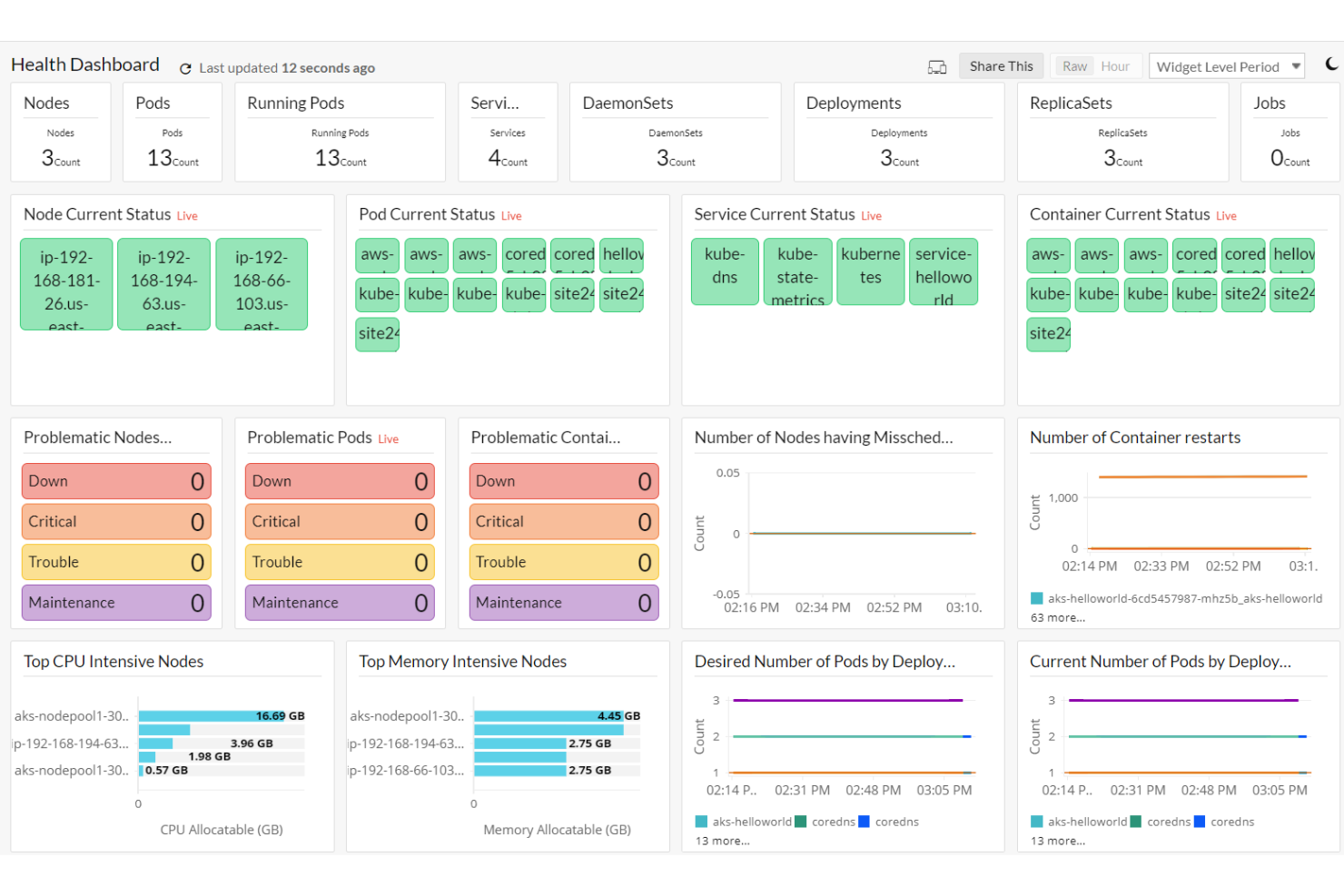
Site24x7 è una soluzione di monitoraggio basata su cloud e alimentata da intelligenza artificiale, progettata per offrire una visibilità completa sulla tua infrastruttura IT. Consente di monitorare siti web, server, reti, applicazioni e piattaforme cloud, garantendo prestazioni ottimali e disponibilità continua.
Perché ho scelto Site24x7: Un motivo per considerare Site24x7 nella gestione dei container è la sua solida capacità di monitoraggio dei container. Offre una visibilità approfondita negli ambienti containerizzati, consentendo di tenere traccia di indicatori chiave di prestazione come CPU, memoria, disco e utilizzo della rete. Questo garantisce un utilizzo efficiente delle risorse e aiuta a prevenire colli di bottiglia nelle applicazioni containerizzate. Un'altra caratteristica degna di nota è il supporto di Site24x7 per il monitoraggio degli ambienti Docker. Fornisce un accesso semplice per raccogliere i log dei container direttamente tramite l'agente AppLog in esecuzione sul tuo server Linux, facilitando la risoluzione dei problemi delle applicazioni che girano all'interno dei container Docker.
Caratteristiche principali e integrazioni:
Tra le funzionalità aggiuntive vi è anche il monitoraggio dei cluster Kubernetes, che consente di tenere traccia dello stato di salute e delle prestazioni dell'ambiente Kubernetes. Site24x7 offre inoltre integrazione con il monitoraggio di Azure Container Apps, permettendo la supervisione delle app container con metriche accurate e l'invio di avvisi immediati in caso di problemi. Alcune integrazioni includono ServiceNow, PagerDuty, Opsgenie, Jira, ManageEngine AlarmsOne, ManageEngine ServiceDesk Plus, Slack, Microsoft Teams, Zoho Cliq, Amazon EventBridge, Zapier e Webhooks.
Pros and Cons
Pros:
- Opzioni di personalizzazione flessibili per dashboard e report
- Avvisi in tempo reale affidabili per una rapida risoluzione dei problemi
- Capacità di monitoraggio complete su vari componenti dell'infrastruttura IT
Cons:
- Opzioni di integrazione limitate con alcuni strumenti di terze parti
- La complessità della configurazione può essere impegnativa per i nuovi utenti
New Product Updates from Site24x7
Site24x7 Adds Compliance Reports and Domain Squatting Detection
Site24x7’s Digital Risk Analyzer now offers domain compliance assessment and squatting detection to help you validate security posture, compare domains, and spot impersonation risks faster. For more information, visit Site24x7’s official site.
 .
.
Ideale per il monitoraggio dei container

ManageEngine Applications Manager è una soluzione per il monitoraggio delle prestazioni delle applicazioni che aiuta i team IT a supervisionare la salute e le prestazioni delle proprie applicazioni e infrastrutture. Offre funzionalità di monitoraggio e gestione in tempo reale, garantendo che le applicazioni aziendali critiche funzionino senza problemi. Con il supporto di oltre 150 tecnologie, fornisce una panoramica completa del tuo ambiente IT.
Perché ho scelto ManageEngine Applications Manager: Offre la possibilità di monitorare efficacemente gli ambienti Docker. Tiene traccia di diversi parametri di prestazione come l'utilizzo di CPU e memoria, aiutandoti a garantire che i tuoi container funzionino in modo efficiente. Questo livello di monitoraggio consente di individuare e risolvere tempestivamente i colli di bottiglia delle risorse, mantenendo prestazioni ottimali. Supporta inoltre il monitoraggio di Kubernetes fornendo informazioni sulle prestazioni dei cluster Kubernetes, inclusi lo stato dei nodi e dei pod. Mantenendo sotto controllo questi componenti, il tuo team può gestire proattivamente potenziali problemi, assicurando l'affidabilità delle applicazioni containerizzate.
Caratteristiche principali & integrazioni:
Altre funzionalità includono il tracciamento delle prestazioni delle applicazioni in tempo reale, che ti consente di identificare e risolvere i problemi prima che impattino sugli utenti. Lo strumento offre anche il monitoraggio dell’esperienza utente finale, fornendoti informazioni su come le tue applicazioni si comportano dal punto di vista dell’utente. Alcune integrazioni includono ADManager Plus, ADAudit Plus, ADSelfService Plus, M365 Manager Plus, OpManager, Site24x7, Log360, EventLog Analyzer, DataSecurity Plus, Endpoint Central, Patch Manager Plus e Mobile Device Manager Plus.
Pros and Cons
Pros:
- Funzionalità di monitoraggio complete
- Sistema di allerta efficace
- Supporta una vasta gamma di tecnologie
Cons:
- Configurazione iniziale complessa
- Può essere intensivo in termini di risorse su larga scala
New Product Updates from ManageEngine Applications Manager
ManageEngine Applications Manager Adds AppLogs Alerting and Query Tools
ManageEngine Applications Manager adds AppLogs Alerting, advanced query operators, and new AppLogs Explorer visualizations. These updates help teams monitor log activity, refine searches, and analyze trends more efficiently. For more information, visit ManageEngine Applications Manager’s official site.
 .
.
Ideale per l'orchestrazione open-source dei container
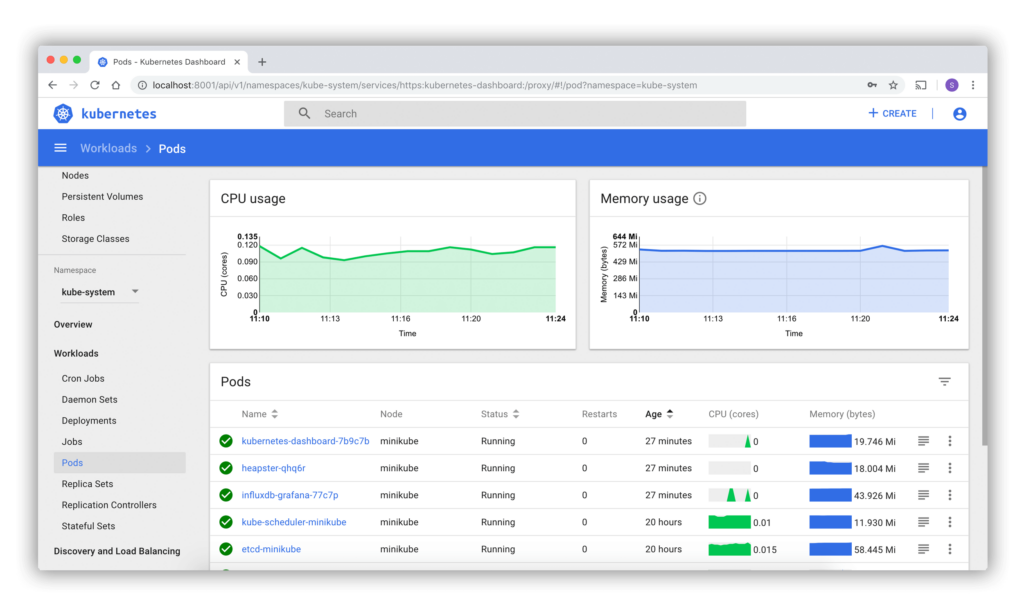
Kubernetes è una piattaforma open-source progettata per automatizzare il deployment, la scalabilità e la gestione dei container applicativi. Grazie all’ampio supporto della community e alla sua adattabilità, è diventata la scelta di fatto per le organizzazioni che puntano a un'orchestrazione efficace dei container.
Perché ho scelto Kubernetes: Scegliere Kubernetes è stata una decisione naturale, data la sua importanza e la sua adozione su larga scala nell’ambito dell'orchestrazione dei container. Nel confrontare e valutare i meriti di diverse piattaforme, mi è stato chiaro che la natura open-source di Kubernetes e il vasto supporto della community lo rendono unico. Queste caratteristiche sottolineano la sua posizione come scelta principale per l'orchestrazione open-source dei container.
Caratteristiche distintive & integrazioni:
Kubernetes offre funzionalità come il bin packing automatico, meccanismi di auto-riparazione e scalabilità orizzontale. Le sue capacità di integrazione sono ampie, con compatibilità verso strumenti come Helm per la gestione dei pacchetti, Istio per il service mesh e Grafana per il monitoraggio.
Pros and Cons
Pros:
- Ricco set di funzionalità per l'orchestrazione dei container
- Vasto supporto della community che porta a rapide innovazioni
- Ampia gamma di integrazioni con altri strumenti
Cons:
- Curva di apprendimento ripida per i principianti
- Richiede una conoscenza approfondita delle configurazioni avanzate
- Il supporto della community, sebbene vasto, può talvolta essere frammentato

Ideale per soluzioni di piattaforme container in cloud ibrido
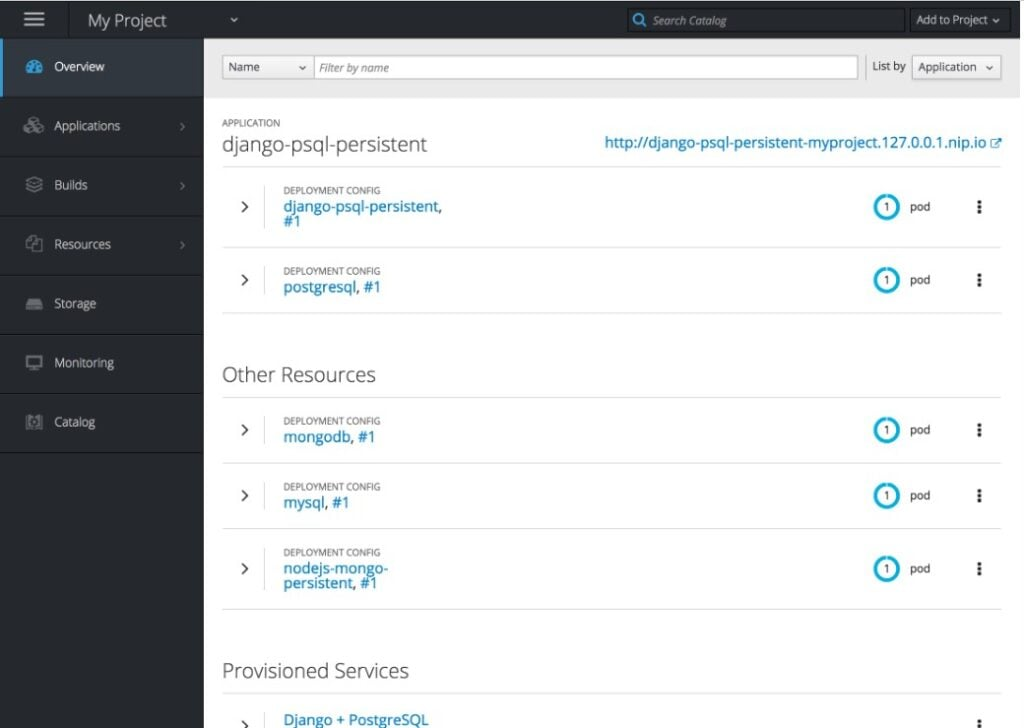
Red Hat OpenShift è una piattaforma cloud ibrida basata su Kubernetes progettata per consentire il deployment e la gestione di applicazioni containerizzate. Rivolta sia ad ambienti cloud pubblici che privati, OpenShift è particolarmente adatta per le aziende che cercano soluzioni cloud ibride flessibili.
Perché ho scelto Red Hat OpenShift: OpenShift ha attirato la mia attenzione grazie alla sua versatilità nel supportare sia le implementazioni cloud pubbliche che private. La mia scelta, basata su confronti ed evaluazioni oggettive, mi ha portato a credere che la capacità di OpenShift di gestire soluzioni cloud ibride la distingue dalle altre piattaforme. Le sue competenze in questo ambito giustificano la sua posizione come migliore soluzione per le esigenze di piattaforme container per il cloud ibrido.
Caratteristiche distintive e integrazioni:
OpenShift offre operazioni automatizzate, servizi per sviluppatori per un'esperienza coerente e gestione multi-cluster. Le integrazioni sono numerose, con supporto per Jenkins per CI/CD, Prometheus per il monitoraggio e forti collegamenti con l'ampia suite software di Red Hat.
Pros and Cons
Pros:
- Offre una piattaforma solida per soluzioni cloud ibride
- Integrazione con la suite di strumenti Red Hat
- Ampia gamma di servizi per sviluppatori per un'esperienza uniforme
Cons:
- Il prezzo può essere elevato per le piccole imprese
- Richiede familiarità con l'ecosistema Red Hat
- La configurazione può essere complessa per i nuovi utenti

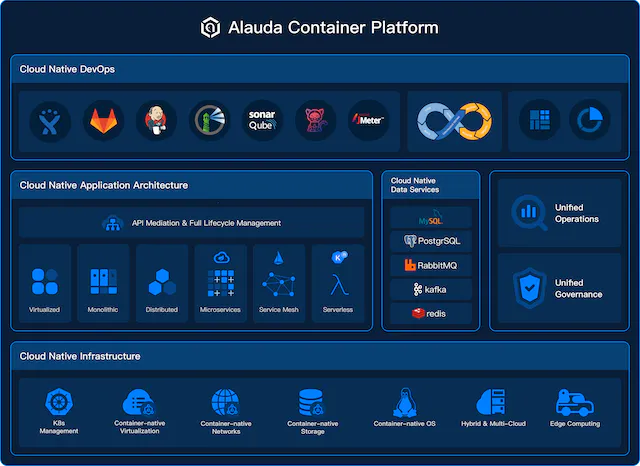
Alauda Container Platform è realizzata su misura per chi è profondamente integrato nell'ecosistema Alibaba Cloud. Semplifica il deployment e la gestione di applicazioni cloud-native su questa piattaforma specifica.
Perché ho scelto Alauda Container Platform: Valutando strumenti specifici per i cloud, ho notato una lacuna per quanto riguarda Alibaba Cloud. La mia valutazione mi ha portato sull'Alauda Container Platform, che offre funzionalità specializzate pensate per l'ambiente di Alibaba. Per chi lavora in profondità sull'infrastruttura Alibaba Cloud, la ritengo la soluzione migliore.
Caratteristiche distintive e integrazioni:
La piattaforma offre soluzioni container end-to-end, dallo sviluppo alla produzione, tutte ottimizzate per Alibaba Cloud. I suoi strumenti nativi, come l'Alauda DevOps platform, consentono una gestione semplificata del ciclo di vita delle applicazioni. Inoltre, si integra perfettamente con la suite di servizi Alibaba Cloud, rendendo fluido il processo di deployment e scaling.
Pros and Cons
Pros:
- Ottimizzata per l'ambiente Alibaba Cloud
- Soluzioni container complete dallo sviluppo alla produzione
- Strumenti nativi per una gestione avanzata delle applicazioni
Cons:
- Meno versatile per chi non utilizza Alibaba Cloud
- Curva di apprendimento più ripida per chi è alle prime armi
- Meno contributi dalla community rispetto alle piattaforme più diffuse

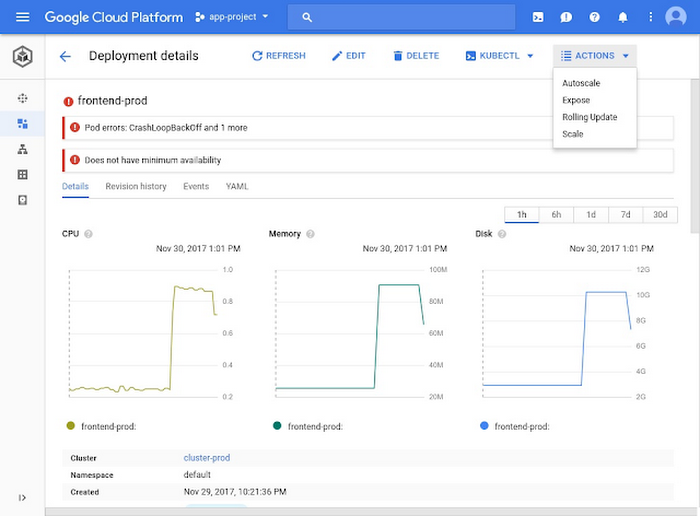
Google Kubernetes Engine offre un ambiente per il deployment, la gestione e la scalabilità di applicazioni containerizzate utilizzando l'infrastruttura di Google. Essendo profondamente integrato con Google Cloud Platform (GCP), GKE si distingue come una soluzione ideale per le aziende che danno priorità all'automazione all'interno dell'ecosistema GCP.
Perché ho scelto GKE: La decisione di scegliere GKE è stata basata sulla sua stretta integrazione con GCP e sulle sue funzionalità di automazione. Dalla mia valutazione e dalle opinioni che mi sono formato, ho determinato che il punto di forza di GKE risiede nelle sue funzionalità di automazione, in particolare per chi è già investito nell'ecosistema Google Cloud.
Caratteristiche e integrazioni principali:
GKE offre una gestione automatizzata dei cluster, consentendo auto-upgrade, auto-scaling e auto-riparazione. Si integra con i servizi GCP come Stackdriver per il logging e il monitoraggio, Google Cloud Storage e BigQuery per l'analisi dei dati.
Pros and Cons
Pros:
- Integrazione profonda con i servizi Google Cloud
- Robuste funzionalità di gestione automatizzata dei cluster
- Sicurezza affidabile grazie all'infrastruttura supportata da Google
Cons:
- Potrebbe risultare meno intuitivo per gli utenti non GCP
- Il prezzo può diventare complesso in base al consumo delle risorse
- Flessibilità limitata al di fuori dell'ecosistema GCP

Ideale per deployment Kubernetes nativi su AWS
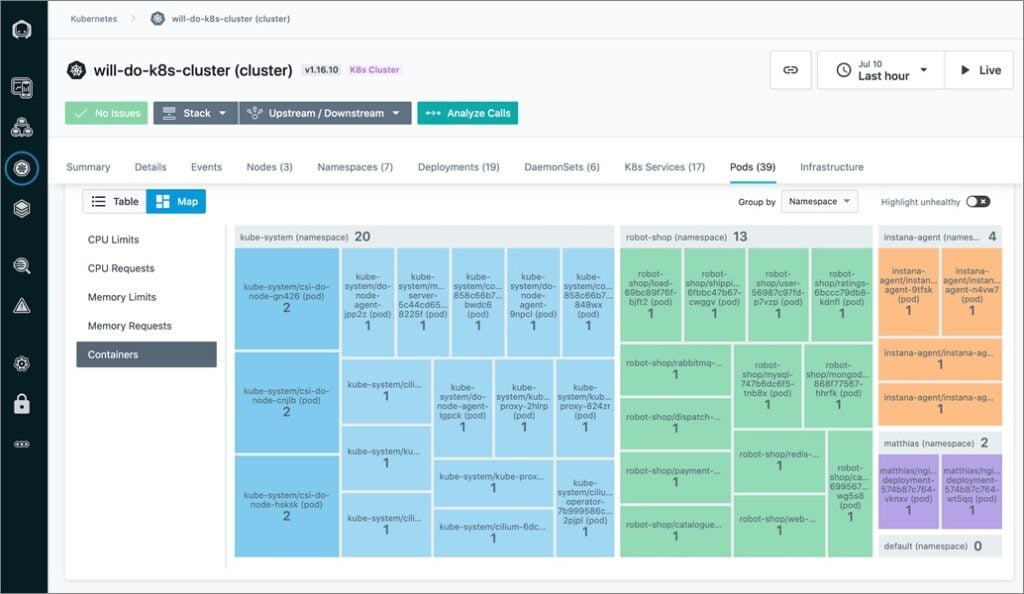
Amazon EKS offre un servizio Kubernetes gestito che si integra profondamente con l'ecosistema AWS, semplificando il deployment, la gestione e la scalabilità delle applicazioni containerizzate per gli utenti AWS. La sua base nativa AWS garantisce un'esperienza ideale per le aziende che dipendono fortemente dall'infrastruttura AWS.
Perché ho scelto Amazon EKS: Quando si trattava di scegliere un servizio Kubernetes su misura per AWS, Amazon EKS era la scelta ovvia. In base ai miei confronti e ai criteri stabiliti, ho ritenuto che la profonda integrazione di Amazon EKS con gli strumenti e i servizi AWS sia impareggiabile, rendendolo una soluzione ideale per le implementazioni incentrate su AWS.
Funzionalità e integrazioni principali:
Amazon EKS offre funzionalità come aggiornamenti automatici delle versioni di Kubernetes e patching. È ben integrato con i servizi AWS, inclusi Amazon CloudWatch per il monitoraggio, AWS Identity and Access Management per la sicurezza e AWS App Mesh per il networking avanzato.
Pros and Cons
Pros:
- Integrazione profonda con l'ecosistema AWS
- Aggiornamenti e patching automatici delle versioni
- Sicurezza avanzata con funzionalità native AWS
Cons:
- Curve di apprendimento più ripida per chi non è già utente AWS
- I costi possono aumentare con un uso intensivo delle risorse
- La configurazione iniziale richiede conoscenza specifica di AWS

Salesforce CRM est une plateforme CRM d'entreprise et d'opérations marketing qui couvre l'orchestration des campagnes, l'automatisation pilotée par l'IA, la notation des prospects, la segmentation des audiences et l'unification native des données entre les e-mails, les SMS, les médias payants et bien plus encore.
À qui Salesforce CRM convient-il le mieux ?
Salesforce CRM est conçu pour les équipes marketing d'entreprise qui doivent unifier les données clients provenant de plusieurs sources, canaux et unités opérationnelles en un seul endroit.
Pourquoi ai-je choisi Salesforce CRM ?
Salesforce CRM figure sur ma liste restreinte, car l'architecture sans copie de Data 360 ne ressemble à rien de ce que j'ai vu pour unifier des données clients à grande échelle. Elle fédère directement les données en temps réel provenant de Snowflake, Databricks, BigQuery et Redshift sans les dupliquer, puis utilise la résolution d'identité pour créer des profils clients unifiés sur chaque point de contact. Je m'appuie également sur cet outil pour l'activation des audiences en temps réel, en envoyant ces segments unifiés directement vers Marketing Cloud, Meta et Google Ads dès qu'un profil est mis à jour.
Principales fonctionnalités de Salesforce CRM
- Journey Builder : un canevas visuel par glisser-déposer pour créer des parcours clients multicanaux en plusieurs étapes, avec une logique conditionnelle et l'expérimentation de parcours.
- Notation des prospects Einstein : une notation alimentée par l'IA qui classe les prospects et les comptes selon leur probabilité de conversion, à partir de signaux comportementaux et prédictifs.
- Automation Studio : un moteur d'automatisation par lots et déclenchée permettant de planifier, d'envoyer et de gérer des flux de travail marketing en plusieurs étapes sur différents canaux.
- Prise en charge de plusieurs unités opérationnelles : un cloisonnement organisationnel qui permet aux équipes d'entreprise de gérer des marques, régions ou services distincts au sein d'une seule instance Salesforce.
Intégrations de Salesforce CRM
Salesforce CRM propose des intégrations natives avec Google Ads, Meta, Eventbrite, Olark, Bitly et Slack, ainsi que des milliers d'intégrations disponibles sur la marketplace via AgentExchange. L'accès à MuleSoft et à l'API REST prend en charge les connexions personnalisées, notamment les liens sans copie vers Snowflake, Databricks, BigQuery et Amazon Redshift.
Pros and Cons
Pros:
- Activation des audiences en temps réel sur tous les canaux
- Intégration unique avec les entrepôts de données sans copie
- Contrôles de gouvernance et de sécurité de niveau entreprise
Cons:
- Les rapports avancés sont réservés aux modules complémentaires coûteux
- La multiplicité des interfaces nécessite des compétences techniques en marketing

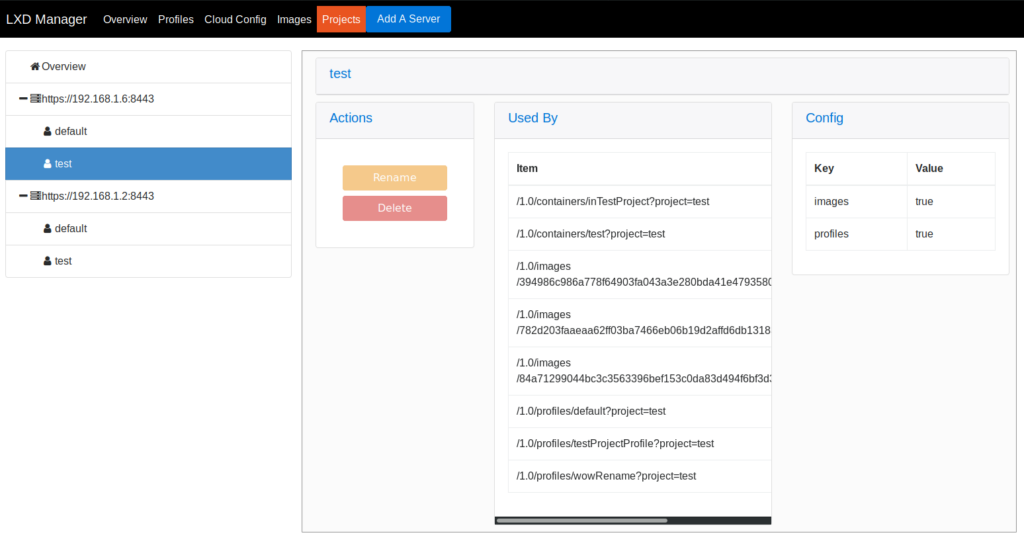
I Linux Containers, spesso indicati come LXC/LXD, rappresentano una soluzione solida per chi cerca un metodo di virtualizzazione leggero. A differenza delle tradizionali macchine virtuali, LXC offre un'alternativa più efficiente e meno dispendiosa di risorse, garantendo comunque l'isolamento.
Perché ho scelto Linux Containers: Scegliere una soluzione di virtualizzazione spesso si riduce a un equilibrio tra prestazioni e consumo di risorse. Nella mia analisi di diversi strumenti, la capacità di LXC di offrire una virtualizzazione rapida ed efficiente senza consumare molte risorse lo ha reso una scelta ovvia. Questo approccio leggero e unico credo sia perfetto per chi cerca prestazioni senza sovraccarichi.
Caratteristiche principali e integrazioni:
LXC è noto per la sua scalabilità e densità, permettendo l'esecuzione di numerosi container su una singola macchina senza sovraccarichi significativi. È anche indipendente dal sistema operativo, ossia i container possono eseguire diverse distribuzioni Linux indipendentemente dall'OS dell'host. Per quanto riguarda le integrazioni, LXC funziona bene con la maggior parte delle distribuzioni Linux e può essere gestito sia con i suoi strumenti nativi che tramite soluzioni di terze parti come Juju.
Pros and Cons
Pros:
- Virtualizzazione efficiente e leggera
- Compatibilità container indipendente dal sistema operativo
- Elevata scalabilità e densità
Cons:
- Potrebbe non essere adatto per ambienti non-Linux
- Alcune configurazioni avanzate potrebbero essere complesse
- L'assenza di un'interfaccia grafica nativa può scoraggiare alcuni utenti

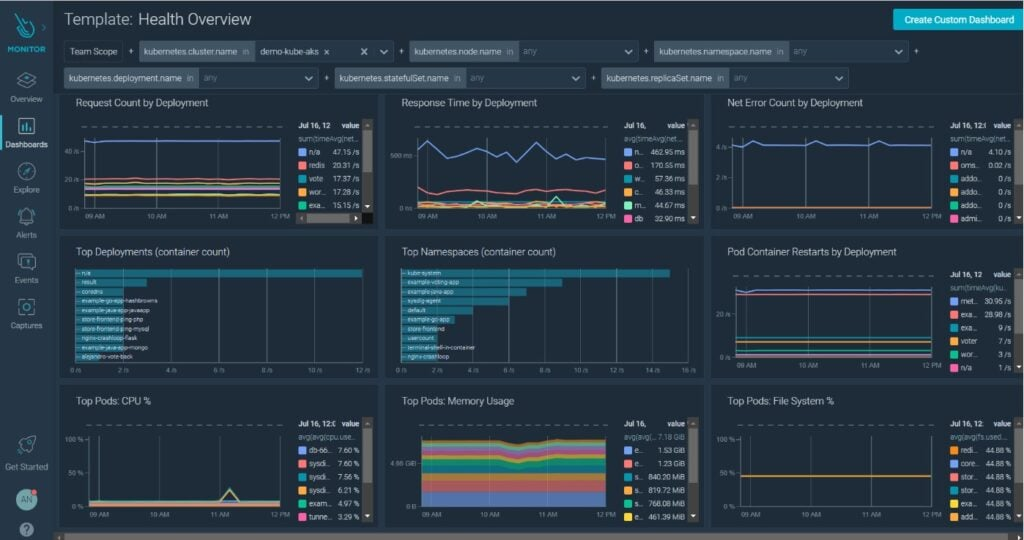
Sysdig è uno strumento completo progettato specificamente per offrire approfondimenti dettagliati sulla sicurezza degli ambienti container e Kubernetes. Data la crescente complessità delle infrastrutture containerizzate, un approccio dedicato alla sicurezza diventa fondamentale, ed è proprio questo che Sysdig si propone di offrire.
Perché ho scelto Sysdig: Quando si trattava di scegliere uno strumento focalizzato sulla sicurezza di container e Kubernetes, Sysdig si è distinto nei miei confronti. Ho valutato le sue capacità in base a profondità, precisione e chiarezza degli approfondimenti. A mio avviso, l’approccio dettagliato di Sysdig alle analisi sulla sicurezza lo rende particolarmente adatto a chi si muove nei complessi scenari delle operazioni con container e Kubernetes.
Funzionalità principali e integrazioni:
Sysdig offre funzionalità come la sicurezza in tempo reale, controlli di conformità e gestione delle vulnerabilità su misura per container e Kubernetes. Include anche integrazioni profonde con Kubernetes, rendendo intuitivo il processo di rilevamento delle minacce e delle anomalie. Inoltre, la sua integrazione con Falco, un progetto open source di sicurezza runtime nativa per Kubernetes, rafforza ulteriormente le sue capacità.
Pros and Cons
Pros:
- Approfondimenti di sicurezza specifici per ambienti Kubernetes
- Gestione completa delle vulnerabilità
- Integrazione con Falco per controlli di sicurezza avanzati
Cons:
- Potrebbe avere una curva di apprendimento per i principianti
- Il deployment può richiedere configurazioni avanzate
- L’interfaccia può risultare complessa per utenti non tecnici
Altri Software di Gestione dei Container
Di seguito un elenco di altri software di gestione dei container che ho selezionato ma che non sono entrati nella top 10. Meritano comunque di essere presi in considerazione.
- Portainer
Ideale per la gestione dei container semplice ed efficiente
- containerd
Ideale per un runtime core per container senza fronzoli
- Mirantis Kubernetes Engine
Ideale per l'orchestrazione di container su larga scala
- CRI-O
Ideale per le operazioni basate sulla Open Container Initiative (OCI)


Come Valuto i Software di Gestione dei Container
Quando valuto se una piattaforma è in grado di gestire una reale orchestrazione dei cluster, deployment in ambienti multipli e sicurezza in fase di esecuzione, suddivido la mia recensione in requisiti di base e fattori distintivi.
Funzionalità di Base (Requisiti Essenziali per Questa Lista)
Quando seleziono gli strumenti per la mia lista, assegno a ciascuno un punteggio da 0 (non offre la funzionalità) a 5 (eccelle in quest'area) per ogni funzionalità di base elencata di seguito. Successivamente, calcolo il punteggio totale dello strumento in percentuale. Ogni strumento deve raggiungere un punteggio totale minimo del 75% per essere preso in considerazione.
- Orchestrazione dei Container: Valuto quanto bene una piattaforma gestisce scheduling, self-healing e gestione del ciclo di vita su cluster distribuiti e diversi gruppi di nodi.
- Gestione delle Immagini e dei Registry: Un registry solido con versioning, controlli di accesso e build automatizzate delle immagini è fondamentale quando i team rilasciano decine di nuove versioni ogni settimana.
- Scalabilità e Bilanciamento del Carico: Controllo se l’auto-scaling risponde a veri picchi di traffico e se il bilanciamento del carico supporta il routing L4/L7 tra i servizi.
- Monitoraggio e Logging: Qui cerco metriche in tempo reale, aggregazione centralizzata dei log e integrazioni di alerting con strumenti come Prometheus o Datadog.
- Sicurezza e Controlli di Conformità: RBAC, scansione delle vulnerabilità, politiche di rete e gestione dei segreti devono essere tutti presenti—soprattutto per i team che gestiscono workload regolamentati.
- Supporto Multicloud e Ibrido: Valuto se una piattaforma consente di distribuire e gestire container su diversi provider e infrastrutture on-premises da un unico piano di controllo.
Una volta in possesso di una lista di strumenti che soddisfano questi criteri, considero ciò che distingue ogni piattaforma.
Fattori Distintivi (Cosa Distingue i Fornitori)
Ecco come confronto i diversi fornitori:
Funzionalità Distintive
Il supporto ai workflow GitOps è un importante fattore distintivo. Quando il tuo team gestisce decine di microservizi, avere deployment dichiarativi basati su Git tramite strumenti come ArgoCD o Flux integrati direttamente nella piattaforma fa risparmiare davvero tempo. Valuto anche gli strumenti di ottimizzazione dei costi, poiché la proliferazione dei container può aumentare silenziosamente i costi cloud senza un dimensionamento adeguato dei carichi di lavoro e report di chargeback. Importante anche l’integrazione con i service mesh—le piattaforme che si integrano nativamente con Istio o Linkerd offrono mTLS e controllo del traffico senza aggiungere infrastruttura extra.
Oltre le Funzionalità
L’ecosistema e le integrazioni hanno un grande valore. Verifico se una piattaforma si connette agli strumenti CI/CD e di osservabilità già utilizzati dal tuo team, come Jenkins, GitLab CI, Prometheus e Grafana. Anche la flessibilità di deployment è importante—alcuni team necessitano di installazioni on-premises isolate per ambienti regolamentati, mentre altri preferiscono soluzioni SaaS completamente gestite. Le certificazioni di conformità come SOC 2, HIPAA e l’allineamento al CIS Kubernetes Benchmark possono restringere rapidamente il campo se gestisci carichi di lavoro in ambito sanitario o finanziario. Le valuto in anticipo perché spesso sono più difficili da aggirare rispetto alla mancanza di funzionalità.
Come Scegliere un Software di Gestione dei Container
È facile perdersi tra liste di funzionalità lunghe e strutture di prezzo complesse. Per aiutarti a restare concentrato durante il tuo percorso di selezione del software, ecco una checklist di fattori da tenere a mente:
| Fattore | Cosa Considerare |
|---|---|
| Scalabilità | Il software riesce a seguire la tua crescita? Valuta i limiti per utenti, allocazione risorse e quanto si adatti facilmente all’aumento dei carichi di lavoro. Considera l’espansione futura. |
| Integrazioni | Quali sistemi usi attualmente? Assicurati che il software si colleghi senza problemi agli strumenti esistenti come pipeline CI/CD e sistemi di monitoraggio. |
| Personalizzabilità | Puoi adattare il software ai tuoi flussi di lavoro? Controlla la flessibilità delle impostazioni e delle configurazioni per rispondere alle tue esigenze specifiche. |
| Facilità d’uso | L’interfaccia è intuitiva? Valuta la curva di apprendimento per il tuo team. Più è semplice l’interfaccia, più velocemente la tua squadra potrà essere operativa. |
| Implementazione e onboarding | Quanto tempo serve per iniziare? Cerca risorse formative, supporto durante l’installazione e l’eventuale disponibilità di tutorial o guide passo-passo. |
| Costo | Il prezzo è in linea con il tuo budget? Confronta i modelli di abbonamento, costi nascosti e costo totale di gestione. Valuta la presenza di prove gratuite per testare il software prima di acquistare. |
| Garanzie di sicurezza | Come il software protegge i tuoi dati? Verifica che sia conforme alle norme di settore e che offra funzionalità come la crittografia e il controllo degli accessi. |
Che Cos’è un Software di Gestione dei Container?
Il software di gestione dei container è uno strumento che aiuta ad automatizzare il deployment, la scalabilità e l’operatività dei container applicativi. Questi strumenti sono comunemente utilizzati da professionisti IT, sviluppatori e team DevOps per gestire in modo efficiente applicazioni containerizzate, aumentando la produttività e riducendo il carico manuale. Le funzionalità di deployment automatizzato, scalabilità e monitoraggio supportano un uso efficiente delle risorse e garantiscono prestazioni applicative costanti. In generale, questi strumenti semplificano la gestione di ambienti applicativi complessi, permettendo ai team di concentrarsi su sviluppo e innovazione.
Caratteristiche
Quando scegli un software di gestione dei container, presta attenzione alle seguenti caratteristiche chiave:
- Deployment automatizzato: Semplifica il processo di avvio dei container, facendo risparmiare tempo e riducendo gli errori manuali.
- Capacità di scalabilità: Adatta il numero di container in esecuzione in base alla domanda, garantendo l’uso ottimale delle risorse e delle prestazioni.
- Monitoraggio e logging: Fornisce informazioni sulle prestazioni e lo stato di salute dei container, aiutando i team a individuare e risolvere rapidamente i problemi.
- Funzionalità di sicurezza: Offre strumenti come la crittografia e i controlli di accesso per proteggere le applicazioni containerizzate dalle minacce.
- Supporto all’integrazione: Si collega senza problemi agli strumenti e sistemi già esistenti, migliorando l’efficienza dei flussi di lavoro e la coerenza dei dati.
- Personalizzazione: Consente agli utenti di adattare impostazioni e configurazioni alle esigenze e ai processi specifici dell’azienda.
- Interfaccia intuitiva per l’utente: Garantisce facilità d’uso con navigazione e design intuitivi, riducendo la curva di apprendimento per i nuovi utenti.
- Supporto multi-cloud: Permette la gestione dei container su diversi ambienti cloud, offrendo flessibilità e possibilità di espansione.
- Capacità di auto-riparazione: Rileva e corregge automaticamente i problemi all’interno dei container, mantenendo l’affidabilità delle applicazioni.
- Ottimizzazione delle risorse: Allocazione efficiente delle risorse, massimizzando le prestazioni e riducendo i costi.
Vantaggi
Implementare un software di gestione dei container offre numerosi vantaggi per il tuo team e la tua azienda. Eccone alcuni a cui puoi aspirare:
- Uso efficiente delle risorse: La scalabilità automatica e l’ottimizzazione delle risorse assicurano che le applicazioni utilizzino le risorse in modo efficace, riducendo sprechi e costi.
- Migliori prestazioni applicative: Il monitoraggio e le capacità di auto-riparazione aiutano a mantenere alte prestazioni risolvendo rapidamente eventuali problemi.
- Maggiore sicurezza: Le funzionalità di sicurezza integrate, come controlli di accesso e crittografia, proteggono le applicazioni da potenziali minacce.
- Operatività semplificata: Il deployment automatizzato e le interfacce intuitive facilitano la gestione di ambienti complessi, facendo risparmiare tempo e riducendo il lavoro manuale.
- Flessibilità e scalabilità: Il supporto multi-cloud e le opzioni di integrazione permettono ai team di adattarsi rapidamente ai cambiamenti e di espandere le operazioni quando necessario.
- Delivery applicativa coerente: Personalizzazione e supporto all’integrazione garantiscono un ambiente adattato, assicurando che le applicazioni funzionino in modo regolare e consistente.
- Cicli di sviluppo più rapidi: Riducendo le attività manuali e migliorando la gestione delle risorse, i team possono dedicarsi maggiormente allo sviluppo e all’innovazione.
Costi e Prezzi
Scegliere un software di gestione dei container richiede la comprensione dei diversi modelli di prezzo e delle soluzioni disponibili. I costi variano in base alle funzionalità, alle dimensioni del team, agli addon e ad altri fattori. La tabella seguente riassume i piani più comuni, i prezzi medi e le caratteristiche tipiche incluse nelle soluzioni software di gestione dei container:
Tabella comparativa dei piani per il software di gestione dei container
| Tipo di Piano | Prezzo Medio | Funzionalità Comuni |
|---|---|---|
| Piano Gratuito | $0/user/month | Deployment di base, scalabilità limitata, supporto della community e monitoraggio essenziale. |
| Piano Personale | $5-$25/user/month | Deployment automatizzato, funzionalità di sicurezza di base, scalabilità moderata e accesso alle risorse della community. |
| Piano Business | $30-$75/user/month | Monitoraggio avanzato, sicurezza migliorata, supporto multi-cloud e assistenza clienti prioritaria. |
| Piano Enterprise | $100-$200/user/month | Integrazioni personalizzate, sicurezza completa, account manager dedicato e massima scalabilità. |
Domande frequenti sul software di gestione dei container
Ecco alcune risposte alle domande più comuni sul software di gestione dei container:
Qual è la differenza tra gestione dei container e orchestrazione?
La gestione dei container riguarda il deployment, l’esecuzione e la manutenzione dei container, mentre l’orchestrazione automatizza questi processi su molti container. Strumenti come Kubernetes si occupano dell’orchestrazione automatizzando le attività di distribuzione, scalabilità e gestione. La gestione si focalizza sui singoli container, mentre l’orchestrazione gestisce i cluster, assicurando che funzionino insieme in modo efficiente. Capire questa distinzione ti aiuterà a scegliere lo strumento giusto in base alle tue esigenze.
Il software di gestione dei container può funzionare con più fornitori cloud?
Sì, molte soluzioni di gestione dei container supportano ambienti multi-cloud. Questo ti permette di distribuire e gestire container su differenti piattaforme cloud, offrendo flessibilità e riducendo il rischio di dipendenza da un unico fornitore. Cerca software con integrazioni già pronte per i principali provider come AWS, Google Cloud e Azure. Questa funzionalità può aiutarti a ottimizzare costi e risorse.
Serve una competenza tecnica per utilizzare il software di gestione dei container?
Sì, spesso è richiesta una certa conoscenza tecnica. Anche se molti strumenti offrono interfacce user-friendly, conoscere i concetti e le configurazioni della containerizzazione ti aiuta a sfruttare al meglio queste piattaforme. Se il tuo team non ha esperienza, valuta soluzioni con ottimo supporto o risorse di formazione. Un po’ di pratica concreta può anche accelerare l’apprendimento e l’adattamento.
Come gestisce la sicurezza il software di gestione dei container?
Il software di gestione dei container include solitamente funzionalità di sicurezza come il controllo degli accessi basato sui ruoli, la crittografia e la scansione delle vulnerabilità. Queste funzionalità proteggono le tue applicazioni da minacce e garantiscono la conformità agli standard di sicurezza. Aggiornamenti e patch regolari da parte dei fornitori aiutano anche a ridurre i rischi. Dai priorità a un software che sia in linea con le esigenze e le policy di sicurezza della tua organizzazione.
Cosa fare dopo:
Se stai valutando soluzioni di gestione dei container, contatta gratuitamente un consulente SoftwareSelect per ricevere consigli personalizzati.
Compili un modulo e fai una breve chiacchierata dove approfondiscono le tue esigenze. Poi riceverai una selezione di software da valutare. Ti supporteranno anche durante tutto il processo d'acquisto, comprese le trattative di prezzo.