

20 Meilleurs Logiciels de Gestion d’Actifs pour les Équipes Informatiques en 2026

Liste des meilleurs logiciels de gestion d’actifs
Voici ma liste des meilleurs logiciels de gestion d’actifs :


Le meilleur logiciel de gestion d’actifs vous aide à suivre, maintenir et optimiser chaque actif physique et numérique de votre organisation—sans dépendre de feuilles de calcul sujettes aux erreurs ou de systèmes cloisonnés. Ces outils offrent aux responsables informatiques et aux équipes opérationnelles une visibilité complète sur le cycle de vie des équipements, les licences logicielles et l’amortissement, afin de prévenir les pannes coûteuses et les défauts de conformité avant qu’ils ne surviennent.
Après avoir évalué des outils SaaS et IT d’entreprise pendant plus de 12 ans, j’ai mis en place avec succès des systèmes de gestion d’actifs auprès des départements informatiques. La bonne plateforme ne se contente pas de répertorier les actifs — elle révolutionne la manière dont les équipes planifient leurs budgets, prolongent la durée de vie du matériel et alignent les décisions d’achat sur les objectifs de l’entreprise.
Plongeons dans ma sélection !
Table of Contents
Why Trust Our Software Reviews
We’ve been testing and reviewing software since 2023. As tech leaders ourselves, we know how critical and difficult it is to make the right decision when selecting software.
We invest in deep research to help our audience make better software purchasing decisions. We’ve tested more than 2,000 tools for different tech use cases and written over 1,000 comprehensive software reviews. Learn how we stay transparent & our software review methodology.
Résumé des meilleurs logiciels de gestion d’actifs pour les équipes IT
| Tool | Best For | Trial Info | Price | ||
|---|---|---|---|---|---|
| 1 | Idéal pour la gestion du cycle de vie des actifs avec cartographie des dépendances | Essai gratuit de 14 jours disponible | À partir de 19 $/utilisateur/mois (facturé annuellement) | Website | |
| 2 | Idéal pour réduire le volume de tickets IT | Essai gratuit de 30 jours + démo gratuite disponible | À partir de $149/technicien/mois (facturé annuellement) | Website | |
| 3 | Idéal pour les flux de travail matériels automatisés | Démo gratuite disponible | À partir de $8/mois/siège (+$540 de frais de plateforme) | Website | |
| 4 | Idéal pour une supervision intégrée des actifs IT | Essai gratuit de 14 jours | À partir de $89/utilisateur/mois (facturé annuellement) | Website | |
| 5 | Idéal pour la gestion des actifs et licences informatiques | Essai gratuit disponible | À partir de $300/mois | Website | |
| 6 | Idéal pour le suivi d’actifs dans les espaces de travail hybrides | Démo gratuite disponible | Tarification sur demande | Website | |
| 7 | Idéal pour la gestion des actifs à l'échelle mondiale dans plus de 130 pays | Démo gratuite disponible | à partir de 5 $/personne/mois | Website | |
| 8 | Idéal pour la découverte automatisée des appareils | Essai gratuit de 14 jours disponible | Tarification sur demande | Website | |
| 9 | Idéal pour l'automatisation de la maintenance préventive IT | Offre gratuite disponible | À partir de 28 $ / utilisateur / mois | Website | |
| 10 | Idéal pour le suivi automatisé des actifs | Essai gratuit de 7 jours | À partir de 29,99 $/utilisateur/mois | Website | |
| 11 | Meilleur outil de gestion des immobilisations adapté aux petits budgets | Essai gratuit de 15 jours | À partir de $35/mois (facturé annuellement) | Website | |
| 12 | Idéal pour une gestion avancée des stocks | Essai gratuit de 14 jours + démo gratuite disponible | À partir de 50 $/mois (facturation annuelle) | Website | |
| 13 | Meilleur ITAM pour les grandes organisations | Démo gratuite disponible | Tarification sur demande | Website | |
| 14 | Meilleur logiciel de gestion des actifs d'entreprise pour prolonger le cycle de vie des actifs | Essai gratuit disponible | Tarification sur demande | Website | |
| 15 | Idéal pour gérer les appareils mobiles professionnels | Essai gratuit de 30 jours + offre gratuite disponible (jusqu’à 25 appareils) | 495$/50 appareils (facturé annuellement) | Website | |
| 16 | Meilleur ITAM pour les fournisseurs de services gérés | Essai gratuit de 14 jours + Démo gratuite disponible | Prix sur demande | Website | |
| 17 | Idéal pour la gestion d'actifs logiciels identiques | Démo gratuite disponible | À partir de 1 295 $/utilisateur/an | Website | |
| 18 | Personnalisation ITAM optimale avec une API ouverte | Formule gratuite + démo gratuite disponible | À partir de 39,99 $/mois (version hébergée) | Website | |
| 19 | La gestion physique des actifs la plus conviviale | Plan gratuit disponible | À partir de 10$/utilisateur/mois (facturation annuelle) | Website | |
| 20 | Meilleur outil de gestion des ressources numériques pour l'évolutivité | Démo gratuite disponible | Tarifs sur demande | Website |


-

Site24x7
Visit WebsiteThis is an aggregated rating for this tool including ratings from Crozdesk users and ratings from other sites.4.7 -
GitHub Actions
Visit WebsiteThis is an aggregated rating for this tool including ratings from Crozdesk users and ratings from other sites.4.8 -
Docker
Visit WebsiteThis is an aggregated rating for this tool including ratings from Crozdesk users and ratings from other sites.4.6





Avis sur les meilleurs logiciels de gestion d’actifs
Voici un résumé des dix meilleurs logiciels de gestion d’actifs pour équipes IT pour vous aider à comprendre les caractéristiques uniques de chaque outil, leurs cas d’utilisation idéaux, leur prix et leurs inconvénients, afin de trouver celui qu’il vous faut.

Idéal pour la gestion du cycle de vie des actifs avec cartographie des dépendances
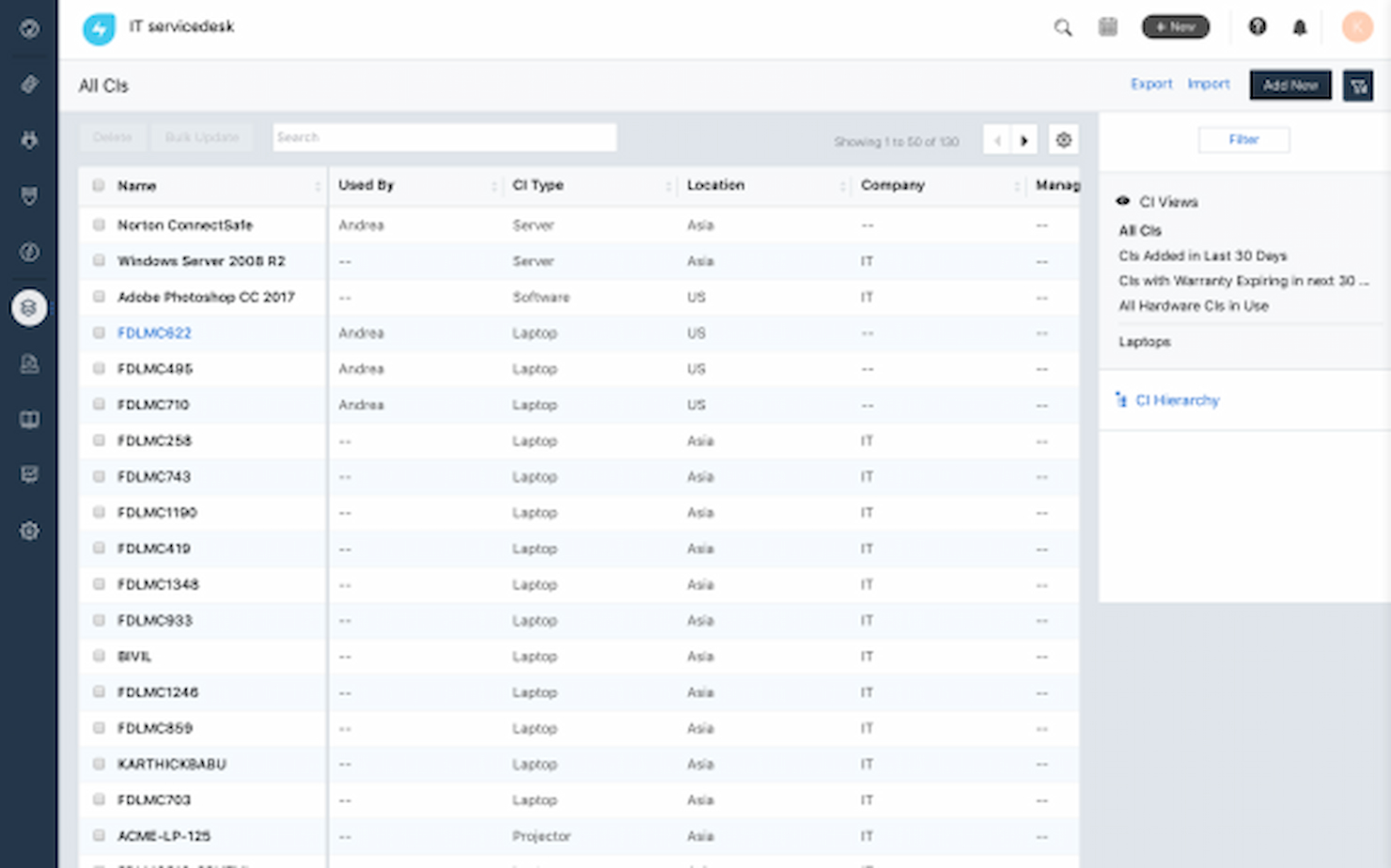
Freshservice est une plateforme de gestion des actifs informatiques (ITAM) de premier plan qui aide les organisations à prendre le contrôle total de leurs actifs technologiques. Qu'il s'agisse de matériel, de logiciels ou d'actifs fixes tels que véhicules et machines, les équipes peuvent suivre, gérer et optimiser les ressources tout au long de leur cycle de vie. Emma Johnson, consultante informatique chez Johnson Technology Solutions, a partagé : « En tant que consultante IT, je recommande Freshservice à mes clients pour ses fonctionnalités complètes de gestion des services alignées sur ITIL. Ses modules de gestion des problèmes et des changements sont particulièrement impressionnants. »
Pourquoi j'ai choisi Freshservice :C’est l’une des plateformes les plus faciles à utiliser lorsque vous souhaitez suivre tous vos logiciels, SaaS, ordinateurs, appareils, et les maintenir sans trop d’effort.
Fonctionnalités et intégrations phares de Freshservice :
Parmi ses fonctionnalités remarquables figurent les rappels automatisés permettant une planification proactive de la maintenance. Cela permet de gagner beaucoup de temps si vous souhaitez garder vos actifs à jour et améliorer leur cycle de vie. La plateforme aide à prévoir les besoins de maintenance et les coûts futurs afin de mieux gérer les dépenses et d’améliorer les marges bénéficiaires. De plus, vous pouvez gérer votre inventaire, vos bons de commande et la cartographie des relations.
Les intégrations incluent Dropbox, Jira, Freshdesk, Bomgar, CloudWatch, Quickbooks, Zapier, Zoom, Freshbooks et Microsoft Teams.
Pros and Cons
Pros:
- Plateforme conviviale
- Application mobile pour le scan des codes-barres ou QR codes
Cons:
- L’API peut être un peu complexe
New Product Updates from Freshservice

Freshservice Enhances Global Search and Dashboards With Task Support
Freshservice enhances Global Search and Dashboards by adding support for ticket, problem, change, and release tasks, along with custom task views. This update helps teams search, track, and report on tasks from one centralized interface. For more information, visit Freshservice's official site.

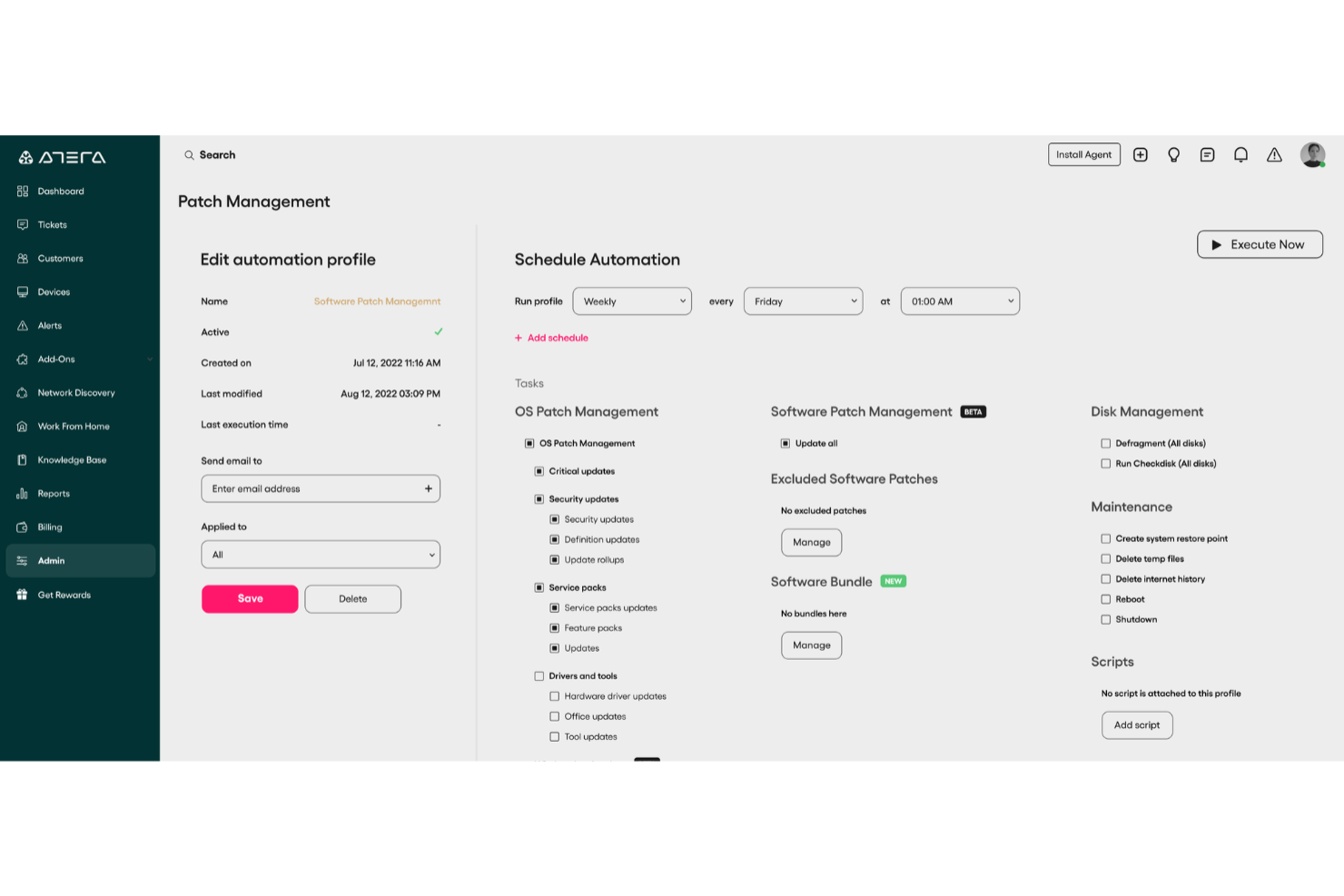
Atera est une plateforme de gestion informatique conçue pour aider les équipes IT à superviser les actifs, automatiser les tâches et fournir un support proactif grâce à des capacités alimentées par l'IA. Elle regroupe des outils IT essentiels comme la supervision et gestion à distance (RMM), le helpdesk, la gestion des tickets et la gestion des correctifs au sein d'une seule plateforme.
Pourquoi j'ai choisi Atera : J'ai choisi Atera pour son accent sur la gestion informatique autonome, qui combine des agents pilotés par l'IA à des outils IT traditionnels afin de traiter les tâches routinières automatiquement. Cela vous permet de gérer les opérations IT plus efficacement en réduisant les volumes de tickets et les temps de réponse. Vous bénéficiez également d'une visibilité et d'un contrôle complets sur vos actifs via une plateforme unifiée — idéal pour les petites équipes IT qui souhaitent se développer sans recruter davantage.
Fonctionnalités et intégrations remarquables d'Atera :
Fonctionnalités remarquables : agents IA qui résolvent de manière autonome les problèmes sur les appareils des utilisateurs, RMM unifié, gestion des tickets helpdesk intégrée, gestion des correctifs et automatisation IT. Atera propose également une intelligence contextuelle qui exploite votre base de connaissances pour résoudre les problèmes en accord avec vos processus.
Intégrations : Microsoft Teams, Slack, Zapier, Bitdefender et d'autres outils IT courants pour soutenir la communication, la sécurité et les flux de travail.
Pros and Cons
Pros:
- Centralise la gestion des tickets, le RMM, le PSA et la gestion des actifs
- Détection proactive des problèmes et options d'automatisation
- Rapports détaillés et tableaux de bord destinés aux clients
Cons:
- Courbe d'apprentissage pour les nouveaux utilisateurs en raison de la richesse des fonctionnalités
- Certaines limites dans les fonctions PSA et de facturation
New Product Updates from Atera

Atera Enhances IT Autopilot With Automation and File Support
Atera’s IT Autopilot gets three major boosts: you can now attach common files for deeper analysis, automate IT tasks with clear workflows, and choose how the system follows up when users go silent. These updates help streamline IT operations and improve resolution efficiency. For more information, visit Atera’s official site.

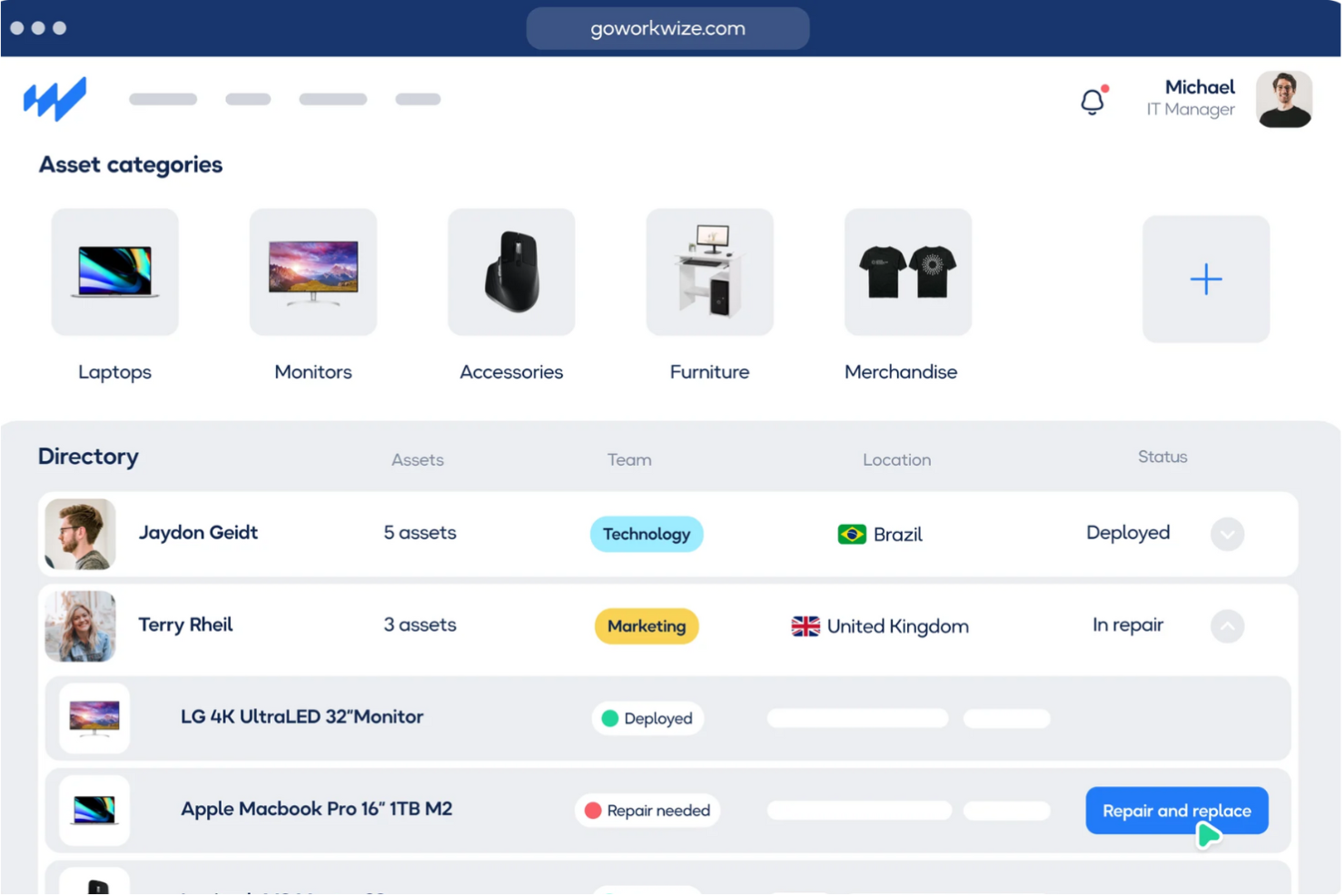
Workwize est une plateforme de gestion du matériel informatique conçue pour aider les entreprises à équiper leur personnel à travers le monde. Elle répond aux besoins des équipes informatiques, RH et opérations, en fournissant une solution complète pour la gestion des actifs matériels informatiques.
Pourquoi j'ai choisi Workwize : Workwize propose une plateforme centralisée reliant les fournisseurs informatiques, la logistique et les entrepôts locaux, offrant ainsi une vue unique permettant de superviser l'ensemble du cycle de vie de vos actifs informatiques. Cette intégration simplifie l'approvisionnement, le déploiement, la gestion, la récupération et l'élimination des équipements informatiques auprès d'équipes distribuées. En automatisant les flux de travail, Workwize réduit les tâches manuelles, permettant à votre équipe de se concentrer sur des initiatives plus stratégiques.
Fonctionnalités et intégrations remarquables de Workwize :
Parmi les fonctionnalités remarquables on compte les flux de travail automatisés, l'approvisionnement et le déploiement des appareils, la gestion des remplacements et récupérations, une vue centralisée du cycle de vie des actifs, la connexion avec les fournisseurs informatiques, l'intégration logistique, la coordination avec les entrepôts locaux, l'intégration à Active Directory et la compatibilité SCIM.
Les intégrations incluent Active Directory, SCIM, systèmes RH, IRIS Cascade RH, ADP Workforce Now, AFAS Software, AlexisHR, Azure Active Directory, BambooHR, et Breathe HR.
Pros and Cons
Pros:
- Aide à l'approvisionnement et au déploiement des appareils
- Flux de travail automatisés
- Plateforme centralisée pour la gestion des actifs informatiques
Cons:
- Peut être coûteux pour les petites entreprises
- Les réparations d'appareils sont limitées à l'offre entreprise

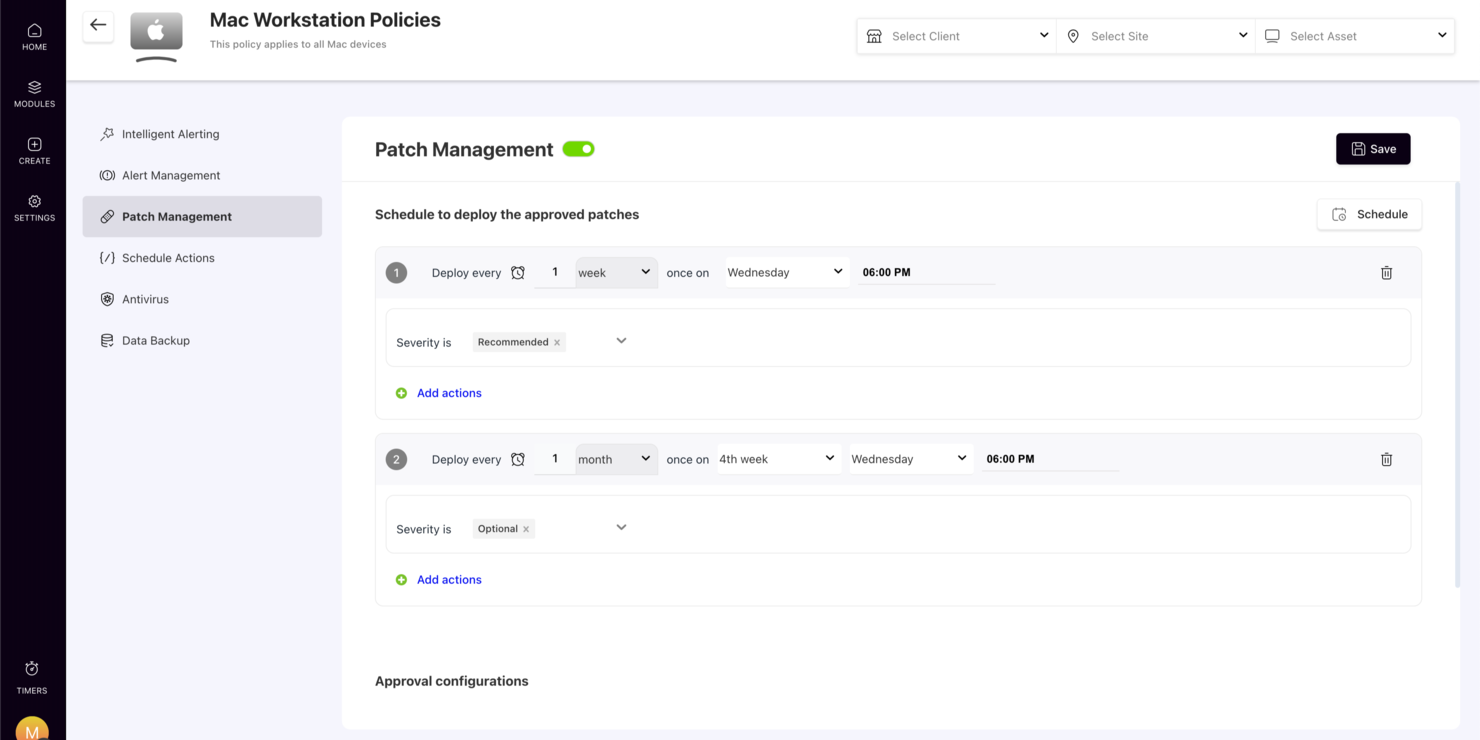
Dans le monde rapide de la gestion informatique, SuperOps se distingue comme une plateforme dynamique conçue spécifiquement pour les fournisseurs de services gérés (MSP) et les équipes informatiques internes. En exploitant la puissance de l'IA agentique, elle offre une gamme de fonctionnalités répondant aux besoins complexes de la gestion des actifs. Que vous gériez la sécurité des terminaux, l'automatisation des services ou le suivi des actifs, SuperOps vise à regrouper ces processus dans un flux de travail unique et efficace. Cela en fait un outil inestimable pour ceux qui cherchent à rationaliser les opérations informatiques et à améliorer l'efficacité globale.
Pourquoi j'ai choisi SuperOps
J'ai choisi SuperOps parce qu'il intègre de façon unique la gestion du service desk et la gestion des actifs dans une seule plateforme cohésive, ce qui en fait une solution idéale pour la gestion des actifs des CTO. La plateforme exploite l'IA agentique pour automatiser les flux de travail, ce qui est essentiel pour des opérations informatiques efficaces. De plus, elle propose une sécurité complète des terminaux, garantissant que tous les appareils de votre réseau sont protégés. Ces caractéristiques répondent directement aux besoins des équipes informatiques souhaitant gérer les actifs tout en maintenant une sécurité et une efficacité élevées.
Fonctionnalités clés de SuperOps
En plus de ses fonctionnalités principales, j'ai également relevé plusieurs caractéristiques qui font de SuperOps un choix convaincant pour la gestion des actifs par les CTO :
- Gestion des correctifs : Maintient vos logiciels à jour en automatisant le déploiement des correctifs sur l'ensemble de votre réseau.
- Gestion des appareils mobiles : Vous permet de gérer et de sécuriser les appareils mobiles à partir d'une seule plateforme.
- Tableaux de bord exécutifs : Fournit des informations stratégiques grâce à des tableaux de bord personnalisables.
- Suivi de la rentabilité en temps réel : Vous aide à surveiller et améliorer la performance financière grâce à l'analyse des données en temps réel.
Intégrations de SuperOps
Les intégrations incluent Microsoft 365, Google Workspace, QuickBooks, Xero, TeamViewer, Splashtop, Acronis, Bitdefender, Webroot et IT Glue.
Pros and Cons
Pros:
- Plateforme unifiée PSA et RMM
- Outils de sécurité des terminaux intégrés
- Automatisation des flux de travail alimentée par l'IA
Cons:
- Principalement conçu pour les MSP
- Courbe d'apprentissage pour les nouveaux utilisateurs
New Product Updates from SuperOps

SuperOps Adds HTML Support for Ticket Closure Emails
SuperOps introduces HTML embedding for ticket closure emails. This update allows teams to include custom content such as CSAT survey links and branded elements in resolution emails. For more information, visit SuperOps’ official site.
 .
.
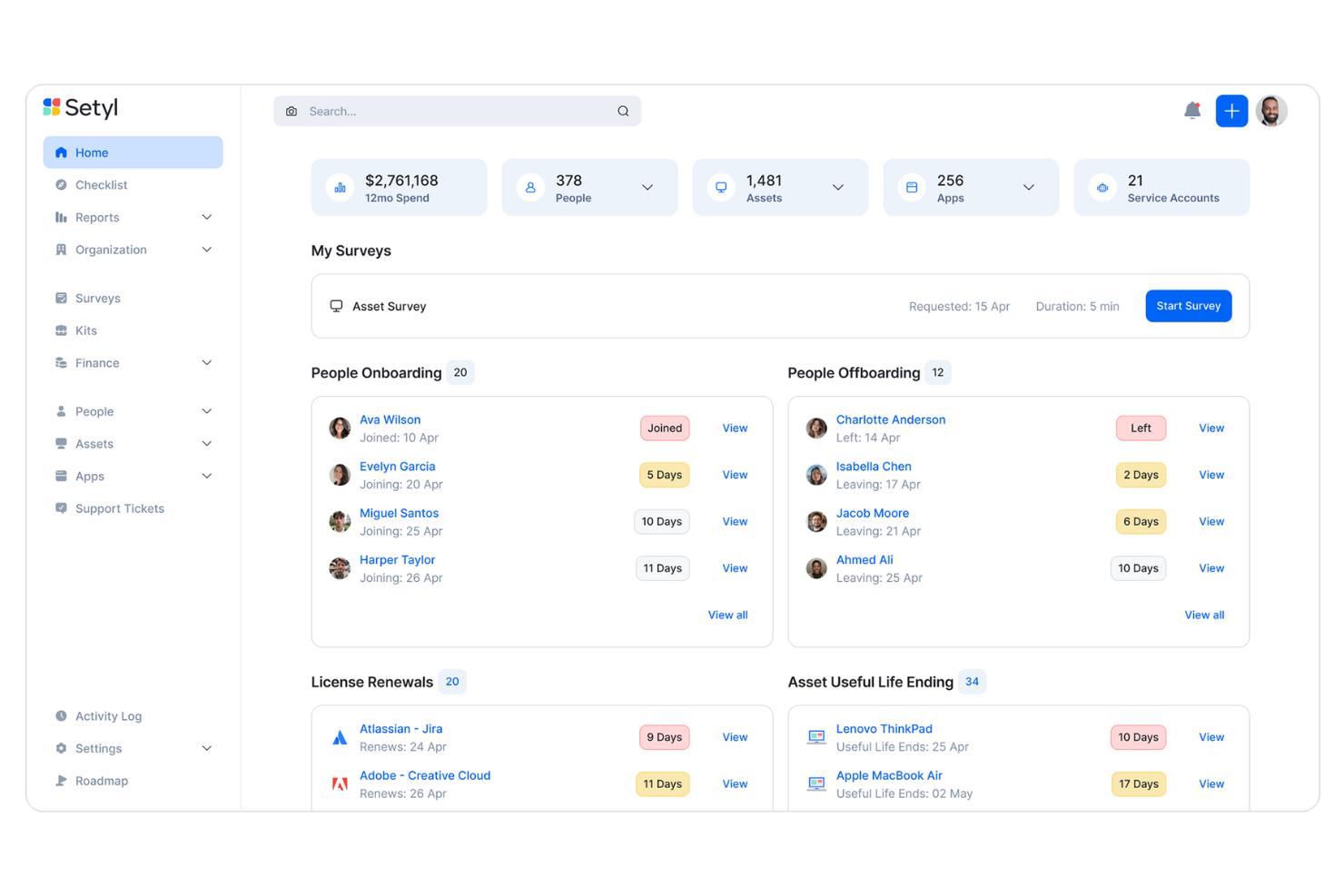
Setyl offre aux organisations une vue claire et organisée de l’ensemble de leur environnement informatique, en rassemblant matériel, logiciels, utilisateurs et fournisseurs sur une plateforme accessible. Au lieu de jongler entre plusieurs outils ou tableurs, les équipes peuvent compter sur Setyl pour rationaliser les processus, renforcer la responsabilité et garder le contrôle sur un environnement technologique en pleine croissance.
Pourquoi j’ai choisi Setyl : J’ai choisi Setyl car il excelle à unifier les données relatives au matériel, aux logiciels, aux licences et aux dépenses en un seul endroit, en faisant une véritable source unique de référence pour la gestion informatique. Le suivi du cycle de vie garantit une attribution, une surveillance et une récupération efficaces des actifs et des licences lors des arrivées et des départs. Grâce à des fonctionnalités telles que les alertes de renouvellement, la détection des applications informatiques non validées et des rapports prêts pour la conformité, il aide les organisations à réduire les gaspillages, améliorer la sécurité et rester prêtes pour les audits. De plus, sa large gamme d’intégrations avec les outils RH, MDM, IAM et financiers automatise la synchronisation des données, réduisant ainsi les tâches manuelles et éliminant les cloisonnements.
Fonctionnalités et intégrations remarquables :
Fonctionnalités remarquables : workflows centrés sur l’employé, comme le suivi de l’attribution d’équipement et la récupération facilitée lors des transitions du personnel. Ses outils de gestion des fournisseurs permettent aussi de consolider les informations contractuelles, les dates de renouvellement et les profils de risques fournisseurs, tandis que le suivi des dépenses relie les coûts à des actifs et équipes spécifiques pour une responsabilité budgétaire plus claire.
Les intégrations incluent Google Workspace, Microsoft 365, Intune, Google Endpoint Management, Jamf, Lansweeper, Meraki, JumpCloud, Okta, BambooHR, HiBob, ADP Workforce Now, Workday, Zendesk, Jira Service Management, et bien d’autres.
Pros and Cons
Pros:
- Nombre illimité d'actifs inclus dans le prix
- Assistance pour la configuration offerte en standard
- Gestion des actifs logiciels et matériels sur une seule plateforme
Cons:
- Pas d’application mobile native
- Ne propose pas les fonctionnalités complexes qui peuvent être nécessaires auprès des très grandes entreprises

Idéal pour le suivi d’actifs dans les espaces de travail hybrides
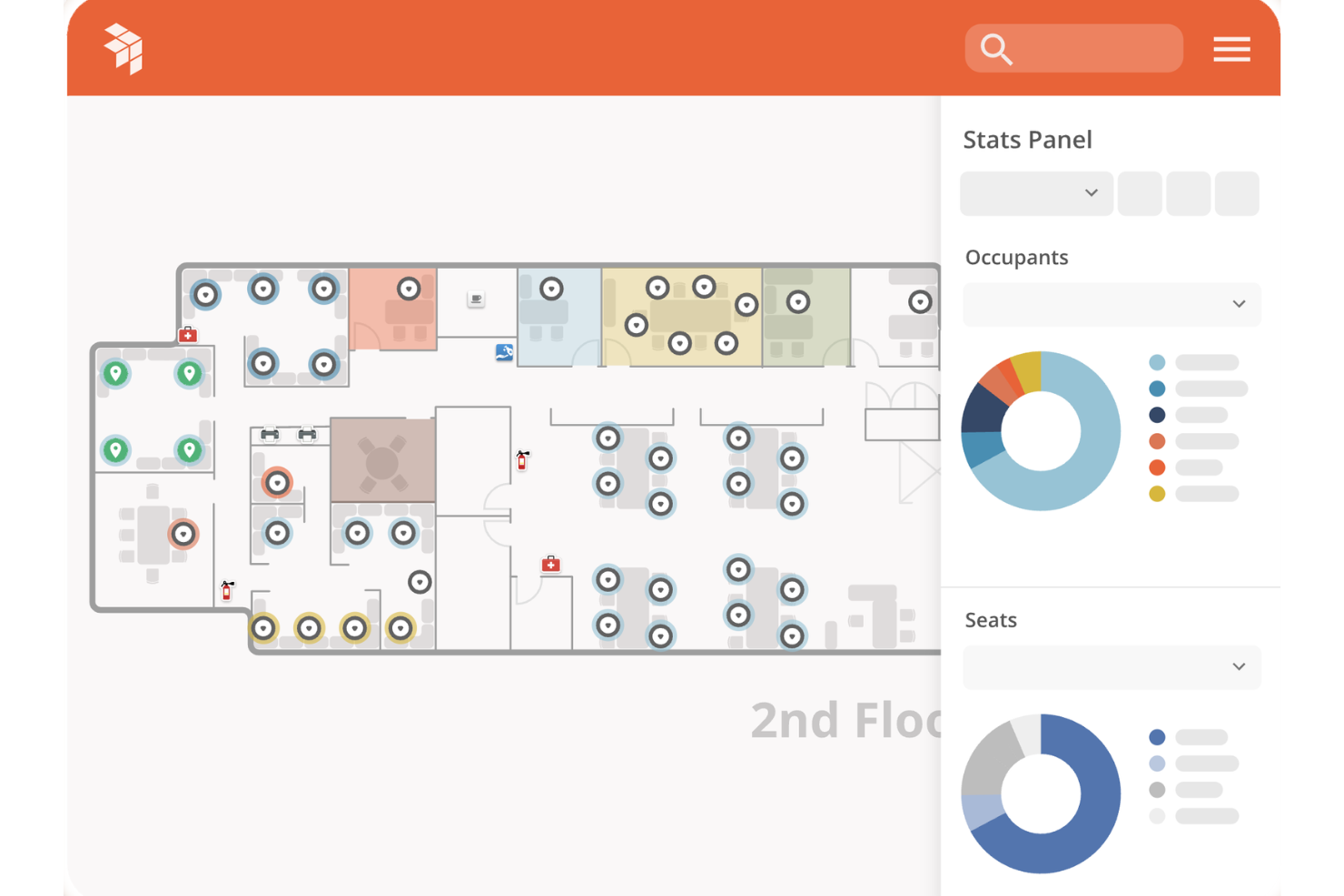
OfficeSpace aide les équipes informatiques et opérationnelles à suivre les actifs physiques dans les environnements de travail hybrides, vous offrant une vue claire du matériel que vous possédez, de son emplacement et des utilisateurs qui l’emploient. C’est particulièrement utile pour les organisations jonglant avec des configurations à la fois en présentiel et à distance, car la solution centralise les données sur les actifs et prend en charge les mises à jour en temps réel depuis le terrain.
Pourquoi j'ai choisi OfficeSpace
J'ai choisi OfficeSpace parce qu'il offre à votre équipe un système unique pour gérer les bureaux, le matériel et les ressources partagées sans avoir à jongler entre plusieurs outils. Vous pouvez automatiser les tâches de maintenance grâce à des ordres de travail planifiés, ce qui réduit le suivi manuel et garantit un équipement fiable. La plateforme relie aussi les données des actifs aux informations de localisation, vous aidant à comprendre où sont déployés les appareils et comment ils sont utilisés. J’apprécie le fait qu’OfficeSpace propose le suivi de la dépréciation et du cycle de vie, ce qui favorise l’alignement entre la finance et l’informatique sur la valeur des actifs. Son accès mobile permet aux équipes terrain de mettre à jour les fiches instantanément grâce aux scans de codes-barres, photos et notes d’état.
Fonctionnalités clés d’OfficeSpace
Voici d’autres fonctionnalités pour le suivi des actifs en environnement hybride :
- Audits d’actifs : Permet de réaliser des audits par emplacement afin de vérifier l’exactitude des inventaires.
- Enregistrement mobile emprunt/retour : Permet des mises à jour en temps réel lorsque les employés empruntent ou rendent du matériel.
- Suivi de la dépréciation : Calcule la valeur des actifs dans le temps pour une meilleure prévision financière.
- Tableaux de bord inter-équipes : Donne à l’informatique, aux services généraux et à la finance une visibilité partagée sur la santé et l’utilisation des actifs.
Intégrations OfficeSpace
Les intégrations incluent Microsoft Teams, Slack, ServiceNow, Jira, SAP, Google Workspace, Workday, Zoom, Okta et OneLogin.
Pros and Cons
Pros:
- Les ordres de travail automatisés réduisent le suivi manuel de la maintenance
- Les outils mobiles aident les équipes sur le terrain à actualiser les données instantanément
- Le suivi détaillé du cycle de vie favorise la planification financière
Cons:
- Certains modules orientés services généraux peuvent dépasser les besoins des équipes IT
- La mise en place nécessite du temps pour configurer les emplacements et les types d’actifs

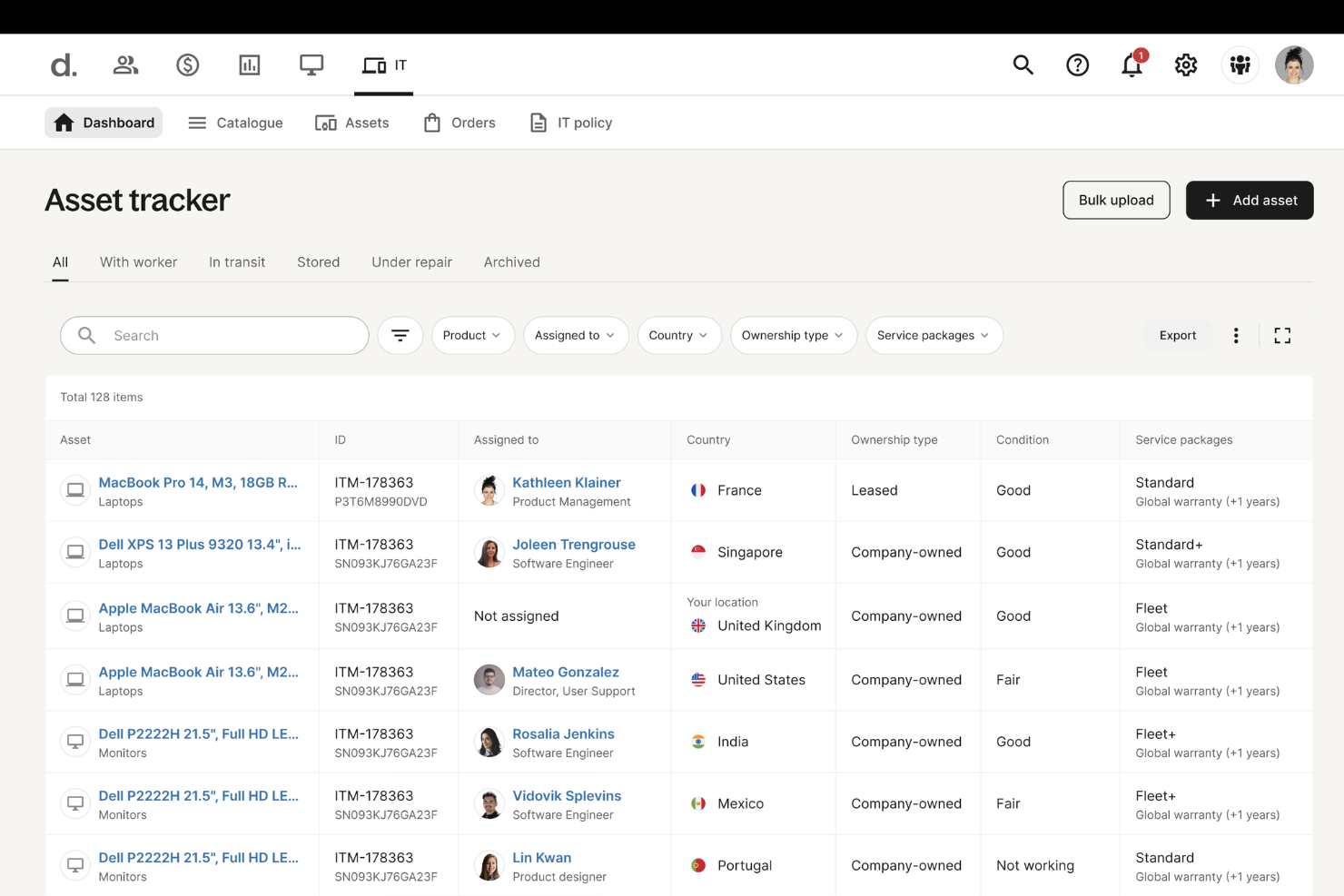
Deel est une plateforme complète qui intègre des outils de RH, de paie, d'immigration et de développement des talents, en faisant une solution polyvalente pour les entreprises de toutes tailles. En plus de ces fonctions clés, Deel propose une suite informatique robuste qui répond aux défis de la gestion des opérations informatiques pour une main-d'œuvre répartie.
Pourquoi j'ai choisi Deel : En tant que plateforme gérant les opérations informatiques dans plus de 130 pays, Deel IT offre une solution unifiée pour l'approvisionnement, le déploiement, le suivi et la récupération des équipements informatiques. Sa combinaison unique d'expertise locale et d'infrastructure mondiale permet aux entreprises de naviguer à travers des réglementations et des logistiques complexes, garantissant que le matériel est livré rapidement et en toute sécurité. Grâce à une visibilité et un contrôle en temps réel sur tous les équipements informatiques, y compris ceux possédés ou loués auprès d'autres fournisseurs, Deel aide les équipes informatiques à gérer efficacement leur inventaire mondial.
Fonctionnalités et intégrations remarquables de Deel :
Fonctionnalités remarquables comprennent un processus totalement automatisé de configuration des appareils, où les dispositifs sont préconfigurés avec les applications, logiciels et contrôles de sécurité nécessaires avant d'être remis aux employés. La plateforme offre également une assistance complète avec des réparations garanties par un accord de niveau de service (SLA) mondial, des appareils de prêt et un support disponible 24h/24 et 7j/7. De plus, la fonctionnalité d'automatisation du renouvellement et de la mise à niveau des appareils garantit que le matériel reste à jour.
Les intégrations incluent Microsoft Azure Active Directory, Okta, Google Workspace, Slack, Microsoft Teams, BambooHR, Workday et SAP SuccessFactors.
Pros and Cons
Pros:
- Gestion des ressources humaines et des actifs informatiques sur une même plateforme
- Contribue à automatiser les flux de travail liés aux actifs
- Permet le déploiement d'équipements dans plus de 130 pays
Cons:
- Peut ne pas convenir aux équipes ayant des besoins informatiques très complexes
- Ne propose pas de fonctionnalités au-delà de la gestion des appareils, comme la gestion des réseaux et des serveurs

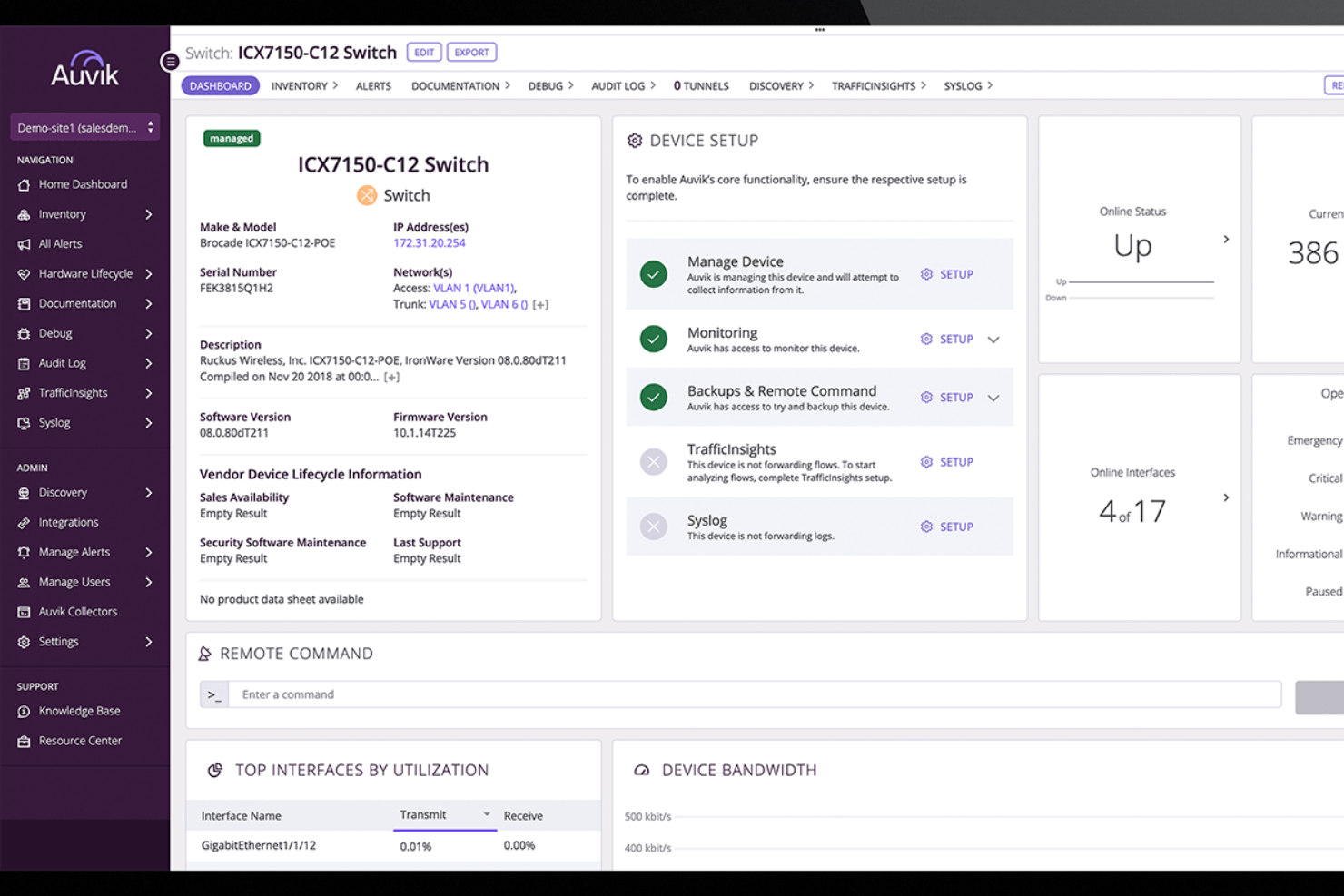
Auvik est un logiciel de gestion de réseau basé sur le cloud conçu pour vous offrir une visibilité et un contrôle complets sur votre infrastructure réseau. Il découvre et cartographie automatiquement vos appareils réseau, fournissant des informations en temps réel sur leur statut et leurs connexions.
Pourquoi j'ai choisi Auvik : J'ai choisi Auvik car il découvre et inventorie automatiquement tous les appareils de votre réseau, capturant des détails comme la marque, le modèle et l'emplacement. Cela aide votre équipe à garder le contrôle sur chaque actif sans suivi manuel. Auvik prend également en charge la gestion du cycle de vie du matériel en signalant les appareils proches de leur fin de vie ou de support afin que vous puissiez planifier leurs remplacements et éviter les interruptions.
Fonctionnalités et intégrations remarquables d'Auvik :
Fonctionnalités remarquables comprennent la cartographie réseau en temps réel qui représente visuellement la topologie de votre réseau, vous permettant de voir comment les appareils sont interconnectés et d'identifier rapidement les problèmes potentiels. Auvik propose aussi la gestion des configurations, en sauvegardant automatiquement les configurations des appareils et en suivant les modifications pour que vous puissiez restaurer les paramètres précédents si nécessaire.
Les intégrations incluent Autotask PSA, Microsoft Teams, Slack, Datto RMM, Cisco, Fortinet, Ubiquiti, Salesforce, Zoom, ConnectWise, Palo Alto Networks et Dell.
Pros and Cons
Pros:
- Système d'alerte rapide pour divers problèmes
- Peut sauvegarder et restaurer les configurations des appareils
- L'inventaire détaillé des appareils facilite la gestion du cycle de vie
Cons:
- La configuration de fonctionnalités avancées peut être complexe
- Retards occasionnels dans la mise à jour des données en temps réel
New Product Updates from Auvik
Auvik Adds Alert Insights Report and Enhanced Alerting Controls
Auvik introduces the Alert Insights Report (Beta), count-based alert delays, and automatic alert dismissal. These updates help reduce alert noise and improve how teams monitor and manage alerts. For more information, visit Auvik’s official site.
 .
.
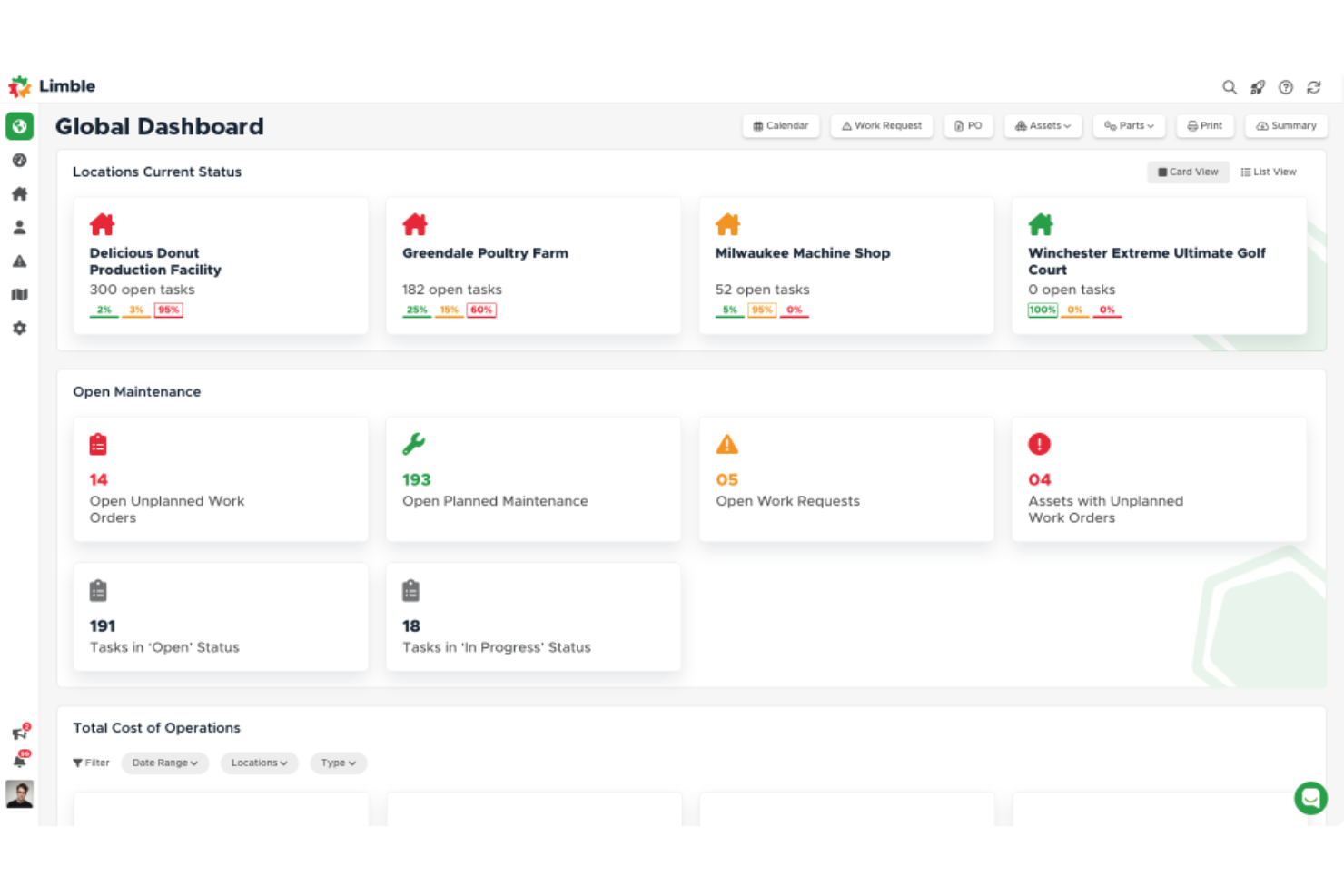
Limble est un système de gestion de maintenance assistée par ordinateur (GMAO) et une plateforme de gestion des actifs basée sur le cloud. Initialement conçu pour rationaliser les opérations de maintenance dans divers secteurs, Limble propose des fonctionnalités telles que la gestion des demandes de travail, la maintenance préventive et le suivi des stocks.
Pourquoi j'ai choisi Limble : Il fournit des outils puissants pour suivre et gérer les actifs informatiques, garantissant que tous les équipements et logiciels sont correctement recensés et entretenus. Le système automatisé de gestion des demandes de travail de Limble permet aux équipes IT de planifier et de hiérarchiser efficacement les tâches de maintenance, tandis que ses fonctionnalités de gestion des actifs assurent un accès facile aux informations sur le cycle de vie du matériel.
Fonctionnalités et intégrations remarquables de Limble :
Parmi les fonctionnalités remarquables : un tableau de bord intuitif offrant une vue d'ensemble en temps réel de toutes les activités de maintenance, ainsi que des rapports personnalisables permettant aux équipes de générer des rapports détaillés sur divers aspects de la gestion des actifs. La planification de la maintenance préventive permet d'automatiser les tâches de maintenance récurrentes, réduisant ainsi la probabilité de pannes inattendues des équipements.
Les intégrations incluent Zapier, QuickBooks, Salesforce, Microsoft Teams, Slack, Jira, ServiceNow et Google Workspace.
Pros and Cons
Pros:
- Accessible via mobile
- Simplifie la création, l’attribution et le suivi des demandes de travail
- Fonctionnalités puissantes pour suivre l’historique des actifs et gérer le stock de pièces détachées
Cons:
- Les rapports automatisés pourraient être plus complets
- La configuration initiale peut nécessiter une assistance

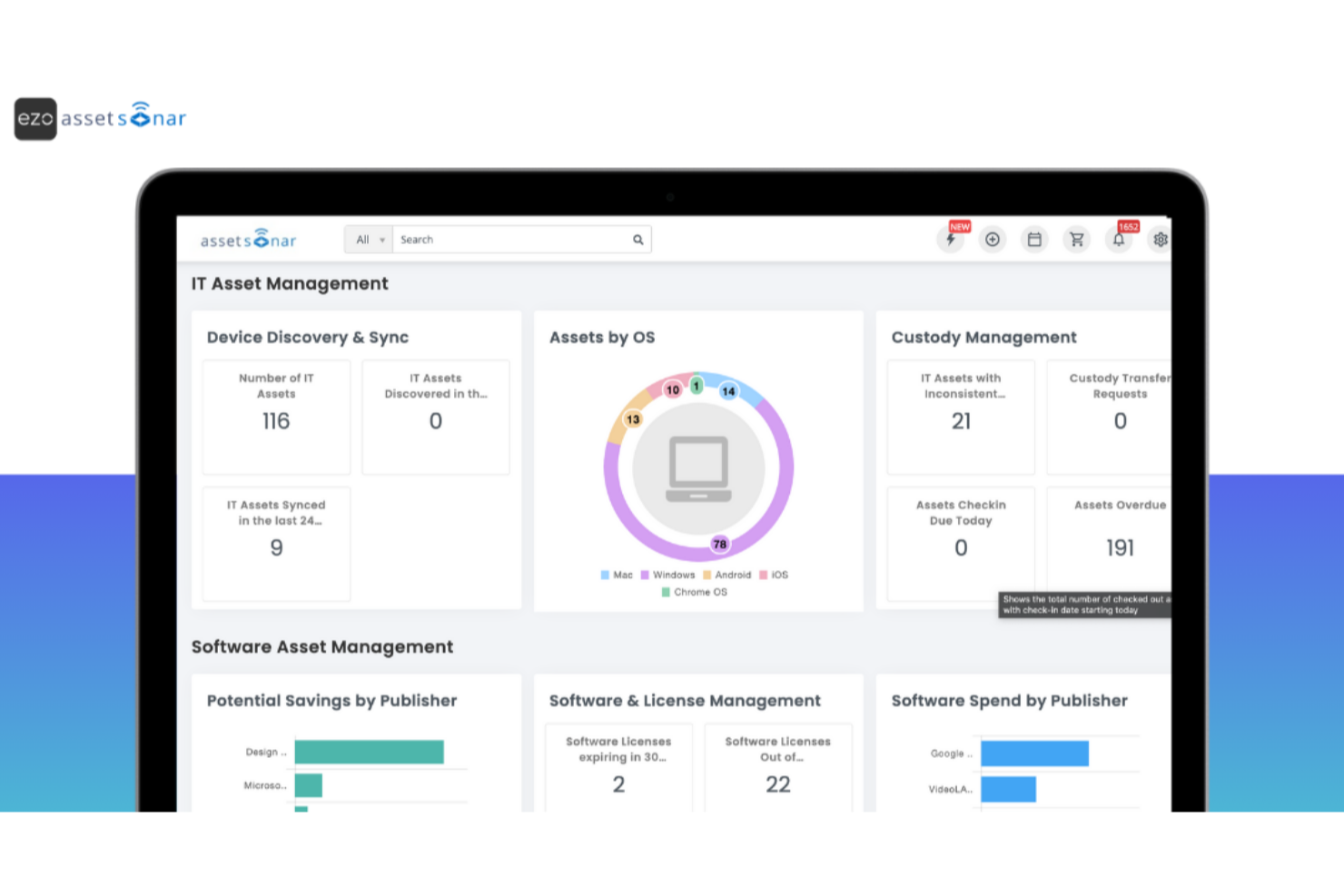
EZO AssetSonar est une plateforme de gestion des actifs informatiques (ITAM) qui aide les organisations à gérer le matériel, les logiciels et les services SaaS depuis un seul endroit. Elle est conçue pour accompagner la montée en charge des équipes IT en offrant visibilité, contrôle et conformité sur l’ensemble des actifs.
Pourquoi j'ai choisi Ezo AssetSonar : J'ai choisi Ezo AssetSonar pour ses fonctionnalités d'automatisation qui simplifient le suivi des actifs et assurent la conformité des licences dans votre environnement informatique. Il prend en charge la gestion des services informatiques avec des outils permettant de répondre plus rapidement aux incidents et de résoudre les tickets, aidant ainsi les équipes à maintenir la continuité opérationnelle. La surveillance en temps réel et les alertes de vulnérabilité renforcent la sécurité, tandis que la centralisation des données de licences permet de récupérer les logiciels inutilisés et de contrôler les dépenses SaaS.
Fonctionnalités phares et intégrations d’Ezo AssetSonar :
Les fonctionnalités phares incluent la surveillance en temps réel et les alertes qui sécurisent les actifs et préviennent les failles de sécurité en fournissant des notifications immédiates concernant les vulnérabilités. La gestion centralisée des licences du logiciel vous aide à optimiser les dépenses liées aux logiciels en récupérant les licences inutilisées. De plus, la détection du Shadow IT par Ezo AssetSonar assure la conformité dans l’ensemble de votre organisation en identifiant l’utilisation non autorisée de logiciels.
Les intégrations comprennent Zendesk, Jira Service Desk, G Suite, Okta, OneLogin, Centrify, Azure AD, Ping Identity, SCCM, Jamf Pro, Microsoft Intune et Cisco Meraki.
Pros and Cons
Pros:
- Gestion des appareils mobiles
- Alertes de conformité en temps réel
- Suivi détaillé des actifs
Cons:
- Retards occasionnels dans les rapports
- Options de personnalisation limitées

Ezo
Meilleur outil de gestion des immobilisations adapté aux petits budgets
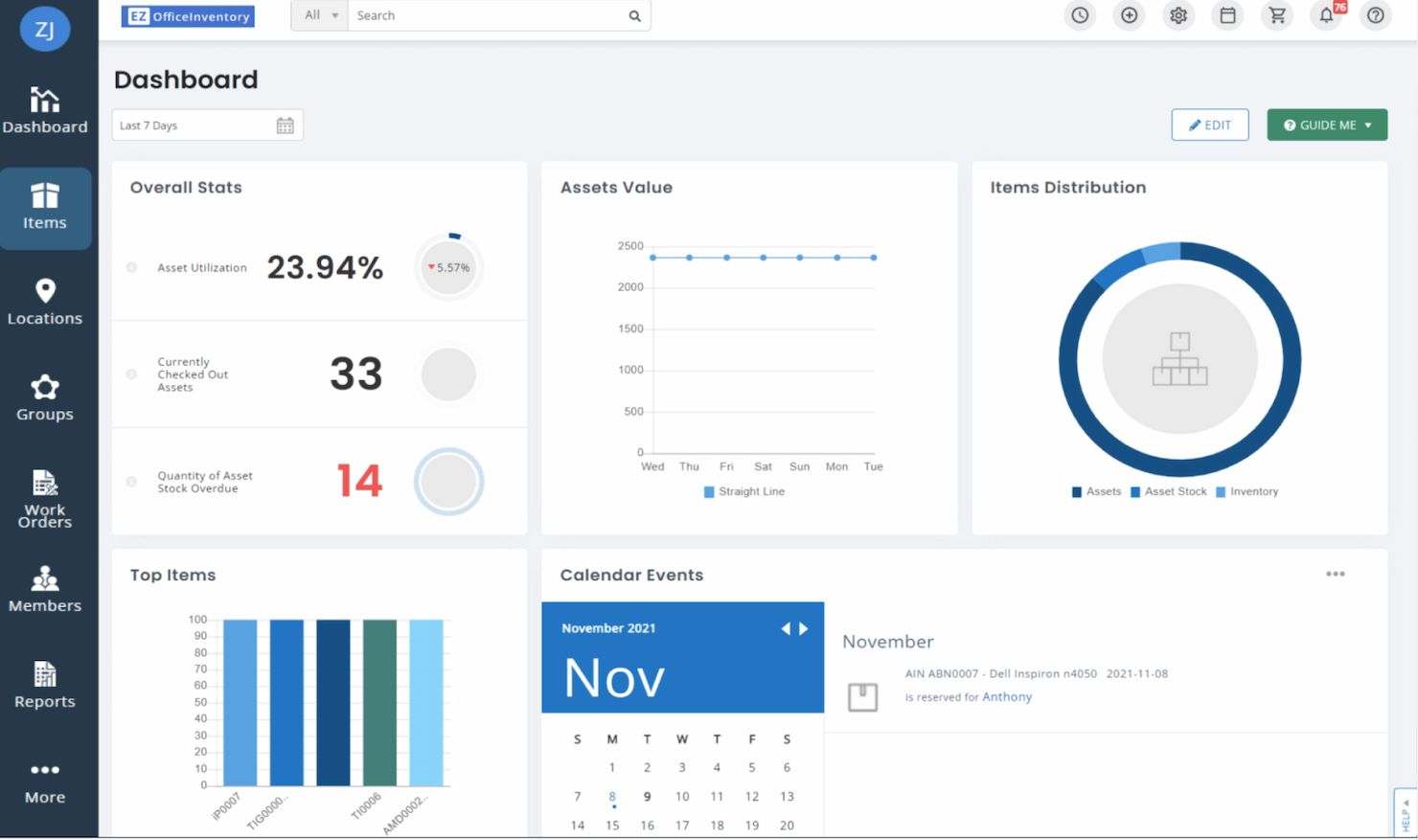
EZOfficeInventory est un logiciel de gestion des immobilisations qui vous permet de suivre votre inventaire, vos machines, vos outils, vos véhicules, et plus encore. Cet outil économique est idéal pour les petites entreprises à la recherche d’un logiciel adapté à leur budget.
Pourquoi j’ai choisi EZOfficeInventory : Je considère cette plateforme comme l'une des meilleures solutions de suivi d'actifs en termes de rapport qualité/prix. Bien qu’elle ne soit pas la plus complète, elle offre tout ce dont une petite entreprise a besoin pour suivre ses immobilisations efficacement, le tout sur une plateforme conviviale.
Fonctionnalités remarquables et intégrations d'EZOfficeInventory :
Les fonctionnalités remarquables incluent la gestion des immobilisations à la fois sur le web et sur mobile. Vous pouvez suivre l’inventaire, les équipements, les outils, et même l’amortissement via la plateforme. J’apprécie également la simplicité de l’application mobile qui permet de gérer et de suivre les immobilisations où que vous soyez. Vous pouvez scanner des QR codes, RFID ou codes-barres partout.
Les intégrations comprennent Google Suite, Zendesk et Zendesk Sunshine, Jira Service Desk, PingIdentity, Okta, OneDrive et OneLogin.
Pros and Cons
Pros:
- Excellent rapport qualité/prix
- Plateforme conviviale
- Calendrier de disponibilité des actifs pour une réservation simplifiée
Cons:
- L’application mobile peut parfois être instable
- Pas de gestion de l’inventaire de vente au détail


Asset Panda est une plateforme tout-en-un de gestion des actifs qui vous permet de suivre une grande variété de biens, y compris les actifs informatiques, les immobilisations et bien d’autres. La plateforme de gestion des actifs informatiques propose des techniques avancées de gestion des stocks, idéales pour les organisations qui comptent des milliers de codes SKU.
Pourquoi j’ai choisi Asset Panda : J’apprécie la manière dont le logiciel vous permet de regrouper des équipements associés grâce à son système de kits d’actifs. De plus, son créateur de codes-barres personnalisés facilite l’ajout rapide de nouveaux articles à l’inventaire en quelques secondes.
Fonctionnalités et intégrations remarquables d’Asset Panda :
Les fonctionnalités remarquables incluent le suivi de la maintenance, le suivi des outils, le suivi des équipements loués et bien d’autres. Je considère ce logiciel comme l’un des plus polyvalents en matière de gestion complète des actifs. J’aime la flexibilité de la plateforme qui peut s’adapter à de nombreux secteurs tels que la santé, la construction, l’éducation, les administrations et les associations à but non lucratif.
Les intégrations comprennent Microsoft Active Directory, Azure Active Directory, Okta, OneLogin, Zendesk, ServiceNow, Lansweeper et Google Workspace.
Pros and Cons
Pros:
- Kit d’actifs pour regrouper le matériel associé
- Droits d’accès selon le rôle pour protéger les données sensibles
- Champs illimités et nombreuses options de configuration
Cons:
- Prendre du temps pour maîtriser la plateforme
- Difficile d’ajouter de nouveaux utilisateurs

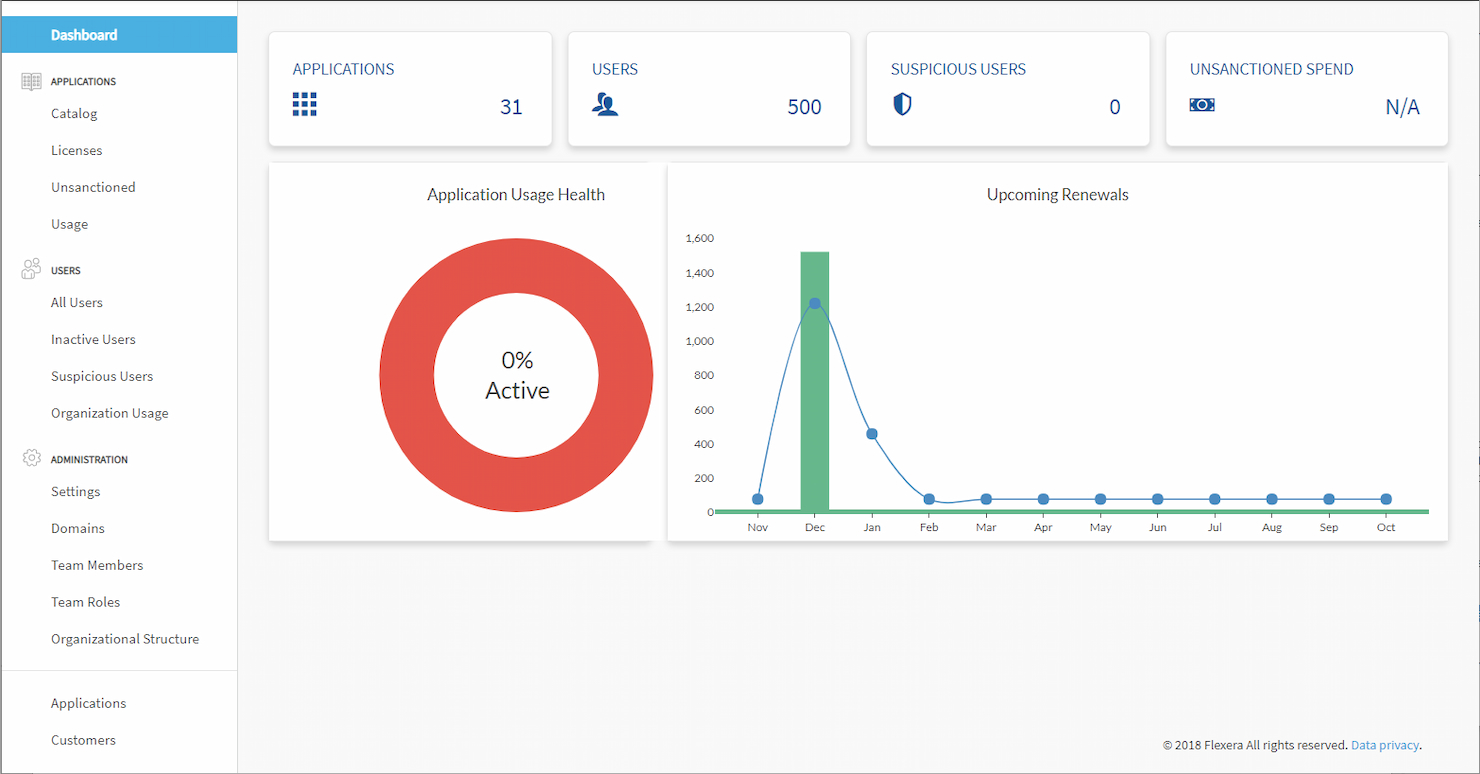
Flexera est un outil puissant de gestion des actifs informatiques (ITAM) en mode SaaS, conçu pour les grandes organisations disposant de processus ITAM matures. Ce logiciel est principalement utilisé pour atténuer les risques informatiques et de sécurité, et pour réduire les coûts grâce à une gestion efficace des actifs.
Pourquoi j'ai choisi Flexera : Flexera est un ITAM complet capable de répondre aux besoins des grandes organisations. Je l'ai choisi car il propose aux entreprises des versions cloud ou sur site du logiciel. Les possibilités de personnalisation rendent la configuration de la plateforme facile selon vos préférences, afin de maîtriser les coûts et de maximiser la productivité.
Fonctionnalités remarquables et intégrations de Flexera :
Fonctionnalités remarquables : une vaste bibliothèque de droits qui automatise la gestion des positions de licences effectives (ELP). Je trouve cette fonctionnalité très utile car elle permet de réduire les coûts sans avoir à suivre manuellement toutes les licences logicielles pour garantir leur conformité.
Intégrations : ServiceNow, Microsoft System Center Configuration Manager (SCCM), Snow Software et BMC Helix.
Pros and Cons
Pros:
- Demandes de logiciels
- Gestion automatique du cycle de vie
- Analyses contractuelles basées sur les données
Cons:
- Peut être assez coûteux
- Configuration complexe

HxGN EAM
Meilleur logiciel de gestion des actifs d'entreprise pour prolonger le cycle de vie des actifs
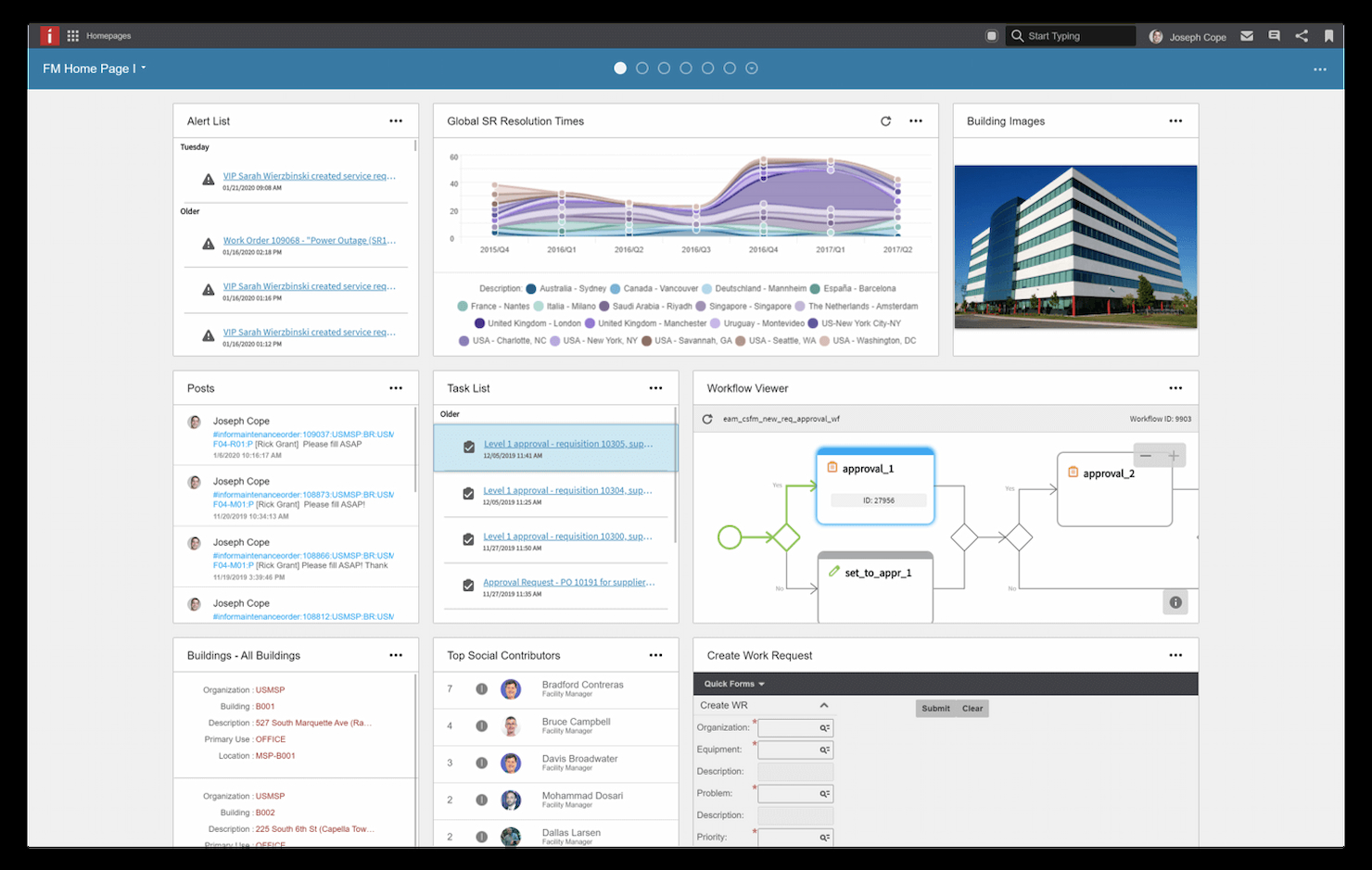
HxGN EAM est un outil de gestion des actifs d'entreprise (EAM) haut de gamme. Fort de plus de 30 ans d'expérience dans la gestion des actifs, la plateforme peut aider les grandes organisations à prolonger le cycle de vie de leurs actifs grâce à ce logiciel.
Pourquoi j'ai choisi HxGN EAM : J'apprécie que la plateforme dispose d'une variété d'outils pour prolonger le cycle de vie, comme les fonctionnalités de gestion des risques, l'outil de gestion de la performance des actifs (APM), et d'autres encore, afin d'aider à prolonger la durée de vie des actifs.
Fonctionnalités et intégrations remarquables de HxGN EAM :
Fonctionnalités remarquables : intelligence artificielle (IA) et apprentissage automatique (ML) qui offrent aux utilisateurs des informations sur l'état des actifs de l'organisation. J'aime le fait qu'il existe également des versions du logiciel spécifiques à certains secteurs comme la santé, la fabrication, l'énergie, et bien d'autres. La plateforme peut également vous aider à améliorer la durée de vie de vos actifs grâce à des fonctionnalités d’analytique intégrée et de gestion des dossiers.
Les intégrations incluent Microsoft (MS) Project, Oracle et Excel.
Pros and Cons
Pros:
- Excellente solution pour prolonger la durée de vie des flottes, équipements et installations
- Informations générées par l'IA pour faciliter la prise de décisions autonome
Cons:
- Peu d'intégrations disponibles

Idéal pour gérer les appareils mobiles professionnels
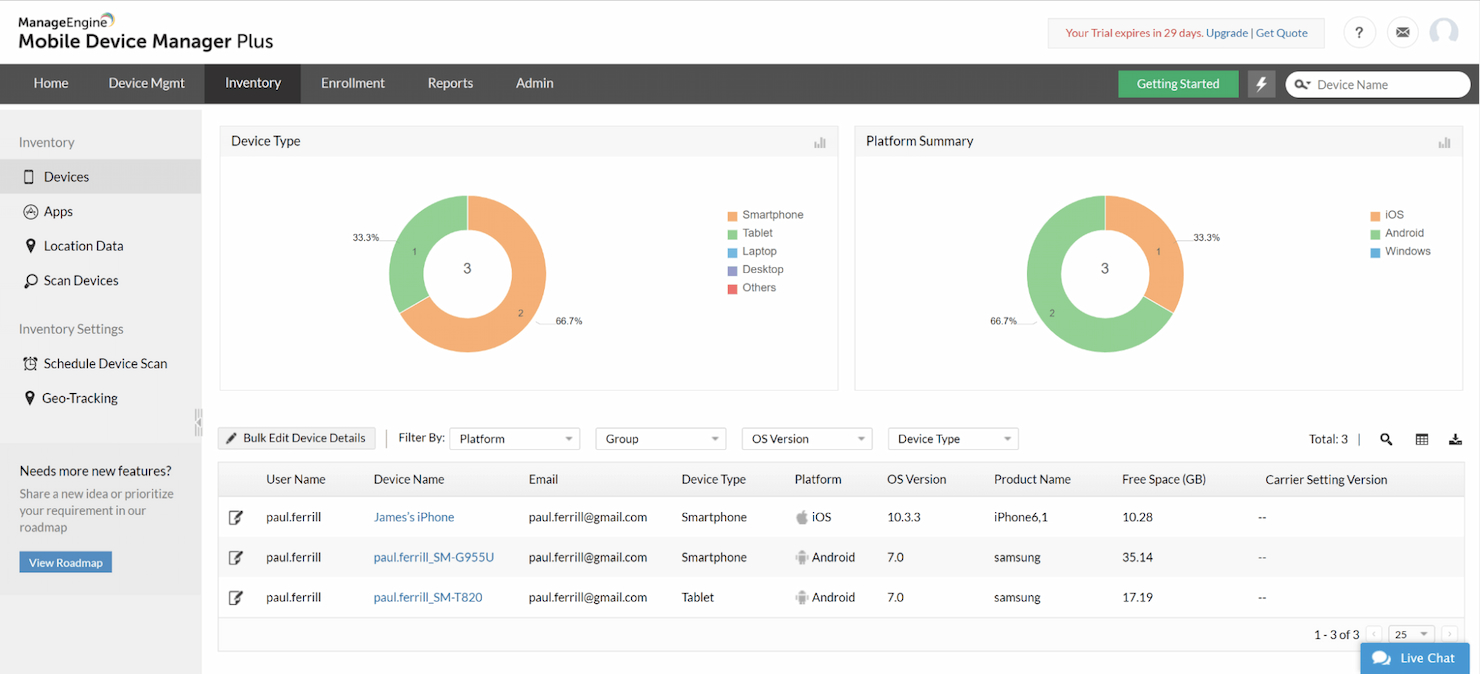
ManageEngine Mobile Device Manager Plus est un système de gestion des actifs pratique, conçu spécifiquement pour organiser et administrer tous les appareils mobiles au sein de votre organisation. Le logiciel de gestion des appareils mobiles (MDM) est destiné à gérer les smartphones, ordinateurs portables, tablettes, ordinateurs de bureau et bien plus encore, avec la gestion des logiciels incluse.
Pourquoi j'ai choisi ManageEngine : L’un des actifs les plus fréquemment gérés par les organisations est le parc de terminaux mobiles. J’ai choisi ManageEngine parce que son logiciel est entièrement dédié à cette branche de la gestion d’actifs, permettant ainsi de facilement organiser, réserver et sécuriser l’outil le plus essentiel de toute entreprise : le smartphone.
Fonctionnalités et intégrations remarquables de ManageEngine :
Fonctionnalités remarquables : définition de restrictions à l’échelle de l’entreprise, application des politiques organisationnelles à chaque appareil, et installation silencieuse automatique des applications approuvées. J’apprécie la grande accessibilité du logiciel qui peut être utilisé sur tous les systèmes d’exploitation comme iOS, Android, Windows, Chrome OS, macOS et iPad OS. Une particularité est la possibilité d’effacer à distance toutes les données de l’entreprise du téléphone en cas de perte ou de vol de l’appareil.
Intégrations : Zendesk, Zoho Creator, Zoho CRM, ServiceNow et Spiceworks.
Pros and Cons
Pros:
- Services disponibles sur site et dans le cloud
- Les données de l’entreprise peuvent être effacées à distance en cas de perte ou de vol du téléphone
- Suit l’utilisation des applications
Cons:
- L’interface utilisateur peut être un peu difficile à prendre en main
- La version cloud peut être instable

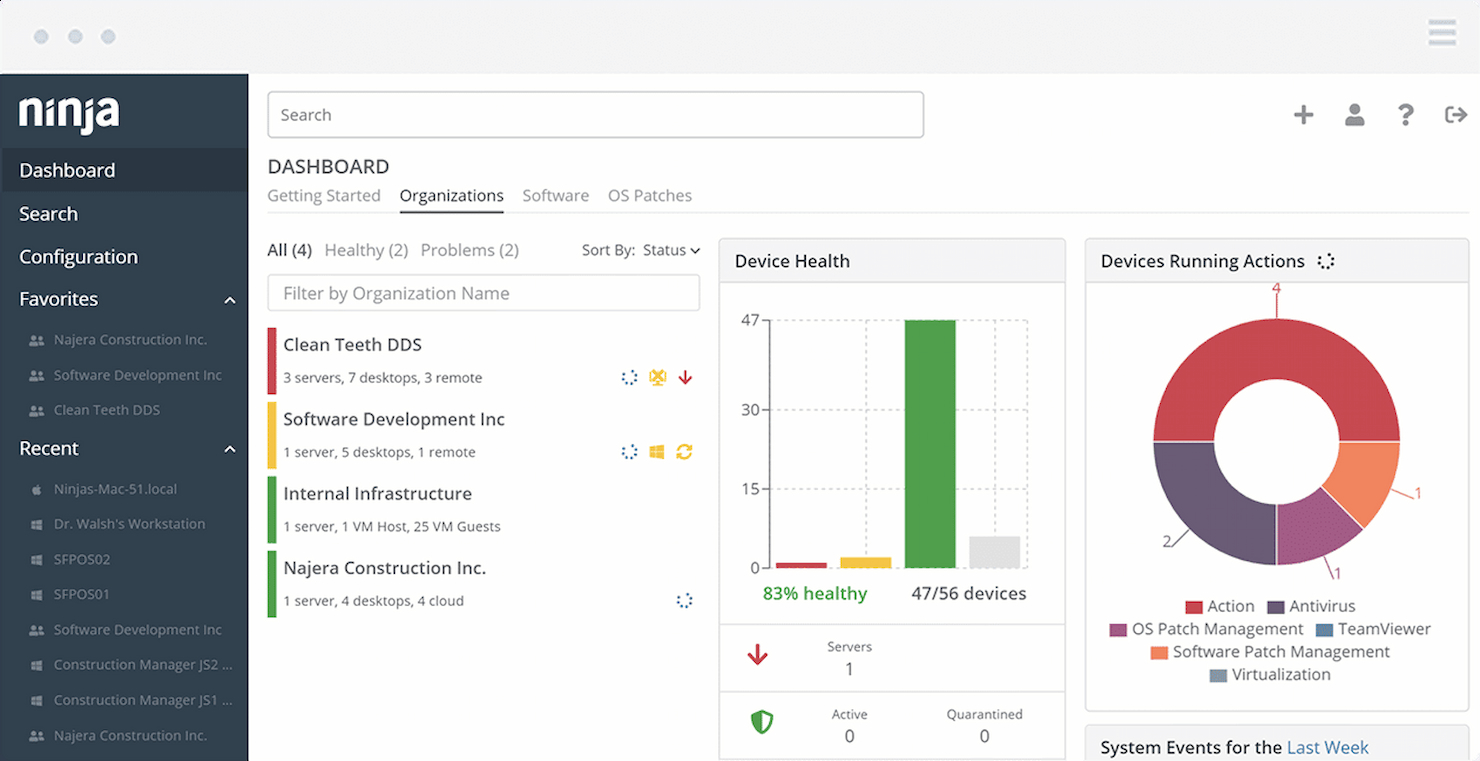
NinjaOne est un leader des solutions ITAM pour les fournisseurs de services gérés (MSP). Cet outil est idéal pour les CTO et les responsables informatiques qui souhaitent gérer les actifs et les besoins informatiques de leurs clients en un seul endroit.
Pourquoi j'ai choisi NinjaOne : J'apprécie le fait que l'outil offre un ensemble complet d'outils permettant aux petites équipes informatiques et aux responsables IT de gérer, surveiller, sécuriser et optimiser les serveurs, appareils réseau, ordinateurs portables et postes de travail. Selon moi, le meilleur atout de la plateforme est sa grande facilité d'utilisation, même si vous devez gérer une grande variété de clients ou d'infrastructures IT.
Fonctionnalités et intégrations phares de NinjaOne :
Fonctionnalités phares : inventaires de logiciels et matériels à jour sur chaque appareil. J'aime particulièrement le fait que la surveillance de l'état des serveurs, des ordinateurs portables et d'autres appareils est extrêmement simple. Toute petite équipe informatique en tirera profit. Vous pouvez gérer à distance chaque appareil, qu'il soit sous Windows ou Mac, sans interrompre les utilisateurs finaux.
Intégrations : Splashtop, Connectwise, TeamViewer, Bitdefender, SentinelOne, Webroot, Malwarebytes, OneLogin et Okta.
Pros and Cons
Pros:
- Plateforme conviviale
- Automatisation pour aider à réduire le volume de tickets
- Automatisation pour aider à réduire le volume de tickets
Cons:
- Les notifications et alertes peuvent parfois être envahissantes
- Les rapports ne sont pas très personnalisables

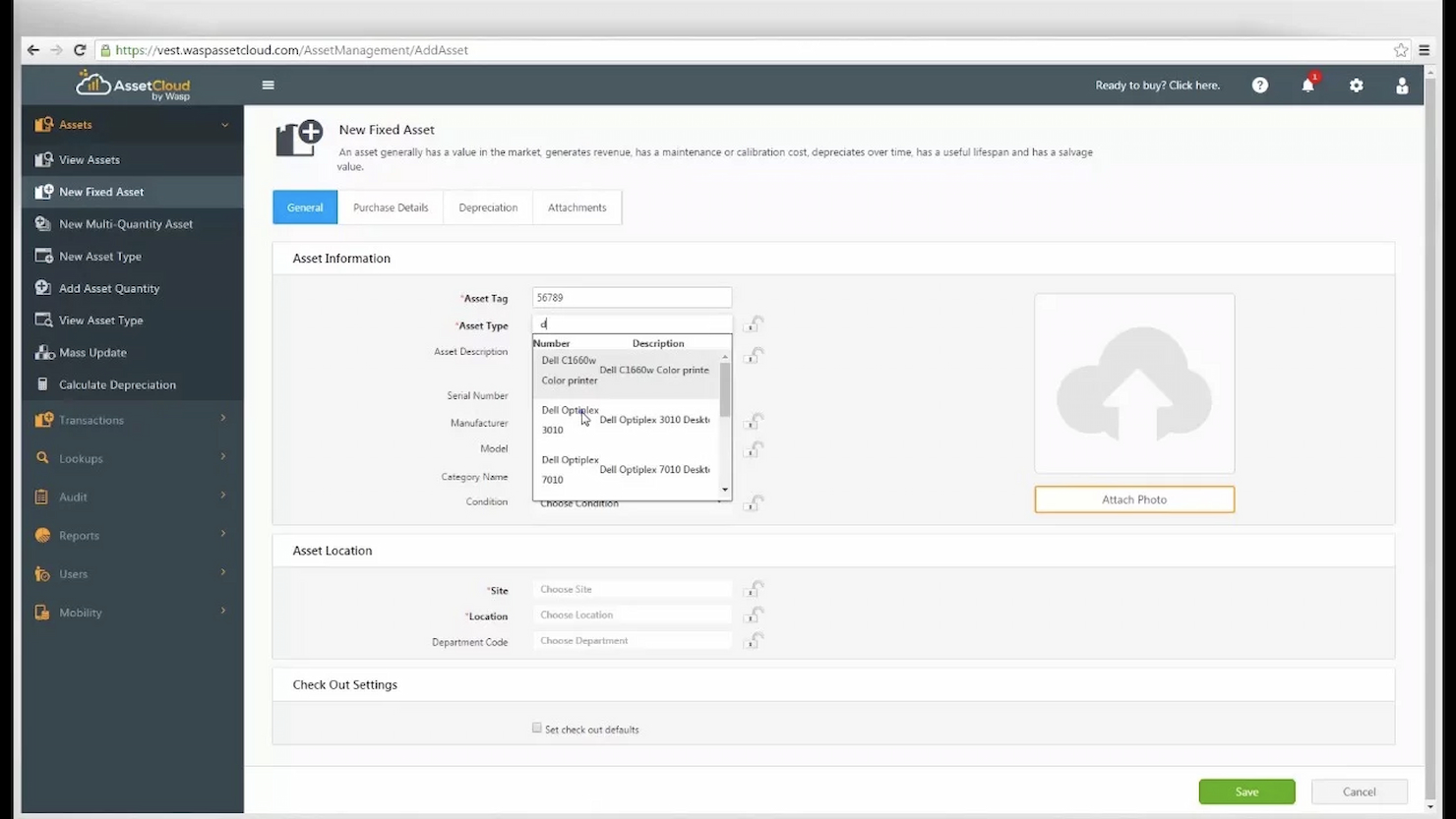
AssetCloud de Wasp Barcode Technologies est un excellent outil que les organisations peuvent utiliser pour suivre à la fois les logiciels et les immobilisations. Utilisée par IBM, Lockheed Martin, Mercedes Benz et Sony, la plateforme peut vous aider si vous gérez une variété d'actifs identiques.
Pourquoi j'ai choisi AssetCloud : J'apprécie que l'outil de gestion d'actifs comprenne un système de bons de travail et de maintenance permettant d'assigner des ordres de travail à plusieurs personnes simultanément. Vous pouvez inclure plusieurs actifs et tâches dans un seul ordre de travail, ce qui signifie que vous n'avez pas besoin de créer plusieurs ordres de travail si vous avez de nombreux équipements identiques.
Fonctionnalités et intégrations remarquables d'AssetCloud :
Les fonctionnalités remarquables incluent une fonction multi-quantité permettant de suivre des groupes d'actifs identiques. Vous pouvez choisir entre deux configurations : hébergé dans le cloud ou sur site, afin d'adapter la plateforme à vos besoins. La plateforme vous permet également d’acheter des éléments complémentaires comme des imprimantes d'étiquettes, des étiquettes et des lecteurs pour vous aider à gérer les immobilisations.
Les intégrations incluent Zapier, HubSpot, Google Workspace, Slack, Mailchimp, Twitter, Facebook Lead Ads, Trello et Calendly.
Pros and Cons
Pros:
- Simplifie la gestion des classes d'actifs identiques
- 25 rapports de suivi de stocks préconfigurés
Cons:
- La configuration initiale est chronophage
- Problèmes de performance avec l’application mobile

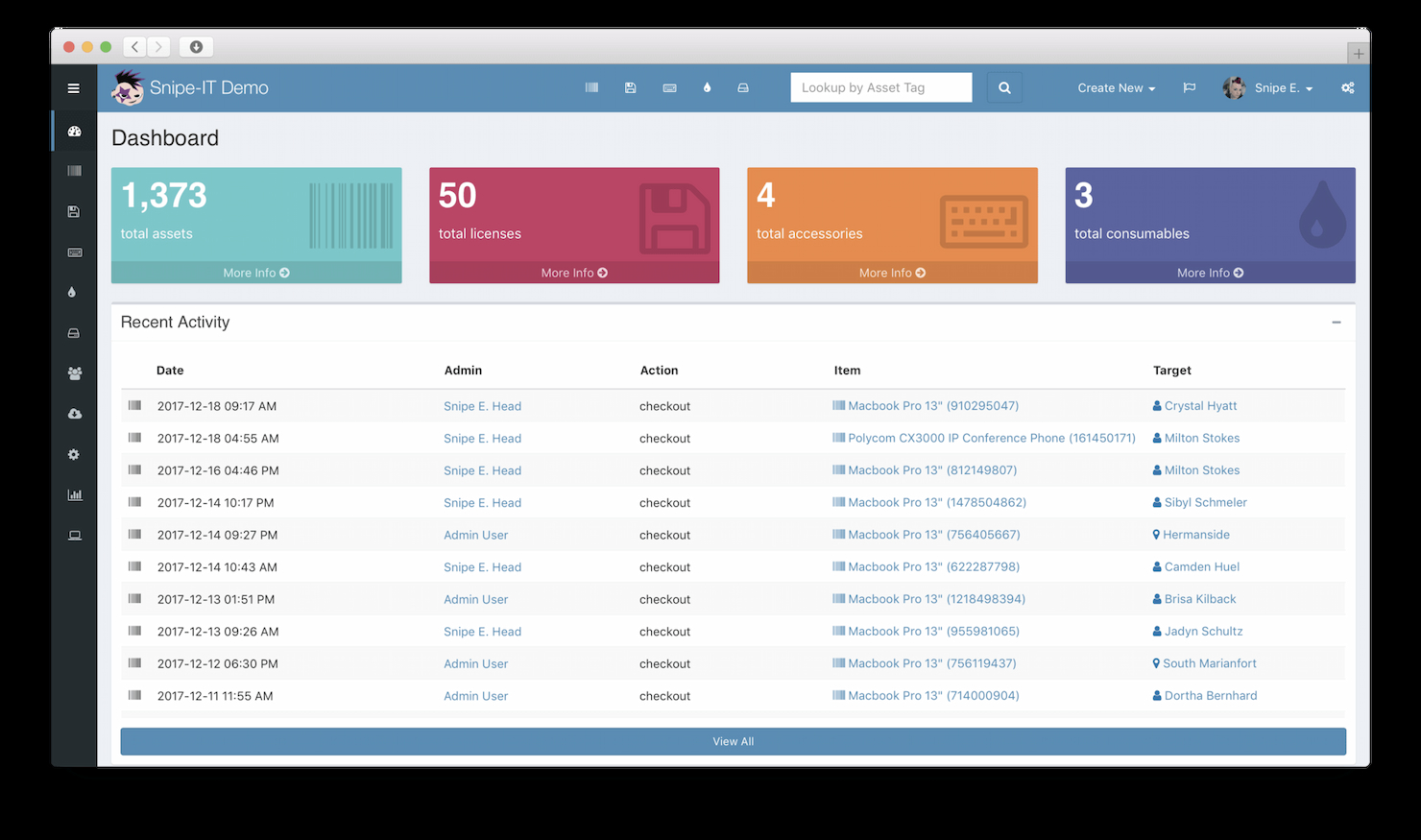
Snipe-IT est le logiciel ITAM open source le plus populaire sur le marché. Le logiciel permet aux entreprises de gérer les logiciels, licences, matériels, consommables et bien plus encore. Le code open source de la plateforme permet aux entreprises de personnaliser facilement la maintenance, les mises à jour et la sécurité de leurs actifs logiciels et matériels.
Pourquoi j'ai choisi Snipe-IT : J'ai choisi Snipe-IT pour sa capacité à vous permettre d'adapter le logiciel à vos besoins. Sa conception open source vous permet de modifier le logiciel à votre convenance pour une meilleure gestion de votre inventaire informatique comme les licences, les logiciels, les ordinateurs, les smartphones, etc.
Fonctionnalités remarquables et intégrations de Snipe-IT :
Parmi les fonctionnalités remarquables on retrouve un tableau de bord épuré offrant une vue d'ensemble sur les activités récentes des actifs, telles que le renouvellement d'une licence, un ordinateur prêté à un employé ou une notification concernant une expiration prochaine de licence. Un aspect qui sera particulièrement avantageux pour ceux qui recherchent une solution sur-mesure réside dans l’API REST incluse dans le logiciel. Elle permet d'intégrer l’application à votre propre système et ainsi d’optimiser la gestion de vos actifs informatiques directement dans votre flux de travail actuel.
Les intégrations comprennent LDAP et Active Directory, et l'outil dispose d'une API ouverte pour des options d'intégration avancées.
Pros and Cons
Pros:
- L'open source offre de remarquables possibilités de personnalisation
- Idéal pour gérer les actifs IT en mobilité
- Peut s'intégrer avec des lecteurs de codes-barres et de QR codes
Cons:
- Le logiciel a une courbe d'apprentissage abrupte
- La fonction de recherche peut prêter à confusion

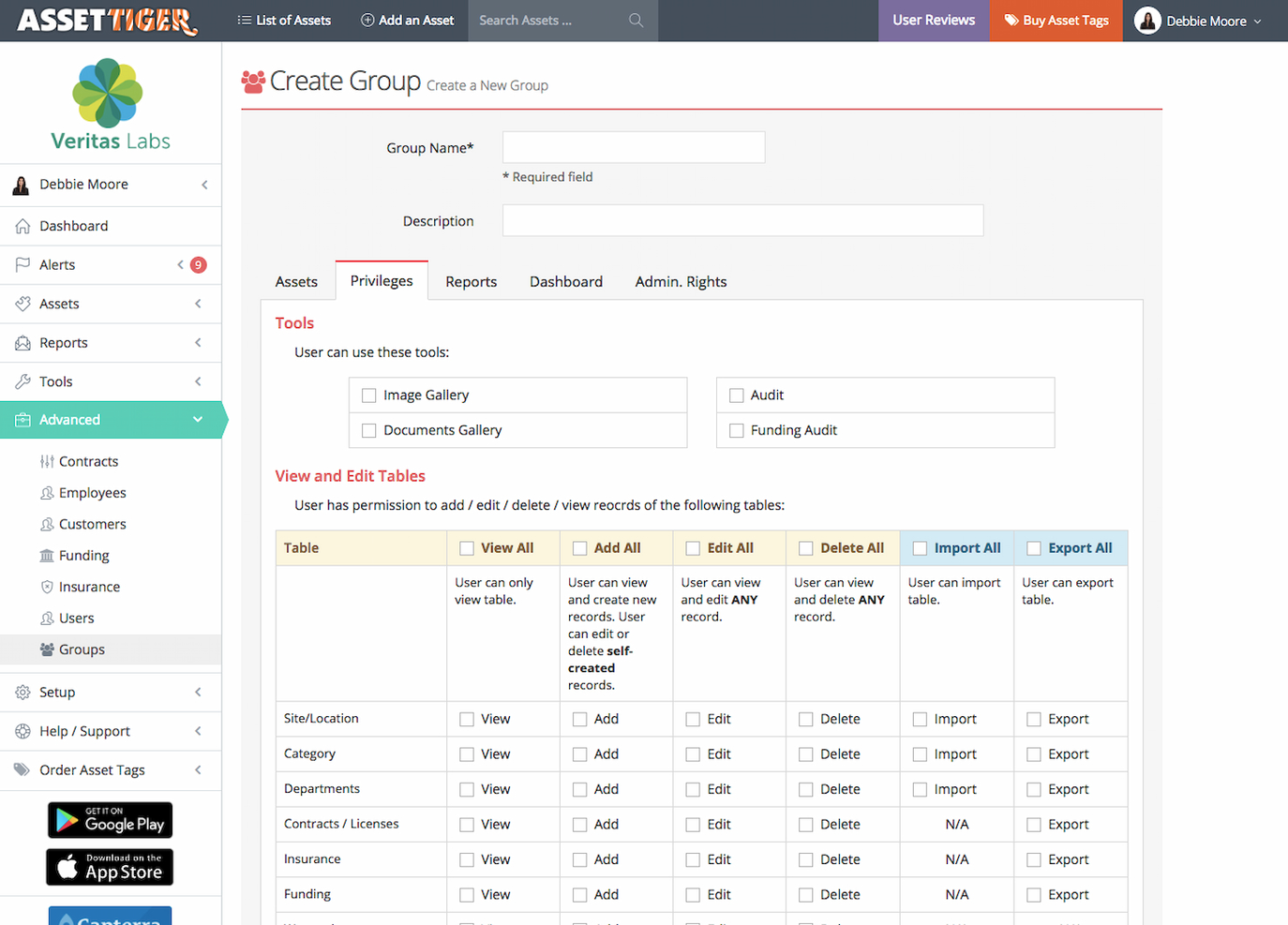
AssetTiger est une plateforme de gestion d'actifs qui vous aide à suivre vos immobilisations de façon conviviale. Leur outil vous permet d'ajouter un nombre illimité d'utilisateurs, de vous installer rapidement et de transformer votre smartphone en lecteur d'actifs numériques grâce à son application mobile intuitive.
Pourquoi j'ai choisi AssetTiger : La plateforme facilite la prise en main de la gestion des actifs pour tout le monde. Elle dispose d'un système convivial d'enregistrement et de retrait pour réserver rapidement et efficacement des actifs. J'apprécie la possibilité de réserver différents actifs à l'avance directement depuis votre téléphone.
Fonctionnalités remarquables et intégrations d'AssetTiger :
Fonctionnalités remarquables : rapports avancés pour suivre l'état des actifs (par dépréciation, périodes d'emprunt et exigences de maintenance). À mon avis, l'outil est l'un des meilleurs du marché pour créer des rapports personnalisés comme l'état des stocks ou l'utilisation globale. Une autre fonctionnalité intéressante est la possibilité pour les gestionnaires de configurer des alertes afin de les prévenir sur les échéances de contrats.
Intégrations : non disponible pour l'instant.
Pros and Cons
Pros:
- Plateforme conviviale
- Stocker les contrats et licences en un seul endroit
- Planifier facilement la maintenance du matériel
Cons:
- Pas encore d'intégrations tierces disponibles
- Possibilités limitées de personnalisation des champs

Bynder
Meilleur outil de gestion des ressources numériques pour l'évolutivité
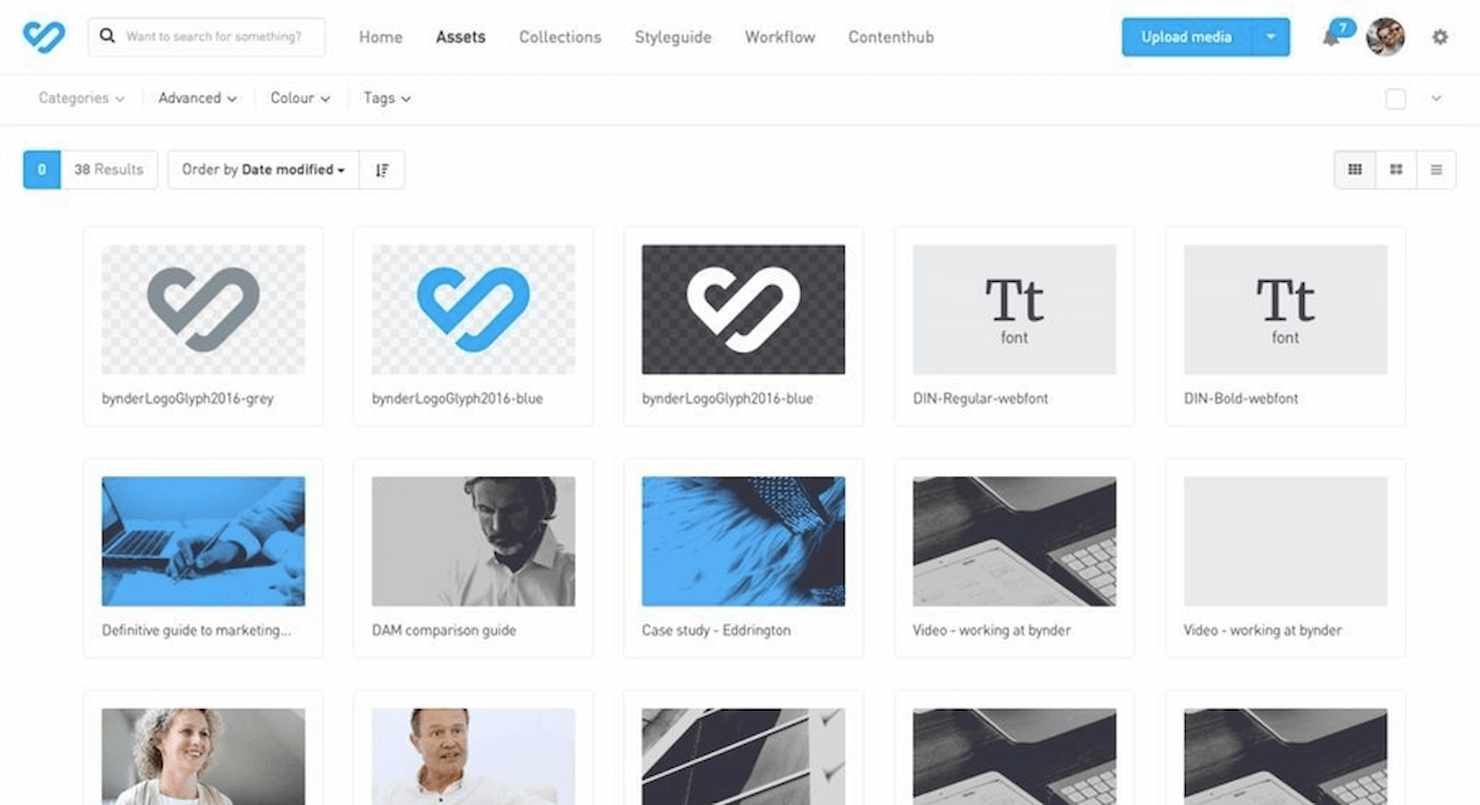
Bynder est un outil de gestion des ressources numériques (DAM) de premier plan, utilisé par Canon, Puma, Spotify et d'autres marques de renommée mondiale. La plateforme convient particulièrement aux organisations en phase de croissance souhaitant suivre leurs ressources numériques.
Pourquoi j'ai choisi Bynder : J'apprécie la façon dont la plateforme permet aux gestionnaires d'automatiser les flux de travail créatifs avec des parcours d'approbation personnalisables et la gestion des versions. À mon avis, les modèles de marque proposés sont très pratiques pour aider les équipes créatives et marketing à concevoir de nouveaux supports directement sur la plateforme.
Fonctionnalités et intégrations remarquables de Bynder :
Fonctionnalités remarquables : les services mondiaux AWS constituent, selon moi, une base solide pour les organisations qui veulent évoluer sans craindre que leur DAM ne flanche. J'aime aussi le fait que l’on puisse accéder à un studio vidéo pour éditer facilement différents supports marketing. De plus, la plateforme dispose d’un tableau de bord collaboratif que les graphistes peuvent utiliser pour modifier automatiquement les ressources.
Les intégrations incluent BloomReach, TYPO3, Google Workspace, Google Analytics, Wrike, Drupal 7, Drupal 8, Hootsuite et Microsoft Active Directory.
Pros and Cons
Pros:
- Intégration rapide des utilisateurs
- Modèles de marque pour un design cohérent
- Créez et gérez des ressources directement sur la plateforme
Cons:
- Peut parfois être lent à charger
- Le support client pourrait être amélioré
Autres logiciels de gestion d’actifs
Voici quelques options supplémentaires qui n’ont pas intégré la liste principale des logiciels de gestion d’actifs mais qui méritent d’être considérées :
- InvGate Asset Management
Idéal pour simplifier l'intégration des actifs informatiques
- Syncro
Idéal pour la surveillance et la gestion à distance des actifs en temps réel
- Prey
Idéal pour la visibilité des déplacements d'appareils


Avis connexes
Vous cherchez d’autres solutions et outils technologiques ? Voici quelques autres critiques logicielles réalisées par l’équipe du CTO Club :
- Plateforme cloud en tant que service
- Outils API
- Logiciels de stockage cloud
- Logiciels de virtualisation
- Outils d'infrastructure as code
- Services PaaS
- Outils de sécurité cloud
- Outils de monitoring DevOps
Critères de sélection pour un logiciel de gestion d’actifs
Pour sélectionner les meilleurs logiciels de gestion d’actifs à inclure dans cette liste, j’ai pris en compte les besoins courants des acheteurs et leurs difficultés comme le suivi efficace des actifs et le respect de la réglementation sur les données. J’ai aussi utilisé le cadre suivant pour garantir une évaluation structurée et équitable :
Fonctionnalité principale (25% de la note totale)
Pour figurer dans cette liste, chaque solution devait répondre à ces cas d’utilisation courants :
- Suivi de la localisation des actifs
- Gestion du cycle de vie des actifs
- Suivi des plannings de maintenance
- Génération de rapports de conformité
- Fourniture de pistes d’audit
Fonctionnalités supplémentaires remarquables (25% de la note totale)
Pour affiner la sélection, j’ai également recherché des fonctionnalités uniques telles que :
- Suivi des actifs en temps réel
- Tableaux de bord personnalisables
- Intégration avec des dispositifs IoT
- Outils avancés de reporting
- Accès via application mobile
Facilité d'utilisation (10 % du score total)
Pour évaluer la facilité d’utilisation de chaque système, j’ai pris en compte les éléments suivants :
- Interface utilisateur intuitive
- Navigation aisée
- Courbe d’apprentissage minimale
- Conception visuelle claire
- Performance réactive
Intégration des nouveaux utilisateurs (10 % du score total)
Pour évaluer l’expérience d’intégration sur chaque plateforme, j’ai pris en compte les aspects suivants :
- Disponibilité de vidéos de formation
- Tours interactifs du produit
- Accès aux modèles
- Assistance par chat pendant la configuration
- Webinaires pour nouveaux utilisateurs
Support client (10 % du score total)
Pour juger les services d’assistance de chaque éditeur de logiciel, j’ai pris en considération les points suivants :
- Disponibilité de l’assistance 24h/24, 7j/7
- Multiples canaux de contact
- Accès à une base de connaissances
- Efficacité du temps de réponse
- Assistance personnalisée
Rapport qualité/prix (10 % du score total)
Pour évaluer le rapport qualité/prix de chaque plateforme, j’ai pris en considération les éléments suivants :
- Tarification compétitive
- Abonnements flexibles
- Disponibilité d’une période d’essai gratuite
- Coût par rapport aux fonctionnalités offertes
- Remises sur les forfaits annuels
Avis des clients (10 % du score total)
Pour évaluer la satisfaction globale des clients, j’ai pris en compte les aspects suivants lors de la lecture des avis :
- Notes de satisfaction globale
- Fonctionnalités fréquemment mises en avant
- Réclamations récurrentes
- Retours des utilisateurs après mises à jour
- Témoignages d’entreprises similaires
Comment choisir un logiciel de gestion des actifs
Il est facile de se perdre dans des listes de fonctionnalités interminables et des structures tarifaires complexes. Pour vous aider à rester concentré lors de votre processus de sélection logicielle, voici une liste de points à garder à l’esprit :
| Facteur | À considérer |
|---|---|
| Évolutivité | Le logiciel évoluera-t-il avec votre entreprise ? Pensez à l’expansion future et vérifiez que l’outil peut gérer une augmentation des actifs et des utilisateurs sans accroc. |
| Intégrations | Est-il compatible avec vos systèmes existants ? Contrôlez la compatibilité avec des outils comme ERP, CRM ou logiciel DCIM déjà utilisés par votre équipe. |
| Personnalisation | Pouvez-vous l’adapter à vos processus ? Recherchez les options permettant de personnaliser les champs, les tableaux de bord et les rapports selon vos besoins spécifiques. |
| Facilité d’utilisation | Est-il convivial pour tous les membres de votre équipe ? Testez l’interface pour vérifier qu’elle est intuitive et réduit le temps de formation. |
| Mise en œuvre et intégration | Combien de temps faudra-t-il pour être opérationnel ? Évaluez le processus d’installation ainsi que les ressources telles que les tutoriels ou l’assistance pour faciliter la transition. |
| Coût | Correspond-il à votre budget ? Comparez les offres, en tenant compte des frais cachés tels que les frais d’installation ou les suppléments pour certaines fonctionnalités. |
| Garanties de sécurité | Vos actifs sont-ils protégés ? Vérifiez que le logiciel répond à vos exigences de sécurité, propose le chiffrement des données et respecte la réglementation du secteur. |
| Disponibilité du support | Quelle aide obtiendrez-vous en cas de problème ? Cherchez la disponibilité d’un support 24h/24, 7j/7 et consultez les avis des utilisateurs sur la qualité et la réactivité du service. |
Qu’est-ce qu’un logiciel de gestion des actifs ?
Un logiciel de gestion des actifs est un outil utilisé par les professionnels de l’informatique, les gestionnaires de site et les équipes financières afin d’optimiser l’utilisation des actifs et de minimiser les coûts. Ce logiciel offre un système centralisé pour suivre les équipements physiques, les actifs numériques et les licences logicielles tout au long de leur cycle de vie – de l’achat jusqu’à la mise au rebut.
Le suivi des inventaires, la planification de la maintenance et la création de rapports pour la conformité permettent une gestion efficace des actifs et facilitent la prise de décisions éclairées.
En consolidant les données à travers les services, ces outils favorisent une meilleure gestion du budget, la surveillance de la conformité et la planification de la maintenance, garantissant ainsi la sécurité, l’efficacité et le suivi complet de vos actifs.
Fonctionnalités d’un logiciel de gestion des actifs
Lors du choix d’un logiciel de gestion des actifs, portez une attention particulière aux caractéristiques suivantes :
- Suivi des stocks : Gardez le contrôle de vos actifs grâce à un suivi en temps réel, afin de toujours savoir où se trouvent vos équipements, matériels ou outils. Cette fonctionnalité simplifie les audits et aide à prévenir la perte ou l’égarement.
- Gestion du cycle de vie : Surveillez chaque étape du parcours d’un actif – de l’acquisition à la mise au rebut. Cela vous permet de planifier les remplacements, d’organiser la maintenance et de recueillir des données clés pour maximiser la durée de vie et la valeur de chaque actif.
- Planification de la maintenance : Programmez automatiquement des rappels d’entretien réguliers pour vos actifs. Une maintenance ponctuelle peut prolonger la vie des équipements, réduire les interruptions et fluidifier vos opérations.
- Gestion de la conformité : Garantissez que tous les actifs respectent les normes réglementaires et de sécurité. Recevez des rappels d’inspection et générez des rapports pour être toujours prêt pour les audits et sûr de respecter la réglementation.
- Intégration code-barres/RFID : Utilisez les technologies code-barres ou RFID pour enregistrer rapidement les entrées et sorties des actifs, accélérer les audits physiques et réduire les erreurs de saisie manuelle. Cela ajoute une couche de précision supplémentaire à la gestion des actifs.
- Rapports et analyses : Produisez des rapports détaillés pour identifier des tendances, repérer les goulets d’étranglement et prendre de meilleures décisions d’investissement. Les bonnes informations vous aident à réduire les coûts et à optimiser l’allocation des ressources.
- Autorisations et rôles utilisateurs : Contrôlez qui peut accéder, modifier ou gérer différents types d’actifs. Cela garantit la sécurité des données et clarifie la collaboration : chacun connaît ses responsabilités.
- Accessibilité mobile : Gérez vos actifs où que vous soyez grâce à une interface adaptée aux mobiles ou à une application dédiée. Cette fonctionnalité est particulièrement utile pour les équipes sur le terrain ou celles ayant besoin de mises à jour en temps réel lors de leurs déplacements.
- Suivi de la dépréciation : Suivez la valeur de vos actifs dans le temps avec des calculs automatisés, pour toujours être prêt pour la comptabilité, les déclarations fiscales ou la revente.
- Capacités d’intégration : Connectez facilement votre logiciel de gestion des actifs à d’autres outils, comme les systèmes financiers, les plateformes d’achats et les solutions de support technique, afin de garder vos données synchronisées et de fluidifier vos flux de travail.
Fonctionnalités d’IA courantes dans les logiciels de gestion des actifs
Au-delà des fonctionnalités standards listées ci-dessus, de nombreuses solutions intègrent l’IA avec des fonctions comme :
- Maintenance prédictive : L’IA analyse les données historiques et les tendances d’utilisation pour anticiper le moment où un actif devra être entretenu, ce qui permet d’éviter les pannes inattendues et de réduire les interruptions coûteuses.
- Catégorisation automatique des actifs : L’IA classe automatiquement les nouveaux actifs dans les bonnes catégories grâce à des algorithmes de reconnaissance intelligente, vous évitant ainsi la saisie manuelle chronophage.
- Détection des anomalies : L’IA analyse en continu les usages des actifs et signale toute irrégularité, permettant de repérer rapidement une fraude éventuelle, un mauvais usage ou un problème technique avant qu’il ne s’aggrave.
- Optimisation intelligente des stocks : L’IA calcule les niveaux de stock optimaux et suggère les seuils de réapprovisionnement d’après les schémas d’utilisation, garantissant ainsi la continuité d’activité sans surstockage.
- Évaluation avancée des risques : L’IA exploite des données multisources pour vous donner une vue précise et en temps réel des risques associés à chaque actif, aidant à prioriser inspections ou mises à niveau.
- Recherche en langage naturel : Une recherche pilotée par IA comprend les requêtes formulées en français courant, ce qui facilite la recherche d’informations sur les actifs, même sans connaître leurs noms exacts ou leurs références précises.
Avantages
La mise en place d’un logiciel de gestion des actifs procure de nombreux bénéfices pour votre équipe et votre entreprise. Voici quelques avantages auxquels vous pouvez vous attendre :
- Efficacité accrue : Automatise le suivi et la production de rapports, libérant du temps pour des tâches plus stratégiques.
- Réduction des coûts : Optimise l’utilisation des actifs et limite les achats inutiles grâce à une vision claire des ressources existantes.
- Meilleure conformité : Facilite la conformité aux normes du secteur grâce à des rapports automatisés et des pistes d’audit.
- Aide à la décision : Fournit des données en temps réel et des outils de reporting avancés pour des décisions éclairées et réactives.
- Durée de vie prolongée des actifs : Programme un entretien régulier pour éviter les pannes et prolonger la durée de vie des équipements.
- Transparence accrue : Offre une visibilité sur les mouvements et l’utilisation des actifs, facilitant le contrôle et la responsabilité.
- Évolutivité : S’adapte à la croissance de votre entreprise, en prenant en charge un nombre croissant d’actifs et d’utilisateurs au fil du temps.
Coûts & Tarification
La sélection d’un logiciel de gestion des immobilisations nécessite de comprendre les différents modèles de tarification et forfaits disponibles. Les coûts varient selon les fonctionnalités, la taille de l’équipe, les modules complémentaires et plus encore. Le tableau ci-dessous résume les forfaits courants, leurs prix moyens et les fonctionnalités typiques généralement incluses dans les solutions de gestion des actifs :
Tableau comparatif des plans pour les logiciels de gestion des actifs
| Type de plan | Prix moyen | Fonctionnalités courantes |
|---|---|---|
| Plan gratuit | $0 | Suivi basique des actifs, utilisateurs limités, et rapports élémentaires. |
| Plan personnel | $5-$25/utilisateur/mois | Suivi des actifs, planification de maintenance, rapports de base et accès mobile. |
| Plan entreprise | $30-$60/utilisateur/mois | Suivi avancé, capacités d’intégration, tableaux de bord personnalisables et rapports de conformité. |
| Plan entreprise avancé | $70-$150/utilisateur/mois | Ensemble complet de fonctionnalités, analyses avancées, support dédié, utilisateurs et actifs illimités. |
FAQ sur les logiciels de gestion des actifs
Voici quelques réponses aux questions fréquentes concernant les logiciels de gestion des actifs :
Le logiciel de gestion des actifs peut-il s’intégrer aux systèmes existants ?
Comment le logiciel de gestion des actifs améliore-t-il la conformité ?
Une formation est-elle nécessaire pour utiliser un logiciel de gestion des actifs ?
Et ensuite ?
Si vous recherchez un logiciel de gestion des actifs, contactez gratuitement un conseiller SoftwareSelect pour recevoir des recommandations.
Remplissez un formulaire et discutez de vos besoins spécifiques. Vous recevrez une liste restreinte de logiciels à examiner et un accompagnement tout au long du processus d’achat, y compris dans la négociation des prix.