

Gestionar la seguridad de los contenedores puede resultar abrumador. Hay que ocuparse del cumplimiento normativo, la protección de datos y la amenaza constante de las brechas de seguridad. No es fácil, y lo entiendo. Por eso he probado y analizado las mejores soluciones de seguridad de contenedores para ti.
Según mi experiencia, la herramienta adecuada puede marcar una gran diferencia. Estas soluciones ayudan a proteger tu infraestructura y te ofrecen tranquilidad. Te presentaré mis principales opciones, centrándome en sus ventajas únicas y en cómo pueden adaptarse a las necesidades de tu equipo.
Encontrarás un análisis detallado e imparcial que va directo al grano. Descubramos la herramienta que mejor responde a tus desafíos y respalda tus objetivos de desarrollo.
Por qué confiar en nuestras recomendaciones de software
6,700+
Reviews
20
Industry experts
16+
Evaluation factors
14
Years
Nuestro equipo lleva probando y evaluando software desde 2012. Como líderes tecnológicos, sabemos lo difícil —y lo importante— que es elegir el software adecuado.
Para esta guía, evaluamos las herramientas mediante pruebas prácticas e investigación independiente, puntuando las herramientas según nuestros criterios de selección.
Nuestras reseñas reflejan nuestro criterio editorial humano, no un discurso de ventas.
Revisores expertos:
- Paulo Gardini MiguelDirector técnico
 Tim FisherVP de IA
 Gabriel RosasTech Lead y arquitecto de software
 Christhian GruhnTech Lead y arquitecto de plataforma

Tabla comparativa de soluciones de seguridad de contenedores
Esta tabla comparativa resume los detalles de precios de mis principales selecciones de soluciones de seguridad de contenedores:
| Tool | Best For | Trial Info | Price | ||
|---|---|---|---|---|---|
| 1 | La mejor opción para la postura y las auditorías de cumplimiento de Kubernetes | Prueba gratuita de 30 días + demostración gratuita disponible | Precio bajo solicitud | Website | |
| 2 | Ideal para corregir automáticamente vulnerabilidades de contenedores | Plan gratuito disponible | Desde $350/mes | Website | |
| 3 | La mejor opción para el análisis de rutas de ataque de contenedores nativos de Azure | Prueba gratuita de 30 días | Desde 15 $/usuario/mes (facturado anualmente) | Website | |
| 4 | Mejor para evaluar el riesgo de los contenedores en toda la pila | Prueba gratuita de 14 días | Precio bajo solicitud | Website | |
| 5 | Ideal para el análisis de vulnerabilidades y cumplimiento | Prueba gratuita de 7 días | Precio bajo solicitud | Website | |
| 6 | La mejor opción para una seguridad nativa de la nube integral | Prueba gratuita de 30 días | Precio disponible bajo solicitud | Website | |
| 7 | La mejor para prevenir desviaciones en tiempo de ejecución en contenedores | Prueba gratuita disponible | Precios bajo solicitud | Website | |
| 8 | La mejor opción para la visibilidad y el análisis forense de contenedores | Demostración gratuita disponible | Precios bajo solicitud | Website | |
| 9 | Ideal para la priorización de vulnerabilidades basada en el tiempo de ejecución | Demostración gratuita disponible | Precio bajo consulta | Website | |
| 10 | La mejor opción para la seguridad nativa de la cadena de suministro de Kubernetes | Prueba gratuita de 60 días | Precios bajo solicitud | Website |


Análisis de las mejores soluciones de seguridad de contenedores
A continuación encontrarás mis resúmenes detallados de las mejores soluciones de seguridad de contenedores que llegaron a mi lista. Mis análisis ofrecen una visión detallada de las funciones principales, ventajas y desventajas, integraciones y casos de uso ideales de cada herramienta para ayudarte a encontrar la mejor opción para ti.
 La mejor opción para la postura y las auditorías de cumplimiento de Kubernetes
- Prueba gratuita de 30 días + demostración gratuita disponible
- Precio bajo solicitud
Visit WebsiteCustomer Rating:4.5/5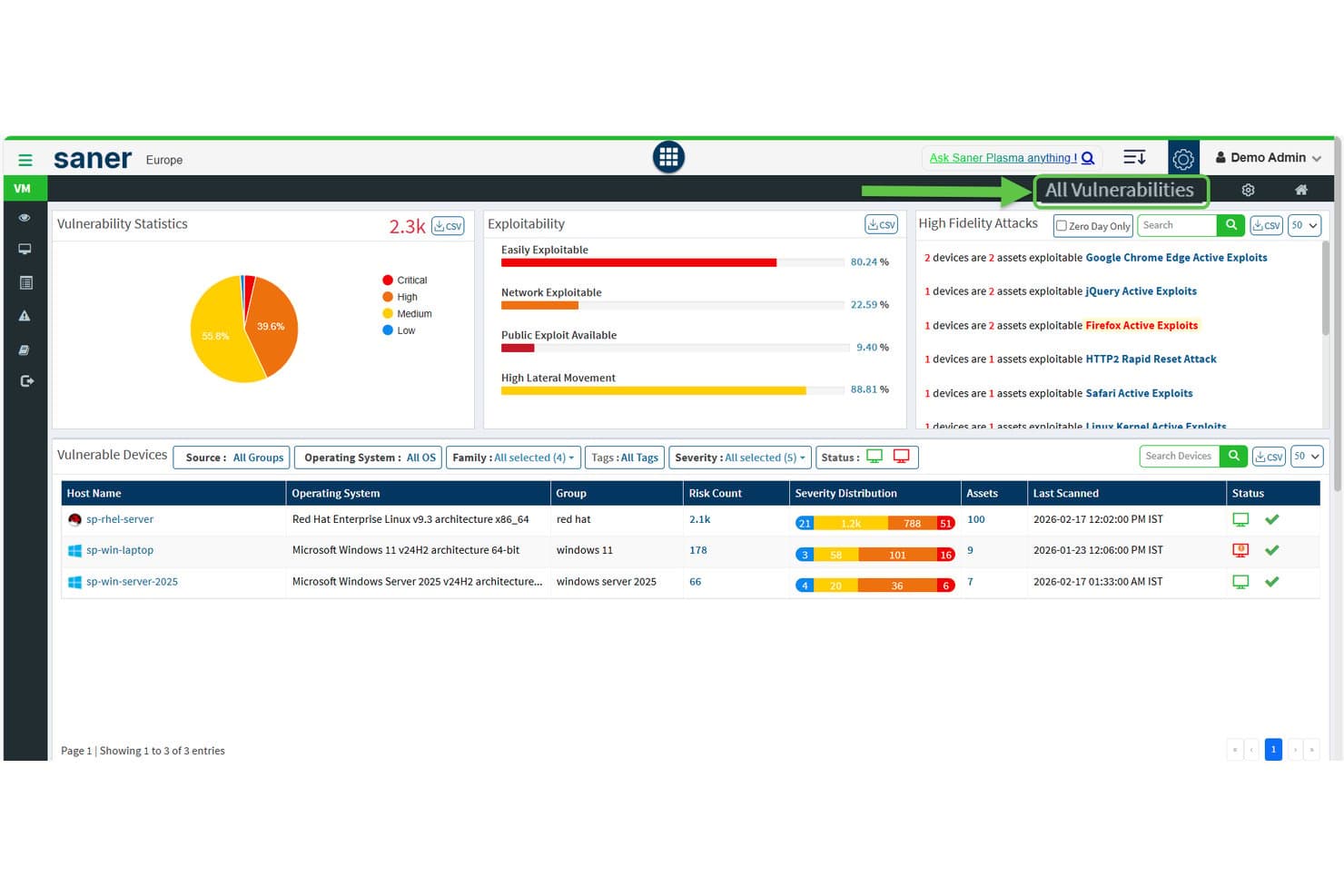
SecPod (Saner Platform) muestra estadísticas de vulnerabilidades y explotabilidad en todos los dispositivos. Saner COSP (Plataforma de seguridad de orquestación de contenedores) es el módulo de seguridad de Kubernetes de SecPod dentro de su CNAPP más amplio, que abarca la gestión de la postura de los clústeres, la exposición de activos, el análisis de derechos RBAC, las auditorías de cumplimiento y la detección de anomalías en EKS, AKS, GKE y clústeres locales.
¿Para quién es más adecuada SecPod?
Saner COSP de SecPod es una opción ideal para arquitectos de seguridad en la nube y responsables de seguridad que gestionan entornos de Kubernetes con múltiples clústeres y priorizan la postura de configuración, las auditorías de RBAC y los informes de cumplimiento por encima de la detección en tiempo de ejecución o el análisis de imágenes previo al despliegue.
Por qué elegí SecPod (Saner Platform)
Elegí SecPod como una de las mejores opciones porque su módulo Saner COSP profundiza más en la postura de Kubernetes y las auditorías de cumplimiento que la mayoría de las herramientas que he evaluado. Me gusta especialmente cómo COSP asigna los derechos RBAC entre usuarios, cuentas de servicio y roles de clúster, y señala los permisos comodín y los roles que no se han utilizado durante 30 días. Su gestión de la postura verifica los clústeres simultáneamente con CIS, NIST 800-53, PCI DSS y HIPAA, con referencias de evaluación personalizadas por espacio de nombres.
Características principales de SecPod (Saner Platform)
- Mapeo de la exposición de activos: Detecta y supervisa espacios de nombres, pods, servicios, entradas, mapas de configuración y secretos, y señala los recursos expuestos a Internet y los puertos abiertos en los clústeres.
- Puntuación de higiene de la orquestación de contenedores: Agrega los resultados de exposición, configuración, control de acceso y seguridad de las cargas de trabajo en una única puntuación que permite comparar clústeres y espacios de nombres a lo largo del tiempo.
- Priorización de riesgos basada en SSVC: Utiliza un árbol de decisión SSVC de CISA para clasificar los hallazgos según la explotabilidad, el impacto en la misión y el potencial de automatización, con resultados asignados a MITRE ATT&CK.
- Reglas de corrección automatizada: Permite configurar correcciones programadas o basadas en activadores para los problemas detectados, con compatibilidad con la reversión si es necesario deshacer una corrección aplicada.
Integraciones de SecPod (Saner Platform)
Las integraciones incluyen Amazon EKS, Microsoft AKS, Google GKE, Kubernetes autogestionado, Freshservice, AWS, Azure y Google Cloud. Las API REST y de informes permiten conexiones personalizadas, mientras que Okta, Azure AD, Auth0, PingID y PingFederate proporcionan integraciones de identidad.
Pros and Cons
Pros:
- Análisis exhaustivo de la exposición de Kubernetes y RBAC
- Informes de cumplimiento con múltiples marcos y referencias de evaluación personalizadas
- La corrección automatizada incluye compatibilidad con la reversión
Cons:
- No ofrece análisis de imágenes de contenedores previo al despliegue
- No ofrece detección de amenazas en tiempo real dentro de los contenedores
Learn more about SecPod (Saner Platform): Ideal para corregir automáticamente vulnerabilidades de contenedores
- Plan gratuito disponible
- Desde $350/mes
Visit WebsiteCustomer Rating:4.7/5
Aikido Security proporciona un panel unificado para clasificar y filtrar problemas por tipo, gravedad y fuente del análisis. Aikido Security es una plataforma de seguridad de aplicaciones nativa para desarrolladores que combina el análisis de imágenes de contenedores, SAST, SCA, la detección de secretos, CSPM y la protección del tiempo de ejecución en la aplicación en entornos de nube y CI/CD.
¿Para quién es más adecuada Aikido Security?
Aikido Security es una opción ideal para equipos de DevSecOps que quieren detectar y corregir vulnerabilidades de contenedores antes del despliegue, sin añadir la sobrecarga de agentes ni herramientas complejas.
Por qué elegí Aikido Security
Elegí Aikido Security como una de las mejores opciones porque ninguna otra herramienta de esta lista gestiona las correcciones de vulnerabilidades de imágenes base como lo hace esta. En lugar de limitarse a señalar una imagen base vulnerable, genera de tres a cinco variantes de Dockerfile listas para fusionar, cada una anotada con los CVE exactos que se corrigen o introducen. Si se combina esto con su biblioteca de más de 2.000 imágenes base reforzadas sin CVE, el equipo puede sustituir una imagen base de riesgo sin tener que adivinar las ventajas y desventajas.
Características principales de Aikido Security
- Análisis de alcanzabilidad: Confirma si las funciones vulnerables de las dependencias se invocan realmente en el código base, reduciendo los falsos positivos hasta en un 95 %.
- Generación de SBOM: Exporta listas de materiales de software en formatos CycloneDX, SPDX y CSV, con análisis de explotabilidad VEX, accesibles mediante API para flujos de trabajo automatizados.
- Control de acceso de canalizaciones CI/CD: Bloquea los despliegues según umbrales de gravedad configurables en GitHub Actions, GitLab CI/CD, Jenkins, Azure Pipelines, CircleCI y Bitbucket Pipelines.
- Fuente de inteligencia sobre amenazas Aikido Intel: Una fuente patentada en tiempo real que detecta vulnerabilidades no divulgadas y malware en ecosistemas de código abierto en un plazo de 8 minutos desde su publicación.
Integraciones de Aikido Security
Aikido Security ofrece integraciones nativas con GitHub, GitLab, Bitbucket, Azure Repos, seis plataformas de CI/CD y más de 12 registros de contenedores, incluidos Amazon ECR, Harbor, JFrog y Docker Hub. También se conecta con AWS, Azure, GCP, Jira y Vanta, con acceso a la API para flujos de trabajo personalizados.
Pros and Cons
Pros:
- Genera automáticamente correcciones seguras de Dockerfile para las imágenes
- Reduce los falsos positivos mediante el análisis de alcanzabilidad
- Proporciona más de 2.000 imágenes base sin CVE
Cons:
- No ofrece detección del tiempo de ejecución de contenedores basada en eBPF
- Carece de integración nativa de control de admisión de Kubernetes
Learn more about Aikido Security: La mejor opción para el análisis de rutas de ataque de contenedores nativos de Azure
- Prueba gratuita de 30 días
- Desde 15 $/usuario/mes (facturado anualmente)

Microsoft Defender for Cloud filtra las recomendaciones de vulnerabilidades por tipo de recurso Contenedor. Microsoft Defender for Cloud es una plataforma nativa de protección de aplicaciones en la nube (CNAPP) que abarca el análisis de imágenes de contenedores, la detección de amenazas en tiempo de ejecución, la gestión de la postura de Kubernetes, la seguridad de las canalizaciones de CI/CD y la aplicación de políticas en entornos de Azure, AWS y GCP.
¿Para quién es más adecuado Microsoft Defender for Cloud?
Es una opción sólida para los equipos de seguridad nativos de Azure que necesitan rastrear las rutas de ataque de los contenedores a través de los recursos en la nube sin incorporar una CNAPP independiente.
Por qué elegí Microsoft Defender for Cloud
Elegí Microsoft Defender for Cloud porque su gráfico de seguridad en la nube hace algo que no he visto igualado en entornos nativos de Azure: rastrea las rutas de ataque explotables desde un contenedor expuesto públicamente hasta los activos críticos en la nube, pasando por RBAC mal configurado, rutas de red laterales e identidades con permisos excesivos. Esta priorización contextual significa que no persigo recuentos brutos de CVE, sino que corrijo las rutas que realmente son explotables. También me gusta que la implementación controlada de Kubernetes bloquee las imágenes que no cumplen las normas en el momento del despliegue en AKS, EKS y GKE, convirtiendo los hallazgos de postura en políticas aplicadas en lugar de simples recomendaciones.
Características principales de Microsoft Defender for Cloud
- Análisis de imágenes en múltiples registros: La evaluación de vulnerabilidades sin agentes analiza imágenes de contenedores en ACR, ECR, GAR, GCR, Docker Hub y JFrog Artifactory, con nuevos análisis diarios que abarcan paquetes del sistema operativo y de lenguajes.
- Detección de amenazas asignada a MITRE ATT&CK: Más de 60 análisis integrados vinculados al marco MITRE ATT&CK para contenedores detectan actividad sospechosa en los niveles de clúster, nodo y carga de trabajo.
- Integración de Defender CLI con CI/CD: Una herramienta de línea de comandos incorpora el análisis de imágenes en más de 11 plataformas de CI/CD, incluidas GitHub Actions, Jenkins y GitLab, con controles de aprobación o rechazo basados en SARIF.
- SCA basada en la alcanzabilidad mediante Endor Labs: Una integración con Endor Labs identifica qué vulnerabilidades en las dependencias de los contenedores son realmente alcanzables en tiempo de ejecución, lo que reduce el ruido en las colas de corrección.
Integraciones de Microsoft Defender for Cloud
Microsoft Defender for Cloud ofrece integraciones nativas con AKS, Amazon EKS, Google GKE, Azure Container Registry, Amazon ECR, GitHub Actions, Jenkins, GitLab, Microsoft Defender XDR y Microsoft Sentinel. Admite 12 integraciones de CI/CD documentadas, además de GitHub Advanced Security, Endor Labs y Azure Arc.
Pros and Cons
Pros:
- Análisis de rutas de ataque desde el contenedor hasta la nube
- Análisis de imágenes sin agentes en los principales registros
- Despliegue controlado de Kubernetes para aplicar políticas
Cons:
- Las funciones multinube están por detrás de la paridad con Azure
- Usuarios empresariales informan de una interfaz compleja
Learn more about Microsoft Defender for Cloud: 4Mejor para evaluar el riesgo de los contenedores en toda la pila
Wiz
- Prueba gratuita de 14 días
- Precio bajo solicitud

Wiz organiza las imágenes de contenedor por ciclo de vida, gravedad y cantidad de vulnerabilidades. Wiz es una plataforma de protección de aplicaciones nativa de la nube (CNAPP) que combina el análisis de imágenes sin agentes, la gestión de la postura de seguridad de Kubernetes, la detección de amenazas en tiempo de ejecución, la integración con canalizaciones de CI/CD y el análisis de rutas de ataque en una única plataforma unificada.
¿Para quién es más adecuado Wiz?
Wiz es una opción sólida para equipos de seguridad empresariales que gestionan entornos multinube y necesitan una única plataforma para evaluar y priorizar el riesgo de los contenedores en toda la pila, desde el código hasta el tiempo de ejecución.
Por qué elegí Wiz
Wiz ocupa un lugar en mi lista de opciones principales porque ninguna otra plataforma correlaciona el riesgo de los contenedores en toda la pila de la manera en que lo hace su gráfico de seguridad. En lugar de mostrar miles de CVE sin procesar, establece relaciones entre vulnerabilidades, configuraciones incorrectas, secretos expuestos y exposición de red para identificar rutas de ataque realmente explotables. También me gusta que su KSPM abarque EKS, AKS y GKE con evaluaciones sin agentes certificadas por CIS, rastreando el movimiento lateral desde los clústeres de Kubernetes hasta las capas de nube subyacentes.
Características principales de Wiz
- Sensor de tiempo de ejecución Wiz Defend: Un sensor basado en eBPF que supervisa las llamadas al sistema, la actividad de los procesos y los flujos de red en las cargas de trabajo contenerizadas, con una sobrecarga de CPU inferior al 2 %.
- Controlador de admisión de Wiz: Un webhook nativo de Kubernetes que impide la implementación de imágenes de contenedor que no cumplen las normas o no están firmadas, según políticas de seguridad definidas de forma centralizada.
- Generación de SBOM: Creación continua y sin agentes de listas de materiales de software en registros, canalizaciones de CI/CD y entornos de tiempo de ejecución, con visibilidad completa a nivel de paquete.
- Wiz Workflows: Manuales personalizados basados en Python que automatizan acciones de corrección, como revocar roles en la nube, rotar credenciales y bloquear el acceso a depósitos de almacenamiento.
Integraciones de Wiz
Wiz ofrece integraciones nativas con GitHub Actions, Jenkins, GitLab CI/CD, Azure DevOps, Amazon ECR, Google Artifact Registry, Azure Container Registry, Docker Hub, Jira y ServiceNow. También se conecta con Splunk, Microsoft Sentinel, Cosign y Notary.
Pros and Cons
Pros:
- La configuración sin agentes encuentra riesgos en cuestión de horas
- El gráfico de seguridad identifica las verdaderas rutas de ataque
- Postura certificada por CIS para todos los principales entornos de Kubernetes
Cons:
- La detección de amenazas en tiempo de ejecución es relativamente nueva
- Algunos flujos de trabajo de búsqueda de eventos resultan poco intuitivos
Learn more about Wiz: Ideal para el análisis de vulnerabilidades y cumplimiento
- Prueba gratuita de 7 días
- Precio bajo solicitud

Qualys Container Security realiza un seguimiento de las imágenes, los contenedores y las vulnerabilidades de los equipos anfitriones según su gravedad. Qualys Container Security (CS) es una plataforma de seguridad de contenedores que abarca el análisis de vulnerabilidades de imágenes, la detección de amenazas en tiempo de ejecución, la gestión de la postura de seguridad de Kubernetes y las auditorías de cumplimiento durante todo el ciclo de vida de los contenedores, desde las canalizaciones de CI/CD hasta la producción.
¿Para quién es más adecuado Qualys Container Security (CS)?
Qualys Container Security es una opción sólida para los equipos de seguridad de sectores regulados que necesitan consolidar el análisis de vulnerabilidades, las auditorías de cumplimiento y la detección de amenazas en tiempo de ejecución en una sola plataforma.
Por qué elegí Qualys Container Security (CS)
He incluido Qualys Container Security entre mis principales opciones porque su puntuación TruRisk va más allá del CVSS sin procesar, ya que tiene en cuenta señales de explotabilidad del mundo real, como los datos de CISA KEV y la actividad de ransomware, para que tu equipo se centre en las vulnerabilidades que realmente importan. Los controles de cumplimiento de CIS Docker Benchmark v1.7.0 y Kubernetes se aplican continuamente, no solo cuando se comprueban bajo demanda. También me gusta que las exportaciones de SBOM en los formatos SPDX y CycloneDX vienen integradas, algo importante cuando necesitas transparencia de la cadena de suministro con rapidez.
Características principales de Qualys Container Security (CS)
- Controlador de admisión de Kubernetes: Intercepta las solicitudes de la API de Kubernetes y evalúa las políticas de seguridad de la organización antes de que las cargas de trabajo se implementen en el clúster.
- CLI de QScanner: Una herramienta de línea de comandos que no requiere instalación y que analiza imágenes de contenedores locales y remotas, y proporciona los resultados en formatos JSON, SARIF o SBOM para su integración en canalizaciones.
- Sensor de tiempo de ejecución de contenedores basado en eBPF: Supervisa los procesos de los contenedores, la actividad de los archivos, las llamadas al sistema y los flujos de red a nivel del kernel sin requerir un contenedor auxiliar ni privilegiado.
- Análisis de rutas de ataque: Correlaciona las vulnerabilidades de los contenedores, las configuraciones incorrectas de la nube y los permisos excesivos para visualizar rutas explotables entre contenedores, nodos y recursos de la nube.
Integraciones de Qualys Container Security (CS)
Qualys Container Security ofrece integraciones nativas con GitLab CI/CD y Azure DevOps, además de compatibilidad con Jenkins e integraciones de registros para Amazon ECR, Azure Container Registry, GitHub Container Registry, JFrog Artifactory y Harbor. QScanner y las API admiten flujos de trabajo de CI/CD personalizados.
Pros and Cons
Pros:
- La puntuación TruRisk destaca las vulnerabilidades realmente explotables
- La protección en tiempo de ejecución basada en eBPF cubre los ataques a nivel del kernel
- La generación de SBOM favorece la transparencia de la cadena de suministro de software
Cons:
- El modelo de licencias es complejo de interpretar
- Las acciones de corrección requieren la intervención manual del equipo
Learn more about Qualys Container Security (CS): La mejor opción para una seguridad nativa de la nube integral
- Prueba gratuita de 30 días
- Precio disponible bajo solicitud

Prisma Cloud realiza un seguimiento de las vulnerabilidades de las imágenes de contenedores en toda la canalización. Prisma Cloud es una plataforma de protección de aplicaciones nativas de la nube (CNAPP) de Palo Alto Networks que combina el análisis de imágenes de contenedores, la detección de amenazas en tiempo de ejecución, la gestión de la postura de seguridad de Kubernetes, la integración con canalizaciones de CI/CD y la auditoría de cumplimiento en entornos multinube.
¿Para quién es más adecuado Prisma Cloud?
Prisma Cloud es una opción sólida para los equipos de seguridad empresarial que gestionan entornos multinube y necesitan una única plataforma que cubra todo el ciclo de vida de los contenedores, desde el código hasta el tiempo de ejecución.
Por qué elegí Prisma Cloud
Prisma Cloud ocupa un lugar en mi lista de opciones preferidas porque cubre una mayor parte del ciclo de vida de la seguridad de los contenedores en una sola plataforma que cualquier otra que haya evaluado. Me gusta especialmente su arquitectura dual, sin agentes y basada en agentes: permite obtener visibilidad inmediata en todo un entorno multinube sin tocar un solo nodo y, después, añadir agentes Defender para aplicar controles profundos en tiempo de ejecución donde realmente importa. El análisis de rutas de ataque es lo que realmente lo diferencia, ya que correlaciona las CVE, las configuraciones incorrectas de IAM y la exposición de red en un gráfico visual, para que puedas corregir los riesgos que son realmente explotables.
Características principales de Prisma Cloud
- Entorno aislado para el análisis de imágenes: Ejecuta dinámicamente las imágenes de contenedores en un entorno aislado para detectar malware o actividad de criptominería antes de que las imágenes lleguen a producción.
- Cobertura de marcos de cumplimiento: Ejecuta más de 400 comprobaciones listas para usar en relación con marcos como CIS, NIST SP 800-190, PCI DSS, HIPAA, FedRAMP High y DISA STIG.
- Generación de listas de materiales de software: Produce automáticamente listas de materiales de software como parte del módulo de seguridad de la cadena de suministro, para ofrecer a los equipos una visibilidad completa de las dependencias de código abierto.
- Establecimiento de líneas base de comportamiento: Crea perfiles de la actividad normal de los procesos, del sistema de archivos y de la red de los contenedores durante un periodo de aprendizaje inicial y, posteriormente, marca o bloquea las desviaciones en tiempo real.
Integraciones de Prisma Cloud
Prisma Cloud ofrece integraciones nativas con Jenkins, GitHub Actions, CircleCI, AWS CodeBuild, Azure DevOps, Google Cloud Build, Docker Hub, Amazon ECR, Google Container Registry y Azure Container Registry.
Pros and Cons
Pros:
- El análisis de rutas de ataque visualiza escenarios de explotación reales
- Opciones de implementación duales, sin agentes y basadas en agentes
- Más de 400 comprobaciones de cumplimiento normativo
Cons:
- El gran volumen de alertas puede saturar a los equipos pequeños
- Configuración compleja para entornos multinube
Learn more about Prisma Cloud: La mejor para prevenir desviaciones en tiempo de ejecución en contenedores
- Prueba gratuita disponible
- Precios bajo solicitud

El explorador de cargas de trabajo de Aqua proporciona una vista de topología para la seguridad de los clústeres de Kubernetes. Aqua Security es una plataforma de seguridad de contenedores basada en la protección en tiempo de ejecución mediante eBPF, el análisis de vulnerabilidades de imágenes, la gestión de la postura de seguridad de Kubernetes y la seguridad de la cadena de suministro de software en entornos multinube e híbridos.
¿Para quién es más adecuada Aqua Security?
Aqua Security es una opción especialmente adecuada para equipos de seguridad e ingeniería de plataformas que ejecutan cargas de trabajo contenerizadas a gran escala y necesitan detección de amenazas en tiempo de ejecución junto con seguridad de la cadena de suministro.
Por qué elegí Aqua Security
Aqua Security ocupa un lugar en mi lista de favoritas porque su prevención de desviaciones basada en eBPF es realmente líder del sector: cuando un contenedor se desvía de su estado conocido como seguro durante el tiempo de ejecución, Aqua bloquea el proceso o cambio de archivo no autorizado sin terminar la carga de trabajo. También me gusta el entorno aislado de análisis dinámico de amenazas, que detecta malware sin archivos y amenazas de día cero que el análisis estático no detecta en absoluto. Su protección patentada contra vulnerabilidades bloquea la explotación de componentes sin parches durante el tiempo de ejecución, lo que da tiempo a tu equipo sin exigir cambios en el código.
Características principales de Aqua Security
- Entorno aislado de análisis dinámico de amenazas: Ejecuta imágenes de contenedores en un entorno virtual aislado y seguro para detectar malware sin archivos, ataques de día cero y amenazas de la cadena de suministro que el análisis estático no detecta.
- Explorador de riesgos de Kubernetes: Proporciona un mapa interactivo y en tiempo real de los clústeres en ejecución que muestra y clasifica los riesgos de seguridad en espacios de nombres, nodos, contenedores y conexiones de red.
- Módulo de seguridad de la cadena de suministro de software: Analiza todos los repositorios de código fuente en busca de vulnerabilidades, configuraciones incorrectas de IaC, secretos y problemas de licencias, y genera SBOM firmadas digitalmente en cada etapa del proceso de compilación.
- Políticas de garantía de CI/CD: Aplica controles de seguridad de aprobación o rechazo en Jenkins, GitHub Actions, GitLab CI y otras plataformas para impedir que las imágenes que no cumplen los requisitos avancen hacia la implementación.
Integraciones de Aqua Security
Aqua Security ofrece integraciones nativas con más de 8 plataformas de CI/CD y más de 10 registros de contenedores, incluidos Jenkins, GitLab CI, GitHub Actions, Azure DevOps, Amazon ECR, JFrog Artifactory, Harbor, Red Hat Quay, Docker Hub y Sonatype Nexus Repository. También admite Terraform y AWS CloudFormation.
Pros and Cons
Pros:
- La prevención de desviaciones bloquea cambios no autorizados en los contenedores
- La aprobación FedRAMP High facilita la compatibilidad con entornos regulados
- El entorno aislado dinámico detecta malware de contenedores sin archivos
Cons:
- Los precios no son transparentes sin contactar con el proveedor
- La navegación de la interfaz frustra a los administradores nuevos
Learn more about Aqua Security: La mejor opción para la visibilidad y el análisis forense de contenedores
- Demostración gratuita disponible
- Precios bajo solicitud

Sysdig revela las vulnerabilidades de los paquetes en las capas de las imágenes de contenedor. Sysdig es una plataforma de protección de aplicaciones nativas de la nube (CNAPP) que combina detección de amenazas en tiempo de ejecución, análisis de vulnerabilidades de imágenes, gestión de la postura de seguridad de Kubernetes y capacidades de investigación forense basadas en el motor de código abierto Falco.
¿Para quién es mejor Sysdig?
Sysdig es una opción excelente para equipos de seguridad e ingeniería de plataformas que ejecutan cargas de trabajo contenerizadas a gran escala y necesitan una visibilidad profunda del tiempo de ejecución, así como la capacidad de investigar incidentes después de que ocurran.
Por qué elegí Sysdig
Sysdig ocupa un lugar en mi lista de favoritos porque es el único proveedor de esta lista que creó Falco, el motor de detección en tiempo de ejecución graduado por la CNCF que ahora funciona en el 60 % de los entornos de Fortune 500. Esa base le proporciona una visibilidad de los contenedores sin igual: la captura de llamadas al sistema basada en eBPF permite ver exactamente qué procesos se ejecutaron, qué archivos se modificaron y qué conexiones se establecieron dentro de un contenedor, en tiempo real. Cuando ocurre un incidente, la reconstrucción forense de Sysdig permite reproducir toda la línea de tiempo del ataque en lugar de reconstruirla a partir de registros incompletos.
Características principales de Sysdig
- Sysdig Sage: Un asistente de IA que responde preguntas de seguridad en lenguaje sencillo y genera automáticamente solicitudes de corrección con todos los detalles contextuales.
- Gráfico de ataques en la nube: Visualiza las rutas de ataque explotables al correlacionar vulnerabilidades, configuraciones incorrectas, secretos expuestos y permisos excesivos en todo el entorno.
- Seguridad de la cadena de suministro de software: Valida la procedencia de las imágenes y admite la verificación de firmas de imágenes de Sigstore/Cosign para detectar manipulaciones en toda la cadena, desde la compilación hasta la implementación.
- Supervisión continua del cumplimiento: Comprueba automáticamente el entorno según marcos como FedRAMP, PCI-DSS, HIPAA y CIS Benchmarks, con informes PDF preparados para auditorías bajo demanda.
Integraciones de Sysdig
Sysdig ofrece integraciones documentadas con GitHub Actions, GitLab CI, Jenkins, CircleCI, Argo CD, AWS ECR, Google GCR, Azure ACR, Harbor y JFrog Artifactory. También se conecta con Splunk, Jira, ServiceNow, Slack, PagerDuty y Open Policy Agent.
Pros and Cons
Pros:
- La visibilidad más profunda del tiempo de ejecución mediante la captura de llamadas al sistema de Falco
- Correlaciona las rutas de riesgo con el Gráfico de ataques en la nube
- Análisis forense en tiempo real con líneas de tiempo de ataques reconstruibles
Cons:
- La configuración inicial y el ajuste son complejos
- No hay prueba gratuita de Sysdig Secure
Learn more about Sysdig: Ideal para la priorización de vulnerabilidades basada en el tiempo de ejecución
- Demostración gratuita disponible
- Precio bajo consulta

Sysdig Secure muestra las vulnerabilidades de los paquetes en las distintas capas de la imagen del contenedor. Sysdig Secure es una plataforma CNAPP y de seguridad de contenedores basada en la detección en tiempo de ejecución mediante eBPF, que abarca el análisis de vulnerabilidades de imágenes, la gestión de la postura de Kubernetes, la detección y respuesta en la nube, las auditorías de cumplimiento y la seguridad de las canalizaciones de CI/CD.
¿Para quién es más adecuado Sysdig Secure?
Sysdig Secure es una opción excelente para los equipos empresariales de seguridad e ingeniería de plataformas que gestionan entornos de Kubernetes a gran escala y necesitan contexto de ejecución para filtrar el ruido de las vulnerabilidades.
Por qué elegí Sysdig Secure
Sysdig Secure ocupa un lugar en mi lista de opciones principales porque está basado en Falco, el motor de ejecución graduado por la CNCF que detecta amenazas a nivel del núcleo mediante eBPF, lo que le proporciona una visibilidad que ningún analizador estático puede replicar. Lo que me resulta más interesante es su priorización de paquetes en uso: el contexto de ejecución filtra las vulnerabilidades asociadas a paquetes que no están realmente cargados en la memoria, reduciendo el ruido hasta en un 99,8 %, para que tu equipo trabaje con una lista real y no teórica. A continuación, el grafo CVE360 incorpora datos de explotabilidad y la criticidad de los activos para que la priorización sea realmente práctica.
Funciones principales de Sysdig Secure
- Motor de ejecución basado en Falco: Detecta amenazas a nivel del núcleo mediante instrumentación eBPF, capturando llamadas al sistema de Linux en contenedores y hosts en tiempo real.
- Grafo de ataques en la nube: Correlaciona vulnerabilidades, configuraciones incorrectas, secretos expuestos y permisos excesivos para trazar rutas de ataque explotables en todo tu entorno de nube.
- Asistente GenAI Sysdig Sage: Responde preguntas de seguridad en lenguaje sencillo y guía a tu equipo paso a paso durante la corrección, incluidos los comandos exactos y las rutas de actualización de la imagen base.
- Módulo de cumplimiento: Audita continuamente las configuraciones de Kubernetes y de la nube conforme a marcos como FedRAMP, PCI DSS 4.0, HIPAA, DISA STIG y CIS Benchmarks, con generación programada de informes en PDF y CSV.
Integraciones de Sysdig Secure
Sysdig Secure ofrece integraciones nativas con GitHub Actions, GitLab, Jenkins, Azure Pipelines, Amazon ECR, Azure Container Registry, Docker Hub, Quay, Splunk y ServiceNow. También es compatible con Backstage y proporciona una API para flujos de trabajo de seguridad personalizados.
Pros and Cons
Pros:
- Filtra las vulnerabilidades que no están en la memoria
- Detección a nivel del núcleo con el motor eBPF de Falco
- Cubre el cumplimiento normativo para sectores regulados
Cons:
- La configuración inicial requiere conocimientos técnicos avanzados
- Las funciones de generación de informes del panel son limitadas
Learn more about Sysdig Secure: La mejor opción para la seguridad nativa de la cadena de suministro de Kubernetes
- Prueba gratuita de 60 días
- Precios bajo solicitud
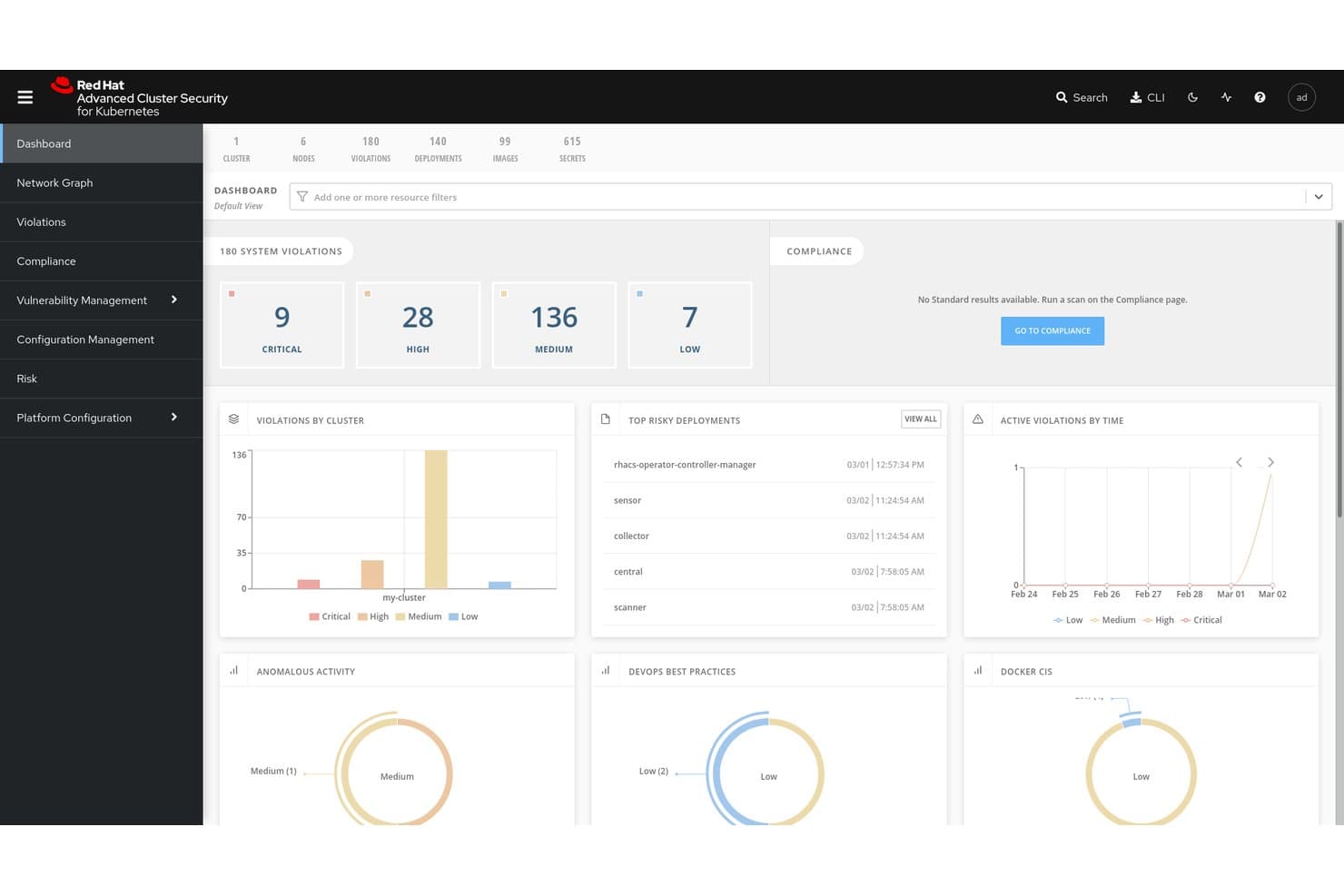
Red Hat Advanced Cluster Security for Kubernetes centraliza la visibilidad de las infracciones y los riesgos. Red Hat Advanced Cluster Security for Kubernetes (RHACS) es una plataforma de seguridad de contenedores nativa de Kubernetes que cubre el análisis de vulnerabilidades de imágenes, la detección de amenazas en tiempo de ejecución, la aplicación de políticas y la auditoría de cumplimiento en entornos multiclúster y multinube.
¿Para quién es más adecuado Red Hat Advanced Cluster Security for Kubernetes?
RHACS es una opción natural para equipos de plataformas y DevSecOps que ejecutan cargas de trabajo en Red Hat OpenShift o en entornos de Kubernetes multinube y necesitan una cobertura de seguridad profunda y nativa durante todo el ciclo de vida de los contenedores.
Por qué elegí Red Hat Advanced Cluster Security for Kubernetes
Elegí RHACS como una de las mejores opciones porque está diseñado específicamente para Kubernetes desde cero, lo que lo hace especialmente adecuado para la seguridad de la cadena de suministro a nivel del orquestador. Me gusta especialmente cómo combina la verificación de firmas de imágenes de Cosign/Sigstore con la generación de SBOM en formato SPDX 2.3, lo que permite a los equipos aplicar políticas que bloquean las imágenes sin firmar antes de que lleguen al clúster. Su CLI
roxctlse integra directamente con las canalizaciones de Jenkins, GitHub Actions y Tekton para bloquear las compilaciones cuando se infringen las políticas, según umbrales de gravedad configurables.Características principales de Red Hat Advanced Cluster Security for Kubernetes
- Recopilación en tiempo de ejecución con eBPF CO-RE: Captura telemetría de llamadas al sistema, procesos, archivos y redes a nivel del núcleo desde contenedores en ejecución, sin módulos del núcleo ni contenedores auxiliares.
- Controlador de admisión con modos de fallo configurables: Aplica políticas en el momento del despliegue mediante un webhook de admisión de Kubernetes, con un comportamiento de Permitir fallo o Bloquear ante fallos que se adapta a tus requisitos de disponibilidad y seguridad.
- Análisis automatizado de cumplimiento: Ejecuta comprobaciones programadas respecto a los marcos CIS, NIST, PCI DSS 4.0, HIPAA e ISO 27001, con exportación de evidencias lista para auditores desde un único panel, mediante un solo clic.
- Detección multiclúster: Detecta clústeres sin protección en Amazon EKS, Google GKE y Microsoft AKS mediante Paladin Cloud y la integración con Red Hat OpenShift Cluster Manager.
Integraciones de Red Hat Advanced Cluster Security for Kubernetes
Las integraciones nativas incluyen Red Hat OpenShift, Amazon EKS, Google GKE, Microsoft AKS, Jenkins, GitHub Actions, Tekton y Argo CD. RHACS también se conecta con Quay, Amazon ECR y Prometheus mediante su punto de conexión de métricas.
Pros and Cons
Pros:
- Diseñado específicamente para los controles de seguridad de Kubernetes
- Visibilidad en tiempo de ejecución con eBPF y detección a nivel del núcleo
- Amplia cobertura de cumplimiento en varios marcos
Cons:
- Las funciones más completas están vinculadas a la plataforma OpenShift
- Algunas tareas administrativas requieren una interfaz de línea de comandos
Learn more about Red Hat Advanced Cluster Security for Kubernetes:
Otras soluciones de seguridad de contenedores
Estas son algunas opciones adicionales de soluciones de seguridad de contenedores que no llegaron a mi lista, pero que aún merece la pena consultar:
- 11Orca SecurityLa mejor opción para la tecnología de escaneo lateral de contenedores
- 12ARMOIdeal para RBAC de Kubernetes y refuerzo de seguridad en tiempo de ejecución
- 13CrowdStrike Falcon Cloud SecurityLa mejor para clasificar los riesgos de los contenedores según los adversarios
- 14SnykMejor para la gestión de vulnerabilidades en contenedores
- 15Check Point CloudGuardDefensa en tiempo de ejecución enriquecida con IA de ThreatCloud
- 16NeuVectorLa mejor opción para la seguridad de contenedores de código abierto basada en confianza cero
- 17PingSafeEl mejor para defensa adaptativa contra amenazas
- 18Trend Micro Cloud SecurityLa mejor opción para CNAPP empresarial con correlación XDR
- 19Tenable Container Security ScannerIdeal para la gestión del riesgo de contenedores basada en la exposición
Cómo Evalúo las Soluciones de Seguridad para Contenedores
Evalúo las herramientas de seguridad para contenedores en dos capas: capacidades básicas como el escaneo de imágenes y la detección en tiempo de ejecución, luego los diferenciadores como la profundidad de endurecimiento de Kubernetes y la integración con CI/CD.
Funcionalidades Básicas (Requisitos Indispensables para esta Lista)
Cuando selecciono herramientas para mi lista, califico cada una en una escala de 0 (no ofrece la funcionalidad) a 5 (destaca en esta área) para cada funcionalidad básica que se indica a continuación. Luego, calculo el puntaje total de la herramienta como un porcentaje. Cada herramienta debe lograr un puntaje total mínimo del 65% para ser considerada para su inclusión.
- Escaneo de Vulnerabilidades en Imágenes: Verifico si la herramienta escanea imágenes de contenedores en diferentes registros en busca de CVEs, secretos embebidos y paquetes desactualizados, además de si genera SBOMs.
- Detección de Amenazas en Tiempo de Ejecución: Es fundamental el monitoreo en tiempo real de los contenedores en ejecución, por lo que evalúo cómo cada herramienta detecta procesos anómalos, llamadas de red inesperadas y desvíos en los contenedores.
- Endurecimiento de la Configuración de Kubernetes: Cada herramienta debe evaluar los clústeres K8s según los benchmarks CIS, señalar permisos RBAC riesgosos y mostrar controladores de admisión mal configurados.
- Integración en el Pipeline de CI/CD: Analizo cómo cada herramienta se conecta a las canalizaciones de construcción para controlar los despliegues, ya sea que soporte verificaciones de políticas en GitHub Actions, GitLab CI o Jenkins.
- Cumplimiento y Aplicación de Políticas: Las plantillas de políticas predefinidas para marcos como PCI-DSS, HIPAA y SOC 2 son el estándar; también evalúo la capacidad de crear políticas personalizadas y la profundidad de los informes.
- Controles de Segmentación de Red: La microsegmentación consciente de contenedores ayuda a prevenir movimientos laterales, así que busco aplicación de políticas L3–L7 y visibilidad clara del tráfico este-oeste.
Una vez que tengo una lista de herramientas que cumplen con estos criterios, considero qué diferencia a cada plataforma.
Factores Diferenciadores (Lo Que Distingue a los Proveedores)
Así es como comparo y contrasto a los diferentes proveedores:
Características Destacadas
La priorización de riesgos impulsada por IA es un gran diferenciador: las herramientas que correlacionan los CVEs con la exposición en tiempo de ejecución y la explotabilidad ayudan a los equipos a filtrar el ruido de alertas y enfocarse en amenazas reales. También evalúo la aplicación mediante controladores de admisión, que bloquean la implementación de cargas de trabajo no conformes en los clústeres antes de que causen problemas. Las capacidades CNAPP unificadas son relevantes cuando los equipos desean seguridad de contenedores combinada con CSPM, CWPP y CIEM en una sola consola, reduciendo la proliferación de herramientas en el ecosistema nativo de la nube.
Más Allá de las Características
El modelo de despliegue es muy relevante aquí. Verifico si una herramienta admite escaneo con agentes, sin agentes o híbrido, y si puede ejecutarse en entornos aislados (air-gapped) para equipos regulados. Las integraciones con el ecosistema son igualmente importantes; una herramienta que se conecta con tu SIEM, sistema de tickets y registros como Harbor o Artifactory mantiene el flujo de los datos de seguridad donde tu equipo ya trabaja. También evalúo la escalabilidad, específicamente la ligereza de los sensores en tiempo de ejecución en clústeres con miles de nodos y si la visibilidad multicloud reside en una única consola.
Cómo elegir una solución de seguridad de contenedores
Es fácil perderse entre largas listas de funciones y estructuras de precios complejas. Para ayudarte a mantener la atención mientras avanzas en tu proceso particular de selección de software, aquí tienes una lista de factores que debes tener en cuenta:
| Factor | Qué debes considerar |
|---|---|
| FactorEscalabilidad | Qué debes considerar¿Puede la herramienta crecer junto con tu empresa? Considera si puede gestionar un aumento de las cargas de trabajo y de los usuarios sin necesitar actualizaciones constantes. |
| FactorIntegraciones | Qué debes considerar¿Funciona con tus herramientas actuales? Comprueba la compatibilidad con las canalizaciones de CI/CD, los proveedores de servicios en la nube y otros programas esenciales. |
| FactorCapacidad de personalización | Qué debes considerar¿Puedes adaptarla a tus necesidades? Busca opciones para ajustar la configuración, los paneles y las alertas de modo que se adapten a tu flujo de trabajo. |
| FactorFacilidad de uso | Qué debes considerar¿Es fácil de usar? Asegúrate de que la interfaz sea intuitiva y requiera una formación mínima para que tu equipo pueda empezar. |
| FactorImplementación e incorporación | Qué debes considerar¿Con qué rapidez puedes empezar? Evalúa el tiempo de configuración, la disponibilidad de recursos como la formación y el soporte durante las fases iniciales. |
| FactorCoste | Qué debes considerar¿Se ajusta a tu presupuesto? Compara los planes de precios, presta atención a las tarifas ocultas y considera el valor que ofrece por su precio. |
| FactorMedidas de seguridad | Qué debes considerar¿Ofrece protecciones sólidas? Busca cifrado, controles de acceso y cumplimiento de los estándares del sector para garantizar la seguridad de los datos. |
| FactorRequisitos de cumplimiento | Qué debes considerar¿Cumple la normativa? Verifica que la solución se ajuste a las normas legales relevantes para tu sector, como el RGPD o la HIPAA. |
¿Qué son las soluciones de seguridad de contenedores?
Las soluciones de seguridad para contenedores son herramientas diseñadas para proteger las aplicaciones contenerizadas frente a vulnerabilidades y amenazas. Los profesionales de TI, desarrolladores y equipos de seguridad suelen utilizar estas herramientas para garantizar que las aplicaciones se ejecuten de forma segura en diversos entornos, tanto si utilizan alternativas a Docker como otras plataformas de contenedores. El análisis de vulnerabilidades, las comprobaciones de cumplimiento y la protección en tiempo de ejecución ayudan a identificar riesgos, cumplir las normativas y proteger las operaciones. Estas herramientas proporcionan la seguridad esencial para mantener sus aplicaciones contenerizadas seguras y conformes.
Características
Al seleccionar soluciones de seguridad para contenedores, preste atención a las siguientes características clave:
- Análisis de vulnerabilidades: Identifica posibles riesgos de seguridad en las imágenes de sus contenedores y en las aplicaciones en ejecución, y le avisa sobre ellos.
- Comprobaciones de cumplimiento: Garantiza que sus contenedores cumplan los estándares y las normativas del sector, como el GDPR y la HIPAA.
- Protección en tiempo de ejecución: Supervisa y defiende frente a amenazas durante la ejecución de aplicaciones contenerizadas.
- Capacidades de integración: Funciona perfectamente con sus canalizaciones de CI/CD y proveedores de nube existentes para mantener la seguridad durante las distintas etapas del desarrollo.
- Control de acceso basado en roles: Permite establecer permisos y gestionar el acceso de los usuarios a información y acciones sensibles.
- Remediación automatizada: Proporciona correcciones automáticas para las vulnerabilidades identificadas, reduciendo la necesidad de intervención manual.
- Alertas en tiempo real: Notifica inmediatamente a su equipo sobre los incidentes de seguridad, lo que permite responder con rapidez.
- Paneles personalizables: Ofrece una vista adaptada de las métricas y alertas de seguridad, lo que facilita la supervisión de los aspectos importantes para usted.
- Cifrado: Garantiza que los datos dentro de los contenedores estén protegidos frente al acceso no autorizado.
- Detección de amenazas basada en aprendizaje automático: Utiliza algoritmos avanzados para identificar y predecir posibles amenazas, mejorando las medidas de seguridad generales.
Beneficios
La implementación de soluciones de seguridad para contenedores proporciona varios beneficios para su equipo y su empresa. Estos son algunos de los que puede esperar:
- Mayor seguridad: Al utilizar el análisis de vulnerabilidades y la protección en tiempo de ejecución, reduce el riesgo de brechas de seguridad y protege los datos sensibles.
- Cumplimiento normativo: Las comprobaciones de cumplimiento garantizan que sus operaciones cumplan los estándares legales necesarios, evitando multas y problemas jurídicos.
- Ahorro de tiempo: La remediación automatizada y las alertas en tiempo real permiten a su equipo responder rápidamente a las amenazas sin esfuerzo manual.
- Mayor eficiencia: Las capacidades de integración con las herramientas existentes agilizan los procesos y mantienen la seguridad durante todo el desarrollo.
- Control de acceso: El control de acceso basado en roles ayuda a gestionar quién puede acceder a cada recurso, reduciendo la posibilidad de acciones no autorizadas.
- Toma de decisiones informada: Los paneles personalizables proporcionan información sobre las métricas de seguridad, lo que le ayuda a tomar mejores decisiones de seguridad.
- Protección de datos: El cifrado garantiza que los datos estén a salvo del acceso no autorizado, manteniendo la confidencialidad y la integridad.
Costes y precios
La selección de soluciones de seguridad para contenedores requiere comprender los distintos modelos de precios y planes disponibles. Los costes varían en función de las características, el tamaño del equipo, los complementos y otros factores. La siguiente tabla resume los planes habituales, sus precios medios y las características que suelen incluir las soluciones de seguridad para contenedores:
Tabla comparativa de planes para soluciones de seguridad de contenedores
| Tipo de plan | Precio medio | Características habituales |
|---|---|---|
| Tipo de planPlan gratuito | Precio medio$0 | Características habitualesAnálisis básico de vulnerabilidades, comprobaciones de cumplimiento limitadas y asistencia de la comunidad. |
| Tipo de planPlan personal | Precio medio$5-$25/usuario/mes | Características habitualesAnálisis avanzado, protección básica en tiempo de ejecución y asistencia por correo electrónico. |
| Tipo de planPlan empresarial | Precio medio$30-$75/usuario/mes | Características habitualesComprobaciones de cumplimiento completas, capacidades de integración y control de acceso basado en roles. |
| Tipo de planPlan corporativo | Precio medio$100+/usuario/mes | Características habitualesPaneles personalizables, detección de amenazas mediante aprendizaje automático y asistencia exclusiva. |
Preguntas frecuentes sobre soluciones de seguridad de contenedores
¿Qué contrapartidas debería esperar entre las herramientas de seguridad de contenedores de código abierto y las comerciales?
Con las herramientas de código abierto, normalmente obtiene flexibilidad, personalización y ausencia de tarifas de licencia, pero normalmente tendrá que asumir más trabajo de integración, ajustes y carga de soporte. Las soluciones comerciales suelen incluir más funciones listas para usar (paneles, alertas y motores de políticas), pero puede quedar limitado por las restricciones del proveedor o por un coste mayor a medida que escala. Deberá valorar la madurez de su equipo, la complejidad de sus entornos y su disposición a crear integraciones entre herramientas.
¿Qué desafíos surgen al proteger contenedores en infraestructuras multinube o híbridas?
En entornos multinube, se enfrentará a API incoherentes, modelos de identidad diferentes y políticas de red divergentes. Una solución que funciona en AWS podría no adaptarse correctamente a Azure o a las instalaciones locales. Necesitará herramientas que abstraigan estas diferencias (o que utilicen un plano de control central) y permitan uniformizar la postura de seguridad entre nubes.
¿Cómo puedo resolver los problemas de los contenedores que se cierran inesperadamente en AWS Fargate?
Los cierres inesperados de contenedores en AWS Fargate pueden deberse a limitaciones de recursos o a configuraciones incorrectas. Compruebe que la definición de la tarea tenga asignaciones de recursos correctas y revise los registros en busca de mensajes de error. Ajustar la configuración de memoria o CPU podría resolver el problema.
¿Cómo se gestionan los falsos positivos en los análisis de vulnerabilidades de las imágenes de contenedor?
Los falsos positivos son habituales cuando los analizadores señalan problemas de bajo impacto o dependencias que la aplicación realmente no utiliza. Para reducir el ruido, ajuste los umbrales del analizador, suprima las alertas de los hallazgos de bajo riesgo y correlacione los resultados de los análisis a lo largo del tiempo para identificar los problemas persistentes. También puede validar los hallazgos con varias herramientas o utilizar un metamarco (por ejemplo, LUCID) para reducir las incoherencias entre analizadores.