

Los 10 mejores programas de cortafuegos analizados en 2026

10 Mejor software de cortafuegos: selección


En la era digital actual, proteger tu red no es solo una decisión inteligente: es esencial. Te enfrentas constantemente a amenazas de ciberataques, y ahí es donde entra en juego el software de cortafuegos. Actúa como una barrera que protege tus datos y te ayuda a mantener la tranquilidad.
He dedicado tiempo a probar y analizar diversas soluciones de cortafuegos, y comprendo los desafíos a los que tú y tu equipo se enfrentan al proteger vuestros sistemas. En este artículo, compartiré mis principales recomendaciones para ofrecerte una visión imparcial de las mejores opciones disponibles.
Encontrarás información sobre las funciones, la facilidad de uso y los aspectos que diferencian a cada software, lo que te ayudará a tomar una decisión fundamentada. Adentrémonos en el mundo del software de cortafuegos y encontremos la opción adecuada para tus necesidades.
Por qué confiar en nuestras recomendaciones de software
Nuestro equipo lleva probando y evaluando software desde 2012. Como líderes tecnológicos, sabemos lo difícil —y lo importante— que es elegir el software adecuado.
Para esta guía, evaluamos las herramientas mediante pruebas prácticas e investigación independiente, puntuando las herramientas según nuestros criterios de selección.
Nuestras reseñas reflejan nuestro criterio editorial humano, no un discurso de ventas.
Revisores expertos:
Resumen del mejor software de cortafuegos
| Tool | Best For | Trial Info | Price | ||
|---|---|---|---|---|---|
| 1 | Mejor para el menor TCO por Mbps protegido | Prueba gratuita de 30 días y demostración gratuita disponibles | Desde $700 | Website | |
| 2 | La mejor opción para inteligencia contra amenazas respaldada por Talos a gran escala | Demostración gratuita disponible | Precio bajo solicitud | Website | |
| 3 | La mejor cobertura de firewall SD-WAN para sucursales | Prueba gratuita de 14 días + demostración gratuita | Desde $25/usuario/mes (facturado anualmente) | Website | |
| 4 | La mejor opción para la detección de día cero basada en el aprendizaje automático de la memoria | Prueba gratuita de 90 días O demostración gratuita disponible | Desde $550 (solo hardware) | Website | |
| 5 | Ideal para el aislamiento de red activado por dispositivos terminales | Prueba gratuita disponible | Desde $25/usuario/mes (facturado anualmente) | Website | |
| 6 | Ideal para el acceso seguro a la nube mediante confianza cero | Demostración gratuita disponible | Precio bajo consulta | Website | |
| 7 | Ideal para una prevención de amenazas multicapa y profunda | Prueba gratuita de 30 días O demostración gratuita disponible | Precios disponibles bajo petición | Website | |
| 8 | Ideal para consolidar NGFW, SD-WAN y ZTNA | Prueba gratuita de 30 días | Desde $450 (dispositivo físico) | Website | |
| 9 | La mejor opción para bloquear amenazas de día cero antes de su divulgación | Prueba gratuita de 15–30 días O demostración gratuita disponible | Precio bajo solicitud | Website | |
| 10 | La mejor opción para los estándares europeos de ciberseguridad | Demostración gratuita disponible | Precio bajo solicitud | Website |
Análisis del mejor software de cortafuegos

Mejor para el menor TCO por Mbps protegido
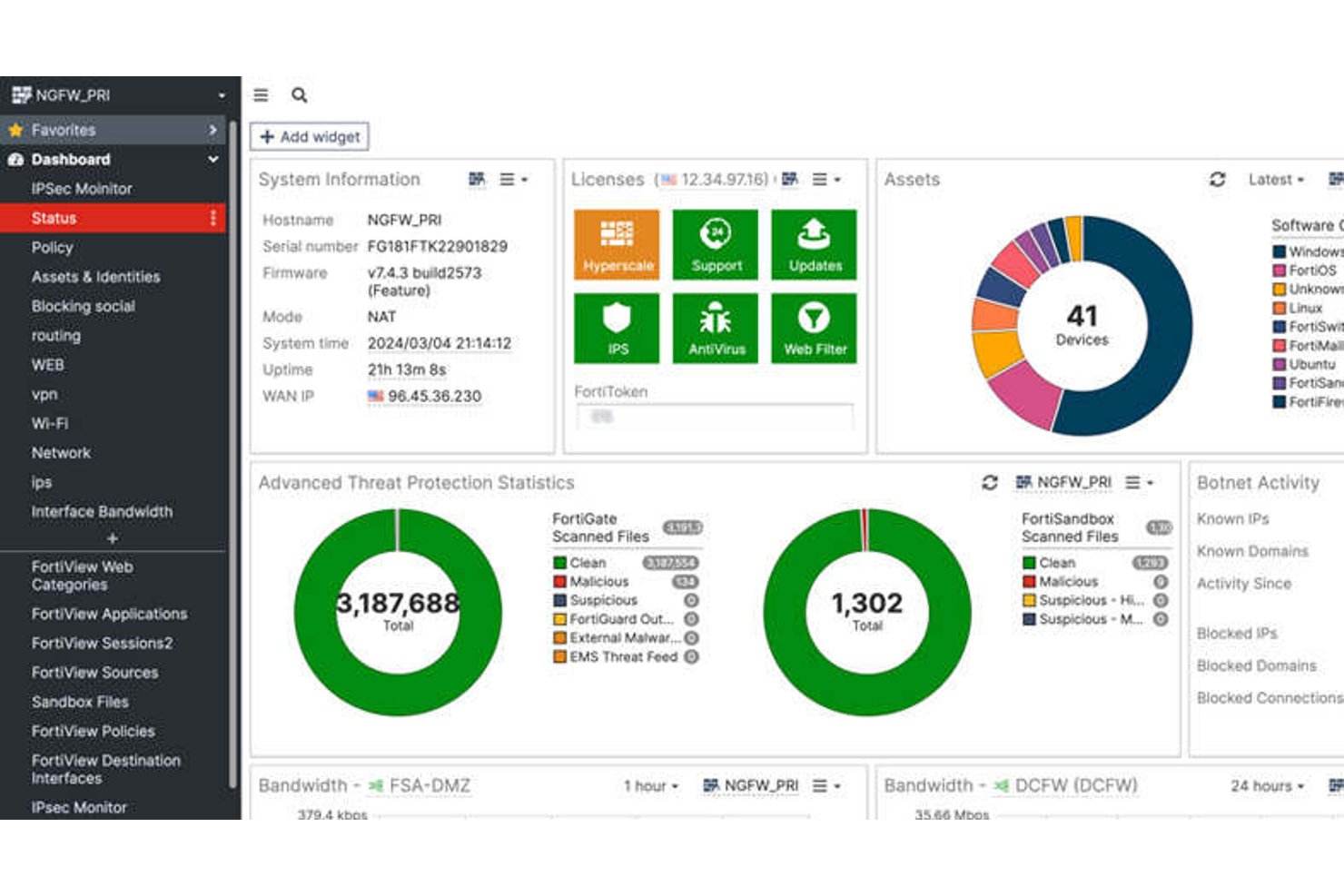
FortiGate NGFW es una plataforma de firewall de red de Fortinet que combina inspección profunda de paquetes, prevención de intrusiones, control a nivel de aplicación, descifrado SSL/TLS y SD-WAN integrada en dispositivos de hardware, máquinas virtuales y despliegues alojados en la nube.
¿Para quién es más adecuado FortiGate NGFW?
FortiGate NGFW es una opción sólida para los equipos de seguridad de redes empresariales que necesitan proteger entornos de alto rendimiento en infraestructuras locales, en la nube e híbridas distribuidas.
Por qué elegí FortiGate NGFW
FortiGate NGFW ocupa un lugar en mi lista de favoritos porque ningún otro firewall se acerca a su rendimiento bruto de protección contra amenazas a escala. Me refiero a los procesadores personalizados FortiASIC, que ejecutan la inspección SSL/TLS y el IPS a velocidad de línea, alcanzando 520 Gbps en el modelo 3800G sin afectar el rendimiento. También me gusta que la SD-WAN esté incluida en la licencia, por lo que mi equipo no tiene que gestionar productos independientes para proteger el tráfico de las sucursales mientras mantiene ese rendimiento en sitios distribuidos.
Características principales de FortiGate NGFW
- Segmentación mediante dominios virtuales (VDOM): Divide un único dispositivo FortiGate en varias instancias de firewall virtuales aisladas, cada una con sus propias políticas, tablas de enrutamiento y administradores.
- Orquestación centralizada con FortiManager: Gestiona políticas, configuraciones y firmware en despliegues distribuidos de FortiGate desde una única consola, con control de versiones y compatibilidad con la reversión de cambios.
- CASB en línea para visibilidad de SaaS: Supervisa y controla en tiempo real el tráfico hacia aplicaciones en la nube, detecta la TI en la sombra y bloquea la exfiltración de datos desde plataformas no autorizadas.
- Criptografía poscuántica para VPN IPsec: Implementa algoritmos poscuánticos aprobados por NIST en FortiOS 7.6.1 para proteger los túneles VPN frente a las amenazas de la computación cuántica.
Integraciones de FortiGate NGFW
FortiGate NGFW admite más de 3.000 integraciones de Security Fabric con más de 400 socios, incluidos CrowdStrike, ServiceNow, Armis, Splunk, AWS, Microsoft Azure y Google Cloud Platform. La compatibilidad con Terraform, Ansible y la API REST permite crear integraciones personalizadas y flujos de trabajo de infraestructura como código.
Pros and Cons
Pros:
- Ofrece el mayor rendimiento de protección contra amenazas disponible
- SD-WAN nativa incluida sin coste adicional
- La segmentación mediante VDOM permite una verdadera multitenencia
Cons:
- Las actualizaciones de firmware pueden introducir errores críticos
- Los informes avanzados requieren una licencia independiente de FortiAnalyzer

La mejor opción para inteligencia contra amenazas respaldada por Talos a gran escala
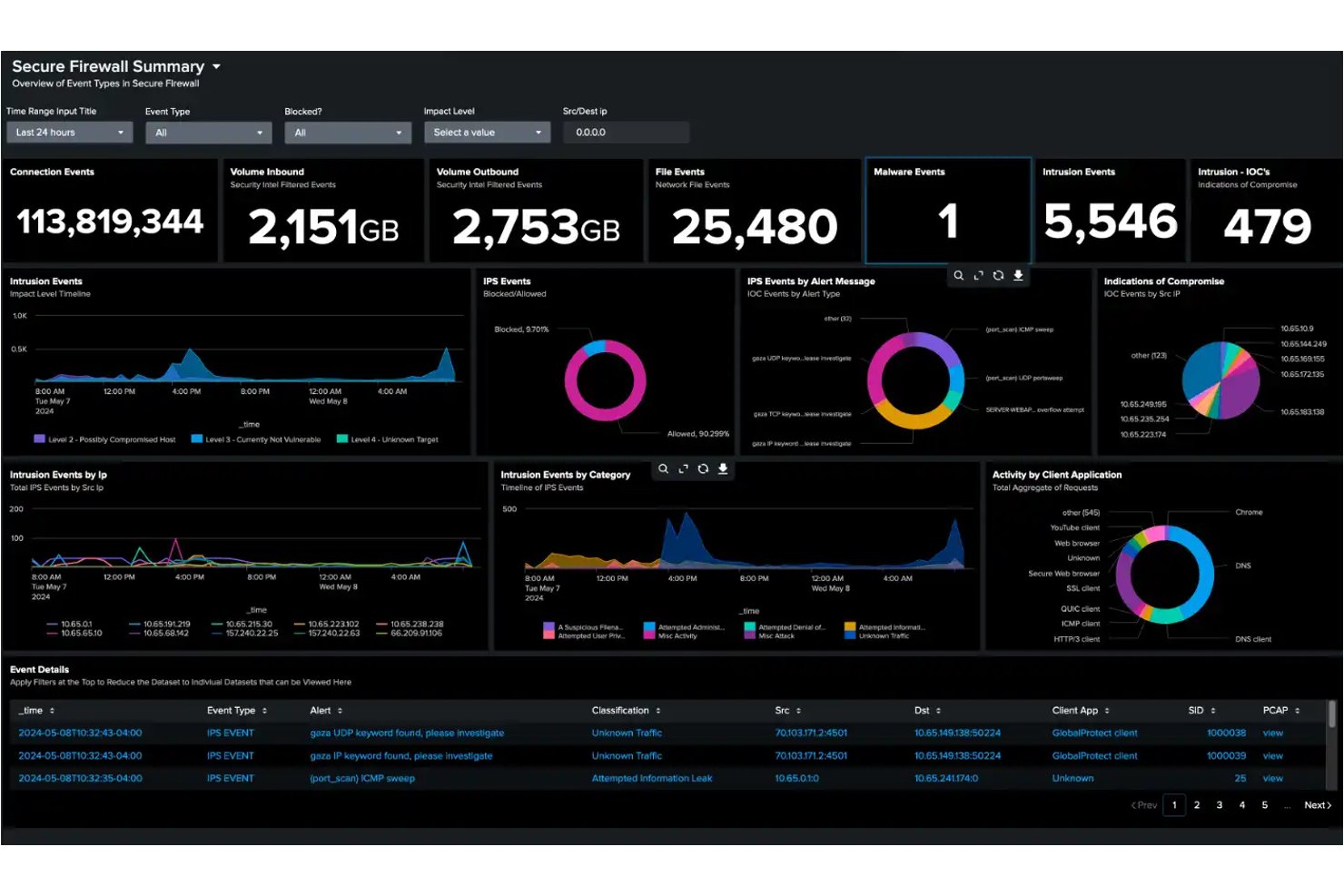
Cisco Secure Firewall es una plataforma de firewall de próxima generación que ofrece inspección de tráfico con estado, prevención de intrusiones mediante el motor Snort 3, inspección profunda de paquetes en más de 6.500 aplicaciones y análisis de tráfico cifrado mediante su Encrypted Visibility Engine.
¿Para quién es más adecuado Cisco Secure Firewall?
Cisco Secure Firewall es una opción sólida para los equipos de seguridad empresarial que necesitan protección contra amenazas verificada y basada en inteligencia en entornos de red grandes, distribuidos e híbridos.
Por qué elegí Cisco Secure Firewall
Cisco Secure Firewall merece estar en mi lista porque la inteligencia contra amenazas que lo respalda está realmente a otro nivel. Cisco Talos analiza 900.000 millones de eventos de seguridad al día en 193 países, incorporando detecciones en tiempo real directamente al motor IPS Snort 3 del firewall. El modelo de comportamiento SnortML se suma a esta capacidad y detecta exploits de día cero sin esperar a una actualización de firmas. En las pruebas empresariales de 2026 de SE Labs, Cisco bloqueó el 100 % de las amenazas, incluidas las simulaciones de APT29 y Scattered Spider.
Características principales de Cisco Secure Firewall
- Encrypted Visibility Engine (EVE): Detecta y bloquea amenazas ocultas en el tráfico cifrado con TLS 1.3 sin requerir descifrado.
- Firewall Management Center (FMC): Consola de administración centralizada local para configurar y aplicar políticas en instancias de firewall de hardware, virtuales y en la nube.
- Universal Zero Trust Network Access (UZTNA): Proporciona acceso a aplicaciones basado en la identidad y la postura del dispositivo, sustituyendo las VPN tradicionales por conexiones verificadas continuamente.
- Cisco Security Cloud Control: Plataforma de orquestación nativa de la nube para administrar implementaciones de firewalls multisede y multiinquilino desde una única interfaz.
Integraciones de Cisco Secure Firewall
Cisco Secure Firewall cuenta con integraciones nativas con Splunk, Cisco XDR, Cisco ISE, Cisco Secure Workload, Cisco Umbrella, Cisco Secure Access y Cisco Multicloud Defense. Es compatible con QRadar y Microsoft Sentinel mediante syslog, además de ofrecer API REST, Terraform y Ansible para flujos de trabajo personalizados y de DevSecOps.
Pros and Cons
Pros:
- Bloquea amenazas de día cero mediante el análisis de comportamiento de SnortML
- Inspecciona el tráfico TLS 1.3 sin descifrado
- Admite implementaciones multinube y en contenedores
Cons:
- La implementación de políticas puede ser lenta y disruptiva
- La complejidad de la interfaz de administración frustra a los administradores


Barracuda CloudGen Firewall es un firewall de nueva generación que combina inspección profunda de paquetes con estado, SD-WAN integrado, IDS/IPS, control en la capa de aplicación y compatibilidad con implementaciones multinube en AWS, Azure y GCP.
¿Para quién es más adecuado Barracuda CloudGen Firewall?
Los equipos de TI que gestionan redes de sucursales distribuidas o entornos multinube aprovecharán al máximo Barracuda CloudGen Firewall, especialmente cuando son importantes la SD-WAN integrada y la implementación sin intervención.
Por qué elegí Barracuda CloudGen Firewall
Elegí Barracuda CloudGen Firewall como uno de los mejores porque gestiona la seguridad multinube sin obligarte a integrar herramientas independientes. La implementación nativa en AWS, Azure y GCP permite aplicar una política de firewall coherente tanto si el tráfico llega a una sucursal como si se dirige a una carga de trabajo en la nube. También me gusta que incluya SD-WAN integrada con duplicación del tráfico y corrección de errores hacia adelante, de modo que los equipos distribuidos permanezcan conectados incluso a través de enlaces 4G/5G con pérdidas, con conmutación por error sin pérdida de paquetes.
Funciones clave de Barracuda CloudGen Firewall
- Inspección profunda de paquetes con estado: Examina los encabezados y las cargas útiles de los paquetes en una sola pasada, aplicando simultáneamente el firewall, IPS/IDS y el análisis antivirus sin añadir latencia por capas.
- Centro de control del firewall: Una consola de gestión centralizada que admite implementaciones en varios sitios con control de revisiones, reversión de configuraciones y aprovisionamiento remoto de sitios sin intervención.
- Entorno aislado para protección avanzada contra amenazas: Utiliza la emulación completa del sistema para detonar de forma segura archivos desconocidos y detectar amenazas basadas en el comportamiento, enviando automáticamente nuevas firmas a las capas de prefiltro.
- Políticas de control de acceso basadas en la identidad: Aplica reglas detalladas por usuario, grupo, aplicación, hora y ubicación mediante integraciones con Active Directory, LDAP, RADIUS, TACACS+ y certificados x.509.
Integraciones de Barracuda CloudGen Firewall
Barracuda CloudGen Firewall se integra con Microsoft Azure, Azure Virtual WAN, AWS, Google Cloud Platform, Datadog y Tufin SecureTrack. Admite exportaciones de syslog a Splunk y otras plataformas SIEM, además de API REST para automatización personalizada.
Pros and Cons
Pros:
- SD-WAN integrada sin hardware adicional
- Gestión centralizada para entornos con varios sitios
- Protección avanzada contra amenazas con entorno aislado
Cons:
- Falta compatibilidad con el protocolo WireGuard
- Las funciones clave requieren suscripciones adicionales

La mejor opción para la detección de día cero basada en el aprendizaje automático de la memoria
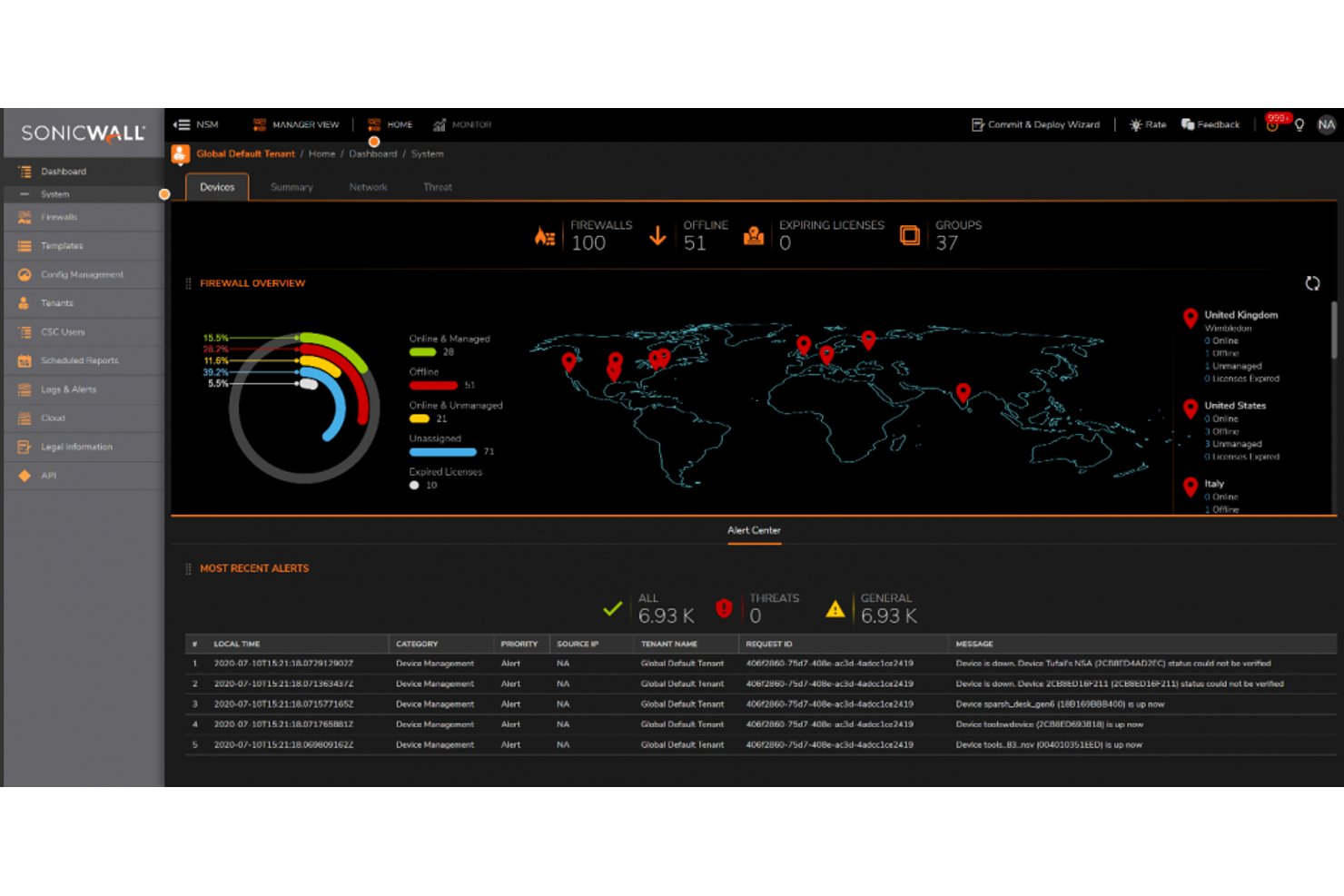
SonicWall es una plataforma de firewall de próxima generación que combina inspección profunda de paquetes, prevención de intrusiones, control en la capa de aplicaciones y aislamiento basado en la nube en entornos de hardware, virtuales y desplegados en la nube.
¿Para quién es más adecuado SonicWall?
SonicWall es una opción sólida para los equipos de TI de pequeñas y medianas empresas y del mercado medio que necesitan prevención de amenazas de nivel empresarial sin el precio de las soluciones empresariales.
Por qué elegí SonicWall
Elegí SonicWall como una de las mejores opciones porque su detección de brechas en tiempo real es realmente difícil de replicar. El motor patentado RTDMI inspecciona la memoria en tiempo real y detecta malware que se oculta tras el cifrado antes de que se ejecute. Respaldada por cinco puntuaciones perfectas consecutivas de ICSA Labs, una detección de amenazas del 100 % con cero falsos positivos no es una afirmación de marketing en este caso: está verificada. También valoro mucho el sandbox Capture ATP, ya que ejecuta una emulación completa del sistema en archivos sospechosos en lugar de realizar comprobaciones superficiales.
Características principales de SonicWall
- Arquitectura de políticas basada en zonas: Permite definir reglas de firewall granulares en zonas de confianza, no confiables, inalámbricas y cifradas, con aplicación por usuario y por grupo.
- SD-WAN segura integrada: Proporciona conmutación por error inteligente, equilibrio de carga y enrutamiento según las aplicaciones en sitios distribuidos sin necesidad de un dispositivo independiente.
- Administrador de seguridad de red (NSM): Una consola centralizada y nativa de la nube para gestionar políticas, configuraciones e informes en varios firewalls y sitios desde una sola interfaz.
- Licencias ZTNA integradas: Los firewalls Gen 8 incluyen integración con Cloud Secure Edge, lo que permite un control de acceso basado en la identidad y el dispositivo como alternativa integrada a SSL-VPN.
Integraciones de SonicWall
SonicWall ofrece integraciones nativas de syslog con Splunk, IBM QRadar y Microsoft Sentinel, además de conectividad con Active Directory y LDAP. NSM proporciona una API REST para integraciones y automatización personalizadas.
Pros and Cons
Pros:
- Precisión líder del sector en la detección de amenazas
- SD-WAN y ZTNA integrados incluidos
- La inspección de memoria en tiempo real bloquea el malware oculto
Cons:
- Las vulnerabilidades recurrentes de SSL-VPN generan preocupación
- Las funciones avanzadas requieren varias suscripciones de pago

Ideal para el aislamiento de red activado por dispositivos terminales

Sophos Firewall es una plataforma de cortafuegos de nueva generación que combina inspección profunda de paquetes, descifrado TLS 1.3, prevención de intrusiones, control en la capa de aplicación y uso compartido de telemetría de amenazas entre productos en dispositivos terminales, servidores y dispositivos de red.
¿Para quién es más adecuado Sophos Firewall?
Sophos Firewall es una excelente opción para los equipos de TI y seguridad que ya utilizan —o planean utilizar— dispositivos terminales de Sophos, donde el aislamiento automatizado de amenazas de Security Heartbeat ofrece el mayor valor.
Por qué elegí Sophos Firewall
Elegí Sophos Firewall porque su arquitectura de seguridad sincronizada hace algo que la mayoría de los cortafuegos no puede hacer: comparte telemetría de estado en tiempo real entre el cortafuegos y los dispositivos terminales de Sophos mediante Security Heartbeat, aislando automáticamente los dispositivos comprometidos a nivel de red sin ninguna intervención manual. También me gusta la respuesta activa ante amenazas, que incorpora fuentes de analistas de MDR y la detección mediante ML de NDR Essentials para contener a los atacantes activos prácticamente en tiempo real.
Características principales de Sophos Firewall
- Inspección de TLS 1.3: La arquitectura Xstream utiliza aceleración de hardware para descifrar e inspeccionar el tráfico TLS 1.3 sin una degradación significativa del rendimiento.
- Aislamiento de Sandstorm en la nube: Los archivos sospechosos se envían a un entorno aislado basado en la nube que utiliza aprendizaje automático y análisis de comportamiento para detectar malware desconocido antes de que llegue a la red.
- Puerta de enlace ZTNA integrada: Cada dispositivo Sophos Firewall incluye una puerta de enlace integrada de acceso a la red de confianza cero, lo que elimina la necesidad de un dispositivo independiente.
- Informes centrales del cortafuegos: Sophos Central proporciona plantillas de informes de cumplimiento basadas en la nube para HIPAA, PCI-DSS y GLBA, con hasta 30 días de retención de registros en el paquete Xstream.
Integraciones de Sophos Firewall
Sophos Firewall se integra con Sophos Central, Sophos Intercept X Endpoint, Sophos MDR/XDR, Active Directory, LDAP, AWS, Azure y GCP. Su API de integración con SIEM admite conexiones personalizadas, mientras que las fuentes de amenazas de terceros y las implementaciones en VMware, Hyper-V y KVM amplían la conectividad.
Pros and Cons
Pros:
- Aislamiento automatizado de dispositivos terminales mediante Security Heartbeat
- Inspección de TLS 1.3 con aceleración de hardware
- Puerta de enlace ZTNA integrada en cada dispositivo
Cons:
- Para aprovechar todas las funciones se necesitan dispositivos terminales de Sophos
- Retención de registros limitada sin un SIEM externo

Ideal para el acceso seguro a la nube mediante confianza cero
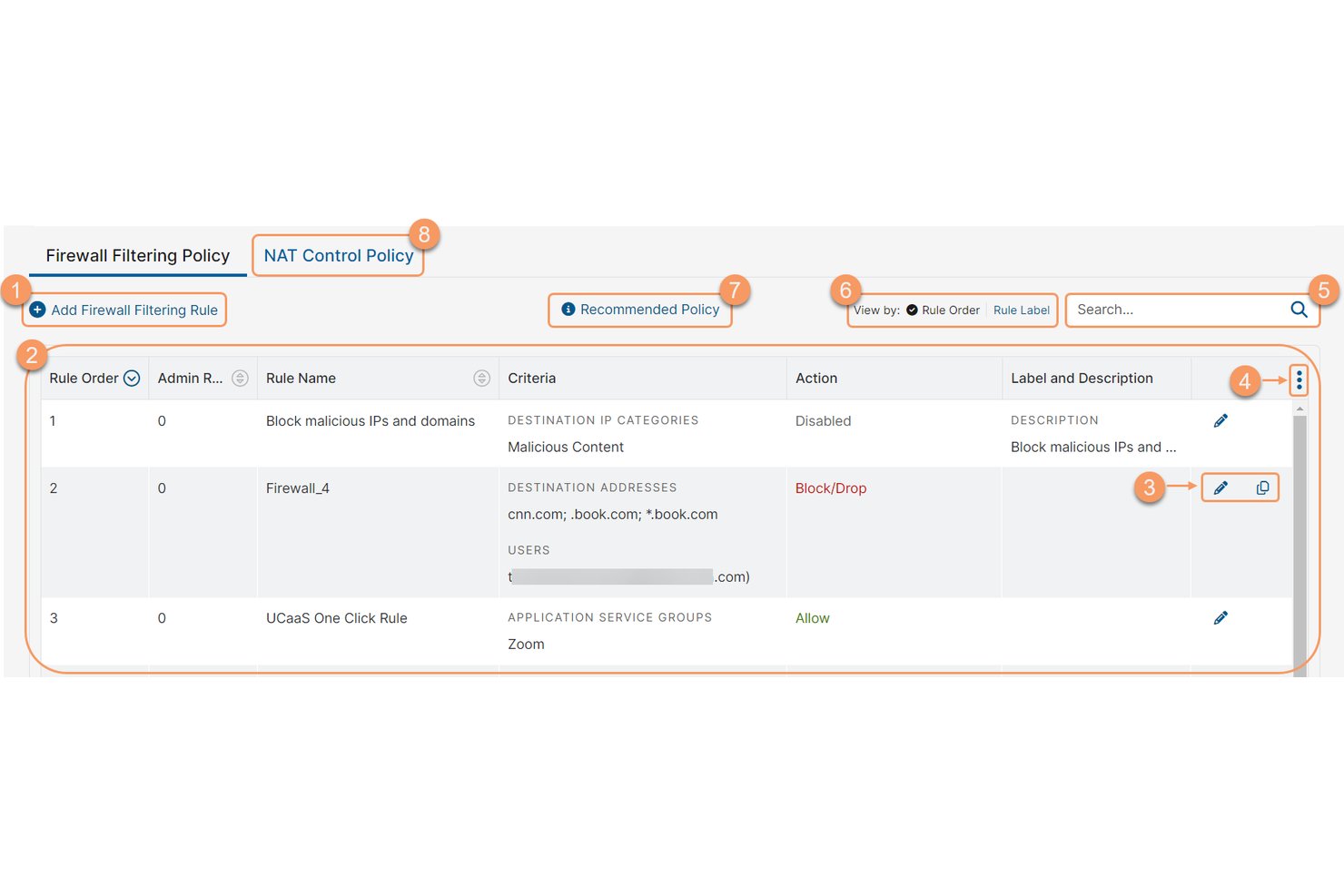
Zscaler Internet Access es una plataforma de cortafuegos nativa de la nube y servicio de seguridad perimetral que ofrece una puerta de enlace web de confianza cero, cortafuegos en la nube, prevención de intrusiones, aislamiento en entorno controlado y control en la capa de aplicación, todo sin dispositivos de hardware.
¿Para quién es más adecuado Zscaler Internet Access?
Zscaler Internet Access es una excelente opción para los equipos empresariales de seguridad y redes que sustituyen los cortafuegos basados en hardware por una arquitectura de confianza cero proporcionada desde la nube.
Por qué elegí Zscaler Internet Access
Zscaler Internet Access ocupa un lugar en mi lista de favoritos porque es el ejemplo más claro de un cortafuegos nativo de la nube que realmente elimina la necesidad de dispositivos físicos. Me atrae la forma en que su cortafuegos de confianza cero inspecciona todos los puertos y protocolos en línea, terminando cada conexión en uno de sus más de 150 puntos de presencia globales antes de que el tráfico limpio llegue a su destino. Su motor de escaneo único y múltiples acciones ejecuta la inspección TLS, IPS y el aislamiento en entorno controlado en una sola pasada, algo que los NGFW tradicionales no pueden replicar a escala.
Características principales de Zscaler Internet Access
- Gestión de políticas basada en la identidad: Permite crear y aplicar reglas de cortafuegos basadas en la identidad del usuario, el estado de seguridad del dispositivo, la aplicación, la ubicación y la hora desde una única consola en la nube.
- IPS en la nube con tres métodos de detección: Combina la detección basada en firmas, basada en políticas y de anomalías o comportamientos en línea en todo el tráfico cifrado, con actualizaciones continuas sin ventanas de mantenimiento.
- Entorno de pruebas en la nube basado en IA: Aísla y analiza archivos desconocidos para detectar malware de día cero, con cuarentena del primer infectado y compatibilidad con el envío mediante API en el nivel Avanzado.
- Transmisión de registros a SIEM y SOAR: Transmite registros y eventos en tiempo real mediante API a plataformas como Splunk, Microsoft Sentinel e IBM QRadar para la generación de informes de cumplimiento y los flujos de trabajo de respuesta a incidentes.
Integraciones de Zscaler Internet Access
Zscaler Internet Access ofrece integraciones documentadas con Splunk, Microsoft Sentinel, IBM QRadar, ServiceNow, Okta, Microsoft Entra ID, CrowdStrike, Terraform, Ansible y Pulumi. Su arquitectura basada en API admite la transmisión de registros a SIEM y SOAR, además de la automatización de políticas personalizadas.
Pros and Cons
Pros:
- Inspecciona el 100 % del tráfico cifrado
- Nativo de la nube, sin necesidad de dispositivos de hardware
- Acceso de confianza cero en cada conexión
Cons:
- La configuración inicial de las políticas puede ser compleja
- La velocidad de Internet puede verse afectada durante las horas punta

Ideal para una prevención de amenazas multicapa y profunda

Los cortafuegos de próxima generación de Check Point (NGFWs) son una plataforma de cortafuegos que combina la inspección profunda de paquetes, la prevención de amenazas basada en IA, el control de acceso consciente de la identidad y la gestión centralizada de políticas en entornos locales, en la nube e híbridos.
¿Para quién son más adecuados los cortafuegos de próxima generación de Check Point (NGFWs)?
Los NGFWs de Check Point son una opción excelente para los equipos de seguridad empresarial que gestionan infraestructuras complejas y con múltiples entornos, donde la precisión de la prevención de amenazas no es negociable.
Por qué elegí los cortafuegos de próxima generación de Check Point (NGFWs)
Los NGFWs de Check Point ocupan un lugar en mi lista de opciones porque ThreatCloud AI pertenece realmente a una categoría propia: procesa más de 2.000 millones de decisiones de seguridad al día para detectar amenazas que las herramientas basadas en firmas no detectan. Me gusta especialmente cómo el aislamiento en entornos controlados de SandBlast y Threat Extraction trabajan conjuntamente: los archivos sospechosos se ejecutan en un entorno aislado, mientras que las versiones saneadas llegan a los usuarios en cuestión de segundos. Las pruebas independientes de Miercom de 2025 validaron una tasa de bloqueo de malware del 99,9 % y una tasa de bloqueo de phishing del 99,7 %, cifras que me parecen difíciles de cuestionar al evaluar la prevención de amenazas multicapa.
Características principales de los cortafuegos de próxima generación de Check Point (NGFWs)
- Gestión centralizada de políticas con SmartConsole: Una única interfaz de gestión para coordinar las políticas de los cortafuegos en implementaciones locales, virtuales, en la nube y SASE desde un solo panel.
- Arquitectura Software Blade: Un modelo de licencias modular que permite activar capacidades de seguridad específicas—IPS, protección contra bots, aislamiento en entornos controlados y DLP—en la puerta de enlace sin necesidad de dispositivos independientes.
- Identity Awareness: Aplica políticas de control de acceso basadas en usuarios y grupos mediante la integración con Active Directory, Azure AD y Okta para vincular las reglas de red con identidades específicas.
- Clúster de cortafuegos hiperescalable Maestro: Una arquitectura hiperescalable que amplía el hardware existente de la puerta de enlace de forma elástica para ofrecer más de 1 Tbps de rendimiento de prevención de amenazas en entornos de grandes centros de datos.
Integraciones de los cortafuegos de próxima generación de Check Point (NGFWs)
Los NGFWs de Check Point se integran con Splunk, Microsoft Sentinel, IBM QRadar, Okta, Microsoft Azure, AWS, VMware NSX, ServiceNow, Terraform y Ansible. Su API REST admite integraciones personalizadas y flujos de trabajo de CI/CD.
Pros and Cons
Pros:
- Gestión centralizada de políticas para todos los entornos
- Tasas de bloqueo de malware y phishing líderes del sector
- Visibilidad profunda a nivel de aplicaciones y usuarios
Cons:
- El complejo modelo de licencias confunde a muchos equipos
- La experiencia de usuario varía según los módulos del producto


El cortafuegos de próxima generación de Fortinet (NGFW) es una plataforma de cortafuegos basada en FortiOS que ofrece inspección con estado del tráfico, inspección profunda de paquetes, prevención de intrusiones, control de aplicaciones, SD-WAN y acceso de red de confianza cero en implementaciones físicas, virtuales y en la nube.
¿Para quién es más adecuado el cortafuegos de próxima generación de Fortinet (NGFW)?
El NGFW de Fortinet es una opción ideal para los equipos de seguridad de redes que gestionan entornos grandes y distribuidos, donde la infraestructura de seguridad debe crecer sin añadir complejidad.
Por qué elegí el cortafuegos de próxima generación de Fortinet (NGFW)
El NGFW de Fortinet ocupa un lugar en mi lista de opciones porque los componentes físicos acelerados por FortiASIC permiten ampliar el rendimiento de protección contra amenazas hasta 520 Gbps sin sacrificar la profundidad de la inspección. Me encanta que Universal ZTNA esté integrado directamente en FortiOS sin coste adicional, de modo que, a medida que crece el entorno, el cumplimiento del acceso por sesión se amplía con él. FortiManager lo conecta todo, ya que permite implementar políticas coherentes en implementaciones físicas, virtuales y en la nube de FortiGate desde una sola consola.
Características clave del cortafuegos de próxima generación de Fortinet (NGFW)
- Inteligencia de amenazas basada en IA de FortiGuard: Las fuentes de inteligencia de amenazas actualizadas continuamente por FortiGuard Labs proporcionan actualizaciones de firmas en tiempo real, seguridad DNS, filtrado de URL y protección contra botnets en todas las implementaciones.
- Inspección SSL/TLS: El descifrado acelerado por hardware mediante procesadores FortiASIC permite realizar una inspección profunda de paquetes del tráfico cifrado sin degradar el rendimiento de la red.
- CASB en línea: Identifica y controla el uso no autorizado de aplicaciones SaaS tanto en tráfico de texto claro como cifrado, lo que proporciona visibilidad sobre la TI en la sombra.
- Registro centralizado de FortiAnalyzer: Agrega las coincidencias de políticas del cortafuegos, los eventos del IPS, la actividad de VPN y el comportamiento de los usuarios en una única plataforma de gestión de registros, con informes preparados para el cumplimiento de PCI-DSS, HIPAA y GDPR.
Integraciones del cortafuegos de próxima generación de Fortinet (NGFW)
El NGFW de Fortinet se integra con Splunk, Microsoft Sentinel, IBM QRadar, FortiSOAR, AWS, Azure, Google Cloud Platform y Oracle Cloud Infrastructure. La compatibilidad con REST API, Terraform y Ansible permite realizar integraciones personalizadas y flujos de trabajo de infraestructura como código.
Pros and Cons
Pros:
- Rendimiento de inspección profunda de paquetes acelerado por hardware
- Universal ZTNA incluido sin coste adicional
- Gestión centralizada de políticas para múltiples sitios
Cons:
- Vulnerabilidades recurrentes de alta gravedad en el firmware
- Algunas funciones avanzadas requieren conocimientos de la CLI

La mejor opción para bloquear amenazas de día cero antes de su divulgación

El cortafuegos de próxima generación de Palo Alto Networks es una plataforma de seguridad de red que proporciona inspección de tráfico con estado, control de la capa de aplicaciones mediante App-ID, prevención de intrusiones e inteligencia sobre amenazas en implementaciones de hardware, virtuales, de contenedores y nativas de la nube.
¿Para quién es más adecuado el cortafuegos de próxima generación de Palo Alto Networks?
Las empresas y grandes organizaciones centradas en la seguridad que necesitan prevención de amenazas impulsada por IA en entornos híbridos, multinube y locales obtendrán el mayor beneficio de esta plataforma.
Por qué elegí el cortafuegos de próxima generación de Palo Alto Networks
Elegí el NGFW de Palo Alto Networks porque su motor de aprendizaje profundo en línea Precision AI bloquea las amenazas antes de que lleguen a la red, sin esperar a las firmas ni a las demoras del entorno aislado. Lo que más me impresiona es el parcheo virtual Frontier, que analiza miles de repositorios de código abierto y proporciona parches el mismo día antes incluso de que los proveedores divulguen las vulnerabilidades. Además, App-ID identifica las aplicaciones por su comportamiento real, no por el puerto o el protocolo, por lo que una política que bloquee las cargas de archivos en Dropbox realmente se aplica.
Características principales del cortafuegos de próxima generación de Palo Alto Networks
- Gestión centralizada con Panorama: Una única consola de gestión que controla hasta 5.000 cortafuegos de hardware, virtuales y de contenedores, con control de acceso basado en roles y simulación del impacto de las políticas.
- Aplicación de políticas mediante User-ID: Asocia el tráfico de red con usuarios y grupos individuales en Active Directory, LDAP y proveedores de identidad en la nube para aplicar políticas de seguridad basadas en la identidad.
- Aislamiento avanzado de WildFire: Analiza archivos sospechosos mediante análisis estático, análisis dinámico del comportamiento y aprendizaje automático para detectar y bloquear malware conocido y desconocido.
- Cortafuegos de contenedores CN-Series: Un cortafuegos nativo de Kubernetes que inspecciona el tráfico de contenedores de este a oeste sin interrumpir los flujos de trabajo de los desarrolladores ni la velocidad de las canalizaciones.
Integraciones del cortafuegos de próxima generación de Palo Alto Networks
Las integraciones nativas incluyen Splunk, IBM QRadar y Microsoft Sentinel. Cortex XSOAR añade más de 900 integraciones, mientras que Terraform, Ansible y las API REST/XML de PAN-OS permiten automatizaciones personalizadas.
Pros and Cons
Pros:
- Bloquea las amenazas de día cero antes de que el proveedor las divulgue
- Identifica las aplicaciones por su comportamiento, no por el puerto
- Gestiona hasta 5.000 cortafuegos de forma centralizada
Cons:
- Las funciones de seguridad avanzadas requieren licencias independientes
- Los tiempos de respuesta del soporte pueden ser impredecibles

La mejor opción para los estándares europeos de ciberseguridad

Stormshield Network Security (SNS) es una plataforma de cortafuegos de nueva generación que combina la inspección profunda de paquetes con seguimiento de estado, IPS/IDS, control en la capa de aplicación, SD-WAN, ZTNA y gestión centralizada de políticas multisitio en una única suite integrada.
¿Para quién es más adecuado Stormshield Network Security (SNS)?
SNS es una opción especialmente adecuada para organizaciones europeas de los sectores gubernamental, de defensa o de infraestructuras críticas que necesitan un cortafuegos que cumpla estrictos requisitos de soberanía y normativas como ANSSI, NIS2 y NATO Restricted.
Por qué elegí Stormshield Network Security (SNS)
Elegí SNS como una de las mejores opciones porque ningún otro cortafuegos de esta lista iguala sus credenciales de soberanía europea: cualificación del estándar de ANSSI, CC EAL4+, EU Restricted y certificaciones NATO Restricted. En la práctica, esto significa que las organizaciones gubernamentales, de defensa o de infraestructuras críticas pueden implementar SNS en entornos clasificados en los que los proveedores con sede en Estados Unidos simplemente no están aprobados. También valoro mucho su compatibilidad nativa con protocolos OT/ICS, que incluye Modbus, OPC UA, S7 y DNP3 para los equipos que protegen entornos industriales junto con las redes de TI tradicionales.
Características principales de Stormshield Network Security (SNS)
- Stormshield Management Center (SMC): Una consola centralizada para gestionar reglas de filtrado, topologías VPN y políticas SD-WAN en varios cortafuegos SNS desde una única interfaz.
- Entorno aislado Breach Fighter: Un módulo de aislamiento basado en la nube que analiza archivos sospechosos mediante un análisis de tres capas que combina IPS, análisis antivirus y detección de comportamiento mejorada mediante IA.
- Cifrado VPN poscuántico: SMC admite criptografía poscuántica basada en KEM y PPK para implementaciones de VPN IPSec, protegiendo las comunicaciones frente a futuras amenazas criptográficas.
- Inspección de protocolos industriales: El motor IPS analiza de forma nativa protocolos OT/ICS, incluidos Modbus, OPC UA, S7 y DNP3, para los equipos que protegen entornos de tecnología operativa.
Integraciones de Stormshield Network Security (SNS)
Stormshield Network Security (SNS) cuenta con integraciones documentadas con Splunk, Elastic, Microsoft Entra ID y Nozomi Networks Guardian. También ofrece una colección oficial de Ansible, API REST para automatización personalizada y opciones de implementación a través de OVHcloud, 3DS OUTSCALE y Microsoft Azure Marketplace.
Pros and Cons
Pros:
- Certificado para el cumplimiento de las normativas de la UE, la OTAN y ANSSI
- Inspección nativa de protocolos OT/ICS incluida
- SD-WAN integrada con seguridad desde el diseño
Cons:
- Escalabilidad limitada de la VPN remota en algunos modelos
- Menos integraciones directas con plataformas SIEM globales
Otros programas de cortafuegos
A continuación encontrarás una lista de programas de cortafuegos adicionales que seleccioné, pero que no llegaron a estar entre los 10 mejores. Sin duda, merece la pena echarles un vistazo.
- Google Cloud
Ideal para políticas de firewall jerárquicas nativas de GCP
- Imperva WAF
La mejor opción para WAF en 111,000+ CVEs
- Cloudflare WAF
Ideal para la defensa contra amenazas de aplicaciones web líder según Forrester
- WatchGuard Firebox
Ideal para la gestión unificada de la seguridad de pymes y proveedores de servicios gestionados


Cómo evalúo el software de cortafuegos
Divido mi evaluación en requisitos básicos—como inspección stateful e IPS—y factores diferenciadores como compatibilidad con ZTNA, implementación nativa en la nube y cómo se comparan las licencias en diferentes entornos.
Funcionalidad principal (Condiciones mínimas para esta lista)
Cuando selecciono herramientas para mi lista, califico cada una en una escala del 0 (no ofrece la funcionalidad) al 5 (destaca en este área) para cada funcionalidad principal que aparece a continuación. Después, calculo la puntuación total de la herramienta en porcentaje. Cada herramienta debe alcanzar una puntuación total mínima del 75% para ser considerada para la inclusión.
- Filtrado y inspección del tráfico: Reviso si una herramienta gestiona la inspección stateful a través de diferentes protocolos y si puede descifrar tráfico SSL/TLS sin reducir significativamente el rendimiento.
- Gestión de políticas y reglas: Aquí es importante la creación granular de reglas; busco políticas conscientes de la identidad que puedas aplicar por usuario, grupo, zona y aplicación.
- Prevención de intrusiones (IDS/IPS): Evalúo cómo cada herramienta detecta amenazas, desde la coincidencia básica de firmas hasta el análisis de comportamiento que detecta movimientos laterales o ataques de día cero.
- Control en la capa de aplicación (DPI): La inspección profunda de paquetes debe identificar aplicaciones por su comportamiento, no solo por el puerto—como distinguir Slack del tráfico general HTTPS.
- Inteligencia de amenazas y protección contra malware: Busco fuentes de amenazas en tiempo real y entornos de prueba (sandboxing), junto con filtrado DNS/URL para phishing y callbacks de C2.
- Registro, monitoreo e informes: Evalúo la capacidad de búsqueda en los registros, personalización de alertas y si los paneles de control soportan marcos normativos como PCI-DSS o HIPAA de forma nativa.
Una vez que tengo una lista de herramientas que cumplen con estos criterios, considero qué distingue a cada plataforma.
Factores diferenciadores (Qué distingue a los proveedores)
Así es como comparo y contrasto diferentes proveedores:
Características destacadas
El soporte para ZTNA es fundamental; busco cortafuegos que apliquen acceso basado en identidad y contexto por sesión, lo cual es importante cuando tu fuerza laboral está dividida entre oficinas y ubicaciones remotas. La implementación nativa en la nube es otro factor que considero, especialmente para equipos que operan cargas de trabajo en AWS, Azure o GCP y que necesitan aplicar políticas coherentes entre los proveedores. También evalúo si una plataforma ofrece una consola de gestión unificada para administrar instancias locales y en la nube desde un solo lugar, ya que gestionar paneles separados por entorno supone un coste operativo real.
Más allá de las funciones
La estructura de licenciamiento es algo que siempre reviso en detalle. Algunos proveedores incluyen IPS, sandboxing y fuentes de amenazas en la licencia básica, mientras que otros cobran por cada complemento—esto cambia drásticamente el coste total de propiedad a lo largo de varios años. La compatibilidad con el ecosistema también importa: compruebo integraciones nativas con plataformas SIEM como Splunk o Sentinel y proveedores de identidad como Okta. Por último, considero si el proveedor cuenta con un equipo interno de investigación de amenazas, ya que la calidad y rapidez de las actualizaciones de firmas e inteligencia afecta directamente a qué tan bien el cortafuegos resiste amenazas emergentes.
Cómo elegir un software de cortafuegos
Es fácil perderse entre largas listas de funciones y complejas estructuras de precios. Para ayudarte a mantener la atención mientras llevas a cabo tu proceso particular de selección de software, aquí tienes una lista de factores que debes tener en cuenta:
| Factor | Qué debes tener en cuenta |
|---|---|
| Escalabilidad | ¿Puede el software crecer junto con tu empresa? Comprueba si admite la ampliación en términos de usuarios y datos sin comprometer el rendimiento. |
| Integraciones | ¿Funciona con tus sistemas actuales? Asegúrate de que sea compatible con las demás herramientas que utiliza tu equipo para evitar interrupciones en el flujo de trabajo. |
| Personalización | ¿Puedes adaptarlo a tus necesidades? Busca un software que te permita ajustar la configuración y las políticas para adaptarlas a tus procesos empresariales. |
| Facilidad de uso | ¿Es fácil de usar? Considera lo intuitiva que es la interfaz y si tu equipo puede utilizarla sin una formación exhaustiva. |
| Implementación e incorporación | ¿Cuánto tiempo tardarás en empezar? Evalúa el tiempo y los recursos necesarios para la configuración y la formación. Busca guías de inicio rápido u opciones de asistencia. |
| Coste | ¿Se ajusta a tu presupuesto? Compara los modelos de precios y presta atención a las tarifas ocultas. Considera el coste a largo plazo frente al valor que aporta a tu equipo. |
| Medidas de seguridad | ¿Satisface tus necesidades de seguridad? Comprueba que disponga de protocolos de seguridad y certificaciones actualizados para garantizar que tus datos permanezcan protegidos. |
| Requisitos de cumplimiento | ¿Cumple las normas legales? Asegúrate de que el software cumpla las normativas del sector relevantes para tu empresa, como GDPR o HIPAA, para evitar complicaciones legales. |
¿Qué es el software de cortafuegos?
El software de cortafuegos es un centinela digital diseñado para supervisar y controlar el tráfico de red entrante y saliente basándose en políticas de seguridad predeterminadas. Al actuar como una barrera entre una red interna de confianza y redes externas potencialmente no fiables, como Internet, es una herramienta fundamental tanto para empresas como para particulares.
Mientras que las empresas implementan cortafuegos para proteger datos confidenciales, impedir accesos no autorizados y garantizar el cumplimiento de las normativas, los particulares los utilizan para protegerse frente a las ciberamenazas, salvaguardar su información personal y mantener la privacidad en sus actividades en línea. ¿Cuál es la importancia de una herramienta así? Es como disponer de un guardia incansable y siempre atento que mantiene las amenazas a raya, optimiza el ancho de banda y garantiza que el software antivirus pueda funcionar sin interrupciones excesivas. La supervisión periódica con software de auditoría de cortafuegos garantiza un rendimiento óptimo.
Funciones
Al seleccionar software de cortafuegos, presta atención a las siguientes características clave:
- Supervisión del tráfico: Analiza continuamente el tráfico de red para detectar cualquier actividad sospechosa y alertarte sobre ella.
- Detección de intrusiones: Identifica posibles amenazas e intentos de acceso no autorizado, proporcionando una capa adicional de seguridad.
- Conexiones VPN seguras: Permite conexiones cifradas para el acceso remoto, garantizando la privacidad y protección de los datos.
- Inteligencia avanzada sobre amenazas: Utiliza datos en tiempo real para identificar y responder rápidamente a las amenazas emergentes.
- Gestión automatizada de políticas: Simplifica el proceso de configuración y actualización de las políticas de seguridad en toda la red.
- Paneles personalizables: Permite adaptar la interfaz para mostrar la información y las métricas relevantes según tus necesidades.
- Integración con servicios en la nube: Garantiza la compatibilidad con aplicaciones y servicios basados en la nube, manteniendo la seguridad en todos los entornos.
- Análisis en tiempo real: Proporciona información instantánea sobre la actividad de la red, ayudándote a tomar decisiones de seguridad fundamentadas.
- Compatibilidad con el cumplimiento normativo: Ayuda a cumplir las regulaciones y normas del sector para evitar problemas legales.
- Interfaz fácil de usar: Ofrece un diseño intuitivo que facilita que los miembros del equipo naveguen por ella y la utilicen eficazmente.
Beneficios
Implementar software de cortafuegos o servicios de cortafuegos gestionados proporciona varios beneficios para tu equipo y tu empresa. Estos son algunos de los que puedes esperar:
- Seguridad mejorada: Protege tu red frente a accesos no autorizados y ciberamenazas mediante funciones como la detección de intrusiones y las conexiones VPN seguras.
- Privacidad de los datos: Garantiza que la información confidencial permanezca protegida mediante el cifrado de datos y la supervisión del tráfico para detectar actividades sospechosas.
- Cumplimiento normativo: Ayuda a cumplir las normas del sector y los requisitos legales, reduciendo el riesgo de sanciones mediante funciones de cumplimiento normativo.
- Mejor rendimiento de la red: Gestiona y prioriza el tráfico de red de forma eficiente, evitando la congestión y manteniendo unas operaciones fluidas.
- Respuesta a las amenazas en tiempo real: Ofrece una identificación y mitigación rápidas de posibles amenazas mediante inteligencia avanzada sobre amenazas y análisis en tiempo real.
- Controles personalizables: Permite adaptar las políticas de seguridad y la configuración de la interfaz a las necesidades específicas de tu empresa, mejorando la facilidad de uso.
- Ahorro de costes: Reduce los posibles costes asociados a las filtraciones de datos y al tiempo de inactividad de la red mediante la gestión proactiva de los riesgos de seguridad.
Costes y precios
Seleccionar software de cortafuegos requiere comprender los distintos modelos de precios y planes disponibles. Los costes varían según las funciones, el tamaño del equipo, los complementos y otros factores. La tabla siguiente resume los planes habituales, sus precios medios y las funciones que suelen incluir las soluciones de software de cortafuegos:
Tabla comparativa de planes de software de cortafuegos
| Tipo de plan | Precio medio | Funciones habituales |
|---|---|---|
| Plan gratuito | $0 | Supervisión básica del tráfico, detección de intrusiones limitada y asistencia de la comunidad. |
| Plan personal | $5-$25/usuario/mes | Supervisión avanzada del tráfico, conexiones VPN seguras y asistencia por correo electrónico. |
| Plan empresarial | $30-$100/usuario/mes | Análisis en tiempo real, gestión automatizada de políticas y asistencia telefónica. |
| Plan empresarial avanzado | $100+/usuario/mes | Paneles personalizables, compatibilidad con el cumplimiento normativo y gestión de cuentas personalizada. |
Preguntas frecuentes sobre el software de cortafuegos
Estas son algunas respuestas a preguntas comunes sobre el software de cortafuegos:
¿Cuáles son las 4 reglas del cortafuegos?
Los cuatro tipos básicos de reglas de cortafuegos son permitir todo, denegar todo, permitir elementos específicos y denegar elementos específicos. Debes comprender estas reglas para configurar tu cortafuegos de manera eficaz. Cada tipo de regla tiene diferentes propósitos, y usarlas correctamente puede ayudar a gestionar el tráfico de red y la seguridad.
¿Cuál es el mayor problema de un cortafuegos?
Uno de los principales problemas de los cortafuegos es su incapacidad para abordar las amenazas internas. Los cortafuegos son excelentes para bloquear riesgos externos, pero pueden tener dificultades con las amenazas procedentes del interior de tu organización. Considera medidas de seguridad adicionales para mitigar riesgos como las amenazas internas y el tráfico cifrado.
¿Cómo funciona un cortafuegos de software?
Un cortafuegos de software es un programa que inspecciona los datos que entran y salen de un dispositivo. Filtra los datos comprobando si coinciden con el perfil de un código malicioso. Puedes personalizarlo para satisfacer tus necesidades específicas, lo que proporciona una solución de seguridad flexible para tus sistemas.
¿Cómo configuro un cortafuegos?
Para configurar un cortafuegos, comienza por definir tus políticas y reglas de seguridad. Determina qué tipos de tráfico permitir o denegar según las necesidades de tu red. Actualiza y revisa periódicamente tus configuraciones para adaptarlas a las nuevas amenazas de seguridad y mantener la protección.
¿Qué es la inspección con estado?
La inspección con estado es una función del cortafuegos que supervisa el estado de las conexiones activas. Analiza los paquetes según el contexto del flujo de tráfico, asegurándose de que solo pasen datos legítimos. Esto proporciona un enfoque más dinámico y seguro en comparación con el filtrado estático.
¿Cuándo debo usar un cortafuegos de software?
Usa un cortafuegos de software cuando necesites soluciones de seguridad flexibles para dispositivos individuales o redes pequeñas. Es especialmente útil para trabajadores remotos o pequeñas empresas que necesitan una protección personalizable sin invertir en hardware. Evalúa tus necesidades específicas para decidir si es adecuado para ti.
¿Qué sigue?
Si estás investigando software de cortafuegos, ponte en contacto con un asesor de SoftwareSelect para obtener recomendaciones gratuitas.
Rellenas un formulario y mantienes una breve conversación en la que se concretan los detalles de tus necesidades. Después, recibirás una lista breve de programas para revisar. Incluso te ayudarán durante todo el proceso de compra, incluidas las negociaciones de precios.