

Gestionar incidentes puede ser todo un desafío para los equipos tecnológicos. Cuando un problema inesperado interrumpe tu flujo de trabajo, cada segundo cuenta. Ahí es donde entra en juego el software de gestión de incidentes, que te ayuda a resolver los problemas de forma rápida y eficaz.
Según mi experiencia, encontrar la herramienta adecuada puede marcar la diferencia a la hora de mantener tus operaciones en funcionamiento sin problemas. He probado y analizado varias opciones para ofrecerte una selección bien documentada de las mejores soluciones disponibles.
En este artículo, compartiré mis principales recomendaciones y destacaré sus características y ventajas únicas. Descubrirás cómo estas herramientas pueden ayudar a tu equipo a mejorar los tiempos de respuesta y reforzar la colaboración, para que esté preparado ante cualquier situación.
Por qué confiar en nuestras recomendaciones de software
6,700+
Reviews
20
Industry experts
16+
Evaluation factors
14
Years
Nuestro equipo lleva probando y evaluando software desde 2012. Como líderes tecnológicos, sabemos lo difícil —y lo importante— que es elegir el software adecuado.
Para esta guía, evaluamos las herramientas mediante pruebas prácticas e investigación independiente, puntuando las herramientas según nuestros criterios de selección.
Nuestras reseñas reflejan nuestro criterio editorial humano, no un discurso de ventas.
Revisores expertos:
- Paulo Gardini MiguelDirector técnico
 Tim FisherVP de IA
 Gabriel RosasTech Lead y arquitecto de software
 Christhian GruhnTech Lead y arquitecto de plataforma

Tabla comparativa de programas de gestión de incidentes
Esta tabla comparativa resume los detalles de precios de mis principales selecciones de programas de gestión de incidentes:
| Tool | Best For | Trial Info | Price | ||
|---|---|---|---|---|---|
| 1 | Mejor para la continuidad del negocio | Demostración gratuita disponible | Precio a consultar | Website | |
| 2 | Ideal para la gestión automatizada de incidentes | Prueba gratuita de 21 días + Demo gratuita | Desde $19/agente/mes (facturación anual) | Website | |
| 3 | Mejor para la detección de incidentes en tiempo real | Prueba gratuita de 30 días + demo gratis disponible | Desde $129/técnico/mes (facturado anualmente) | Website | |
| 4 | Ideal para reducir la carga de trabajo de TI con IA | Prueba gratuita de 14 días | Precios bajo solicitud | Website | |
| 5 | Ideal para atención al cliente | Prueba gratuita de 30 días disponible | Desde $15/usuario/mes | Website | |
| 6 | Ideal para necesidades de cumplimiento | Demostración gratuita disponible | Precios a consultar | Website | |
| 7 | Ideal para integrar la búsqueda de amenazas | Prueba gratuita + demo gratuita disponible | Precio a consultar | Website | |
| 8 | Mejor para resolución de incidentes potenciada por IA | Demo gratuita disponible | Desde $20/usuario/mes | Website | |
| 9 | Ideal para la gestión de registros | Prueba gratuita de 30 días + demo gratis | Precio a consultar | Website | |
| 10 | La mejor opción para flujos de trabajo de corrección automática de TI | Demostración gratuita disponible | Precios bajo solicitud | Website |


Análisis de los mejores programas de gestión de incidentes
A continuación encontrarás mis resúmenes detallados de los mejores programas de gestión de incidentes que entraron en mi lista de selección. Mis análisis ofrecen una visión detallada de las características clave, ventajas y desventajas, integraciones y casos de uso ideales de cada herramienta para ayudarte a encontrar la mejor opción para ti.
 Mejor para la continuidad del negocio
- Demostración gratuita disponible
- Precio a consultar
Visit WebsiteCustomer Rating:4.3/5
El panel de gestión de incidentes de Preparis proporciona una visión detallada de los incidentes en toda la organización. Preparis es una plataforma de gestión de incidentes diseñada para equipos de TI y líderes empresariales que necesitan coordinar la respuesta ante emergencias, agilizar la comunicación y mantener la resiliencia operativa durante las interrupciones.
¿Para quién es mejor Preparis?
Preparis es una excelente opción para organizaciones medianas y grandes que necesitan un enfoque estructurado para la planificación de la continuidad del negocio y la coordinación de la respuesta ante emergencias.
Por qué elegí Preparis
Preparis se gana su lugar en mi lista porque es una de las pocas herramientas de gestión de incidentes creadas específicamente en torno a la continuidad del negocio como disciplina, y no solo como una función. Me gusta cómo Preparis Planner guía a los equipos en la elaboración de planes de continuidad totalmente personalizables, incluyendo análisis de impacto en el negocio (BIA), evaluaciones de riesgos e informes de cumplimiento, todo en un único flujo de trabajo guiado. Cuando ocurre un incidente, el módulo Incident Manager permite a mi equipo configurar una sala de guerra virtual, distribuir listas de acciones a los interesados y hacer un seguimiento del progreso de la recuperación por medio de paneles de control en tiempo real. Encuentro especialmente útil la visibilidad de 360° sobre el estado del incidente al coordinar respuestas entre varios equipos o ubicaciones.
Funciones clave de Preparis
- Mensajería de emergencia bidireccional: Envía alertas a empleados por ubicación, departamento, grupo o rol a través de su canal preferido y rastrea las respuestas en un solo panel.
- Alertas de ubicación basadas en geocercas: Dibuja geocercas en tiempo real o utiliza las predeterminadas para enviar notificaciones basadas en la ubicación a los empleados en campo o trabajando de forma remota.
- Intercambio de documentos en la nube y sin conexión: Almacena y comparte documentos de continuidad para que sean accesibles incluso cuando el edificio no está disponible o los servidores estén fuera de línea.
- Centro de formación y conocimiento en línea: Accede a más de 100 temas de capacitación específicos sobre amenazas y certifica a los equipos de crisis en protocolos de respuesta a emergencias directamente desde la plataforma.
Integraciones de Preparis
Preparis ofrece integraciones nativas con Everbridge, Alertus y Singlewire, además de una API para integraciones personalizadas.
Pros and Cons
Pros:
- Diseño de panel intuitivo
- Planes de gestión de crisis efectivos
- Sistemas de notificación de emergencias
Cons:
- No es ideal para equipos pequeños
- Posibles retrasos en las notificaciones
Learn more about Preparis: Ideal para la gestión automatizada de incidentes
- Prueba gratuita de 21 días + Demo gratuita
- Desde $19/agente/mes (facturación anual)
Visit WebsiteCustomer Rating:4.6/5
Gestiona incidentes de varios canales en un solo panel de control. Freshservice es una plataforma de gestión de servicios de TI basada en la nube, diseñada para equipos de TI en empresas de todos los tamaños que necesitan centralizar la respuesta a incidentes, automatizar flujos de trabajo y mejorar la visibilidad en sus operaciones de TI.
¿Para Quién es Mejor Freshservice?
Freshservice es ideal para equipos de TI medianos a empresariales que requieren un enfoque estructurado y alineado con ITIL para gestionar incidentes, solicitudes de servicio y operaciones de TI en un solo lugar.
Por Qué Elegí Freshservice
Elegí Freshservice como una de las mejores opciones para la gestión automatizada de incidentes por el alto nivel de automatización que abarca todo el ciclo de vida de los incidentes. Me gusta que, cuando llega una alerta, Freddy AI correlaciona señales de herramientas de monitoreo, asigna automáticamente el ticket al equipo adecuado según la disponibilidad y la carga de trabajo, y puede crear una sala de crisis con todo el contexto necesario—todo sin intervención manual. Mi equipo utiliza el generador de flujos de trabajo sin código para configurar las escaladas automáticas, disparadores de SLA y rotaciones de guardia, asegurando que las personas correctas estén involucradas en el momento oportuno. Los informes post mortem generados por IA después de cada incidente capturan automáticamente las causas raíz, aportando aprendizajes reales a la prevención en lugar de depender de informes manuales.
Características Clave de Freshservice
- Gestión de SLA: Crea políticas de SLA personalizadas, escala automáticamente tickets prioritarios y monitorea el cumplimiento de los objetivos de servicio.
- Soporte omnicanal: Gestiona incidentes recibidos por correo electrónico, Slack, Microsoft Teams o un portal de autoservicio desde una única vista de agente.
- Gestión de alertas: Consolida alertas de múltiples fuentes de monitoreo en una sola vista y reduce el ruido mediante filtrado asistido por IA.
- Integración con CMDB: Vincula los incidentes directamente con los activos y elementos de configuración afectados para ofrecer a los respondedores un contexto completo de la infraestructura.
Integraciones de Freshservice
Freshservice ofrece más de 1,200 integraciones nativas, incluidas Microsoft Teams, Slack, Jira, Azure AD, TeamViewer y SecPod, con aplicaciones conectoras, APIs flexibles y herramientas de bajo código disponibles para integraciones personalizadas.
Pros and Cons
Pros:
- Acuerdos de nivel de servicio (SLA) personalizables y reglas de escalado
- Puede consultar datos históricos con su motor de IA llamado Freddy
- Informes y análisis detallados sobre tendencias y desempeño de incidentes
Cons:
- Curva de aprendizaje pronunciada
- Puede resultar costoso a medida que aumenta el número de agentes
Learn more about Freshservice: Mejor para la detección de incidentes en tiempo real
- Prueba gratuita de 30 días + demo gratis disponible
- Desde $129/técnico/mes (facturado anualmente)
Visit WebsiteCustomer Rating:4.6/5
Atera ofrece funciones de automatización de tickets para agilizar las operaciones de la mesa de ayuda. Atera es una plataforma integral de gestión de TI creada para proveedores de servicios gestionados y equipos internos de TI que necesitan supervisar, detectar y resolver incidentes en múltiples dispositivos y entornos desde un único panel de control.
¿Para Quién es Mejor Atera?
Atera es una opción sólida para los MSP y departamentos de TI que gestionan endpoints distribuidos y necesitan una plataforma unificada para monitorización, gestión de tickets y soporte remoto.
Por Qué Elegí Atera
Atera se gana un lugar en mi lista porque sus capacidades de monitorización y alertas en tiempo real están muy integradas con el flujo de respuesta ante incidentes. Me gusta que el agente de Atera rastrea continuamente las métricas del dispositivo—CPU, RAM, uso de disco, ancho de banda de red y eventos de Windows—y genera alertas en el momento que algo cruza un umbral definido. Eso significa que mi equipo no tiene que esperar a que un usuario llame con un problema; ya estamos atendiéndolo antes de que lo noten. La capa de IA Copilot va más allá analizando proactivamente esas alertas y sugiriendo soluciones, recortando bastante el tiempo entre la detección y la acción.
Características Clave de Atera
- Mesa de ayuda y gestión de tickets: Gestiona, rastrea y responde a solicitudes de soporte de usuarios finales desde un sistema centralizado de tickets con etiquetado automático mediante IA y automatización de tickets.
- Gestión de parches: Automatiza la actualización de parches para dispositivos Windows, Mac y Linux en tu entorno según un horario definido o bajo demanda.
- Descubrimiento de red: Escanea tus redes monitorizadas para identificar todos los dispositivos conectados, puertos abiertos y posibles CVE, incluyendo activos no autorizados.
- Automatización de TI: Crea perfiles de automatización para manejar tareas repetitivas—como la instalación de software y la incorporación de nuevos usuarios—en dispositivos recién añadidos o existentes.
Integraciones de Atera
Atera ofrece integraciones nativas con Splashtop, TeamViewer, ScreenConnect, AnyDesk, HubSpot, Slack, WhatsApp, Microsoft Teams, Google (para SSO), Azure Active Directory y Okta, y proporciona una API para integraciones personalizadas.
Pros and Cons
Pros:
- Soporte de IA integrado para gestión de tickets y resolución de problemas
- Plataforma unificada para RMM, PSA y mesa de ayuda
- Modelo de precios por técnico
Cons:
- Personalización limitada de flujos de trabajo
- La app móvil tiene menos funciones que la versión de escritorio
 Ideal para reducir la carga de trabajo de TI con IA
- Prueba gratuita de 14 días
- Precios bajo solicitud
Visit WebsiteCustomer Rating:4.5/5
Panel de desempeño ITSM de SysAid que visualiza volúmenes de tickets, indicadores de SLA y tendencias de MTTR en los canales de soporte. SysAid es una plataforma de gestión de servicios de TI diseñada para equipos de TI en organizaciones medianas y grandes que necesitan centralizar el seguimiento de incidencias, automatizar flujos de trabajo y gestionar activos de TI para mantener los sistemas funcionando sin problemas.
¿Para quién es mejor SysAid?
SysAid es una excelente opción para departamentos de TI medianos a grandes que necesitan una plataforma ITSM estructurada con automatización integrada para gestionar grandes volúmenes de incidencias y solicitudes de servicio.
Por qué elegí SysAid
Elegí SysAid como uno de los mejores debido a lo avanzado que está su IA en aligerar la carga del equipo. Lo que me parece realmente impresionante es que los agentes de IA de SysAid no solo muestran sugerencias, sino que ejecutan acciones. Ejemplos incluyen resolver tickets duplicados, desbloquear cuentas de usuario, asignar licencias de Microsoft 365 y marcar activos con vencimiento de garantía; todo esto sucede automáticamente sin intervención manual. SysAid Copilot añade otra capa proporcionando a los agentes de TI contexto instantáneo del ticket, respuestas redactadas por IA e incluso una interfaz conversacional para consultar datos de servicio; así que incluso incidentes complejos avanzan más rápido. La plataforma afirma resolver automáticamente más del 60% de las incidencias antes de que siquiera se conviertan en tickets, lo que, en mi experiencia, es el tipo de desvío que transforma la operativa diaria de una mesa de servicios.
Características clave de SysAid
- Portal de autoservicio: Un portal personalizable donde los empleados pueden enviar tickets, hacer seguimiento de su progreso y buscar en una base de conocimientos sin contactar directamente al departamento de TI.
- Constructor de flujos de trabajo sin código: Una interfaz de arrastrar y soltar para construir flujos de trabajo de enrutamiento de tickets, escalaciones y aprobaciones, sin escribir código.
- Clasificación de incidencias alineada con ITIL: Los tickets se categorizan automáticamente utilizando datos históricos, análisis de sentimientos y metadatos para guiarlos a través de flujos de trabajo estructurados conforme a ITIL.
- Priorización de tickets basada en SLA: Aplica umbrales de SLA, puntuaciones de urgencia y niveles de riesgo para establecer automáticamente fechas límite y reasignar tickets antes de que ocurran incumplimientos.
Integraciones de SysAid
SysAid ofrece integraciones nativas en todo el ecosistema de Microsoft, incluidas Microsoft 365 y Azure, así como integraciones con Jira, Slack, Google Workspace, Okta, Salesforce y Zapier. Hay una API disponible para integraciones personalizadas.
Pros and Cons
Pros:
- La automatización con IA agiliza la gestión de tickets
- Las analíticas en tiempo real mejoran el monitoreo del rendimiento
- La automatización de flujos de trabajo incrementa la eficiencia de los procesos
Cons:
- El diseño de la interfaz parece algo anticuado
- El proceso de configuración e implementación suele ser lento
 Ideal para atención al cliente
- Prueba gratuita de 30 días disponible
- Desde $15/usuario/mes
Visit WebsiteCustomer Rating:4.4/5
Salesforce Service Cloud es una plataforma de atención al cliente multifacética que integra IA y soporte omnicanal. Salesforce Service Cloud es una plataforma CRM diseñada para equipos de atención al cliente que buscan aumentar la satisfacción y la lealtad de los clientes.
Por qué elegí Salesforce Service Cloud: Está diseñada para el servicio al cliente, integrando funciones de marketing y ventas con funciones de servicio para mejorar las interacciones con los clientes. Puedes gestionar los casos de los clientes de manera eficiente con sus herramientas de gestión de casos. La base de conocimientos de la plataforma ayuda a tu equipo a resolver problemas más rápido. Sus paneles personalizables te ofrecen una visión del rendimiento del servicio al cliente, facilitando la toma de decisiones.
Características destacadas e integraciones:
Características incluyen la gestión de casos, que te permite rastrear y resolver los problemas de los clientes de manera eficiente, una base de conocimientos que agiliza la resolución de incidencias, y paneles personalizables que ofrecen información sobre el rendimiento del servicio. La plataforma también soporta interacciones con clientes a través de múltiples canales.
Integraciones incluyen Slack, Microsoft Teams, Google Workspace, Mailchimp, HubSpot, Zendesk, QuickBooks, Dropbox, DocuSign y PayPal.
Pros and Cons
Pros:
- Soporte multicanal
- Paneles personalizables
- Plataforma unificada para interacciones con clientes
Cons:
- Funcionalidades limitadas de serie
- Requiere formación para nuevos usuarios
Learn more about Agentforce Service (formerly Service Cloud): Ideal para necesidades de cumplimiento
- Demostración gratuita disponible
- Precios a consultar
Visit WebsiteCustomer Rating:3.5/5
El software te permite gestionar incidentes y otras no conformidades, convirtiendo el proceso en un componente integral de tu programa de GRC. Corporater es una plataforma de gestión empresarial diseñada para organizaciones que priorizan el cumplimiento normativo y la adhesión a regulaciones.
Por qué elegí Corporater: Está enfocada en necesidades de cumplimiento, ofreciendo funciones para gestionar incidentes, auditorías y evaluaciones de riesgos. Puedes alinear tus operaciones con los requisitos regulatorios utilizando sus herramientas de seguimiento de cumplimiento. Las capacidades de evaluación de riesgos de la plataforma te ayudan a identificar y mitigar amenazas potenciales. Los paneles personalizables proporcionan información sobre el desempeño en cumplimiento, ayudando en la planificación estratégica.
Funciones y compatibilidades destacadas:
Funciones incluyen seguimiento de cumplimiento que ayuda a tu equipo a cumplir con los estándares regulatorios, evaluación de riesgos para identificar amenazas potenciales y paneles personalizables para obtener información sobre el desempeño en cumplimiento. La herramienta también facilita la gestión de auditorías para garantizar evaluaciones exhaustivas.
Integraciones incluyen Microsoft 365, Salesforce, SAP, Oracle, Google Workspace, IBM, ServiceNow, Jira, Slack y Tableau.
Pros and Cons
Pros:
- Diseñado para necesidades de cumplimiento
- Soporta la gestión de auditorías
- Evaluación de riesgos efectiva
Cons:
- Funciones limitadas fuera de lo estándar
- Requiere capacitación para usuarios nuevos
Learn more about Corporater: Ideal para integrar la búsqueda de amenazas
- Prueba gratuita + demo gratuita disponible
- Precio a consultar

Heimdal proporciona gestión automatizada de parches para mayor seguridad. Heimdal ofrece a los equipos de TI y seguridad una plataforma unificada para detectar, responder y gestionar incidentes en endpoints y redes, ayudando a las organizaciones a reducir riesgos y automatizar la respuesta ante amenazas en entornos complejos.
¿Para Quién es Mejor Heimdal?
Heimdal es una excelente opción para equipos de seguridad y operaciones de TI de tamaño medio a empresarial que necesitan una plataforma centralizada para gestionar amenazas en entornos complejos y multinivel.
Por Qué Elegí Heimdal
Heimdal se gana su lugar en mi lista porque su Centro de Caza de Amenazas y Acción (TAC) integra la búsqueda de amenazas directamente en el flujo de trabajo de gestión de incidentes, algo que la mayoría de las herramientas trata como un proceso separado. Me gusta cómo el TAC utiliza el motor de Protección Extendida contra Amenazas (XTP) junto con el marco MITRE ATT&CK para detectar comportamientos anómalos a nivel de dispositivo, proporcionando a mi equipo contexto forense real en lugar de solo alertas sin procesar. El Centro de Acción con un solo clic nos permite ejecutar respuestas como cuarentena, análisis y aislamiento de endpoints sin tener que cambiar entre herramientas. La analítica de comportamiento de usuarios y entidades (UEBA) incorporada rastrea amenazas basadas en identidades en Microsoft 365, cubriendo así incidentes tanto a nivel de endpoint como de usuario desde la misma plataforma.
Características Clave de Heimdal
- Gestión de Parcheo y Activos: Prueba, sanea y despliega automáticamente parches de SO y de terceros para más de 350 aplicaciones en Windows, macOS y Linux.
- Protección Contra el Cifrado de Ransomware (REP X): Utiliza cuatro motores de detección en tiempo real—cifrado, cambio de nombre, copia sombra y canario—para bloquear ransomware antes de que comience el cifrado de archivos.
- Gestión de Accesos con Privilegios (PAM): Controla y monitorea el acceso de cuentas privilegiadas para prevenir accesos no autorizados y movimientos laterales en su entorno.
- Seguridad DNS: Bloquea amenazas web, malware e intentos de exfiltración de datos a nivel de red utilizando inteligencia de amenazas potenciada por IA/ML.
Integraciones de Heimdal
Heimdal ofrece integraciones nativas en el ecosistema de Microsoft, incluyendo Microsoft 365, Azure y aplicaciones empresariales clave, así como integraciones con Splunk, ServiceNow y Zapier. También dispone de una API para integraciones personalizadas.
Pros and Cons
Pros:
- Automatiza el parcheo en todos los endpoints
- Detección sólida de vulnerabilidades y amenazas
- Visibilidad detallada de activos y licencias
Cons:
- No hay integraciones nativas disponibles
- La interfaz requiere tiempo de adaptación
Learn more about Heimdal: Mejor para resolución de incidentes potenciada por IA
- Demo gratuita disponible
- Desde $20/usuario/mes
Visit WebsiteCustomer Rating:4.8/5
Rootly se integra con Slack para automatizar la comunicación y las actualizaciones de incidentes. Rootly es una plataforma de gestión de incidentes diseñada para equipos de TI y SRE que necesitan automatizar flujos de respuesta, coordinarse a través de canales y reducir el tiempo de inactividad durante las interrupciones del servicio.
¿Para Quién es Mejor Rootly?
Rootly es ideal para organizaciones lideradas por ingeniería y equipos de SRE en empresas medianas a grandes que necesitan una respuesta a incidentes estructurada y automatizada a gran escala.
Por Qué Elegí Rootly
Rootly se gana su lugar en mi lista reducida gracias a cómo su agente SRE de IA maneja el análisis de la causa raíz. Cuando se produce un incidente, la IA de Rootly cruza alertas activas, cambios de código recientes e incidentes históricos para mostrar causas raíz probables con puntuaciones de confianza; así, mi equipo no parte de cero a las 2 a.m. También me gusta que no solo indica lo que está fallando, sino que muestra el razonamiento detrás de sus sugerencias y ofrece soluciones específicas, lo que facilita una acción rápida. Además, el servidor Rootly MCP permite a los ingenieros resolver incidentes de producción directamente desde su IDE en herramientas como Cursor o Windsurf, eliminando los cambios de contexto que ralentizan los tiempos de respuesta.
Funciones Clave de Rootly
- Constructor de flujos de trabajo automatizados: Crea flujos de trabajo de respuesta a incidentes sin código que desencadenan acciones como asignación de roles, creación de canales de Slack y notificación a partes interesadas en cuanto se declara un incidente.
- Programación de guardias consciente de vacaciones: El motor de programación de Rootly tiene en cuenta los días libres y permite a los ingenieros solicitar cobertura de turno con un solo clic, encontrando y asignando sustituciones automáticamente mediante IA.
- Retrospectivas automáticas post-incidente: Rootly genera de forma automática cronologías de incidentes y documentos estructurados de revisión post-incidente, incluyendo el contexto del incidente sin necesidad de copiar y pegar manualmente.
- Automatización de páginas de estado: Rootly actualiza las páginas de estado orientadas al cliente en tiempo real a medida que cambia la severidad y el estado del incidente, sin requerir actualizaciones manuales del equipo de respuesta.
Integraciones de Rootly
Rootly ofrece más de 70 integraciones nativas, incluyendo Slack, Jira, ServiceNow, PagerDuty, Datadog, AWS CloudWatch, GitHub, Zoom, Microsoft Teams, Google Cloud y Zapier. También dispone de una API para integraciones personalizadas.
Pros and Cons
Pros:
- Automatización de respuesta a incidentes impulsada por IA
- Integración con Slack y Teams
- Retrospectivas automáticas con resúmenes de IA
Cons:
- El precio para empresas requiere cotización personalizada
- Lista de integraciones públicas limitada
Learn more about Rootly: Ideal para la gestión de registros
- Prueba gratuita de 30 días + demo gratis
- Precio a consultar
Visit WebsiteCustomer Rating:4.5/5
La función Incident Workbench de ManageEngine EventLog Analyzer proporciona una vista detallada de los incidentes, ayudando en una investigación y resolución exhaustiva. ManageEngine EventLog Analyzer es una herramienta de gestión de registros diseñada para administradores de TI y profesionales de la seguridad. Ayuda a monitorear, gestionar y auditar los registros de red para garantizar el cumplimiento y mejorar la seguridad.¿Para quién es mejor ManageEngine EventLog Analyzer?
ManageEngine EventLog Analyzer es ideal para equipos de seguridad informática y cumplimiento en organizaciones medianas a grandes que gestionan grandes volúmenes de datos de registros a lo largo de una infraestructura distribuida.
Por qué elegí ManageEngine EventLog Analyzer
La gestión de registros es donde ManageEngine EventLog Analyzer destaca. Me gusta cómo centraliza la recopilación de registros de una amplia variedad de fuentes: registros de eventos de Windows, syslogs, servidores de aplicaciones, bases de datos y dispositivos perimetrales; así mi equipo no tiene que cambiar entre sistemas para reconstruir lo que sucedió durante un incidente. La función de forense de registros resulta particularmente útil: cuando ocurre una brecha de seguridad, puedo generar informes de correlación y rastrear la causa raíz directamente desde los datos de registro, sin la necesidad de una herramienta de investigación adicional. La correlación de eventos en tiempo real y las alertas instantáneas por correo electrónico o SMS significan que mi equipo detecta anomalías en el momento, no horas después.
Principales funcionalidades de ManageEngine EventLog Analyzer
- Inteligencia de amenazas: Detecta tráfico IP malicioso que ingresa a su red utilizando actualizaciones en tiempo real desde una base de datos global de amenazas IP.
- Monitoreo de integridad de archivos: Envía alertas instantáneas cuando se realizan cambios críticos en archivos y carpetas confidenciales.
- Monitoreo de dispositivos de red: Rastrea el tráfico web, actualizaciones de configuración y reglas en dispositivos perimetrales con informes prediseñados.
- Gestión de cumplimiento: Genera informes listos para auditoría para mandatos como PCI DSS, GDPR, FISMA, ISO 27001 y SOX.
Integraciones de ManageEngine EventLog Analyzer
ManageEngine EventLog Analyzer ofrece integraciones nativas con ServiceNow, Jira, Splunk, ManageEngine ServiceDesk Plus, ManageEngine OpManager y una API para integración personalizada.
Pros and Cons
Pros:
- Sistema de alertas personalizable
- Monitoreo de registros en tiempo real
- Capacidades de generación de informes extensas
Cons:
- Gran consumo de recursos en redes de gran tamaño
- Retrasos ocasionales en la generación de informes
Learn more about ManageEngine EventLog Analyzer: 10La mejor opción para flujos de trabajo de corrección automática de TI
Resolve
- Demostración gratuita disponible
- Precios bajo solicitud
Visit WebsiteCustomer Rating:5/5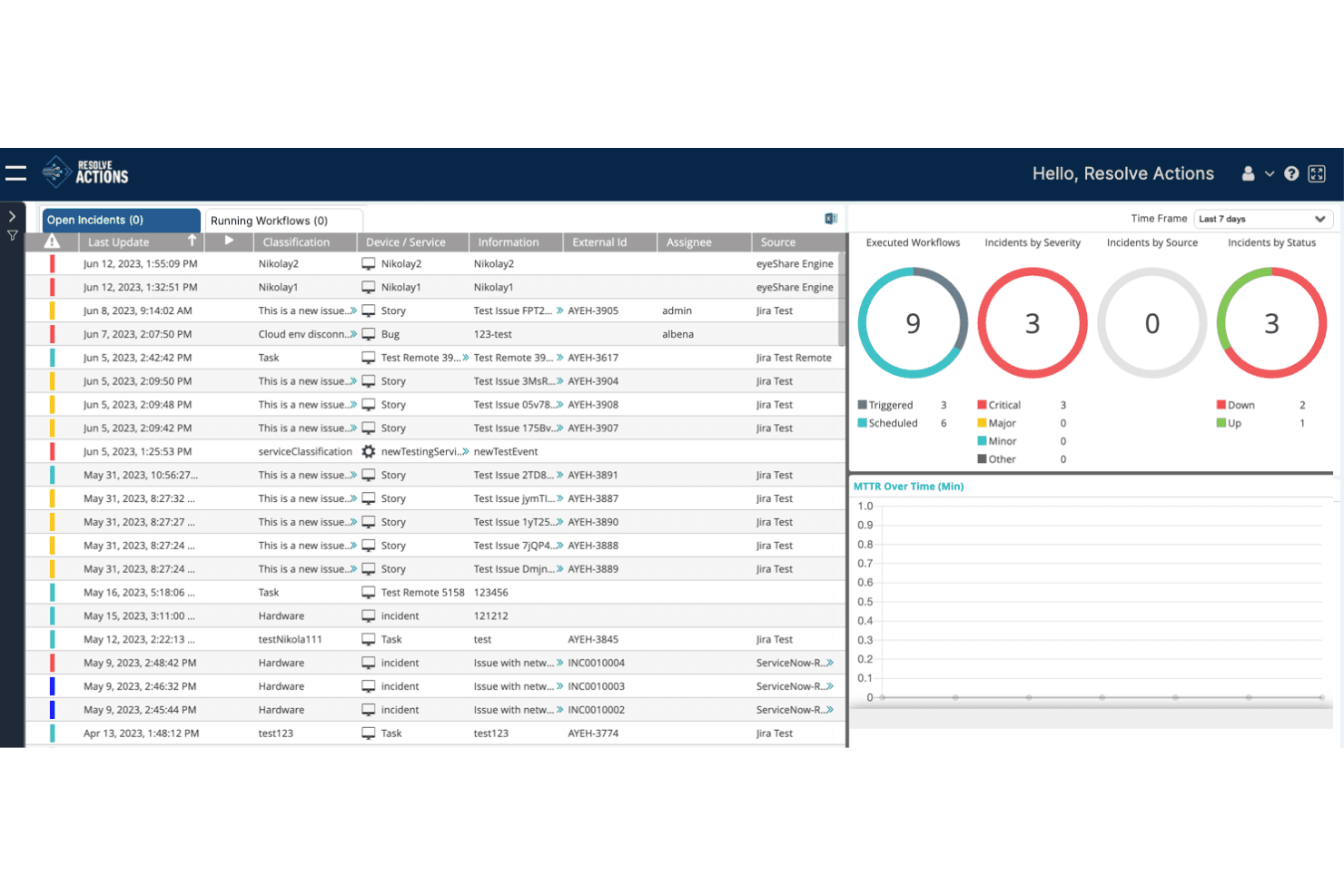
Resolve Actions centraliza la gestión de incidentes con seguimiento de flujos de trabajo y análisis. Resolve es una plataforma de automatización y orquestación de TI impulsada por IA que gestiona la detección de incidentes, la clasificación de alertas, la ejecución automatizada de procedimientos operativos y la corrección con circuito cerrado mediante flujos de trabajo basados en agentes e infraestructura autorreparable.
¿Para quién es más adecuado Resolve?
Resolve es una opción especialmente adecuada para responsables de operaciones de TI y equipos de infraestructura empresarial centrados en reducir el volumen de tickets mediante la corrección automatizada, en lugar de la coordinación manual de incidentes.
Por qué elegí Resolve
Elegí Resolve como una de las mejores opciones porque su corrección automática con circuito cerrado va más allá que la mayoría de las herramientas de este ámbito. Mientras que otras plataformas alertan a su equipo para que actúe, los procedimientos automatizados de Resolve gestionan el ciclo completo: clasificación de alertas, diagnóstico, ejecución de la solución y cierre del ticket sin intervención humana. Me impresiona especialmente su capacidad de infraestructura autorreparable, que puede reducir el tiempo de confirmación de alarmas de más de 1.800 minutos a menos de un minuto para patrones de fallo conocidos.
Características principales de Resolve
- Correlación de alertas mediante IA y filtrado de ruido: Resolve enriquece y correlaciona las alertas entrantes para suprimir los falsos positivos antes de que lleguen a su equipo de operaciones.
- Biblioteca de flujos de trabajo de Automation Exchange: Acceda a más de 5.000 plantillas de automatización prediseñadas que abarcan la clasificación de incidentes, los reinicios de servicios, las reversiones de configuraciones y mucho más.
- Constructor de agentes de IA personalizados AgentLab: Cree e implemente agentes de IA con un alcance definido, controles de gobernanza, flujos de trabajo de aprobación y límites operativos establecidos.
- Sincronización bidireccional con ITSM: Resolve mantiene una sincronización bidireccional y en tiempo real con ServiceNow y Jira durante todo el ciclo de vida del incidente, manteniendo actualizado su sistema de registro sin actualizaciones manuales.
Integraciones de Resolve
Resolve ofrece más de 500 integraciones con herramientas de ITSM, monitorización, nube y colaboración, incluidas ServiceNow, Jira, Datadog, Splunk, AWS, Microsoft Azure, Slack y Microsoft Teams.
Pros and Cons
Pros:
- Corrección automatizada de incidentes sin intervención humana
- Clasificación en tiempo real y supresión del ruido de alertas
- Amplias opciones de automatización y flujos de trabajo prediseñados
Cons:
- No incluye programación de guardias ni notificaciones de forma nativa
- Carece de herramientas integradas para análisis posteriores a incidentes y SLO
Learn more about Resolve:
Otras opciones de programas de gestión de incidentes
Estas son algunas opciones adicionales de programas de gestión de incidentes que no entraron en mi lista de selección, pero que merece la pena considerar:
- 11OpsgenieMejor para la gestión de guardias
- 12ServiceNowIdeal para soluciones empresariales
- 13AlertOpsIdeal para alertas en tiempo real
- 14New RelicMejor para monitoreo de rendimiento
- 15BigPandaMejor para capacidades de AIOps
- 16Jira Service ManagementMejor para la gestión de incidentes entre equipos
- 17ClickUpIdeal para herramientas de colaboración en equipo
- 18incident.ioIdeal para respuesta rápida a incidentes
- 19Mantis Bug TrackerIdeal para el seguimiento de errores
- 20xMattersIdeal para respuesta automática a incidentes
- 21FireHydrantMejor para revisiones posteriores a incidentes
- 22SolarWinds IT Service Desk SoftwareIdeal para automatización de servicios impulsada por IA
- 23Rippling ITIdeal para integración en la gestión de dispositivos
- 24ManageEngine ServiceDesk PlusIdeal para procesos alineados con ITIL
- 25Mitratech AlyneIdeal para equipos centrados en el cumplimiento
Cómo evalúo el software de gestión de incidentes
Evalúo las herramientas de gestión de incidentes en dos niveles: la base que toda herramienta debe tener— notificaciones en tiempo real, programación de guardias—y los diferenciadores que son relevantes para equipos de SRE y DevOps.
Funcionalidad principal (Requisitos imprescindibles para esta lista)
Al seleccionar las herramientas para mi lista, califico cada una en una escala de 0 (no ofrece la funcionalidad) a 5 (destaca en esta área) para cada función principal que se detalla a continuación. Luego, calculo la puntuación total de la herramienta como un porcentaje. Cada herramienta debe lograr una puntuación mínima total del 65% para ser considerada.
- Notificaciones y encaminamiento en tiempo real: Verifico si las alertas llegan rápidamente al responsable adecuado por SMS, push, correo electrónico y voz—especialmente durante fallos en cascada donde minutos de retraso agravan el tiempo de inactividad.
- Programación de guardias y escalamiento: Las buenas herramientas permiten crear rotaciones multinivel con cobertura siguiendo el sol, calendarios de anulación y escalados automáticos cuando expira la ventana de reconocimiento.
- Gestión del ciclo de vida del incidente: Busco flujos de trabajo estructurados que avancen un incidente desde la detección, a través de la evaluación, asignación de gravedad, respuesta activa y resolución, con un seguimiento de estado claro en cada etapa.
- Colaboración y comunicación: Los equipos necesitan salas de guerra integradas o ChatOps bidireccional con herramientas como Slack y Microsoft Teams para que los equipos de respuesta puedan coordinarse sin cambiar de contexto durante un incidente.
- Post-mortem y analíticas: Evalúo si la plataforma soporta cronologías posteriores al incidente, plantillas de causa raíz y métricas como MTTA y MTTR que ayudan a identificar patrones recurrentes entre servicios.
- Integraciones de herramientas: La plataforma debe conectarse nativamente con tus herramientas de monitoreo, APM, registros e ITSM—herramientas como Datadog, Prometheus, Jira y ServiceNow son anclas que espero encontrar.
Una vez tengo una lista de herramientas que cumplen estos criterios, considero qué distingue a cada plataforma.
Factores diferenciadores (Qué distingue a los proveedores)
Así es como comparo y contrasto diferentes proveedores:
Características destacadas
La reducción de ruido mediante IA es clave para mí. Durante una gran caída, un solo servicio que falla puede generar cientos de alertas duplicadas—las herramientas que correlacionan y suprimen ese ruido permiten que los responsables se centren en el problema real. También busco runbooks de remediación automática que puedan reiniciar servicios o activar rollbacks para modos de fallo conocidos sin esperar la intervención humana. El mapeo de dependencias de servicios completa el conjunto mostrando el impacto aguas arriba y aguas abajo, lo que ayuda a los equipos a priorizar cuando múltiples servicios se degradan al mismo tiempo.
Más allá de las características
La fiabilidad importa más aquí que en la mayoría de las categorías de software—tu plataforma de gestión de incidentes no puede fallar durante la crisis que debería ayudarte a resolver. Reviso los SLA de disponibilidad respaldados por failover en múltiples regiones e infraestructura independiente de los grandes proveedores de la nube. La estructura de precios es otro punto que evalúo detenidamente, ya que los modelos por responsable escalan de forma muy diferente a los modelos por usuario o incidente según crecen los equipos de guardia. Para equipos en entornos regulados, también reviso la postura de cumplimiento, incluyendo SOC 2 Tipo II, HIPAA y soporte para SSO/SAML.
Cómo elegir un programa de gestión de incidentes
Es fácil perderse entre largas listas de características y estructuras de precios complejas. Para ayudarte a mantener la concentración mientras avanzas en tu proceso único de selección de software, aquí tienes una lista de factores que debes tener en cuenta:
| Factor | Qué tener en cuenta |
| Escalabilidad | Asegúrate de que el software pueda crecer junto con tu equipo. Busca soluciones que admitan un número creciente de usuarios e incidentes sin comprometer el rendimiento. |
| Integraciones | Comprueba si el software se integra con tus herramientas actuales, como Slack, Jira o AWS. Una integración fluida puede ahorrar tiempo y reducir el trabajo manual de tu equipo. |
| Personalización | Considera si la herramienta te permite adaptar los flujos de trabajo y las alertas a tus necesidades específicas. Esta flexibilidad puede mejorar la eficiencia y la satisfacción de los usuarios. |
| Facilidad de uso | Evalúa la interfaz de usuario y la navegación. Una herramienta fácil de usar reducirá el tiempo de formación y ayudará a tu equipo a responder más rápido a los incidentes. |
| Presupuesto | Compara el coste con tu presupuesto. Considera el valor ofrecido en los distintos niveles de precios y las posibles tarifas ocultas que podrían afectar a tus finanzas. |
| Medidas de seguridad | Busca funciones como el cifrado de datos y los controles de acceso. Estas medidas son fundamentales para proteger la información confidencial durante la gestión de incidentes. |
| Asistencia | Evalúa la disponibilidad y la calidad de la asistencia al cliente. Una asistencia fiable puede ser fundamental durante un incidente, cuando necesitas ayuda rápida. |
| Informes | Comprueba que incluya herramientas completas de generación de informes que proporcionen información sobre las tendencias de los incidentes y el rendimiento del equipo. Estos datos pueden orientar las mejoras. |
Tendencias del software de gestión de incidentes
Durante mi investigación, recopilé innumerables actualizaciones de productos, comunicados de prensa y registros de versiones de distintos proveedores de software de gestión de incidentes. Estas son algunas de las tendencias emergentes que estoy siguiendo:
- Información basada en IA: Muchas herramientas utilizan ahora la IA para analizar los datos de los incidentes y predecir problemas futuros. Esto ayuda a los equipos a prepararse mejor y responder más rápido. Proveedores como Moogsoft están integrando la IA para ofrecer análisis predictivos y sistemas de alertas más inteligentes.
- Colaboración en tiempo real: Se está produciendo un cambio hacia la integración de herramientas de comunicación en tiempo real dentro de las plataformas de gestión de incidentes. Esta tendencia mejora la coordinación del equipo durante los incidentes y permite resolverlos más rápidamente. Herramientas como incident.io están incorporando funciones de chat directamente en sus plataformas.
- Alertas contextuales: En lugar de bombardear a los equipos con alertas, el nuevo software de alertas de TI proporciona notificaciones con abundante contexto. Esto ayuda a los equipos a priorizar y abordar primero los problemas más críticos. Opsgenie, por ejemplo, ofrece alertas que incluyen detalles relevantes del incidente para actuar más rápidamente.
- Análisis posterior al incidente: Cada vez más herramientas se centran en ofrecer sólidas funciones de revisión posterior a los incidentes. Estas funciones ayudan a los equipos a aprender de incidentes anteriores y mejorar sus respuestas futuras. FireHydrant proporciona informes detallados posteriores a los incidentes para respaldar la mejora continua.
- Paneles centrados en el usuario: Cada vez se hace más hincapié en los paneles personalizables que se adaptan a las funciones de cada usuario. Esto permite a los usuarios acceder rápidamente a los datos relevantes. Proveedores como ServiceNow ofrecen paneles que los usuarios pueden adaptar a sus necesidades específicas.
¿Qué es el software de gestión de incidentes?
El software de gestión de incidentes es una herramienta que ayuda a las organizaciones a realizar un seguimiento de los incidentes, gestionarlos y resolverlos de forma eficiente. Los profesionales de TI, los equipos de DevOps y el personal de atención al cliente suelen utilizar estas herramientas para minimizar el tiempo de inactividad y mejorar la fiabilidad de los servicios.
Los flujos de trabajo automatizados, la colaboración en tiempo real y las funciones de alertas contextuales ayudan a responder rápidamente y a comunicarse de forma eficaz durante los incidentes. En general, estos servicios de respuesta ante incidentes cibernéticos mejoran la eficiencia operativa y garantizan una recuperación más rápida tras las interrupciones.
Funciones del software de gestión de incidentes
Al seleccionar un software de gestión de incidentes, presta atención a las siguientes funciones clave:
- Flujos de trabajo automatizados: Agiliza las respuestas ante incidentes mediante la automatización de tareas rutinarias, lo que permite a tu equipo centrarse en problemas más complejos.
- Colaboración en tiempo real: Mejora la comunicación del equipo durante los incidentes, asegurándote de que todos estén al tanto de la situación y reduciendo los tiempos de resolución.
- Alertas contextuales: Envía alertas con detalles relevantes para ayudar a priorizar y abordar primero los problemas más críticos.
- Análisis posterior al incidente: Proporciona información sobre incidentes anteriores para favorecer la mejora continua y optimizar las respuestas futuras.
- Paneles personalizables: Permite a los usuarios adaptar su vista para acceder a los datos más relevantes de forma rápida y eficiente.
- Información basada en IA: Utiliza inteligencia artificial para analizar datos y predecir posibles incidentes futuros, mejorando la preparación.
- Notificaciones multicanal: Garantiza que las alertas lleguen a tu equipo a través de varios canales de comunicación, manteniendo a todos informados.
- Escalabilidad: Admite equipos en crecimiento y un número cada vez mayor de incidentes sin sacrificar el rendimiento ni la eficiencia.
- Capacidades de integración: Conecta con herramientas existentes como Slack, Jira y AWS para crear un flujo de trabajo cohesionado dentro de tu organización.
- Interfaz fácil de usar: Simplifica la navegación y reduce la curva de aprendizaje, ayudando a los equipos a adaptarse rápidamente al software.
Ventajas del software de gestión de incidentes
La implementación de un software de gestión de incidentes ofrece varias ventajas para tu equipo y tu empresa. Estas son algunas de las que puedes esperar:
- Tiempo de respuesta más rápido: Los flujos de trabajo automatizados y las alertas en tiempo real ayudan a tu equipo a abordar los incidentes rápidamente, minimizando el tiempo de inactividad.
- Comunicación mejorada: Las herramientas de colaboración en tiempo real garantizan que todos los miembros de tu equipo estén informados y coordinados durante los incidentes.
- Priorización más eficaz: Las alertas contextuales ayudan a tu equipo a centrarse primero en los problemas más críticos, mejorando la eficiencia.
- Análisis detallado: Las revisiones posteriores a los incidentes proporcionan información valiosa sobre las tendencias de los incidentes y favorecen la mejora continua.
- Mayor preparación: La información basada en IA y el análisis predictivo ayudan a tu equipo a anticipar los problemas antes de que se produzcan.
- Experiencia de usuario adaptada: Los paneles personalizables y las interfaces fáciles de usar facilitan que tu equipo navegue por el software y lo utilice eficazmente.
Costes y precios del software de gestión de incidentes
Para seleccionar un software de gestión de incidentes es necesario comprender los distintos modelos de precios y planes disponibles. Además de nombres destacados como Jira, considera revisar las alternativas a Jira Service Management para encontrar la opción que mejor se adapte a tu presupuesto. Los costes varían en función de las características, el tamaño del equipo, los complementos y otros factores. La siguiente tabla resume los planes más habituales, sus precios medios y las funciones que suelen incluir las soluciones de software de gestión de incidentes:
Tabla comparativa de planes de software de gestión de incidentes
| Tipo de plan | Precio medio | Funciones habituales |
| Plan gratuito | $0 | Seguimiento básico de incidentes, alertas limitadas e informes esenciales. |
| Plan personal | $5-$25/usuario/mes | Alertas avanzadas, paneles personalizables e integración con herramientas seleccionadas. |
| Plan empresarial | $30-$60/usuario/mes | Colaboración en tiempo real, análisis detallados y notificaciones multicanal. |
| Plan empresarial | $70-$100/usuario/mes | Personalización completa, información basada en IA, análisis posterior al incidente y asistencia prioritaria al cliente. |
Preguntas frecuentes sobre software de gestión de incidentes
Estas son algunas respuestas a preguntas frecuentes sobre el software de gestión de incidentes:
¿Cómo puede el software de gestión de incidentes reducir los riesgos laborales?
El software de gestión de incidentes puede ayudar a tu equipo a identificar y abordar posibles riesgos antes de que se agraven. Al proporcionar alertas en tiempo real e informes detallados, el software garantiza que tu equipo esté al tanto de cualquier problema en cuanto surja. Este enfoque proactivo ayuda a mantener un entorno de trabajo más seguro y minimiza las interrupciones.
¿Cómo garantiza el software de gestión de incidentes el cumplimiento de las normativas?
Estas herramientas realizan un seguimiento de los plazos y requisitos de cumplimiento, ayudando a tu equipo a mantenerse al día con los estándares del sector. A menudo incluyen plantillas y listas de comprobación integradas para normativas como las de OSHA, lo que facilita que tu equipo garantice el cumplimiento. Esto reduce el riesgo de sanciones y permite que tus operaciones funcionen sin problemas.
¿Qué herramientas son mejores para automatizar la corrección de incidentes?
La automatización de la corrección de incidentes puede ahorrar tiempo a tu equipo y reducir los errores humanos. Para este fin se suelen utilizar herramientas como los sistemas SIEM y las plataformas SOAR. Ayudan a priorizar y resolver incidentes automáticamente, lo que permite a tu equipo centrarse en tareas más complejas que requieren intervención humana.
¿Cómo se integra el software de gestión de incidentes con otras herramientas?
La mayoría de las soluciones de software de gestión de incidentes ofrecen integraciones con herramientas populares como Slack, Jira y AWS. Estas integraciones permiten a tu equipo optimizar los flujos de trabajo y garantizar que la información se comparta entre plataformas. Esta conectividad mejora la eficiencia y garantiza que todos los miembros del equipo estén alineados.
¿Cuál es la diferencia entre la gestión de problemas y la gestión de incidentes?
La gestión de incidentes se centra en resolver problemas inmediatos para restablecer el servicio rápidamente, mientras que la gestión de problemas tiene como objetivo identificar y corregir la causa raíz de los problemas recurrentes. La gestión de incidentes es reactiva y aborda los incidentes cuando ocurren, mientras que la gestión de problemas es proactiva y evita futuros incidentes.
¿Cómo se priorizan varios incidentes que ocurren simultáneamente?
La priorización de incidentes implica evaluar su impacto y urgencia. El software de gestión de incidentes proporciona herramientas para categorizar y priorizar los incidentes según criterios predefinidos. Esto ayuda a tu equipo a abordar primero los problemas más críticos, garantizando que las interrupciones más importantes se resuelvan rápidamente.