

10 Beste Sicherheitstest-Tools im Jahr 2026 im Vergleich

10 Beste Security Testing Tools: Kurzliste


Sicherheitslücken sind nicht nur ein Risiko – sie sind eine ständige Herausforderung. Ihr Team muss Schwachstellen finden, bevor es Angreifer tun. Die manuelle Überprüfung kostet jedoch viel Zeit, automatisierte Scans erzeugen oft zahlreiche Fehlalarme, und es ist nicht einfach, mit den sich ständig weiterentwickelnden Bedrohungen Schritt zu halten. Egal, ob Sie Cloud-Anwendungen absichern, APIs testen oder Compliance sicherstellen: Die Auswahl des richtigen Security Testing Tools ist entscheidend.
Deshalb habe ich Zeit damit verbracht, Security Tools zu testen und zu bewerten, die Teams tatsächlich dabei unterstützen, Schwachstellen zu erkennen, Testprozesse zu automatisieren und sich auf reale Bedrohungen zu konzentrieren, ohne die Entwicklung zu verlangsamen. In diesem Leitfaden erhalten Sie detaillierte Einblicke in die besten verfügbaren Security Testing Tools – einschließlich ihrer Hauptfunktionen, idealen Nutzer, und wie sie dabei helfen können, Ihre Systeme zu schützen.
Table of Contents
Why Trust Our Software Reviews
We’ve been testing and reviewing software since 2023. As tech leaders ourselves, we know how critical and difficult it is to make the right decision when selecting software.
We invest in deep research to help our audience make better software purchasing decisions. We’ve tested more than 2,000 tools for different tech use cases and written over 1,000 comprehensive software reviews. Learn how we stay transparent & our software review methodology.
Zusammenfassung: Beste Security Testing Tools
Nachfolgend finden Sie meine ausführlichen Zusammenfassungen der besten Security Testing Tools, die es auf meine Kurzliste geschafft haben. Meine Bewertungen geben Ihnen einen detaillierten Einblick in die wichtigsten Funktionen, Vorteile & Nachteile, Integrationen sowie die idealen Anwendungsfälle jedes Tools, damit Sie das passende für sich finden.
| Tool | Best For | Trial Info | Price | ||
|---|---|---|---|---|---|
| 1 | Best for code quality analysis | Free plan available (up to 5 users) | From $65/month | Website | |
| 2 | Best for auto-triage features | Free plan available | From $34/developer/month | Website | |
| 3 | Best for proactive vulnerability detection | Free plan available + free demo | From $350/month | Website | |
| 4 | Best for comprehensive vulnerability analysis | Free demo available | From $69/month | Website | |
| 5 | Best for context-aware code analysis | Free plan available | From $200/month | Website | |
| 6 | Best for team collaboration | Free demo available | Pricing upon request | Website | |
| 7 | Best for real-time monitoring | Free trial + free demo available | Pricing upon request | Website | |
| 8 | Best for open-source management | Free demo available | From $18.67/user/month (billed annually) | Website | |
| 9 | Best for web vulnerability scanning | Not available | Pricing upon request | Website | |
| 10 | Best for penetration testing | Not available | Free to use | Website |


-

Site24x7
Visit WebsiteThis is an aggregated rating for this tool including ratings from Crozdesk users and ratings from other sites.4.6 -
GitHub Actions
Visit WebsiteThis is an aggregated rating for this tool including ratings from Crozdesk users and ratings from other sites.4.8 -
Docker
Visit WebsiteThis is an aggregated rating for this tool including ratings from Crozdesk users and ratings from other sites.4.6





Testberichte: Beste Security Testing Tools
Nachfolgend finden Sie meine ausführlichen Zusammenfassungen der besten Security Testing Tools, die es auf meine Kurzliste geschafft haben. Meine Bewertungen geben Ihnen einen detaillierten Einblick in die wichtigsten Funktionen, Vorteile & Nachteile, Integrationen sowie die idealen Anwendungsfälle jedes Tools, damit Sie das passende für sich finden.


SonarQube is a fully featured integrated code security (SAST, SCA) and code quality solution for both self-managed and cloud deployments. It analyzes first-party, AI-generated, and open source code to detect vulnerabilities, bugs, and maintainability issues early in the development lifecycle. The platform also provides AI-powered fix suggestions to reduce manual debugging and includes built-in secrets detection covering over 400 patterns.
Why I picked SonarQube: I selected SonarQube for its balanced focus on code quality and security across multiple programming languages. It delivers clear insights into reliability and maintainability while fitting naturally into CI/CD pipelines. Its combination of customizable quality gates and security analysis helps teams uphold consistent and secure coding standards.
Standout features & integrations:
Features include support for 35 programming languages, customizable quality gates, detailed static analysis, and secrets detection for more than 400 patterns.
Integrations include Jenkins, GitHub, GitLab, Bitbucket, Azure DevOps, Bamboo, Travis CI, CircleCI, TeamCity, and Visual Studio. A free SonarQube IDE extension is available for VS Code, JetBrains IDEs, Cursor, Windsurf, and others..
Pros and Cons
Pros:
- Extensive language support
- Enhances coding standards
- Integrates with CI/CD pipelines
Cons:
- Requires setup and configuration
- Can be resource-intensive
New Product Updates from SonarQube
SonarQube Cloud Introduces Architecture Management
SonarQube Cloud now offers architecture management to automatically map your project's structure, ensuring design integrity and resolving deviations seamlessly. For more information, visit SonarQube's official site.
 .
.
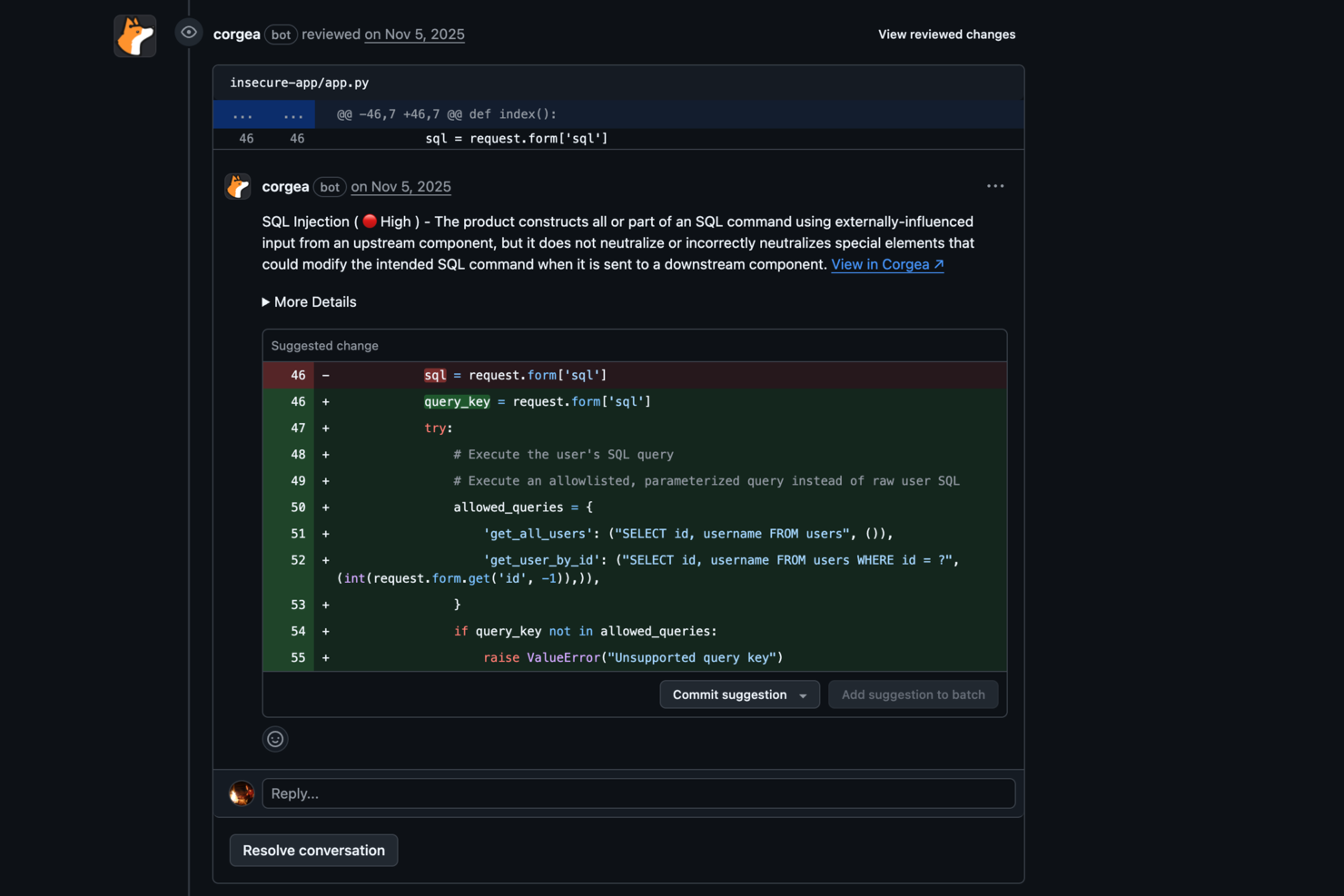
Corgea enhances your team's security capabilities by pinpointing and fixing insecure code, making it an ideal solution for CTOs seeking to safeguard their digital assets. Its AI-driven technology appeals to industries that require stringent security measures, such as finance and healthcare, by addressing vulnerabilities that could compromise sensitive data. By integrating into your existing workflows, Corgea helps your team efficiently manage security risks, ensuring peace of mind and allowing you to focus on innovation.
Why I Picked Corgea
I picked Corgea for its AI-driven Static Application Security Testing (SAST), which excels in identifying complex vulnerabilities that traditional methods might miss. The auto-triage feature significantly reduces false positives, saving your team time and allowing them to focus on actual threats. Additionally, Corgea's customizable detection policies let you tailor the tool to your specific security needs, ensuring comprehensive protection against emerging threats.
Corgea Key Features
In addition to its core strengths, Corgea offers several other features that enhance its utility:
- Dependency Scanning: This feature checks for vulnerabilities in your project's dependencies across multiple programming languages.
- SAST Auto-Fix: Automatically generates security patches, reducing the manual effort required to secure your codebase.
- Privacy Leak Detection: Identifies sensitive information such as AWS keys and authentication credentials to prevent privacy breaches.
- Multi-Language Support: Supports a wide range of programming languages, including Java, Python, and Ruby, ensuring compatibility with your projects.
Corgea Integrations
Integrations include GitHub Actions, GitLab CI, Jenkins, Azure DevOps, JIRA, Slack, Zapier, and webhooks.
Pros and Cons
Pros:
- Broad CI/CD integrations
- Automated secure code fixes
- AI detects complex vulnerabilities
Cons:
- Focused mainly on code security
- Setup required for CI integrations

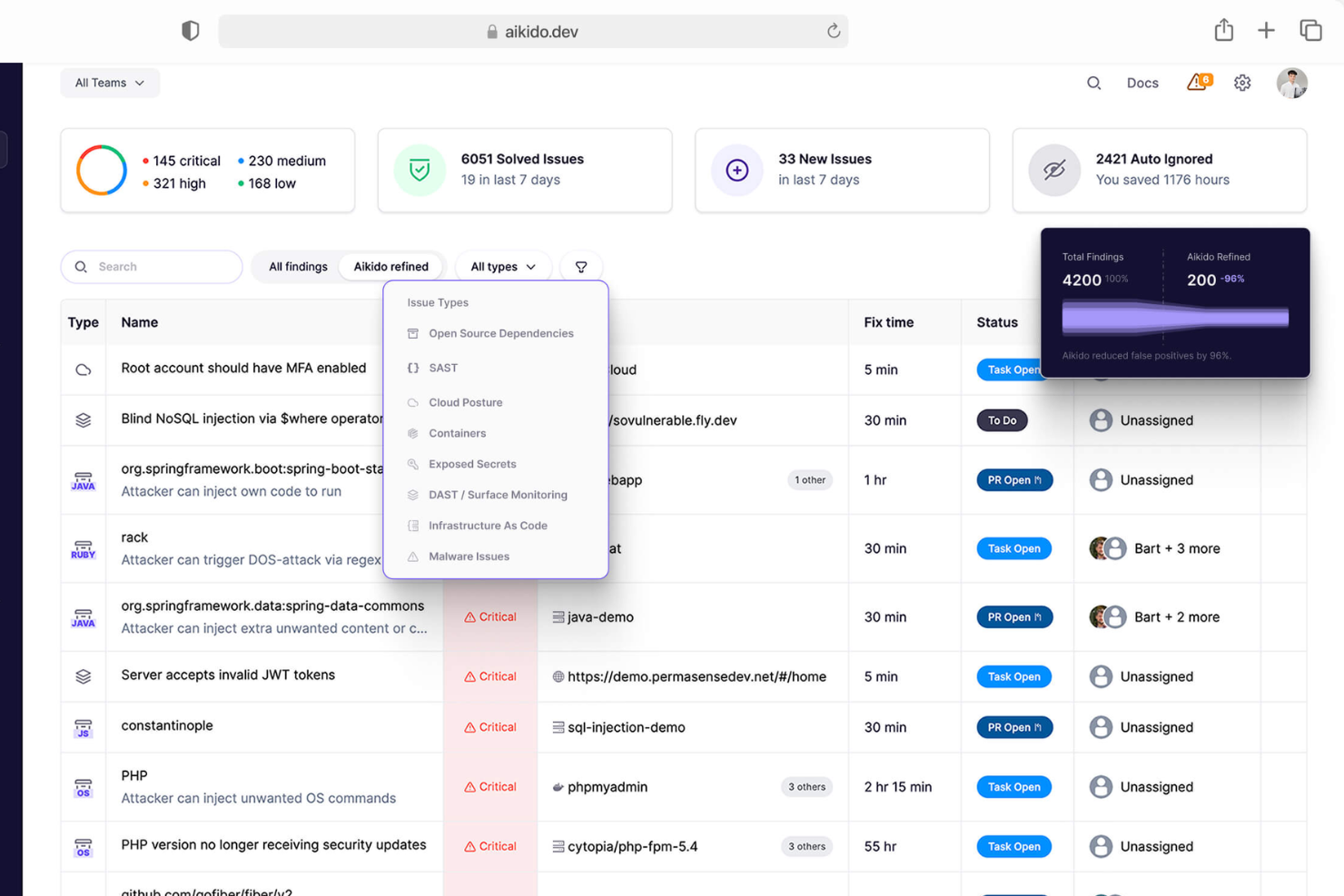
Aikido Security is a comprehensive platform designed to secure your entire stack, from code to cloud. It consolidates various security scanners into one centralized system, allowing you to monitor and protect your applications.
Why I picked Aikido Security: I like that it offers static application security testing (SAST). Aikido scans your source code for security risks before issues can be merged, helping you catch vulnerabilities early in the development process. This proactive approach ensures that potential threats are addressed promptly, reducing the likelihood of security breaches. Another notable feature is Aikido's cloud posture management (CSPM). It detects cloud infrastructure risks, such as misconfigurations and vulnerabilities in virtual machines and container images, across major cloud providers.
Standout features & integrations:
Features include open source dependency scanning (SCA), which continuously monitors your code for known vulnerabilities and generates software bills of materials (SBOMs). Additionally, Aikido's surface monitoring (DAST) dynamically tests your web application's front-end and APIs to identify vulnerabilities through simulated attacks.
Integrations include GitHub, GitLab, BitBucket, Azure Pipelines, Drata, Vanta, Asana, ClickUp, Monday.com, Microsoft Teams, and Jira.
Pros and Cons
Pros:
- Has a comprehensive dashboard and customizable reports
- Offers actionable insights
- Scalable for growing teams
Cons:
- Ignores vulnerabilities if no fix is available
- Does not have endpoint security or intrusion detection capabilities
New Product Updates from Aikido Security

Aikido Security Introduces AI Fix Prompts and Pentest Modeling
Aikido Security introduces new features including AI-powered fix prompts, real-time pentest threat modeling, and Alibaba Cloud support to strengthen application security workflows. For more information, visit Aikido Security’s official site.

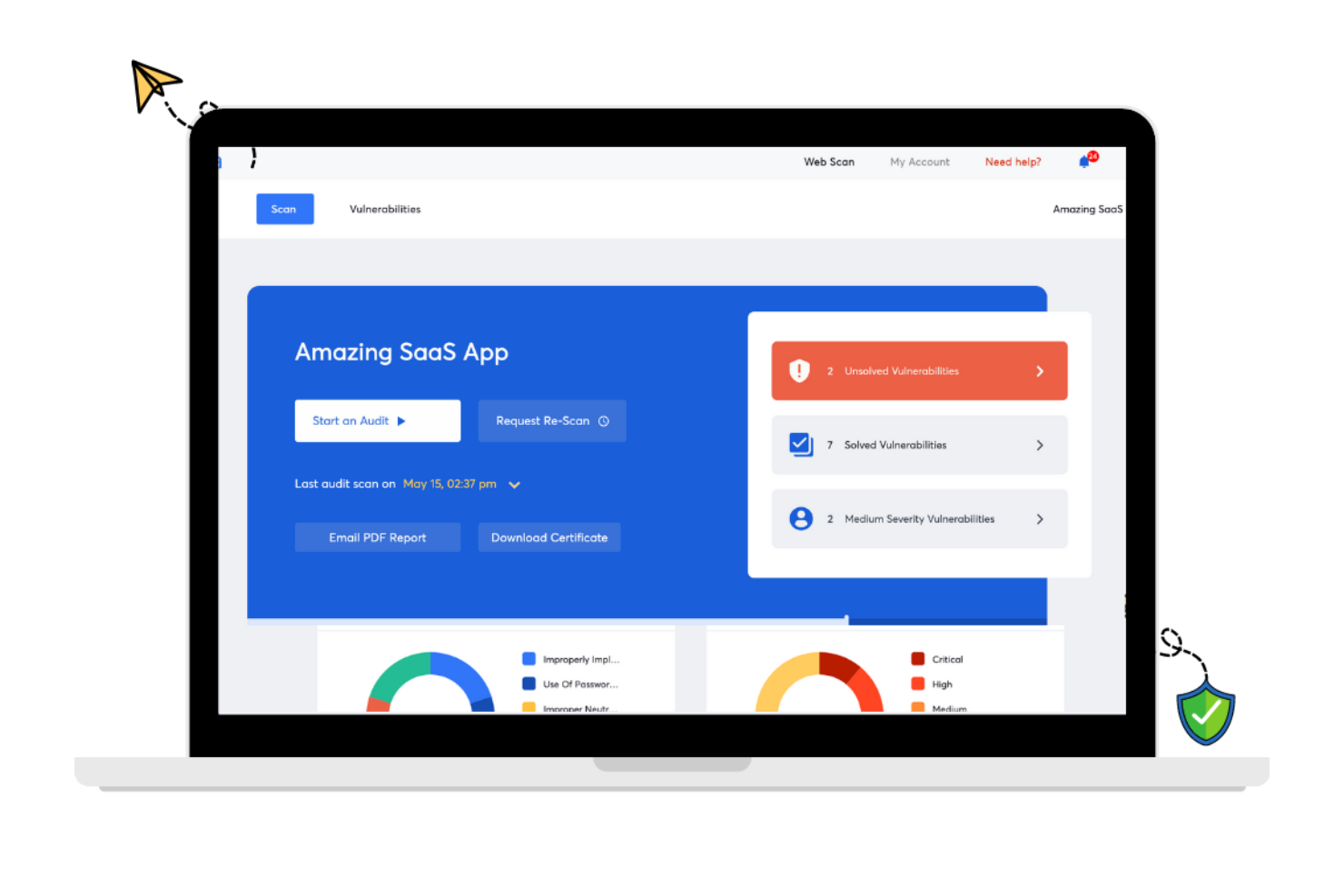
Astra Pentest is a security testing tool designed to safeguard your digital assets. It provides a thorough analysis of your web applications, networks, and more, ensuring vulnerabilities are identified and addressed.
Why I Picked Astra Pentest: I chose Astra Pentest because it offers both automated and manual testing, enabling a thorough evaluation of your system's security. This feature ensures that you get a comprehensive analysis of vulnerabilities, which is crucial for maintaining robust security standards. Additionally, Astra Pentest provides a detailed vulnerability management dashboard, helping you to efficiently track and manage any issues that are discovered. Another reason I picked Astra Pentest is its focus on compliance testing. It helps you ensure that your systems meet international security standards like SOC2 and HIPAA. This compliance feature is particularly beneficial for organizations that need to adhere to strict regulatory requirements. Moreover, Astra Pentest offers continuous scanning and re-testing, providing peace of mind that your systems remain secure over time.
Standout features & integrations:
Features include a publicly verifiable pentest certificate, which adds an extra layer of trust and assurance for your stakeholders. The tool’s integration with CI/CD pipelines allows for automated security checks during the development process, minimizing vulnerabilities before they reach production. Furthermore, Astra Pentest offers real-time remediation support, enabling your team to quickly resolve any identified issues.
Integrations include Slack, JIRA, GitHub, GitLab, Circle CI, Jenkins, and others that are not explicitly listed in the retrieved data.
Pros and Cons
Pros:
- Provides compliance-specific security scans
- Integrates with major CI/CD tools
- Combines automated and manual testing
Cons:
- Customer support response time varies
- Performance issues during heavy scans

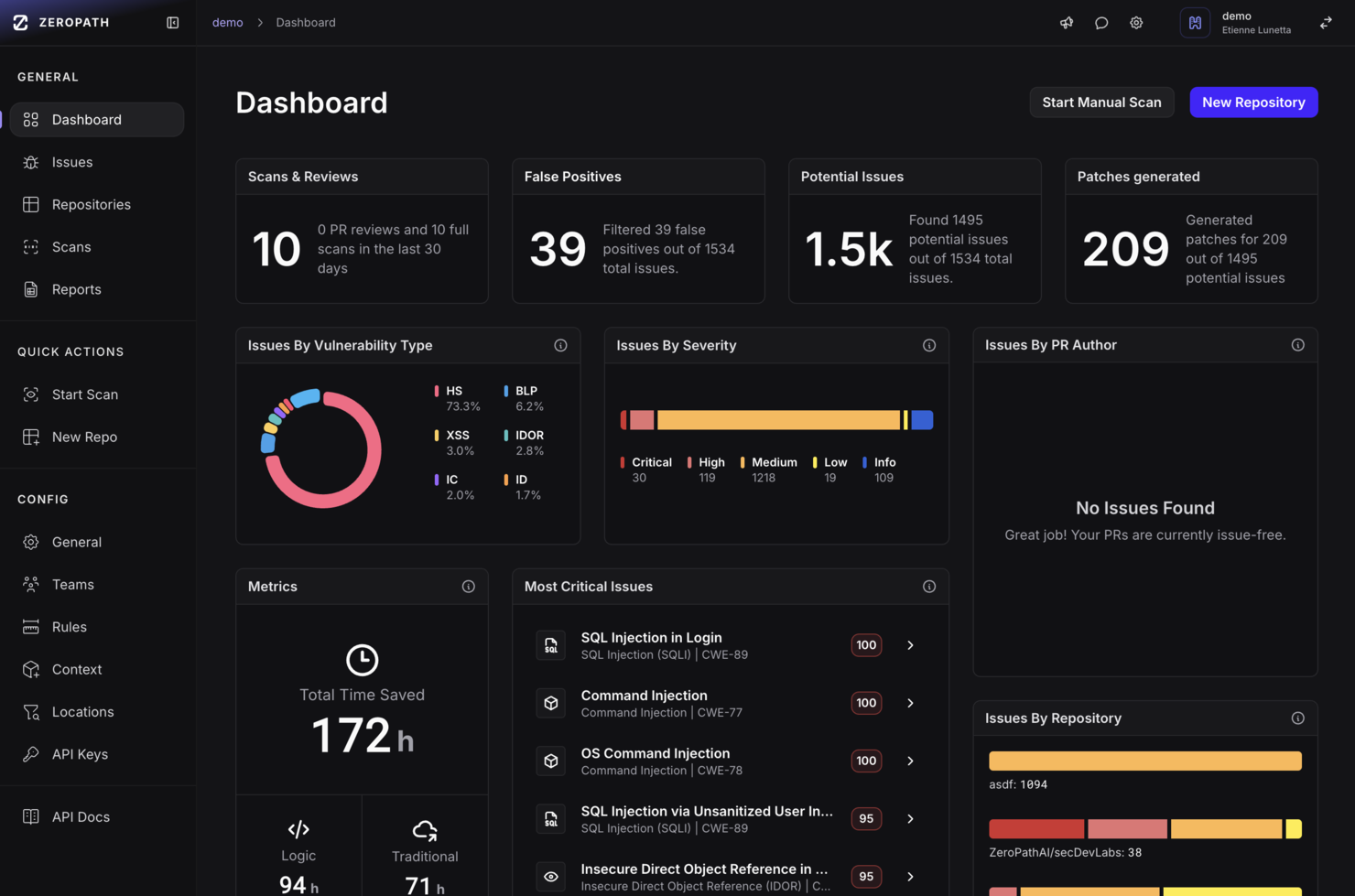
ZeroPath is designed for development teams and security professionals who want to embed deeper vulnerability detection into their codebase without sifting through countless false alarms. You’re likely in a fast-moving engineering environment where developers need actionable feedback and your security team wants meaningful results instead of noise. ZeroPath appeals to organizations building complex applications (for example, fintech, healthcare, or SaaS) where business logic, authorization flows, and modern threat classes matter.
Why I Picked Zeropath
I picked ZeroPath because it puts context-aware code analysis at the heart of application security. It uses an AI SAST engine that understands your application’s logic and can surface authorization bypasses, dependency risks and complex flaws rather than generic issues. It also offers autofix capabilities—once it finds a vulnerability, it can suggest or even generate pull-request patches you can review. These features align if your goal is to move faster while keeping risk in check.
Zeropath Key Features
In addition to those core strengths, you’ll find these features useful for your team:
- Version Control Integration: Native support for GitHub, GitLab, Bitbucket, and Azure DevOps allows for quick setup and seamless integration into your workflow.
- IaC misconfiguration detection: Infrastructure-as-Code issues (e.g., Terraform, CloudFormation, Kubernetes configs) are scanned for security flaws.
- Secrets scanning: It detects leaked secrets or hard-coded credentials across your repositories and alerts you to them.
- Automated Compliance Reporting: Generate compliance reports for standards like SOC 2 and ISO 27001, ensuring your organization meets regulatory requirements.
Zeropath Integrations
Integrations include GitHub, GitLab, Bitbucket, Azure DevOps, Jira, Linear, Slack, and existing security tools like Snyk, Semgrep, and Checkmarx.
Pros and Cons
Pros:
- It catches logic flaws and hidden risks you might miss in normal scans.
- Cuts down noisy findings so your team can focus on real issues.
- Gives you clear fixes that speed up your security reviews.
Cons:
- Integration options may not be extensive enough for complex enterprise environments.
- You may need time to adjust your workflow around its automation.


QA Wolf is a security testing tool designed for teams seeking efficient collaboration in quality assurance. This tool is ideal for teams aiming to enhance their testing capabilities and reduce deployment times.
Why I picked QA Wolf: QA Wolf offers unique features that facilitate team collaboration. Its ability to automate 80% of test coverage within four months stands out. The platform supports unlimited parallel test runs, reducing QA cycle times significantly. Additionally, its integration of AI to investigate failed tests adds value to its collaborative approach, ensuring speed and accuracy. It combines AI efficiency with human oversight, making it a reliable choice for team collaboration.
Standout features & integrations:
Features include automated testing using Playwright for web and Appium for mobile, which allows for quick automation of tests. The tool supports unlimited parallel test runs, significantly cutting down QA cycle times. It also employs AI to investigate failed tests, ensuring quick identification and resolution of issues.
Integrations include Jenkins, CircleCI, GitHub Actions, Azure DevOps, Travis CI, GitLab CI, Bamboo, TeamCity, and Bitbucket Pipelines.
Pros and Cons
Pros:
- Rapid test automation
- Significant time savings
- Efficient bug reporting
Cons:
- Limited pricing transparency
- Potential learning curve for new users
New Product Updates from QA Wolf

QA Wolf Adds Android Emulator Infrastructure for Device Testing
QA Wolf introduces Android emulator infrastructure with expanded device and OS testing support. These updates enable teams to test across real-world device conditions and improve test coverage. For more information, visit QA Wolf’s official site.
 .
.

New Relic is a comprehensive observability platform designed for businesses requiring real-time monitoring and application performance enhancement.
Why I picked New Relic: The platform excels in real-time monitoring with its Application Performance Monitoring (APM) and Interactive Application Security Testing (IAST). It supports over 780 integrations, making it highly adaptable for various tech stacks. Its usage-based pricing model offers flexibility, catering to different organizational needs. The proactive threat management and zero-day vulnerability alerts are key features that align with its USP of real-time monitoring.
Standout features & integrations:
Features include end-to-end observability, which allows for comprehensive monitoring of applications. The platform offers real-time threat management to address vulnerabilities as they arise. Users also benefit from zero-day vulnerability alerts, enhancing security measures.
Integrations include AWS, Azure, Google Cloud Platform, Kubernetes, Docker, Jenkins, GitHub, Slack, PagerDuty, and Microsoft Teams.
Pros and Cons
Pros:
- Extensive integration options
- Real-time threat alerts
- Enhances team collaboration
Cons:
- May overwhelm with data
- Limited support for smaller teams


Sonatype is a security testing tool focusing on open-source management and software supply chain security. It serves development teams and enterprises by ensuring the safety and compliance of open-source components.
Why I picked Sonatype: Sonatype excels in open-source management with its Nexus platform, which automates security checks and compliance. It provides real-time monitoring of open-source components, helping your team address vulnerabilities quickly. The tool also offers detailed insights into component health, ensuring you make informed decisions. Its ability to integrate with various development environments enhances its utility for managing open-source security.
Standout features & integrations:
Features include automated policy enforcement, which helps maintain compliance across your projects. It offers component intelligence, giving you insights into the quality and security of open-source components. The platform also provides real-time alerts on vulnerabilities, allowing you to act swiftly.
Integrations include Jenkins, GitHub, GitLab, Bitbucket, Bamboo, Azure DevOps, Jira, Eclipse, IntelliJ IDEA, and Visual Studio.
Pros and Cons
Pros:
- Strong focus on open-source security
- Real-time vulnerability alerts
- Detailed component insights
Cons:
- Can be complex to configure
- High learning curve for beginners


Wapiti is an open-source web application vulnerability scanner designed for security professionals and developers. It identifies vulnerabilities in web applications by performing black-box testing, which simulates attacks on your web applications to expose weaknesses.
Why I picked Wapiti: Wapiti offers a straightforward approach to web vulnerability scanning with its black-box testing methodology. It can detect a variety of vulnerabilities, such as SQL injection and cross-site scripting, ensuring comprehensive coverage for your web applications. The tool's ability to perform both GET and POST HTTP attack methods enhances its effectiveness. Its command-line interface allows for flexible and customizable scanning options, making it a valuable tool for web vulnerability scanning.
Standout features & integrations:
Features include the ability to detect a wide range of vulnerabilities, providing thorough security assessments. The tool supports both GET and POST HTTP attack methods, ensuring comprehensive testing. Wapiti's command-line interface allows for flexible and customizable scanning options, catering to your specific needs.
Integrations include compatibility with various web technologies and platforms, such as HTML5, XML, JSON, SOAP, and AJAX.
Pros and Cons
Pros:
- Supports multiple attack methods
- Customizable scanning options
- Simple command-line interface
Cons:
- Limited user interface
- Can be resource-intensive


Zed Attack Proxy (ZAP) is an open-source web application security scanner designed for security professionals and developers. It performs penetration testing to identify vulnerabilities in web applications, helping you secure your online assets.
Why I picked Zed Attack Proxy (ZAP): ZAP provides an intuitive interface suitable for both beginners and experienced testers. It offers automated scanners and a set of tools that allow you to discover security vulnerabilities manually. Its ability to function as a proxy server enables you to intercept and modify traffic, enhancing its utility for penetration testing. The community-driven nature of ZAP ensures continuous updates and improvements, making it a reliable choice for comprehensive testing.
Standout features & integrations:
Features include automated scanners that quickly identify security vulnerabilities in web applications. The tool allows you to intercept and modify web traffic, providing a deeper analysis of potential issues. ZAP also offers a range of manual testing tools, giving you flexibility in how you conduct your security assessments.
Integrations include compatibility with Jenkins, Docker, GitHub Actions, GitLab, Azure DevOps, Bamboo, TeamCity, Travis CI, and CircleCI.
Pros and Cons
Pros:
- Supports manual and automated testing
- Intuitive interface for all users
- Offers traffic interception capabilities
Cons:
- Limited documentation for beginners
- Frequent updates may disrupt use
Weitere Security Testing Tools
Hier sind einige weitere Optionen für Security Testing Tools, die es nicht auf meine Kurzliste geschafft haben, aber dennoch einen Blick wert sind:
- SQLMap
For SQL injection testing
- ImmuniWeb
For AI-driven security
- BeEF (Browser Exploitation Framework)
For browser security testing
- Vega
For web app security
- Mend.io
For vulnerability scanning
- NowSecure
For automated mobile app security testing
- Snyk
For developer-first security
- Astra Pentest
For continuous pentesting
- Invicti
For automated web app testing
- Intruder
For continuous vulnerability scanning
- Probely
For scalable security assessments
- Tenable
For continuous vulnerability assessment
- Burp Suite
For manual security testing
- UnderDefense
For managed detection and response
- Cyberpion
For external attack surface management
- Wfuzz
For web application fuzzing
- Google Nogotofail
For network traffic testing


Auswahlkriterien für Security Testing Tools
Bei der Auswahl der besten Security Testing Tools für diese Liste habe ich gängige Bedürfnisse und Probleme der Käufer berücksichtigt, wie z.B. die Entdeckung von Schwachstellen und die Integrationsfähigkeit in bestehende Systeme. Zudem habe ich das folgende Framework genutzt, um meine Bewertung strukturiert und fair zu gestalten:
Kernfunktionen (25 % der Gesamtbewertung)
Um in diese Liste aufgenommen zu werden, musste jede Lösung folgende Anwendungsfälle abdecken:
- Erkennung von Schwachstellen
- Durchführung von Penetrationstests
- Webanwendungsscans durchführen
- Sicherheitsberichte bereitstellen
- Unterstützung von Compliance-Anforderungen
Zusätzliche besondere Funktionen (25 % der Gesamtbewertung)
Zur weiteren Eingrenzung habe ich nach speziellen Eigenschaften gesucht, wie zum Beispiel:
- Echtzeit-Bedrohungswarnungen
- Integration mit CI/CD-Pipelines
- Individuell anpassbare Dashboards
- KI-gestützte Analysen
- Automatische Vorschläge zur Behebung von Schwachstellen
Benutzerfreundlichkeit (10 % der Gesamtbewertung)
Um die Benutzerfreundlichkeit der Systeme zu beurteilen, habe ich Folgendes berücksichtigt:
- Intuitives Oberflächendesign
- Einfache Navigation
- Minimale Lernkurve
- Anpassbare Benutzereinstellungen
- Zugänglichkeit über verschiedene Geräte
Onboarding (10 % der Gesamtbewertung)
Um die Onboarding-Erfahrung für jede Plattform zu bewerten, habe ich Folgendes berücksichtigt:
- Verfügbarkeit von Trainingsvideos
- Interaktive Produkttouren
- Zugriff auf Vorlagen und Anleitungen
- Vorhandensein von Chatbots für Support
- Regelmäßige Webinare für Nutzer
Kundensupport (10 % der Gesamtbewertung)
Um die Kundensupport-Dienste jedes Softwareanbieters zu bewerten, habe ich Folgendes berücksichtigt:
- 24/7 Support-Verfügbarkeit
- Optionen für Live-Chat
- Umfassende Wissensdatenbank
- Schneller E-Mail-Support
- Dedizierte Kundenbetreuer
Preis-Leistungs-Verhältnis (10 % der Gesamtbewertung)
Um das Preis-Leistungs-Verhältnis jeder Plattform zu bewerten, habe ich Folgendes berücksichtigt:
- Wettbewerbsfähige Preisgestaltung
- Flexible Abonnement-Modelle
- Transparente Preisstruktur
- Leistungsmerkmale im Basispreis enthalten
- Rabatte bei jährlicher Abrechnung
Kundenbewertungen (10 % der Gesamtbewertung)
Um ein Gefühl für die allgemeine Kundenzufriedenheit zu bekommen, habe ich folgende Aspekte bei der Durchsicht von Kundenbewertungen berücksichtigt:
- Allgemeine Zufriedenheitsbewertung
- Feedback zur Wirksamkeit von Funktionen
- Kommentare zur Benutzerfreundlichkeit
- Meinungen zum Kundensupport
- Einblicke zu Zuverlässigkeit und Verfügbarkeit
Wie man Security Testing Tools auswählt
Es ist leicht, sich in langen Funktionslisten und komplexen Preisstrukturen zu verlieren. Damit Sie sich auf Ihren individuellen Auswahlprozess konzentrieren können, finden Sie hier eine Checkliste wichtiger Faktoren:
| Faktor | Worauf achten |
| Skalierbarkeit | Stellen Sie sicher, dass das Tool mit Ihrem Team wächst. Prüfen Sie, ob es steigende Arbeitslasten und Benutzeranforderungen bewältigen kann. |
| Integrationen | Suchen Sie nach Kompatibilität mit Ihren bestehenden Tools wie CI/CD-Pipelines und Versionskontrollsystemen. |
| Anpassbarkeit | Prüfen Sie, ob sich Einstellungen für Ihre spezifischen Testanforderungen und Workflows anpassen lassen. |
| Benutzerfreundlichkeit | Wählen Sie ein Tool mit intuitiver Oberfläche. Es sollte die Einarbeitungszeit für Ihr Team minimieren. |
| Budget | Stimmen Sie die Kosten des Tools mit Ihren finanziellen Vorgaben ab. Prüfen Sie, ob es ein gutes Preis-Leistungs-Verhältnis bietet. |
| Sicherheitsvorkehrungen | Überprüfen Sie die Fähigkeiten des Tools zum Schutz sensibler Daten und zur Einhaltung von Compliance-Richtlinien. |
| Support | Beachten Sie die Verfügbarkeit von Kundensupport und Ressourcen wie Tutorials und Anleitungen. |
| Leistung | Bewerten Sie die Geschwindigkeit und Genauigkeit des Tools bei der Erkennung von Schwachstellen, ohne die Systemleistung zu beeinträchtigen. |
Trends bei Security Testing Tools
In meinen Recherchen habe ich unzählige Produktneuheiten, Pressemitteilungen und Release-Notes verschiedener Anbieter von Security Testing Tools ausgewertet. Hier sind einige der aufkommenden Trends, die ich derzeit beobachte:
- KI und maschinelles Lernen: Diese Technologien werden eingesetzt, um Schwachstellenerkennung und -analyse zu verbessern. Sie können Muster erkennen und potenzielle Bedrohungen schneller vorhersagen als traditionelle Methoden. Anbieter wie ImmuniWeb integrieren KI, um intelligentere Bedrohungsbewertungen zu ermöglichen.
- Fokus auf Cloud-Sicherheit: Da immer mehr Unternehmen in die Cloud wechseln, legen Tools nun verstärkt Wert auf cloud-spezifische Sicherheitstests. So wird sichergestellt, dass Cloud-Umgebungen genauso sicher sind wie lokale Systeme. Lösungen wie Snyk passen ihr Angebot an, um Cloud-Schwachstellen gezielt anzugehen.
- Bedrohungsinformationen in Echtzeit: Nutzer wünschen sich aktuelle Einblicke in potenzielle Gefahren. Tools integrieren Echtzeit-Bedrohungsfeeds, um sofortige Warnungen und Empfehlungen zu geben. Dieser Trend ist entscheidend, damit Unternehmen rasch auf Sicherheitsvorfälle reagieren können.
- DevSecOps-Tools-Integration: Sicherheitstests werden zu einem festen Bestandteil des DevOps-Lebenszyklus. Die Tools sind darauf ausgelegt, sich nahtlos in CI/CD-Pipelines einzufügen, und fördern einen „Shift-left“-Ansatz für Sicherheit. Diese Integration hilft, Schwachstellen frühzeitig im Entwicklungsprozess zu erkennen.
- Nutzerverhaltensanalyse: Das Analysieren von Nutzerverhalten wird immer wichtiger, um Anomalien zu identifizieren, die auf Sicherheitsverletzungen hindeuten könnten. Dieser Trend hilft, interne Bedrohungen und ungewöhnliche Zugriffsmuster zu erkennen. Er wird zu einem zentralen Bestandteil umfassender Sicherheitsstrategien.
Was sind Security Testing Tools?
Sicherheits-Testtools sind Softwarelösungen, die dazu entwickelt wurden, Schwachstellen und Sicherheitslücken in Systemen, Anwendungen und Netzwerken zu identifizieren. Diese Tools werden häufig von Sicherheitsexperten, Entwicklern und IT-Teams eingesetzt, um die Sicherheitslage ihres Unternehmens zu verbessern. Funktionen wie Schwachstellenerkennung, Echtzeit-Bedrohungsinformationen und Fokus auf Cloud-Sicherheit helfen dabei, sensible Daten zu schützen und die Einhaltung von Vorgaben sicherzustellen. Insgesamt bieten diese Tools essenzielle Unterstützung, um sichere und widerstandsfähige IT-Umgebungen aufrechtzuerhalten.
Funktionen von Security Testing Tools
Achten Sie bei der Auswahl von Security Testing Tools auf die folgenden Schlüsselfunktionen:
- Schwachstellenerkennung: Findet Schwachstellen und Sicherheitslücken in Anwendungen, um potenzielle Angriffe zu vermeiden.
- Echtzeit-Bedrohungsinformationen: Liefert aktuelle Warnmeldungen über neue Bedrohungen und ermöglicht sofortige Reaktionen und Gegenmaßnahmen.
- Fokus auf Cloud-Sicherheit: Sorgt dafür, dass Cloud-Umgebungen geschützt sind und geht auf die besonderen Herausforderungen cloud-basierter Systeme ein.
- DevSecOps-Integration: Lässt sich in CI/CD-Pipelines einbinden, sodass während des gesamten Entwicklungsprozesses Sicherheitsüberprüfungen durchgeführt werden und Probleme früh erkannt werden können.
- Nutzerverhaltensanalyse: Überwacht und analysiert Benutzeraktivitäten, um ungewöhnliche Muster zu erkennen, die auf Sicherheitsgefahren hindeuten könnten.
- Automatisierte Scans: Führt regelmäßige, automatisierte Sicherheitsüberprüfungen durch, verringert manuellen Aufwand und spart Zeit.
- Anpassbare Dashboards: Bietet individuelle Übersichten und Berichte, damit Teams sich auf die relevantesten Sicherheitskennzahlen und Erkenntnisse konzentrieren können.
- Fähigkeiten für KI und maschinelles Lernen: Verbessern die Erkennung und Analyse von Bedrohungen, um intelligentere und schnellere Sicherheitsbewertungen bereitzustellen.
- Compliance-Unterstützung: Hilft sicherzustellen, dass Systeme branchenspezifische Vorgaben und Normen erfüllen und reduziert so das Risiko von Compliance-Verstößen.
- Manuelle Testtools: Bietet Möglichkeiten für detaillierte, manuelle Prüfungen für Sicherheitsexperten, die eine umfassende Analyse benötigen.
Vorteile von Security Testing Tools
Die Implementierung von Security Testing Tools bringt für Ihr Team und Ihr Unternehmen zahlreiche Vorteile. Auf diese können Sie sich freuen:
- Verbesserte Sicherheitslage: Durch das Aufdecken und Beheben von Schwachstellen helfen diese Tools, Ihre Systeme vor potenziellen Bedrohungen zu schützen.
- Zeitersparnis: Automatisierte Scans verringern den manuellen Prüfaufwand, sodass sich Ihr Team auf andere Aufgaben konzentrieren kann.
- Bessere Compliance: Tools mit Compliance-Unterstützung sorgen dafür, dass Sie Branchenstandards einhalten und so das Risiko von Sanktionen verringern.
- Früherkennung von Problemen: Die Integration mit anderen DevOps-Security-Tools ermöglicht Sicherheitsüberprüfungen während der Entwicklung, sodass Probleme erkannt werden, bevor sie eskalieren.
- Fundierte Entscheidungen: Anpassbare Dashboards und detaillierte Berichte liefern Erkenntnisse, die Ihre Sicherheitsstrategien steuern.
- Proaktives Bedrohungsmanagement: Bedrohungsinformationen in Echtzeit halten Sie über neue Gefahren auf dem Laufenden, sodass Sie schnell reagieren können.
- Skalierbarkeit: Wenn Ihr Unternehmen wächst, passen sich diese Tools an den erhöhten Bedarf an und sorgen weiterhin für umfassenden Schutz.
Kosten und Preise von Security Testing Tools
Die Auswahl von Sicherheitstest-Tools erfordert ein Verständnis der verschiedenen Preisgestaltungsmodelle und verfügbaren Pläne. Die Kosten variieren je nach Funktionen, Teamgröße, Zusatzoptionen und mehr. Die folgende Tabelle fasst gängige Pläne, deren durchschnittliche Preise und typische enthaltene Funktionen von Sicherheitstest-Tools zusammen:
Vergleichstabelle für Sicherheitstest-Tools
| Plan-Typ | Durchschnittlicher Preis | Gängige Funktionen |
| Kostenloser Plan | $0 | Grundlegendes Schwachstellen-Scanning, eingeschränkter Support und Community-Zugang. |
| Persönlicher Plan | $10-$30 /Benutzer /Monat | Erweiterte Scan-Möglichkeiten, Basisberichte und E-Mail-Support. |
| Business-Plan | $50-$100 /Benutzer /Monat | Umfassendes Scanning, Echtzeit-Benachrichtigungen, Compliance-Prüfungen und telefonischer Support. |
| Enterprise-Plan | $150-$300/Benutzer /Monat | Vollständige Feature-Suite, dedizierte Account-Manager, individuelle Integrationen und 24/7-Support. |
Sicherheitstest-Tools FAQs
Hier finden Sie Antworten auf häufig gestellte Fragen zu Sicherheitstest-Tools:
Welches Tool wird für Sicherheitstests verwendet?
Für Sicherheitstests werden Tools wie Burp Suite und OWASP ZAP für Webanwendungen sowie Nmap und Wireshark für die Netzanalyse eingesetzt. Diese Tools erkennen und beseitigen Sicherheitsprobleme in verschiedenen Bereichen. Sie bieten fortschrittliche Funktionen, die für umfassende Sicherheitstests unerlässlich sind.
Was sind die drei Arten von Sicherheitstests?
Die drei Hauptarten von Sicherheitstests sind Schwachstellenscans, Penetrationstests und statische Analysen. Schwachstellenscans verwenden automatisierte Tools, um Schwachstellen zu erkennen. Penetrationstests simulieren Angriffe, um Sicherheitslücken aufzudecken. Statische Analysen untersuchen Quellcode auf potenzielle Schwachstellen.
Sind Sicherheitstests funktional oder nicht-funktional?
Sicherheitstests gelten als eine Form des nicht-funktionalen Testens. Sie konzentrieren sich darauf, wie sich ein System unter unerwarteten Bedingungen verhält, anstatt auf spezifische Funktionalitäten. Nicht-funktionale Tests, einschließlich Sicherheitstests, bewerten die Widerstandsfähigkeit eines Systems und seine Fähigkeit, Bedrohungen zu begegnen.
Was sind die sechs Grundprinzipien von Sicherheitstests?
Die sechs Grundprinzipien sind Vertraulichkeit, Integrität, Verfügbarkeit, Authentifizierung, Autorisierung und Nichtabstreitbarkeit. Diese Prinzipien stellen sicher, dass Daten vor unbefugtem Zugriff geschützt, korrekt und verfügbar bleiben sowie Handlungen nachvollziehbar sind. Sie bilden die Grundlage für effektive Sicherheitstests.
Wie oft sollten Sicherheitstests durchgeführt werden?
Regelmäßige Sicherheitstests sind entscheidend für die Aufrechterhaltung einer sicheren Umgebung. Idealerweise sollten Tests mindestens vierteljährlich und nach wesentlichen Systemänderungen erfolgen. So werden neue Schwachstellen entdeckt und ein kontinuierlicher Schutz gegen sich entwickelnde Bedrohungen gewährleistet.
Können Sicherheitstest-Tools in CI/CD-Pipelines integriert werden?
Ja, viele Sicherheitstest-Tools lassen sich in CI/CD-Pipelines integrieren. Diese Integration ermöglicht kontinuierliche Sicherheitsprüfungen während des Entwicklungsprozesses. So werden Schwachstellen frühzeitig erkannt und sichergestellt, dass Sicherheit Teil des gesamten Softwareentwicklungszyklus ist.
Wie geht es weiter?
Wenn Sie gerade dabei sind, Sicherheitstest-Tools zu recherchieren, kontaktieren Sie einen SoftwareSelect-Berater für kostenlose Empfehlungen.
Sie füllen ein Formular aus und führen ein kurzes Gespräch, in dem Ihre individuellen Anforderungen im Detail besprochen werden. Anschließend erhalten Sie eine Shortlist mit passenden Softwarelösungen. Sie werden während des gesamten Kaufprozesses unterstützt, einschließlich Preisverhandlungen.