

10 Best Enterprise Penetration Testing Tools in 2026

Best Enterprise Penetration Testing Tools Shortlist


With so many different enterprise penetration testing tools available, figuring out which is right for you is tough. You know you want to proactively fortify your organization's defenses against potential cyber threats but need to figure out which tool is best. I've got you! In this post I'll help make your choice easy, sharing my personal experiences using dozens of different enterprise penetration testing software with a variety of teams and projects, with my picks of the best enterprise penetration testing tools.
Why Trust Our Software Recommendations
Our team has been testing and reviewing software since 2012. As tech leaders ourselves, we know how difficult—and important—it is to choose the right software.
For this guide, we evaluated tools using hands-on testing and independent research, scoring tools using our selection criteria.
Our reviews reflect our human editorial judgment, not a sales pitch.
Best Enterprise Penetration Testing Tools Summary
This comparison chart summarizes pricing details for my top enterprise penetration testing tools selections to help you find the best one for your budget and business needs.
| Tool | Best For | Trial Info | Price | ||
|---|---|---|---|---|---|
| 1 | Best for business logic security testing | Free demo available | Pricing upon request | Website | |
| 2 | Best for continuous AI pentesting across apps | Free plan available | From $350/month | Website | |
| 3 | Best for hybrid AI + human pentesting | Free plan available | From $200/month | Website | |
| 4 | Best for attack surface management | 14-day free trial + free demo available | From $149/month | Website | |
| 5 | Best for offering automated security scanning throughout your SDLC | Free demo available | Pricing upon request | Website | |
| 6 | Best for continuous vulnerability scanning | Free demo available | From $69/month | Website | |
| 7 | Best for providing a vast array of tools and utilities | Free demo available | Free to use | Website | |
| 8 | Best for command-line and GUI-based manual penetration testing | Free demo available | Pricing upon request | Website | |
| 9 | Best for customizable troubleshooting and live results | 7-day free trial + free demo | From $4,390/license/year | Website | |
| 10 | Best for external attack surface visibility | Free demo available | Pricing upon request | Website |


Best Enterprise Penetration Testing Tool Reviews
Below, you’ll find an overview of each of the 10 best enterprise penetration testing tools with screenshots, key feature highlights, pricing, and pros and cons.

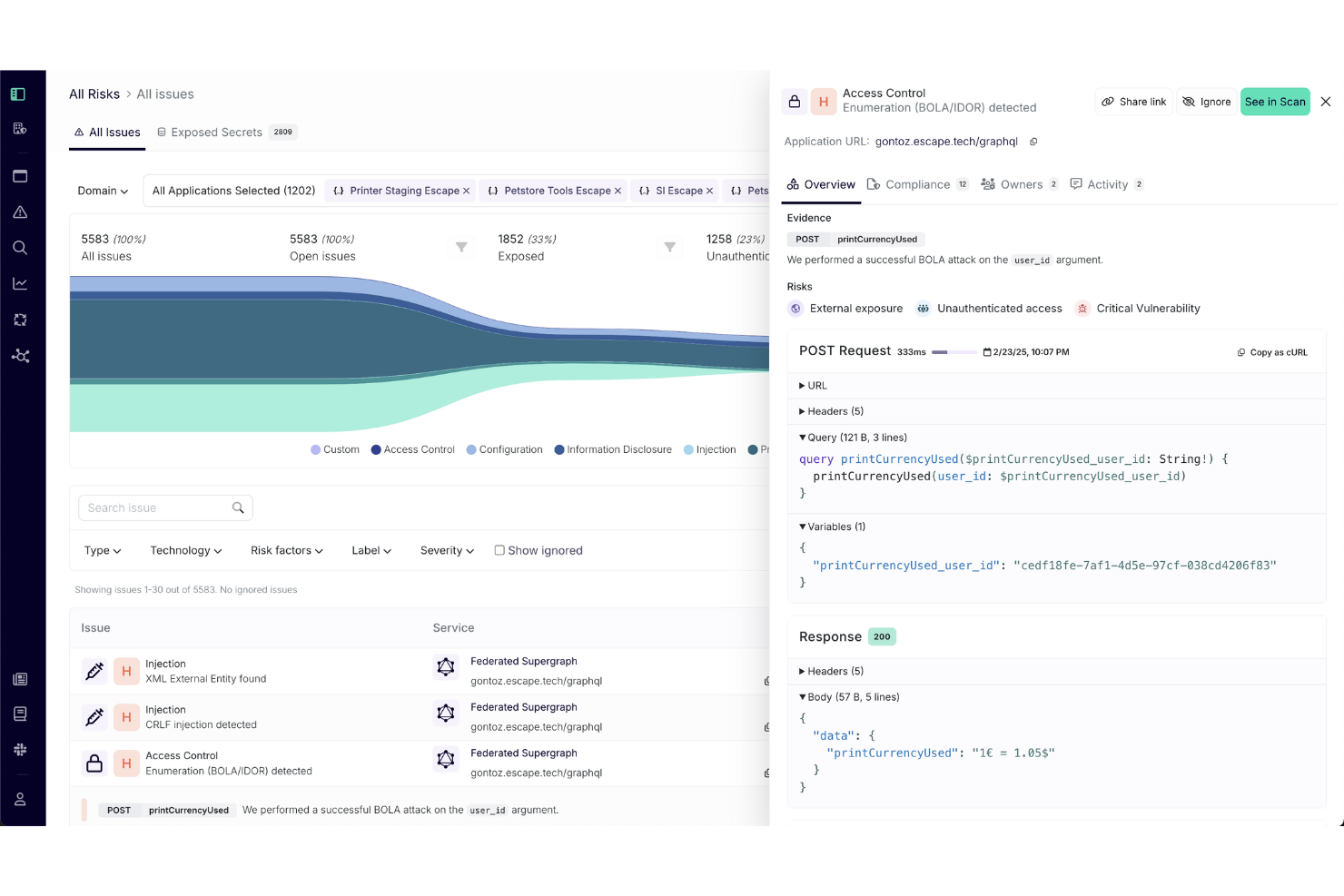
Escape is a cutting-edge Dynamic Application Security Testing (DAST) solution designed for enterprises that need to secure modern tech environments. It appeals to CISOs, IT managers, and security engineers across industries like finance and healthcare, addressing the challenge of rapid vulnerability remediation in frequently deployed applications. With features like business logic, security testing, and seamless CI/CD integration, it offers tailored solutions that integrate smoothly into existing workflows, ensuring comprehensive security observability.
Why I Picked Escape
I picked Escape for its focus on business logic security testing, which is crucial for enterprises dealing with complex applications. It excels in API and GraphQL security, helping your team uncover vulnerabilities that traditional tools might miss. The integration with CI/CD pipelines allows for continuous testing, ensuring security checks are part of your development process. Escape's AI-driven approach minimizes false positives, enhancing the efficiency of your security operations.
Escape Key Features
In addition to business logic security testing, Escape offers:
- Automated Shadow API Discovery: This feature enables your team to identify undocumented APIs that could pose security risks.
- Compliance Reporting: Escape provides built-in compliance checks, making it easier for your organization to adhere to industry standards like PCI-DSS and SOCII.
- Sensitive Data Leak Detection: This functionality helps detect potential data exposure, safeguarding your organization's confidential information.
- OpenAPI/Swagger Generation: Escape generates API documentation automatically, facilitating better understanding and management of your API ecosystem.
Escape Integrations
Integrations include DevSecOps, CI/CD processes, Jira, and public API access.
Pros and Cons
Pros:
- Strong API vulnerability detection, including coverage for REST and GraphQL endpoints
- Seamless integrations that fit into existing development and security workflows
- Continuous scanning and verification that support ongoing security monitoring
Cons:
- Setup process can be complex and may require configuration adjustments
- Platform upgrades can take time to apply and adapt to

Best for continuous AI pentesting across apps

Aikido Security blends AI-driven assessments with continuous scanning through Aikido Attack, helping security teams identify vulnerabilities across applications and APIs without waiting for periodic manual engagements.
Why I Picked Aikido Security
I picked Aikido Security because of its ability to combine AI-powered penetration testing with broader application security workflows. Through Aikido Attack, autonomous AI agents continuously test applications and APIs, helping teams uncover attack paths, validate findings, and prioritize remediation efforts. Beyond continuous pentesting, the platform also provides API fuzzing, runtime scanning, code security analysis, and cloud security capabilities, giving teams visibility across the software development lifecycle. For organizations looking to move beyond traditional point-in-time pentests, Aikido offers a more continuous and integrated approach to application security.
Aikido Security Key Features
Aside from the core pentesting capabilities mentioned above, you and your team will benefit from these features:
- Static Code Analysis: This feature helps your team identify vulnerabilities in your codebase early in the development cycle.
- Container Image Scanning: It provides insights into potential vulnerabilities within your containerized applications, ensuring secure deployments.
- Infrastructure as Code Scanning: This helps in identifying security issues in your infrastructure setup, enabling proactive remediation.
- Secrets Detection: It scans for sensitive information in your code repositories to prevent accidental exposure of credentials or secrets.
Aikido Security Integrations
Integrations include Azure Pipelines, Jira, GitHub, and more, enhancing workflow efficiency and ensuring seamless integration into your existing development environment.
Pros and Cons
Pros:
- Enterprise-ready controls and compliance alignment (ISO 27001 / SOC-2) documented.
- IDE plugin enables developers to catch issues early in the dev cycle.
- AI-powered agents discover complex vulnerabilities beyond typical scans.
Cons:
- Integrations beyond core DevOps ecosystem may require additional setup or custom work.
- For organizations used to purely manual pentests, the autonomous model may require cultural shift.
New Product Updates from Aikido Security
Aikido Security Adds Pentest for AI Capabilities
Aikido Security adds Pentest for AI to test agents and LLM features against OWASP Agentic Top 10 risks. This helps teams identify AI-specific security weaknesses before they reach production. For more information, visit Aikido Security’s official site.

Zeropath
Best for hybrid AI + human pentesting

When you’re trying to stay ahead of code-based vulnerabilities, you need a tool that does more than run scans and deliver dashboards. With ZeroPath you get an AI-native security platform that embeds into your dev workflow and surfaces issues like business logic flaws or auth bypasses before they reach production.
Why I Picked Zeropath
I picked ZeroPath because it blends automated intelligence with human-led analysis, a combination that aligns well with what teams need in an enterprise penetration testing tool. Its AI systems constantly scan for weaknesses, giving you timely insight into new issues as your applications change. From there, experienced pentesters validate the findings and map out attack paths that automated engines often overlook. This approach helps your team focus on vulnerabilities that truly matter, not just theoretical noise.
Zeropath Key Features
In addition to its core functionalities, Zeropath offers several other features beneficial for enterprise penetration testing:
- Software Composition Analysis (SCA): This feature helps your team identify and manage open-source components within your code, ensuring compliance and security.
- Real-time detection of new issues: Alerts surface instantly when the platform identifies emerging risks in your applications.
- Automated Compliance Reporting: This tool provides real-time security metrics and compliance reports, helping your organization stay informed and compliant with industry standards.
- Safe proof-of-concept exploit details: Every validated finding includes reproducible exploitation steps to show the practical impact.
Zeropath Integrations
Integrations include GitHub, GitLab, Azure DevOps, and Bitbucket, allowing for seamless integration into your existing development workflows.
Pros and Cons
Pros:
- AI-driven detection significantly reduces false positives.
- Automated vulnerability remediation streamlines security processes.
- Continuous scanning and retesting ensure issues don’t creep back in.
Cons:
- Dependence on AI means that edge-case detection still may vary.
- You may need time to adjust your workflow around its automation.

Intruder
Best for attack surface management
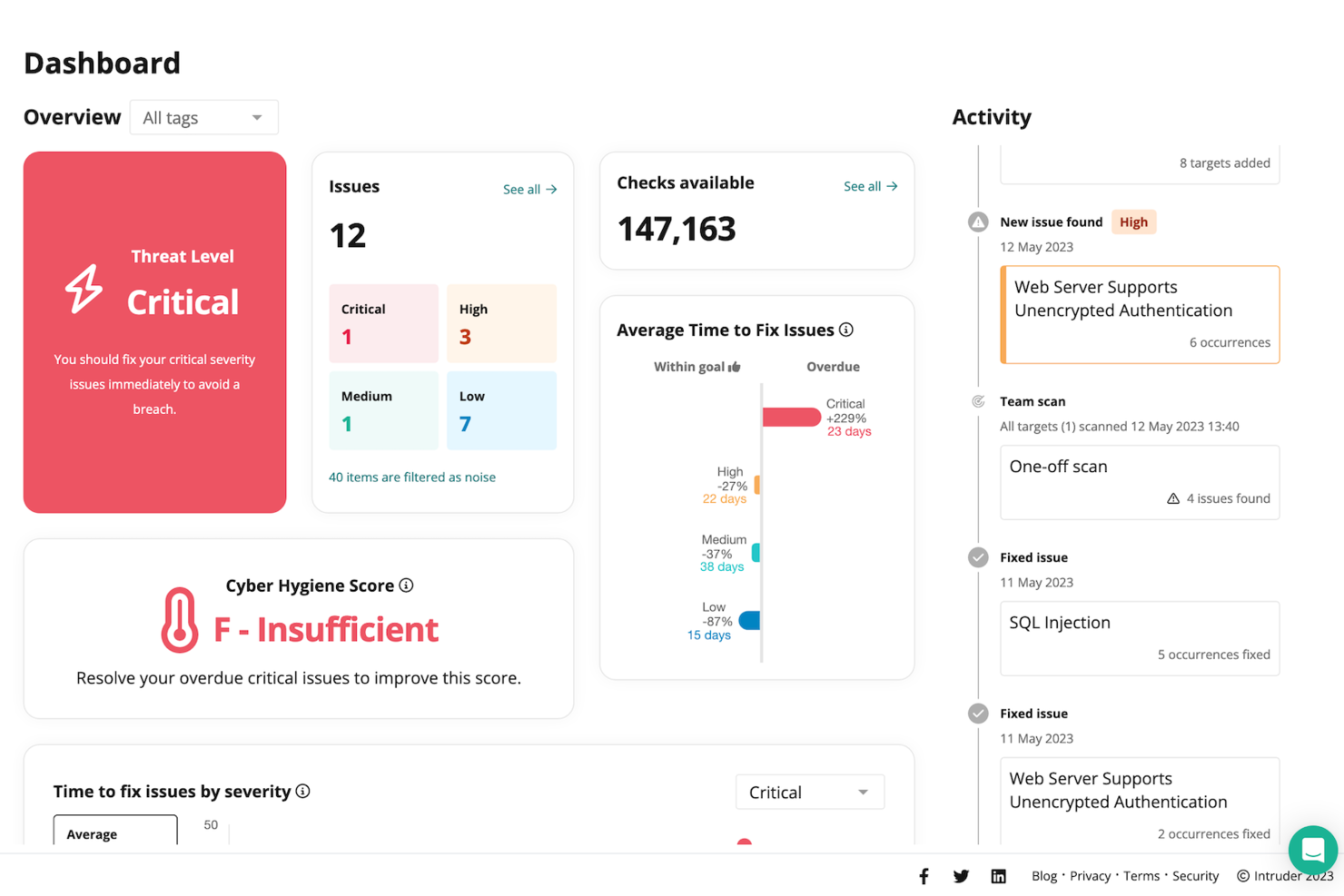
Intruder is a sophisticated cybersecurity solution designed to cater to enterprises seeking robust penetration testing tools. It appeals to IT security teams and professionals in need of continuous monitoring and vulnerability management to protect their digital assets. By focusing on proactive threat detection and compliance with industry standards, Intruder helps organizations address the evolving challenges of safeguarding sensitive data and maintaining a secure network environment.
Why I Picked Intruder
I picked Intruder for its focus on continuous monitoring and vulnerability management, which are crucial for enterprise penetration testing. Intruder's AI Security Automation accelerates response times to threats, ensuring that your security team can react swiftly to potential vulnerabilities. Additionally, its Attack Surface Management feature keeps track of changes and hidden assets, providing a comprehensive view of your network's security posture. These features, combined with risk-based prioritization to minimize alert fatigue, make Intruder a compelling choice for enterprises.
Intruder Key Features
In addition to its standout features, I also found Intruder offers:
- Cloud Security: Conducts daily configuration checks to ensure cloud services remain secure.
- API Security: Tests APIs for vulnerabilities, safeguarding critical data exchanges.
- Compliance Solutions: Supports standards like SOC 2, ISO, and HIPAA, helping you meet regulatory requirements.
- Emerging Threat Detection: Quickly identifies and responds to new threats, maintaining your network's integrity.
Intruder Integrations
Integrations include Jira, Slack, Microsoft Teams, AWS, Microsoft Azure, Google Cloud Platform, GitHub, GitLab, Bitbucket, and ServiceNow.
Pros and Cons
Pros:
- External and internal scanning
- AI driven threat prioritization
- Continuous automated vulnerability monitoring
Cons:
- Limited manual testing capabilities
- No dedicated mobile application
New Product Updates from Intruder
Intruder Launches On-Demand AI Pentesting for Web Apps
Intruder adds on-demand AI pentesting for web applications, allowing teams to launch assessments in minutes and receive audit-ready reports on the same day. For more information, visit Intruder’s official site.
 .
.
Invicti
Best for offering automated security scanning throughout your SDLC
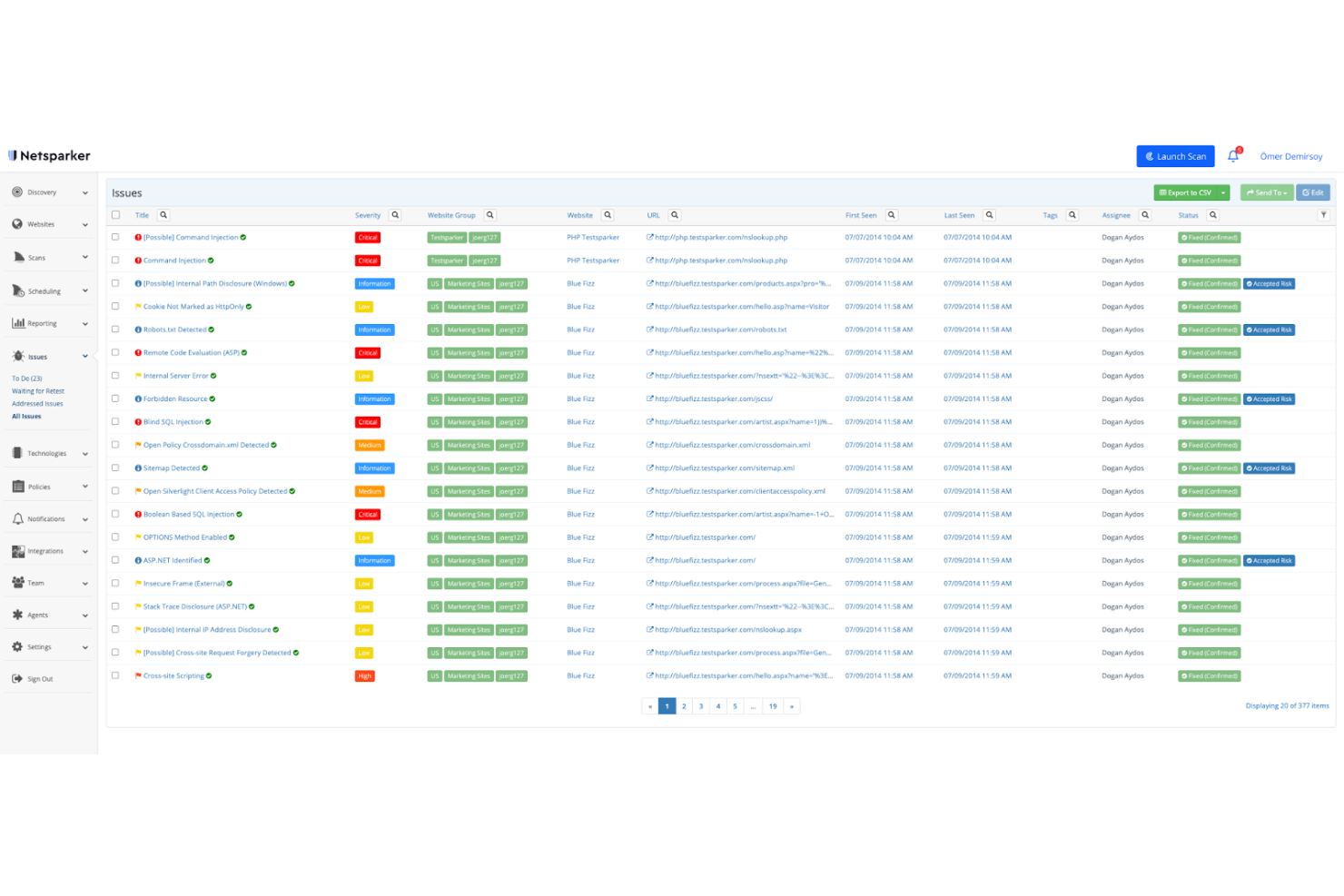
This tool provides scalable and accurate automated application security testing for enterprises. Invicti helps you find vulnerabilities using a unique dynamic and interactive approach, enabling you to significantly reduce your risk of attacks.
Why I picked Invicti: It allows you to automate security scanning throughout your software development lifecycle. With Invicti, you can integrate security testing into every phase of development. The tool helps you identify vulnerabilities that really matter, manage workloads properly, and assign tasks to team members for remediation.
It provides extensive visibility that gives you a complete picture of your app security. Invicti enables you to keep track of your web assets, scan every part of your apps, and follow up on your remediation efforts. You can also integrate seamlessly with issue tracking and ticketing software to help you manage the remediation processes effectively.
Invicti Standout Features and Integrations
Standout features: Invicti offers an exceptional dynamic and interactive (DAST + IAST) scanning approach. It uses combined signature and behavior-based testing to enable you to identify vulnerabilities that are difficult to uncover. The tool empowers you to resolve issues with less manual effort.
It reduces false positives with proof-based scanning. There are dashboards and reporting capabilities to help you monitor your security posture. You can get the right report for every stakeholder, view your current security status, and get detailed technical insights.
Integrations are available with CircleCI, GitHub, GitLab, Jenkins, Jira, Slack, Okta, Microsoft Teams, and ServiceNow.
Pros and Cons
Pros:
- Seamless integrations
- Comprehensive scanning
- Very scalable
Cons:
- It fails to fetch the database sometimes
- Slow support services

Best for continuous vulnerability scanning

Astra Pentest is an enterprise penetration testing platform that blends automated vulnerability scanning with expert-driven manual testing. It helps organizations identify and address security risks across web apps, APIs, networks, and cloud systems. Designed for engineering and security teams that need ongoing visibility, Astra delivers continuous, collaborative testing rather than one-off reports.
Why I picked Astra Pentest: I picked Astra Pentest because it not only uncovers vulnerabilities but also gives you proof of your security posture. The platform issues a publicly verifiable certificate once your systems are tested and validated by Astra’s security engineers, which can help you earn customer trust and demonstrate compliance.
I also found its collaboration tools particularly effective, letting you communicate with pentesters directly through Slack or Jira and track issue resolution in real time.
Astra Pentest standout features and integrations
Features include continuous vulnerability scanning with over 10,000 tests, AI-guided remediation steps, and comprehensive pentesting for web, mobile, API, and cloud environments.
Integrations include GitHub, GitLab, Jira, Slack, Jenkins, Azure DevOps, and major CI/CD pipelines, giving teams full visibility across development and security workflows.
Pros and Cons
Pros:
- AI-generated remediation step suggestions
- Centralized vulnerability management dashboard
- Over 8,000 comprehensive security tests
Cons:
- Limited mobile application testing support
- Occasional customer communication delays

Best for providing a vast array of tools and utilities

Kali Linux provides a range of tools that enable you to assess the security of your software systems. It’s a leading penetration testing platform that consists of a vast array of tools and utilities.
Why I picked Kali Linux: It’s easily customizable. The software provides a highly accessible and well-documented ISO customization process, which helps you generate an optimized version of Kali that suits your needs. It gives you the flexibility to adjust its features to match your security needs.
It has detailed documentation that helps new users get started quickly. There is an active community that makes using Kali Linux less challenging. There are experienced users willing to answer your questions and offer guidance.
Kali Linux Standout Features and Integrations
Standout features: Kali Linux features a wide range of security tools for assessing your systems’ security. Some of its offerings include Undercover Mode, Kali NetHunter, and Win-KeX. The Undercover Mode lets you use the software in an environment where you don’t want to draw attention to yourself.
Kali NetHunter is a mobile pen-testing solution for Android devices based on Kali Linux, while Win-Kex features a full Kali desktop experience for Windows WSL.
Integrations include Kasm Workspaces, Docker, AWS, Microsoft Azure, Nmap, CyCognito, Burp Suite, Responder, Wireshark, Hydra, and Vagrant.
Pros and Cons
Pros:
- Seamless integrations
- Good documentation
- It’s feature-rich
Cons:
- Complicated configurations
- It might overwhelm new users
Acunetix
Best for command-line and GUI-based manual penetration testing
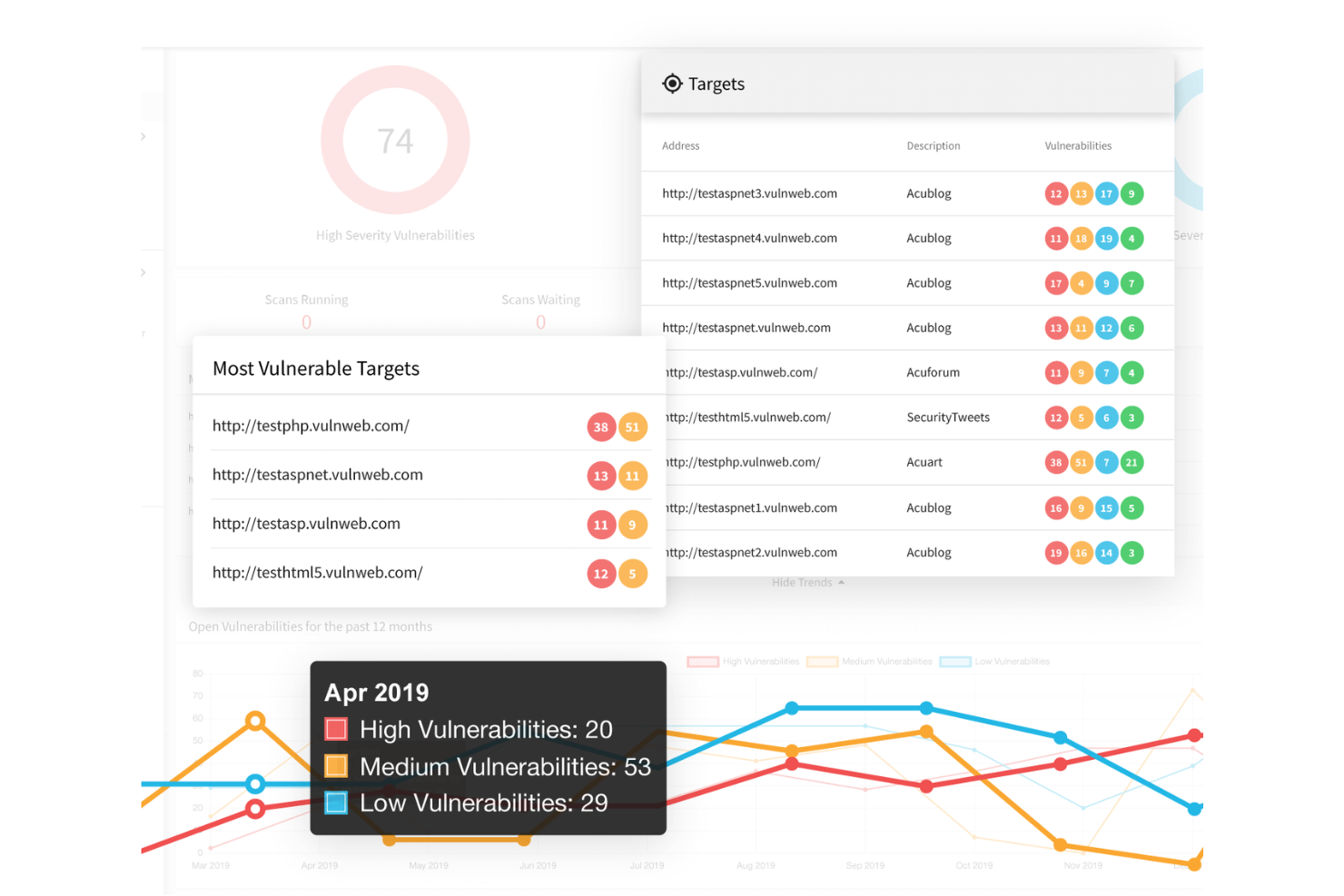
Acunetix helps you detect 7,000+ vulnerabilities with blended DAST and IAST scanning. It lets you run ultra-fast scans and get actionable results in minutes.
Why I picked Acunetix: It lets you manage loopholes effectively. You can use automation to prioritize your high-risk vulnerabilities. The tool allows you to schedule one-time or recurring scans and assess more than one environment at a time. Acunetix eliminates false positives and helps you save time and resources from hours of manually validating real vulnerabilities.
Acunetix Standout Features and Integrations
Standout features include pinpointing vulnerability locations and getting remediation guidance. You can trace the exact line of code where the loophole lies, helping you to fix issues quickly. Results come with the information that guides developers through the remediation process.
Acunetix has advanced scanning features, which enable you to run automated scans in hard-to-reach places. The software allows you to scan almost anywhere, including single-page applications (SPAs), script-heavy sites, password-protected areas, complex paths and multi-level forms, and more.
Integrations include GitHub, Jira, Jenkins, GitLab, Bugzilla, Okta, Microsoft Teams, and Mantis Bug Tracker.
Pros and Cons
Pros:
- You can schedule tests
- Get scan results in minutes
- Ultra-fast scans
Cons:
- Long customer service response time
- Beginners struggle with complex settings

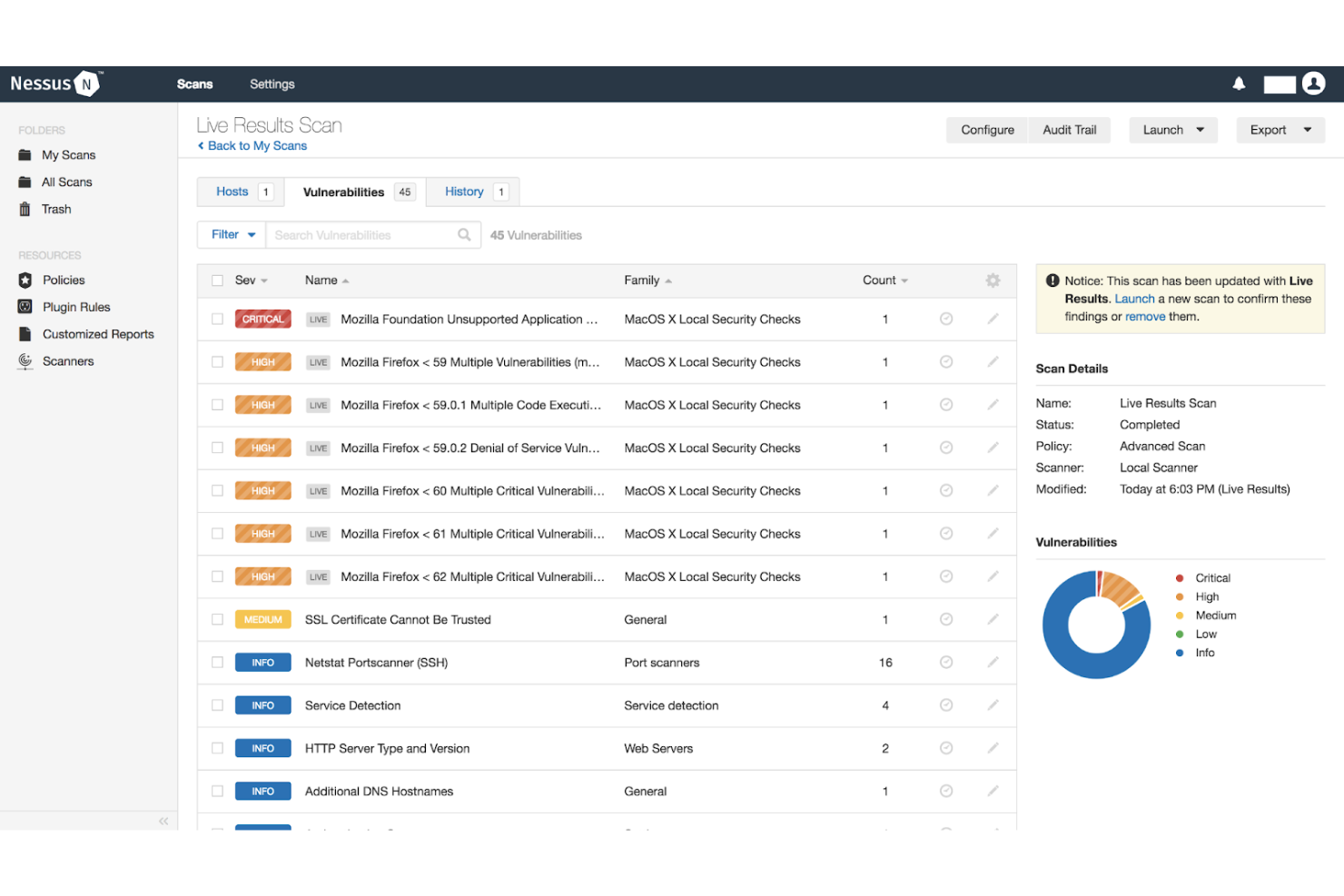
Tenable Nessus is a vulnerability assessment software designed to help you assess modern attack surfaces. The tool helps secure applications and cloud infrastructure by providing advanced visibility that you need to monitor your organization’s security posture.
Why I picked Nessus: Nessus has a low false positive rate and high accuracy. It provides broad vulnerability coverage. This helps you keep an eye on every part of your software infrastructure. The tool is cross-platform and fully portable; you can deploy it on a wide range of platforms or operating systems, such as Unix, macOS, Windows, and Raspberry Pi.
Nessus Standout Features and Integrations
Standout features include customizable reporting and troubleshooting, live results, and pre-built policies and templates. There are over 450 preconfigured templates designed to help you pinpoint where your security issues lie. With customizable reporting, you can easily report vulnerabilities in ways and formats that best suit your team and stakeholders.
Get a clear view of where you have vulnerabilities based on your scan history with the help of live results. This feature automatically performs an offline vulnerability check with every plugin update. You can easily perform a scan, identify security loopholes, and prioritize issues as you wish.
Integrations include Phoenix Security, Hyperproof, C1Risk, ASPIA, Vulcan Cyber, Conviso, Sn1per, Code Dx, StorageGuard, and Cyver Core.
Pros and Cons
Pros:
- Deploy on any platform
- High-level visibility
- It’s customizable
Cons:
- Difficult to use sometimes
- The support portal is slow at times

CyCognito
Best for external attack surface visibility

CyCognito is an enterprise-grade penetration testing platform that comprehensively views your organization’s external attack surface. It identifies unknown and unmanaged assets, simulates attacker behavior with active tests, and prioritizes vulnerabilities for remediation—all without requiring installed agents or configuration.
Why I picked CyCognito:
I picked CyCognito for its unique ability to map an organization’s digital footprint the way an attacker would see it. The business mapping is easy to consume and provides risk scoring by division and brand. It automates asset discovery and vulnerability testing, continuously probing for infrastructure, applications, and third-party systems weaknesses. Additionally, its exploit intelligence and contextual risk scoring help prioritize critical exposures for remediation.
Another factor that stood out is its active security testing engine, which mimics real-world attack techniques to validate risks and test defenses. Paired with remediation acceleration tools and compliance-ready reports, CyCognito supports proactive, scalable security operations.
CyCognito Standout Features and Integrations
Standout features include external attack surface management and continuous automated testing (AutoPT). The platform also offers asset discovery, risk contextualization, active testing, exploit intelligence, and streamlined remediation tools.
Integrations include Wiz, Axonius, Armis, Cortex XSOAR, ServiceNow, Splunk, and other popular security platforms.
Pros and Cons
Pros:
- Intuitive interface with great visibility
- Detailed reports and continuous testing
- Strong exploit intelligence and prioritization
Cons:
- Limited control over testing configurations
- Reporting lacks customization for some roles
Other Enterprise Penetration Testing Tools
In addition to the 10 best enterprise penetration testing tools I’ve reviewed above, here are some other solutions that are worth checking out:
- Metasploit
For vulnerability management
- Zed Attack Proxy (ZAP)
Free and open-source web app scanner
- Intruder
For continuous network monitoring
- Cobalt Strike
Tool for red team operations
- Darwin Attack
Enterprise penetration testing software for cloud pen-testing
- W3af
For finding and exploiting web application vulnerabilities
- vPenTest
For automated network penetration testing
- UnderDefense
For comprehensive reports with actionable remediation steps
- Quixxi Security
For mobile app penetration testing
- Probely
Web app and API scanner


How I Evaluate Enterprise Penetration Testing Tools
I check whether a tool can run a full kill chain—from initial access to domain compromise—and then look at what distinguishes it: continuous testing, MITRE mapping, or ITSM integration.
Core Functionality (Table Stakes For This List)
When I'm selecting tools for my list, I rank each one on a scale from 0 (does not offer the functionality) to 5 (excels in this area) for each core functionality listed below. Then, I calculate the tool's total score into a percentage. Each tool needs to achieve a minimum total score of 65% to be considered for inclusion.
- Exploit Framework & Payloads: I evaluate the depth and freshness of the exploit library, including whether the tool supports custom payload development for testing specific CVEs in your environment.
- Multi-Vector Testing Coverage: A tool should cover network, web app, cloud, and wireless surfaces so your team can run engagements across hybrid infrastructure from a single platform.
- Automated & Manual Testing: I look for flexible workflows where automated scans surface low-hanging fruit and manual exploitation tools let red team operators dig into complex attack chains.
- Enterprise Scalability & RBAC: Large teams need granular role-based access, multi-tenant workspaces, and distributed scan agents to run concurrent engagements across business units or regions.
- Reporting & Compliance Documentation: I check whether reports map findings to frameworks like PCI DSS, NIST, or MITRE ATT&CK and offer both executive summaries and technical breakdowns.
- Post-Exploitation & Lateral Movement: Tools should support privilege escalation, credential harvesting, pivoting, and Active Directory attacks to simulate a full adversary kill chain beyond initial access.
Once I have a list of tools that meet this criteria, I consider what sets each platform apart.
Differentiating Factors (What Sets Vendors Apart)
Here's how I compare and contrast different vendors:
Standout Features
Attack path mapping is a major differentiator. I look for tools that visually graph how an attacker could chain footholds into domain admin access across Active Directory. Continuous pen testing matters too, since point-in-time assessments go stale fast in environments where infrastructure changes weekly. I also evaluate whether a tool syncs validated findings directly into Jira or ServiceNow, so remediation gets tracked without manual handoff between security and ops teams.
Beyond Features
Deployment flexibility is something I always evaluate. Some enterprises need air-gapped or on-premise options for classified environments, while others want SaaS to avoid infrastructure overhead. I also check how well a tool fits the existing stack, particularly native integrations with SIEMs like Splunk or QRadar and vulnerability scanners like Tenable or Qualys. Licensing structure deserves attention too. Per-asset pricing can balloon in large environments, so I look at whether unlimited testing models are available to keep costs predictable across multi-site engagements.
How to Choose Enterprise Penetration Testing Tool
It’s easy to get bogged down in long feature lists and complex pricing structures. To help you stay focused as you work through your unique software selection process, here’s a checklist of factors to keep in mind:
| Factor | What to Consider |
|---|---|
| Scalability | Can the tool grow with your team or company? Consider whether it supports increasing users or larger data sets without a drop in performance. |
| Integrations | Does it work with your current tools? Check for compatibility with existing software like CI/CD pipelines, project management, or other security tools. |
| Customizability | Can you tailor the tool to your needs? Look for options to customize dashboards, reports, and testing templates to fit your workflow. |
| Ease of Use | Is it user-friendly? Evaluate the learning curve and whether your team can easily navigate and use the tool without constant support. |
| Implementation and Onboarding | How smooth is the setup process? Assess the time and resources needed to get up and running, including training and support during onboarding. |
| Cost | Does it fit your budget? Compare pricing models and consider long-term costs, including any hidden fees or additional charges for premium features. |
| Security Safeguards | Are there robust security measures? Ensure the tool complies with industry standards and offers features like encryption and access controls to protect your data. |
| Compliance Requirements | Does it meet regulatory needs? Verify if the tool supports compliance with relevant regulations like GDPR, HIPAA, or PCI-DSS, depending on your industry. |
What Are Enterprise Penetration Testing Tools?
Enterprise penetration testing tools are software that simulate cyberattacks on an organization’s network and systems to identify and assess vulnerabilities. These tools mimic the techniques used by hackers to evaluate the strength of an enterprise's cybersecurity defenses.
They are employed to probe networks, applications, and other digital infrastructures, uncovering security weaknesses that need to be addressed.
Features
When selecting enterprise penetration testing tools, keep an eye out for the following key features:
- Automated vulnerability scanning: Automatically identifies security weaknesses in your systems, saving time and effort for your IT team.
- Customizable testing templates: Allows you to tailor tests to specific needs, ensuring relevant and accurate security assessments.
- Integration capabilities: Seamlessly connects with existing software like CI/CD pipelines, enhancing workflow and data sharing.
- Compliance support: Helps ensure your organization meets industry regulations such as GDPR or HIPAA, reducing legal risks.
- Real-time threat intelligence: Provides up-to-date information on potential threats, enabling proactive security measures.
- Detailed reporting: Generates comprehensive reports that help in understanding vulnerabilities and planning remediation strategies.
- User-friendly interface: Simplifies navigation and use, making it accessible for both seasoned professionals and newcomers.
- Access controls: Ensures that only authorized personnel can access sensitive information, enhancing data security.
- Scalability: Supports growth and increased data loads without compromising performance, accommodating expanding organizational needs.
- Interactive dashboards: Offers visual insights and analytics that aid in quick decision-making and monitoring security status.
Benefits
Implementing enterprise penetration testing tools provides several benefits for your team and your business. Here are a few you can look forward to:
- Enhanced security: By identifying vulnerabilities, these tools help protect your systems from potential breaches.
- Regulatory compliance: Ensures your organization meets industry standards, reducing the risk of penalties.
- Proactive threat management: Real-time threat intelligence allows you to address potential risks before they become serious issues.
- Time efficiency: Automated scanning saves your team time, allowing them to focus on other critical tasks.
- Informed decision-making: Detailed reports and interactive dashboards provide insights that aid in strategic planning.
- Scalable solutions: Supports your organization's growth without compromising security, accommodating increased data and user loads.
- Improved data protection: Access controls and compliance features help safeguard sensitive information from unauthorized access.
Costs and Pricing
Selecting enterprise penetration testing tools requires an understanding of the various pricing models and plans available. Costs vary based on features, team size, add-ons, and more.
The table below summarizes common plans, their average prices, and typical features included in enterprise penetration testing tools solutions:
Plan Comparison Table for Enterprise Penetration Testing Tools
| Plan Type | Average Price | Common Features |
|---|---|---|
| Free Plan | $0 | Basic vulnerability scanning, limited reporting, and community support. |
| Personal Plan | $20-$50/user/month | Automated scanning, customizable templates, and basic integration options. |
| Business Plan | $50-$150/user/month | Advanced reporting, compliance checks, and integration with CI/CD pipelines. |
| Enterprise Plan | $150-$300+/user/month | Full customization, dedicated support, real-time threat intelligence, and access controls. |
Enterprise Penetration Testing Tools FAQs
Here are some questions that are frequently asked about enterprise penetration testing systems:
What is the typical implementation time for enterprise penetration testing tools?
The implementation time can vary widely depending on the complexity of your existing infrastructure and the specific tool you choose. Typically, it can take anywhere from a few days to several weeks.
To speed up the process, ensure your team is prepared with all necessary information and resources. Utilize any available onboarding assistance from the vendor, such as training materials or dedicated support.
Can enterprise penetration testing tools integrate with other security systems?
Yes, most enterprise penetration testing tools can integrate with other security systems. This includes tools for threat intelligence, SIEM (Security Information and Event Management), and CI/CD pipelines.
Integration helps create a more cohesive security environment and allows for streamlined processes. Always check the tool’s compatibility with your existing systems before purchasing.
How often should penetration tests be conducted using these tools?
The frequency of penetration tests depends on your organization’s security needs, regulatory requirements, and any changes in your IT environment. Generally, conducting tests at least quarterly is recommended.
However, more frequent testing may be necessary for high-risk environments or after significant system updates.
Do enterprise penetration testing tools require specialized training to use?
Yes, some level of specialized training is often required to effectively use these tools. While many tools are designed to be user-friendly, understanding the nuances of penetration testing and interpreting results accurately is crucial.
Vendors usually offer training resources, including tutorials, webinars, and documentation, to help users get up to speed.
What’s Next:
If you're in the process of researching enterprise penetration testing tools, connect with a SoftwareSelect advisor for free recommendations.
You fill out a form and have a quick chat where they get into the specifics of your needs. Then you'll get a shortlist of software to review. They'll even support you through the entire buying process, including price negotiations.