

Die besten Plattformen für codefreie Entwicklung helfen Teams dabei, Anwendungen schneller bereitzustellen, indem sie nicht technisch versierten Benutzern ermöglichen, Apps ohne Programmieraufwand zu erstellen, anzupassen und bereitzustellen. Sie ermöglichen es Unternehmen, digitale Projekte zu beschleunigen, bestehende Systeme zu integrieren und die Abhängigkeit von begrenzten Entwicklerressourcen zu verringern.
Viele Teams beginnen mit der Suche nach codefreien Lösungen, nachdem sie Schwierigkeiten hatten, interne Tools ohne Unterstützung durch Entwickler zu erstellen, stundenlang Tabellen manuell aktualisiert haben, die nicht skalierbar sind, oder mehrere voneinander getrennte Anwendungen verwalten mussten, die keine Daten gemeinsam nutzen können. Diese Probleme verlangsamen die Abläufe und erschweren es den Geschäftsbereichen, das erforderliche Tempo zu erreichen.
Ich habe mit Produktteams gearbeitet, die Plattformen für codefreie Entwicklung eingeführt haben, um veraltete Arbeitsabläufe zu ersetzen, habe getestet, wie sich diese Tools in Live-Produktionsumgebungen verhalten, und ihre Flexibilität bei der Unterstützung von Integrationen über SaaS- und Unternehmensstacks hinweg bewertet. Diese Erfahrungen haben mir einen klaren Einblick gegeben, welche Plattformen nicht technisch versierte Benutzer unterstützen, ohne Skalierbarkeit oder Kontrolle zu beeinträchtigen.
In diesem Leitfaden erfahren Sie, welche Plattformen für codefreie Entwicklung die praktischsten Anpassungsmöglichkeiten bieten, sich effektiv in moderne Geschäftssysteme integrieren lassen und Ihrem Unternehmen helfen, schneller voranzukommen, ohne sich ausschließlich auf technische Ressourcen verlassen zu müssen.
Warum Sie unseren Software-Empfehlungen vertrauen können
6,700+
Reviews
20
Industry experts
16+
Evaluation factors
14
Years
Unser Team testet und bewertet Software seit 2012. Als Tech-Führungskräfte wissen wir selbst, wie schwierig – und wichtig – es ist, die richtige Software auszuwählen.
Für diesen Leitfaden haben wir Tools mithilfe von praktischen Tests und unabhängiger Recherche bewertet und dabei unsere Bewertungskriterien angewendet.
Unsere Bewertungen spiegeln unser menschliches redaktionelles Urteilsvermögen wider, keine Verkaufsstrategie.
Expertenprüfer:
- Paulo Gardini MiguelTech-Direktor
 Tim FisherVP für KI
 Gabriel RosasTech Lead & Software-Architekt
 Christhian GruhnTech Lead & Plattform-Architekt

Vergleichstabelle für Plattformen zur codefreien Entwicklung
Diese Vergleichstabelle fasst die Preisinformationen meiner Auswahl der besten Plattformen für codefreie Entwicklung zusammen:
| Tool | Best For | Trial Info | Price | ||
|---|---|---|---|---|---|
| 1 | Am besten für die Digitalisierung von Arbeitsabläufen zur Erfassung von Außendienstdaten geeignet | 15-tägige kostenlose Testversion | Ab 20 $/Benutzer/Monat (jährliche Abrechnung) | Website | |
| 2 | Am besten geeignet für KI-gestützte Unternehmensentwicklung von Apps | $85/user/month | $25/user/month | Website | |
| 3 | Am besten geeignet, um Tabellen in mobile Apps umzuwandeln | Kostenlose Testversion + kostenloser Tarif verfügbar | Ab $19/Monat (bei jährlicher Abrechnung) | Website | |
| 4 | Am besten für skalierbare Backends geeignet | Kostenloser Tarif verfügbar | Ab $85/Monat (jährliche Abrechnung) | Website | |
| 5 | Am besten geeignet für datenbankbasierte Anwendungsentwicklung | Kostenlose Demo + 15-tägige Testversion verfügbar | Ab $8/Nutzer/Monat (jährliche Abrechnung) | Website | |
| 6 | Beste für visuelle Webanwendungsentwicklung | Kostenloser Tarif verfügbar | Ab $29/Monat (jährliche Abrechnung) | Website | |
| 7 | Am besten geeignet für die Erstellung interaktiver mobiler und Web-Apps | Kostenloser Tarif verfügbar | Ab $36/Monat | Website | |
| 8 | Am besten für dynamische formularbasierte Anwendungen | Kostenloser Plan verfügbar | Ab $34/Nutzer/Monat (jährlich abgerechnet) | Website | |
| 9 | Am besten geeignet für Geschäftslösungen innerhalb des Microsoft-Ökosystems | 30-tägige kostenlose Testversion + kostenloser Plan verfügbar | Ab $20/Nutzer/Monat | Website | |
| 10 | Am besten zur Automatisierung von Geschäftsprozessen geeignet | Website |


Die 10 besten Plattformen für codefreie Entwicklung im Test
Nachfolgend finden Sie meine ausführlichen Zusammenfassungen der besten Plattformen für codefreie Entwicklung, die es in meine Auswahl geschafft haben. Meine Testberichte bieten einen detaillierten Überblick über die wichtigsten Funktionen, Vor- und Nachteile, Integrationen und idealen Anwendungsfälle jedes Tools, damit Sie die beste Lösung für Ihre Anforderungen finden.
 Am besten für die Digitalisierung von Arbeitsabläufen zur Erfassung von Außendienstdaten geeignet
- 15-tägige kostenlose Testversion
- Ab 20 $/Benutzer/Monat (jährliche Abrechnung)
Visit WebsiteCustomer Rating:4.7/5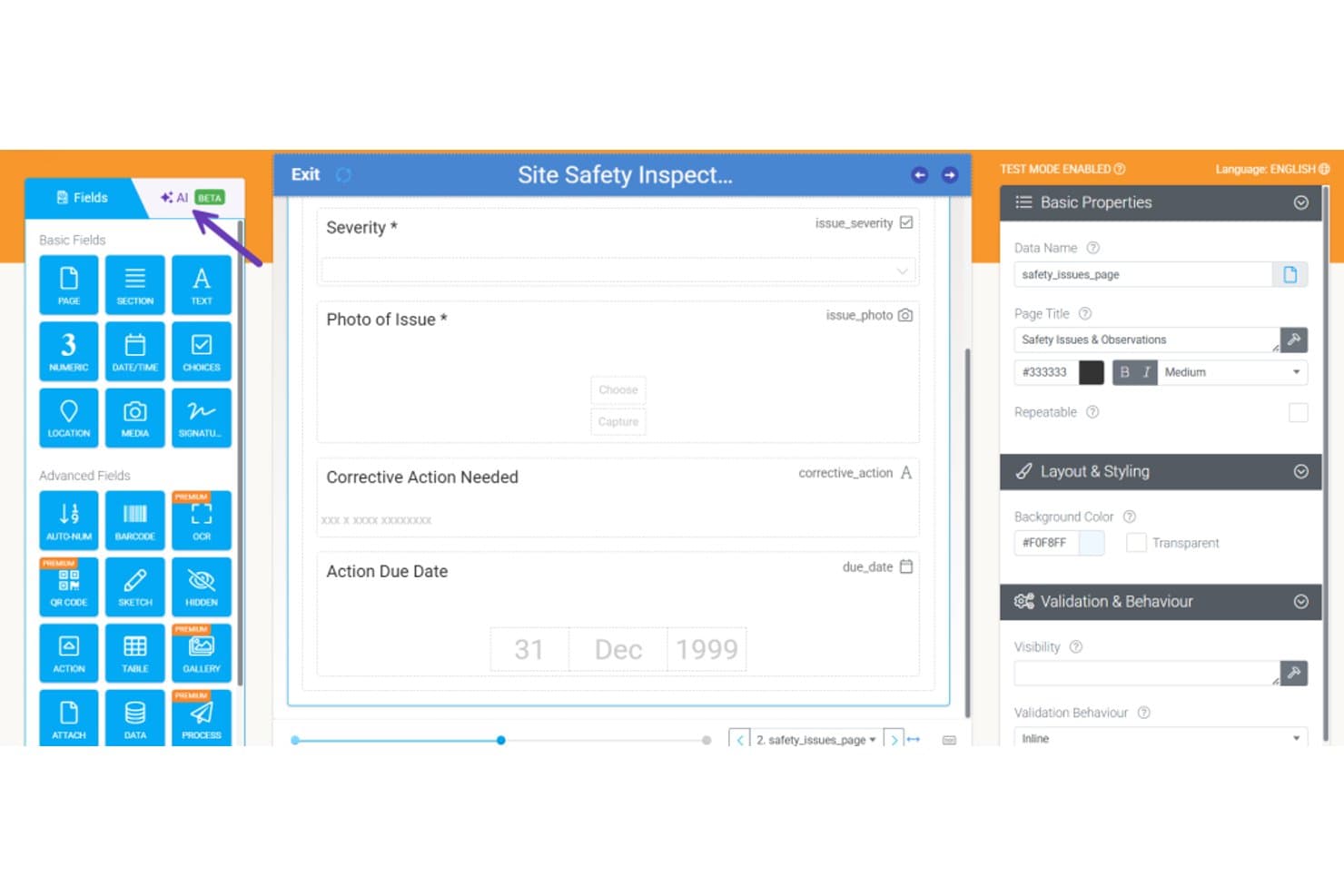
Mit Appenate können Benutzer Formulare für Sicherheitsinspektionen per Ziehen und Ablegen mit Feldern erstellen. Appenate ist ein Baukasten ohne Code für mobile Apps, der speziell für Außendienstteams entwickelt wurde und die Erstellung von Formularen per Ziehen und Ablegen, die Offline-Datenerfassung, die KI-gestützte Formulargenerierung und automatisierte Arbeitsabläufe für Inspektionen, Audits und Auftragszuweisungen bietet.
Für wen ist Appenate am besten geeignet?
Appenate eignet sich besonders für Außendienst- und Industrieteams – etwa in den Bereichen Bauwesen, Bergbau und Fertigung –, die papierbasierte Inspektionen, Audits und Checklisten durch offlinefähige mobile Apps ersetzen müssen.
Warum ich Appenate ausgewählt habe
Ich habe Appenate als eine der besten Lösungen ausgewählt, weil es etwas bietet, das die meisten Plattformen ohne Code nicht leisten: Es wurde speziell für die Digitalisierung von Arbeitsabläufen zur Erfassung von Außendienstdaten entwickelt und nicht nachträglich dafür angepasst. Besonders gut gefällt mir die Funktion zum Ausfüllen per KI-Foto, mit der Außendienstmitarbeiter ein Papierformular fotografieren können, woraufhin die digitalen Felder automatisch ausgefüllt werden. In Kombination mit der nativen Offline-Erfassung unter iOS, Android und Windows bewältigt Appenate die realen Bedingungen im Außendienst, bei denen die Verbindung während einer Inspektion abbrechen kann.
Wichtige Funktionen von Appenate
- Formularersteller mit Ziehen und Ablegen: Ein visueller Editor, mit dem technisch nicht versierte Benutzer Apps zur Datenerfassung erstellen können, unter Verwendung von Feldtypen wie GPS, Barcode-Scanning, NFC, Unterschriften und wiederholbaren Tabellen.
- Automatisierungsmodul für die Synchronisierung: Ein Werkzeug für Arbeitsabläufe ohne Code, das verkettete Aktionen auslöst – etwa die Erstellung von Dokumenten, das Übertragen von Daten und den Versand von E-Mails –, basierend auf Formulareinsendungen, Zeitplänen oder eingehenden Webhooks.
- Distill-BI-Übersichten: Eine integrierte Analyseebene, die erfasste Außendienstdaten in interaktive Übersichten umwandelt und Abfragen der Ergebnisse anhand Ihrer internen Standardarbeitsanweisungen ermöglicht.
- Unterstützung mehrerer Umgebungen: Separate Umgebungen pro Abteilung, wobei das Enterprise Toolkit mehrere Unternehmensumgebungen sowie die Synchronisierung von Apps, Dokumenten und Daten zwischen diesen ermöglicht.
Integrationen von Appenate
Appenate bietet native Integrationen mit Salesforce, NetSuite, Xero, QuickBooks, Google Sheets, Snowflake, Google BigQuery und Tools aus dem Microsoft-Ökosystem, darunter SharePoint und Azure. Außerdem stellt es Verbindungen zu SQL Server, MySQL und PostgreSQL her und unterstützt eine REST-API, Webhooks und Zapier.
Pros and Cons
Pros:
- Die mobile Offline-Erfassung funktioniert ohne Verbindung
- Das Fotografieren von Papierformularen verkürzt die Einrichtungszeit
- Dedizierte Unterstützung bei der Einführung erleichtert die Bereitstellung im Außendienst
Cons:
- Der begrenzte Funktionsumfang schränkt die allgemeine App-Erstellung ein
- Keine Versionskontrolle und kein benutzerdefinierter Code
Learn more about Appenate: Am besten geeignet für KI-gestützte Unternehmensentwicklung von Apps
- $85/user/month
- $25/user/month
Visit WebsiteCustomer Rating:4.7/5
Der Application Hub von Studio Creatio bietet eine konsolidierte Übersicht über alle Vorlagen, Konnektoren und Apps. Studio Creatio ist eine vielseitige No-Code-Plattform, die darauf ausgelegt ist, Anwendern das Erstellen von Anwendungen und das Automatisieren von Workflows ohne umfassende Programmierkenntnisse zu ermöglichen. Sie richtet sich sowohl an technische als auch an nicht-technische Nutzer mit einer benutzerfreundlichen Oberfläche.
Warum ich Studio Creatio ausgewählt habe: Diese Plattform zeichnet sich durch ihre fortschrittlichen KI- und Machine-Learning-Funktionen aus. Die composable Architektur von Studio Creatio unterstützt die Konfiguration und Bereitstellung von KI-Anwendungsfällen für CRM und KI-gestützte App-Entwicklung. Dadurch können Nutzer ihre Anwendungen und Workflows verbessern und bessere Geschäftsergebnisse sowie mehr operative Effizienz erzielen – ganz ohne technisches Expertenwissen.
Zusätzlich bietet sie mit ihrem Application Hub eine konsolidierte Übersicht über alle verfügbaren Apps, Konnektoren und Vorlagen und verfügt über einen No-Code-Designer, der es Anwendern ermöglicht, Seiten, Ansichten, Workflows, Datenmodelle und Integrationen innerhalb einer intuitiven Oberfläche zu erstellen und zu bearbeiten.
Herausragende Funktionen & Integrationen:
Zu den besonderen Merkmalen von Studio Creatio zählen ein zentraler Arbeitsbereich zur Konfiguration und Bereitstellung von Anwendungen, visuelle Modellierungswerkzeuge, umfassende Workflow-Automatisierung, robuste Sicherheitskonfigurationen, das Management des Anwendungslebenszyklus sowie detaillierte Analyse- und Berichtsfunktionen.
Integrationen umfassen Asterisk, Chat Master, PandaDoc, Jira, Calendly, Zoom, Shopify, SharePoint, Microsoft Teams, Zapier, QuickBooks, SAP BusinessOne und mehr.
Pros and Cons
Pros:
- Minimale Anpassung erforderlich
- Funktionen zur Prozess- und Workflow-Automatisierung
- Drag-and-drop-Oberfläche
Cons:
- Lernkurve für diejenigen, die mit No-Code-Entwicklung nicht vertraut sind
- Einige Nutzer empfinden das Erstellen von Automatisierungs-Workflows als kompliziert
Learn more about Creatio AI Studio: Am besten geeignet, um Tabellen in mobile Apps umzuwandeln
- Kostenlose Testversion + kostenloser Tarif verfügbar
- Ab $19/Monat (bei jährlicher Abrechnung)
Visit WebsiteCustomer Rating:4.7/5
Hier sehen Sie ein Beispiel für das Design einer App mit der Vorlagenfunktion von Glide. Glide ist eine No-Code-Anwendungsentwicklungsplattform, die Google Sheets in funktionsfähige mobile Apps verwandelt. Sie vereinfacht den App-Erstellungsprozess, indem sie auf bereits in Tabellenform organisierte Daten zurückgreift.
Warum ich Glide ausgewählt habe: Bei der Bewertung und dem Vergleich verschiedener App-Builder habe ich Glide aufgrund seiner einzigartigen Fähigkeit ausgewählt, Tabellenkalkulationen nahtlos mit mobilen Anwendungen zu verbinden. Dieses Tool hebt sich durch seinen direkten Fokus auf die Umwandlung von Tabellendaten in benutzerfreundliche mobile Oberflächen hervor. Ich habe mich für Glide entschieden, da es ideal für diejenigen ist, die ihre Google-Sheets-Daten in eine mobile App überführen möchten. Daher ist es „am besten geeignet, um Tabellen in mobile Apps umzuwandeln“.
Hervorstechende Funktionen & Integrationen:
Die Drag-and-Drop-Oberfläche von Glide sorgt für eine einfache Bedienung, selbst für Anwender mit minimalen Programmierkenntnissen. Eines der herausragenden Merkmale ist die Echtzeit-Synchronisierung mit Google Sheets: Alle Aktualisierungen an der Tabelle werden sofort in der App reflektiert. Glide bietet zudem eine Vielzahl vorgefertigter Vorlagen, die verschiedene Einsatzbereiche wie CRM, E-Commerce und Projektmanagement abdecken.
Hinsichtlich der Integrationen ist Glide eng mit Google Sheets verbunden, und Anwender können einfach mit anderen Google-Workspace-Tools integrieren.
Pros and Cons
Pros:
- Direkte Integration mit Google Sheets für Echtzeit-Updates
- Einfache Bedienung dank benutzerfreundlicher Oberfläche
- Vielfalt an Vorlagen für unterschiedliche Bedürfnisse
Cons:
- Backend-Daten sind auf Google Sheets beschränkt
- Fortgeschrittene Anpassungen erfordern eine gewisse Einarbeitung
- Abhängigkeit von Google Workspace für erweiterte Integrationen
Learn more about Glide: 4Am besten für skalierbare Backends geeignet
Xano
- Kostenloser Tarif verfügbar
- Ab $85/Monat (jährliche Abrechnung)
Visit WebsiteCustomer Rating:4.8/5
Xano bietet einen No-Code-API-Builder, der es Nutzern erlaubt, Geschäftslogik ohne Programmierung zu erstellen. Xano ist ein No-Code-Backend-Entwicklungstool, das es Nutzern ermöglicht, ihre eigene Backend-Infrastruktur ohne herkömmliche Programmierung zu erstellen und zu verwalten. Es ist als Frontend-agnostisch konzipiert, sodass es mehrere Frontends gleichzeitig unterstützen kann, und wird wegen seiner Einfachheit, Geschwindigkeit und Skalierbarkeit häufig verwendet.
Warum ich Xano gewählt habe: Mir gefällt der No-Code-API-Builder, mit dem Nutzer APIs erstellen und verwalten können. Diese Funktion ist besonders wertvoll für alle, die verschiedene Dienste und Anwendungen schnell integrieren müssen. Darüber hinaus sorgt die Verwendung einer flexiblen PostgreSQL-Datenbank bei Xano dafür, dass Nutzer komplexe Datenbeziehungen handhaben und fortgeschrittene Abfragen durchführen können, ohne dass ein traditioneller SQL-Datenbankadministrator erforderlich ist.
Die Plattform stellt zudem skalierbare Server zur Verfügung, die erhebliche Mengen an Datenverkehr und Datenlast bewältigen können, was sie ideal für Unternehmen mit schnellem Wachstum macht. Außerdem verpflichtet sich Xano zur Sicherheit durch die Einhaltung von Branchenstandards wie GDPR und HIPAA.
Hervorstechende Funktionen & Integrationen:
Funktionen umfassen die Möglichkeit, Arbeitsabläufe über Webhooks zu automatisieren, was Integrationen mit anderen Diensten sowie die Verarbeitung von Echtzeitdaten ermöglicht. Eine weitere beeindruckende Funktion ist die integrierte Debugging- und Testumgebung, die den Entwicklungsprozess vereinfacht, indem Nutzer ihre APIs und Backend-Logik vor der Bereitstellung testen können. Xano unterstützt außerdem regionale Bereitstellungen, damit Anwendungen lokale Anforderungen an die Datenresidenz erfüllen.
Integrationen umfassen Zapier, Slack, Stripe, Twilio, SendGrid, Google Cloud, AWS, Airtable, Webflow, Bubble, Adalo, Glide und Flutter.
Pros and Cons
Pros:
- Xano ist hoch skalierbar
- Gute Funktionen für API-Management
- Vorgefertigte Vorlagen verfügbar
Cons:
- Begrenzte Frontend-Funktionen
- Eingeschränkte Möglichkeiten zur Anpassung der Basis-Infrastruktur
Learn more about Xano: Am besten geeignet für datenbankbasierte Anwendungsentwicklung
- Kostenlose Demo + 15-tägige Testversion verfügbar
- Ab $8/Nutzer/Monat (jährliche Abrechnung)
Visit WebsiteCustomer Rating:4.3/5
Hier ist die intuitive Drag-and-Drop-Builder-Funktion von Zoho Creator. Zoho Creator ist eine Anwendungsentwicklungsplattform, die Benutzer dazu befähigt, individuelle, datenbankbasierte Anwendungen für ihre geschäftlichen Anforderungen zu erstellen. Aufgrund des starken Fokus auf Datenbanken ist sie besonders dazu geeignet, komplexe Anwendungsdesigns zu bewältigen, die stark auf Datenstrukturen basieren.
Warum ich Zoho Creator ausgewählt habe: Bei der Zusammenstellung der Tools für diese Liste überzeugte mich Zoho Creator mit seinem besonderen Schwerpunkt auf datenbankorientiertem Design, was nicht jede Plattform in den Mittelpunkt stellt. Dieser einzigartige Ansatz, gepaart mit der einfachen Bedienbarkeit, sicherte Zoho Creator einen festen Platz in meiner Auswahl.
Ich habe es als 'am besten für datenbankbasierte Anwendungsentwicklung' beurteilt, da es die Lücke zwischen Datenstrukturen und Anwendungsdesign effektiv schließt und einen reibungslosen Prozess für komplexe Anwendungsfälle bietet.
Besondere Funktionen & Integrationen:
Zoho Creator besticht durch eine benutzerfreundliche Drag-and-Drop-Oberfläche, die es Anwendern ermöglicht, Anwendungen einfach ihren Bedürfnissen entsprechend zu gestalten. Darüber hinaus erlaubt die Code-App-Entwicklung erweiterte Funktionalitäten, wenn dies nötig ist.
Was die Integrationen betrifft, bietet es Kompatibilität zu zahlreichen weiteren Zoho-Produkten, aber auch Anbindungen an externe Plattformen wie Salesforce, MailChimp und Slack, wodurch sich der Nutzen im Unternehmens-Ökosystem erweitert.
Pros and Cons
Pros:
- Starker Fokus auf der Erstellung datenbankbasierter Anwendungen.
- Benutzerfreundliche Oberfläche für sowohl Experten als auch Neueinsteiger.
- Vielfältige Integrationen, insbesondere innerhalb des Zoho-Ökosystems.
Cons:
- Obwohl die Plattform intuitiv ist, können einige fortgeschrittene Funktionen eine steilere Lernkurve haben.
- Externe Integrationen sind im Vergleich zu anderen No-Code-Plattformen eventuell eingeschränkter.
- Wie bei anderen SaaS-Tools können die Kosten bei größeren Teams schnell steigen.
Learn more about Zoho Creator: Beste für visuelle Webanwendungsentwicklung
- Kostenloser Tarif verfügbar
- Ab $29/Monat (jährliche Abrechnung)
Visit WebsiteCustomer Rating:4.4/5
Hier sehen Sie das Drag-and-Drop-Oberflächen-Feature in Bubble. Bubble ist eine No-Code-Anwendungsentwicklungsplattform, die Ihre Ideen mühelos in visuelle Webanwendungen verwandelt. Sie richtet sich an alle, die Wert auf eine visuelle Herangehensweise legen und ihre Apps zum Leben erwecken möchten, ohne sich mit komplexer Programmierung auseinandersetzen zu müssen.
Warum ich Bubble gewählt habe: Nach dem Vergleich verschiedener App-Entwicklungsplattformen habe ich mich wegen des einzigartigen visuellen Entwicklungsansatzes für Bubble entschieden. Besonders herausgestochen hat Bubble durch die Möglichkeit, Ideen direkt in funktionale Webanwendungen umzusetzen, ohne dass Kenntnisse in komplizierten Programmiersprachen nötig sind. Dieses klare Bekenntnis zur visuellen Methodik rechtfertigt die Auszeichnung als 'Beste für visuelle Webanwendungsentwicklung'.
Herausragende Funktionen & Integrationen:
Eine der Hauptstärken von Bubble ist die Drag-and-Drop-Oberfläche – ein echter Game-Changer für Nutzerinnen und Nutzer ohne Programmierkenntnisse. Über grundlegende Funktionen hinaus ermöglicht Bubble Echtzeit-Änderungen, wodurch der Entwicklungsprozess deutlich effizienter wird.
Im Bereich Integration bietet Bubble Schnittstellen zu verschiedenen CRMs, Kompatibilität mit APIs und sogar Plugins, die für zusätzliche Funktionen in Ihre App eingebunden werden können.
Pros and Cons
Pros:
- Drag-and-Drop-Oberfläche vereinfacht den Entwicklungsprozess von Anwendungen.
- Echtzeit-Änderungen ermöglichen sofortiges Feedback und Anpassungen.
- Große Plugin-Bibliothek zur Erweiterung der App-Funktionen.
Cons:
- Für absolute Anfänger könnte die Lernkurve anfangs steil sein.
- Trotz Vielseitigkeit gibt es möglicherweise einige Einschränkungen im Vergleich zur klassischen Programmierung.
- Die Plattform kann aufgrund der vielen Funktionen für manche Nutzer überwältigend sein.
 Am besten geeignet für die Erstellung interaktiver mobiler und Web-Apps
- Kostenloser Tarif verfügbar
- Ab $36/Monat
Visit WebsiteCustomer Rating:3.5/5
Hier sind die vorgefertigten Komponenten in Adalo. Adalo bietet eine Plattform, die es Nutzern ermöglicht, Web- und Mobilanwendungen zu erstellen, ohne tief in Programmiersprachen einzutauchen. Ihre Besonderheit liegt in der Entwicklung hochgradig interaktiver Anwendungen, was sie zu einer idealen Wahl für alle macht, die Benutzer auf eine neue Weise einbinden möchten.
Warum ich Adalo gewählt habe: Nachdem ich verschiedene Plattformen bewertet habe, entschied ich mich für Adalo aufgrund seines starken Fokus auf Interaktivität. Beim Vergleich mehrerer No-Code-Tools überzeugte mich Adalo mit seiner benutzerfreundlichen Oberfläche und dem Versprechen, sowohl Web- als auch Mobilanwendungen bereitzustellen. Diese Doppelfunktion unterstreicht meine Überzeugung, dass es 'am besten für die Erstellung interaktiver mobiler und Web-Apps' geeignet ist.
Herausragende Funktionen & Integrationen:
Adalo zeichnet sich durch seine Drag-and-Drop-Oberfläche aus, die es selbst Nutzern ohne Programmierkenntnisse ermöglicht, Anwendungen problemlos zu bauen. Die Plattform bietet eine große Auswahl an vorgefertigten Vorlagen, die den Entwicklungsprozess vereinfachen.
Bei den Integrationen unterstützt Adalo Verbindungen zu CRMs, APIs für kundenspezifische Funktionen und Plugins, die die Backend-Operationen der App verbessern.
Pros and Cons
Pros:
- Benutzerfreundliche Drag-and-Drop-Oberfläche für eine einfache Anwendungsentwicklung.
- Vielseitige Plattform, die sowohl Web- als auch Mobilanwendungserstellung unterstützt.
- Umfangreiche Bibliothek vorgefertigter Vorlagen für eine schnelle Projektumsetzung.
Cons:
- Premium-Funktionen sind mit höheren Kosten verbunden.
- Einige fortgeschrittene Funktionen erfordern möglicherweise eine gewisse Einarbeitungszeit.
- Je nach Projekt können externe Integrationen für die vollständige Funktionalität erforderlich sein.
Learn more about Adalo: Am besten für dynamische formularbasierte Anwendungen
- Kostenloser Plan verfügbar
- Ab $34/Nutzer/Monat (jährlich abgerechnet)

Hier ist ein Screenshot der App-Builder-Seite in Jotform. Jotform Apps ist ein App-Builder, der sich hauptsächlich auf formularbasierte Anwendungen konzentriert und es Nutzern ermöglicht, Anwendungen zu erstellen, ohne umfangreiche Programmierkenntnisse zu benötigen. Seine Stärke in der dynamischen Formularerstellung macht ihn zur optimalen Lösung für alle, die diese Funktionalität in ihren Anwendungen nutzen möchten.
Warum ich Jotform Apps gewählt habe: Bei meinem Auswahl- und Vergleichsprozess von No-Code-Tools fiel Jotform Apps durch seine spezialisierten, formularbasierten Funktionen besonders auf. Ich habe Jotform Apps ausgewählt, weil es ein Maß an Spezifität und Funktionalität bietet, das andere Plattformen in Bezug auf formularzentrierte Anwendungen nicht erreichen.
Diese besondere Fähigkeit im Bereich der dynamischen Formularerstellung hat mich dazu bewogen, Jotform Apps als wirklich 'am besten für dynamische formularbasierte Anwendungen' zu bewerten.
Herausragende Funktionen & Integrationen:
Jotform Apps überzeugt mit seiner Drag-and-Drop-Oberfläche, die das Erstellen von Formularen und deren Integration in Anwendungen leicht macht. Echtzeit-Feedback während der Formularerstellung sorgt für einen reibungslosen Entwicklungsprozess und macht das Tool benutzerfreundlich.
Die Plattform bietet Integrationen mit wichtigen Tools, darunter Salesforce für CRM-Funktionen und Slack für die Kommunikation. Die Kompatibilität mit Google Sheets erweitert die Einsatzmöglichkeiten für das Datenmanagement von Formularen.
Pros and Cons
Pros:
- Intuitive Drag-and-Drop-Oberfläche
- Echtzeit-Feedback während der Formularerstellung
- Starke Integrationen, insbesondere Salesforce und Slack
Cons:
- Fortgeschrittene Funktionen erfordern eventuell CSS-Kenntnisse
- Begrenzte Anpassungsmöglichkeiten im Basisplan
- Lernkurve für bestimmte Funktionen
Learn more about Jotform Apps: Am besten geeignet für Geschäftslösungen innerhalb des Microsoft-Ökosystems
- 30-tägige kostenlose Testversion + kostenloser Plan verfügbar
- Ab $20/Nutzer/Monat

Hier sehen Sie einen Screenshot des Microsoft Power Apps Studios. Microsoft Power Apps ist eine innovative Plattform, die die schnelle Entwicklung maßgeschneiderter Geschäftsapplikationen ermöglicht. Mit Benutzerfreundlichkeit im Fokus richtet sich dieses Tool speziell an Unternehmen, die stark in die Produkt- und Dienstleistungspalette von Microsoft investiert sind.
Warum ich Microsoft Power Apps gewählt habe: Während meines Evaluierungsprozesses tauchte Microsoft Power Apps immer wieder als zuverlässige Wahl auf, insbesondere wenn es um Plattformen geht, die innerhalb des Microsoft-Ökosystems herausragend sind. Die nahtlose Integration mit dem gesamten Microsoft-Produktportfolio hebt dieses Tool von anderen App-Buildern ab.
Ich bin überzeugt, dass es 'am besten für Geschäftslösungen innerhalb des Microsoft-Ökosystems' geeignet ist, da es die Entwicklung von Anwendungen für Unternehmen, die bereits mit Microsoft-Produkten vertraut sind, erleichtert und optimiert.
Herausragende Funktionen & Integrationen:
Microsoft Power Apps bietet eine benutzerfreundliche Drag-and-Drop-Oberfläche, mit der sowohl erfahrene Entwickler als auch Geschäftsbenutzer Anwendungen erstellen können. Die No-Code-Lösungen und die robuste Funktionalität machen es zu einer erstklassigen Wahl für vielfältige Einsatzbereiche – von einfachen Dashboards bis hin zu komplexen E-Commerce-Plattformen.
Die bemerkenswertesten Integrationen umfassen die Anbindung an eine Vielzahl von Microsoft-Diensten wie Excel, Dynamics 365 und SharePoint, was einen nahtlosen Workflow garantiert.
Pros and Cons
Pros:
- Leistungsstarke Integration mit Microsoft-Diensten wie Excel und Dynamics 365.
- No-Code-Entwicklungsplattform, wodurch sie auch für Nutzer mit minimalen Programmierkenntnissen zugänglich ist.
- Bietet eine Vielzahl vorgefertigter Vorlagen, die den Entwicklungsprozess beschleunigen.
Cons:
- Die Lernkurve kann für Neulinge im Microsoft-Ökosystem etwas steil sein.
- Obwohl die Funktionalität umfangreich ist, könnte sie für sehr kleine Unternehmen überdimensioniert sein.
- Für Anpassungen außerhalb der Microsoft-Welt könnten zusätzliche Konnektoren oder Fachkenntnisse erforderlich sein.
Learn more about Microsoft PowerApps:

Hier sehen Sie einen Screenshot der Hauptseite von Google App AppSheet. Google App AppSheet ist die No-Code-Anwendungsentwicklungsplattform von Google, die speziell für Nutzer entwickelt wurde, die ohne großen Aufwand mobile und Web-Anwendungen erstellen möchten. Dank seiner leistungsstarken Tools und Integrationen eignet sich die Plattform hervorragend zur Automatisierung verschiedenster Geschäftsprozesse, ohne dass tiefgehende Programmierkenntnisse erforderlich sind.
Warum ich mich für Google App AppSheet entschieden habe: Bei der Auswahl der Tools für diese Liste fiel mir Google App AppSheet immer wieder als optimale Lösung auf, wenn es um die Automatisierung komplexer Geschäftsaufgaben geht. Die besondere Funktionalität in Kombination mit der Anwenderfreundlichkeit, die das Google-Ökosystem mit sich bringt, hebt es von der Konkurrenz ab.
Ich habe festgestellt, dass es sich um die „beste Option zur Automatisierung von Geschäftsprozessen“ handelt, da es Aufgaben einfach und effizient vereinfacht und in bestehende Workflows integriert werden kann.
Hervorstechende Funktionen & Integrationen:
Google App AppSheet überzeugt mit einer benutzerfreundlichen Drag-and-Drop-Oberfläche, die es sowohl professionellen Entwicklern als auch Citizen Developern ermöglicht, Anwendungen effizient zu erstellen. Darüber hinaus sorgt die Echtzeit-Datensynchronisation dafür, dass alle Nutzer stets mit aktuellen Informationen versorgt werden.
Was die Integrationen betrifft, punktet AppSheet durch seine Kompatibilität mit Google Sheets, Excel, Salesforce und anderen führenden Plattformen, was einen einfachen Datenzugriff und eine unkomplizierte Verwaltung ermöglicht.
Pros and Cons
Pros:
- Nahtlose Integration in Google-Dienste und somit einfacher Datenzugriff.
- Echtzeit-Datensynchronisation sorgt für aktuelle Informationen für alle Nutzer.
- Benutzerfreundliche Oberfläche, die sowohl erfahrene Entwickler als auch Einsteiger anspricht.
Cons:
- Trotz der Leistungsfähigkeit kann es für absolute Anfänger eine Lernkurve geben.
- Erweiterte Funktionen erfordern eventuell tiefere Kenntnisse.
- Einige fortgeschrittene Integrationen oder Funktionen können zusätzliche Kosten verursachen.
Learn more about Google App AppSheet:
Weitere Plattformen für codefreie Entwicklung, die Sie in Betracht ziehen sollten
Nachfolgend finden Sie eine Liste weiterer Plattformen für codefreie Entwicklung, die ich in die engere Auswahl aufgenommen habe, die es aber nicht unter die Top 10 geschafft haben. Sie sind definitiv einen Blick wert.
- 11WebflowAm besten geeignet für Webdesign ohne Programmierung
- 12ServiceNow App EngineAm besten für skalierbare Anwendungen geeignet
- 13Base44Am besten geeignet für App-Erstellung in natürlicher Sprache
- 14ThunkableAm besten geeignet für mobile Drag-and-Drop-App-Erstellung
- 15ZeroqodeAm besten geeignet zum Erstellen mit vorgefertigten Vorlagen
- 16Codeless ONEAm besten geeignet für die Entwicklung von Unternehmensanwendungen
- 17QuickbaseAm besten geeignet für die geschäftliche App-Entwicklung
Verwandte IT-Softwaretests
Wenn Sie hier noch nicht gefunden haben, wonach Sie suchen, sehen Sie sich diese alternativen Tools an, die wir getestet und bewertet haben.
- Software zur Netzwerküberwachung
- Software zur Serverüberwachung
- SD-WAN-Lösungen
- Tools zur Infrastrukturüberwachung
- Paket-Analyzer
- Tools zur Anwendungsüberwachung
Wie ich No-Code-Entwicklungsplattformen bewerte
Von IT-Teams, die interne Dashboards erstellen, bis hin zu DevOps-Leitungen, die Genehmigungsabläufe automatisieren: Ich achte auf zwei Dinge – grundlegende Basiskapazitäten, die ein Tool zwingend bieten muss, und die Merkmale, die die besten Lösungen wirklich auszeichnen.
Kernfunktionen (Mindestanforderungen für diese Liste)
Wenn ich Tools für meine Liste auswähle, bewerte ich jedes Tool auf einer Skala von 0 (bietet die Funktionalität nicht) bis 5 (hervorragend in diesem Bereich) für jede der unten aufgeführten Kernfunktionen. Anschließend berechne ich aus der Gesamtsumme des Tools einen Prozentsatz. Jedes Tool muss mindestens 75 % der Gesamtpunktzahl erreichen, um aufgenommen zu werden.
- Visuelle Entwicklungsoberfläche: Ich prüfe, ob der Drag-and-Drop-Builder nicht nur das UI-Layout, sondern auch Datenbindung und Logik ohne Backend-Coding abdeckt – und nicht einfach nur ein Screen-Design-Tool ist.
- Vorgefertigte Vorlagen & Komponenten: Eine solide Bibliothek wiederverwendbarer Elemente wie Formularelemente, Diagramme und Tabellenansichten spart erheblich Zeit beim Erstellen gängiger Apps wie Bestandsverwaltungen oder Antragsportalen.
- Workflow- & Logikautomatisierung: Ich suche nach visuellen Workflow-Buildern, die mehrstufige Prozesse abbilden können – Dinge wie Genehmigungsketten, bedingte Weiterleitungen und geplante Auslöser.
- Datenmanagement & Integration: Die einfache und gut dokumentierte Anbindung an externe Datenbanken, REST-APIs und Tools wie Salesforce oder Google Sheets sollte gewährleistet sein.
- Multi-Plattform-Bereitstellung: Ich prüfe, ob ein Projekt sowohl als responsives Web-App als auch als native Mobile-App veröffentlicht werden kann, ohne Bildschirme erneut entwickeln zu müssen.
- Benutzerzugang & Rollenverwaltung: Integrierte Authentifizierung und detaillierte Rollenberechtigungen sind Voraussetzung – vor allem bei internen Anwendungen, wenn verschiedene Teams unterschiedlich tiefen Datenzugang haben sollen.
Nachdem ich eine Liste der Tools habe, die diese Kriterien erfüllen, schaue ich, was jede Plattform besonders auszeichnet.
Unterscheidungsmerkmale (Was Anbieter voneinander abhebt)
So vergleiche und unterscheide ich verschiedene Anbieter:
Besondere Funktionen
KI-gestützte Entwicklung ist aktuell ein großes Unterscheidungsmerkmal. Ich achte darauf, ob Plattformen natürliche Sprache zur Generierung von funktionsfähigen App-Layouts oder Logikabläufen nutzen können, was die Entwicklungszeit für interne Tools stark verkürzt. Versionskontrolle und Staging-Umgebungen sind ebenfalls relevant – besonders, wenn mehrere Teams Produktions-Apps gleichzeitig weiterentwickeln. Auch die Möglichkeit, eigenen Code zu integrieren, ist entscheidend: Plattformen wie Retool und Appsmith ermöglichen etwa das Einbinden von JavaScript, wenn der visuelle Builder an seine Grenzen stößt. Das bietet IT-Teams eine Absicherung für komplexe Anwendungsfälle.
Über die Funktionen hinaus
Governance und IT-Überblick stehen im Mittelpunkt, wenn Citizen Developer bereichsübergreifend bauen. Ich prüfe, ob eine Plattform zentrale Admin-Kontrollen und Audit-Trails bietet, damit IT-Teams die Übersicht behalten, ohne Entwickler auszubremsen. Compliance-Zertifizierungen wie SOC 2 Typ II und GDPR-Konformität sind ebenso wichtig, vor allem, wenn Anwendungen Kunden- oder Mitarbeitendaten verarbeiten. Auch Preistransparenz zählt – ich untersuche, ob die Lizenzierung bei wachsender Nutzerzahl oder zusätzlichen Unternehmenseinheiten nachvollziehbar skaliert, da überraschende Kostenanstiege die Einführung schnell behindern können.
So wählen Sie Plattformen für codefreie Entwicklung aus
Es ist leicht, sich in langen Funktionslisten und komplexen Preisstrukturen zu verlieren. Damit Sie bei der Auswahl der für Sie passenden Software den Überblick behalten, finden Sie hier eine Checkliste mit den wichtigsten Faktoren:
| Faktor | Was zu beachten ist |
|---|---|
| FaktorSkalierbarkeit | Was zu beachten istStellen Sie sicher, dass die Plattform ein steigendes Nutzeraufkommen und wachsende Datenanforderungen ohne Leistungseinbußen bewältigen kann. |
| FaktorIntegrationen | Was zu beachten istAchten Sie auf die Kompatibilität mit Ihrem bestehenden CRM, ERP und anderen zentralen Geschäftssystemen. |
| FaktorAnpassbarkeit | Was zu beachten istPrüfen Sie, wie einfach sich Vorlagen und Arbeitsabläufe an Ihre spezifischen Geschäftsprozesse anpassen lassen. |
| FaktorBenutzerfreundlichkeit | Was zu beachten istDie Plattform sollte über eine intuitive Ziehen-und-Ablegen-Oberfläche verfügen und nur eine geringe Einarbeitungszeit erfordern. |
| FaktorBudget | Was zu beachten istVergleichen Sie die Preispläne, um sicherzustellen, dass Sie innerhalb Ihres Budgets die richtige Kombination aus Funktionen und Benutzerplätzen erhalten. |
| FaktorSicherheitsvorkehrungen | Was zu beachten istVergewissern Sie sich, dass die Plattform Datenverschlüsselung, rollenbasierten Zugriff und die Einhaltung von Branchenstandards bietet. |
| FaktorMobile Unterstützung | Was zu beachten istStellen Sie sicher, dass die Plattform responsives Design und plattformübergreifende Kompatibilität unterstützt. |
| FaktorBenutzerberechtigungen | Was zu beachten istAchten Sie auf detaillierte Benutzerrollen und Zugriffseinstellungen, um die Sichtbarkeit von Daten und Bearbeitungsrechte zu kontrollieren. |
Trends bei codefreien Entwicklungsplattformen
Für meine Recherche habe ich unzählige Produktaktualisierungen, Pressemitteilungen und Versionsprotokolle verschiedener Anbieter von codefreien und codearmen Entwicklungsplattformen ausgewertet. Hier sind einige der aufkommenden Trends, die ich im Auge behalte:
- KI-gestützte Entwicklung: Plattformen integrieren KI, um Logik zu automatisieren, Verbesserungen vorzuschlagen und die Benutzererfahrung durch vorausschauendes Design und intelligente Automatisierung zu verbessern.
- Flexibilität durch Ziehen und Ablegen: Immer mehr Plattformen erweitern ihre Funktionen zum Ziehen und Ablegen und ermöglichen dadurch eine stärkere Anpassung ohne Programmierkenntnisse.
- Erweiterte Benutzerrollen: Werkzeuge bieten detailliertere Berechtigungseinstellungen und rollenbasierten Zugriff, um komplexen Unternehmensstrukturen gerecht zu werden.
- Plattformübergreifende Bereitstellung: Die wachsende Nachfrage nach Kompatibilität mit Web, Mobilgeräten und Desktop treibt Plattformen dazu an, ihre Bereitstellungsoptionen zu erweitern.
- Integrierte Analysen: Anbieter integrieren Datenvisualisierungs- und Berichtswerkzeuge direkt in Plattformen, damit Benutzer die Leistung überwachen und Arbeitsabläufe optimieren können.
Was sind codefreie Entwicklungsplattformen?
Codefreie Entwicklungsplattformen sind Softwarewerkzeuge, mit denen Benutzer Anwendungen erstellen können, ohne Code zu schreiben. Fachleute aus Unternehmen, Produktmanager und sogenannte Bürgerentwickler nutzen sie typischerweise, um Anwendungen schnell zu entwickeln und die Abhängigkeit von technischen Teams zu verringern.
Ziehen-und-Ablegen-Oberflächen, vorgefertigte Vorlagen und Funktionen zur Automatisierung von Arbeitsabläufen tragen dazu bei, den Entwicklungsprozess zu vereinfachen. Diese Plattformen ermöglichen eine schnelle Bereitstellung, Kosteneinsparungen und mehr Innovation und sind damit wertvoll für Unternehmen, die schnell skalieren und sich anpassen möchten. Moderne codefreie KI-Plattformen gehen noch einen Schritt weiter, indem sie komplexe Aufgaben automatisieren, für die zuvor technisches Fachwissen erforderlich war.
Funktionen codefreier Entwicklungsplattformen
Achten Sie bei der Auswahl codefreier Entwicklungsplattformen auf die folgenden wichtigen Funktionen:
- Ziehen-und-Ablegen-Oberfläche: Ermöglicht es Benutzern, Anwendungen ohne Programmierkenntnisse visuell zu erstellen, und beschleunigt dadurch die Entwicklung.
- Vorgefertigte Vorlagen: Stellt sofort einsatzbereite Anwendungsframeworks bereit, um die Bereitstellung zu beschleunigen.
- Datenintegration: Ermöglicht die Verbindung mit vorhandenen Datenbanken, APIs und Anwendungen von Drittanbietern.
- Individuelle Arbeitsabläufe: Unterstützt die Automatisierung von Geschäftsprozessen mithilfe logikbasierter Regeln.
- Responsives Design: Stellt sicher, dass Anwendungen auf Desktop- und Mobilgeräten funktionieren.
- Benutzerberechtigungen: Steuert Zugriffsebenen und Rollen, um die Datensicherheit zu gewährleisten.
- Versionskontrolle: Verfolgt und verwaltet Änderungen, um Konflikte zu vermeiden und Konsistenz zu gewährleisten.
- Analysen und Berichte: Liefert Einblicke in die Anwendungsleistung und das Benutzerverhalten.
- Skalierbarkeit: Stellt sicher, dass die Plattform wachsende Benutzer- und Datenmengen bewältigen kann.
- Offline-Funktionalität: Ermöglicht den Betrieb von Anwendungen ohne Internetverbindung und deren spätere Synchronisierung.
Vorteile codefreier Entwicklungsplattformen
Die Einführung codefreier Entwicklungsplattformen bietet Ihrem Team und Ihrem Unternehmen mehrere Vorteile. Hier sind einige, auf die Sie sich freuen können:
- Schnellere Entwicklung: Beschleunigt die Erstellung von Apps mit Drag-and-drop-Werkzeugen und vorgefertigten Vorlagen.
- Niedrigere Kosten: Verringert den Bedarf an teuren Entwicklerressourcen und langen Entwicklungszyklen.
- Befähigt Nichtentwickler: Ermöglicht es Geschäftsbenutzern, Apps ohne Programmierkenntnisse zu erstellen.
- Verbesserte Zusammenarbeit: Ermöglicht technischen und nicht technischen Teams, effektiver zusammenzuarbeiten.
- Skalierbarkeit: Passt sich wachsenden Geschäftsanforderungen an, ohne dass eine vollständige Neuerstellung erforderlich ist.
- Höhere Flexibilität: Benutzerdefinierte Arbeitsabläufe und Automatisierungsoptionen ermöglichen maßgeschneiderte Lösungen.
- Erhöhte Sicherheit: Integrierte Berechtigungen und Datenverschlüsselung schützen vertrauliche Informationen.
Kosten und Preise codefreier Entwicklungsplattformen
Bei der Auswahl codefreier Entwicklungsplattformen ist es wichtig, die verschiedenen verfügbaren Preismodelle und Tarife zu verstehen. Die Kosten variieren je nach Funktionen, Teamgröße, Erweiterungen und weiteren Faktoren. Die folgende Tabelle fasst gängige Tarife, ihre durchschnittlichen Preise und die typischerweise enthaltenen Funktionen codefreier Entwicklungsplattformen zusammen:
Vergleichstabelle für Tarife codefreier Entwicklungsplattformen
| Tarifart | Durchschnittlicher Preis | Übliche Funktionen |
|---|---|---|
| TarifartKostenloser Tarif | Durchschnittlicher Preis$0 | Übliche FunktionenGrundlegende Vorlagen, begrenzte Benutzerplätze und eingeschränkte Integrationen. |
| TarifartPersönlicher Tarif | Durchschnittlicher Preis$10–$30/Benutzer/Monat | Übliche FunktionenAnpassbare Vorlagen, grundlegende Automatisierung und standardmäßige Integrationen. |
| TarifartGeschäftstarif | Durchschnittlicher Preis$30–$100/Benutzer/Monat | Übliche FunktionenErweiterte Automatisierung, Unterstützung mehrerer Benutzer, erhöhte Sicherheit und Berichtswerkzeuge. |
| TarifartUnternehmenstarif | Durchschnittlicher Preis$100+/Benutzer/Monat | Übliche FunktionenUnbegrenzte Benutzerplätze, erweiterte Sicherheit, dedizierter Support und Funktionen zur Einhaltung von Compliance-Anforderungen. |
Häufig gestellte Fragen zu Plattformen für codefreie Entwicklung
Hier finden Sie Antworten auf häufig gestellte Fragen zu Plattformen für codefreie Entwicklung:
Können Plattformen für codefreie Entwicklung komplexe Geschäftsanwendungen verarbeiten?
Ja, viele Plattformen für codefreie Entwicklung wurden weiterentwickelt, um komplexe Geschäftsanwendungen zu unterstützen. Sie bieten fortschrittliche Funktionen wie Integrationen mit verschiedenen Datenquellen, Benutzerauthentifizierung und Workflow-Automatisierung. Der Umfang der verarbeitbaren Komplexität variiert jedoch je nach Plattform. Daher ist es wichtig, Ihre spezifischen Anforderungen zu prüfen und eine Plattform auszuwählen, die zu Ihren geschäftlichen Anforderungen passt.
Wie gewährleisten Plattformen für codefreie Entwicklung Datensicherheit und Compliance?
Seriöse Plattformen für codefreie Entwicklung setzen robuste Sicherheitsmaßnahmen um, darunter Datenverschlüsselung, Benutzerauthentifizierung und regelmäßige Sicherheitsprüfungen. Einige Plattformen erfüllen außerdem Branchenstandards und Vorschriften wie die DSGVO oder HIPAA. Es ist entscheidend, die Sicherheitsfunktionen und Compliance-Zertifizierungen der Plattform zu prüfen, um sicherzustellen, dass sie den Standards Ihrer Organisation entsprechen.
Können Plattformen für codefreie Entwicklung in bestehende Systeme und Datenbanken integriert werden?
Ja, die meisten Plattformen für codefreie Entwicklung bieten Integrationsmöglichkeiten für bestehende Systeme und Datenbanken über APIs oder integrierte Konnektoren. Dadurch können Sie Ihre Anwendungen mit anderen Tools und Diensten verbinden, einen nahtlosen Datenfluss ermöglichen und die Funktionalität erweitern. Prüfen Sie stets die Integrationsoptionen einer Plattform, um die Kompatibilität mit Ihren aktuellen Systemen sicherzustellen.
Welche Einschränkungen haben Plattformen für codefreie Entwicklung?
Plattformen für codefreie Entwicklung ermöglichen zwar eine schnelle Entwicklung und eine einfache Bedienung, können bei der Anpassung und Skalierbarkeit jedoch im Vergleich zur herkömmlichen Programmierung Einschränkungen aufweisen. Die Implementierung komplexer Funktionen kann schwierig sein, und bei groß angelegten Anwendungen kann die Leistung zu einem Problem werden. Es ist wichtig, diese Faktoren anhand der Anforderungen Ihres Projekts zu bewerten.
Wie gehen Plattformen für codefreie Entwicklung mit der Skalierbarkeit um, wenn mein Unternehmen wächst?
Die Skalierbarkeit variiert je nach Plattform für codefreie Entwicklung. Einige Plattformen sind auf die Unterstützung von Wachstum ausgelegt und bieten Funktionen, die ein höheres Datenvolumen und eine größere Benutzerzahl bewältigen können. Andere eignen sich möglicherweise besser für kleine bis mittelgroße Anwendungen. Bewerten Sie die Skalierungsoptionen einer Plattform, beispielsweise Leistungsoptimierung und Infrastrukturunterstützung, um sicherzustellen, dass sie mit Ihrem Unternehmen wachsen kann. Je nach Ihren Anforderungen besteht eine weitere Möglichkeit darin, mit einem Entwicklungsunternehmen wie einem Anbieter für plattformübergreifende App-Entwicklung zusammenzuarbeiten.
Gibt es kostenlose Plattformen für codefreie Entwicklung?
Ja, viele Plattformen für codefreie Entwicklung bieten kostenlose Tarife an, um Benutzer zu gewinnen. Diese kostenlosen Tarife sind häufig mit Einschränkungen verbunden, beispielsweise Wasserzeichen der Marke, weniger Funktionen oder Begrenzungen bei der Anzahl der Benutzer oder App-Besucher. Plattformen wie Bubble und Glide bieten beliebte kostenlose Tarife an, um den Einstieg zu erleichtern.
Benötige ich technische Kenntnisse, um eine Plattform für codefreie Entwicklung effektiv zu nutzen?
Plattformen für codefreie Entwicklung sind für Benutzer mit wenig oder keinen technischen Vorkenntnissen konzipiert und verfügen über intuitive Benutzeroberflächen sowie Funktionen zum Ziehen und Ablegen. Grundkenntnisse in Anwendungslogik und Datenstrukturen können jedoch hilfreich sein, um anspruchsvollere Anwendungen zu erstellen. Einige Plattformen bieten außerdem Ressourcen und Tutorials an, die den Einstieg erleichtern.