

10 Best Internal Developer Portals in 2026

Best Internal Developer Portals Shortlist


Internal developer portals are centralized platforms that give your engineering teams a single place to access tools, documentation, services, and workflows. Choosing the right portal can help you tackle slow onboarding, tangled toolchains, and scaling pain as your infrastructure grows. In this guide, you’ll find the best internal developer portals for 2026, each selected to help you simplify operations, boost team productivity, and support a culture of self-service. Dive in to see which solution matches your current needs and can adapt as your environment evolves.
Why Trust Our Software Reviews
We’ve been testing and reviewing software since 2023. As tech leaders ourselves, we know how critical and difficult it is to make the right decision when selecting software.
We invest in deep research to help our audience make better software purchasing decisions. We’ve tested more than 2,000 tools for different tech use cases and written over 1,000 comprehensive software reviews. Learn how we stay transparent & our software review methodology.
Best Internal Developer Portals Summary
This comparison chart summarizes pricing details for my top Internal developer portal selections to help you find the best one for your budget and business needs.
| Tool | Best For | Trial Info | Price | ||
|---|---|---|---|---|---|
| 1 | Best Dynamic Configuration Management | 30-day free trial available | From $1,979/month (billed annually) | Website | |
| 2 | Best hybrid cloud environment support | Free demo available | From $29/user/month (billed annually) | Website | |
| 3 | Best for instant app deployment scaling | Free trial available | From $899/month | Website | |
| 4 | Best unified workflow management | Free plan available | From $6/GB/month | Website | |
| 5 | Best for building modular digital backends | Free demo available | Pricing upon request | Website | |
| 6 | Best for tracking operational maturity | Free demo available | Pricing upon request | Website | |
| 7 | Best plug-and-play platform integrations | Free plan + free demo available | From $30/user/month (billed annually) | Website | |
| 8 | Best for tracking team and component health | Free plan available | From $7.67/user/month | Website | |
| 9 | Best catalog for microservice visibility | Free demo available | Pricing upon request | Website | |
| 10 | Best for operational insights across environments | Free plan + free demo available | From $19/user/month (billed annually) | Website |
Best Internal Developer Portals Reviews
Below are my detailed summaries of the best internal developer portals that made it onto my shortlist. My reviews offer a detailed look at the features, integrations, and best use cases of each platform to help you find the best one for you.

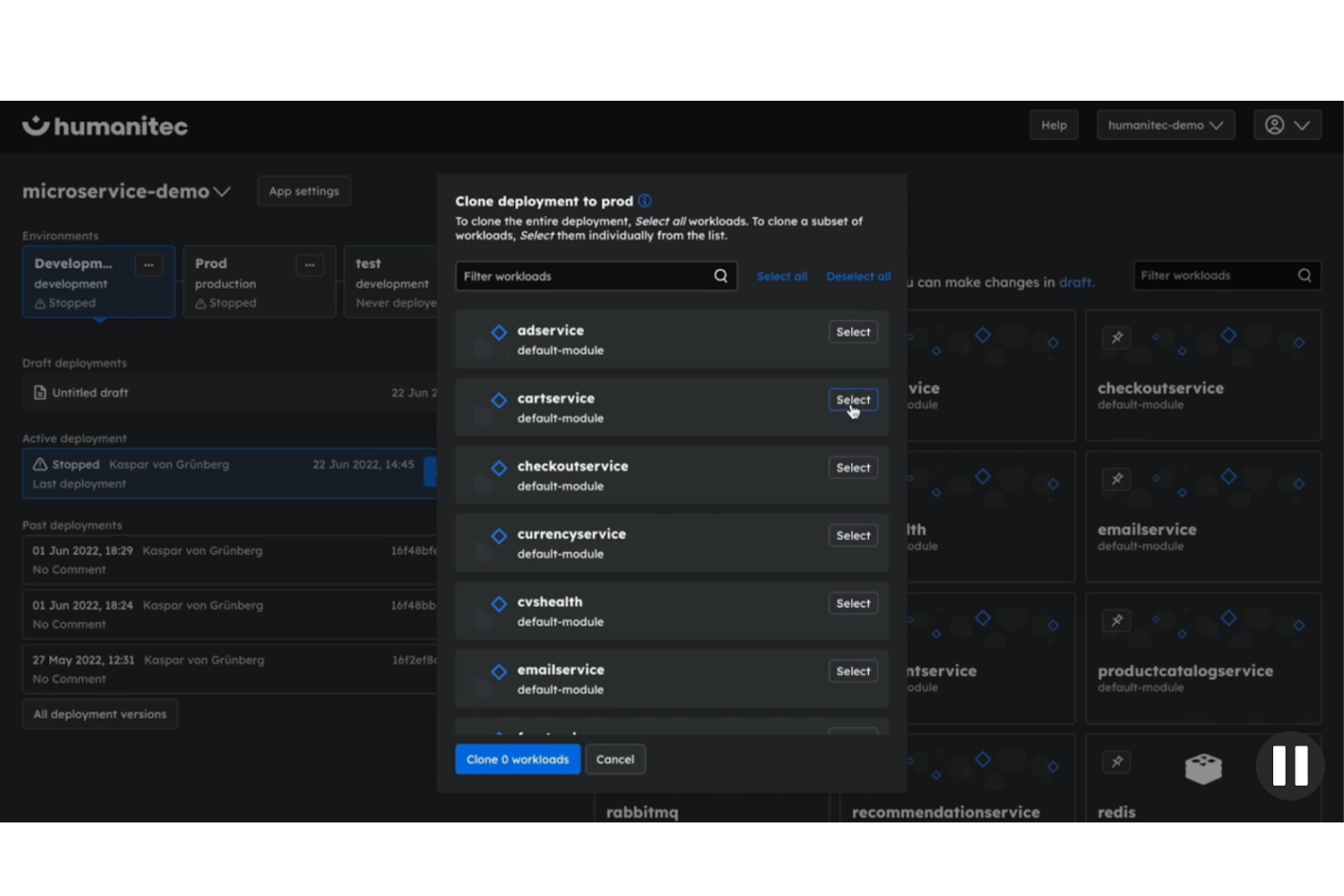
Humanitec is an internal developer portal and platform orchestration layer that connects CI/CD pipelines, infrastructure as code, and cloud accounts behind a unified governance engine for dynamic configuration management and AI-governed infrastructure provisioning.
Who Is Humanitec Best For?
Humanitec is a strong fit for platform engineering teams at mid-to-large enterprises that need to standardize environment configuration across dozens of services without hardcoding values into each deployment pipeline.
Why I Picked Humanitec
I picked Humanitec as one of the best because its Dynamic Configuration Management is the most concrete solution I've seen to config sprawl across multiple environments. The Score specification lets my team define workload requirements once, and Humanitec resolves environment-specific values at deploy time, so no hardcoded configs bleed between staging, production, or ephemeral environments. I also rely heavily on its Drift Detection feature, which flags the moment an agent or developer changes something outside of policy.
Humanitec Key Features
- Resource definitions: Pre-configured infrastructure modules that platform engineers define once and share across multiple workloads, eliminating repeated setup.
- Ephemeral environments: On-demand, short-lived environments that developers can spin up and tear down without opening tickets or waiting for ops.
- RBAC and governance controls: Role-based access rules applied across all deployment workflows, restricting what developers can deploy or modify based on their role.
- Insights and engineering intelligence: A real-time view across your toolchain that surfaces deployment signals and environment health data in one place.
Humanitec Integrations
Integrations include AWS, GCP, Azure, Terraform, OpenTofu, Cloudflare, Kubernetes, PostgreSQL, MySQL, and MariaDB.
Pros and Cons
Pros:
- Graph-based resource visualization built in
- Supports AI agent infrastructure provisioning
- Configs auto-generate per environment at deploy
Cons:
- Initial setup needs dedicated engineering support
- Documentation lags behind frequent feature updates

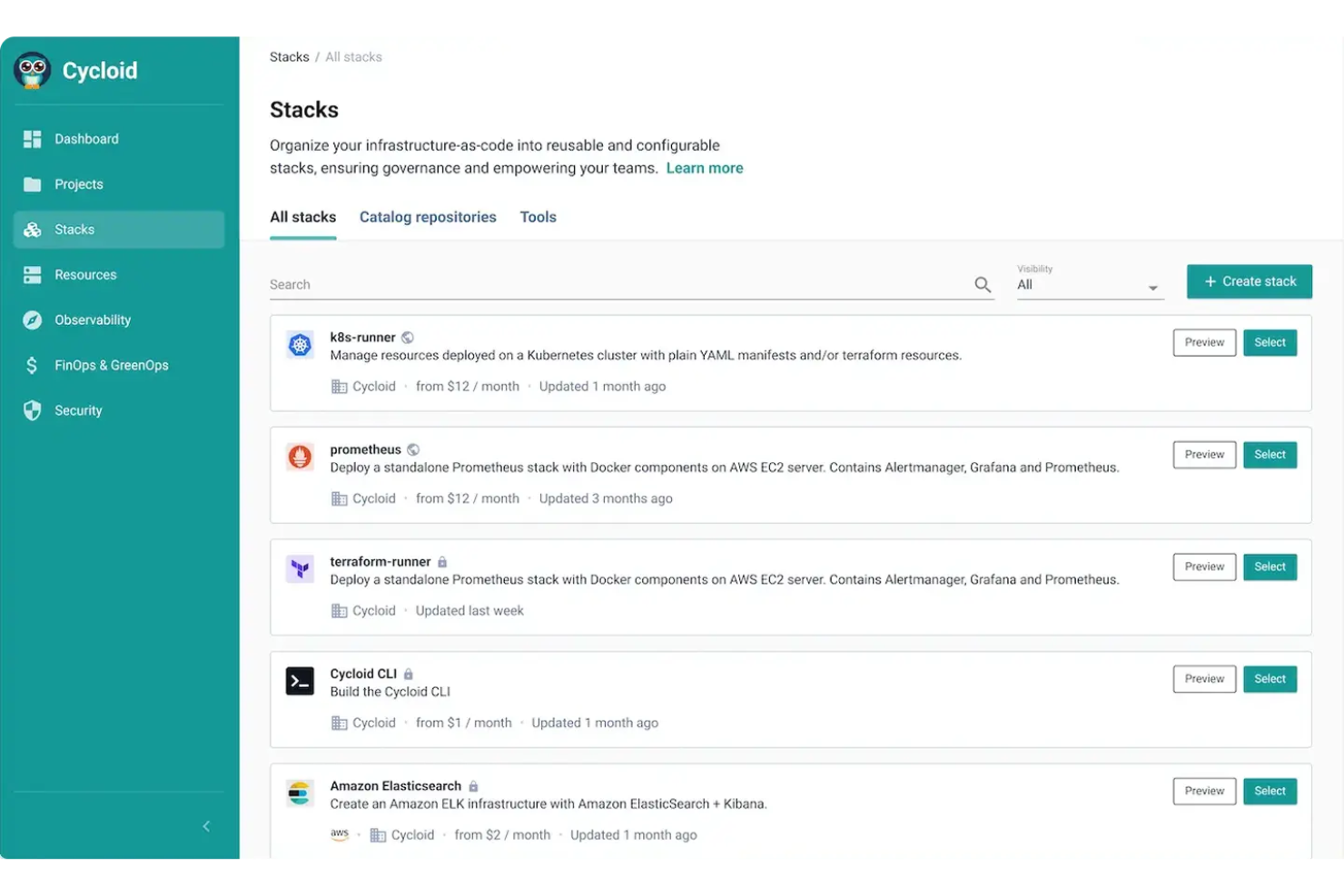
Cycloid is an internal developer portal and cloud management platform that combines a self-service infrastructure portal, Terraform/OpenTofu-native IaC automation, multi-cloud cost management, and asset inventory across on-premises and public cloud environments.
Who Is Cycloid Best For?
Cycloid is a strong fit for platform engineering teams managing workloads across mixed environments, particularly those running a combination of on-premises infrastructure and multiple public clouds.
Why I Picked Cycloid
Cycloid earns its spot on my shortlist because no other IDP I've tested handles true hybrid cloud environments as cleanly. What stands out is StackForms, which lets my team publish self-service infrastructure forms that work identically whether the target is AWS, Azure, GCP, or bare-metal on-prem, with no separate provisioning workflow per environment. Pair that with InfraView, which maps live resource dependencies across all those environments in one visual graph, and you have a control plane that actually reflects your real infrastructure.
Cycloid Key Features
- Service catalogue: A browsable catalogue of pre-approved infrastructure stacks that developers can deploy without writing IaC from scratch.
- Pipeline view: A visual CI/CD pipeline interface that tracks deployment progress across infrastructure jobs in real time.
- Cloud cost management: Built-in FinOps dashboards that surface spending breakdowns per project, environment, and provider.
- Git-based stack management: IaC templates are stored and versioned directly in Git, keeping infrastructure definitions auditable and reusable.
Cycloid Integrations
Integrations include Terraform, Ansible, Helm, GitHub, GitLab, Bitbucket, Jenkins, Azure DevOps, and ArgoCD for IaC.
Pros and Cons
Pros:
- Vendor-agnostic across on-prem and cloud
- StackForms abstract IaC for non-experts
- Built-in carbon footprint tracking per deployment
Cons:
- Lacks extensive plugin library
- Unannounced maintenance can cause downtime

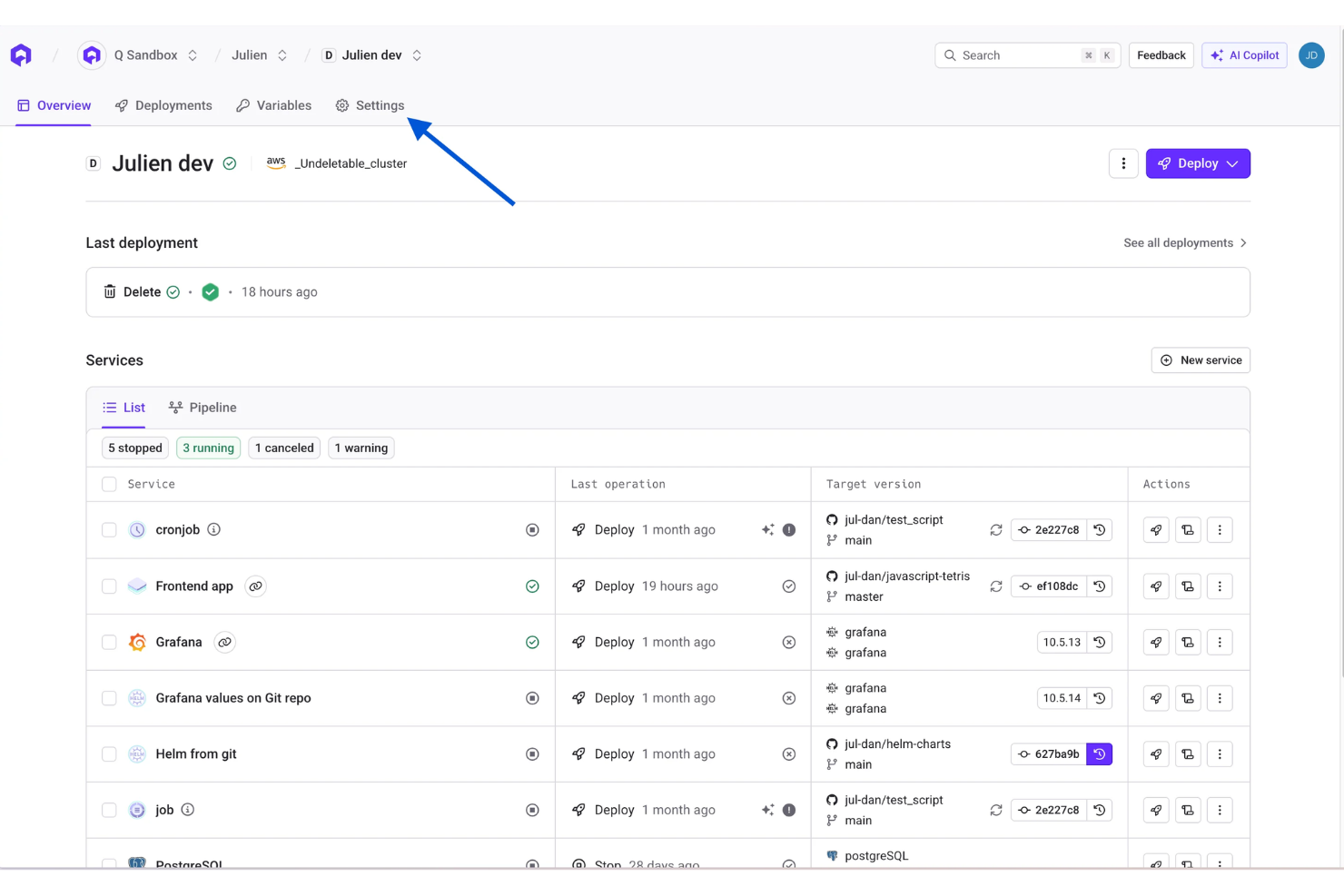
Qovery is a Kubernetes management platform that gives development teams a self-service portal for deploying, scaling, and managing containerized applications across AWS EKS, GCP GKE, Azure AKS, and on-premises clusters.
Who Is Qovery Best For?
Qovery is a strong fit for engineering teams at scaling startups and mid-size companies that run Kubernetes but want developers to self-serve deployments without writing infrastructure code.
Why I Picked Qovery
I picked Qovery as one of the best because of how it handles deployment scaling through ephemeral environments. Every pull request spins up a full-stack preview environment, including apps, databases, queues, and workers, in about three minutes, with a real URL, real TLS, and auto-cleanup on merge. I also like that per-environment cost caps and TTL controls keep spending flat even as the number of concurrent environments scales. That combination of instant provisioning and automatic teardown is something very few IDPs handle natively.
Qovery Key Features
- RBAC and policy enforcement: Define role-based access controls and policy-as-code rules that gate every deployment action before it reaches your cluster.
- Built-in observability: Logs, metrics, traces, and deploy events are wired to every service automatically, with no agents to install or dashboards to configure.
- GitOps pipeline support: Zero-config CI/CD pipelines connect directly to your Git repositories, supporting containers, Helm charts, Terraform modules, and managed databases.
- Audit log: Every action taken by a human or AI agent is logged, attributed, and reviewable through a single audit trail.
Qovery Integrations
Integrations include GitHub, GitLab, Slack, Bitbucket, Terraform and CloudFormation.
Pros and Cons
Pros:
- AI chat surfaces deployment insights instantly
- Environment cloning includes databases with data
- Deploys on your own cloud account
Cons:
- Env vars unsupported in self-managed Helm charts
- Full environment copies raise infra costs
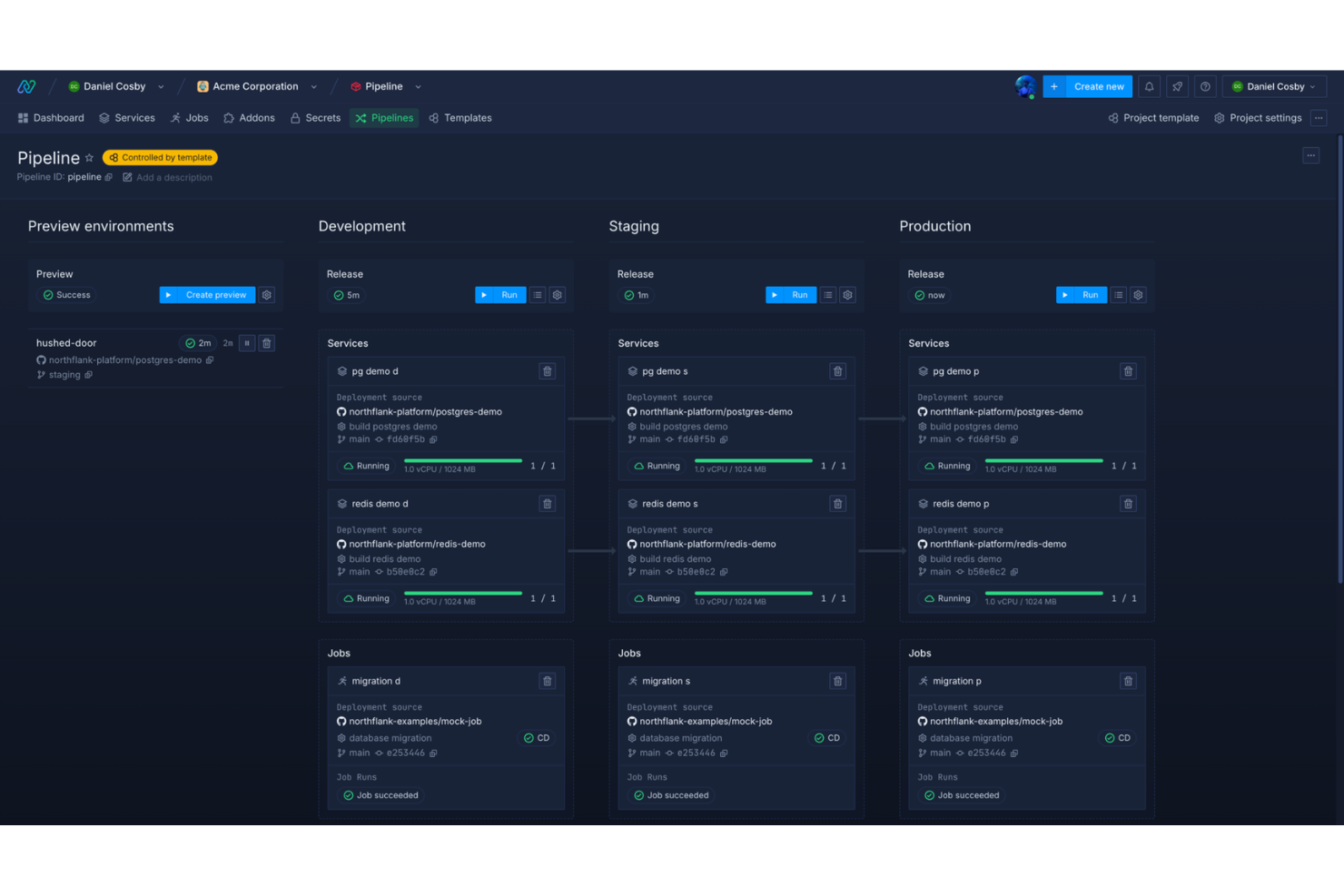
Northflank is a Kubernetes-native deployment platform that unifies services, databases, jobs, CI/CD pipelines, preview environments, and secrets management into a single internal developer portal running on your cloud or theirs.
Who Is Northflank Best For?
Northflank is a strong fit for platform engineering teams at growth-stage companies that need one system to manage deployments, pipelines, and databases without stitching together separate tools.
Why I Picked Northflank
I've included Northflank in my top picks because its workflow templates let you define an entire stack (services, jobs, databases, and pipelines) as a single reusable object. When I clone that template across staging and production, environment parity is automatic. I also like the built-in secrets inheritance, where secrets propagate from project to service level without any manual wiring between separate tools.
Northflank Key Features
- Preview environments: Automatically spin up ephemeral, full-stack environments tied to pull requests, then tear them down after merging.
- Bring your own cloud: Deploy Northflank's control plane into your own AWS, GCP, or Azure account to keep workloads within your infrastructure boundary.
- Deployment rollbacks: Revert any service to a previously deployed build directly from the UI without rerunning a pipeline.
- Custom domains: Assign and manage custom domains per service, with TLS certificates provisioned automatically.
Northflank Integrations
Northflank offers native integrations with GitHub, GitLab, Bitbucket, AWS, GCP, Azure, Civo, Oracle, Fastly, and CloudFront. It also connects to external container registries, external secret managers, and Tailscale for VPN-based private access. An API and CLI are available for custom integrations and CI/CD pipeline automation.
Pros and Cons
Pros:
- Bring-your-own-cloud deployment option
- Preview environments tied to pull requests
- Built-in databases alongside app services
Cons:
- Limited third-party plugin ecosystem
- Requires platform engineering expertise
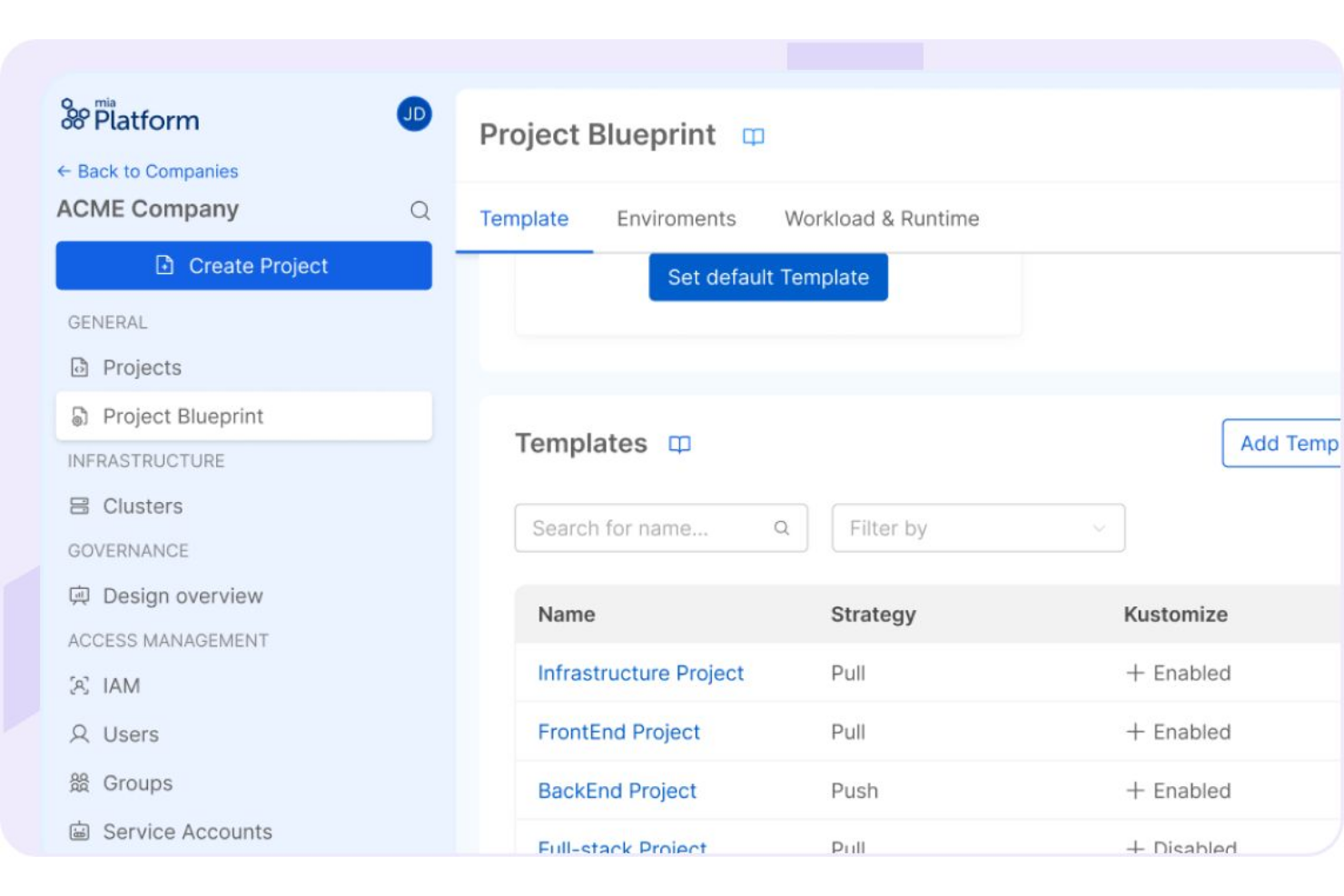
Mia-Platform is an AI-native internal developer portal and platform engineering tool that combines a service catalogue, software lifecycle management, scorecards, and an AI governance layer to help enterprise engineering teams build and deliver production-ready software.
Who Is Mia-Platform Best For?
Mia-Platform is a strong fit for enterprise platform engineering teams in regulated industries like banking, insurance, and telco that need structured, governed control over their software delivery lifecycle.
Why I Picked Mia-Platform
I picked Mia-Platform as one of the best because its approach to modular backend building is unlike anything else on this list. The Marketplace lets my team select pre-built, pre-tested microservices and compose them into backends without starting from scratch on each project. I also like the golden paths built into the Context Catalog, which enforce architectural standards at the point of creation so every new service ships enterprise-ready by design, not by review.
Mia-Platform Key Features
- AI Foundry: A governance layer that maps natural language requests to pre-approved AI Playbooks, validating every AI output against business specs before it reaches production.
- Scorecards: Compliance checks run at every commit, with automated campaigns that route remediation tasks directly to the responsible engineer.
- RBAC and ABAC controls: Role-based and attribute-based access controls are embedded directly into catalogue entries, restricting what users and AI agents can see and act on.
- Headless catalogue access: The Context Catalog exposes its data via APIs and MCP protocols, so external tools, IDEs, and AI assistants can consume your digital twin's knowledge directly.
Mia-Platform Integrations
Integrations include AWS, GCP, Azure, OCI, GitHub, GitLab, Kubernetes, and Helm.
Pros and Cons
Pros:
- Flexible creation of connectors and architectures
- Marketplace offers ready-to-use templates and plugins
- Governance tools give full SDLC control
Cons:
- Requires established Kubernetes skills to adopt
- No built-in structured monitoring solution
Cortex
Best for tracking operational maturity
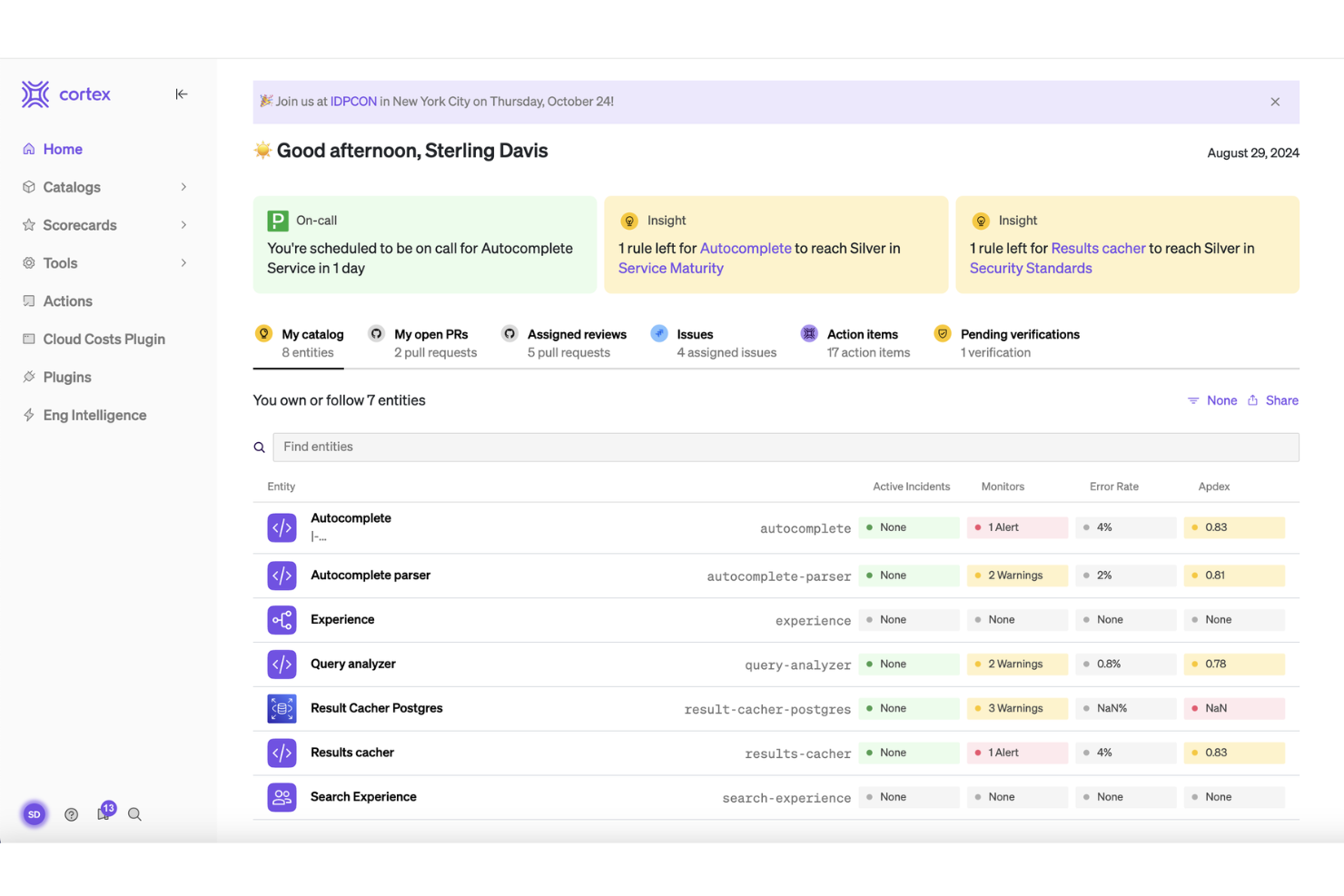
Cortex is an engineering operations platform and internal developer portal that centralizes service catalogue management, production readiness scorecards, developer self-service, and operational maturity tracking across engineering organizations.
Who Is Cortex Best For?
Cortex is a strong fit for engineering and platform teams at mid-size to large organizations that need structured visibility into service ownership and operational maturity across a complex, distributed software environment.
Why I Picked Cortex
Tracking operational maturity across dozens of services is where Cortex really stands out in my experience. I picked Cortex because its scorecard system lets my team define exactly what "good" looks like for production readiness, security compliance, and service ownership, then automatically tracks every team's progress against those standards without anyone chasing engineers for updates. I also like that Cortex surfaces service-level gaps directly to the developers who own them, which means issues get addressed at the source rather than escalating into platform team backlogs.
Cortex Key Features
- Service catalogue: Cortex's catalogue gives you a single source of truth for every service, infrastructure resource, and team, with customizable entity types, ownership tracking, and multi-level relationship mapping.
- Golden path workflows: Cortex lets teams build standardized, multi-step self-service workflows for tasks like service scaffolding, infrastructure provisioning, and developer onboarding using a no-code block library.
- Engineering intelligence dashboards: Cortex surfaces DORA metrics, cycle time, incident rates, and team velocity through built-in and custom dashboards, pulling data from your existing tools automatically.
- Scorecards: Define engineering standards across areas like production readiness, security compliance, and on-call hygiene, then automatically track every team's progress against those standards over time.
Cortex Integrations
Integrations include GitHub, GitLab, PagerDuty, Datadog, Jira, Slack, New Relic, SonarQube, Snyk, and AWS.
Pros and Cons
Pros:
- Strong out-of-the-box DevOps integrations
- AI predicts service ownership from git
- Tiered scorecards grade services automatically
Cons:
- Implementation can take six months or more
- Requires proprietary CQL query language
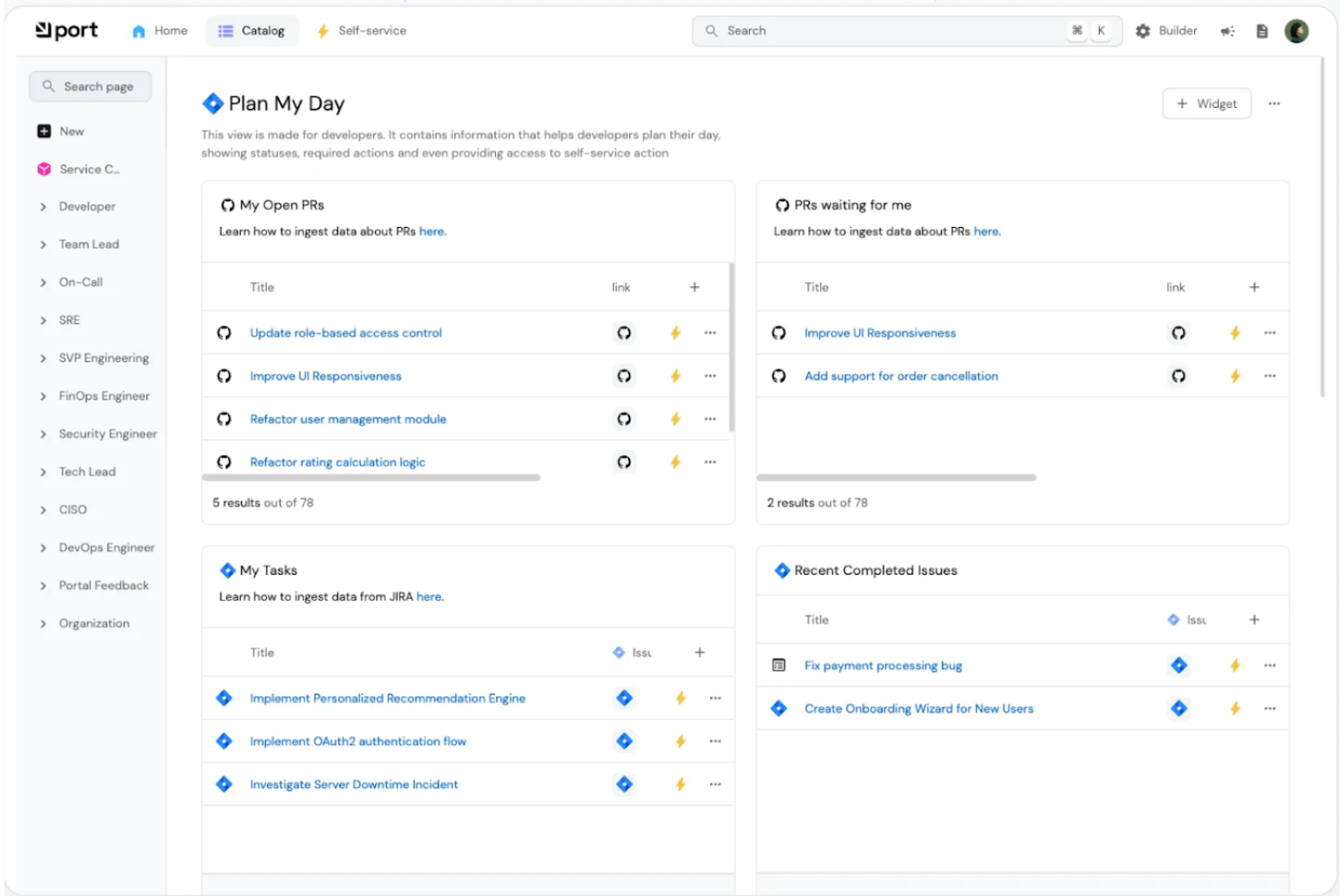
Port is an internal developer portal and agentic software development lifecycle (SDLC) platform that combines a software catalogue, self-service workflow orchestration, AI agent management, and engineering governance in a single system.
Who Is Port Best For?
Port is a strong fit for platform engineering teams at growth-stage and enterprise tech companies that need a developer portal up and running quickly without heavy customization work.
Why I Picked Port
Port earns its spot on my shortlist because its plug-and-play integration library is genuinely one of the best I've seen for getting a portal stood up fast. With 86 out-of-the-box integrations, you can connect GitHub, Jira, PagerDuty, Datadog, ArgoCD, Snyk, and Terraform without writing a single line of custom code. What I find most compelling is Port Ocean, Port's open-source integration framework, which lets you model any external data source into your catalogue using a structured SDK when you need something beyond the standard library.
Port Key Features
- Blueprints: A schema-based modelling system that lets you define any software asset, from microservices to cloud resources, as a structured, queryable catalogue entity.
- Self-service actions: A drag-and-drop action builder that triggers backend workflows in tools like GitHub Actions or Terraform directly from the portal UI.
- Scorecards: Configurable rule sets that grade services against production readiness, security, and compliance standards automatically.
- RBAC: Granular role-based access control that governs which teams can view, trigger, or manage specific catalogue entities and actions.
Port Integrations
Integrations include GitHub, GitLab, Jira, PagerDuty, Datadog, ArgoCD, Terraform, AWS, Azure, and GCP.
Pros and Cons
Pros:
- Dedicated white-glove onboarding support included
- Kubernetes service catalogue setup is fast
- Flexible blueprint-based data modelling system
Cons:
- Heavy JSON configuration for custom workflows
- Requires specific plugin configuration
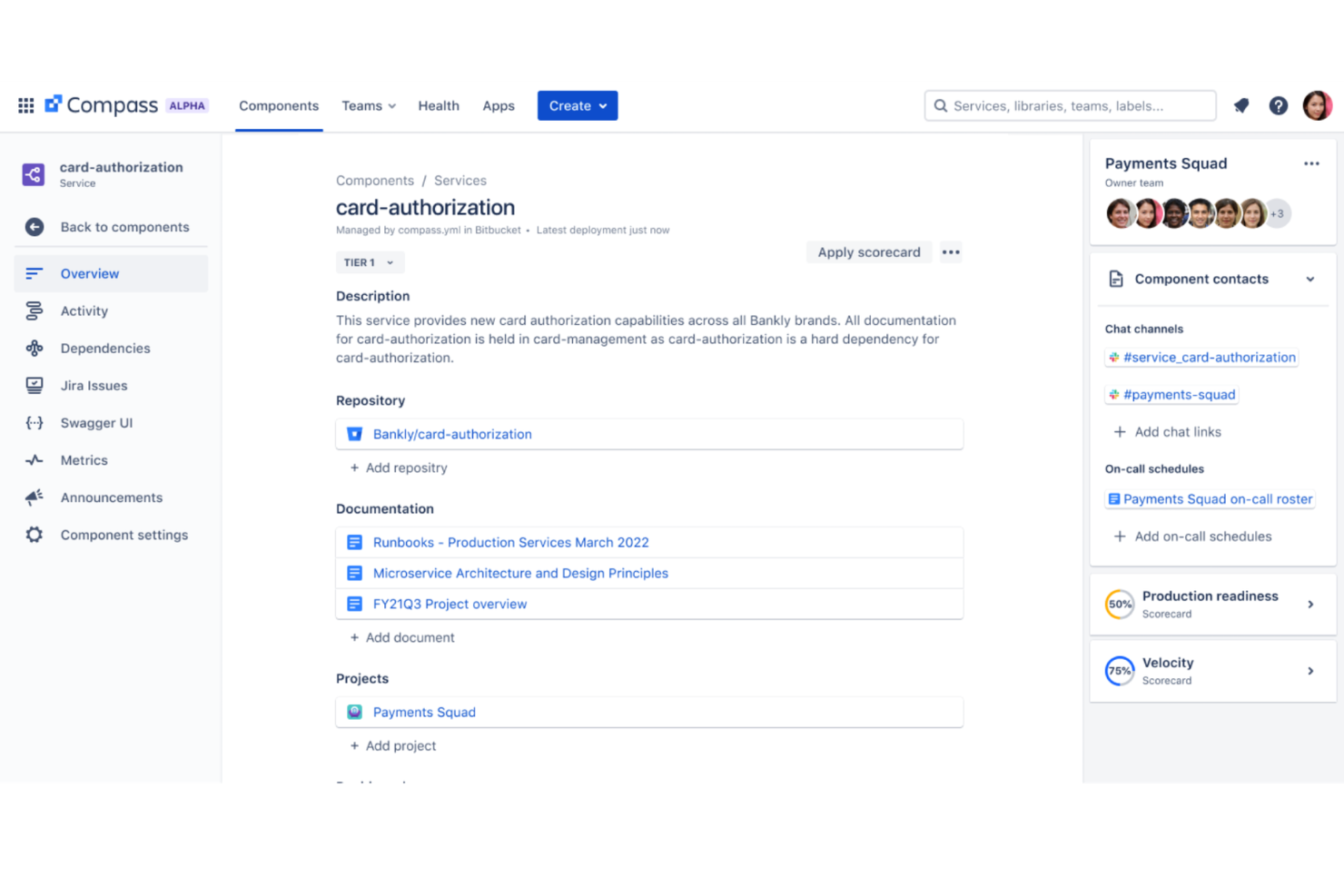
Built into the Atlassian ecosystem, Compass is an internal developer portal that centralizes your software catalogue, component ownership, scorecards, and engineering insights across distributed teams.
Who Is Atlassian Compass Best For?
Compass is a natural fit for engineering teams already running Jira, Confluence, or Bitbucket who want a developer portal without leaving the Atlassian ecosystem.
Why I Picked Atlassian Compass
I've included Atlassian Compass in my top picks because of how well it handles health tracking across both components and the teams that own them. I particularly like that scorecards are tied directly to real signals like code quality, test coverage, and security vulnerabilities, not just self-reported status. On top of that, built-in DORA metrics give my team visibility into cycle time, deployment frequency, and where delivery is slowing down. It's one of the few portals that connects component health to team performance in a single view.
Atlassian Compass Key Features
- Software catalogue: A searchable registry of all components, services, libraries, and APIs across your engineering org, with ownership clearly assigned.
- Dependency mapping: Visual mapping of relationships between components so teams can see upstream and downstream dependencies before making changes.
- Compass extensions: A marketplace of pre-built extensions that pull data from third-party DevOps tools directly into component pages.
- Announcements: A built-in notification system that lets component owners broadcast updates, deprecations, or incident alerts to relevant teams.
Atlassian Compass Integrations
Integrations include GitHub, GitLab, CircleCI, PagerDuty, Sentry, Slack, Snyk, Jira, Bitbucket, and Datadog.
Pros and Cons
Pros:
- Templated service creation with baked-in policies
- Born from Atlassian's own microservices needs
- Built-in scorecards and DORA metrics
Cons:
- Lacks advanced Kubernetes workflow orchestration
- Limited self-service beyond scaffolding new services
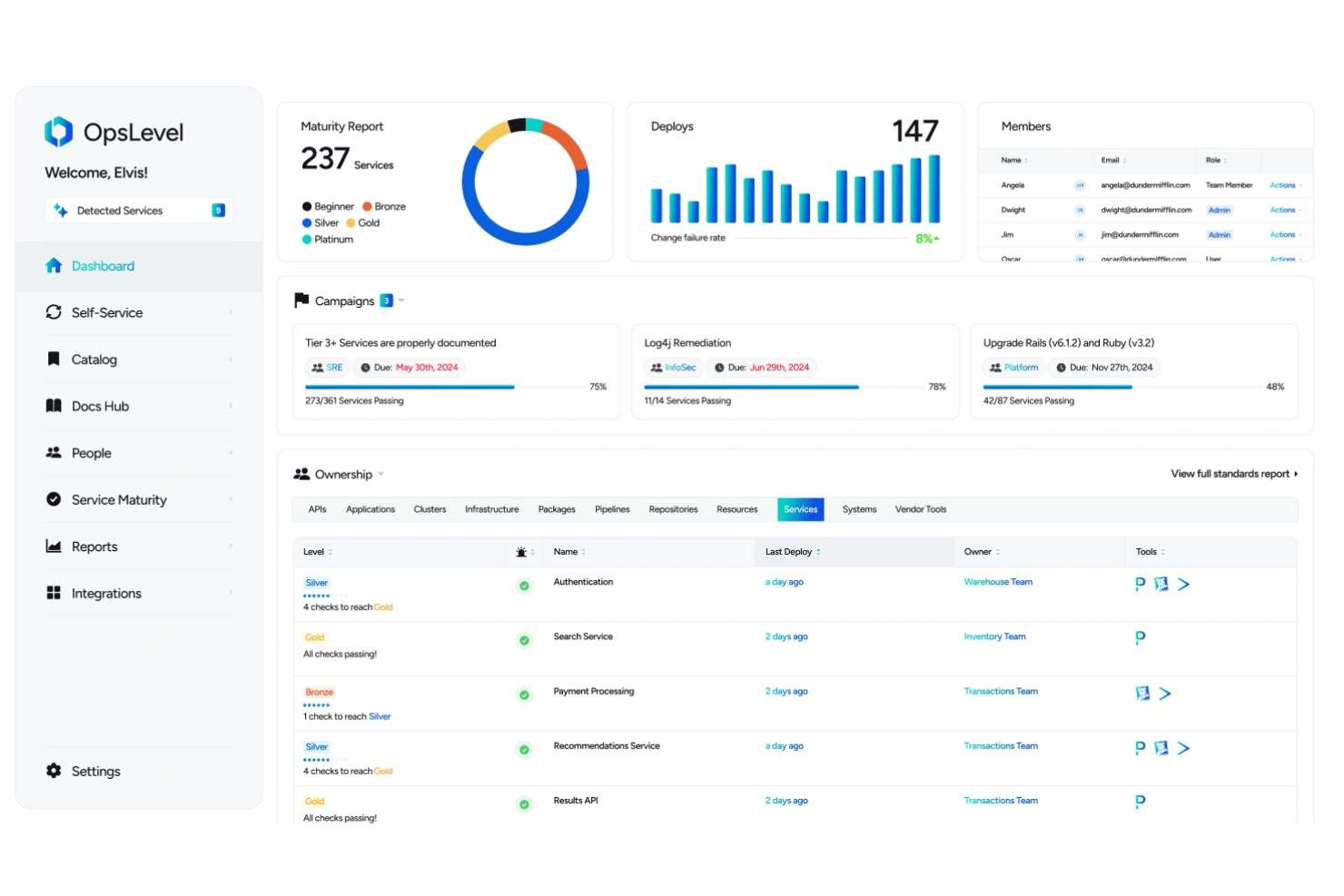
OpsLevel is a strong fit for engineering teams at mid-to-large companies managing a high volume of microservices across multiple squads or domains.
Why I Picked OpsLevel
OpsLevel earns its spot on my shortlist because of how it handles service discovery at scale. I like that it connects to sources like GitHub, Datadog, and AWS, then automatically detects and enriches catalogue entries without requiring teams to manually register every microservice. The Kubernetes Syncer is a real standout for orgs with containerized workloads, since it pulls in service data automatically based on existing tags. I also like that ownership is auto-detected rather than self-reported, which keeps the catalogue accurate as services grow and change.
OpsLevel Key Features
- Campaigns: Create org-wide initiatives that push specific checks to service owners, tracking completion progress across every team from a central view.
- Custom actions: Trigger workflows like incident creation, CI/CD pipelines, or Slack notifications directly from a service's catalogue page, without opening a ticket.
- Knowledge center: A single location that surfaces API docs and tech docs tied to each service, so developers don't have to hunt through wikis or repos.
- Maturity levels: Define and name custom maturity tiers across your org so every team has shared context on what "production-ready" actually means for your services.
OpsLevel Integrations
OpsLevel offers native integrations across git providers, CI/CD pipelines, observability platforms, incident management tools, and security scanners, including GitHub, GitLab, Bitbucket, Datadog, PagerDuty, Slack, Kubernetes, Snyk, Jira, and SonarQube. It also supports AWS, Azure, and Google Cloud Platform for infrastructure ingestion, and provides a GraphQL API and CLI for custom integrations.
Pros and Cons
Pros:
- Centralizes microservice health data
- Extensible APIs for pulling in diverse data
- Syncs with existing git repos
Cons:
- Self-service actions limited to single steps
- Requires steep initial configuration
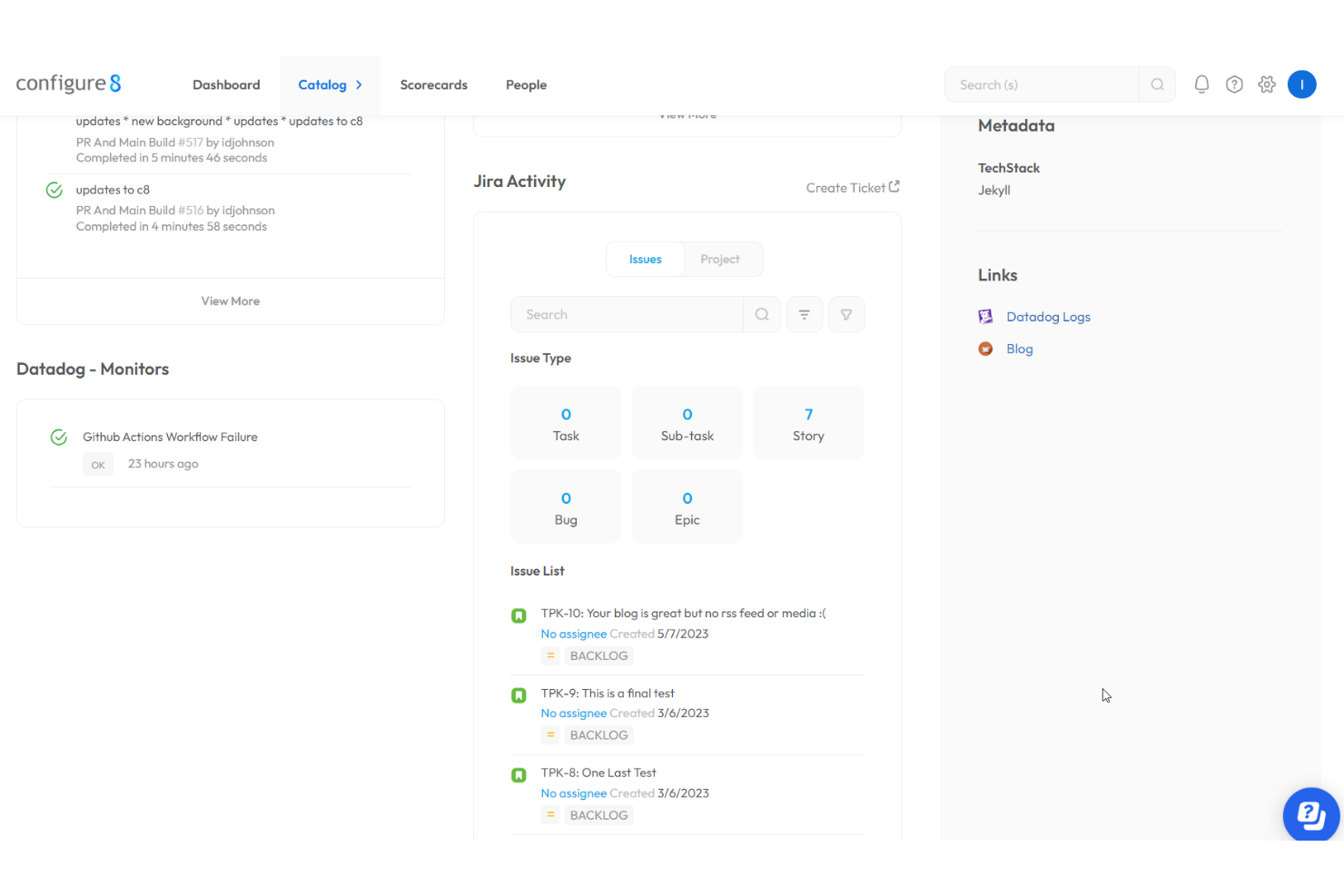
Configure8 is an internal developer portal that combines a universal service catalogue, scorecards, self-serve actions, and cloud cost management to give engineering teams centralized visibility and control across their environments.
Who Is Configure8 Best For?
Configure8 is a strong fit for platform engineering teams at growing companies that manage services across multiple cloud environments and need visibility into both service health and infrastructure costs.
Why I Picked Configure8
I picked Configure8 as one of the best because it connects cloud cost visibility directly to the services and environments in the catalogue. I like that you can slice spending across clouds and accounts by nearly any dimension and trace costs down to specific resources, not just aggregate totals. The auto-tag mapping automatically links cloud resources to environments and services, so cost data is contextualized without manual tagging work.
Configure8 Key Features
- Scorecards: Define checks across reliability, security, DORA metrics, and development maturity, then track compliance progress against each standard org-wide.
- Ownership mapping: Ties every service, environment, and resource to a clear owner, so on-call engineers can find contacts and dependencies without hunting through multiple tools.
- Application landscape diagram: An interactive visual map of your entire system that helps new hires understand service relationships and preserves institutional knowledge.
- RBAC and SSO: Role-based access controls and single sign-on support enforce the right access levels across teams, with options for SaaS or on-premise deployment.
Configure8 Integrations
Integrations include AWS, Azure, Google Cloud Platform, GitHub, GitLab, Bitbucket, Jenkins, CircleCI, Datadog, and PagerDuty.
Pros and Cons
Pros:
- Maturity levels show gaps per service clearly
- Offers multi-cloud cost views
- Automated service discovery from connected sources
Cons:
- Requires dedicated platform engineering headcount
- Complex setup for legacy environments
Other Internal Developer Portals
Here are some additional internal developer portals options that didn’t make it onto my shortlist, but are still worth checking out:
- Harness Internal Developer Portal
For self-service software delivery
- Atmosly
For governed Kubernetes provisioning
- AWS Proton
For managed infrastructure provisioning
- Plural
For deploying OSS infrastructure stacks
- Encore Cloud
For automatic API documentation generation


How I Evaluate Internal Developer Portals
I split my evaluation into two layers: baseline capabilities like auto-discovered catalogs and golden-path scaffolding, then differentiators like plugin depth and developer adoption.
Core Functionality (Table Stakes For This List)
When I'm selecting tools for my list, I rank each one on a scale from 0 (does not offer the functionality) to 5 (excels in this area) for each core functionality listed below. Then, I calculate the tool's total score into a percentage. Each tool needs to achieve a minimum total score of 75% to be considered for inclusion.
- Software Catalog: I check whether the catalog auto-discovers services, APIs, and resources or requires manual entry, and how well it maps ownership and dependencies.
- Scaffolding & Templates: Golden-path templates should let a developer spin up a new microservice with CI/CD already wired, not just clone a bare repo.
- Developer Self-Service: I look for portals where developers can provision a cloud resource or trigger a deployment directly, without filing a ticket to the platform team.
- Tech Stack Integrations: The portal should connect to Git providers, CI/CD pipelines, cloud platforms, Kubernetes, and observability tools to surface context in one place.
- Scorecards & Standards: I evaluate whether scorecards track production readiness and security posture with automated checks, not just static checklists teams ignore.
- Extensibility & Plugins: A plugin framework or SDK matters here because every engineering org has internal tools it needs to wire into the portal's UI and data layer.
Once I have a list of tools that meet this criteria, I consider what sets each platform apart.
Differentiating Factors (What Sets Vendors Apart)
Here's how I compare and contrast different vendors:
Standout Features
TechDocs support is a big differentiator. I look for portals where documentation lives alongside services in the catalog, so engineers find runbooks and API specs without switching to a separate wiki. Scorecards that track DORA metrics and maturity trends over time also matter—they give engineering leaders real visibility into tech debt across teams. The depth of a vendor's plugin ecosystem, whether it includes a marketplace or community-contributed plugins, shapes how much custom work your platform team needs to take on.
Beyond Features
Deployment model matters a lot here. A self-hosted Backstage instance gives you full control but demands a dedicated platform team to maintain it, while managed SaaS options shift that burden to the vendor. I also evaluate time-to-value—some portals take months of configuration before a single developer logs in, while others ship with pre-built catalog ingestion and templates out of the box. Pricing structure deserves attention too, since per-seat costs can spiral fast as your engineering org scales past a few hundred developers.
How to Choose Internal Developer Portals
It’s easy to get bogged down in long feature lists and complex pricing structures. To help you stay focused as you work through your unique software selection process, here’s a checklist of factors to keep in mind:
| Factor | What to Consider |
| Scalability | Can the portal handle your growth in environments, teams, and projects without rework? Check for limits on users or resource catalogue size. |
| Integrations | Will the tool connect with your existing CI/CD, IaC, cloud, and developer tools? Confirm support for your ecosystem, not just popular vendors. |
| Customizability | Can you adapt workflows, roles, and templates to fit your organization’s processes? Look for access to APIs, scripting, or UI configuration. |
| Ease of use | How accessible is the experience for developers, operators, and non-technical stakeholders? Assess UI clarity, navigation, and help resources. |
| Implementation and onboarding | What does setup entail? Ask about migration assistance, time-to-value during rollout, and support for pilot teams or parallel adoption. |
| Cost | Are all important capabilities included within your budget? Watch for volume-based pricing, required add-ons, and hidden support or usage fees. |
| Security safeguards | Does the product provide strong access controls, role delegation, auditing, and multi-tenant data protection? Evaluate compliance track record. |
| Support availability | Will you have reliable support channels and SLAs matching your team’s needs? Clarify hours, points of contact, and escalation paths in advance. |
What Are Internal Developer Portals?
Internal developer portals are centralized platforms that let your teams discover, provision, and manage services, infrastructure, and resources across your organization's tech stack. They provide governed self-service, enforce security policies, and offer visibility into documentation and deployment processes, helping teams standardize workflows and improve collaboration within the development lifecycle.
Features of Internal Developer Portals
When selecting internal developer portals, keep an eye out for the following key features:
- Service catalogue: Centralizes all available internal services, tools, and APIs so teams can easily browse, request, and integrate approved resources.
- Self-service provisioning: Let developers deploy, manage, and tear down infrastructure or environments on their own, reducing wait times and operational bottlenecks.
- Access controls: Enforce role-based permissions and policies to ensure only authorized users can view or change specific resources, protecting sensitive environments and data.
- Environment management: Provides tools for tracking, organizing, and modifying development, testing, and production environments across multiple projects.
- Audit logging: Records user activity, configuration changes, and requests for compliance, troubleshooting, and analysis, making accountability and security reviews straightforward.
- Automated workflows: Supports pre-approved, standardized workflows for deploying software, provisioning resources, or handling requests, reducing manual intervention and errors.
- Documentation integration: Surfaces relevant documentation, runbooks, and technical specs directly within the portal, allowing teams to quickly find guidance when working with different services.
- Health and status monitoring: Displays the current state, uptime, and health of services and environments so teams can spot issues or outages at a glance.
- CI/CD pipeline integration: Connects with build, test, and deployment tools, enabling developers to trigger, monitor, and control deployments right from the portal.
- API management: Gives teams visibility and governance over internal and external APIs, tracking usage, access, and changes through a single interface.
Common Internal Developer Portals AI Features
Beyond the standard internal developer portals features listed above, many of these solutions are incorporating AI with features like:
- Automated troubleshooting assistant: Uses AI to analyze error logs and recent platform changes, then provides actionable resolutions or recommendations to help teams quickly resolve incidents.
- Predictive resource scaling: Continuously analyzes usage trends and service metrics, predicting future resource needs and automatically scaling environments to maintain performance without wasted capacity.
- Intelligent dependency mapping: Applies AI to build dynamic visualizations of service dependencies, alerting teams to potential risks or bottlenecks as changes occur across environments.
- Smart documentation suggestions: Recommends relevant documentation or onboarding resources in context, using AI to match information to the user’s actions or queries.
- Anomaly detection for deployments: Leverages AI to monitor deployment patterns and flag unexpected behaviour, failed releases, or potential security incidents before they impact end users.
Benefits of Internal Developer Portals
Implementing internal developer portals provides several benefits for your team and your business. Here are a few you can look forward to:
- Faster development cycles: Self-service provisioning, standardized workflows, and integrated documentation reduce delays and let teams move through development more quickly.
- Improved security and compliance: Fine-grained access controls, audit logging, and standardized environments help protect sensitive resources and support regulatory requirements.
- Enhanced developer experience: Centralized service catalogues and intuitive interfaces make it easier for developers to discover resources and collaborate across teams.
- Smooth onboarding: Built-in documentation hubs and template libraries help new users get up to speed quickly with less dependence on manual training.
- Better infrastructure visibility: Real-time dashboards and health monitoring provide a clear view of system performance and environment status for proactive management.
- Reduced operational overhead: Automated workflows and integrated CI/CD reduce repetitive manual tasks and lighten the workload for platform and operations teams.
- Optimized resource usage: Environment management and provision tracking help teams identify unused resources and right-size infrastructure to control costs.
Costs and Pricing of Internal Developer Portals
Selecting internal developer portals requires an understanding of the various pricing models and plans available. Costs vary based on features, team size, add-ons, and more. The table below summarizes common plans, their average prices, and typical features included in internal developer portals solutions:
Plan Comparison Table for Internal Developer Portals
| Plan Type | Average Price | Common Features |
| Free Plan | $0 | Basic service catalogue, limited self-service provisioning, basic documentation integration, and community support. |
| Personal Plan | $10–$25/user/month | Full service and API catalogue, single-user access controls, environment management, and basic audit logging. |
| Business Plan | $25–$60/user/month | Team-based access controls, automated workflows, advanced integrations, health and status dashboards, and support. |
| Enterprise Plan | $60–$120/user/month | Custom workflow automation, enhanced security features, compliance tools, multi-region support, and priority support. |
Internal Developer Portals FAQs
Here are some answers to common questions about internal developer portals:
What kinds of teams use internal developer portals?
Engineering, platform, DevOps, and infrastructure teams in organizations of all sizes use internal developer portals to centralize access to resources, support workflows, and manage environments. These platforms help engineering leaders reduce cognitive load for their devs by unifying the development process in one place.
Do internal developer portals work with cloud and on-premises infrastructure?
Yes, most internal developer portals are built to integrate with both cloud-native platforms and on-premises infrastructure tools, allowing you to manage resources across a hybrid or multi-cloud environment from a single user interface.
How do internal developer portals help with compliance?
Internal developer portals provide features like access controls, audit logging, and standardized workflows, which help enforce compliance with company policies and external regulations. They maintain clear metadata tracking across all software catalogues to ensure security standards are met throughout the software engineering lifecycle.
Is it difficult to migrate existing developer tools into a portal?
Most portals offer integrations and APIs to connect your existing tools and development environments, but the complexity depends on your current stack and how much optimization is required. Planning the migration in phases can help reduce disruption and improve your overall time to market.
Can internal developer portals support multiple teams and projects?
Yes, these platforms are designed to handle multi-team and multi-project environments, often providing resource segmentation, role-based access, and project-specific dashboards for clear separation and management.