
12 Enterprise ETL Tools Picked for 2026

Enterprise ETL Tools Shortlist
Here’s my shortlist of enterprise ETL tools:


Enterprise ETL tools are specialized software platforms that extract, transform, and load large volumes of data across complex business systems. If you’re searching for the best enterprise ETL tools, you’re likely managing growing data pipelines, integrating diverse sources, or supporting analytics at scale.
Choosing the right tool can help your team automate workflows, maintain data quality, and meet compliance requirements—while keeping pace with evolving business needs. In this list, you’ll find a clear comparison of leading enterprise ETL solutions for 2026, so you can confidently evaluate which platform fits your organization’s technical and operational demands.
Why Trust Our Software Reviews
Best Enterprise ETL Tools Summary
This comparison chart summarizes pricing details for my top enterprise ETL tools selections to help you find the best one for your budget and business needs.
| Tool | Best For | Trial Info | Price | ||
|---|---|---|---|---|---|
| 1 | Best for rapid SaaS data extraction | 14-day free trial available | From $100/month | Website | |
| 2 | Best for open-source extensibility | 14-day free trial available | Pricing upon request | Website | |
| 3 | Best for serverless data transformation | Free plan available | From $0.44/DPU-hour | Website | |
| 4 | Best for hybrid cloud connectivity | Free plan available | From $1/1,000 pipeline runs | Website | |
| 5 | Best for native Oracle ecosystem integration | Free demo available | Pricing upon request | Website | |
| 6 | Best for automated schema migration | 14-day free trial available | From $5/month | Website | |
| 7 | Best for large-scale data governance | 30-day free trial and free demo available | Pricing upon request | Website | |
| 8 | Best for visual data orchestration | 30-day free trial + free demo available | Pricing upon request | Website | |
| 9 | Best for AI-powered pipeline design | Free demo available | Pricing upon request | Website | |
| 10 | Best for real-time stream processing | Free plan available | From $0.069/vCPU-hour (streaming) | Website |
-

Site24x7
Visit WebsiteThis is an aggregated rating for this tool including ratings from Crozdesk users and ratings from other sites.4.6 -
GitHub Actions
Visit WebsiteThis is an aggregated rating for this tool including ratings from Crozdesk users and ratings from other sites.4.8 -
Docker
Visit WebsiteThis is an aggregated rating for this tool including ratings from Crozdesk users and ratings from other sites.4.6





Enterprise ETL Tools Reviews
Below are my detailed summaries of the enterprise ETL tools that made it onto my shortlist. My reviews offer a detailed look at the features, integrations, and best use cases of each platform to help you find the best one for your organization.

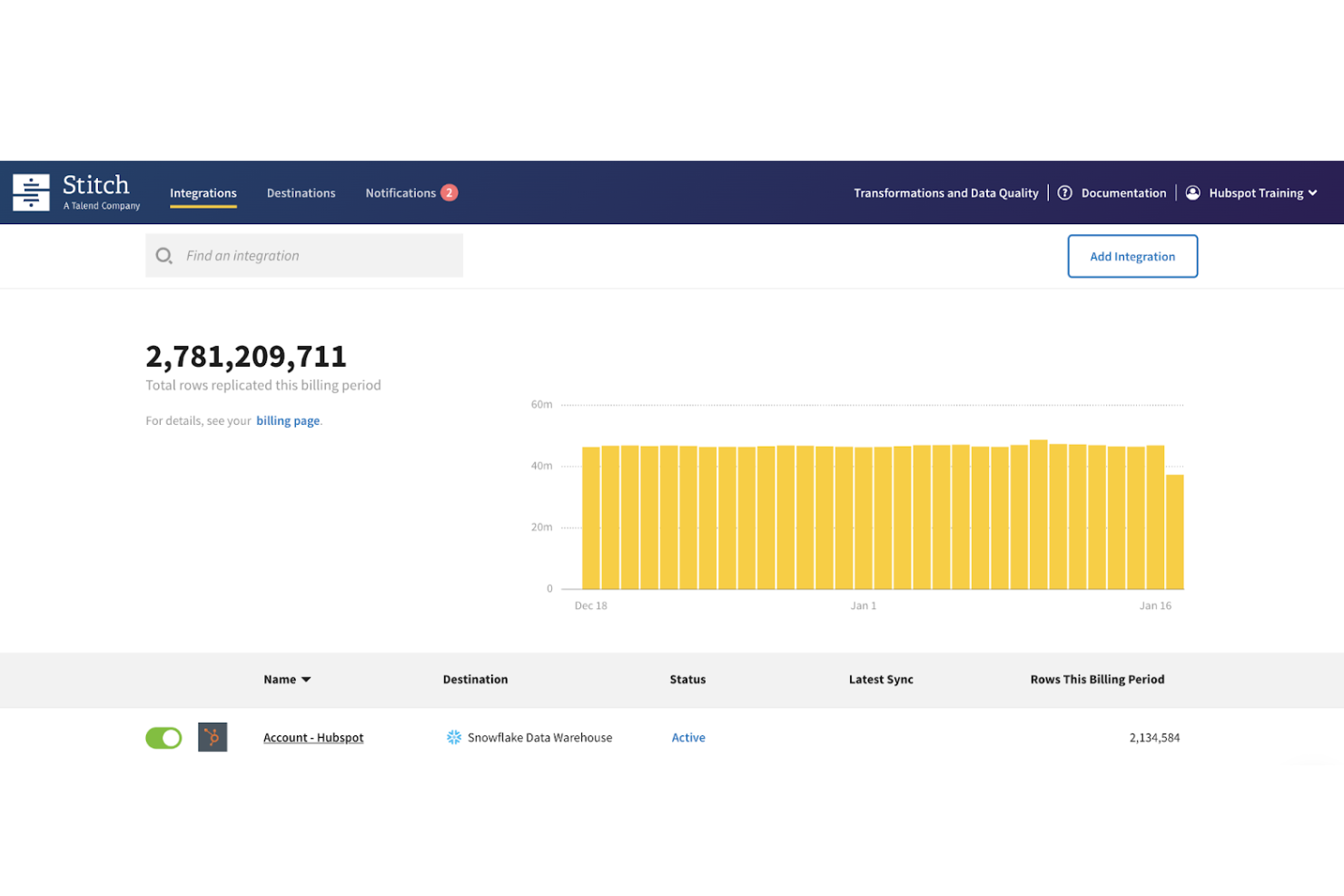
Stitch is a cloud-based data integration tool focused on quickly extracting and loading data from SaaS platforms into data warehouses. It’s a strong fit for teams that want fast, reliable data ingestion without building and maintaining custom pipelines. Stitch is especially useful for organizations centralizing data from multiple business tools for analytics and reporting.
Why Stitch Is a Good Mixpanel Alternative
For teams prioritizing fast and reliable data ingestion, Stitch offers a streamlined approach to extracting and loading data from SaaS applications. I picked Stitch because it simplifies the process of moving data into cloud data warehouses, allowing teams to focus on analysis rather than pipeline maintenance.
The platform uses an ELT approach, meaning data is loaded into your warehouse first and transformed later using your preferred tools. This makes it a good fit for organizations that already rely on modern data stacks and want flexibility in how they model and analyze data downstream.
Stitch Key Features
Some other features in Stitch that are useful for enterprise ETL workflows include:
- Prebuilt connectors: Access a wide range of connectors for SaaS apps, databases, and cloud services
- Automated data replication: Schedule and sync data from multiple sources without manual intervention
- Incremental data loading: Sync only updated records to reduce load times and resource usage
- Warehouse-first architecture: Load raw data into your data warehouse for flexible downstream transformation
Stitch Integrations
Integrations include Salesforce, HubSpot, Google Analytics, Shopify, Stripe, Facebook Ads, Zendesk, Marketo, Snowflake, and Amazon Redshift.
Pros and Cons
Pros:
- Automated replication reduces manual pipeline work
- Wide range of prebuilt connectors
- Fast setup for SaaS data ingestion
Cons:
- Limited support for on-premises data sources
- No built-in data transformation capabilities

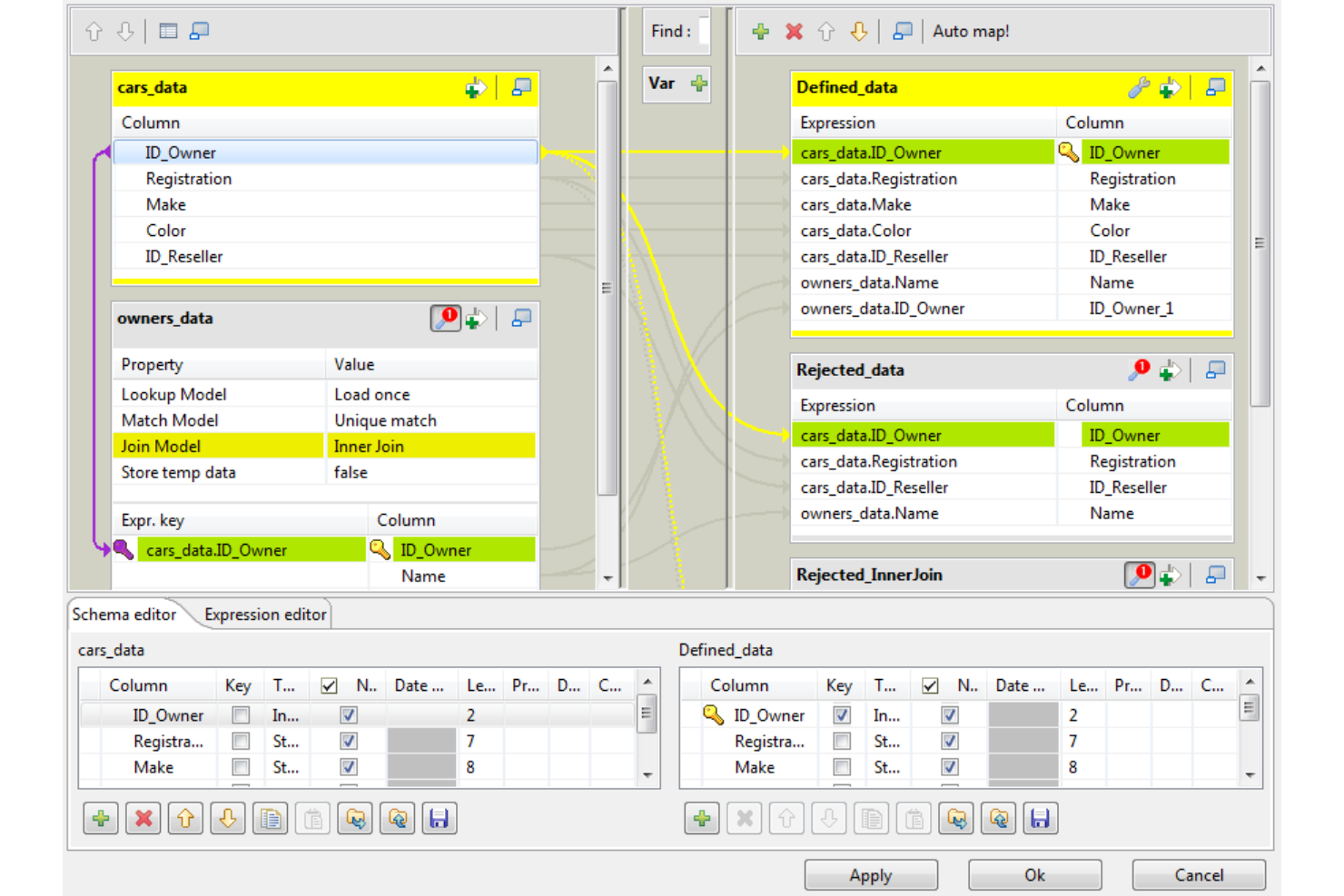
Talend offers an open-source approach to enterprise ETL, making it a strong fit for teams that want flexibility and customization in their data integration workflows. IT specialists and data engineers who need to connect diverse systems or build tailored pipelines often turn to Talend for its extensibility and broad connector library. Its modular design helps organizations adapt quickly to changing data requirements and compliance standards.
Why I Picked Talend
I chose Talend for its open-source extensibility, which stands out for organizations that need to customize and scale their ETL processes. Talend’s component-based architecture lets you build and modify connectors or transformations to fit unique enterprise data environments. I appreciate how the platform supports scripting and custom code, so teams can address complex data logic or compliance requirements. Its open-source foundation also encourages collaboration and rapid adaptation as business needs evolve.
Talend Key Features
Some other features in Talend that are useful for enterprise ETL projects include:
- Data Quality Tools: Built-in profiling, cleansing, and enrichment tools help maintain high data standards across your pipelines.
- Job Scheduling: Schedule and automate ETL jobs directly within the platform to support regular data refresh cycles.
- Metadata Management: Centralized metadata repository allows you to track data lineage and manage schema changes.
- Cloud and On-Premises Deployment: Flexible deployment options let you run Talend in cloud environments, on-premises, or in hybrid setups.
Talend Integrations
Integrations include AWS, Google Cloud, Microsoft Azure, Snowflake, SAP, Databricks, Cloudera, Oracle, Salesforce, and Adobe.
Pros and Cons
Pros:
- Wide connector library supports diverse data sources
- Strong data quality tools improve data reliability
- Open-source flexibility supports custom data workflows
Cons:
- Advanced features require strong technical expertise
- Interface can feel outdated for modern teams

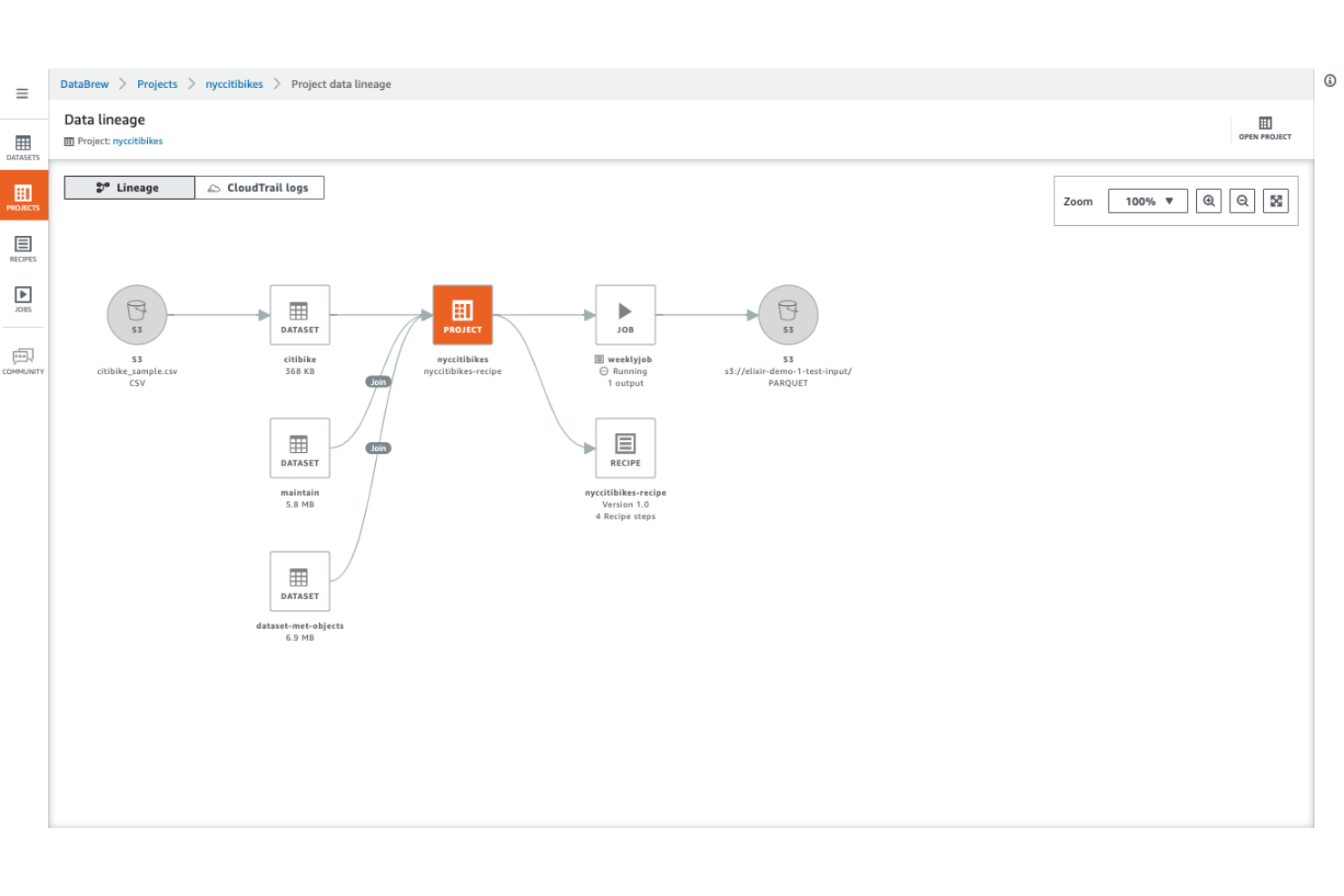
AWS Glue is designed for teams that want to automate and scale data transformation without managing servers. It’s a strong fit for organizations already invested in AWS or those handling large, complex data pipelines across cloud environments. With its serverless architecture, AWS Glue helps data engineers focus on building and orchestrating ETL workflows instead of infrastructure management.
Why I Picked AWS Glue
For teams that want to avoid managing infrastructure, AWS Glue stands out with its fully serverless approach to data transformation. The platform automatically provisions, scales, and manages the compute resources needed for ETL jobs, so you don’t have to worry about capacity planning or server maintenance.
I picked AWS Glue because it supports both code-based and visual ETL development, letting you choose between authoring in Python/Scala or using a drag-and-drop interface. This flexibility, combined with automated job scheduling and dependency management, makes it a strong choice for enterprise-scale ETL workflows.
AWS Glue Key Features
Some other features that make AWS Glue appealing for enterprise ETL teams include:
- Data Catalog Integration: Maintain a unified metadata repository for all your data assets across AWS services.
- Automatic Schema Discovery: Detect and catalog new data sources and structures without manual intervention.
- Built-in Job Monitoring: Track ETL job status, logs, and performance metrics directly from the AWS console.
- Support for Streaming ETL: Process and transform streaming data in near real-time using Glue’s streaming jobs.
AWS Glue Integrations
Integrations include Amazon S3, Amazon Redshift, Amazon RDS, Amazon Aurora, Amazon DynamoDB, Amazon Athena, Amazon EMR, Amazon SageMaker, AWS Lake Formation, and Apache Hudi.
Pros and Cons
Pros:
- Automatic schema discovery for new data sources
- Native integration with AWS data services
- Serverless architecture eliminates infrastructure management
Cons:
- Debugging complex ETL jobs can be difficult
- Limited support for non-AWS data sources

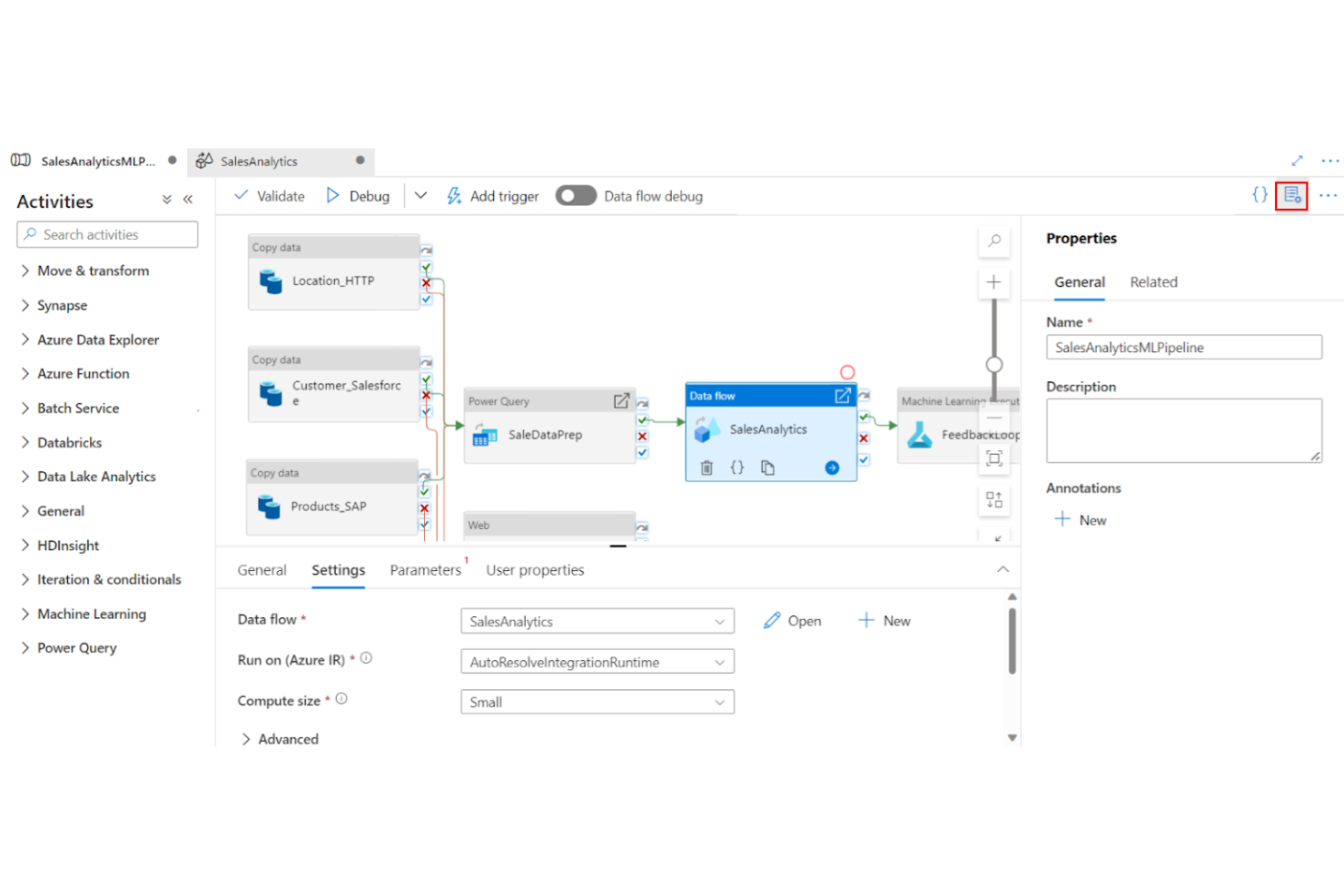
Azure Data Factory is built for organizations that need to connect, transform, and move data across both on-premises and cloud environments. It’s a strong fit for IT teams managing hybrid infrastructures or supporting data integration across multiple clouds. The platform’s managed connectors and flexible pipeline design help address complex data movement and compliance requirements in enterprise settings.
Why I Picked Azure Data Factory
Hybrid cloud connectivity is a major challenge for many enterprise ETL teams, and Azure Data Factory addresses this with its extensive support for both on-premises and cloud data sources. I picked Azure Data Factory because it offers managed integration runtimes that securely bridge data movement between private networks and public clouds.
The tool’s built-in connectors cover a wide range of enterprise systems, making it easier to orchestrate complex data flows across hybrid environments. This approach helps IT teams maintain compliance and control while modernizing their data infrastructure.
Azure Data Factory Key Features
In addition to its hybrid connectivity strengths, I also found several other features worth noting:
- Visual Pipeline Designer: Build and manage ETL workflows using a drag-and-drop interface.
- Data Flow Debugging: Test and troubleshoot data flows interactively before deployment.
- Parameterization Support: Reuse pipeline templates with dynamic parameters for flexible deployments.
- Integration with Azure Monitor: Track pipeline activity and performance through native monitoring tools.
Azure Data Factory Integrations
Integrations include Azure Synapse Analytics, Azure Databricks, Azure SQL Database, Azure Cosmos DB, Amazon Redshift, Google BigQuery, Oracle Exadata, Teradata, Salesforce, and ServiceNow.
Pros and Cons
Pros:
- Built-in connectors for major enterprise platforms
- Visual pipeline designer for workflow creation
- Supports on-premises and multi-cloud data sources
Cons:
- Pricing model can be complex to estimate
- Monitoring dashboards lack advanced customization

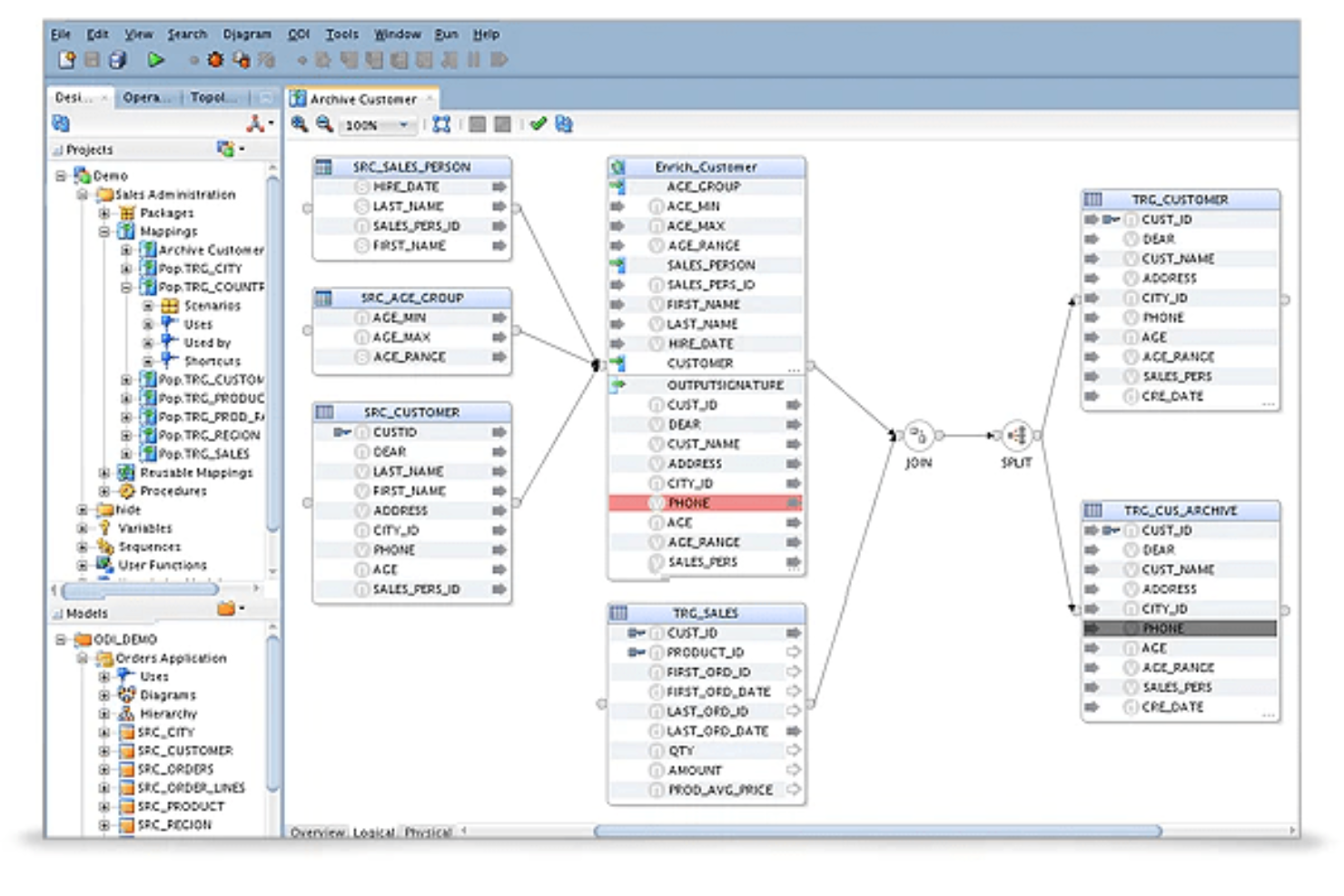
Oracle Data Integrator is purpose-built for organizations that rely on Oracle databases and applications across their IT landscape. Data architects and IT teams working in Oracle-heavy environments use it to orchestrate complex data flows and transformations with tight integration to Oracle technologies. Its native support for Oracle platforms helps reduce compatibility issues and optimize performance for enterprise-scale ETL workloads.
Why I Picked Oracle Data Integrator
For teams deeply invested in Oracle infrastructure, Oracle Data Integrator offers native integration that’s hard to match. Its ELT architecture is optimized for Oracle databases, letting you push complex transformations directly to the database engine for better performance and scalability.
I picked this tool because it leverages Oracle’s security, metadata management, and workflow orchestration features, which are essential for enterprise data environments. This tight alignment with the Oracle ecosystem helps reduce friction and ensures smoother operations for organizations standardizing on Oracle technologies.
Oracle Data Integrator Key Features
Some other features in Oracle Data Integrator that are useful for enterprise ETL teams include:
- Declarative Design Approach: Define data integration processes using a visual, model-driven interface.
- Knowledge Modules: Reusable templates let you standardize and automate common data integration tasks.
- Change Data Capture (CDC): Capture and process only changed data to optimize ETL performance.
- Extensive Connectivity: Connect to a wide range of databases, applications, and big data platforms beyond Oracle.
Oracle Data Integrator Integrations
Integrations include Workday, Salesforce, SAP, Shopify, Snowflake, and more.
Pros and Cons
Pros:
- Metadata-driven design improves consistency
- Supports complex transformation logic at scale
- Optimized performance within Oracle environments
Cons:
- Steep learning curve for new users
- Limited flexibility outside the Oracle ecosystem

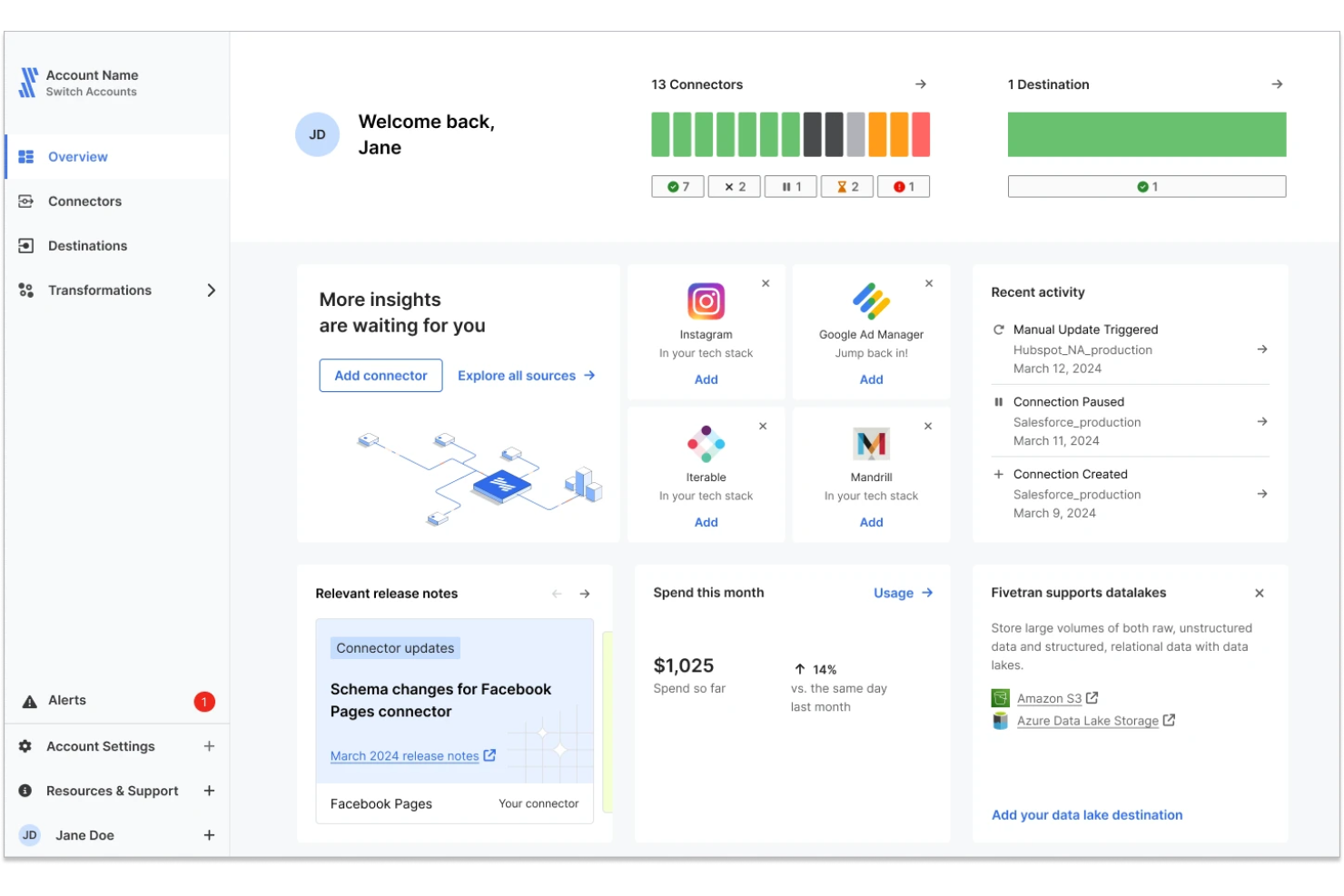
Fivetran is a fully managed data integration platform designed to automate data movement from source systems into cloud data warehouses. It’s built for teams that want reliable, hands-off pipelines without the need to monitor or maintain infrastructure. Fivetran is especially useful for organizations scaling their data operations and looking to reduce engineering overhead.
Why Fivetran Is a Good Choice
For teams that want to eliminate pipeline maintenance, Fivetran stands out with its fully managed approach to data integration. I picked Fivetran because it handles everything from connector setup to schema changes and pipeline reliability without requiring ongoing manual intervention.
The platform continuously syncs data and automatically adapts to schema changes in source systems, reducing the risk of broken pipelines. This makes it a strong fit for data teams that need dependable pipelines at scale while freeing up resources for analytics and modeling.
Fivetran Key Features
Some other features in Fivetran that are useful for enterprise ETL workflows include:
- Managed connectors: Access a large library of connectors that are maintained and updated automatically
- Automatic schema evolution: Adjust to source schema changes without manual remapping
- Incremental data sync: Capture and load only new or updated data for efficiency
- Pipeline monitoring: Track sync status and performance through a centralized dashboard
Fivetran Integrations
Integrations include Salesforce, NetSuite, Google Analytics, Amazon Redshift, Snowflake, Microsoft Azure Synapse Analytics, PostgreSQL, MySQL, Oracle, and HubSpot.
Pros and Cons
Pros:
- Wide connector coverage for SaaS and databases
- Automatic schema updates prevent pipeline breaks
- Fully managed pipelines reduce maintenance effort
Cons:
- Less flexibility for custom pipeline logic
- Limited transformation capabilities within the platform

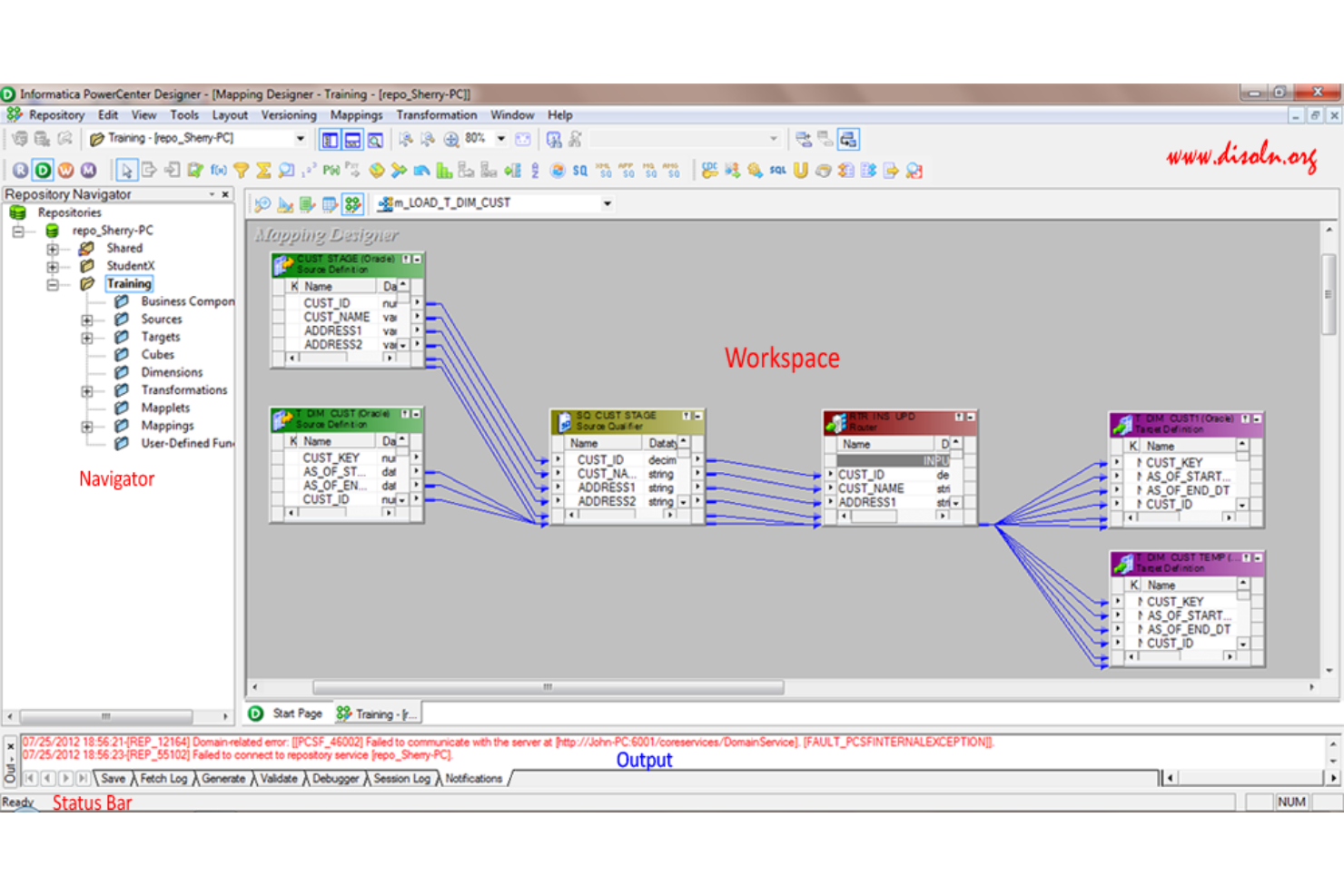
Informatica PowerCenter is designed for organizations that need rigorous data governance at scale. It’s a strong fit for enterprises in regulated industries or those managing sensitive, high-volume data across complex environments. With its focus on metadata management and end-to-end data lineage, PowerCenter helps you maintain control and compliance throughout your ETL processes.
Why I Picked Informatica PowerCenter
For enterprise ETL teams that need to prioritize large-scale data governance, Informatica PowerCenter stands out for its deep focus on data quality and compliance. The platform’s metadata-driven architecture gives you detailed visibility into data lineage, making it easier to track, audit, and manage sensitive information across your organization.
I picked PowerCenter because its built-in data governance tools—like automated data profiling and policy enforcement—help enterprises meet regulatory requirements and internal standards. These capabilities make it a strong choice for businesses where data trust and accountability are non-negotiable.
Informatica PowerCenter Key Features
Some other features that make Informatica PowerCenter valuable for enterprise ETL include:
- Parallel Processing Engine: Execute large-scale data transformations and loads with high throughput.
- Extensive Connectivity Library: Access a wide range of connectors for databases, cloud platforms, and enterprise applications.
- Workflow Orchestration: Design, schedule, and monitor complex ETL workflows from a centralized interface.
- Error Handling and Recovery: Configure automated error detection, logging, and restart capabilities for resilient data pipelines.
Informatica PowerCenter Integrations
Integrations include Salesforce, SAP, Oracle, Microsoft SQL Server, Amazon Redshift, Google BigQuery, Workday, NetSuite, Snowflake, and IBM Db2.
Pros and Cons
Pros:
- Scalable architecture handles high-volume workloads
- Built-in data profiling for quality assurance
- Granular data lineage supports regulatory compliance
Cons:
- Resource-intensive deployments require skilled administrators
- Upgrade processes can disrupt production environments

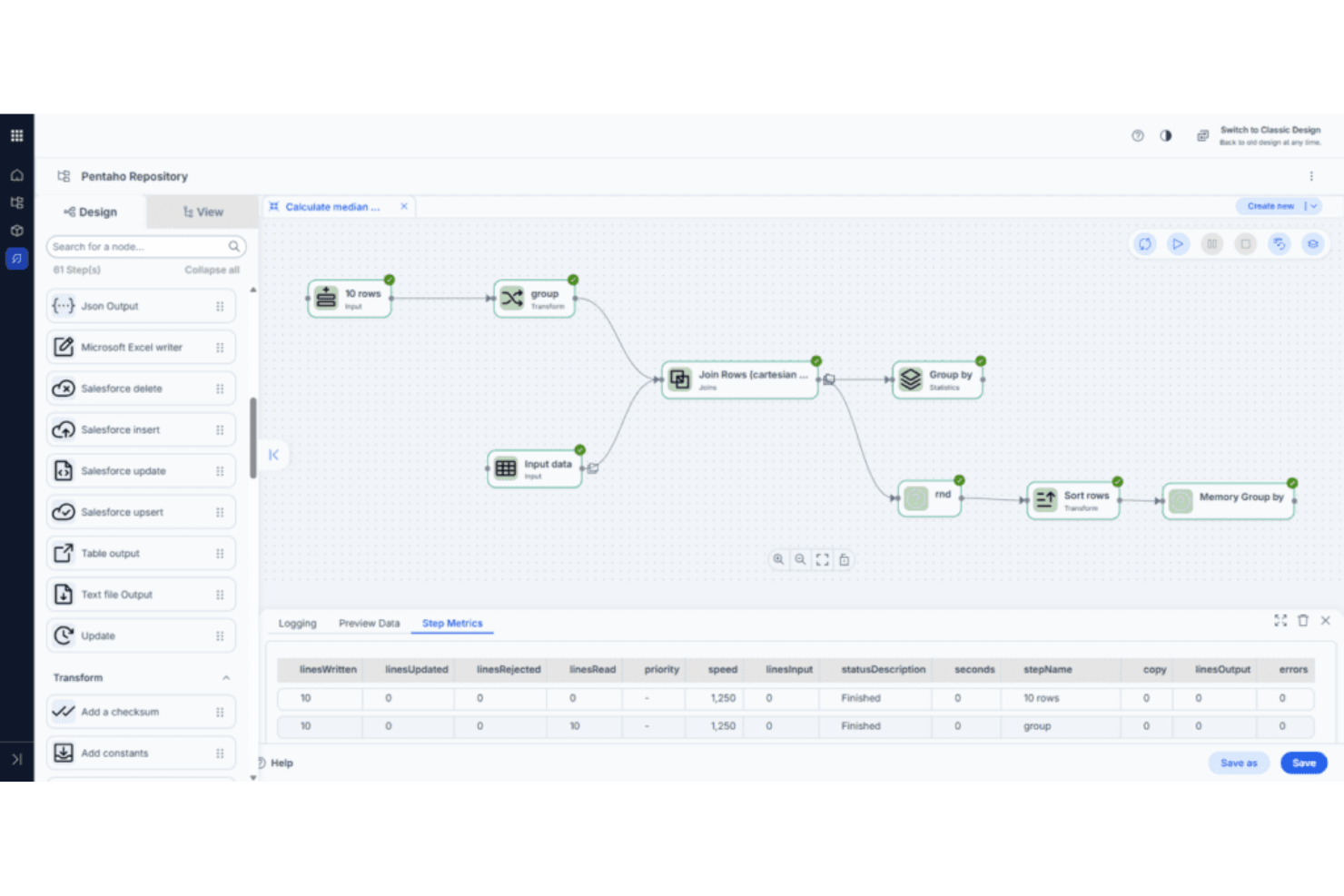
Pentaho Data Integration stands out for teams that want to design, orchestrate, and manage complex data workflows visually. It’s a strong fit for IT departments and data engineers who need to coordinate data movement across diverse sources without heavy coding. The drag-and-drop interface and broad connectivity help organizations streamline data preparation and integration at scale.
Why I Picked Pentaho Data Integration
For organizations that need to orchestrate complex data flows visually, Pentaho Data Integration offers a unique drag-and-drop interface for building and managing ETL pipelines. I picked Pentaho because its graphical workflow designer lets teams map out data transformations, joins, and aggregations without writing code.
The tool also supports job scheduling and workflow automation, which helps coordinate multi-step processes across different data environments. This visual approach makes it easier for IT teams to document, maintain, and scale enterprise ETL operations.
Pentaho Data Integration Key Features
Some other features that make Pentaho Data Integration valuable for enterprise ETL teams include:
- Extensive Connectivity Options: Connect to a wide range of databases, flat files, cloud services, and big data platforms.
- Metadata Injection: Dynamically generate and modify ETL jobs at runtime using metadata-driven templates.
- Integrated Data Quality Tools: Profile, cleanse, and validate data as part of the ETL process.
- Clustered and Parallel Execution: Run transformations and jobs across multiple nodes to improve performance and scalability.
Pentaho Data Integration Integrations
Integrations include SAP, Salesforce, ElasticSearch, Kafka, Google Analytics, Azure Event Hub, Microsoft Dynamics, SharePoint, Zendesk, and Jira.
Pros and Cons
Pros:
- Metadata injection enables dynamic job creation
- Broad support for big data and cloud sources
- Visual workflow builder supports complex orchestration
Cons:
- Documentation lacks depth for advanced scenarios
- User interface can feel outdated for teams

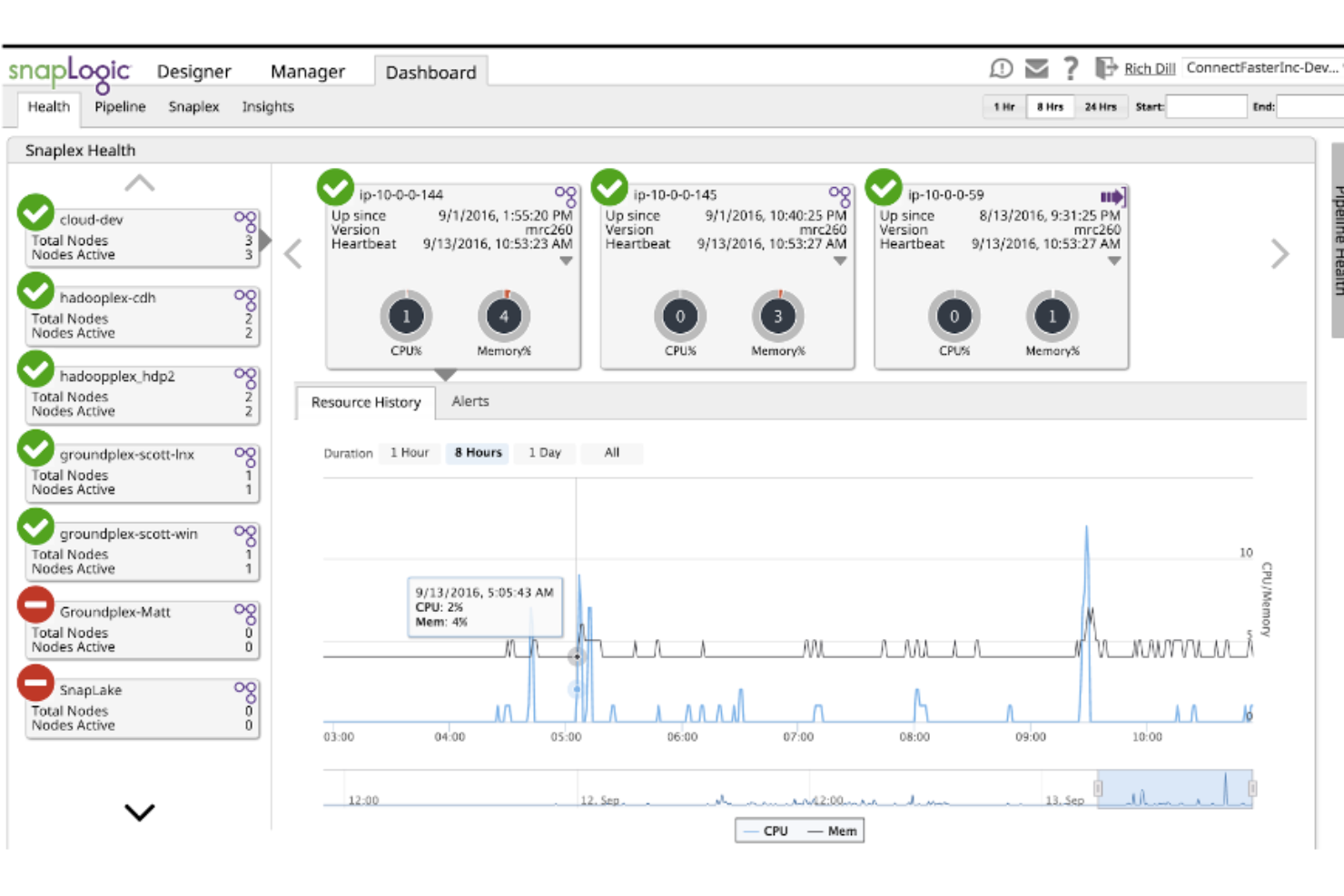
SnapLogic brings AI-powered pipeline design to teams that need to accelerate and simplify complex ETL workflows. It’s especially useful for IT and data engineering teams in large enterprises that want to automate data integration across cloud, on-premises, and hybrid environments. With its visual interface and intelligent recommendations, SnapLogic helps you build, manage, and optimize data pipelines with less manual effort.
Why I Picked SnapLogic
What drew me to SnapLogic for enterprise ETL is its focus on AI-powered pipeline design, which directly addresses the complexity of building and maintaining large-scale data workflows. The platform’s Iris AI engine suggests pipeline components and automates repetitive tasks, helping teams accelerate development and reduce manual errors.
I appreciate how SnapLogic’s visual designer lets you map, transform, and orchestrate data flows with drag-and-drop tools, making it easier to manage intricate integrations. These features make SnapLogic a strong fit for organizations that want to modernize their ETL processes with intelligent automation.
SnapLogic Key Features
Some other features that make SnapLogic valuable for enterprise ETL teams include:
- Prebuilt Snap Packs: Choose from a wide range of connectors for popular enterprise applications and data sources.
- Pipeline Version Control: Track, compare, and roll back changes to your data pipelines as needed.
- Built-In Data Quality Tools: Validate, cleanse, and enrich data within your ETL workflows.
- Role-Based Access Management: Assign granular permissions to users and groups for secure collaboration.
SnapLogic Integrations
Integrations include Salesforce, Workday, SAP, Oracle, Microsoft Dynamics 365, ServiceNow, Snowflake, Google BigQuery, Amazon Redshift, and Slack.
Pros and Cons
Pros:
- Extensive Snap Pack library covers major platforms
- Visual pipeline builder supports complex data flows
- AI-driven suggestions accelerate pipeline development
Cons:
- Performance tuning options are not always transparent
- Documentation sometimes lacks advanced use cases

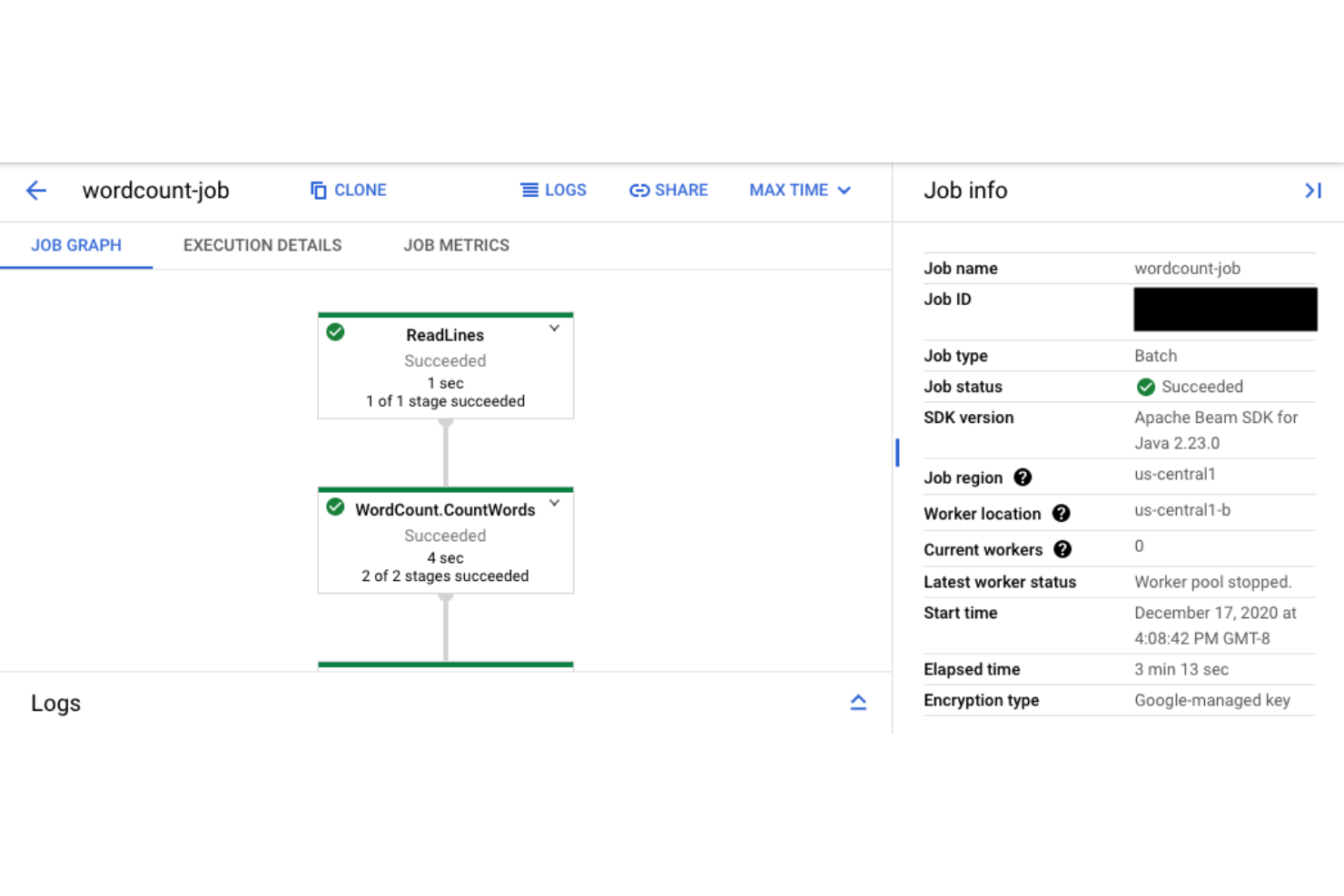
Google Cloud Dataflow is designed for teams that need to process and analyze data streams in real time. It’s especially useful for IT specialists and data engineers working in industries where immediate insights from large-scale data are essential. The platform’s unified model for batch and streaming data lets you build ETL pipelines that handle both historical and live data with minimal operational overhead.
Why I Picked Google Cloud Dataflow
When real-time stream processing is a top priority, Google Cloud Dataflow stands out for its ability to handle both streaming and batch data in a single pipeline. I picked Dataflow because it uses Apache Beam’s unified programming model, which lets teams write ETL logic once and run it on both live and historical data.
The platform’s autoscaling and serverless architecture mean you can process high-velocity data streams without managing infrastructure. This makes it a strong choice for IT teams that need to deliver immediate analytics and event-driven workflows at enterprise scale.
Google Cloud Dataflow Key Features
Some other features that make Google Cloud Dataflow valuable for enterprise ETL teams include:
- Data Loss Prevention Integration: Protect sensitive data in transit with built-in DLP connectors.
- Flexible Windowing and Triggers: Define custom time windows and event triggers for precise data aggregation.
- Native Google Cloud Storage Support: Read from and write to Google Cloud Storage buckets directly within pipelines.
- Monitoring with Cloud Dataflow Metrics: Track job health, throughput, and latency using integrated monitoring dashboards.
Google Cloud Dataflow Integrations
Integrations include BigQuery, Google Cloud Storage, Pub/Sub, Spanner, Bigtable, Cloud SQL, Datadog, Splunk, Vertex AI, and Managed Service for Apache Kafka.
Pros and Cons
Pros:
- Native integration with Google Cloud ecosystem
- Unified batch and streaming pipeline support
- Autoscaling adjusts resources for workload spikes
Cons:
- Debugging complex pipelines can be challenging
- Limited support for non-Google cloud platforms


Enterprise ETL Tools Selection Criteria
When selecting the best enterprise ETL tools to include in this list, I considered common buyer needs and pain points like managing complex data pipelines across hybrid environments and ensuring secure, scalable data integration. I also used the following framework to keep my evaluation structured and fair:
Core Functionality (25% of total score)
To be considered for inclusion in this list, each solution had to fulfill these common use cases:
- Extract data from multiple sources
- Transform data using configurable workflows
- Load data into target systems
- Schedule and automate ETL jobs
- Monitor and log ETL processes
Additional Standout Features (25% of total score)
To help further narrow down the competition, I also looked for unique features, such as:
- Support for hybrid cloud and on-premises integration
- Built-in data quality and validation tools
- Advanced data lineage and impact analysis
- Real-time or streaming data processing
- Native connectors for industry-specific platforms
Usability (10% of total score)
To get a sense of the usability of each system, I considered the following:
- Intuitive drag-and-drop workflow design
- Clear and organized dashboard layout
- Customizable user roles and permissions
- Responsive interface for large data sets
- Accessible documentation and in-app guidance
Onboarding (10% of total score)
To evaluate the onboarding experience for each platform, I considered the following:
- Availability of step-by-step tutorials
- Access to prebuilt pipeline templates
- Interactive product tours for new users
- Comprehensive training videos and webinars
- Migration support and onboarding checklists
Customer Support (10% of total score)
To assess each software provider’s customer support services, I considered the following:
- 24/7 support availability
- Multiple support channels, including chat and phone
- Access to a dedicated account manager
- Active user community and knowledge base
- Fast response times for critical issues
Value For Money (10% of total score)
To evaluate the value for money of each platform, I considered the following:
- Transparent and predictable pricing structure
- Flexible plans for different business sizes
- No hidden fees or surprise charges
- Free trial or demo availability
- Features included at each pricing tier
Customer Reviews (10% of total score)
To get a sense of overall customer satisfaction, I considered the following when reading customer reviews:
- Consistent reliability and uptime reports
- Positive feedback on integration capabilities
- Reports of responsive customer support
- User satisfaction with performance and speed
- Feedback on ease of scaling and customization
How to Choose Enterprise ETL Tools
It’s easy to get bogged down in long feature lists and complex pricing structures. To help you stay focused as you work through your unique software selection process, here’s a checklist of factors to keep in mind:
| Factor | What to Consider |
|---|---|
| Scalability | Can the tool handle your current and projected data volumes? Ask about throughput limits, node scaling, and multi-region support. |
| Integrations | Does it natively connect to your critical data sources and targets? Check for compatibility with legacy systems and cloud platforms. |
| Customizability | Can you tailor workflows, transformations, and scheduling to your business logic? Consider scripting support and reusable templates. |
| Ease of use | Will your team need extensive training, or is the interface intuitive? Evaluate the learning curve for both technical and non-technical users. |
| Implementation and onboarding | How long will it take to deploy and migrate existing pipelines? Look for migration tools, onboarding resources, and vendor support. |
| Cost | Are pricing tiers transparent and predictable? Factor in data volume, pipeline runs, and any extra charges for connectors or support. |
| Security safeguards | Does the tool support encryption, access controls, and audit logging? Ensure it meets your organization’s security and compliance standards. |
| Support availability | What support channels and response times are offered? Consider if you need 24/7 support or a dedicated account manager for critical issues. |
What Are Enterprise ETL Tools?
Enterprise ETL tools are enterprise grade software platforms that extract, transform, and load data across complex systems and various data sources. These tools support data management by helping teams move and prepare data for use in business intelligence, data lake environments, and analytics workflows.
Many modern ETL platform solutions are cloud native and designed to handle both batch processing and real-time data, enabling organizations to keep up with growing data demands. As some of the best ETL tools available, they also support data intelligence initiatives by preparing high-quality data for reporting, machine learning, and operational use cases.
Features of Enterprise ETL Tools
Enterprise ETL tools include a range of capabilities that support scalable data management and integration. When evaluating top ETL tools, these are the key features to consider:
- Data extraction: Connect to various data sources including databases, SaaS platforms, and data lake storage systems to ingest raw data
- Data transformation: Apply rules and logic to prepare data for business intelligence, reporting, and machine learning use cases
- Workflow orchestration: Automate and manage pipelines with support for batch processing and real-time data flows
- Low-code and no-code interfaces: Enable teams to build pipelines through a user-friendly interface while still supporting advanced customization
- Scalability: Support enterprise-grade workloads across cloud native environments with high data volumes
- Data lineage tracking: Provide visibility into how data moves and changes across the ETL platform
- Security and compliance: Include controls to support standards such as HIPAA, where required
- Prebuilt connectors: Simplify integration with various data sources and reduce manual development effort
- Monitoring and alerting: Track pipeline performance and ensure reliable data management operations
Benefits of Enterprise ETL Tools
Implementing enterprise ETL tools provides several benefits for your team and your business. Here are a few you can look forward to:
- Centralized data integration: Consolidates data from multiple sources into a single, unified environment using automated extraction and loading features.
- Improved data quality: Cleanses, standardizes, and validates data through transformation and error handling capabilities, reducing inconsistencies and inaccuracies.
- Enhanced scalability: Handles large and growing data volumes with scalability controls and workflow orchestration, supporting business growth and peak workloads.
- Stronger security and compliance: Protects sensitive information with role-based access controls, encryption, and data lineage tracking to meet regulatory requirements.
- Operational efficiency: Automates repetitive data processes and provides monitoring dashboards, freeing up IT resources for higher-value work.
- Faster decision-making: Delivers timely, reliable data to analytics and reporting systems, enabling business leaders to act on accurate insights.
- Reduced integration complexity: Offers prebuilt connectors and native integrations, minimizing manual coding and simplifying connections to enterprise systems.
Costs and Pricing of Enterprise ETL Tools
Selecting enterprise ETL tools requires an understanding of the various pricing models and plans available. Costs vary based on features, team size, add-ons, and more. The table below summarizes common plans, their average prices, and typical features included in enterprise ETL tools solutions:
Plan Comparison Table for Enterprise ETL Tools
| Plan Type | Average | Common Features |
|---|---|---|
| Free Plan | $0 | Basic data extraction, limited connectors, single-user access, and community support. |
| Personal Plan | $20-$50/user/month | Standard connectors, basic transformation tools, workflow scheduling, and email support. |
| Business Plan | $100-$500/month | Multi-user access, advanced transformation, monitoring dashboards, role-based permissions, and API access. |
| Enterprise Plan | $1,000-$5,000/month | Unlimited connectors, high-volume scalability, custom integrations, dedicated support, and compliance features. |
Enterprise ETL Tools FAQs
Here are some answers to common questions about enterprise ETL tools:
How do enterprise ETL tools differ from basic ETL tools?
Enterprise ETL tools offer advanced features like workflow orchestration, data lineage tracking, and role-based access controls. These capabilities support larger data volumes, complex integrations, and stricter security requirements compared to basic ETL tools.
Can enterprise ETL tools handle both cloud and on-premises data sources?
Yes, most enterprise ETL tools support hybrid environments. They provide connectors and integration options for both cloud-based and on-premises systems, allowing you to manage data pipelines across diverse infrastructure.
What security features should I look for in enterprise ETL tools?
Look for encryption at rest and in transit, granular access controls, audit logging, and compliance certifications. These features help protect sensitive data and ensure your organization meets regulatory requirements.
How long does it take to implement an enterprise ETL tool?
Implementation timelines vary, but most organizations can expect a process ranging from a few weeks to several months. Factors include data complexity, migration needs, and the availability of onboarding resources or vendor support.
Do enterprise ETL tools require coding skills to use?
No, many enterprise ETL tools offer visual interfaces and prebuilt connectors that reduce the need for coding. However, advanced customization or complex transformations may still require scripting or programming knowledge.