

Computer vision software gives you the tools to extract, analyze, and interpret information from images or video using AI. If you’re searching for the best way to automate visual data tasks or deploy machine vision as beginners in your projects, it’s crucial to choose a solution that fits your workflows and can handle your scaling needs.
In this guide, you’ll find a focused look at feature-packed platforms for labeling, training, deploying, and managing computer vision models, so you can move fast and make informed decisions.
Why Trust Our Software Recommendations
6,700+
Reviews
20
Industry experts
16+
Evaluation factors
14
Years
Our team has been testing and reviewing software since 2012. As tech leaders ourselves, we know how difficult—and important—it is to choose the right software.
For this guide, we evaluated tools using hands-on testing and independent research, scoring tools using our selection criteria.
Our reviews reflect our human editorial judgment, not a sales pitch.
Expert reviewers:
- Paulo Gardini MiguelTech Director
 Tim FisherVP of AI
 Gabriel RosasTech Lead & Software Architect
 Christhian GruhnTech Lead & Platform Architect

Computer Vision Software Comparison Table
This comparison table summarizes pricing details for my top computer vision software selections:
| Tool | Best For | Trial Info | Price | ||
|---|---|---|---|---|---|
| 1 | Best for managing large annotation teams | Free demo available | Pricing upon request | Website | |
| 2 | Best for cloud-native image and video analysis | 12-month free tier available | From $0.001/image | Website | |
| 3 | Best for industry-specific visual recognition | Free demo available | Pricing upon request | Website | |
| 4 | Best for integrated image and video annotation | Free demo available | Pricing upon request | Website | |
| 5 | Best for building end-to-end AI vision pipelines | Free plan + free demo available | From $30/month | Website | |
| 6 | Best for rapid model deployment on custom datasets | Free plan + free trial + free demo available | From $99/month | Website | |
| 7 | Best for automated data annotation at scale | Free demo available | Pricing upon request | Website | |
| 8 | Best for advanced data labeling workflows | Free trial available | Pricing upon request | Website | |
| 9 | Best for scalable AI model lifecycle management | 14-day free trial available | Pricing upon request | Website | |
| 10 | Best for enterprise-grade annotation services | Free demo available | Pricing upon request | Website |


Best Computer Vision Software Reviews
Below are my detailed summaries of the best computer vision software that made it onto my shortlist. My reviews offer a detailed look at the features, best use cases, and integrations of each platform to help you find the best one for you.
 Best for managing large annotation teams
- Free demo available
- Pricing upon request
Visit WebsiteCustomer Rating:4.9/5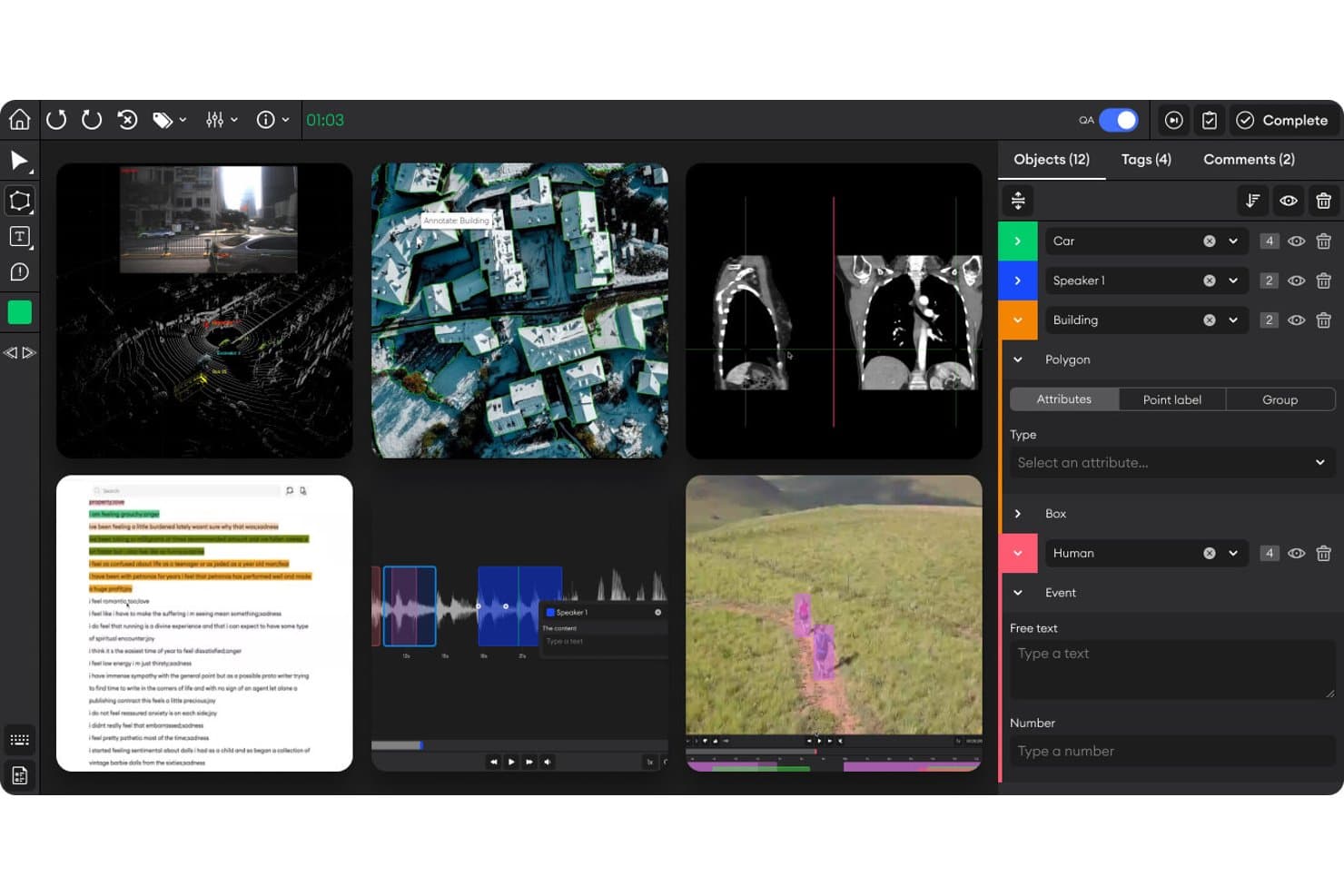
SuperAnnotate offers a multi-modal annotation workspace supporting images, medical scans, LiDAR, audio, and video with object labeling, polygon tools, and attribute panels. SuperAnnotate is an annotation project management platform designed for computer vision teams, offering advanced tools for image, video, text, and audio data labeling, collaboration, and quality assurance workflows.
Who Is SuperAnnotate Best For?
Annotation managers and data science leads at companies coordinating large, distributed teams for computer vision data labeling projects.
Why I Picked SuperAnnotate
I picked SuperAnnotate as one of the best because my team relies on its advanced annotation management tools to coordinate large teams, apply QA workflows across image and video data, and track project progress at scale. Its collaboration features let us handle complex data pipelines smoothly.
SuperAnnotate Key Features
- Multimodal annotation support: Label image, video, text, and audio data in unified projects.
- Python SDK and API: Automate data import, export, and integration into custom ML pipelines.
- Advanced label taxonomy configuration: Create complex, hierarchical labeling structures tailored to each project.
- Integrated vendor and workforce management: Organize tasks across internal teams and external annotation vendors.
SuperAnnotate Integrations
SuperAnnotate offers native integrations with AWS S3, GCP, Nvidia, Databricks, Snowflake, and IBM Cloud. A Python SDK and REST API are available for custom integrations into existing machine learning pipelines.
Pros and Cons
Pros:
- Vendor and workforce management included
- Advanced collaboration and QA workflows
- Multimodal annotation on a single platform
Cons:
- Reporting limited to annotation-focused metrics
- No built-in model training capability
Learn more about SuperAnnotate: Best for cloud-native image and video analysis
- 12-month free tier available
- From $0.001/image
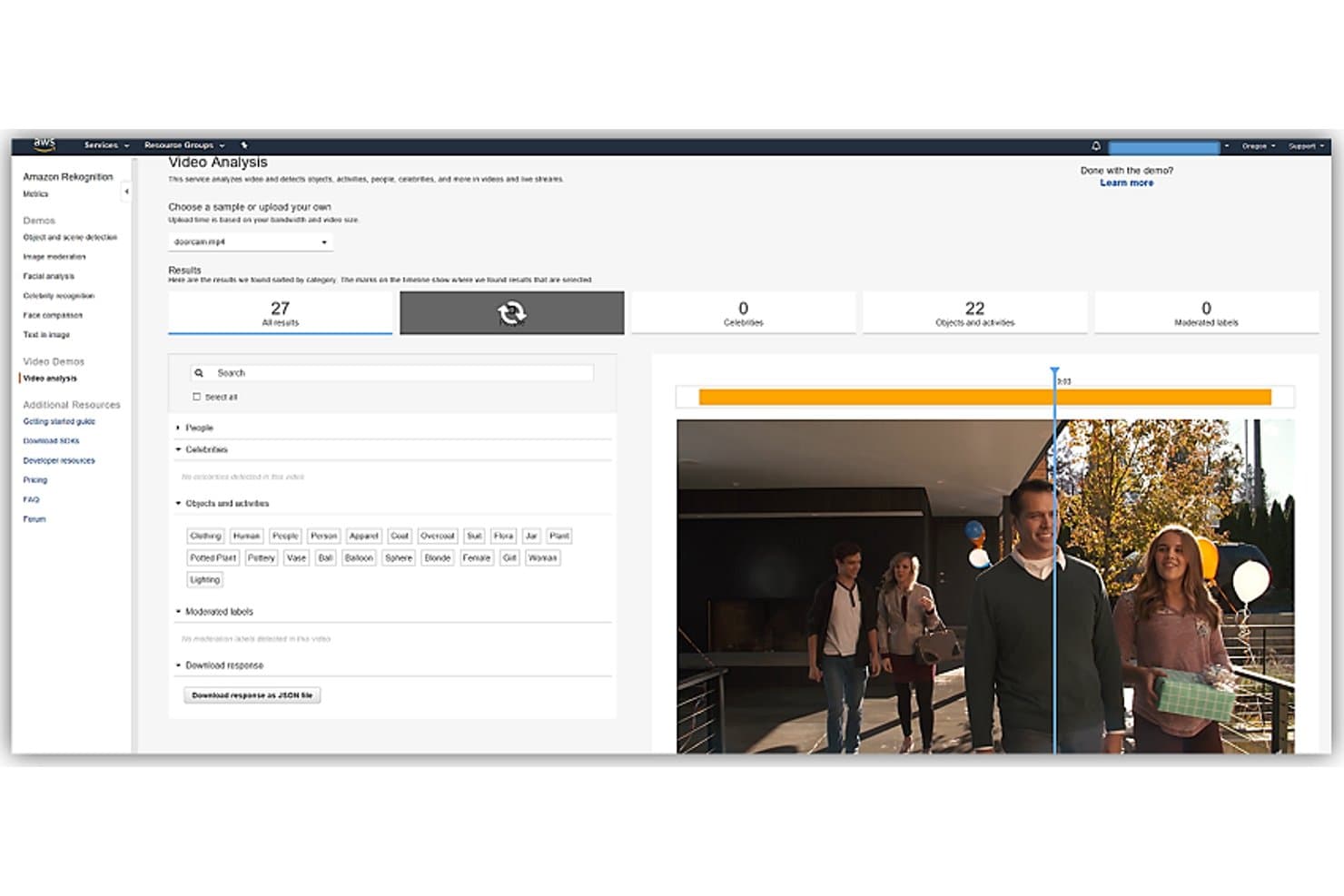
Amazon Rekognition offers a video analysis demo that detects objects, activities, people, and celebrities in video streams with 27 total results. Amazon Rekognition is a cloud-based computer vision platform that provides image and video analysis, object and facial detection, content moderation, scene labeling, and support for building custom vision models.
Who Is Amazon Rekognition Best For?
Teams managing high-volume image or video analysis on AWS infrastructure or building scalable, cloud-native computer vision workflows.
Why I Picked Amazon Rekognition
I picked Amazon Rekognition as one of the best because I can analyze massive image and video datasets directly in the cloud. I rely on its real-time video stream analysis and custom image classification to automate content moderation and facial recognition for high-scale projects.
Amazon Rekognition Key Features
- Face comparison and search: Match faces in images or video against collections at scale.
- Text detection (OCR): Identify and extract text from images in multiple scripts and formats.
- Image moderation: Detect explicit, suggestive, or unsafe image content using pre-trained classifiers.
- Celebrity recognition: Automatically tag known public figures in photos and videos.
Amazon Rekognition Integrations
Amazon Rekognition offers native integrations across the AWS ecosystem, including S3, Lambda, Kinesis, SageMaker Ground Truth, SNS, and SQS. An API is available for custom integrations.
Pros and Cons
Pros:
- Scales for high-volume processing in cloud
- Real-time video and image analysis capabilities
- Pre-trained models for common image tasks
Cons:
- Lacks pixel-level segmentation features
- No offline or on-premises deployment option
Learn more about Amazon Rekognition: Best for industry-specific visual recognition
- Free demo available
- Pricing upon request
Visit WebsiteCustomer Rating:4/5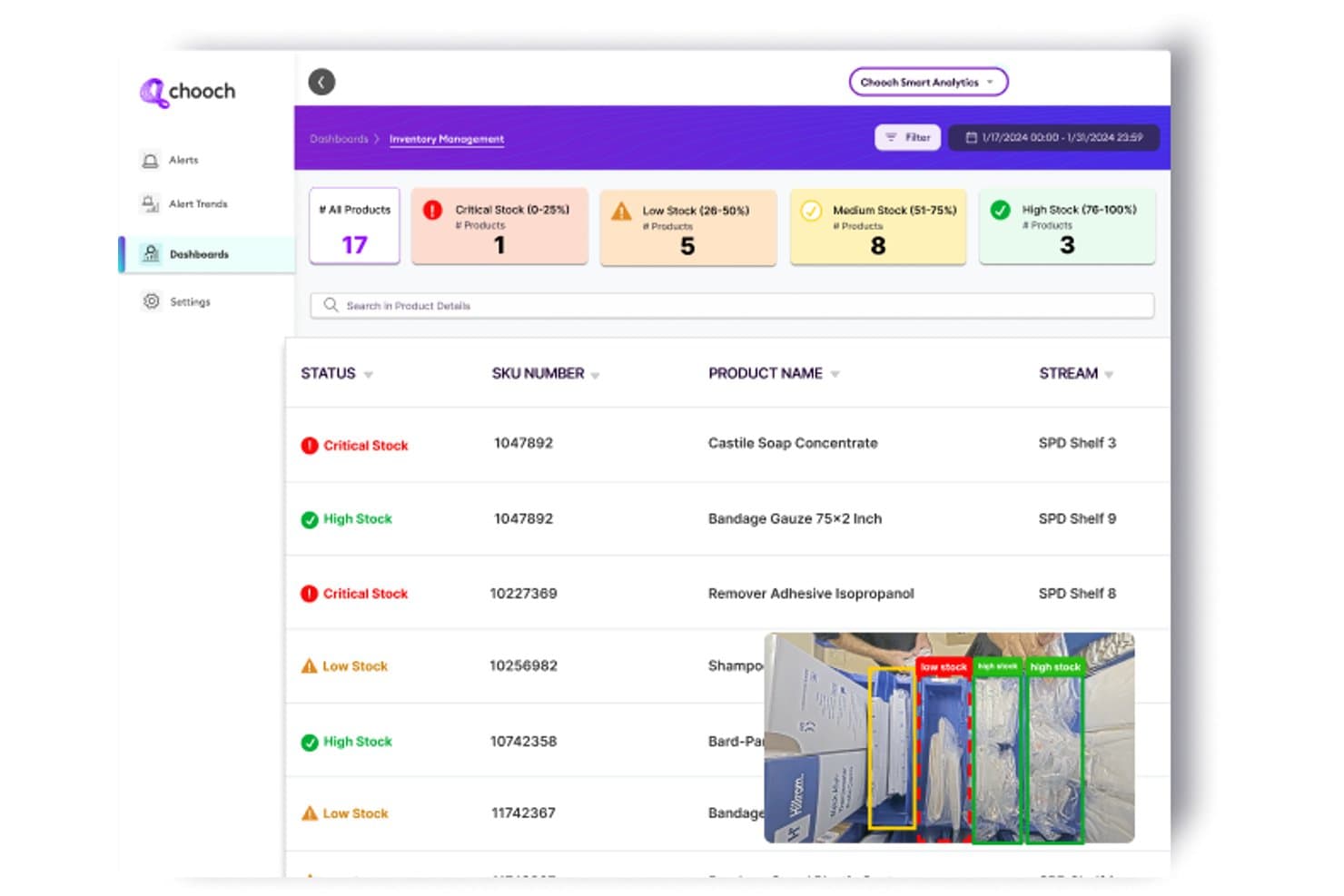
Chooch AI offers an inventory management dashboard with real-time computer vision stock level detection, categorizing products by critical, low, medium, and high stock status. Chooch AI is a computer vision platform designed for organizations that need custom training, rapid annotation, and scalable model deployment across cloud, edge, and on-prem environments.
Who Is Chooch AI Best For?
Chooch AI suits ML engineers and IT teams in manufacturing, healthcare, or industrial sectors who need tailored visual recognition for complex environments.
Why I Picked Chooch AI
I picked Chooch AI as one of the best because it gives me pre-built visual recognition models tailored for healthcare, manufacturing, and public safety. My team deploys these models on edge devices for real-time detection in industrial use cases.
Chooch AI Key Features
- Smart Annotation: Automatically labels objects in images and video with bounding boxes and polygons.
- Continuous learning: Allows retraining of deployed models with new data to improve accuracy.
- Edge deployment: Runs vision models on devices like Nvidia Jetson for low-latency processing.
- Integrated API and SDK: Provides REST API and SDKs for accessing and integrating computer vision capabilities in applications.
Chooch AI Integrations
Native integrations are not publicly listed. Chooch AI provides an API and SDKs for building custom integrations.
Pros and Cons
Pros:
- Custom AI model training for unique datasets
- Supports deployment on edge, cloud, on-prem
- Industry-ready visual recognition models available
Cons:
- Advanced 3D or temporal analysis limited
- Few public third-party user reviews
Learn more about Chooch AI:
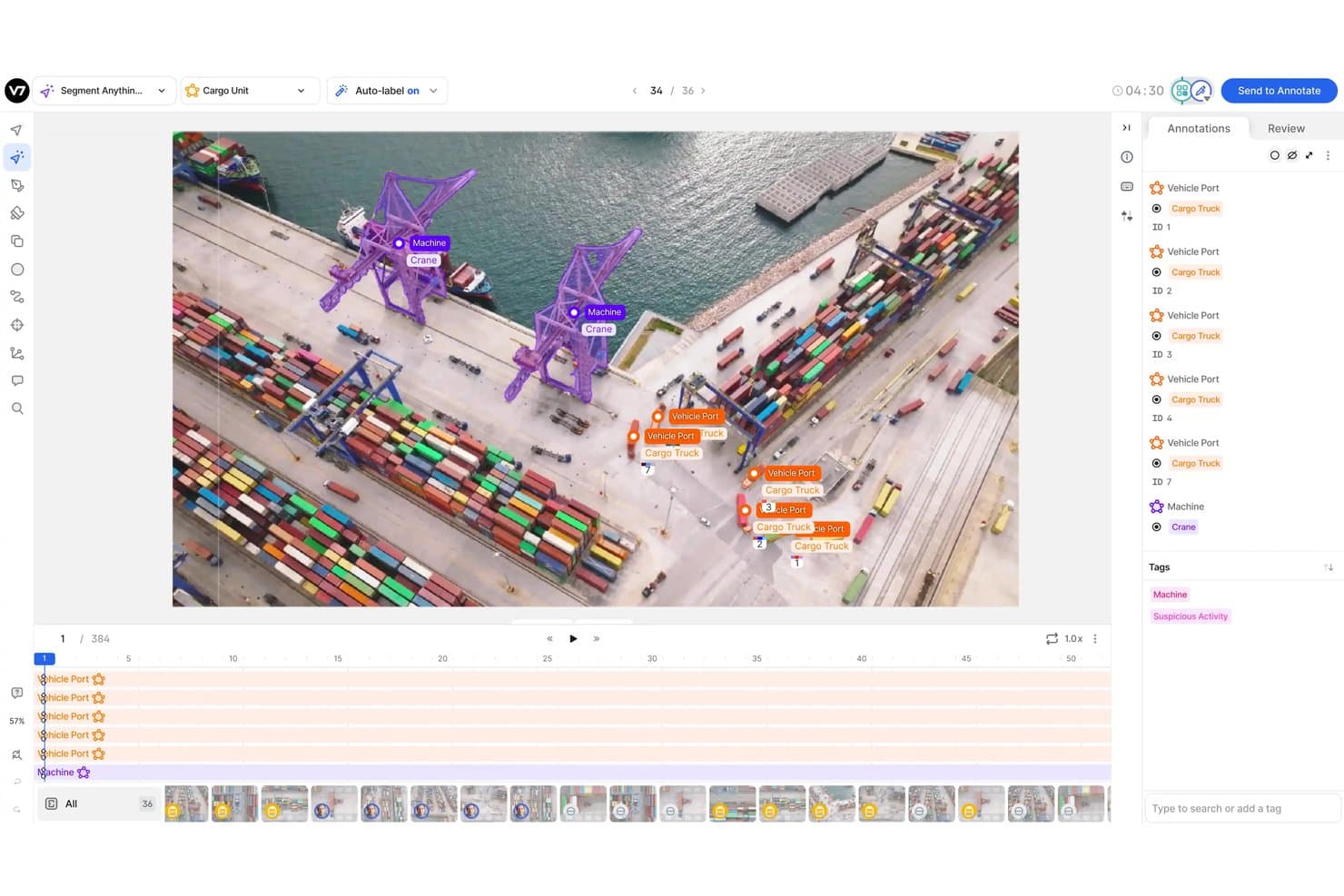
V7 offers an AI-powered annotation workspace for labeling cargo port footage with object segmentation, auto-labeling, and multi-class tagging tools. V7 is a computer vision platform designed for teams who need advanced tools for labeling, annotating, and managing large volumes of images and videos.
Who Is V7 Best For?
Ideal for machine learning and data science teams in industries like healthcare, automotive, or manufacturing that require detailed image and video annotation workflows.
Why I Picked V7
I picked V7 as one of the best because I can manage complex image and video annotation projects in a single workspace. I use integrated tools like auto-labeling with segmentation models and video object tracking, all tied into a review and QA workflow.
V7 Key Features
- Consensus and QA workflows: Assign annotation tasks and manage multi-level review processes for quality control.
- Dataset versioning: Track changes and maintain different versions of annotated datasets for audit and reproducibility.
- DICOM and medical imagery support: Annotate and manage specialized medical formats like DICOM and NifTI directly in the platform.
- Python SDK and REST API: Integrate dataset management and annotation pipelines into your custom ML or automation workflows.
V7 Integrations
V7 provides native integrations with AWS and Google Cloud, and offers an API for building custom integrations.
Pros and Cons
Pros:
- Customizable QA and consensus review workflows
- Built-in video object and frame annotation
- Supports medical formats like DICOM and NifTI
Cons:
- Limited support for 3D and lidar annotation
- No built-in model training feature
Learn more about V7: Best for building end-to-end AI vision pipelines
- Free plan + free demo available
- From $30/month
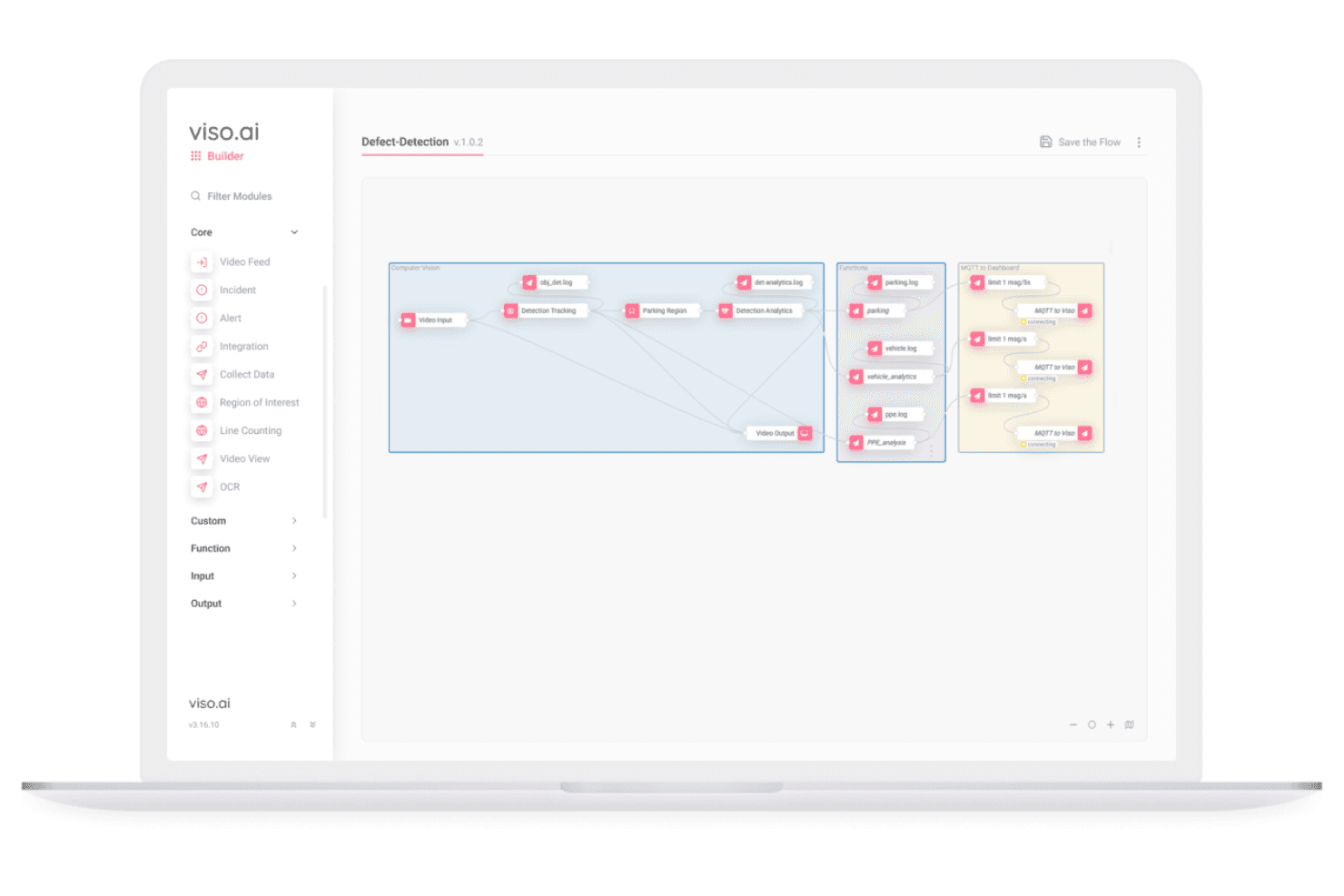
Viso Suite lets users build end-to-end AI vision pipelines visually. Viso Suite is an end-to-end computer vision platform for building, training, deploying, and managing AI vision pipelines at scale across edge, on-premises, and cloud environments.
Who Is Viso Suite Best For?
Enterprises and IT teams deploying large-scale visual AI workflows across multiple sites, industries, and edge or hybrid infrastructure environments.
Why I Picked Viso Suite
I picked Viso Suite as one of the best because I can design, deploy, and manage entire AI vision pipelines from data collection to real-time inference in a unified environment. The no-code workflow builder and support for edge, cloud, and on-prem deployment make large-scale projects practical.
Viso Suite Key Features
- Advanced object detection models: Choose from a library of state-of-the-art models for complex visual recognition tasks.
- Collaborative annotation workflows: Multiple users can label and review datasets within built-in QA tools.
- Real-time video stream processing: Analyze and track visual data from thousands of live cameras simultaneously.
- Granular role-based access control: Manage security and user permissions for projects at the workspace and deployment level.
Viso Suite Integrations
Viso Suite offers native integrations with IP camera systems, Google Cloud Platform, Azure, and AWS, and provides an API for custom integrations.
Pros and Cons
Pros:
- Supports complex multi-camera video analytics
- Built-in collaborative data annotation workflow
- Scales to thousands of edge or cloud devices
Cons:
- Annotation tools focus on 2D data only
- Little third-party review or community support
Learn more about Viso Suite: Best for rapid model deployment on custom datasets
- Free plan + free trial + free demo available
- From $99/month
Visit WebsiteCustomer Rating:4.8/5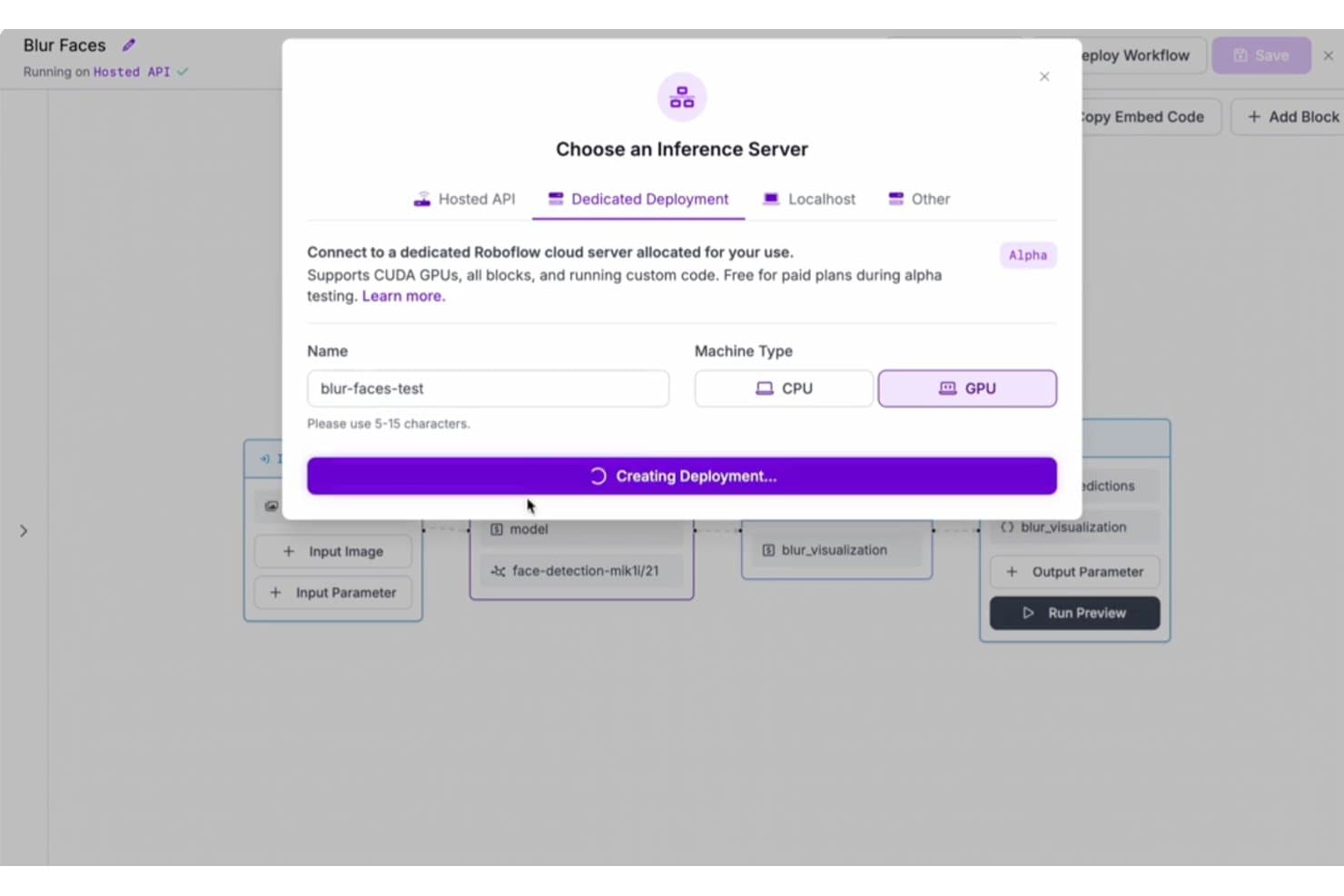
Roboflow offers a Dedicated Deployment option with GPU support for running computer vision workflows on dedicated cloud servers. Roboflow is a computer vision platform for building, annotating, training, and deploying custom image classification and object detection models using your own datasets.
Who Is Roboflow Best For?
ML engineers and developers at startups or enterprises who need to deploy and iterate on custom computer vision models quickly.
Why I Picked Roboflow
I picked Roboflow as one of the best because I can upload my own datasets, annotate them, and deploy custom computer vision models in minutes. My team uses its model training pipeline and one-click deployment tools to optimize rapid iteration.
Roboflow Key Features
- Pre-built model library: Choose from a collection of public computer vision models ready to deploy or fine-tune.
- API and SDK access: Connect models directly to your applications using REST APIs and supported SDKs.
- Collaborative annotation workspace: Assign annotation tasks, review progress, and manage datasets with team members in a unified platform.
- Support for multiple export formats: Export datasets and models to formats compatible with TensorFlow, PyTorch, YOLO, and more.
Roboflow Integrations
Roboflow offers native integrations with HuggingFace, Google Cloud Vision, Supervisely, SuperAnnotate, OBS, IBM Cloud, LabelMe, YOLOv8, and more. Zapier is supported, and an API is available for custom integrations.
Pros and Cons
Pros:
- Supports export to major AI model formats
- Built-in collaborative data annotation workspace
- Fast deployment of custom vision models
Cons:
- Advanced video analytics features are limited
- Lacks native support for 3D annotation
Learn more about Roboflow: Best for automated data annotation at scale
- Free demo available
- Pricing upon request
Visit WebsiteCustomer Rating:4.8/5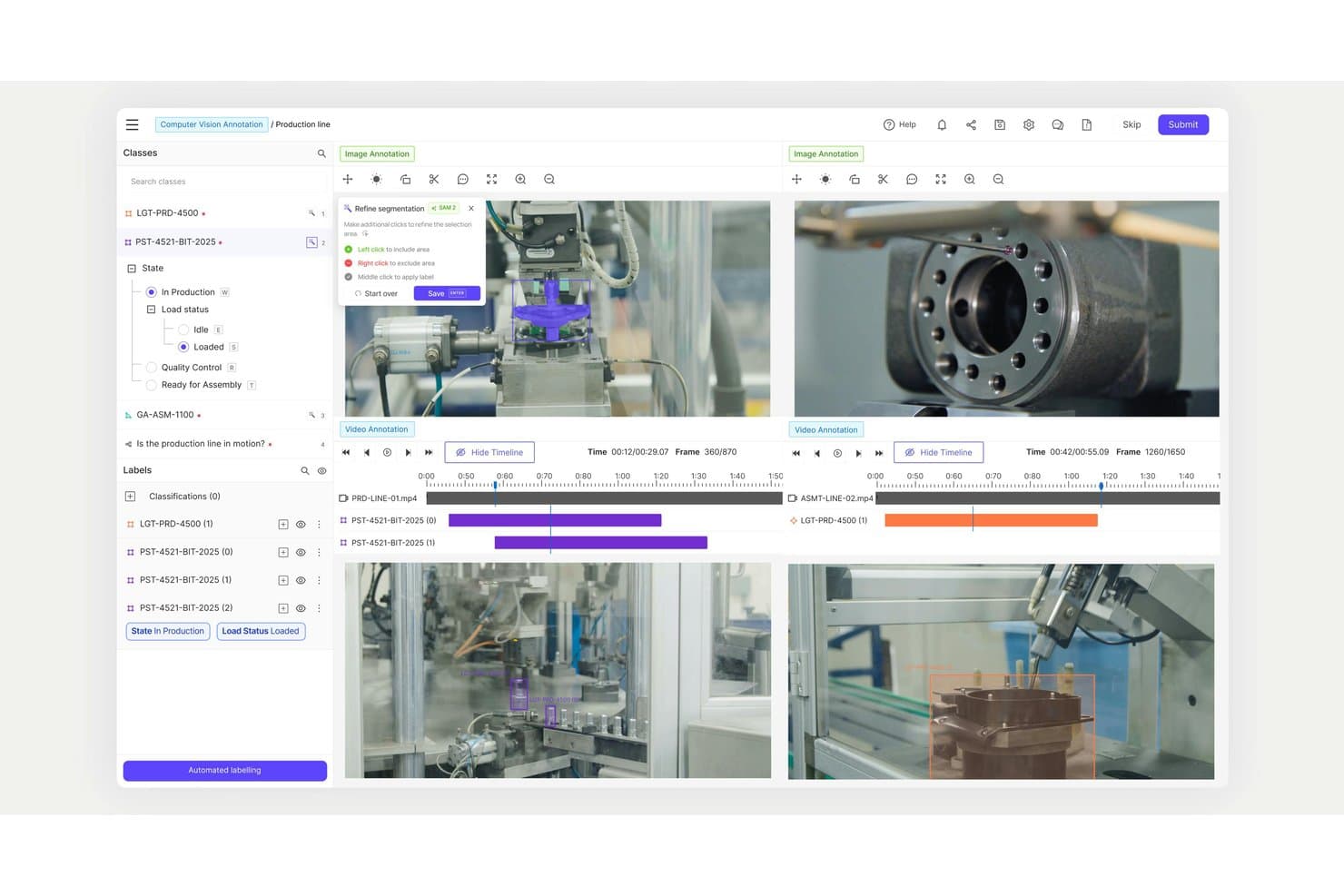
Encord offers a multi-video annotation workspace with timeline controls, segmentation refinement tools, and classification labels for production line computer vision tasks. Encord is a data-centric computer vision software platform that provides large-scale image, video, and multimodal annotation tools alongside integrated automated labeling, quality assurance workflows, and workflow management designed for enterprise AI teams.
Who Is Encord Best For?
Enterprise data science teams and ML engineers in regulated industries who need large-scale, automated annotation for complex computer vision projects.
Why I Picked Encord
I picked Encord as one of the best because I can automate annotation for huge datasets using AI-driven labeling workflows, deploy advanced tools for images, video, and 3D, and rely on integrated QA processes to handle complex, scaled-up computer vision tasks.
Encord Key Features
- Multimodal annotation tools: Annotate images, videos, LiDAR, and text data in one platform.
- Built-in active learning: Use model-in-the-loop capabilities to identify and prioritize edge cases.
- Collaborative project workspaces: Support simultaneous annotation and review across large teams.
- Role-based access control: Set roles and permissions for teams to maintain security and compliance.
Encord Integrations
Encord offers native integrations with AWS S3, Google Cloud Storage, and Azure Blob Storage. An API is available for custom integrations.
Pros and Cons
Pros:
- Supports video, 3D, and multimodal labeling
- Advanced QA and audit trail workflows
- Automated annotation for high-volume image datasets
Cons:
- Annotation interface can lag with huge datasets
- No built-in model training pipeline
Learn more about Encord: Best for advanced data labeling workflows
- Free trial available
- Pricing upon request
Visit WebsiteCustomer Rating:4.5/5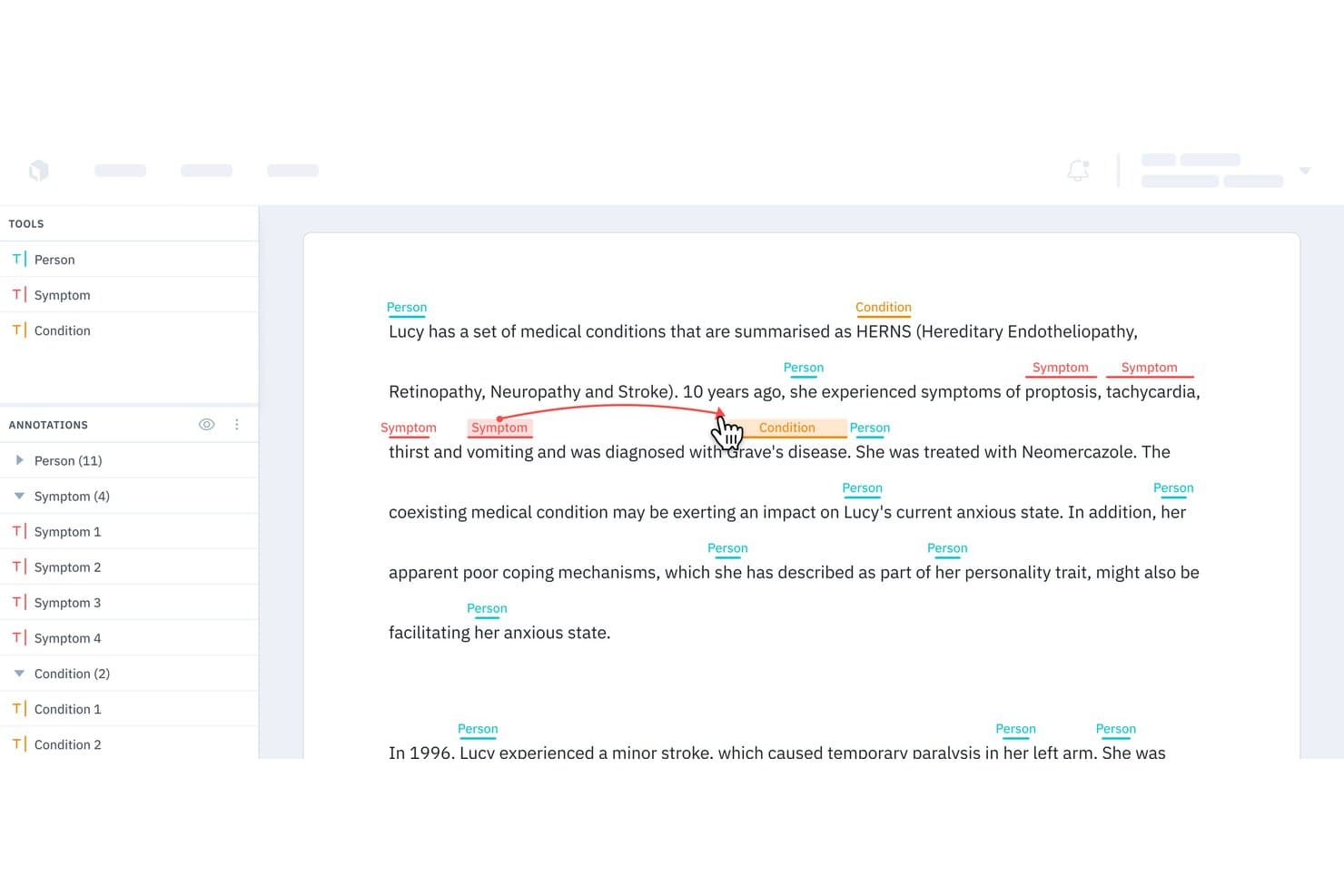
Labelbox offers a named entity recognition (NER) annotation interface that allows users to label medical text with tags like Person, Symptom, and Condition, with relationship linking between entities. Labelbox is a computer vision data labeling platform that gives your team advanced tools to annotate, manage, and quality-control large image, video, and 3D datasets for machine learning workflows.
Who Is Labelbox Best For?
Labelbox is a strong fit for data science teams and ML engineers at mid-sized to enterprise organizations managing large-scale computer vision projects.
Why I Picked Labelbox
I picked Labelbox as a high-performance tool because I rely on its advanced data labeling workflows for large-scale image, video, and 3D annotation projects. My team uses its auto-labeling and review features to speed up QA and handle collaboration across complex datasets.
Labelbox Key Features
- Label editor customization: Build tailored annotation interfaces for unique computer vision data types.
- Ontology management: Define hierarchical label structures to match your project’s requirements.
- Model-assisted labeling: Integrate your models to generate pre-labels and incorporate active learning strategies.
- Python SDK and API: Access automation and integration options for large-scale data and workflow management.
Labelbox Integrations
Labelbox offers native integrations with Google Cloud Storage, Amazon S3, Snowflake, MySQL, Kafka, Looker, Redshift, MotherDuck, and more. An API is available for custom integrations.
Pros and Cons
Pros:
- Advanced automation for quality assurance workflows
- Supports image, video, and 3D labeling
- Handles large-scale data annotation projects
Cons:
- Occasional platform slowdowns on massive datasets
- No built-in computer vision model training
Learn more about Labelbox: Best for scalable AI model lifecycle management
- 14-day free trial available
- Pricing upon request
Visit WebsiteCustomer Rating:4.3/5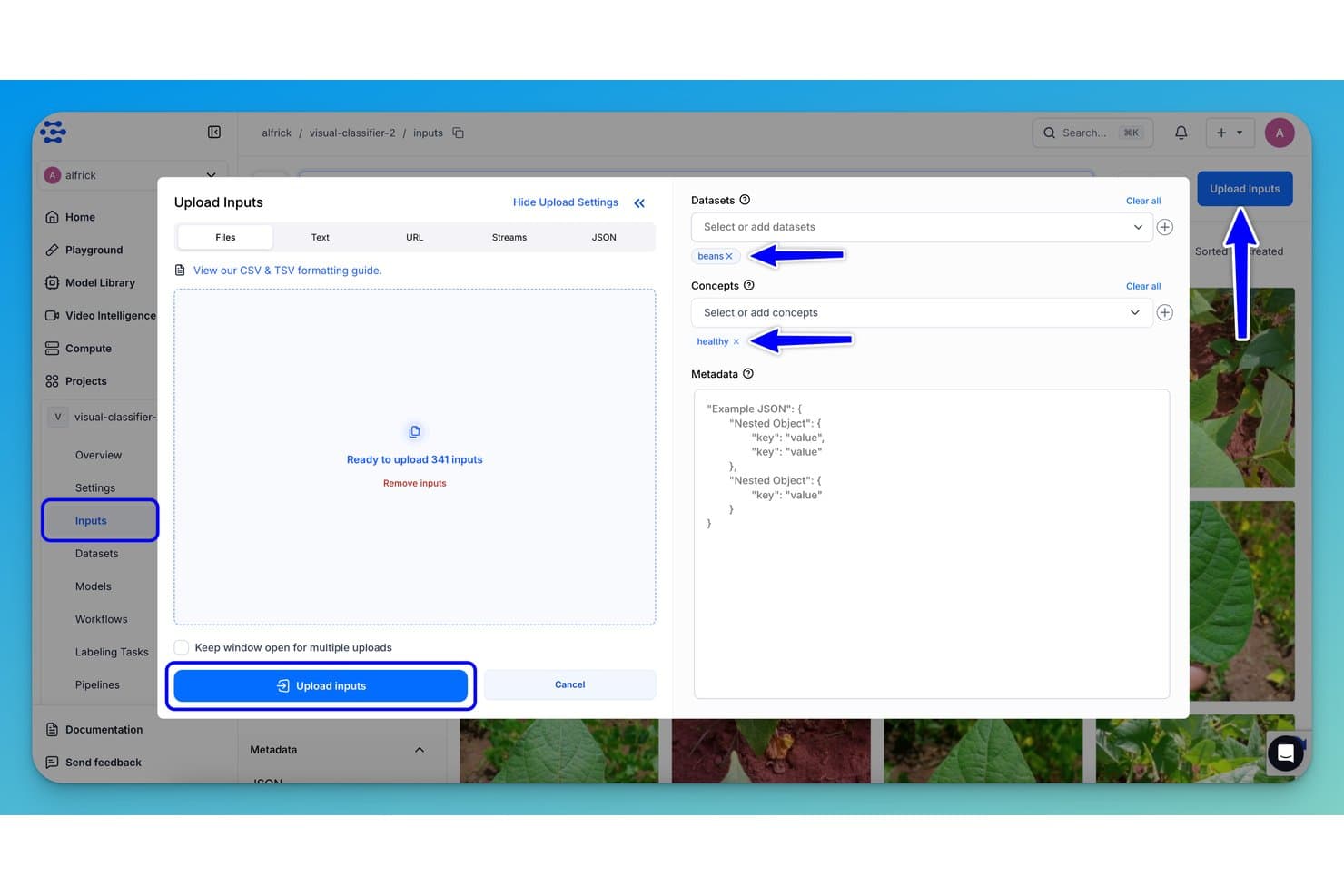
Clarifai offers an Upload Inputs dialog where users can assign datasets and concepts like 'beans' and 'healthy' before bulk uploading 341 images for model training. Clarifai is an enterprise computer vision platform for developing, training, and deploying image and video recognition models at scale, with extensive tools for custom model management, data annotation, and real-time visual analysis.
Who Is Clarifai Best For?
Enterprises and teams with dedicated machine learning engineers or data scientists working on large-scale computer vision projects.
Why I Picked Clarifai
I picked Clarifai as one of the best because I can manage every stage of my AI model pipeline, from dataset annotation to deployment, in one system. I rely on its advanced MLOps, powerful video analysis, and smooth edge deployment options.
Clarifai Key Features
- Pre-trained model library: Access a wide selection of ready-to-use computer vision models for rapid deployment.
- Collaborative data annotation tools: Enable teams to label and manage large image and video datasets in a shared workspace.
- API and SDK integrations: Connect models and workflows to your applications using REST APIs and multiple programming SDKs.
- Customizable workflow pipelines: Design and manage end-to-end vision processing pipelines tailored to complex project needs.
Clarifai Integrations
Clarifai offers native integrations with Snowflake and Amazon S3, and provides an API and SDKs for custom apps integrations in Python, Java, and Node.js.
Pros and Cons
Pros:
- On-premises, cloud, and edge deployment options
- Fast annotation and collaboration workflow tools
- Pre-trained models for many image tasks
Cons:
- Limited published benchmarks for some models
- Complex automation setup for advanced pipelines
Learn more about Clarifai:
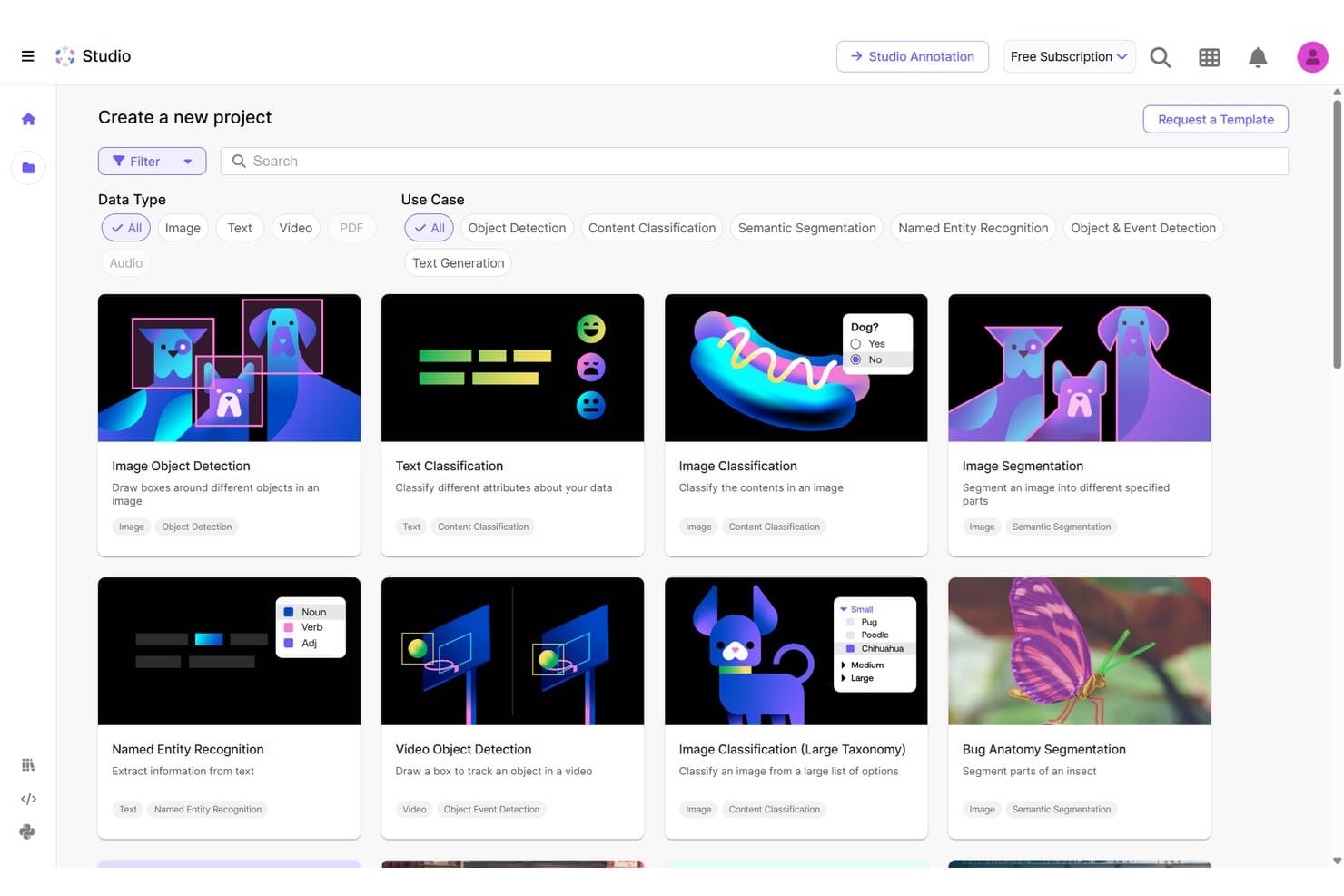
Scale AI offers a project template gallery with computer vision options like Image Object Detection, Image Classification, and Image Segmentation for training data labeling. Scale AI is an enterprise-focused computer vision software platform offering extensive annotation, dataset management, and scalable APIs for image, video, and 3D data workflows.
Who Is Scale AI Best For?
Scale AI suits large enterprises and advanced AI teams managing demanding computer vision projects and complex, high-volume data annotation workflows.
Why I Picked Scale AI
I picked Scale AI as one of the best because I rely on its enterprise-grade annotation services for large, complex computer vision datasets. My team uses its advanced annotation workflows, fast QA processes, and support for video and 3D data for demanding vision projects.
Scale AI Key Features
- Multi-modality data support: Annotate images, videos, LiDAR, and text data optimized for language models within a unified platform.
- API-driven integration: Connect data pipelines through REST APIs for optimized dataset management and automation.
- Real-time collaboration tools: Enable multiple users to review, comment, and adjust visual labels simultaneously.
- Secure data environment: Protect sensitive information with enterprise-grade access controls and privacy safeguards.
Scale AI Integrations
Native integrations are not publicly listed. Scale AI provides an API for custom integrations.
Pros and Cons
Pros:
- Supports 2D, 3D, and video annotation
- Advanced quality control on labeled datasets
- High-volume annotation for complex data types
Cons:
- No clear documentation of native third-party integrations
- Limited suitability for small team projects
Learn more about Scale AI:
Other Computer Vision Software
Here are some additional computer vision software options that didn’t make it onto my shortlist, but are still worth checking out:
- 11SuperviselyBest for no-code project configuration
- 12CVATBest for open-source annotation customization
- 13Vertex AIBest for integrating with Google Cloud
- 14DataLoopBest for automated data pipeline management
- 15Azure AI Custom VisionBest for rapid custom model training via API
- 16UltralyticsBest for pretrained YOLO model support
- 17Hive AIBest for large-scale content moderation
- 18OpenCVBest for open-source algorithm libraries
- 19Milestone SystemsBest for forensic video investigation
How I Evaluate Computer Vision Software
I split my evaluation into baseline requirements—like annotation tooling and API deployment—and differentiators like edge support and MLOps maturity.
Core Functionality (Table Stakes For This List)
When I'm selecting tools for my list, I rank each one on a scale from 0 (does not offer the functionality) to 5 (excels in this area) for each core functionality listed below. Then, I calculate the tool's total score into a percentage. Each tool needs to achieve a minimum total score of 75% to be considered for inclusion.
- Image Recognition & Classification: I evaluate how well a platform classifies objects, scenes, and attributes in static images, from pre-trained general models to custom classifiers trained on domain-specific data like retail product catalogs or medical scans.
- Object Detection & Segmentation: I look for support beyond basic bounding boxes, checking whether the tool handles instance segmentation, semantic segmentation, or pose estimation for use cases like warehouse inventory counting or defect inspection on production lines.
- Model Training & Customization: The ability to fine-tune or train models on your own labeled datasets matters here. I check for AutoML options, architecture flexibility, hyperparameter tuning, and experiment tracking so teams can iterate without starting from scratch.
- Video Analysis Capabilities: I consider whether the platform can process live video streams with multi-object tracking and event detection, not just frame-by-frame image analysis. Real-time surveillance feeds and manufacturing line monitoring are where this really gets tested.
- Data Annotation & Labeling: Strong annotation tooling with collaboration features, QA review workflows, and AI-assisted auto-labeling saves enormous time. I look at how each platform handles labeling for both images and video, including support for polygon, keypoint, and 3D annotation types.
- Deployment & API Integration: I check whether models can be deployed across cloud, on-prem, and edge environments via REST APIs, SDKs, or containerized runtimes. Platforms that support exports to formats like ONNX or TensorRT give your team more flexibility when targeting specific hardware.
Once I have a list of tools that meet the criteria, I consider what sets each platform apart.
Differentiating Factors (What Sets Vendors Apart)
Here's how I compare and contrast different vendors:
Standout Features
Edge deployment support is a major differentiator—I check whether a platform can push models to devices like NVIDIA Jetson boards or industrial cameras for real-time inference without relying on cloud connectivity. MLOps tooling matters just as much once models hit production. Drift detection and automated retraining pipelines keep accuracy from degrading as real-world conditions shift. I also look at pre-trained model libraries, since a strong catalog of ready-to-use models for tasks like OCR or pose estimation lets teams validate use cases before investing in custom training.
Beyond Features
Compliance and security weigh heavily in my evaluation, especially for platforms handling facial recognition or biometric data. I check for certifications like SOC 2 and HIPAA, plus built-in privacy features like PII blurring and audit logs. Deployment flexibility also matters—a platform that supports cloud, on-prem, and hybrid options gives your team room to meet data residency requirements without rearchitecting later. Pricing transparency is another factor I consider closely, since costs can spiral when training compute, storage, and per-inference fees are all billed separately.
How to Choose Computer Vision Software
It’s easy to get bogged down in long feature lists and complex pricing structures. To help you stay focused as you work through your unique software selection process, here’s a checklist of factors to keep in mind:
| Factor | What to Consider |
|---|---|
| FactorScalability | What to ConsiderWill the platform handle growth in data volume, additional models, or new locations without degraded performance? |
| FactorIntegrations | What to ConsiderCan you connect the tool with your current systems, cloud storage, IoT devices, or data pipelines without custom development? |
| FactorCustomizability | What to ConsiderDoes it let you adapt model workflows or annotation interfaces to match your team’s unique projects, environments, or data types? |
| FactorEase of use | What to ConsiderWill technical and non-technical team members be able to operate the platform efficiently, or will usage require deep ML expertise? |
| FactorImplementation and onboarding | What to ConsiderWhat resources, documentation, or support are provided to get your models and data live on the new system without long delays? |
| FactorCost | What to ConsiderAre all costs clear—including training compute, data storage, API usage, and annotation? Watch for hidden charges and overage fees. |
| FactorSecurity safeguards | What to ConsiderDoes the tool offer role-based access, data encryption, and audit logs to protect your datasets and model IP from internal and external threats? |
| FactorCompliance requirements | What to ConsiderDoes the software support data privacy and industry standards (GDPR, HIPAA, etc.) relevant to your sector or region? |
What is Computer Vision Software?
Computer vision software is a class of tools that use AI to detect, analyze, and interpret images or video. These platforms enable teams to automate tasks such as image labeling, object detection, and video analytics. By supporting model training, deployment, and integration with other systems, computer vision software helps businesses unlock insights and automate processes from visual data in a wide range of computer vision applications.
Features
When selecting computer vision software, keep an eye out for the following key features:
- Image classification: Assigns labels or categories to images, allowing automated organization and sorting of large datasets by recognizing key elements or patterns.
- Object detection: Locates and identifies objects within images or video frames, supporting use cases like quality assurance, inventory tracking, or automotive safety.
- Segmentation: Divides images into distinct regions or objects, enabling precise analysis, measurement, or isolation of areas such as medical scans or mapped environments.
- Video processing: Analyzes and extracts information from video streams or files, allowing real-time detection, event tracking, and motion analysis for surveillance or monitoring.
- Data annotation tools: Provides interfaces for manual labeling of images or frames, supporting model accuracy by ensuring data is correctly tagged for training.
- Batch processing: Handles large volumes of images or videos in a single workflow, saving time and effort during model training, validation, or reprocessing tasks.
- API integration: Allows the software to connect with other platforms, enabling automated processing pipelines and embedding vision capabilities into your own applications.
- Role-based access: Lets you manage permissions for user groups, ensuring the right team members can annotate data, review results, or deploy models securely.
- Reporting and visualization: Offers dashboards or analytics tools to visualize results, track improvements, and communicate findings clearly across teams or stakeholders.
- Hardware compatibility: Supports various GPUs, CPUs, or specialized accelerators, making deployment and scaling easier across your infrastructure.
Common Computer Vision Software AI Features
Beyond the standard computer vision software features listed above, many of these solutions are incorporating AI with features like:
- Auto-labeling: Uses AI to automatically generate annotations for images or video frames, dramatically speeding up dataset preparation and reducing manual effort.
- Anomaly detection: Leverages machine learning to identify unusual patterns or defects in images or video, supporting applications like quality control or security monitoring.
- Facial recognition: Employs deep learning to detect and match faces in images or video, enabling identity verification, access control, or customer analytics.
- Pose estimation: Uses AI models to determine the position and orientation of objects or people, supporting applications in sports analytics, robotics, or ergonomic assessments.
- Scene understanding: Applies AI to interpret complex environments, recognizing relationships between objects and predicting context for tasks like autonomous navigation or retail analytics.
- Active learning: Integrates AI to suggest which data samples should be labeled next, optimizing annotation workflows and improving model performance with less labeled data.
Benefits
Implementing computer vision software provides several benefits for your team and your business. Here are a few you can look forward to:
- Faster decision-making: Automated analysis of images and video streams enables real-time insights for applications like quality control or security monitoring.
- Increased productivity: Workflow automation and AI-powered annotation tools help your team process more data with less manual effort.
- Scalable operations: Cloud, on-prem, and edge deployment options let you grow from pilot projects to large-scale production without major rework.
- Improved accuracy: Customizable model training and active learning workflows continuously improve detection, classification, and segmentation results.
- Stronger data security: Role-based access, audit logging, and compliance features protect sensitive visual data and align with privacy requirements.
- Easier integrations: API access and SDKs connect models to existing business systems for smooth data flow and custom workflows.
- Actionable insights: Reporting dashboards and visualizations translate complex visual data into clear, business-relevant findings for better strategy planning.
Costs and Pricing
Selecting computer vision software requires an understanding of the various pricing models and plans available. Costs vary based on features, team size, add-ons, and more. The table below summarizes common plans, their average prices, and typical features included in computer vision software solutions:
Plan Comparison Table for Computer Vision Software
| Plan Type | Average Price | Common Features |
|---|---|---|
| Plan TypeFree Plan | Average Price$0 | Common FeaturesLimited datasets, basic image processing, essential annotation tools, and community support. |
| Plan TypePersonal Plan | Average Price$25-$100/user/month | Common FeaturesSingle-user access, batch processing, core computer vision models, data export, and email support. |
| Plan TypeBusiness Plan | Average Price$100-$500/user/month | Common FeaturesMulti-user collaboration, advanced model customization, API access, integration options, and priority support. |
| Plan TypeEnterprise Plan | Average Price$500+/user/month | Common FeaturesCustom deployment, role-based access, compliance features, dedicated onboarding, custom SLAs, and full support. |
Computer Vision Software FAQs
Here are some answers to common questions about computer vision software:
What industries use computer vision software?
You’ll see computer vision software in manufacturing, healthcare, retail, security, logistics, and agriculture—basically anywhere organizations want to extract value from visual data for inspection, automation, or analytics.
Can non-technical users work with computer vision platforms?
Yes, many platforms now offer low-code interfaces, guided workflows, and pre-trained models, so domain experts and operators can label data and use basic models without deep machine learning expertise.
How does computer vision software protect sensitive data?
Most platforms offer features like data encryption, role-based access, audit logs, and on-device processing options to safeguard sensitive images or video and help you meet compliance requirements.
Is it possible to integrate computer vision software with existing business systems?
Yes, API access and SDKs are common, making it straightforward to connect with ERP, MES, VMS, or cloud storage platforms and embed vision outputs into your own workflows.
What should I know about scaling up a computer vision solution?
Check if the solution can handle increasing data volumes, multiple users, and deployments across cloud, on-premise, or edge devices without performance issues or complex reconfiguration.