

The best API integration tools help teams connect systems reliably, automate data exchange, reduce manual work, and keep applications in sync across environments. These tools allow developers and operations teams to manage integrations without building and maintaining custom connectors for every service.
Teams often look for API integration tools when manual integrations break under scale, misconfigurations cause outages, or data inconsistencies slow releases and reporting. Issues like brittle scripts, limited error handling, and poor visibility into failures create delays and make collaboration between engineering and operations teams harder.
With over 20 years in the industry as a Chief Technology Officer, I’ve tested and reviewed dozens of API integration tools across real-world environments to evaluate their reliability, integration depth, and usability. This guide highlights the top API integration tools that simplify workflows, improve system coordination, and help teams maintain dependable data flows. Each review covers features, pros and cons, and best-fit use cases to help you choose the right tool.
Why Trust Our Software Recommendations
6,700+
Reviews
20
Industry experts
16+
Evaluation factors
14
Years
Our team has been testing and reviewing software since 2012. As tech leaders ourselves, we know how difficult—and important—it is to choose the right software.
For this guide, we evaluated tools using hands-on testing and independent research, scoring tools using our selection criteria.
Our reviews reflect our human editorial judgment, not a sales pitch.
Expert reviewers:
- Paulo Gardini MiguelTech Director
 Tim FisherVP of AI
 Gabriel RosasTech Lead & Software Architect
 Christhian GruhnTech Lead & Platform Architect

API Integration Tools Comparison Table
This comparison table summarizes pricing details for my top API integration tool selections:
| Tool | Best For | Trial Info | Price | ||
|---|---|---|---|---|---|
| 1 | Best for ecommerce solutions | 30-day free trial | Pricing upon request | Website | |
| 2 | Best for instant public endpoints | Free plan available | From $8/month (billed annually) | Website | |
| 3 | Best for managed ITSM integration ops | Not available | Pricing upon request | Website | |
| 4 | Best for replacing bots and scripts | Free forever plan | From $499/month | Website | |
| 5 | Best for small business integration | Free demo available | From $1,495/month | Website | |
| 6 | Best for business automation | Free plan available | From $100/month | Website | |
| 7 | Best for open-source flexibility | 30-day free trial | From $25/month | Website | |
| 8 | Best for B2B data exchange | Free demo available | Pricing upon request | Website | |
| 9 | Best for security compliance | 30-day free trial + free demo available | Pricing upon request | Website | |
| 10 | Best for enterprise solutions | 30-day free trial + free demo available | Pricing upon request | Website |


Best API Integration Tool Reviews
Below are my detailed summaries of the best API integration tools that made it onto my shortlist. My reviews thoroughly examine the key features, pros & cons, integrations, and ideal use cases of each tool to help you find the best one for you.


Celigo automates ecommerce workflows for IT and managers efficiently. Celigo is an integration platform tailored for ecommerce businesses, helping them automate and manage workflows. IT teams and business managers use it to streamline operations and enhance productivity.
Why I picked Celigo: It excels in ecommerce solutions by offering tailored integrations and automation for online businesses. You can create custom workflows that fit your shop's unique needs. Its intuitive interface allows you to manage complex processes without extensive coding. The platform provides pre-built templates specifically for e-commerce, simplifying setup and reducing the time to launch.
Standout features & integrations:
Features include an intuitive interface that simplifies complex process management. Pre-built templates allow you to set up common workflows quickly. The platform also offers advanced error management to help your team resolve issues swiftly.
Integrations include Shopify, Magento, Amazon, NetSuite, Salesforce, Zendesk, QuickBooks, PayPal, Stripe, and BigCommerce.
Pros and Cons
Pros:
- Supports hybrid and cloud-based deployments
- Drag-and-drop interface for API workflows
- Pre-built connectors for faster integrations
Cons:
- Advanced customizations may require coding
- Inconsistent compatibility with legacy APIs
Learn more about Celigo: Best for instant public endpoints
- Free plan available
- From $8/month (billed annually)

ngrok dashboard showing live local endpoints, secure tunnels, traffic inspection logs, and real-time API request monitoring. ngrok is a tunneling and API integration platform that lets you securely expose local servers online, manage endpoints, inspect traffic, and test webhooks directly from your development environment.
Who Is ngrok Best For?
ngrok is a strong fit for developers and DevOps teams who need to test and expose local services during API and integration development.
Why I Picked ngrok
ngrok earns its spot on my shortlist because spinning up a public endpoint takes seconds—no DNS changes, no firewall rules, no server configuration. I rely on ngrok's ephemeral and reserved URLs to expose a local port instantly, which is genuinely useful when sharing a work-in-progress API with a teammate or third-party service. The built-in traffic inspection lets me see exactly what's hitting my endpoint in real time.
ngrok Key Features
- Request replay: Re-send any previously captured request to your local server without triggering the original source again.
- Custom domains: Assign a fixed, branded domain to your tunnel so your endpoint URL stays consistent across sessions.
- IP restrictions: Lock down access to your tunnel by allowlisting specific IP addresses or CIDR ranges.
- Webhook verification: Automatically validate incoming webhook signatures from providers like GitHub, Stripe, and Twilio.
ngrok Integrations
ngrok offers native integrations with GitHub, Bitbucket, and Stripe, and provides an API for custom integrations.
Pros and Cons
Pros:
- Agent supports configuration as code with YAML
- Webhook replay for repeated event debugging
- Supports TCP and arbitrary port forwarding
Cons:
- TLS termination limited without paid subscription
- Data usage and request limits on free/lowest plans
Learn more about ngrok:
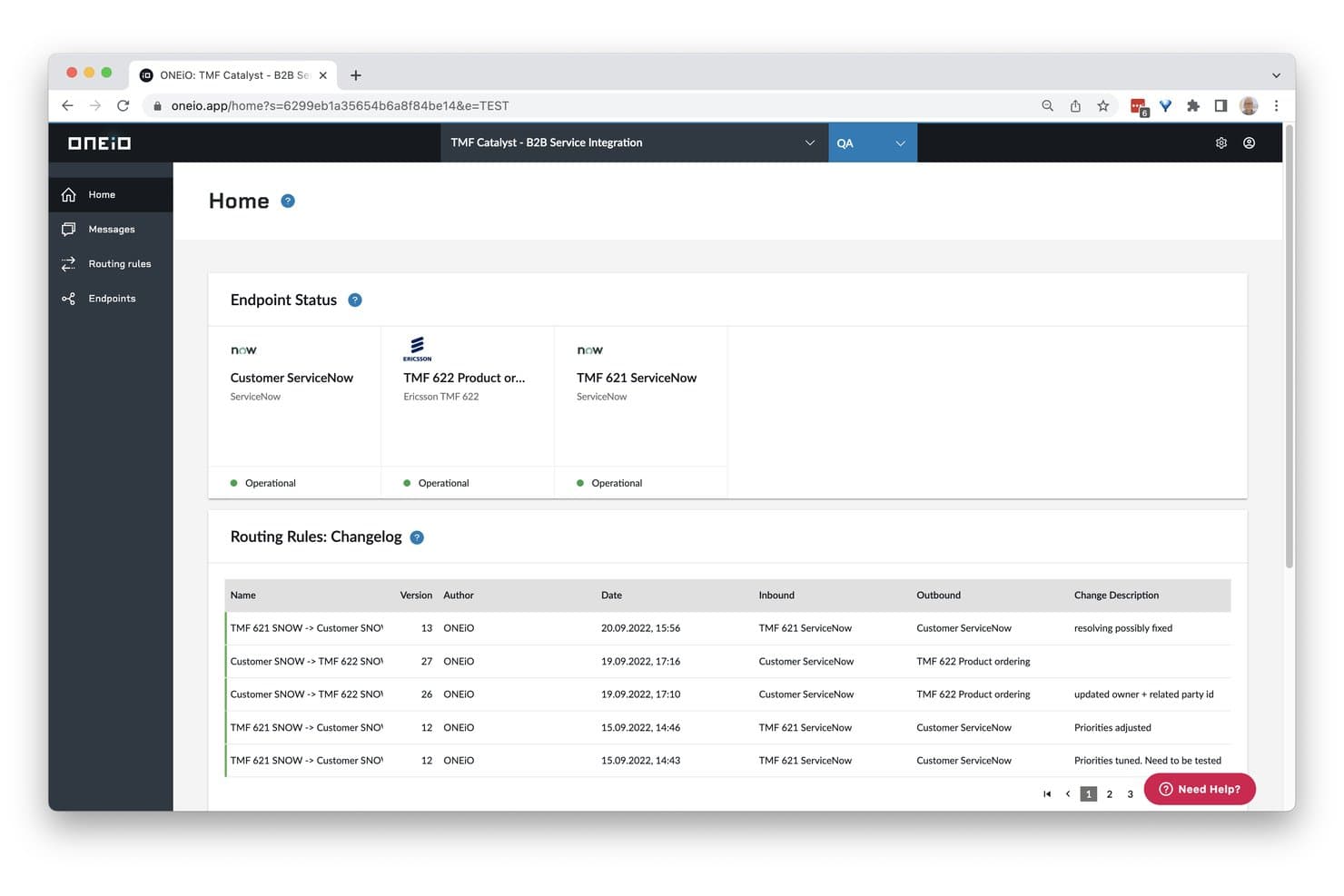
ONEiO displays endpoint status and routing rule changelogs in one view. ONEiO is a managed API integration platform purpose-built for ITSM and enterprise IT environments, offering no-code configuration, multi-endpoint orchestration, persistent message queuing, and AI-assisted field mapping across 60+ curated connectors.
Who Is ONEiO Best For?
ONEiO is a strong fit for enterprise IT teams and managed service providers that run multi-vendor ITSM toolchains and want to offload integration operations entirely.
Why I Picked ONEiO
ONEiO earns its spot on my shortlist because it's the only tool here that functions less like integration software and more like an outsourced integration ops team. I picked it specifically for its Fully Managed service tier, where ONEiO owns the entire lifecycle end-to-end, including monitoring, maintenance, and handling API changes as connected systems update. Its persistent async message queuing means integrations stay resilient even during downstream outages, and the ONEAi Troubleshooting Agent surfaces human-readable error analysis with suggested fixes across your ITSM toolchain.
ONEiO Key Features
- No-code browser-based configuration UI: Build and manage integrations directly in a browser without writing code, using a visual interface that supports routing rules, conditional logic, and delay logic.
- Persistent async message queuing: Inbound, broker, and outbound message pipelines hold and retry messages automatically when downstream systems are unavailable.
- ONEAi field mapping suggestions: AI-assisted field mapping recommendations help you map data between endpoints faster, with human-in-the-loop review before any changes are applied.
- Multi-endpoint fan-out architecture: Connect a system once to ONEiO and route data to multiple endpoints simultaneously without rebuilding individual point-to-point connections.
ONEiO Integrations
ONEiO offers 50+ documented integrations, including ServiceNow, Jira, BMC Remedy, Freshservice, Zendesk, Salesforce, Microsoft Dynamics 365, HubSpot, Slack, and Azure DevOps. It also connects to custom systems through REST, SOAP, FTP, email, and other standard APIs.
Pros and Cons
Pros:
- AI-assisted field mapping and troubleshooting
- Persistent message queuing for fault tolerance
- Fully managed integration operations option
Cons:
- No SDK or developer-first automation tools
- Narrow connector focus on ITSM platforms
Learn more about ONEiO: 4Best for replacing bots and scripts
Deck
- Free forever plan
- From $499/month
Visit WebsiteCustomer Rating:4.3/5
Deck’s link library lets you browse pre-built integrations or create custom connections. Deck is an API integration tool designed for developers and businesses looking to connect to multiple data sources without relying on bots or custom scripts. It offers a single, consistent API for accessing credentialed data securely and supports automated workflows across various sectors.
Why I Picked Deck: I picked Deck because it allows you to replace bots and manual scripts with a unified integration platform. Its built-in authentication flows ensure secure access to user-permissioned data, while its dual agent-script architecture improves both performance and scalability. You can use Deck to automate onboarding, vendor migrations, and complex data workflows without heavy infrastructure demands. This makes it especially valuable for teams managing multiple API connections at scale.
Standout Features & Integrations
Features include a link builder for custom integrations, developer-friendly APIs with clear documentation, and session visibility for monitoring connections. Deck also offers a link library, enabling quick access to pre-built connections while reducing setup time.
Integrations include Shopify, Salesforce Commerce Cloud, Microsoft Dynamics, Amazon, BigCommerce, Stripe, Magento, WooCommerce, NetSuite, SAP, Oracle, and IBM.
Pros and Cons
Pros:
- Developer-friendly API documentation
- Secure authentication flows
- Unified API for multiple sources
Cons:
- Pricing depends on API calls
- Limited integration tutorials
Learn more about Deck: Best for small business integration
- Free demo available
- From $1,495/month
Visit WebsiteCustomer Rating:4.8/5
Cyclr is an embedded integration platform for B2B SaaS used by developers & PMs. Cyclr is an embedded integration platform designed for B2B SaaS applications. SaaS developers and product managers mainly use it to enhance integration capabilities.
Why I picked Cyclr: It offers a customizable API and low-code integration tools, setting it apart for small business integration. Cyclr provides over 500 pre-built connectors, which means less time to develop from scratch. It's SOC 2 Type II accredited, ensuring your business's compliance and security. The platform supports both shared and private cloud hosting, giving you flexibility in deployment.
Standout features & integrations:
Features include low-code integration tools that let you build workflows without extensive coding. You can customize APIs to fit your specific needs. Cyclr also offers strong customer support and resources like webinars and case studies to help your team succeed.
Integrations include Salesforce, Shopify, HubSpot, QuickBooks, Mailchimp, Slack, Zendesk, Microsoft Dynamics, Google Sheets, and Xero.
Pros and Cons
Pros:
- Advanced workflow automation with conditional logic
- Scales efficiently with increasing data volume
- Intuitive visual builder for workflow design
Cons:
- Custom scripting is required for niche integrations
- Support response time varies based on plan level
Learn more about Cyclr:

Workato connects apps and automates workflows for IT teams and analysts. Workato is an automation platform designed for business process automation and integration. IT teams and business analysts use it to connect applications and automate workflows, enhancing operational efficiency.
Why I picked Workato: It excels in business automation by providing tools for creating dynamic workflows. Your team can benefit from its intelligent automation capabilities, which include features like real-time data processing. The platform's recipe-based approach simplifies the creation of automated processes. With built-in governance and security controls, it ensures compliance while automating tasks.
Standout features & integrations:
Features include intelligent automation capabilities that help you process data in real-time. Its recipe-based approach simplifies the creation of automated workflows. Built-in governance and security controls are there to ensure compliance and protect your data.
Integrations include Salesforce, Slack, QuickBooks, ServiceNow, Zendesk, Marketo, NetSuite, Workday, Snowflake, and SAP.
Pros and Cons
Pros:
- Recipe-based workflow creation
- Real-time data processing
- Intelligent automation features
Cons:
- Performance bottlenecks with bulk data
- Error debugging lacks detailed insights
Learn more about Workato:

Kong Inc. offers flexible API management, monitoring, and security solutions. Kong Inc. is an open-source API management platform that caters to developers and IT teams looking for flexible solutions. It facilitates API management, monitoring, and security for various applications.
Why I picked Kong Inc.: It offers open-source flexibility, allowing developers to customize and extend the platform as needed. Your team can use its scalable architecture to manage APIs across multiple environments. The platform includes advanced security features to protect your data and applications. With built-in analytics, you can gain insights into API performance and usage.
Standout features & integrations:
Features include advanced security features that protect your data and applications. Its scalable architecture supports managing APIs across different environments. The platform's built-in analytics provide insights into API performance and usage.
Integrations include AWS Lambda, Datadog, Prometheus, Kubernetes, Terraform, Azure, Splunk, Grafana, New Relic, and HashiCorp Vault.
Pros and Cons
Pros:
- Native Kubernetes and Cloud compatibility
- Strong open-source community support
- Lightweight and high-performance gateway
Cons:
- Documentation could be more detailed
- Debugging logs could be more user-friendly
Learn more about Kong Gateway: 8Best for B2B data exchange
Cleo
- Free demo available
- Pricing upon request
Visit WebsiteCustomer Rating:4.4/5
Cleo enables API-based B2B data exchange for IT and business integration. Cleo is an integration platform specializing in API-based data exchanges for B2B applications. IT professionals and business managers primarily use it to improve data flow and connectivity between partners and internal systems.
Why I picked Cleo: It offers specialized features for B2B data exchanges, making it ideal for businesses with complex data needs. Your team can leverage Cleo's real-time visibility to manage and monitor data transactions. The platform's secure data transfer capabilities ensure compliance with industry standards. With Cleo's customizable dashboards, you can tailor the interface to fit your organization's specific requirements.
Standout features & integrations:
Features include real-time visibility into data transactions, which helps you monitor and manage exchanges effectively. Secure data transfer ensures your information complies with industry standards. Customizable dashboards let you tailor the interface to match your organization's needs.
Integrations include SAP, Oracle, Salesforce, Microsoft Dynamics, NetSuite, Amazon Web Services, IBM, Shopify, EDI, and QuickBooks.
Pros and Cons
Pros:
- Offers solid security features.
- Enhances flexibility in integrations.
- Facilitates real-time data exchange.
Cons:
- Complex error handling mechanisms
- Challenges in performance optimization
Learn more about Cleo: Best for security compliance
- 30-day free trial + free demo available
- Pricing upon request

IBM API Connect manages and secures enterprise APIs for IT teams and developers. IBM API Connect is a comprehensive API management solution for enterprises needing secure and scalable API integrations. IT teams and developers use it to create, manage, and secure APIs across various environments.
Why I picked IBM API Connect: It offers robust security compliance features, making it ideal for enterprises focused on data protection. Your team can utilize its end-to-end API lifecycle management to streamline development and deployment. The platform's advanced analytics provide insights into API performance and usage. With integrated security protocols, you can ensure compliance with industry standards.
Standout features & integrations:
Features include end-to-end API lifecycle management that streamlines development and deployment. Advanced analytics help your team gain insights into API performance and usage. Integrated security protocols ensure compliance with industry standards, safeguarding your data.
Integrations include Salesforce, SAP, Oracle, Microsoft Azure, Amazon Web Services, Google Cloud Platform, ServiceNow, IBM Cloud, Red Hat OpenShift, and MuleSoft.
Pros and Cons
Pros:
- Scalable for enterprise API management
- Seamless integration with IBM Cloud tools
- Strong security and compliance features
Cons:
- Performance may vary with high API traffic
- Some advanced features locked behind paywalls
Learn more about IBM API Connect:

TIBCO connects systems and automates processes for enterprise IT teams. TIBCO is an API-led integration platform designed for large enterprises looking to connect systems and manage data efficiently. IT departments use it to automate processes and facilitate communication across various applications.
Why I picked TIBCO: It provides enterprise solutions focusing on scalability and integration capabilities. Your team can use its advanced data analytics features to gain insights and drive decision-making. The platform's flexible deployment options cater to different business needs. With comprehensive monitoring tools, you can ensure your systems are running smoothly and securely.
Standout features & integrations:
Features include advanced data analytics that helps your team gain valuable insights. Flexible deployment options allow you to tailor the platform to your business needs. Comprehensive monitoring tools ensure your systems run smoothly and securely.
Integrations include Salesforce, SAP, Oracle, Microsoft Dynamics, AWS, Google Cloud Platform, IBM, NetSuite, ServiceNow, and Slack.
Pros and Cons
Pros:
- Comprehensive monitoring tools
- Flexible deployment options
- Advanced data analytics features
Cons:
- Licensing model may be complex to understand
- UI navigation could be more intuitive
Learn more about TIBCO:
Other API Integration Tools
Here are some additional API integration tools options that didn’t make it onto my shortlist but are still worth checking out.
- 11Tray.ioBest for custom workflows
- 12SnapLogicBest for cloud integration
- 13JitterbitBest for quick API creation
- 14CoefficientBest for live data across teams
- 15DreamFactoryBest for auto-generating APIs
- 16ZapierBest for non-technical users
- 17InformaticaBest for data governance
- 18ApigeeBest for data analytics
- 19Amazon API GatewayBest for serverless architectures
- 20Microsoft Azure API ManagementBest for global reach
- 21SAP Integration SuiteBest for enterprise resource planning
- 22Anypoint Studio (MuleSoft)Best for hybrid deployments
- 23Oracle API ManagementBest for cloud-native applications
How I Evaluate API Integration Tools
I split my evaluation into two layers: the non-negotiable baseline—authentication handling, connector breadth, transformation logic—and the differentiators that reveal whether a tool fits your stack.
Core Functionality (Table Stakes For This List)
When I'm selecting tools for my list, I rank each one on a scale from 0 (does not offer the functionality) to 5 (excels in this area) for each core functionality listed below. Then, I calculate the tool's total score into a percentage. Each tool needs to achieve a minimum total score of 75% to be considered for inclusion.
- Pre-Built Connector Library: I evaluate breadth and depth of connectors—covering major SaaS apps, databases, ERPs, and protocols like SFTP, SOAP, and REST.
- API Lifecycle Management: From initial design through versioning and deprecation, I look for tools that support the full lifecycle, not just deployment.
- Data Mapping & Transformation: The mapper needs to handle real-world complexity like converting nested JSON to flat CSV or reconciling mismatched field types.
- Authentication & Security: I check which auth protocols are supported (OAuth 2.0, JWT, SAML, API keys) and whether rate limiting and access controls are built in.
- Workflow Automation & Orchestration: Multi-step flows with conditional branching, event triggers, and scheduling matter—think syncing CRM records only when a deal stage changes.
- Monitoring & Error Handling: Real-time dashboards, configurable alerts, and automated retry logic are what I look for to gauge how well a tool handles failures in production.
Once I have a list of tools that meet this criteria, I consider what sets each platform apart.
Differentiating Factors (What Sets Vendors Apart)
Here's how I compare and contrast different vendors:
Standout Features
AI-assisted integration is a big differentiator—I look for tools that auto-suggest field mappings or flag anomalies in API traffic, which saves real time on complex builds. A custom connector SDK also matters when your stack includes proprietary or niche APIs that no pre-built connector covers. Event-driven architecture rounds things out: native support for webhooks, message queues, or streaming protocols like Kafka means your integrations react in real time instead of polling on a schedule.
Beyond Features
Deployment flexibility is one of the first things I evaluate—some teams need on-premise or hybrid options for data residency, while others want a fully cloud-native setup with Kubernetes support. Compliance certifications like SOC 2, HIPAA, and ISO 27001 also weigh heavily, especially for teams in regulated industries. Developer experience matters too: I check for CLI tools, Git-based version control, and CI/CD pipeline compatibility, because integration code should ship through the same workflows as the rest of your application stack.
How to Choose API Integration Tools
It’s easy to get bogged down in long feature lists and complex pricing structures. Here's a checklist of factors to remember to help you stay focused as you work through your unique software selection process.
| Factor | What to Consider |
| Scalability | Ensure the tool can grow with your business. Look for solutions that can handle increased data loads and user demands. |
| Integrations | Check if it supports the apps and platforms you already use. Consider tools with a wide range of pre-built connectors, such as embedded iPaaS. |
| Customizability | Evaluate how easily you can tailor the tool to your specific processes. Look for flexible options that fit your workflow. |
| Ease of Use | Consider the learning curve. A user-friendly interface can save time and reduce the need for extensive training. |
| Budget | Align the tool’s cost with your financial constraints. Look for transparent pricing and consider any hidden fees. |
| Security Safeguards | Ensure the tool complies with industry standards. Look for features like encryption and access controls to protect your data. |
| Support | Evaluate the quality and availability of customer support. Consider if you need 24/7 assistance or dedicated account management. |
| Performance | Assess the tool’s speed and reliability. Look for solutions that offer consistent uptime and fast data processing. |
Trends in API Integration Tools
In my research, I sourced countless product updates, press releases, and release logs from different API integration tool vendors. Here are some of the emerging trends I’m keeping an eye on.
- AI-Powered Insights: Tools incorporate AI to provide actionable insights from API data. This helps businesses make informed decisions quickly. For example, some platforms now offer predictive analytics to anticipate data trends.
- Real-Time Monitoring: More tools focus on the real-time monitoring of API performance. This trend allows teams to detect and address issues instantly, minimizing downtime. Vendors are adding dashboards that update live data for immediate visibility.
- No-Code/Low-Code Development: The rise of no-code/low-code capabilities makes it easier for non-developers to create and manage APIs. This trend democratizes access, enabling more team members to engage with integration tasks without deep technical skills.
- API Security Enhancements: With increasing cyber threats, vendors are prioritizing security features. Enhanced encryption, two-factor authentication, and advanced threat detection are becoming standard, ensuring that data exchanges remain secure.
- Unified API Platforms: There's a shift towards platforms that unify API management, monitoring, and analytics in one place. This integration simplifies workflows and provides a single source of truth, making it easier for teams to manage their API ecosystem efficiently.
What Are API Integration Tools?
API integration tools enable different applications to communicate and share data. They're generally used by IT professionals, developers, and business analysts to automate workflows and enhance data connectivity across systems.
Real-time monitoring, no-code/low-code capabilities, and security enhancements help with efficient data management and secure exchanges. Overall, these tools simplify complex integrations, saving time and reducing errors in data handling.
Features of API Integration Tools
When selecting API integration tools, keep an eye out for the following key features:
- Real-time monitoring: Provides instant visibility into API performance, helping teams detect and address issues as they occur.
- No-code/low-code capabilities: Allows users without extensive coding skills to create and manage integrations, broadening access within the team.
- Security enhancements: Ensures data protection through features like encryption and two-factor authentication, keeping exchanges safe.
- Scalability: Supports growing data loads and user demands, making it suitable for businesses of all sizes.
- Advanced analytics: Offers insights into API usage and performance, aiding in informed decision-making.
- Customizable dashboards: Allows users to tailor the interface to fit their specific needs, improving usability and efficiency.
- Pre-built connectors: Simplifies the setup process by providing ready-made connections to popular applications.
- Unified platform: Combines management, monitoring, and analytics into one solution, streamlining workflows.
- Flexible deployment options: Provides choices for on-premises, cloud, or hybrid setups, catering to different business environments.
- CRM integration: Enables seamless connection with customer relationship management (CRM) systems, improving customer data synchronization and workflow automation.
- Endpoints management: Helps configure, secure, and monitor API endpoints, ensuring optimal communication between systems.
- REST API support: Ensures compatibility with RESTful APIs, allowing smooth communication and interoperability between services.
- Digital transformation acceleration: Facilitates the modernization of business processes by integrating legacy and new systems efficiently.
- Streamlined integration process: Simplifies and automates the setup and maintenance of API connections, reducing complexity and time investment.
- iPaaS (Integration Platform as a Service): Provides cloud-based API integration capabilities, offering scalability, flexibility, and automation for various applications.
- Microservices orchestration: Supports integration and management of microservices, ensuring efficient communication and modular architecture.
- Automated pipelines: Enables continuous integration and deployment (CI/CD) processes by automating API-related workflows.
- Software applications connectivity: Ensures seamless integration between various software applications, reducing silos and improving efficiency.
- Anypoint Platform compatibility: Supports integration with MuleSoft’s Anypoint Platform, enabling comprehensive API lifecycle management.
- API design tools: Provides frameworks and templates for designing, documenting, and managing APIs.
- Comprehensive API integration solution: Offers a full suite of tools to connect, secure, and monitor APIs across multiple environments.
- Automation tool capabilities: Enables businesses to automate API interactions, minimizing manual intervention and boosting efficiency.
- Cloud services integration: Connects APIs to major cloud platforms and iPaaS software, ensuring seamless data exchange across cloud-based applications.
- Interoperability with different software systems: Facilitates data flow between diverse applications, improving operational consistency.
- MuleSoft Anypoint connectivity: Enhances integration through MuleSoft’s API-led connectivity, simplifying enterprise-wide data management.
- Native integration support: Provides pre-configured integrations with major software solutions, reducing the need for custom development.
- Real-time notifications: Sends alerts on API performance, failures, and security risks, ensuring prompt response and resolution.
- OAuth & authentication support: Implements secure authentication mechanisms such as OAuth to control and manage API access.
- Minimizing time-consuming processes: Reduces manual tasks by automating API-driven workflows, increasing efficiency.
- Support for multiple APIs: Ensures compatibility with REST, SOAP, GraphQL, and other API formats, broadening integration possibilities.
- Complex workflow automation: Handles multi-step integration workflows, reducing manual coordination and improving operational efficiency.
- Web applications connectivity: Integrates APIs with web applications, enhancing their functionality and interoperability.
- Zapier & Zaps integration: Allows non-technical users to create automated workflows by connecting APIs with Zapier’s no-code automation tools.
Benefits of API Integration Tools
Implementing API integration tools provides several benefits for your team and your business. Here are a few you can look forward to.
- Improved efficiency: Automates workflows, reducing the need for manual data entry and minimizing errors.
- Enhanced collaboration: Enables different applications to communicate, facilitating better data sharing across teams.
- Scalability: Supports your business's growth by effortlessly handling increased data loads and user demands.
- Increased security: Offers features like encryption and authentication, ensuring data exchanges remain protected.
- Better decision-making: Provides real-time insights and analytics, helping your team make informed decisions quickly.
- Cost savings: Reduces the need for multiple tools by providing a unified integration, management, and monitoring platform.
- Flexibility: Adapts to various business needs with customizable options and deployment choices.
Costs & Pricing of API Integration Tools
Selecting API integration tools requires understanding the various available pricing models and plans. Costs vary based on features, team size, add-ons, and more.
The table below summarizes standard plans, their average prices, and typical features included in API integration tool solutions.
Plan Comparison Table for API Integration Tools
| Plan Type | Average Price | Common Features |
| Free Plan | $0 | Basic integrations, limited API calls, and community support. |
| Personal Plan | $10-$30/ user/month | More API calls, basic analytics, and email support. |
| Business Plan | $50-$100/ user/month | Advanced integrations, real-time monitoring, and priority support. |
| Enterprise Plan | $150-$300/ user/month | Customizable dashboards, enhanced security, and dedicated account management. |
API Integration Tools FAQs
Here are some answers to common questions about API integration tools.
What could be some of the drawbacks of API integration tools?
API tools can present challenges like security concerns, which may expose sensitive data if not adequately managed. There’s also complexity involved in setting up and maintaining integrations, which might require technical expertise. Compatibility issues can arise if tools don’t support specific platforms or data formats.
What do you need to know about API integration tools?
API integration connects multiple applications, allowing them to communicate and exchange data efficiently. It acts as a bridge between different systems, enabling seamless data flow. Understanding APIs’ basic setup and functions can help you leverage these integrations effectively in your business processes.
What is the difference between API and API integration tools?
APIs allow software components to communicate, acting as building blocks for applications. On the other hand, API integration is the process of connecting these APIs to enable data flow and communication between different systems. It’s like the glue that holds various APIs together.
How to successfully implement API integration tools for the first time?
To implement API-first integration, start by clearly identifying your project objectives. Understand the existing systems and their integration points. Design your APIs with scalability in mind, focusing on utility and domain-specific needs. Test thoroughly to ensure smooth communication across platforms.
Are any API integration tools free?
Some API integration tools offer free plans, typically including basic integration capabilities and limited API calls. These plans suit small teams or businesses looking to experiment before committing to a paid plan. Always check what features are included in the free tier to ensure it meets your needs.
How do you evaluate API integration tools?
When evaluating API integration platforms, consider scalability, security features, and ease of use. Similar to selecting SaaS integration platforms, assess the platform’s ability to integrate with your existing systems and its support for various data formats. Also, look into customer support and pricing to ensure it aligns with your business requirements.